Dynamic Model Routing and Configuration Management for Generative AI with AWS AppConfig - Feature Flags, Schema Validation, and Safe Deployments
First Published:
Last Updated:
1. Introduction
Most generative AI applications carry a set of runtime decisions that are not really code: which foundation model to invoke, what temperature and maxTokens to use, which Amazon Bedrock guardrail to attach, which knowledge base to retrieve from, and which customer tiers get the premium model versus the fast one. In the first version of an application these values almost always live as environment variables or as string literals compiled into the deployment package. That works until the first time you need to change one of them - swap a model generation, widen a guardrail, roll out a cheaper model to free-tier users - and discover that the only way to do it is to rebuild and redeploy the whole service.
Redeploying to change a model ID is a poor operational posture for a system whose "code" changes far more often than its logic. Every routing tweak becomes a full release, every release carries the blast radius of a code deploy, and a bad value - a typo in a model ID, an out-of-range temperature - is discovered in production because there was nothing to catch it earlier. What you want instead is to treat this operational configuration as data that is deployed on its own cadence, validated before it can reach production, rolled out gradually, and rolled back automatically if it misbehaves.
This guide is about doing exactly that with AWS AppConfig, a capability of AWS Systems Manager for deploying application configuration as a governed, first-class artifact. The article stays narrowly on the runtime configuration-management problem for generative AI: how to model model-routing decisions as AppConfig configuration, how to validate them before deployment so a malformed model ID never ships, how the retrieval side (the AppConfig agent and Lambda extension) caches and polls, and how gradual deployment plus CloudWatch-alarm-driven automatic rollback make a configuration change safe.
Several adjacent topics are deliberately delegated to keep this a single, sharp entry point:
- The end-to-end model rollout pipeline - canary traffic shifting between model versions, evaluation gates, and orchestration - is covered in Safe Foundation Model Rollout Strategies on AWS. This article covers how to flip the routing configuration safely; that article covers the full promotion pipeline the flip sits inside.
- Prompt versioning and lifecycle - a different artifact with its own managed store - is covered in Prompt Lifecycle Management on AWS.
- Secret material - API keys, tokens - belongs in AWS Secrets Manager or SSM Parameter Store, not in AppConfig configuration; the trade-offs are in AWS Secrets Manager and Parameter Store Decision Guide.
- Service-specific vocabulary is defined in Amazon Bedrock Glossary.
What this guide does not cover: prices (consult the official pricing pages linked in the References), and the deep mechanics of the model-serving layer itself. The center of gravity is the configuration control plane and the retrieval path that feed a model-routing decision.
2. Why Not Environment Variables or Stage Variables
Before reaching for a service, it is worth being precise about what the common alternatives cannot do, because the gap is the entire justification for AppConfig.
Lambda environment variables and container environment variables are fixed at deploy time. Changing one is a function update or a new task-definition revision - a redeploy by another name. They are invisible to any validation step, so a mis-set value is only discovered at runtime. And there is no notion of gradual rollout: the new value is live for 100% of invocations the instant the update lands.
API Gateway stage variables share the same shape. They are name-value pairs attached to a deployment stage, changed through a stage update, with no schema, no staged rollout, and no automatic rollback.
SSM Parameter Store is a genuine improvement: values are decoupled from the deployment and can be changed without a redeploy, and applications can read them at runtime. But Parameter Store on its own has no concept of validating a change before it takes effect, no gradual rollout across your fleet, and no automatic rollback driven by a health signal. A bad parameter value is live everywhere as soon as you save it. (Parameter Store remains the right tool for individual operational values and, with SecureString, for secret-adjacent data - AppConfig can even source a freeform configuration from Parameter Store.)
AppConfig's distinguishing properties, each of which the above lack, are:
- Pre-deployment validation. A configuration change is checked against a JSON Schema or a Lambda validator before it is allowed to deploy. A malformed model ID or an out-of-range temperature is rejected at deploy time, not discovered at 2 a.m.
- Gradual deployment. A change rolls out to a configurable percentage of your targets over a configurable window, rather than flipping everyone at once.
- Automatic rollback. During the deployment and a subsequent "bake" period, AppConfig watches CloudWatch alarms you associate with the environment; if one fires, it rolls the configuration back automatically.
- A managed retrieval path - the AppConfig agent and Lambda extension - that caches configuration locally and polls for updates in the background, so your code reads a local endpoint instead of hand-writing the session-token retrieval loop.
The rest of this article is about how those four properties are wired, using generative AI model routing as the worked example.
3. AppConfig Building Blocks
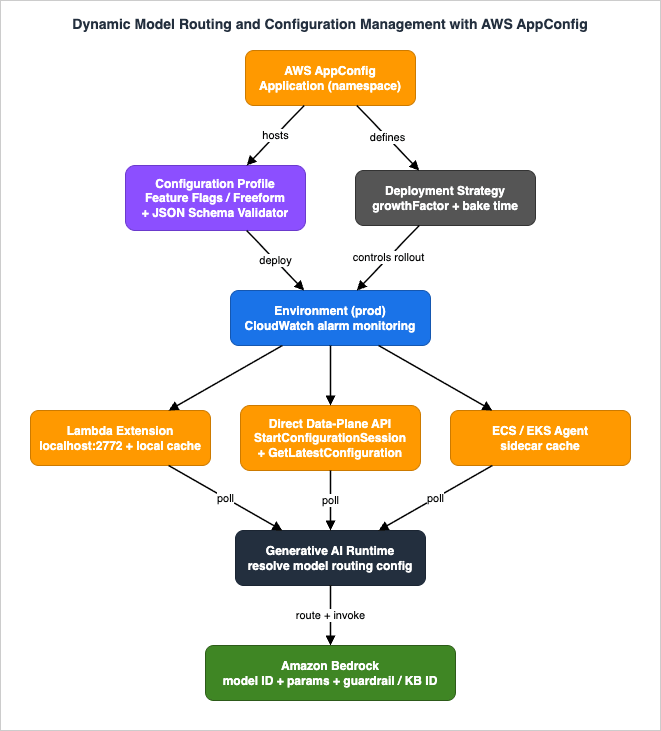
AppConfig models configuration with four resources. Getting their relationship right - and, critically, which one carries validation and which one carries rollout behavior - is the foundation for everything downstream.
Application - an organizational namespace, "an organizational construct like a folder" in the words of the User Guide. It groups the configuration for one logical system. For a generative AI service you might have a single application named genai-routing.
Environment - a logical deployment group of targets, such as beta and production, or subcomponents such as web, mobile, and backend. The environment is where you attach the CloudWatch alarms that drive automatic rollback: alarms are monitored per environment during a deployment. A configuration change is always deployed to an environment.
Configuration profile - the definition of a set of configuration data. A profile carries a URI that tells AppConfig where the data lives, and a type. AppConfig supports two profile types, and the choice matters:
- Feature flags (
AWS.AppConfig.FeatureFlags) - AppConfig stores the flags in its own hosted store in a structured flag-and-attribute format; the URI is simplyhosted. Flags can carry attributes, and AppConfig additionally supports multi-variant feature flags and experiment definitions (A/B testing for a flag within an application), which map cleanly onto model-routing use cases. - Freeform configurations (
AWS.Freeform) - arbitrary configuration data (JSON, YAML, or text). A freeform profile can source its data from the AppConfig hosted configuration store, Amazon S3, AWS CodePipeline, AWS Secrets Manager, SSM Parameter Store, or the SSM Document store. AWS recommends the hosted store when you do not have a reason to use another, because it needs no separate service setup or IAM wiring and is the store with the most features.
Deployment strategy - defines how a configuration change rolls out: the growth type and step percentage, the total deployment window, and the final bake time during which alarms are watched. Strategies are reusable across deployments and are covered in detail in Section 7.
The relationship, then, is: an application contains one or more configuration profiles (each holding feature-flag or freeform data, optionally guarded by validators) and is deployed to one or more environments using a deployment strategy that governs the rollout. Figure 1 shows this control plane together with the three retrieval paths that carry a deployed configuration into a running generative AI service.
3.1 Feature flags versus freeform: which to use for model routing
The two profile types are not interchangeable for this use case, and the decision is worth making deliberately.
- Feature flags shine when the configuration is a set of toggles and small attribute bags: "is latency-optimized inference enabled," "which model tier is active for the premium segment," "is the experimental guardrail on." The structured format gives you per-flag enable/disable plus typed attributes, and the multi-variant and experiment features are purpose-built for splitting behavior across segments.
- Freeform shines when the configuration is a structured document you want to own the shape of - a routing table mapping customer tiers and Regions to model IDs, inference parameters, guardrail IDs, and knowledge base IDs. You define the JSON, and (as Section 5 shows) you attach your own JSON Schema to enforce it.
A common and effective pattern is to use both: a freeform profile for the routing table (the bulk of the configuration), and a small feature-flag profile for the coarse on/off switches an operator flips in an incident. This article's examples lean on freeform for the routing table because it is where schema validation delivers the most value.
One design point applies to both: keep secrets out of these profiles. Model IDs, parameters, guardrail IDs, and knowledge base IDs are not secret. API keys and tokens are - route those through Secrets Manager or Parameter Store SecureString (see the delegated guide) rather than embedding them in a routing document that is broadly readable.
4. Configuration Patterns for Generative AI
This is the core of the article: concrete schemas for the four configuration decisions a generative AI service most often needs to change without a redeploy. All of them are freeform JSON stored in the AppConfig hosted store; Section 5 attaches the schema that keeps them honest.
Throughout, model identifiers are shown as current-generation Amazon Bedrock model IDs (for example anthropic.claude-opus-4-8, anthropic.claude-sonnet-5, and anthropic.claude-haiku-4-5-20251001-v1:0) or, better, as cross-Region inference profile IDs. Note that the ID format is per model, not uniform across a family: newer models such as Claude Sonnet 5 and Claude Opus 4.8 use bare, un-dated IDs on the Converse API, while earlier-generation models such as Claude Haiku 4.5 keep a date-suffixed ID - always copy the exact string from the model's page in the Amazon Bedrock User Guide. Do not hard-code a foundation-model generation into a configuration you intend to keep for a long time without a plan to update it; bind to an inference profile or to the current model ID for your Region and treat the model list as something you consult, not something you memorize.
4.1 Model ID and inference parameters
The simplest and highest-value pattern: externalize the model binding and its inference configuration so that "which model, with which parameters" is a deployment, not a release.
{
  "default_model": {
    "model_id": "anthropic.claude-sonnet-5",
    "inference": { "maxTokens": 1024, "temperature": 0.2, "topP": 0.9 }
  }
}
Your service reads default_model.model_id and passes it to the Amazon Bedrock Converse API modelId field, and spreads inference into the inferenceConfig. Swapping the model or nudging the temperature is now an AppConfig deployment that is validated, rolled out gradually, and reversible - none of which a rebuild-and-redeploy gives you.
4.2 Tier- and Region-based routing rules
Real services rarely route every request to one model. A routing table lets you send premium customers to the most capable model, free-tier traffic to a faster and cheaper one, and requests in a data-residency-constrained Region to a Region-appropriate inference profile - all as data.
{
  "routing": {
    "tiers": {
      "premium":  { "model_id": "anthropic.claude-opus-4-8",  "inference": { "maxTokens": 2048, "temperature": 0.3 } },
      "standard": { "model_id": "anthropic.claude-sonnet-5",  "inference": { "maxTokens": 1024, "temperature": 0.2 } },
      "free":     { "model_id": "anthropic.claude-haiku-4-5-20251001-v1:0", "inference": { "maxTokens": 512,  "temperature": 0.2 } }
    },
    "region_overrides": {
      "eu-central-1": { "model_id_prefix": "eu.", "note": "use EU geographic inference profile" }
    },
    "fallback_tier": "standard"
  }
}
The application resolves a request's tier (from the caller's identity or plan) and its Region, looks up the row, applies any Region override, and falls back to fallback_tier if the tier is unknown. Because this is configuration, a decision like "move free tier from Haiku to Sonnet for the next campaign" is a validated, gradual, reversible deployment. The Region-contained routing here is only the selection mechanism; the full data-residency architecture - inference profiles, service control policies, and Region-pinned retrieval - is a separate design concern. Note also that this business-rule routing is a different mechanism from Amazon Bedrock Intelligent Prompt Routing, which automatically picks a model within the same family per request based on predicted response quality - the AppConfig pattern encodes explicit rules you author (tier, Region, campaign), and the two can coexist: a routing row can point at a prompt router instead of a single model ID.
4.3 Guardrail and knowledge base ID injection per environment
Amazon Bedrock guardrails and knowledge bases are referenced by ID, and those IDs differ across environments: your beta environment points at a test guardrail and a staging knowledge base, production at the real ones. Hard-coding them couples your deployment artifact to an environment. Injecting them as configuration decouples the two - the same build runs in every environment and picks up the environment's IDs from the profile deployed to that environment.
{
  "guardrail": { "identifier": "abcd1234wxyz", "version": "1" },
  "knowledge_base": { "id": "KBABCDE123", "number_of_results": 5 }
}
Because AppConfig deploys per environment, the beta environment receives a profile whose guardrail.identifier is the test guardrail, and production receives one with the production guardrail - with no environment-specific branching in application code. A note on the guardrail version: point production at a numbered guardrail version rather than DRAFT, for the same immutability reason that applies to any deployable artifact. This is a safety-relevant value - a mistake here silently weakens content controls - which is one of the strongest arguments for the schema validation in Section 5.
4.4 A/B variant assignment
To compare two configurations - two models, two parameter sets, two guardrails - on live traffic, express the split as data and attribute each request to the arm that served it.
{
  "experiment": {
    "name": "sonnet5-vs-opus48-summarization",
    "enabled": true,
    "arms": [
      { "id": "control",   "weight": 90, "model_id": "anthropic.claude-sonnet-5" },
      { "id": "candidate", "weight": 10, "model_id": "anthropic.claude-opus-4-8" }
    ]
  }
}
The application hashes a stable key (a session or user identifier) into the weighted arms, tags the request and its telemetry with the chosen arm.id, and later attributes quality and latency back to the arm. Widening the candidate from 10% to 50%, or ending the experiment, is a configuration deployment. For feature-flag profiles, AppConfig's native multi-variant flags and experiment definitions provide a structured version of the same idea; the freeform form shown here keeps the split visible in one document you can schema-validate. AWS has also since made this a managed capability: AWS AppConfig experimentation (generally available as of July 2026) layers console-driven experiment design and CloudWatch-backed control/treatment analysis on top of multi-variant flags, with promotion through the same safe-rollout machinery - and its announcement names AI model selection and prompt experiments as a primary use case, so evaluate it before hand-rolling the weighted-arms document above if you want managed analysis rather than your own telemetry attribution. Note the boundary with the delegated rollout guide: AppConfig gives you the addressable, validated split; the traffic-shifting and evaluation-gated promotion machinery around a model change lives in Safe Foundation Model Rollout Strategies on AWS.
5. Validating Before You Deploy: JSON Schema Validators
This is the property that most cleanly separates AppConfig from environment variables and Parameter Store: a configuration change can be rejected before it deploys if it does not satisfy a validator you attach to the profile. For generative AI routing - where a bad value is a wrong model ID, an out-of-range temperature, or a missing guardrail - this turns a class of production incidents into deploy-time errors.
AppConfig supports two validator types, declared on the configuration profile:
JSON_SCHEMA- an inline JSON Schema (Draft 4) that the configuration data must satisfy. The schema content is stored on the profile, with a maximum length of 32,768 characters.LAMBDA- the ARN of a Lambda function that AppConfig invokes with the configuration content; the function returns success or failure. Use this when validation needs logic a schema cannot express - for example, checking a model ID against an allow-list fetched at validation time, or asserting cross-field invariants.
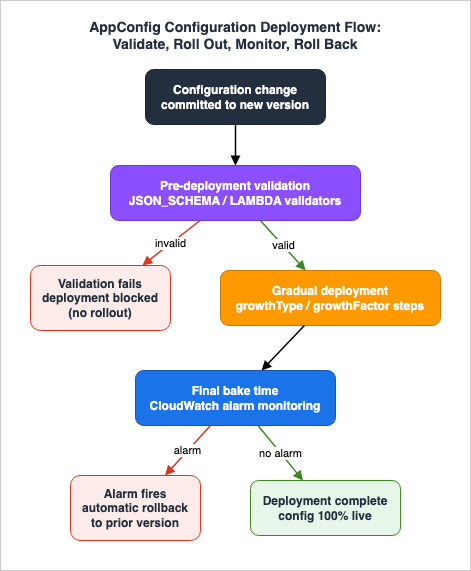
AppConfig evaluates the validators when you start a deployment. If validation fails, the deployment cannot proceed - the bad configuration never reaches a target.
A JSON Schema for the tier-routing document of Section 4.2 catches the most common mistakes - an unknown enum value, a temperature outside [0, 1], a missing required field:
{
  "$schema": "http://json-schema.org/draft-04/schema#",
  "type": "object",
  "required": ["routing"],
  "properties": {
    "routing": {
      "type": "object",
      "required": ["tiers", "fallback_tier"],
      "properties": {
        "tiers": {
          "type": "object",
          "additionalProperties": {
            "type": "object",
            "required": ["model_id", "inference"],
            "properties": {
              "model_id": {
                "type": "string",
                "enum": [
                  "anthropic.claude-opus-4-8",
                  "anthropic.claude-sonnet-5",
                  "anthropic.claude-haiku-4-5-20251001-v1:0"
                ]
              },
              "inference": {
                "type": "object",
                "properties": {
                  "maxTokens":   { "type": "integer", "minimum": 1, "maximum": 8192 },
                  "temperature": { "type": "number",  "minimum": 0, "maximum": 1 },
                  "topP":        { "type": "number",  "minimum": 0, "maximum": 1 }
                },
                "additionalProperties": false
              }
            },
            "additionalProperties": false
          }
        },
        "fallback_tier": { "type": "string" }
      }
    }
  }
}
Pinning model_id to an enum is the single most valuable line: it makes "deploy a model ID that does not exist" impossible, because the deployment is rejected the moment the value falls outside the allowed set. The trade-off is that adding a new model to the allow-list is itself a schema change (a profile update) - which is the correct amount of friction for a value whose mistakes are expensive.
When a schema cannot express the rule, a Lambda validator can. AppConfig invokes it with the content (base-64 encoded); the function decodes, checks, and signals failure by raising:
import base64, json

ALLOWED = {"anthropic.claude-opus-4-8", "anthropic.claude-sonnet-5", "anthropic.claude-haiku-4-5-20251001-v1:0"}

def handler(event, context):
    # AppConfig passes the candidate configuration content, base-64 encoded.
    content = json.loads(base64.b64decode(event["content"]))
    tiers = content.get("routing", {}).get("tiers", {})
    for name, row in tiers.items():
        if row["model_id"] not in ALLOWED:
            # Any raised exception fails validation and blocks the deployment.
            raise ValueError(f"tier '{name}' uses disallowed model_id '{row['model_id']}'")
    # Returning normally signals success.
You can attach both a JSON_SCHEMA and a LAMBDA validator to the same profile; both must pass. The pragmatic division of labor is: schema for shape and ranges (cheap, declarative, reviewable in the profile), Lambda for anything requiring logic or an external lookup.
The failure-mode types this closes are exactly the ones that otherwise reach production: a mistyped model ID, a temperature of 2.0, a maxTokens a downstream consumer cannot handle, a routing document missing its fallback_tier. None of them can deploy. What validation does not cover is a value that is well-formed but wrong for the business (routing everyone to the most expensive model) - that is what the gradual deployment and alarm-driven rollback of Section 7 are for.
6. Retrieving Configuration: Agent and Lambda Extension
A deployed configuration is only useful if the running service can read it efficiently. Calling the AppConfig data-plane API directly on every request would add latency and cost to the hot path, so AppConfig's retrieval model is built around a session that you poll and a local cache. There are three ways to consume it; all three share the same underlying session semantics.
6.1 The data-plane session API
The lowest-level path uses the appconfigdata API - a session model that superseded the older single-call GetConfiguration operation:
- Call
StartConfigurationSessiononce, naming the application, environment, and configuration profile. It returns anInitialConfigurationToken. - Call
GetLatestConfigurationwith that token. It returns the configuration content and aNextPollConfigurationToken. - On the next poll, use the
NextPollConfigurationTokenfrom the previous response - each token is valid for a singleGetLatestConfigurationcall.
Two properties from the API reference shape any client you write against this:
GetLatestConfigurationreturns empty content when the client already has the latest version. Your code must treat an empty response as "no change - keep using the cached value," not as "the configuration was cleared." This is the mechanism that makes frequent polling cheap.- A poll token is valid for up to 24 hours; a
GetLatestConfigurationcall with an expired token returnsBadRequestException. Long-poll clients must refresh the session rather than hold a token indefinitely.
Because GetLatestConfiguration is a priced call, you do not want to call it on every request. That is precisely why the agent and Lambda extension exist: they own the session, the token bookkeeping, the cache, and the poll cadence for you.
6.2 The Lambda extension
For AWS Lambda, the AppConfig Agent Lambda extension removes the session bookkeeping entirely. You add it as a Lambda layer; the extension then runs alongside your function and:
- Serves configuration to your handler over a local HTTP endpoint at
localhost:2772, on the path/applications/<app>/environments/<env>/configurations/<profile>. - Maintains a local cache. If the requested data is not cached, the extension calls AppConfig, stores the result, and returns it.
- Polls in the background. On each function invocation, the extension checks the elapsed time since it last retrieved the configuration; if that exceeds the configured poll interval, it calls AppConfig for newly deployed data, updates the cache if the version changed, and resets the timer.
Your handler code becomes a local HTTP GET - no AWS SDK call, no token handling:
import json, urllib.request

APP, ENV, PROFILE = "genai-routing", "production", "model-routing"
_URL = f"http://localhost:2772/applications/{APP}/environments/{ENV}/configurations/{PROFILE}"

def get_config():
    # The extension serves from its local cache and refreshes in the background.
    with urllib.request.urlopen(_URL) as resp:
        return json.loads(resp.read())

def handler(event, context):
    cfg = get_config()
    routing = cfg["routing"]
    tier = event.get("tier", routing["fallback_tier"])
    row = routing["tiers"].get(tier) or routing["tiers"][routing["fallback_tier"]]
    model_id = row["model_id"]
    # ... invoke Amazon Bedrock Converse with model_id and row["inference"] ...
    return {"model_id": model_id}
Two behaviors are important to internalize because they explain most "why didn't my change appear" questions:
- Each Lambda execution environment has its own isolated cache. Lambda scales by creating concurrent instances, and each instance's extension polls independently. A newly deployed configuration therefore appears in different instances at slightly different times, bounded by the poll interval.
- The end-to-end time for a change to appear is the sum of the deployment strategy's rollout time and the extension's poll interval. A slow, safe deployment strategy plus a long poll interval means a change is deliberately not instantaneous - which is usually what you want for safety, and occasionally surprising when you are trying to test quickly.
The extension is configured through Lambda environment variables. The most useful ones:
AWS_APPCONFIG_EXTENSION_POLL_INTERVAL_SECONDS- how often the extension checks for updates (45 seconds by default). Lower it for faster propagation at the cost of moreGetLatestConfigurationcalls; raise it for the opposite.AWS_APPCONFIG_EXTENSION_PREFETCH_LIST- a configuration path (or comma-separated paths) the extension retrieves before your handler is initialized, so the value is warm on the first request instead of incurring a cache-miss round trip.AWS_APPCONFIG_EXTENSION_ROLE_ARN(with optional..._ROLE_EXTERNAL_IDand..._ROLE_SESSION_NAME) - an IAM role for retrieving configuration from another account. Cross-account retrieval requires the target account's role to allowappconfig:StartConfigurationSessionandappconfig:GetLatestConfigurationon the configuration resources.
6.3 Containers: the ECS and EKS agent
For services on Amazon ECS or Amazon EKS, AppConfig provides an agent that runs as a sidecar container and exposes the same local-HTTP, cache-and-poll model as the Lambda extension. The application container reads configuration from the agent over localhost instead of integrating the SDK session loop itself. The mental model is identical to the Lambda extension: a local endpoint backed by a background-polling cache, so the same reasoning about poll interval and propagation time applies.
6.4 Choosing and tuning the poll interval
The poll interval is the main knob relating freshness to cost and load. A short interval propagates changes quickly but issues more GetLatestConfiguration calls; a long interval is cheaper and calmer but delays propagation. For model routing, propagation on the order of the default (tens of seconds) is almost always fine - you are changing which model serves traffic, not responding to a security event in real time. Reserve short intervals for configuration you genuinely need to flip fast, and remember that the extension only actually calls AppConfig when the elapsed time exceeds the interval and the function is invoked, so an idle function does not poll.
7. Safe Deployments and Automatic Rollback
Validation (Section 5) keeps malformed configuration out. Safe deployment keeps well-formed but harmful configuration from taking down all of production at once. AppConfig's deployment strategies and alarm-driven rollback are the mechanism, and Figure 2 shows the whole path: a change is validated, rolled out gradually, monitored during a bake period, and either completed or rolled back automatically.
7.1 Deployment strategies
A deployment strategy defines how a configuration change progresses from 0% to 100% of the environment's targets, and how long AppConfig then watches for trouble. The parameters, from the API reference, are:
GrowthType-LINEAR(equal steps) orEXPONENTIAL(accelerating steps).GrowthFactor- the step percentage applied at each interval, between1.0and100.0.DeploymentDurationInMinutes- the total window over which the rollout proceeds,0-1440(up to 24 hours). This is a processing window, not a timeout.FinalBakeTimeInMinutes- after the configuration reaches 100% of targets, how long AppConfig continues to monitor CloudWatch alarms before declaring the deployment complete,0-1440. If an alarm fires during the bake, AppConfig rolls back.ReplicateTo-NONE, orSSM_DOCUMENTto save the strategy as a Systems Manager document.
You can create your own strategy or use one of the predefined ones, which cover the common shapes:
| Predefined strategy | Behavior | Bake time |
|---|---|---|
AppConfig.Linear20PercentEvery6Minutes | 20% of targets every 6 minutes, 30-minute deployment (AWS recommended for production) | 30 minutes |
AppConfig.Canary10Percent20Minutes | Exponential 10% growth over 20 minutes (AWS recommended for production) | 10 minutes |
AppConfig.AllAtOnce | 100% immediately (quick) | 10 minutes |
AppConfig.Linear50PercentEvery30Seconds | 50% every 30 seconds, 1-minute deployment (testing/demo only) | 1 minute |
For a model-routing change in production, one of the two AWS-recommended strategies is the right default: the gradual rollout means a harmful value degrades a fraction of traffic before the alarm catches it, and the bake time gives the alarm room to fire. Reserve AppConfig.AllAtOnce for low-risk changes or non-production environments, and AppConfig.Linear50PercentEvery30Seconds for demos. (AWS AppConfig enforces bounded resource quotas - for example, a default of 20 deployment strategies per Region and 20 environments per application - all adjustable through Service Quotas; consult the quotas reference rather than assuming a fixed ceiling.)
7.2 Automatic rollback
AppConfig rolls a deployment back automatically in two situations, and understanding both is what makes the "unexpected rollback" diagnostic in Section 8 tractable.
- Validation failure. If a validator (Section 5) rejects the configuration, the deployment does not proceed. This is a pre-deployment gate rather than a mid-deployment rollback, but it is the same safety intent.
- A CloudWatch alarm fires during the deployment or its bake time. You associate CloudWatch alarms with the environment; AppConfig monitors them throughout the rollout and the final bake period, and if one enters
ALARM, it rolls the configuration back to the previously deployed version.
Alarm-driven rollback has an IAM prerequisite that is easy to miss: AppConfig needs a role that lets it see your alarms. You configure a role that grants AppConfig permission to describe CloudWatch alarms (and the environment references that role), so that AppConfig can monitor them on your behalf during a deployment. Without that permission, AppConfig cannot act on the alarms and the automatic-rollback safety net silently does nothing.
The alarms you attach should reflect the health of the model-serving path the configuration controls: an elevated Amazon Bedrock error rate, a spike in end-to-end latency, a drop in a downstream success metric, or a jump in guardrail interventions. A configuration change that quietly routes traffic to a misbehaving model then trips the alarm and rolls itself back - the fraction of traffic exposed bounded by the growth factor, the time-to-detect bounded by the bake time. The full pipeline that wraps this - promoting or rolling back a model change across an evaluation gate, versus rolling back a configuration change - is the subject of Safe Foundation Model Rollout Strategies on AWS; AppConfig supplies the safe-deployment primitive that pipeline builds on.
8. Diagnostics
When something looks wrong with runtime configuration, the symptoms cluster into three recurring situations. Each maps to a specific mechanism from the sections above, which is what makes them quick to resolve once you know where to look.
8.1 Stale configuration: the application is running an old value
Symptom: you deployed a change, AppConfig shows the deployment as complete, but the application is still using the old model ID or parameters.
The cause is almost always the cache-and-poll path from Section 6, and the checks proceed from cheapest to most involved:
- Confirm the deployment actually reached this environment. A change is deployed per environment; verify you deployed to
productionand not onlybeta, and that the deployment reached 100% rather than being rolled back. - Account for propagation time. The change appears only after the deployment's rollout window plus the extension or agent poll interval, and each Lambda instance or container caches independently. Immediately after a deployment, some instances legitimately still serve the old value; wait for at least one poll interval across the fleet.
- Check the poll interval and prefetch. A long
AWS_APPCONFIG_EXTENSION_POLL_INTERVAL_SECONDSdelays propagation by design. Remember, too, that the extension only polls on invocation once the interval has elapsed - an idle function will not have refreshed. - Handle the empty-response case correctly. If you wrote a client directly against
GetLatestConfiguration, confirm it treats an empty response as "keep the cached value." A client that misreads empty as "no configuration" will appear stuck. - Watch for a stale poll token. A direct client holding a poll token past its 24-hour validity gets
BadRequestExceptionand, if it does not refresh the session, stops receiving updates.
8.2 Validation errors: the deployment will not start
Symptom: starting a deployment fails, or a hosted-version create is rejected, citing validation.
This is the validator from Section 5 doing its job. Read the error, then check, in order:
- The JSON Schema. The most common cause is a value outside an
enum(a new model ID not yet added to the allow-list), a number outside itsminimum/maximum, or a missingrequiredfield. Validate the candidate document against the schema locally to see exactly which keyword failed. - The Lambda validator. If a
LAMBDAvalidator is attached, an exception it raises fails the deployment; check the function's logs for the specific assertion that failed. Also confirm AppConfig has permission to invoke the function and that the function decodes the base-64contentcorrectly. - The store's size limit. A configuration that grows past the store's limit is rejected - the hosted store allows up to 2 MB by default (4 MB maximum), S3-backed and CodePipeline-backed profiles up to 2 MB, and Parameter Store or Secrets Manager sources considerably less. If a routing table has grown large, split it across profiles rather than fighting the limit.
The correct reaction to a validation error is relief: the gate caught a bad change before it shipped. Fix the document (or extend the allow-list deliberately) and redeploy.
8.3 Unexpected rollback: the deployment reverted itself
Symptom: a deployment started, then rolled back to the previous version on its own.
From Section 7.2, an automatic rollback means a CloudWatch alarm associated with the environment entered ALARM during the deployment or its bake time. To isolate it:
- Identify the alarm. Review the environment's associated alarms and the deployment's events to see which alarm fired and when relative to the rollout steps.
- Decide whether the alarm was right. If the alarm reflected a real regression - the new model raised the error rate or latency - the rollback did its job; fix the configuration and redeploy behind the same safety net. If the alarm was too sensitive (a threshold that trips on normal variance, or a bake time so short that a transient blip triggers it), tune the alarm or lengthen the bake time so a healthy change is not rolled back spuriously.
- Verify the rollback permission is intact. Paradoxically, if you expected a rollback and it did not happen, confirm AppConfig still has the role permission to describe the alarms - without it, the safety net is inert and a harmful change will simply stay live.
The through-line across all three diagnostics is that AppConfig's behavior is deterministic once you know which mechanism you are looking at: stale values are the cache-and-poll path, blocked deployments are the validator, and self-reverting deployments are the alarm-and-bake path. None of them require guessing.
9. Frequently Asked Questions
Is AWS AppConfig the right place to store model IDs, prompts, and secrets?
Model IDs, inference parameters, guardrail IDs, and knowledge base IDs - yes; they are non-secret operational configuration that changes often, which is exactly AppConfig's sweet spot. Prompts are better managed in a dedicated prompt store (see the delegated prompt-lifecycle guide) because they have their own versioning and testing lifecycle. Secrets - API keys, tokens - belong in Secrets Manager or Parameter Store SecureString, not in a broadly readable routing document.
Feature flags or freeform configuration for model routing?
Use freeform for a structured routing table you want to schema-validate (the bulk of the routing decision), and feature flags for coarse operator toggles and for native multi-variant / experiment behavior. Many teams use both in the same application.
How does validation actually block a bad model ID?
Attach a JSON_SCHEMA validator to the profile that pins model_id to an enum of allowed values (and bounds temperature, maxTokens, and so on). AppConfig evaluates validators when a deployment starts; a value outside the schema fails validation and the deployment never proceeds. For rules a schema cannot express, a LAMBDA validator runs your own check.
How does my application read the configuration without adding latency to every request?
Use the AppConfig Agent Lambda extension (as a layer) or, on ECS/EKS, the AppConfig agent (as a sidecar). Your code reads a local endpoint at localhost:2772; the extension or agent caches the configuration and polls AppConfig in the background, so the hot path is a local read rather than a priced API call.
Why hasn't my configuration change appeared yet?
The end-to-end time is the deployment strategy's rollout window plus the retrieval poll interval, and each Lambda instance or container caches independently. Immediately after a completed deployment, some instances still serve the old value until they next poll. A long AWS_APPCONFIG_EXTENSION_POLL_INTERVAL_SECONDS delays this by design.
What triggers an automatic rollback?
Two things: a validator rejecting the configuration (before deployment), and a CloudWatch alarm associated with the environment entering ALARM during the deployment or its final bake time. Alarm-driven rollback requires that AppConfig has an IAM role permitting it to describe your alarms.
Which deployment strategy should I use in production?
One of the AWS-recommended ones - AppConfig.Linear20PercentEvery6Minutes or AppConfig.Canary10Percent20Minutes - because their gradual rollout and bake time limit the blast radius of a harmful change and give alarms time to fire. Reserve AppConfig.AllAtOnce for low-risk or non-production changes.
Does AppConfig replace a model rollout pipeline?
No. AppConfig is the safe-deployment primitive for the configuration that selects a model. The end-to-end model rollout - evaluation gates, canary traffic shifting, and promotion or rollback of a model change - is a larger workflow that uses AppConfig as one component; see Safe Foundation Model Rollout Strategies on AWS.
10. Summary
Generative AI applications carry a body of runtime decisions - which model, which parameters, which guardrail and knowledge base, which customer tiers get which behavior - that changes far more often than the application logic around it. Holding those decisions in environment variables or stage variables forces a redeploy for every change, offers no way to catch a bad value before it ships, and flips 100% of traffic at once. AWS AppConfig replaces that with a configuration control plane built for exactly this problem.
The building blocks are an application (namespace), configuration profiles (feature-flag or freeform data, optionally guarded by validators), environments (deployment targets that carry the CloudWatch alarms), and deployment strategies (how a change rolls out). Model routing maps naturally onto freeform profiles: a routing table by tier and Region, per-environment guardrail and knowledge base IDs, and weighted A/B arms - all as data you deploy rather than code you redeploy. A JSON_SCHEMA validator that pins model IDs to an allow-list and bounds inference parameters makes a malformed change impossible to deploy, and a LAMBDA validator covers rules a schema cannot express. On the retrieval side, the Lambda extension and the ECS/EKS agent expose a local localhost:2772 endpoint backed by a background-polling cache, so reading configuration is a local operation, not a priced API call on every request. And deployment strategies plus CloudWatch-alarm-driven automatic rollback keep a well-formed-but-harmful change from taking down all of production: it degrades a bounded fraction of traffic, trips an alarm, and reverts itself.
Adopt these four properties - validate before deploy, deploy gradually, roll back on a health signal, and retrieve from a local cache - and changing which model serves your traffic stops being a release with a redeploy's blast radius and becomes what it should be: a small, validated, reversible configuration deployment.
11. References
- AWS AppConfig User Guide - What is AWS AppConfig: https://docs.aws.amazon.com/appconfig/latest/userguide/what-is-appconfig.html
- AWS AppConfig User Guide - Creating feature flags and free form configuration data: https://docs.aws.amazon.com/appconfig/latest/userguide/creating-feature-flags-and-configuration-data.html
- AWS AppConfig User Guide - Creating a configuration profile: https://docs.aws.amazon.com/appconfig/latest/userguide/appconfig-creating-configuration-profile.html
- AWS AppConfig User Guide - Type of configurations (feature flags): https://docs.aws.amazon.com/appconfig/latest/userguide/appconfig-creating-configuration-and-profile-feature-flags.html
- AWS AppConfig User Guide - About validators: https://docs.aws.amazon.com/appconfig/latest/userguide/appconfig-creating-configuration-and-profile-validators.html
- AWS AppConfig User Guide - Understanding the hosted configuration store: https://docs.aws.amazon.com/appconfig/latest/userguide/appconfig-creating-configuration-and-profile-about-hosted-store.html
- AWS AppConfig User Guide - Configuration store quotas and limitations: https://docs.aws.amazon.com/appconfig/latest/userguide/appconfig-creating-configuration-and-profile-quotas.html
- AWS AppConfig User Guide - Working with deployment strategies: https://docs.aws.amazon.com/appconfig/latest/userguide/appconfig-creating-deployment-strategy.html
- AWS AppConfig User Guide - Using predefined deployment strategies: https://docs.aws.amazon.com/appconfig/latest/userguide/appconfig-creating-deployment-strategy-predefined.html
- AWS AppConfig User Guide - Retrieving feature flags and configuration data: https://docs.aws.amazon.com/appconfig/latest/userguide/retrieving-feature-flags.html
- AWS AppConfig User Guide - AWS AppConfig experimentation: https://docs.aws.amazon.com/appconfig/latest/userguide/appconfig-experimentation.html
- AWS AppConfig User Guide - Integration with Lambda extensions: https://docs.aws.amazon.com/appconfig/latest/userguide/appconfig-integration-lambda-extensions.html
- AWS AppConfig User Guide - Understanding how the Lambda extension works: https://docs.aws.amazon.com/appconfig/latest/userguide/appconfig-integration-lambda-extensions-how-it-works.html
- AWS AppConfig User Guide - Configuring the Lambda extension: https://docs.aws.amazon.com/appconfig/latest/userguide/appconfig-integration-lambda-extensions-config.html
- AWS AppConfig User Guide - Integration with Amazon ECS and Amazon EKS: https://docs.aws.amazon.com/appconfig/latest/userguide/appconfig-integration-containers-agent.html
- AWS AppConfig Data API Reference - StartConfigurationSession: https://docs.aws.amazon.com/appconfig/2019-10-09/APIReference/API_appconfigdata_StartConfigurationSession.html
- AWS AppConfig Data API Reference - GetLatestConfiguration: https://docs.aws.amazon.com/appconfig/2019-10-09/APIReference/API_appconfigdata_GetLatestConfiguration.html
- AWS AppConfig API Reference - Validator: https://docs.aws.amazon.com/appconfig/2019-10-09/APIReference/API_Validator.html
- AWS AppConfig API Reference - DeploymentStrategy: https://docs.aws.amazon.com/appconfig/2019-10-09/APIReference/API_DeploymentStrategy.html
- AWS General Reference - AWS AppConfig endpoints and quotas: https://docs.aws.amazon.com/general/latest/gr/appconfig.html
- AWS CloudFormation User Guide - AWS::AppConfig::ConfigurationProfile Validators: https://docs.aws.amazon.com/AWSCloudFormation/latest/TemplateReference/aws-properties-appconfig-configurationprofile-validators.html
- Amazon Bedrock API Reference - Converse: https://docs.aws.amazon.com/bedrock/latest/APIReference/API_runtime_Converse.html
- Amazon Bedrock User Guide - Increase throughput with cross-Region inference (inference profiles): https://docs.aws.amazon.com/bedrock/latest/userguide/inference-profiles.html
- AWS Systems Manager Pricing (includes AWS AppConfig): https://aws.amazon.com/systems-manager/pricing/
- Amazon Bedrock Pricing: https://aws.amazon.com/bedrock/pricing/
Related Articles in This Series
- Safe Foundation Model Rollout Strategies on AWS - Canary Traffic Shifting, Evaluation Gates, and Automated Rollback
- Prompt Lifecycle Management on AWS - Amazon Bedrock Prompt Management, Versioning, and Prompt-as-Code CI/CD
- AWS Secrets Manager and Parameter Store Decision Guide
- Amazon Bedrock Glossary - A Reference for AI Engineers and Architects
References:
Tech Blog with curated related content