Prompt Lifecycle Management on AWS - Amazon Bedrock Prompt Management, Versioning, and Prompt-as-Code CI/CD
First Published:
Last Updated:
1. Introduction
In most generative AI applications, the prompt is the single most influential piece of "code" in the system. It decides tone, output format, refusal behavior, tool-calling patterns, and the shape of every downstream parse. Yet in team after team, prompts live as string literals buried in application code, or as cells in a shared spreadsheet, changed by whoever last had an idea, with no record of who changed what, when, or why. When quality regresses in production, nobody can answer the first diagnostic question: which prompt is actually running right now?
This guide is about PromptOps - treating prompts as versioned, reviewed, testable artifacts with an explicit lifecycle, the same way you already treat application code and infrastructure. It focuses narrowly on the management of prompts on AWS: how to author, variable-ize, version, deploy, control access to, audit, and regression-test prompts, and how to reconcile a managed prompt store with a Git repository so that "prompt-as-code" is more than a slogan.
The center of gravity is Amazon Bedrock Prompt Management, a generally available feature of Amazon Bedrock that stores prompts as first-class, versioned resources and resolves them at runtime through the Converse and InvokeModel APIs. Around it we build the operational scaffolding - IAM permission separation, AWS CloudTrail audit trails, a repository-backed approval workflow, and a regression-test gate - that turns a prompt library into a governed asset.
To keep the article to a single, sharp entry point, several adjacent topics are delegated to existing articles:
- The broader observability and evaluation control plane - tracing, metrics, LLM-as-judge harnesses, and the AWS CodePipeline / CodeBuild regression gate that promotes or rolls back a change - is covered in LLMOps Observability and Evaluation Architecture on AWS. This article covers how to design the prompt regression suite; that article covers how to wire the gate into a pipeline.
- Model migrations - re-tuning prompts when you move across model generations - are covered in Anthropic Claude Model Migration Guide.
- Service-specific vocabulary is defined in Amazon Bedrock Glossary.
What this guide deliberately does not cover: prompt-engineering technique (how to phrase a good instruction), the internals of a specific evaluation job, or the deep mechanics of Amazon Bedrock Flows. Prompt engineering is a craft; PromptOps is a discipline, and this article is about the discipline.
2. The Prompt Lifecycle
Before touching any API, it helps to name the stages a prompt moves through, because every governance control below attaches to a transition between two of these stages.
- Author - someone writes or edits a prompt template, parameterizing the parts that vary per request as variables.
- Test - the draft is exercised against a representative set of inputs, and its outputs are compared against expectations or against the previous version.
- Approve - a human (or an automated gate, or both) signs off that this configuration is fit to deploy.
- Promote to production - an immutable snapshot of the approved configuration is created and the application is pointed at it.
- Monitor - production traffic against that snapshot is observed for quality drift, latency, and error rate.
- Revise - findings from monitoring feed the next authoring cycle, and the loop repeats.
Two properties of this loop drive the entire rest of the article. First, the Author -> Approve transition is where access control lives: the person who edits a draft should not necessarily be the person who blesses it for production. Second, the Approve -> Promote transition is where immutability lives: once a configuration is deployed, the exact bytes that produced a given output must be reconstructable months later, which is impossible if the "current prompt" is a mutable string.
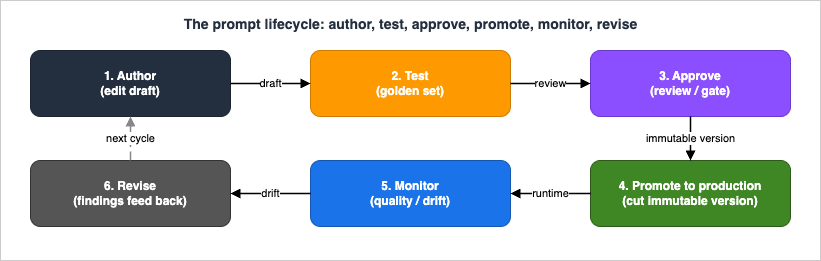
The remainder of this guide maps each control onto these transitions: Prompt Management (Section 3) gives you the artifacts (drafts, variants, immutable versions); access control and audit (Section 4) govern the transitions; prompt-as-code (Section 5) makes the transitions reviewable in Git; regression testing (Section 6) automates the Test and Approve stages; and diagnostics (Section 10) is what you reach for when Monitor tells you something broke.
3. Amazon Bedrock Prompt Management: Prompts, Versions, and Variants
Amazon Bedrock Prompt Management is a generally available capability that lets you create, store, version, and share prompts as managed resources instead of hard-coded strings. You interact with it through the Amazon Bedrock console's prompt builder or through the Agents for Amazon Bedrock build-time API (the bedrock-agent client in the AWS SDKs). Understanding what each concept is - and, critically, what is mutable versus immutable - is the foundation for everything downstream.
3.1 Prompts, variables, and templates
The core definitions, from the Amazon Bedrock User Guide, are:
- Prompt - an input provided to a model to guide its output. In Prompt Management it is a named, ARN-addressable resource.
- Variable - a placeholder inside the prompt message, written with double curly braces as
{{variable}}, whose value is supplied at test time or at invocation time. Variables are what let one stored template serve many concrete requests without string concatenation in application code. - Prompt variant - an alternative configuration of the prompt: a different message, a different model, or different inference configuration. During authoring you can hold more than one variant to compare them, and you designate one as the default variant.
- Prompt builder - the console tool for creating, editing, and testing prompts and their variants visually.
When you create a prompt, you supply a template. A TEXT template is a single message body with {{variables}}; a CHAT template (for models that support the Converse API) can additionally carry a system prompt, prior user/assistant turns as conversational history, tool definitions, and prompt-caching configuration. You either bind the prompt to a specific model - in which case you can also set inference configuration - or leave the model unspecified so the prompt can be used with an agent.
All prompts accept a common set of base inference parameters, verified against the User Guide:
maxTokens- the maximum number of tokens allowed in the generated response.stopSequences- a list of character sequences that cause the model to stop generating.temperature- how strongly the model favors higher-probability tokens.topP- the nucleus-sampling cutoff for candidate tokens.
Model-specific parameters that are not in the base set are supplied through an additional fields JSON object. The User Guide's own example is top_k, which some Anthropic Claude models support but which is not a base parameter:
{
  "top_k": 200
}
Here is a minimal prompt created through the build-time API with Boto3. Note that the variants list carries the template, the variable declarations, the bound model, and the inference configuration in one object, and that defaultVariant names which variant is the default:
import boto3

bedrock_agent = boto3.client("bedrock-agent")

response = bedrock_agent.create_prompt(
    name="support-ticket-summary",
    description="Summarize a customer support ticket into a one-paragraph digest.",
    defaultVariant="v-baseline",
    variants=[
        {
            "name": "v-baseline",
            "templateType": "TEXT",
            "templateConfiguration": {
                "text": {
                    "text": (
                        "Summarize the following support ticket for a triage queue. "
                        "Keep it under 60 words and preserve any account identifiers.\n\n"
                        "Ticket:\n{{ticket_body}}"
                    ),
                    "inputVariables": [{"name": "ticket_body"}],
                }
            },
            # Bind the variant to a model ID or an inference profile ARN of your choice.
            "modelId": "<your-model-id-or-inference-profile-arn>",
            "inferenceConfiguration": {
                "text": {
                    "maxTokens": 512,
                    "temperature": 0.2,
                    "topP": 0.9,
                    "stopSequences": [],
                }
            },
        }
    ],
    # Optional: encrypt the prompt with a customer managed KMS key.
    # customerEncryptionKeyArn="arn:aws:kms:...",
)

prompt_id = response["id"]      # 10-character identifier, e.g. "ABCDE12345"
prompt_arn = response["arn"]    # arn:aws:bedrock:<region>:<account>:prompt/<id>
print(response["version"])      # -> "DRAFT"
A few properties from the API reference are worth internalizing because they shape the workflow:
- The prompt
idis a fixed 10-character string, and the ARN follows the patternarn:aws:bedrock:<region>:<account>:prompt/<id>with an optional:<version>suffix. - The
versionreturned bycreate_promptis alwaysDRAFT. Prompt Management always starts you on a working draft. customerEncryptionKeyArnlets you encrypt the prompt with a customer managed AWS KMS key rather than the service default.- Idempotency is available through
clientToken(minimum length 33), which is useful when you drive creation from a pipeline that might retry. - The
variantsarray accepts at most one item through the API. This is a consequential detail addressed in Section 7: multi-variant comparison is an authoring-time construct in the console, while the persisted prompt resource stores a single default variant.
Model IDs are intentionally left as a placeholder above. Do not hard-code a specific foundation model generation into an evergreen prompt library; bind variants to an inference profile or the current model ID for your Region, and consult the official model list rather than copying a version string that will age out.
3.2 The draft, and immutable versions
The distinction between the draft and a version is the heart of prompt lifecycle management.
When you save a prompt, you are editing its draft version (DRAFT). The draft is mutable: you can keep changing the message, the model, and the inference configuration and re-saving, iterating until you are satisfied. Nothing about the draft is safe to point production at, precisely because it can change under your feet.
When a configuration is ready to deploy, you create a version - an immutable snapshot taken at that point in time. From the User Guide: "A version is a snapshot of your prompt that you create at a point in time when you are iterating on the working draft." Versions let you switch cleanly between configurations and point each part of your application at the most appropriate one.
Through the API you create a version with CreatePromptVersion against the build-time endpoint, passing the prompt's ARN or ID as promptIdentifier. Versions are numbered incrementally, starting from 1:
version_resp = bedrock_agent.create_prompt_version(
    promptIdentifier=prompt_id,
    description="Baseline approved for triage summarization, 2026-07.",
    # clientToken makes a pipeline-driven version cut idempotent on retry.
)

version_number = version_resp["version"]   # "1", then "2", ...
version_arn = version_resp["arn"]          # arn:aws:bedrock:...:prompt/<id>:<version>
The supporting version operations, all on the build-time endpoint, complete the picture: you can view versions of a prompt, compare two versions to see exactly what differs, and delete a version you no longer want. Deleting a version does not touch the draft or other versions.
The mental model to carry forward: the draft is your workbench; a numbered version is a release artifact. Production should reference a numbered version, never DRAFT. Everything in Sections 5, 6, and 10 exists to make the draft-to-version transition safe, reviewable, and reversible.
3.3 Runtime resolution: how an application uses a stored prompt
A stored prompt is only useful if applications can resolve it at inference time. Prompt Management supports four resolution paths, all verified against the User Guide and the GA announcement.
Path 1 - Converse and InvokeModel with the prompt ARN as the model ID. This is the primary path. You pass the prompt's ARN (optionally with a :<version> suffix) in the modelId position of a Converse, ConverseStream, InvokeModel, or InvokeModelWithResponseStream call, and supply variable values through the promptVariables field. Bedrock loads the stored prompt version and runs the invocation directly, with no separate retrieval step. You do not send messages or system - those live inside the stored template.
import boto3

bedrock_runtime = boto3.client("bedrock-runtime")

# Reference a specific, immutable version by ARN suffix - never DRAFT in production.
prompt_version_arn = "arn:aws:bedrock:us-east-1:111122223333:prompt/ABCDE12345:1"

response = bedrock_runtime.converse(
    modelId=prompt_version_arn,
    promptVariables={
        "ticket_body": {"text": "Customer reports repeated 502 errors on checkout since 09:00 UTC..."}
    },
)

print(response["output"]["message"]["content"][0]["text"])
The promptVariables field maps each variable name declared in the template to an object holding its value. From the Converse API reference: the field is ignored if you do not specify a prompt resource in modelId, so the same code path degrades gracefully to ordinary model invocation.
Path 2 - GetPrompt in application code. If you would rather fetch the prompt into your own code - for example to feed it into an open-source framework such as LangChain or LlamaIndex - call GetPrompt on the build-time endpoint and format the template yourself. This trades the zero-retrieval convenience of Path 1 for full control over how the prompt is assembled.
Path 3 - the Prompt node in Amazon Bedrock Flows. Any prompt version can be referenced by a Prompt node inside a Flow. This is covered as a positioning topic in Section 8.
Path 4 - Agents. A prompt created with the model left unspecified can be used with an Amazon Bedrock agent, which supplies the model at orchestration time. Note that this integration targets what is now Amazon Bedrock Agents Classic, which AWS has announced will no longer accept new customers starting July 30, 2026 - for new agent builds, evaluate Amazon Bedrock AgentCore instead and treat this path as relevant only to existing Agents Classic workloads.
The strategic implication of Path 1 is subtle but important: because the runtime call references the prompt ARN, the model binding is inside the version, not in application code. Your service code says "run prompt version 7"; which model that resolves to is a property of the stored version. This decoupling is exactly what makes the model-migration workflow in Section 9 tractable.
3.4 Automated prompt optimization (optional authoring aid)
Prompt Management also exposes an AI-assisted authoring aid, prompt optimization, through the OptimizePrompt operation on the bedrock-agent-runtime endpoint (and one-click in the console). You pass an under-developed prompt plus a targetModelId, and a Prompt Analyzer / Prompt Rewriter pair returns a rewritten prompt tailored to that model, streamed back as events. It is a convenience for the Author stage, not a governance control - treat its output as a new draft that still has to pass the same review and regression gates as any hand-written change.
4. Access Control and Audit
Prompt Management stores your prompts, but it does not, on its own, tell you who is allowed to change what or who changed what and when. Those are the jobs of IAM and AWS CloudTrail, and they are where a prompt library becomes a governed asset. This section is the operational core of the article.
4.1 IAM permission separation
The prompt lifecycle has three natural roles, and the point of least privilege is to keep them distinct:
- Author - may create and edit drafts, but may not cut a production version.
- Approver / release manager - may cut versions (the promotion step) but does not need to edit drafts.
- Runtime execution role - the identity your application assumes to invoke prompts, which needs neither authoring nor versioning permission.
Prompt Management operations live on the bedrock service in IAM. The build-time (control-plane) actions largely mirror the API: bedrock:CreatePrompt, bedrock:UpdatePrompt, bedrock:GetPrompt, bedrock:ListPrompts, bedrock:CreatePromptVersion, and bedrock:DeletePrompt - note there is no separate DeletePromptVersion action, because the DeletePrompt API deletes either the whole prompt or a single version depending on whether the promptVersion parameter is supplied, and the same IAM action governs both (scope it with the :<version> ARN suffix when you need version-level granularity) - plus the tagging actions bedrock:TagResource / bedrock:ListTagsForResource. Because prompts are ARN-addressable, you can scope these to individual prompts or to prompts carrying a particular tag.
An author policy that grants draft editing but explicitly denies version promotion looks like this:
{
  "Version": "2012-10-17",
  "Statement": [
    {
      "Sid": "AuthorMayEditDrafts",
      "Effect": "Allow",
      "Action": [
        "bedrock:CreatePrompt",
        "bedrock:UpdatePrompt",
        "bedrock:GetPrompt",
        "bedrock:ListPrompts"
      ],
      "Resource": "arn:aws:bedrock:us-east-1:111122223333:prompt/*"
    },
    {
      "Sid": "AuthorMayNotPromote",
      "Effect": "Deny",
      "Action": "bedrock:CreatePromptVersion",
      "Resource": "*"
    }
  ]
}
An approver policy grants the promotion action and nothing else destructive:
{
  "Version": "2012-10-17",
  "Statement": [
    {
      "Sid": "ApproverMayCutVersions",
      "Effect": "Allow",
      "Action": [
        "bedrock:GetPrompt",
        "bedrock:ListPrompts",
        "bedrock:CreatePromptVersion"
      ],
      "Resource": "arn:aws:bedrock:us-east-1:111122223333:prompt/*"
    }
  ]
}
The runtime execution role is where a non-obvious but important permission appears. When your application invokes a managed prompt through Converse or InvokeModel, Bedrock internally renders the stored template. The CloudTrail documentation identifies this as RenderPrompt, "a permission-only action that renders prompts, created using Prompt management, for model invocation." That means the runtime role needs bedrock:RenderPrompt on the prompt resource in addition to bedrock:InvokeModel - but it needs neither CreatePrompt nor CreatePromptVersion:
{
  "Version": "2012-10-17",
  "Statement": [
    {
      "Sid": "RuntimeMayInvokeManagedPrompt",
      "Effect": "Allow",
      "Action": [
        "bedrock:InvokeModel",
        "bedrock:InvokeModelWithResponseStream",
        "bedrock:RenderPrompt"
      ],
      "Resource": [
        "arn:aws:bedrock:us-east-1:111122223333:prompt/ABCDE12345",
        "arn:aws:bedrock:us-east-1:111122223333:foundation-model/*",
        "arn:aws:bedrock:us-east-1:111122223333:inference-profile/*"
      ]
    }
  ]
}
Scoping bedrock:RenderPrompt to specific prompt ARNs is the mechanism by which you control which stored prompts a given service is allowed to run - a production service can be restricted to the exact prompt it owns, so a compromised or misconfigured caller cannot pull an arbitrary prompt from the shared library.
If you encrypt prompts with a customer managed KMS key, remember that each of these roles also needs the corresponding KMS permissions (kms:Decrypt, and kms:GenerateDataKey for authors) on that key.
4.2 CloudTrail audit trail
CloudTrail answers "who changed what, when," and Prompt Management activity splits across CloudTrail's two event categories in a way that is easy to get wrong.
Build-time operations are management events. Control-plane calls such as CreatePrompt, UpdatePrompt, CreatePromptVersion, and DeletePrompt are recorded by CloudTrail as management events under the bedrock.amazonaws.com event source. These are visible in CloudTrail Event history for the last 90 days with no extra configuration, and you should also deliver them to a durable trail (an S3 bucket or CloudWatch Logs) for long-term retention. This management-event stream is your change log for the Author and Promote transitions - every version cut leaves a CreatePromptVersion record with the caller identity, timestamp, and request parameters.
Runtime rendering is a data event. The RenderPrompt action - the internal rendering that happens each time an application resolves a managed prompt for InvokeModel or Converse - is a data event, which CloudTrail does not log by default. To capture it you must add an advanced event selector that records data events for the AWS::Bedrock::Prompt resource type:
{
  "AdvancedEventSelectors": [
    {
      "Name": "Log Bedrock Prompt render (RenderPrompt) data events",
      "FieldSelectors": [
        { "Field": "eventCategory", "Equals": ["Data"] },
        { "Field": "resources.type", "Equals": ["AWS::Bedrock::Prompt"] }
      ]
    }
  ]
}
With that selector in place, every production resolution of a managed prompt produces an auditable RenderPrompt data event, letting you answer "which prompt version was invoked, by which principal, and how often." Because data events are higher-volume and billed differently from management events, scope them deliberately - a common pattern is to record AWS::Bedrock::Prompt data events only for the trail that feeds your security or audit account.
Model invocation logging is a separate, complementary control. Distinct from CloudTrail, Amazon Bedrock offers Model Invocation Logging, which captures the full request and response payloads (not just metadata) to CloudWatch Logs or S3. It is off by default and is the tool you enable when the audit question is about content rather than API activity. Deep observability - traces, metrics, and evaluation - is delegated to LLMOps Observability and Evaluation Architecture on AWS; here the point is only that the audit trail for prompt changes (management events) and prompt usage (AWS::Bedrock::Prompt data events) are two different switches you must throw.
5. Prompt-as-Code: Repository-Backed Workflows
Prompt Management gives you versioned artifacts and an audit trail, but the console-driven "edit draft, click Create version" flow is not, by itself, a software-delivery process. For a team that already runs everything else through pull requests, the missing piece is treating the prompt text as source code in a Git repository and driving Prompt Management from that repository. This is what "prompt-as-code" means in practice.
5.1 Why the repository should be the source of truth
There is a genuine decision to make here - which system holds the canonical prompt? - and getting it wrong produces drift that is painful to untangle.
- If Prompt Management is canonical, edits happen in the console and Git (if used at all) is a lagging export. You get Bedrock's native versioning but lose pull-request review, blame history, branch-based experimentation, and the ability to diff a prompt change alongside the application change that depends on it.
- If the repository is canonical, prompt templates live as files, every change goes through a pull request, and a pipeline projects the approved text into Prompt Management by creating or updating the prompt and cutting a version. You get code review, history, and atomic coupling between a prompt change and its dependent code - at the cost of having to build the sync.
For any team practicing PromptOps, the repository should be canonical. The console prompt builder remains invaluable for authoring and side-by-side experimentation, but experiments graduate by being written back into the repository as a proposed change, not by being clicked live. The rule of thumb: the console is where you explore; the repository is where you decide; Prompt Management is where you deploy.
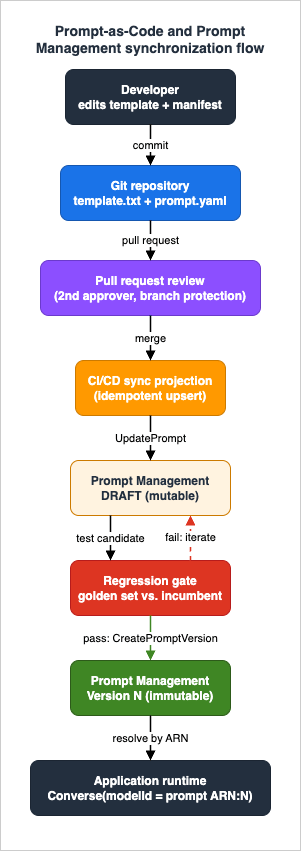
5.2 A repository layout and a sync projection
Store each prompt as a template file plus a small manifest describing its variables and inference configuration. A manifest keeps the parts that Prompt Management needs to know about - variable names, model binding, inference settings - under review alongside the prompt text:
# prompts/support-ticket-summary/prompt.yaml
name: support-ticket-summary
description: Summarize a customer support ticket into a one-paragraph digest.
template_type: TEXT
input_variables:
  - ticket_body
model_ref: default-summarization-profile   # resolved to an ARN by the pipeline, per environment
inference:
  max_tokens: 512
  temperature: 0.2
  top_p: 0.9
# prompts/support-ticket-summary/template.txt
Summarize the following support ticket for a triage queue.
Keep it under 60 words and preserve any account identifiers.
Ticket:
{{ticket_body}}The sync projection is an idempotent script the pipeline runs after a change merges: for each changed prompt, it ensures the Prompt Management resource exists (create on first sight, update the draft otherwise), and - only on the promotion path - cuts a new version and records the returned version number back into the environment's deployment config. The important properties are idempotency (safe to re-run) and traceability (the Git commit SHA is written into the version description):
import boto3

bedrock_agent = boto3.client("bedrock-agent")

def upsert_draft(manifest, template_text, model_arn):
    """Create the prompt on first sight, otherwise update its draft in place."""
    variant = {
        "name": "default",
        "templateType": manifest["template_type"],
        "templateConfiguration": {
            "text": {
                "text": template_text,
                "inputVariables": [{"name": v} for v in manifest["input_variables"]],
            }
        },
        "modelId": model_arn,
        "inferenceConfiguration": {
            "text": {
                "maxTokens": manifest["inference"]["max_tokens"],
                "temperature": manifest["inference"]["temperature"],
                "topP": manifest["inference"]["top_p"],
            }
        },
    }
    existing = find_prompt_by_name(manifest["name"])   # ListPrompts + filter
    if existing is None:
        resp = bedrock_agent.create_prompt(
            name=manifest["name"],
            description=manifest["description"],
            defaultVariant="default",
            variants=[variant],
        )
        return resp["id"]
    bedrock_agent.update_prompt(
        promptIdentifier=existing["id"],
        name=manifest["name"],
        description=manifest["description"],
        defaultVariant="default",
        variants=[variant],
    )
    return existing["id"]

def promote(prompt_id, commit_sha):
    """Cut an immutable version and return its number for the deployment config."""
    resp = bedrock_agent.create_prompt_version(
        promptIdentifier=prompt_id,
        description=f"Released from commit {commit_sha}",
    )
    return resp["version"]
5.3 PR-based approval and infrastructure as code
With the repository canonical, approval becomes ordinary code review: a prompt change is a pull request, reviewers see the exact diff of the template and manifest, and branch protection enforces that a second person approves before merge. The IAM separation from Section 4.1 reinforces this at the AWS layer - the pipeline role that runs upsert_draft on every merge can be denied CreatePromptVersion, while only the promotion stage (gated on a passing regression suite and, if you require it, a manual approval action) assumes a role that may cut a version.
If you prefer declarative infrastructure over an imperative sync script, Prompt Management is fully modeled in AWS CloudFormation through the AWS::Bedrock::Prompt and AWS::Bedrock::PromptVersion resource types, and in the AWS CDK. Declaring the version resource in the same template as the prompt means a stack deployment both updates the draft and cuts the version atomically. The trade-off is that CloudFormation's model of "the current version" is tied to the stack's view of the resource, so you still need a deliberate convention - usually a stack parameter or a hash-based version trigger - for when a new version should actually be minted versus when only the draft changes.
Either way, the outcome is the same and is the whole point of prompt-as-code: no prompt reaches production without a reviewed commit, an audit record, and an immutable version behind it.
6. Regression Testing Prompts
A version cut is only trustworthy if you know it did not make things worse. Prompt changes are deceptively risky: a one-word edit can flip refusal behavior, break a downstream JSON parser, or quietly degrade answer quality on a class of inputs you were not looking at. Regression testing is how you catch that before promotion, and it is the automated form of the Test and Approve stages from Section 2.
This section is about designing the prompt regression suite. The surrounding machinery - the LLM-as-judge evaluators, the online sampling of production traffic, and the CodePipeline / CodeBuild gate that actually promotes or rolls back - is covered in LLMOps Observability and Evaluation Architecture on AWS, and the specifics of Bedrock's built-in evaluation jobs are delegated to the model-evaluation guide in this series (Amazon Bedrock Model Evaluation Practical Guide).
6.1 The golden set
The foundation of prompt regression testing is a golden set: a curated collection of representative inputs paired with either a reference output or a set of checkable assertions. Store it in the repository next to the prompt it exercises so that changing the prompt and changing its tests happen in the same pull request. A useful golden set has three kinds of cases:
- Typical cases - the everyday inputs the prompt exists to handle, where you assert on output shape and key facts rather than exact string equality.
- Edge cases - inputs that previously broke, unusual formats, adversarial-but-benign phrasings, and boundary lengths. Every production incident should graduate into a permanent edge case.
- Format-contract cases - inputs whose outputs must satisfy a machine-checkable contract (valid JSON, a required field present, a length bound), because format breakage is the failure mode most likely to take down a downstream system.
6.2 What to measure, and how to compare
For each case, run the candidate draft and score it. The scoring blends cheap deterministic checks with more expensive judged checks:
- Deterministic assertions - schema validation, regex/field presence, length bounds, and "must-not-contain" guards. These are fast, free, and catch the highest-impact regressions; run them first and fail closed.
- Quantitative comparison against the incumbent - run the same golden set against the currently deployed version (resolved by its ARN) and compare, so the gate measures change rather than absolute quality. A candidate that scores 0.86 is fine if the incumbent scored 0.85 and alarming if the incumbent scored 0.94.
- Judged quality - for open-ended outputs where no reference string exists, an LLM-as-judge or Bedrock's evaluation jobs produce a relative score. Keep the judging design itself out of this suite and delegate it to the evaluation guides above; here you only consume a score.
Comparing candidate against incumbent is straightforward because both are addressable by ARN - the incumbent is the deployed version, the candidate is the draft:
import boto3

bedrock_runtime = boto3.client("bedrock-runtime")

def run_case(prompt_ref, variables):
    resp = bedrock_runtime.converse(
        modelId=prompt_ref,   # deployed version ARN, or the DRAFT ARN for the candidate
        promptVariables={k: {"text": v} for k, v in variables.items()},
    )
    return resp["output"]["message"]["content"][0]["text"]

def gate(golden_set, incumbent_arn, candidate_arn):
    regressions = []
    for case in golden_set:
        cand = run_case(candidate_arn, case["variables"])
        # 1) Hard contracts first - fail closed.
        for check in case["assertions"]:
            if not check(cand):
                regressions.append((case["id"], "assertion_failed"))
        # 2) Relative quality vs. the incumbent.
        base = run_case(incumbent_arn, case["variables"])
        if score(cand, case) + TOLERANCE < score(base, case):
            regressions.append((case["id"], "quality_regressed"))
    return regressions
6.3 Wiring the suite into promotion
The suite's output is a promotion decision. In a repository-canonical flow, the pipeline runs upsert_draft on merge, then executes the gate against the draft; if the gate returns no regressions, the promotion stage assumes the approver role and calls create_prompt_version; if it returns regressions, the pipeline stops and the draft never becomes a version. The design principle is cheap changes gated cheaply: run deterministic contracts on every change, and reserve the expensive judged comparison for the promotion path. The concrete CodePipeline / CodeBuild wiring - stages, artifacts, approval actions, and rollback - is the subject of the LLMOps observability guide and is not re-derived here.
7. Variants and A/B Testing
Variants are the most misunderstood part of Prompt Management, and the confusion comes from a real gap between the console experience and the API.
In the console prompt builder, a variant is an experimentation device: you can hold more than one variant of a prompt and compare them side by side - the console's Compare variants mode accepts up to three variants at once - to see how a wording or model change affects output before you commit. This is genuinely useful during the Author stage.
Through the API, however, the variants array on CreatePrompt and UpdatePrompt accepts at most one item, and you designate it with defaultVariant. In other words, the persisted prompt resource carries a single variant; multi-variant comparison is an authoring-time affordance, not a production traffic-routing mechanism. This is the single most important thing to get right about variants, because it changes how you do A/B testing in production.
Since a stored prompt resolves to one configuration, production A/B testing is done at the version and traffic layer, not inside a single prompt. The pattern is:
- Cut two versions (or two prompts) representing the A and B configurations.
- Split production traffic between their ARNs in your application or routing layer, tagging each request with which arm served it.
- Attribute your quality and business metrics back to the arm, then promote the winner and retire the loser.
Because each arm is an immutable, ARN-addressable version, the experiment is fully reconstructable: you always know exactly which bytes produced which measured outcome. The traffic-splitting and progressive-rollout mechanics themselves - canary weights, staged rollout, and feature-flag-driven routing - are deployment concerns delegated to Safe Foundation Model Rollout on AWS and Dynamic Model Routing with AWS AppConfig. Prompt Management's contribution to A/B testing is the immutable, addressable artifacts; the routing lives above it.
8. Prompts in Bedrock Flows
For workflows that chain several steps - a prompt feeding a knowledge base lookup feeding another prompt - Amazon Bedrock Flows provides a visual and SDK-driven way to compose them without gluing everything together in application code. Flows is generally available; it was previously known as Prompt Flows and was renamed to Amazon Bedrock Flows at general availability.
The connection to this article is the Prompt node. A Flow's Prompt node can reference either an inline prompt or, more usefully for lifecycle management, a version from Prompt Management. When it references a managed prompt version, everything in Sections 3 through 6 still applies: the node runs an immutable, audited, regression-tested artifact, and updating the prompt is a version cut rather than a Flow edit. From the Flows documentation, a Prompt node can use Prompt Management with any text model supported for the Converse API.
That is the extent of the relationship worth covering here. The internals of Flows - node types, orchestration, tracing, and its own versioning - are a separate topic; the takeaway is only that a governed prompt lifecycle composes cleanly into Flows because the Flow references the same versioned artifact your direct Converse calls do.
9. Prompts and Model Versions
Prompts and models version on independent clocks, and the seam between them is where a surprising amount of production breakage lives. A prompt that was tuned for one model generation can behave differently on the next: instruction-following strictness, verbosity, refusal calibration, tool-calling eagerness, and even tokenization can shift, so "same prompt, newer model" is not a no-op.
Prompt Management helps here precisely because of the decoupling noted in Section 3.3: the model binding lives inside the prompt variant, so a model change is a prompt change in lifecycle terms - you edit the draft's modelId (or the inference profile it points at), run the regression suite from Section 6 against the new binding, and cut a new version if it passes. The compatibility matrix you should reason about is small but real:
| Dimension | What can shift across a model change | Lifecycle action |
|---|---|---|
| Instruction following | Stricter or looser adherence to the template's directives | Re-run the golden set; tighten wording if the new model over- or under-triggers |
| Output format | JSON escaping, verbosity, section structure | Deterministic format-contract cases (Section 6.2) must pass on the new binding |
| Refusal / safety | Different refusal boundaries on benign edge cases | Add the affected inputs as permanent edge cases |
| Inference parameters | Parameter support and defaults differ by model | Re-validate temperature / topP / additional fields against the new model |
| Tokenization | Same text tokenizes to different counts | Re-check maxTokens headroom so responses are not truncated |
The disciplined move is to treat a model upgrade as a candidate version that must clear the same gate as any prompt edit, and to keep the old version deployable so you can roll back instantly by re-pointing at its ARN. The full re-tuning playbook across model generations - inventory, parallel comparison, staged rollout, and deprecation watch - is covered in Anthropic Claude Model Migration Guide, and the rollout mechanics in Safe Foundation Model Rollout on AWS.
10. Diagnostics
When monitoring says something is wrong, prompt lifecycle problems reduce to two recurring situations. Both are far easier to resolve if you have adopted the practices above, and both are nearly impossible if you have not.
10.1 "Which prompt version is actually running in production?"
This is the diagnostic that motivates the entire article. If your application invokes prompts by the DRAFT ARN, or embeds prompt text as a string literal, the honest answer is nobody knows, and recovery starts by fixing that.
Recovery when you have Prompt Management and CloudTrail in place:
- Read the deployment configuration. In a repository-canonical flow, the deployed version number is written into the environment's config at promotion time (Section 5.2). That is the authoritative answer.
- Corroborate with
RenderPromptdata events. If you enabled theAWS::Bedrock::Promptdata-event selector from Section 4.2, CloudTrail shows exactly which prompt version each production principal resolved, and how often. This confirms what config claims and catches callers still pinned to an old version. - Cross-check version history.
ListPromptswith apromptIdentifierreturns every version and its creation time;CreatePromptVersionmanagement events in CloudTrail tie each version back to the commit and identity that cut it.
Recovery when you do not: point the service at an explicit numbered version immediately (never DRAFT), enable the data-event selector, and backfill a manifest for the current prompt text so the next change is reviewable. The permanent fix is the prohibition from Section 3.2 - production references a numbered version, never the draft.
10.2 A change made quality worse
When quality drops after a change, the goal is to isolate whether the prompt, the model, or the input distribution moved.
- Establish what changed and when.
CreatePromptVersionmanagement events give you the exact time a new version was cut and by whom; correlate that timestamp with the onset of the quality drop in your monitoring. - Bisect prompt versus model. Because both are ARN-addressable, run the golden set against (a) the old prompt version and (b) a version identical except for the model binding. If quality tracks the model binding, you have a model-compatibility issue (Section 9); if it tracks the prompt text, the edit itself regressed.
- Compare the failing production inputs against the golden set. If the regression only appears on inputs unlike anything in the golden set, the input distribution shifted and the fix is to expand the golden set - not to blindly re-edit the prompt.
- Roll back by re-pointing, not re-editing. The immediate mitigation is to re-point the runtime ARN at the last known-good version. Because versions are immutable, that rollback is exact and instantaneous, and it buys time to fix the draft properly and run it back through the gate.
The through-line of both diagnostics is that immutable, ARN-addressable versions plus a RenderPrompt audit trail turn "we're not sure what happened" into a small number of deterministic queries. That is the entire return on adopting prompt lifecycle management.
11. Frequently Asked Questions
Is Amazon Bedrock Prompt Management generally available?
Yes. Prompt Management is a generally available feature of Amazon Bedrock, usable from the Amazon Bedrock console prompt builder and from the Agents for Amazon Bedrock build-time API (the bedrock-agent client).
What is the difference between the draft and a version?
The draft (DRAFT) is the mutable working copy you iterate on. A version is an immutable snapshot created with CreatePromptVersion; versions are numbered incrementally starting from 1. Production should always reference a numbered version, never the draft.
How does my application use a stored prompt at runtime?
Pass the prompt ARN (optionally with a :<version> suffix) as the modelId in a Converse, ConverseStream, InvokeModel, or InvokeModelWithResponseStream call and supply values through promptVariables. Bedrock resolves the stored version directly, so you do not send messages or system. You can alternatively fetch the prompt with GetPrompt and format it yourself, or reference it from a Prompt node in Amazon Bedrock Flows.
Which IAM permission does the runtime role need, beyond InvokeModel?
bedrock:RenderPrompt, scoped to the prompt ARNs the service is allowed to run. It is a permission-only action that renders managed prompts for model invocation; the runtime role does not need any authoring or versioning permission.
How do I audit prompt changes and prompt usage?
Two different CloudTrail switches. Control-plane changes (CreatePrompt, CreatePromptVersion, and so on) are management events, logged by default and visible in Event history for 90 days. Runtime rendering (RenderPrompt) is a data event that you must opt into with an advanced event selector on the AWS::Bedrock::Prompt resource type.
Can I run an A/B test using two variants of one prompt?
Not through the persisted resource. The CreatePrompt / UpdatePrompt API stores at most one variant per prompt; side-by-side variant comparison is an authoring-time feature of the console. Production A/B testing is done by deploying two immutable versions (or two prompts) and splitting traffic between their ARNs at the application or routing layer.
Should the repository or Prompt Management be the source of truth?
For a team practicing PromptOps, the Git repository should be canonical: changes go through pull requests, and a pipeline projects approved text into Prompt Management and cuts versions. The console remains the place to explore and experiment; the repository is where changes are decided.
Where are the quotas for prompts and versions?
Prompt Management limits (such as the number of prompts and versions) are AWS service quotas that can be adjusted through Service Quotas; consult the Amazon Bedrock quotas documentation for the current default values in your Region rather than assuming a fixed number.
12. Summary
Prompts decide the behavior of a generative AI application, yet they are the artifact most often left ungoverned. Prompt lifecycle management closes that gap by giving prompts the same discipline as code: an explicit lifecycle (author, test, approve, promote, monitor, revise), immutable release artifacts, permission separation, an audit trail, and an automated regression gate.
On AWS, Amazon Bedrock Prompt Management supplies the artifacts. A prompt is a named, ARN-addressable resource; its draft is a mutable workbench and its numbered versions are immutable releases; variables ({{variable}}) parameterize the template; and applications resolve a version at runtime by passing its ARN as the modelId to Converse or InvokeModel - which keeps the model binding inside the version rather than in application code. IAM separates the author, approver, and runtime roles, with bedrock:RenderPrompt as the non-obvious runtime permission that also lets you restrict which prompts a service may run. CloudTrail records prompt changes as management events and prompt usage as AWS::Bedrock::Prompt data events - two switches you throw independently.
On top of those primitives, prompt-as-code makes the repository canonical and every change a reviewed pull request, a regression suite built on a golden set gates promotion by measuring change against the deployed incumbent, and the immutability of versions turns both major diagnostics - "which version is running?" and "what made quality worse?" - into a handful of deterministic queries with instant, exact rollback. Adopt these practices and a prompt library stops being a liability and becomes what it should be: a governed, auditable, testable asset.
13. References
- Amazon Bedrock User Guide - Construct and store reusable prompts with Prompt management: https://docs.aws.amazon.com/bedrock/latest/userguide/prompt-management.html
- Amazon Bedrock User Guide - Create a prompt using Prompt management: https://docs.aws.amazon.com/bedrock/latest/userguide/prompt-management-create.html
- Amazon Bedrock User Guide - Deploy a prompt using versions: https://docs.aws.amazon.com/bedrock/latest/userguide/prompt-management-deploy.html
- Amazon Bedrock User Guide - Create a version of a prompt: https://docs.aws.amazon.com/bedrock/latest/userguide/prompt-management-version-create.html
- Amazon Bedrock User Guide - Run Prompt management code samples: https://docs.aws.amazon.com/bedrock/latest/userguide/prompt-management-code-ex.html
- Amazon Bedrock User Guide - Inference using the Converse API (promptVariables): https://docs.aws.amazon.com/bedrock/latest/userguide/conversation-inference.html
- Amazon Bedrock API Reference - CreatePrompt: https://docs.aws.amazon.com/bedrock/latest/APIReference/API_agent_CreatePrompt.html
- Amazon Bedrock API Reference - CreatePromptVersion: https://docs.aws.amazon.com/bedrock/latest/APIReference/API_agent_CreatePromptVersion.html
- Amazon Bedrock API Reference - ListPrompts: https://docs.aws.amazon.com/bedrock/latest/APIReference/API_agent_ListPrompts.html
- Amazon Bedrock User Guide - Monitor Amazon Bedrock API calls using CloudTrail (RenderPrompt data events): https://docs.aws.amazon.com/bedrock/latest/userguide/logging-using-cloudtrail.html
- Amazon Bedrock User Guide - Quotas for Amazon Bedrock: https://docs.aws.amazon.com/bedrock/latest/userguide/quotas.html
- Amazon Bedrock User Guide - Amazon Bedrock Flows: https://docs.aws.amazon.com/bedrock/latest/userguide/flows.html
- Amazon Bedrock User Guide - Supported Regions and models for flows: https://docs.aws.amazon.com/bedrock/latest/userguide/flows-supported.html
- AWS Machine Learning Blog - Amazon Bedrock Prompt Management is now available in GA: https://aws.amazon.com/blogs/machine-learning/amazon-bedrock-prompt-management-is-now-available-in-ga/
- AWS Machine Learning Blog - Amazon Bedrock Flows is now generally available: https://aws.amazon.com/blogs/machine-learning/amazon-bedrock-flows-is-now-generally-available-with-enhanced-safety-and-traceability/
- AWS CloudFormation User Guide - AWS::Bedrock::Prompt: https://docs.aws.amazon.com/AWSCloudFormation/latest/UserGuide/aws-resource-bedrock-prompt.html
- Amazon Bedrock Pricing: https://aws.amazon.com/bedrock/pricing/
Related Articles in This Series
- LLMOps Observability and Evaluation Architecture on AWS - Tracing, Metrics, and Automated Evaluation Gates with CloudWatch and OpenTelemetry
- Anthropic Claude Model Migration Guide - Upgrading Prompts and Workloads Across Model Generations
- Amazon Bedrock Glossary - A Reference for AI Engineers and Architects
- Amazon Bedrock Model Evaluation Practical Guide
- Safe Foundation Model Rollout on AWS
- Dynamic Model Routing with AWS AppConfig
References:
Tech Blog with curated related content