Amazon Bedrock Inference Throughput and Latency Optimization - Quotas, Provisioned Throughput, Latency-Optimized Inference, Prompt Caching, and Intelligent Prompt Routing
First Published:
Last Updated:
1. Introduction
When a generative AI application on Amazon Bedrock starts to strain, the symptoms usually arrive as two different complaints that get lumped together: "we are getting throttled" and "responses are too slow." They feel similar to an on-call engineer, but they are distinct problems with distinct mechanisms, and Amazon Bedrock exposes a distinct set of controls for each.Throttling is a capacity problem. It surfaces as
429 ThrottlingException and is governed by your account's per-model quotas — requests per minute (RPM) and, more often, tokens per minute (TPM). Latency is a per-request timing problem. It shows up as slow time-to-first-token (TTFT) or slow output tokens per second (OTPS), and it is unaffected by how much headroom you have in your quotas. A request can be fast and still be throttled; it can have plenty of quota and still be slow.Amazon Bedrock has accumulated a growing toolbox for both: on-demand service tiers, cross-region inference, Reserved Tier and Provisioned Throughput, latency-optimized inference, prompt caching, Intelligent Prompt Routing, and batch inference. Each acts on a different layer of the inference path, and each fits a different traffic pattern. The problem for practitioners is not a shortage of options — it is that the options are documented feature-by-feature, with no single map of which mechanism solves which symptom, in what order, and for which traffic shape.
This article is that map. It is scoped to the inference request path — how quotas and throttling actually work, and how each optimization mechanism changes throughput or latency — for foundation models invoked through Amazon Bedrock. It deliberately delegates several adjacent topics so it can stay focused on the request path:
- Cross-region inference details — geographic inference profiles, data residency, and SCP/IAM alignment. This article covers only its role as a load-distribution and resilience mechanism.
- Retry, backoff, and circuit-breaker implementation — covered in the LLM inference resilience patterns article. This article covers the diagnosis, not the client library.
- Batch pipeline design — orchestration, error handling, and scaling of large batch jobs. This article covers batch inference only as a throughput mechanism.
- Monitoring implementation — CloudWatch and X-Ray instrumentation. This article names the metrics you need for diagnosis.
- Self-managed serving topology — how the two phases of inference are placed on your own accelerators, covered in Disaggregated Prefill and Decode for LLM Serving on AWS. On Amazon Bedrock the placement is not yours to choose, so this article treats the managed endpoint as a single mechanism and stops at its controls.
Throughout, the focus is on throughput characteristics, latency characteristics, the operational model, and the traffic patterns each mechanism suits. Cost trade-offs are mentioned qualitatively where they matter for a decision, but this article contains no prices — for those, consult the official Amazon Bedrock Pricing page. For terminology, the Amazon Bedrock Glossary is a companion reference.
Note: The Amazon Bedrock inference surface changes quickly. Model lineups, supported Regions for individual features, and preview/GA status shift often. Where a feature is small or evolving, this article gives you the mechanism plus a link to the authoritative model and Region list rather than a table that will be stale in a month. Verify current specifics against the linked AWS documentation before you build.
2. How On-Demand Quotas and Throttling Work
Every optimization in this article is, ultimately, a way to avoid or absorb throttling — so it pays to understand the throttling machinery first. Get this section right and several later decisions become obvious.2.1 The runtime endpoint and its quotas
On-demand inference goes through thebedrock-runtime.<region>.amazonaws.com endpoint, and traffic to it is governed by per-model, token-based quotas scoped to your account and Region. You can view them in the Service Quotas console (select Amazon Bedrock) or in the Amazon Bedrock service quotas table in the AWS General Reference.There are three quota dimensions to know:
- Requests per minute (RPM) — the number of inference requests to a given model and Region per 60-second window.
- Tokens per minute (TPM) — a model-level quota on the number of tokens (input and output combined) you can use in one minute. This is the dimension most applications hit first.
- Tokens per day (TPD) — a model-level daily quota. By default it is
TPM × 24 × 60, but new AWS accounts start with reduced quotas.
TPM quotas vary widely by model — roughly from a few hundred thousand tokens per minute up to tens of millions for the highest-throughput current models — and they are adjustable through AWS Service Quotas as your application scales.
Note: A newer, separate endpoint,
bedrock-mantle.<region>.api.aws — which hosts the Anthropic Messages API alongside OpenAI-compatible APIs — exists for some models and carries its own quota allocations, independent of bedrock-runtime. Traffic to the two endpoints consumes separate quotas even for the same underlying model, and reserved capacity — the Reserved Tier and Provisioned Throughput — is available only on bedrock-runtime. This article covers the bedrock-runtime path. As of September 28, 2026, AWS's scaling and throughput best practices say to start with bedrock-runtime for most new applications and to use bedrock-mantle for capabilities or models that are available only on that endpoint; both endpoints use the same underlying inference engine but account for quotas differently, so check which endpoint your SDK client targets before applying the quota math below. Which APIs, features, IAM actions, and CloudTrail records differ between the two endpoints is compared in Amazon Bedrock Inference Endpoints and API Keys.2.2 The two flavors of 429
429 ThrottlingException means Amazon Bedrock is deliberately rejecting some requests to keep you inside your quotas. It comes in two flavors that you distinguish by the message:ThrottlingException: Too many requests, please wait before trying again. # RPM
ThrottlingException: Too many tokens, please wait before trying again. # TPMbedrock-runtime, RPM is not enforced as an independent dimension — throughput for those models is governed by TPM alone — so rate-based throttling in practice concerns earlier-generation and non-Claude models.Token-based (TPM) throttling is triggered when the tokens processed per minute exceed your TPM quota. This is subtler than request count, because a single large prompt or a long completion can consume thousands of tokens at once. Understanding exactly when and how many tokens are deducted is the key to avoiding it.
Distinct from both,
503 ServiceUnavailableException is not quota-related — it signals transient service unavailability and typically clears faster than a quota refresh. Treat 429 and 503 differently: 429 requires syncing your retry with the 60-second quota cycle and, longer-term, optimizing token usage or raising quotas; 503 is an immediate retry with exponential backoff. The Amazon Bedrock Errors and Exceptions Reference covers the full 429/503 taxonomy.2.3 The token deduction lifecycle — where max_tokens bites
Tokens are deducted from your TPM and TPD quotas at three stages of a request:| Stage | What is deducted |
|---|---|
| At request start (throttle decision) | Total input tokens + max_tokens — the throttle decision is made against this sum before any output exists |
| During processing | Adjusted for the actual number of output tokens generated |
| At request end (final) | InputTokenCount + CacheWriteInputTokens + (OutputTokenCount × burndown rate); unused reservation is replenished |
Two facts in that lifecycle explain most "mysterious" throttling.
1.
max_tokens is reserved up front. At the start of the request, total input tokens + max_tokens is deducted, and the throttle decision is made against that sum — before the model generates anything. If max_tokens is not explicitly set, it defaults to the model's maximum output capacity (for example, 64,000 tokens for Claude Sonnet 4.5 and Sonnet 4.6, or 128,000 tokens for Claude Sonnet 5). A modest request can therefore silently reserve tens of thousands of tokens of quota it will never use, and this is the single most common cause of unexpected throttling.Consider a model with a 2,000,000 TPM quota and requests of 500 input tokens each:
max_tokens setting | Reserved per request | Effective capacity |
|---|---|---|
max_tokens = 1,000 | ~1,500 tokens | ~1,333 concurrent requests/min |
max_tokens unset (model maximum — 64,000 in this example) | ~64,500 tokens | ~31 concurrent requests/min |
Same quota, same traffic, a roughly 40x difference in effective capacity — driven entirely by an unset parameter. Right-sizing
max_tokens to approximate your actual completion length is the cheapest throughput optimization available, and it costs nothing.2. Output tokens burn down faster than 1:1 on some models. The final deduction weights output tokens by a model-specific burndown rate. For Anthropic Claude models the rate has grown with newer, more capable generations:
* You can sort the table by clicking on the column name.
| Model generation | Output-token burndown rate |
|---|---|
| Anthropic Claude models version 4.8 | 15x (1 output token consumes 15 from quota) |
| Anthropic Claude Sonnet 5 | 10x |
| Anthropic Claude models version 4.7 and below | 5x |
| All other (non-Claude) models | 1:1 |
Cache-read tokens (
CacheReadInputTokens) do not count toward quota at all, and unused reservation is replenished at the end of the request. Burndown applies only to models on the bedrock-runtime endpoint; bedrock-mantle models have separate input/output quotas and no burndown.The practical consequence: for an output-heavy workload on a high-burndown Claude model, your TPM quota is consumed far faster than the raw token counts suggest. A request that generates 1,000 output tokens on a 5x model consumes 5,000 tokens of quota for the output portion alone. This is why "we are nowhere near our token count" is not a valid reason to rule out TPM throttling.
Note: You are billed for actual token usage, not the burndown-adjusted or reserved amounts. Burndown and up-front reservation affect quota consumption (and therefore throttling), not the bill.
2.4 Diagnosing and raising quotas
For monitoring, the relevant Amazon Bedrock runtime CloudWatch metrics areInputTokenCount, OutputTokenCount, CacheReadInputTokens, and CacheWriteInputTokens, plus newer operational metrics for TTFT and estimated quota consumption (EstimatedTPMQuotaUsage) that help you observe usage trends and right-size max_tokens from real data. Treat EstimatedTPMQuotaUsage as an approximation — AWS documents that it does not reflect the reservation-based consumption that actually drives throttling decisions, so do not use it as the sole capacity-planning signal. To determine total input consumption against quota, sum InputTokenCount + CacheWriteInputTokens.When you genuinely need more capacity, analyze CloudWatch for true peak RPM and TPM per application, sum the peaks across all applications sharing the same model and Region, add a safety margin, and request an increase through AWS Service Quotas. But raising quotas is rarely the first move — the rest of this article is largely about not needing to.
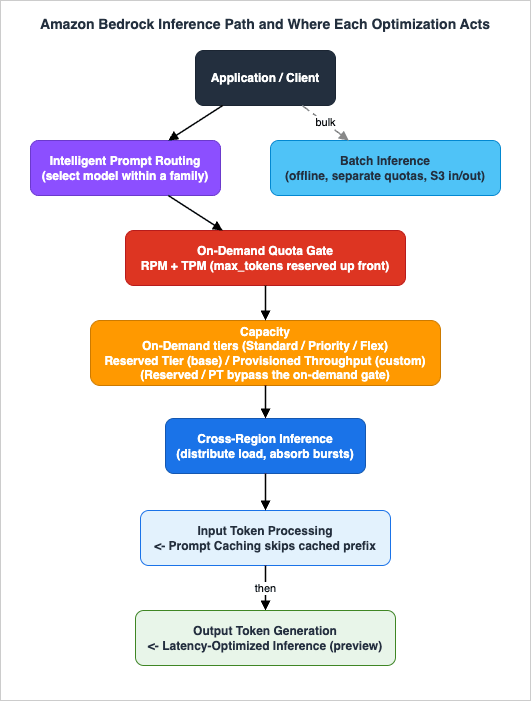
Figure 1 shows the on-demand inference request path and the point at which each optimization mechanism acts.
3. On-Demand Service Tiers and Cross-Region Inference
Before reaching for reservations or provisioned capacity, two on-demand mechanisms change your throughput and latency profile with no commitment.3.1 On-demand service tiers
Amazon Bedrock offers on-demand service tiers that trade off latency, price, and predictability for the same models:* You can sort the table by clicking on the column name.
| Tier | What it changes | Fits |
|---|---|---|
| Standard | Baseline — consistent performance at regular rates, available across all foundation models | General applications, content generation, routine analysis |
| Priority | Preferential treatment in the processing queue; for supported models, up to ~25% better OTPS latency than Standard | Real-time customer service, live latency-sensitive applications |
| Flex | Discounted rate for workloads that can trade immediate processing for efficiency | Model evaluations, summarization, non-urgent multi-step agentic workflows |
| Reserved | Guaranteed tokens-per-minute capacity (covered in Section 4) | Mission-critical workloads needing predictable throughput |
Standard is the default. Priority and Flex are on-demand — no reservation — and their model support is published per model on the Bedrock model detail pages, so confirm availability for the specific model you use. The key mental model: Priority buys lower latency under load, Flex buys lower cost in exchange for latency tolerance, and both leave you on the pay-per-token on-demand path.
3.2 Cross-region inference for load distribution
Cross-region inference (CRIS) lets a single logical request be served from compute in one of several AWS Regions within a geography, chosen automatically. You invoke it by passing a system-defined inference profile ID — for exampleus.anthropic.claude-sonnet-4-5-20250929-v1:0 routes across US Regions (us-east-1, us-east-2, us-west-2) — instead of a Region-specific model ID. A global inference profile (for example global.anthropic.claude-sonnet-4-5-20250929-v1:0) selects the optimal Region across geographies. The examples in this article use the Claude Sonnet 4.5 IDs that AWS's own documentation uses in its worked examples; the same prefix patterns apply to current-generation models such as Claude Sonnet 5 and Claude Opus 4.8 — take the exact profile IDs from the model's detail page.From the throughput and latency angle, what CRIS buys you is:
- Higher effective throughput — traffic bursts are absorbed across multiple Regions' capacity rather than throttling against a single Region's quota.
- Resilience — a transient issue in one Region does not stall inference; requests are served from another.
CRIS is enabled by simply targeting the profile ID; you must have model access in every destination Region in the profile. Global inference profiles are supported for on-demand inference, batch inference, Agents, model evaluation, prompt management, and prompt flows.
Note: The data-residency, SCP, and IAM implications of routing across Regions — and the pattern for a Region-contained deployment — are a topic in their own right. This article treats CRIS purely as a load-distribution lever; see the Amazon Bedrock Cross-Region Inference and Data Residency article for that depth.
Because CRIS is free to enable and materially improves both throughput and resilience, it belongs in nearly every production baseline, alongside a right-sized
max_tokens.4. Reserved and Provisioned Capacity
On-demand quotas are shared and best-effort; they can throttle when the account is busy. For workloads that cannot tolerate that variability, Amazon Bedrock offers two distinct mechanisms for dedicated or reserved capacity. They are often confused, so it is worth being precise about which applies to which model type.4.1 Reserved Tier — guaranteed capacity for base models
The Reserved Tier reserves prioritized compute capacity for mission-critical applications on foundation models. Its defining properties:- You allocate separate input and output tokens-per-minute capacities to match your workload, and pay a fixed price per 1,000 tokens-per-minute, billed monthly, for a 1-month or 3-month term.
- When you exceed your reserved capacity, the service automatically overflows to the Standard tier, so operations continue uninterrupted.
- It targets 99.5% uptime for model response.
- Minimum capacity is 100,000 input TPM and 10,000 output TPM. Access is arranged through your AWS account team.
There is an important sizing subtlety: your tokens-per-minute consumption for reservation purposes includes both
InputTokenCount and CacheWriteInputTokens. If you use prompt caching, sum both metrics in CloudWatch to estimate the reservation you actually need. Billing continues until you delete the reservation (through your account manager).Reserved Tier is the answer to "we have a steady, high, predictable base load on a foundation model, and we cannot afford to be throttled by other tenants in the account."
4.2 Provisioned Throughput — dedicated capacity by model units
Provisioned Throughput provisions dedicated model-invocation capacity, billed hourly, and is purchased in model units (MUs). An MU delivers a specific throughput level — a number of input tokens and output tokens the unit can process per minute across all requests. The hourly price depends on the model, the number of MUs, and the commitment duration you choose: No commitment (delete any time), 1 month, or 6 months, with longer commitments more discounted.The critical scoping fact: a customized model answers nothing until you set up inference for it. Purchasing Provisioned Throughput is one way to do that. AWS has since documented a second one, a custom model deployment for on-demand inference, but it is narrow: US East (N. Virginia) and US West (Oregon), models customized on or after July 16, 2025, and only the base models AWS lists on that page. Which of the paths a given custom model qualifies for is covered in my Model Customization on Amazon Bedrock; the supported list moves, so check it against the user guide before you design around it. Provisioned Throughput can also be purchased for base models, but base-model reservations differ from custom-model ones in one respect: only Provisioned Throughputs associated with a custom model can be re-pointed to a different model (the base it was customized from, or another custom model from the same base).
Before you can purchase any Provisioned Throughput, you must request MUs for your account through the AWS support center; without a granted MU quota, you cannot purchase.
You create a Provisioned Throughput with the
CreateProvisionedModelThroughput API:import boto3
bedrock = boto3.client("bedrock")
# Omit commitmentDuration for hourly, no-commitment provisioning.
resp = bedrock.create_provisioned_model_throughput(
provisionedModelName="my-provisioned-claude",
modelId="arn:aws:bedrock:us-east-1::foundation-model/anthropic.claude-sonnet-4-5-20250929-v1:0",
modelUnits=1,
# commitmentDuration="OneMonth", # or "SixMonths"; omit for no commitment
)
provisioned_model_arn = resp["provisionedModelArn"]
# e.g. arn:aws:bedrock:us-east-1:123456789012:provisioned-model/a1b2c3d4e5f6
print(provisioned_model_arn)4.3 The ARN pitfall — the most common Provisioned Throughput mistake
Purchasing Provisioned Throughput does not by itself route your inference through it. To actually use the dedicated capacity, you must pass the returnedprovisionedModelArn as the modelId in your inference calls. If you keep passing the foundation-model ID, your requests continue to travel the on-demand path — consuming on-demand quota and paying for provisioned capacity you are not using.runtime = boto3.client("bedrock-runtime")
# WRONG: still on the on-demand path, provisioned capacity idle and unused.
runtime.converse(
modelId="anthropic.claude-sonnet-4-5-20250929-v1:0",
messages=[{"role": "user", "content": [{"text": "Summarize this report."}]}],
)
# CORRECT: routes through the provisioned capacity you purchased.
runtime.converse(
modelId=provisioned_model_arn,
messages=[{"role": "user", "content": [{"text": "Summarize this report."}]}],
)modelId in your call is the provisioned-model ARN, and check CloudWatch and CloudTrail to see whether invocations are hitting the provisioned model or the on-demand foundation model. A silent fall-through to on-demand is easy to miss because inference keeps working — you only notice at billing time, or when you throttle on a quota you thought you had reserved past.See Increase model invocation capacity with Provisioned Throughput and Service tiers for optimizing performance and cost.
5. Latency-Optimized Inference
The mechanisms so far change throughput — how many requests or tokens you can push through. Latency-optimized inference changes per-request timing: faster time-to-first-token and faster output tokens per second, for the same model and the same output. The comparable lever on the self-hosted side is speculative decoding, covered in Speculative Decoding and Draft Models on AWS.Note: Latency-optimized inference is a preview feature in Amazon Bedrock and is subject to change. Treat its supported-model and supported-Region lists, and the mechanism itself, as provisional; confirm current status in the AWS documentation before you depend on it in production.
5.1 How it works
You opt in per request by setting the performance configuration on the runtime API — there is no separate setup, fine-tuning, or provisioning:runtime = boto3.client("bedrock-runtime")
resp = runtime.converse(
modelId="us.anthropic.claude-3-5-haiku-20241022-v1:0",
messages=[{"role": "user", "content": [{"text": "Draft a two-line status update."}]}],
performanceConfig={"latency": "optimized"}, # "standard" (default) | "optimized"
)"standard" (the default), the request is served by standard inference. Latency-optimized inference is accessed via cross-region inference profiles, so you pass a profile ID as the modelId.Two fall-back behaviors matter operationally:
- Quota fall-back. Once you reach the latency-optimization usage quota for a model, Amazon Bedrock serves the request with standard latency (and charges standard rates). The latency configuration actually used is visible in the API response and in AWS CloudTrail logs, and you can view metrics for latency-optimized requests in CloudWatch under
model-id+latency-optimized. This means a request you asked to be optimized may quietly run standard — instrument for it. - Token-count fall-back. For some models, requests above a token threshold fall back to standard. At the time of writing, latency-optimized Llama 3.1 405B supports requests up to roughly 11K total input and output tokens; larger requests use standard mode.
5.2 What it supports, and the honest caveat
Latency-optimized inference is available for a small, evolving set of models via cross-region inference — at the time of writing, Amazon Nova Pro, Anthropic Claude 3.5 Haiku, and Meta Llama 3.1 (70B and 405B) in a limited set of US Regions (primarily US East (Ohio) and US West (Oregon), with Nova Pro also in US East (N. Virginia)).The honest caveat for anyone standardizing on Claude: the only Claude model currently in the preview is Claude 3.5 Haiku, an older generation. If your application is built around a current-generation Claude model, latency-optimized inference may not yet apply to it. Rather than reproduce a model/Region table that will age quickly, treat this section as mechanism plus caveat and check the authoritative list before building: Optimize model inference for latency.
For latency-sensitive workloads where latency-optimized inference does not (yet) cover your model, the practical alternatives are the Priority service tier (Section 3), response streaming so users see the first tokens sooner, and prompt caching (Section 6), which cuts input-processing time on the cached prefix.
6. Prompt Caching
Prompt caching attacks latency and throughput from the input side. Large language model inference has two stages — input token processing and output token generation — and prompt caching optimizes the first. When a large, static prefix (a long system prompt, few-shot examples, a document) is reused across requests, caching lets the model skip recomputing it, cutting both latency and the input tokens that count against your quota.6.1 How cache checkpoints work
You mark a cache checkpoint at a point in your prompt; everything preceding it becomes the cached prompt prefix. On subsequent requests, if the prefix matches exactly, the model reads from the cache and resumes processing from the checkpoint instead of recomputing the prefix.Three properties govern whether you get a hit:
- Exact-prefix match. Cache hits occur only when the prefix is byte-for-byte identical. Any change anywhere in the prefix — including images and tool definitions, which must also be identical — causes a miss. The design rule follows directly: put static content first (instructions, examples, tools, images) and dynamic content last (the user's specific question, per-request identifiers).
- Minimum token thresholds, per model. A checkpoint only caches if the prefix meets the model's minimum. For example, Claude 3.7 Sonnet and Claude Sonnet 4.6 require at least 1,024 tokens per checkpoint, while Claude Opus 4.5, Claude Opus 4.6, Claude Haiku 4.5, and Claude Sonnet 4.5 require at least 4,096; for the newest models, check the model card. Below the minimum, the inference still succeeds but nothing is cached. Maximum checkpoints per request are also model-specific.
- Time to live (TTL). The cache has a TTL that resets on every successful hit; if no hit occurs within the window the cache expires. The default on supported models is a 5-minute TTL, and the
cachePointblock also accepts an optionalttlfield (5mor1h) that enables extended one-hour caching where the model supports it — check the model card for the exact conditions.
For Claude models, Bedrock also offers simplified cache management, which removes most of the checkpoint-placement guesswork: place a single cache checkpoint at the end of your static content, and the system automatically checks for cache hits at previous content-block boundaries — looking back up to approximately 20 content blocks from the checkpoint — to find the longest matching prefix. Multiple checkpoints (up to 4 for Claude models) remain available for granular control, and are still the right tool when you cache sections that change at different frequencies or when your static content extends beyond that roughly-20-block lookback window.
Prompt caching works with the Converse and ConverseStream APIs, the InvokeModel and InvokeModelWithResponseStream APIs, and in conjunction with cross-region inference (at times of high demand, CRIS may lead to more cache writes).
6.2 Setting a cache checkpoint
In the Converse API, a checkpoint is acachePoint content block placed after the content you want cached:runtime = boto3.client("bedrock-runtime")
SYSTEM_PROMPT = "...long, static instructions and examples (>= model minimum tokens)..."
resp = runtime.converse(
modelId="us.anthropic.claude-sonnet-4-5-20250929-v1:0",
system=[
{"text": SYSTEM_PROMPT},
{"cachePoint": {"type": "default"}}, # everything above becomes the cached prefix
],
messages=[
{"role": "user", "content": [
{"text": "What changed in the Q3 figures?"}, # dynamic content, after the checkpoint
]},
],
)
usage = resp["usage"]
# Verify the cache is working:
print(usage.get("cacheReadInputTokens"), usage.get("cacheWriteInputTokens"))6.3 Why caching helps throughput, not just latency
Prompt caching has a quota benefit that is easy to overlook:CacheReadInputTokens do not count toward your TPM quota. Tokens served from the cache are neither reprocessed nor charged against your token quota, so a workload with a large cached prefix consumes far less quota per request than its raw token count implies — directly relieving TPM throttling in addition to cutting latency. Cache writes (CacheWriteInputTokens) do count toward input consumption, so the benefit accrues on the second and subsequent requests that reuse the prefix.Verify caching with the
CacheReadInputTokens and CacheWriteInputTokens usage fields. If cacheReadInputTokens stays at zero across requests you believe share a prefix, a silent invalidator is at work — a per-request timestamp or ID inside the prefix, non-deterministic serialization, a varying tool set, or a prefix below the model minimum (Section 10 covers the triage).Note: This section covers Amazon Bedrock's prompt caching mechanism. The design of the prompt itself — breakpoint placement strategy, the prefix-invalidation audit, and TTL selection on the first-party Claude API — is covered in depth in the Anthropic Claude API Prompt Caching and Token Efficiency article. For caching responses by semantic similarity rather than caching prompt prefixes, see the Semantic Caching for LLM Applications on AWS article.
See Prompt caching for faster model inference.
7. Intelligent Prompt Routing
Not every request needs your most capable — and slowest, most quota-hungry — model. Intelligent Prompt Routing provides a single serverless endpoint that routes each request to the model within a family that it predicts will give the desired response at the lowest cost, optimizing quality and cost together.7.1 How routing decides
For each incoming request, the router analyzes the prompt, predicts the response quality of each candidate model, and forwards the request to the model offering the best combination of predicted quality and cost. The response includes information about which model actually served the request, so routing decisions are fully traceable.The important constraints:
- Pairwise. A router contains exactly two models, one of which is the fallback. Both must be in the same Region.
- Default or configured routers. Default routers cover the Anthropic and Meta model families out of the box. Configured routers let you choose the two models and set the routing criteria — a response-quality-difference threshold that, when not met, sends the request to the fallback model.
- Optimized for English chat. Routing is tuned for English-language, typical chat-assistant use cases. For other languages or specialized domains, test before relying on it, and note that it does not adapt routing on your application-specific performance data.
7.2 Creating and using a router
bedrock = boto3.client("bedrock")

router = bedrock.create_prompt_router(
    promptRouterName="support-router",
    models=[
        {"modelArn": "arn:aws:bedrock:us-east-1::foundation-model/<modelA>"},
        {"modelArn": "arn:aws:bedrock:us-east-1::foundation-model/<modelB>"},
    ],
    fallbackModel={"modelArn": "arn:aws:bedrock:us-east-1::foundation-model/<modelB>"},
    routingCriteria={"responseQualityDifference": 0.5},
)modelId in converse or invoke_model — the router endpoint looks like any other model to the caller, and Amazon Bedrock performs the routing behind it. Start with a default router and the playground to build intuition before configuring your own.Intelligent Prompt Routing suits mixed-difficulty, interactive traffic where a meaningful fraction of requests are simple enough for a smaller, faster model — you get lower average latency and reduced quota pressure on the large model without hand-building an orchestration layer. See Understanding intelligent prompt routing in Amazon Bedrock.
8. Batch Inference for Non-Interactive Workloads
The single most effective thing you can do for a bulk, non-interactive workload is to take it off the interactive path entirely. Batch inference processes large volumes asynchronously against separate quotas from real-time inference, at a reduced price, so it neither competes with nor throttles your interactive traffic.8.1 The job model
You submit a batch job withCreateModelInvocationJob, pointing it at input and output locations in Amazon S3:bedrock = boto3.client("bedrock")
resp = bedrock.create_model_invocation_job(
jobName="nightly-summarization",
roleArn="arn:aws:iam::123456789012:role/MyBatchInferenceRole",
modelId="anthropic.claude-sonnet-4-5-20250929-v1:0",
inputDataConfig={"s3InputDataConfig": {"s3Uri": "s3://my-bucket/input/records.jsonl"}},
outputDataConfig={"s3OutputDataConfig": {"s3Uri": "s3://my-bucket/output/"}},
)
job_arn = resp["jobArn"]
status = bedrock.get_model_invocation_job(jobIdentifier=job_arn)["status"]
# Submitted -> InProgress -> Completed | Failed | StoppedrecordId and a modelInput:{ "recordId": "req-0001", "modelInput": { "...": "body matching InvokeModel or Converse format" } }
{ "recordId": "req-0002", "modelInput": { "...": "..." } }modelInput format matches the body of an InvokeModel request (the default job type) or the request body of the Converse API (the Converse job type). Two behaviors to plan for: if you omit recordId, Amazon Bedrock adds one in the output; and the order of records in the output is not guaranteed to match the input — key your results by recordId, never by position.8.2 Quotas and fit
Batch inference has its own quotas — searchable in Service Quotas as the minimum and maximum records per batch job, records per input file, and concurrent jobs per model — and the per-model values change often enough that you should read them from the Service Quotas console rather than from any article. Because it runs against separate quotas and at a reduced price relative to on-demand, batch is the right home for anything that does not need an answer now: overnight document processing, dataset labeling, evaluation runs, backfills.Note: This article covers batch inference as a throughput mechanism. Designing the surrounding pipeline — triggering, chunking, error handling, retries, and scaling across many jobs — is covered in the Large-Scale Batch Generative AI Pipeline on AWS article.
See Format and upload your batch inference data.
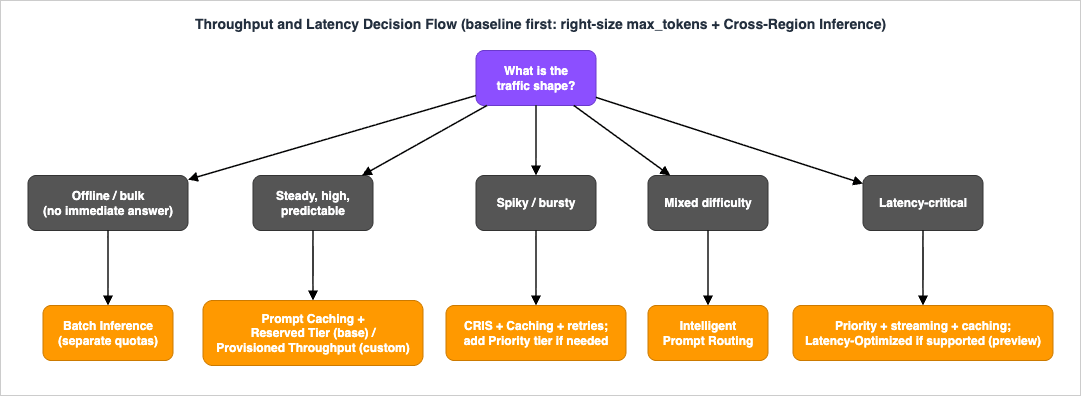
9. The Decision Flow: Matching Mechanism to Traffic
With the mechanisms understood individually, the practical question is which to reach for, in what order, for a given workload. The organizing axes are traffic pattern (steady / spiky / batch / nightly-peak), latency requirement (interactive-strict / relaxed / offline), and predictability (how well you can forecast load).9.1 Start with the free baseline
Two things belong in nearly every production configuration because they cost nothing and help both throughput and resilience:- Right-size
max_tokens. Set it to approximate your real completion length. This alone can multiply effective throughput several-fold (Section 2.3). - Enable cross-region inference. Absorb bursts and Region-level issues across a geography's capacity (Section 3.2).
Everything else is layered on top, cheapest change first.
9.2 The tuning order
* You can sort the table by clicking on the column name.| Order | Change | Cost / commitment | Primarily helps |
|---|---|---|---|
| 1 | Right-size max_tokens | None | Throughput (TPM) |
| 2 | Cross-region inference | None (config) | Throughput, resilience |
| 3 | Prompt caching | Config; cache writes count | Latency + throughput (cached prefix) |
| 4 | Service tier: Priority or Flex | Per-request (Priority premium / Flex discount) | Latency (Priority) or cost (Flex) |
| 5 | Intelligent Prompt Routing | Config; per-request | Latency + quota pressure on large model |
| 6 | Reserved Tier / Provisioned Throughput | Term commitment | Guaranteed throughput / dedicated capacity |
| 7 | Batch inference | Separate quota, reduced price | Throughput for offline work |
9.3 Matching by traffic shape
- Steady, high, predictable interactive load → free baseline + prompt caching, then Reserved Tier to guarantee capacity against noisy neighbors. If the load is on a custom model that does not qualify for an on-demand deployment, Provisioned Throughput is the only path.
- Spiky, bursty interactive load → free baseline (CRIS is doing heavy lifting here) + prompt caching + backoff/jitter retries. Add Priority tier if latency under burst is critical. Reserve only if the baseline under the spikes is itself high and predictable.
- Mixed-difficulty interactive load → Intelligent Prompt Routing to push simple requests to a smaller, faster model, shrinking latency and large-model quota pressure.
- Latency-critical interactive load → Priority tier and response streaming; latency-optimized inference if it covers your model (preview); prompt caching to cut input-processing time.
- Offline / non-interactive bulk → batch inference, full stop. It is the only mechanism that removes the load from your interactive quotas entirely.
- Nightly or scheduled peaks → batch for the deferrable portion; Flex tier for the non-urgent interactive portion; reserve only if the peak is both high and recurring enough to justify a term commitment.
9.4 Combining mechanisms
The mechanisms compose. Three common combinations:- Prompt caching + latency-optimized inference (or Priority) — cut input-processing latency with caching and output latency with the tier/optimization, for a chat assistant with a large, reused system prompt.
- Prompt caching + Reserved Tier — reserve capacity for a steady high-volume workload, and size the reservation smaller because caching reduces the input tokens (remember to include
CacheWriteInputTokenswhen sizing, per Section 4.1). - Intelligent Prompt Routing + caching — route simple requests to a small model while caching the shared prefix on both, compounding the quota relief.
Figure 2 renders this as a decision flow from traffic pattern and latency requirement to the mechanism to reach for.
10. Diagnostics: From Symptom to Cause
When something is wrong in production, you work backward from the symptom. Three symptoms cover most cases.10.1 Symptom: 429 ThrottlingException
First, read the message to split RPM from TPM:- "Too many requests" → RPM. The quota is per-account and per-Region across all callers. Confirm whether another application in the account is spiking against the same model and Region. Fix: enforce per-application rate limits, spread retries with exponential backoff and jitter across the full 60-second window, and — if true summed peaks genuinely exceed the quota — request an RPM increase in Service Quotas. Note that for Claude 4.7 and later models RPM is not enforced independently (throughput is governed by TPM), so on current-generation Claude models work the TPM branch below instead of requesting RPM increases.
- "Too many tokens" → TPM. The usual root cause is an unset or oversized
max_tokensreserving far more quota than the request uses (Section 2.3). Fix, in order: right-sizemax_tokens; enable prompt caching soCacheReadInputTokensstop counting against quota; distribute across Regions with CRIS; move bulk work to batch inference; and only then request a TPM increase. Remember the output burndown multiplier when estimating consumption on Claude models.
Distinguish 429 from
503 ServiceUnavailableException, which is transient and not quota-related — retry immediately with backoff rather than optimizing quota.10.2 Symptom: latency regression
Separate the two latency components: TTFT (time to first token) and OTPS (output tokens per second).- Check whether a latency-optimized request silently fell back to standard because you hit the optimization quota or exceeded a model's token threshold — the served latency configuration is in the API response and CloudTrail (Section 5.1).
- Check the Region you are actually being served from under CRIS; a distant Region adds round-trip latency.
- If the model is not covered by latency-optimized inference, consider the Priority tier and response streaming so users perceive faster first output, and prompt caching to shorten input processing.
- Rule out client-side and network causes before attributing latency to the model.
10.3 Symptom: prompt cache is not hitting
IfcacheReadInputTokens is zero across requests you expect to share a prefix, walk this list:- Prefix not byte-identical. A timestamp, UUID, session ID, or user-specific string inside the prefix invalidates it. Non-deterministic JSON serialization (unsorted keys) does too. Move all dynamic content after the checkpoint.
- Tools or images changed. These are part of the prefix; they must be identical across requests.
- Prefix below the model minimum. If the cached prefix is under the model's minimum tokens per checkpoint (for example 4,096 for several current Claude models), nothing caches even though the call succeeds.
- TTL expired. If requests are spaced further apart than the TTL (often 5 minutes) with no intervening hits, the cache expires between them.
- Model or feature mismatch. Confirm the model supports prompt caching and that you placed the
cachePointblock correctly.
Confirm the fix with
cacheReadInputTokens and cacheWriteInputTokens on subsequent requests.Note: Building the retry, backoff, jitter, and circuit-breaker logic that these diagnostics imply is covered in the LLM Inference Resilience Patterns on AWS article; the observability instrumentation to surface these signals — metrics, dashboards, and tracing — is covered in the LLMOps Observability and Evaluation Architecture on AWS article.
11. Frequently Asked Questions
Is throttling a latency problem or a capacity problem?A capacity problem. Throttling (
429) means you exceeded an RPM or TPM quota; it is unrelated to how fast an individual request runs. Latency mechanisms (latency-optimized inference, Priority tier, streaming) will not fix throttling, and throughput mechanisms (quotas, Reserved Tier, batch) will not make a single request faster.Why am I throttled when my token counts look low?
Two reasons, both in Section 2.3. First,
max_tokens is reserved up front — if unset it defaults to the model's maximum output, silently reserving huge quota. Second, output tokens burn down faster than 1:1 on Claude models (up to 15x on the newest generation), so quota is consumed faster than raw counts suggest.Do I need Provisioned Throughput to get guaranteed capacity on a base model?
Not necessarily. For base foundation models, the Reserved Tier provides guaranteed tokens-per-minute capacity with overflow to Standard. Provisioned Throughput (model units) is required for custom (fine-tuned or imported) models and optional for base models. Choose based on model type and whether you want per-1K-TPM reservation (Reserved Tier) or model-unit capacity (Provisioned Throughput).
I bought Provisioned Throughput but see no change — why?
Almost certainly the ARN pitfall (Section 4.3): you must pass the
provisionedModelArn as the modelId in your inference calls. If you keep passing the foundation-model ID, requests stay on the on-demand path and your provisioned capacity sits idle. Verify the modelId and check CloudWatch/CloudTrail.Is latency-optimized inference available for current Claude models?
At the time of writing it is a preview feature, and the only Claude model in it is Claude 3.5 Haiku (an older generation), alongside Amazon Nova Pro and Meta Llama 3.1, in a limited set of Regions. Confirm the current list in the AWS documentation. For current-generation Claude models, the Priority tier, streaming, and prompt caching are the practical latency levers today.
Does prompt caching help with throttling, or only cost and latency?
Both.
CacheReadInputTokens do not count against your TPM quota, so caching a large static prefix reduces quota consumption per request in addition to cutting latency. The benefit accrues from the second request onward, since the first request pays a cache write.When should I use batch inference instead of tuning real-time throughput?
Whenever the workload does not need an immediate answer. Batch runs against separate quotas at a reduced price, so it removes bulk load from your interactive path entirely rather than competing with it. It is the highest-leverage move for offline processing.
12. Summary
Throughput and latency are separate problems on Amazon Bedrock, and they call for separate mechanisms:- Throttling is a capacity problem. Master the token-deduction lifecycle first:
max_tokensis reserved up front (right-size it — it is the cheapest and highest-leverage fix), output tokens burn down faster than 1:1 on Claude models, and cache-read tokens do not count against quota at all. - The free baseline — a right-sized
max_tokensand cross-region inference — belongs in nearly every production configuration. - Layer on the cheapest change first: prompt caching (latency and quota relief with an exact-prefix match), then service tiers (Priority for latency, Flex for cost), then Intelligent Prompt Routing (push simple requests to smaller models), then a term commitment (Reserved Tier for base models, Provisioned Throughput for custom models — mind the ARN pitfall), and batch inference to take offline work off the interactive path entirely.
- Latency-optimized inference is a preview mechanism with a small, older-generation Claude footprint today; verify coverage before depending on it.
- Diagnose from the symptom: read the 429 message to split RPM from TPM, check for silent latency-optimization fall-back, and verify cache hits with
cacheReadInputTokens.
Match the mechanism to the traffic shape — steady and predictable, spiky, mixed-difficulty, latency-critical, or offline — and you can keep a Bedrock application responsive and inside its quotas as it scales, without reaching for a quota increase as the first (or only) answer.
13. References
- Quotas for the bedrock-runtime endpoint - Amazon Bedrock User Guide
- How tokens are counted in Amazon Bedrock (token burndown) - Amazon Bedrock User Guide
- Scaling and throughput best practices - Amazon Bedrock User Guide
- Service tiers for optimizing performance and cost - Amazon Bedrock User Guide
- Amazon Bedrock On-Demand Service Tiers
- Increase model invocation capacity with Provisioned Throughput - Amazon Bedrock User Guide
- Purchase a Provisioned Throughput for an Amazon Bedrock model - Amazon Bedrock User Guide
- Optimize model inference for latency (preview) - Amazon Bedrock User Guide
- Prompt caching for faster model inference - Amazon Bedrock User Guide
- Inference using the Converse API (cachePoint) - Amazon Bedrock User Guide
- Understanding intelligent prompt routing in Amazon Bedrock - Amazon Bedrock User Guide
- Format and upload your batch inference data - Amazon Bedrock User Guide
- CreateModelInvocationJob - Amazon Bedrock API Reference
- Global cross-Region inference - Amazon Bedrock User Guide
- Optimize your applications for scale and reliability on Amazon Bedrock - AWS Machine Learning Blog
- Effectively use prompt caching on Amazon Bedrock - AWS Machine Learning Blog
- Use Amazon Bedrock Intelligent Prompt Routing for cost and latency benefits - AWS Machine Learning Blog
- Amazon Bedrock Pricing
- Production RAG Architecture on Amazon Bedrock - Knowledge Bases, Vector Stores, Retrieval, Guardrails, and Evaluation
- Amazon Bedrock Glossary
References:
Tech Blog with curated related content
Written by Hidekazu Konishi