SOCI Lazy Loading on Fargate, Lambda Managed Instances, and SageMaker AI - Which Index Each Service Reads
First Published:
Last Updated:
On AWS Fargate, new users of SOCI can only use the SOCI Index Manifest v2. Users who have previously used SOCI on Fargate can use both v1 and v2. AWS Lambda announced on October 28, 2026, that it supports SOCI indexes for container functions running on Lambda Managed Instances. Lambda only accepts v2 and does not download the rest of the image in the background. Amazon SageMaker AI announced on October 29, 2026, that it supports images with SOCI indexes for training and processing jobs. SageMaker AI only detects v2 indexes referenced by tags and falls back to a standard download if the index cannot be read. The upstream SOCI snapshotter has disabled v1 by default, starting with v0.10.0.
This article provides a table outlining which version of the index each service reads, from which references, when using the same image across Fargate, Lambda Managed Instances, and SageMaker AI, and what action it takes when an index is unavailable. It also details how Amazon ECR replication, backfill, pull through cache, and lifecycle policies handle indexes, distinguishing between documented behavior and areas where documentation is lacking. The documented information was verified as of November 7, 2026.
This article does not provide an introduction to SOCI or instructions on how to create indexes. It also does not discuss pricing or compare boot times.
Related articles on this site:
- AWS Lambda Managed Instances - Capacity Providers and the Multi-Concurrency Trap
- AWS Lambda Cold Start Mitigation Guide - Provisioned Concurrency, SnapStart, and Code-Level Techniques
- Software Supply Chain Security on AWS - Signing, Attestation, and Admission Control
- Metadata Endpoints Across AWS Compute - What Code on EC2, ECS, EKS, and Lambda Can Ask the Platform, How Each Endpoint Checks the Caller, and Where Location and Credentials Come From
- Amazon SES Tenants and Sender Reputation - Who Pauses a Tenant, Who Can Resume It, and What Still Reaches the Account
- Moving Amazon MSK to TLS 1.3 - Named Security Policies, One Step at a Time, and Handshakes That Do Not Fall Back
Table of Contents
- 1. Scope and Assumptions
- 2. How to Read the Tables
- 3. Two Versions of the Index
- 4. Which Service Uses Which Index?
- 5. Fargate
- 6. Lambda Managed Instances and SageMaker AI
- 7. How Amazon ECR Handles Indexes
- 8. Situations Where Lazy Loading May Not Be Suitable
- 9. Where the Sources Disagree and What They Do Not Say
- 10. What This Setup Showed
- 11. Failure Modes
- 12. Frequently Asked Questions about SOCI Lazy Loading
- 13. Summary
- 14. References
1. Scope and Assumptions
This chapter will first define the intended audience, the scope of this article, the relevant source materials, and the terminology used. The following twelve points will outline the conclusions.- There are two versions of the index. v1 is a separate artifact and can be found using the OCI referrers API. v2 combines the original image's manifest and index into a single image index, and has a new digest (Chapter 3).
- On Fargate, new users can only use v2. If a new user attempts to use an image with only v1, Fargate will download the entire image. Existing users can use both v1 and v2 (Section 5.1).
- On Fargate, only tasks using the Linux platform version 1.4.0 can read the index. The Fargate page recommends trying it with images that exceed 250 MiB when compressed (Section 5.2).
- On Lambda, SOCI can only be used with container functions using Lambda Managed Instances. Lambda only supports v2, and the image index must contain exactly two entries (Section 6.1).
- Lambda does not download the rest of the image in the background. The first file read within a function invocation will increase the invocation time. The Fargate page and the SageMaker training page state that the rest of the image is downloaded in the background (Section 4.5, Section 6.1).
- This article found no description of how Lambda Managed Instances behave when the index is missing or cannot be read (Section 6.1, Section 9.3).
- SageMaker AI only detects v2 indexes referenced by tags. Images referenced by digest and images pulled from registries within a VPC will undergo a standard download. If the index cannot be read, the job will fall back to a standard download and continue (Section 6.2).
- The upstream SOCI snapshotter has disabled v1 by default, starting with v0.10.0. The documentation does not explicitly state that this is a "deprecated" feature (Section 3.3).
- The Amazon ECR documentation regarding replication, backfill, and pull through cache does not describe how SOCI indexes are handled. This article does not state whether ECR transports indexes or not (Chapter 7).
- The lifecycle page states that images referenced in a manifest list will not expire as long as the manifest list itself exists. This general principle does not mention SOCI by name (Section 7.4).
- Docker and Podman only pull images for the current platform and do not copy v2 indexes. Upstream considerations states this (Section 7.6).
- In the single setup in Chapter 10, after ECR replication and backfill, a v2 image index with its two children and a v1 index appeared in the destination Region, and a Fargate task in the destination Region lazy loaded the v2 image. This is a single observation, and this article does not change the source state of the ECR pages (Section 10.5, Section 10.6, Section 10.7).
1.1 Intended Audience
This article is intended for the following audience:- Developers who are running large container images on Fargate, Lambda Managed Instances, or SageMaker AI (or a combination thereof) and are looking to improve startup times.
- Individuals responsible for managing image build pipelines and ECR repositories, including defining indexing procedures, replication strategies, and lifecycle rules.
- Operations personnel responsible for verifying the effectiveness of indexing and troubleshooting issues when indexing is not functioning as expected.
This article assumes that readers may believe the following, and checks each point against the documentation:
- Attaching a SOCI index makes every service lazy load the image the same way.
- Fargate does not accept v1 indexes.
- Without an index, all services will fall back to standard image downloads.
- All services download the rest of the image in the background.
- Using SOCI will always result in faster startup times.
- ECR replication will propagate SOCI indexes to destination repositories.
- Even when an image is copied to another registry using Docker, the index remains attached.
1.2 What This Article Covers and What It Does Not
This article focuses on SOCI indexes in AWS services and Amazon ECR. Specifically, it covers the differences between v1 and v2, the versions that each service accepts, how each service finds the index and which image reference it needs, behavior when there is no index, background downloads, conditions, verification methods, handling ECR replication, backfill, pull through cache, and lifecycle policies. It also addresses differences in tools for copying images, upstream defaults, and situations where lazy loading is not suitable.This article does not cover the following:
- Capacity providers and concurrency for Lambda Managed Instances. This is covered in a separate article on AWS Lambda Managed Instances, which explicitly states that it does not cover how to package container images.
- Cold starts for standard Lambda functions and mitigation strategies. This is addressed in the AWS Lambda Cold Start Mitigation Guide. Lazy loading of container images for standard Lambda functions is a different mechanism from the SOCI indexes discussed in this article.
- Image signing and general handling of referrers. This is covered in the Software Supply Chain Security on AWS article.
- The inner workings of AWS Lambda execution environments. This is explained in the How AWS Lambda Execution Environments Work article.
- Configuring inference on Amazon EKS. This is covered in the Self-Managed LLM Inference on Amazon EKS article. This article only briefly mentions nodes with self-managed SOCI snapshotters, in a single row of a table.
- SageMaker AI GPU configuration and SOCI in Amazon SageMaker Studio. SOCI in Studio is a separate feature covered on a different page, with only a single paragraph in Section 6.3 of this article.
- Pricing and comparisons of startup times.
- Detailed steps for creating indexes. This article only references specific commands as examples, as indicated in the documentation.
- Topics covered in other articles in the same series. Tenants and sender reputation for Amazon SES are covered in the Amazon SES tenant article (Amazon SES Tenants and Sender Reputation), and TLS 1.3 for Amazon MSK is covered in the Amazon MSK TLS 1.3 article (Moving Amazon MSK to TLS 1.3).
1.3 Date of Review and Materials Reviewed
This article was written after reviewing the following materials on November 7, 2026. In the body, this article uses the English short names in parentheses.- AWS Lambda Developer Guide, page on SOCI for Lambda Managed Instances (Lambda SOCI page). A foundational resource for Lambda.
- AWS Lambda Developer Guide, page on creating functions with container images (Lambda container image page).
- Amazon ECS Developer Guide, lazy loading section of the page on Fargate tasks (Fargate page). A foundational resource for Fargate.
- Amazon ECS Developer Guide, page on the JSON response from the task metadata endpoint version 4 for Fargate tasks (task metadata page).
- Amazon SageMaker AI Developer Guide, page on SOCI for training jobs (SageMaker training page) and page on SOCI for processing jobs (SageMaker processing page).
- Amazon SageMaker AI Developer Guide, page on SOCI for SageMaker Studio (SageMaker Studio page).
- Amazon ECR User Guide, page on replication (replication page), page on backfill (backfill page), page on pull through cache (pull through cache page), and page on lifecycle policies (lifecycle page).
- AWS Containers Blog, article on the SOCI Index Manifest v2, published July 3, 2025 (v2 post), and article on how Fargate lazy loads images, published July 18, 2023 (under-the-hood post).
- AWS Artificial Intelligence Blog, article on SageMaker AI SOCI, published October 27, 2026 (AI Blog post), and article on Deep Learning AMIs and Deep Learning Containers, published June 3, 2026 (DLAMI post).
- AWS Open Source Blog, article on ECR and OCI 1.1, published August 1, 2024 (OCI 1.1 post).
- AWS What's New, announcements for Lambda (October 28, 2026), SageMaker AI (October 29, 2026), ECR backfill (October 26, 2026), Fargate v2 (July 3, 2025), and Fargate's selective lazy loading (November 6, 2023) (What's New posts). The dates for announcements in 2026 and 2025 correspond to the
postDateTimevalue in the announcements. - Upstream awslabs/soci-snapshotter, documentation on the SOCI Index Manifest v2 (upstream v2 doc), documentation on considerations when using it (upstream considerations), documentation on the registry (upstream registry doc), and documentation on the CLI (upstream CLI doc). This article is based on the main branch documentation for the latest release, v0.16.1.
- awslabs/cfn-ecr-aws-soci-index-builder, README (Index Builder README).
This article treats blogs, What's New posts, and upstream documentation as separate sources, distinct from the developer guide. This article does not present the content from upstream documentation as specifications for AWS services.
1.4 Terms, and Different Things with the Same Spelling
This article uses the following terms consistently:- SOCI Index: Metadata that indicates the location of files within each layer of an image. In this article, it is also referred to simply as "index."
- SOCI Index Manifest v1 and SOCI Index Manifest v2: The two versions of the index. In this article, they are also referred to as v1 and v2.
- Image Index: An OCI manifest that bundles multiple manifests together. Also known as a manifest list. This article uses "index" and "image index" as distinct terms.
- Lazy loading: A method of starting a container before downloading the entire image, retrieving files as needed.
- Snapshotter: A component within containerd that prepares a container's file system from image layers. The SOCI snapshotter refers to the upstream awslabs/soci-snapshotter component.
- New Users and Existing Users: These terms follow the Fargate page and the v2 post, which say customers new to SOCI on AWS Fargate and existing customers. They refer to users who have not used SOCI on Fargate and those who have.
The following terms have the same spelling but refer to different concepts. This article distinguishes them by explicitly specifying which one is being referenced each time.
- Lazy loading: In this article, this refers to lazy loading as it relates to SOCI indexes. Lazy loading of container images for standard Lambda functions is a separate mechanism. It is also distinct from the lazy loading used for initializing storage in Amazon RDS.
- Replication: In this article, this refers to replication within ECR registries. Copying an image to a different registry using a tool is referred to as "copy."
- Fallback: In this article, this refers to a service stopping lazy loading and downloading the entire image. The SageMaker training page uses the phrase
falls back to a standard download, and the v2 post usesfails back to fully downloading. The fallback mechanism in the upstream registry doc, related to referrers API-less registries, is a separate concept. In the related article on MSK TLS 1.3, "no fallback" means not lowering the TLS version, which is the opposite direction. - Default: In this article, this refers to the behavior when no settings are configured. The article distinguishes between the default behavior of a service and the default behavior of the upstream SOCI snapshotter by explicitly specifying which one is being referenced each time.
2. How to Read the Tables
This chapter defines the columns in the tables presented in this article, as well as how to describe the state of the sources and how to cite the sources. The columns in the summary table, as presented in Section 4.6, are used consistently across three articles in the same series.2.1 Table Columns
The summary table in Section 4.6 has the following seven columns:Setting: The configuration or value for that row.Default When Unset: The value that applies when no setting is specified. This article does not call a value the default because the documentation recommends it or because it is common.Who Can Change It: The entity that can modify this value, and the action required to do so.Who Cannot: The entity that cannot modify this value. This is included only when explicitly stated in the documentation.When the Default Does Not Apply: Circumstances under which the default value does not apply, or when another setting takes precedence.Where It Is Written: The source of the information for that row.Source State: The state of the documentation. Described using the terminology from Section 2.2.
The tables in Sections 3.2, 4.1, 7.1, and 9.3 use columns specific to this article. Each section explains its columns.
2.2 Terms for the State of the Sources
This article uses eight terms to describe the state of the documentation. The tables also use these English terms.- Stated: The documentation contains a statement regarding the matter.
- Stated as not supported: The documentation explicitly states that the matter is not supported or cannot be used.
- Documentation does not list: While a list or table exists, the specific item is not included. This does not necessarily indicate that the matter is unsupported or unavailable.
- Not recorded (stated): The documentation states that the information is not included in logs or records.
- No statement found: Despite searching using different search terms and examining different categories of documentation (as described in Section 1.3), no relevant statement could be found. This does not necessarily indicate that the matter is absent or does not occur.
- Sources disagree: The documentation from two different sources provides conflicting statements regarding the same matter. This includes cases where the statements directly contradict each other, as well as cases where the scope, strength, or subject matter differs, and the text does not settle which one applies. This article presents both statements and their sources without designating either as incorrect.
- Inference: This is an inference made by this article, and is not a statement found in any of the documentation. This article says in the same sentence that it is an inference.
- Observation: This is based on observations made during testing (as described in Chapter 10) and is not a commitment made by the documentation. This article will not override statements found in the documentation with observations.
This article distinguishes between "Stated as not supported" and "No statement found." The former refers to a statement in the documentation, while the latter indicates that this article was unable to find a relevant statement.
2.3 Citing Sources
This article indicates the specific page from which each statement originates in the same sentence. Even when referring to the same Fargate content, this article treats text from the Fargate page and text from the v2 post as separate sources. For example, if a new user utilizes an image that has only a v1 index, the statement that they will download everything refers to the v2 post, not the Fargate page. Text from upstream documents reflects the behavior of the upstream SOCI snapshotter, and not the behavior of AWS services.3. Two Versions of the Index
This chapter explains how versions v1 and v2 connect the index to images, and how services and snapshotters locate it.3.1 Relationship Between v1 and v2
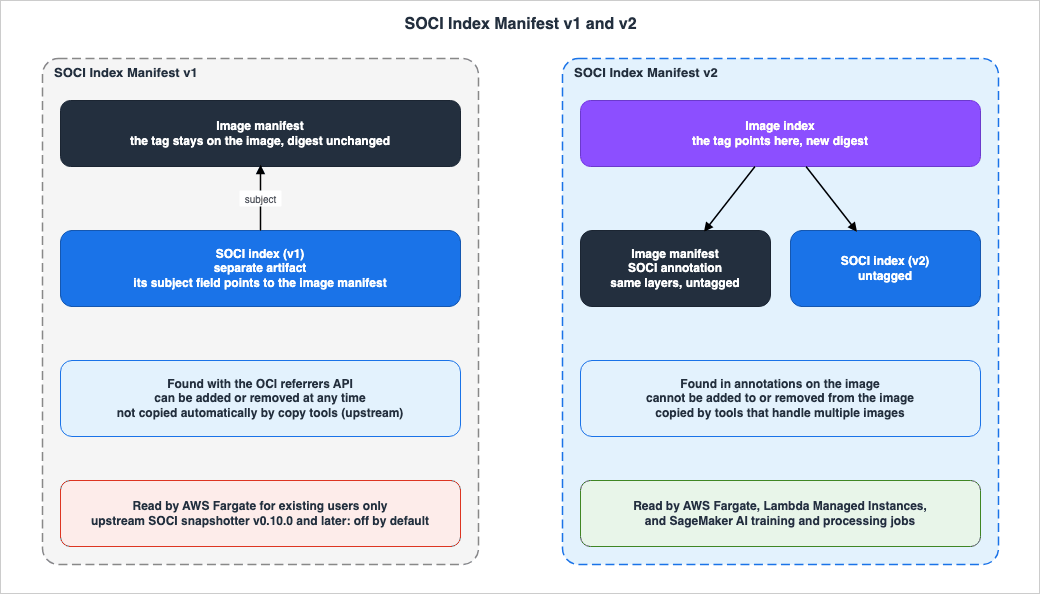
According to the v2 post, the index for v1 is a separate artifact from the image itself. The index points to the manifest of the original image through thesubject field. According to upstream considerations, this relationship is unidirectional; the image is unaware of the index. According to upstream considerations, the SOCI snapshotter finds the v1 index using the OCI referrers API. The v2 post states that the loose relationship in v1 has caused two issues. First, tools like crane and Skopeo often drop the index when copying images between registries. Second, if the index is deleted or modified during an ECS deployment, it can result in a mix of tasks that are lazy loaded and tasks that are not.According to the v2 post, v2 links the manifest of the original image with the manifest of the index using a single image index. The upstream v2 doc states that the v2 index cannot be added to or removed from a SOCI-enabled image. According to upstream considerations, the SOCI snapshotter finds the v2 index by examining annotations on the image itself.
According to the Fargate page and the v2 post, creating a v2 index adds an annotation to the manifest of the original image, resulting in a new image digest. The contents of the filesystem layers remain unchanged. According to the Fargate page, if the image already exists in the repository, it should be pushed again after creating the index. The Fargate page states that even after pushing, the layers will not be duplicated; only the new manifest file is uploaded.
In the example provided in the v2 post, pushing an image with a v2 index creates three artifacts in the repository: the original image, the SOCI index, and the image index. In the same example, only the image index has a tag; the other two artifacts do not.
The following diagram illustrates the relationship between the two versions.
3.2 Comparison of v1 and v2
The following table compares two versions. The columns areItem (what is being compared), SOCI Index Manifest v1, SOCI Index Manifest v2, and Where It Is Written.| Item | SOCI Index Manifest v1 | SOCI Index Manifest v2 | Where It Is Written |
|---|---|---|---|
| Index and Image Association | The index refers to the original image using the subject. The image is unaware of the index. | The image index binds the original image's manifest and the index itself. | v2 post, upstream considerations |
| How to Find | OCI referrers API | Annotations on the image itself. | upstream considerations |
| Image Digest | The original image remains unchanged. | The image that carries the index has a new digest, and the layers remain the same (Fargate page, v2 post). In the SageMaker procedure, the indexed copy gets a new tag, and the original image, tag, and digest are unchanged (SageMaker training page). | Fargate page, v2 post, SageMaker training page |
| Adding or Removing | Possible. | Not possible. A new image must be created. | upstream v2 doc |
| Example CLI Commands | soci create and soci push | soci convert, or nerdctl image convert --soci | upstream CLI doc, Lambda SOCI page |
| Copying Between Registries | Not copied automatically. | If using a tool that handles multiple images, the index is copied along with the image. | upstream v2 doc, upstream considerations |
| Default for Upstream SOCI Snapshotter | Disabled from v0.10.0. | Automatically used if an index is present. | upstream v2 doc, upstream considerations |
The media types for v1 and v2 are as follows. The media types for v2 are documented on the Lambda SOCI page and the Fargate page. The media type for v1 is demonstrated in the referrers API example on the Fargate page, presented in an encoded format. The v1 line below is the decoded form, produced by this article.
application/vnd.amazon.soci.index.v1+json
application/vnd.amazon.soci.index.v2+json
3.3 Upstream SOCI Snapshotter Defaults
According to the upstream v2 doc, the SOCI snapshotter v0.10.0 does not use v1 by default. The upstream v2 doc states that, after upgrading to v0.10.0, existing v1 images will no longer be lazy loaded. Upstream considerations explains that v1 indexes may be added to the registry outside of the deployment process, and the snapshotter can automatically locate them; therefore, it is disabled by default from v0.10.0.According to the upstream v2 doc, v1 is still present in the snapshotter, and operators can re-enable v1 by modifying the snapshotter's configuration file. The configuration takes the following format:
[pull_modes]
  [pull_modes.soci_v1]
    enable = true
The upstream v2 doc describes v1 as
disabled by default, rather than "deprecated." The upstream v2 doc strongly recommends migrating to v2. This article also avoids mixing the terms "disabled" and "deprecated."3.4 Differences from the v1-Era Fallback Image Index
According to the under-the-hood post on the Containers Blog, thesoci push process in 2023 pushed not only the v1 index but also a separate image index with a tag in the format sha-<digest-of-container-image>. This image index is used for registries that do not support the referrers API, and it relies on client-managed references. The upstream registry doc refers to this as a "fallback." According to the upstream registry doc, ECR does support the referrers API.This image index is distinct from the v2 image index. The v1 fallback image index simply indicates the location of the index; it is not the image itself. In contrast, a v2 image index contains both the original image's manifest and its index, allowing it to be run as a self-contained image. This article keeps the two separate.
4. Which Service Uses Which Index?
This chapter details, for each service, the version it receives, how to locate it, the format in which it is accessed, what happens when an index is unavailable, whether the rest of the image is downloaded in the background, and the conditions that apply.4.1 Service Table
The columns in the following table are:Service, Index Versions Accepted, How the Index Is Found, Image Reference, No Index or Unusable Index, Rest of the Image, Conditions, and Source State.| Service | Index Versions Accepted | How the Index Is Found | Image Reference | No Index or Unusable Index | Rest of the Image | Conditions | Source State |
|---|---|---|---|---|---|---|---|
| Fargate, New Users | v2 only | Fargate automatically searches when launching tasks. | Tags or digests | If no index is found, the entire image is downloaded before starting. If the image has only a v1 index, the entire image is also downloaded. | Downloads in the background | Linux platform version 1.4.0, private ECR registry, gzip or uncompressed layers | Stated |
| Fargate, Existing Users | v1 and v2 | Same as above | Tags or digests | If no index is found, the entire image is downloaded before starting. | Downloads in the background | Same as above | Stated |
| Lambda Managed Instances (Container Functions) | v2 only | Lambda resolves the function version to the image index and searches for the index. | SOCI-indexed tag | No statement found | Does not download in the background | Single architecture image. The image index contains exactly two entries. | Stated |
| SageMaker AI Training Jobs | v2 only. v1 is not detected | SageMaker AI searches when creating the job. | Tags only | If no index is found, it gets a standard download. If the index cannot be read, it falls back to a standard download, and the job continues. | See Section 6.2 | Private ECR repository. Images referenced by digest, and images from a registry in a VPC, will get a standard download. | Stated |
| SageMaker AI Processing Jobs | v2 only | Same as above | Tags only | Same as training jobs | See Section 6.2 | Private ECR repository. Images referenced by digest will get a standard download. | Stated |
| Self-Managed SOCI Snapshotter | By default, v2 only. v1 can be enabled through configuration. | v2 uses image annotations; v1 uses referrers API. | — | According to the DLAMI post, if no index is found, it falls back to a standard pull. Snapshotters with v1 disabled do not lazy load images that have only a v1 index. | Upstream docs: see Section 8.2 | containerd and snapshotter configuration | Stated |
The final line refers to documentation for the upstream SOCI snapshotter and a DLAMI post, and it does not describe the specifications of AWS managed services. The text in the DLAMI post concerns the SOCI snapshotter included in the Deep Learning AMI. If you are using the SOCI snapshotter on an Amazon EKS node, this line applies.
4.2 Versions Accepted
Of the three services, the ones that accept only v2 are Fargate for new users, Lambda Managed Instances, and SageMaker AI. Only existing Fargate users can also use v1. The Lambda SOCI page states that Lambda does not support v1 indexes. The SageMaker training page indicates that v1 indexes are not detected. The Fargate page and the v2 post state that new users can only use v2.4.3 Finding and Referencing Images
With Fargate, when a task starts, Fargate automatically checks whether an index exists. According to the v2 post, users can simply specify an image tag or digest in the task definition, without needing any other flags or parameters.For Lambda Managed Instances, users point the function's image URI at a SOCI-indexed tag and publish a function version. According to the Lambda SOCI page, Lambda resolves the function version to the image index, enabling lazy loading.
In SageMaker AI, users reference a SOCI-indexed image by tag in the job request. According to the SageMaker training page, specifying an image by digest will result in a standard download.
The way images are referenced differs across the three services. Fargate works with either tags or digests, SageMaker AI detects the index using only tags, and Lambda requires a SOCI-indexed tag in the function's image URI and a published function version.
4.4 When an Index Is Missing or Unreadable
According to the Fargate page, containers without an index begin after downloading the entire image. According to the v2 post, if a new user's image only has v1, Fargate will not lazy load that image and will download the entire image instead.The SageMaker training page presents three scenarios in a table. For images without an index, the behavior remains consistent with a standard download. When an index is unreadable or when lazy loading fails, the training job falls back to a standard download process and continues. The SageMaker training page states that adding an index will not prevent a training job from running.
The Lambda SOCI page does not describe the behavior when an index is missing or unreadable. This article does not state that Lambda falls back to a standard download. Section 9.3 shows the scope of the search.
4.5 The Rest of the Image
According to the Fargate page, when using SOCI, containers start up quickly, taking only a few seconds to pull the image, and the image is downloaded in the background. According to the SageMaker training page, the remaining portions are also downloaded in the background. However, according to the Lambda SOCI page, Lambda does not download the remaining image portions in the background.This difference becomes apparent in how files are handled when accessed for the first time. In Lambda, files that the function reads during initialization are retrieved during initialization, while files that the handler reads for the first time are retrieved during the handler's invocation. The Lambda SOCI page states that this increases the time taken for that invocation.
4.6 Summary Table
The following table uses the columns shared by the three articles in this series to list the defaults covered in this article.| Setting | Default When Unset | Who Can Change It | Who Cannot | When the Default Does Not Apply | Where It Is Written | Source State |
|---|---|---|---|---|---|---|
| Fargate's lazy loading | If no index is available, it downloads the entire image before starting. | The image owner can push an image with an index. The Fargate page lists no setting in the task definition. | — | Tasks whose platform version is not 1.4.0, Windows containers, ECR registries that are not private, and layers using zstd do not use lazy loading. | Fargate page, v2 post | Stated |
| Fargate's accepted index version | New users: v2 only. Existing users: v1 and v2. | — | New users cannot use v1. | For new users, images with only a v1 index are downloaded in full. | Fargate page, v2 post | Stated |
| Lambda Managed Instances' lazy loading | If the image URI does not point to a SOCI-indexed tag, Lambda downloads and unpacks the image on each instance before starting the execution environment. | The function owner can point the image URI to a tag with a SOCI index and publish a function version. | — | When no index is available or it cannot be read: No statement found. | Lambda SOCI page | Stated |
| Lambda's accepted index version | Only v2. | — | — | Does not support v1 indexes. | Lambda SOCI page | Stated |
| SageMaker AI's lazy loading | If no index is available, it performs a standard download. | The job owner can point to an image with a SOCI index using a tag. | — | Digest referencing, registries within a VPC, and v1 indexes perform a standard download. | SageMaker training page | Stated |
| Upstream SOCI snapshotter (v1) | Disabled by default from v0.10.0. | The snapshotter operator can enable it using [pull_modes.soci_v1]. | — | — | upstream v2 doc | Stated |
| ECR replication target | Only content pushed or restored after the replication is configured. | The registry owner determines the replication rules and backfill. | — | The handling of SOCI indexes: Documentation does not list. | replication page | Stated |
| Entity that creates indexes | ECR does not create indexes on its own. | The image owner creates them using the CLI or Index Builder. | — | — | SageMaker training page | Stated |
5. Fargate
This chapter describes the conditions under which indexes are used with Fargate, as well as how to verify and disable them.5.1 New and Existing Users
The Fargate page states that users who want to use SOCI with Fargate can only use v2. The page continues, stating that users who have previously used SOCI with Fargate can continue using v1, but strongly recommends that they transition to v2.The v2 post states the following regarding new users. The original wording is
fails back.For these customers, Fargate does not lazy load a container image attached to a SOCI index manifest v1 and fails back to fully downloading the container image.The v2 post also states that, for existing users, Fargate lazy loads an image that has either a v1 or a v2 index. In other words, even for the same v1 image, whether it is lazy loaded depends on whether the customer has previously used SOCI with Fargate. The pages say customers and do not say whether this is tracked per account. The What's New post of July 3, 2025, states the following. The date of the v2 post is also July 3, 2025.
As of today, SOCI Index Manifest v2 is the default mechanism for using SOCI with ECS and Fargate.This text indicates that from that date, v2 became the default. However, it does not specify the date when new users were no longer able to use v1. This article has not been able to locate the date when new users were restricted to using only v2 (see Section 9.3).
The setup in Section 10.4 is an account that had not used SOCI with Fargate. In this setup, the task with the v1-only image used
overlayfs as its Snapshotter, while the task with the v2 image used soci as its Snapshotter (Observation). The v1-only task ran after the two v2 tasks in that account, so this does not show how Fargate decides who is a new customer (Section 10.4).5.2 Conditions
The Fargate page lists the following conditions for using the index:- Only tasks that run on Linux platform version 1.4.0 can use the index. It does not support tasks running Windows containers.
- The CPU architecture must be either X86_64 or ARM64.
- The image must be stored in a private ECR registry. The index must be stored as an artifact in the same repository as the image.
- Layers must be either compressed using gzip or uncompressed. It does not support layers compressed using zstd.
The Fargate page recommends testing with images larger than 250 MiB when compressed, noting that it may not significantly reduce startup time with smaller images.
The Fargate page states that containers without an index will download the entire image before starting, and that this behavior is consistent with Fargate platform versions other than 1.4.0, as well as with EC2 instances using ECS-optimized AMIs. Based on this, it can be inferred (Inference) that when running ECS tasks on EC2, the system will not use the SOCI index if using the default ECS-optimized AMI. This article does not cover configurations that utilize SOCI on EC2.
5.3 Selective Lazy Loading
According to the What's New post of November 6, 2023, Fargate now allows you to index only specific images within a single task, while allowing other images to download first. Previously, it was necessary to create indexes for all images specified in the task definition. For example, you can now create indexes only for the images of large applications, while excluding smaller sidecar images.5.4 Verification Method
The Fargate page describes how to verify whether a task was lazy loaded by examining the task's metadata endpoint in the task itself. According to the task metadata page, theSnapshotter field in the response from task metadata endpoint version 4 indicates the snapshotter used by containerd to download the image. This value is either the default overlayfs or soci, which is used when the image is lazy loaded with a SOCI index. The task metadata page notes that this field is only present for tasks using the Linux platform version 1.4.0.The Fargate page provides an example of how to verify whether an image has a v2 index by retrieving the image index using the AWS CLI.
aws ecr batch-get-image \
 --repository-name=$IMAGE_REPOSITORY \
 --image-ids imageTag=$IMAGE_TAG \
 --query 'images[0].imageManifest' --output text | jq -r '.manifests[] | select(.artifactType=="application/vnd.amazon.soci.index.v2+json")'
The Fargate page also provides an example of how to verify a v1 index using the OCI referrers API. The request involves retrieving referrers for the image's digest, specifying the v1 media type in the
artifactType field.In the setup in Section 10.4, both the task that referenced the v2 image by tag and the task that referenced it by the image index digest showed
soci in the Snapshotter field (Observation).5.5 Stopping and Deployment Considerations
According to the Fargate page, if you want to prevent an image from being lazy loaded, you should re-push the image without a SOCI index attached. The Fargate page does not list a setting in the task definition to stop lazy loading.The Fargate page also notes that the time it takes for a task to start with lazy loading may vary, so you might need to adjust timeouts in services like Elastic Load Balancing (e.g., health check grace period).
6. Lambda Managed Instances and SageMaker AI
This chapter outlines the conditions for two services that added SOCI support in October 2026.6.1 Lambda Managed Instances
According to the Lambda SOCI page, SOCI can only be used with container image functions running on Lambda Managed Instances. The beginning of the Lambda SOCI page identifies the target as Lambda Event Functions deployed as container images on Lambda Managed Instances. The page also states that before execution, Lambda downloads and unpacks the image on each instance. When using SOCI, Lambda only retrieves the specific files the function needs when reading them.The Lambda SOCI page describes the index it accepts as follows:
Lambda supports SOCI Index Manifest v2 only (media type application/vnd.amazon.soci.index.v2+json). Lambda doesn't support SOCI Index Manifest v1 indexes.The image index must contain exactly two entries: the SOCI index and one OCI image manifest.According to the Lambda SOCI page, the function's image URI points to the SOCI-indexed tag, rather than the original image tag. When the image is updated, or the index is changed, users must push the new tag and update the function's image URI to reflect that tag. The Lambda SOCI page provides an example using
nerdctl image convert --soci to create a v2 index, and then using nerdctl push to push only the platform that matches the function's architecture.The Lambda SOCI page also states that Lambda only supports images with a single architecture, and that the
--platform value should be aligned with the function's architecture. The Lambda container image page similarly states that Lambda does not support functions that use multi-architecture container images. Combining these two pages, it can be inferred that Lambda accepts an image index only for SOCI-indexed functions on Lambda Managed Instances, and only when the image index has exactly two entries (Inference). This article does not equate this image index with those used for multi-architecture images.According to the Lambda SOCI page, Lambda retrieves the contents of the image only when the function reads them. Files read during initialization are retrieved during the initialization process, while files read by the handler are retrieved during that specific invocation. Lambda does not download the rest of the image in the background. The Lambda SOCI page recommends that functions read necessary libraries and files in the initialization code rather than in the handler, to keep invocation durations consistent. The Lambda SOCI page also suggests testing with and without SOCI to compare startup time and invocation duration.
The Lambda What's New post states that container startup times can be reduced by up to 70%. However, it does not specify the conditions for achieving this figure. This article does not attempt to generalize that number.
The Lambda SOCI page does not describe behavior when indexes are missing or unreadable (Section 9.3).
Lazy loading of container images for standard Lambda functions is a different mechanism from the SOCI described in this article, and is covered in this site's AWS Lambda Cold Start Mitigation Guide.
6.2 SageMaker AI Training and Processing Jobs
According to the SageMaker training page, when creating a training job, SageMaker AI checks whether the specified image contains a SOCI index. According to the SageMaker processing page, processing jobs also have this same functionality. The SageMaker training page states that regardless of whether an index is present, the image download will appear as a secondary status ofDownloading for the training job.The table on the SageMaker training page, regarding cases where the index cannot be read, lists the Scenario and What happens columns as follows:
The index can't be read, or lazy loading doesn't succeed
The training job falls back to a standard download and continues running
The conditions, as described on the SageMaker training page, are as follows:
- The image is located in a private repository in ECR.
- The image is referenced by tag. Images referenced by digest will undergo a standard download.
- Images pulled from a private Docker registry within a VPC (with
TrainingRepositoryAccessModeset toVpc) will undergo a standard download. - Tags refer to images containing a v2 index. v1 indexes are not detected.
- Layers smaller than the minimum layer size will not have an index created, and will undergo a standard download.
The SageMaker processing page also mentions tag referencing, standard downloads for digests, and v2 indexes. The section regarding registries within a VPC is only present on the training page.
The SageMaker training page describes the rest of the image as follows. This article will not add any interpretation to this statement.
The rest is downloaded in the background as your code uses it.According to the SageMaker training page, ECR does not create indexes on its own. AWS publishes Deep Learning Containers that are indexed. These containers have a tag ending in
-soci. The SageMaker training page states that images created using FROM from Deep Learning Containers do not inherit the index. The SageMaker training page also notes that indexed images run on containerd rather than Docker, and advises caution when using code that relies on Docker-specific files.The SageMaker training page and the What's New post state that GPU idle time during image pulling can be reduced by up to 90%. The AI Blog post presents this figure as a value obtained through AWS's own measurements. These measurements involved pulling eight images, ranging in size from 1.8 GB to 35.4 GB compressed, across two AWS Regions. This article does not attempt to generalize this figure.
6.3 SOCI in SageMaker Studio Is a Separate Feature
The SageMaker Studio page covers the SOCI index when starting containers within Studio. This is a separate page with a distinct function from SOCI for training and processing jobs. The SageMaker Studio page states that using it can reduce the startup time for containers using your own images by approximately 30-70%. This figure is specific to Studio's environment, and this article does not generalize that finding.7. How Amazon ECR Handles Indexes
This chapter describes the functionality of ECR and how tools that copy images handle indexes. The ECR feature pages do not name SOCI. This article will separate the discussion into two parts: the general rules outlined in the documentation, and how those rules apply to SOCI indexes.7.1 ECR Table
The columns in the following table are:ECR Feature, What the Page States, SOCI Index Manifest v2, SOCI Index Manifest v1, and Source State.| ECR Feature | What the Page States | SOCI Index Manifest v2 | SOCI Index Manifest v1 | Source State |
|---|---|---|---|---|
| Replication | Only content pushed or restored after replication is configured is replicated. Deletions and archives are not replicated. Lifecycle policies are not replicated. | Documentation does not list | Documentation does not list. OCI 1.1 post states that ECR replication generally replicates referrers. | Documentation does not list |
| Backfill | Replicates existing images according to the current replication rules. | Documentation does not list | Documentation does not list | Documentation does not list |
| Pull through cache | For multi-architecture images, pulls the manifest list and each image it references. When referrers are requested, ECR checks upstream if the last check was more than 6 hours ago. | Documentation does not list. Rules for manifest lists are stated. | Documentation does not list. Rules for referrers are stated. | Documentation does not list |
| Lifecycle policy | Images referenced by the manifest list will not expire as long as the manifest list itself exists. Reference artifacts expire or are archived within 24 hours after the subject image is deleted or archived. | Applying it to the child manifests: Inference | Applying the reference artifact rule: Inference | Stated |
| Tag immutability and replication | If tag immutability is enabled in the repository and the destination has an image with the same tag, the replicated image may not have that tag and could become untagged. | Applying it to the image index tag: Inference | — | Stated |
7.2 ECR Replication
According to the replication page, ECR only replicates content pushed or restored to a repository after replication is configured, and does not replicate any content prior to that point, except through replication backfill (Section 7.3). The replication page states that replication occurs only once per push or restore operation, and that most images are replicated within 30 minutes. According to the replication page, replication does not include deletion or archival operations. Repository policies and lifecycle policies are not replicated; they only apply to the designated repository.The replication page does not mention SOCI indexes or referrers. The OCI 1.1 post states that ECR replication replicates referrers to configured destinations on push, so that referrers such as image signatures and SBOMs are also present at the destination. This statement provides a general description of referrers and does not specifically mention SOCI indexes. The v2 post indicates that v2 image indexes bundle architecture and index information, simplifying management tasks such as deletion and replication. However, this post also does not state that ECR replication transfers indexes.
This article does not state whether ECR replication transfers SOCI indexes or not. The source state is Documentation does not list. In the single setup in Section 10.5, after replication, a v2 image index, along with its two children, and a v1 index appeared in the destination Region (Observation). As this is a single observation, this article does not change the source state.
7.3 Backfill
According to the What's New post of October 26, 2026, ECR now supports backfill, which allows you to replicate existing images to a configured replication destination. According to the backfill page, backfill only includes images that comply with the current replication rules for the specified destination. The backfill page also states that you can run up to 10 backfill operations simultaneously within a single registry, and only one backfill operation at a time within a single destination Region. ECR retains backfill operations in a terminal state (COMPLETE, FAILED, or STOPPED) for 90 days after completion.The backfill page does not mention SOCI indexes or referrers. The source state is Documentation does not list. In the setup in Section 10.7, after the backfill, a v2 image index, along with its two children, and a v1 index appeared in the destination Region (Observation).
7.4 Lifecycle Policies
The lifecycle page outlines the following general rules:If an image is referenced by a manifest list, it cannot be expired or archived without the manifest list being deleted or archived first.In the example in the v2 post, pushing an image with a v2 index creates two artifacts without tags. This article infers that, because the v2 image index references these two artifacts, according to the rule described above, as long as the image index is not deleted, these artifacts will not expire, even if the "expire untagged" rule is applied (Inference). The lifecycle page does not mention the name of SOCI.
Regarding reference artifacts, the lifecycle page states that they expire or are archived within 24 hours after the subject image is deleted or archived. A v1 index is a reference artifact whose subject is the original image, so this article infers that this rule applies to it (Inference).
The OCI 1.1 post, published in 2024, states that lifecycle policy rules will not delete reference artifacts that refer to an active image until the image is deleted. However, the current lifecycle page does not contain this protective statement (Section 9.1).
In the setup in Section 10.8, a preview of the rule that retains only one untagged image showed that neither of the two v2 children nor the v1 index became candidates for expiration (Observation). This preview was not the result of applying the rule.
7.5 Pull Through Cache
According to the pull through cache page, when pulling multi-architecture images using the pull through cache, both the manifest list and each image it references are pulled to the ECR repository. The pull through cache page states that callingListImageReferrers on a repository created with pull through cache will return a list of referrers. ECR checks for updates to upstream referrers if more than 6 hours have passed since the last verification. The pull through cache page does not name SOCI indexes. The source state is Documentation does not list.7.6 Copying with Tools
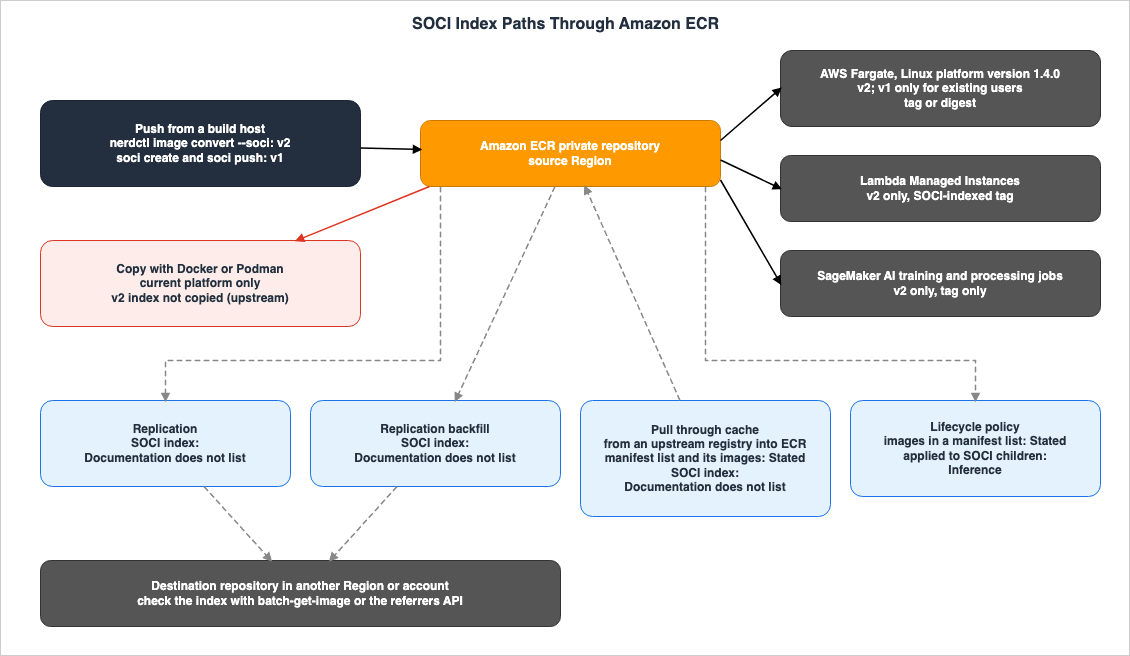
When copying images using tools instead of ECR's replication functionality, upstream considerations states the following:Docker and Podman will only pull the current platform and therefore will not copy the SOCI index.According to upstream considerations, in v2, tools that can handle multiple images copy the images along with their indexes. Examples include skopeo, crane, and finch and nerdctl with the
--all-platforms flag. If only a single platform is copied, the SOCI snapshotter cannot lazy load the image. According to upstream considerations, in v1, copying an image does not automatically copy its index; users must copy the index separately.The following diagram illustrates the path from pushing to ECR, through its functionality, to the service, and shows the source state for each path.
8. Situations Where Lazy Loading May Not Be Suitable
This chapter gathers instances where the documentation indicates that using lazy loading may not save time, or where specific considerations are necessary.8.1 Small Container Images
The Fargate page recommends testing with images larger than 250 MiB compressed, noting that smaller images are less likely to see a reduction in load time. According to the SageMaker training page, layers smaller than the minimum size will not have indexes created. The AI Blog post says that images smaller than roughly 4 GB see relatively small improvements on SageMaker AI training jobs, and the Lambda SOCI page says that the benefit is largest for images of several gigabytes. These statements come from different sources about different services, and this article does not merge them into one threshold.8.2 File System Latency and Health Checks
According to upstream considerations, SOCI downloads images and starts containers concurrently, which may result in slower individual file reads before the download is complete. Upstream considerations also notes that this can sometimes increase container startup time. However, upstream considerations further states that, for most workloads, the time between initiating the download and the container becoming operational decreases overall. It suggests that SOCI may not be suitable for applications sensitive to latency fluctuations and that it may be necessary to adjust the health check timeout. The Fargate page also references health check grace period within Elastic Load Balancing (see Section 5.5).8.3 Processes That Read Many Files at Startup
The SageMaker training page notes that when code reads large portions of an image before training begins, that time is incurred not during the download phase, but at the start of training. An example is reading the model weights in the image. The SageMaker training page states that when using theFile input mode, the job will also wait for the dataset to download. To minimize overhead, it recommends using either the FastFile or Pipe mode. In Lambda, the first time a handler reads a file, it can increase the invocation time (see Section 6.1).8.4 Mutable Tags
Upstream considerations indicates that allowing mutable tags such aslatest could unexpectedly trigger the deployment of v2 images during scaling. It recommends either configuring the system to prevent tag changes or deploying images using digests rather than tags. However, SageMaker AI does not lazy load images referenced by digest (see Section 6.2).9. Where the Sources Disagree and What They Do Not Say
This chapter identifies areas where the documents contain conflicting information, information that is not included in the documents, and instances where descriptions are missing.9.1 Where the Sources Disagree
- SageMaker AI Announcement Date (Sources disagree): The
postDateTimeof the What's New post indicates October 29, 2026, while the AI Blog post is dated October 27, 2026. This article will present both dates, citing their respective sources.
- Verification Method for v2 Indexes (Sources disagree): The Fargate page example for
batch-get-imagedoes not specify an accepted media type. In contrast, the SageMaker training page example uses the--accepted-media-typesparameter to specify the media type for the OCI image index. These two pages provide different commands for the same verification process, and the documentation does not clarify whether a v2 index is visible without specifying a media type. This article will not designate either as incorrect. In the setup in Section 10.3, both specifying and omitting the parameter returned the same image index (Observation).
- Protection of reference artifacts (Sources disagree): The OCI 1.1 post states that reference artifacts that refer to an active image are not removed by lifecycle policy rules. The current lifecycle page does not contain this statement. This article will document the current lifecycle page's content in Section 7.4 and present the statement from the OCI 1.1 post as a reference from 2024.
Differences between services (regarding v1 handling, background downloads, and referencing methods) do not represent discrepancies in the documentation. These are differences in specifications between individual services (see Section 9.4).
9.2 What the Documentation Does Not List
- Does ECR replication deliver the v2 image index, along with the two artifacts it references, to the destination? The replication page does not list SOCI indexes.
- Does ECR replication deliver the v1 index? While there is a general statement regarding referrers in the OCI 1.1 post, the ECR pages do not list SOCI indexes.
- Does the backfill process include the SOCI index?
- Does the pull through cache maintain the SOCI index?
In the single setup in Chapter 10, the indexes were visible in the destination Region after both replication and backfill. As this is a single observation, this article does not change the items in this section. Pull through cache was not tested.
9.3 Items with No Statement Found
The following table listsItem (what was searched for), What Was Searched (the scope of the search), and Source State.| Item | What Was Searched | Source State |
|---|---|---|
| Regarding Lambda Managed Instances: when there is no index, when the index cannot be read, and when the number of entries in the image index is not 2. | Lambda SOCI page, Lambda container image page, Lambda What's New, searches of AWS documentation with variations in wording (3 times). | No statement found |
| The date when new Fargate users were no longer able to use v1. The July 3, 2025 What's New announcement states that v2 is the default mechanism from that date. | Fargate page, v2 post, under-the-hood post, What's New posts, searches of AWS documentation. | No statement found |
| How SOCI indexes are handled in ECR replication, backfill, and pull through cache. | replication page, backfill page, pull through cache page, ECR What's New, searches of AWS documentation with variations in wording (3 times). | No statement found |
| Whether the lifecycle policy rule for "untagged" selects the v2 child artifacts. | lifecycle page, page with lifecycle policy examples, v2 post. | No statement found |
| The condition "up to 70%" regarding Lambda. | Lambda What's New, Lambda SOCI page. | No statement found |
9.4 Important Notes When Reading
- Differences between services stem from differences in specifications. Only existing Fargate users can use v1. Only Lambda does not download the rest of the image in the background. SageMaker AI only detects indexes for images referenced by tags, and, of the three services, only the SageMaker pages state that a digest reference gets a standard download.
- The documentation for the upstream SOCI snapshotter describes its behavior. AWS services may not necessarily behave in the same way.
- A "No statement found" indication does not necessarily mean that the matter does not exist. This article does not state that Lambda Managed Instances cannot run images without an index.
- Conditional numbers (up to 70% for Lambda, up to 90% for SageMaker AI GPU idle time during image pulls, and approximately 30-70% for Studio) are each source's own figures; for the Lambda figure, this article did not find the conditions (Section 9.3).
- The Fargate page states that only v2 is available for new users, and it does not describe what happens when using only v1. The phrase "downloads everything" only appears in the v2 post. These two statements are not contradictory.
10. What This Setup Showed
This chapter details observations made between November 7 and November 8, 2026 (UTC), within a single AWS account. Each result represents a single observation and is not a promise of the documentation. This article does not use the observations in this chapter to change the source states in Chapters 3 through 9.10.1 Setup
- The source Region was us-east-1, with us-east-2 designated as the replication destination. Initially, the registry had only one replication rule, which replicated repositories whose names begin with
b79-soci-demo-repto us-east-2. - This account had not previously used SOCI with Fargate. This article reads it as a new customer under the wording in Section 5.1 (Inference); the pages do not define having previously used SOCI.
- The image adds a single 600 MiB file of random bytes on top of the Amazon Linux 2023 image. Because the random data is difficult to compress, even when compressed, the image size exceeds 250 MiB. The
describe-imagescommand in ECR reported a size of 682,797,263 bytes. - Three tags were created.
plainindicates an image without an index.v2is a v2 image index created usingnerdctl image convert --soci, derived from theplainimage.v1baseis a different image that differs fromplainin a single file, with a v1 index attached usingsoci createandsoci push. - The index was created on an arm64 EC2 instance running Amazon Linux 2023. The tools used were soci-snapshotter 0.16.1, nerdctl 2.3.5, containerd 2.3.7, and Docker 25.0.18, all installed via dnf.
- The Fargate task runs on Linux platform version 1.4.0 and ARM64, utilizing 1 vCPU and 2048 MiB of memory.
- The container prints the contents of a small file in the image and the response from task metadata endpoint version 4, and then exits. The container does not read the 600 MiB file.
10.2 Artifacts After the Push
The original repository'sdescribe-images command returned six artifacts. The columns in the following table represent Tag, Manifest (manifest type), and Contents.| Tag | Manifest | Contents |
|---|---|---|
| plain | Docker image manifest | Index-less image |
| v1base | Docker image manifest | The original image referenced by the v1 index |
| v2 | OCI image index | v2 image index |
| Untagged | OCI image manifest | Manifest of an image that is a child of the v2 image index |
| Untagged | OCI image manifest | SOCI index that is a child of the v2 image index |
| Untagged | OCI image manifest | v1 index |
The two children of v2 and the v1 index did not have tags. The media type of the artifact for the child index of v2 was
application/vnd.amazon.soci.index.v2+json, while the media type of the artifact for the v1 index was application/vnd.amazon.soci.index.v1+json. Both the v2 image index and the manifest of its child image had digests different from plain. They are in the same format as the v2 post example.10.3 Checking the Index
- When retrieving an image with the
v2tag usingbatch-get-image, the same image index was returned regardless of whether the OCI image index media type was specified using--accepted-media-typesor not. - The image index contained two entries: one was a manifest for an image with the annotation
com.amazon.soci.index-digest, and the other was a SOCI index whoseartifactTypewas the v2 media type, annotated withcom.amazon.soci.image-manifest-digest. - When retrieving an image with the
plaintag usingbatch-get-image, a Docker image manifest was returned, and it had nosubjectfield. - When querying the referrers API for the digest of
v1base, an HTTP 200 response was received, returning a single reference artifact. ItsartifactTypewas the v1 media type. When querying for the digest ofplain, the response was HTTP 200 with 0 results. - Regarding the second item in Section 9.1, in this setup, the results were the same regardless of the differences in the command structure. This article does not change the source state in Section 9.1.
10.4 Fargate Tasks
In us-east-1, four tasks were run, one task for each image reference. The columns in the following table representImage Reference (the image reference specified in the task definition), Index (the index assigned), Snapshotter (the value from the task metadata endpoint version 4), Pull Seconds, and Created to Started. Pull Seconds represents the number of seconds from the task's pullStartedAt to pullStoppedAt. Created to Started represents the number of seconds from the task's createdAt to startedAt.| Image Reference | Index | Snapshotter | Pull Seconds | Created to Started |
|---|---|---|---|---|
| Tag plain | None | overlayfs | 13.8 | 34.6 |
| Tag v2 | v2 | soci | 1.9 | 20.9 |
| Digest of v2 image index | v2 | soci | 1.9 | 16.7 |
| Tag v1base | v1 only | overlayfs | 11.5 | 23.8 |
- In this account, which had not used SOCI with Fargate before this setup, the task using the v1-only image used
overlayfs. This result is consistent with the v2 post statement quoted in Section 5.1. The v1-only task ran after the two v2 tasks in the same account, and the pages do not define having previously used SOCI, so this observation does not show how Fargate decides who is a new customer. - The v2 image used
sociboth when referenced by tag and when referenced by digest. - All four tasks completed with an exit code of 0.
- The values in seconds are from a single task each. Since the containers do not read a 600 MiB file, these values do not include any latency incurred when reading the file for the first time after startup. This article does not use these values to compare startup times (see Chapter 8).
10.5 ECR Replication
- The repository in us-east-2 showed six artifacts, all with the same digest and tags as the original. The
imagePushedAttimestamp for each artifact was within 8 seconds of the originalimagePushedAt. - The
describe-image-replication-statuscommand returnedCOMPLETEfor all artifacts. For the tagv2, three statuses with the same destination were returned. This article has not confirmed in the documentation what each of those three statuses represents. - On the destination,
batch-get-imagereturned the same image index with two items. The referrers API returned a single v1 index for thev1basedigest. - This observation is of replication within the same account, to a single destination Region. Replication across accounts, different repository filtering methods, and repositories with tag immutability enabled have not been tested.
10.6 Fargate Tasks in the Destination Region
In us-east-2, two tasks using images from the destination repository were run, one task for each image. The columns are the same as in the table in Section 10.4.| Image Reference | Index | Snapshotter | Pull Seconds | Created to Started |
|---|---|---|---|---|
| Tag v2 | v2 | soci | 2.0 | 13.8 |
| Tag v1base | v1 only | overlayfs | 12.1 | 26.2 |
In the destination Region, the task using the v2 image used
soci, while the task using the v1-only image used overlayfs.10.7 Backfill
- The same three tags and indexes were pushed to the second repository,
b79-soci-demo-old, before any replication rule covered it. At that point, the repository was not present in us-east-2, anddescribe-imagesreturned aRepositoryNotFoundException. - Subsequently, this repository was added to the replication rule, and a backfill was started with us-east-2 as the destination.
- The backfill process completed approximately 17 seconds after it started, reaching a
COMPLETEstatus. All 18 replications were successful, with zero failures. This total included the replications forb79-soci-demo-rep, which had already been replicated. - After the backfill, the
b79-soci-demo-oldrepository appeared in us-east-2, containing six artifacts.batch-get-imagereturned an image index with two entries, and the referrers API returned a single v1 index.
10.8 Preview of Lifecycle Policies
- The rule is designed to retain only one untagged image, expiring all others. The rule's selection criteria are:
tagStatusisuntagged,countTypeisimageCountMoreThan, andcountNumberis 1. This article only creates a preview and does not apply the rule to the repository. - Both the original repository and the destination repository contained three untagged artifacts: two children of v2, and the v1 index. As an inference of this article, if all three artifacts fall within the rule's count, then two of them would be candidates for expiration (Inference).
- The number of artifacts identified as candidates for expiration in the preview was 0 in both Regions.
- The fact that neither of the two children of v2 were selected as candidates aligns with the general rules described in Section 7.4. This article has not confirmed in the documentation why the v1 index was not selected as a candidate (see Section 9.1).
- The preview does not reflect the result of applying the rule. This article has not tested the behavior after the rule is applied.
10.9 What This Observation Does Not Show
- That ECR replication or backfill, in any configuration, propagates the SOCI index. The source state for the ECR pages remains Documentation does not list (see Section 7.1).
- How v1 indexes are handled for existing users who have used SOCI with Fargate.
- How Fargate decides whether a customer has previously used SOCI. The pages do not define it, and the v1-only task in Section 10.4 ran after the v2 tasks.
- The behavior of Lambda Managed Instances and SageMaker AI. This article does not include testing of these two.
- How the index is handled with pull through cache and with copies created using tools.
- A comparison of startup times. The values are for a single task each.
11. Failure Modes
This chapter gathers common failure scenarios based on the documentation from Chapters 3 through 9.- New users' Fargate tasks using only v1 indexes: Fargate downloads the entire image, rather than using lazy loading. Users should re-push images with v2 indexes.
- Running the same v1 image in a different account: Whether lazy loading occurs depends on whether the customer has previously used SOCI with Fargate. The pages do not say whether this is tracked per account.
- v1 indexes in Lambda Managed Instances: Lambda does not support v1 indexes.
- Lambda functions referencing the original image tag: The function's image URI must point to a SOCI-indexed tag.
- First file read in a Lambda handler: Because Lambda does not download the rest of the image in the background, that invocation takes longer.
- SageMaker AI jobs referencing digests: Images referenced by digests will be downloaded in the standard way.
- Failure to index images created from Deep Learning Containers: Images created with
FROMdo not inherit the index. - Copying v2 images using Docker or Podman: Only the current platform's image is copied; the index is not copied.
- Misconception that ECR replication carries indexes: The ECR documentation does not describe how SOCI indexes are handled. Users should verify the index on the destination.
- Use of mutable tags: Pushing a v2 image to the
latesttag can unexpectedly trigger lazy loading during scaling. - Indexing small images: The Fargate page says that a reduction in load time is less likely for images of 250 MiB or less when compressed.
- Oversight in reviewing health check timeouts: Using lazy loading can change the time it takes for tasks to start, potentially leading to incorrect timeout periods.
- Layers compressed with zstd: Fargate does not support layers compressed with zstd.
12. Frequently Asked Questions about SOCI Lazy Loading
This chapter addresses common questions, focusing on the misconceptions outlined in Section 1.1, and provides answers with references to specific sections of the text.Q1. If you attach a SOCI index, does every service lazy load the image the same way?
Not every service lazy loads the image the same way. The version used, how the index is found, the format of the references, how it behaves when an index is unavailable, and whether the rest of the image is downloaded in the background – all of these aspects vary from service to service (see Section 4.1).Q2. Does Fargate not accept v1 indexes?
Fargate can accept v1 indexes. Existing Fargate users who have used SOCI can use both v1 and v2. New users are limited to v2, and images with only a v1 index will be fully downloaded. The setup in Section 10.4 was an account that had not used SOCI with Fargate, and theSnapshotter for the task using the v1-only image was overlayfs (see Sections 5.1 and 10.4). The v1-only task ran after the two v2 tasks, so the observation does not show how Fargate decides who is a new customer.Q3. If there is no index in Lambda Managed Instances, will it fall back to a standard download?
This article did not find a statement on that. The Lambda SOCI page states that Lambda downloads and unpacks an image on each instance before starting the execution environment. However, it does not describe the behavior when an index is missing or unreadable (Sections 6.1 and 9.3).Q4. Will all services download the rest of the image in the background?
Not all services download the rest of the image in the background. The Fargate page and the SageMaker training page indicate that they do download in the background. The Lambda SOCI page states that Lambda does not download the rest of the image in the background (see Section 4.5).Q5. Is it permissible to refer to images in SageMaker AI jobs using their SHA256 digests?
While it is possible to refer to images using digests, those images are not lazy loaded. SageMaker AI only detects indexes of images referenced by tags; images referenced by digests will undergo a standard download process (see Section 6.2).Q6. Will using SOCI always result in faster startup times?
It is not guaranteed that startup times will always be faster. The Fargate page states that for smaller images, lazy loading may not significantly reduce startup time. Upstream considerations notes that file reads can be slower before the download is complete, which can extend the startup time (Chapter 8).Q7. Does replicating the ECR registry also transfer the SOCI index to the destination?
The ECR pages do not list how this is handled. This article does not state whether the index is transferred or not. In the single setup in Section 10.5, both v2 and v1 indexes appeared in the destination Region, but this is a single observation. Users should verify the index at the destination usingbatch-get-image or the referrers API (see Sections 7.2, 9.2, and 10.5).Q8. If you copy an image to a different registry using Docker, will the index still be included?
When using Docker to copy an image, the v2 index is not included. According to upstream considerations, both Docker and Podman only pull the current platform and do not copy the v2 index. According to upstream considerations, v1 indexes are not copied automatically when an image is copied between registries and must be copied explicitly (see Section 7.6).Q9. Has the upstream SOCI snapshotter deprecated v1?
The documentation does not state that v1 has been deprecated. The upstream v2 doc indicates that v1 is disabled by default from v0.10.0, but it can be re-enabled through the configuration settings (Section 3.3).Q10. Does the "untagged items expire" rule in the lifecycle policy remove the v2 child artifacts?
The lifecycle page states that images referenced in a manifest list will not expire unless the manifest list itself is deleted. This article infers that this rule applies to the v2 child artifacts, but the lifecycle page does not mention SOCI. In the preview in the setup in Section 10.8, the v2 child artifacts were not candidates for expiration (Sections 7.4 and 10.8).13. Summary
Before lazy loading the same image with Fargate, Lambda Managed Instances, and SageMaker AI, users should verify the following:- The index was created with v2. Lambda Managed Instances and SageMaker AI only support v2, and new Fargate users can also use only v2.
- Fargate tasks run on Linux platform version 1.4.0, and the image is in a private ECR registry with gzip-compressed or uncompressed layers.
- For Lambda functions, the image URI points to a SOCI-indexed tag, the image is built for a single architecture, the image index contains exactly two entries, and a function version has been published.
- Lambda functions read the files they need in the initialization code.
- For SageMaker AI jobs, the image is referenced by tag and is not pulled from a registry in a VPC.
- For images that have been replicated to a different Region or account, or copied using tools, the index was verified at the destination.
- For Fargate tasks, the task metadata shows
Snapshotterset tosoci. - The process has been designed to prevent accidentally pushing a SOCI-indexed image to a mutable tag.
- The health check grace period and timeouts that depend on startup time were reviewed.
- Because smaller images may not see significant time savings, the effect was compared with and without SOCI.
14. References
- Lazy-load container images with Seekable OCI (SOCI) - AWS Lambda
- Create a Lambda Event Function using a container image - AWS Lambda
- Amazon ECS task definition differences for Fargate - Amazon Elastic Container Service
- Amazon ECS task metadata v4 JSON response for tasks on Fargate - Amazon Elastic Container Service
- Speed up training job startup with SOCI-indexed images - Amazon SageMaker AI
- Speed up processing job startup with SOCI-indexed images - Amazon SageMaker AI
- Speed up container startup with SOCI - Amazon SageMaker AI
- Private image replication in Amazon ECR - Amazon ECR
- Replication backfill - Amazon ECR
- Sync an upstream registry with an Amazon ECR private registry - Amazon ECR
- Automate the cleanup of images by using lifecycle policies in Amazon ECR - Amazon ECR
- Improving Amazon ECS deployment consistency with SOCI Index Manifest v2 - AWS Containers Blog
- Under the hood: Lazy Loading Container Images with Seekable OCI and AWS Fargate - AWS Containers Blog
- Announcing SOCI-indexed images for faster SageMaker AI jobs - AWS Artificial Intelligence Blog
- Reducing container cold start times using SOCI index on DLAMI and DLC - AWS Artificial Intelligence Blog
- Diving into OCI Image and Distribution 1.1 Support in Amazon ECR - AWS Open Source Blog
- AWS Lambda supports Seekable OCI (SOCI) lazy loading for Lambda Managed Instances - AWS What's New
- Amazon SageMaker AI now supports SOCI-indexed images to start training jobs in seconds - AWS What's New
- Amazon ECR now supports replication backfill for existing container images - AWS What's New
- AWS Fargate now supports SOCI Index Manifest v2 for greater deployment consistency - AWS What's New
- AWS Fargate now enables Amazon ECS tasks to selectively leverage SOCI - AWS What's New
- SOCI Index Manifest v2 - awslabs/soci-snapshotter
- Considerations When Using SOCI - awslabs/soci-snapshotter
- Registry Compatibility with SOCI - awslabs/soci-snapshotter
- Using the SOCI CLI - awslabs/soci-snapshotter
- AWS SOCI Index Builder - awslabs/cfn-ecr-aws-soci-index-builder
References:
Tech Blog with curated related content
Written by Hidekazu Konishi