Amazon SES Tenants and Sender Reputation - Who Pauses a Tenant, Who Can Resume It, and What Still Reaches the Account
First Published:
Last Updated:
The three layers differ in who can pause sending and who can resume it. A tenant can be paused manually by the customer, automatically by SES's reputation policy, or by AWS. Customers can resume tenants they or SES's reputation policy have paused. Only AWS can resume tenants paused by AWS. Even when a tenant is paused, some things still reach the account. The Amazon SES developer guide states that the combined sending activity of tenants can impact the account's reputation. When the suppression scope is
TENANT, a tenant's hard bounces are recorded in the tenant's list and in SES's global suppression list, not in the account-level suppression list. Account pauses do not emit EventBridge events.This article presents a layer table and two diagrams that outline what applies by default in each of the three layers, who can pause and resume sending, and what still reaches the account even after a tenant is paused. This article separates what the documentation states, what this article could not find in it, and where documents disagree. The information presented in this article was verified as of November 7, 2026.
This article is not a step-by-step guide on how to set up tenants. It does not discuss pricing. It also does not cover methods for improving delivery rates, recovering reputation, or avoiding reviews or pauses.
Related articles on this site:
- AWS History and Timeline regarding Amazon SES - Overview, Functions, Features, Summary of Updates, and Introduction to Amazon Simple Email Service
- Setting up DKIM, SPF, DMARC with Amazon SES and Amazon Route 53 - An Overview of DMARC Parameters and Configuration Examples
- Email Authentication History and Timeline - SPF, DKIM, DMARC, and BIMI
- AWS SaaS Multi-Tenant Architecture Guide - Tenant Isolation, Pool and Silo Models, Onboarding, and Metering
- Moving Amazon MSK to TLS 1.3 - Named Security Policies, One Step at a Time, and Handshakes That Do Not Fall Back
- SOCI Lazy Loading on Fargate, Lambda Managed Instances, and SageMaker AI - Which Index Each Service Reads
Table of Contents
- 1. Scope and Assumptions
- 2. How to Read the Tables
- 3. Map of the Three Layers
- 4. Defaults and How Each Layer Is Stopped
- 5. Customer-Side and AWS-Side Statuses
- 6. What Remains After a Tenant Is Paused
- 7. Sending Paths and Tenant Attribution
- 8. Stopping a Configuration Set
- 9. Where the Sources Disagree and What They Do Not Say
- 10. What This Setup Showed
- 11. Failure Modes
- 12. Frequently Asked Questions about SES Tenants and Sender Reputation
- 13. Summary
- 14. References
1. Scope and Assumptions
This chapter first defines the intended audience, the scope of this article, the source materials, and the terminology. The conclusions come first, in the following twelve points.- SES can halt sending based on three units: tenant, configuration set, and account. This article refers to these three as "layers" (Chapter 3).
- A tenant's reputation policy can be selected from three options: none, standard, and strict. When a tenant is created, SES assigns standard. While none turns off automatic pauses, the Part 3 post says that SES reserves the right to apply pauses even with this setting in severe cases (Section 4.1).
- A tenant's sending status is tracked through two records: the customer-side
CustomerManagedStatusand the AWS-sideAwsSesManagedStatus. If either of these is set toDISABLED, the tenant will be unable to send. (Chapter 5) - When the reputation policy pauses a tenant, SES sets the customer-side record to
DISABLED. Customers can clear that pause themselves. Only AWS can modify the AWS-side record, and customers must resolve this through a support case with AWS (Sections 5.2 and 5.4). - If a customer changes the status to
ENABLEDwhile findings are open, the reputation policy can pause the tenant again. To continue sending despite open findings, the status must be set toREINSTATED(Section 5.3). - The default scope for a tenant's suppression list is
ACCOUNT, meaning all tenants share an account-level suppression list. If the scope is set toTENANT, hard bounces for that tenant are recorded only in the tenant's suppression list and the global suppression list, but not in the account-level list (Sections 6.1 and 6.2). - The sources disagree on whether a tenant's metrics affect the account's reputation. The tenants page and Part 3 post state that they do, while the Mail Manager post indicates that metrics are attributed only to the tenant, not the account (Sections 6.3 and 9.1).
- The enforcement FAQ publishes the rates for account review and pause. A bounce rate of 5% or greater leads to review, and 10% or greater may lead to a pause. A complaint rate of 0.1% or greater leads to review, and 0.5% or greater may lead to a pause; the re:Post rate notification article gives a different complaint figure (Section 9.1). The numerical thresholds for tenant findings are not documented in the developer guide or API reference, but only the Part 3 post states them (Sections 4.3 and 6.4).
- Changes to a tenant's status are delivered to the default EventBridge event bus. Account pauses do not emit EventBridge events. The account's status can be read using the
EnforcementStatusfield in theGetAccountoperation (Sections 5.6 and 6.5). - Tenant attribution is set through several methods: the
TenantNameparameter inSendEmailorSendBulkEmail, theX-SES-TENANTheader in SMTP, or the "Send to internet" action in Mail Manager. No statement was found on how sends that carry none of these are counted toward any metric (Chapter 7). - As an inference of this article (Inference), customers can use the IAM condition key
ses:TenantNameto reject sends that are not associated with a tenant (Section 7.4). - In the setup in Chapter 10,
get-reputation-entityright after creation did not return the fields for the two records. When the customer-side record was set toDISABLED, the console showed Paused, and the EventBridge event haddetail.data.originset toCUSTOMER_MANAGED. Sends with no tenant specified were not counted in the tenant's CloudWatch metrics. Each of these was observed only once.
1.1 Intended Audience
This article is intended for the following readers:- Developers who are SaaS providers and want to send emails to individual customers from a single SES account, ensuring that issues affecting one customer do not impact others.
- Operations personnel responsible for managing email sending across multiple business units or applications, all within a single SES account.
- Individuals responsible for monitoring SES tenant pauses and deciding who resumes a tenant when a pause occurs.
This article assumes that readers may believe the following, and checks each point against the documentation:
- Pausing a tenant keeps the account from reaching review.
- A tenant pause is a single state.
- With none, a tenant is never paused.
- Using tenants also separates suppression lists per tenant.
- Account pauses, like tenant pauses, show up in EventBridge.
1.2 What This Article Covers and What It Does Not
This article addresses the stopping and reputation management of three layers: SES tenants, configuration sets, and accounts. Specifically, it covers default settings, the entities responsible for stopping and restoring, three reputation policy values, two status records and the aggregate status, the suppression scope and where entries are recorded, the aggregation and definition of reputation metrics, account review and pause, sending paths and tenant attribution, the IAM condition keyses:TenantName, and stopping a configuration set.This article does not cover:
- Email authentication (DKIM, SPF, DMARC). This is covered on this site in Setting up DKIM, SPF, DMARC with Amazon SES and Amazon Route 53 and Email Authentication History and Timeline.
- The release dates of SES features. This is covered on this site in AWS History and Timeline regarding Amazon SES.
- General concepts of tenant isolation for SaaS. This is covered on this site in AWS SaaS Multi-Tenant Architecture Guide.
- Pricing. This includes tenant pricing and SES pricing plans.
- Methods for improving delivery rates, recovering reputation, or avoiding reviews or pauses.
- The steps involved in building Mail Manager.
- Topics covered in other articles within this series. For example, the TLS version for Amazon MSK is covered in the Amazon MSK TLS 1.3 article (Moving Amazon MSK to TLS 1.3), and lazy loading of container images is covered in the SOCI article (SOCI Lazy Loading on Fargate, Lambda Managed Instances, and SageMaker AI).
1.3 Date of Review and Materials Reviewed
This article was written after reviewing the following materials on November 7, 2026. The body text uses the English names given in parentheses.- Amazon SES Developer Guide, the page of the tenants chapter (tenants page).
- Amazon SES Developer Guide, the page on tenant-level suppression lists (tenant suppression page).
- Amazon SES Developer Guide, the page on the global suppression list (global suppression page).
- Amazon SES Developer Guide, the FAQ page on the sending review and pause process (enforcement FAQ).
- Amazon SES Developer Guide, the mailbox simulator page (mailbox simulator page) and the page on deliverability concepts (deliverability concepts page).
- Amazon SES Developer Guide, the page on automatically pausing email sending (automatic pausing page).
- Amazon SES API v2 Reference (SES API v2 Reference). The body text names the operation or the data type together with it.
- Amazon SES API v1 Reference (SES API v1 Reference). Specifically, the pages for
UpdateConfigurationSetSendingEnabledandUpdateAccountSendingEnabled. - Service Authorization Reference, the Amazon Simple Email Service v2 page (SES v2 authorization reference).
- AWS Messaging Blog, the post introducing tenant management, published on August 6, 2025 (tenant introduction post).
- AWS Messaging Blog, Part 3 of the tenant implementation guide, published on November 26, 2025 (Part 3 post).
- AWS Messaging Blog, the post on Mail Manager and tenant management, published on September 28, 2026 (Mail Manager post).
- AWS Messaging Blog, the post on isolating email suppression per tenant, published on July 7, 2026 (suppression post).
- AWS re:Post Knowledge Center, the article on resolving an account review or pause (re:Post review and pause article) and the article on notifications for bounce rate and complaint rate thresholds (re:Post rate notification article).
- On AWS What's New: the announcement for tenants on August 1, 2025; the announcement for tenant-level suppression lists on June 1, 2026; and the announcement for tenant support in Virtual Deliverability Manager on September 17, 2026. Dates correspond to the
postDateTimevalue in the announcement.
The AWS Messaging Blog and AWS re:Post are treated as separate sources of information from developer guides and API references. This article does not repurpose content from the blog as if it were part of a developer guide.
1.4 Terms, and Different Things with the Same Spelling
This article uses the following terms consistently:- Tenant: A container that groups SES resources, including identities, configuration sets, templates, and reputation metrics. This is distinct from the general meaning of "tenant" (customer) used in SaaS design. When used simply as "tenant" in this article, it refers to SES resources.
- Customer: The owner of the SES account. They create tenants, associate resources, and select a reputation policy.
- Layer: A term of this article, not a term from the documentation. It refers to a single unit used to stop sending. It encompasses tenants, configuration sets, and accounts.
- Reputation policy: A policy managed by SES that is applied to a tenant. There are three options: none, standard, and strict. This is distinct from IAM policies.
- Finding: A record of a reputation issue created by SES based on a tenant's reputation metrics. The documentation calls it a reputation finding. There are two severity levels: Low and High.
- Pause: The act of stopping sending. This can be applied to tenants, configuration sets, or accounts.
- Review: A term used in the enforcement FAQ, referring to placing an account
under review. This corresponds to thePROBATIONstatus in theGetAccountEnforcementStatus. A review is not a pause. - Suppression list: A list of recipients to whom messages should not be sent. This article distinguishes between three types: tenant suppression lists, account-level suppression lists, and global suppression lists.
- Sending path: The method used to send messages to SES. There are three options: API, SMTP, and Mail Manager.
- Tenant attribution: The process by which SES treats a message as belonging to a specific tenant. This is a term used in the Mail Manager post.
The terms
ENABLED and REINSTATED both indicate a state where sending is possible, but they have different meanings (see Section 5.3). This article does not give the two the same name and writes each value as it is spelled.2. How to Read the Tables
This chapter defines the columns in the tables presented in this article, as well as how to describe the state of the materials and how to cite the sources. The columns in the summary table, found in Section 4.5, are used consistently across three articles within the same series.2.1 Table Columns
The summary table in Section 4.5 has the following seven columns:Setting: The configuration or value for that row.Default When Unset: The value that applies when no setting is specified. This article does not call a value the default because the documentation recommends it or because it is common.Who Can Change It: The entity that can modify this value, and the action required to do so.Who Cannot: The entity that cannot modify this value. This is included only when explicitly stated in the documentation.When the Default Does Not Apply: Circumstances under which the default value does not apply, or when another setting takes precedence.Where It Is Written: The source of the information for that row.Source State: The state of the documentation. Described using the terminology from Section 2.2.
The layer table in Section 4.4, the table in Section 6.6, and the sending path table in Section 7.5 use columns of their own. Each section explains its columns.
2.2 Terms for the State of the Sources
This article uses eight terms to describe the state of the documentation. The tables also use these English terms.- Stated: The documentation contains a statement regarding the matter.
- Stated as not supported: The documentation explicitly states that the matter is not supported or cannot be used.
- Documentation does not list: While a list or table exists, the specific item is not included. This does not necessarily indicate that the matter is unsupported or unavailable.
- Not recorded (stated): The documentation states that the information is not included in logs or records.
- No statement found: Despite searching using different search terms and examining different categories of documentation (as described in Section 1.3), no relevant statement could be found. This does not necessarily indicate that the matter is absent or does not occur.
- Sources disagree: The documentation from two different sources provides conflicting statements regarding the same matter. This includes cases where the statements directly contradict each other, as well as cases where the scope, strength, or subject matter differs, and the text does not settle which one applies. This article presents both statements and their sources without designating either as incorrect.
- Inference: This is an inference made by this article, and is not a statement found in any of the documentation. This article says in the same sentence that it is an inference.
- Observation: This is based on observations made during testing (as described in Chapter 10) and is not a commitment made by the documentation. This article will not override statements found in the documentation with observations.
This article distinguishes between "Stated as not supported" and "No statement found." The former refers to a statement in the documentation, while the latter indicates that this article was unable to find a relevant statement.
2.3 Citing Sources
This article will cite the specific page containing each statement in the same sentence. Even for the same topic, this article treats statements from the developer guide, the API reference, and the AWS Messaging Blog as separate sources. For example, the numeric conditions for a tenant finding come from the Part 3 post, not from the developer guide.3. Map of the Three Layers
This chapter illustrates how the three layers—tenants, configuration sets, and accounts—relate to one another.3.1 Three Layers
An account layer refers to SES in a single AWS account and a single Region. This terminology is used in this article. According to the tenants page, a tenant represents resources within each Region and is not automatically replicated across Regions. A tenant does not span multiple AWS accounts, and a tenant does not contain other tenants.A tenant can be thought of as a container within an account. The tenants page describes a tenant as follows:
Each tenant can have its own email identities, configuration sets, templates, and reputation metricsA configuration set is a collection of settings applied to sending. Customers associate configuration sets with tenants and can use these configuration sets for sending within that tenant. According to the CreateTenantResourceAssociation page, it is also possible to associate a single resource with multiple tenants.
3.2 Conditions for Sending with a Tenant
According to the tenants page, after creating a tenant, customers must associate at least one verified identity and one configuration set. Until then, the tenant cannot send email. SES verifies, for each send request, that the requested identity, configuration set, and template are associated with the tenant. If not, the send request will fail. In the setup in Chapter 10, sending with an unassociated configuration set failed with anAccessDeniedException (Observation).The limitations section on the tenants page states the following about configuration sets when sending with a tenant:
When sending on behalf of a tenant, you must specify a configuration set that is associated with that tenant, or use an identity that has a default configuration set associated with the tenant.In the setup in Chapter 10, a send through a tenant succeeded with no configuration set specified and no default configuration set on the identity (Observation). This article does not override the statement on the tenants page with this observation.
3.3 Layer Ownership
Figure 1 illustrates the three layers and identifies the entities that can stop and resume each layer.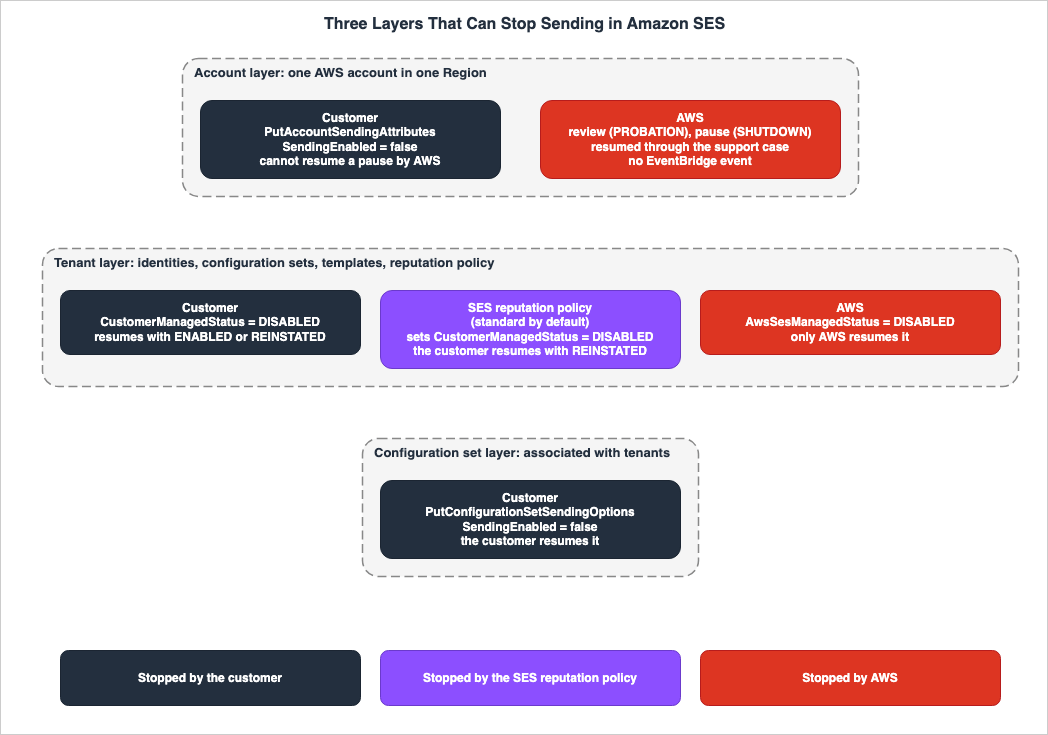
4. Defaults and How Each Layer Is Stopped
This chapter details the defaults, how each of the three layers is stopped, and how it is resumed.4.1 The Tenant Layer
There are three entities that can pause a tenant: customers, the SES reputation policy, and AWS.Customers can pause a tenant by setting the tenant's record on their side to
DISABLED using UpdateReputationEntityCustomerManagedStatus. According to the tenants page, pausing sending through the console also modifies this record.The SES reputation policy automatically pauses tenants when a finding meets the policy's criteria. The tenants page describes the three values for the reputation policy as follows:
- Standard: Automatically pauses a tenant's sending if a "High" finding is detected. The tenants page marks standard as recommended.
- Strict: Automatically pauses a tenant's sending if any finding is detected, including "Low" findings.
- None: Does not automatically pause tenants. Findings are recorded and visible.
The UpdateReputationEntityPolicy page lists the available values as follows:
You can select from none, standard, and strict policies.According to the same page, reputation policies are predefined policies managed by SES. This article reads "predefined" to mean that customers cannot create their own reputation policies (Inference). According to the tenants page, SES automatically assigns the standard policy when a tenant is created. The CLI example on the tenants page refers to the standard policy using the following ARN:
arn:aws:ses:us-east-1:aws:reputation-policy/standardRegarding none, the Part 3 post states:
Note: Even with the None policy enabled, Amazon SES reserves the right to apply sending pauses if a tenant exhibits severe reputation issues to protect the overall sending infrastructure and deliverability for all customers.The tenants page also mentions that the none option carries risks, as described in the Trust & Safety section. The best practices section on the tenants page recommends temporarily using none when onboarding new tenants to monitor their sending activity.
AWS pauses a tenant by setting the tenant's AWS-side record to
DISABLED. According to the tenants page, AWS Trust & Safety can pause only problematic tenants, rather than the entire account. To resume a tenant whose AWS record is DISABLED, the customer must resolve the tenant's findings and work with Trust & Safety (Section 5.4).4.2 The Configuration Set Layer
Customers can stop a configuration set by settingSendingEnabled to false with the SES API v2 operation PutConfigurationSetSendingOptions. The SES API v1 operation UpdateConfigurationSetSendingEnabled performs the same action. The SES API v1 Reference describes how to combine this operation with CloudWatch alarms to temporarily pause a configuration set's sending when a reputation metric exceeds a threshold. The automatic pausing page details the steps to automatically pause a configuration set's sending using CloudWatch and Lambda.Stopping a configuration set is done by the customer or a system created by the customer. No statement was found in the sources in Section 1.3 that SES automatically stops configuration sets.
4.3 The Account Layer
There are two entities that can stop an account from sending: the customer and AWS.Customers can stop an account from sending in a specific Region by setting the
SendingEnabled parameter to false using the SES API v2 operation PutAccountSendingAttributes. The UpdateAccountSendingEnabled operation in the SES API v1 can also stop an account from sending in a Region. The PutAccountSendingAttributes page states the following about accounts that AWS has paused:If AWS paused your account's ability to send email, you can't use this operation to resume your account's ability to send email.AWS can place an account under review and may pause its sending, based on its bounce rate and complaint rate. The enforcement FAQ also lists other reasons for a pause: issues not corrected by the end of a review period, repeated reviews for the same issue, and serious violations of the AWS Service Terms, which can lead to a pause without a prior review. The enforcement FAQ describes these rates as follows:
If your bounce rate is 5% or greater, we'll place your account under review. If your bounce rate is 10% or greater, we might pause your account's ability to send additional emailIf your complaint rate is 0.1% or greater, we'll place your account under review. If your complaint rate is 0.5% or greater, we might pause your account's ability to send additional emailThe review sentence says we'll place, and the pause sentence says we might pause. This article does not present a pause as certain once a rate is reached. For the complaint rate, the re:Post rate notification article gives a different figure (Section 9.1).
According to the enforcement FAQ, only hard bounces to unverified domains are counted towards an account's bounce rate. Temporary failures and bounces resulting from IP address blocking are not counted. The complaint rate is the percentage of complaints on mail sent to domains that send complaint feedback to SES. Both rates are calculated using a representative volume of sending activity, rather than a fixed period. The enforcement FAQ also states that it is not possible to calculate the bounce rate yourself using the sending and bounce counts from CloudWatch.
4.4 Layer Table
The following table lists the three layers, organized by the entity responsible for stopping each layer. The columns are the entity that stops it, the stopping action, the entity that resumes it and the resuming action, what it does not stop, and the source.| Layer and Stopping Entity | Stopping Action | Resuming Entity and Action | What It Does Not Stop | Source |
|---|---|---|---|---|
| Tenant, Customer | Sets CustomerManagedStatus to DISABLED via UpdateReputationEntityCustomerManagedStatus. Pauses sending from the console. | Customer sets to ENABLED or REINSTATED. | Other tenants. The impact on the account's reputation will not be stopped (tenants page; the sources disagree, see Section 6.3). | tenants page |
| Tenant, SES Reputation Policy | If a finding matches the policy's conditions, the policy sets CustomerManagedStatus to DISABLED. | Customer sets to REINSTATED. Setting ENABLED can lead to another pause while findings are open. | Other tenants. | tenants page |
| Tenant, AWS Trust & Safety | Sets AwsSesManagedStatus to DISABLED. | Only AWS. The customer resolves the issue by responding to a support case opened by AWS. | Other tenants. The account may be placed under review. | tenants page |
| Configuration Set, Customer | Sets SendingEnabled to false via PutConfigurationSetSendingOptions. In v1, uses UpdateConfigurationSetSendingEnabled. | Customer sets to true. | Sending that does not use that configuration set. | SES API v2 Reference, SES API v1 Reference |
| Account, Customer | Sets SendingEnabled to false via PutAccountSendingAttributes. In v1, uses UpdateAccountSendingEnabled. | Customer sets to true. | Other Regions. | SES API v2 Reference, SES API v1 Reference |
| Account, AWS | Places the account under review and may pause its sending. | Only AWS. The customer responds to a support case opened by AWS. Cannot be reversed using PutAccountSendingAttributes. | No statement found | enforcement FAQ, SES API v2 Reference |
The Trust & Safety section of the tenants page states that when SES has stopped a tenant's sending because of high-severity issues and has placed the account under review, a notification arrives and a support case is opened. A tenant pause and an account review can happen at the same time.
4.5 Summary Table
The following table lists this article's defaults with the columns shared by the three articles in this series.| Setting | Default When Unset | Who Can Change It | Who Cannot | When the Default Does Not Apply | Where It Is Written | Source State |
|---|---|---|---|---|---|---|
| Tenant Reputation Policy | standard. Assigned by SES when a tenant is created. | Customers can choose from none, standard, and strict using UpdateReputationEntityPolicy. | Customers cannot create their own reputation policy (Inference from "predefined"). | Even with none selected, SES reserves the right to apply pauses in severe cases (Part 3 post). | tenants page, UpdateReputationEntityPolicy page, Part 3 post | Stated |
| Tenant Suppression Scope | ACCOUNT. Applies to both existing and new tenants. | Customers can modify this using PutTenantSuppressionAttributes or the SuppressionAttributes field in CreateTenant. | — | If a configuration set has a suppression scope defined, that setting takes precedence. | tenant suppression page | Stated |
| Configuration Set Suppression Scope | If not specified, follows the tenant or account settings. | Customers can modify this using the SuppressionScope field in the SuppressionOptions of a configuration set. | — | — | tenant suppression page, SES API v2 Reference | Stated |
CustomerManagedStatus | The value right after a tenant is created: No statement found. In the setup in Chapter 10, this field was not in the response (Observation). | Customers. The SES reputation policy also sets it to DISABLED. | — | If AwsSesManagedStatus is DISABLED, the tenant cannot send, whatever this value is. | tenants page, ReputationEntity data type | Stated |
AwsSesManagedStatus | The value right after a tenant is created: No statement found. In the setup in Chapter 10, this field was not in the response (Observation). | AWS only. | Customers. Neither the CLI nor the console changes this value. | — | tenants page | Stated |
Account EnforcementStatus | HEALTHY when no issues are present. | AWS. | Customers. | Under review, it is PROBATION. During a pause, it is SHUTDOWN. | GetAccount page, enforcement FAQ | Stated |
| Tenant Event Destination | Default EventBridge event bus. | Customers create rules to receive events. | — | Account pauses and resumptions do not emit EventBridge events. | tenants page, enforcement FAQ | Stated |
| Handling of sends with no tenant attribution | How they are counted in metrics: No statement found. Suppression: for a SendEmail call without TenantName, the account-level suppression list is evaluated (suppression post). | — | — | Customers can reject messages not associated with a tenant using the ses:TenantName condition in IAM (Inference). | Mail Manager post, SES v2 authorization reference, suppression post | Metrics: No statement found. Suppression: Stated |
5. Customer-Side and AWS-Side Statuses
This chapter details the two records that determine a tenant's sending status, and the aggregate status.5.1 Two Records and the Aggregate Status
According to theReputationEntity data type, a tenant's status is maintained through two separate records: CustomerManagedStatus (maintained by the customer) and AwsSesManagedStatus (maintained by AWS). Both records contain one of the following values: ENABLED, REINSTATED, or DISABLED, along with a reason and the time of update. The aggregate status is SendingStatusAggregate. The ReputationEntity data type defines the aggregation rule as follows:If either the customer-managed status or the AWS Amazon SES-managed status is DISABLED, the aggregate status will be DISABLED and the entity will not be allowed to send emails.The entity can only send emails when both statuses permit sending.The tenants page indicates the owners of these two records as follows:
The AWS CLI and the console both update CustomerManagedStatus. Neither one changes AwsSesManagedStatus. Only AWS changes AwsSesManagedStatus.According to the tenants page, to determine which record holds the pause, you call
GetReputationEntity and compare the values of the two records. The reason in each record explains the pause.5.2 A Reputation Policy Pause Uses the Customer-Side Record
According to the tenants page, the reputation policy pauses a tenant by setting the customer-managed status record (CustomerManagedStatus) to DISABLED. The tenants page also states that customers can clear this pause themselves. A tenant paused by the reputation policy and a tenant paused by hand are paused by the same record with the same value.As an inference of this article (Inference), the reason in the customer-side record and the reason in the EventBridge event can serve as clues to tell a manual pause from an automated one. The EventBridge event example on the tenants page indicates that when a tenant is paused by hand, the reason is recorded as
Status manually updated. No statement giving the reason for an automated pause was found in the sources in Section 1.3.5.3 Differences between ENABLED and REINSTATED
Both ENABLED and REINSTATED, when referring to values in customer records, indicate a state where the tenant can send. According to the StatusRecord data type, REINSTATED allows sending even if there are open findings. The tenants page describes the behavior when reverting to ENABLED as follows:If you set ENABLED while findings are still open, the policy can pause the tenant again.According to the tenants page, to send while findings are still open, you run the same command with
--sending-status REINSTATED. Resume sending in the console also sets REINSTATED. According to the limitations section of the tenants page, while in the REINSTATED state, SES temporarily ignores open findings, and the tenant remains in this state until all findings are resolved.Regarding transitions from
REINSTATED, both the tenant introduction post and Part 3 post state that the tenant automatically transitions to ENABLED when the metrics return to a healthy state. However, this automatic transition is not described in the developer guide or the API reference (Section 9.2).5.4 DISABLED on the AWS Side
When the AwsSesManagedStatus record on the AWS side is DISABLED, tenants are unable to send emails, regardless of customer actions. The tenants page states:If the Status in AwsSesManagedStatus is DISABLED, a call to UpdateReputationEntityCustomerManagedStatus still succeeds. The tenant still cannot send email.According to the tenants page, the aggregate status stays
DISABLED, and the console turns off Resume sending for that tenant. Customers then reply to the case that AWS opened in the AWS Support Center, resolving the issue with Trust & Safety and addressing any findings related to that tenant. The Part 3 post also states that tenants stopped by Trust & Safety require resolution through AWS Support.According to the UpdateReputationEntityCustomerManagedStatus page, even if a customer modifies their own records, the AWS-side record remains unchanged. Even if the customer changes the status to
REINSTATED, email sending is only permitted when the AWS-side record also allows it.5.5 Console Display Names
According to the tenants page, the console shows a tenant's sending status with four names: Enabled, Paused, Enforced, and Reinstated. "Paused" means that the customer or an SES automated policy has paused sending for the tenant. "Enforced" indicates a state where SES has stopped the tenant due to a significant reputation issue. While the API values areENABLED, REINSTATED, and DISABLED, the display names are four. No statement on how the display names map to combinations of the two records and the aggregate status was found in the sources in Section 1.3. As an inference of this article (Inference), "Paused" likely corresponds to DISABLED on the customer's side, and "Enforced" likely corresponds to DISABLED on the AWS side. In the setup in Chapter 10, setting the customer side to DISABLED showed Paused (Observation). This article did not observe DISABLED on the AWS side.5.6 Distinguishing Events in EventBridge
According to the tenants page, SES, by default, sends events to the EventBridge default event bus when a tenant finding is detected and when the tenant's status changes. The detail-type for status change events consists of two options:Sending Status Enabled and Sending Status Disabled. The tenants page states that Sending Status Disabled is triggered both when the new status is DISABLED and when it is REINSTATED.Do not use the detail-type alone to decide if a tenant can send email.According to the tenants page, to differentiate between pausing and resuming, you should examine
detail.data.record.status. The event status reflects the state of a single record, as indicated by detail.data.origin, and does not represent the overall status of the tenant. The value of detail.data.origin can only be CUSTOMER_MANAGED or AWS_SES. To determine the tenant's overall status, call GetReputationEntity and read the aggregate status. The tenants page explains that CUSTOMER_MANAGED indicates that the status was changed by the customer or the customer's application, while AWS_SES indicates that SES changed the status. While the reputation policy modifies records on the customer's side (Section 5.2), no statement on which value detail.data.origin takes in those events was found in the sources in Section 1.3. The detail-type for finding events is Advisor Recommendation Status Open and Advisor Recommendation Status Resolved.Figure 2 illustrates the two records, along with the aggregate status, and indicates the entity responsible for each change.
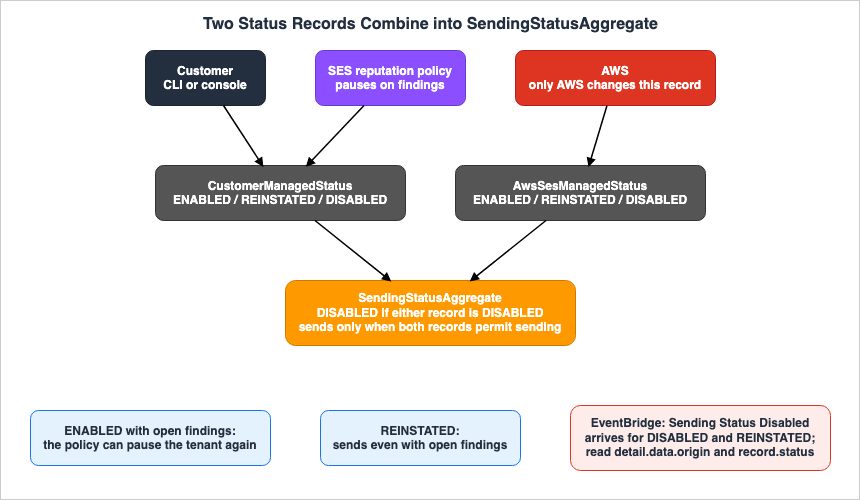
DISABLED, the aggregate status also becomes DISABLED.6. What Remains After a Tenant Is Paused
This chapter will differentiate between the scope of tenant settings and what remains within the account.6.1 The Default Suppression Scope and Its Precedence
The tenants page states the suppression list default as follows:By default, all tenants in your account share the account-level suppression list.According to the tenants page, this default setting dictates that if an address generates a bounce or complaint from an email sent by a single tenant, SES stops sending to that address for every tenant in the account. The tenant suppression page indicates that the
SuppressionScope value can be TENANT or ACCOUNT, and by default, ACCOUNT is used for both existing and new tenants. Customers can configure both the suppression scope and the reasons for suppression (SuppressedReasons) together when using PutTenantSuppressionAttributes or CreateTenant. If the reasons are empty, SES checks no suppression list and records nothing.According to the tenant suppression page, SES resolves suppression settings in the following order: configuration set, tenant, and then account default. If a configuration set has suppression settings defined, SES will use those. If the configuration set does not have suppression settings, SES will use the tenant settings. If neither the configuration set nor the tenant have settings, SES will use the account default.
The tenant suppression page describes how sends are checked when the scope is
TENANT as follows:When the scope is TENANT, SES checks only the tenant's suppression list and skips the account-level suppression list. An address that is on the account-level suppression list but not on the tenant's suppression list is not suppressed.6.2 Where Entries Are Recorded with the TENANT Scope
According to the tenant suppression page, when the scope is TENANT, SES records information as follows:Hard bounces – SES adds the address to the tenant's suppression list and the global suppression list. SES does not add the address to the account-level suppression list.Complaints are recorded only in the tenant list. If a recipient later reports the message as not spam, SES removes the complaint-reason entries from the tenant list.
The global suppression list is separate from account-level lists. According to the global suppression page, this internal list applies to all SES users, and customers cannot view or directly modify its contents. An address that produced a hard bounce can stay on this list for up to 14 days. As an inference of this article (Inference), even when the scope is set to
TENANT, addresses that produced hard bounces are temporarily added to the list that applies to all SES users.According to the tenant suppression page, messages that a tenant's suppression list kept from being sent still count toward the daily sending quota. When a tenant is deleted, SES also deletes the entries on that tenant's list. Customers can manage the tenant list by using operations like
PutSuppressedDestination and specifying a TenantName; otherwise, they manage the account-level list. In sandbox accounts, customers cannot call PutSuppressedDestination.6.3 Aggregating Reputation Metrics
The tenants page states, as the responsibility of the account owner:While the tenant feature isolates reputation tracking at the tenant level, their combined sending activity still affects your overall account reputationThe Part 3 post also mentions that a tenant's metrics contribute to the overall account reputation, providing an example. It states that if three tenants each send 1,000 emails, and only one tenant receives 150 bounces, that tenant's bounce rate is 15%, while the account's bounce rate would be 5%, calculated from 150 bounces out of a total of 3,000 emails sent. This article uses this example as an illustration. According to the enforcement FAQ, the account's bounce rate only considers hard bounces to unverified domains, using a representative sending volume. This article does not present the calculation from the Part 3 post as a method for SES to calculate the account's rate.
In contrast, the Mail Manager post states:
Amazon SES attributes bounces, complaints, and Trust and Safety signals to the tenant, not the accountThe tenant introduction post indicates that tenant issues can be prevented from impacting the overall account reputation. The Part 3 post, in a separate paragraph, also states that pausing a tenant can protect the account's reputation. Section 9.1 sets the two kinds of statements side by side.
The section on tenant management in the tenants page states that a single tenant's high bounce rate or complaint rate will not affect the deliverability of emails sent by other tenants. The subject of this sentence refers to "other tenants," not the account itself. This article does not expand this statement to imply that it does not affect the account's reputation.
6.4 Tenant Finding Conditions and Account Rates
The tenants page states that a finding is generated when a tenant's reputation metric exceeds a certain threshold, but it does not specify the numerical value of that threshold. According to the limitations section on the tenants page, this reputation metric is calculated over a period ranging from approximately 24 hours to 7 days, depending on the type of metric. Some findings are not generated until a minimum sending volume is reached.The Part 3 post gives the numbers as follows:
The Standard policy (recommended) pauses only for high-severity findings (bounce rate > 15%, complaint rate > 1%), while Strict pauses even for low severity findings (bounce rate > 10%, complaint rate > 0.5%).The developer guide and API reference do not include these values. The example finding on the tenants page has a description saying that the bounce rate exceeded 15.0%, and an impact of
HIGH. This article quotes the Part 3 numbers as the post's statement, not as values that SES guarantees.As an inference of this article (Inference), if the Part 3 numbers hold, the tenant reputation policy pauses tenants at bounce rates above the account review rate. If a standard tenant's bounce rate is between 5% and 15%, the reputation policy does not pause that tenant, but the account's bounce rate can approach the 5% review rate. However, it is not explicitly stated that the calculation periods and the bounces counted to determine the tenant's rate and the account's rate are identical (see Section 4.3). This article does not compare the two rates using the same criteria.
6.5 Notification Paths
Tenant pauses and resumptions emit EventBridge events (see Section 5.6). The enforcement FAQ states the following regarding accounts:SES does not emit an Amazon EventBridge event when it pauses or reinstates sending for your entire account.According to the enforcement FAQ, account pauses and resumptions show up in the account dashboard, the AWS Health Dashboard, and in support cases opened by AWS. The AWS Health Dashboard includes an SES sending paused event. To detect this automatically, call the SES API v2's
GetAccount and read the EnforcementStatus. According to the GetAccount page, the EnforcementStatus can have the values HEALTHY, PROBATION, or SHUTDOWN. PROBATION indicates that the account has been placed under review, while SHUTDOWN indicates that the account's sending has been paused.The enforcement FAQ also specifies that the
GetAccount's SendingEnabled field should not be used to detect pauses. SendingEnabled indicates whether the customer has turned off sending for the account and does not change when AWS pauses the account.6.6 Where the Unit of Isolation Differs
The following table lists the scope of tenant settings and what remains at the account and SES levels. The columns represent the item, what is affected by tenant settings, what remains at the account or SES levels, and the source.| Item | Affected by Tenant Settings | Remains at Account or SES Levels | Source |
|---|---|---|---|
| Suppression check at send time | If the scope is TENANT, only the tenant list is checked. | The default scope is ACCOUNT, and all tenants share an account-level list. | tenants page, tenant suppression page |
| Hard Bounce Records | If the scope is TENANT, the tenant list. | Also recorded in the global suppression list. Not recorded in the account-level list. | tenant suppression page |
| Complaint Records | If the scope is TENANT, only the tenant list. | — | tenant suppression page |
| Messages the tenant list kept from being sent | Not sent to those addresses. | Counts towards the daily sending quota. | tenant suppression page |
| Reputation Metrics | Tenant-specific findings, CloudWatch metrics, Virtual Deliverability Manager metrics. | The tenant's sending activity impacts the account's reputation (tenants page). The Mail Manager post says that SES attributes it to the tenant, not the account. | tenants page, Part 3 post, Mail Manager post |
| Rates and Conditions | Finding severity is Low or High. Numerical values are specified only in the Part 3 post. | For review, the bounce rate is 5% and the complaint rate is 0.1%. A pause is possible at 10% and 0.5%. | tenants page, Part 3 post, enforcement FAQ |
| Status Notifications | EventBridge default event bus. | No EventBridge events are emitted. Check GetAccount's EnforcementStatus and the AWS Health Dashboard. | tenants page, enforcement FAQ |
7. Sending Paths and Tenant Attribution
This chapter describes which path a send takes and which tenant it is attributed to.7.1 SendEmail and SendBulkEmail
According to the SES API v2 Reference, both SendEmail and SendBulkEmail accept an optional parameter, TenantName. Both pages include the following note:The email sending operation will only succeed if all referenced resources (identities, configuration sets, and templates) are associated with this tenant.7.2 SMTP
According to the tenants page, when sending emails using a tenant via SMTP, the tenant name must be included in the email header.X-SES-TENANT: MyTenantThe tenants page states that this header indicates to SES which tenant's resources to verify and whose reputation to track.
7.3 Mail Manager
According to the Mail Manager post, Mail Manager rules have the following actions: Add header, Write to S3, Invoke Lambda, Send to internet, SMTP relay, and Drop. The post says the following about tenant attribution:Amazon SES performs tenant attribution only during send processing.According to the Mail Manager post, tenant management applies to the Send to internet action and to Lambda functions that call
SendEmail with the TenantName parameter or the X-SES-TENANT header. The SMTP relay action passes messages to a third-party SMTP server, so SES does not process the send, and therefore tenant attribution does not apply. The Write to S3 and Drop actions do not pass messages to SES. The post compares five patterns, including adding the X-SES-TENANT header with the Add header action before passing the message to Send to internet.According to the Mail Manager post, sends for a paused tenant fail with a rejection error. Mail Manager does not redirect messages from paused tenants to an alternative route, nor does it attempt to resend them.
7.4 Sends with No Tenant and the IAM Condition
No statement was found in the sources in Section 1.3 on how sends that carry neitherTenantName nor X-SES-TENANT are counted in account-level and tenant-level metrics. For suppression, the suppression post states that a SendEmail call without TenantName falls back to evaluating the account-level suppression list. The Part 3 post indicates that existing sends can be migrated to a tenant without interruption, outlining a process to modify applications to include the tenant name and configuration set in sends after resources have been associated.According to the SES v2 authorization reference, the condition key
ses:TenantName is used to restrict authorization based on the tenant name used in the send. The Mail Manager post provides an example of adding the ses:TenantName condition to the IAM role of the Send to internet action.Messages tagged with any other tenant value, or messages with no tenant header, are denied.As an inference of this article (Inference), customers can use the
ses:TenantName condition in the IAM policy of the sending principal to reject sends without a tenant at the entry point.No statement was found either on whether
TenantName can be passed when calling SES from an EventBridge Scheduler's universal target. The delivery guarantees for EventBridge Scheduler are covered in the Amazon EventBridge Scheduler Delivery Semantics document on this site.7.5 The Sending Path Table
The following table lists whether each sending path attributes the send to a tenant. The columns are the path, tenant attribution, source, and source state.| Path | Tenant Attribution | Source | Source State |
|---|---|---|---|
SendEmail's TenantName | Yes. The send succeeds only when all resources are associated with the tenant. | SES API v2 Reference | Stated |
SendBulkEmail's TenantName | Yes. The conditions are the same as for SendEmail. | SES API v2 Reference | Stated |
SMTP with the X-SES-TENANT header | Yes. | tenants page | Stated |
| Mail Manager's Send to internet | Yes. Includes adding a header. | Mail Manager post | Stated |
From Mail Manager, via a Lambda function, to SendEmail | Yes, if the Lambda function passes the TenantName or a header. | Mail Manager post | Stated |
| Mail Manager's SMTP relay, Write to S3, Drop | No. SES does not process the send. | Mail Manager post | Stated |
| EventBridge Scheduler's universal target | No statement found | — | No statement found |
| Send with none of these | How it is counted: No statement found. Suppression: for a SendEmail call without TenantName, the account-level list is evaluated (suppression post). Can be rejected using IAM's ses:TenantName condition (Inference). | Mail Manager post, SES v2 authorization reference, suppression post | Counting: No statement found. Suppression: Stated |
8. Stopping a Configuration Set
This chapter discusses the relationship between managing the configuration set layer and the tenant layer.8.1 v2 and v1 Operations
The operation to stop sending from a configuration set is available through SES API v2'sPutConfigurationSetSendingOptions and SES API v1's UpdateConfigurationSetSendingEnabled. The SES API v1 Reference describes UpdateConfigurationSetSendingEnabled as follows:You can execute this operation no more than once per second.8.2 Switching Reputation Metric Collection
The SES API v2 operationPutConfigurationSetReputationOptions allows you to enable or disable reputation metric collection for a configuration set using the ReputationMetricsEnabled parameter. This action does not stop sending emails. This article clarifies that stopping metric collection is distinct from stopping email delivery.8.3 Relationship to Tenant Status
No statement was found in the sources in Section 1.3 on what happens to a tenant's two records and the aggregate status when only the associated configuration set is stopped. As an inference of this article (Inference), stopping a configuration set stops sends that use that configuration set, independent of the tenant's status. Since sends through a tenant require a configuration set to be specified (as described in Section 3.2), if a tenant is associated with only one configuration set, stopping that configuration set also stops sends through that tenant. In the setup in Chapter 10, stopping the configuration set left the tenant's customer-side record and aggregate status atENABLED, and sends that used that configuration set failed with a SendingPausedException (Observation).9. Where the Sources Disagree and What They Do Not Say
This chapter gathers instances where the information in the sources conflicts, where information is missing, or where no statement could be found.9.1 Where the Sources Disagree
- Tenant Metrics vs. Account Reputation: The tenants page states that combined activity from tenants can impact the overall reputation of an account. The Part 3 post states that tenant metrics contribute to the overall account reputation. The Mail Manager post states that SES attributes bounces, complaints, and Trust and Safety signals to the tenant, rather than the account. The tenant introduction post states that tenant issues can be managed to prevent them from affecting the overall account reputation. The Part 3 post, in a different section of the same post, also states that pausing a tenant can protect the account's reputation (Section 6.3).
- Account Complaint Rate: The enforcement FAQ and the re:Post review and pause article state that a complaint rate of 0.1% or greater leads to review, and 0.5% or greater may lead to a pause. The re:Post rate notification article states that if the complaint rate exceeds 0.01%, SES pauses the account's sending (Section 4.3).
- Part 3 Post Code Comments: In the Part 3 post, the example code for modifying the reputation policy includes a comment indicating that sending should be stopped when passing the ARN for the strict policy, and a comment suggesting monitoring and then resuming when passing the ARN for the none policy. The tenants page and the UpdateReputationEntityPolicy page clarify that the reputation policy is used to select conditions for automatic pausing, and does not represent actions to stop or resume sending. Actions to stop and resume sending are managed through
UpdateReputationEntityCustomerManagedStatus(Section 4.1, Chapter 5).
This article does not definitively identify any of these documents as containing errors.
9.2 What the Documentation Does Not List
- Numerical Values for Tenant Findings: The developer guide and API reference do not include numerical values. Only the Part 3 post provides these values (see Section 6.4).
- Transitioning from
REINSTATED: The tenants page states that a tenant remains in theREINSTATEDstatus until all findings are resolved. The tenant introduction post and the Part 3 post indicate that a tenant is automatically transitioned toENABLEDonce the metrics return to a healthy state. However, the developer guide and API reference do not document this automated transition (see Section 5.3).
9.3 Items with No Statement Found
This article identifies the following items for which descriptions could not be found after reviewing the materials in Section 1.3 and searching AWS documentation:- How sends that carry neither
TenantNamenorX-SES-TENANTare counted in account metrics and tenant metrics (Section 7.4). - Whether the
TenantNamecan be passed when calling SES from an EventBridge Scheduler universal target (Section 7.4). - A tenant's two records and the aggregate status when only the tenant-associated configuration set is stopped (Section 8.3).
- The values of the two records immediately after a tenant is created (Section 4.5).
- The correspondence between the console display names "Paused" and "Enforced" and the combinations of the two records (Section 5.5).
- The wording of the reason in the record when a reputation policy automatically pauses a tenant (Section 5.2).
- When a reputation policy automatically pauses a tenant, whether the
detail.data.originfield in the EventBridge event isCUSTOMER_MANAGEDorAWS_SES(Section 5.6). - Whether sends to the mailbox simulator are counted in tenant metrics and findings. The mailbox simulator page states that sends to the mailbox simulator do not affect deliverability or reputation metrics, while the deliverability concepts page states that they are not counted in bounce or complaint metrics. Neither page mentions tenant metrics. In the setup in Chapter 10, the one send to the bounce simulator was counted in the tenant's CloudWatch Bounce metric (Observation). Whether it counts toward findings was not observed.
- Whether SES v1 sending operations, such as
SendRawEmail, have a parameter that corresponds toTenantName. This article only verified SES API v2'sSendEmailandSendBulkEmail. - Whether an account review or pause affects sending in other Regions (Section 4.4).
9.4 Important Notes When Reading
- The section on CloudWatch metrics on the tenants page describes the "Complaints" metric as representing the number of bounced emails for a tenant. This article quotes the sentence and does not judge which count it represents.
- The ARN (Amazon Resource Name) for the tenant in the example on the tenants page is provided in two formats. The CLI example uses the format
tenant/tenantId, while the response and event examples use the formattenant/{tenant-name}/{tenant-id}. The responses in the setup in Chapter 10 used the latter format (Observation). - In the example of the EventBridge event on the tenants page, the
timefield displays a value from 2025. This value is provided for illustrative purposes only. - The tenants announcement of August 1, 2025 states that the capabilities are available in all AWS Regions where Amazon SES is offered. The announcement of November 6, 2026, which added six Regions to SES, does not mention tenants, and this article did not test tenants in those six Regions.
10. What This Setup Showed
This chapter describes the setup tested inus-east-1 on November 7, 2026, and what it showed. Each item is a single observation, not a commitment made by the documentation. This article does not override statements in the documentation with these observations.10.1 Setup
- The account is an SES sandbox account (no production access). The only destination for sending is the mailbox simulator.
- CloudFormation created one email address identity, three configuration sets, two tenants, one EventBridge rule, and one log group. The configuration sets were associated with tenant A, with tenant B, and with no tenant.
- Tenant A did not specify a suppression scope, and tenant B's scope was set to
TENANT. No default configuration set was assigned to the identity. - The state-altering operations were performed using AWS CLI version 2.39.3.
- The setup did not trigger an automatic pause by the reputation policy or
DISABLEDon the AWS side, to avoid sends that could hurt reputation.
10.2 The Tenants Right After Creation
Following tenant creation, theget-tenant command returned a SendingStatus of ENABLED. The suppression attribute for Tenant A was not present in the response. Tenant B returned a scope of TENANT along with the reasons BOUNCE and COMPLAINT. The tenant ARN followed the format tenant/{tenant-name}/{tenant-id} (Section 9.4).The response from
get-reputation-entity was as follows (with certain values redacted):{
"ReputationEntity": {
"ReputationEntityType": "RESOURCE",
"ReputationManagementPolicy": "arn:aws:ses:us-east-1:aws:reputation-policy/standard",
"SendingStatusAggregate": "ENABLED",
"ReputationImpact": "NONE"
}
}The response did not include the
CustomerManagedStatus and AwsSesManagedStatus fields. The ReputationEntity data type lists only LOW and HIGH as values for ReputationImpact. NONE is a value that the data type does not list.10.3 Sending and Resource Association
The following table lists the results of theSendEmail operation, organized by tenant name and configuration set combinations.| Send | TenantName | Configuration Set | Result |
|---|---|---|---|
| s1 | Tenant A | Configuration set associated with Tenant A | Success |
| s2 | Tenant A | Configuration set not associated with any tenant | AccessDeniedException |
| s7 | Tenant A | Configuration set associated only with Tenant B | AccessDeniedException |
| s3 | Tenant A | None specified | Success |
| s4 | None specified | Configuration set associated with Tenant A | Success |
| s5 | None specified | Configuration set not associated with any tenant | Success |
The error encountered with s2 was:
An error occurred (AccessDeniedException) when calling the SendEmail operation: Tenant not associated with resources [arn:aws:ses:us-east-1:123456789012:configuration-set/b79-ses-demo-cs-unassoc].s3 succeeded through Tenant A without a configuration set, and the identity had no default configuration set. The tenants page states that sending through a tenant requires a configuration set (Section 3.2). This article does not override that statement with this observation.
10.4 The Three Reputation Policy Values
Tenant A's reputation policy was changed to strict, then none, then standard. Each change was reflected in theReputationManagementPolicy within get-reputation-entity. The CustomerManagedStatus field did not appear, and no EventBridge events arrived. When providing an ARN for a non-existent policy, a BadRequestException was returned with the message Provided resource identifier is invalid.10.5 A Customer Pause and How It Was Resumed
The following table outlines the results when the customer-side record for Tenant A was changed in turn toDISABLED, REINSTATED, and ENABLED.| Value Set | CustomerManagedStatus | Aggregate Status | Console Display Name | Send Through Tenant A | EventBridge Event |
|---|---|---|---|---|---|
DISABLED | DISABLED | DISABLED | Paused | Failed with MessageRejected | Sending Status Disabled, CUSTOMER_MANAGED, DISABLED |
REINSTATED | REINSTATED | REINSTATED | Reinstated | Success | Sending Status Disabled, CUSTOMER_MANAGED, REINSTATED |
ENABLED | ENABLED | ENABLED | Enabled | Success | Sending Status Enabled, CUSTOMER_MANAGED, ENABLED |
The reason for all three events was
Status manually updated. The SendingStatus returned by get-tenant also matched the set value. The AwsSesManagedStatus field was not present in any of the responses. While Tenant A was DISABLED, sends through Tenant B still succeeded. The failed send through Tenant A returned the following (with portions of the ARN redacted):An error occurred (MessageRejected) when calling the SendEmail operation: Sending disabled for <arn:aws:ses:us-east-1:123456789012:tenant/b79-ses-demo-tenant-a/<tenant-id-1>>. For more information, please check the resource configuration and status.This configuration's tenant had no open findings. Therefore, this setup did not show the difference between
ENABLED and REINSTATED when there are open findings (Section 5.3).10.6 When Only the Configuration Set Is Stopped
When theSendingEnabled setting for the configuration set associated with Tenant A was set to false, sends that used that configuration set failed with the following error, both when they named Tenant A and when they named no tenant:An error occurred (SendingPausedException) when calling the SendEmail operation: Sending is paused for configuration set b79-ses-demo-cs-aDuring this time, Tenant A's
CustomerManagedStatus and aggregate status remained in the ENABLED state. Once SendingEnabled was set back to true, sends succeeded.10.7 Suppression Lists and the Bounce Simulator
One email was sent through Tenant B to the bounce address of the mailbox simulator. Ninety seconds later, Tenant B's list remained empty, and the address was not found on the account-level list either. The global suppression list was not checked, because customers cannot view its contents.10.8 CloudWatch Metrics and Sends with No Tenant
After the sends, the metrics in theAWS/SES namespace were read as sums over the last 6 hours.| Scope | Send | Delivery | Bounce |
|---|---|---|---|
Tenant A, with dimensions TenantId and TenantName | 5 | 5 | — |
| Tenant B, with the same dimensions | 3 | 2 | 1 |
| Account (no dimension) | 11 | 10 | 1 |
With this configuration, 10 sends succeeded: 5 named Tenant A, 3 named Tenant B, and 2 (s4 and s5) named no tenant. The Send metric for Tenant A was 5, the same as the number of sends that named Tenant A. Even when using a configuration set associated with Tenant A, message s4, which was sent without a tenant specified, was not counted in Tenant A's metrics. The Send metric for the account, with no dimensions, was 11, one more than the 10 sends in this setup. This article did not identify that one send. The Bounce metric for Tenant B counted the one send to the bounce simulator.
These are CloudWatch send counts, not the bounce rate used for the account review (Section 4.3). This article does not conclude from this observation how sends with no tenant are counted toward the account's reputation.
10.9 Account Status
TheEnforcementStatus returned by get-account was HEALTHY both before and after the setup, and SendingEnabled was true.10.10 What This Setup Does Not Show
- The setup did not trigger an automatic pause by the reputation policy or
DISABLEDon the AWS side, so it did not show thedetail.data.originvalue or the reason text for those events. - It did not show the difference between
ENABLEDandREINSTATEDwhile findings are open. - It did not show how sends with no tenant are counted toward the account's reputation rates and findings.
- It ran once in a sandbox account. Whether an account with production access behaves the same was not checked.
11. Failure Modes
This chapter gathers common failures from the documentation quoted in Chapters 4 through 8.- Sending through a tenant without associating the resources: SES verifies, for each request, whether the identity, configuration set, and template are associated with a tenant. If not, the sending request will fail.
- Sending through a tenant without specifying a configuration set: According to the tenants page, when sending from a tenant, you must either specify a configuration set associated with the tenant, or use an identity that has a default configuration set associated with the tenant.
- Setting
ENABLEDafter a reputation policy pause: If you set the tenant toENABLEDwhile there are open findings, the reputation policy can pause the tenant again. To continue sending even with open findings, set the status toREINSTATED. - Trying to resume an AWS-side pause through the customer-side record: When
AwsSesManagedStatusisDISABLED, callingUpdateReputationEntityCustomerManagedStatuswill succeed, but the tenant will still be unable to send. - Assuming that tenants also separate suppression lists: The default scope for suppression is
ACCOUNT, meaning all tenants share an account-level list. - Relying on the account-level list after setting the scope to
TENANT: When the scope isTENANT, SES does not check account-level lists. It will send to recipients who are on the account-level list but not on the tenant-level list. - Assuming that pausing a tenant keeps the account out of review: The tenants page states that the tenants' combined sending activity can affect the account's reputation, and that the account can be placed under review when Trust & Safety stops a tenant.
- Assuming that none means a tenant never pauses: The Part 3 post says that even with none, SES reserves the right to apply pauses in severe cases. AWS changes the AWS-side record regardless of the reputation policy.
- Waiting for an account pause on EventBridge: Account pauses and reinstatements do not emit EventBridge events. Check the
EnforcementStatusinGetAccount. - Detecting an account pause with
SendingEnabled:SendingEnableddoes not change even if AWS pauses the account. - Deciding from the
Sending Status Disableddetail-type alone that a tenant cannot send: TheSending Status Disabledevent also arrives when the status changes toREINSTATED. The event status reflects only the record named indetail.data.origin. - Not setting tenants up again in each Region: Tenants are Region-specific resources and are not automatically replicated across Regions.
12. Frequently Asked Questions about SES Tenants and Sender Reputation
This chapter addresses common questions, referencing the relevant sections of the text, focusing on the misconceptions outlined in Section 1.1.Q1. If a tenant is paused, does the account stay out of review?
The sources do not support that. The tenants page states that the tenants' combined sending activity can affect the account's overall reputation, while the Part 3 post states that a tenant's metrics contribute to the overall account reputation. The Mail Manager post states that SES attributes these to the tenant, not the account, so the sources disagree on this point (see Sections 6.3 and 9.1). According to the tenants page, when Trust & Safety pauses a tenant, the account may also be placed under review (see Section 4.4).Q2. Is a tenant pause a single state?
No. A tenant's sending status is determined by two records:CustomerManagedStatus on the customer's side and AwsSesManagedStatus on the AWS side. SendingStatusAggregate reflects the combined status. If either of these is DISABLED, the tenant will not be able to send emails (see Section 5.1).Q3. Who resumes a tenant that the reputation policy paused?
The customer does. The reputation policy pauses a tenant by setting the customer-side record toDISABLED, so the customer can resume it with UpdateReputationEntityCustomerManagedStatus. If there are any open findings, set the status to REINSTATED before sending. If the record on the AWS side is DISABLED, only AWS can resume the tenant (see Sections 5.2 through 5.4).Q4. With none, is a tenant never paused?
No. The none value turns off automatic pauses by the reputation policy. However, the Part 3 post states that SES reserves the right to apply pauses even with none in severe cases. Both customer pauses and AWS-side pauses can occur regardless of whether the value is none (see Section 4.1).Q5. If you use tenants, are suppression lists also separated per tenant?
By default, they are not. The default scope for suppression isACCOUNT, meaning all tenants share an account-level list. If you set the scope to TENANT, then tenant-specific lists are used. In that case, hard bounces are recorded in both the tenant-specific list and the global suppression list, but are not recorded in the account-level list (see Sections 6.1 and 6.2).Q6. Does EventBridge also show account pauses?
No. According to the enforcement FAQ, SES does not emit EventBridge events for account pauses and reinstatements. You should check theEnforcementStatus of the GetAccount operation, or consult the AWS Health Dashboard and support cases. Tenant pauses and reinstatements, however, do emit EventBridge events (see Sections 5.6 and 6.5).Q7. At what bounce rate does a tenant finding appear?
The developer guide and API reference do not list the numbers. The Part 3 post states that standard pauses a tenant on High findings, with a bounce rate above 15% or a complaint rate above 1%, and that strict also pauses on Low findings, with a bounce rate above 10% or a complaint rate above 0.5%. This article does not present these figures as guaranteed values provided by SES (see Section 6.4).Q8. How are sends without TenantName counted?
No statement was found. As an inference of this article (Inference), customers can use the IAM condition key ses:TenantName to reject sends that do not include a tenant (see Section 7.4).Q9. Will stopping the configuration set also stop the tenant?
No statement was found on what happens to the tenant's two records. Stopping the configuration set stops sends that use that configuration set. As an inference of this article (Inference), since sends through the tenant require a configuration set, sends through that tenant also stop going through if only one configuration set is associated with the tenant (Section 8.3). In the setup in Chapter 10, stopping the configuration set left the tenant's customer-side record and aggregate status atENABLED (Observation).13. Summary
Before segmenting sending by tenant within SES, customers should verify the following:- That you have decided whether the reputation policy for each tenant can stay at the default standard. If you monitor new tenants with none, you know that SES can still apply pauses in severe cases.
- That tenants are associated with verified identities and configuration sets, and that sending requests include either
TenantNameor theX-SES-TENANTheader. - That the IAM policy for the sending principal includes the
ses:TenantNamecondition, and that you have decided whether to reject sending requests without a tenant. - That you have decided whether to keep the default
ACCOUNTsuppression scope or setTENANT. You know that withTENANT, SES no longer checks the account-level list. - That, when monitoring pauses, you read tenants from EventBridge with
detail.data.originanddetail.data.record.status, and the account fromGetAccountwithEnforcementStatus. - That your runbook says that the customer resumes a reputation policy pause with
REINSTATEDand resolves an AWS-side pause with AWS through the support case. - That, on the premise that a tenant's sending can affect the account's reputation even when the tenant is paused, you also watch the account's bounce rate and complaint rate.
- That you have set up tenants, reputation policies, and suppression settings in every Region you use.
14. References
- Tenants - Amazon Simple Email Service
- Using tenant-level suppression lists in Amazon SES - Amazon Simple Email Service
- Amazon SES global suppression list - Amazon Simple Email Service
- Amazon SES Sending review process FAQs - Amazon Simple Email Service
- Sending test emails in Amazon SES with the simulator - Amazon Simple Email Service
- Understanding email deliverability in Amazon SES - Amazon Simple Email Service
- Automatically pausing email sending - Amazon Simple Email Service
- ReputationEntity - Amazon Simple Email Service
- StatusRecord - Amazon Simple Email Service
- UpdateReputationEntityCustomerManagedStatus - Amazon Simple Email Service
- UpdateReputationEntityPolicy - Amazon Simple Email Service
- CreateTenant - Amazon Simple Email Service
- CreateTenantResourceAssociation - Amazon Simple Email Service
- SendEmail - Amazon Simple Email Service
- SendBulkEmail - Amazon Simple Email Service
- GetAccount - Amazon Simple Email Service
- PutAccountSendingAttributes - Amazon Simple Email Service
- PutConfigurationSetSendingOptions - Amazon Simple Email Service
- PutConfigurationSetReputationOptions - Amazon Simple Email Service
- PutTenantSuppressionAttributes - Amazon Simple Email Service
- SuppressionOptions - Amazon Simple Email Service
- UpdateConfigurationSetSendingEnabled - Amazon Simple Email Service
- UpdateAccountSendingEnabled - Amazon Simple Email Service
- Actions, resources, and condition keys for Amazon Simple Email Service v2 - Service Authorization Reference
- Improve email deliverability with tenant management in Amazon SES - AWS Messaging Blog
- Implement Tenants in your Amazon SES environment, Part 3: Implementation guide - AWS Messaging Blog
- Isolate email reputation in Amazon SES Mail Manager with tenant management - AWS Messaging Blog
- Isolate email suppression per tenant with Amazon SES - AWS Messaging Blog
- Resolve Amazon SES sending account review or pause - AWS re:Post
- Set up notifications for a bounce rate or complaint rate threshold on Amazon SES - AWS re:Post
- Amazon SES introduces tenant isolation with automated reputation policies - AWS What's New
- Amazon SES now supports tenant-level suppression lists - AWS What's New
- Amazon SES now supports tenant-level deliverability insights - AWS What's New
References:
Tech Blog with curated related content
Written by Hidekazu Konishi