Amazon EventBridge Scheduler Delivery Semantics - At-Least-Once Invocation, Flexible Time Windows, Retries, and Missed Schedules
First Published:
Last Updated:
EventBridge Scheduler provides at-least-once event delivery to targets, meaning that at least one delivery succeeds with a response from the target. This statement guarantees that at least one delivery will succeed, receiving a response from the target. It does not, however, promise exactly one delivery, nor does it specify that the invocation will occur precisely at the scheduled time.This article interprets the behavior of EventBridge Scheduler — when, how often, and under what conditions it invokes targets — as a contract defined by each setting. For each setting, it lines up what users can specify, the valid values available, what happens if a value is not provided, which source the default value comes from, what occurs at the boundaries, and where the result shows. It also lines up what the sources do not state.
This article does not cover the steps for creating schedules, selecting target services, or pricing. It also does not say whether EventBridge Scheduler or the legacy scheduled rules are better. The information presented here was verified on October 22, 2026. The results in Section 10 were obtained from a small configuration created in the US East (Northern Virginia) Region, and were collected on October 22, 2026 (UTC).
Related articles on this site:
- AWS History and Timeline regarding Amazon EventBridge - Overview, Functions, Features, Summary of Updates, and Introduction
- AWS Messaging and Event Routing Decision Guide - Choosing Between SQS, SNS, EventBridge, and Kinesis
- Amazon EventBridge Custom Event Bus and the Classic Bus - What Maps From Rules to Subscribers, Which Defaults Change, and What Stays on the Classic Bus
- Event-Driven Architecture Anti-Patterns on AWS - Failure Modes, Root Causes, and How to Design Around Them
- Event-Driven Serverless Architecture on AWS - Building Resilient Workflows with API Gateway, Lambda, EventBridge, Step Functions, and DynamoDB
- What Breaks Ordering, Service by Service on AWS - SQS FIFO, SNS FIFO, Kinesis, Amazon MSK, DynamoDB Streams, and the EventBridge Custom Event Bus
- Where a Stream Consumer Can Start on AWS - Starting Positions in DynamoDB Streams, Kinesis Data Streams, KCL, and Lambda Event Source Mappings
- Deletions You Schedule on AWS - KMS Waiting Periods, Secrets Manager Recovery Windows, and What Can Be Read or Undone Meanwhile
Table of Contents
- 1. Scope and Assumptions
- 2. How to Read the Tables
- 3. The Delivery Contract Tables
- 4. When It Invokes — 60 Second Precision, Flexible Time Windows, Expressions, and Time Zones
- 5. How Many Times It Invokes — At-Least-Once, Retries, and Throttling
- 6. When It Cannot Invoke — Dead-Letter Queues
- 7. Invocations That Are Skipped and Invocations That Run Right Away
- 8. After Completion and When You Change a Schedule
- 9. Next to the Legacy Scheduled Rules
- 10. What This Configuration Returned
- 11. Failure Modes
- 12. Frequently Asked Questions About EventBridge Scheduler Delivery
- 13. Summary
- 14. References
1. Scope and Assumptions
This section first defines the intended audience, the scope of this article, the sources read, and the names used. The conclusions, presented upfront, are as follows:- The definition of at-least-once delivery in the sources is that at least one delivery succeeds with a response from the target. No statement specific to EventBridge Scheduler was found on duplicates or order.
- Without configuring flexible time windows, the target is invoked with 60 second precision. Time windows can be set between 1 and 1440 minutes; the sources say that invocations are dispersed across the window, but no statement was found on how.
- The retry range is specified in the API reference (60 to 86400 seconds, or 0 to 185 attempts). The default values (24 hours, 185 attempts) are documented in the AWS Compute Blog from November 10, 2022, and in the default fields of the AWS CDK API reference. No statement of these default values was found in the user guide, API reference, or CloudFormation template reference.
- Invocations that do not happen and invocations that happen right away fall into four cases in the statements of the sources. A time that does not exist because of the spring daylight saving change is skipped, an overlapping time in the fall is invoked only once, and re-enabling a one-time schedule after its time has passed may invoke the target right away (
may). No statement was found on what happens to the invocations a recurring schedule missed while it was disabled.
1.1 Who This Article Is For
This article is intended for the following readers.- Developers and operations personnel who are using EventBridge Scheduler, or who are currently using legacy scheduled rules, to trigger recurring or one-time processes
- Those who believe that "EventBridge Scheduler invokes exactly once at the specified time," "the default retry behavior is documented in the API reference," "failed invocations are always sent to the dead-letter queue (DLQ)," "invocations missed while the schedule was disabled will be processed in bulk when the schedule is re-enabled," and "invocations missed due to daylight saving time adjustments will be recovered later."
None of these beliefs matches the statements in the sources this article read, or each holds only under conditions. The definition of at-least-once is quoted above. The API reference specifies only the range for
MaximumEventAgeInSeconds as 60 to 86400 seconds, and for MaximumRetryAttempts as 0 to 185. The DLQ page describes the EXHAUSTED_RETRY_CONDITION attribute, stating that This attribute will be present if the error from the target API is a retryable error, and not a permanent error. Regarding daylight saving time, the user guide states that your schedule invocation is skipped during the spring transition. Section 7.5 shows what was searched for the invocations missed while a schedule was disabled.1.2 What This Article Covers, and What It Does Not
This article focuses on the contract governing how EventBridge Scheduler invokes targets. Specifically, it addresses the invocation time (60 second precision, flexible time windows, rate, cron, and at expressions,StartDate and EndDate, time zones, and daylight saving time), the number of invocations (at-least-once, retries, throttling), what happens when an invocation fails (dead-letter queue), invocations that are skipped and invocations that run right away, and automatic deletion after completion and what happens when a schedule is changed. Legacy scheduled rules are only placed side by side in Section 9.This article does not cover:
- Pricing and billing details.
- The steps for creating schedules, or console operations.
- Selecting target services. The selection criteria for services like SQS, SNS, EventBridge, and Kinesis are detailed on this site's AWS Messaging and Event Routing Decision Guide.
- The history of EventBridge Scheduler. This information is available on this site's AWS History and Timeline regarding Amazon EventBridge.
- Rules for event buses, and retries for new custom event bus subscribers. This information is available on this site's Amazon EventBridge Custom Event Bus and the Classic Bus.
- General principles of idempotency design. Section 5 of this site's Event-Driven Architecture Anti-Patterns on AWS provides this information.
- Detailed instructions for writing execution roles. This article only specifies the necessary permissions for the target and the dead-letter queue, one sentence each.
- A list of quota values by Region. This information is available on the quotas page.
1.3 Sources Read and the Date They Were Checked
On October 22, 2026, the following AWS documentation was reviewed: all 37 pages in the table of contents of the EventBridge Scheduler User Guide, 14 pages from the EventBridge Scheduler API Reference (including sections onCreateSchedule, UpdateSchedule, GetSchedule, DeleteSchedule, Target, RetryPolicy, FlexibleTimeWindow, and DeadLetterConfig), the pages for AWS::Scheduler::Schedule and AWS::Scheduler::ScheduleGroup and their associated properties in CloudFormation, three articles on EventBridge Scheduler from the AWS re:Post Knowledge Center, two pages from the AWS CDK v2 API Reference, a page on retries and a page on time zones from the console help panel (the time zone page was reviewed on October 23, 2026), a page on scheduled rules and retries from the Amazon EventBridge User Guide, the EventBridge FAQ, two articles from the AWS Compute Blog (an announcement from November 10, 2022, and an article on email delivery from September 1, 2026), and twelve "What's New" entries for EventBridge Scheduler (from November 10, 2022, to May 12, 2026).The most recent entry in the User Guide's Document History was March 25, 2026 (regarding updates to managed policies). The most recent "What's New" entry was May 12, 2026, concerning the addition of SDK API actions. EventBridge Scheduler was not named in the AWS Service Availability Updates of March, June, and September 2026.
When this article states that no statement was found, this refers to searches conducted on October 22, 2026, using various wording, and no matching text was found in the reviewed documentation. This does not mean that the functionality or behavior described is nonexistent.
1.4 Names
This article uses the following names.- EventBridge Scheduler: A service that creates schedules and invokes targets. Its resources are schedules and schedule groups.
- Scheduled rules: Rules that run on a schedule and are placed within an Amazon EventBridge event bus. The EventBridge user guide states that
Scheduled rules are a legacy feature of EventBridge. - Templated targets and universal targets: Two types of targets within EventBridge Scheduler. The ARN for a universal target follows the format
arn:aws:scheduler:::aws-sdk:service:apiAction. A similar feature with the same name, "universal target," also exists in newer Custom Event Buses, but it is a feature of a different product (see Section 5.1 of Amazon EventBridge Custom Event Bus and the Classic Bus). - Automatic deletion after completion: A feature where EventBridge Scheduler deletes schedules configured with
ActionAfterCompletionset toDELETEafter the final invocation (see Section 8.1). This is distinct from a mechanism where users reserve resource deletion with a waiting period.
2. How to Read the Tables
This section defines the columns in the two tables in Section 3, and how the source of a default is written.2.1 Columns
The two tables in Section 3 use the following seven column headings. The first six are common to the articles on this site that cover AWS contracts set by time, while the seventh is specific to this article.| Column | What the cell holds |
|---|---|
You Set | What the user can write, and where (schedule, target, or group) |
Allowed Values | The values the API Reference or the User Guide allows |
If You Set Nothing | What happens when the user writes nothing, with the source of that statement |
At the Boundary | What happens at an edge: the window, the end of retries, daylight saving time, a past time, completion |
Where It Shows | Where the result becomes visible: metrics, DLQ message attributes, the schedule's state |
No Statement Found | What the sources do not state, after a search of the sources in Section 1.3 |
Source of the Default | Which source states the value in If You Set Nothing |
2.2 How the Source of a Default Is Written
Default values for EventBridge Scheduler are not consolidated in a single document. They are distributed across various resources, including the API Reference, the User Guide's main text, console procedure instructions, the console help panel, the AWS Compute Blog, and the default field descriptions in the AWS CDK v2 API Reference. In theSource of the Default column, this article writes one of the following seven labels.| Label | What it means |
|---|---|
API Reference | A field description in the EventBridge Scheduler API Reference |
User Guide | Body text in the EventBridge Scheduler User Guide |
Console procedure | A step in a console procedure in the User Guide |
Console help panel | A page of the EventBridge Scheduler console help panel |
Compute Blog (2022-11-10) | The AWS Compute Blog post that introduced EventBridge Scheduler |
AWS CDK default field | The default field in the AWS CDK v2 API Reference |
No statement found | No source in Section 1.3 states a value |
The entries for the AWS Compute Blog and AWS CDK default values do not represent definitive statements of service specifications. The Compute Blog provides a description at the time of its publication, and the CDK entry describes what a CDK component provides. This article names these two as sources and does not present them as statements of service specifications.
2.3 Setting Nothing at Creation and at Update
When creating a schedule and when updating it, the meaning of "not specifying" differs. The API reference forUpdateSchedule states that if a non-required field is not included in the request, that field will be set to its system-default value after the update. The user guide's schedule state page states If you do not specify a parameter that you've previously set, it defaults to null. The column titled If You Set Nothing in Section 3 refers to the behavior during schedule creation. The handling of parameters during updates is described in Section 8.3.2.4 Values from the Sources and Values Returned in This Configuration
The tables in Sections 3 through 9 contain only values from the sources. In the tables in Section 10, the values returned in this article's configuration are placed in a separate column from what the sources state. The values in Section 10 are a record of that configuration on that day, not values that the sources guarantee.3. The Delivery Contract Tables
This section lays out the contract for each schedule setting in two tables. The table in Section 3.1 lists what the user writes, and the table in Section 3.2 lists what follows from it. The rows in both tables are arranged in the same order.3.1 What You Write
| Setting | You Set | Allowed Values | If You Set Nothing | Source of the Default |
|---|---|---|---|---|
ScheduleExpression | An at(), rate(), or cron() expression on the schedule | at(yyyy-mm-ddThh:mm:ss); rate(value unit) with a positive value; cron() with six fields and no rate faster than 1 minute | Required | API Reference |
ScheduleExpressionTimezone | An IANA time zone name, or an offset format through the AWS CLI or SDKs | String of 1 to 50 characters | UTC (see Sections 4.5 and 10) | Console help panel |
StartDate | A timestamp in UTC | Ignored for one-time schedules | A recurring schedule begins as soon as it is created and available | Console procedure; User Guide (rate-based schedules) |
EndDate | A timestamp in UTC | Ignored for one-time schedules | A recurring schedule continues to invoke its target indefinitely; with ActionAfterCompletion DELETE, it is not deleted automatically | Console procedure; User Guide |
FlexibleTimeWindow.Mode | OFF or FLEXIBLE on the schedule | OFF, FLEXIBLE; the object is required in CreateSchedule | Required; with OFF, targets are invoked with 60 second precision | API Reference |
MaximumWindowInMinutes | The window length in minutes | 1 to 1440 | Must be specified when Mode is FLEXIBLE | User Guide |
State | ENABLED or DISABLED | ENABLED, DISABLED | Enabled | Console procedure |
MaximumEventAgeInSeconds | The retry age in RetryPolicy on the target | 60 to 86400 | 86400 seconds (24 hours) | Compute Blog (2022-11-10); AWS CDK default field |
MaximumRetryAttempts | The retry count in RetryPolicy on the target | 0 to 185 | 185 | Compute Blog (2022-11-10); AWS CDK default field |
DeadLetterConfig | The ARN of an Amazon SQS standard queue on the target | A FIFO queue is not supported | No DLQ; the event is dropped after retries | Compute Blog (2022-11-10) |
ActionAfterCompletion | NONE or DELETE on the schedule | NONE, DELETE | No action after the schedule completes | Console procedure |
GroupName | A schedule group, at creation only | 1 to 64 characters | The default schedule group | API Reference |
Input | Text or JSON passed to the target | Up to 256 KB; JSON for templated Lambda, Step Functions, and EventBridge targets | A default notification is delivered to the target | API Reference |
3.2 What Happens
| Setting | At the Boundary | Where It Shows | No Statement Found |
|---|---|---|---|
ScheduleExpression | Spring forward: a non-existent time is skipped; fall back: runs only once; rate(1 days) is 24 hours after the last invocation | The console's preview of the next 10 execution times | What happens when an at() time is already past at creation |
ScheduleExpressionTimezone | Adjusted for daylight saving time in that zone; not adjusted in UTC or in zones without daylight saving time | None stated | — |
StartDate | Without it, a recurring schedule begins as soon as it is created; one-time schedules ignore it | InvocationAttemptCount | — |
EndDate | Invocations might stop on, or before, EndDate | None stated | — |
FlexibleTimeWindow | Invoked within the window after the scheduled time; might not trigger at the start of the window | InvocationAttemptCount | How invocations are spread within the window |
State | Re-enabling a one-time schedule after its time may invoke the target immediately | None stated | Whether a recurring schedule catches up on the invocations it missed while disabled |
RetryPolicy | Retries with exponential backoff until either limit is reached | TargetErrorCount; TargetErrorThrottledCount; InvocationDroppedCount | A list of retryable and permanent errors |
DeadLetterConfig | EXHAUSTED_RETRY_CONDITION is present if the error is retryable; a failed DLQ write leaves the DLQ empty | InvocationsSentToDeadLetterCount; InvocationsFailedToBeSentToDeadLetterCount | Whether EXHAUSTED_RETRY_CONDITION is absent for every permanent error |
ActionAfterCompletion | DELETE deletes the schedule after its last invocation; a recurring schedule needs EndDate | None stated | — |
GroupName | A schedule cannot move to another group; deleting a group deletes its schedules | The group's state (ACTIVE, DELETING) | — |
Input | A universal target's Input is not validated at creation; an invalid one fails on every invocation | TargetErrorCount; ERROR_CODE in the DLQ message | Whether retries differ between templated and universal targets |
Notes on the tables:
- For the default values of
MaximumEventAgeInSecondsandMaximumRetryAttemptsin Section 3.1, no statement was found in the user guide, API reference, or CloudFormation template reference. Details regarding the source of these defaults can be found in Section 5.2. - The default values for
State,StartDate,EndDate, andActionAfterCompletionin Section 3.1 are derived from the console instructions in the Getting started page of the user guide (Sections 4.4 and 8.1). RegardingState, it states,By default, the EventBridge Scheduler enables your schedule.These fields in the API reference do not specify default values. - The default value for
DeadLetterConfigin Section 3.1 is based on a statement from the AWS Compute Blog from November 10, 2022 (If that fails, the message is dropped, since by default there is not a DLQ configured.). - For the units of
rate()in Section 3.1, the API reference lists six units in singular and plural forms, while the user guide lists three plural units (Section 4.1).
4. When It Invokes — 60 Second Precision, Flexible Time Windows, Expressions, and Time Zones
This section details what the documentation specifies regarding the timing at which EventBridge Scheduler invokes targets.4.1 Three Expressions
EventBridge Scheduler schedules are defined using one of three expressions:rate(), cron(), and at(). rate() and cron() define recurring schedules, while at() defines schedules that execute once.rate(): Invokes at a specified interval. The user guide describes values as positive numbers, with units specified asminutes,hours, ordays. The API reference forCreateSchedulelists six possible units:minute,minutes,hour,hours,day, anddays. The sources disagree on the number of units.cron(): Defined using six fields: minute, hour, day, month, weekday, and year. The user guide states,Cron expressions that lead to rates faster than 1 minute are not supported.It is not possible to use*in both the day and weekday fields;?goes in one of them.at(): Specifies a single execution time in the formatat(yyyy-mm-ddThh:mm:ss).
The user guide's troubleshooting page notes that when creating or editing schedules in the console, the system displays the scheduled times for the next 10 executions.
4.2 60 Second Precision
The user guide describes the precision when no flexible time window is set as follows.All schedule types on EventBridge Scheduler invoke their targets with 60 second precision. This means that if you set your schedule to run at 1:00, it will invoke the target API between 1:00:00 and 1:00:59, assuming that a flexible time window is not set.
The troubleshooting page further clarifies that
schedule invocations are not clamped to the 0th second of a minute. As an example, it notes that a schedule configured with rate(1 hour) may execute at times such as 2:00:45 PM, 3:00:32 PM, and 4:00:18 PM. So the documentation does not say that a schedule runs at the same second each time. No statement was found on which second in the scheduled minute the invocation happens.4.3 Flexible Time Windows
A flexible time window allows for a range of times when the target can be invoked. InCreateSchedule, the FlexibleTimeWindow field is required, and you must specify either OFF or FLEXIBLE in the Mode setting. The flexible time windows page of the user guide states:You must specify whether you want to set a flexible time window or not. If you do not want to set this option, specify OFF. If you do set the value to FLEXIBLE, you must then specify a maximum window of time during which you schedule will run.
According to the API reference, the range for
MaximumWindowInMinutes is Minimum value of 1. Maximum value of 1440. The flexible time windows page gives an example of setting a 15-minute time window for a schedule that runs hourly, noting that it invokes the target within 15 minutes after the scheduled time. The time window extends after the scheduled time.Regarding the purpose of the time window, the flexible time windows page states that setting a time window increases the schedule's reliability by
dispersing your target invocations. An AWS Compute Blog post from November 10, 2022, states that the scheduled tasks are dispersed across the time window to reduce the impact of multiple requests on downstream services. Concerning where in the time window the target is invoked, the troubleshooting page notes that Flexible time windows allow EventBridge Scheduler to optimize invocations., and The schedule might not trigger exactly at the start of the window. No statement was found on how invocations are dispersed in the time window (for example, evenly or toward particular times).4.4 StartDate and EndDate
StartDate and EndDate are timestamps in UTC. The API reference describes StartDate as The date, in UTC, after which the schedule can begin invoking its target., and continues, invocations might occur on, or after, the StartDate you specify. Similarly, regarding EndDate, it states, invocations might stop on, or before, the EndDate you specify.For one-time schedules, these fields are not used. The user guide states,
When you configure a one-time schedule, EventBridge Scheduler ignores the StartDate and EndDate you specify for the schedule.Regarding rate-based schedules and the absence of a
StartDate, the user guide explains, If you do not provide a StartDate for a rate-based schedule, your schedule starts invoking the target immediately. This means the initial invocation occurs shortly after creation. The Getting started page of the user guide, in the console instructions for recurring schedules, states:A recurring schedule without a start date will begin as soon as it is created and available. A recurring schedules without an end date will continue to invoke it's target indefinitely.
This page describes the steps for creating a schedule in the console. The
StartDate and EndDate fields in the API reference do not specify behavior when these values are not provided. An article in the AWS Knowledge Center, "Why is my Amazon EventBridge schedule starting immediately?", states, If you don't set a start date or a flexible time window, then your schedule invokes the target immediately. The article also lists a flexible time window as a condition. The Knowledge Center article is a troubleshooting guide, not a description of the service's specifications.4.5 Time Zones
The user guide states that cron and one-time schedules can be configured to run in any specified time zone. EventBridge Scheduler uses the Time Zone Database maintained by the Internet Assigned Numbers Authority (IANA). The console help panel states that when you create a schedule with the AWS CLI or an EventBridge Scheduler SDK, you can also set the time zone in an alternative format such as UTC-offset. In that format, the console does not show the next invocation date. As an example, the user guide shows a cron schedule that invokes a target every day at 8:30 a.m. inAmerica/New_York.No statement was found in the user guide, API reference, or CloudFormation template reference on which time zone is used when
ScheduleExpressionTimezone is not specified. The time zone page in the console help panel states, If you don's set a time zone, your schedule is set in UTC by default. (Verified on October 23, 2026. The spelling don's appears in the original text.) The API reference provides an example of a cron schedule using 8:00 am (UTC+0) in the ScheduleExpression field, but this is presented as an example time and does not represent a default setting. Section 10 documents the GetSchedule response for schedules that do not include this parameter.5. How Many Times It Invokes — At-Least-Once, Retries, and Throttling
This section describes how many times EventBridge Scheduler will invoke a target.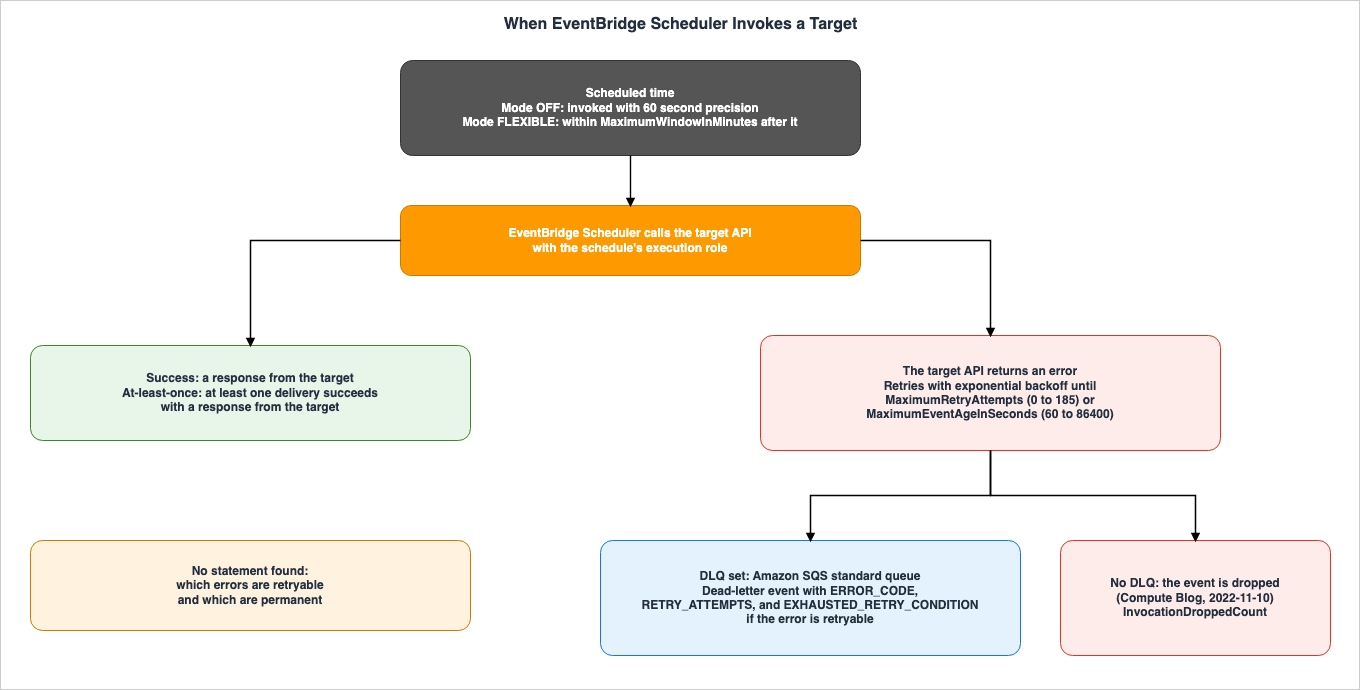
5.1 The Definition of At-Least-Once, and What It Does Not Say
The definition of "at-least-once" is in the user guide, under the "Retries" section of the "Key Features" page.Retries – EventBridge Scheduler provides at-least-once event delivery to targets, meaning that at least one delivery succeeds with a response from the target. EventBridge Scheduler allows you to set the number of retries for your schedule for a failed task.
This definition establishes a lower limit of one successful delivery. It does not specify an upper limit. The definition has no statement that rules out more than one successful delivery.
No statement specific to EventBridge Scheduler was found on whether a target might receive the same invocation multiple times (duplication), or whether invocations are delivered in the intended order. The
ClientToken in the API reference, used in requests such as CreateSchedule, is a value for ensuring idempotency in requests, rather than a statement about delivery to the target. A general discussion of idempotency design on the target side can be found in Section 5 of this site's Event-Driven Architecture Anti-Patterns on AWS. Service-specific ordering guarantees are addressed in this site's What Breaks Ordering, Service by Service on AWS.5.2 The Retry Range and Where the Defaults Come From
The retry policy (RetryPolicy) is a child of the target (Target) and holds two values: MaximumEventAgeInSeconds, which specifies the maximum time to continue retries, and MaximumRetryAttempts, which defines the maximum number of retry attempts.The same values, 24 hours and 185 attempts, appear in multiple sentences with different origins. The following table lists what each statement is about.
| Source | Statement | What it is about |
|---|---|---|
EventBridge Scheduler API Reference, RetryPolicy | Minimum value of 60. Maximum value of 86400. and Minimum value of 0. Maximum value of 185. | The allowed range; no default value is stated |
CloudFormation, AWS::Scheduler::Schedule RetryPolicy | The same descriptions and ranges as the API Reference | The allowed range; no default value is stated |
| EventBridge Scheduler User Guide, console procedure | The maximum value is 24 hours. and The maximum value is 185 retries. | The maximum values |
| Console help panel, Retry policy | The maximum value is 24 hours. and The maximum value is 185 retries. | The maximum values |
| AWS Compute Blog, 2022-11-10 | By default, EventBridge Scheduler tries to send the event for 24 hours and a maximum of 185 times. | The default for EventBridge Scheduler |
AWS CDK v2, aws_scheduler.ScheduleTargetConfig | Maximum retry attempts of 185 and maximum age of 86400 seconds (1 day) | The default field of a CDK type |
AWS CDK v2, aws_scheduler_targets.ScheduleTargetBaseProps | maxEventAge Duration.hours(24); retryAttempts 185 | The default fields of the CDK construct library |
| Amazon EventBridge User Guide, retry page for rules | By default, EventBridge retries sending the event for 24 hours and up to 185 times | Event bus rules, a different feature |
In the table, the statements that give the EventBridge Scheduler defaults are the AWS Compute Blog and the two AWS CDK fields. The text in the help panel and console instructions describes maximum values, not default values. The final row concerns the retry settings for event bus rules, but does not pertain to EventBridge Scheduler. For new custom event bus subscribers, the default retry value is different. This change is discussed in Section 4.1 of this site's Amazon EventBridge Custom Event Bus and the Classic Bus.
No statement of the default
RetryPolicy values was found in the 37 pages of the user guide, the API reference, or the CloudFormation template reference. The user guide's console instructions say to turn the retry setting on and enter values, but no statement was found on which values apply when it is off. Section 10 records the response from GetSchedule for schedules created without the RetryPolicy parameter.5.3 Exponential Backoff and Two Limits
TheMaximumRetryAttempts field in the API reference describes the retry behavior as follows:The maximum number of retry attempts to make before the request fails. Retry attempts with exponential backoff continue until either the maximum number of attempts is made or until the duration of the MaximumEventAgeInSeconds is reached.
Retries will stop when either the maximum number of attempts is reached or the
MaximumEventAgeInSeconds duration is reached. The minimum value for MaximumRetryAttempts is 0.No list of which errors are retried and which are not was found. The only terms the user guide uses to tell them apart are retryable error and permanent error, on the DLQ page (Section 6.3).
5.4 Throttling Delays Invocations Instead of Dropping Them
EventBridge Scheduler has a quota (Invocations throttle limit) that controls how quickly it can invoke targets. The quota page specifies default values of 1,000 invocations per second for primary Regions and 500 invocations per second for all other Regions. It describes what happens at the limit as follows.An invocation is a schedule payload being delivered to the defined target. After the limit is reached, the invocations are throttled; that is, they still happen but they are delayed.
The
InvocationThrottleCount metric counts the invocations that this quota throttles. If the target's API rejects an invocation due to throttling, it is reported in a separate metric, TargetErrorThrottledCount.5.5 Context Attributes
When the following keywords appear in theInput passed to the target, EventBridge Scheduler replaces them with values at the time of invocation. The user guide lists four such attributes.| Keyword | User Guide description |
|---|---|
<aws.scheduler.schedule-arn> | The ARN of the schedule |
<aws.scheduler.scheduled-time> | The time you specified for the schedule to invoke its target |
<aws.scheduler.execution-id> | The unique ID that EventBridge Scheduler assigns for each attempted invocation of a target |
<aws.scheduler.attempt-number> | A counter that identifies the attempt number for the current invocation |
The description for
execution-id states that it is assigned for each attempted invocation. However, this statement alone does not determine whether the execution-id will change during retries of the same scheduled invocation. Furthermore, no statement was found that execution-id can be used to detect duplicates. In the configuration in Section 10, the errors caused were not retried, so the values during retries could not be observed (Section 10.3).6. When It Cannot Invoke — Dead-Letter Queues
This section explains what happens when EventBridge Scheduler fails to invoke a target, and where you can observe this behavior.6.1 The DLQ Belongs to the Target and Is an SQS Standard Queue Only
The DLQ is configured by specifying the Amazon SQS queue's ARN in theDeadLetterConfig section of the Target item. The user guide states that when a target cannot be invoked, EventBridge Scheduler sends a JSON payload containing invocation details and the target's response to an Amazon SQS standard queue that you specify. Regarding FIFO queues, the guide notes that EventBridge Scheduler does not support using a FIFO queue as your schedule's DLQ.Both
RetryPolicy and DeadLetterConfig are located in the Target section.{
"Target": {
"Arn": "QUEUE_ARN",
"RoleArn": "ROLE_ARN",
"RetryPolicy": {
"MaximumEventAgeInSeconds": 3600,
"MaximumRetryAttempts": 3
},
"DeadLetterConfig": {
"Arn": "DLQ_ARN"
}
}
}To send messages to the DLQ, the schedule's execution role requires the
sqs:SendMessage permission. If the DLQ is encrypted with a KMS key, the troubleshooting page indicates that the key's policy must grant EventBridge Scheduler permission to use the key.6.2 DLQ Message Attributes
The example on the DLQ page shows that DLQ messages include the following attributes:ERROR_CODE, ERROR_MESSAGE, EXECUTION_ID, EXHAUSTED_RETRY_CONDITION, IS_PAYLOAD_TRUNCATED, RETRY_ATTEMPTS, SCHEDULED_TIME, SCHEDULE_ARN, and TARGET_ARN.The
ERROR_CODE and ERROR_MESSAGE fields contain error information returned by the target service's API. According to the user guide, if the issue originates from within EventBridge Scheduler, the ERROR_CODE is AWS.Scheduler.InternalServerError and the ERROR_MESSAGE is Unexpected error occurred while processing the request.6.3 When EXHAUSTED_RETRY_CONDITION Is Present
The EXHAUSTED_RETRY_CONDITION attribute indicates the reason an event was sent to the DLQ. The user guide states:EXHAUSTED_RETRY_CONDITION – Indicates why the event was delivered to the DLQ. This attribute will be present if the error from the target API is a retryable error, and not a permanent error. The attribute can contain the values MaximumRetryAttempts if EventBridge Scheduler sent it to the DLQ after it exceeded the maximum retry attempts you configured for the schedule, or MaximumEventAgeInSeconds, if the event is older than the maximum age you configured on the schedule and is still failing to deliver.
The text states that the attribute is present when the error is retryable. It does not explicitly state that the attribute is absent when the error is a permanent error.
Regarding whether events with permanent errors end up in the DLQ, another section provides clues. The note on the DLQ page indicates that for universal targets with invalid input,
A schedule with invalid input parameters will be created successfully but will fail on every invocation. The DLQ message will contain the error code and message from the target service. The troubleshooting page provides examples such as InvalidParameterValueException and ValidationException returned by the target service. However, no text was found that explicitly classifies these errors as permanent errors. Section 10 documents the attributes of DLQ messages when dealing with invalid input or when attempting to send to a non-existent queue.6.4 When the DLQ Cannot Be Written
If EventBridge Scheduler is unable to send messages to the DLQ, it shows in theInvocationsFailedToBeSentToDeadLetterCount metric. There are also metrics named InvocationsFailedToBeSentToDeadLetterCount_<error_code>. If the messages sent to the DLQ exceed the maximum size limit for SQS, EventBridge Scheduler truncates the Input and emits InvocationsSentToDeadLetterCount_Truncated_MessageSizeExceeded.The troubleshooting page states that if failed invocations are appearing in the metrics but the DLQ is empty,
this likely indicates a permissions issue preventing EventBridge Scheduler from writing to the DLQ itself. The documentation uses the word likely.6.5 Without a DLQ
On November 10, 2022, the AWS Compute Blog stated,If that fails, the message is dropped, since by default there is not a DLQ configured. The user guide's metrics page describes InvocationDroppedCount as Emitted when EventBridge Scheduler stops attempting to invoke the target after a schedule's retry policy has been exhausted. This metric appears for all schedules, including those without a DLQ, as indicated in the table of metrics.| Metric | Emitted when (User Guide) |
|---|---|
InvocationAttemptCount | Every invocation attempt |
TargetErrorCount | The target returns an exception after EventBridge Scheduler calls the target API |
TargetErrorThrottledCount | Target invocation fails because the target throttles the API calls |
InvocationThrottleCount | EventBridge Scheduler throttles an invocation because it exceeds the invocations throttle limit quota |
InvocationDroppedCount | EventBridge Scheduler stops attempting after the retry policy has been exhausted |
InvocationsSentToDeadLetterCount | Every successful delivery to the DLQ (schedules with a DLQ) |
InvocationsFailedToBeSentToDeadLetterCount | EventBridge Scheduler cannot deliver an event to the DLQ (schedules with a DLQ) |
7. Invocations That Are Skipped and Invocations That Run Right Away
This section sorts, statement by statement, the invocations that do not happen at the scheduled time and the invocations that run right away at a different time.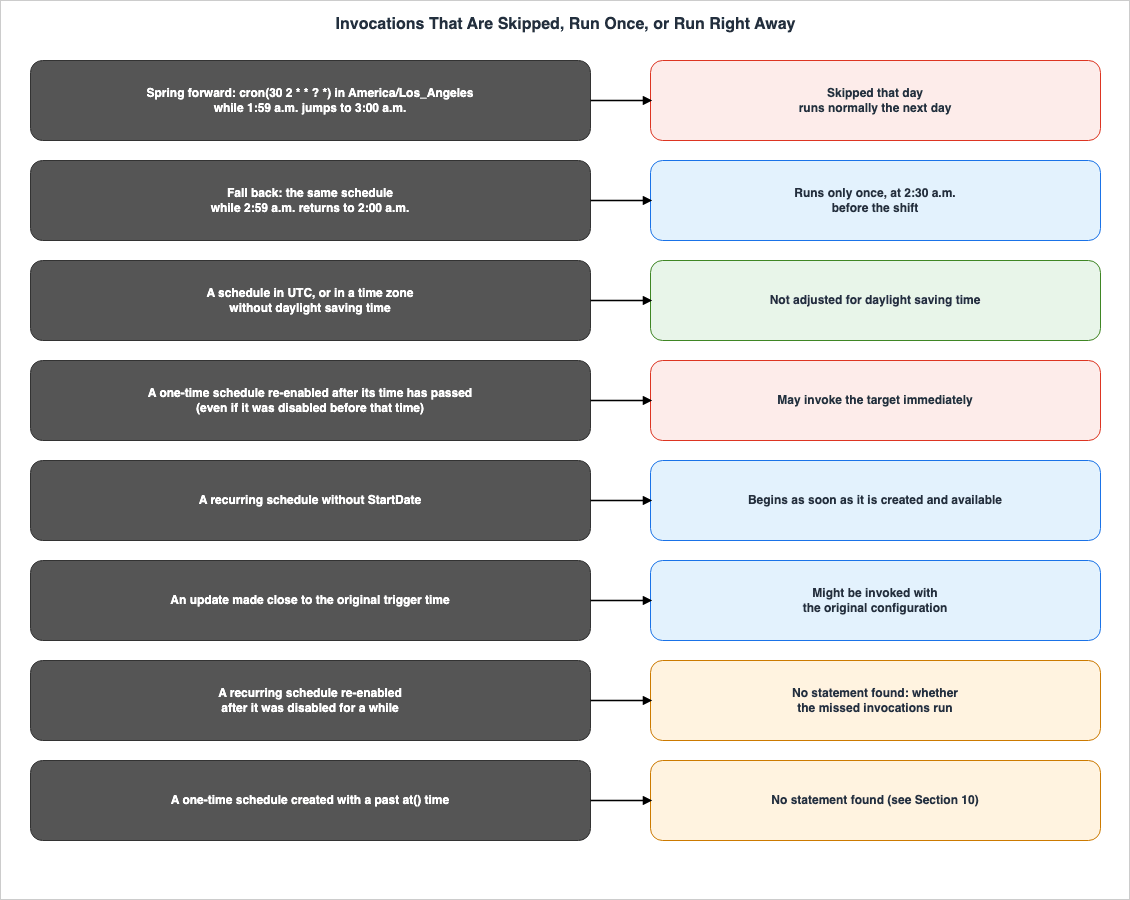
7.1 Daylight Saving Time — Skipped in the Spring, Once in the Fall
EventBridge Scheduler adjusts the invocation time of schedules to account for daylight saving time in the schedule's time zone. The user guide describes how time shifts forward in the spring and backward in the fall as follows:When time shifts forward in the Spring, if a cron expression falls on a non-existent date and time, your schedule invocation is skipped. When time shifts backwards in the Fall, your schedule runs only once and does not repeat its invocation. The following invocations occur normally at the specified date and time.
The user guide provides an example using the
America/Los_Angeles time zone and the schedule cron(30 2 * * ? *), which invokes a target every day at 2:30 a.m. During the spring, when the time shifts from 1:59 a.m. to 3:00 a.m., the invocation for that day is skipped, and the schedule resumes normal operation the following day. In the fall, when the time shifts back from 2:59 a.m. to 2:00 a.m., the schedule is invoked only once at the time before the shift (2:30 a.m.), and is not invoked after the shift (2:30 a.m.). No statement was found that an invocation skipped in the spring runs later.This adjustment is subject to certain conditions. The user guide states that schedules in the
America/New_York time zone are adjusted when the time changes within that time zone, while schedules in America/Los_Angeles are adjusted three hours later. Schedules in time zones that do not observe daylight saving time are not adjusted. Regarding schedules in UTC, the user guide states, Daylight-savings time adjustments do not apply to schedules in universal coordinated time (UTC).Concerning schedules configured with a rate based on days (e.g.,
rate(1 days)), the user guide clarifies that a "day" is defined as a 24-hour period. Even when daylight saving time results in a day being shorter (23 hours) or longer (25 hours), EventBridge Scheduler evaluates the expression 24 hours after the last invocation.7.2 Re-Enabling a One-Time Schedule Can Invoke It Right Away
The troubleshooting page describes disabling and re-enabling a one-time schedule as follows.When re-enabling a one-time schedule after its original scheduled time has passed, the schedule may immediately invoke its target. This can occur even if the schedule was disabled before its original execution time.
The example on the same page creates a one-time schedule for 13:30 UTC at 13:15 UTC, disables it before 13:30 UTC, and re-enables it at 14:00 UTC; its result line reads
The target may be invoked immediately upon re-enabling. The documentation uses the word may, indicating that it is not a guaranteed outcome. The key point is that this can occur even if the schedule was disabled prior to its intended execution time. Section 10 records the result of trying the same steps.7.3 A Rate-Based Schedule Without StartDate Starts Right Away
As described in Section 4.4, a rate-based schedule without StartDate starts invoking the target right away. The rate example in the user guide also states that, because it does not set --start-date, it starts invoking the target right after it is created and activated.7.4 An Update Close to the Trigger Time Can Use the Original Configuration
The troubleshooting page notes that even after changing a schedule, invocations might not immediately follow the new settings.When you make a change to a schedule, invocations might not immediately reflect the updated schedule. Allow a short period of time for changes to take effect. For example, if you update a schedule close to its original trigger time, you might see an invocation based on the original schedule configuration.
7.5 Where No Statement Was Found
For the following four points, the sources in Section 1.3 were searched on October 22, 2026, and no statement was found.- Invocations missed while a recurring schedule was disabled: whether, when it is re-enabled, those invocations run together or are skipped. Searches with terms such as "backfill," "catch up," and "missed" found no statement. This article does not extend the one-time statement in Section 7.2 to recurring schedules.
- Creating an
at()schedule with a past time: whether creation is rejected, the target is invoked right after creation, or the target is not invoked. Section 10 records the response to creation. - Invocations missed because of a failure on the EventBridge Scheduler side: whether they are invoked after the failure. The
AWS.Scheduler.InternalServerErrorin Section 6.2 is a statement about a value in the DLQ message, not about what happens after a failure. - How invocations are spread within a flexible time window: as described in Section 4.3.
8. After Completion and When You Change a Schedule
This section reads what happens to a schedule after its last invocation, and what happens when a schedule is changed.8.1 Automatic Deletion After Completion — ActionAfterCompletion
ActionAfterCompletion defines what EventBridge Scheduler does to a schedule after it completes its final invocation. The available API options are NONE and DELETE. What's New announced this feature on August 2, 2023. The user guide describes what happens with DELETE as follows.When you configure automatic deletion for a schedule, EventBridge Scheduler deletes the schedule after its last target invocation. For one-time schedules, this occurs after the schedule has invoked its target once. For recurring schedules you set up with rate, or cron, expressions, your schedule is deleted after its last invocation. A recurring schedule's last invocation is the invocation that occurs closest to the EndDate you specify.
Recurring schedules have a specific requirement. The user guide states
If you configure a schedule with automatic deletion but do not specify a value for EndDate, EventBridge Scheduler does not automatically delete the schedule.When
ActionAfterCompletion is not specified, the API reference has no statement on what happens. The user guide's Getting started page, in the console instructions, states, Choose NONE, or do not choose a value, if you do not want EventBridge Scheduler to take any action after the schedule completes. Furthermore, the CloudFormation template reference, as of October 22, 2026, does not list ActionAfterCompletion among the properties for AWS::Scheduler::Schedule.8.2 Completed One-Time Schedules Still Count Against the Quota
Regarding one-time schedules, the user guide statesA one-time schedule still counts against your account quota after it has completed running and invoking its target. It continues, We recommend deleting your one-time schedules after they've completed running. The quota page specifies a default quota of 10,000,000 schedules per Region, and clarifies that this quota includes completed one-time schedules. The same page recommends configuring the ActionAfterCompletion setting to automatically delete schedules after they complete.8.3 UpdateSchedule Replaces the Whole Schedule
The API reference for UpdateSchedule states:When you call UpdateSchedule, EventBridge Scheduler uses all values, including empty values, specified in the request and overrides the existing schedule. This is by design. This means that if you do not set an optional field in your request, that field will be set to its system-default value after the update.
The same page recommends calling
GetSchedule before this operation to record all optional fields. The user guide's page on schedule state states the same thing as If you do not specify a parameter that you've previously set, it defaults to null. The API reference uses the term "system-default value," while the user guide uses "null." This article does not determine which term is correct.This behavior also applies to toggling between enabled and disabled states. Even if you only want to change the
State, you must include all other fields you want to preserve in the UpdateSchedule request. For example, if you forget to include RetryPolicy or DeadLetterConfig within Target, those fields in the updated schedule will revert to the system-default values as described in the API reference.8.4 Schedule Groups
Schedule groups are resources that organize schedules. Each account has adefault group, which cannot be deleted or modified. The user guide states that accounts can have up to 500 schedule groups, while the quotas page specifies 500 per Region. The sources disagree on the unit of the count. Tags are applied to schedule groups, not to individual schedules.A schedule can only be associated with a group during its initial creation. As the user guide states,
You can only associate a schedule with a group when you first create the schedule. When a schedule group is deleted, it enters a DELETING state and is removed after EventBridge Scheduler deletes all schedules within that group.9. Next to the Legacy Scheduled Rules
This section places the scheduled rules of EventBridge event buses next to EventBridge Scheduler, item by item, without stating which is preferable. The EventBridge user guide mentions on the scheduled rules page,We recommend that you use Scheduler to invoke targets on a schedule. Meanwhile, the EventBridge FAQ states, Scheduled rules will continue to be available. This article does not describe scheduled rules as a discontinued feature.| Item | EventBridge Scheduler | Scheduled rules |
|---|---|---|
| Status in the documentation | The scheduling service that the EventBridge User Guide recommends | Scheduled rules are a legacy feature of EventBridge.; the FAQ says they will continue to be available |
| Expressions | at(), rate(), cron() | rate(), cron() |
| Time zone | Any time zone you specify, for cron-based and one-time schedules | All scheduled events use UTC+0 time zone |
| Precision | 60 second precision without a flexible time window; not clamped to the 0th second | Minimum precision of one minute; a delay of several seconds can occur before the target runs |
| Where it lives | A schedule in a schedule group | A rule on the default event bus only |
| Source of the 24-hour and 185-attempt figures | AWS Compute Blog (2022-11-10) and the AWS CDK default field | The EventBridge User Guide's retry page: By default, EventBridge retries sending the event for 24 hours and up to 185 times |
The EventBridge user guide's section on scheduled rules states that all scheduled events use the UTC+0 time zone. The AWS Knowledge Center article on daylight saving time also states,
Currently, all scheduled event rules use the UTC+0 time zone. No statement on daylight saving time adjustments was found in the scheduled rules pages. This article does not apply the daylight saving time handling of EventBridge Scheduler (Section 7.1) to scheduled rules.The dates when the EventBridge Scheduler and scheduled rules features were added are on this site's AWS History and Timeline regarding Amazon EventBridge.
10. What This Configuration Returned
The values presented in this section were obtained on October 22, 2026 (UTC), using the following configuration. They are not values that the sources guarantee. All timestamps are given in UTC.- Region:
us-east-1. CloudFormation created one schedule group, two standard Amazon SQS queues (one for the target and one for the dead-letter queue), one execution role, and one schedule. The same stack also had a Lambda function, with its role and log group, that the results below do not use. During the run, a stack update added a third queue. - The remaining schedules were created using the AWS CLI's
create-schedulecommand. TheRetryPolicyfor the schedules designed to fail was set to either 300 seconds and 2 retries, or 3600 seconds and 185 retries. - The
Inputfor the target contained the context attributes described in Section 5.5. Actual account IDs, ARNs, and queue URLs, as well as theexecution-id, have been masked.
10.1 Omitted Settings and Invocation Times
The first column is the schedule created, the second is what the documentation states, and the third is what this configuration returned.| Schedule | Documentation | Returned in this configuration |
|---|---|---|
at() far in the future; RetryPolicy, ScheduleExpressionTimezone, State, ActionAfterCompletion omitted; created with the CLI | Default retry values: Compute Blog and AWS CDK default field; time zone: UTC (console help panel) | GetSchedule: MaximumEventAgeInSeconds 86400, MaximumRetryAttempts 185, ScheduleExpressionTimezone UTC, State ENABLED, ActionAfterCompletion NONE; no DeadLetterConfig |
| The same, created by CloudFormation | Same as above | The same GetSchedule values as the CLI schedule |
rate(5 minutes) without StartDate | A rate-based schedule starts invoking the target immediately | First invocation 40.8 seconds after creation; scheduled-time carried the creation time, to the second |
| The same schedule, 12 later invocations | 60 second precision | Each delivered 22.6 seconds after its scheduled-time; attempt-number 1 every time |
at() one day in the past | No statement found | CreateSchedule succeeded; the target was invoked about 40 seconds after creation; scheduled-time was the past time |
| One-time schedule disabled before its time and re-enabled about 2 minutes after it | The target may be invoked immediately | Invoked about 40 seconds after re-enabling; scheduled-time was the original time |
In this configuration,
GetSchedule for the schedule created without RetryPolicy returned the same values as the AWS Compute Blog and the AWS CDK default fields. It produced the same result whether the schedule was created using the CLI or CloudFormation. However, this reflects the behavior observed in this specific configuration on this particular day and does not represent a statement from the user guide or API reference.For the schedule created without
ScheduleExpressionTimezone, GetSchedule returned UTC. This matches the default value presented in the console help panel (Section 4.5).The
at() schedule with a past time was not rejected at creation, and the target was invoked right after creation. In this configuration, the re-enabled one-time schedule was also invoked right after it was re-enabled. Each was recorded once. The documentation in Section 7.2 uses the word may, and these results do not definitively indicate that the target will always be invoked.10.2 Failures and the DLQ
| Schedule | Documentation | Returned in this configuration |
|---|---|---|
Universal target lambda:invoke without InvocationType | The Input of a universal target is not validated at creation | CreateSchedule failed with ValidationException: Synchronous Lambda invocations are not yet supported. Please provide InvocationType parameter with value Event to invoke Lambda asynchronously. |
Universal target sqs:sendMessage to a queue that does not exist; 300 seconds and 2 retries | The DLQ page's example shows EXHAUSTED_RETRY_CONDITION with MaximumEventAgeInSeconds for this error code | In the DLQ 23 seconds after scheduled-time; ERROR_CODE AWS.SimpleQueueService.NonExistentQueue; RETRY_ATTEMPTS 0; no EXHAUSTED_RETRY_CONDITION |
| The same error, 3600 seconds and 185 retries | Retries continue until either limit is reached | In the DLQ 43 seconds after scheduled-time; RETRY_ATTEMPTS 0; no EXHAUSTED_RETRY_CONDITION |
Universal target lambda:invoke with InvocationType Event and FunctionName " " | The DLQ message contains the error code from the target service | In the DLQ 33 seconds after scheduled-time; ERROR_CODE ValidationException; RETRY_ATTEMPTS 0; no EXHAUSTED_RETRY_CONDITION |
| Attributes of the three DLQ messages | The example lists nine attributes | CONTAINS_INVALID_PAYLOAD, ERROR_CODE, ERROR_MESSAGE, EXECUTION_ID, IS_PAYLOAD_TRUNCATED, RETRY_ATTEMPTS, SCHEDULED_TIME, SCHEDULE_ARN, TARGET_ARN |
| Metrics for the group at the end of the run | InvocationDroppedCount is emitted when the retry policy has been exhausted | InvocationAttemptCount 19 (18 in the rows of Sections 10.1 and 10.2, plus one schedule that targeted the third queue and succeeded on its first attempt); TargetErrorCount 3; InvocationsSentToDeadLetterCount 3; InvocationDroppedCount 3 |
This table records the following four points.
- The universal target
lambda:invokewithoutInvocationTypewas rejected at creation. The user guide states that the contents of a universal target'sInputare not validated at creation, but this field was validated at creation. All universal target examples in the user guide setInvocationTypetoEvent. The troubleshooting page's example of invalid input (Section 6.3) does not setInvocationType, so, in this configuration, that example as written would be rejected at creation. - The three failures related to non-existent queues and invalid function names all went to the DLQ without any retry attempts.
RETRY_ATTEMPTSwas 0, andEXHAUSTED_RETRY_CONDITIONwas absent. This result does not contradict the statement in Section 6.3 that the attribute is present when the error is retryable. On the other hand, the example on the DLQ page gives the sameAWS.SimpleQueueService.NonExistentQueueanEXHAUSTED_RETRY_CONDITIONofMaximumEventAgeInSeconds. This configuration produced a different result than the example in the documentation. - The messages in the DLQ included an attribute,
CONTAINS_INVALID_PAYLOAD, which was not present in the example on the DLQ page. No statement explaining this attribute was found in the sources in Section 1.3. - The three invocations sent to the DLQ were also counted in the
InvocationDroppedCountmetric. The metrics page states that this metric appears when the retry policy has been exhausted. It does not say that the metric depends on whether a DLQ is set.
10.3 What This Configuration Did Not Show
The three errors caused in this configuration were not retried. So neither the same invocation succeeding after a retry nor whetherexecution-id changes between retries could be observed. For every invocation that succeeded in this configuration, attempt-number was 1.The
execution-id within this configuration was a 36-character value, including hyphens, and differed for each invocation. It differed in format from the example provided on the context attributes page in the user guide (e.g., d32c5kddcf5bb8c3).11. Failure Modes
This section lists failures that are likely in operation, as read from the statements in the sources in this article.- Writing the retry defaults as API reference values. The API reference states only the range. The defaults of 24 hours and 185 attempts are statements in the AWS Compute Blog and the AWS CDK default fields (Section 5.2).
- Reading the help panel's maximum as the default. The statement
The maximum value is 24 hours.refers to the maximum value (Section 5.2). - Citing the event bus rules' retry statement as an EventBridge Scheduler statement. Even with the same 24 hours and 185 attempts, these are statements related to a different feature (Section 5.2, Section 9).
- Reading at-least-once as exactly once. The definition only establishes a lower limit for success. Whether the target side prepares for duplicates is up to the user (Section 5.1).
- Assuming every failure goes to the DLQ. If a DLQ is not configured, events are dropped after retries, and the
InvocationDroppedCountwill reflect this. If the DLQ cannot be written to, the DLQ will remain empty, and theInvocationsFailedToBeSentToDeadLetterCountwill increment (Sections 6.4, 6.5). - Assuming errors in a universal target's
Inputare caught at creation. The troubleshooting page states that EventBridge Scheduler only validates the ARN format and does not check the contents of theInput. Incorrect schedules can be created, and these will fail on every invocation (Section 6.3). - Assuming invocations skipped for daylight saving time run later. The user guide states that the spring invocation is skipped and that the schedule runs normally from the following day (Section 7.1).
- Treating a one-time schedule as safe because it was disabled before its time. If the schedule is re-enabled after the scheduled time has passed, it may be invoked immediately (Section 7.2).
- Calling
UpdateScheduleto change onlyState. Any unspecified parameters will revert to their default values or null (Section 8.3). - Assuming
ActionAfterCompletionDELETEalso deletes recurring schedules. If anEndDateis not specified, the schedule will not be automatically deleted (Section 8.1). - Leaving out
InvocationTypefor the universal targetlambda:invoke. In the configuration in Section 10,CreateSchedulereturnedValidationException. The examples in the user guide all specifyInvocationTypeasEvent(Section 10.2).
12. Frequently Asked Questions About EventBridge Scheduler Delivery
Q1. Does EventBridge Scheduler invoke a target only once?
The user guide specifies an "at-least-once" delivery, meaning that at least one delivery succeeds with a response from the target. No statement about invoking a target exactly once was found, and no statement specific to EventBridge Scheduler about duplicates was found either (Section 5.1).Q2. What are the default retry values, and where are they written?
The default values are 24 hours and 185 attempts. This information is in the AWS Compute Blog from November 10, 2022, and in the default fields of the AWS CDK v2 API reference. The EventBridge Scheduler API reference only specifies the range (60 to 86400 seconds, 0 to 185 attempts). In the configuration in Section 10,GetSchedule for a schedule created without RetryPolicy returned the same values: 86400 seconds and 185 attempts (Sections 5.2 and 10.1).Q3. Does every failed invocation go to the DLQ?
Not always. Without a DLQ, the event is dropped after retries. Even with a DLQ, if EventBridge Scheduler cannot write to it, the DLQ stays empty. In messages that reach the DLQ,EXHAUSTED_RETRY_CONDITION is present when the error is retryable (see Section 6).Q4. Are the invocations missed while a recurring schedule was disabled run when it is re-enabled?
No statement was found in the sources. For one-time schedules, the user guide states that re-enabling one after its time has passed may invoke the target right away (may), but that is not a statement about recurring schedules (see Sections 7.2 and 7.5).Q5. Are schedules in UTC also skipped for daylight saving time?
The user guide states that daylight saving time adjustments do not apply to schedules in UTC. Schedules for time zones that do not observe daylight saving time are also not adjusted (see Section 7.1).Q6. With a flexible time window, where in the window is the target invoked?
The time window extends after the scheduled time, and the target is invoked within that window. The user guide states that invocations are dispersed across the time window and that they might not begin exactly at the start of the window. No statement was found on how they are dispersed (Section 4.3).Q7. Can execution-id be used to tell duplicate invocations apart?
The user guide describes execution-id as an ID assigned for each attempted invocation. No statement was found that it can be used to identify duplicates. In the configuration in Section 10, the values between retries could not be observed (see Sections 5.5 and 10.3).Q8. Have scheduled rules been discontinued?
The EventBridge user guide describes scheduled rules as a "legacy feature" and recommends using EventBridge Scheduler instead. The EventBridge FAQ states that scheduled rules will continue to be available (Section 9).13. Summary
- At-least-once is defined as at least one delivery that succeeds with a response from the target: No statement specific to EventBridge Scheduler on duplicates and order was found (Section 5.1).
- The invocation time has 60 second precision without a time window, and falls inside the window when one is set: Seconds are not aligned to zero. The time window extends from the scheduled time by 1 to 1440 minutes (Section 4).
- The retry range is documented in the API reference; the default values are in the AWS Compute Blog and the AWS CDK default fields: The value in the help panel is the maximum value, while the text regarding event bus rules refers to a different feature (Section 5.2).
- The DLQ is supported only for standard SQS queues; if not specified, events are dropped: The
EXHAUSTED_RETRY_CONDITIONattribute is present when the error is retryable. Metrics indicate when an event cannot be written to the DLQ (Section 6). - The statements in the sources separate the invocations that are skipped from the invocations that run right away: In the spring, a non-existent time is skipped; in the fall, the schedule runs once; schedules in UTC are not adjusted. If a one-time schedule is re-enabled after its scheduled time, it may be invoked immediately. No statement was found on backfill for recurring schedules (Section 7).
- Settings left out also matter after completion and when a schedule is changed: The
DELETEaction withinActionAfterCompletionrequires anEndDatefor recurring schedules.UpdateSchedulereverts unspecified items to their default values or sets them to null (Section 8).
14. References
- What is Amazon EventBridge Scheduler? - EventBridge Scheduler User Guide
- Schedule types in EventBridge Scheduler - EventBridge Scheduler User Guide
- Getting started with EventBridge Scheduler - EventBridge Scheduler User Guide
- Changing the schedule state in EventBridge Scheduler - EventBridge Scheduler User Guide
- Configuring flexible time windows in EventBridge Scheduler - EventBridge Scheduler User Guide
- Configuring a schedule's dead-letter queue in EventBridge Scheduler - EventBridge Scheduler User Guide
- Deleting a schedule in EventBridge Scheduler - EventBridge Scheduler User Guide
- Managing a schedule group in EventBridge Scheduler - EventBridge Scheduler User Guide
- Deleting a schedule group in EventBridge Scheduler - EventBridge Scheduler User Guide
- Using templated targets in EventBridge Scheduler - EventBridge Scheduler User Guide
- Using universal targets in EventBridge Scheduler - EventBridge Scheduler User Guide
- Adding context attributes in EventBridge Scheduler - EventBridge Scheduler User Guide
- Monitoring Amazon EventBridge Scheduler with Amazon CloudWatch - EventBridge Scheduler User Guide
- Quotas for Amazon EventBridge Scheduler - EventBridge Scheduler User Guide
- Troubleshooting Amazon EventBridge Scheduler - EventBridge Scheduler User Guide
- Document history for the EventBridge Scheduler User Guide - EventBridge Scheduler User Guide
- CreateSchedule - EventBridge Scheduler API Reference
- UpdateSchedule - EventBridge Scheduler API Reference
- Target - EventBridge Scheduler API Reference
- RetryPolicy - EventBridge Scheduler API Reference
- FlexibleTimeWindow - EventBridge Scheduler API Reference
- DeadLetterConfig - EventBridge Scheduler API Reference
- AWS::Scheduler::Schedule - AWS CloudFormation Template Reference
- AWS::Scheduler::Schedule RetryPolicy - AWS CloudFormation Template Reference
- ScheduleTargetConfig - AWS CDK v2 API Reference
- ScheduleTargetBaseProps - AWS CDK v2 API Reference
- Retry policy - EventBridge Scheduler console help panel
- Time zone - EventBridge Scheduler console help panel
- Creating a scheduled rule (legacy) in Amazon EventBridge - Amazon EventBridge User Guide
- How EventBridge retries delivering events - Amazon EventBridge User Guide
- Amazon EventBridge FAQs
- Why is my Amazon EventBridge schedule starting immediately? - AWS re:Post Knowledge Center
- How do I adjust my EventBridge schedule for daylight saving time? - AWS re:Post Knowledge Center
- Introducing Amazon EventBridge Scheduler - AWS Compute Blog
- Amazon EventBridge Launches New Scheduler - AWS What's New
- Amazon EventBridge Scheduler adds schedule deletion after completion - AWS What's New
References:
Tech Blog with curated related content
Written by Hidekazu Konishi