Moving Amazon MSK to TLS 1.3 - Named Security Policies, One Step at a Time, and Handshakes That Do Not Fall Back
First Published:
Last Updated:
MSK-TLS1.2-Default-2026. In contrast, Apache Kafka brokers themselves have a different default; Kafka's ssl.enabled.protocols default on the version 4.2 broker configs page is TLSv1.2,TLSv1.3. Therefore, the default settings for MSK and Kafka differ.On October 30, 2026, AWS announced that MSK Provisioned allows customers to select TLS 1.3. Customers can configure MSK by writing the
tls.security.policy property in an MSK configuration, choosing one of three named TLS security policies. For existing clusters, customers can only update the policy one step at a time. Even with policies that accept both TLS 1.2 and TLS 1.3, connections that fail during a TLS 1.3 handshake will not retry using TLS 1.2. Policies that only accept TLS 1.3 will reject connections that cannot negotiate TLS 1.3. Furthermore, TLS configurations written directly to individual brokers via the Kafka admin API take precedence over MSK's configuration and will take effect when the broker restarts.This article aims to clarify the TLS versions accepted by MSK brokers, detailing which settings are default, how to adjust them, which clients fail, and how many steps are required to revert. It will present this information using diagrams and tables outlining default settings, policy options, upgrade steps, and potential failure points. The article will distinguish between information explicitly stated in the official documentation, information that cannot be found in the documentation, and discrepancies between different documentation sources. The documentation was checked as of November 7, 2026.
This article is not a step-by-step guide for applying policies. It will not discuss pricing. It will also not cover the advantages of different TLS versions or the potential for downgrade attacks.
Related articles on this site:
- When Does a Connection to an AWS Endpoint Actually Use ML-KEM? - Client Defaults, Server Policies, Each Hop, and How to Tell
- How AWS Lambda Authenticates to Apache Kafka - Where Each Event Source Mapping Method Keeps the Credential, Who Refreshes the Token, and What the Brokers Must Trust
- Amazon MSK Broker Types and Storage Tiers - What Standard Brokers, Express Brokers, and MSK Serverless Each Take Away
- Cryptography Glossary for Engineers - AES, RSA, ECDSA, HKDF, Envelope Encryption, and TLS Explained
- Amazon SES Tenants and Sender Reputation - Who Pauses a Tenant, Who Can Resume It, and What Still Reaches the Account
- SOCI Lazy Loading on Fargate, Lambda Managed Instances, and SageMaker AI - Which Index Each Service Reads
Table of Contents
- 1. Scope and Assumptions
- 2. How to Read the Tables
- 3. Differences in Defaults for MSK and Kafka
- 4. Named Policies and Cipher Suites
- 5. The Ladder and the One-Rung Rule
- 6. How Policies Are Applied, and Where They Apply
- 7. Connections That Do Not Fall Back, and Per-Broker Settings
- 8. Prerequisites and Error Messages
- 9. Where the Sources Disagree and What They Do Not Say
- 10. What This Setup Showed
- 11. Failure Modes
- 12. Frequently Asked Questions about TLS 1.3 on Amazon MSK
- 13. Summary
- 14. References
1. Scope and Assumptions
This chapter will first define the intended audience, the scope of this article, the relevant source materials, and the terminology used. The following eleven points will outline the conclusions.- MSK Provisioned brokers only accept TLS 1.2 unless a customer selects a specific policy. The policy page refers to this state as
MSK-TLS1.2-Default-2026. On the Kafka 4.2 broker configs page, the default value for the Kafka broker'sssl.enabled.protocolsisTLSv1.2,TLSv1.3, which differs from the default setting in MSK (see Chapter 3). - MSK offers three policies:
MSK-TLS1.2-Default-2026,MSK-TLSv1.3-2026, andMSK-TLSv1.3-Only-2026. Policy names are case-sensitive (see Chapter 4). - The
MSK-TLSv1.3-2026policy is additive: it adds TLS 1.3 and removes no TLS 1.2 cipher suite. For each connection, the client negotiates the highest version it supports. Clients that only support TLS 1.2 will connect using TLS 1.2 (see Section 4.3). - MSK does not support
TLS_CHACHA20_POLY1305_SHA256among the TLS 1.3 cipher suites. Clients that only offer this cipher suite for TLS 1.3 will fail to complete the TLS 1.3 handshake with MSK (see Section 4.4). - In existing clusters, customers can only move the policy one rung at a time. This applies whether moving up or down. In new clusters, customers can directly select the
MSK-TLSv1.3-Only-2026policy (see Chapter 5). - If a customer removes the
tls.security.policyproperty from a cluster configured with theMSK-TLSv1.3-Only-2026policy, MSK will reject the request as a two-rung move to the default (see Section 5.4). - Customers apply a policy through an MSK configuration revision, and MSK restarts each broker once in a rolling restart. The policy applies not only to client connections but also to all encrypted links managed by MSK (see Chapter 6).
- There are two types of "no fallback." With the
MSK-TLSv1.3-2026policy, connections that negotiate TLS 1.3 and then fail the handshake will not retry using TLS 1.2. With theMSK-TLSv1.3-Only-2026policy, MSK will reject connections that cannot negotiate TLS 1.3 (see Sections 7.1 and 7.2). - MSK rejects raw
ssl.*keys in a configuration revision. The Kafka admin API does not reject these keys, and per-broker settings override the values configured in MSK. Because brokers only read this value at startup, failures will only manifest on the next restart (see Section 7.5). - The policy page assumes a Kafka version of 3.6 or later, but on the versions page, support for 3.6.0 and 3.7.x has ended. Policies are not supported with MSK Serverless (see Chapter 8).
- Documentation regarding whether AWS-side clients (such as the Lambda event source mapping or MSK Connect) can connect to TLS 1.3-only clusters is not found. Similarly, documentation regarding whether policies apply to Express brokers is also not found (see Section 9.3). In the single observation in Chapter 10, a Lambda event source mapping connected with unauthenticated TLS continued to receive records from a TLS 1.3-only cluster (see Section 10.7).
1.1 Intended Audience
This article is intended for the following audiences:- Individuals responsible for migrating MSK clusters to TLS 1.3 to align with standards or internal guidelines.
- Developers who own applications, tools, or AWS services that connect to MSK clusters and want to understand potential impacts when implementing TLS 1.3 policies.
- Operations personnel responsible for managing MSK cluster configurations and broker settings, and for defining procedures to revert policies.
This article assumes that readers may believe the following, and checks each point against the documentation:
- MSK, like Kafka, accepts TLS 1.3 by default.
- Applying a TLS 1.3 policy will ensure that all clients connect using TLS 1.3.
- Even if a TLS 1.3 handshake fails, connections will automatically renegotiate and establish using TLS 1.2.
- It is possible to transition from default settings to a TLS 1.3-only policy with a single configuration update.
- Removing the
tls.security.policyparameter from the configuration allows reverting to default settings from any rung. - The
ssl.enabled.protocolsparameter can achieve the same functionality as a policy. - AWS services such as Lambda will connect to clusters configured with a TLS 1.3-only policy.
1.2 What This Article Covers and What It Does Not
This article focuses on the MSK Provisioned TLS security policy. Specifically, it covers the three policies and their cipher suites, the difference between the MSK default and the Kafka default, the rung rule, how to apply policies, the scope within which policies are effective, how to revert changes, and the two types of "no fallback." It also addresses direct per-broker settings, preconditions, error messages, and whether the documentation includes descriptions related to AWS clients.This article does not cover the following:
- Post-quantum cryptography and ML-KEM. Whether ML-KEM is used in connections to MSK is addressed on this site in When Does a Connection to an AWS Endpoint Actually Use ML-KEM?.
- How AWS Lambda authenticates to the broker. This is covered on this site in How AWS Lambda Authenticates to Apache Kafka.
- The differences between Standard brokers, Express brokers, and MSK Serverless. This is covered on this site in Amazon MSK Broker Types and Storage Tiers.
- Definitions of TLS and cipher suite terminology. This is covered on this site in Cryptography Glossary for Engineers.
- Pricing.
- The merits and drawbacks of different TLS versions, and discussions of downgrade attacks.
- Configuration procedures for individual client libraries. This article will cover the verification steps required by the policy page.
- Topics covered in other articles in the same series. Information on Amazon SES tenants and sender reputation is covered in the SES tenant article (Amazon SES Tenants and Sender Reputation), and lazy loading of container images is covered in the SOCI article (SOCI Lazy Loading on Fargate, Lambda Managed Instances, and SageMaker AI).
1.3 Date of Review and Materials Reviewed
This article was written after reviewing the following materials on November 7, 2026. In the body, this article uses the English short names in parentheses.- Amazon MSK Developer Guide, TLS security policies page (policy page). This serves as the primary reference material.
- Amazon MSK Developer Guide, Configuration Properties page (configuration properties page).
- Amazon MSK Developer Guide, Encryption page (encryption page).
- Amazon MSK Developer Guide, Supported Kafka Versions page (versions page).
- Amazon MSK Developer Guide, Express broker configuration pages (Express configuration pages) and Metadata Management page (metadata management page).
- Amazon MSK Developer Guide, Document History page (Document history).
- Amazon MSK API Reference, Configurations and Cluster Configuration pages (MSK API Reference).
- AWS CloudFormation,
AWS::MSK::Configurationpage (CloudFormation reference). - AWS Lambda Developer Guide, MSK Cluster Authentication page (Lambda MSK authentication page).
- AWS What's New, October 30, 2026, post regarding TLS 1.3 (What's New post; the date corresponds to the
postDateTimevalue in the post). - Apache Kafka, Broker Configuration page (Kafka broker configs). This article cites the page for version 4.2. The pages for versions 4.0 and 4.1 give the same default text. The pages for versions 3.8 and 3.9 give the defaults of
ssl.enabled.protocolsandssl.protocolonly for Java 11 or newer andTLSv1.2otherwise (see Section 3.3).
The AWS What's New and Apache Kafka documentation are treated as separate sources from the Amazon MSK Developer Guide. This article does not rephrase content from the What's New post as if it were from the Developer Guide.
1.4 Terms, and Different Things with the Same Spelling
This article uses the following terms consistently:- Policy: In this article, "policy" refers to the MSK TLS security policy. This defines the TLS versions accepted by MSK and the cipher suites that MSK can use. It is distinct from the security policies used by Elastic Load Balancing or CloudFront, and also distinct from IAM policies.
- Rung: A term used on the policy page, referring to each position in the order of the three policies. The sequence is
MSK-TLS1.2-Default-2026,MSK-TLSv1.3-2026, andMSK-TLSv1.3-Only-2026. - Configuration: An MSK resource, representing a collection of revisions to the
server.propertiesfile, which defines Kafka properties. Customers apply a specific configuration revision to the cluster. - Per-broker setting: Settings written directly to individual Kafka brokers using the admin API. This is a separate mechanism from MSK configurations.
- Cipher suite: A combination of encryption algorithms used in TLS connections. The policy page organizes the TLS 1.2 cipher suites by cipher family.
- Link: A term used on the policy page, referring to each individual encrypted connection managed by MSK. This includes connections between clients and brokers, as well as connections between brokers themselves.
The following terms have the same spelling but refer to different concepts. This article will explicitly specify which concept is being referenced each time.
- Default: MSK's default setting is TLS 1.2 only, while Kafka's default supports both TLS 1.2 and TLS 1.3. This article will specify which default is being used in each instance.
- Fallback: The
does not fall backwording on the policy page indicates that connections failing to establish a handshake after attempting TLS 1.3 will not attempt to renegotiate using TLS 1.2. Conversely, thefallback to TLSv1.2wording in the Kafka broker configs means that if either the client or server does not support TLS 1.3, both will attempt to negotiate TLS 1.2. The Lambda MSK authentication page states that if Lambda cannot connect to the most secure type of broker, it will not switch to a less secure type. This refers to authentication types, not TLS versions. - Encryption Settings: The encryption page allows configuration of whether connections between the client and broker are encrypted using TLS, or whether plaintext is permitted. This is separate from TLS policies.
2. How to Read the Tables
This chapter defines the columns in the tables presented in this article, as well as how to describe the state of the materials and how to cite their sources. The columns in the summary table, as presented in Section 3.4, are used consistently across three articles in the same series.2.1 Table Columns
The summary table in Section 3.4 contains the following seven columns:Setting: The configuration or value for that row.Default When Unset: The value that applies when no setting is specified. This article does not call a value the default because the documentation recommends it or because it is common.Who Can Change It: The entity that can modify this value, and the action required to do so.Who Cannot: The entity that cannot modify this value. This is included only when explicitly stated in the documentation.When the Default Does Not Apply: Circumstances under which the default value does not apply, or when another setting takes precedence.Where It Is Written: The source of the information for that row.Source State: The state of the documentation. Described using the terminology from Section 2.2.
Tables summarizing the policies in Section 4.2, the steps in Section 5.6, the failures in Section 7.6, and the table in Section 9.3 all use columns of their own. Each section provides a detailed explanation of these columns.
2.2 Terms for the State of the Sources
This article uses eight terms to describe the state of the documentation. The tables also use these English terms.- Stated: The documentation contains a statement regarding the matter.
- Stated as not supported: The documentation explicitly states that the matter is not supported or cannot be used.
- Documentation does not list: While a list or table exists, the specific item is not included. This does not necessarily indicate that the matter is unsupported or unavailable.
- Not recorded (stated): The documentation states that the information is not included in logs or records.
- No statement found: Despite searching using different search terms and examining different categories of documentation (as described in Section 1.3), no relevant statement could be found. This does not necessarily indicate that the matter is absent or does not occur.
- Sources disagree: The documentation from two different sources provides conflicting statements regarding the same matter. This includes cases where the statements directly contradict each other, as well as cases where the scope, strength, or subject matter differs, and the text does not settle which one applies. This article presents both statements and their sources without designating either as incorrect.
- Inference: This is an inference made by this article, and is not a statement found in any of the documentation. This article says in the same sentence that it is an inference.
- Observation: This is based on observations made during testing (as described in Chapter 10) and is not a commitment made by the documentation. This article will not override statements found in the documentation with observations.
This article distinguishes between "Stated as not supported" and "No statement found." The former refers to a statement in the documentation, while the latter indicates that this article was unable to find a relevant statement.
2.3 Citing Sources
This article indicates the specific page or section from which each statement originates in the same sentence. Even when referring to the same topic within MSK, this article treats text from the policy page and content from the What's New posts as separate sources. For example, the statement that the policies are available in all AWS Regions where MSK Provisioned is available originates from the What's New post, rather than the policy page.3. Differences in Defaults for MSK and Kafka
This chapter outlines which TLS versions are accepted by MSK brokers and Kafka brokers and clients, respectively, when no configurations are explicitly set.3.1 MSK Defaults
According to the policy page, MSK clusters use TLS 1.2 by default. The encryption page also states that MSK uses TLS 1.2 by default, and that TLS 1.3 is available on MSK Provisioned clusters through a TLS security policy.The policy page indicates that selecting a specific policy is optional, and describes the behavior of clusters that do not have a policy selected as follows:
A cluster with no policy set keeps its current TLS configuration, which is referred to as MSK-TLS1.2-Default-2026. Nothing changes until you apply a policy.The table on the policy page refers to
MSK-TLS1.2-Default-2026 as the default policy, specifying that it only accepts TLS 1.2. The table also states that, unless a customer selects a different policy, all MSK clusters will use this configuration. According to the policy page, if a customer reads the configuration of a cluster (e.g., configuration revision) and the tls.security.policy setting is not present, the cluster will use the default policy, MSK-TLS1.2-Default-2026.3.2 Kafka Defaults
According to the Kafka broker configs for version 4.2, the default value forssl.enabled.protocols is TLSv1.2,TLSv1.3. The Kafka broker configs state the following:This means that clients and servers will prefer TLSv1.3 if both support it and fallback to TLSv1.2 otherwise (assuming both support at least TLSv1.2).According to the Kafka broker configs, the default value for
ssl.protocol is TLSv1.3. The Kafka broker configs indicate that clients using the defaults for ssl.protocol and ssl.enabled.protocols will downgrade to TLS 1.2 if the server does not support TLS 1.3. The Kafka broker configs also state that if ssl.protocol is set to TLSv1.2, clients will not use TLS 1.3, even if the server only supports TLS 1.3. The Kafka broker configs specify that the update mode for ssl.enabled.protocols is set to per-broker.3.3 How the MSK Default and the Kafka Default Relate
The default settings for MSK and Kafka are different. MSK brokers only accept TLS 1.2 unless a customer selects a different policy. Kafka brokers, by default, accept both TLS 1.2 and TLS 1.3, unless their configuration is changed. Based on the information available, it can be inferred that MSK is configured to accept only a narrower range of protocols than Kafka, specifically limiting the accepted protocols on the broker side (Inference). MSK documentation does not detail the mechanisms used to implement this configuration.The default settings on the Kafka client side are determined by the client owner. Under the Kafka broker configs, a Kafka client using its default settings will negotiate TLS 1.2 when connecting to an MSK cluster on the default policy. The same client will negotiate TLS 1.3 when connecting to a cluster configured with
MSK-TLSv1.3-2026. The Kafka broker configs pages for versions 3.8 and 3.9 give these defaults only when running with Java 11 or newer, and TLSv1.2 for both settings otherwise. Under those pages, a client of those versions that keeps its defaults on an older Java version would not negotiate TLS 1.3 and would not connect to a cluster on MSK-TLSv1.3-Only-2026 (Inference). This article does not verify the default settings of client libraries other than Java using primary source material.3.4 Summary Table
The following table lists this article's defaults with the columns shared by the three articles in this series.| Setting | Default When Unset | Who Can Change It | Who Cannot | When the Default Does Not Apply | Where It Is Written | Source State |
|---|---|---|---|---|---|---|
MSK configuration: tls.security.policy | MSK-TLS1.2-Default-2026. | Customers who create a configuration revision and apply it using UpdateClusterConfiguration or UpdateClusterKafkaVersion. | — | For existing clusters, this setting can only be moved to the adjacent rung. For new clusters, MSK-TLSv1.3-Only-2026 can also be selected directly. | Policy page, configuration properties page | Stated |
Broker: ssl.enabled.protocols | Kafka default on the version 4.2 page: TLSv1.2,TLSv1.3 (for versions 3.8 and 3.9, see Section 3.3). | Customers, via the Kafka admin API, on a per-broker basis. The policy page provides a warning against this. | Customers creating a configuration revision. MSK rejects raw ssl.* keys in a configuration revision. | Per-broker values override the MSK configuration. | Kafka broker configs, policy page | Stated |
| Encryption between clients and brokers | Only data encrypted with TLS is permitted. | Customers, choosing from three available settings. | — | Customers can also select a configuration that allows unencrypted communication. | Encryption page | Stated |
| Encryption between brokers | Encryption is enabled. | Customers, when creating a cluster. | — | — | Encryption page | Stated |
Kafka client: ssl.protocol | TLSv1.3. | Client owner. | — | If set to TLSv1.2, the client will not use TLS 1.3, even if the server only supports TLS 1.3. | Kafka broker configs | Stated |
| Policy-defined key exchange groups | No statement found. | — | — | — | Policy page | No statement found. |
4. Named Policies and Cipher Suites
This chapter identifies the TLS versions and cipher suites that the three named policies accept.4.1 Name and Description
The policy page describes three policies as follows:MSK-TLS1.2-Default-2026: The default. It only accepts TLS 1.2.MSK-TLSv1.3-2026: It accepts both TLS 1.2 and TLS 1.3. This policy is additive.MSK-TLSv1.3-Only-2026: It only accepts TLS 1.3. MSK will reject any connection that cannot negotiate TLS 1.3.
The version portion of the default policy name is
TLS1.2, while the version portion of the other two policy names is TLSv1.3. The default policy name does not include the letter "v." The policy page states the following regarding the names:Policy names are case sensitive and must match exactly.4.2 Policy Table
The following table combines three tables from the policy page: one for the TLS versions, one for the TLS 1.3 cipher suites, and one for the TLS 1.2 cipher suites. Rows represent TLS versions and cipher suites, while columns represent three different policies. The numbers in parentheses for the TLS 1.2 row, according to the policy page, indicate the number of cipher suites supported by MSK within that family.| Item | MSK-TLS1.2-Default-2026 | MSK-TLSv1.3-2026 | MSK-TLSv1.3-Only-2026 |
|---|---|---|---|
| TLS 1.3 | No | Yes | Yes |
TLS_AES_128_GCM_SHA256 (TLS 1.3) | No | Yes | Yes |
TLS_AES_256_GCM_SHA384 (TLS 1.3) | No | Yes | Yes |
| TLS 1.2 | Yes | Yes | No |
| ECDHE (ECDSA/RSA) AES-GCM (4) | Yes | Yes | No |
| ECDH static (ECDSA/RSA) AES-GCM (4) | Yes | Yes | No |
| RSA AES-GCM (2) | Yes | Yes | No |
| DHE_DSS AES-GCM (2) | Yes | Yes | No |
| ECDHE (ECDSA/RSA) AES-CBC (8) | Yes | Yes | No |
| ECDH static (ECDSA/RSA) AES-CBC (8) | Yes | Yes | No |
| RSA AES-CBC (4) | Yes | Yes | No |
| DHE_DSS AES-CBC (4) | Yes | Yes | No |
The table on the policy page does not include rows for TLS versions older than TLS 1.2, nor does it include rows for key exchange groups.
4.3 The Additive Policy
The policy page states the following regardingMSK-TLSv1.3-2026:This policy is additive. It adds TLS 1.3 and removes no TLS 1.2 cipher suite.According to the policy page, with
MSK-TLSv1.3-2026, the client negotiates the highest version supported during each connection. Therefore, even when using MSK-TLSv1.3-2026, not all clients will necessarily use TLS 1.3. Clients that only support TLS 1.2 will connect to an MSK-TLSv1.3-2026 cluster using TLS 1.2.4.4 TLS_CHACHA20_POLY1305_SHA256
The policy page describes the TLS 1.3 cipher suites as follows:Amazon MSK does not support TLS_CHACHA20_POLY1305_SHA256. A client that offers only this suite for TLS 1.3 can't complete a TLS 1.3 handshake with Amazon MSK.The policy page also states that most Apache Kafka clients offer the AES-GCM cipher suites (as listed in Section 4.2) by default.
5. The Ladder and the One-Rung Rule
This chapter outlines the order in which customers can implement policies.5.1 Existing Clusters – One Rung at a Time
The policy page describes the process for updating the policies of existing clusters as follows:you can move only one rung at a time, in either directionAccording to the policy page, customers can perform this update using either
UpdateClusterConfiguration or UpdateClusterKafkaVersion. The policy page outlines the order of the rungs as follows:MSK-TLS1.2-Default-2026 <-> MSK-TLSv1.3-2026 <-> MSK-TLSv1.3-Only-2026When transitioning from the default settings to TLS 1.3 only, customers must first apply
MSK-TLSv1.3-2026 and wait for that update to complete before applying MSK-TLSv1.3-Only-2026. The policy page states that customers cannot transition directly from MSK-TLS1.2-Default-2026 to MSK-TLSv1.3-Only-2026. Similarly, when reverting changes, customers must revert one rung at a time. In the setup in Section 10.4, the update from the default to MSK-TLSv1.3-Only-2026 was rejected with the second error in Section 8.4 (Observation).5.2 Reason for the Rule
The policy page explains the reason for this rule as follows:This restriction exists so that every node in your cluster shares a protocol version with every other node at every point during the rolling restart, which is what keeps the cluster serving throughout the change.During the period of rolling restart, both brokers that have been restarted with the new policy and those that have not yet been restarted may coexist. Policies on adjacent rungs share at least one version of TLS.
MSK-TLS1.2-Default-2026 and MSK-TLSv1.3-Only-2026 do not share a TLS version (Inference from the table in Section 4.2).5.3 New Cluster
According to the policy page, in new clusters, customers can directly selectMSK-TLSv1.3-Only-2026. The policy page also asks customers to make sure that, at that time, their clients are configured to support TLS 1.3.5.4 Removing the Property
The policy page states that deleting the property is not a way to leave a TLS 1.3-only policy. In clusters configured withMSK-TLSv1.3-Only-2026, if a customer removes the tls.security.policy setting from their configuration, the change will result in a request for TLS 1.2 only. According to the policy page, this constitutes a two-rung change, and MSK will reject the request. In the setup in Section 10.8, MSK treated the revision without the property as a request for MSK-TLS1.2-Default-2026 and rejected it (Observation).There may be instances where deleting properties is permissible. According to the policy page, when reverting from
MSK-TLSv1.3-2026 to the default configuration, customers can either specify tls.security.policy=MSK-TLS1.2-Default-2026 or delete the property entirely. The policy page recommends explicitly specifying a value, as this clarifies the intended configuration.The same rules apply when managing configurations through CloudFormation. According to the policy page, customers should write the previous policy in the
ServerProperties section of AWS::MSK::Configuration and then update the stack. When reverting from MSK-TLSv1.3-Only-2026 to the default configuration, customers must update the stack twice, waiting for the cluster update to complete between the two updates.5.5 Ladder Diagram
Figure 1 illustrates the three rungs. It shows the directions in which existing clusters can move, and the rung that can be directly selected in new clusters.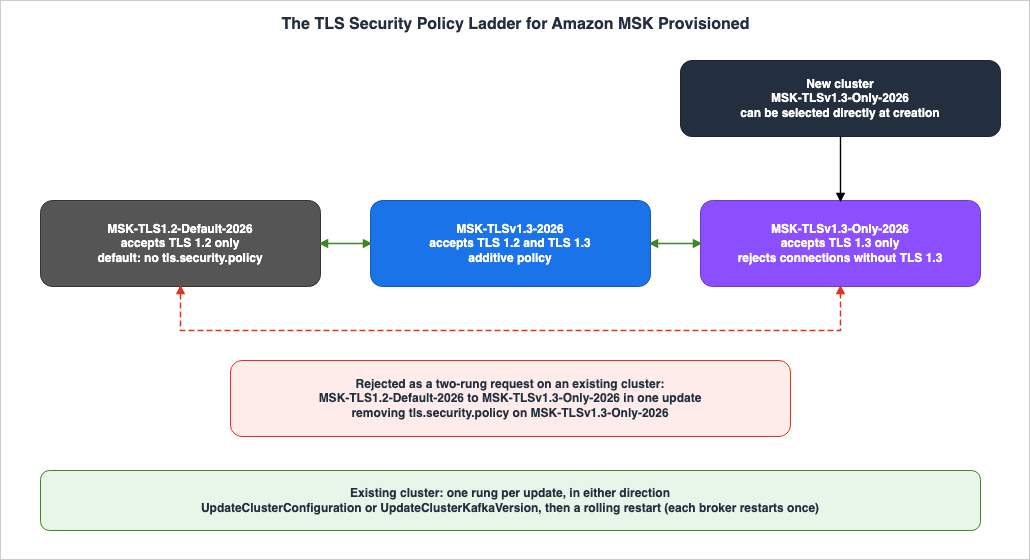
MSK-TLSv1.3-Only-2026 rung can be directly selected in a new cluster. Both a direct update from the default to TLS 1.3 only, and removing the property on a TLS 1.3-only cluster, constitute two-rung requests.5.6 The Rung Table
The following table shows, for each combination of current and target policies, the number of updates and the result of a single update.| Current Policy | Target Policy | Number of Updates | Result of a Single Update | Source |
|---|---|---|---|---|
MSK-TLS1.2-Default-2026 | MSK-TLSv1.3-2026 | 1 | Successful | policy page |
MSK-TLSv1.3-2026 | MSK-TLSv1.3-Only-2026 | 1 | Successful | policy page |
MSK-TLS1.2-Default-2026 | MSK-TLSv1.3-Only-2026 | 2 | Rejected. Error described in Section 8.4, item 2 | policy page |
MSK-TLSv1.3-Only-2026 | MSK-TLSv1.3-2026 | 1 | Successful. Clients using only TLS 1.2 can connect again. | policy page |
MSK-TLSv1.3-2026 | MSK-TLS1.2-Default-2026 | 1 | Successful. This can be achieved either by specifying a value or by deleting a property. | policy page |
MSK-TLSv1.3-Only-2026 | MSK-TLS1.2-Default-2026 | 2 | Rejected. Deleting a property results in the same outcome. | policy page |
| New Cluster | MSK-TLSv1.3-Only-2026 | At creation | Successful | policy page |
6. How Policies Are Applied, and Where They Apply
This chapter explains how customers apply policies, how MSK rolls them out, and which links those policies cover.6.1 The Configuration Revision
The policy page describes how to apply the policy as follows:You set tls.security.policy in an Amazon MSK configuration and apply that configuration to your cluster. There is no separate API.Customers write a line such as
tls.security.policy=MSK-TLSv1.3-2026 in the server.properties file to create or update their MSK configuration. They then apply this configuration revision to the cluster using either UpdateClusterConfiguration or UpdateClusterKafkaVersion. The configuration properties page also includes a section that describes how to specify tls.security.policy with three possible values and a requirement for Kafka version 3.6 or later. The cluster configuration page of the MSK API Reference does not list a field for specifying the TLS version. Customers can include this property in the ServerProperties section of a CloudFormation AWS::MSK::Configuration resource, or in configurations created through the MSK console.The policy page states that a new configuration revision will replace the current configuration. Customers should ensure that other properties in the configuration are also retained in the new revision.
According to the prerequisites section of the policy page, when a customer applies the policy, the cluster must be in the
ACTIVE state, and no other operations should be in progress. The policy page also states that MSK performs only one operation on the cluster at a time.6.2 The Rolling Restart
According to the policy page, MSK performs a rolling restart to apply the policy, and each broker restarts once. Clients reconnect when the broker they are connected to restarts, and negotiate TLS with the new policy.According to the policy page, the cluster will continue to accept traffic during a restart if all three of the following conditions are met:
- The topic's replication factor is 3 or greater.
min.insync.replicasis less than or equal to the replication factor minus 1.- The client retries.
According to the policy page, once the operation status reaches
UPDATE_COMPLETE, all brokers will use the new policy. The policy page does not specify the time it takes to complete a rolling restart. In the setup in Chapter 10 (three brokers), a single update took between 29 minutes 13 seconds and 31 minutes 28 seconds (Observation).6.3 The Links That a Policy Covers
The policy page states that the policy applies not only to client connections but also to all encrypted links managed by MSK. The following table lists the links mentioned on the policy page, categorized by metadata management method.| Link | KRaft Mode Clusters | ZooKeeper Mode Clusters |
|---|---|---|
| Client to Broker | Applies | Applies |
| Broker to Broker (Replication) | Applies | Applies |
| Broker to Controller | Applies | — |
| Controller Quorum | Applies | — |
| Broker to ZooKeeper | — | Applies |
| ZooKeeper Quorum | — | Applies |
The policy page does not specify the policy's application based on individual ports or authentication methods. According to the encryption page, customers can choose to configure settings that allow plaintext communication between clients and brokers. Based on the information provided, it can be inferred that plaintext links are not encrypted links and therefore fall outside the scope of the policy (Inference).
6.4 How to Read and Verify the Current Policy
According to the policy page, customers should usedescribe-cluster to read the ARN and revision of the configuration applied to the cluster, and then use describe-configuration-revision to read the details of that revision. If the revision does not include tls.security.policy, the cluster is using the default policy.The policy page lists
openssl s_client as a command for verifying connections.openssl s_client -connect broker-endpoint:port -tls1_2According to the policy page, if the handshake is successful, a line beginning with
New, TLSv1.2, Cipher is will appear. If the handshake is rejected, a line beginning with New, (NONE), Cipher is (NONE) will appear, along with a protocol version alert. Customers should also verify TLS 1.3 by changing -tls1_2 to -tls1_3.7. Connections That Do Not Fall Back, and Per-Broker Settings
This chapter addresses two scenarios where connection failures occur when applying a policy, along with instructions on how to recover, and introduces per-broker settings, which take precedence over MSK configuration.7.1 Connections That Fail the TLS 1.3 Handshake Under the Additive Policy
The table on the policy page states the following regardingMSK-TLSv1.3-2026:If a client negotiates TLS 1.3 and the handshake fails, the connection does not fall back to TLS 1.2.The warning on the policy page indicates that both TLS 1.3 policies may disrupt client connections. With
MSK-TLSv1.3-2026, clients that only support TLS 1.2 will continue to connect. However, clients with flaws in their TLS 1.3 implementation fail. Clients claiming to support TLS 1.3 but failing to implement it correctly negotiate TLS 1.3 and then fail during the handshake process.The policy page advises customers to verify the following three points before applying a policy:
- The TLS library used by the client supports TLS 1.3.
- The client implements TLS 1.3 according to RFC 8446. According to the policy page, some older implementations may terminate the handshake without negotiating a compatible version.
- Firewalls, proxies, load balancers, and any other devices inspecting communication between the client and the broker are capable of handling TLS 1.3.
The policy page recommends that customers first apply
MSK-TLSv1.3-2026 to a non-production cluster and verify that clients can connect.7.2 Connections Rejected Under the TLS 1.3-Only Policy
According to the policy page, clients that do not support TLS 1.3 cannot connect to a cluster using theMSK-TLSv1.3-Only-2026 policy. MSK rejects connections that cannot negotiate TLS 1.3. Clients that only support TLS 1.2 will not be able to connect with this policy.7.3 Rejection Versus No Retry with TLS 1.2
The failures described in Sections 7.1 and 7.2 are distinct issues. In Section 7.1, MSK accepts TLS 1.2 connections, but if a connection negotiates TLS 1.3 and the handshake fails, it does not attempt to renegotiate using TLS 1.2. In Section 7.2, MSK does not accept TLS 1.2 connections at all.The
fallback wording in the Kafka broker configs addresses a different scenario entirely. This wording describes a situation where, if either the client or the server does not support TLS 1.3, both parties negotiate a connection using TLS 1.2. This applies to cases where a Kafka client, using its default settings, connects to an MSK cluster that is also using its default configuration.7.4 Reverting Policies
The policy page states that if clients fail to connect after a policy is applied, customers can revert to the previous policy. When reverting, customers can only move one rung at a time. The following table outlines the process for reverting policies as described in the policy page.| Current Policy | Target Policy | Action |
|---|---|---|
MSK-TLSv1.3-Only-2026 | MSK-TLSv1.3-2026 | Once. Clients that only support TLS 1.2 will be able to connect again. |
MSK-TLSv1.3-2026 | MSK-TLS1.2-Default-2026 | Once. The cluster will only accept connections using TLS 1.2. |
MSK-TLSv1.3-Only-2026 | MSK-TLS1.2-Default-2026 | Twice. Apply MSK-TLSv1.3-2026, wait for the update to complete, and then apply MSK-TLS1.2-Default-2026. |
According to the policy page, the quickest way to restore connectivity for clients that only support TLS 1.2 is to revert from
MSK-TLSv1.3-Only-2026 to MSK-TLSv1.3-2026. Customers do not need to revert all the way back to the default policy. However, even with MSK-TLSv1.3-2026 applied, clients that do not properly implement TLS 1.3 will continue to fail the handshake process.The policy page also states that if a customer reverts to
MSK-TLS1.2-Default-2026, the cluster will no longer accept connections using TLS 1.3. Clients configured to use only TLS 1.3 will be unable to connect. The policy page asks customers to confirm that all clients are able to negotiate TLS 1.2 before reverting to the default policy.7.5 Direct Per-Broker Settings
The policy page warns against directly writing TLS properties to individual brokers via the Kafka admin API. The policy page explains the reason as follows:Amazon MSK rejects raw ssl.* keys in a configuration revision, but the Kafka admin API does not, and a per-broker setting takes precedence over the configuration that Amazon MSK applies.According to the policy page, if a protocol written directly does not share any common cipher suite with the policy, the broker may fail to start or lose replication with other brokers. The policy page provides an example: if you pin
ssl.enabled.protocols=TLSv1.2 on a broker running MSK-TLSv1.3-Only-2026, no usable cipher suite will remain. In the setup in Section 10.3, an MSK configuration that specified ssl.enabled.protocols was rejected when it was created (Observation).According to the policy page, brokers only read this configuration at startup. Therefore, any failures will manifest on the next restart, which could be an MSK operation such as applying a patch, long after the customer has changed the configuration. The policy page describes the recovery process as follows:
If every broker is affected, the cluster becomes unavailable. Recovery then requires AWS Support, because removing a per-broker setting requires a reachable broker.Figure 2 illustrates the paths from which the broker receives its TLS configuration.
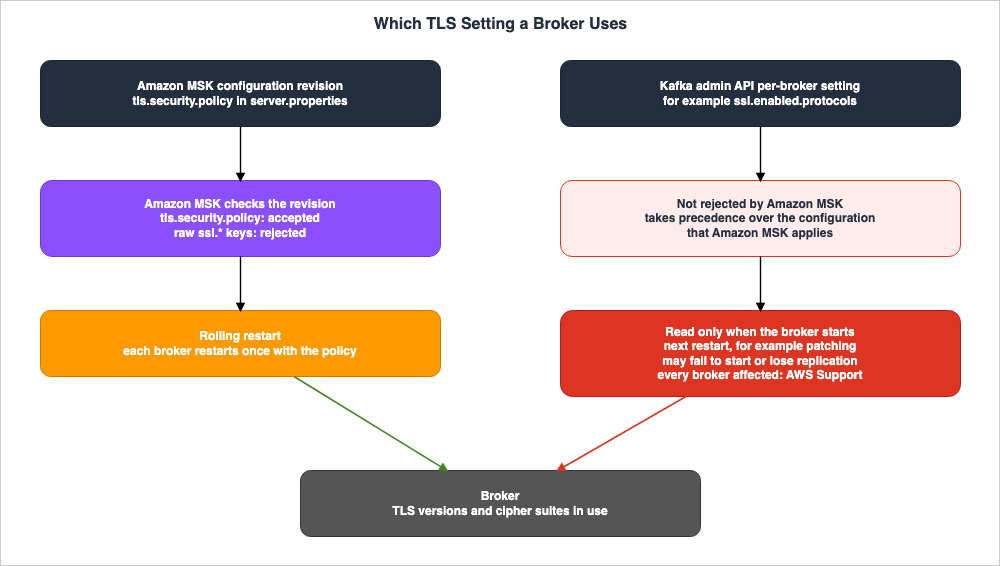
tls.security.policy and rejects raw ssl.* keys, applying the policy to all brokers. The right-hand path in Figure 2 represents the Kafka admin API's per-broker setting. MSK does not reject this path, and per-broker settings take precedence over MSK's configuration; the broker will read these values on the next restart.7.6 The Failure Table
The following table outlines potential issues, when they occur, and how to resolve them, categorized by policy and client/configuration settings.| Scenario | Policy | Client or Configuration | Outcome | When Visible | How to Revert | Source State |
|---|---|---|---|---|---|---|
| Defects with additive policy | MSK-TLSv1.3-2026 | Clients claiming to support TLS 1.3 but not implementing it according to RFC 8446 | The client negotiates TLS 1.3 and the handshake fails. It does not retry with TLS 1.2. | After the connected broker restarts with the new policy. | While remaining on MSK-TLSv1.3-2026, the client will continue to fail. Customers should verify the client's TLS 1.3 implementation. | Stated |
| Additive policy and older clients | MSK-TLSv1.3-2026 | Clients that only support TLS 1.2 | Connects using TLS 1.2 | — | — | Stated |
| TLS 1.3 only policy | MSK-TLSv1.3-Only-2026 | Clients unable to negotiate TLS 1.3 | MSK rejects the connection. | After the connected broker restarts with the new policy. | Revert to MSK-TLSv1.3-2026 in a single step. | Stated |
| ChaCha20 only | MSK-TLSv1.3-2026 or MSK-TLSv1.3-Only-2026 | Clients that only offer TLS_CHACHA20_POLY1305_SHA256 during TLS 1.3 negotiation | The TLS 1.3 handshake fails. | When attempting TLS 1.3 negotiation. | Based on this article's analysis, configure the client to also offer AES-GCM (Inference). | Stated |
| After reverting to default | MSK-TLS1.2-Default-2026 | Clients configured to only use TLS 1.3 | Connection fails. | After reverting to the default. | Before reverting, ensure all clients can negotiate TLS 1.2. | Stated |
| Raw keys in a configuration revision | Any | Keys configured under ssl.* written in a configuration revision | MSK rejects the modification. | When creating the configuration revision (Observation, Section 10.3; the policy page does not say at which step). | Select the policy name. | Stated |
| per-broker setting | Any | Per-broker settings configured under ssl.enabled.protocols via the Kafka admin API | If there is no common cipher suite, the broker may fail to start or lose replication. | During the next restart, or during certain MSK operations such as applying a patch. | If all brokers are affected, recovery requires AWS Support. | Stated |
8. Prerequisites and Error Messages
This chapter outlines the prerequisites for applying policies and provides examples of error messages that MSK may display when it rejects policy values.8.1 Apache Kafka Versions
The section outlining the assumptions on the policy page describes Kafka versions as follows:Your cluster runs Apache Kafka version 3.6 or later.The configuration properties page also states that Kafka versions 3.6 and above are required for
tls.security.policy. However, the versions page indicates that support for versions 3.6.0 and 3.7.x with MSK has ended. The following table, taken from the versions page as of November 7, 2026, lists the entries for versions 3.6.0 through 4.2.x:| Kafka Version | MSK Release Date | End of Support | Notes |
|---|---|---|---|
3.6.0 | 2023-11-16 | 2026-06-01 | End of Support |
3.7.x | 2024-05-29 | 2026-09-01 | End of Support |
3.8.x | 2025-02-20 | -- | — |
3.9.x | 2025-04-21 | -- | The versions page lists this as "Recommended." The final version supporting both ZooKeeper and KRaft. |
4.0.x | 2025-05-16 | -- | — |
4.1.x | 2025-10-15 | -- | — |
4.2.x | 2026-07-15 | -- | According to the versions page, currently only usable with Express brokers. |
This article does not state that the policy is available for Kafka version 3.6. While the assumptions on the policy page specify versions 3.6 and above, as of November 7, 2026, the versions supported by MSK, according to the versions page, are 3.8.x and later. Version 4.2.x is only usable with Express brokers, and no documentation was found regarding whether the policy functions with Express brokers (Section 9.3).
8.2 MSK Serverless
The prerequisite section of the policy page requires that the cluster be an MSK Provisioned cluster, and states the following:TLS security policies aren't available on Amazon MSK Serverless.8.3 When the Account Cannot Set the Property
The troubleshooting table on the policy page lists errors that may occur when you are unable to set properties on your account. According to the policy page, in such cases, customers should remove the property from the configuration, and contact either the AWS account team or AWS Support to request access. The relationship between this error and the content in the What's New post will be discussed in Section 9.1.8.4 Error Messages
The policy page lists four potential errors that occur when MSK rejects the value oftls.security.policy.Invalid value 'value' for tls.security.policy
Cannot change tls.security.policy from current-policy to target-policy in one step
Unsupported config tls.security.policy for Apache Kafka version kafka-version
Setting tls.security.policy is not supported for this accountOn the policy page,
value, current-policy, target-policy, and kafka-version represent placeholder values. According to the policy page, customers should take the following actions in each case:- 1st: Modify the value to one of three valid names and apply the update. The names are case-sensitive.
- 2nd: First apply
MSK-TLSv1.3-2026, then wait for the update to complete before applyingMSK-TLSv1.3-Only-2026. - 3rd: Upgrade the cluster to Kafka version 3.6 or later, then apply the policy. If an upgrade is not possible, remove the property from the configuration and maintain the current TLS settings.
- 4th: Remove the property from the configuration. To request access, contact your AWS account team or AWS Support.
9. Where the Sources Disagree and What They Do Not Say
This chapter will list discrepancies between documents, matters not covered in the documents, and instances where descriptions are missing.9.1 Where the Sources Disagree
The following three points present conflicting information. This article does not definitively identify either source as incorrect.- Terminology: The What's New post uses the terms
encryption policiesandnamed security policy. The policy page and configuration properties page refer to these asTLS security policy. This article will use the terminology used on the policy page.
- Availability: The What's New post states that this feature is available in all AWS Regions where MSK Provisioned is available. The troubleshooting table on the policy page lists error number four from Section 8.4 and advises contacting your account team or AWS Support. Neither statement definitively indicates whether this applies to your account. This article does not state that it is available for all accounts.
- TLS 1.2 Clients: The What's New post states that policies supporting both TLS 1.2 and TLS 1.3 allow TLS 1.2 clients to continue connecting via TLS 1.2. This applies to the
MSK-TLSv1.3-2026policy. According to the policy page, clients using only TLS 1.2 will not connect when using theMSK-TLSv1.3-Only-2026policy. The What's New post also describes a more restrictive policy that only supports TLS 1.3 in a separate statement.
9.2 What the Documentation Does Not List
The following two items are not included in the documentation:- On the Express configuration pages, the list of configurable properties that customers can read and write does not include
tls.security.policy. - The document history table does not list the TLS security policy. The most recent entry in the table, as viewed on November 7, 2026, is dated November 17, 2025.
9.3 Items with No Statement Found
The following table lists items searched for in the materials in Section 1.3, as well as in each service's developer guides, FAQs, and AWS re:Post. Despite searching using various search terms, no relevant information was found for these items. This article does not state that these items do not connect or do not apply.| Item | What Was Searched | Source State |
|---|---|---|
| Does Lambda's MSK integration (event source mapping) connect to clusters using TLS 1.3 only? | Lambda MSK event source page, network page, authentication page, AWS re:Post | No statement found |
| Does MSK Connect connect to clusters using TLS 1.3 only? | MSK Connect page, AWS re:Post | No statement found |
| Does MSK Replicator connect to clusters using TLS 1.3 only? | MSK Replicator page, AWS What's New | No statement found |
| Does Amazon Data Firehose's MSK source connect to clusters using TLS 1.3 only? | Firehose page and FAQ | No statement found |
| Does Amazon EventBridge Pipes' MSK source connect to clusters using TLS 1.3 only? | EventBridge Pipes page, AWS re:Post | No statement found |
| Do Amazon Managed Service for Apache Flink, AWS Glue streaming, Amazon Athena's Kafka connector, and Amazon OpenSearch Ingestion connect to clusters using TLS 1.3 only? | Search of each service's documentation | No statement found |
| Does the policy function with the Express broker? | Policy page, Express configuration pages, Document history | No statement found |
| Do the policies function differently with IAM, SASL/SCRAM, mTLS, unauthenticated listeners, public access, and multi-VPC connections? | Policy page | No statement found |
| Does the policy determine key exchange groups? | Policy page | No statement found |
In the setup in Section 10.7, a Lambda event source mapping connected with unauthenticated TLS continued to receive records from a TLS 1.3-only cluster (Observation). As this is a single observation in one setup, this article does not change the Source State in the table.
The Lambda MSK authentication page describes how to select the type of broker that Lambda's event source mapping will connect to, based on the authentication method. This page does not specify the TLS version. Key exchange groups and ML-KEM are covered on this site's When Does a Connection to an AWS Endpoint Actually Use ML-KEM? page, which states the following regarding MSK:
This article states neither that MSK supports ML-KEM nor that it does not.9.4 Important Notes When Reading
- The "No statement found" message in Section 9.3 indicates that the data was not found in the documentation and does not imply a lack of connectivity or functionality. Before connecting clients on the AWS side to a cluster using only TLS 1.3, customers should test in a non-production cluster.
- The prerequisite of version 3.6 or later on the policy page does not show that the policies can still be used on versions 3.6 and 3.7. The table in Section 8.1 reflects the values as of the versions page on November 7, 2026.
- The information in the What's New post, pertaining to all Regions where MSK Provisioned is available, does not guarantee that the features are available for all accounts (see Section 9.1).
- The policy page does not mention Express brokers. This article does not state whether or not policies are supported on Express brokers.
10. What This Setup Showed
This chapter details the results of creating a single MSK Provisioned cluster in theus-east-1 Region and testing various policy configurations, incrementally adjusting them from the default. Each observation was conducted as a single test and is not a promise of the documentation (as described in Section 2.2, "Observation"). This article does not overwrite statements in the documentation with observations. Following the warning in Section 7.5, configuring TLS on a per-broker basis using the Kafka admin API was not attempted.10.1 Setup
The cluster was created using Kafka version3.9.x.kraft, broker type kafka.m7g.large, and consists of three brokers across three Availability Zones. Communication between clients and brokers uses TLS, and client authentication is disabled. Encryption within the cluster is enabled. Apart from the policy, the configuration revisions contained only auto.create.topics.enable=false. Observations were conducted between 02:47 and 11:28 (UTC) on November 7, 2026. The request to create the cluster was sent at 02:47, and a verification at 03:15 confirmed the status as ACTIVE.A single EC2 instance was placed within the same VPC for observation purposes. Handshakes were tested using OpenSSL 3.5.8's
openssl s_client against one of the brokers, with three different attempts. These attempts involved using only TLS 1.2, using only TLS 1.3, and attempting to use only TLS_CHACHA20_POLY1305_SHA256 with TLS 1.3. The producer used confluent-kafka version 2.16.1, with librdkafka version 2.16.0. The producer was configured with acks set to all, idempotence enabled, and sent one message per second. The topic was created with three partitions, a replication factor of three, and min.insync.replicas set to two. These settings align with the three conditions outlined in Section 6.2. Immediately after creation, the topic was not included in the metadata retrieval, so this article does not verify whether these settings were applied.A Lambda function reads from the same topic through an event source mapping. No secret was passed to the event source mapping, and IAM authentication was not enabled. According to the Lambda MSK authentication page, this combination represents an unauthenticated TLS connection.
10.2 Clusters Immediately After Creation
Immediately after creation, the cluster's configuration ARN and revision were bothnull, and no configuration was applied. In this state, the TLS 1.2 handshake completed, and the cipher suite was AES256-SHA256 in OpenSSL's naming. This represents a combination of RSA key exchange and AES-CBC encryption, corresponding to the RSA AES-CBC family in the table in Section 4.2. Attempts to use TLS 1.3 resulted in an error, indicated by the line New, (NONE), Cipher is (NONE) and a protocol version alert (number 70), mirroring the output for rejected handshakes described in Section 6.4. This observation aligns with the statement in Section 3.1 that clusters without the property only accept TLS 1.2.10.3 The Raw ssl.enabled.protocols Setting Entered into a Configuration Revision
The request to create a configuration with ssl.enabled.protocols=TLSv1.3 was rejected with a BadRequestException during the CreateConfiguration step. The error message was as follows:Key 'ssl.enabled.protocols' is not supported by at least one Apache Kafka version. Key checked against versions: [4.1.x.kraft, 3.9.x, 3.8.x.kraft, 3.9.x.kraft, 3.8.x, 4.2.x, 3.8.x, 3.9.x, 4.0.x.kraft]Because the configuration itself was not created, it did not proceed to the stage of applying it to the cluster. This observation aligns with the statement in Section 7.5, which indicates that MSK rejects raw
ssl.* keys in a configuration revision. The error message does not mention policies but states that one of the Kafka versions does not support that key.10.4 Direct Update to TLS 1.3 Only from the Default
A configuration written withtls.security.policy=MSK-TLSv1.3-Only-2026 was not rejected during the configuration creation process. However, the UpdateClusterConfiguration request, which applied this configuration to the cluster, was rejected with a BadRequestException. The error message is as follows:Cannot change tls.security.policy from MSK-TLS1.2-Default-2026 to MSK-TLSv1.3-Only-2026 in one step. To fix this, apply MSK-TLSv1.3-2026 first and wait for the update to complete. Then apply MSK-TLSv1.3-Only-2026.The first sentence is the second error in Section 8.4, with the replacement values inserted. The second and third sentences essentially state the same information as found in the troubleshooting section of the policy page. In this setup, MSK validated the rung not during the configuration creation process, but when applying it to the cluster.
10.5 Moving to the Additive Policy
At 03:18, a revision containingMSK-TLSv1.3-2026 was applied to the cluster. The operation status transitioned through PENDING, UPDATE_IN_PROGRESS, and UPDATE_COMPLETE, taking 29 minutes and 13 seconds from start to finish. Subsequently, both TLS 1.2 and TLS 1.3 handshakes completed successfully. For TLS 1.3, the cipher suite used was TLS_AES_128_GCM_SHA256. An attempt to exclusively use TLS_CHACHA20_POLY1305_SHA256 with TLS 1.3 resulted in a handshake failure alert (number 40). This observation aligns with the statements in Section 4.4. Under the default, the same attempt had resulted in an alert indicating a protocol version mismatch.Prior to this update, the first producer was initiated. This producer sent 5,394 messages, all of which were successfully delivered, with zero failures. The producer remained active until 04:48, continuing to send messages through the rolling restart in Section 10.7 as well.
10.6 Lambda's Event Source Mapping
At 03:55, an event source mapping was created for theMSK-TLSv1.3-2026 cluster, and its status became Enabled at 03:57. Subsequently, 20 records with a label were sent. The function logs indicate that this label appeared in 20 invocations. The LastProcessingResult was OK.10.7 Transitioning to the TLS 1.3-Only Policy
At 04:04, the next revision, containingMSK-TLSv1.3-Only-2026, was applied. The operation completed in 30 minutes and 17 seconds, transitioning to UPDATE_COMPLETE. Subsequently, the attempt to use TLS 1.2 only resulted in the line New, (NONE), Cipher is (NONE) and a protocol version alert. The TLS 1.3 handshake completed successfully, with cipher suite utilizing TLS_AES_128_GCM_SHA256. The attempt to use ChaCha20 only, as in Section 10.5, also ended with a handshake failure alert.Prior to this update, a second producer was initiated. This second producer also sent 5,394 messages, with zero failures. Combined with the producer from Section 10.5, there were no recorded transmission failures from either producer during the two rolling restarts.
Following the update, 20 records with a different label were sent. The function logs indicated that this label appeared in 20 invocations. The status of the event source mapping remained
Enabled, and the LastProcessingResult was OK. Therefore, in this setup, the event source mapping, which connected using unauthenticated TLS, continued to receive messages from the TLS 1.3-only cluster. Because each broker was restarted during the rolling restart and attempts to use TLS 1.2 were subsequently rejected, this article infers that the connection for the event source mapping was negotiated using TLS 1.3 (Inference). This article did not record which version the event source mapping negotiated.10.8 A Revision Without the Property
At 10:55, a revision that did not include thetls.security.policy property was applied to the cluster that only supports TLS 1.3. The revision was created successfully, but the request to apply it to the cluster was rejected with a BadRequestException. The error message was as follows:Cannot change tls.security.policy from MSK-TLSv1.3-Only-2026 to MSK-TLS1.2-Default-2026 in one step. To fix this, apply MSK-TLSv1.3-2026 first and wait for the update to complete. Then apply MSK-TLS1.2-Default-2026.MSK treated the revision without the property as a request for
MSK-TLS1.2-Default-2026 and rejected it as a two-rung request. This observation aligns with the statement in Section 5.4.10.9 Return to the Additive Policy
Following Section 10.8, the following revision, containingMSK-TLSv1.3-2026, was applied. The operation completed with a status of UPDATE_COMPLETE in 31 minutes and 28 seconds, and the TLS 1.2 handshake finished again. This observation aligns with the statement in Section 7.4, which indicates that clients using only TLS 1.2 can reconnect after a single update.10.10 Handshake Summary
The following table summarizes the results of the handshakes described in Sections 10.2 through 10.9. "Completed" indicates that the handshake finished successfully. "Alert 70" signifies the handshake terminated with a protocol version alert, while "Alert 40" indicates a handshake failure alert.| Section | Policy | TLS 1.2 Only | TLS 1.3 Only | TLS 1.3 with ChaCha20 Only |
|---|---|---|---|---|
| 10.2 | Default (no property) | Completed | Alert 70 | Alert 70 |
| 10.5 | MSK-TLSv1.3-2026 | Completed | Completed | Alert 40 |
| 10.7 | MSK-TLSv1.3-Only-2026 | Alert 70 | Completed | Alert 40 |
| 10.9 | MSK-TLSv1.3-2026 | Completed | Completed | Alert 40 |
10.11 What This Observation Does Not Show
- All observations were single runs, with only one type of broker, one version of Kafka, a single number of brokers, and a single Region. The rolling restart times are values from this setup. The policy page does not document the time required (see Section 6.2).
- The fact that producer failures were zero is a result of the conditions outlined in Section 6.2 and the specific settings used for this producer. It does not reflect the behavior of other clients or under different settings.
- Only one event source mapping, using unauthenticated TLS, was tested. Event source mappings with IAM, SASL/SCRAM, or mTLS authentication, MSK Connect, and the other AWS clients described in Section 9.3 were not tested. This observation does not alter the "No statement found" entry in Section 9.3.
- It was not tested whether a connection that negotiates TLS 1.3 and then fails the handshake retries with TLS 1.2 (as described in Section 7.1). When only ChaCha20 was used, the client only offered TLS 1.3, so it is unclear whether a retry would happen.
- Express broker and MSK Serverless were not tested.
11. Failure Modes
This chapter gathers common failures identified from the materials presented in Chapters 3 through 9.- Single update to TLS 1.3 only: In existing clusters, MSK will reject two-rung requests. Customers should first apply
MSK-TLSv1.3-2026and wait for the update to complete. - Deleting properties on a TLS 1.3 only cluster: MSK will reject it as a two-rung request for the default. Customers should first apply
MSK-TLSv1.3-2026. - Incorrect assumption that the additive policy will not cause issues: Even with
MSK-TLSv1.3-2026, clients that do not properly implement TLS 1.3 will fail the handshake and will not retry with TLS 1.2. - Clients that only offer ChaCha20: Clients that only offer
TLS_CHACHA20_POLY1305_SHA256in TLS 1.3 will be unable to complete the TLS 1.3 handshake with MSK. - Overlooking intermediate devices: If firewalls, proxies, load balancers, or other devices inspecting communication between the client and broker do not support TLS 1.3, the connection may fail.
- Entering
ssl.enabled.protocolsin a configuration revision: MSK rejects rawssl.*keys in a configuration revision. Customers should select by policy name. - Per-broker TLS settings in the Kafka admin API: Per-broker settings take precedence over MSK configuration and take effect after the next restart. If all brokers are affected, the cluster becomes unusable, requiring AWS Support for recovery.
- Overlooking other properties in a new revision: The new configuration revision will replace the current configuration. Customers should ensure that other properties are preserved.
- Misunderstanding assumptions on end-of-support versions: The policy page assumes a version of 3.6 or higher, but support for MSK versions 3.6.0 and 3.7.x has ended.
- Incorrect assumption about account-level availability: If a property cannot be set on an account, the fourth error in Section 8.4 will be returned.
- Application to MSK Serverless: Policies cannot be used with MSK Serverless.
- Overlooking client verification on the AWS side: Descriptions regarding whether Lambda (e.g., event source mapping) or MSK Connect can connect to a TLS 1.3 only cluster are not found. Customers should test with non-production clusters.
- Overlooking clients configured for TLS 1.3 only when reverting to default: When reverting to the default, clients configured to use only TLS 1.3 will be unable to connect.
12. Frequently Asked Questions about TLS 1.3 on Amazon MSK
This chapter answers common questions, focusing on the assumptions outlined in Section 1.1, with references to the relevant sections of the text.Q1. Does the MSK cluster accept TLS 1.3 by default?
No, it does not. MSK Provisioned clusters only accept TLS 1.2 unless the customer selects a specific policy. The policy page refers to this default state asMSK-TLS1.2-Default-2026. While Kafka brokers default to accepting both TLS 1.2 and TLS 1.3, MSK's default setting is different (see Chapter 3).Q2. If you apply MSK-TLSv1.3-2026, will all clients then use TLS 1.3?
No. With MSK-TLSv1.3-2026, for each connection, the client negotiates the highest version it supports. Clients that only support TLS 1.2 will connect using TLS 1.2 (see Section 4.3).Q3. If a connection fails the TLS 1.3 handshake, will it attempt to reconnect using TLS 1.2?
No, it will not. According to the policy page, connections that negotiate TLS 1.3 and then fail the handshake when usingMSK-TLSv1.3-2026 do not retry with TLS 1.2. With MSK-TLSv1.3-Only-2026, MSK will reject connections that are unable to negotiate TLS 1.3 (see Sections 7.1 and 7.2).Q4. Can existing clusters be migrated to TLS 1.3 only in a single operation?
No, they cannot. With existing clusters, customers can only move the policy one rung at a time. They must first applyMSK-TLSv1.3-2026, and once that update is complete, they can then apply MSK-TLSv1.3-Only-2026. In new clusters, customers can directly select MSK-TLSv1.3-Only-2026 (see Chapter 5).Q5. If you remove the tls.security.policy configuration, will it revert to the default?
If you are currently using MSK-TLSv1.3-2026, it will revert. However, it will not revert if you are using MSK-TLSv1.3-Only-2026. If you remove the property on a cluster configured with MSK-TLSv1.3-Only-2026, it will trigger a two-rung request for the default, which MSK will reject (see Section 5.4).Q6. If you specify ssl.enabled.protocols in the configuration, can you achieve the same result as a policy?
No. MSK rejects the raw ssl.* keys entered in a configuration revision. While MSK does not reject values configured on a per-broker basis through the Kafka admin API, the policy page warns against this. Values configured on a per-broker basis take precedence over the MSK configuration and will take effect when the broker is restarted (see Section 7.5).Q7. To reconnect a TLS 1.2 client to a cluster that only supports TLS 1.3 as quickly as possible, what should be done?
The customer should revert fromMSK-TLSv1.3-Only-2026 back to MSK-TLSv1.3-2026 in a single update. There is no need to revert to the default configuration (see Section 7.4).Q8. Can policies be used in a Kafka cluster running version 3.6?
While the prerequisites listed on the policy page require version 3.6 or later, the versions page indicates that support for MSK in version 3.6.0 ended on June 1, 2026, and support for version 3.7.x ended on September 1, 2026. As of the versions page read on November 7, 2026, only versions 3.8.x and later are still supported (see Section 8.1).Q9. Can Lambda or MSK Connect connect to clusters that only support TLS 1.3?
The documentation does not provide a definitive answer. This article did not find a description of whether clients on the AWS side can connect to clusters that support only TLS 1.3. This does not necessarily mean that a connection is not possible. In the setup in Section 10.7, a Lambda event source mapping connected with unauthenticated TLS continued to receive records from a TLS 1.3-only cluster. This was a single observation, and other authentication methods and other clients were not tested. Customers can test this on non-production clusters (see Sections 9.3 and 10.7).Q10. Can policies be used with Express brokers or MSK Serverless?
Policies cannot be used with MSK Serverless. The policy page states this. There is no mention of whether policies work with Express brokers. This article does not state whether policies can or cannot be used with Express brokers (Sections 8.2 and 9.3).13. Summary
Before migrating your MSK cluster to TLS 1.3, customers should verify the following:- The cluster is configured as MSK Provisioned, the Kafka version is a supported version as listed on the versions page, and the account can set
tls.security.policy. - The current policy is read from the
tls.security.policysetting in the configuration revision. If no property is specified, it defaults toMSK-TLS1.2-Default-2026. - All clients, tools, and intermediary devices support TLS 1.3 according to RFC 8446 and offer the AES-GCM cipher suites.
- AWS-side clients (such as the Lambda event source mapping and MSK Connect) have been tested on a non-production cluster.
- For existing clusters, the procedure is to first apply
MSK-TLSv1.3-2026, and then, after the update is complete, applyMSK-TLSv1.3-Only-2026. - The new configuration revision retains other properties.
- The topic replication factor is 3 or greater, and
min.insync.replicasis less than or equal to the replication factor minus 1. Clients retry connections. - No configuration revision specifies
ssl.*keys, and no per-broker TLS settings are written with the Kafka admin API. - Your runbook rolls back one rung at a time. The fastest way to restore connectivity for clients that only support TLS 1.2 is to revert from
MSK-TLSv1.3-Only-2026toMSK-TLSv1.3-2026with a single update.
14. References
- TLS security policies for Amazon MSK - Amazon Managed Streaming for Apache Kafka
- Custom Amazon MSK configurations - Amazon Managed Streaming for Apache Kafka
- Amazon MSK encryption - Amazon Managed Streaming for Apache Kafka
- Supported Apache Kafka versions - Amazon Managed Streaming for Apache Kafka
- Custom MSK Express broker configurations (Read/Write access) - Amazon Managed Streaming for Apache Kafka
- Metadata management - Amazon Managed Streaming for Apache Kafka
- Document history for Amazon MSK Developer Guide - Amazon Managed Streaming for Apache Kafka
- Configurations - Amazon Managed Streaming for Apache Kafka
- Cluster Configuration - Amazon Managed Streaming for Apache Kafka
- AWS::MSK::Configuration - AWS CloudFormation
- Configuring Amazon MSK cluster authentication methods in Lambda - AWS Lambda
- Amazon MSK now supports TLS 1.3 for data in transit - AWS What's New
- Broker Configs - Apache Kafka
- RFC 8446: The Transport Layer Security (TLS) Protocol Version 1.3
References:
Tech Blog with curated related content
Written by Hidekazu Konishi