Claude Code Version History and Timeline - Release Channels, Changed Defaults, and Where Each Version Date Comes From
First Published:
Last Updated:
anthropics/claude-code repository on GitHub contained headings for 427 versions. The latest version was 2.1.307, and the oldest was version 0.2.21. None of these 427 headings include dates. The changelog page within Claude Code's documentation, which is generated from this file, also lacks dates associated with the version headings. Instead, dates for each version come from three separate sources: the npm registry, the GitHub Release pages, and the weekly "What's new" summaries in the documentation. These three sources sometimes record different dates for the same version.The default behavior has also changed over time. According to the documentation on the check date, interactive terminal and VS Code sessions start in auto mode when no permission mode is configured and auto mode is available. In a project with no CLAUDE.md, Claude Code reads AGENTS.md. Fork subagents are on by default. In the terminal, long conversations that meet certain criteria are compacted while idle. These defaults were introduced in versions and announcements released between August and October of 2026.
This article is a timeline detailing the versions of Claude Code, from the initial research preview on February 24, 2025, up to the check date. It lists the versions in which the way Claude Code is offered, its extension points, or the defaults that decide how a session starts changed. Each row lists the version and the publish time (UTC) recorded in the npm registry (only for rows with a version), what changed, and the source that states it: a CHANGELOG line, the documentation, or an Anthropic news page. The article also shows how the rows were selected and where the sources disagree on a version or a date. All information was verified as of October 21, 2026.
Background and Method of Creating the Claude Code Version History and Timeline
Claude Code releases versions frequently. According to the npm registry records, 46 versions were released over a period of 51 days, from September 1, 2026, to October 21, 2026. Versions were released on 38 of those days, with 8 days seeing the release of two or more versions. At this pace, it's difficult to determine what defaults are in effect for the version you are currently using simply by reading the CHANGELOG. The purpose of this article is to identify the versions where defaults have changed, along with the source that each date comes from, and to demonstrate, based solely on the original source material, to what extent users can independently choose which version to use.Sources Used in This Article
The rows of the timeline were primarily drawn from the following sources:- CHANGELOG.md — A file in the
anthropics/claude-coderepository on GitHub. It lists changes in a bullet-point format. This article checked the exact wording of each quoted line in the tables against this file. The link provided as the source for each row refers to the corresponding version on the Claude Code documentation's changelog page. This page states,This page is generated from the CHANGELOG.md on GitHub. - npm registry — Records for the
@anthropic-ai/claude-codepackage. Thetimefield gives the UTC time when each version was published. Thedist-tagsfield shows which version each tag (such aslatestandstable) refers to. - GitHub Release pages — Pages located at
github.com/anthropics/claude-code/releases/tag/v<version>. This article compared the timestamps on these pages with the times in the npm registry. - Claude Code documentation — Various pages on
code.claude.com/docs/en/, specifically the following: Advanced setup, Choose a permission mode, All settings, How Claude remembers your project, Create custom subagents, Mods overview, Manage mods for your organization, and Claude apps gateway. "What's new" provides a weekly summary of updates in the documentation. - Anthropic news pages — The three pages announcing the research preview, general availability (GA), and version 2.0.
A CHANGELOG records changes, the documentation reflects the specifications as of the check date, and the news pages announce new developments. This article distinguishes between these three types of information.
Where the Dates in This Timeline Come From
The CHANGELOG and the changelog page in the documentation have no dates in their version headings. Within what this article checked, three sources give a date for each version:- The npm registry's
timefield: This provides the publish time of every version in UTC. On the check date, there were 551 versions. - GitHub's Release pages: Pages exist only for newer versions. Pages for versions such as 1.0.0, 1.0.38, and 2.0.0 returned a 404 error on the check date.
- Documentation's "What's new": This provides weekly summaries, listing the week's dates and the range of versions released during that week. On the check date, the most recent summary was for Week 37 (
September 7–11, 2026). Week 31 is not listed on the list page.
For milestones such as the research preview, GA, and 2.0, there is also a fourth date: the publication date of the Anthropic news page.
The dates in the table come from the
time value in npm's registry. The column heading is npm Publish Time (UTC). This is the time the version was published on npm, not the announcement date. The dates stay in UTC, without conversion to Japan time. Therefore, there are some versions where the UTC date and the date in Japan time differ by one day. For example, the npm time for version 2.1.3 is 2026-01-09T21:05:42Z, which corresponds to the morning of January 10, 2026, in Japan time.The times on npm and on the GitHub Release pages do not always match. Among the versions in the timeline rows, this article compared the 20 that have a GitHub Release page. Two of those versions had different UTC dates.
| Version | npm Publish Time (UTC) | GitHub Release Page (UTC) |
|---|---|---|
| 2.1.206 | 2026-07-09T17:54:03Z | 2026-07-10T01:45:26Z |
| 2.1.212 | 2026-07-16T19:20:24Z | 2026-07-17T00:26:27Z |
The npm registry and the CHANGELOG do not contain the same set of versions. There are eight versions present in the CHANGELOG but not in the npm registry (0.2.21, 0.2.26, 0.2.63, 0.2.75, 0.2.82, 1.0.97, 2.1.43, 2.1.46), and 132 versions appear in the npm registry's
time field but have no heading in the CHANGELOG. This article does not treat a version without a CHANGELOG heading as a skipped version number, because the sources give no reason.The npm
time and dist-tags fields can be viewed with read-only commands like the following. The output is long, so it is not shown here.npm view @anthropic-ai/claude-code time --json
npm view @anthropic-ai/claude-code dist-tagsHow the Rows Were Selected
This timeline highlights specific changes and is not a comprehensive list of all versions. The timeline includes rows for the following four types of changes:- Milestones in how the product is offered — The research preview, GA (General Availability), 2.0, SDK name changes.
- Initial introduction of extension mechanisms — Hooks, subagents, plugins, skills, sandboxes, mods.
- Default changes that determine how sessions begin — Permission modes, the instruction files that are loaded, subagents, forks, and running them in the background, compaction, update channels, gateways.
- Announcements of termination, deletion, or renaming — End of product or SDK entry points, renaming of permission mode display names.
Bug fixes, performance improvements, and UI details were not included.
This article gathered candidates in two ways. The first was automated extraction. There were 8,086 bulleted lines in the CHANGELOG. From these, lines beginning with
Fixed, Improved, or Reduced were set aside, and lines containing terms representing defaults, deletions, deprecations, or general availability were extracted. Examples are lines beginning with Changed and containing the word default, or lines containing phrases like by default, Removed, Deprecated, or generally available. This resulted in 148 lines. The second method involved searching for the extension mechanisms mentioned in point 2 above. This is because lines for a first introduction, such as Released hooks. and Added Claude Mods, are not caught by the first method. The remaining rows come from the version statements in the documentation, the news pages, and CHANGELOG lines found by searching for the release channel, the gateway, AGENTS.md, idle compaction, and Claude Design.Of the 148 lines, the timeline includes 16. The remaining 132 lines were left out as the kinds below. Leaving a line out does not mean that nothing changed; it means that the line is outside the scope of this timeline.
| Kind of Line Left Out | Lines |
|---|---|
| Default models, effort, thinking | 33 |
| Displays, notifications, startup messages | 20 |
| Surfaces other than the core (e.g., details of the VS Code extension, Claude Tag, cloud sessions, Code Review, Remote Control) | 18 |
| MCP (e.g., protocol version negotiations) | 9 |
| Limits on the number and depth of subagents, and the size of workflows | 8 |
| Default settings for the auto mode classifier, and suggestions for switching to auto mode | 5 |
| Defaults per provider, deletion and deprecation of commands and tools, and other items | 39 |
The Anthropic Claude Model Release Timeline covers the history of the default model, and the Model Context Protocol Specification Version Timeline covers the MCP specification versions.
The number of words in the CHANGELOG varies depending on the counting method. When counting bulleted lines without regard to capitalization, lines containing a word that begins with
default (such as defaults and defaultMode) appear 249 times, lines containing no longer appear 309 times, and lines containing by default appear 49 times. Lines containing Changed default appear 2 times. Because simply counting words cannot reliably identify relevant lines, this article extracts potential candidates using automated methods, and then each line is reviewed individually to determine if it falls into one of the four categories listed above.What This Article Leaves to Other Articles
This article does not cover the usage of individual features. Claude Code Hooks Complete Guide covers hooks, Claude Code Plugins Complete Guide covers plugins, Claude Code Subagents and Multi-Agent Orchestration Guide covers subagents and forks, and Claude Code Compaction and Long-Session Operations Guide covers compaction. Detailed explanations of permission modes and settings are in Claude Code Operator's Handbook and Claude Code Features and Settings Reference 2026. AGENTS.md Across Coding Agents compares how other coding agents read AGENTS.md. A separate article published at the same time, Claude Code Mods Next to Settings Hooks, covers what a mod can approve and what stops it. A comparison of Claude Code and other CLI agents is available in CLI Coding Agents Comparison. This article does not specify which channels or versions to choose.How to Read the Tables
The columns of the five timeline tables are as follows:- Version — The version number. It is written using the same notation as the headings in the CHANGELOG. For a row based on a documentation statement, the version that the statement names is shown.
- npm Publish Time (UTC) — The
timevalue from the npm registry, recorded to the second. Rows without a specific version number show—. - Area — Indicates the type of change. It specifies one of the following:
Product,Extension point,Default,Release channel,Gateway, orNotice. - What Changed — Describes what was changed. It includes excerpts from the CHANGELOG, in English, followed by a brief description of the change.
- Where It Is Written — Specifies the document that provides the basis for the row. It indicates whether the information is found in a CHANGELOG line, a documentation page, or a news page.
The word default has two meanings in this article. One refers to the value
default for the permission mode, which is displayed as "Manual" on the screen from version 2.1.200 onwards. The other refers to the behavior when the user has not configured any settings; the documentation refers to this as the "built-in default." For example, it might state that the built-in default for permission mode is auto mode. In this article, the former is written as default mode (Manual mode), and the latter as the default.The table in the Current Overview section uses the columns shared across this series. It includes six columns:
What Changed, Since, Who Decides, Where It Is Written, What You Can Set, and No Statement Found, along with Status on the Check Date, which indicates the status as of the check date. The value for Status on the Check Date comes from seven options: Released, In effect, Documented, Announced, Scheduled, Proposed, and End of life. This article uses the following three:In effect— The default is currently active in the version checked.Documented— The documentation states it, but no corresponding line was found in the CHANGELOG.Announced— It is announced as a plan for a future date.
Claude Code Version Historical Timeline (Updates from February 24, 2025)
The following five tables constitute the main timeline. All references were obtained on October 21, 2026. The CHANGELOG and the npm registry record were obtained again at 02:07 UTC on October 22, 2026. Both were last changed on October 21, 2026 (UTC), so the counts and versions in this article are the state at the end of October 21 (UTC).Index:
- 2025-02 to 2025-05 - From research preview to general availability.
- 2025-06 to 2025-12 - Period when hooks, subagents, plugins, and skills were added, and version 2.0 was released.
- 2026-01 to 2026-08 - The 2.1 line, release channels, the gateway, and fork subagents as a default.
- 2026-09 - How project settings are handled, AGENTS.md, and the auto mode default spreading to more plans.
- 2026-10 - Mods, idle compaction, and the fork default spreading to other surfaces.
* You can sort the table by clicking on the column name.
2025-02 to 2025-05 — The Research Preview and General Availability
During this period, Claude Code was released as a research preview and became generally available.| Version | npm Publish Time (UTC) | Area | What Changed | Where It Is Written |
|---|---|---|---|---|
| 0.2.6 | 2025-02-24T18:03:41Z | Product | Announced as a research preview. The announcement for Claude 3.7 Sonnet states, Claude Code is available as a limited research preview. Version 0.2.6 is the oldest version in the npm registry's time field; the registry has no package for that version. The oldest heading in the CHANGELOG is 0.2.21, and this version is not available on npm. | Claude 3.7 Sonnet and Claude Code (Anthropic, published 2025-02-24) |
| 1.0.0 | 2025-05-22T16:57:18Z | Product | Became generally available. The CHANGELOG states, Claude Code is now generally available, and the same version includes the line, Introducing Sonnet 4 and Opus 4 models. | CHANGELOG 1.0.0 / Introducing Claude 4 (Anthropic, published 2025-05-22) |
2025-06 to 2025-12 — Hooks, Subagents, Plugins, Skills, and 2.0
During this period, extension points were added. The SDK name changed with version 2.0.| Version | npm Publish Time (UTC) | Area | What Changed | Where It Is Written |
|---|---|---|---|---|
| 1.0.38 | 2025-06-30T20:29:03Z | Extension point | Hooks were added. The CHANGELOG line reads Released hooks. | CHANGELOG 1.0.38 |
| 1.0.60 | 2025-07-24T20:52:22Z | Extension point | Custom subagents were added. The CHANGELOG line reads You can now create custom subagents for specialized tasks! | CHANGELOG 1.0.60 |
| 2.0.0 | 2025-09-29T14:41:14Z | Product | Version 2.0 was released. The CHANGELOG line reads SDK: The Claude Code SDK is now the Claude Agent SDK, and the same version has a line for New native VS Code extension. The announcement names the VS Code extension, version 2.0 of the terminal interface, and checkpoints. | CHANGELOG 2.0.0 / Enabling Claude Code to work more autonomously (Anthropic, published 2025-09-29) |
| 2.0.12 | 2025-10-09T15:43:28Z | Extension point | Plugins were added. The CHANGELOG writes Plugin System Released in bold. | CHANGELOG 2.0.12 |
| 2.0.20 | 2025-10-16T16:01:05Z | Extension point | Skills were added. The CHANGELOG writes Added support for Claude Skills. | CHANGELOG 2.0.20 |
| 2.0.24 | 2025-10-20T18:36:49Z | Extension point | A sandbox for BashTool was added. The CHANGELOG writes Sandbox: Releasing a sandbox mode for the BashTool on Linux & Mac. | CHANGELOG 2.0.24 |
| 2.0.25 | 2025-10-21T21:03:51Z | Notice | The legacy SDK entry point was removed. The CHANGELOG writes Removed legacy SDK entrypoint and guides users to migrate to the Claude Agent SDK package. | CHANGELOG 2.0.25 |
2026-01 to 2026-08 — The 2.1 Line, Release Channels, the Gateway, and Fork Subagents
During this period, the 2.1 release line began, and users gained the ability to select release channels. The gateway was added, and running subagents in the background and fork subagents became the default.| Version | npm Publish Time (UTC) | Area | What Changed | Where It Is Written |
|---|---|---|---|---|
| 2.1.0 | 2026-01-07T02:43:04Z | Product | The initial version of the 2.1 release line was released. This version allowed skills to run in a forked subagent context through context: fork in the skill's frontmatter. | CHANGELOG 2.1.0 |
| 2.1.3 | 2026-01-09T21:05:42Z | Release channel | Users gained the ability to switch release channels via /config. The CHANGELOG writes Added release channel and names stable and latest. | CHANGELOG 2.1.3 |
| 2.1.195 | 2026-06-26T18:16:23Z | Gateway | According to the documentation, this marked the initial release of the gateway. The prerequisites table on the Claude apps gateway page says that the claude gateway subcommand and gateway sign-in were introduced in version 2.1.195. There is no mention of the gateway in the CHANGELOG section for 2.1.195. | Claude apps gateway for Amazon Bedrock, Claude Platform on AWS, Google Cloud, and Microsoft Foundry (Claude Code Docs) |
| 2.1.198 | 2026-07-01T16:50:16Z | Gateway | In the CHANGELOG, this is the first line that begins with Gateway:. It states: Gateway: added Claude Platform on AWS (anthropicAws) as an upstream provider. | CHANGELOG 2.1.198 |
| 2.1.198 | 2026-07-01T16:50:16Z | Default | Subagents now run in the background by default. The CHANGELOG notes: Subagents now run in the background by default, and adds that this was previously a gradual rollout. In the same version, the wizard for /agents was removed. | CHANGELOG 2.1.198 |
| 2.1.200 | 2026-07-03T04:33:49Z | Notice | The display name for the default permission mode has been changed to Manual. The change appears in the CLI, --help, VS Code, and JetBrains. The setting continues to accept both default and manual as valid values. | CHANGELOG 2.1.200 |
| 2.1.206 | 2026-07-09T17:54:03Z | Gateway | /login now supports public gateway endpoints operated by Anthropic. The date and time on the GitHub Release page is 2026-07-10T01:45:26Z, which differs from the npm date by one day (UTC). | CHANGELOG 2.1.206 |
| 2.1.212 | 2026-07-16T19:20:24Z | Default | The /fork command now duplicates the conversation into a new background session. The in-session subagent that /fork used to start is now /subtask. In the same version, the mode argument for the Task tool has been deprecated, and subagents now inherit the parent session's permission mode by default. According to the documentation, when agent view is turned off, /fork starts a forked subagent instead. The date and time on the GitHub Release page is 2026-07-17T00:26:27Z. | CHANGELOG 2.1.212 |
| 2.1.218 | 2026-07-22T19:55:32Z | Default | Skills with context: fork now run in the background by default. You can revert this behavior on a per-skill basis by setting background: false. | CHANGELOG 2.1.218 |
| 2.1.228 | 2026-08-11T17:45:45Z | Default | According to the documentation, this version (macOS, Linux, WSL) is the minimum version for auto mode to be the default permission mode. The Choose a permission mode page says that native Windows needs version 2.1.233 or later. No lines changing the default were found in the CHANGELOG sections for versions 2.1.228 and 2.1.233. | Choose a permission mode (Claude Code Docs) |
| — | — | Default | From 2026-08-14, auto mode became the default permission mode for new sessions on the Pro, Max, and Team plans. What's new for the week of 2026-08-03 to 2026-08-07 (Week 32) announced this with Starting August 14. This is a date announcement, not a version note. If you set a default mode yourself, it stays in place unless you accept the one-time switch prompt. A default your organization manages does not change. | Week 32 · August 3–7, 2026 (Claude Code Docs, What's new) |
| 2.1.232 | 2026-08-13T21:30:53Z | Default | Fork subagents are now on by default in interactive sessions. The CHANGELOG states Subagent forking is now on by default. The same line also says that agent spawns that are not teammates now run in the background by default in interactive sessions. | CHANGELOG 2.1.232 |
2026-09 — Project Settings, AGENTS.md, and Auto Mode for Every Plan
During this period, thebypassPermissions setting within project settings began to be ignored, and support for AGENTS.md was added. The auto mode default was extended to every plan and provider.| Version | npm Publish Time (UTC) | Area | What Changed | Where It Is Written |
|---|---|---|---|---|
| 2.1.257 | 2026-09-01T17:15:33Z | Default | The bypassPermissions setting specified in project settings began to be ignored. This applies to defaultMode in .claude/settings.json and .claude/settings.local.json, which is now ignored there, as auto already was. | CHANGELOG 2.1.257 |
| 2.1.277 | 2026-09-18T16:22:26Z | Default | Support for AGENTS.md was added. The CHANGELOG notes: Added AGENTS.md support: in a project with no CLAUDE.md, Claude Code reads AGENTS.md instead. | CHANGELOG 2.1.277 / How Claude remembers your project (Claude Code Docs) |
| 2.1.281 | 2026-09-23T17:01:17Z | Default | Support for AGENTS.md was extended to Amazon Bedrock, Google Vertex AI, Microsoft Foundry, LLM gateways, and sessions with telemetry disabled. | CHANGELOG 2.1.281 |
| 2.1.283 | 2026-09-25T18:46:11Z | Default | Interactive sessions on third-party providers or with telemetry off now start in auto mode when no permission mode is configured. The documentation says that from version 2.1.283, interactive terminal and VS Code sessions start in auto mode by default. | CHANGELOG 2.1.283 / Choose a permission mode (Claude Code Docs) |
| 2.1.284 | 2026-09-28T17:11:59Z | Default | Interactive terminal and VS Code sessions now start in auto mode when no permission mode is configured, on every plan and provider. The CHANGELOG writes on every plan and provider. | CHANGELOG 2.1.284 |
| 2.1.285 | 2026-09-29T17:32:09Z | Default | Sessions initiated with claude -p and the Python Agent SDK also now begin in auto mode when using third-party providers or when telemetry is disabled. The documentation says that in an organization with the HIPAA configuration applied, the sessions it covers start in default mode from version 2.1.285. | CHANGELOG 2.1.285 / Choose a permission mode (Claude Code Docs) |
| 2.1.286 | 2026-09-30T17:14:38Z | Extension point | According to the documentation, this is the first version in which mods work in the Desktop app. The Manage mods for your organization page says that mods are on by default from version 2.1.286. The 2.1.286 section of the CHANGELOG has no line about mods. | Mods overview (Claude Code Docs) / Manage mods for your organization (Claude Code Docs) |
2026-10 — Mods, Idle Compaction, and Fork Subagents Beyond the Terminal
During this period, mods and idle compaction were added, and fork subagents became the default on surfaces other than the terminal. The closure of standalone Claude Design was announced.| Version | npm Publish Time (UTC) | Area | What Changed | Where It Is Written |
|---|---|---|---|---|
| 2.1.287 | 2026-10-01T16:59:25Z | Extension point | Mods were added. The CHANGELOG states: Added Claude Mods: plugins may now modify deeper behavior. The Mods overview page indicates that mods are enabled by default and that in the terminal you use version 2.1.287 or later. | CHANGELOG 2.1.287 / Mods overview (Claude Code Docs) |
| 2.1.299 | 2026-10-14T00:23:19Z | Default | Idle compaction was added to the terminal. A conversation of 200,000 tokens or more that is left idle for about 54 minutes is compacted before its one-hour prompt cache expires. | CHANGELOG 2.1.299 / All settings (Claude Code Docs) |
| 2.1.302 | 2026-10-16T16:48:28Z | Default | Fork subagents were enabled by default in claude -p, the Agent SDK, the Desktop app, and VS Code as well. The CHANGELOG notes that they are already enabled in the terminal. | CHANGELOG 2.1.302 / Create custom subagents (Claude Code Docs) |
| 2.1.302 | 2026-10-16T16:48:28Z | Default | claude -p and Agent SDK sessions with no permission mode now start in default mode on third-party providers, with telemetry off, or on a fresh install. If you pass --permission-mode auto, it will remain in auto mode. | CHANGELOG 2.1.302 |
| 2.1.302 | 2026-10-16T16:48:28Z | Default | In both the Desktop app and VS Code, the main conversation's subagents now always run in the background. The CHANGELOG indicates this is equivalent to the terminal behavior. | CHANGELOG 2.1.302 |
| 2.1.302 | 2026-10-16T16:48:28Z | Notice | The closure of standalone Claude Design was announced. The /design-sync and /design-login commands now show a notice that claude.ai/design closes by December 14, 2026. On the check date, this is a plan. | CHANGELOG 2.1.302 |
Current Overview of Claude Code Versions and Defaults
This section summarizes the defaults and the range in which users can choose a version, as of the check date, October 21, 2026. On the check date, the npmdist-tags indicated that latest refers to version 2.1.307 (2026-10-21T20:47:18Z), and stable refers to version 2.1.306 (2026-10-21T02:28:47Z).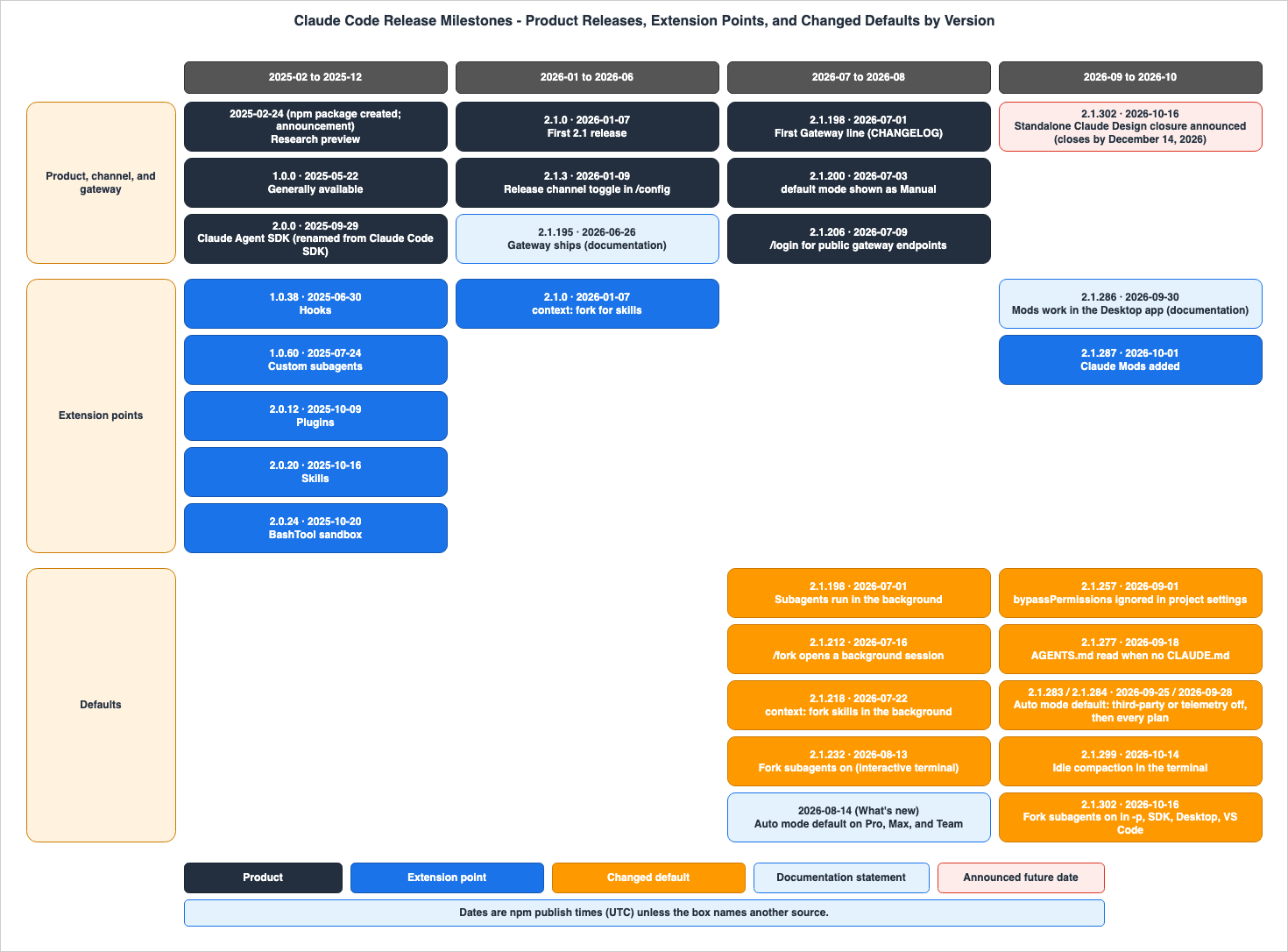
Defaults That Changed by Version
The following table regroups rows of the timeline by what changed. TheSince dates refer to the UTC dates within npm's time field.| What Changed | Since | Who Decides | Where It Is Written | What You Can Set | No Statement Found | Status on the Check Date |
|---|---|---|---|---|---|---|
| The default permission mode for interactive terminal and VS Code sessions is auto mode | Pro, Max, and Team: from 2026-08-14 (version 2.1.228 and later; native Windows: version 2.1.233 and later). Third-party providers or telemetry off: 2.1.283 (2026-09-25). For all plans and providers: 2.1.284 (2026-09-28). | Anthropic | CHANGELOG 2.1.283, 2.1.284 / Choose a permission mode / What's new (Week 32) | permissions.defaultMode, --permission-mode | A CHANGELOG line for the 2026-08-14 switch (searched the 2.1.228 to 2.1.233 sections and the words Pro, Max, and Team and August 14) | In effect |
The default permission mode for sessions using claude -p and the Agent SDK | Two lines: 2.1.285 (2026-09-29) and 2.1.302 (2026-10-16). The conditions and the targets differ between the two lines. | Anthropic | CHANGELOG 2.1.285, 2.1.302 | --permission-mode | — | In effect |
Project settings now ignore bypassPermissions and auto | 2.1.257 (2026-09-01) | Anthropic | CHANGELOG 2.1.257 / All settings | User settings, managed settings, --permission-mode | — | In effect |
| Reading AGENTS.md on projects without CLAUDE.md | 2.1.277 (2026-09-18). Other providers and sessions with telemetry off: 2.1.281 (2026-09-23) | Anthropic | CHANGELOG 2.1.277, 2.1.281 / How Claude remembers your project | Project instructions in /config | — | In effect |
| Running subagents in the background | 2.1.198 (2026-07-01), 2.1.232 (2026-08-13), and 2.1.302 (2026-10-16) for the Desktop app and VS Code | Anthropic | CHANGELOG 2.1.198, 2.1.232, 2.1.302 | CLAUDE_CODE_DISABLE_BACKGROUND_TASKS, disable fork mode | — | In effect |
| Fork mode (fork subagents) | Interactive terminal sessions: 2.1.232 (2026-08-13). claude -p, the Agent SDK, the Desktop app, and VS Code: 2.1.302 (2026-10-16) | Anthropic | CHANGELOG 2.1.232, 2.1.302 / Create custom subagents | Set CLAUDE_CODE_FORK_SUBAGENT to 0 | The version that added the /fork command, a feature separate from fork subagents (searched for /fork, fork command, and Added /fork. The earliest mention appears in a fix for a bug in version 2.1.47, while a section in version 2.1.77 states that /fork was renamed to /branch, but /fork was kept as an alias.) | In effect |
| Terminal idle compaction | 2.1.299 (2026-10-14) | Anthropic | CHANGELOG 2.1.299 / All settings | "idleCompaction": false (version 2.1.290 and later), the Idle compaction row in /config (version 2.1.302 and later) | — | In effect |
| Mods are on by default | Documentation statements. Terminal: 2.1.287 (2026-10-01); Desktop app: 2.1.286 (2026-09-30); Manage mods for your organization page: 2.1.286 | Anthropic, Organization administrator | Mods overview / Manage mods for your organization | Managed setting (see separate article) | A CHANGELOG line stating that mods are on by default (searched for mods are on, Mods with by default, CLAUDE_CODE_ENABLE_FUNCTION_HOOKS, and early access). The 2.1.287 line only says that mods were added. | Documented |
Default update channel is latest | Version 2.1.3 (2026-01-09) introduced the ability to change this in /config. | User, Organization administrator | CHANGELOG 2.1.3 / Advanced setup / All settings | autoUpdatesChannel, minimumVersion | The CHANGELOG line that added minimumVersion (searched for minimumVersion, minimum version, and version floor). | In effect |
| Closure of standalone Claude Design | Announcement in version 2.1.302 (2026-10-16). The announcement says it closes by 2026-12-14. | Anthropic | CHANGELOG 2.1.302 | — | — | Announced |
The following four lines are the verbatim lines behind the permission mode rows above: two lines for interactive sessions and two lines for
claude -p.2.1.283: Changed interactive sessions on third-party providers or with telemetry off to start in auto mode when no permission mode is configured; `permissions.defaultMode` still overrides it
2.1.284: Changed interactive terminal and VS Code sessions to start in auto mode when no permission mode is configured, on every plan and provider; `permissions.defaultMode` still overrides it
2.1.285: Changed `claude -p` and Python Agent SDK sessions on third-party providers or with telemetry off to start in auto mode when no permission mode is configured, like interactive sessions; `--permission-mode` still overrides it
2.1.302: Changed `claude -p` and Agent SDK sessions with no permission mode to start in `default` mode on third-party providers, with telemetry off or on a fresh install; `--permission-mode auto` keeps autoThe lines for version 2.1.285 and version 2.1.302 have different targets and conditions. The line for 2.1.285 mentions the Python Agent SDK, while the line for 2.1.302 simply states "Agent SDK." The line for 2.1.302 includes the condition that it applies when the system is newly installed. The "Choose a permission mode" page states the outcome for these runs:
Before v2.1.302, these runs could start in auto mode if they didn't fetch feature flags, and from version 2.1.302, claude -p and Agent SDK runs with no permission mode set start in Manual mode.The default permission mode is not determined solely by the version. According to the "Choose a permission mode" page, in versions before 2.1.283, auto mode was the default only on the Pro, Max, and Team plans, in sessions that fetch feature flags. For organizations applying HIPAA configurations, sessions subject to those configurations will start in
default mode from version 2.1.285 onwards. When the --permission-mode flag, a settings file, or the built-in default selects auto but auto mode is not available to the session, Claude Code starts the session in Manual mode.Release Channels and minimumVersion
Users can choose which version they receive through automatic updates by selecting a release channel. The "Advanced setup" page describes the values of theautoUpdatesChannel setting as follows:* `"latest"`, the default: receive new features as soon as they're released
* `"stable"`: use a version that is typically about one week old, skipping releases with major regressionsThe
stable channel also receives new versions. The documentation states that the stable version is typically about one week old. On the check date, the version that stable pointed to, 2.1.306, was one version behind the latest version, which pointed to 2.1.307. Because of this, a version that changes a default can reach the stable channel later. Whether an update changes a default depends not only on the version itself, but also on the user's plan and settings.The same page describes
minimumVersion as a lower limit. Automatic updates and the claude update command will not install versions below this value. Therefore, even if someone on a newer build from the latest channel switches to the stable channel, they will not be rolled back to an older version. When switching from latest to stable via /config, the system will ask whether to remain on the current version or revert to an older one. If the user chooses to remain, the minimumVersion will be set to that version. Switching back to latest will remove the minimumVersion setting. To prevent the system from launching outside a specific version range, use the requiredMinimumVersion and requiredMaximumVersion settings in managed settings.The documentation also includes two additional notes. Newly released models may require a more recent version of Claude Code than the version available on the
stable channel. Homebrew selects channels based on the cask name, rather than through settings. claude-code tracks the stable channel, and claude-code@latest tracks the latest channel. Neither of these casks updates automatically by default.Where the Documentation and the CHANGELOG Disagree
There are three instances where the documentation and the CHANGELOG give different versions for the same change. This article does not claim that either source is incorrect; instead, it presents them side-by-side.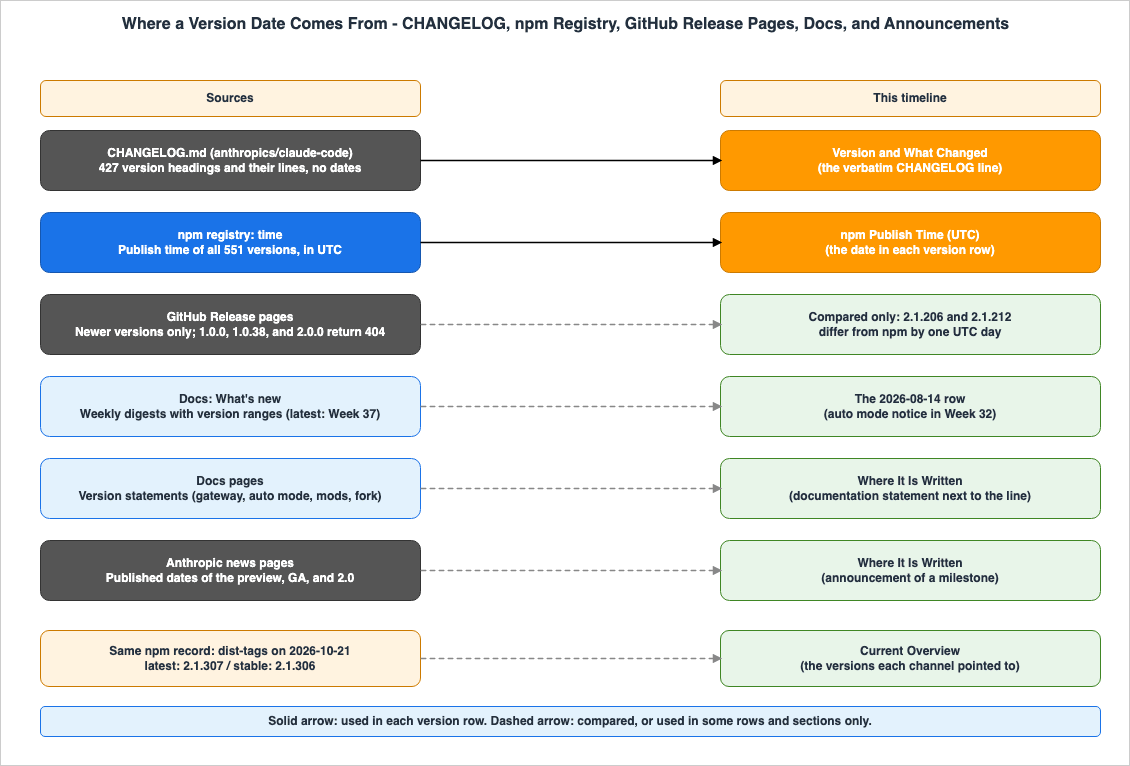
The `claude gateway` subcommand and the gateway sign-in flow ship in v2.1.195. Earlier public builds don't include them.The CHANGELOG, version 2.1.195, does not mention the gateway. The first line in the CHANGELOG that begins with
Gateway: is in version 2.1.198: Gateway: added Claude Platform on AWS (anthropicAws) as an upstream provider. Version 2.1.206 has a line that begins with Gateway: and says that /login now supports Anthropic-operated public gateway endpoints. This article reads this line as signing in to the public gateway endpoints, not the introduction of signing in to the gateway itself, because the documentation gives version 2.1.195 for gateway sign-in. This article lists the initial gateway version as described in the documentation (version 2.1.195) alongside the two lines from the CHANGELOG.The auto mode default for the permission mode. The "Choose a permission mode" page says that from version 2.1.283, interactive terminal and VS Code sessions start in auto mode by default. The CHANGELOG describes version 2.1.283 as a change for sessions on third-party providers or with telemetry off, and version 2.1.284 as a change for all plans and providers. For the Pro, Max, and Team plans before version 2.1.283, "What's new" for Week 32 gives 2026-08-14 as the start.
The mods default. The "Mods overview" page states:
Mods are on by default. In the terminal, use Claude Code v2.1.287 or later. The Desktop app includes its own copy of Claude Code, and mods work there from v2.1.286.The "Manage mods for your organization" page says, without naming a surface:
Mods are on by default in Claude Code v2.1.286 and later. The CHANGELOG has a line in version 2.1.287 that mentions adding mods, but no line stating that they are on by default was found.While not a discrepancy, three different lines describe running subagents in the background. The 2.1.198 line says that subagents now run in the background by default and that this was previously a gradual rollout. The full text of version 2.1.232 is as follows:
Subagent forking is now on by default: a `subagent_type: "fork"` subagent inherits the full conversation and prompt cache, and non-teammate agent spawns in interactive sessions now run in the background by defaultThe 2.1.302 line says that the Desktop app and VS Code were changed to always run the main conversation's subagents in the background. The CHANGELOG does not explain how the 2.1.198 and 2.1.232 lines relate; the 2.1.302 line says only that the change matches what the terminal does. The "Create custom subagents" page says
Fork mode is on by default from Claude Code v2.1.302, and in an interactive terminal session from v2.1.232., which agrees with the CHANGELOG.Claude Code on AWS
Claude Code can use Amazon Bedrock as a provider. The "Claude Code on Amazon Bedrock" page in the documentation explains how to set it up. As an upstream of the gateway, Claude Platform on AWS can also be used. The CHANGELOG line that adds Claude Platform on AWS (anthropicAws) as an upstream is in version 2.1.198 (2026-07-01). The article Running Claude Apps Gateway on AWS details what the gateway handles, what it enforces, and what stays on developer machines. For the first version of the gateway, the same article also places the documentation's 2.1.195 next to the CHANGELOG's 2.1.198, as this article does. What a Translating LLM Gateway Drops covers what the gateway loses when it translates between API formats. To assemble and inspect permissions and settings locally, you can use the Claude Code Settings and Permissions Builder and Linter Tool.Frequently Asked Questions about Claude Code Versions and Defaults
This section answers common questions about Claude Code versions and default settings, based on the information presented here. The versions and dates referenced are as of October 21, 2026.Does the Claude Code CHANGELOG list a date for each version?
The Claude Code CHANGELOG does not list a date for each version. None of the 427 version headings in CHANGELOG.md on the check date has a date. Version-specific dates are in the npm registry'stime field, on the GitHub Release pages, and in the weekly "What's new" summaries in the documentation. The three values are not always the same. Versions 2.1.206 and 2.1.212, for example, have UTC dates that differ by one day on npm and on the GitHub Release pages. The dates used in this article are based on the UTC values from npm's time field.If I use the stable channel, will my defaults stay the same?
Not necessarily. Even thestable channel receives new versions. The documentation states that the stable version is typically about one week old. While newer versions that might change the defaults arrive later, whether those defaults actually change depends not only on the version but also on your plan and settings. The minimumVersion setting determines the lowest version that updates install, but it doesn't lock in your default settings.Since which version is auto mode the default permission mode?
The wording varies depending on the source. For the Pro, Max, and Team plans, "What's new" for Week 32 states that the date is August 14, 2026. According to the "Choose a permission mode" page, the built-in auto default requires version 2.1.228 or later (for native Windows, version 2.1.233 or later). The "Choose a permission mode" page also says that from version 2.1.283, interactive terminal and VS Code sessions start in auto mode by default. The CHANGELOG gives version 2.1.283 for third-party providers or telemetry off, and version 2.1.284 for every plan and provider. Both lines for versions 2.1.283 and 2.1.284 state that thepermissions.defaultMode setting still takes precedence. However, according to the "All settings" page, auto and bypassPermissions do not take effect when they are set in project settings or local settings.Since which version are mods on by default?
The documentation uses different wording. The "Mods overview" page says that mods work from version 2.1.287 in the terminal and from version 2.1.286 in the Desktop app. The "Manage mods for your organization" page says, without naming a surface, that mods are on by default from version 2.1.286. The CHANGELOG mentions adding mods in version 2.1.287, but no line stating that they were turned on by default was found. A separate article published at the same time, Claude Code Mods Next to Settings Hooks, covers how to stop mods.Since when are fork subagents on by default?
Fork subagents have been enabled by default since version 2.1.232 (August 13, 2026) in interactive terminal sessions. Inclaude -p, the Agent SDK, the Desktop app, and VS Code, this feature has been enabled since version 2.1.302 (October 16, 2026). The CHANGELOG and "Create custom subagents" page agree on both versions. Fork mode can be turned off by setting CLAUDE_CODE_FORK_SUBAGENT to 0.Summary
This article presents a timeline of versions of Claude Code, from the research preview on February 24, 2025, through the check date, October 21, 2026. The timeline covers the versions in which the way Claude Code is offered, its extension points, or the defaults that decide how a session starts changed.The CHANGELOG has no dates in its version headings. Version-specific dates are in the npm registry, on the GitHub Release pages, and in the documentation's "What's new" summaries. The three values are not always the same. This article uses the UTC
time value from npm.This timeline represents a curated selection of versions. Of the 148 lines that the machine extraction found, the timeline includes 16, along with rows found by the other routes described in the method section. Default models, MCP, and display changes were left out.
The way sessions begin underwent a significant change between August and October 2026. Auto mode as the default permission mode, AGENTS.md, fork subagents, and idle compaction became defaults in versions of this period.
There can be discrepancies between the documentation and the CHANGELOG. For the gateway, the auto mode default for the permission mode, and the mods default, the sources give different versions.
This article covers two ways to choose a version: channels and a minimum version. You can choose between
latest and stable using autoUpdatesChannel, and set a minimum version using minimumVersion. The Advanced setup page also describes installing a specific version and turning off auto-updates. A version that changes a default can reach the stable channel later.⚠ Things may change after the check date. Standalone Claude Design is announced to close by December 14, 2026. New versions of Claude Code will continue to be released after the check date. All information presented here is current as of October 21, 2026.
This timeline will be updated as Claude Code continues to evolve.
In addition, there are related history-and-timeline articles on this site, so please have a look if you are interested.
- Anthropic Claude Model Release Timeline - Model Family Tree, Capability Evolution, and Platform Availability
- Model Context Protocol Specification Version Timeline - Version-by-Version Changes and Adoption Milestones
- Claude Code Operator's Handbook
- Claude Code Features and Settings Reference 2026
References:
- CHANGELOG.md (anthropics/claude-code)
- Claude Code changelog (Claude Code Docs)
- What's new (Claude Code Docs)
- Advanced setup (Claude Code Docs)
- Choose a permission mode (Claude Code Docs)
- All settings (Claude Code Docs)
- How Claude remembers your project (Claude Code Docs)
- Create custom subagents (Claude Code Docs)
- Mods overview (Claude Code Docs)
- Manage mods for your organization (Claude Code Docs)
- Claude apps gateway for Amazon Bedrock, Claude Platform on AWS, Google Cloud, and Microsoft Foundry (Claude Code Docs)
- Claude Code on Amazon Bedrock (Claude Code Docs)
- @anthropic-ai/claude-code (npm)
- Releases (anthropics/claude-code)
- Claude 3.7 Sonnet and Claude Code (Anthropic)
- Introducing Claude 4 (Anthropic)
- Enabling Claude Code to work more autonomously (Anthropic)
References:
Tech Blog with curated related content
Written by Hidekazu Konishi