Claude Code Mods Next to Settings Hooks - What a Mod Can Approve, and What allowManagedModsOnly and disableAllHooks Stop
First Published:
Last Updated:
ask rules or PreToolUse hooks depends on whether the machine has managed settings and whether the session's credential is a Team or Enterprise /login.This article presents a comparative table, aligning mods and settings hooks side-by-side. It details where each runs, what they can modify, what they can approve, and what can stop them, drawing directly from Claude Code's documentation and changelog entries. Where the answers differ between personal machines and organization-managed machines, both rows are given. This article does not cover how to write a mod. It also does not attempt to rank which is preferable: mods or settings hooks.
This article's information was verified as of October 21, 2026. At the end of that date (UTC), the npm registry's
latest tag pointed to version 2.1.307, and stable pointed to version 2.1.306. The results presented in Section 8 were verified on a single Mac. The remaining sections were written from the sources.Related articles on this site:
- Claude Code Version History and Timeline - Release Channels, Changed Defaults, and Where Each Version Date Comes From
- Claude Code Hooks Complete Guide - Deterministic Enforcement Across the Tool Lifecycle
- Claude Code Extension Layer Decision Guide - Choosing Among Skills, Subagents, Hooks, and Plugins
- Claude Code Plugins Complete Guide - Bundling Skills, Hooks, Agents, and MCP Servers for Team Distribution
- Hardening and Governance Guide for Claude Code and Claude Desktop - Containerized Containment and Why Code and Desktop Govern Differently
- Claude Code Features and Settings Reference 2026
- Claude Code Harness and Environment Engineering: Designing the Frontline Where Local AI Agents Actually Live
Table of Contents
- 1. Scope and Assumptions
- 2. How to Read the Tables
- 3. Mods and Settings Hooks: Where Each Runs and What Each Can Change
- 4. What a Mod Can Approve: It Depends on Whether the Built-In Guard Loads
- 5. Ways to Stop Mods: What Each One Stops and What It Leaves Running
- 6. Where Mods Run and Where What They Draw Appears
- 7. Checks Before You Install: The hooks: and calls: Lines of claude plugin validate
- 8. What This Setup Showed: A Record From One Mac
- 9. Version History of the Conditions
- 10. Failure Modes
- 11. Frequently Asked Questions About Claude Code Mods and Settings Hooks
- 12. Summary
- 13. References
1. Scope and Assumptions
This section defines the intended audience, differentiates between two types of hooks, distinguishes between personal and organization-managed machines, and names the sources read. The following five points summarize the key conclusions:- Where It Runs: A mod is a function called in the Claude Code process, and it does not run inside a sandbox. The documentation says
Mods aren't sandboxed.A process that a mod starts also runs outside the sandbox (Section 3). - Approval: When the machine has managed settings, or when a session's credentials indicate a Team or Enterprise
/login, Claude Code loads the built-in guard. In that case, by default the approval of a mod that the user installed does not get pastdenyandaskrules orPreToolUsehooks. If the machine has no managed settings and the credential is not a Team or Enterprise/login, the mod can approve even a call that adenyrule refuses (Section 4). - Stopping: The
--safe-modeflag stops all installed mods and other customizations for the duration of the session. The reach of thedisableAllHookssetting depends on the file that holds it. TheallowManagedModsOnlysetting only takes effect when placed in managed settings. None of these settings stop mods that are built into Claude Code (Section 5). - Where Drawing Appears: Hooks from mods can execute in any session where plugins are loaded. What a mod draws appears in the terminal, the Desktop app, and the VS Code extension. In
claude -pand the Agent SDK, hooks run, but what the mod draws does not appear. In WSL sessions of the Desktop app, hooks do not run either (Section 6). - Before You Install: The output of
claude plugin validate, specifically the lines labeledhooks:andcalls:, indicates the events the mod will receive and the mods API it will call (Section 7).
1.1 Intended Readers
This article is intended for the following readers:- Individual developers who are configuring Claude Code using settings hooks (such as
PreToolUse) and rules that utilizeallow,ask, anddeny. - Administrators who govern Claude Code on their organization's machines through managed settings.
- People who believe the following: mods operate within a sandbox. A mod cannot get past your own
PreToolUsehooks, or it always can. SettingCLAUDE_CODE_ENABLE_FUNCTION_HOOKS=0stops mods. SettingdisableAllHookswill stop all mods. SettingallowManagedModsOnlyin user settings takes effect.
Each of these beliefs either does not match the sources this article read or holds only under conditions. The "Mods overview" page says
Mods aren't sandboxed. (Section 3.3). The scope of approval depends on whether the built-in guard is loaded (Section 4). The same page says about CLAUDE_CODE_ENABLE_FUNCTION_HOOKS: Claude Code v2.1.287 and later ignores it (Section 5.1). The "All settings" page says about disableAllHooks, whether it is set in managed settings or in another settings file: Mods built into Claude Code keep running in both cases. (Section 5.4). The "Manage mods for your organization" page says about allowManagedModsOnly: the guard reads the option from managed settings only (Section 5.2).1.2 What This Article Covers and What It Does Not
This article focuses on the following six topics:- The differences between mods and settings hooks (including where they operate, what can be modified, and the order within a tool call).
- The scope and conditions for mod approval.
- Settings and flags that stop mods, and what keeps running.
- Where mods run and where what they draw appears.
- How to interpret the output of
claude plugin validatebefore installation. - In which versions these conditions were introduced.
This article does not cover:
- How to write mods. This is covered in the "Create a mod" page of the Claude Code documentation. This article will not include mod code examples.
- How to write settings hooks, events, or decision forms. The Claude Code Hooks Complete Guide on this site covers this.
- Which to choose: skills, subagents, hooks, or plugins. The Claude Code Extension Layer Decision Guide on this site covers this.
- Plugin distribution, the marketplace, and the general usage of
claude plugin validate. The Claude Code Plugins Complete Guide on this site covers this. - Overall organizational controls and containment within containers. The Hardening and Governance Guide for Claude Code and Claude Desktop on this site covers this.
- A timeline of Claude Code versions. The Claude Code Version History and Timeline on this site covers this.
- Pricing, including the prices of plans.
- The ranking of mods and settings hooks, skills, and MCP servers. The
Pick it whenrow of the comparison table in the documentation will be quoted verbatim from the original source material. - Procedures for bypassing approval with mods, extracting secrets, or removing an organization's guard.
1.3 Two Kinds of Hooks
The Claude Code documentation refers to two types of elements as "hooks." The "Mods overview" page distinguishes between them as follows:Claude Code's existing hooks also run on events, as a shell command, HTTP request, or prompt you
configure in a settings file. A mod's handlers are functions that run inside Claude Code instead.
Claude Code calls both kinds hooks: on these pages, "hook" means a mod's handler, and the
settings-file kind is a "settings hook".This article follows that same distinction. It calls a handler within a mod a mod hook, and the settings-file kind a settings hook. Hooks specified under the
hooks key in a plugin's hooks/hooks.json file are also settings hooks. The documentation refers to the files containing a mod's code as "hooks modules."1.4 Personal Machines and Organization-Managed Machines
The tables in this article differentiate rows based on two conditions:- Machines with managed settings: Machines that hold settings an organization delivers as a
managed-settings.jsonfile, through MDM (mobile device management), or from the claude.ai admin console. - Session credentials: Whether the session's credential is a
/loginfor a Team or Enterprise plan, or something else.
The "Manage mods for your organization" page describes the conditions under which the built-in guard is loaded, specifying either:
* The machine has managed settings
* The session runs on `/login` credentials for a Team or Enterprise plan
The same page continues with:
A user who authenticates with an API key, or through Amazon Bedrock, Google Cloud's Agent Platform,
or Microsoft Foundry, gets the guard only on a machine that has managed settings. A session that
runs on a long-lived `CLAUDE_CODE_OAUTH_TOKEN` doesn't count as that login either, even when a Team
or Enterprise login is stored on the machine.
This article refers to sessions that meet either of these two conditions as sessions where the guard is loaded. Sessions that meet neither condition are referred to as sessions where the guard is not loaded. The "Mods overview" and "Configure permissions" pages describe the scope of approval based on whether the machine has managed settings or the session's credential is a Team or Enterprise
/login. In the sources this article read, these conditions are stated as the same conditions as those under which the guard is loaded.1.5 Sources Read and the Check Date
This article read the following sources on October 21, 2026, and retrieved the documentation pages in.md format. The quotes in this article are the sources' own English words. The quotes drop their links and keep only the link text.| Kind | Sources |
|---|---|
| Mods pages | Mods overview, Manage mods for your organization, React to events with a mod, Mods reference, Use the mods API, Create a mod, Troubleshoot a mod, Draw in the interface with a mod, Test a mod, Interface gallery for mods (code.claude.com/docs/en/plugins/mods/, retrieved 2026-10-21) |
| Other Claude Code documentation | Configure permissions, All settings, Settings files and precedence, Hooks reference, Automate actions with hooks, CLI reference, Environment variables, Claude Code Desktop in WSL, Run Claude Code programmatically, Configure the sandboxed Bash tool |
| Change record | CHANGELOG.md in the anthropics/claude-code repository (latest heading 2.1.307, retrieved 2026-10-21 and again 2026-10-22) |
| Package registry | npm registry record for @anthropic-ai/claude-code: time and dist-tags (retrieved 2026-10-21 and again 2026-10-22) |
The documentation reflects the specifications as of the check date, while the CHANGELOG records changes for each version. This article distinguishes between the two. Where documentation pages word something differently, this article names each page. The dates for the versions refer to the
time value (UTC) from the npm registry.2. How to Read the Tables
This section defines the table columns, the status terms, and the distinction between source values and demo values.2.1 Shared Columns and the Columns This Article Adds
The tables in Section 9 use seven columns: the six columns shared with this site's Claude Code version timeline, plus a status column.| Column | What the cell holds |
|---|---|
What Changed | The behavior or setting that changed |
Since | The version, with its npm publish date (UTC), or the documentation statement that names a version |
Who Decides | Anthropic, Organization administrator, or User |
Where It Is Written | The CHANGELOG line or documentation page behind the row |
What You Can Set | The setting, flag, or command that changes the behavior |
No Statement Found | What the sources do not state, with what was searched |
Status on the Check Date | The state on 2026-10-21, using the terms in Section 2.2 |
The tables in Sections 3 and 5 use the four columns that this article adds.
| Column | What the cell holds |
|---|---|
Where It Runs | Where the code or command runs, in the documentation's words |
What It Can Change | What it can change, in the documentation's words |
Stops It | What the setting or flag stops |
Does Not Stop It | What keeps running when the setting or flag applies |
2.2 Terms for Status on the Check Date
TheStatus on the Check Date column holds one of the seven terms shared with this site's timeline (Released, In effect, Documented, Announced, Scheduled, Proposed, and End of life). This article uses the following three:Released: The CHANGELOG line for that version describes it, but no matching description was found in the documentation pages on the check date.In effect: The CHANGELOG line for that version describes it, and the documentation on the check date also describes the behavior.Documented: The functionality is described in the documentation, but no corresponding CHANGELOG line was found.
2.3 Source Values, This Article's Inferences, and Demo Values
The tables in this article hold only values from the sources. When a statement cannot be found in the source material, it is markedNo statement found, and the sources searched are named in the same cell or sentence. It does not state that a particular function is unavailable. Anything this article derives by combining statements from the sources is called an inference in the text.The values presented in Section 8 are the results of testing performed on a single Mac. These values are placed in a separate section from the source values and are not mixed into the same tables.
3. Mods and Settings Hooks: Where Each Runs and What Each Can Change
This section clarifies the differences between mods and settings hooks, referencing the comparison table on the "Mods overview" page and the order within one tool call.3.1 The Documentation's Comparison Table
The "Mods overview" page lists mods, settings hooks, skills, and MCP servers in a single table. The following table shows two columns – "Mod" and "Settings Hook" – transcribed verbatim. ThePick it when row contains statements from the documentation and does not represent recommendations from this article.| Aspect | Mod | Settings Hook |
|---|---|---|
Where It Runs (What it is) | Functions in a plugin that Claude Code calls in its own process | A shell command, HTTP request, or prompt that Claude Code runs on a lifecycle event |
What It Can Change | Tool calls, prompts, commands, turns, and what the interface draws | Whether a tool call or prompt goes ahead, a tool call's arguments and result, and context added for Claude |
| Can it draw in the interface | Yes | No |
| What you write | JavaScript or TypeScript | A script and a settings.json entry |
| Pick it when | You want a pane, a band above the prompt, a custom command, or to rewrite an event | You want to block, allow, or log an event with a script you already have |
The same page explains what a mod can do that settings hooks, skills, status lines, and MCP servers cannot.
Settings hooks, skills, status lines, and MCP servers work from outside Claude Code: each one runs a
script, or gives Claude text or tools. A mod runs inside Claude Code, so it can do things they
can't:
Mods provide a way to read and write files, launch processes, and make network requests, all through the mods API (represented by the symbol
$ in the code). The "Mods overview" page says A hook has no other way to do those things, which is why Claude Code can list what a mod does before you install it. This capability underlies the output of the claude plugin validate command, as described in Section 7.3.2 The Order Within One Tool Call
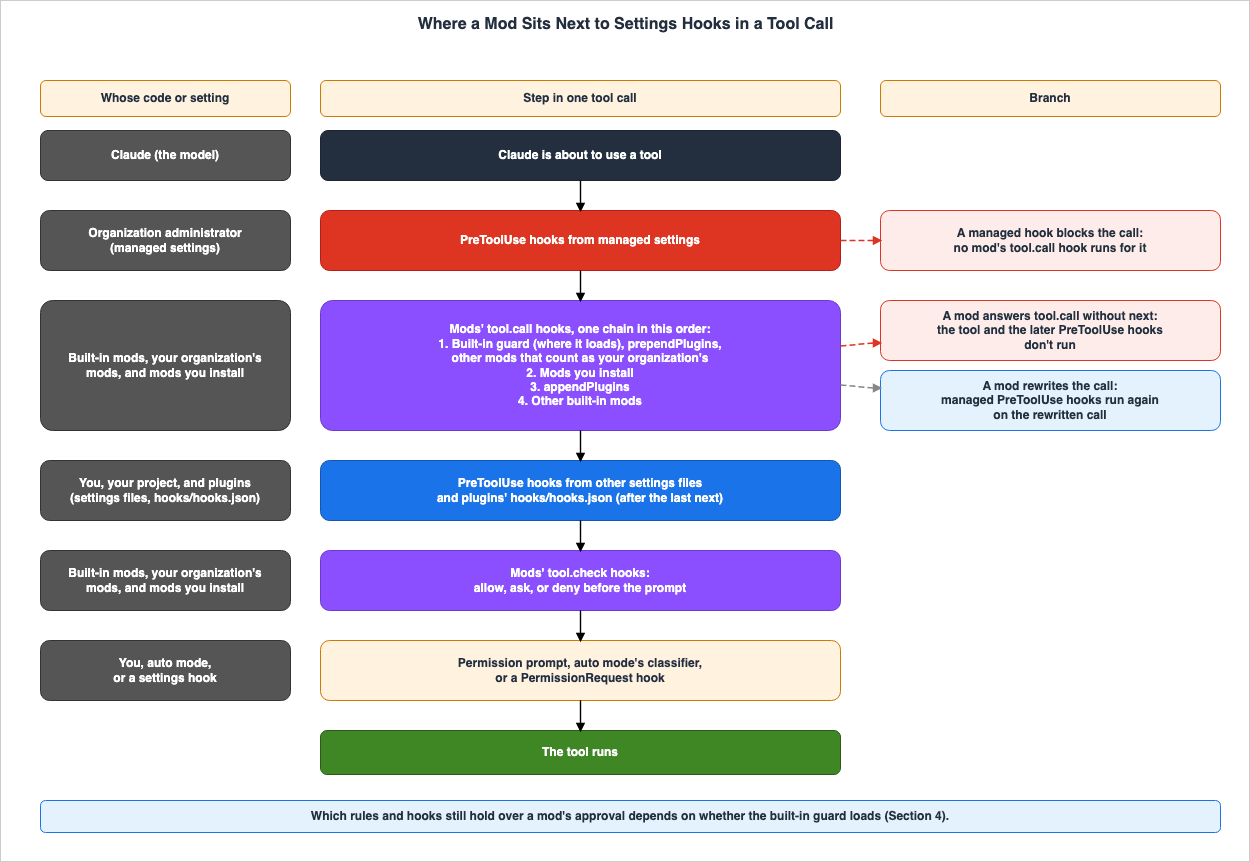
Within a single tool invocation, settings hooks and mod hooks operate at specific points. The "The order mods run in" section of the "React to events with a mod" page and the "Know which controls still apply" section of the "Manage mods for your organization" page give the following order:PreToolUsehooks from managed settings execute before the first mod'stool.callhook. If a managed hook stops the invocation, no mod'stool.callhook will execute during that invocation.- The mods'
tool.callhooks execute as a chain. The order within this chain is as follows: (1) the built-in guard (where it loads), mods listed in the organization'sprependPlugins, other mods not listed inappendPluginsand counted as the organization's mods, (2) mods the user installs, (3) mods listed in the organization'sappendPlugins, (4) other built-in mods. PreToolUsehooks from other settings files and from plugins'hooks/hooks.jsonexecute as part of Claude Code's own operation, after the last mod has callednext.- The mods'
tool.checkhooks execute after thePreToolUsehooks. The "React to events with a mod" page specifies this position as occurring after thePreToolUsehooks, before the permission prompt, auto mode's classifier, or aPermissionRequesthook. - The tool then runs, after the permission prompt, auto mode's classifier, or a
PermissionRequesthook.
This order has two branching points.
- If a mod responds to a
tool.calldirectly and does not callnext, the tool will not execute. ThePreToolUsehooks of step 3 do not run either. The "Manage mods for your organization" page saysIf a mod answers the tool call itself, the tool never runs and neither do those hooks.
- If a mod modifies a call, the managed hooks will run again on that modified call. The same page says
If the call goes ahead and a mod rewrites it, your managed hooks run again on the rewritten call, so they can still block it.
The diagram in Section 1 illustrates this sequence. The left-hand column shows whose code or setting each step is.
3.3 Outside the Sandbox
The "Mods overview" page includes the following two sentences regarding the sandbox.Mods aren't sandboxed. If you turn on sandboxing, the sandbox isolates the Bash commands Claude
runs, and a process that a mod starts runs outside it.The first sentence describes the mod itself. The "Manage mods for your organization" page also begins with
Mods aren't sandboxed. Following the list of controls, it states:None of these controls sandboxes a mod. A mod you allow runs as the user, with the user's access to
files, processes, and the network.The second sentence of the "Mods overview" passage describes the process that the mod launches. Even with the sandbox enabled, it only isolates the Bash commands run by Claude; the process launched by the mod operates outside of that sandbox. This article will present these two sentences together, without separation.
4. What a Mod Can Approve: It Depends on Whether the Built-In Guard Loads
This section shows whether the approval of a mod'stool.check hook gets past the user's rules and hooks, separately for sessions where the guard loads and sessions where it does not.4.1 The Approval Sentences Cover Different Ground on Each Page
The scope of approval differs across three pages.- The "Mods overview" page lists the
askrules and thePreToolUsehook.
With managed settings or a Team or Enterprise `/login` as the session's credential, by default a
mod's approval doesn't get a call past your `ask` rules or `PreToolUse` hooks. Without either, a mod
can approve a call that an `ask` rule would prompt for, or that your `PreToolUse` hook blocked. To
check when a mod can also approve a call that a `deny` rule refuses, see Extend permissions with
hooks.- The "Configure permissions" page describes the
denyrules as well.
With neither managed settings nor a Team or Enterprise `/login` as the session's credential, the mod
can approve a call that a deny rule refuses or a `PreToolUse` hook blocked. A session that runs on
an API key or a long-lived `CLAUDE_CODE_OAUTH_TOKEN` instead isn't using that login, even when that
login is stored.- The "Manage mods for your organization" page is written with the guard as the subject.
With the guard loaded, by default a user's mod can't approve a call that a `deny` rule refuses or an
`ask` rule prompts for, whichever settings file holds the rule. The mod can't approve a call that
any `PreToolUse` hook blocked, either.
If you read only the paragraph on the "Mods overview" page, the
deny rules are left out. The last sentence in that paragraph directs the reader to the "Configure permissions" page for information on handling deny rules. This article combines the content from all three pages into a table in Section 4.2.The text on the "Manage mods for your organization" page uses
a user's mod, a mod that a user installed, as the subject. No statement was found in the sources this article read (the "Manage mods for your organization" page, the "Configure permissions" page, the "React to events with a mod" page, and the "Mods reference" page) on whether the approval of a mod that counts as your organization's is treated the same way.4.2 The Table by Condition
The following table outlines what remains when thetool.check hook of a mod that a user installed approves a call. With the Guard Loaded indicates a session with managed settings, or a Team or Enterprise /login session. Without the Guard refers to sessions that are neither of these.| When the Mod Approves | With the Guard Loaded | Without the Guard | Where It Is Written |
|---|---|---|---|
A call that a deny rule refuses | Stays refused by default. An administrator can set allowModsToOverrideDenyRules | The mod can approve it | Configure permissions / Manage mods for your organization |
A call that an ask rule would prompt for | Still prompts you | Runs without the prompt | Configure permissions / Mods overview |
A call that a PreToolUse hook blocked | Stays blocked, whichever settings file the hook comes from | The mod can approve it | Configure permissions / Mods overview |
A call that a PreToolUse hook or permissions.blockReadsOutsideWorkingDirectories would prompt for | Still prompts you | Runs without the prompt | Configure permissions |
A call that --permission-prompt-tool or the Agent SDK canUseTool callback would be asked about | Still put to that tool or callback | Not asked | Configure permissions |
| What the permission prompt shows | A mod can't change it | A mod can't change it | Mods overview / Manage mods for your organization |
A tool that requires user interaction, such as AskUserQuestion or an MCP tool marked requiresUserInteraction | The approval doesn't skip the prompt (version 2.1.292 or later) | The approval doesn't skip the prompt (version 2.1.292 or later) | Configure permissions |
The
allowModsToOverrideDenyRules setting in the deny rule row is an option for the built-in guard. The table on the "Manage mods for your organization" page describes the behavior when this option is set to true.A user's mod that approves tool calls can approve a call that a `deny` rule refusesThis option only takes effect when configured in the managed settings (see Section 5.2).
For tools that require user interaction, the text on the "Configure permissions" page names no condition on managed settings or
/login. This article writes the same text in both columns.4.3 Conditions That Permission Modes Add
The "Configure permissions" page says that each of three permission modes adds the following outcomein every setup, that is, whether or not the guard loads:- Auto mode: A call the mod approves runs without a classifier check. However, where the mod cannot bypass the user's permission prompt tool or Agent SDK permission callback, the classifier checks the call first. The "Manage mods for your organization" page describes that case as a session where the guard is loaded and that runs with
--permission-prompt-toolor an Agent SDKcanUseToolcallback. - Plan mode: Mods cannot approve calls that are not read-only (e.g., file edits or shell commands that write). They can still block such calls.
dontAskmode: Mods can approve calls that only this mode would deny.
Regarding the limitation in plan mode, the CHANGELOG, version 2.1.299, includes a line about a fix for writes running in plan mode after either a
PreToolUse hook or a mod's tool.check hook allowed them (see Section 9).4.4 A Mod's Own Calls, Which Permission Rules Do Not Cover
The table in Section 4.2 outlines calls to Claude's tools. File read/write operations and process initiation performed through the mods API are not subject to permission rules or thePreToolUse hook. The "Manage mods for your organization" page states:Permission rules and `PreToolUse` hooks apply to Claude's tool calls, not to a mod's `$.fs` and
`$.process` calls. With `Read(.env)` denied, a mod can still read that file with `$.fs.read` or
start a program that does.This page also lists preventing mod loading (as described in Section 5.2) and handling the calls in an organization's policy mod as methods for restricting a mod's access to
$.fs and $.process. Regarding network access, the same page further states:- If the organization's policy prohibits WebFetch, Claude Code will reject all requests from mods using
$.http.fetch. - Even if the WebFetch tool is turned off with
CLAUDE_CODE_DISABLE_WEB_FETCHor aWebFetchdeny rule, mods can still make requests using$.http.fetch. This remains true even when the setting is in managed settings. - None of these restrictions apply to programs launched by a mod using
$.process.run. Those programs have access to the network using the user's own permissions.
The "Mods overview" page lists six potential actions a mod might perform after it is loaded:
Act on your machine as you, Read your secrets, See your session, Change your session, Act without asking you, and Spend your usage. This article cites them as material for deciding before you install a mod. It does not describe how to use them.5. Ways to Stop Mods: What Each One Stops and What It Leaves Running
This section lists the settings and flags for stopping mods, grouped into the user's side, the organization's side, and Anthropic's side. Each row also lists what the setting or flag does not stop.5.1 On the User's Side
The following table lists the ways users can stop mods themselves.| What You Can Set | Stops It | Does Not Stop It | Where It Is Written |
|---|---|---|---|
Disable or uninstall the plugin in the Installed tab of /plugin | That one mod | Other mods | Mods overview |
claude --safe-mode (one session) | Every installed mod, your organization's included, and other customizations: CLAUDE.md, skills, plugins, hooks, MCP servers, and more | Managed settings policy, including policy-configured hooks; built-in mods | Mods overview / Manage mods for your organization / CLI reference |
"disableAllHooks": true in ~/.claude/settings.json or another settings file that is not managed settings | The mods you installed; user, project, local, and plugin hooks; custom status line and file suggestion | Your organization's mods; managed hooks; Agent SDK hooks; hooks from plugins force-enabled in managed enabledPlugins; built-in mods | All settings / Mods overview |
--bare | Installed plugins that are not managed load no hooks module (troubleshooting message); auto-discovery of hooks and installed plugins is skipped | Built-in mods | Troubleshoot a mod / CLI reference / Mods overview |
CLAUDE_CODE_ENABLE_FUNCTION_HOOKS=0 | Nothing. Version 2.1.287 and later ignores it | Mods | Mods overview / Manage mods for your organization |
allowManagedModsOnly in a user, project, or local settings file, or in a --settings file | Nothing. The entry changes nothing | Users' own mods | Manage mods for your organization |
The "Mods overview" page lists ways to stop mods, by how many mods to stop and for how long.
--safe-mode is on the Every installed mod, for one session line, followed by which also disables your other customizations. disableAllHooks is on the Every mod you installed, in every session line, followed by Your settings hooks and custom status line stop too. What your organization manages keeps running. The "Hooks reference" page adds that Claude Code reads the value left after settings precedence applies, so a "disableAllHooks": false in a project's .claude/settings.json overrides a true in your user settings.The
--safe-mode flag and disableAllHooks in user settings handle your organization's mods differently. The "Manage mods for your organization" page states that --safe-mode turns installed mods off, yours included. The same page uses yours for the organization's mods: it describes installing a mod so that it counts as yours. The CLI reference page also says that under --safe-mode, managed settings policy still applies but managed plugins do not: managed plugins, managed skills, managed CLAUDE.md, and policy-configured MCP servers do not. In contrast, the "All settings" page describes disableAllHooks (outside of managed settings) with the words your organization's mods keep running.The
Stops It column of the --bare row was taken from the "Troubleshoot a mod" page, which reads installed plugins that are not managed load no hooks module in this mode (--bare). No statement was found (in the "Troubleshoot a mod" page, the CLI reference page, the headless page, or the "Create a mod" page) on whether the mods of plugins that an organization manages run under --bare.CLAUDE_CODE_ENABLE_FUNCTION_HOOKS was an environment variable used during the early access period. The "Mods overview" page states:If you set `CLAUDE_CODE_ENABLE_FUNCTION_HOOKS` during early access, remove it. Claude Code v2.1.287
and later ignores it, so setting it to `0` doesn't keep mods off.This variable was not found in the list on the "Environment variables" page as of the check date. No CHANGELOG line naming this variable was found either (Section 9).
5.2 On the Organization's Side
The following table lists the ways an organization can stop mods through managed settings. Each row describes the behavior when the setting is placed in managed settings.| What You Can Set | Stops It | Does Not Stop It | Where It Is Written |
|---|---|---|---|
allowManagedModsOnly, an option of the built-in guard under pluginConfigs | The hooks of every mod a user brings: installed, loaded with --plugin-dir, or written by Claude during a session | Your organization's mods; built-in mods; users' settings hooks and plugins' hooks/hooks.json hooks, status lines, and /goal; the rest of the plugin | Manage mods for your organization |
allowManagedHooksOnly | Hooks in users' own settings files, hooks and mods from other installed plugins, and hooks in agent frontmatter | Managed and Agent SDK hooks; hooks from force-enabled plugins; your organization's mods; built-in mods | All settings / Manage mods for your organization |
disableAllHooks | The mods in every installed plugin, your organization's included; every hook in settings files, including managed PreToolUse hooks; status lines and /goal | Built-in mods; hooks the Agent SDK registers in process | All settings / Manage mods for your organization |
disableSideloadFlags | --plugin-dir and --plugin-url at startup, and mods Claude writes during a session; also --agents and --mcp-config | Mods from the marketplaces you allow | All settings / Manage mods for your organization |
prependPlugins that does not name sec-default@builtin | The built-in guard, so neither guard option applies | — | Manage mods for your organization |
The location for
allowManagedModsOnly is under the pluginConfigs section of the managed settings, specifically under the key cc-plugin-sec-default@builtin. The example on the "Manage mods for your organization" page is as follows.{
"pluginConfigs": {
"cc-plugin-sec-default@builtin": {
"options": {
"allowManagedModsOnly": true
}
}
}
}This page also explains the conditions under which this option takes effect:
- Key Format: Claude Code only reads this option under the key
cc-plugin-sec-default@builtin. WhileprependPluginsacceptssec-default@builtin,pluginConfigsdoes not. - Only managed settings count: The same entry in a user, project, or local settings file, or in a file passed with
--settings, neither sets the option nor loosens it. - The guard has to load:
Where the guard doesn't load, neither option applies. - The guard fails closed: When the guard cannot read managed settings, it refuses every user's mod at load.
Under
allowManagedModsOnly, the mods that count as users' mods and are refused also include mods in plugins that the organization enables from GitHub or other remote marketplaces, and mods that the organization turns on for its members on claude.ai. The page says That includes a mod in a plugin you enable from a GitHub or other remote marketplace, and one your organization turns on for its members on claude.ai. If none counts as yours, no installed mod runs its hooks.A mod counts as your organization's when its plugin is enabled in managed
enabledPlugins and is loaded, by a relative path, from a marketplace that managed settings name as a directory on the machine by absolute path.The
prependPlugins row is in the table, but it is not a setting that stops mods. The "Manage mods for your organization" page explains that when configuring prependPlugins in the managed settings, it is important to include sec-default@builtin in the list to maintain the guard. The "Mods reference" page states: If managed prependPlugins is set, the guard loads only when that list names it, at the position listed. Because the guard is what reads its options, leaving it out of the list removes the guard and both of its options.allowManagedModsOnly and disableAllHooks stop the mod and leave the rest of its plugin in place. The "Mods overview" page says the plugin stays installed, and its skills, commands, agents, and MCP servers load. The impact of allowManagedHooksOnly and disableAllHooks on plugins and settings hooks is detailed in two sections on the "All settings" page.Where managed settings files are placed is covered in Section 5-2 of the Hardening and Governance Guide for Claude Code and Claude Desktop. Managed settings that restrict which plugin marketplaces users can add are covered in Section 6.3 of the Claude Code Plugins Complete Guide.
5.3 On Anthropic's Side
Users and organizations are not the only ones who can stop mods. The "Troubleshoot a mod" page includes a table displaying the output ofclaude plugin test, which contains the following row:| Message includes | What it means |
|---|---|
hooks modules are turned off in this process: the rollout switch served off | Anthropic has turned installed mods off remotely. |
Version 2.1.299 of the CHANGELOG includes the line
Fixed installed mods that kept running in an open session after being turned off remotely; they now unload between turns. In the "Mods overview" page's table of built-in mods, the Where it's on cell of cc-plugin-plugin-authoring also reads Unless Anthropic has turned installed mods off remotely.5.4 Built-In Mods
Some of Claude Code's own features are mods. The "Mods overview" page states:The settings and flags that stop installed mods, such as `disableAllHooks`, `--bare`, and
`--safe-mode`, don't stop built-in mods.Each built-in mod has its own way to turn it off. The following table, taken from that same page, lists the name, function, and way to turn off each mod (links have been removed). The list is the one on the page on the check date.
/plugin lists the built-in mods a session has under "Built-in" in its "Installed" tab.Name in /plugin | What it does | How to turn it off |
|---|---|---|
cc-plugin-agents-md | Loads AGENTS.md as project instructions | Disable it in /plugin, or choose which instruction files load |
cc-plugin-diff | Takes over /diff and draws its pane | Disable it in /plugin. /diff stays, and Claude Code's built-in version of the command answers it. |
cc-plugin-plugin-authoring | Gives Claude the plugin-authoring skill for writing mods. It holds a skill and no mod code. | Disable it in /plugin |
cc-plugin-sec-default | Guards what your organization manages from the mods a user installs | You can't. An administrator sets the order in managed settings |
cc-plugin-telemetry | Sends the analytics records that Claude Code and its built-in mods log | Disable it in /plugin, or turn analytics off, for example with DISABLE_TELEMETRY |
cc-plugin-you-should-know | You should know: a side agent shows a note above the prompt when it finds something you might have missed | Disable it in /plugin |
The same page's table also has a
Where it's on column, which describes where each mod is on (the table in this article does not reproduce it). That column gives Off until you turn it on for cc-plugin-you-should-know.The
mods active line in /plugin does not count built-in mods. The "Mods overview" page states that this line omits built-in mods.The following figure shows whether each of the main settings and flags from Sections 5.1 and 5.2 stops each of four kinds of code. A pair with no statement in the sources is marked
No statement found.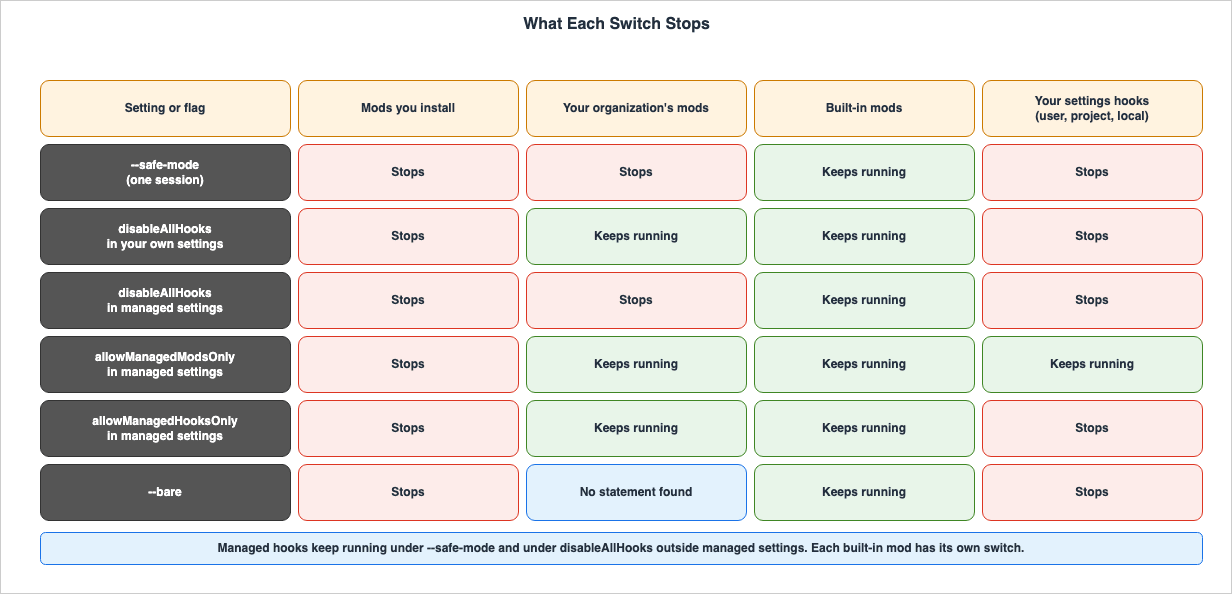
6. Where Mods Run and Where What They Draw Appears
The "Mods overview" page distinguishes between where mod hooks run and where what a mod draws appears.A mod's hooks run in every kind of session that loads the plugin, whichever provider serves the
model, including Amazon Bedrock, Google Cloud's Agent Platform, and Microsoft Foundry. Drawing is
narrower: what a mod draws appears in the terminal, the Desktop app, and the VS Code extension.The table below is a reproduction of a table from that page (links have been removed).
| Where You Run Claude Code | Hooks Run | What the Mod Draws Appears |
|---|---|---|
claude in a terminal, including an editor's integrated terminal and the JetBrains plugin | Yes | Yes |
| The Code tab of the Desktop app, except in a WSL session | Yes | Yes, except elements the elements table marks terminal-only |
| A WSL session in the Desktop app | No, because plugins aren't available in WSL sessions | No |
| The VS Code extension's chat panel | Yes | Yes, with extension version 2.1.299 or later. A session that doesn't fetch feature flags, such as one on Amazon Bedrock, needs 2.1.304 or later. The render sites and elements tables mark what the panel draws. |
claude -p and the Agent SDK | Yes | No |
| Remote Control from claude.ai or the mobile app | Yes, in the session on your machine | In the terminal on your machine |
| A cloud session | Yes, for a plugin that reaches the cloud session | No |
In the
claude -p and Agent SDK row, the mod's hooks run, and only what the mod draws does not appear. The "Troubleshoot a mod" page states that when a hooks module is refused in a claude -p run, the message is written to standard error (A non-interactive run has no transcript, so the message goes to stderr.).The row for WSL sessions in the Desktop app aligns with the description on the "Claude Code Desktop in WSL" page, which states that plugins are
not available in WSL sessions.The way to check the version of the Desktop app also differs from the terminal. The "Mods overview" page indicates that in the terminal, you run
claude --version, while in the Desktop app, you enter /status in a local session in the Code tab and read the Claude Code row.7. Checks Before You Install: The hooks: and calls: Lines of claude plugin validate
This section explains how to understand what a mod does before installing it, without running its code. The general usage ofclaude plugin validate and plugin validation are covered in Section 4.5 of the Claude Code Plugins Complete Guide.7.1 The Two Lines of Output
The "Mods overview" page instructs users to runclaude plugin validate on the plugin's directory after obtaining the plugin's files.claude plugin validate ./some-modThe "Manage mods for your organization" page provides the following two lines as examples of the output.
  ❯ ./register.js hooks: session.start, tool.call, ui.render{component=Pane}
  ❯ ./register.js calls: $.fs.read, $.http.fetch, $.store.set, $.ui.open
The line labeled
hooks: indicates the events the mod receives. The line labeled calls: indicates the mods API methods that the mod's code invokes. The same page says Claude Code refuses to load a mod that uses the mods API in a way this command can't read.7.2 Names to Look For on the calls: Line
The following table lists the names that the "Manage mods for your organization" page says to look for on thecalls: line, with their meanings.| Call | What it means |
|---|---|
$.fs.read, $.fs.write | Reads or writes files anywhere the user can |
$.process.run, $.process.spawn | Starts programs as the user |
$.http.fetch | Makes network requests |
$.env.get, $.settings.read | Reads environment variables and settings, which can hold API keys. An env reads: line in the output names each variable. |
$.env.set | Sets an environment variable for Claude Code and for every command and MCP server it starts afterward, which can change what those programs run. An env writes: line names each variable. |
$.mcp.call | Calls a tool on a connected MCP server, under the session's permission rules |
$.model.complete | Uses the user's plan or API key for model calls |
$.prompt.submit | Submits a prompt, and can send it as the user's own words |
$.session.send | Sends a message that another session's, subagent's, or teammate's Claude reads |
7.3 Names to Look For on the hooks: Line
The same page names the following on thehooks: line:tool.callandprompt.submit: The mod can observe and modify all tool calls and all prompts.session.append: The mod can rewrite each line of the conversation before it is saved.ui.render{component=AskUserQuestion}: The mod can re-render the screen where Claude asks the user a question.tool.check: The mod can approve or reject tool calls before a permission prompt appears.
A mod that includes
tool.check in its hooks: line is a mod capable of approving or rejecting tool calls. The extent of this approval depends on whether the guard is loaded (see Section 4).7.4 claude plugin test
The "Troubleshoot a mod" page describes a method for verifying whether mods can be loaded in a given environment, even without installing any mods. This involves runningclaude plugin test in a directory that does not contain any mods. No session is required. The output messages and their meanings are as follows:| Message includes | What it means |
|---|---|
no hooks module to load | Mods can load. The command found no mod to test in this directory. |
hooks modules are turned off here | A setting is blocking your mods: disableAllHooks in your own settings, or your organization's policy |
hooks modules are turned off in this process: the rollout switch served off | Anthropic has turned installed mods off remotely. |
hooks modules are turned off in this process: the rollout switch was saved off by an earlier session | The command used a value an earlier session saved, which may be out of date. Start claude once to refresh it, then run the command again. |
The same page continues with the following:
An organization can also set `allowManagedModsOnly` to allow only its own mods, which this command
doesn't report.
Even when the command prints
no hooks module to load, the guard may refuse a mod you install on an organization's machine.7.5 The Output Format Changes Between Versions
The output fromclaude plugin validate has changed across different versions. The CHANGELOG includes entries for versions 2.1.290, 2.1.299, and 2.1.304, each containing the following line:2.1.290 Added to `claude plugin validate`: each hook a mod registers at a gating site is listed
with whether it has a `.catch` (`gatingHooks` under `--json`)
2.1.299 Added a note in `/plugin` and `claude plugin validate` naming a mod's hooks that are
skipped where an organization manages Claude Code
2.1.304 Removed the notes from `claude plugin validate` that predicted where a mod's hooks would
runThe example in Section 7.1 of this article is the documentation's example on the check date. The output shown in Section 8 is specific to the version described in Section 8.
8. What This Setup Showed: A Record From One Mac
This section details the results of verifying how mods are loaded and stopped on a single Mac. The scope of approval (as described in Section 4) was not verified. No mod that approves tool calls was used. No prompts were sent.8.1 Setup
- Execution Date: October 21, 2026 (UTC)
- Machine: One Mac. Claude Code was running version 2.1.304, the version that the npm registry's
stabletag pointed to at the time of the run. - Managed settings: Neither of the macOS locations for managed settings,
managed-settings.jsonandmanaged-settings.dunder/Library/Application Support/ClaudeCode/, existed. - Session credential: Not a Team or Enterprise
/login. - Mod: The mod was the example from the "Mods overview" page, used as is. This mod simply counts tool calls and shows the count beside the spinner, with hooks for
tool.callandui.render. It was not installed from the marketplace but was loaded using the--plugin-diroption. disableAllHooks: This setting was specified in a temporary file passed via the--settingsoption. The user's~/.claude/settings.jsonfile was not modified. The SHA-256 hash of~/.claude/settings.jsonmatched before the demo and after the cleanup.- Actions: In each interactive session, only
/pluginswas entered to open the/pluginscreen, which was then closed before exiting. No prompts were sent.
8.2 Checks Without Opening a Session
claude plugin validate was run on the mod's directory. The lines pertaining to the mod's code (excluding lines with local paths) are as follows: ❯ ./register.js hooks: tool.call, ui.render{component=Spinner}
❯ ./register.js gating hook without .catch: tool.call
❯ ./register.js calls: $.ui.invalidate
✔ Validation passedThe line under
hooks: indicates the events for two hooks used by the mod. The calls: line only shows the use of the $.ui.invalidate function from the mods API. This mod does not call any file, process, or network APIs. The gating hook without .catch line is output that version 2.1.290 added, according to the CHANGELOG. The "Create a mod" page also says that one such line appears for each hook that can refuse an action.When running
claude plugin test in an empty directory without a mod, the output was no hooks module to load; there is no hooks/hooks.json naming one in "modules". The exit code was 1. According to the table on the "Troubleshoot a mod" page, no hooks module to load indicates a state where the mods can be loaded.8.3 Three Launches
The same mod was loaded with--plugin-dir, and Claude Code was started three times with different configurations. The following table shows the mods active line from the /plugin interface, as well as lines from the debug log pertaining to the "first-mod" in each case.| Case | Flags added to claude --plugin-dir ./first-mod | mods active line in /plugin | Debug log line about first-mod |
|---|---|---|---|
| 1 | None | 1 mod active · first-mod | hooks module first-mod@inline loaded (worker, environment 1, tier user); events: tool.call,ui.render |
| 2 | --safe-mode | No line | Safe mode: installed plugins are disabled, none of their hooks or hooks modules load; built-in plugins load regardless |
| 3 | --settings ./disable-all-hooks.json | No line | hooks module first-mod@inline not loaded: only managed plugins and built-in plugins run (allowManagedHooksOnly / disableAllHooks) |
The following table lists whether hooks module lines for the built-in mods and the guard appeared in the same three debug logs.
| Built-in mod | Case 1 | Case 2 | Case 3 |
|---|---|---|---|
cc-plugin-agents-md@builtin | Loaded (tier builtin) | Loaded (tier builtin) | Loaded (tier builtin) |
cc-plugin-diff@builtin | Loaded (tier builtin) | Loaded (tier builtin) | Loaded (tier builtin) |
cc-plugin-plugin-authoring@builtin | Loaded (tier builtin) | Loaded (tier builtin) | Loaded (tier builtin) |
cc-plugin-sec-default (the guard) | No line | No line | No line |
The "Mods overview" page says of
cc-plugin-plugin-authoring: It holds a skill and no mod code. Yet each of the three debug logs had a line beginning with hooks module cc-plugin-plugin-authoring@builtin loaded. This article has not checked what causes the difference.The first debug log also contained a line regarding the loading of "first-mod":
plugin.register: first-mod (user, first-mod@inline), judged by core alone: admitted.After the first startup, the mod directory contained several files with type definitions written by Claude Code (files located under
.claude-plugin/types/ and one file named tsconfig.json).8.4 Findings From This Setup
disableAllHooksin a file passed via--settingswas treated asdisableAllHooksoutside managed settings. The refusal message began withonly managed plugins and built-in plugins run, the text in the table on the "Troubleshoot a mod" page. In this version,(allowManagedHooksOnly / disableAllHooks)followed it.- When using
--safe-mode, the hooks module of mods loaded via--plugin-dirwas also not loaded. The debug log indicated that the plugins themselves were loaded from--plugin-dir. However, it then stated that the hooks for the installed plugins, as well as the hooks module, were not loaded, while built-in plugins were loaded. There was no line for the hooks module of first-mod. - The three built-in mods in the table were loaded in all three configurations. This matches
don't stop built-in modson the "Mods overview" page. Themods activeline did not count built-in mods. - There was no hooks module line for the guard. In all three instances, the debug log had no hooks module line for
cc-plugin-sec-default. Neither of the macOS file locations for managed settings existed on this Mac (managed settings delivered through MDM or the claude.ai admin console were not checked), and the session's credential was not a Team or Enterprise/login. According to the documentation, the guard loads when managed settings are present or when the session's credential is a Team or Enterprise/login(see Section 1.4). - The scope of approval was not verified. The table in Section 4 was based solely on the values documented.
These findings represent a record from a single Mac, on a single version. Other versions, or machines with managed settings, may display different results.
9. Version History of the Conditions
This section lists the versions in which the conditions described in this article were introduced, using seven common columns. TheSince dates are the UTC dates of the time field in the npm registry. Below the headings for 18 versions, from 2.1.287 to 2.1.306 in the CHANGELOG, there were 131 bullet-point lines containing at least one of the following: mod or mods (case-insensitive), hooks module, plugin validate, plugin test, or tool.check. The following table presents a selection of those lines, focusing only on the lines relevant to the conditions described in this article and the version descriptions in the documentation.| What Changed | Since | Who Decides | Where It Is Written | What You Can Set | No Statement Found | Status on the Check Date |
|---|---|---|---|---|---|---|
The disableAllHooks setting was added | 1.0.68 (2025-08-04) | User, Organization administrator | CHANGELOG 1.0.68 / All settings | disableAllHooks | — | In effect |
| Non-managed settings can no longer disable managed hooks | 2.1.49 (2026-02-19) | Organization administrator | CHANGELOG 2.1.49 | disableAllHooks in managed settings | — | In effect |
The --safe-mode flag was added | 2.1.169 (2026-06-08) | User | CHANGELOG 2.1.169 / CLI reference | --safe-mode, CLAUDE_CODE_SAFE_MODE | — | In effect |
| Mods were added | 2.1.287 (2026-10-01) | Anthropic | CHANGELOG 2.1.287 / Mods overview | — | — | In effect |
| Mods are on by default | Documentation statements. Mods overview: terminal 2.1.287 (2026-10-01), Desktop app 2.1.286 (2026-09-30). Manage mods for your organization: 2.1.286 | Anthropic, Organization administrator | Mods overview / Manage mods for your organization | allowManagedModsOnly, disableAllHooks, --safe-mode | A CHANGELOG line stating that mods are on by default (searched for Mods are on, on by default, and early access) | Documented |
CLAUDE_CODE_ENABLE_FUNCTION_HOOKS is ignored | Documentation statement: version 2.1.287 and later | Anthropic | Mods overview / Manage mods for your organization | Remove the variable | A CHANGELOG line naming the variable (searched for CLAUDE_CODE_ENABLE_FUNCTION_HOOKS, early access, and function hook) | Documented |
With CLAUDE_CODE_DISABLE_NONESSENTIAL_TRAFFIC set, a mod that you or your users install can still make $.http.fetch requests | Documentation statement: before 2.1.288 (2026-10-02), the variable stopped every mod's $.http.fetch request | Anthropic | Manage mods for your organization | CLAUDE_CODE_DISABLE_NONESSENTIAL_TRAFFIC | A line about this change in the 2.1.288 section of the CHANGELOG | Documented |
| What Changed | Since | Who Decides | Where It Is Written | What You Can Set | No Statement Found | Status on the Check Date |
|---|---|---|---|---|---|---|
A deny or ask rule on a nested part of a compound shell command holds over a user-installed mod's approval on managed machines | 2.1.289 (2026-10-03), as a fix | Anthropic | CHANGELOG 2.1.289 | deny and ask rules | — | Released |
A mod's tool.check approval doesn't skip the prompt of a tool that requires user interaction | 2.1.292 (2026-10-06), as a fix | Anthropic | CHANGELOG 2.1.292 / Configure permissions | — | — | In effect |
In plan mode, a write that a PreToolUse hook or a mod's tool.check hook allowed no longer runs | 2.1.299 (2026-10-14), as a fix | Anthropic | CHANGELOG 2.1.299 / Configure permissions | Approve the plan, or switch modes | — | In effect |
| Installed mods that Anthropic turned off remotely unload between turns | 2.1.299 (2026-10-14), as a fix | Anthropic | CHANGELOG 2.1.299 | — | — | Released |
claude plugin validate names a mod's hooks that are skipped where an organization manages Claude Code | 2.1.299 (2026-10-14) | Anthropic | CHANGELOG 2.1.299 | — | — | Released |
A mod's tool.check answer can carry decider: "person" | 2.1.304 (2026-10-19) | Anthropic | CHANGELOG 2.1.304 | — | A description of decider in the ten mods pages (searched for decider) | Released |
claude plugin validate no longer prints notes that predicted where a mod's hooks would run | 2.1.304 (2026-10-19) | Anthropic | CHANGELOG 2.1.304 | — | — | Released |
The
decider: "person" row is the following line in version 2.1.304 of the CHANGELOG.2.1.304 Added `decider: "person"` to a mod's `tool.check` answer: only the permission dialog or a
host's callback can approve the ask, and it is refused with the mod's reason where nobody
can be askedThis option belongs to a mod's
tool.check answer and is not something users or organizations write in their settings.The version from which mods are on by default differs between documentation pages. The "Mods overview" page states:
Mods are on by default. In the terminal, use Claude Code v2.1.287 or later. The Desktop app includes
its own copy of Claude Code, and mods work there from v2.1.286.
The "Manage mods for your organization" page states, without naming a surface,
Mods are on by default in Claude Code v2.1.286 and later. The line in CHANGELOG version 2.1.287, Added Claude Mods: plugins may now modify deeper behavior, does not state that mods are on by default. In version 2.1.286, there was no mention of mods. This article does not treat any of them as wrong.10. Failure Modes
Here are some common errors that can occur when misinterpreting the data presented in this article.- Assuming that a mod cannot get past your own
PreToolUsehooks. In sessions where the guard is not loaded, a mod can approve calls that aPreToolUsehook blocked, as well as calls thatdenyrules refuse (Section 4.2). - Assuming that the guard loads even in API key sessions if a Team subscription is in place. Sessions using credentials such as API keys or long-term
CLAUDE_CODE_OAUTH_TOKENdo not count as that/login, even if a Team or Enterprise login is stored on the machine. On a machine without managed settings, the guard is not loaded (Section 1.4). - Assuming, from the paragraph on the "Mods overview" page alone, that a mod cannot get past
denyrules. The same paragraph directs users to the "Configure permissions" page for information on howdenyrules are handled (Section 4.1). - Assuming that if
Read(.env)is denied, a mod also cannot read.env. Permission rules do not apply to a mod's own calls to$.fsand$.process(Section 4.4). - Assuming that turning on the sandbox also isolates a mod. Mods do not run inside the sandbox. A process that a mod starts also runs outside the sandbox (Section 3.3).
- Using
CLAUDE_CODE_ENABLE_FUNCTION_HOOKS=0to stop mods. From version 2.1.287 onwards, this variable is ignored (Section 5.1). - Assuming that
disableAllHooksstops every mod. Built-in mods do not stop. When it is placed outside managed settings, your organization's mods keep running (Sections 5.1 and 5.4). - Writing
allowManagedModsOnlyin user settings or in a--settingsfile. An entry outside managed settings changes nothing (Section 5.2). - Listing only your organization's mods in
prependPlugins. Ifsec-default@builtinis left out, the guard and its options are removed (Section 5.2). - Assuming that
--safe-modestops only mods. It also stops CLAUDE.md, skills, plugins, hooks, and MCP servers, and your organization's mods too (Section 5.1). - Assuming that, because
claude plugin testprintedno hooks module to load, a mod you install also runs on an organization's machine. This command does not report the status ofallowManagedModsOnly(Section 7.4). - Assuming that mods do not run in
claude -p. Hooks still run; only what the mod draws does not appear (Section 6). - Assuming that only the user and the organization can stop mods. Anthropic can turn installed mods off remotely (Section 5.3).
11. Frequently Asked Questions About Claude Code Mods and Settings Hooks
This section compiles answers to common questions in a question-and-answer format, mirroring the information presented in the table earlier in the text. The rationale behind each answer can be found in the sections enclosed in parentheses.Q1. Does a mod run inside the sandbox?
No. Both the "Mods overview" page and the "Manage mods for your organization" page sayMods aren't sandboxed. Even when a sandbox is enabled, a process that a mod starts runs outside of the sandbox (Section 3.3).Q2. Can a mod approve a call that a deny rule refuses?
In sessions where the guard is not loaded, this is possible. The "Configure permissions" page states that in sessions without managed settings or Team/Enterprise/login, a mod can approve a call that a deny rule refuses. In sessions where the guard is loaded, the call stays refused by default. However, administrators can configure allowModsToOverrideDenyRules, which lets a user's mod approve such a call (see Section 4.2).Q3. Does disableAllHooks stop mods?
Yes, the installed mods will stop. The scope of this effect varies depending on the file wheredisableAllHooks is placed. If placed in managed settings, your organization's mods stop too. If placed in other settings files, your organization's mods continue to run. In either case, built-in mods do not stop (see Sections 5.1 and 5.2).Q4. Can allowManagedModsOnly be used in user settings?
No. The "Manage mods for your organization" page says that the guard reads this option from managed settings only. The same entry in a user, project, or local settings file, or in a--settings file, changes nothing (see Section 5.2).Q5. Does setting CLAUDE_CODE_ENABLE_FUNCTION_HOOKS to 0 stop mods?
No. The "Mods overview" page states that versions 2.1.287 and later ignore this variable, and even if it is set to0, mods do not stop (see Section 5.1).Q6. Do mods run in claude -p and the Agent SDK?
Hooks run. What a mod draws does not appear. The table on the "Mods overview" page gives the row forclaude -p and the Agent SDK as Yes for hooks and No for drawing (Section 6).Q7. Since which version are mods on by default?
The documentation pages word it differently. The "Mods overview" page states that mods are on by default, that the terminal needs version 2.1.287 or later, and that mods work in the Desktop app from version 2.1.286. The "Manage mods for your organization" page states that mods are on by default in version 2.1.286 and later, without naming a surface. The CHANGELOG for version 2.1.287 has a line that adds mods (Section 9).Q8. When were the statements in this article checked?
This article read its sources on October 21, 2026. At the end of that day (UTC), the npm registry'slatest tag pointed to version 2.1.307. The CHANGELOG entries from version 2.1.287 onwards continued to include lines that add to the mods API and settings. Between versions 2.1.287 and 2.1.306, there were 131 lines (counted as described in Section 9) containing terms related to "mods" listed under each version's heading. The heading for version 2.1.307 has no such line.12. Summary
The key points of this article are as follows:- A mod is called in the Claude Code process, but does not run inside a sandbox: Settings hooks run as shell commands, HTTP requests, and prompts. Within a single tool call,
PreToolUsehooks from managed settings, the mod'stool.call, otherPreToolUsehooks, and the mod'stool.checkexecute in sequence (Section 3). - The scope of mod approval depends on whether the built-in guard is loaded: The guard is loaded with managed settings or in Team or Enterprise
/loginsessions. When it loads, by default a user's mod's approval does not get pastdeny,ask, orPreToolUse. When it does not load, the approval can get past them. Permission rules do not apply to the mod's own$.fsand$.processcalls (Section 4). - How far each way of stopping mods reaches depends on where it is placed and on the kind of mod:
--safe-modestops your organization's mods too.disableAllHooksoutside managed settings leaves your organization's mods running.allowManagedModsOnlyonly works in managed settings. None of these stops built-in mods. Anthropic can also turn installed mods off remotely (Section 5). - Where hooks run and where what a mod draws appears are different: In
claude -pand the Agent SDK, hooks run, but what the mod draws does not appear. In the Desktop app's WSL sessions, hooks do not run (Section 6). - Before installation, review the
claude plugin validateoutput, specifically thehooks:andcalls:lines: Mods whosehooks:line includestool.checkcan approve or reject tool calls. The output format has changed across versions (Section 7). - Conditions for approval and display have a version history: Versions 2.1.289, 2.1.292, 2.1.299, and 2.1.304 introduced changes to the conditions for approval and display. The version from which mods are on by default differs between documentation pages (Section 9).
When assembling and verifying the
allow, ask, and deny rules for settings.json locally, you can use the Claude Code Settings and Permissions Builder and Linter Tool. The Claude Code Hooks Configuration Builder Tool builds the JSON for settings hooks. Neither tool handles the approval of mods or the conditions under which the guard loads.13. References
- Mods overview - Claude Code Docs
- Manage mods for your organization - Claude Code Docs
- React to events with a mod - Claude Code Docs
- Mods reference - Claude Code Docs
- Use the mods API - Claude Code Docs
- Create a mod - Claude Code Docs
- Troubleshoot a mod - Claude Code Docs
- Test a mod - Claude Code Docs
- Configure permissions - Claude Code Docs
- All settings - Claude Code Docs
- Settings files and precedence - Claude Code Docs
- Hooks reference - Claude Code Docs
- CLI reference - Claude Code Docs
- Environment variables - Claude Code Docs
- Run Claude Code programmatically - Claude Code Docs
- Claude Code Desktop in WSL - Claude Code Docs
- Configure the sandboxed Bash tool - Claude Code Docs
- Changelog - Claude Code Docs
- CHANGELOG.md - anthropics/claude-code - GitHub
- @anthropic-ai/claude-code (npm)
References:
Tech Blog with curated related content
Written by Hidekazu Konishi