What AgentCore Code Interpreter Keeps and Where Its Traffic Goes - Network Modes, Session Lifetime, and Files
First Published:
Last Updated:
SANDBOX network mode, code can reach Amazon S3. The README for the aws_bedrockagentcore module in AWS CDK describes the same mode as an environment that does not have access to the internet. An AWS Security Hub control marks SANDBOX, like PUBLIC, as noncompliant because the mode exposes the code interpreter to the internet. For sessions, too, one page of the Developer Guide states that the data is cleaned up when the session is terminated, and then states that the retention period for session data is 30 days.This article aims to clarify what a single session holds, when and why it ends, and what is lost upon termination, as well as where its traffic can go in each network mode. It will separate this information into settings defined during creation and those defined at the session's start, and will distinguish between the information found in the documentation and observations made during a single test run on us-east-1 on November 16, 2026.
Based on the documentation and the observations, the answers are as follows: The network mode and execution role are determined when the code interpreter is created, and there are no API operations to change these settings afterward. A session's lifetime is counted in elapsed time and does not extend even if you keep calling the session. When a session ends, the files and execution state associated with that session become unusable and are not carried over to new sessions. In the observation, a
SANDBOX session reached an S3 endpoint but did not reach a public website or the AWS STS endpoint. For the built-in code interpreter provided by AWS, the API does not return the network mode value, and its behavior in the observation was the same as that of a custom SANDBOX code interpreter without an execution role.This article is not an introduction to Code Interpreter, nor does it provide instructions on how to integrate it into agents. It does not discuss pricing or which network mode to choose. The information presented here was verified as of November 16, 2026.
Related articles on this site:
- What AgentCore Browser Keeps and Where Its Traffic Goes - Profiles, Recordings, Proxies, and VPC Egress
- Amazon Bedrock AgentCore Beginner's Guide - AI Agent Development from Basics with Detailed Term Explanations
- Amazon Bedrock AgentCore Implementation Guide Part 1: Runtime, Memory, and Code Interpreter Patterns
- Agent Sandboxing and Blast-Radius Isolation on AWS - Choosing the Unit of Each Containment Boundary and What Each One Does Not Stop
- AI Agent Defense in Depth Model (AIDDM) - WAF, Guardrails, Reasoning Sandbox, and Output Filter
- What a Snapshot Carries on AgentCore Runtime V2 - Startup Work, Per-Request Values, and Session Credentials
- Stopping an AI Agent on AWS - What Each Control Stops, What Keeps Running, and Who Can Undo It
Table of Contents
- 1. Scope and Terms
- 2. How to Read the Tables
- 3. What Is Set at Create Time and What Is Set at Session Start
- 4. Where Traffic Goes in Each Network Mode
- 5. What a Session Holds
- 6. How a Session Ends and What Is Lost
- 7. Files In and Out
- 8. Synchronous and Asynchronous Execution
- 9. Observation
- 10. Where the Sources Disagree and What They Do Not Say
- 11. Failure Modes
- 12. Frequently Asked Questions About What AgentCore Code Interpreter Keeps and Where Its Traffic Goes
- 13. Summary
- 14. References
1. Scope and Terms
This chapter defines the scope of this article, its intended audience, the materials referenced, clarifies distinctions between similarly named entities, and establishes the terminology used throughout. In summary, there are eight key points:- The possible values for the network mode are
PUBLIC,SANDBOX, andVPCas defined in the control plane API reference. The Developer Guide page on creating a code interpreter and the custom section of its resource management page list only Sandbox and Public. - The network mode, VPC configuration, and execution role are determined when creating a code interpreter. There are no operations to update a code interpreter listed in the control plane API operations. The Security Hub remediation step says to delete the code interpreter and recreate it.
- A session's lifetime is set by
sessionTimeoutSeconds, and the API reference states that the session ends even while processing is ongoing. The default is 900 seconds, and the maximum is 28,800 seconds. No mention was found regarding termination due to idle time. - What a session holds is the files and execution state in a dedicated microVM. The Developer Guide session page states that the data is cleaned up on termination, and the same page states that the retention period for session data is 30 days. It does not specify which data this 30-day retention period applies to.
- There are three paths for passing files. Inline uploads are limited to 100 MB. Using the execution role to run terminal commands and transfer data to S3 is limited to 5 GB. Mounting your own Amazon S3 Files or Amazon EFS access points requires the
VPCnetwork mode. - The 100 MB limit mentioned on the Quotas page refers to the maximum size of request and response payloads, and is separate from the file size limit. Likewise, the 15 mins Request timeout for a synchronous request is a separate value from the session's default of 15 minutes.
- By default, the
VPCnetwork mode does not provide internet access. Even when placed in a public subnet, it cannot access the internet. A private subnet with a route to a NAT gateway is required. - In the observation on November 16, 2026 (one run, us-east-1), the built-in code interpreter and the custom
SANDBOXcode interpreters reached the S3 endpoint but not a public website or the STS endpoint. The customPUBLICcode interpreter reached a public website.
1.1 Who This Article Is For
This article is intended for developers using Amazon Bedrock AgentCore Code Interpreter within their own agents or applications, as well as platform administrators responsible for configuring its network and permissions. This article is particularly relevant for readers who believe any of the following statements to be true:- The
SANDBOXnetwork mode cannot connect to any external resources. - The
SANDBOXnetwork mode can access the internet. - The network mode of the code interpreter can be changed even after it has been created.
- Sessions end after a period of inactivity but can be extended by continued use.
- Even if a session is stopped, files created within it remain accessible in subsequent sessions.
- The maximum file size that can be passed via the API is 100 MB.
- By using the
VPCnetwork mode, it is possible to access both the internet and S3. - The 15-minute timeout for synchronous calls and the default 15-minute session timeout are the same value.
Each of these is true only in part, or not at all, depending on which source you read, which network mode you use, and which path you take.
1.2 What This Article Covers and What It Does Not
This article addresses the following topics:- The differences between built-in and custom code interpreters, including settings determined during creation and those determined at session start.
- What each of the three network modes can reach, what three groups of sources say about
SANDBOX, and the prerequisites forVPC. - What a session holds, how sessions end, and what is lost upon termination.
- The three paths for passing files, and their respective limits.
- Synchronous and asynchronous execution, and error types.
- Discrepancies and omissions within the documentation.
- Observations made on November 16, 2026.
This article does not cover the following. This article does not include pricing information.
- Introduction to and usage of Code Interpreter, integrating it with agents, and its integration with Strands Agents and LangChain. These are covered in the existing articles Amazon Bedrock AgentCore Beginner's Guide and Amazon Bedrock AgentCore Implementation Guide Part 1.
- AgentCore Browser profiles, recordings, and proxies. This is covered in the existing article What AgentCore Browser Keeps and Where Its Traffic Goes.
- General principles regarding how to define separation boundaries. These are covered in the existing articles Agent Sandboxing and Blast-Radius Isolation on AWS and AI Agent Defense in Depth Model (AIDDM).
- AgentCore Runtime sessions. This is covered in the existing article What a Snapshot Carries on AgentCore Runtime V2.
- A list of pre-installed libraries. This information is kept on the Developer Guide's Pre-installed libraries page and is subject to change, so it is not included in this article.
- Procedures for exiting the sandbox, bypassing network restrictions, and extracting credentials.
1.3 Confirmation Date and Sources
The information presented was verified on November 16, 2026. The sources consulted are listed below. In the body, this article abbreviates the names of the sources as follows.- Amazon Bedrock AgentCore Developer Guide (hereinafter DG): the following pages
- DG: Execute code and analyze data using Amazon Bedrock AgentCore Code Interpreter (hereinafter, the DG overview page).
- DG: Resource management (hereinafter, the DG resource management page) and Creating an AgentCore Code Interpreter (hereinafter, the DG creation page).
- DG: Resource and session management (hereinafter, the DG resource and session management page) and Session management (hereinafter, the DG session page).
- DG: Starting a AgentCore Code Interpreter session (hereinafter, the DG start page) and Stopping a AgentCore Code Interpreter session (hereinafter, the DG stop page).
- DG: Write files to a session (hereinafter, the DG files page) and Using Terminal Commands with an execution role (hereinafter, the DG S3 page).
- DG: File system configurations for AgentCore Code Interpreter (hereinafter, the DG file system page).
- DG: Runtime selection (hereinafter, the DG runtime page) and Observability (hereinafter, the DG observability page).
- DG: Configure Amazon Bedrock AgentCore Runtime and tools for VPC (hereinafter, the DG VPC page).
- DG: Quotas for Amazon Bedrock AgentCore (hereinafter, the DG Quotas page) and Release notes for Amazon Bedrock AgentCore (hereinafter, the DG release notes).
- Amazon Bedrock AgentCore Data Plane API Reference (hereinafter, the data plane API reference):
StartCodeInterpreterSession,InvokeCodeInterpreter,GetCodeInterpreterSession,ListCodeInterpreterSessions,StopCodeInterpreterSession,ToolArguments,ToolResultStructuredContent. - Amazon Bedrock AgentCore Control Plane API Reference (hereinafter, the control plane API reference):
CreateCodeInterpreter,CodeInterpreterNetworkConfiguration,VpcConfig, Actions. - AWS CloudFormation Template Reference:
AWS::BedrockAgentCore::CodeInterpreterCustom(hereinafter, the CloudFormation reference). - AWS CDK
aws_bedrockagentcoremodule README (aws-cdk-lib 2.277.0; hereinafter, the CDK README). - AWS Security Hub User Guide: Security Hub CSPM controls for Amazon Bedrock AgentCore (hereinafter, the Security Hub page).
- What's New announcements: Amazon Bedrock AgentCore Runtime, Browser, and Code Interpreter add support for VPC, AWS PrivateLink, CloudFormation, and tagging (September 25, 2025), Amazon Bedrock AgentCore is now generally available (October 13, 2025). Dates indicate the time of publication for each page, in Coordinated Universal Time (UTC).
This article references specific sentences on each page of the documentation. There are instances where the same information is described in different sentences across different pages, including the DG documentation and the API reference, and the scope covered may vary depending on the page. The observation procedures and results are summarized in Chapter 9.
1.4 Words That Look the Same but Mean Different Things
This article distinguishes similar words as follows.- Code Interpreter: The Code Interpreter discussed in this article refers to the Amazon Bedrock AgentCore Code Interpreter. Amazon Bedrock Agents also have a separate feature called "code interpretation," which can be enabled through the
AMAZON.CodeInterpreteraction group. Additionally, the API provided by the model vendor includes tools for executing code. This article does not cover these two alternative options. - Built-in and Custom: Within the DG resource management page, AWS-created code interpreters are referred to as System ARNs, while code interpreters created by users are called Custom ARNs. This article uses "built-in" to refer to the former and "custom" to refer to the latter. The ID for the built-in code interpreter is
aws.codeinterpreter.v1. - Session: In this article, a "session" refers to a Code Interpreter session, which begins with
StartCodeInterpreterSession. AgentCore Runtime sessions and AgentCore Browser sessions are different things, and they differ in how their lifetime is set and in what they hold. SANDBOX: The uppercaseSANDBOXrepresents a value fornetworkMode. DG refers to the environment in which code is executed as a "sandbox environment," regardless of the network mode. This article consistently usesSANDBOXwhen referring to the network mode and "sandbox" when referring to the execution environment.- 15 Minutes: Code Interpreter has two instances of the value "15 minutes." One is the default 900 seconds for
sessionTimeoutSeconds. The other is the Request timeout of 15 mins for synchronous requests on the DG Quotas page. This article will specify which "15 minutes" is being referenced each time. - 100 MB: Code Interpreter has two instances of the value "100 MB." One is the maximum file size for inline uploads, as listed on the DG overview page. The other is the maximum payload size for requests and responses, as listed on the DG Quotas page. This article will specify which "100 MB" is being referenced each time.
- Timeout: The "timeout" for a session in this article refers to the elapsed time since the session began. Documentation for Code Interpreter did not reveal any information regarding timeouts that measure unused time.
1.5 Holds, Reach, and Carries Over
This article uses the following terms with the following meanings:- Goes together: This refers to cases where a statement in one of the sources treats a setting as a pair with another setting. In this article, this applies to settings that are determined together when creating a code interpreter.
- Carries over: This means that something created during a particular call or session can be directly used in subsequent calls or a different session. When this article uses the term "carries over," it will always specify whether the carry-over applies across calls or across sessions within the same sentence.
- Holds: This refers to what a session keeps across calls during its lifetime. Files and execution state are examples of this.
- Reach: This means that code within a session can connect to a specific destination. When this article uses the term "reach," it will always specify the relevant network mode and the document or observation being referenced within the same sentence.
- Network mode: This refers to the value of the
networkModefield within aCodeInterpreterNetworkConfiguration.
2. How to Read the Tables
This chapter defines the columns in the tables from Chapter 3 through Chapter 11, as well as how to describe the state of the sources. The terms for the state of the sources and the kinds of difference are the same as in this site's containerd, Kubernetes, and Docker Engine Support Timeline.2.1 Terms for the State of the Sources
This article uses six terms to describe the state of the sources. This article uses these English spellings in table cells as well.- Stated: The source contains text describing the matter in question.
- Stated as not supported: The source explicitly states that it does not support, or cannot be used for, the matter.
- Documentation does not list: While a list or table exists, the specific item is not included. This does not necessarily indicate that the matter is unsupported or unavailable.
- No statement found: Despite searching using different keywords and source categories (as described in section 1.3), no relevant text could be found within the source. This does not necessarily indicate that the matter is unsupported or unavailable.
- Sources disagree: The text from two different sources provides conflicting information regarding the same matter. This includes cases where the text directly contradicts each other, as well as cases where the scope, strength, or subject matter differs, making it impossible to determine which source is correct based on the text alone. This article will present both texts and their sources without designating either as incorrect.
- Inference: This represents an inference made by this article, and is not a statement found in any of the sources. This article will clearly indicate when a statement is an inference.
Dates referenced in this article will always include the year. Pages may be rewritten after the confirmation date.
2.2 Kind of Difference
The "Kind of Difference" column in the table for discrepancies lists four categories:Sources disagree: The text in two documents does not match, as defined in section 2.1.Disagrees within the same page: Text within a single page does not align.Different kinds of statements: The documents contain different types of statements. For example, one might describe a feature, while another defines an API argument. This article does not decide which, if any, is incorrect.Different record formats: The same information appears different due to differences in the record format.
This article does not guess why the sources differ unless the sources say so.
2.3 Source Statements and Observations
This article will present information separately, distinguishing between documented material and observations made on November 16, 2026. Observations are labeledObservation in table cells and introduced with "In the observation" in the body text. The observation was conducted only once in the us-east-1 Region, and it cannot be assumed that the same results will be obtained in other Regions, on other days, or with other accounts. This article does not substitute observations for documented material, nor does it attempt to derive general rules based on these observations.3. What Is Set at Create Time and What Is Set at Session Start
This chapter differentiates between settings configured during the creation of the code interpreter and those configured at the start of a session. Settings defined during creation apply to all sessions that use that code interpreter. Settings configured at the start of a session, on the other hand, only affect that specific session.| Setting | Set At | Built-in aws.codeinterpreter.v1 | Custom Code Interpreter | Source |
|---|---|---|---|---|
networkMode | Creation (Required) | No statement found. Observation: GetCodeInterpreter does not return a value. | Choose from PUBLIC, SANDBOX, and VPC. | Control plane API reference for CreateCodeInterpreter and CodeInterpreterNetworkConfiguration. |
vpcConfig | Creation | N/A | Required when using VPC. From 1 to 16 subnets and from 1 to 16 security groups. | Control plane API reference for CodeInterpreterNetworkConfiguration and VpcConfig. |
executionRoleArn | Creation (Optional) | No statement found. Observation: GetCodeInterpreter does not return a value. | Optional. Determines which AWS resources the code can access. | CreateCodeInterpreter, DG creation page. |
certificates | Creation and Start | Only at start | Creation and start | CreateCodeInterpreter, StartCodeInterpreterSession. |
filesystemConfigurations | Creation and Start | N/A. Requires VPC network mode. | Creation settings are inherited by all sessions; start settings are added to the session. | DG file system page. |
sessionTimeoutSeconds | Start | Specify at start | Specify at start | StartCodeInterpreterSession. |
Session name | Start | Specify at start | Specify at start | StartCodeInterpreterSession. |
The following three sections describe the differences between built-in and custom, what cannot be changed after creation, and the settings chosen at session start.
3.1 Built-in and Custom Code Interpreters
The DG resource management page describes the built-in code interpreter as follows:These ARNs have default configuration with the most restrictive options and are available for all regions where Amazon Bedrock AgentCore is available.The same page indicates that the built-in code interpreter's ID is
aws.codeinterpreter.v1 and its status is READY. Neither this page nor the other pages this article read state which network mode value the most restrictive configuration uses or whether it includes an execution role. In the observation, when GetCodeInterpreter was called for the built-in code interpreter, the response only included five keys: codeInterpreterArn, codeInterpreterId, description, name, and status. It did not return networkConfiguration or executionRoleArn. networkConfiguration was returned for all three custom code interpreters, and executionRoleArn for the two that were created with an execution role.Regarding custom code interpreters, the same page states:
Custom ARNs allow you to configure a code interpreter with your own settings. You can choose network settings (Sandbox or Public), and the execution role that defines what AWS resources the code interpreter can access.The DG creation page describes the execution role as an IAM role that the code interpreter assumes when executing code, determining which AWS resources it can access. The DG resource and session management page provides an example of the execution role's trust policy, specifying the principal as
bedrock-agentcore.amazonaws.com and including conditions for aws:SourceAccount and aws:SourceArn.3.2 What Cannot Be Changed After Creation
This article examined three sources to determine whether the network mode and execution role can be changed after a code interpreter is created.The first source is the list of operations from the control plane API reference. As of November 16, 2026, the list includes
CreateCodeInterpreter, GetCodeInterpreter, ListCodeInterpreters, and DeleteCodeInterpreter, but does not include UpdateCodeInterpreter. The same list does include UpdateAgentRuntime, UpdateGateway, and UpdateMemory. There are also no update operations listed for AgentCore Browser.The second source is the CloudFormation reference. For
AWS::BedrockAgentCore::CodeInterpreterCustom, the properties Name, Description, ExecutionRoleArn, NetworkConfiguration, and Certificates are all Update requires: Replacement. Only Tags is No interruption. This classification describes how CloudFormation behaves when a stack is updated, and does not indicate whether the service's API accepts changes.The third source is the remediation step on the Security Hub page. It is a source statement, separate from the observation described in section 2.3.
To remediate this finding, delete the non-compliant Bedrock AgentCore custom code interpreter and recreate it with VPC network mode.Based on these three sources, this article concludes that there is no API operation to change the network mode or execution role after a code interpreter is created. To make these changes, a new code interpreter must be created, and a new session must be initiated.
3.3 Settings Chosen at Session Start
The settings chosen when starting a session appear in the request ofStartCodeInterpreterSession in the data plane API reference. These include sessionTimeoutSeconds, filesystemConfigurations, certificates, name, and clientToken.filesystemConfigurations are present both during creation and at session start. The DG file system page states that settings configured during creation are inherited by all sessions initiated from the code interpreter, while settings configured at session start apply only to that specific session. A session's mounts are the combination of both.certificates are also present both during creation and at session start. Both the CreateCodeInterpreter and StartCodeInterpreterSession arrays can contain between 1 and 200 entries. However, the CloudFormation reference for Certificates specifies a range of 0 to 10, which is inconsistent. This will be addressed in Chapter 10.Regarding the session
name, the documentation for StartCodeInterpreterSession states that both an identifier and a name must be provided. However, the definition of name within the same documentation is Required: No. This discrepancy will also be discussed in Chapter 10.4. Where Traffic Goes in Each Network Mode
This chapter lists, from source statements, where code in a session can reach in each of the three network modes. The results of observations are presented in Chapter 9, with a summary provided in the final row of the table in this chapter.| Destination | SANDBOX | PUBLIC | VPC |
|---|---|---|---|
| Amazon S3 | Stated. The DG resource management page states that code can reach S3. | No statement found. No documentation mentions S3 specifically. | Stated for resources outside the VPC in general (the sentence does not name S3). By default, communication is limited to resources within the same VPC. To access resources outside the VPC, a VPC endpoint or NAT gateway route is required. |
| Other AWS services | Stated. The DG resource management page mentions limited external network access to AWS services, though it does not specify which services. | No statement found. | Stated. A VPC endpoint or NAT gateway route is required. |
| Public internet | Sources disagree. The CDK README states that it does not reach the internet, and the Security Hub page states that it is exposed to the internet. | Stated. Traffic reaches public internet resources. | Stated. By default, traffic does not reach the public internet. A private subnet with a route to a NAT gateway is required. |
| Resources in your VPC | No statement found. | No statement found. | Stated. Traffic reaches these resources. |
| Security Hub's BedrockAgentCore.7 | Noncompliant | Noncompliant | Compliant |
Observation (November 16, 2026, us-east-1, one run) | Reached the S3 endpoint. Did not reach a public website or the STS endpoint. | Reached a public website and the S3 and STS endpoints. | Not created in the observation. |
The following diagram represents this table, arranged with network modes as columns and destinations as rows. The
SANDBOX column shows the statements from the three groups of sources.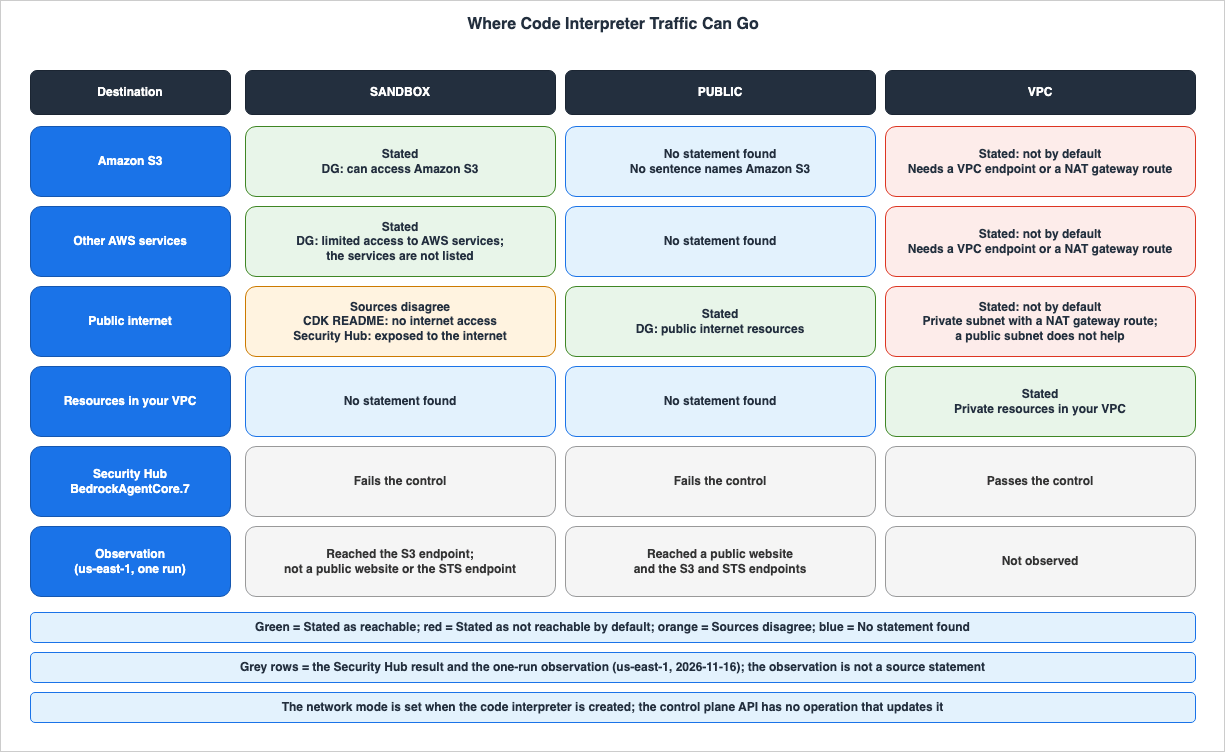
4.1 What Three Sources Say About SANDBOX
The sources describeSANDBOX in three different ways.The DG resource management page states:
Provides limited external network access to AWS services. In Sandbox mode, the code interpreter can access Amazon S3 for data operations.The DG S3 page states that you choose
SANDBOX when you want access limited to Amazon S3.If your Code Interpreter needs access limited to Amazon S3, choose SANDBOX mode.The DG creation page's console instructions describe Sandbox as an environment with limited access to external networks.
The CDK README describes
SANDBOX as follows:Isolated network environment with no internet accessThe same README continues with
Only allows access to pre-installed packages and local resources. It does not mention S3.The Security Hub page, BedrockAgentCore.7, states that if the custom code interpreter's network mode is
PUBLIC or SANDBOX, it is marked as noncompliant. The reason provided is:Public or sandbox network modes expose the code interpreter to the internet, increasing the risk of unauthorized access and data exfiltration.DG states that it can reach S3, while the CDK README states it cannot reach the internet, and the Security Hub page states it is exposed to the internet. As an inference by this article, because S3 endpoints can also be reached from the public internet, the three statements may describe the same reach in different words. However, none of the statements says so. This article lists the three as
Sources disagree without deciding that any of them is incorrect. In the observation, a SANDBOX session could not resolve the name of a public website, reached the S3 endpoint over HTTPS, and could resolve the name of the STS endpoint but could not connect to it.4.2 PUBLIC
The DG resource management page describesPUBLIC as follows:Allows the tool to access public internet resources. This option enables integration with external APIs and services but introduces potential security considerations.The CDK README states that the default network mode for the Code Interpreter construct is
PUBLIC. The control plane API reference and the CloudFormation reference specify that networkMode is a required parameter, but do not list a default value. The Security Hub page marks PUBLIC as noncompliant. This article does not provide recommendations on which network mode to choose.4.3 VPC
The DG resource management page describesVPC as a mode that allows access to databases, internal APIs, and services within your VPC, while keeping the tool isolated from the public internet, and notes that additional VPC configurations are required. The DG VPC page specifies the default reachability as follows:When you connect Amazon Bedrock AgentCore Runtime or a built-in tool to a Virtual Private Cloud (VPC), it does not have internet access by default.The same page states that placing it in a public subnet does not give it internet access.
Using a public subnet does not provide internet connectivity.To reach the internet, a NAT gateway must be placed in the public subnet, and the default route in the private subnet's route table must be directed to the NAT gateway. The DG VPC page recommends placing at least two private subnets in different Availability Zones, and provides a table of the supported Availability Zone IDs. It states that specifying a subnet in an Availability Zone not listed in the table will result in a failure during resource creation.
The DG VPC page indicates that network interfaces are created using the service-linked role
AWSServiceRoleForBedrockAgentCoreNetwork. It also states that these network interfaces may remain for up to 8 hours after an agent is deleted. The subject of this sentence is the agent, and no similar statement was found for deleting a code interpreter.The key name for the
VPC settings differs across the sources. CodeInterpreterNetworkConfiguration in the control plane API reference uses vpcConfig, while the DG VPC page's example for Code Interpreter uses networkModeConfig. The requireServiceS3Endpoint setting found on the VpcConfig page is stated to apply only to Agent Runtime, and not to Browser or Code Interpreter.The troubleshooting section for Code Interpreter on the DG VPC page lists three potential issues. If invoking a public endpoint results in a timeout, it advises checking the NAT gateway configuration. If using a private VPC endpoint results in an AccessDenied error, it recommends verifying the permissions of the execution role provided during creation. If you encounter an "Unable to locate Credentials" error, it advises verifying that you provided an execution role during creation.
4.4 The Execution Role Decides Credentials, Not Reach
As an inference by this article, network mode determines where you can connect, and the execution role determines which AWS permissions will be used to sign requests once they reach their destination. The Unable to locate Credentials symptom on the DG VPC page is also linked to not providing an execution role. In the observation, a custom code interpreter inSANDBOX without an execution role was able to reach the S3 endpoint, but the SDK could not locate credentials and could not list the observation bucket. A custom code interpreter in SANDBOX with an execution role, however, was able to list the same bucket.5. What a Session Holds
This chapter lists what a single session holds during its lifetime.| What | What the Sources Say | Source |
|---|---|---|
| Execution Environment | Stated: Each session utilizes a dedicated microVM, providing separate CPU, memory, and file system resources. | DG session page |
| Files | Stated: Available throughout the session's lifetime. | DG session page |
| Execution State | Stated: Maintains state between executions. | DG resource and session management page |
clearContext | Stated: A boolean value indicating whether to clear the tool's context. The specifics of what is cleared are not documented. | Data plane API reference: ToolArguments |
| Multiple sessions of the same code interpreter | Stated: Can operate concurrently, each with its own state and environment. | DG session page |
| Hardware | Stated: 2vCPU/8GB per session; not adjustable. | DG Quotas page |
| Disk Space | Stated: 10 GB per session; not adjustable. | DG Quotas page |
| Languages and Runtime | Stated: Python, JavaScript, TypeScript. Supported runtimes include python, nodejs, and deno. | ToolArguments, DG runtime page |
5.1 One microVM per Session
The DG session page describes session isolation as follows:Each tool session runs in a dedicated microVM with isolated CPU, memory, and filesystem resources.The DG overview page states that Code Interpreter runs within a containerized environment within Amazon Bedrock AgentCore. Neither page describes the relationship between microVMs and containers. This article places the two in Chapter 10 as
Different kinds of statements.5.2 Files and Execution State Across Calls
The DG session page states that files and data created in a session are available throughout the session's lifetime. The DG resource and session management page states that code in the supported languages can be run and that state is kept between executions. In other words, both files and execution state, such as variables, are carried over across calls within the same session.The
ToolArguments property clearContext is a boolean value indicating whether the tool's context should be cleared. What is cleared and what is retained is not documented in either the API reference or within DG itself. In the observation, after an executeCode call with clearContext set, variables created in previous calls were cleared, while files written in previous calls remained.5.3 Several Sessions per Code Interpreter
The DG session page states that a single code interpreter can run multiple sessions concurrently, each with its own state and environment. The DG Quotas page indicates that the system allows for up to 1000 concurrent sessions per account and 1000 code interpreters, both of which are adjustable.The DG file system page notes that Code Interpreter does not have managed storage like AgentCore Runtime.
Unlike AgentCore Runtime, AgentCore Code Interpreter does not offer a managed session-storage option.The paths that keep files across sessions are Amazon S3 in Chapter 7 and mounting your own file system.
6. How a Session Ends and What Is Lost
This chapter lists how a session ends, what happens afterward, and what is lost.| Event | What the Sources Say | Source |
|---|---|---|
The elapsed time reaches sessionTimeoutSeconds | Stated. The session ends even while processing is ongoing. Default is 900 seconds, with a maximum of 28,800 seconds. | StartCodeInterpreterSession |
StopCodeInterpreterSession is called | Stated. A stopped session cannot be restarted. | StopCodeInterpreterSession |
InvokeCodeInterpreter is called on a terminated session | Stated. This will fail. | InvokeCodeInterpreter |
| State value after termination | Disagrees within the same page. Valid Values are READY and TERMINATED. The description mentions ACTIVE, STOPPING, and STOPPED. | GetCodeInterpreterSession, ListCodeInterpreterSessions |
| Data after termination | Disagrees within the same page. It states that the data is cleaned up on termination and that the retention period for session data is 30 days. | DG session page |
| microVM after termination | Stated. The microVM is terminated, and its memory is sanitized. | DG session page |
6.1 Elapsed Time, Not Idle Time
The data plane API reference forStartCodeInterpreterSession specifies sessionTimeoutSeconds as follows:The duration in seconds (time-to-live) after which the session automatically terminates, regardless of ongoing activity. Defaults to 900 seconds (15 minutes). Recommended minimum: 60 seconds. Maximum allowed: 28,800 seconds (8 hours).The valid range for this value is from 1 to 28,800. The DG session page states a default value of 900 seconds, and states that the session lifetime can be adjusted up to 8 hours when creating a session. There was no mention in the Code Interpreter documentation regarding a setting to terminate the session after a period of inactivity.
The DG overview page describes the same 15-minute and 8-hour durations using different wording.
The Code Interpreter tool provides support for a default execution time of 15 minutes, which can be extended for up to eight hours.The API reference writes these as the session's lifetime, and the DG overview page writes them as execution time. This article places the two in Chapter 10 as
Different kinds of statements.In the observation, when a session with
sessionTimeoutSeconds set to 60 was repeatedly sent the executeCode command every 10 seconds, the call at 51.5 seconds was successful, while the call at 61.8 seconds failed.6.2 Stopping a Session
TheStopCodeInterpreterSession page of the data plane API reference states:Once stopped, a session cannot be restarted; you must create a new session using StartCodeInterpreterSession.The DG stop page says to stop a session when you are finished with it and release its resources.
6.3 After the Session Ends
TheInvokeCodeInterpreter page includes the following text in the definition of sessionId:If the session has expired or been stopped, the request will fail.The type of failure is not specified in this text. In the observation, calls to a session that ended by reaching its lifetime and to a stopped session both resulted in a
ValidationException (HTTP 400). Calls to non-existent session IDs resulted in a ResourceNotFoundException (HTTP 404).The
GetCodeInterpreterSession page lists the status values as ACTIVE, STOPPING, and STOPPED in the description, while the same page lists them as READY and TERMINATED in the Valid Values section. The ListCodeInterpreterSessions page follows the same pattern. In the observation, a session that ended by reaching its lifetime and a stopped session both reported a status of TERMINATED in both GetCodeInterpreterSession and ListCodeInterpreterSessions.6.4 What Is Lost When a Session Ends
The DG session page states that the data is cleaned up when the session is terminated.When the session is terminated, the session no longer persists and the data is cleaned up.The same page continues, specifying a retention period.
The time to live (TTL) retention policy for the session data is 30 days.However, this page, as well as other pages referenced in this article, do not clarify whether the 30-day retention period applies to files, execution results, or session logs. This article lists the two statements as
Disagrees within the same page and does not lean toward either.The isolation section on the same page states that when a session ends, the microVM is terminated and its memory is sanitized.
Upon session completion, the microVM is fully terminated, and its memory is sanitized, thereby eliminating any risk of cross-session data leakage.In the observation, files written during a stopped session were not found by the
listFiles and readFiles commands in a new session started on the same code interpreter.The following diagram illustrates the sequence of events, from the start of a session through what it keeps and the two events that end it to what happens after it ends.
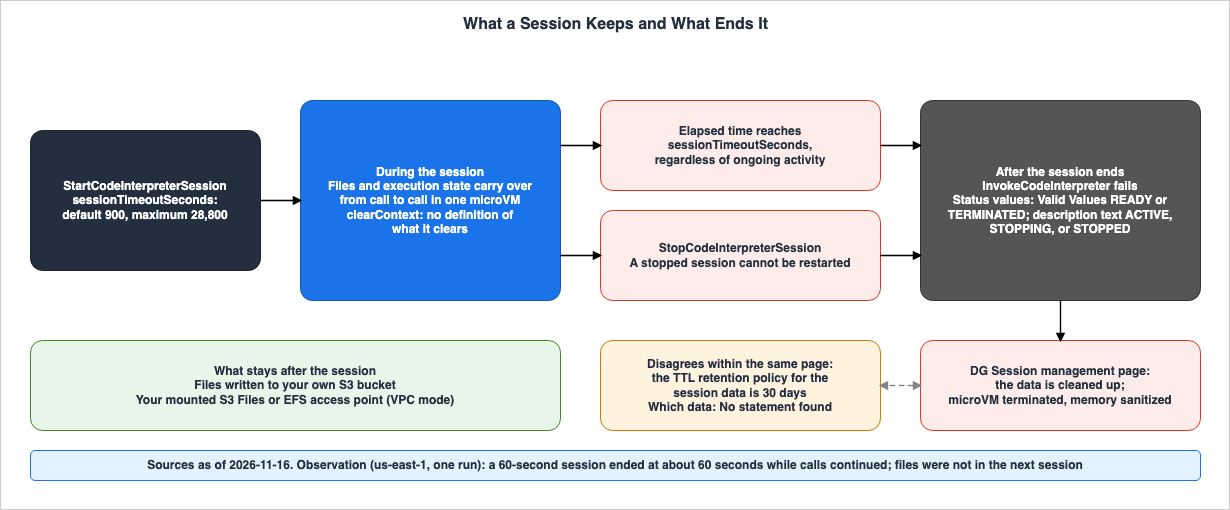
7. Files In and Out
This chapter divides the ways to pass files into and out of a session into three paths.| Path | Stated Size Limit | Where the Data Lives | Kept After the Session Ends | Network Mode | Source |
|---|---|---|---|---|---|
Inline uploads (using tools like writeFiles) | 100 MB | Session file system | Disagrees within the same page. Cleaned up, and the retention period for session data is 30 days (section 6.4). | Any | DG overview page, DG files page |
| Transferring data to and from S3 via execution roles and terminal commands | 5 GB | Your own S3 bucket | Remains in your bucket | A mode that can reach S3 | DG overview page, DG S3 page |
| Mounting your own Amazon S3 Files or Amazon EFS access points | No statement found. See section 7.3 for quantity limits. | Your account's file system | Stated. Remains in your account. | VPC only | DG file system page |
7.1 Inline Upload and the Payload Limit
The DG overview page specifies the maximum file size as follows:For inline upload, the file size can be up to 100 MB. And for uploading to Amazon S3 through terminal commands, the file size can be as large as 5 GB.On the DG Quotas page, within the Code Interpreter section, there is a line indicating a "Max payload size" of 100 MB, with the note
Maximum size for request/response payloads. This is the limit on the size of a single request and response, and it is not a row for file size. The maximum length for ToolArguments fields, including code, command, and path, is 100,000,000 characters.7.2 Through Amazon S3 with an Execution Role
The DG S3 page demonstrates creating a custom code interpreter with an execution role, and uses theexecuteCommand tool to run aws s3 cp, enabling file transfer between S3 and the interpreter. The code interpreter's network mode is set to SANDBOX, and the execution role is granted s3:PutObject and s3:GetObject permissions for the target bucket. Files written to the S3 bucket will remain in the bucket even after the session ends.7.3 Mounting Your Own File System
The DG file system page states that you can usefilesystemConfigurations to mount Amazon S3 Files or Amazon EFS access points under /mnt/. Both options require the code interpreter's network mode to be set to VPC, and the execution role must have mounting permissions. Data remains within your own account, and multiple sessions, multiple code interpreters, and other applications can utilize the same access point.The same page specifies limits: a maximum of 2 S3 Files and 2 EFS mounts per request, totaling 4. For a single session, create time and session start combined allow a total of 8. The
filesystemConfigurations array in the API reference can contain between 0 and 10 entries. If even one mount fails, the StartCodeInterpreterSession will return an error, and the session will not reach the READY state.8. Synchronous and Asynchronous Execution
This chapter outlines the tools that can be called usingInvokeCodeInterpreter, along with the limits for synchronous and asynchronous execution, and the types of errors that may occur.The valid values for the
name parameter within InvokeCodeInterpreter are as follows:executeCode | executeCommand | readFiles | listFiles | removeFiles | writeFiles | startCommandExecution | getTask | stopTask| Execution | Tools | Stated Limit | Source |
|---|---|---|---|
| Synchronous | executeCode, executeCommand, file tools | Request timeout 15 mins (maximum time for synchronous requests) | DG Quotas page |
| Asynchronous | startCommandExecution, getTask, stopTask | Asynchronous command max duration 8 hrs | DG Quotas page |
The assignment of tools in the Tools column is an inference by this article. The DG Quotas page does not name any tools for either limit.
8.1 Two 15-Minute Values
The Request timeout of 15 mins on the DG Quotas page is the maximum time for a single synchronous request. The default of 900 seconds forsessionTimeoutSeconds is the session's lifetime. Both values are 15 minutes, but they measure different things. Even if the session's lifetime is set to 8 hours, the limit for a single synchronous request remains 15 mins.8.2 Asynchronous Commands
ThestartCommandExecution tool starts a command asynchronously. You can check the status using getTask and stop the task using stopTask. The valid values for taskStatus within the ToolResultStructuredContent are five: submitted, working, completed, canceled, and failed. The maximum duration for asynchronous commands is 8 hrs on the DG Quotas page. What happens when a session reaches its lifetime in the middle of an asynchronous command is not documented.8.3 Errors and Results
TheInvokeCodeInterpreter page documents error types and HTTP status codes as follows:| Error | HTTP Status Code |
|---|---|
AccessDeniedException | 403 |
ConflictException | 409 |
InternalServerException | 500 |
ResourceNotFoundException | 404 |
ServiceQuotaExceededException | 402 |
ThrottlingException | 429 |
ValidationException | 400 |
The response is a stream of events, where the same exceptions are also defined as events within the stream. The result of code execution is returned as a
result event, which includes a boolean value isError indicating whether the result represents an error, along with structuredContent containing stdout, stderr, exitCode, and executionTime. In the observation, a NameError raised in Python code was returned not as an exception but as a result with isError set to true.The DG observability page states that console output from execution can be read by using the stdout and stderr returned with each call. As metrics visible in CloudWatch, the page lists the number of sessions, duration, number of calls, request latency, throttling, user errors, and system errors.
9. Observation
This chapter summarizes a single observation conducted on November 16, 2026, in the us-east-1 Region. The observed values are not source statements. It is not guaranteed that the same results will be obtained in other Regions, on other days, or with other accounts.9.1 What Was Run
The setup was as follows:- One built-in code interpreter (
aws.codeinterpreter.v1) and three custom code interpreters created using AWS CloudFormation. The three wereSANDBOXwith an execution role,SANDBOXwithout an execution role, andPUBLICwith an execution role. - The execution role permissions were limited to
s3:ListBucketands3:GetObjectfor a single S3 bucket used for observation purposes. - The calls were made using AWS SDK for Python (Boto3) version 1.44.3, using the following operations:
GetCodeInterpreter,StartCodeInterpreterSession,InvokeCodeInterpreter,GetCodeInterpreterSession,ListCodeInterpreterSessions, andStopCodeInterpreterSession. - After the observation, the custom code interpreters, IAM roles, and S3 bucket were deleted, and it was verified that they no longer existed. The built-in code interpreter was neither created nor deleted.
Account IDs, ARNs, bucket names, and session IDs have been redacted.
9.2 Reach from Each Code Interpreter
Four code interpreters were used, each starting a session and executing the same command usingexecuteCommand. The tests involved name resolution, HTTPS connections using curl, and calls to AWS services using Python's Boto3.| Check | Built-in | Custom SANDBOX with Role | Custom SANDBOX without Role | Custom PUBLIC with Role |
|---|---|---|---|---|
GetCodeInterpreter's networkMode | Not returned | SANDBOX | SANDBOX | PUBLIC |
| Name resolution for public websites | Unable to resolve | Unable to resolve | Unable to resolve | Able to resolve |
| HTTPS connection to public websites | Connection failed | Connection failed | Connection failed | HTTP 200 |
| HTTPS to S3 endpoint in us-east-1 | HTTP 307 | HTTP 307 | HTTP 307 | HTTP 307 |
| HTTPS to STS endpoint in us-east-1 | Name resolved, but connection failed | Name resolved, but connection failed | Name resolved, but connection failed | HTTP 302 |
| Caller identification using Boto3 | credentials not found | Unable to connect to STS endpoint | credentials not found | Assumed-role execution role |
| Listing observation buckets using Boto3 | credentials not found | Listing successful | credentials not found | Listing successful |
The built-in row matched the row for the custom
SANDBOX without a role. All this observation shows is that, on this day and in this Region, the built-in code interpreter could not be told apart from a custom SANDBOX one without a role in these checks. The value of the built-in network mode is unknown, as the API does not return it.That
SANDBOX reached the S3 endpoint and could not connect to the STS endpoint agrees with the text on the DG resource management page, which states that it can reach S3. For which AWS services other than S3 the limited access covers, only one example, STS, was checked.9.3 Files and State
Using the built-in code interpreter, the following steps were executed:writeFileswrote the filenotes/demo.txt. The result wasSuccessfully wrote all 1 files.- Using
listFilesandreadFiles, the same file was found. It could be read from the Python code using the same relative path viaexecuteCode. executeCodewas used to set the variablexto 42. Subsequently, using another call toexecuteCode, displaying the value ofxshowed 42.- After an
executeCodecall withclearContext, attempting to displayxresulted in aNameError. The result'sisErrorwas true, and theexitCodewas 1. At the same point in time,listFilesshowed that the filenotes/demo.txtexisted. - The session was stopped using
StopCodeInterpreterSession. The state of the immediately followingGetCodeInterpreterSessioncall wasTERMINATED. Attempting to execute code on the stopped session usingexecuteCoderesulted in aValidationException(HTTP 400), with a message indicating that the session was not active. CallingStopCodeInterpreterSessionagain resulted in aConflictException(HTTP 409). - A new session was started. Using
listFilesto list the contents ofnotesresulted in a message indicating that the directory could not be found.readFilesalso resulted in a message indicating that the file could not be found. Neither call resulted in an exception; both returned a result whereisErrorwas true.
9.4 Elapsed Time
Using the built-in code interpreter, a session was started withsessionTimeoutSeconds set to 60. The executeCode command was sent every 10 seconds. The first six calls, from 0 seconds to 51.5 seconds, were successful. However, the call at 61.8 seconds resulted in a ValidationException (HTTP 400). Even though calls continued, the session ended after approximately 60 seconds.Immediately after the session ended and again 30 seconds later, the status of
GetCodeInterpreterSession was TERMINATED in both cases. Calling StopCodeInterpreterSession on the ended session did not return an error, and the lastUpdatedAt field was updated. However, the response differed when attempting to stop the session a second time after it had been manually stopped, resulting in a ConflictException. The reason for this difference is not documented.9.5 Errors and Asynchronous Commands
SettingsessionTimeoutSeconds to 28801 and calling StartCodeInterpreterSession resulted in a ValidationException (HTTP 400), indicating that the value must be 28800 or less. Attempts to InvokeCodeInterpreter or GetCodeInterpreterSession with a non-existent session ID resulted in a ResourceNotFoundException (HTTP 404). When passing a value for name that was not one of the nine allowed values, a ValidationException (HTTP 400) was returned, along with a message listing the nine valid values.When initiating a command that takes 20 seconds using
startCommandExecution, the initial taskStatus was submitted. Reading the task status every 5 seconds using getTask showed working through 16.0 seconds and completed at 21.3 seconds, and the command output was returned. Starting a command that takes 120 seconds and then calling stopTask while the status is working, the next call to getTask returned a status of canceled.9.6 What This Observation Cannot Show
This observation cannot demonstrate:- Whether the same results will be obtained in other Regions, on different days, or with different accounts.
- The built-in network mode value, or the permissions with which the built-in code interpreter runs.
- Which data is subject to the 30-day retention period, and where and how much data remains after the session ends.
- The reach of the
VPCnetwork mode – this was not configured in this observation. - The response when a synchronous request reaches the 15 mins limit – this observation does not include waiting for that response.
- Whether AWS services other than S3 and STS are accessible from
SANDBOX.
10. Where the Sources Disagree and What They Do Not Say
This chapter will outline the points where the sources diverge and the information they do not provide.10.1 Where the Sources Differ
| Event | What Each Source Says | Kind of Difference |
|---|---|---|
| Number of network modes | The control plane API reference lists three network modes: PUBLIC, SANDBOX, and VPC. The DG creation page, the DG resource and session management page, and the custom section of the DG resource management page list only two: Sandbox and Public. | Sources disagree |
| Number of modes within the DG resource management page | The custom section lists two modes: Sandbox and Public. The same page, in the "Network settings" section, lists three modes, including VPC. | Disagrees within the same page |
Reach of SANDBOX | DG states that code can reach S3. The CDK README states that it does not reach the internet. The Security Hub page states that it is exposed to the internet. | Sources disagree |
| Default network mode | The CDK README states that the default for the Code Interpreter construct is PUBLIC. The control plane API reference and CloudFormation reference list it as a required setting, but do not specify a default. | Different kinds of statements |
Key for VPC configuration | The control plane API reference uses vpcConfig. An example on the DG VPC page uses networkModeConfig. | Sources disagree |
| Session status values | The descriptions for GetCodeInterpreterSession and ListCodeInterpreterSessions list ACTIVE, STOPPING, and STOPPED. Each page, in the "Valid Values" section, lists READY and TERMINATED. | Disagrees within the same page |
| Data after termination | The DG session page states that the data is cleaned up on termination. The same page also states that the retention period for session data is 30 days. | Disagrees within the same page |
| 15 minutes and 8 hours | StartCodeInterpreterSession writes them as the session's lifetime. The DG overview page writes them as execution time. | Different kinds of statements |
| Execution environment | The DG session page describes it as a dedicated microVM. The DG overview page describes it as a containerized environment. | Different kinds of statements |
Number of filesystemConfigurations | The API reference lists a range of 0 to 10. The DG file system page states a total of 4 per request, and a total of 8 per session. | Sources disagree |
Number of certificates | CreateCodeInterpreter and StartCodeInterpreterSession list a range of 1 to 200. The CloudFormation reference lists a range of 0 to 10. | Sources disagree |
Session name | The description for StartCodeInterpreterSession states that a name must be specified. The same page defines name as Required: No. | Disagrees within the same page |
Identifier for ListCodeInterpreterSessions | The description states that without a specified identifier, all code interpreter sessions will be returned. The same page defines it as Required: Yes. | Disagrees within the same page |
| AWS CLI examples in the DG | The DG creation page runs create-code-interpreter under aws bedrock-agentcore. The DG start page passes --code-interpreter-id and --description. The API reference for CreateCodeInterpreter describes a control plane operation, while StartCodeInterpreterSession has a codeInterpreterIdentifier and no description parameter. | Sources disagree |
10.2 What the Sources Do Not Say
The following items were not found in the materials from section 1.3:- The values of the network mode for the built-in code interpreter, and whether an execution role is used.
- Which AWS services other than S3 can be reached from
SANDBOX. - Which data is subject to the 30-day retention period, and how to access the data after the session ends.
- Settings for terminating sessions when they are inactive.
- What happens when a session reaches its lifetime during an asynchronous command.
- How long the network interfaces for
VPCremain after a code interpreter is deleted. - The reason for the difference in the termination response between a session that ended by reaching its lifetime and one that was stopped.
- The types of resources that are logged in AWS CloudTrail.
- The general availability date for Code Interpreter alone. While the "What's New" announcement from October 13, 2025, announces the general availability of Amazon Bedrock AgentCore, it does not mention Code Interpreter.
- The date when the ability to mount your own file system was added to Code Interpreter. The DG release notes are organized by month, and while there are entries for similar features in AgentCore Runtime and harness, no mention of Code Interpreter was found.
11. Failure Modes
This chapter lists potential issues that may arise when the sources in this article are misread, by the form of the misreading. Every row stays within what the source statements say.| Failure Mode | What Can Happen | What the Sources Say |
|---|---|---|
Assuming SANDBOX prevents communication anywhere. | Overlooking the possibility of a route to S3. | The DG resource management page states that SANDBOX can reach S3. |
Assuming SANDBOX allows internet access. | Package acquisition and external API calls can fail. | Sources disagree (section 4.1). The CDK README states that it does not have internet access. DG states that it has limited access to S3 and AWS services. The Security Hub page states that the mode exposes the code interpreter to the internet. |
| Attempting to change the network mode or execution role after creation. | The operation to change these settings cannot be found. | The control plane API does not have an UpdateCodeInterpreter operation. Security Hub's remediation step says to delete the code interpreter and recreate it. |
| Calling AWS services without providing an execution role. | Can result in an "Unable to locate Credentials" error. | The DG VPC page advises verifying whether an execution role was provided during creation. |
| Assuming that continued calls will extend the session. | The session ends during a long-running process. | sessionTimeoutSeconds defines the time after which the session ends, regardless of ongoing processes. |
| Attempting to restart a stopped session. | The call fails. | A stopped session cannot be restarted; a new session must be started. |
| Assuming that files persist to the next session after stopping the session. | Files are not found in the next session. | The data is cleaned up on termination. Code Interpreter does not have managed session storage. |
| Assuming that the 30-day retention period allows recovering files. | No method for recovery can be found. | What the 30-day retention period covers is not stated. |
| Passing files larger than 100 MB inline. | The file exceeds the stated limit. | Inline is limited to 100 MB; using S3 allows up to 5 GB. |
| Running processes longer than 15 minutes in synchronous calls. | Request limits are reached. | The Request timeout for synchronous requests is 15 mins; asynchronous commands can run for up to 8 hrs. |
Assuming that placing the VPC network mode in a public subnet allows internet access. | Package acquisition and public API calls time out. | Even in a public subnet, internet access is not possible. A private subnet with a route to a NAT gateway is required. |
Passing the networkModeConfig from the VPC example directly to the API. | The request format does not match the API definition. | The control plane API reference uses the key vpcConfig. |
| Failing to mount your own file system. | The session does not become READY. | If even one mount fails, StartCodeInterpreterSession returns an error. |
12. Frequently Asked Questions About What AgentCore Code Interpreter Keeps and Where Its Traffic Goes
Can code in SANDBOX network mode reach the internet?
The documentation describesSANDBOX in three different ways. The Amazon Bedrock AgentCore Developer Guide describes SANDBOX as limited access to AWS services and states that code can reach Amazon S3. The AWS CDK README states that it operates in an environment without internet access. An AWS Security Hub control marks SANDBOX, like PUBLIC, as noncompliant because the mode exposes the code interpreter to the internet. A one-run observation on November 16, 2026, in the us-east-1 Region showed that a SANDBOX session reached the S3 endpoint but did not reach a public website.Can I change the network mode of a code interpreter after I create it?
Not through an API operation. While the Amazon Bedrock AgentCore control plane API includes operations for creating and deleting code interpreters, it has no operation that updates one. AWS Security Hub's remediation steps also indicate that you should delete and recreate the interpreter. To change the network mode, you will need to create a new code interpreter and start a new session.Does a Code Interpreter session end when it is idle, or after a fixed time?
A Code Interpreter session ends based on elapsed time. ThesessionTimeoutSeconds parameter in StartCodeInterpreterSession specifies the duration after which the session will end, regardless of any ongoing processes. The default value is 900 seconds, and the maximum value is 28,800 seconds. No setting that ends a session after idle time was found in the sources. A one-run observation on November 16, 2026, in the us-east-1 Region showed that even when a session was set to 60 seconds and called every 10 seconds, it ended after about 60 seconds.Do files in a session remain after the session ends?
Files used in a session become unavailable and are not carried over to new sessions. The Amazon Bedrock AgentCore Developer Guide states that the data is cleaned up when the session is terminated. While the same page mentions a 30-day retention period for session data, it does not specify what data is subject to that retention. The documented ways to keep files after a session are writing them to your own Amazon S3 bucket and mounting your own Amazon S3 Files or Amazon EFS access point.What is the largest file I can pass to a session?
The maximum file size you can pass to a session varies depending on the method. Inline uploads are limited to 100 MB, while transferring files to and from Amazon S3 via terminal commands using an execution role allows for files up to 5 GB. The 100 MB limit mentioned on the "Quotas" page for Amazon Bedrock AgentCore refers to the maximum size for request and response payloads, and is separate from the file size limit.Why can a code interpreter in VPC network mode not reach the internet?
The Amazon Bedrock AgentCore Developer Guide page on VPC states that a code interpreter in theVPC network mode does not have internet access by default. Even if it is placed in a public subnet, it still cannot access the internet. To enable internet access, it must be placed in a private subnet that has a route to a NAT gateway. Alternatively, you can use VPC endpoints to access AWS services.13. Summary
The network mode for Amazon Bedrock AgentCore Code Interpreter is determined when the interpreter is created, and there are no API operations to change it afterward.PUBLIC allows access to the public internet, while VPC is restricted by default to your own VPC. Regarding SANDBOX, the Developer Guide states it can access S3, the CDK README states it cannot access the internet, and the Security Hub page indicates it is exposed to the internet. As an inference by this article, the execution role determines the permissions used at the destination, not the destination itself.A single session runs within a dedicated microVM, maintaining its files and execution state. This state is carried over across calls within the same session. A session ends after the
sessionTimeoutSeconds has elapsed or when it is stopped, and cannot be restarted. The statement that the data is cleaned up on termination and the statement that the retention period for session data is 30 days appear on the same page, and what the 30 days covers is not stated. After a session ends, the paths that keep files are your own S3 bucket and a mounted file system.File size limits vary depending on the path. Inline files are limited to 100 MB, while files passed through S3 have a limit of 5 GB. The 100 MB on the Quotas page is the payload limit, and the 15 mins is the limit for a synchronous request, a different value from the session's default of 15 minutes. A single observation conducted on November 16, 2026, in the us-east-1 Region, showed that
SANDBOX accessed an S3 endpoint, that the built-in code interpreter behaved the same as a custom SANDBOX one without an execution role, and that the lifetime was counted in elapsed time, but none of these are source statements. The information presented in the documentation reflects the state as of November 16, 2026.14. References
- Amazon Bedrock AgentCore Developer Guide: Execute code and analyze data using Amazon Bedrock AgentCore Code Interpreter
- Amazon Bedrock AgentCore Developer Guide: Resource management
- Amazon Bedrock AgentCore Developer Guide: Creating an AgentCore Code Interpreter
- Amazon Bedrock AgentCore Developer Guide: Resource and session management
- Amazon Bedrock AgentCore Developer Guide: Session management
- Amazon Bedrock AgentCore Developer Guide: Starting a AgentCore Code Interpreter session
- Amazon Bedrock AgentCore Developer Guide: Stopping a AgentCore Code Interpreter session
- Amazon Bedrock AgentCore Developer Guide: Write files to a session
- Amazon Bedrock AgentCore Developer Guide: Using Terminal Commands with an execution role
- Amazon Bedrock AgentCore Developer Guide: File system configurations for AgentCore Code Interpreter
- Amazon Bedrock AgentCore Developer Guide: Runtime selection
- Amazon Bedrock AgentCore Developer Guide: Observability
- Amazon Bedrock AgentCore Developer Guide: Configure Amazon Bedrock AgentCore Runtime and tools for VPC
- Amazon Bedrock AgentCore Developer Guide: Quotas for Amazon Bedrock AgentCore
- Amazon Bedrock AgentCore Developer Guide: Release notes for Amazon Bedrock AgentCore
- Amazon Bedrock AgentCore Data Plane API Reference: StartCodeInterpreterSession
- Amazon Bedrock AgentCore Data Plane API Reference: InvokeCodeInterpreter
- Amazon Bedrock AgentCore Data Plane API Reference: GetCodeInterpreterSession
- Amazon Bedrock AgentCore Data Plane API Reference: ListCodeInterpreterSessions
- Amazon Bedrock AgentCore Data Plane API Reference: StopCodeInterpreterSession
- Amazon Bedrock AgentCore Data Plane API Reference: ToolArguments
- Amazon Bedrock AgentCore Data Plane API Reference: ToolResultStructuredContent
- Amazon Bedrock AgentCore Control Plane API Reference: CreateCodeInterpreter
- Amazon Bedrock AgentCore Control Plane API Reference: CodeInterpreterNetworkConfiguration
- Amazon Bedrock AgentCore Control Plane API Reference: VpcConfig
- Amazon Bedrock AgentCore Control Plane API Reference: Actions
- AWS CloudFormation Template Reference: AWS::BedrockAgentCore::CodeInterpreterCustom
- AWS CDK API Reference: Amazon Bedrock AgentCore Construct Library
- AWS Security Hub User Guide: Security Hub CSPM controls for Amazon Bedrock AgentCore
- What's New: Amazon Bedrock AgentCore Runtime, Browser, and Code Interpreter add support for VPC, AWS PrivateLink, CloudFormation, and tagging
- What's New: Amazon Bedrock AgentCore is now generally available
References:
Tech Blog with curated related content
Written by Hidekazu Konishi