Rotating an Amazon EKS Cluster's CA - Who Updates Which Trust Bundle, and What Breaks at Activation
First Published:
Last Updated:
However, the automated rotation does not mean users do not need to take action. AWS only updates the trust bundles for components it manages. Managed node groups, nodes created by your own Karpenter deployments, self-managed nodes, hybrid nodes, kubeconfig files, CI/CD pipelines, and monitoring tools all maintain their own trust bundles, and only users can modify them. Furthermore, AWS cannot verify whether users have completed these updates. If a client has not updated its trust bundle before the successor CA is activated, that client will lose the ability to connect to the API server.
This article presents a table, using the ownership of trust bundles as a central axis, to clarify the process. The table will list which trust bundles are owned by whom, who is responsible for updating them, the deadlines for making changes, what will break if changes are not made, and where users can verify completion. The article will then detail three stages and a timeline, outlining what needs to be completed during the dual trust period, what might break upon activation, how to roll back, safeguards, and how to handle Infrastructure as Code (IaC). This article distinguishes between information provided in the official documentation and information that is not currently found within that documentation. This article also documents creating a cluster with one managed node group in
us-east-1 on November 3, 2026, and observing the process from the addition of the successor CA to the deletion of the original CA (Chapter 9).This article is not a step-by-step guide for performing the CA rotation. Those instructions are available in the user guide. It also does not offer recommendations on which compute options to choose, nor does it cover pricing. The information presented here was verified as of November 3, 2026.
Related articles on this site:
- Rolling Back an Amazon EKS Cluster Version - What Decides Eligibility, What Rollback Readiness Insights Do Not Decide, and Where the Primary Sources Disagree
- Certificate Distribution in Kubernetes with AWS Private CA - Issue, Request, Store, Consume, and the Layer Where Renewal Stops
- Amazon EKS Capabilities - Managed Argo CD, ACK, and kro, and What Changes When the Controllers Move Off Your Cluster
- Amazon EKS Control Plane Configuration - What You Can Set, What Blocks the Way Back, and How Far Each Setting Reaches
- AWS History and Timeline regarding Amazon EKS - Overview, Functions, Features, Summary of Updates, and Introduction
Table of Contents
- 1. Scope and Assumptions
- 2. How to Read the Tables
- 3. Three Stages and Schedule
- 4. The Trust Bundle Owner Table
- 5. What to Finish Before and During the Dual Trust Period
- 6. What Breaks at Activation
- 7. Rollback and Safeguards
- 8. Infrastructure as Code and Cross-Cluster Visibility
- 9. Observations Based on This Configuration
- 10. Discrepancies and Omissions in the Documentation
- 11. Failure Modes
- 12. Frequently Asked Questions About CA Rotation
- 13. Summary
- 14. References
1. Scope and Assumptions
1.1 Intended Audience
This article is intended for individuals who currently operate EKS clusters and have been, or will be, notified of an upcoming Certificate Authority (CA) expiration or the addition of a successor CA through AWS Health, Cluster Insights, or email. In particular, it is written for readers who assume any of the following:- AWS rotates the CA automatically, so users do not need to take any action.
- Replacing the nodes is enough.
- For kubeconfig, re-running
update-kubeconfigis enough. - CloudFormation reports a change in the signing CA as drift.
These assumptions are only valid under certain conditions, which are detailed in Chapters 4 through 8.
1.2 Scope and Exclusions
This article focuses on the rotation of the cluster's Certificate Authority (CA), specifically addressing who holds the trust bundle and what actions need to be completed at each stage. More specifically, it covers the following:- The three stages (append, distribution, and activation) and the notification schedule.
- A table of trust bundle owners: the AWS-distributed side and the customer side.
- Details regarding dual trust periods, CA pinning, EC2 user data capacity, and Karpenter user data.
- What breaks at activation, and how the documentation describes the failure.
- Rollback conditions, safeguards, deletion conditions, and mutual exclusion with version upgrades.
- The two-step approach to writing CloudFormation templates and how drift is handled.
- Cross-cluster visibility through the EKS Dashboard and API.
- Inconsistencies in the documentation and missing information.
This article does not cover the following:
- Pricing.
- Certificates used by Pod workloads. These are managed by a different CA than the cluster's CA. This is covered on this site in Certificate Distribution in Kubernetes with AWS Private CA.
- Kubernetes version upgrades and rollback procedures. This is covered on this site in Rolling Back an Amazon EKS Cluster Version. This article will only briefly mention the mutual exclusion between CA operations and version upgrades in Section 7.6.
- EKS authentication. This article does not cover IAM, OIDC identity providers, or access entries.
- General principles of PKI and the design of AWS Private CA hierarchies.
- Guidance on choosing between Auto Mode, Fargate, managed node groups, and Karpenter.
- IAM Identity Center across Regions, and AWS WAF tokens. These are covered in two other articles in this series: IAM Identity Center Across Regions and Where an AWS WAF Token Comes From.
1.3 Checked Date and Reviewed Materials
This article was written after reviewing the following materials on November 3, 2026. Abbreviations used in the text are indicated in parentheses.- Amazon EKS User Guide, specifically the page on cluster CA rotation (the rotation page).
- Amazon EKS API Reference, including the pages for
CreateCertificateAuthority,ListCertificateAuthorities,DescribeCertificateAuthority,ActivateCertificateAuthority,DeleteCertificateAuthority,CertificateAuthority, andCertificateAuthorityScheduledEvents(collectively, the API reference). - AWS CloudFormation Template Reference, specifically the pages for
AWS::EKS::CertificateAuthority,AWS::EKS::Cluster, andAWS::EKS::Cluster ActiveCertificateAuthority(collectively, the CloudFormation reference). - AWS What's New, including the announcement regarding CA rotation dated August 20, 2026 (the rotation announcement) and the announcement regarding the EKS Dashboard dated October 28, 2026 (the Dashboard announcement).
- AWS Containers Blog, specifically the detailed article on CA rotation published on August 19, 2026 (the deep-dive blog).
- Amazon EKS User Guide, specifically the Document history.
- Amazon EKS User Guide, including the page on migrating from Fargate to Auto Mode (the Fargate migration page) and the page on hybrid node nodeadm (the nodeadm page).
- AWS CloudFormation User Guide, specifically the table listing resource types that support import and drift detection (the Resource type support table).
- Karpenter documentation, specifically the NodeClass page and the Disruption page. Both were v1.15, the latest version shown as of November 3, 2026 (the Karpenter NodeClass page and the Karpenter Disruption page).
1.4 Distinct Entities with the Same Name
- Cluster CA vs. Other CAs: In this article, the term "CA" refers to the CA that EKS creates for each cluster and uses to sign API server certificates. It is not the CA used by AWS Private CA, nor is it the CA that cert-manager uses to issue certificates to workloads. The rotation page says that using your own AWS Private CA to back the cluster's certificates (BYOCA) is not currently supported.
- Trust Bundles: The trust bundle referenced in this article is a collection of the cluster's CA certificates, formatted in PEM, and found in
describe-clusterundercertificateAuthority.dataand in kubeconfig undercertificate-authority-data. The AWS Trust Bundles described in the When Intermediate CA Keys Are Compromised article are a separate entity; they are bundles used by AWS services to validate outbound TLS connections. - Two "data" Fields: The "data" field in the API reference for
CertificateAuthoritycontains the public certificate of a single CA. In contrast, thecertificateAuthority.datafield indescribe-clusteris the entire cluster's trust bundle, which during the dual trust period, includes two CAs. - Karpenter: The Karpenter nodes discussed in this article are nodes created by a Karpenter instance that the user manages themselves. According to the rotation page, AWS updates nodes in EKS Auto Mode, while the user updates nodes managed by Karpenter.
- Rollback: In this article, "rollback" refers to a CA rollback, meaning reverting to a previous CA to sign certificates after a CA has been activated. This is distinct from a Kubernetes version rollback.
- CloudFormation Names:
AWS::EKS::CertificateAuthorityis a resource that appends a successor CA.AWS::EKS::Cluster'sActiveCertificateAuthorityIdis a write-only property that triggers the activation process.ActiveCertificateAuthorityis a read-only type for the CA currently being used for signing.AWS::EKS::Cluster'sCertificateAuthorityproperty refers to the cluster'scertificate-authority-data.
2. How to Read the Tables
This section defines the columns in the tables found in Chapter 4, as well as the terms for the status of the sources. These columns and the terminology used to denote ownership will be used consistently across three articles in the same series.2.1 Columns
The table in Chapter 4 has the following seven columns:Trust Being Held: The trust held in that row, specifying which trust bundle and where it is located.Who Holds It: The entity holding that trust bundle.Who Can Update It: The entity that can modify its contents.When It Must Change: The deadline by which the successor CA must be trusted.What Breaks If It Does Not: The consequences of failing to update.How You Can Tell: Where you can verify that the update is complete.Where It Is Written: The source of the information in that row.
2.2 Terminology for Source Status
The status of a source is described using the following five terms:- No statement found: Despite searching using different search terms and source types, the relevant text cannot be located. This does not indicate that the subject matter is nonexistent or does not occur.
- Documentation does not list: The item is not listed in a list or table.
- Sources disagree: Both statements and their respective sources are presented. This article does not definitively identify either as incorrect.
- Inference: This is this article's reading, and does not appear in any source. The same sentence says so.
- Observation: This refers to observations made in the configuration in Chapter 9, and does not override information found in the sources.
2.3 Terminology
This article uses the following terms consistently:- Owner: The entity that holds the trust bundle and is authorized to modify its contents.
- AWS-distributed side: The components to which AWS distributes the successor CA. This includes the control plane, EKS Auto Mode nodes, Fargate Pods, and EKS Capabilities.
- Customer side: The components and clients whose trust bundle only the user can modify.
- Successor CA: The newly added Certificate Authority.
- Outgoing CA: The Certificate Authority that was signing certificates prior to the transition. While it is no longer used for signing after activation, it remains in the trust bundle.
- Dual trust period: The period from when the successor CA is added until the outgoing CA is decommissioned. During this time, the cluster trusts both CAs.
- Append, Distribute, Activate: Stages 1, 2, and 3 on the rotation page, respectively.
2.4 Source Reliability
This article treats the following resources as authoritative, in the order listed:- Content from the rotation page and API reference.
- The CloudFormation reference.
- Announcements in the "What's New" section.
- Content from the deep-dive blog. Within this article, the same sentence identifies the blog as the source.
- Karpenter documentation. This serves as the primary source for understanding Karpenter's operation.
- Observations in the configuration in Section 9.
3. Three Stages and Schedule
3.1 Append
In Stage 1 on the rotation page, the successor CA is appended to the cluster. From this point forward, the cluster trusts both the outgoing CA and the successor CA. The outgoing CA continues to issue certificates.Users can append a successor CA at any time using tools such as the CLI, EKS API, console, or Infrastructure as Code (IaC) tools like CloudFormation. However, there is one condition. The rotation page states:
You can append a successor CA yourself at any time using the AWS CLI, EKS API, Console, or infrastructure as code (IaC) such as AWS CloudFormation, as long as your cluster is in an active state. If you do not, we will automatically append one on your behalf.A cluster can accommodate a maximum of two CAs: the active CA and one successor CA. A second successor CA cannot be appended until the previous rotation is complete.
3.2 Distribution
In Stage 2, AWS makes the control plane, EKS Auto Mode instances, and Fargate nodes trust both CAs. You can monitor the progress using thedistributionStatus of the successor CA. The distributionStatus values in the API reference are IN_PROGRESS, COMPLETE, FAILED, and DELETING.The successor CA cannot be activated until distribution is complete.The Notifications table on the rotation page gives the timing of distribution complete as
Shortly after append (varies by cluster). It gives no number for the duration.If the update status shows
UPDATE_FAILED and the successor CA's distributionStatus becomes FAILED, the rotation page instructs you to delete the failed CA using delete-certificate-authority and recreate it. The rotation page also states that in an automated rotation initiated by AWS, AWS will identify and remove the failed CA before adding the new successor CA.3.3 Activation
In Stage 3, the successor CA is activated. Following activation, the cluster will issue certificates signed by the successor CA. The outgoing CA remains trusted but will no longer be used for signing. ThesigningStatus value in the API reference can be one of three values: NOT_USED, ACTIVATING, or IN_USE. After activation, the successor CA will have a status of IN_USE, while the outgoing CA will have a status of NOT_USED.The rotation page recommends that users activate the successor CA on their own timeline. If the user does not activate it, AWS will automatically activate it when the expiration date approaches.
3.4 Notification Schedule
The Notifications table on the rotation page lists notifications, along with their timing, as follows. Notifications are received via AWS Health, Cluster Insights, and email.| Notification | When | What It Means |
|---|---|---|
| CA expiry reminder | 2.5 years before expiration | Plan the rotation. |
| Successor CA appended | When the user or AWS appends one. AWS's automatic append is 2 years before expiration. | The rotation has begun. AWS is distributing to AWS-managed components. |
| Distribution complete | Shortly after append. Varies by cluster. | AWS has completed its side. You can begin updating the customer side. |
| Activation warning | 60 days before auto-activation | AWS will activate shortly. |
| Successor CA activated | When the user or AWS activates it. AWS's auto-activation is 6 months before expiration. | The cluster is issuing certificates from the successor CA. |
| Final auto-activation (if rolled back) | 45 days before expiration | AWS will activate. Rollback is not possible. |
The last row does not apply to every cluster. The rotation page indicates this as follows:
Final auto-activation only occurs if the first auto-activation was previously rolled back.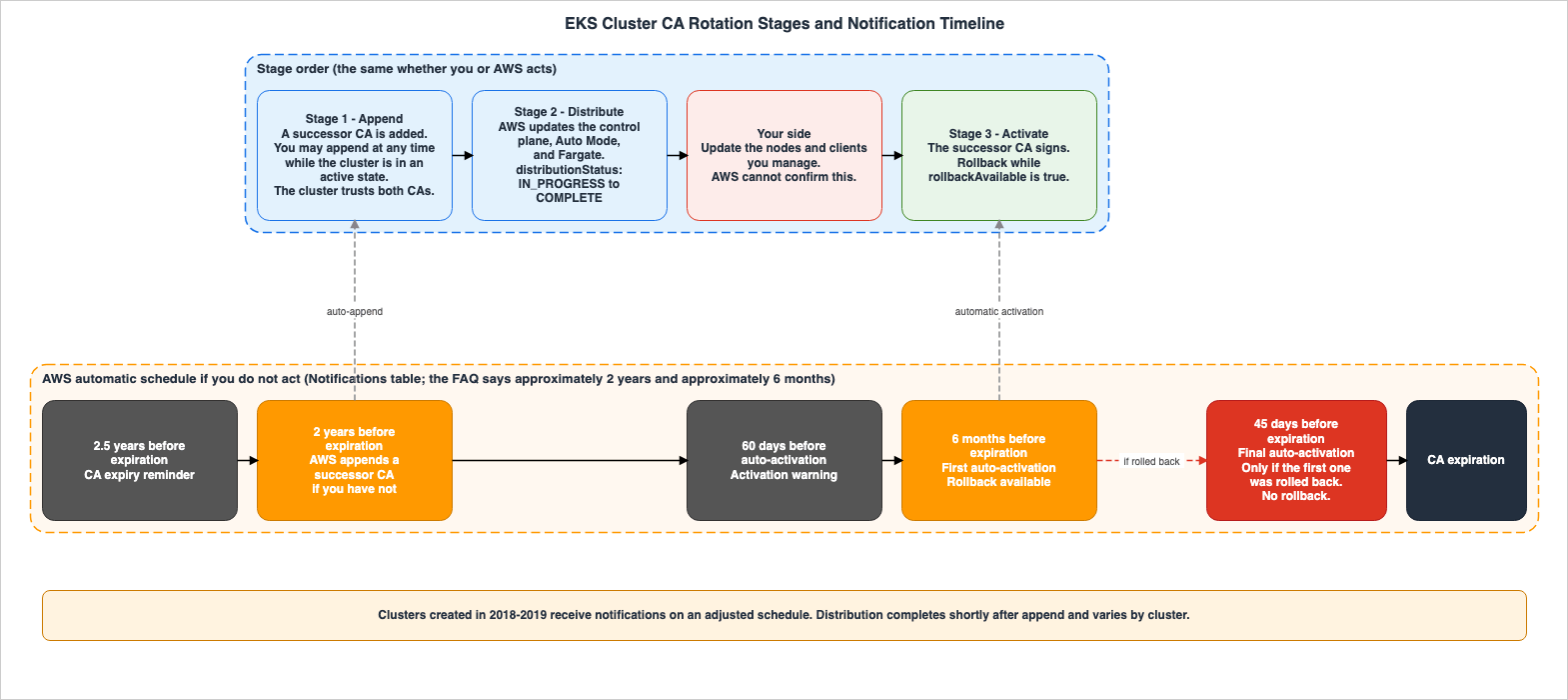
3.5 Values With and Without "Approximately"
The rotation page states the same timing with different strength depending on the section. The Notifications table lists values such as "2 years," "6 months," and "45 days" without using the qualifier "approximately." The FAQ entry "How much time do I have to complete CA rotation?" gives the automatic append as approximately 2 years before expiration, the auto-activation as approximately 6 months before expiration, and the final auto-activation as 45 days before expiration. The FAQ entry "Does CA rotation cause downtime for my cluster?" gives the final auto-activation as approximately 45 days before expiration. The CA rollback section gives the first auto-activation as approximately 6 months before expiration.When this article gives a timing, it says which section the value comes from. The labels in Figure 1 correspond to the values listed in the Notifications table.
3.6 Clusters Created in 2018 and 2019
The notification schedule for clusters created between 2018 and 2019 is separate, and the notifications are delivered according to an adjusted schedule, as noted on the rotation page. According to the FAQ, this is because calculating the standard notification date results in a date prior to when this feature was available. The FAQ also states that the initial notification includes the date applicable to that cluster, and the next steps.The rotation page specifies that the notification schedule is separate. No statement was found on whether the timing for the automatic append and automatic activation is also separate. Specific dates are not provided on the rotation page.
3.7 scheduledEvents and the Timing Calculated from an Example
The scheduledEvents for the successor CA indicate the times when AWS may or will automatically activate the CA. The API reference documents these two values using different auxiliary verbs.firstAutoActivation: The earliest Unix epoch timestamp in seconds at which Amazon EKS may automatically activate this certificate authority.
finalAutoActivation: The Unix epoch timestamp in seconds by which Amazon EKS will automatically activate this certificate authority if you haven't already activated it.firstAutoActivation is indicated with "may," the earliest time at which automatic activation may occur. finalAutoActivation is indicated with "will," the time by which automatic activation will occur. The note in Step 2 on the rotation page specifies that scheduledEvents appear for the successor CA, not the outgoing CA.The example in the deep-dive blog lets you check these two values against the timeline. In the example, the outgoing CA for the cluster was created on March 15, 2019, and will expire in 2029. The
firstAutoActivation for the example successor CA is September 15, 2028, and the finalAutoActivation is January 29, 2029. Assuming a 10-year validity period for the outgoing CA, the expiration date is March 15, 2029. September 15, 2028, is six months prior, and January 29, 2029, is 45 days prior, aligning with the values in the Notifications table. This is this article's calculation, using the values in the blog's example.However, some values in the example do not align with the schedule. In the example output in Step 2 on the rotation page, the validity period of the CA created with the cluster appears to be 5 years, but the same page states that this validity period is 10 years. In the deep-dive blog's example, EKS appended the successor CA on June 1, 2026, but calculating two years before expiration based on the Notifications table results in March 2027. This article does not estimate timing based on the example values.
4. The Trust Bundle Owner Table
4.1 The Boundary Is Distribution Complete
The section on the Shared Responsibility Model in the rotation page clarifies the responsibilities of AWS and the user. AWS will make the control plane, EKS Auto Mode nodes, and Fargate nodes trust the successor CA, and will prevent activation until the distribution is complete. The user will make external clients and the worker nodes they manage trust the successor CA. When the user determines that the update is complete, they will activate the successor CA.The boundary between these two sides is the completion of the distribution. The
distributionStatus showing COMPLETE indicates AWS's completion. There is no corresponding value to indicate the user's completion. The FAQ on the rotation page says:AWS does not provide a single indicator that all clients are ready, as it cannot see into your external systems.The rotation page explains why AWS cannot update the user's components, using the TLS trust mechanism.
This is consistent with how TLS trust works: the client holds its own trust store, and only the client’s administrator can update it.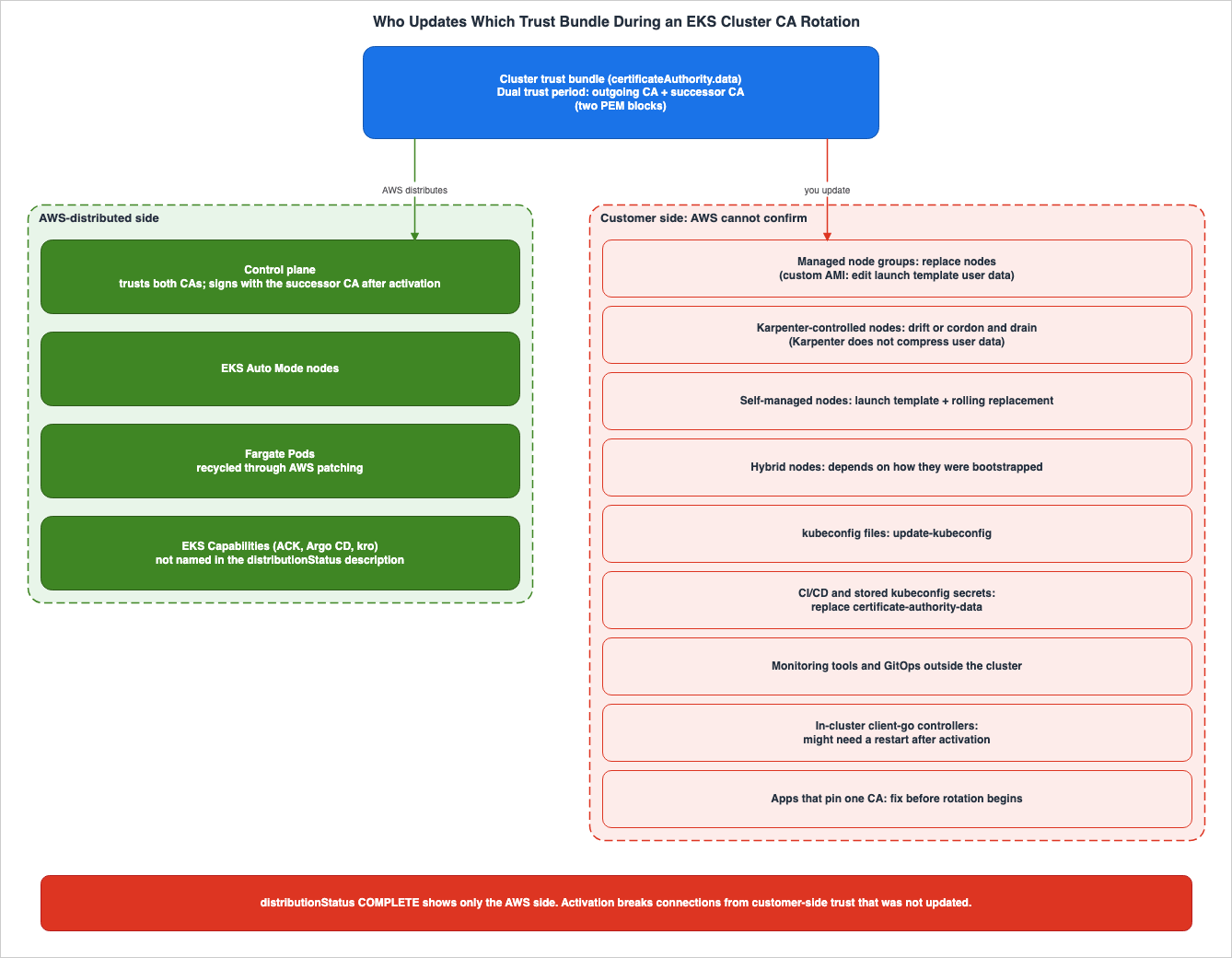
4.2 The AWS-Distributed Side
| Trust Being Held | Who Holds It | Who Can Update It | When It Must Change | What Breaks If It Does Not | How You Can Tell | Where It Is Written |
|---|---|---|---|---|---|---|
| Control plane trust and signing | AWS | AWS | AWS updates it during distribution | The rotation page says that AWS preserves cluster availability throughout the rotation | distributionStatus showing COMPLETE. | The rotation page's Shared Responsibility Model and Control Plane Updates sections. |
| CA on EKS Auto Mode nodes | AWS | AWS | AWS updates it during distribution | The FAQ on the rotation page says that worker nodes in this mode have no risk of connectivity loss | distributionStatus showing COMPLETE. | The rotation page's EKS Auto Mode and Fargate Updates section and FAQ. |
| kubelet CA for Fargate Pods (received during Pod creation) | AWS | AWS. Recreates Pods during patching. | Recycling finishes before AWS activates. The rotation page says that a safeguard prevents activation until recycling is finished | The rotation page says that no user action is required | The successor CA's distributionStatus is COMPLETE. If the user tries to activate early, the safeguard stops the activation | The rotation page's AWS Fargate Pods section. |
| Trust that EKS Capabilities (ACK, Argo CD, kro) managed resources use to connect to the API server | AWS | AWS | AWS updates it during distribution | The rotation page says that no user action is required | The rotation page says that they are updated as part of distribution. The API reference's description of distributionStatus does not mention EKS Capabilities. | The rotation page's EKS Capabilities Updates section and the API reference's CertificateAuthority page. |
The row for Fargate differs slightly from the other three. According to the rotation page, in Fargate each Pod has its own dedicated compute environment and kubelet, and the kubelet bootstraps with the CA data at the time the Pod is created. AWS recreates Pods during the patching process. The rotation page states that AWS's automatic activation occurs significantly after the addition of the successor CA, by which time the Pods have already been recreated. The safeguard is designed to handle situations where a user attempts to activate prematurely.
4.3 The Customer Side
| Trust Being Held | Who Holds It | Who Can Update It | When It Must Change | What Breaks If It Does Not | How You Can Tell | Where It Is Written |
|---|---|---|---|---|---|---|
| The CA received by a managed node group's node at startup. | The node. | Users. Replace the node using update-nodegroup-version. | Before activation. | After activation, the node will no longer be able to connect to the API server. | The version of the node group's launch template, the CA in the user data, and the Ready status in kubectl get nodes. | Rotation page, "Managed node groups" section. |
| For a managed node group using a custom AMI, the CA written by the user in the launch template's user data. | The launch template. | Users. Create a new version of the launch template and update the node group to that version. | Before activation. | Nodes without a successor CA will not be able to join the cluster. | Decode the user data and compare it to the values from describe-cluster. | Rotation page, "Custom launch template with a custom AMI" section. |
| The CA that a Karpenter instance the user runs embeds in the user data it generates. | The launch template and node created by Karpenter. | Karpenter, if drift detection is enabled and its window is not too long. Otherwise, users replace the nodes. | Before activation (reduce spec.userData before the dual trust period). | After activation, the node will lose connection. From the time the successor CA is appended, if spec.userData is close to the limit, launch template creation can fail and Karpenter cannot provision new nodes (Section 5.3). | NodePool disruption and disruption budget settings. | Rotation page, "Karpenter-controlled nodes" section and the Karpenter NodeClass page. |
| The CA in a self-managed node's launch template or user data script. | The launch template and node. | Users. Update the launch template and replace the node within the Auto Scaling group. | Before activation. | After activation, the node will lose connection. | The user data in the launch template. | Rotation page, "Self-managed nodes" section. |
| The trust configuration for hybrid nodes. | Each node. | Users. The procedure depends on the node's bootstrapping method. | Before activation. | After activation, the node will lose connection. | The nodeadm page says that nodeadm debug checks the validity of the API endpoint certificate. Using it as a check for the CA rotation is this article's reading. | Rotation page, "Hybrid nodes" section and the nodeadm page. |
The certificate-authority-data in a developer's kubeconfig file. | The kubeconfig file. | Users. Use update-kubeconfig. | Before activation. | Connection will fail. | kubectl get nodes. | Rotation page, "Kubeconfig" section. |
The certificate-authority-data in a kubeconfig file stored in secrets, used by CI/CD and automation pipelines. | The pipeline and secrets. | Users. Replace it with the value from describe-cluster. | Before activation. | Connection will fail. | Connection from the pipeline to the API server. | Rotation page, "Kubeconfig" section and the "CA rollback" section. |
| The trust configuration for external tools, GitOps controllers outside the cluster, and scripts that call Kubernetes APIs. | Each tool. | Users. | Before activation. | The tool will fail to verify the new certificate and connection will fail. | Connection from the tool to the API server. | Rotation page, "External clients" section. |
| The CA loaded by a controller or operator within the cluster that uses client-go. | Each process. | Users. Restart after activation. | After activation. | The FAQ on the rotation page mentions that a restart may be required. | No statement found. | Rotation page, "FAQ" section. |
| The configuration of applications that pin a CA or validate against a single CA only. | Each application. | Users. | Before rotation begins. | The application will fail when the trust bundle changes. | No statement found. | Rotation page, "dual trust period" note and the "FAQ." |
| IaC templates that directly write the CA in the launch template or user data. | The template. | Users. | Before activation. | Nodes launched from that template will not have a successor CA. | The value of the CA within the template. | Rotation page, "Managed node groups and IaC" section and the "Self-managed nodes" section. |
Regarding the table, the "lose connection" entry in the node rows refers to text from the rotation page's FAQ and the "What you need to do" section. The rotation page states that nodes that are not updated before activation will lose connection to the API server until they are replaced or a CA rollback is performed.
The entry for "client-go" refers to the text from the rotation page's FAQ, specifically the question "Do I need to restart my pods?".
However, in-cluster controllers and operators that use client-go to communicate with the API server might need to be restarted after activation of the successor CA, as client-go does not dynamically re-read the CA trust bundle.The FAQ uses the word "might." It does not describe methods for determining which controller is affected. This is the only row whose
When It Must Change is after activation.The IaC template row is this article's reading, derived from two statements. The rotation page, under the "Managed Node Groups and IaC" section, states that template changes are not necessary if the template does not directly include the CA in the launch template or user data. The "Self-Managed Nodes" section advises updating the CA in the launch template or user data. In this article's reading, if a template directly includes the CA certificate, that template itself becomes the owner of the trust bundle.
4.4 Why AWS Cannot Verify the Customer Side
The "Why only you can do this" section of the rotation page outlines two reasons. External clients exist outside of AWS's operational boundaries. The configuration of worker nodes (excluding those using EKS Auto Mode) is determined by the launch template, user data scripts, and bootstrap processes – all of which the user controls.Furthermore, the rotation page details limitations in the protocol layers. The API server lacks a mechanism to query whether a client has updated their trust bundle. The server can only present its certificate when a client connects. The page states that there is no way for AWS to confirm that the user's components are ready before activation.
Therefore, every
How You Can Tell cell on the customer side is either a check that the user runs themselves or No statement found.The text in the "How to verify a client has been updated" section of the rotation page reads:
If the command succeeds, your kubeconfig trusts the active CA data. After activation of the successor CA, run the same command to confirm continued connectivity.Before activation, the API server presents a certificate signed by the original CA. In this article's reading, a connection check before activation succeeds if the client trusts the original CA, and it does not show whether the client trusts the successor CA. In the observations in Section 9.2, both the kubeconfig with only the original CA and the kubeconfig with two CAs worked before activation. Where the page named in the
Where It Is Written column does not describe the check in the How You Can Tell column, that check is this article's reading.5. What to Finish Before and During the Dual Trust Period
5.1 Two PEM Blocks in the Trust Bundle
During the dual trust period, the cluster's trust bundle contains two Certificate Authorities (CAs). According to the diagram on the rotation page, before the rotation, the trust bundle contains one PEM block for the outgoing CA; during the dual trust period, it contains two – the outgoing CA and the successor CA; and after the rotation, it contains only one, the successor CA.The rotation page notes that this is the standard behavior for PEM-encoded trust bundles, and adds the following caution:
Update applications that perform strict single-CA validation or CA pinning to accept multiple CAs before rotation begins.The deadline for this caution is before the rotation begins, not before activation. In this article's reading, this is because the trust bundle's composition changes when the successor CA is appended.
5.2 EC2 User Data Size
With two CAs, the trust bundle is larger. According to the rotation page, the size of two CAs encoded in base64 is approximately 2.8 KB, and approximately 1.9 KB when compressed using gzip. The maximum size for EC2 user data is 16 KB. The Considerations and limitations section of the rotation page says, with conditions:If your existing user data is close to this limit, the addition of a second CA might cause launch template creation to fail and prevent new nodes from being provisioned.This statement has two conditions: that existing user data is close to the maximum limit, and that the situation "might" occur. User data that is far below the maximum limit is outside this statement.
5.3 Compressing with gzip or Reducing Data First?
For user data close to the limit, what the rotation page recommends is compressing the user data with gzip. The deep-dive blog says the same.The Karpenter NodeClass page describes a different remedy for Karpenter:
Karpenter does not compress user data, so reduce the size of your spec.userData before the dual trust period begins — for example, by baking configuration into your AMI or having your script fetch its contents at boot instead of inlining them.In this article's reading, these two recommendations are not contradictory; they apply to different scenarios. The gzip advice on the rotation page is intended for users who write user data directly into their launch templates. Karpenter, on the other hand, generates its own user data, including the cluster's CA. Because Karpenter does not compress it, users need to make
spec.userData smaller before the dual trust period begins. The Karpenter NodeClass page gives the deadline as the start of the dual trust period, not activation.5.4 Custom AMI Managed Node Groups
In most managed node groups, when nodes are replaced, the new nodes receive the updated CA from the cluster. However, node groups using custom AMIs operate differently. The rotation page states:If your node group is deployed with a custom AMI, AWS does not merge user data.In this scenario, the user is responsible for providing the bootstrap configuration, including the CA. The rotation page says that CA rotation does not update your user data, and that nodes without a successor CA cannot join the cluster. The process involves retrieving the trust bundle from
describe-cluster, rewriting the CA in the user data of the launch template, creating a new version of the launch template, and then updating the node group to use that new version.The rotation page also details the steps to ensure that all nodes are running with the latest version of the launch template before activation. This includes decoding the user data to verify that the CA matches the trust bundle retrieved from
describe-cluster, confirming that all instances in the Auto Scaling group are in the InService state and using the current version, and verifying that all nodes are in the Ready state.5.5 Karpenter's Drift and Disruption Budget
The rotation page says that if drift detection is enabled in a Karpenter NodePool, Karpenter detects nodes running with outdated CA data and replaces them within its configured disruption window. The rotation page also says that drift detection is enabled by default if a consolidation policy is configured.However, the replacements do not always finish before activation. The rotation page says that if the disruption budget is too restrictive, not all nodes might be replaced in time. It provides examples such as a narrow maintenance window and a low replacement rate. If drift detection is disabled, or if the window is longer than the rotation timeline, the rotation page says that you can replace nodes manually by cordoning and draining them. The example NodePool in the deep-dive blog has drift detection enabled and a disruption budget set to 10% per week.
The Karpenter Disruption page describes the items that are considered drift. No statement was found on this page or the Karpenter NodeClass page that treats changes to the cluster's CA as drift. The statement that Karpenter detects changes in CA data as drift is found on both the rotation page and the deep-dive blog.
5.6 Where Your kubeconfig Comes From
Step 6 on the rotation page states that updating your local kubeconfig usingupdate-kubeconfig will ensure that the kubeconfig trusts two CAs. In this article's reading, this operation updates only the kubeconfig file that the command writes.The rotation page differentiates between cases where CI/CD and automation create their own kubeconfig files, and cases where kubeconfig is stored as a secret. In those cases, you should replace the value of
certificate-authority-data with the value obtained from describe-cluster. The External clients section of the rotation page lists all systems that store certificate-authority-data as a static value as being subject to the update.6. What Breaks at Activation
6.1 Three Categories
The components that can break upon activation can be divided into three categories. This categorization is specific to this article and does not reflect the categorization used in the rotation page.- Nodes that received the CA at startup: This includes managed node groups, node groups using custom AMIs, nodes from your own Karpenter, self-managed nodes, and hybrid nodes that have not been replaced prior to activation.
- Clients with static
certificate-authority-data: This includes older kubeconfig files, pipeline secrets, monitoring tools, and GitOps controllers located outside the cluster. - Processes that do not re-read the CA: This includes controllers and operators in the cluster that use client-go.
The first two categories should be addressed before activation. According to the FAQ on the rotation page, the third category may require a restart after activation.
6.2 How the Documentation Describes the Failure
The rotation page describes the failure as follows:- The dual trust period section: Clients that have not updated their trust bundle will not recognize the server's certificate and will be unable to establish a connection.
- The diagram description in the same section: If the client's trust bundle does not include the successor CA, the TLS handshake will be rejected.
- FAQ: Clients that have not been updated will fail TLS validation and will be unable to connect.
- The Recovery without CA rollback section: Nodes that lost connectivity are
NotReady.
The specific error messages for individual clients were not found in either the rotation page or the deep-dive blog. Section 9.4 shows the messages that clients trusting only the original CA produced after activation in this configuration.
6.3 The Cluster Remains Operational
The FAQ on the rotation page states that the control plane remains available throughout the rotation process and responds to requests at every stage. What fails is not the cluster itself, but the connections of the clients and nodes that were not updated. The FAQ makes this distinction clearly.If they are not replaced, those nodes will lose connectivity to the control plane after the successor CA is activated, even though the control plane itself remains fully operational.The FAQ also states that running Pods are not disrupted by CA rotation itself. Communication between Pods occurs through the cluster's network, and does not utilize the CA. When a node is replaced, Pods may move as a normal part of the node replacement process, and this is not a side effect of the CA rotation, the FAQ notes. It recommends setting up Pod Disruption Budgets for critical workloads.
7. Rollback and Safeguards
7.1 Rollback Conditions
After activation, if any clients or nodes have not been updated, you can return signing to the previous CA. This is a CA rollback. To roll back, pass the ID of the previous CA to theactivate-certificate-authority command. The CA rollback section of the rotation page gives two conditions:- The activation was either initiated by the user or was the first auto-activation by AWS. The rotation page gives the first auto-activation as approximately 6 months before the expiration of the outgoing CA.
- The rollback window has not expired.
The specific length of the rollback window was not found on the rotation page, in the API reference, or in the CloudFormation reference. All of them simply state that the rollback is available "for a limited period." To determine whether rollback is still available, check the
rollbackAvailable field that the describe-certificate-authority command returns for the CA. The sources do not say which CA's field to read (Section 10.3).The deep-dive blog states that rollbacks are available after the initial activation, which differs from the two conditions outlined on the rotation page. This article adheres to the conditions specified on the rotation page.
7.2 What Happens During Rollback
According to the rotation page, when you perform a rollback, the following occurs:- The previous CA resumes signing certificates for the cluster.
- The successor CA remains in the trust bundle.
- Nodes and clients that have been updated to trust the successor CA will continue to function as normal.
- Nodes and clients that had not been updated resume normal operation.
- The kubelet on worker nodes will automatically reconnect through its built-in retry mechanism.
Even after the rollback, the dual trust period remains in effect. The rotation page says that you can fix the issue and then activate the successor CA again.
7.3 Final Auto-Activation
If the first auto-activation is rolled back, AWS performs a final auto-activation 45 days before expiration. This action cannot be rolled back. The rotation page describes this as a final safeguard, ensuring that the cluster does not reach expiry without a valid CA. Clusters that did not roll back the first auto-activation never reach this step.7.4 Recovery When Rollback Is Not Possible
The "Recovery without CA rollback" section describes the steps to take when you activated before updating your managed node groups and a rollback is no longer an option. The initial rolling update fails, because nodes that have lost connectivity are unable to receive pod eviction instructions from the API server. The procedure involves identifying nodes in aNotReady state, listing the pods running on those nodes, forcibly deleting those pods, re-attempting the rolling update, and verifying node recovery.The rotation page emphasizes caution when following this procedure. Force deleting Pods terminates workloads ungracefully, and data loss is possible for stateful workloads. Furthermore, containers on detached instances may continue to run until the Auto Scaling group terminates those instances. The rotation page calls it a last resort for when the rollback window is no longer available.
7.5 Conditions for Deleting a CA
The rotation page outlines the conditions for deleting a CA in two sections, using wording of different strength. The text under "Considerations and Limitations" reads as follows:If AWS automatically appended a successor CA, you cannot delete it. This safeguard ensures the rotation process cannot be interrupted by accidental deletion. Customer-appended CAs can be deleted as long as they are not the active signing CA.The Built-in safeguards section says:
An AWS-appended successor CA cannot be deleted while it is the only successor on the cluster. This safeguard ensures your cluster always has a valid CA path to prevent expiry. After a successor CA has been activated, the outgoing CA can be deleted.
A customer-appended successor CA cannot be deleted after it reaches the two-year mark before CA expiration.
For a successor CA that AWS appended, the Considerations and limitations statement has no condition. The Built-in safeguards statement says that such a CA cannot be deleted as long as it is the sole successor CA on the cluster. For CAs added by the user, the Considerations and limitations statement indicates that they can be deleted if they are not currently being used for signing. However, according to the Built-in safeguards statement, once the CA reaches the two-year mark before CA expiration, it can no longer be deleted. The
DeleteCertificateAuthority API reference states that CAs currently being used for signing cannot be deleted. The same reference provides an example stating that a successor CA added by AWS cannot be deleted as long as it remains the sole successor CA on the cluster.This article gives the statements from both sections. Before deleting a CA, check its
createdBy and signingStatus, as well as how long remains until the cluster's CA expires.According to the API reference, deleting a CA removes its public certificate from the cluster's trust bundle. It is after this deletion that the successor CA becomes the sole CA in the trust bundle. No statement was found on whether AWS deletes the outgoing CA automatically, or when.
7.6 Other Constraints
- Number of CAs: A cluster can have a maximum of two CAs (see Section 3.1).
- Certificate revocation: CA rotation does not support revoking individual certificates. The rotation page says that upstream Kubernetes also does not implement CRL or OCSP.
- Version Upgrades: The rotation page indicates that version upgrades are rejected while a CA rotation operation is in progress. Conversely, CA operations are also rejected while a version upgrade is in progress. In this article's reading, this exclusivity applies only to ongoing operations and does not encompass the entire dual trust period.
If a CA rotation operation is in progress, a version upgrade will be rejected until the CA operation completes, and vice versa.- BYOCA: Using your own AWS Private CA to back the cluster's certificates is not currently supported.
- Region: The rotation page says that CA rotation is available in all AWS commercial Regions where Amazon EKS is supported.
- CA Validity Period: According to the CA validity period section of the rotation page, the validity period for the initial CA created with the cluster is 10 years. The successor CAs created through rotation, and all later CAs, have a validity period of 5 years. The opening of the same page states that the validity period depends on when the cluster's CA was created. In the cluster created for this article, the original CA had a validity period of 5 years (Section 9.6).
8. Infrastructure as Code and Cross-Cluster Visibility
8.1 Why CA Rotation Does Not Affect IaC State
The rotation page states that CA rotation does not introduce drift in the IaC state. This is because the CA lifecycle is managed through dedicated APIs –create-certificate-authority, activate-certificate-authority, and delete-certificate-authority – and is separate from the cluster's resource configuration. The rotation page emphasizes that whether initiated by the user or automatically by AWS, CA rotation will not alter the properties that IaC tools are tracking for the cluster's resources.The
describe-cluster command's certificateAuthority.data field is a read-only output. During the dual trust period it returns the combined trust bundle with both CAs, but it is not a configurable property.The rotation page also says that even when managed node groups are managed with tools like Terraform or CloudFormation, CA rotation will not cause drift. Replacing nodes through node group version updates is considered an operational action.
8.2 CloudFormation – Two-Stage Process
The rotation page describes how to rotate through CloudFormation, presented in two stages. In the initial stack update, add theAWS::EKS::CertificateAuthority resource to append the successor CA. Wait for the distribution to reach a COMPLETE status, then in the second update, add the ActiveCertificateAuthorityId to the existing AWS::EKS::Cluster and activate the successor CA. The template for the second update takes the following form (the example on the rotation page, with its comment line removed).Resources:
NewCA:
Type: AWS::EKS::CertificateAuthority
Properties:
ClusterName: my-cluster
MyCluster:
Type: AWS::EKS::Cluster
Properties:
Name: my-cluster
ActiveCertificateAuthorityId: !GetAtt NewCA.IdActiveCertificateAuthorityId is a write-only property. The CloudFormation reference says:This is a write-only property that triggers activation. It isn't stored in the stack's state or returned on read, so subsequent stack updates that omit it don't revert or deactivate the CA, and CloudFormation doesn't detect drift if the active CA changes outside of CloudFormation (for example, through auto-activation by Amazon EKS).This means that even if AWS automatically activates it, or if someone rolls back through the CLI, CloudFormation will not report it as drift. To determine which CA is currently signing, check the EKS API, not CloudFormation drift. If you read it in CloudFormation, there are the
CertificateAuthority.Active.Id and CertificateAuthority.Active.ActivatedBy attributes for the AWS::EKS::Cluster.Note that CloudFormation handles EKS CAs differently than standard resources. EKS CAs are not independent resources with their own ARNs; instead, they are part of the cluster's certificate lifecycle and are authorized through the cluster. As a similar example, the rotation page mentions
AWS::IAM::RolePolicy, whose IAM role policy is authorized through the parent role. In the CloudFormation reference, the only property of AWS::EKS::CertificateAuthority is ClusterName, and any update will result in a replacement.8.3 The CA in the Launch Template, and the Template's Values
Section 8.1, which states "does not create drift," refers to the cluster resource and the node group resource. As mentioned in the last row of Section 4.3, if a launch template or user data directly includes a CA, the user will need to modify the template's values. The rotation page, specifically the section on "Managed node groups and IaC," states that if the CA is not directly included, no changes to the template are necessary. However, interpreting this statement in reverse – that if the template does directly include the CA, changes are required – is this article's reading.8.4 EKS Dashboard
According to the EKS Dashboard announcement from October 28, 2026, the EKS Dashboard allows you to view the status of CA rotation for each cluster, clusters where the CA is nearing expiration, and planned automatic CA rotations from AWS, all in one place. Because the Dashboard aggregates data across accounts and Regions through AWS Organizations, it is necessary to enable trusted access for the Dashboard in the organization's management account. The Dashboard is accessible from the us-east-1 Region. The "Using the Amazon EKS console" section of the rotation page also describes a cluster CA dashboard that shows the same three items.8.5 Viewing via the API
The FAQ on the rotation page lists the following values to monitor the progress of rotation across multiple clusters:signingStatus: Indicates whether the CA is signing. Possible values:NOT_USED,ACTIVATING,IN_USE.distributionStatus: Indicates whether distribution to AWS-managed components is complete. Possible values:IN_PROGRESS,COMPLETE,FAILED,DELETING.rollbackAvailable: Indicates whether a rollback is possible after activation.createdByandactivatedBy: Indicates whether a user or AWS performed the action. Possible values:CUSTOMERandEKS.scheduledEvents: Lists the planned times for AWS's automatic activation, includingfirstAutoActivationandfinalAutoActivation.
The rotation page notes that
createdBy and activatedBy can also be used for audit and change management records. All of these values reflect the status within AWS and AWS's planned actions. None of these values indicate whether a client on the user's side has been updated.8.6 Notifications and How to Find Your Node Types
Notifications are delivered through AWS Health, Cluster Insights, and email. The rotation page also says that you can build your own notifications with Amazon EventBridge. No statement giving the event type names was found in the sources in Section 1.3. The deep-dive blog lists AWS Health and email as notification channels.The rotation page says that you can use Cluster Insights to identify which types of worker nodes run in your cluster. This is the starting point for determining which row in the table in Section 4.3 applies to your cluster.
Document history includes a row indicating that permissions were added to the
AmazonEKSServiceRolePolicy on October 1, 2026.Added the eks:CreateCertificateAuthority, eks:ActivateCertificateAuthority, eks:DeleteCertificateAuthority, and ec2:RebootInstances permissions to AmazonEKSServiceRolePolicy. These permissions allow Amazon EKS to rotate cluster certificate authorities and reboot Amazon EC2 instances managed by EKS Auto Mode.9. Observations Based on This Configuration
This section describes observations made using the configuration created specifically for this article. Observations are not promises in the sources. The values obtained using this configuration may not be the same when using different configurations.9.1 Configuration
This article describes observations made on November 3, 2026, using the following configuration in theus-east-1 region. This article created the cluster at 3:08 AM UTC and finished observing at 4:54 AM UTC.- One EKS cluster. The Kubernetes version was 1.37, and the authentication mode was set to
API. A CloudFormation stack created the cluster and the node group. - One managed node group. It used the Amazon Linux 2023 AMI and the default launch template provided by EKS, running a single t3.small instance. It did not use a custom AMI.
- This article prepared two kubeconfig files.
update-kubeconfigwrote the first one immediately after the cluster was created, and it only contained the original CA. This section calls it the "old" kubeconfig.update-kubeconfigwrote the other one again after the distribution was complete, and it contained two CAs. This section calls it the "new" kubeconfig. - Throughout this section, the "original" CA means the CA that existed when the cluster was created, and the "successor" CA means the CA added using
create-certificate-authority. - The AWS CLI performed the operations. The records come from the output of
list-certificate-authorities,describe-certificate-authority,describe-update, and kubectl 1.36.
9.2 Observations
| What Was Checked | What This Setup Recorded |
|---|---|
| Before the rotation | One CA: createdBy EKS, signingStatus IN_USE, distributionStatus COMPLETE, rollbackAvailable false. Its validity was five years, starting when the cluster was created. certificateAuthority.data, the node's user data, and the kube-root-ca.crt ConfigMap each held one PEM block. |
create-certificate-authority | The response contained an update of type CertificateAuthorityUpdate. The new CA had createdBy CUSTOMER, signingStatus NOT_USED, and distributionStatus IN_PROGRESS. Its validity was five years, with notBefore approximately 5 minutes after the call. |
| Waiting for distribution | describe-update showed Successful approximately 12 minutes after the call. distributionStatus remained IN_PROGRESS and then showed COMPLETE approximately 28 minutes after the call. |
scheduledEvents | Only the successor CA had it. firstAutoActivation was 180 days and finalAutoActivation was 45 days before the original CA's notAfter, both at 00:00 UTC. rollbackAvailable was true on the successor CA and false on the original CA. |
| After distribution | certificateAuthority.data held two PEM blocks: 2,337 bytes as PEM (1,645 bytes with gzip) and 3,116 bytes as the base64 value (2,128 bytes with gzip). The kube-root-ca.crt ConfigMap held two PEM blocks. Both kubeconfigs worked. The API server certificate still verified against the original CA. |
| The node group after distribution | The launch template remained at version 1, and its user data still held one CA. The running node did not change. |
activate-certificate-authority for the successor CA, without replacing nodes | signingStatus went from ACTIVATING to IN_USE, and describe-update showed Successful approximately 7 minutes after the call. The API server certificate verified against the successor CA only. The old kubeconfig and curl with only the original CA failed (Section 9.4); the new kubeconfig worked. |
| The node that was not replaced | It went NotReady approximately 10 minutes after the activation call, about 3 minutes after Successful, and remained NotReady until the end of the 10-minute monitoring period. |
activate-certificate-authority for the original CA (rollback) | Accepted, and Successful approximately 9 minutes after the call. The original CA's activatedBy changed from EKS to CUSTOMER. The successor CA returned to NOT_USED and kept rollbackAvailable true. The old kubeconfig worked again, and the node was Ready at the first check after Successful. |
update-nodegroup-version with the same Kubernetes version | Successful approximately 9 minutes after the call. The launch template moved to version 2. Its user data held both CAs and grew from 2,170 bytes to 3,726 bytes (MIME, not compressed with gzip). |
activate-certificate-authority for the successor CA, after replacing nodes | Successful approximately 9 minutes after the call. The replaced node remained Ready for the 6-minute monitoring period. The old kubeconfig failed with the same message as before; the new kubeconfig worked. |
| CloudFormation drift detection | The stack was IN_SYNC with zero drifted resources. AWS::EKS::Cluster and AWS::EKS::Nodegroup were NOT_CHECKED (Section 9.5). |
delete-certificate-authority for the successor CA while it was signing | Rejected with ResourceInUseException (Section 9.4). |
delete-certificate-authority for the original CA | Accepted. distributionStatus became DELETING, and describe-update showed Successful approximately 9 minutes after the call. certificateAuthority.data went back to one PEM block, the successor CA. The successor CA's rollbackAvailable became false, and scheduledEvents no longer appeared. The kube-root-ca.crt ConfigMap still held two PEM blocks at the check right after Successful. |
9.3 Completion of Distribution and Successful Update
In this configuration, the distribution had not yet completed when thecreate-certificate-authority update reached a Successful status. The distributionStatus finally reached COMPLETE approximately 16 minutes after the update's success. When waiting for distribution completion, it is necessary to check the CA's distributionStatus rather than the status of describe-update. This is this article's reading of the observation in this configuration.The
scheduledEvents for this configuration were set to 180 days and 45 days prior to the expiration of the original CA, aligning with the 6-month and 45-day entries in the Notifications table. An automatic activation schedule was also set for the successor CA that was added by the user.9.4 Error Messages After Activation
Following the activation of the successor CA, kubectl, using the old kubeconfig, failed with the following message. The second activation, after the node was replaced, produced the same message.Unable to connect to the server: tls: failed to verify certificate: x509: certificate signed by unknown authority (possibly because of "crypto/rsa: verification error" while trying to verify candidate authority certificate "kubernetes")When using curl with only the original CA trusted, it failed with exit code 60 and the following message. Curl configured to trust the successor CA passed TLS verification and, because it sent no credentials, received HTTP 401.
curl: (60) SSL certificate problem: unable to get local issuer certificateThe attempt to delete the successor CA while it was signing was rejected with the following message.
An error occurred (ResourceInUseException) when calling the DeleteCertificateAuthority operation: Cannot delete the active certificate authority. Activate a different CA first.The node that was not replaced showed a status of
NotReady in kubectl. This aligns with the description in the Recovery without CA rollback section of the rotation page. The kubelet logs for this node were not examined.9.5 CloudFormation Drift Detection
After activating the successor CA via the CLI, the stack's drift detection status wasIN_SYNC, and the number of drifted resources was 0. However, the drift statuses for AWS::EKS::Cluster and AWS::EKS::Nodegroup were NOT_CHECKED. The Resource type support table in the CloudFormation User Guide indicates that drift detection is not supported for these two resource types.Therefore, in this configuration, an
IN_SYNC status provides no information regarding the cluster's CA. The statement in Section 8.2 that such a change does not appear as drift comes from the description of ActiveCertificateAuthorityId in the CloudFormation reference. This observation does not support that statement.9.6 Reading the Observations Alongside the Sources
- Original CA Validity Period: The original CA for the cluster created on November 3, 2026, in this configuration had a validity period of 5 years. The CA validity period section and the FAQ of the rotation page state that the CA created with the cluster is valid for 10 years. The opening of the same page states that the validity period depends on when the cluster's CA was created. The values in this configuration align with the example output from Step 2, which shows a 5-year validity period.
- Trust Bundle Size: The rotation page states that two CA certificates, encoded in base64, are approximately 2.8 KB. In this configuration, the size was 2,337 bytes when using PEM encoding, and 3,116 bytes for the
certificateAuthority.datavalue. The rotation page does not say which form of the data it measured. All values are smaller than the 16 KB limit for EC2 user data. - Rollback Availability: In this configuration, the successor CA's
rollbackAvailablestatus wastruefrom the addition of the successor CA until the original CA was deleted. Once the original CA was deleted, the status changed tofalse. This observation provides no information about the duration of the rollback window.
9.7 What This Configuration Does Not Show
- The times taken by distribution, activation, and deletion each come from a single run. The rotation page notes that the time distribution takes varies by cluster.
- The time it takes for a node that was not replaced to transition to
NotReady, and the time it takes to return toReadythrough a rollback, are recorded for a single node. It can only be said that the node wasReadyat the first check after the rollback update succeeded. - This article did not observe when the
kube-root-ca.crtConfigMap goes back to one PEM block after the original CA is deleted. - This configuration does not include successor CAs automatically added by AWS, automatic activation, Auto Mode, Fargate, Karpenter, hybrid nodes, or node groups using custom AMIs.
- This article did not test whether processes using client-go within the cluster require a restart after activation.
- The error messages presented are specific to the versions of
kubectlandcurlused in this configuration. If different clients are used, the error messages may vary.
10. Discrepancies and Omissions in the Documentation
This section consolidates the conflicting information, the items the documentation does not list, and the missing statements that have been identified throughout Chapters 3 through 9.10.1 Where the Sources Disagree
- Conditions for CA Removal: The "Considerations and Limitations" and "Built-in Safeguards" sections on the rotation page use wording of different strength regarding successor CAs added by AWS and CAs added by the user (Section 7.5).
- Use of "Approximately": The "Notifications" table on the rotation page does not use the term "approximately," while the FAQ and CA rollback sections do. Only one FAQ answer puts "approximately" on the 45-day value (Section 3.5).
- Rollback conditions: The rotation page says that CA rollback is available after a user-initiated activation or AWS's first auto-activation. The deep-dive blog says that it is available after the first activation (Section 7.1).
- Notification Channels: The rotation page lists AWS Health, Cluster Insights, and email as notification channels. The deep-dive blog lists AWS Health and email (Section 8.6).
- Example Values: The example output in Step 2 on the rotation page suggests that the CA validity period at cluster creation is 5 years. The same page also states that the initial CA is valid for 10 years. In the example provided in the deep-dive blog, a cluster created in 2019 has a successor CA added by EKS on June 1, 2026. Calculating two years before expiration, as shown in the "Notifications" table, results in March 2027. These are all example values, and this article does not estimate specific dates based on these examples (Section 3.7). In this configuration, the original CA of the cluster created on November 3, 2026, had a validity period of 5 years (Section 9.6).
10.2 Items Not Included in the Documentation
- A figure indicating when distribution completes, in the "Notifications" table. As noted (Section 3.2), it varies by cluster. The value in this configuration is in Section 9.3.
- The adjusted notification dates for clusters created between 2018 and 2019 (Section 3.6).
- The
distributionStatusdescription in the API reference does not include EKS Capabilities. It lists the control plane, EKS Auto Mode instances, and Fargate nodes. The rotation page states that EKS Capabilities are updated during the distribution process (Section 4.2). - The document history does not include a record of the addition of the rotation page. Therefore, it is not possible to determine when this page was added. For the feature's date, this article uses August 20, 2026, the date of the rotation announcement. The deep-dive blog is dated August 19, 2026.
10.3 Where No Statement Was Found
- Length of the rollback window (Section 7.1)
- Which CA's
rollbackAvailableto read. The API reference saysfor this certificate authority. In Section 9.2, it wastrueon the successor CA before activation (Section 7.1) - Error messages per client (Section 6.2; Section 9.4 shows the messages observed in this configuration)
- Whether the timing of the automatic append and the auto-activation differs for clusters created between 2018 and 2019 (Section 3.6)
- Whether AWS automatically deletes outgoing CAs and, if so, when (Section 7.5)
- A statement in the Karpenter documentation regarding Karpenter treating changes to a cluster's CA as drift (Section 5.5)
- Methods for determining which client-go processes within a cluster require a restart (Section 4.3)
- The names of the EventBridge event types related to CA rotation (Section 8.6)
11. Failure Modes
This section lists the failures that occur when the owner is mistaken, drawn from Chapters 3 through 8. Each item represents a possible failure scenario.- Assuming that AWS will automatically manage everything, users fail to replace managed node groups before the auto-activation. After activation, those nodes lose their connection to the API server.
- Believing that a cluster using only Auto Mode and Fargate requires no user action. While AWS updates the nodes, users are responsible for updating kubeconfig, CI/CD tools, and monitoring tools.
- Assuming that running
update-kubeconfiglocally is sufficient. Secrets containing kubeconfig, and kubeconfig files generated by pipelines, may retain outdatedcertificate-authority-data. - Assuming that updating the node group version within a custom AMI node group is all that's needed. AWS does not merge user data, so the CA in the launch template stays outdated, and nodes without the successor CA will be unable to join the cluster.
- With a Karpenter NodeClass whose
spec.userDatais close to the limit, assuming that gzip compression is enough. Karpenter does not compress user data, sospec.userDatamust be reduced in size before the dual trust period. - Assuming that Karpenter's drift detection will finish in time, and not checking the disruption budget's window and percentage.
- Assuming that applications that pin a CA only need fixing before activation. The shape of the trust bundle changes when the successor CA is appended.
- Interpreting
distributionStatusshowingCOMPLETEas an indication that all preparations are complete. However,COMPLETEonly reflects AWS's status. - Assuming the rollback window is a fixed number of days. The sources give no number. Check
rollbackAvailable. - Trying to find out which CA is signing through CloudFormation drift detection.
ActiveCertificateAuthorityIdis write-only, and AWS's auto-activation does not appear as drift. - Initiating a Kubernetes version upgrade while a CA rotation operation is in progress. One of these operations will be rejected.
12. Frequently Asked Questions About CA Rotation
12.1 Does the user need to take any action, even though AWS rotates the CA automatically?
Yes. If the user does not take action, AWS will automatically append and activate the successor CA. AWS only updates the trust bundle for components that it manages. Managed node groups, your own Karpenter deployments, self-managed nodes, and hybrid nodes, along with kubeconfig files, CI/CD pipelines, and monitoring tools, all need the user to make them trust the successor CA. If this is not done before activation, they will be unable to connect to the API server (see Section 4.3).12.2 If the cluster only uses Auto Mode and Fargate, is there anything that needs to be done?
According to the rotation page, no user intervention is required for worker nodes. However, the user will need to update external clients. Applications that pin a CA and processes in the cluster that use client-go are also on the customer side (see Sections 4.2 and 4.3).12.3 Is re-running update-kubeconfig enough?
For the kubeconfig file that the command writes, it is enough. For the kubeconfig that your CI/CD pipeline and automation create themselves, or the one stored as a secret, you need to replace the certificate-authority-data value with the output from describe-cluster (see Section 5.6).12.4 Is replacing the nodes enough?
In managed node groups that do not use custom AMIs, newly replaced nodes will bootstrap using the updated CA. For node groups using custom AMIs, you must first update the CA in the launch template's user data. Nodes from your own Karpenter are updated through drift detection or manual replacement. The procedure for hybrid nodes depends on their bootstrapping method. In all cases, external clients must be updated separately (see Section 4.3 and Section 5.4).12.5 Can an activation be reverted? And for how long can it be reverted?
There are two conditions for reversion. The first is that the activation was initiated by the user or was the initial automatic activation by AWS. The second is that the rollback window has not expired. The sources do not specify the length of this window, so you should verify this using therollbackAvailable field. If you roll back the initial automatic activation, AWS will perform a final automatic activation 45 days before the CA expiration. This final automatic activation cannot be reverted (see Sections 7.1 and 7.3).12.6 When managing resources with CloudFormation, does AWS's auto-activation appear as drift?
No.ActiveCertificateAuthorityId is write-only and is not saved in the stack's state. Therefore, CloudFormation does not detect changes to the active CA outside of the stack as drift (see Section 8.2). In addition, CloudFormation drift detection does not support AWS::EKS::Cluster (Section 9.5).12.7 Can Kubernetes versions be upgraded during a CA rotation?
While a CA rotation operation is in progress, Kubernetes version upgrades will be rejected. Conversely, attempting to start a CA operation while a version upgrade is in progress will also be denied. In this article's reading, this restriction applies only during the ongoing operation and not throughout the entire dual trust period (see Section 7.6).12.8 Can my own AWS Private CA be used as the cluster's CA?
The rotation page states that this is not currently supported (see Section 7.6).12.9 When will notifications be sent for the clusters created between 2018 and 2019?
Clusters created between 2018 and 2019 receive notifications according to an adjusted schedule. The initial notification includes a date relevant to that cluster. The rotation page gives no specific dates (see Section 3.6).13. Summary
In an EKS cluster's CA rotation, the owners of the trust bundle are split into two groups. For the control plane, EKS Auto Mode nodes, Fargate Pods, and EKS Capabilities, AWS distributes the successor CA. AWS indicates completion of its side through thedistributionStatus showing COMPLETE. For managed node groups, your own Karpenter, self-managed and hybrid nodes, kubeconfig, CI/CD tools, monitoring tools, and client-go processes in the cluster, the user is responsible for rewriting the trust bundle (client-go processes might need a restart instead), and AWS cannot verify completion.What breaks at activation is nodes that received the CA at startup and were not replaced, clients with static
certificate-authority-data, and, possibly, processes that do not re-read the CA. CA rollback is available within its conditions and window. The sources give no length for the window; check rollbackAvailable.When preparing your cluster for rotation, verify the following for each owner group:
- Control plane, Auto Mode, Fargate, and EKS Capabilities: Verify that the successor CA's
distributionStatusisCOMPLETE. ThedistributionStatusdescription does not name EKS Capabilities (Section 10.2). - Managed node groups: Ensure all nodes are running with a launch template version that includes both CAs and are in the
Readystate. If using a custom AMI, verify that the CA in the launch template's user data has been updated. - Your own Karpenter: Confirm that all nodes will be replaced before activation, considering drift detection and disruption budgets. Verify that the
spec.userDatacan accommodate both CAs without exceeding the limit. - Self-managed and hybrid nodes: Update the CA in the launch template or bootstrap configuration and ensure the nodes have been updated. For hybrid nodes, use
nodeadm debugto verify (this article's reading; Section 4.3). - Kubeconfig, CI/CD tools, monitoring tools, and GitOps outside the cluster: Confirm that each can connect to the API server using values that include both CAs.
- Applications that pin the CA: Ensure these have been modified to accept multiple CAs before the rotation begins.
- client-go controllers in the cluster: Have a procedure to check, after activation, whether a restart is needed.
- IaC: Check whether templates hardcode the CA in launch templates or user data. Have a procedure to check the active CA through the EKS API, not CloudFormation drift.
14. References
Amazon EKS User Guide- Rotate the EKS cluster certificate authority (CA)
- Document history
- Migrate from EKS Fargate to EKS Auto Mode
- Hybrid nodes nodeadm reference
Amazon EKS API Reference
- CreateCertificateAuthority
- ListCertificateAuthorities
- DescribeCertificateAuthority
- ActivateCertificateAuthority
- DeleteCertificateAuthority
- CertificateAuthority
- CertificateAuthorityScheduledEvents
AWS CloudFormation Template Reference
AWS CloudFormation User Guide
AWS What's New and AWS Blogs
- Amazon EKS now supports certificate authority (CA) rotation with automated lifecycle management
- Amazon EKS Dashboard now provides fleet-wide visibility into certificate authority (CA) rotation
- Deep dive into Amazon EKS certificate authority rotation
Karpenter Documentation
Related Articles on This Site
- Rolling Back an Amazon EKS Cluster Version - What Decides Eligibility, What Rollback Readiness Insights Do Not Decide, and Where the Primary Sources Disagree
- Certificate Distribution in Kubernetes with AWS Private CA - Issue, Request, Store, Consume, and the Layer Where Renewal Stops
- Amazon EKS Capabilities - Managed Argo CD, ACK, and kro, and What Changes When the Controllers Move Off Your Cluster
- Amazon EKS Control Plane Configuration - What You Can Set, What Blocks the Way Back, and How Far Each Setting Reaches
- AWS Private CA Hierarchy Design - Root and Subordinate CAs, Revocation, Short-Lived Mode, and mTLS on ALB
- When Intermediate CA Keys Are Compromised - Pushed Blocklists, Compiled-In Denylists, Root Removals, and AWS Trust Bundles
- AWS History and Timeline regarding Amazon EKS - Overview, Functions, Features, Summary of Updates, and Introduction
- SSL/TLS Certificate Decoder and Chain Inspector - X.509 PEM/DER Viewer
References:
Tech Blog with curated related content
Written by Hidekazu Konishi