Who Can Call the Kubernetes API on Amazon EKS - One-Way Authentication Modes, Which Mapping Wins, and Access Policies Plus RBAC
First Published:
Last Updated:
aws-auth ConfigMap, EKS access policies, and Kubernetes RBAC. The authentication modes are CONFIG_MAP, API_AND_CONFIG_MAP, and API, and on an existing cluster, the mode can be changed in only one direction.This article explains which transitions are irreversible, what happens when an IAM principal has both an access entry and a mapping in the
aws-auth ConfigMap, and how the permissions of access policies and RBAC add up. It also addresses the administrator permissions of the principal who created the cluster, the types of access entries for node roles, and where the sources disagree.To summarize, once a cluster has been enabled with access entries, it cannot be reverted to a mode that relies solely on the
aws-auth ConfigMap. When an IAM principal has both an access entry and a mapping in the aws-auth ConfigMap, the access entry mapping is used. EKS access policy and RBAC permissions are combined, and there are no denials from the access policy side.This article was written based on the documentation as read on November 11, 2026 (Japan Standard Time). It was not tested on a real cluster. Pricing information is not included.
Related articles on this site:
- AWS History and Timeline regarding Amazon EKS - Overview, Functions, Features, Summary of Updates, and Introduction
- Amazon EKS Pod Identity and IRSA Decision Guide - Workload Identity Design, Trade-offs, and Migration Paths
- Rotating an Amazon EKS Cluster's CA - Who Updates Which Trust Bundle, and What Breaks at Activation
- Amazon EKS Capabilities - Managed Argo CD, ACK, and kro, and What Changes When the Controllers Move Off Your Cluster
- Amazon EKS Control Plane Configuration - What You Can Set, What Blocks the Way Back, and How Far Each Setting Reaches
- IAM Policy Evaluation Logic Step-by-Step - Explicit Deny, RCP, SCP, Resource Policy, Identity Policy, Permission Boundary, and Session Policy
Table of Contents
- 1. Scope and Assumptions
- 2. How to Read the Tables
- 3. Three Authentication Modes and the Default Set by How a Cluster Is Created
- 4. Changes That Move in Only One Direction
- 5. When the Same Principal Has Two Mappings
- 6. How Access Policies and Kubernetes RBAC Add Up
- 7. The Administrator Permissions of the Principal That Created the Cluster
- 8. Access Entries for Node Roles
- 9. Using OIDC Users Alongside IAM Principals
- 10. Where the Sources Disagree and What They Do Not Say
- 11. Failure Modes
- 12. Frequently Asked Questions About EKS Authentication Modes and Access Entries
- 13. Summary
- 14. References
1. Scope and Assumptions
This chapter first defines the intended audience, the scope of this article, the referenced materials, and the terminology used. The following ten points represent the key conclusions.- There are three authentication modes:
CONFIG_MAP,API_AND_CONFIG_MAP, andAPI. If not specified during cluster creation, clusters created using the EKS API, AWS SDK, and AWS CloudFormation will useCONFIG_MAP, while clusters created using the AWS Management Console will useAPI_AND_CONFIG_MAP(Chapter 3). - On an existing cluster, the changes that the sources state as allowed are from
CONFIG_MAPtoAPI_AND_CONFIG_MAPand fromAPI_AND_CONFIG_MAPtoAPI. Attempts to revert to previous modes will result in anInvalidParameterException(Chapter 4). - From
CONFIG_MAPtoAPI, the launch blog post and the best practices guide state that you first change toAPI_AND_CONFIG_MAPand then toAPI(Section 4.2). - When the same IAM principal has a mapping in both an access entry and the
aws-authConfigMap, the access entry's mapping is used (Chapter 5). - Permissions defined in the access policy and permissions configured in Kubernetes RBAC are combined. The access policy side has no deny (Chapter 6).
- The
kubectl auth can-i --listcommand does not display access policy permissions. When you impersonate with--as, the access policy permissions are not used (Chapter 6). - The administrator permissions for the principal that created the cluster can only be selected during cluster creation. By default, they are granted (Chapter 7).
- The types for access entries are listed as seven values in the API reference. The type cannot be changed after the access entry is created (Chapter 8).
- For
API_AND_CONFIG_MAPclusters, the sources disagree on where EKS creates the mappings for the roles of managed node groups and Fargate (Section 8.2). - The User Guide indicates that the
aws-authConfigMap is deprecated, but does not specify an end date (Sections 1.4 and 10.3).
1.1 Intended Audience
This article is intended for the following audience:- Platform engineers responsible for managing Amazon EKS clusters and migrating from the
aws-authConfigMap to access entries. - Individuals responsible for defining authentication modes and cluster creator principal permissions when creating new clusters.
- Security personnel conducting an inventory of who has administrative access to the cluster.
This article assumes that readers are considering the following points, and checks each one against the statements in the sources:
- Authentication modes can be switched in any direction.
- During migration, if a role is present in both the
aws-authConfigMap and access entries, the ConfigMap mapping will be used. - Removing an access policy will revoke the associated principal's permissions.
- You can verify all of a principal's permissions using
kubectl auth can-i --list. - The administrator permissions of the cluster creator principal can be revoked later through configuration.
- The
aws-authConfigMap can no longer be used.
1.2 What This Article Covers and What It Does Not
This article focuses on how IAM principals access the Kubernetes API. Specifically, it covers three authentication modes, default settings, one-way changes, two mappings for the same principal, the relationship between access policies and RBAC, the administrator permissions of the principal that created the cluster, the types of access entries for node roles, using IAM principals alongside OIDC users, and differences between the sources.This article does not cover:
- Pricing.
- Authentication for Pods calling AWS APIs (Amazon EKS Pod Identity and IRSA). This site's Amazon EKS Pod Identity and IRSA Decision Guide covers this. This article focuses on the reverse scenario: AWS principals accessing the Kubernetes API.
- Designing multiple external OIDC identity providers.
- Designing EKS Auto Mode. This article only states that Auto Mode requires access entries (Sections 3.3 and 8.3).
- Updating the cluster's CA. This site's Rotating an Amazon EKS Cluster's CA covers this.
- Access entries for the roles within EKS Capabilities, and the access policies associated with those roles. This site's Amazon EKS Capabilities covers this.
- Configuration of the control plane, excluding authentication modes. This site's Amazon EKS Control Plane Configuration covers this.
- A timeline of features for Amazon EKS. This site's AWS History and Timeline regarding Amazon EKS covers this.
- Complete steps for migration, and procedures for obtaining permissions.
1.3 Date of Review and Materials Reviewed
This article was written after reviewing the following materials on November 11, 2026 (Japan Standard Time). The body of this article refers to each source by the English name in parentheses.- Amazon EKS User Guide, "Grant IAM users and roles access to Kubernetes APIs" page (access overview page)
- The same guide, "Change authentication mode to use access entries" page (authentication mode page)
- The same guide, "Grant IAM users access to Kubernetes with EKS access entries" page (access entries page)
- The same guide, "Create access entries" page (create access entries page)
- The same guide, "Associate access policies with access entries" page (access policies page)
- The same guide, "Review access policy permissions" page (access policy permissions page)
- The same guide, "Migrating existing aws-auth ConfigMap entries to access entries" page (migration page)
- The same guide, "Grant IAM users access to Kubernetes with a ConfigMap" page (ConfigMap page)
- The same guide, "Grant users access to Kubernetes with an external OIDC provider" page (OIDC page)
- The same guide, "Learn how access control works in Amazon EKS" page (access control page)
- The same guide, "Create a Node Class for Amazon EKS" page (node class page)
- The same guide, "Document history" (document history)
- Amazon EKS API Reference, pages for
CreateAccessConfigRequest,UpdateAccessConfigRequest,AccessConfigResponse,CreateAccessEntry, andUpdateClusterConfig(API reference) - Amazon EKS Best Practices Guide, pages for "Identity and Access Management," "Cluster access management," and "EKS Auto Mode - Security" (best practices guide)
- Amazon EKS console help panel, "Cluster authentication modes" page (console help panel)
- AWS CloudFormation Template Reference, page for
AWS::EKS::Cluster AccessConfig(CloudFormation reference) - eksctl User Guide, "EKS Access Entries" page (eksctl page)
- AWS CDK API Reference, "Amazon EKS V2 Construct Library" page (CDK reference)
- AWS General Reference, "Amazon Elastic Kubernetes Service endpoints and quotas" page (quotas page)
- AWS re:Post Knowledge Center, article "Troubleshoot access entries in Amazon EKS" (re:Post article)
- AWS Containers Blog, article "A deep dive into simplified Amazon EKS access management controls" (launch blog post)
- AWS What's New, announcement "Amazon EKS introduces simplified controls for IAM cluster access management" (What's New post)
This article read every source in the original text obtained with curl.
1.4 Terms, and Different Things with the Same Spelling
This article uses the following terms with fixed meanings:- Authentication mode: A setting that determines the method the cluster uses to map IAM principals to Kubernetes usernames and groups. The API name is
authenticationMode. - Access entry: A single mapping created by the EKS API, associating one IAM principal with a Kubernetes username and groups. It has one type.
aws-authConfigMap: A ConfigMap located in thekube-systemnamespace of the cluster, containing a list of mappings between IAM principals and Kubernetes usernames and groups.- Mapping: Something that links one IAM principal to a Kubernetes username and groups. There are mappings associated with access entries and mappings in the
aws-authConfigMap. - Access policy: A collection of Kubernetes permissions defined by EKS and associated with an access entry.
- Union: A state where a principal possesses all permissions granted by either of two mechanisms.
- Cluster creator: The IAM principal that invoked the API to create the cluster.
The sources that this article read contain different things with the same spelling:
- Authentication and authorization: The authentication mode is a setting on the side that decides who a principal is. Access policies and Kubernetes RBAC decide what a principal may do. This article does not refer to authentication mode as an authorization mode.
- Access policy: In this article, "access policy" refers only to the access policies defined by EKS. It is distinct from IAM policies, as the launch blog post states below. This site's IAM Policy Evaluation Logic Step-by-Step covers how IAM policies are evaluated. It is also separate from access policies used by other services, such as Amazon OpenSearch Service.
Access policies are not AWS IAM entities and are defined and managed by Amazon EKS.- Type: The type of an access entry is either
STANDARDor one of the node types. The create access entries page states that the type does not define the permissions (Section 8.1). - ConfigMap: In this article, the term "ConfigMap" refers only to the
aws-authConfigMap. Other ConfigMaps are not discussed. - Deprecated: The ConfigMap page indicates that the
aws-authConfigMap is deprecated. In this article, "deprecated" is used to mean "not recommended for continued use," and not to indicate that it has been removed or that support has ended. The ConfigMap page does not include an end date.
The aws-auth ConfigMap is deprecated.2. How to Read the Tables
This chapter defines the terms for the state of the sources used in this article's tables, and how this article writes verification dates and dates.2.1 Terms for the State of the Sources
This article uses six terms to describe the state of the documentation. These terms, including their English spellings, will also be used in the tables.- Stated: The documentation contains a statement regarding the matter.
- Stated as not supported: The documentation explicitly states that the matter is not supported or cannot be used.
- Documentation does not list: While a list or table exists, the specific item is not included. This does not necessarily indicate that the matter is unsupported or unavailable.
- No statement found: Despite searching using different search terms and examining different categories of documentation (as described in Section 1.3), no relevant statement could be found. This does not necessarily indicate that the matter is absent or does not occur.
- Sources disagree: The documentation from two different sources provides conflicting statements regarding the same matter. This includes cases where the statements directly contradict each other, as well as cases where the scope, strength, or subject matter differs, and the text alone does not settle which one applies. This article presents both statements and their sources without designating either as incorrect.
- Inference: This represents an inference made by this article, and is not a statement found in any of the documentation. This article says in the same sentence that it is an inference.
This article distinguishes between "Stated as not supported" and "No statement found." The former refers to a statement in the documentation, while the latter indicates that this article was unable to find a relevant statement.
This article does not call two statements that differ only in what they count or in the directions they cover "Sources disagree." For example, the re:Post article lists the three error messages for the backward directions and does not list the direction from
CONFIG_MAP to API; the two simply cover different directions (Section 10.1).2.2 How This Article Writes Verification Dates and Dates
The verification date for this article is November 11, 2026 (Japan Standard Time). The default values, access policies, and quotas listed are accurate as of the verification date. These values may change after the verification date.This article writes every date with its year. The date when access entries were added is December 18, 2023, in both the What's New post and the document history.
3. Three Authentication Modes and the Default Set by How a Cluster Is Created
This chapter describes the three authentication modes and explains what each mode allows, as well as which mode is used if none is specified when a cluster is created.3.1 The Three Modes
The access overview page describes three authentication modes. The values in the table correspond to theValid Values specified in the API reference.| Authentication Mode | Available Methods | Access Policy |
|---|---|---|
CONFIG_MAP | Only the aws-auth ConfigMap | Not available |
API_AND_CONFIG_MAP | Both access entries and the aws-auth ConfigMap | Available only for access entries |
API | Only access entries | Available for access entries |
The access overview page describes
CONFIG_MAP as the original authentication mode for Amazon EKS clusters. With API_AND_CONFIG_MAP, the mappings for both methods are stored separately (Section 5.2). API mode manages access to the cluster for IAM principals through the EKS API, AWS CLI, AWS SDK, AWS CloudFormation, and AWS Management Console.3.2 The Default for Each Way of Creating a Cluster
The API reference forCreateAccessConfigRequest documents the default authentication mode when one is not specified, for each creation method. The CloudFormation reference has the same sentence.If you create a cluster by using the EKS API, AWS SDKs, or AWS CloudFormation, the default is CONFIG_MAP. If you create the cluster by using the AWS Management Console, the default value is API_AND_CONFIG_MAP.The default settings for each tool are as follows:
| Creation Method | Default Authentication Mode (if not specified) | Source |
|---|---|---|
| EKS API, AWS SDK, AWS CloudFormation | CONFIG_MAP | API reference, CloudFormation reference |
| AWS Management Console | API_AND_CONFIG_MAP | API reference |
| eksctl | API_AND_CONFIG_MAP | eksctl page |
AWS CDK aws-eks-v2 components | API | CDK reference |
Because the creation method determines the default setting, clusters in the same organization can have different authentication modes depending on the tool that created them. As of the verification date, no announcement was found indicating that the default setting for new clusters had been changed to
API (No statement found, Section 10.3).3.3 What Hybrid Nodes and Auto Mode Require
The access overview page states that clusters using hybrid nodes must use eitherAPI or API_AND_CONFIG_MAP. It also states that EKS Auto Mode requires access entries. The access control page indicates that in clusters using Auto Mode, access entries cannot be disabled, and the aws-auth ConfigMap can be enabled optionally. It does not specify whether this enablement can only occur during cluster creation (No statement found, see Section 10.3).You cannot disable access entries on an EKS Auto Mode cluster. You can optionally enable the aws-auth ConfigMap.3.4 Limits on Numbers, and Version Requirements
The quotas page states that the maximum number of access entries for a single cluster is 3,000, and this limit cannot be increased (Adjustable: No). The number of access policies that can be associated with a single access entry is not specified in either the quotas page or the User Guide (Documentation does not list).The authentication mode page indicates that to use an access entry, the cluster's platform version must be the same as or later than the version in the following table. For Kubernetes versions not listed in the table, any platform version is supported.
| Kubernetes Version | Platform Version |
|---|---|
| 1.30 | eks.2 |
| 1.29 | eks.1 |
| 1.28 | eks.6 |
4. Changes That Move in Only One Direction
This chapter shows which changes are allowed on an existing cluster and which are rejected.4.1 Allowed Changes and Changes That Cannot Be Undone
The access overview page states the following:Once the access entry method is enabled, it cannot be disabled.
If the ConfigMap method is not enabled during cluster creation, it cannot be enabled later.The authentication mode page states the following in its console steps:
Note that you can't change the authentication mode back to a mode that removes the EKS API and access entries.The re:Post article lists the three error messages that
UpdateClusterConfig returns when it rejects a change in a backward direction.An error occurred (InvalidParameterException) when calling the UpdateClusterConfig operation: Unsupported authentication mode update from API_AND_CONFIG_MAP to CONFIG_MAP.
An error occurred (InvalidParameterException) when calling the UpdateClusterConfig operation: Unsupported authentication mode update from API to CONFIG_MAP.
An error occurred (InvalidParameterException) when calling the UpdateClusterConfig operation: Unsupported authentication mode update from API to API_AND_CONFIG_MAP.The Identity and Access Management page of the best practices guide also states that the same three directions cannot be reverted.
These operations cannot be reverted, meaning that's not possible to switch from API to API_AND_CONFIG_MAP or CONFIG_MAP, and also from API_AND_CONFIG_MAP to CONFIG_MAP.From these sources, the directions of change can be summarized as follows:
| Before the Change | After the Change | Status | Source |
|---|---|---|---|
CONFIG_MAP | API_AND_CONFIG_MAP | Allowed (Stated) | authentication mode page, launch blog post, best practices guide |
API_AND_CONFIG_MAP | API | Allowed (Stated) | authentication mode page, launch blog post, best practices guide |
CONFIG_MAP | API | Some sources state that you first change to API_AND_CONFIG_MAP (Stated) | launch blog post, best practices guide (Section 4.2) |
API_AND_CONFIG_MAP | CONFIG_MAP | Rejected (Stated as not supported) | re:Post article, launch blog post, best practices guide, access overview page, authentication mode page |
API | API_AND_CONFIG_MAP | Rejected (Stated as not supported) | re:Post article, launch blog post, best practices guide |
API | CONFIG_MAP | Rejected (Stated as not supported) | re:Post article, launch blog post, best practices guide, access overview page, authentication mode page |
Figure 1 shows the changes that are allowed and the changes that are rejected on an existing cluster.
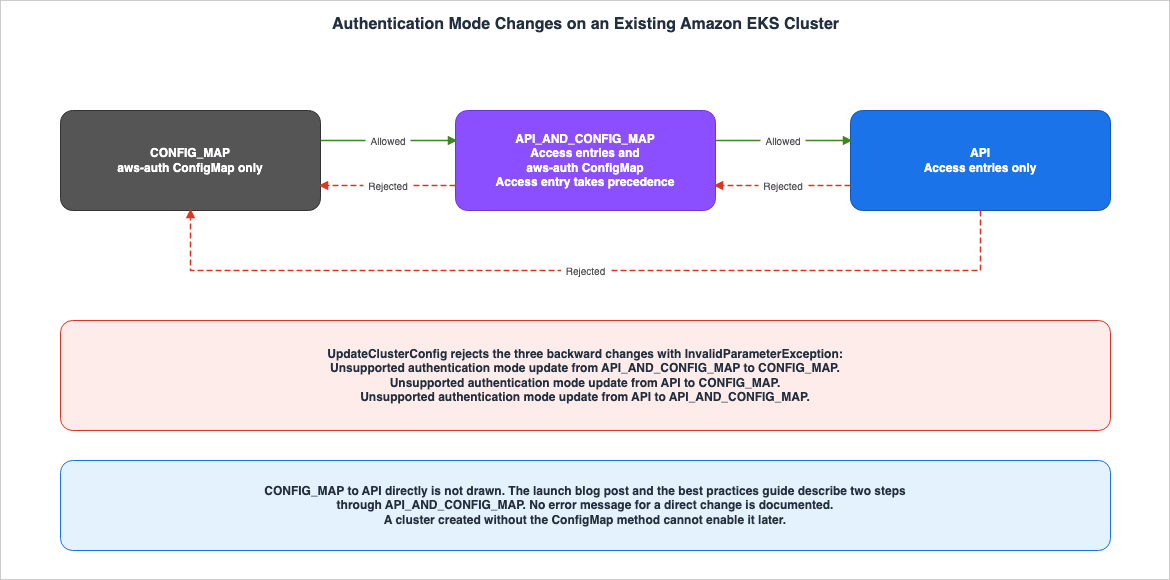
API_AND_CONFIG_MAP to CONFIG_MAP and a sentence that reads as not allowing it (Sources disagree, Section 10.2). The table in this article follows the error messages in the re:Post article and the statements in the best practices guide and the access overview page.4.2 From CONFIG_MAP to API
The launch blog post and the best practices guide state that to change a cluster fromCONFIG_MAP to API, you must first change it to API_AND_CONFIG_MAP and then to API. The launch blog post states:For existing clusters using CONFIG_MAP you'll have to first update the authenticationMode to API_AND_CONFIG_MAP and then to API.
Switching authentication modes on an existing cluster is a one-way operation.The eksctl page also indicates that to use access entries with a cluster configured with
CONFIG_MAP, you must first transition it to API_AND_CONFIG_MAP.In contrast, the access overview page and API reference do not discuss a direct transition from
CONFIG_MAP to API. The three error messages in the re:Post article do not include this direction either (Documentation does not list). The AWS CLI steps on the authentication mode page state, without naming the mode before the change, that if you want to disable the ConfigMap method permanently, you replace API_AND_CONFIG_MAP with API. The eksctl page states that its migrate-to-access-entry command with the target mode API switches the mode to API, and it also does not name the mode before the change. This article states neither that a direct change from CONFIG_MAP to API is rejected nor that it succeeds. The path that the sources describe has two steps through API_AND_CONFIG_MAP.4.3 What Can Be Decided Only When a Cluster Is Created
The second sentence from the access overview page in Section 4.1 shows that if theaws-auth ConfigMap method was not enabled during cluster creation, it cannot be enabled later. Therefore, this article reads that a cluster created with API cannot use the aws-auth ConfigMap later (Inference). This reading applies the sentence and the table in Section 4.1 as they are.Furthermore, the administrator permissions of the principal that created the cluster can also only be selected during cluster creation (Section 7.1).
4.4 While the Mode Is Changing
The authentication mode page states that when changing the authentication mode, the cluster status will change toUPDATING, and the change is recorded in the output of aws eks list-updates. After the cluster status returns to Active, access entries can be created. The UpdateClusterConfig API reference indicates that the cluster remains operational during the update process.The create access entries page explains that the creation and modification of access entries are eventually consistent, and it may take several seconds for changes to take effect after a successful API call. The create access entries page also recommends against placing access entry creation and modification within critical paths for applications requiring high availability.
5. When the Same Principal Has Two Mappings
This chapter shows which mapping is used in anAPI_AND_CONFIG_MAP cluster when the same IAM principal has a mapping in both an access entry and the aws-auth ConfigMap.5.1 The Access Entry Takes Precedence
The migration page states the following:Access entries take precedence over ConfigMap entries for the same IAM principal.In the same paragraph, the migration page states that when the same IAM role has a mapping in both, the role uses the access entry's mapping for authentication. In its migration steps, it also states that if the row in the
aws-auth ConfigMap is not deleted, the settings of the principal's access entry take precedence over the row in the aws-auth ConfigMap.The launch blog post states the same thing as an order of evaluation.
an access entry is evaluated prior to a configuration map along with any associated username and groups.The launch blog post continues that when no access entry exists for the principal, the
aws-auth ConfigMap is inspected. The best practices guide describes API_AND_CONFIG_MAP as a mode that retrieves principals authenticated from both sources, prioritizing the access entry.Therefore, while the same IAM principal has an access entry, the username and groups in that principal's row in the
aws-auth ConfigMap are not used. This article reads this from the statements on the migration page and in the launch blog post (Inference).5.2 The Two Are Stored Separately
The access overview page states that in clusters usingAPI_AND_CONFIG_MAP, the two methods store their mappings separately.Note that each method stores separate entries; for example, if you add an access entry from the AWS CLI, the aws-auth ConfigMap is not updated.Therefore, even if an access entry is created, the row in the
aws-auth ConfigMap is not deleted. This article reads that if the access entry is deleted, the remaining row in the aws-auth ConfigMap can be used again for that principal (Inference). No statement in the sources says this directly (No statement found).5.3 The Order of Migration
The migration page describes this order: create an access entry with the same ARN, username, and groups as the row in theaws-auth ConfigMap, and then delete that row from the aws-auth ConfigMap. Because the access entry's mapping takes precedence, the principal is authenticated with the access entry's mapping even before the row is deleted (Section 5.1).The migration page states that it is not possible to associate access policies with the rows in the
aws-auth ConfigMap.You can't associate access policies to entries in the aws-auth ConfigMap.5.4 Rows That Cannot Be Migrated, and What an Access Entry Cannot Do
The migration page states that rows created by EKS in theaws-auth ConfigMap for managed node groups and Fargate profiles cannot be migrated. It also instructs users to verify that access entries for the same resources exist before deleting those rows, and states that deleting them without the equivalent access entries makes the cluster not function properly.The sources state the following differences between access entries and rows in the
aws-auth ConfigMap:| Item | Access Entry | aws-auth ConfigMap Row | Source |
|---|---|---|---|
| Service-linked role | Cannot be created (Stated as not supported) | Can be listed | create access entries page, re:Post article |
| IAM role ARN path | Can be included | Cannot be included | create access entries page, ConfigMap page |
| Access entries per IAM principal | Only one | — | create access entries page |
| Access policy | Can be associated (types in Section 6.6) | Cannot be associated | access policies page, migration page |
The re:Post article states that to give a service-linked role access to the cluster, you list it in the
aws-auth ConfigMap in the CONFIG_MAP or API_AND_CONFIG_MAP mode. Therefore, this article reads that if a cluster that lists a service-linked role in the aws-auth ConfigMap is changed to API, the mapping in that row is left with no mode that reads it (Inference).5.5 When a Principal Is Re-created
The create access entries page states that even if you delete a principal in IAM, its access entry is not deleted automatically. Even if you re-create a principal with the same ARN, that access entry does not work. EKS stores access entries along with the ARN, as well as the principal'sroleID or userID, and because these IDs are different when you recreate a principal, the access entry does not work. The create access entries page recommends deleting the access entry of a deleted principal.6. How Access Policies and Kubernetes RBAC Add Up
This chapter shows the path by which an IAM principal's request is authenticated and the mechanisms by which it is authorized.6.1 The Path a Request Takes
Figure 2 illustrates the paths that IAM principals and OIDC users take for authentication and authorization.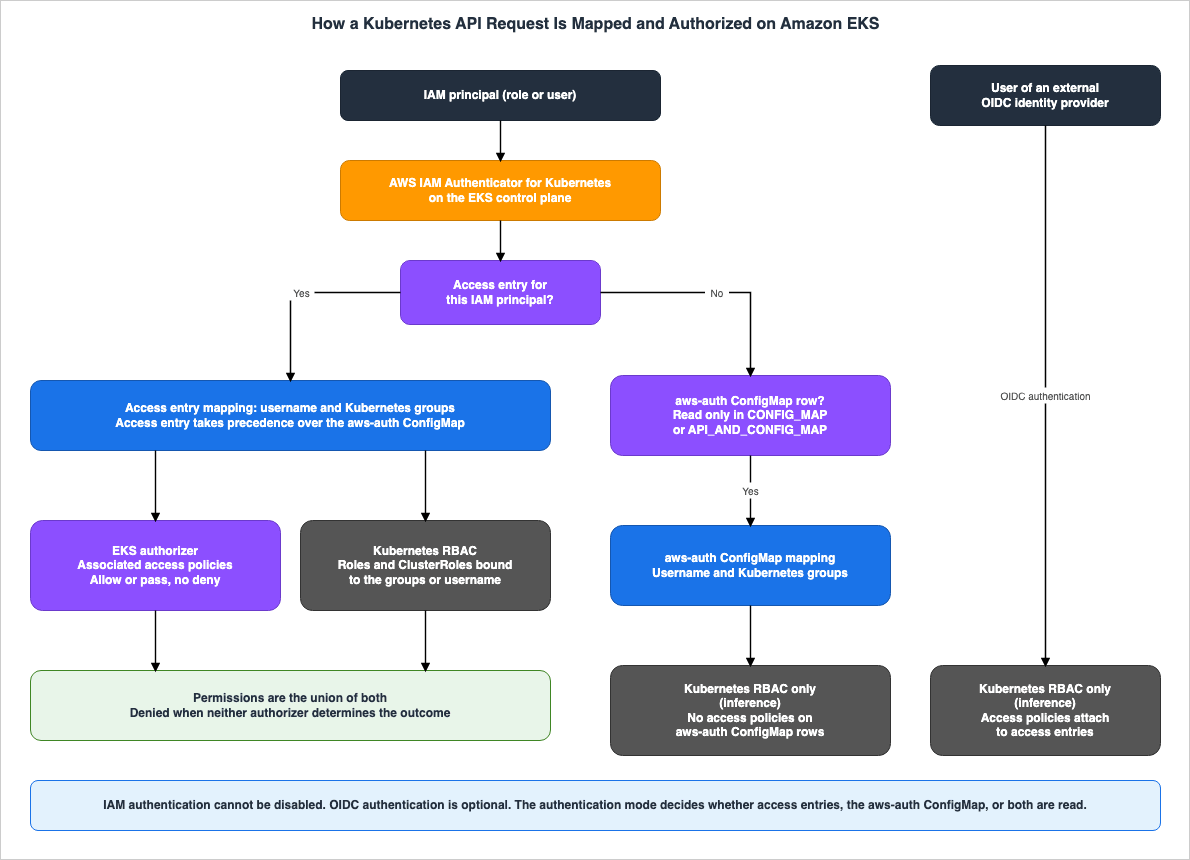
aws-auth ConfigMap method is enabled, the entries in the aws-auth ConfigMap are used (Section 5.1).Authorization is handled by two mechanisms: the EKS authorizer and Kubernetes RBAC. The best practices guide states:
Cluster Access Manager allows the combination of upstream RBAC with Access Policies supporting allow and pass (but not deny) on Kubernetes AuthZ decisions regarding API server requests.
A deny decision will happen when both, the upstream RBAC and Amazon EKS authorizers can't determine the outcome of a request evaluation.
Because rows in the
aws-auth ConfigMap cannot be associated with access policies, this article reads that the permissions of principals authenticated via the aws-auth ConfigMap are determined solely by RBAC (Inference, Section 5.3).6.2 A Union, with No Deny
The access policies page states that when a principal is associated with multiple access policies, that principal has all the permissions in all of those access policies. Regarding access entries that also have group names, it states:If you associate an access policy to an access entry that also has group names specified, then the IAM principal has all the permissions in all associated access policies. It also has all the permissions in any Kubernetes Role or ClusterRole object that is specified in any Kubernetes Role and RoleBinding objects that specify the group names.Therefore, even if an access policy is removed, if RBAC permissions are bound to the principal's group names, those permissions remain. Because the access policy side has no deny, an access policy cannot cancel RBAC permissions. This is read from the statements on the access policies page and in the best practices guide (Inference).
6.3 Permissions Not Shown by kubectl auth can-i
The access policies page states thatkubectl auth can-i --list does not display permissions related to access policies.If you run the kubectl auth can-i --list command, you won't see any Kubernetes permissions assigned by access policies associated with an access entry for the IAM principal you're using when you run the command.The access policies page continues that this command only shows permissions associated with Roles or ClusterRoles that are bound to the group names or username specified for the access entry. Therefore, this article reads that when auditing a principal's permissions, you need to review both the output of
kubectl auth can-i --list and the output of aws eks list-associated-access-policies (Inference).6.4 Permissions Lost When Impersonating
The access policies page states that usingkubectl with options like --as or --as-group to impersonate Kubernetes users or groups will enforce Kubernetes RBAC authorization, preventing access policies from being applied. When impersonating a user or group, permissions are limited to those granted by RBAC Roles and ClusterRoles. The access policies page states that to have the access policy permissions, you do not impersonate.Therefore, verifying permissions while impersonated will not reveal the permissions that would be granted without impersonation. This article does not use impersonation to audit access policy permissions.
6.5 Group Names Are Not Checked
The create access entries page states that EKS does not check whether the group names specified in an access entry exist in the RBAC objects on the cluster.For example, if you create an access entry for a group that currently doesn't exist, Amazon EKS will accept the configuration without returning an error, but the IAM principal won't have any permissions until matching Kubernetes RBAC resources are created.Regarding access entries for IAM users who do not have a group name or access policy, the create access entries page indicates that an access policy must be associated to grant more permissions than those in the Kubernetes API discovery roles.
6.6 The Scope and Limits of Access Policies
The sources state the following about access policies:- The access policies page indicates that access policies can be associated with access entries of type
STANDARD, while access entries of other types automatically receive the necessary permissions from EKS. The console instructions on the access policies page state that no association options are available if the access entry type is anything other thanSTANDARD. Conversely, the node class page provides an example of associating theAmazonEKSAutoNodePolicywith an access entry of typeEC2(Sources disagree, Section 10.2). - The scope of an access policy can be either the entire cluster or one or more namespaces. Wildcards, such as
dev-*, can be used in namespace names (as described on the access policies page). - The contents of an access policy cannot be modified, and it is not possible to create custom access policies (as stated on the access policy permissions page).
You can't modify the contents of an access policy. You can't create your own access policies.The access policy permissions page displays a list of access policies and a table showing their update history. The most recent two entries in the history table reflect updates to Argo CD access policies on November 2, 2026, and September 24, 2026. The entry for November 6, 2026, in the document history states that two access policies were added to those that the EKS service-linked role can associate; however, these two policies are not listed on the access policy permissions page (Documentation does not list). This article does not specify the total number of access policies. To verify the available access policies, use the
aws eks list-access-policies command.6.7 When {{SessionName}} Is Used in the Username
When you specify your own username for aSTANDARD access entry of an IAM role, the create access entries page recommends appending {{SessionName}} or {{SessionNameRaw}} to its end, with a colon before it. This is because the STS session name, which is assigned when the role is assumed, is passed to the cluster and appears in CloudTrail logs. The same page recommends not specifying a username unless you have a specific reason.The ConfigMap page states that the caller making the
sts:AssumeRole call determines the values for {{SessionName}} and {{SessionNameRaw}}. The ConfigMap page states:Only use {{SessionName}} or {{SessionNameRaw}} in username or groups if you trust all principals that can assume the role.Therefore, a role that uses
{{SessionName}} in its username or groups needs to limit the principals that can assume it to trusted ones.7. The Administrator Permissions of the Principal That Created the Cluster
This chapter shows when the administrator permissions of the principal that created the cluster can be chosen and when they can be removed.7.1 Chosen Only When the Cluster Is Created
TheCreateAccessConfigRequest API reference describes bootstrapClusterCreatorAdminPermissions as the setting for whether the principal that created the cluster is set as a cluster admin access entry, with the default value true. The UpdateAccessConfigRequest only includes the authenticationMode setting and does not include bootstrapClusterCreatorAdminPermissions. The CloudFormation reference states that an update to BootstrapClusterCreatorAdminPermissions requires replacement of the cluster (Replacement).Therefore, this article reads that there is no API available to change this setting after the cluster has been created (Inference). To remove the administrator permissions after creation in a mode that uses access entries, you must either delete the access entry or disassociate the access policy (Section 7.2).
7.2 Modes Where the Permissions Can Be Removed, and a Mode Where They Cannot
The access entries page states that by using access entries, you can modify or revoke the cluster-admin permissions of the principal who created the cluster. The best practices guide provides examples of removing theAmazonEKSClusterAdminPolicy association and examples of deleting the whole access entry, and describes revoking this permission as a best practice.In clusters using
CONFIG_MAP, the situation is different. The ConfigMap page states that the principal who created the cluster is automatically granted system:masters permissions through the EKS control plane's RBAC configuration. The access overview page notes that because this principal's entry is not present in the aws-auth ConfigMap, other users can neither manage nor remove this principal. The best practices guide states:Even being a best practice to remove this permission, as described here if using the CONFIG_MAP authentication method, relying on aws-auth ConfigMap, this access cannot be revoked.The access entries page indicates that in clusters that rely on the
aws-auth ConfigMap, when access entries are enabled, only the access entry for the original principal that created the cluster is created automatically. Therefore, this article reads that to remove the administrator permissions of the principal that created a CONFIG_MAP cluster, a change to a mode that uses access entries is required (Inference). That change cannot be undone (Chapter 4).The best practices guide states that you can create a cluster with
bootstrapClusterCreatorAdminPermissions set to false only when using the API_AND_CONFIG_MAP or API modes. No statement describing the behavior when false is specified in the CONFIG_MAP mode was found (No statement found).7.3 Break-Glass After Removal
The best practices guide states that this permission can be granted again if needed during an incident, an emergency, or a break-glass scenario. For clusters still usingCONFIG_MAP, it states that after the aws-auth ConfigMap is configured, the role assigned to the entity that created the cluster can be deleted and recreated only in an incident, an emergency, or a break-glass scenario, or when the aws-auth ConfigMap is corrupted and the cluster is otherwise inaccessible.Therefore, this article reads that before removing the creator's administrator permissions, you need to decide who grants them again and by which steps (Inference). The launch blog post indicates that even if configuration errors occur, if a caller with the necessary permissions invokes the EKS API, access to the cluster can be restored.
8. Access Entries for Node Roles
This chapter shows the access entry types for the IAM roles that nodes use, and where EKS puts the mappings that it creates automatically.8.1 The Seven Type Values
TheCreateAccessEntry API reference lists the following seven values for the type:| Type | Purpose | Automatically Assigned Username |
|---|---|---|
STANDARD | Default type when no type is specified. Specified when the principal ARN is for any other purpose. | For IAM users, the ARN; for IAM roles, the STS ARN with {{SessionName}} appended. |
EC2_LINUX | Role for self-managed nodes running Linux or Bottlerocket. | system:node:{{EC2PrivateDNSName}} |
EC2_WINDOWS | Role for self-managed nodes running Windows. | system:node:{{EC2PrivateDNSName}} |
FARGATE_LINUX | Role for AWS Fargate. | system:node:{{SessionName}} |
HYBRID_LINUX | Role for hybrid nodes. | system:node:{{SessionName}} |
EC2 | Role for custom node classes in EKS Auto Mode, or for self-managed nodes where the node name is the instance ID. | system:node:{{SessionName}} |
HYPERPOD_LINUX | Not included in the list of types on the create access entries page. | — |
The create access entries page indicates that the type is determined by the resource type to which the access entry is associated, and does not define the permissions. The type cannot be changed after it is created, but the username can be modified. For types other than
STANDARD, the principal ARN must be in the same AWS account as the cluster. The same page states that group names can be added to STANDARD access entries, and the API reference states that kubernetesGroups cannot be specified for EC2_LINUX and EC2_WINDOWS. The list of types on the create access entries page includes six options, excluding HYPERPOD_LINUX. In another section of the same page, it states that access entries for HYBRID_LINUX and HYPERPOD_LINUX associate the IAM role with the system:nodes group (Section 10.1).8.2 Where Automatically Created Mappings Go
The create access entries page states that you do not need to create access entries for the roles of managed node groups and Fargate profiles, and describes where EKS creates them as follows:EKS will create access entries (if enabled), or update the auth config map (if access entries are unavailable)The API reference for
CreateAccessEntry states the following regarding clusters with API_AND_CONFIG_MAP:If you have the access mode of the cluster set to API_AND_CONFIG_MAP, it's unnecessary to create access entries for IAM roles used with Fargate profiles or managed Amazon EC2 nodes, because Amazon EKS creates entries in the aws-auth ConfigMap for the roles.In
API_AND_CONFIG_MAP clusters, access entries are enabled. Therefore, the statement on the create access entries page reads as access entries, and the statement in the API reference reads as the aws-auth ConfigMap (Sources disagree). This article does not decide which one is the behavior as of the verification date. The migration page's instruction to verify that an access entry for the same role exists before deleting the rows for managed node group and Fargate roles from the aws-auth ConfigMap applies under either reading (Section 5.4).The re:Post article states that when you migrate from
CONFIG_MAP to API_AND_CONFIG_MAP and a node role is mapped to an access entry, the groups that were system:bootstrappers and system:nodes in the aws-auth ConfigMap become only system:nodes in the access entry. The re:Post article states that, because the migration automatically associates node roles with the system:nodes group, this is not an error that needs to be corrected.8.3 Node Roles in Auto Mode
The access control page states that access entries used by EKS Auto Mode are automatically configured, and can be viewed but not modified. It states that when you create a custom node role through a node class, you need to create the access entry for that role with theAmazonEKSAutoNodePolicy access policy. The node class page indicates that EKS automatically creates access entries for built-in node classes and node pools, and that access entries for custom node classes use the EC2 type. The node class example demonstrates the creation of an access entry with the type EC2 and associates it with AmazonEKSAutoNodePolicy.This article does not cover the design of Auto Mode. This site's Amazon EKS Capabilities provides another example of access entries automatically created by EKS, specifically those associated with the Capabilities role.
9. Using OIDC Users Alongside IAM Principals
This chapter shows what the sources settle when IAM principals and users of an external OIDC identity provider are used on the same cluster.The access overview page states that two types of identity can be used on the same cluster, noting that IAM authentication cannot be disabled, while OIDC authentication is optional.
You can use both types of identities with your cluster. The IAM authentication method cannot be disabled. The OIDC authentication method is optional.The OIDC page clarifies that because nodes require IAM authentication to join the cluster, IAM authentication cannot be disabled. The access overview page further explains that while OIDC users are granted Kubernetes permissions, they are not granted IAM permissions necessary to manage the cluster through the EKS API or the AWS Management Console.
Access policies are associated with access entries, which correspond to IAM principals (as described in Section 1.4). Therefore, this article reads that the permissions of OIDC users are decided only by Kubernetes RBAC, and that access policies cannot be used for them (Inference). No statement that says this explicitly was found (No statement found).
The OIDC page states that users authenticated via OIDC, provided they are sending control plane logs to CloudWatch Logs, will appear in the cluster's audit logs. The OIDC page also notes that clusters running Kubernetes 1.32 and later can associate up to 10 OIDC identity providers. This article does not address the design of multiple identity providers.
10. Where the Sources Disagree and What They Do Not Say
This chapter collects the differences between the sources in Section 1.3 and the matters for which no statement was found.10.1 Differences Only in Counting or Premise
The following differences are only differences in scope or premise, and this article does not call them Sources disagree.- Direction from
CONFIG_MAPtoAPI: The launch blog post and the best practices guide describe a two-step process involvingAPI_AND_CONFIG_MAP. The re:Post article lists only the three error messages for the backward directions. The AWS CLI steps on the authentication mode page and themigrate-to-access-entrycommand on the eksctl page do not state the mode before the change. None of the sources states the result of a direct change (Section 4.2). - Number of types: The API reference for
CreateAccessEntrylists seven values, while the create access entries page lists six. In a different section of the same page,HYPERPOD_LINUXis mentioned. This article reads the list of types on the create access entries page as not includingHYPERPOD_LINUX(Documentation does not list, Section 8.1). - How precedence is written: The migration page states that access entries take precedence, while the launch blog post describes evaluating access entries first. Both show that the access entry's mapping is used for the same IAM principal (Section 5.1).
10.2 Where the Sources Disagree
- The same paragraph of the console help panel: The console help panel states that changing modes is one-way, but in the same paragraph, it has the following two sentences (Sources disagree). The first sentence reads as allowing changes in both directions between
API_AND_CONFIG_MAPandCONFIG_MAP. The second sentence states that the mode cannot be changed fromAPI_AND_CONFIG_MAPtoCONFIG_MAP. The error messages in the re:Post article, the launch blog post, the best practices guide, the access overview page, and the authentication mode page agree with the second sentence. This article does not call either sentence an error; it wrote the table in Section 4.1 following the sources on the side of the second sentence.
You can change between API_AND_CONFIG_MAP and CONFIG_MAP.
Additionally, you can't change from API_AND_CONFIG_MAP to CONFIG_MAP.- Where node role mappings go: The create access entries page and the
CreateAccessEntryAPI reference have statements that read as different places where EKS creates the mappings for the roles of managed node groups and Fargate in anAPI_AND_CONFIG_MAPcluster (Sources disagree, Section 8.2). - Default for Auto Mode: The EKS Auto Mode - Security page in the best practices guide states that it strongly recommends using the default
APIauthentication mode for new clusters. The default for theCreateAccessConfigRequestAPI reference depends on how the cluster is created and has no condition for Auto Mode (Section 3.2). The only documentation that states the default for Auto Mode clusters isAPIis this page in the best practices guide (Sources disagree). - Types that access policies can be associated with: The access policies page states that access policies can be associated with access entries of type
STANDARD, while the console instructions indicate that no association options are available for types other thanSTANDARD. TheCreateAccessEntryAPI reference states that access policies cannot be associated with access entries of typeEC2_LINUXorEC2_WINDOWS. The node class page provides an example of associating theAmazonEKSAutoNodePolicywith an access entry of typeEC2(Sources disagree, Section 6.6). This article does not definitively state whether access policies can be associated with access entries of typeEC2. - Spelling of the values: The values in the API reference are
API,API_AND_CONFIG_MAP, andCONFIG_MAP. The migration page uses the spellingAPI_AND_CONFIGMAP, and the EKS Auto Mode - Security page in the best practices guide usesCONFIG_MAP_AND_API. None of these spellings appear in the API reference. This article will only use the spellings found in the API reference.
While it is still possible to create an EKS Auto Mode cluster with CONFIG_MAP_AND_API authentication mode, this is not the standard approach, and it's highly recommended to use the default API authentication mode for new clusters.10.3 Items Not Found
The following items were not found after searching with different search terms and different families of sources in Section 1.3 (No statement found). None of them shows that the matter does not exist or does not happen.- The date on which the
aws-authConfigMap and theCONFIG_MAPmode end (Section 1.4) - The announcement regarding changing the default for new clusters to
API(Section 3.2) - The results of switching directly from
CONFIG_MAPtoAPI, and the error message that rejects it (Documentation does not list, Section 4.2) - The scenario where, after deleting an access entry, the row for the same principal in the
aws-authConfigMap is used again (Section 5.2) - How to differentiate in the logs whether a request was authenticated through an access entry or the
aws-authConfigMap (Section 6.1) - The maximum number of access policies that can be associated with a single access entry (Documentation does not list, Section 3.4)
- The behavior when
bootstrapClusterCreatorAdminPermissionsis set tofalsein theCONFIG_MAPmode (Section 7.2) - Whether the ability to optionally enable the
aws-authConfigMap in EKS Auto Mode clusters is limited to cluster creation only (Section 3.3) - The statement explicitly indicating that users of OIDC cannot use access policies (Chapter 9)
- The description on the access policy permissions page regarding the two access policies added in the document history entry dated November 6, 2026 (Documentation does not list, Section 6.6)
11. Failure Modes
This chapter collects common misreadings from the statements in Chapters 3 through 10.- The misreading that the authentication mode can be switched in either direction: The changes that the sources state as allowed are from
CONFIG_MAPtoAPI_AND_CONFIG_MAPand fromAPI_AND_CONFIG_MAPtoAPI. The three backward changes are rejected withInvalidParameterException(Section 4.1). - The misreading that the "change between" sentence in the console help panel shows the mode can be changed back: The later sentence in the same paragraph and other sources state that it is not possible to revert from
API_AND_CONFIG_MAPtoCONFIG_MAP(Section 10.2). - The misreading that a cluster created with
APIcan use theaws-authConfigMap later: Clusters created without enabling theaws-authConfigMap method at creation cannot have it enabled later (Section 4.3). - The misreading that the default authentication mode is the same however the cluster is created: EKS API, AWS SDK, and AWS CloudFormation use
CONFIG_MAP; AWS Management Console and eksctl useAPI_AND_CONFIG_MAP; and AWS CDK'saws-eks-v2usesAPI(Section 3.2). - The misreading that during migration, the same role's row in the
aws-authConfigMap is used: If there is an existing access entry for the same IAM principal, the access entry mapping will be used (Section 5.1). - The misreading that creating an access entry also rewrites the row in the
aws-authConfigMap: These are stored separately (Section 5.2). - The misreading that removing an access policy removes all permissions of that principal: If RBAC permissions are bound to the group names, those permissions remain (Section 6.2).
- The misreading that the output of
kubectl auth can-i --listshows all permissions of a principal: Access policy permissions are not displayed (Section 6.3). - The misreading that permissions checked while impersonating with
--asare the permissions without impersonation: When impersonating, access policy permissions are not used (Section 6.4). - The misreading that writing a group name in an access entry gives the permissions of that group: EKS does not check the group name, and the principal has no permissions until matching RBAC resources are created (Section 6.5).
- The misreading that the administrator permissions of the principal that created the cluster can be removed later through configuration:
bootstrapClusterCreatorAdminPermissionscan only be selected during cluster creation. After creation, you delete the access entry or disassociate the access policy. In aCONFIG_MAPcluster, this permission cannot be revoked (Chapter 7). - The misreading that the type of a node role's access entry can be changed later: The type cannot be changed after creation (Section 8.1).
- The misreading that node rows that EKS created in the
aws-authConfigMap can be migrated as they are: The migration page states that these rows cannot be migrated and instructs users to verify that access entries for the same resources exist before deleting them (Section 5.4). - The misreading that deprecated means the
aws-authConfigMap can no longer be used: The ConfigMap page uses the term "deprecated," but does not specify an end date. TheCONFIG_MAPandAPI_AND_CONFIG_MAPmodes are values in the API reference as of the verification date (Section 1.4).
12. Frequently Asked Questions About EKS Authentication Modes and Access Entries
This chapter answers the reader assumptions in Section 1.1 with the statements in Chapters 3 through 10.Q1. After the authentication mode is changed to API, can it be changed back to API_AND_CONFIG_MAP?
No. The re:Post article states that a change fromAPI to API_AND_CONFIG_MAP is rejected with InvalidParameterException, and the best practices guide also states that it cannot be reverted (Section 4.1). You cannot go back from API_AND_CONFIG_MAP to CONFIG_MAP either.Q2. Can a CONFIG_MAP cluster be changed directly to API?
The launch blog post and the best practices guide state that you first change toAPI_AND_CONFIG_MAP and then to API (Section 4.2). No source that states the result of a direct change, and no error message that rejects it, were found. This article does not state whether the transition will succeed or fail.Q3. When a role exists in both the access entry and the aws-auth ConfigMap, which one is used?
The access entry's mapping is used. The migration page states that access entries take precedence over ConfigMap entries for the same IAM principal (Section 5.1).Q4. If the access policy is removed, can that principal no longer do anything in the cluster?
Not necessarily. Access policy permissions and the RBAC permissions bound to the access entry's group names are added together (Section 6.2). Even if the access policy is removed, the RBAC permissions will remain. The create access entries page notes that access policies are required to grant permissions beyond those in the Kubernetes API discovery roles, using the example of an IAM user without a specified group name for their access entry (Section 6.5).Q5. Can kubectl auth can-i --list be used to verify all permissions for a principal?
No. The access policies page states that this command does not display permissions associated with access policies (Section 6.3). You can verify access policy associations usingaws eks list-associated-access-policies.Q6. Can the administrator permissions of the principal that created the cluster be removed later through configuration?
The settingbootstrapClusterCreatorAdminPermissions cannot be changed later. It can only be selected during cluster creation, and the default setting is true (Section 7.1). In a mode that uses access entries, the permissions themselves can be removed by deleting that access entry or disassociating the access policy. The best practices guide states that this permission cannot be revoked for clusters using CONFIG_MAP (Section 7.2).Q7. Can the aws-auth ConfigMap no longer be used?
The ConfigMap page indicates that it is deprecated and recommends using access entries (Section 1.4). However, it does not specify an end date (Section 10.3). As of the verification date,CONFIG_MAP and API_AND_CONFIG_MAP clusters read the aws-auth ConfigMap.Q8. Can a cluster run with OIDC users only, with IAM authentication disabled?
No. The access overview page and the OIDC page state that IAM authentication cannot be disabled and that nodes need IAM authentication to join the cluster (Chapter 9).13. Summary
Before deciding how principals get into an EKS cluster, and before migrating from theaws-auth ConfigMap, check the following:- The default authentication mode differs by the tool that creates a cluster, and clusters are created with the authentication mode stated explicitly (Section 3.2).
- The migration plan accounts for the change being one-way: after the change to
API_AND_CONFIG_MAP, the cluster cannot go back toCONFIG_MAP, and after the change toAPI, it cannot go back to theaws-authConfigMap (Chapter 4). - The migration from
CONFIG_MAPtoAPIis planned in two stages, passing throughAPI_AND_CONFIG_MAP(Section 4.2). - Access entries are created with the same ARN, username, and groups as the rows in the
aws-authConfigMap, and the rows in theaws-authConfigMap are deleted after that (Section 5.3). - The node rows that EKS created and the rows for service-linked roles are kept apart from the rows to migrate (Section 5.4).
- The review of a principal's permissions looks at both the associated access policies and the RBAC permissions bound to its group names (Sections 6.2 and 6.3).
- RBAC resources that match the group names in the access entries exist (Section 6.5).
- Whether to keep or remove the administrator permissions of the principal that created the cluster is decided at creation, and if they are removed, the break-glass steps are decided (Chapter 7).
- The access entry type for each node role is decided before the access entry is created (Section 8.1).
- The pages have been opened again to check that the default values, the list of access policies, and the quotas have not changed since the verification date of November 11, 2026 (Section 2.2).
14. References
- Grant IAM users and roles access to Kubernetes APIs - Amazon EKS
- Change authentication mode to use access entries - Amazon EKS
- Grant IAM users access to Kubernetes with EKS access entries - Amazon EKS
- Create access entries - Amazon EKS
- Associate access policies with access entries - Amazon EKS
- Review access policy permissions - Amazon EKS
- Migrating existing aws-auth ConfigMap entries to access entries - Amazon EKS
- Grant IAM users access to Kubernetes with a ConfigMap - Amazon EKS
- Grant users access to Kubernetes with an external OIDC provider - Amazon EKS
- Learn how access control works in Amazon EKS - Amazon EKS
- Create a Node Class for Amazon EKS - Amazon EKS
- Document history - Amazon EKS
- CreateAccessConfigRequest - Amazon EKS
- UpdateAccessConfigRequest - Amazon EKS
- AccessConfigResponse - Amazon EKS
- CreateAccessEntry - Amazon EKS
- UpdateClusterConfig - Amazon EKS
- Identity and Access Management - Amazon EKS Best Practices Guide
- Cluster access management - Amazon EKS Best Practices Guide
- EKS Auto Mode - Security - Amazon EKS Best Practices Guide
- Cluster authentication modes - Amazon EKS console help panel
- AWS::EKS::Cluster AccessConfig - AWS CloudFormation
- EKS Access Entries - Eksctl User Guide
- Amazon EKS V2 Construct Library - AWS CDK API Reference
- Amazon Elastic Kubernetes Service endpoints and quotas - AWS General Reference
- Troubleshoot access entries in Amazon EKS - AWS re:Post
- A deep dive into simplified Amazon EKS access management controls - AWS Containers Blog
- Amazon EKS introduces simplified controls for IAM cluster access management - AWS What's New
- AWS History and Timeline regarding Amazon EKS - Overview, Functions, Features, Summary of Updates, and Introduction
- Amazon EKS Pod Identity and IRSA Decision Guide - Workload Identity Design, Trade-offs, and Migration Paths
- Rotating an Amazon EKS Cluster's CA - Who Updates Which Trust Bundle, and What Breaks at Activation
- Amazon EKS Capabilities - Managed Argo CD, ACK, and kro, and What Changes When the Controllers Move Off Your Cluster
- Amazon EKS Control Plane Configuration - What You Can Set, What Blocks the Way Back, and How Far Each Setting Reaches
- IAM Policy Evaluation Logic Step-by-Step - Explicit Deny, RCP, SCP, Resource Policy, Identity Policy, Permission Boundary, and Session Policy
References:
Tech Blog with curated related content
Written by Hidekazu Konishi