Temporary Elevated and Emergency Access with IAM Identity Center - When a Recreated Permission Set Role Breaks Key Policies and EKS Access
First Published:
Last Updated:
This article addresses the design of temporary elevated access and emergency access, focusing on when the ARN of a permission set role changes and where policies referencing that ARN might break. This article compares four different approaches to temporary elevated access using a decision table. Regarding emergency access, it outlines which accounts and identities should be used, categorized by the three failure modes outlined in the AWS Well-Architected Framework.
In conclusion, if policies reference a permission set role's ARN, it is recommended to maintain at least one permanent assignment for that permission set in the account that contains the role to prevent the role from being deleted. For KMS key policies and EKS, also include a backup role created in IAM, and manage EKS access with access entries. Deleting an assignment does not immediately end role sessions that have already been issued. Emergency access paths should not rely on the same components as the normal access path. The emergency access configurations described in the IAM Identity Center user guide are intended for scenarios where Identity Center itself is unavailable, and will not function when the Identity Provider (IdP) is inaccessible.
This article was reviewed based on available documentation as of November 25, 2026 (Japan Standard Time). It has not been tested on actual AWS resources. Pricing information is not included. This article was written prior to AWS re:Invent 2026 (November 30 – December 4, 2026) and does not include any information that will be presented at that event.
Related articles on this site:
- Changing the Identity Source in IAM Identity Center Is Not Symmetric - What Survives in Each Direction, and What the Revision Field Guards
- AWS IAM Identity Center Complete Setup Guide - Multi-Account SSO Design Patterns from Organization Structure to ABAC
- Who Can Call the Kubernetes API on Amazon EKS - One-Way Authentication Modes, Which Mapping Wins, and Access Policies Plus RBAC
- Root Sessions in AWS Organizations - Centralized Root Access, Task Policies, and the Break-Glass You Still Need
- What AWS Account Access Manager Assigns - Existing IAM Roles, Identity Center Groups, and What Trust Policies Still Decide
- IAM Identity Center Across Regions - What the Primary Region Keeps, What Additional Regions Serve, and How Trusted Identity Propagation Crosses Them
- AWS Multi-Account Operational Patterns - Control Tower, Organizations, SCPs
Table of Contents
- 1. Scope and Assumptions
- 2. When Is a Permission Set Role Recreated
- 3. What Breaks When the Role Is Recreated
- 4. Four Ways to Build Temporary Elevated Access
- 5. Ending Elevated Access Early
- 6. Emergency Access Paths
- 7. Mitigations for EKS and KMS
- 8. What to Check Before Choosing TEAM or a Partner Product
- 9. Information Not Found in the Sources
- 10. Frequently Asked Questions About Temporary Elevated Access and Emergency Access
- 11. Summary
- 12. References
1. Scope and Assumptions
This chapter first defines the intended audience, the scope of this article, the relevant documentation, and the terminology used. The key conclusions are as follows:- Permission set role names begin with
AWSReservedSSO_and end with a unique suffix (Section 2.1). - Within an AWS account, if all assignments for a permission set are deleted, the corresponding role is also deleted. If re-assigned later, a new role with a different suffix will be created (Section 2.2).
- Policies that reference the ARN of the role before it was recreated break. The Identity Center user guide provides examples using the
aws-authConfigMap for EKS and key policies for KMS (Chapter 3). - The recommendations in the user guide are to maintain at least one permanent assignment to prevent role deletion, and to include roles created in IAM for both EKS and KMS. The example using a wildcard at the end of the ARN is in the trust policy of a role created in IAM (Section 3.4, Chapter 7).
- There are four ways to build temporary elevated access: adding and removing assignments, adding and removing assignments with a permanent assignment in place, assuming a role created in IAM, and assigning an existing IAM role using account access manager (Chapter 4).
- Even if assignments are deleted or portal sessions are ended, existing role sessions may persist until the configured time limit is reached (Chapter 5).
- Emergency access paths differ by the three failure modes. The configuration in the Identity Center user guide is for when Identity Center is unavailable; it cannot be used when the IdP is unavailable (Chapter 6).
- Emergency access paths, including the approval path, should not rely on the same components as the normal path (Section 6.5).
1.1 Intended Audience
This article is intended for:- Platform and security engineers who manage access for users across a large number of accounts using AWS Organizations and IAM Identity Center.
- Individuals who want to grant temporary access with administrator privileges through requests and approvals, including those considering TEAM or partners' just-in-time products.
- Those who need to provide an emergency access point when an IdP or Identity Center is unavailable.
1.2 Scope and Exclusions
This article covers the following topics:- The name and ARN of permission set roles, and the conditions under which a role is deleted and recreated.
- Which policies that reference a role's ARN break when the role is recreated.
- Four ways to build temporary elevated access, and a decision table for them.
- Key points on what remains when elevated access is ended early.
- Three failure modes for emergency access, and the path for each.
- Mitigations for EKS and KMS.
- Items to verify before selecting TEAM and partner products.
This article does not cover:
- An introduction to Identity Center and general principles of permission set design. This is covered in the AWS IAM Identity Center Complete Setup Guide on this site.
- Switching identity sources. This is covered in the Changing the Identity Source in IAM Identity Center Is Not Symmetric on this site. Section 5.4 specifically addresses the suffix of the permission set role when assignments are deleted during an identity source switch.
- Operations performed by the root user. This is covered in the Root Sessions in AWS Organizations on this site.
- Details regarding EKS access entries and the
aws-authConfigMap. This is covered in the Who Can Call the Kubernetes API on Amazon EKS on this site. - A comprehensive overview of revocation for each type of credential. This article only provides key points, leaving the details to a separate article released around the same time.
- Product listings, comparisons, pricing, and attack procedures.
1.3 Verification Date and Materials Reviewed
This article was written after reviewing the following materials on November 25, 2026 (Japan Standard Time). In the text, this article refers to each source by the English name in parentheses. The value ofLast-Modified for HTTP was obtained using curl.- The "Referencing permission sets in resource policies, Amazon EKS Cluster config maps, and AWS KMS key policies" page in the IAM Identity Center User Guide (referencing page).
Last-Modifiedwas November 24, 2026, 18:58:12 GMT. - The "Temporary elevated access for AWS accounts" page in the same guide (elevated access page).
Last-Modifiedwas November 24, 2026, 18:58:15 GMT. - The "Set up emergency access to the AWS Management Console" page and the pages under it in the same guide (emergency access pages).
Last-Modifiedwas November 24, 2026, 18:58:29 GMT. - The "Revoke user access" page (revoke page) and the "Use a Deny policy to revoke active user permissions" page (Deny policy page) in the same guide.
- The "View and end active sessions for your workforce users" page (sessions page) and the "Understanding authentication sessions in IAM Identity Center" page (authentication sessions page) in the same guide.
- The "Set session duration for AWS accounts" page in the same guide (session duration page).
- The "AWS JSON policy elements: Principal" page in the IAM User Guide (Principal element page).
Last-Modifiedwas November 24, 2026, 18:59:33 GMT. - The "IAM roles" page (IAM roles page) and the "Account access manager" page (account access manager page) in the IAM User Guide.
- The "Create access entries" page in the Amazon EKS User Guide (EKS access entries page).
Last-Modifiedwas November 25, 2026, 04:11:11 GMT. - The "FND05-BP02 Establish emergency access mechanisms" page in the AWS Well-Architected Framework (FND05-BP02).
Last-Modifiedwas November 24, 2026, 18:59:25 GMT. - The "Temporary elevated access management with IAM Identity Center" blog post on the AWS Security Blog (TEAM blog post). Published: June 8, 2023.
- The "How to use trust policies with IAM roles" blog post on the AWS Security Blog (trust policy blog post). Published: November 3, 2022.
- The "Release notes" page in the same framework, as well as the SEC03-BP03 page as it existed at the time of review, and the SEC03-BP03 page from February 25, 2025.
- AWS What's New announcements for August 10, 2026, and November 18, 2026, regarding account access manager.
- The README and releases for the
aws-samples/iam-identity-center-teamrepository on GitHub (TEAM repository).
All materials were read, comparing them to the original data obtained with curl and information found through searching AWS documentation.
1.4 Terminology
This article uses the following terms consistently:- Permission set: A collection of permissions that grants access to an AWS account, defined within Identity Center.
- Assignment: Linking a permission set to a user or group within a specific AWS account.
- Permission set role: An IAM role created by Identity Center in the account to which a permission set is assigned. The role name begins with
AWSReservedSSO_. - IAM role (role created in IAM): An IAM role created by the user. Used to differentiate from a permission set role.
- Portal session (AWS access portal session): A session established when a user signs in to Identity Center.
- IAM role session: A temporary session obtained by assuming an IAM role.
- Temporary elevated access: Granting users temporary access with elevated permissions for a specific task, subject to an application and approval process. This is the elevated access page's term.
- Emergency access: An alternative path used when the normal path is unavailable. This term is used as referenced in the Identity Center user guide and the Well-Architected documentation. This article will only use the term "break-glass" when referencing existing documentation or published materials.
- Delete, end session, disable, expire: These terms are used as they appear in the user guide.
This article uses "assume" only for obtaining a role's temporary credentials. Assignments involve permission sets, not roles.
1.5 Terms for the State of the Sources
This article uses three terms to describe the state of the sources. These terms, including their English spellings, are also used in the table cells.- Stated: A source contains a statement regarding the matter.
- No statement found: Even after searching the sources in Section 1.3, using different search terms and source types, no relevant statement could be found. This does not indicate that the matter is absent or does not occur.
- Inference: This represents an inference made within this article, and is not a statement found in any of the sources. This article will clearly indicate when a statement is an inference.
The verification date for this article is November 25, 2026 (Japan Standard Time). The format of role names, recommendations, procedures, and the list of products reflect the state of these elements as of the verification date. These elements may be subject to change after that date. This article consistently includes the year when referencing dates.
1.6 Well-Architected Best Practice Numbers
The best practice for emergency access is currently designated as FND05-BP02, "Establish emergency access mechanisms," according to the AWS Well-Architected Framework as of the verification date (Stated). FND05 is the Security and compliance question within Cloud Foundations, which was added during the Framework update on November 16, 2026 (Stated). The Framework's release notes state that this update consolidated the white papers for all six pillars into a single Framework document, including the addition of Cloud Foundations (Stated).Prior to this update, the best practice for emergency access was named SEC03-BP03, "Establish emergency access process" (Stated). As of the verification date, this name remains on the dated version of the Framework from February 25, 2025, as well as on the legacy Security Pillar page (Stated). While the documentation does not explicitly state that FND05-BP02 replaced SEC03-BP03, this article interprets them as addressing the same subject (Inference). The legacy Security Pillar page indicates that it is intended for historical reference only and will eventually be deprecated (Stated).
| Version | Number | Name |
|---|---|---|
| Current Framework | FND05-BP02 | Establish emergency access mechanisms |
| Framework version from February 25, 2025, legacy Security Pillar | SEC03-BP03 | Establish emergency access process |
| Current Framework | SEC03-BP03 | Analyze public and cross-account access |
The current Framework also includes SEC03-BP03, but it is a different best practice: analyzing public and cross-account access (Stated). Searching by number will lead to this different best practice. This article refers to the best practice for emergency access as FND05-BP02.
2. When Is a Permission Set Role Recreated
This chapter outlines the names and ARNs of the roles associated with permission sets, and specifies the conditions under which those roles are deleted and recreated.2.1 Name and ARN
When you assign a permission set to an AWS account, Identity Center creates a role in that account, with a name that begins withAWSReservedSSO_ (Stated). The referencing page illustrates the format for the name and ARN as follows.AWSReservedSSO_permission-set-name_unique-suffix
arn:aws:iam::aws-account-ID:role/aws-reserved/sso.amazonaws.com/aws-region/AWSReservedSSO_permission-set-name_unique-suffixThe ARN includes the path
aws-reserved/sso.amazonaws.com/ (Stated). If the Identity Center identity source is located in us-east-1, the ARN does not include a Region (Stated).arn:aws:iam::aws-account-ID:role/aws-reserved/sso.amazonaws.com/AWSReservedSSO_permission-set-name_unique-suffixThe suffix at the end of the role name is unique for each role (Stated). When you specify this role in a policy, the name and ARN that you write include the suffix.
2.2 When All Assignments Are Deleted, the Role Is Deleted Too
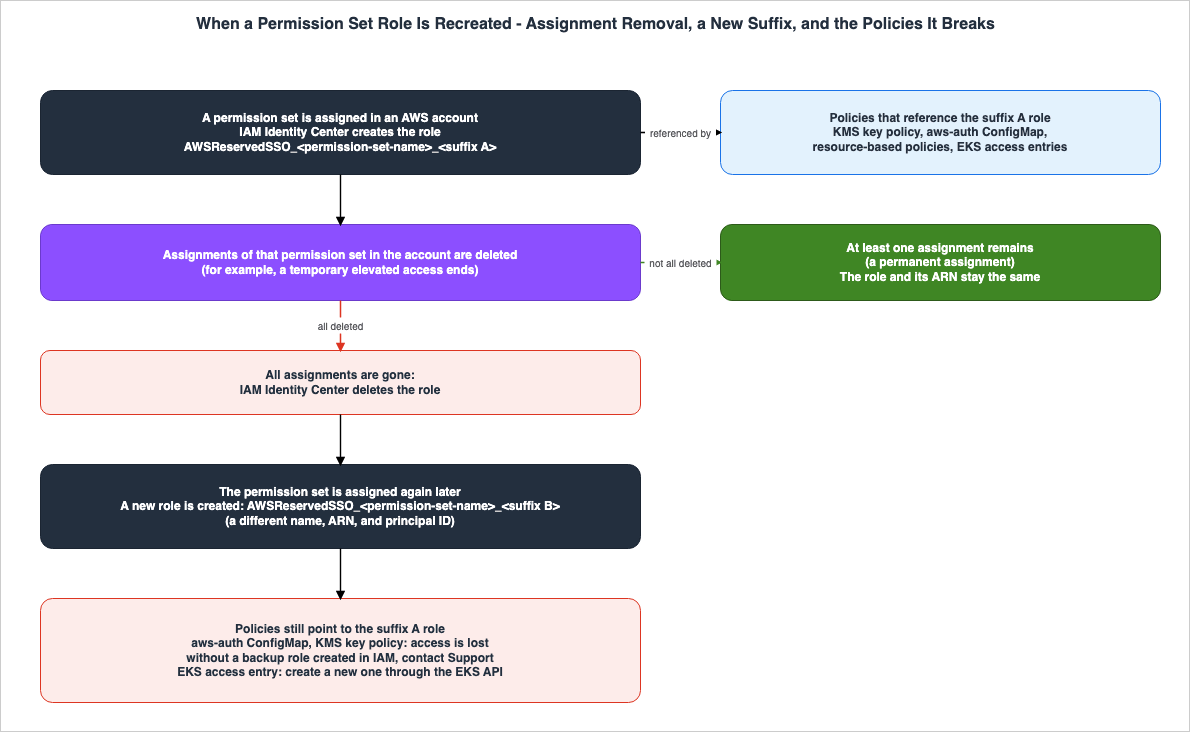
The referencing page describes the conditions under which roles are deleted, and the naming conventions for newly created roles, as follows:If you delete all assignments to this permission set in the AWS account, the corresponding role that IAM Identity Center created is also deleted. If you make a new assignment to the same permission set later, IAM Identity Center creates a new role for the permission set. The name and ARN of the new role include a different, unique suffix.Within an AWS account, when all assignments for a particular permission set are deleted, Identity Center will delete the role it created (Stated). If the same permission set is reassigned later, Identity Center will create a new role. The name and ARN of this new role will include a unique suffix, different from the previous one (Stated).
The condition is that all assignments for that permission set are deleted within that account. If even a single assignment for the same permission set remains in the account, the condition described in this section is not met. Chapters 4 and 7 of this article use this condition to differentiate the ways to build elevated access.
2.3 A Recreated Role Is a Different Principal from the Previous Role
It is not simply a matter of a different ARN. Even if the ARN is the same, IAM and EKS will not treat the recreated principal as the previous one.The Principal element page states that when you enter the role's ARN in the
Principal element of the trust policy, it is converted to the role's unique principal ID upon saving (Stated). Regarding role deletion, it states:However, if you delete the role, then you break the relationship. The policy no longer applies, even if you recreate the role because the new role has a new principal ID that does not match the ID stored in the trust policy.When a role is deleted, the relationship is severed. Even if you recreate the role, the new role's principal ID will not match the ID stored in the policy, so the policy will no longer be effective (Stated). The trust policy blog post also states that AWS identifies a role in the
Principal element by its unique RoleId (Stated).The EKS access entries page describes access entries as follows:
If you don’t delete the access entry and ever recreate the IAM principal, even if it has the same ARN, the access entry won’t work.If you recreate an IAM principal, even if the ARN is the same, the previous access entry will no longer be valid (Stated). This is because EKS stores the principal's role ID with the access entry (Stated). Even if you delete the principal, the access entry will not be automatically deleted (Stated).
When a permission set role is recreated, its suffix also changes. Therefore, if the conditions outlined in Section 2.2 are met, both policies that reference the ARN and those that use the ID for identification, as well as the access entries, will continue to refer to the previous role (Inference, combining the statements in Section 2.2 and this section).
3. What Breaks When the Role Is Recreated
This chapter will detail what happens during recreation, specifically examining the impact on each location where the permission set role's ARN is written.3.1 Two Examples the Referencing Page Gives
The referencing page describes the effect of recreation as follows:The suffix change in the new name and ARN for the role will cause any policies that reference the original name and ARN to be out-of-date, which disrupts access for individuals who use the corresponding permission set.When the suffix changes, policies that reference the original name and ARN become out of date, and access is disrupted for the people who use that permission set (Stated). The referencing page gives the following two examples (Stated).
- The
aws-authConfigMap of an EKS cluster that uses theaws-authConfigMap for cluster access - The resource-based policy of a KMS key (key policy)
These are two locations where issues can arise that may be difficult to resolve independently. If the permissions on an EKS cluster break, you may lose the ability to edit the
aws-auth ConfigMap. Similarly, if a KMS key policy breaks, you may lose the ability to edit the key policy (Inference, based on the following text). The referencing page states the following about the case where there is no backup role created in IAM.If you don’t have a backup IAM role with permissions to update the aws-auth ConfigMap or the AWS KMS key policy, contact Support to regain access to those resources.If there is no backup IAM role with permissions to update the
aws-auth ConfigMap or KMS key policy, you will need to contact Support to regain access (Stated).3.2 Other Resource-Based Policies
The referencing page states the following about the resource-based policies of other services:Although you can update resource-based policies for most AWS services to reference a new ARN for a role that corresponds to a permission set, you must have a backup role that you create in IAM for Amazon EKS and AWS KMS if the ARN changes.Most services' resource-based policies can be updated to include new ARNs (Stated). EKS and KMS require backup roles created in IAM to be in place in the event that ARNs change (Stated).
While policies for other services can be updated, access previously permitted by those policies may be restricted until the update is applied (Inference, based on statements in Section 3.1). If you build elevated access by adding and removing assignments (Section 4.1) and write the permission set role used for temporary elevated access in S3 bucket policies or Secrets Manager resource policies, you need to update them each time elevated access is granted (Inference).
3.3 EKS Access Entries
EKS access entries provide a separate method for managing cluster access, distinct from theaws-auth ConfigMap. The referencing page has the following Note:By using Amazon EKS access entries, you can use an IAM principal with Amazon EKS permissions to regain access to a cluster without contacting Support.Using access entries, IAM principals with EKS permissions can regain access to the cluster without contacting Support (Stated). The referencing page recommends managing cluster access in EKS using access entries (Stated).
This does not mean that access entries are immune to the impact of recreation. As described in Section 2.3, a previous access entry does not work for a recreated principal (Stated). The EKS access entries page also states that, once an access entry is created, the associated principal cannot be changed (Stated). Therefore, if a permission set role is recreated, a new access entry will need to be created with the new ARN (Inference). The key difference is that the remediation process relies on the EKS API, and does not require access to the cluster itself (Inference, based on the note on the referencing page).
The EKS access entries page also describes differences in how ARNs are formatted.
ARNs in aws-auth ConfigMap entries, can’t include a path.Access entries allow you to specify the ARN of a role, including its path. In contrast, the ARN specified in the
aws-auth ConfigMap cannot include a path (Stated). Since a permission set role's ARN includes the path aws-reserved/sso.amazonaws.com/, you will need to specify the ARN without the path when configuring the aws-auth ConfigMap (Inference, based on a combination of information from Section 2.1 and this section). The overall configuration of access entries and the aws-auth ConfigMap is described on this site at Who Can Call the Kubernetes API on Amazon EKS.3.4 Differences by How the ARN Is Written
The Principal element page describes how to write principals for resource-based policies within Identity Center, as follows:In IAM Identity Center, the principal in a resource-based policy must be defined as the AWS account principal. To specify access, reference the role ARN of the permission set in the condition block.Within resource-based policies, Identity Center principals are written as AWS account principals. To specify access, you must reference the permission set role's ARN in a condition block (Stated). The same page also states that you cannot use wildcards for parts of the principal's name or ARN (Stated).
You cannot use a wildcard to match part of a principal name or ARN.An example of a trust policy from the referencing page shows this format. The
Principal element specifies an AWS account, and the Condition element uses ArnLike and aws:PrincipalArn, using a wildcard for the end of the ARN (Stated). The referencing page explains this example as follows.This means that the policy allows the permission set to assume the role created in IAM even if the role ARN for the permission set changes.Even if the permission set role's ARN changes, the permission set can still assume the role created in IAM (Stated). However, this example is a trust policy for a backup role created in IAM (Stated). The referencing page does not contain any statements recommending the use of conditions with wildcards at the end of the ARN in key policies or other resource-based policies (No statement found).
The following table summarizes the differences based on how ARNs are written:
| How the ARN Is Written | After Recreation | Source State |
|---|---|---|
Write the permission set role's ARN in the Principal element | Fails. This is because the suffix changes. Trust policies determine identity based on ID, so they will fail even if the ARN is the same. | Stated (Principal element page; the statement regarding ID applies to trust policies) |
| Write the ARN, including the suffix, in the condition block | Fails. This is because the suffix changes. | Inference |
| Use a wildcard for the end of the ARN in the condition block | Works | Stated (as an example of a trust policy, from the referencing page). Use in key policies and other resource-based policies is Inference |
| Write a role created in IAM, and have the permission set assume that role | Works. This is because roles created in IAM are not recreated. | Stated (recommended by the referencing page) |
This article does not present conditions with wildcards at the end of ARNs in key policies or resource-based policies as a recommendation. If you choose to use them, you will be applying the format shown in the user guide example to policies other than trust policies (Inference).
4. Four Ways to Build Temporary Elevated Access
This chapter outlines four methods for building temporary elevated access, comparing them based on whether the permission set role's ARN changes.The elevated access page describes how to request, approve, and track the use of temporary elevated access (also known as just-in-time access) for specific tasks, granting permissions for a defined period (Stated). Furthermore, the following note is included:
If you are using resource-based, Amazon Elastic Kubernetes Service or AWS Key Management Service, see Referencing permission sets in resource policies, Amazon EKS Cluster config maps, and AWS KMS key policies before you choose your just-in-time solution.If you are using resource-based policies, EKS, or KMS, refer to the referencing page before selecting the just-in-time approach (Stated).
4.1 Adding and Removing Assignments
One approach involves creating an assignment upon approval and deleting it upon completion. The TEAM blog post describes how TEAM activates and ends elevated access as follows:To activate access, a TEAM orchestration workflow creates a temporary account assignment, which links the requester’s user identity in IAM Identity Center with the permission set and account in their request.When elevated access ends, or is revoked, the TEAM orchestration workflow automatically deletes the temporary account assignment for this request.TEAM creates a temporary assignment when it activates elevated access and deletes the assignment when elevated access ends (Stated).
In this way, when elevated access ends, if no assignment of that permission set remains in the account, the role is deleted (the condition in Section 2.2; Inference). The next elevated access creates a role with a different suffix. Therefore, if a policy references the role's ARN, the policy breaks each time elevated access is granted (Inference). If the permission set role's ARN is not referenced in any policy, nothing breaks in this way (Inference).
4.2 Adding and Removing Assignments with a Permanent Assignment in Place
Secondly, this method involves using a permission set for elevated access, with one assignment permanently assigned, while adding and removing other users' assignments. As recommended on the referencing page, it is advisable to have one assignment permanently assigned (Stated).Because the assignment is permanent, IAM Identity Center won’t delete the corresponding role, which eliminates the renaming risk.When an assignment is permanent, IAM Identity Center will not delete the role, eliminating the risk of the role name changing (Stated). An example on the referencing page illustrates this by assigning the
EKSAccess permission set permanently to a group of administrators on an account (Stated).With this permanent assignment in place, creating or removing other assignments for the same permission set in the same account will not trigger the "delete all" condition described in Section 2.2 (Inference based on the conditions outlined in Section 2.2). Therefore, the role ARN will remain unchanged, and elevated access can be built with assignment modifications (Inference).
Users who have a permanent assignment will always possess the permissions granted by that permission set. As shown in an example on the referencing page, the holder is a group of administrators (Stated). The selection of users for a permanent assignment should be determined based on the level of permissions granted by the permission set (Inference).
4.3 Assuming Roles Created in IAM
Third, you can grant strong permissions to roles created in IAM and then have the permission set assume those roles. The referencing page's second recommendation is to include at least one role created in IAM in theaws-auth ConfigMap and the KMS key policy and let the permission set assume that role (Stated). The trust policy should be written in the format described in Section 3.4.In this approach, the policy should specify the ARN of the IAM role. IAM roles created in this manner will not be deleted even if the permission set's assignment is removed (Inference). Therefore, the policy will remain in effect (Inference).
Assuming a different role from a permission set role's session is referred to as role chaining (Inference, based on the definition on the IAM roles page). The IAM roles page states that the session duration for role chaining is as follows:
Role chaining limits your AWS Management Console, AWS CLI or AWS API role session to a maximum of one hour.In role chaining, the session lasts for a maximum of one hour (Stated). If the elevated access task takes longer than one hour, it will be necessary to re-assume the role (Inference).
4.4 Assigning an Existing IAM Role with Account Access Manager
Fourth, account access manager allows you to assign existing IAM roles to Identity Center users and groups. Account access manager, a feature of IAM announced on August 10, 2026, was expanded on November 18, 2026, with the addition of AWS managed policies (Stated).The account access manager page compares IAM roles with account access manager, permission sets, and IAM federation, describing the roles within permission sets as "provisioned as immutable IAM roles" (Stated). With account access manager, users create roles either through Infrastructure as Code (IaC) or through the IAM console (Stated).
In this configuration, users determine the name and ARN of the roles. Even if an assignment (referred to as an "entitlement" within account access manager) is deleted, the account access manager page does not state that the roles created by users will be deleted (No statement found). Based on this, this article infers that the roles will not be deleted, and their ARNs will remain unchanged (Inference). The mechanics of the assignment process are detailed on this site's What AWS Account Access Manager Assigns page.
4.5 Decision Table
The following table summarizes the four methods.| Method | Does the Role ARN Change? | Policies That Reference the ARN | What Remains After Elevated Access Ends | Source State |
|---|---|---|---|---|
| Adding and removing assignments | Changes if the last assignment in that account is deleted | Break at the next elevated access | Role sessions already issued | Stated (referencing page, TEAM blog post). Breaking is Inference |
| Adding and removing with a permanent assignment in place | Does not change | Do not break | Role sessions already issued, and the permissions of the permanent assignment's holder | Stated (referencing page recommendation). Not changing with additions and removals is Inference |
| Assuming a role created in IAM | The role created in IAM does not change | Do not break | The session of the assumed role (maximum 1 hour) | Stated (referencing page recommendation, IAM roles page). Not breaking is Inference |
| Assigning an existing IAM role with account access manager | Does not change | Do not break | Role sessions already issued | Inference (no statement on deletion found on the account access manager page) |
Consider these options in the following order:
- If the role ARN for the permission set used for elevated access is not written in any policy, adding and removing assignments is sufficient (Inference).
- If the ARN is written in a key policy,
aws-authConfigMap, or resource-based policy, keep one permanent assignment in that account (Stated, referencing page recommendation). - For EKS and KMS, in addition to a permanent assignment, include a role created in IAM (Stated, referencing page).
- If you want to define the role name, path, and trust policy yourself, consider assigning an existing IAM role via account access manager (Inference).
5. Ending Elevated Access Early
This chapter outlines key considerations when aiming to end elevated access ahead of schedule. A comprehensive overview of revocation for different credential types can be found on this site in What Stays Valid After You Revoke on AWS - Role Sessions, Presigned URLs, Portal Sessions, Tokens, and Open Connections.5.1 Ending a Portal Session Does Not End Role Sessions
The sessions page includes the following note:Ending an active session for an IAM Identity Center user doesn't end any active IAM role sessions in the AWS Management Console or AWS CLI.Even if a user's portal session in Identity Center is ended, the role sessions in the AWS Management Console and AWS CLI do not end (Stated).
5.2 Deleting an Assignment Does Not End Role Sessions
The authentication sessions page states that when a user's access to an AWS account is removed, or when a user is removed from a group, existing AWS account sessions will be lost within 12 hours. The duration is determined by the session duration of the role configured in the permission set (or of the IAM role when using account access manager) (Stated). Deleting a permission set assignment is equivalent to removing a user's or group's access to an AWS account (Inference). The same page also states the following regarding role sessions:IAM role sessions operate independently and only end when their configured duration expires.Role sessions operate independently and end only when the configured duration expires (Stated).
The TEAM blog post also clarifies that the elevated access period and the session duration are separate, and includes the following note:
Sessions invoked just before elevated access ends might remain valid beyond the end of the approved elevated access period.Sessions initiated near the end of the elevated access period may remain valid beyond the approved period (Stated). The TEAM blog post suggests that if this is a concern, you should consider shortening the session duration of the permission set, for example, to one hour (Stated).
5.3 Session Duration
The session duration page indicates that the default session duration for a permission set is 1 hour (Stated).The minimum session duration is 1 hour, and can be set to a maximum of 12 hours.The minimum session duration is 1 hour, and the maximum is 12 hours (Stated). When using a permission set for elevated access, shortening the session duration can also shorten the duration of items remaining as described in Section 5.2 (Inference).
5.4 A Deny Policy Placed in Advance
The Deny policy page recommends that you proactively configure a Deny policy within your service control policies (SCPs), using the conditionidentitystore:userId, to stop the role sessions a user is actively using (Stated). It suggests using a placeholder ID that is not valid in the policy during normal operation, and then updating it to the user's actual ID when you need to revoke access (Stated).The revoke page includes the following instruction at the end of the user access revocation process:
Leave the Deny policy in place for at least 12 hours. Otherwise, the user with an active IAM role session will have restored actions with the IAM role.The Deny policy should remain in effect for at least 12 hours. Otherwise, users with active sessions for that role may be able to resume operations using the role (Stated). The revoke page also notes that even if a user is disabled, users with portal sessions may continue to assume new roles until their access is fully removed (Stated).
Even when ending temporary elevated access early, simply deleting the assignment is not sufficient (Inference). This article will only give the key points regarding how to utilize the preemptive Deny policy.
6. Emergency Access Paths
This chapter describes the alternative paths to be used when the normal path is unavailable, outlining them for each of the three failure modes defined in FND05-BP02.The elevated access page recommends setting up emergency access to the AWS Management Console for business continuity (Stated).
To ensure business continuity, we recommend that you set up emergency access to the AWS Management Console.6.1 Three Failure Modes
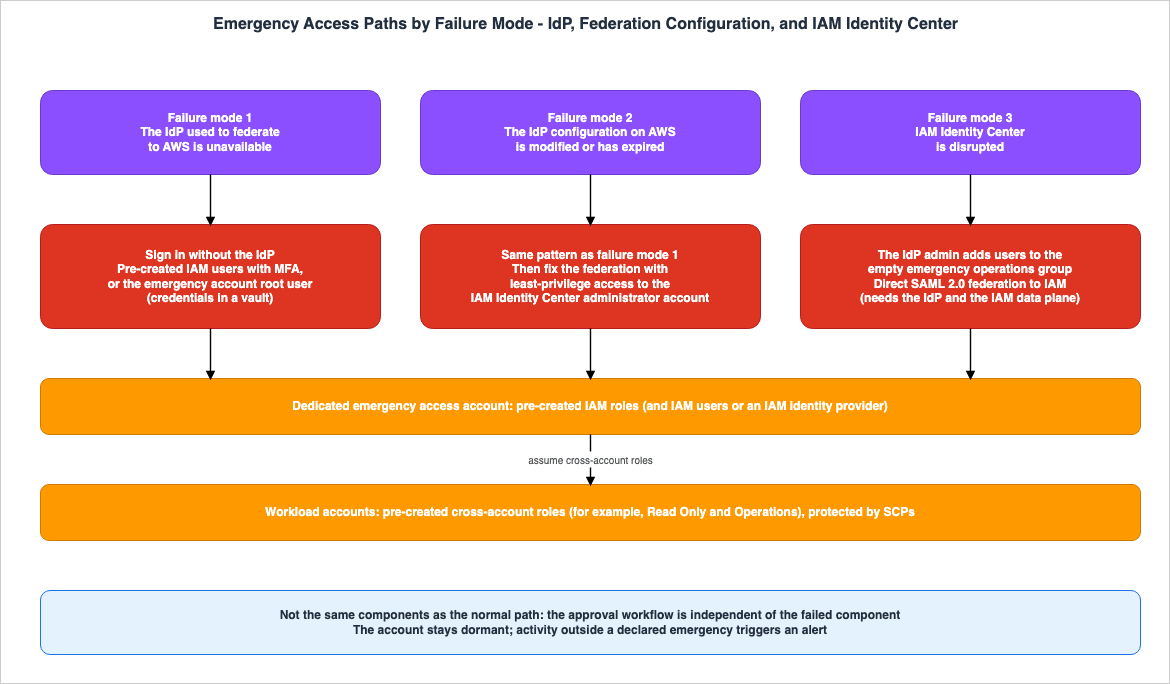
FND05-BP02 specifies that emergency access procedures should be designed for specific failure modes (Stated). The following three failure modes are listed (Stated):- The IdP used for federation with AWS is unavailable.
- The IdP configuration on the AWS side (either Identity Center or an IAM Identity Provider) has been modified, or the imported X.509 certificate has expired.
- Identity Center is unavailable (due to an Identity Center failure or an AWS Region outage).
FND05-BP02 outlines the following design principles:
The architectural principle is isolation, meaning that your emergency access path must not depend on the same components as your primary access path.Emergency access paths must not rely on the same components as the normal access path (Stated). These components include the IdP itself, the infrastructure on which the IdP is hosted, the network paths that reach the IdP, and the configuration data that supports the IdP (Stated).
6.2 Failure Mode 1: The IdP Is Unavailable
When the IdP is unavailable, users cannot federate to their AWS accounts (Stated). FND05-BP02 describes using a pre-created AWS account for emergency access. This account will contain an IAM role that can assume cross-account roles for accounts requiring emergency access (Stated). There are two methods (Stated):- Pre-created IAM users: Create as few as possible, one user per emergency administrator. Apply strong passwords and Multi-Factor Authentication (MFA). While each user can be tracked via CloudTrail, this will result in multiple long-term credentials.
- Root user of the emergency access account: Apply a strong password and multiple MFA tokens, storing them in the company's secure credential vault. While there is only one set of credentials, multiple administrators will share them, so tracking usage will rely on the vault's audit logs.
In this failure mode, the emergency access configuration described in the Identity Center user guide cannot be used (Section 6.4). The complete process for using the root user is detailed in this site's Root Sessions in AWS Organizations.
6.3 Failure Mode 2: The AWS-Side IdP Configuration Is Modified or Has Expired
If the AWS-side configuration is modified incorrectly, or if the X.509 certificate expires without being replaced, federation will fail (Stated). FND05-BP02 states that the procedure follows the same steps as failure mode 1 (Stated). The only access the identity administrators need is least-privilege access to the Identity Center administrator account to correct the federation settings (Stated).In this failure mode, the IdP is operational. However, the path relying on federation from the IdP to Identity Center is unavailable (Inference).
6.4 Failure Mode 3: IAM Identity Center Is Unavailable
The configuration for the emergency access pages in the Identity Center user guide is specific to this failure mode. The user guide states the conditions under which this configuration functions:This configuration works when IAM Identity Center is unavailable, but the IAM data plane and your external identity provider (IdP) are availableThis configuration works when Identity Center is unavailable, but the IAM data plane and an external IdP are operational (Stated). If you do not want to rely on an external IdP, consider an alternative break-glass access method (Stated).
The key elements of this configuration are as follows (Stated):
- Create an emergency operations account in the organization.
- Directly federate the IdP to the emergency operations account using SAML 2.0.
- Create an IdP federation role in the emergency operations account. Create an emergency operations role in each workload account.
- Create an emergency operations group in the IdP with no members.
The emergency access pages describe the normal state as follows:
During normal operations, no one has access to the emergency operations account because the emergency operations group in your IdP has no members.During normal operation, no one can access the emergency operations account because the IdP's emergency operations group has no members (Stated). In the event of a failure, trusted users are added to the group in the IdP. Users sign in to the IdP, assume a role in the emergency operations account, and then switch to the emergency access role for the workload account (Stated).
The emergency access pages recommend limiting roles to the necessary accounts, such as production, and starting with two roles: Read Only and Operations (Stated). As a final step in preparation, disable the IdP's direct federation application to prevent normal usage (Stated). Once Identity Center is restored, sign users out, disable the application, and remove users from the group. The roles remain as a disabled backup path (Stated).
The behavior during an outage of the primary Region for Identity Center is described in Chapter 6 of IAM Identity Center Across Regions on this site.
6.5 Not Relying on the Same Components as the Normal Path
FND05-BP02 requires that the emergency access path be separated from normal components, not only for the IdP but also for the approval process (Stated).The approval workflow itself must be independent of the failed component.If granting emergency access requires approvers to authenticate through the same identity provider that is down, you have created a circular dependency.The approval workflow itself must be independent of the failed component. If approvers must authenticate through the IdP that is unavailable to grant emergency access, this creates a circular dependency (Stated).
Utilizing the mechanism of temporary elevated access for approving emergency access can lead to this circular dependency. Approval mechanisms that operate on both Identity Center and the IdP, like TEAM, cannot be used in failure modes 1 or 3 (Inference based on the FND05-BP02 document and the TEAM blog post). The Identity Center user guide describes failover procedures that accept requests for inclusion in the emergency group through existing channels, such as email or Slack (Stated).
Furthermore, FND05-BP02 also specifies the following (Stated):
- Pre-provision the IAM resources required for emergency access. This avoids reliance on control plane APIs that may be unavailable during an emergency and avoids eventual consistency delays.
- Keep the emergency access accounts dormant during normal operation. Any sign-ins or API activity outside of documented emergency scenarios indicates misuse or unauthorized use and must be investigated immediately.
- Prevent the deletion or modification of cross-account roles using SCP.
- Aggregate CloudTrail logs and use EventBridge to detect activity related to emergency roles, notifying administrators if activity occurs outside of emergency situations.
- After emergency use, replace credentials and regularly practice the procedures.
The emergency access pages also recommend creating their configuration (Section 6.4) before a disruption occurs. If the ability to create the necessary IAM roles is also disrupted, it will be impossible to create the configuration (Stated).
We recommend that you deploy this configuration before a disruption occurs because you cannot create the configuration if your access to create the required IAM roles is also disrupted.7. Mitigations for EKS and KMS
This chapter summarizes the mitigations for entering the permission set role's ARN, specifically for EKS and KMS, following the recommendations outlined in the referencing page.7.1 Keep One Permanent Assignment
One initial recommendation on the referencing page is to maintain at least one assignment (Stated). This assignment should be for an account that holds roles referenced in theaws-auth ConfigMap, KMS key policies, and other service-based resource policies (Stated). Even if you use a permission set temporarily for elevated access, if you specify its role ARN in these, you should maintain a single assignment for that account (see Section 4.2).7.2 Include a Backup Role Created in IAM
The second recommendation on the referencing page is to include at least one role created in IAM in theaws-auth ConfigMap and the KMS key policy (Stated). This role must be able to access the EKS cluster or manage the KMS key policy, and the permission set must be able to assume it (Stated).The following is the referencing page's example of a trust policy, with the Region replaced. It specifies an account in the
Principal element and, in the Condition element, uses a wildcard to match the ARN of the role associated with the AdministratorAccess permission set.{
"Version": "2012-10-17",
"Statement": [
{
"Effect": "Allow",
"Principal": {
"AWS": "arn:aws:iam::111122223333:root"
},
"Action": "sts:AssumeRole",
"Condition": {
"ArnLike": {
"aws:PrincipalArn": "arn:aws:iam::111122223333:role/aws-reserved/sso.amazonaws.com/<aws-region>/AWSReservedSSO_AdministratorAccess_*"
}
}
}
]
}The referencing page states that by including a role created in IAM in the policy in this way, you have emergency access to the EKS cluster, KMS keys, and other resources, even if the permission set or all of its assignments are accidentally deleted and recreated (Stated).
7.3 Manage EKS Access with Access Entries
The referencing page recommends managing access to your EKS cluster using access entries (Stated). As mentioned in Section 3.3, access entries are also affected by recreation (Stated), but can be corrected through the EKS API (Inference). The design of access entries, and the migration from theaws-auth ConfigMap, are detailed in this site's Who Can Call the Kubernetes API on Amazon EKS.8. What to Check Before Choosing TEAM or a Partner Product
The elevated access page states that Identity Center integrates with products from AWS Security Competency partners, listing the names of products that AWS has validated (Stated). Because the list of products may change after the verification date, this article does not reproduce the list here and directs you to the elevated access page. TEAM is an open-source solution published on the AWS Samples GitHub repository (Stated; TEAM repository). As of the verification date, the latest release is v1.5.2, released on September 23, 2026 (Stated).Before comparing products, verify the following five points. This article does not provide answers for each product individually.
- Does the product build elevated access through the creation and deletion of Identity Center permission set assignments? If so, Section 2.2 applies. TEAM functions in this manner (Stated; TEAM blog post).
- Can the permission sets used with the product allow for a single assignment to remain permanently? If so, the role ARN will not change (Section 4.2; Inference).
- Does the product build elevated access through the use of account access manager assignments? A What's New post dated November 18, 2026, states that account access manager assignments are being integrated with third-party products that manage identities and entitlements (Stated).
- What happens to existing role sessions when elevated access ends? If only the assignment is deleted, the sessions may remain active (Chapter 5).
- Does the approval process rely on an IdP and Identity Center? If so, the product cannot be used for emergency access approvals when the IdP or Identity Center is unavailable (Section 6.5; Inference).
9. Information Not Found in the Sources
As of the verification date, the following was not found in the sources (No statement found). This article does not write about them.- What happens to existing sessions associated with a role when that role is deleted after its last assignment has been removed? The table on the authentication sessions page says that existing AWS account sessions are lost within 12 hours when access is removed, but it does not specify the behavior when a role is deleted.
- Whether it is recommended or requires caution to use conditions in key policies or resource-based policies that use a wildcard at the end of the ARN of a permission set role.
- That after deleting an account access manager entitlement, the assigned IAM role remains.
- How each partner product builds elevated access.
10. Frequently Asked Questions About Temporary Elevated Access and Emergency Access
This chapter answers questions based on the reader profile outlined in Section 1.1, using the content from Chapters 2 through 9.Q1. If a permission set assignment is deleted, is the permission set role deleted too?
The role is only deleted when all assignments of that permission set in the account are deleted. If even one assignment remains, the role will not be deleted. If you assign the permission set again later, a new role will be created with a different suffix (see Section 2.2).Q2. Can a KMS key policy reference the ARN of a permission set role?
Yes, it can, but it will become invalid if the role is recreated. It is recommended to maintain one permanent assignment for that account and also include the ARN of the backup role you created in IAM in the key policy. Without a backup role, you need to contact Support (see Section 3.1 and Chapter 7).Q3. Does a wildcard at the end of the ARN avoid the effect of recreation?
ThePrincipal element does not allow wildcards for parts of the principal's name or ARN. An example of using ArnLike with a wildcard at the end of the ARN in a condition block can be found in the user guide, in the trust policy of a backup role created in IAM. The user guide does not contain any recommendations to use this format in key policies or resource-based policies (Section 3.4).Q4. Are EKS access entries unaffected by recreation?
No, they are affected. When a principal is recreated, even if the ARN remains the same, the previous access entry will no longer be effective. However, access entries can be recreated through the EKS API, allowing you to correct them without entering the cluster (see Section 3.3).Q5. Does deleting the assignment end the elevated access immediately?
No, it does not. Even if you end the portal session or delete the assignment, sessions for roles that have already been initiated may remain active until the configured duration has passed. To stop them before they expire, use the Deny policy that you previously configured (see Chapter 5).Q6. Can the emergency access configuration in the Identity Center user guide be used when the IdP is down?
No, it cannot. This configuration is designed to be used when Identity Center is unavailable, but the IAM data plane and an external IdP are still operational. In the event of an IdP outage, use either the IAM users created beforehand or the root user account designated for emergency access (see Sections 6.2 and 6.4).Q7. Can the approval mechanism for temporary elevated access also approve emergency access?
Not if that mechanism relies on an IdP or Identity Center that is down. FND05-BP02 states that the approval process itself must be independent of any failing components (Section 6.5).Q8. Should I look at SEC03-BP03?
At the time of verification, the best practice for emergency access in the Framework is FND05-BP02. At that same time, SEC03-BP03 is a different best practice, Analyze public and cross-account access (see Section 1.6).11. Summary
Before designing temporary elevated access and emergency access, check the following:- Where is the ARN of the permission set role used for elevated access written – in the key policy,
aws-authConfigMap, resource-based policy, or access entries (Chapter 3)? - If it is written, does the account have at least one permanent permission set assignment (Section 4.2, Section 7.1)?
- Do EKS and KMS include roles created in IAM that can be assumed from the permission set (Section 7.2)?
- Is access for the EKS cluster managed through access entries (Section 7.3)?
- When ending elevated access early, can you leverage pre-configured Deny policies? Is the permission set session duration short (Chapter 5)?
- For emergency access, have you prepared separate paths for each of the three failure modes, and are the procedures for using each path clearly documented (Chapter 6)?
- Does the emergency access approval path rely on potentially unavailable IdPs or Identity Center? Is the emergency access account dormant during normal operation (Section 6.5)?
12. References
- Referencing permission sets in resource policies, Amazon EKS Cluster config maps, and AWS KMS key policies - AWS IAM Identity Center
- Temporary elevated access for AWS accounts - AWS IAM Identity Center
- Set up emergency access to the AWS Management Console - AWS IAM Identity Center
- Summary of emergency access configuration - AWS IAM Identity Center
- How to plan your access model - AWS IAM Identity Center
- Emergency preparation tasks - AWS IAM Identity Center
- Emergency failover process - AWS IAM Identity Center
- Return to normal operations - AWS IAM Identity Center
- Revoke user access - AWS IAM Identity Center
- Use a Deny policy to revoke active user permissions - AWS IAM Identity Center
- View and end active sessions for your workforce users - AWS IAM Identity Center
- Understanding authentication sessions in IAM Identity Center - AWS IAM Identity Center
- Set session duration for AWS accounts - AWS IAM Identity Center
- AWS JSON policy elements: Principal - AWS Identity and Access Management
- IAM roles - AWS Identity and Access Management
- Account access manager - AWS Identity and Access Management
- Create access entries - Amazon EKS
- Grant IAM users access to Kubernetes with EKS access entries - Amazon EKS
- FND05-BP02 Establish emergency access mechanisms - AWS Well-Architected Framework
- Release notes - AWS Well-Architected Framework
- SEC03-BP03 Analyze public and cross-account access - AWS Well-Architected Framework
- SEC03-BP03 Establish emergency access process - AWS Well-Architected Framework (2025-02-25 version)
- Temporary elevated access management with IAM Identity Center - AWS Security Blog
- How to use trust policies with IAM roles - AWS Security Blog
- AWS Identity and Access Management streamlines assignment of IAM roles to workforce users with account access manager - AWS What's New
- AWS IAM account access manager is now even easier to deploy and use - AWS What's New
- aws-samples/iam-identity-center-team - GitHub
- Changing the Identity Source in IAM Identity Center Is Not Symmetric - What Survives in Each Direction, and What the Revision Field Guards
- AWS IAM Identity Center Complete Setup Guide - Multi-Account SSO Design Patterns from Organization Structure to ABAC
- Who Can Call the Kubernetes API on Amazon EKS - One-Way Authentication Modes, Which Mapping Wins, and Access Policies Plus RBAC
- Root Sessions in AWS Organizations - Centralized Root Access, Task Policies, and the Break-Glass You Still Need
- What AWS Account Access Manager Assigns - Existing IAM Roles, Identity Center Groups, and What Trust Policies Still Decide
- IAM Identity Center Across Regions - What the Primary Region Keeps, What Additional Regions Serve, and How Trusted Identity Propagation Crosses Them
- AWS Multi-Account Operational Patterns - Control Tower, Organizations, SCPs
References:
Tech Blog with curated related content
Written by Hidekazu Konishi