What Stays Valid After You Revoke on AWS - Role Sessions, Presigned URLs, Portal Sessions, Tokens, and Open Connections
First Published:
Last Updated:
This article provides a design guide, presented in a table, outlining the scope of a revocation action for each type of credentials. Each row in the table is written from statements in the primary sources. Rows where no statement was found will be marked as such, without making assumptions. It also indicates what actions should be taken for what revocation does not reach, and the order in which to perform revocations.
To summarize, the following is the key takeaway: according to the IAM user guide, temporary credentials issued by AWS STS remain valid until their expiration date and cannot be revoked. Achieving a similar effect requires modifying permissions to reject access on each use. As this article reads it, a revocation only applies to actions that pass a permissions evaluation after the revocation is performed. Ongoing downloads, established database connections, service-side caches, and application validations that are unaware of the revocation will either bypass the evaluation or reach that evaluation point at a later time. When revoking, preserve the records first, then close the entry points, reject issued credentials, address unreachable items with expiration dates, connection management, and caches, and finally, verify using CloudTrail.
This article was written based on documentation reviewed on November 25, 2026 (Japan Standard Time). This article has not been tested on live systems. Pricing information is not included. This article was written prior to AWS re:Invent 2026 (November 30 – December 4, 2026) and does not include any information that will be presented at that event.
Related articles on this site:
- Stopping an AI Agent on AWS - What Each Control Stops, What Keeps Running, and Who Can Undo It
- User Pool Sessions in Amazon Cognito - SSO and Token Sessions, the Per-User Limit, and What Revocation Does Not Reach
- IAM Authentication to Databases, Caches, and Streams on AWS - Token Lifetime, What Revoking Access Does to Open Connections, and the Identity Inside the Service
- NIST IR 8587 Mapped to AWS Controls - Signing Keys, Audience, Token Lifetimes, Revocation, and What the Settings Leave Open
- AWS Security Incident Response Playbooks - First-Response Runbooks for Common Scenarios
- Amazon S3 Security and Access Control Guide - Bucket Policies, IAM, Access Points, Block Public Access, and Encryption
- Impersonation or Delegation - Amazon Cognito Token Exchange, the act Claim, and Down-Scoping
Table of Contents
- 1. Scope and Assumptions
- 2. Role Sessions
- 3. IAM User Access Keys and the Temporary Credentials Derived from Them
- 4. Derived Authentication: Presigned URLs and Cognito Tokens
- 5. The Portal and Federation
- 6. Open Connections and Propagation Delays
- 7. Narrowing Is Not Revocation: GetScopedCredentials
- 8. One Table and the Order to Revoke In
- 9. Frequently Asked Questions About Revocation
- 10. Summary
- 11. References
1. Scope and Assumptions
This chapter first defines the intended audience, the scope of this article, the sources read, and the terms used. The following eight points represent the key conclusions:- Temporary credentials issued by AWS STS are valid until their expiration date and cannot be revoked. The same effect as revocation can be achieved by modifying permissions (Section 1.4).
- Revoke active sessions will reject role sessions assumed up to approximately 30 seconds after the action. It will not affect sessions assumed after that time. Sessions associated with service-linked roles cannot be revoked (Chapter 2).
- When an access key is deactivated, it can no longer be used to make API calls. No statement was found on whether temporary credentials obtained earlier with that key also stop (Chapter 3).
- In general, presigned URLs expire even before their expiration time if the credentials they were created with are revoked. Downloads initiated just before the expiration time continue even after the expiration time (Section 4.1).
- Ending a session in the Identity Center portal does not end the associated role sessions. The role session will remain active until the configured duration, 12 hours or less, expires (Chapter 5).
- Tokens used for RDS IAM authentication do not affect established connections. Revoking a KMS grant may take several minutes for the change to propagate (Chapter 6).
- GetScopedCredentials only narrows the permissions and expiration time; it does not serve as a replacement for revocation. Scoped credentials are revoked together with the parent session (Chapter 7).
- The order of revocation operations is as follows: preserve, close entry points, reject issued credentials, address unreachable items, and verify (Chapter 8).
1.1 Intended Audience
This article is intended for:- Security, incident response, and platform engineers who are responsible for determining that access has stopped when credentials leak, when someone leaves, or when access privileges are revoked.
- Individuals who are familiar with revoking role sessions but would like to see a consolidated view of how presigned URLs, portal sessions, tokens, and open connections are handled.
1.2 Scope and Exclusions
This article addresses the following topics:- What revoking role sessions denies, and what it does not deny.
- IAM user access keys and temporary credentials derived from them.
- Presigned URLs and tokens from Amazon Cognito user pools.
- Identity Center portal sessions, and permission set role sessions.
- Federation from external identity providers (IdPs), and role chaining.
- Connections opened through IAM authentication for RDS, IAM eventual consistency, AWS KMS grants, and data key caching.
- Where GetScopedCredentials fits.
- A table by credential type, and the order to revoke in.
This article does not cover:
- The complete incident response procedures. Refer to the AWS Security Incident Response Playbooks on this site.
- Stopping AI agents. Refer to Stopping an AI Agent on AWS on this site. Chapters 3 and 4 of that document detail, for AI agent roles, what stops, what keeps running, and the order of preservation and revocation.
- The mechanics of Cognito sessions. Refer to User Pool Sessions in Amazon Cognito on this site.
- The mechanics of IAM authentication for databases, caches, and streams on AWS. Refer to IAM Authentication to Databases, Caches, and Streams on AWS on this site.
- The design of temporary elevated access within Identity Center. Refer to this site's article published around the same time, Temporary Elevated and Emergency Access with IAM Identity Center - When a Recreated Permission Set Role Breaks Key Policies and EKS Access.
- Certificate revocation (CRL and OCSP), pricing, and how leaked credentials could be used.
1.3 Verification Date and Sources Read
This article reviewed the following materials on November 25, 2026 (Japan Standard Time). In the text, this article refers to each source by the English name in parentheses. The HTTPLast-Modified values are the ones curl returned.- The "Revoke IAM role temporary security credentials" page in the IAM User Guide (role revocation page).
Last-Modifiedwas November 24, 2026 at 18:58:46 GMT. - The "Permissions for temporary security credentials" page in the IAM User Guide (temporary credentials page).
Last-Modifiedwas November 24, 2026 at 18:59:01 GMT. - The "Disabling permissions for temporary security credentials" page in the IAM User Guide (disabling permissions page).
Last-Modifiedwas November 24, 2026 at 18:58:54 GMT. - The "Permissions for GetScopedCredentials" page in the IAM User Guide (scoped credentials page).
Last-Modifiedwas November 24, 2026 at 18:59:11 GMT. - The "Manage access keys for IAM users" page in the IAM User Guide (access keys page).
Last-Modifiedwas November 24, 2026 at 18:59:09 GMT. - The "Changes that I make are not always immediately visible" section of the "Troubleshoot IAM" page in the IAM User Guide (IAM troubleshooting page).
Last-Modifiedwas November 24, 2026 at 18:58:45 GMT. - The "GetScopedCredentials" page in the AWS STS API Reference (GetScopedCredentials API reference).
Last-Modifiedwas November 24, 2026 at 18:59:53 GMT. - The "Download and upload objects with presigned URLs" page in the Amazon S3 User Guide (presigned URL page).
Last-Modifiedwas November 24, 2026 at 19:00:14 GMT. - The "View and end active sessions for your workforce users" page (sessions page), the "Understanding authentication sessions in IAM Identity Center" page (authentication sessions page), the "Revoke user access" page (Identity Center revocation page), and the "Use a Deny policy to revoke active user permissions" page (Deny policy page) in the IAM Identity Center User Guide.
Last-Modifiedranged from November 24, 2026 at 18:57:54 GMT to 18:58:12 GMT. - The "Grants in AWS KMS" page (grants page), the "Retiring and revoking grants" page (grant deletion page), and the "Using session-specific context with AWS services that cache data keys" section of the "AWS global condition keys" page (data key caching section) in the AWS KMS Developer Guide.
- The "IAM database authentication" page in the Amazon RDS User Guide (RDS IAM authentication page).
Last-Modifiedwas November 25, 2026 at 00:28:23 GMT. - The "Ending user sessions with token revocation" page (Cognito token revocation page) and the "Refresh tokens" page (Cognito refresh token page) in the Amazon Cognito Developer Guide.
- "How to revoke federated users’ active AWS sessions" on the AWS Security Blog (federated sessions blog post). Published on January 16, 2023, with an update on February 6, 2023.
- "Scope down permissions of existing sessions using AWS STS GetScopedCredentials" on the AWS Security Blog (GetScopedCredentials blog post). Published on November 20, 2026.
- "AWS STS announces GetScopedCredentials to scope down permissions at runtime" on AWS What's New (GetScopedCredentials announcement). Posted on November 19, 2026.
This article reviewed all the materials, comparing the original text obtained with curl and information found through searching AWS documentation.
1.4 What Revocation Means
The temporary credentials page describes the temporary credentials issued by AWS STS as follows:After AWS STS issues temporary security credentials, they are valid through the expiration period and cannot be revoked. However, the permissions assigned to temporary security credentials are evaluated each time a request is made that uses the credentials, so you can achieve the effect of revoking the credentials by changing their access rights after they have been issued.The temporary credentials issued by AWS STS are valid until their expiration date and cannot be revoked (Stated). However, the permissions assigned to the temporary credentials are evaluated each time a request is made using those credentials. Therefore, changing the permissions after they are issued can achieve the same effect as revocation (Stated).
This article is based on this statement. Many of AWS's revocation operations do not actually delete the credentials themselves, but instead add a Deny policy, causing requests to be rejected during the next evaluation. Consequently, this article addresses two key questions: first, to which credentials that Deny applies, and second, what continues to function without undergoing a permissions evaluation.
1.5 Terms
This article uses the following terms consistently. The English terms are the user guides' terms.- Revoke: Making role sessions, KMS grants, or Cognito tokens unusable.
- Deactivate, disable: Setting an access key to Inactive, or disabling the access of an Identity Center user.
- Delete: The action of removing an access key, permission set assignment, or role.
- Expire: Temporary credentials, a presigned URL, or a session becoming unusable after its set duration passes.
- End session: Ending an Identity Center portal session.
- AWS access portal session: A session established after signing in to Identity Center.
- IAM role session: A session of temporary credentials obtained by assuming a role.
- Assignment: The process of linking a permission set to a user or group within a specific AWS account.
This article uses the term "assume" exclusively to refer to the process of obtaining temporary credentials by assuming a role.
1.6 Terms for the State of the Sources
This article uses three terms to describe the state of the sources. These terms are also used in the table, and this article will consistently use the English spellings.- Stated: The source contains text explicitly stating the matter in question.
- No statement found: Despite searching the sources mentioned in Section 1.3, using different search terms and exploring different categories, no relevant text was found. This does not indicate that the matter is nonexistent or did not occur.
- Inference: This represents an inference made within this article, and is not based on any specific text from the source materials. This article marks an inference in the same sentence.
The verification date for this article is November 25, 2026 (Japan Standard Time). Time values, procedures, and availability are as of the verification date. All of them can change after the verification date. This article consistently uses the full year when referencing dates.
2. Role Sessions
This chapter describes what Revoke active sessions on an IAM role denies and what it does not deny. The procedures for AI agent roles are covered in Chapters 3 and 4 of this site's Stopping an AI Agent on AWS. This chapter describes how far it reaches, whatever the type of role.2.1 What Revoke Active Sessions Adds
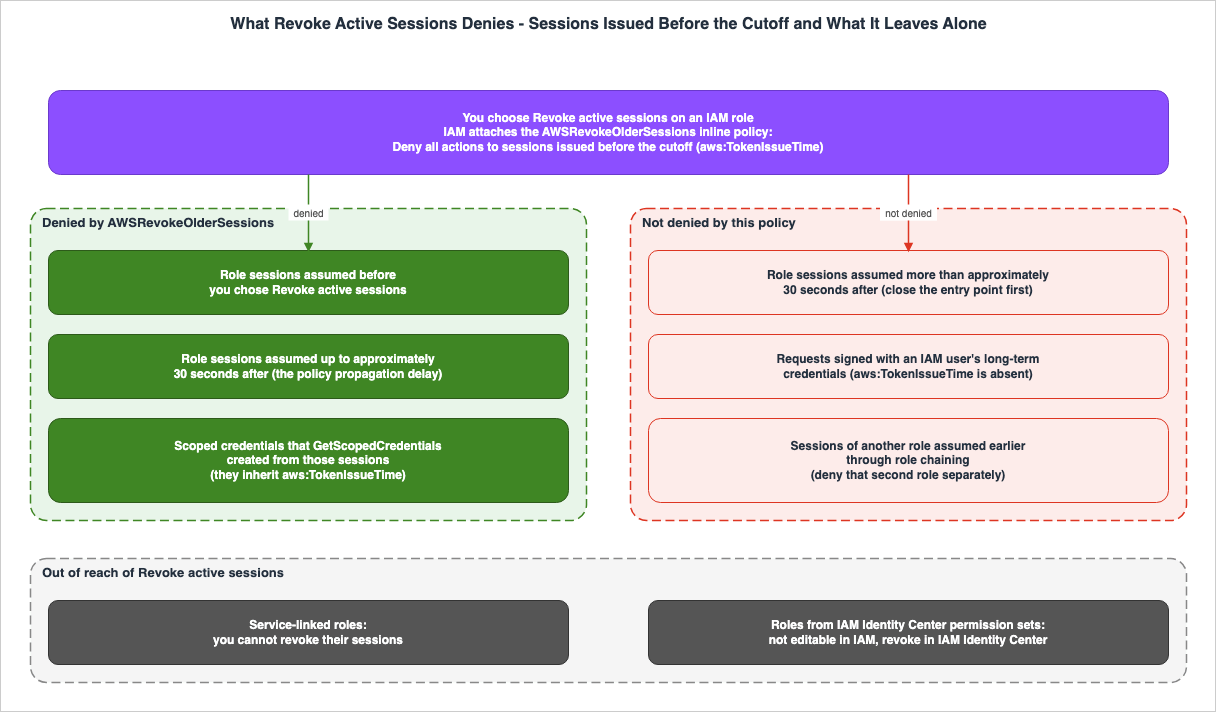
In the IAM console, when you choose Revoke active sessions on the Revoke sessions tab of a role, IAM attaches an inline policy namedAWSRevokeOlderSessions to that role (Stated). This policy denies all actions, and has a condition that applies only to users who assumed the role before the time of the operation (Stated). To perform this action, you must have the PutRolePolicy permission for that role (Stated).The role revocation page describes the scope of the revocation as follows:
After you choose Revoke active sessions, the policy denies all access to users who assumed the role in the past as well as approximately 30 seconds into the future.After selecting Revoke active sessions, this policy will deny access for users who previously assumed the role, as well as those who assume it up to approximately 30 seconds into the future (Stated). The role revocation page states that this approximately 30-second window is intended to account for the delay in the policy propagating to a Region and to address any sessions acquired or renewed during that time (Stated). The same page continues with the following:
Any user who assumes the role more than approximately 30 seconds after you choose Revoke active sessions is not affected.It does not affect users who assume the role more than approximately 30 seconds after Revoke active sessions is chosen (Stated).
The beginning of the role revocation page states that this policy applies only to users who assumed the role before the time of the operation (Stated). However, the procedure section of that page includes users who assume the role up to approximately 30 seconds after it (Stated). There is a discrepancy in how the scope is described on the same page. This article will use the timeframe from the procedure section, approximately 30 seconds.
2.2 It Does Not Stop Anyone Who Can Assume the Role Again
Based on the statement in Section 2.1, Revoke active sessions does not prevent users with the ability to re-assume the role (Inference). If only the role session credentials were compromised, those holding them will be unable to obtain a new session after being rejected (Inference). However, if they had previously assumed a different role within that session before the revocation, that session remains (Section 5.4). If the compromise involved different credentials or a different mechanism that allows users to re-assume the role, this policy will not apply to sessions re-assumed more than approximately 30 seconds later (Inference). In such cases, it is necessary to close the entry point first. Details on how to close the entry point are described in Chapters 3, 5, and 8.The role revocation page states that
AWSRevokeOlderSessions applies not only to users with long console sessions, but to all users of that role (Stated). Legitimate users also cannot work until they obtain a new session.The disabling permissions page describes another method: modifying the role's identity-based policy to deny all actions (Stated). This change applies to all temporary credentials associated with that role, including those issued before the change (Stated). This method is not time-bound, so it will continue to apply to re-assumed sessions as long as the policy is in place (Inference). However, this will also prevent legitimate processes that use that role from functioning.
2.3 Roles You Cannot Revoke, and Roles You Do Not Revoke in IAM
The role revocation page places the following Note on service-linked roles:You cannot revoke the session for a service-linked role.Sessions of service-linked roles cannot be revoked (Stated).
Roles created from Identity Center permission sets cannot be edited in IAM (Stated). The role revocation page states that their sessions are revoked in Identity Center (Stated). The procedure for doing so is outlined in Chapter 5.
2.4 Writing Your Own Deny on aws:TokenIssueTime
The role revocation page, in a separate section from Revoke active sessions (Revoking session permissions before a specified time), shows how to write your own Deny policy with theaws:TokenIssueTime condition using the AWS CLI or an SDK.{
"Version": "2012-10-17",
"Statement": {
"Effect": "Deny",
"Action": "*",
"Resource": "*",
"Condition": {
"DateLessThan": {"aws:TokenIssueTime": "2014-05-07T23:47:00Z"}
}
}
}This policy denies all permissions when the value of
aws:TokenIssueTime is earlier than the specified date and time (Stated). The value of aws:TokenIssueTime is the exact time the temporary credentials were created (Stated). This section includes the following important note:The aws:TokenIssueTime value is only present in the context of AWS requests that are signed with temporary security credentials, so the Deny statement in the policy does not affect requests that are signed with the long-term credentials of the IAM user.aws:TokenIssueTime is only present in requests signed with temporary credentials. Therefore, the Deny in this policy does not affect requests signed with an IAM user's long-term credentials (Stated). When this policy is attached to a role, it applies only to temporary credentials that the role created before the specified date and time (Stated).Because the section mentions that this policy can also be applied to roles, it primarily assumes that it will be used with IAM users (Inference). When applied to an IAM user, this policy will deny access to any temporary credentials obtained by that user before the specified time, while allowing requests signed with the user's access keys to proceed (Inference).
The statement about the button (Section 2.1) and the statements in this section are in different sections of the page. The button automatically includes a timestamp, while the manually created policy allows you to select the timestamp. The scoped credentials page states that
AWSRevokeOlderSessions also denies with the aws:TokenIssueTime condition key (Stated).2.5 The AWS CLI Cache
The role revocation page states that legitimate users whose sessions are revoked must obtain temporary credentials for a new session (Stated). It then continues with the following:The AWS CLI caches credentials until they expire.The AWS CLI caches credentials until their expiration date (Stated). The role revocation page indicates that on Linux, macOS, and Unix systems, the following command can be used to clear the cache and obtain new credentials (Stated):
rm -r ~/.aws/cli/cacheCredentials in the cache will be rejected and will not remain valid (Inference). Clearing the cache is a measure to prevent legitimate users from remaining denied after their sessions have been revoked (Inference).
3. IAM User Access Keys and the Temporary Credentials Derived from Them
This chapter describes what is halted and on what no statement was found when an IAM user's access key is deactivated or deleted. The initial steps for responding to a compromised key are detailed in Chapter 3 of the AWS Security Incident Response Playbooks.3.1 The Key Itself
The access keys page describes deactivating an access key as follows:After an access key is deactivated, it can no longer be used by API calls. You can activate it again if needed.When an access key is deactivated, it can no longer be used for API calls. It can be activated again if needed (Stated). The same page states that after you deactivate an access key, you delete it if it is no longer needed (Stated).
Deactivating an access key can be reversed, but deletion is permanent (Inference). If you are in the process of investigating, deactivating the key is preferable, as it allows for restoration if it impacts legitimate users (Inference).
3.2 Temporary Credentials Obtained Earlier with the Key
Calling GetSessionToken with an access key returns temporary credentials for that user. Calling AssumeRole with an access key returns a role session. This article searched the materials in Section 1.3 to determine whether these temporary credentials obtained with that key also stop when the key is deactivated or deleted, but no statement was found (No statement found). Based on the text in Section 1.4, it can be inferred that temporary credentials may remain valid until their expiration, independent of the original key (Inference).This article does not guess that they stop. Instead, it shows two measures that the sources describe.
- Sessions originating from an IAM user: The disabling permissions page indicates that by specifying the unique ID of an IAM user as the value for
aws:useridin a Deny policy, that policy applies to sessions created by GetSessionToken (Stated). - Role sessions: To stop role sessions, either use Revoke active sessions in Chapter 2, or apply a Deny policy based on
aws:TokenIssueTimeto that role (Stated).
The disabling permissions page provides the following example regarding
aws:userid:Specifying the unique ID of an IAM user as a value for context key aws:userid will deny access to the IAM user. This includes any temporary security credential sessions that were created by calling the GetSessionToken API.When the unique ID of an IAM user is specified as the value for
aws:userid, access for that IAM user is denied. This includes sessions created by GetSessionToken (Stated).3.3 Temporary Credentials Created as the Root User
The disabling permissions page states that the permissions of the root user cannot be changed. Similarly, the permissions of temporary credentials created by signing in as the root user and calling either GetFederationToken or GetSessionToken also cannot be changed (Stated). Therefore, this page recommends against calling these operations as the root user (Stated). The methods described in Section 1.4, which change permissions to achieve the same effect as revocation, cannot be applied to credentials whose permissions cannot be modified (Inference).4. Derived Authentication: Presigned URLs and Cognito Tokens
This chapter describes things that are created from credentials and carried around separately from them.4.1 Presigned URLs
Presigned URLs are bearer tokens that grant access to the holder, and what they can do is limited by the permissions of the person who created them (Stated). The presigned URL page gives how long a URL is valid for each type of credentials used to create it (Stated).- IAM Users: Using AWS Signature Version 4, a maximum of 7 days.
- IAM role credentials: Even if a longer expiration time is specified, the URL will expire when the role's session expires.
- Role credentials used by Amazon EC2 instances: For the duration of the role credentials (typically 6 hours according to the bullet points on the same page, and a maximum validity period of approximately 6 hours according to the FAQ on the same page).
The presigned URL page includes the following note regarding revocation:
In general, a presigned URL expires when the credential you used to create it is revoked, deleted, or deactivated. This is true even if the URL was created with a later expiration time.In general, a presigned URL expires when the credentials used to create it are revoked, deleted, or deactivated. This applies even if the URL was created with a later expiration time (Stated). This sentence begins with "In general." While searching for exceptions in the documentation, no such statements were found (No statement found). Although this article reads the Deny of Revoke active sessions as also applying to requests with URLs signed by that role's sessions, the presigned URL page does not explicitly mention any revocation methods (Inference).
The same page describes the relationship between expiration and downloads as follows:
Amazon S3 checks the expiration date and time of a signed URL at the time of the HTTP request. For example, if a client begins to download a large file immediately before the expiration time, the download continues even if the expiration time passes during the download. However, if the connection drops and the client tries to restart the download after the expiration time passes, the download fails.S3 verifies the URL's expiration at the time of the HTTP request. If a large file download is initiated just before the expiration time, the download continues even if the expiration time passes during the download. However, if the connection is interrupted and the download is restarted after the expiration time, the download will fail (Stated).
This section refers to the expiration time, not revocation. The documentation does not specify whether a download will be interrupted if the credentials that signed the URL are revoked mid-download (No statement found). Based on the statement that S3 verifies the URL at the time of the request, it can be inferred that new requests after a revocation will be rejected, while ongoing transfers may continue (Inference).
The presigned URL page describes URL auditing as follows:
The logs identify the signer, not who later uses the URL.CloudTrail data events and S3 server access logs indicate who signed a URL, but do not show who subsequently used that URL (Stated). It is not possible to determine from the logs who utilized a leaked URL (Inference).
When the credentials that created a URL are revoked, any legitimate processes that use the corresponding credentials will also be stopped. A bucket policy offers a safeguard for situations where revocation is not possible or during the revocation process. The disabling permissions page provides an example of how to use resource-based policies to deny specific principals within an S3 bucket policy (Stated). The conditions used are
aws:PrincipalArn or aws:SourceIdentity (Stated). If the bucket denies a principal, any requests made using URLs signed by that principal will also be denied (Inference). In role sessions, the value of aws:PrincipalArn represents the ARN of the role; therefore, denying a principal in this way will block all sessions associated with that role (Inference). No statement was found on a means to stop only one issued URL (No statement found).Alternatively, it is possible to proactively limit the remaining validity period. The presigned URL page demonstrates how to use the
s3:signatureAge condition within a bucket policy to deny requests for presigned URLs whose signature is more than 10 minutes old (Stated).4.2 Cognito User Pool Tokens
Cognito user pool tokens are revoked with RevokeToken, the revocation endpoint, GlobalSignOut, and AdminUserGlobalSignOut (Stated). The Cognito token revocation page states the following regarding revoked tokens:User pool JWTs are self-contained with a signature and expiration time that was assigned when the token was created. Revoked tokens can't be used with any Amazon Cognito API calls that require a token. However, revoked tokens will still be valid if they are verified using any JWT library that verifies the signature and expiration of the token.User pool JWTs contain the signature and expiration time used when they were created. Revoked tokens cannot be used with Cognito APIs that require a token. JWT libraries that verify signatures and expiration times still treat a revoked token as valid (Stated).
Only Cognito knows when a token has been revoked, so applications that independently verify tokens may still accept them until their expiration time (Inference). The Cognito refresh token page also mentions another consideration: managed login session cookies do not expire automatically. Therefore, even after signing out, users may still be able to authenticate using these cookies without being prompted for credentials (Stated). The same page also indicates that after signing out a managed login user, it is necessary to send the user to a logout endpoint that clears the cookie (Stated).
Information regarding token revocation at the session level, and details about what revocation does not reach, can be found in Chapters 6 and 7 of this site's User Pool Sessions in Amazon Cognito. What happens in token exchange after the original credentials are revoked is covered in Section 5.3 of this site's Impersonation or Delegation.
5. The Portal and Federation
This chapter discusses the entry points for human access: portal sessions in Identity Center and federation with external IdPs. The naming and recreation of roles for Identity Center permission sets are detailed in this site's article published around the same time, Temporary Elevated and Emergency Access with IAM Identity Center.5.1 Ending a Portal Session Does Not End Role Sessions
The sessions page includes the following note:Ending an active session for an IAM Identity Center user doesn't end any active IAM role sessions in the AWS Management Console or AWS CLI.Ending an Identity Center user's portal session does not end the role sessions in the AWS Management Console and the AWS CLI (Stated).
The authentication sessions page provides a table detailing what stops, and when, for specific administrator actions. The following five actions are summarized in four rows:
| Administrator Action | Unable to Create New Application Sessions | Unable to Use Existing Application Sessions | Loses Existing AWS Account Sessions |
|---|---|---|---|
| Disable User Access | Effective immediately | Within 30 minutes | Within 12 hours or less |
| Delete User | Effective immediately | Within 30 minutes | Within 12 hours or less |
| Revoke User Session | Effective immediately | Within 30 minutes | Within 12 hours or less |
| Remove AWS Account Access from User or Group | Effective immediately | Within 30 minutes | Within 12 hours or less |
Existing AWS account sessions, or role sessions, depend on the session duration configured in the permission set (in the role, for account access manager) and are lost within 12 hours (Stated). The same page states that existing application sessions will end at the next refresh attempt, typically within 30 minutes (Stated). Regarding role sessions, the page states:
Within 12 hours or less – IAM role sessions operate independently and only end when their configured duration expires.Role sessions operate independently and end only when their configured duration expires (Stated).
5.2 Stopping Identity Center Role Sessions
Because Identity Center permission set roles cannot be edited in IAM (see Section 2.3), Revoke active sessions cannot be used (Stated). The Deny policy page recommends pre-configuring a Deny policy in your Service Control Policy (SCP) that includes the conditionidentitystore:userId (Stated). The value should initially contain a placeholder ID that is not valid under normal circumstances, and this value should be updated to the ID of the user being stopped (Stated). Alternatively, you can include the same Deny policy in the inline policy of permission sets or within a customer managed policy used by the permission sets (Stated). The Deny policy page suggests using aws:userId as an option, but notes that this can be affected by how user attributes are synchronized, and that it can change when usernames or email addresses change. Therefore, it recommends using identitystore:userId as a more reliable option (Stated).The Identity Center revocation page gives the revocation steps in the following order (Stated):
- Determine the ID of the user you want to stop.
- Add that ID to the Deny policy in your SCP. At this point, the user will no longer be able to perform actions using roles to which the policy applies.
- Remove all of the user's permission set assignments, including those through group memberships.
- Remove all account access manager IAM role assignments for that user.
- If your identity source is an external IdP or Microsoft Active Directory, disable the user within that system. If the Identity Center directory is the identity source, do not disable the user here; do it in step 7.
- In the Identity Center console, delete any active sessions for the user.
- In the Identity Center console, disable the user's access.
- Keep the Deny policy in place for at least 12 hours.
Regarding step 3, the Identity Center revocation page states:
If a user has an active AWS access portal session and you disable the user, they can continue to assume new roles until you remove their access.Users with portal sessions may continue to assume new roles even after the user is disabled, as long as their access has not been fully removed (Stated).
Regarding step 8, the same page states:
Leave the Deny policy in place for at least 12 hours. Otherwise, the user with an active IAM role session will have restored actions with the IAM role.Keep the Deny policy in place for at least 12 hours. Otherwise, users with existing role sessions may be able to resume operations using those roles (Stated).
The same page states, in an Important note, that if you complete step 7 before step 6, you will lose the ability to end user sessions from the console (Stated). If you make a mistake, re-enable the user, end the session, and then disable the user again (Stated). The correct sequence is to end the session and then disable the user.
5.3 Changes in an External IdP Do Not Invalidate AWS Sessions
The federated sessions blog post states that changes made by an external IdP administrator to a user will not invalidate that user's existing AWS sessions (Stated). This is due to the session length configured for the roles they assume (Stated). The post provides an example: even if a user assumes a role at 8:00 AM and that user's credentials are revoked in the IdP at 9:00 AM, they can still access AWS through the role until 8:00 PM with a 12-hour session (Stated).The blog post also states that assigning a deny-all policy to a role or deleting the role will prevent anyone using that role from accessing AWS (Stated). It recommends denying access based on the
principalId or sourceIdentity of specific users (Stated). This can be achieved by using aws:userid and aws:SourceIdentity within SCP deny conditions (Stated).SCPs do not apply to users and roles in the management account of AWS Organizations (Stated). The federated sessions blog post explains that in the management account, the same functionality can be achieved by applying an IAM policy to the roles assumed from the IdP (Stated).
5.4 Role Chaining
Role chaining is assuming another role with a role session (Stated). The federated sessions blog post describes a scenario where, after assuming a role from an IdP, the user assumes a second role, using a different session name than the one assigned by the IdP, as follows.In a role chaining situation, the users will still have access by using the cached credentials for the second role.In role chaining, the users keep access by using the cached credentials for the second role (Stated). The disabling permissions page states that a role session’s unique ID is represented by a combination of the role’s unique ID and the session name, and that the session name can change during role chaining (Stated). Because both the role and the session name change during the second role’s session, an
aws:userid Deny written for the first role's session does not match (Inference).aws:SourceIdentity still remains in this case. The disabling permissions page states that once a source identity is configured, it cannot be changed and is carried over to subsequent sessions, even when a different role is assumed (Stated). The federated sessions blog post recommends configuring a source identity in the IdP (Stated). For second roles where a source identity is not configured, the federated sessions blog post suggests using an SCP that lists the roles that can be assumed in the chain, and implementing a Deny for aws:TokenIssueTime to revoke any issued sessions (Stated).6. Open Connections and Propagation Delays
This chapter discusses connections that persist even after a revocation, and situations where the revocation itself does not immediately reach everywhere.6.1 Connections Opened with RDS IAM Authentication
The RDS IAM authentication page states the following regarding the authentication token:Each token has a lifetime of 15 minutes.The token is valid for 15 minutes (Stated). The same page continues, stating:
The token is only used for authentication and doesn't affect the session after it is established.The token is used solely for authentication and does not affect established sessions (Stated).
The page does not state that removing connection permissions in the IAM policy will terminate existing connections (No statement found). To close an open connection, it is necessary to terminate it from the database side (Inference). The differences between services – database, cache, and stream – and discrepancies between sources are detailed in Chapters 5 and 6 of this site's IAM Authentication to Databases, Caches, and Streams on AWS.
6.2 IAM Eventual Consistency
The IAM troubleshooting page explains that IAM changes may not be immediately visible due to eventual consistency (Stated). It notes that it can take time for IAM changes to propagate to all endpoints, and that performance-related caching can further extend this timeframe (Stated). The disabling permissions page also states that it may take a few minutes for policy updates to take effect (Stated).The approximately 30 seconds in Section 2.1 accommodates sessions during this delay (Stated). Furthermore, even when using
aws:TokenIssueTime to deny access, or implementing a policy that denies all access, revoked credentials may still be usable during the time it takes for the changes to fully propagate (Inference).6.3 KMS Grants
KMS grants are revoked with RevokeGrant and retired with RetireGrant. Both actions delete the grant (Stated). The key administrator typically revokes a grant, while the principal designated in the grant retires it (Stated). The grants page indicates that the time it takes for grant creation, retirement, and revocation to propagate throughout KMS is as follows:It typically takes less than a few seconds for the change to propagate throughout the system, but in some cases it can take several minutes.The change typically propagates in less than a few seconds, and in some cases takes several minutes (Stated). The grant deletion page states that if you need to delete a recently created grant before it has propagated, you retire it with a grant token, and places the following sentence:
You cannot use a grant token to revoke a grant.It is not possible to revoke a grant using the grant token (Stated). Even when you revoke urgently, the several minutes of propagation can remain (Inference).
6.4 KMS Data Key Caching
Some AWS services integrated with KMS temporarily cache data keys to reduce the number of times they need to call KMS on behalf of users (Stated). The data key caching section states that the keys used for caching usually include the requesting role or user, but do not include session-specific information (Stated). Examples include Amazon SQS, DynamoDB, and Amazon S3 with S3 Bucket Keys enabled (Stated).The data key caching section provides an example using S3 Bucket Keys, in which the key policy allows one session and denies another session of the same role.
Until that cache entry expires, Amazon S3 can serve requests from the DeniedUser session without calling AWS KMS.Until a cached entry expires, S3 may respond to requests from the session that should be denied, without calling KMS (Stated). The same section recommends that session-specific conditions be included in the policies of integrated services, such as the policies for S3 buckets (Stated). Integrated services evaluate their own policies for each request. KMS only evaluates the key policy conditions when the service calls KMS (Stated).
The scoped credentials page also notes that, for the same reason, policies that restrict KMS permissions (scope down) may sometimes allow the original session's role to continue accessing recently used data (Stated). Even if a key policy rejects a session, access may continue during the cache period (Inference). To prevent access based on session-specific conditions, the Deny policy should be included not only in the KMS key policy, but also in the policies that the service holding the data evaluates for each request (Inference).
7. Narrowing Is Not Revocation: GetScopedCredentials
This chapter discusses how AWS STS's GetScopedCredentials, announced on November 19, 2026, relates to revocation.7.1 What It Does
The GetScopedCredentials API reference describes this operation as follows:GetScopedCredentials preserves the caller's identity while narrowing the permissions and optionally shortening the session lifetime.GetScopedCredentials, while preserving the identity of the caller, narrows permissions and, if necessary, shortens the session length (Stated). The scoped credentials page states that the resulting credentials keep the session ARN, the role session name, and the session tags (Stated). Permissions and session length can only be reduced (Stated).
The GetScopedCredentials API reference specifies the following constraints (Stated):
- It can only be called with temporary credentials. It cannot be called with IAM user or root user credentials.
- It cannot be used with the global endpoint of AWS STS.
DurationSecondsmust be between 1 and 129,600 seconds (36 hours), and cannot exceed the remaining duration of the calling session. Attempts to set a longer duration will result in anInsufficientSessionLifetimeerror.- The number of scope down policy layers is limited to a maximum of three per session.
The scoped credentials page states that, compared to re-assuming the role with a session policy, while role chaining limits the session length to a maximum of one hour, GetScopedCredentials does not impose such a limit (Stated). Availability is described in the GetScopedCredentials announcement.
7.2 Scoped Credentials Are Revoked with the Parent Session
The scoped credentials page states the following about revoking scoped credentials:You can revoke scoped down credentials together with the parent session since they share the same creation time.Because scoped credentials share the original session's creation time, they can be revoked along with the original session (Stated). GetScopedCredentials does not create a new session but instead inherits the original credentials'
aws:TokenIssueTime (Stated). The AWSRevokeOlderSessions policy of Revoke active sessions applies to all scoped credentials created from the revoked session, including any that were created through repeated calls (Stated). The same page also includes the following statement:You cannot use aws:TokenIssueTime to revoke scoped down credentials separately from the session that they were created from.You cannot use
aws:TokenIssueTime to revoke scoped credentials separately from the parent session (Stated).7.3 Not a Substitute for Revocation
GetScopedCredentials is an operation that creates less powerful credentials from temporary credentials that are already available (Stated). The permissions of the original, compromised session do not become restricted (Inference). Therefore, it cannot be used as a means to invalidate a compromised session (Inference). If the scoped credentials are what leaked, stopping them means revoking the parent session, which also stops legitimate processes running in that same session (Inference).When using a design that utilizes scoped credentials, shortening the duration of the original session helps minimize the impact of a potential revocation (Inference). The scoped credentials page provides an example, using the
sts:DurationSeconds condition key, to limit the lifespan of scoped credentials, for instance, to within 15 minutes when using an SCP (Stated).8. One Table and the Order to Revoke In
This chapter puts Chapters 2 through 7 into one table and shows the order to revoke in.8.1 A Table by Credential Type
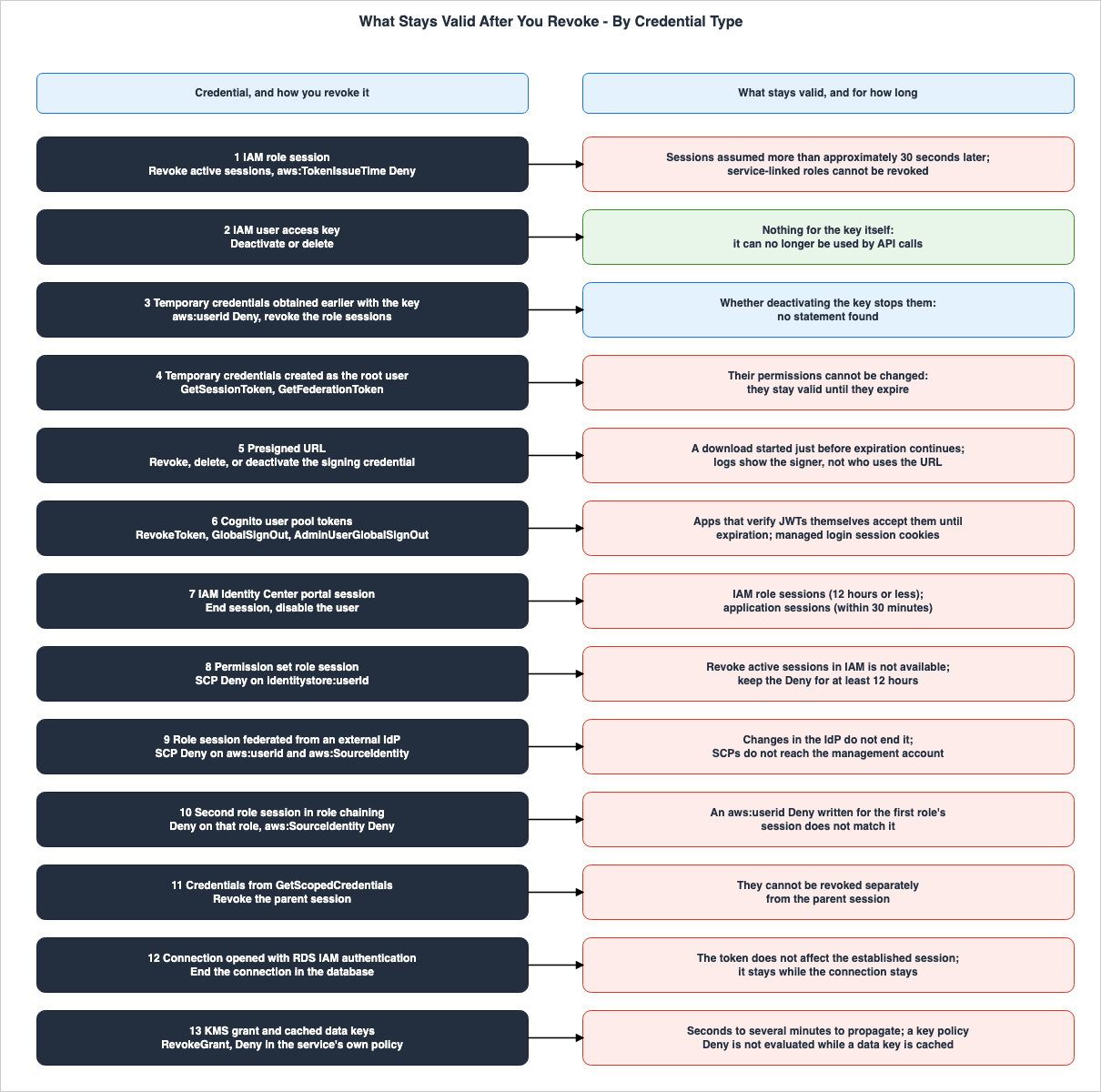
The following table lists, for each type of credentials, the methods of revocation, what revocation does not reach, the maximum remaining duration, and the source of information. The maximum remaining duration refers to the value documented at the time of verification.| # | Credential | Revocation Method | What It Does Not Reach | Maximum Remaining Duration | Source |
|---|---|---|---|---|---|
| 1 | IAM Role Session | Revoke active sessions, aws:TokenIssueTime Deny | Sessions assumed more than approximately 30 seconds later. Service-linked roles. | Expiration of sessions assumed again. | Role revocation page (Stated) |
| 2 | IAM User Access Key | Deactivate, Delete | None. Cannot be used for API calls after deactivation. | None | Access keys page (Stated) |
| 3 | Temporary credentials previously obtained with an access key | Deny aws:userid, Revoke role sessions | Whether deactivating the key stops them: No statement found. | Expiration of the temporary credentials. | Disabling permissions page (Stated), relationship with key deactivation: No statement found. |
| 4 | Temporary credentials created by the root user | None. Cannot change permissions. | Revocation due to permission changes. | Expiration of the temporary credentials. | Disabling permissions page (Stated) |
| 5 | Presigned URL | Revoke, Delete, or Deactivate the credentials that created it. | Downloads started just before the expiration time. Whether revocation stops ongoing transfers - No statement found. | Whichever expires first: the URL's expiration or the credentials' expiration. | Presigned URL page (Stated) |
| 6 | Cognito User Pool Token | RevokeToken, GlobalSignOut, AdminUserGlobalSignOut | Applications that verify tokens themselves. Managed login session cookies. | Token expiration. | Cognito token revocation page, Cognito refresh token page (Stated) |
| 7 | Identity Center Portal Session | End session, Disable user | Role sessions. Application sessions. | Application sessions within 30 minutes, role sessions within 12 hours or less. | Sessions page, Authentication sessions page (Stated) |
| 8 | Role session of a permission set in Identity Center | Deny identitystore:userId in SCP. | IAM's Revoke active sessions cannot be used. | 12 hours or less, with a configured duration. Deny must remain in effect for at least 12 hours. | Identity Center revocation page, Deny policy page (Stated) |
| 9 | Role session from an external IdP | Deny aws:userid and aws:SourceIdentity in SCP. | Changes in the IdP do not reach it. SCPs do not reach the management account. | Role session expiration. | Federated sessions blog post (Stated) |
| 10 | Role session in a chain of roles (second role) | Deny aws:TokenIssueTime for the second role, Deny aws:SourceIdentity. | Deny aws:userid that matches the first role's session does not apply. | Expiration of the second role's session. | Federated sessions blog post, Disabling permissions page (Stated) |
| 11 | Credentials scoped down with GetScopedCredentials | Revoke the parent session. | Revoking only the scoped credentials. | Until the parent session expires. | Scoped credentials page (Stated) |
| 12 | Connection opened via RDS IAM authentication | Terminate the connection on the database side. | Changes to IAM policies and token expiration. | As long as the connection remains open. | RDS IAM authentication page (Stated); closing the connection: Inference |
| 13 | KMS Grant and data key cache | RevokeGrant, Deny on the service holding the data. | Delay in propagation. Deny on the key policy during caching. | Several seconds to several minutes. Expiration of cached items. | Grants page, Grant deletion page, Data key caching section (Stated) |
Rows 3, 5, and 12 contain points with no statement found, or inferences. This article does not fill them in by guesswork.
8.2 The Order to Revoke In
This section outlines the revocation order in five steps. The order itself is a deduction based on combining information from Chapters 2 through 7 (Inference). The operations within each step come from the sources. The sequence for stopping an AI agent, including preservation and revocation procedures, is detailed in Chapter 4 of this site's Stopping an AI Agent on AWS.- Preserve: Using CloudTrail, investigate the use of credentials. The federated sessions blog post outlines how to identify
principalIdandsourceIdentityfrom CloudTrail logs (Stated). The scoped credentials page states that CloudTrail’suserIdentity.sessionContext.attributescreationDatecorresponds toaws:TokenIssueTime(Stated). Logs for presigned URLs only show the signer (Section 4.1). - Close Entry Points: First, prevent re-assumption. This includes deactivating access keys (Chapter 3), denying access via SCPs for
identitystore:userId,aws:userid, andaws:SourceIdentity(Chapter 5), and deleting Identity Center assignments (Section 5.2). Since SCPs do not apply to management accounts, implement the same denial using IAM policies (Section 5.3). Revoke active sessions does not apply to sessions assumed more than approximately 30 seconds later (Section 2.1). Therefore, if the entry point remains open, a new session may be established after revocation (Inference). - Reject Issued Credentials: Apply Revoke active sessions or an
aws:TokenIssueTimeDeny to the role (Chapter 2). Also apply it to the second role in role chaining (Section 5.4). If a resource-based policy permits the principal, explicitly deny access on the resource side as well. The disabling permissions page states that this is necessary (Stated). - Address Unreachable Items: For presigned URLs, the bucket policy should deny access to the principal who signed it (Section 4.1). Terminate open connections on the database side (Section 6.1). For KMS caches, deny on the side of the service that holds the data (Section 6.4). Ask legitimate users to clear their AWS CLI caches (Section 2.5). Applications that validate Cognito tokens themselves should assume that they may accept tokens until their expiration date (Section 4.2).
- Verify: Wait for the time it takes for the denial to propagate (Sections 6.2 and 6.3), then use CloudTrail to verify that requests with credentials that should be denied are indeed being rejected, and that no new sessions are being established after revocation (Inference). Maintain the Deny policies until the latest expiration time of any issued credentials (Inference). In Identity Center, documentation states a minimum of 12 hours (Section 5.2).
8.3 When to Remove the Deny
This article searched for information in Section 1.3 regarding when to remove the Deny associated withAWSRevokeOlderSessions or custom aws:TokenIssueTime policies, but no explicit statement was found (No statement found). It can be inferred that it is safe to remove the Deny once all credentials issued before the specified time have expired (Inference). The maximum session length configured for the role determines this expiration time (Inference). The documentation for Identity Center states that the Deny period is, at a minimum, 12 hours (Stated).9. Frequently Asked Questions About Revocation
Q1. Once you choose Revoke active sessions, can the role no longer be used?
Only sessions assumed up to approximately 30 seconds after the operation become unusable (see Section 2.1). It will not affect sessions assumed after that time. To stop individuals who can assume the role again, you must first close the entry point (see Section 8.2).Q2. If you deactivate an access key, do the temporary credentials obtained with it stop too?
The key itself will no longer be usable for API calls (Section 3.1). Whether any temporary credentials previously obtained using that key will stop is not documented (Section 3.2). Stop them separately with either anaws:userid Deny or the revocation of the role sessions.Q3. Is a presigned URL always usable until it expires?
Not necessarily. Generally, if the credentials that created it are revoked, deleted, or deactivated, it will stop working even before the expiration time (see Section 4.1). However, downloads initiated just before the expiration time continue even after the expiration time has passed.Q4. If you disable a user in Identity Center, do their actions on AWS stop?
No, they do not. Users with an active portal session can continue to assume new roles until their access is removed, and existing role sessions will remain active for 12 hours or less, as configured (see Sections 5.1 and 5.2). To prevent access, you should first deny access via SCP, then remove assignments, end sessions, and finally disable the user, following the steps outlined on the Identity Center revocation page.Q5. If you delete a user in the IdP, do their AWS sessions end too?
No, they will not. The federated sessions blog post states that changes made in the IdP do not invalidate existing AWS sessions (Section 5.3). Configure theaws:userid and aws:SourceIdentity Denies in SCPs, and in the management account, implement them using IAM policies.Q6. Can GetScopedCredentials invalidate a leaked session?
No. GetScopedCredentials only creates less powerful credentials derived from the existing credentials (see Section 7.3). Scoped credentials can only be revoked along with the original session (see Section 7.2).Q7. If you remove the RDS IAM authentication permission, do open connections close too?
The RDS IAM authentication page states that tokens do not affect established sessions (Section 6.1). There is no mention of connections being terminated when permissions are revoked. Close open connections on the database side.Q8. If you revoke a KMS grant, does it stop working immediately?
Typically, the change propagates in less than a few seconds, although in some cases, it may take several minutes (see Section 6.3). A grant cannot be revoked with a grant token. In services that cache data keys, a key policy Deny may not take effect while a data key is cached (see Section 6.4).Q9. When can you remove AWSRevokeOlderSessions?
The documentation does not specify when this policy can be removed (see Section 8.3). According to this article, it is safe to remove it after all credentials that were issued before the specified time have expired.10. Summary
- Temporary credentials issued by AWS STS are valid until their expiration and cannot be revoked. Revocation applies a Deny policy, which will be evaluated with each request.
- Revoke active sessions will invalidate sessions assumed up to approximately 30 seconds after the operation. This action does not affect later sessions, sessions of service-linked roles cannot be revoked, and Identity Center roles must be stopped within Identity Center.
- A Deny policy for
aws:TokenIssueTimewill not affect requests signed with long-term credentials for IAM users. While access keys can be deactivated, no statement was found on whether previously obtained temporary credentials will be invalidated. - In general, a presigned URL expires when the credentials that created it are revoked. Downloads initiated just before the expiration time continue, and logs only show the signer.
- Revoked Cognito tokens remain valid when validated using JWT libraries.
- Ending portal sessions within Identity Center does not end the associated role sessions. A Deny policy should remain in place for at least 12 hours. After the portal session is ended, the user should be disabled.
- Changes made within an IdP do not invalidate existing AWS sessions. The second role in role chaining and the management account need separate measures.
- IAM authentication tokens for RDS do not affect established connections. Changes to IAM and KMS may take several minutes to propagate. While a KMS data key is cached, a key policy Deny may not take effect.
- GetScopedCredentials only narrows, and is not a substitute for revocation.
- The proper order for revocation is: preserve, close entry points, reject issued credentials, address unreachable items, and verify.
11. References
- Revoke IAM role temporary security credentials - AWS Identity and Access Management
- Permissions for temporary security credentials - AWS Identity and Access Management
- Disabling permissions for temporary security credentials - AWS Identity and Access Management
- Permissions for GetScopedCredentials - AWS Identity and Access Management
- Manage access keys for IAM users - AWS Identity and Access Management
- Troubleshoot IAM - AWS Identity and Access Management
- GetScopedCredentials - AWS Security Token Service
- Download and upload objects with presigned URLs - Amazon Simple Storage Service
- View and end active sessions for your workforce users - AWS IAM Identity Center
- Understanding authentication sessions in IAM Identity Center - AWS IAM Identity Center
- Revoke user access - AWS IAM Identity Center
- Use a Deny policy to revoke active user permissions - AWS IAM Identity Center
- Grants in AWS KMS - AWS Key Management Service
- Retiring and revoking grants - AWS Key Management Service
- AWS global condition keys - AWS Key Management Service
- IAM database authentication for MariaDB, MySQL, and PostgreSQL - Amazon Relational Database Service
- Ending user sessions with token revocation - Amazon Cognito
- Refresh tokens - Amazon Cognito
- How to revoke federated users’ active AWS sessions - AWS Security Blog
- Scope down permissions of existing sessions using AWS STS GetScopedCredentials - AWS Security Blog
- AWS STS announces GetScopedCredentials to scope down permissions at runtime - AWS What's New
- Stopping an AI Agent on AWS - What Each Control Stops, What Keeps Running, and Who Can Undo It
- User Pool Sessions in Amazon Cognito - SSO and Token Sessions, the Per-User Limit, and What Revocation Does Not Reach
- IAM Authentication to Databases, Caches, and Streams on AWS - Token Lifetime, What Revoking Access Does to Open Connections, and the Identity Inside the Service
- NIST IR 8587 Mapped to AWS Controls - Signing Keys, Audience, Token Lifetimes, Revocation, and What the Settings Leave Open
- AWS Security Incident Response Playbooks - First-Response Runbooks for Common Scenarios
- Amazon S3 Security and Access Control Guide - Bucket Policies, IAM, Access Points, Block Public Access, and Encryption
- Impersonation or Delegation - Amazon Cognito Token Exchange, the act Claim, and Down-Scoping
References:
Tech Blog with curated related content
Written by Hidekazu Konishi