User Pool Sessions in Amazon Cognito - SSO and Token Sessions, the Per-User Limit, and What Revocation Does Not Reach
First Published:
Last Updated:
This article sets out, from the text of the documentation, what this record keeps, when sessions can be ended, and what cannot be ended. It addresses two types of sessions – SSO sessions and token sessions – the duration for which SSO sessions can be reused, the per-user limit and behavior when that limit is reached, the APIs for listing and revoking sessions, what revocation does not affect, and the process for enabling and disabling session tracking. This article is not a step-by-step configuration guide, nor is it an introduction to OAuth. It also does not cover pricing.
The conclusions come first:
- Session tracking is opt-in on a per user pool basis. It is disabled by default and is only available with the Essentials and Plus feature plans. When disabled, Amazon Cognito does not store session records on the server and does not modify the tokens.
- SSO sessions are created when users sign in using managed login and are associated with a browser cookie. Token sessions track the lifetime of a refresh token issued to a single app client. Token refresh and rotation do not create new sessions.
- The number of token sessions a user can have is configurable between 1 and 100 per user pool, with a default of 20. SSO sessions are limited to 10 per user and cannot be changed. If a user signs in when the token session limit is reached, the sign-in will succeed, and the least recently used token session will be revoked. New sign-ins will not be rejected.
RevokeUserSessionandAdminRevokeUserSessionrevoke a single session by its ID. SpecifyingLINKEDwill also revoke linked sessions. However, even whenLINKEDis specified for a token session, other token sessions originating from the same SSO session will not be revoked.- Revocation does not make JWTs that were already issued unusable everywhere. The token revocation page notes that JWT libraries, which only verify signatures and expiration dates, will still report these tokens as valid. As an inference by this article, the same applies to session revocation.
- Some disagreements between the sources remain. Even on the date of review, the Quotas page and the Refresh tokens page describe the managed login session cookie as lasting 1 hour. While two AWS CloudFormation resources are mentioned in the developer guide, they are not listed in the CloudFormation Template Reference.
This article was written after reviewing the documentation on November 14, 2026 (Japan Standard Time). This article does not include observations from actively running Amazon Cognito.
Related articles on this site:
- Browser-Based Apps and Cross-Device Flows on Amazon Cognito - RFC 10017 and RFC 10027 Mapped to App Client Settings
- Amazon Cognito Multi-Region Replication - What Only the Primary Accepts, Which Issuer Your Tokens Carry, and What Validators Must Assume
- Amazon Cognito Federation Complete Implementation Guide - Google, Apple, Microsoft, OIDC, and SAML
- AWS History and Timeline regarding Amazon Cognito - Overview, Functions, Features, Summary of Updates, and Introduction
Table of Contents
- 1. Scope and Terms
- 2. What Changed on November 11, 2026
- 3. Two Kinds of Sessions
- 4. How Long an SSO Session Is Reused
- 5. Limits and What Happens at the Limit
- 6. Listing and Revoking Sessions
- 7. What Revocation Does Not Reach
- 8. Turning Tracking On and Off
- 9. Where the Sources Disagree, and Where No Statement Was Found
- 10. Failure Modes
- 11. Frequently Asked Questions About Amazon Cognito User Pool Sessions
- 12. Summary
- 13. References
1. Scope and Terms
This chapter defines the scope, audience, referenced materials, and terminology. The key conclusions are as follows:- This article focuses solely on managing sessions added on November 11, 2026. The general principles of OAuth flows and token validation are left to other articles on this site (Section 1.2).
- The term "session" is used to refer to at least four different concepts within the referenced materials. This article will differentiate between SSO sessions, token sessions, cookies, and application sessions (Section 1.4).
- The term "limit" also refers to four different numerical values. This article will specify which values are being referenced within the same sentence (Section 1.4).
- Every row of this article's tables of documented facts carries the date of review, November 14, 2026.
- When the documentation does not state something, this article does not describe it as nonexistent or impossible (Sections 1.5 and 9.2).
1.1 Intended Audience
This article is intended for individuals who:- Are looking to implement sign-out functionality, device management, and session limits within an Amazon Cognito user pool.
- Want to ensure that when a user loses a device, only the sessions associated with that device are terminated.
- Want to know where JWTs that were already issued may still be accepted after a session has been revoked.
- Want to understand the current interpretation of the documentation statements that managed login cookies expire after one hour.
This article assumes that readers are considering the following points and will use the information provided to confirm their understanding:
- Session management is automatically enabled once a user pool is created.
- When a user reaches their session limit, new sign-ins will be rejected.
- Revoking a session ensures that the associated token will fail validation regardless of where it is used.
GlobalSignOutwill terminate SSO sessions, regardless of whether tracking is enabled.- The duration for which an SSO session can be reused is determined by the configuration of the app client that created the session.
1.2 Scope and Exclusions
This article covers the following:- Session tracking, added on November 11, 2026, and the conditions for using it.
- Definitions of SSO (Single Sign-On) and token sessions, and the operations that do and do not create them.
- The duration for which SSO sessions are reused per app client, and the 90-day lifetime limitation for SSO sessions.
- User-specific limits for token sessions and SSO sessions, and the behavior when these limits are reached.
- The four APIs for listing and revoking sessions, and how they relate to
RevokeToken,GlobalSignOut,AdminUserGlobalSignOut, andAdminDisableUser. - What revocation does not reach.
- Enabling and disabling tracking, IAM action names, AWS CloudFormation, and a section on multi-Region functionality.
- Discrepancies between documentation and instances where information is missing.
This article does not cover:
- Pricing, including costs associated with feature plans.
- OAuth flows, refresh token rotation, and general token validation. Browser-Based Apps and Cross-Device Flows on Amazon Cognito on this site covers them.
- Federation configuration. Amazon Cognito Federation Complete Implementation Guide on this site covers it.
- The mechanics of multi-Region functionality. Amazon Cognito Multi-Region Replication on this site covers it. This article only addresses the text related to sessions.
- Identity pools. Credentials provided by an identity pool are separate from the sessions discussed in this article. What a Cognito Identity Pool Hands Out on this site covers it.
- The creation of managed login screens.
- Procedures for attacking and compromising sessions. This article only describes the design from the perspective of prevention.
- Details from two other articles on this site: The New Default Retry Behavior in AWS SDKs and What AWS Emulator Promises. This article only borrows aspects of their writing style, namely tables with dates of review, the way disagreements between sources are laid out, and the inference marker.
1.3 Date of Review and Materials Reviewed
This article was written after reviewing the following materials on November 14, 2026 (Japan Standard Time). In the body, this article uses the names given in parentheses.- AWS What's New: Amazon Cognito now supports user pool session management. Published on November 11, 2026 (What's New post).
- Amazon Cognito Developer Guide: Managing user sessions page.
- Same guide: Ending user sessions with token revocation page.
- Same guide: Refresh tokens page.
- Same guide: Quotas in Amazon Cognito page.
- Same guide: User pool feature plans page.
- Same guide: Amazon Cognito logging in AWS CloudTrail page (CloudTrail page).
- Amazon Cognito console: Session management help panel.
- Amazon Cognito user pools API Reference: 16 pages, including 12 pages detailing the following operations:
RevokeUserSession,AdminRevokeUserSession,ListUserSessions,AdminListUserSessions,SetUserPoolSessionConfiguration,GetUserPoolSessionConfiguration,SetUserPoolClientSessionConfiguration,GetUserPoolClientSessionConfiguration,RevokeToken,GlobalSignOut,AdminUserGlobalSignOut, andAdminDisableUser, as well as 3 pages describing the following types:UserPoolTokenSessionConfigType,ClientSSOSessionConfigType, andSessionDescriptionType, and the Actions page listing the operations (API Reference). - Service Authorization Reference: Simplified AWS service information for programmatic access page, and the associated JSON file for Amazon Cognito user pools (service reference file). The update time for this file is November 12, 2026, 01:01 (UTC).
- AWS CloudFormation Template Reference: Page listing the Amazon Cognito resource types (CloudFormation resource list), and the schema file for resources in us-east-1 (CloudFormation schema file).
The developer guide and API Reference pages were checked by retrieving the content using
curl and comparing it with the content obtained from the AWS Knowledge MCP Server. Direct quotes in this article have been verified against these versions. The help panel was reviewed by examining the HTML content. Unfortunately, the content of the Document history page within the Amazon Cognito Developer Guide could not be retrieved. The URL for that page redirected to a different page on the date it was checked.1.4 Terms, and Different Things with the Same Name
This article will consistently use the following terms to refer to the same meaning:- Session tracking: A feature that you enable on a user pool, with which Amazon Cognito keeps session records on the server side. This refers to the "session tracking" feature described on the Managing user sessions page.
- SSO session: A server-side session created when a user signs in through managed login (see Section 3.1).
- Token session: A session that tracks the lifecycle of a refresh token issued to a single app client (see Section 3.1).
- Revocation: Revoking all of the tokens of a session in Amazon Cognito and deleting the session record. It corresponds to revoke in the documentation.
- Date of review: The date on which this article read the documentation, November 14, 2026.
This article references materials that contain entities with the same names but different meanings.
- session: Besides SSO sessions and token sessions, browser cookies are also referred to as sessions. These include the managed login session cookie on the Refresh tokens page and the Hosted UI session cookie on the Quotas page. A login state maintained directly by an application is also commonly referred to as a session. This article calls the Amazon Cognito records SSO sessions and token sessions, the browser side cookies, and the state that an application keeps application sessions.
- revoke:
RevokeUserSessionrevokes a single session.RevokeTokenrevokes a single refresh token and the access tokens created from it.GlobalSignOutrevokes all of a user's tokens. JWT libraries are not aware of revocations. This article states each time which operation's revocation it means. - limits: The number of token sessions per user, the number of SSO sessions per user, the number of items in a single list response, and the lifespan of an SSO session in days are all separate numbers (see Section 5.1). When referring to a limit, this article will specify which limit is being discussed within the same sentence.
- 1 hour: The previous fixed one-hour duration mentioned in the What's New post refers to the previous value for how long SSO sessions are reused. Sixty minutes is the default value for
SSOSession.MaxValidityMinutes. The 1 hour for the Hosted UI session cookie on the Quotas page and the valid for one hour on the Refresh tokens page describe the cookie as of the date of review. The lower bound of the refresh token range on the Quotas page is also one hour. This article states each time which one hour it means.
1.5 Terms for the State of the Sources
This article uses the following six terms to describe the state of the documentation. These terms, including their English spellings, are also used in the tables.- Stated: The documentation contains a statement regarding the matter.
- Stated as not supported: The documentation explicitly states that the matter is not supported or cannot be used.
- Documentation does not list: While a list or table exists, the specific item is not included. This does not necessarily indicate that the matter is unsupported or unavailable.
- No statement found: Despite searching using different keywords and categories of documentation (as described in Section 1.3), no relevant statement could be found. This does not necessarily indicate that the matter is absent or impossible.
- Sources disagree: The statements regarding the same matter in two different documents are contradictory. This article presents both statements, along with their sources, without designating either as incorrect.
- Inference: This is an inference made by this article, and is not a statement found in any of the documentation. This article says in the same sentence that it is an inference.
All dates referenced in this article are presented with the year. Pages may be rewritten after the date of review.
2. What Changed on November 11, 2026
This chapter explains what session tracking is and the conditions under which it can be used.2.1 Opt-in per User Pool
The What's New post states that Amazon Cognito now supports managing user pool sessions. The Managing user sessions page describes this feature as follows:Session tracking is an opt-in feature that you turn on at the user pool level. When session tracking is off, Amazon Cognito does not store server-side session records and token contents are unchanged.The same page also indicates that session tracking is disabled by default. To use session management, it must be enabled within the user pool. The first assumption outlined in Section 1.1 is inconsistent with this statement. Creating a user pool alone does not create session records.
2.2 Feature Plans
The Managing user sessions page states that tracking user sessions requires a user pool to be on either the Essentials or Plus feature plan. Attempting to enable this feature on a user pool with an unsupported plan will result in aFeatureUnavailableInTierException. The table on the feature plans page also indicates that session management is available on the Essentials and Plus plans. The What's New post contains the same information.The Managing user sessions page also states that if you downgrade a user pool with session tracking enabled to the Lite feature plan, Amazon Cognito will return an error. Before downgrading, you must disable session tracking.
2.3 The sid Claim
The Managing user sessions page states that when session tracking is enabled, Amazon Cognito adds thesid claim to both the ID token and the access token. The sid is a session identifier, and within the same session, it remains unchanged even when tokens are refreshed or rotated. The page also notes that the sid adheres to the standard name for the session ID claim in OpenID Connect.The same page says the following about a Lambda trigger that runs before tokens are generated:
If your user pool uses a pre token generation trigger that adds its own sid claim, Amazon Cognito doesn't change that claim, and session tracking doesn't operate for that user pool — it behaves as if session tracking is disabled, even when you enable it.The page further explains that to use session management, you remove the
sid claim from the trigger. Even if enabled in the settings, if the trigger adds its own sid claim, session tracking will not function.2.4 What Does Not Change When Tracking Is Off
When session tracking is disabled, Amazon Cognito does not store session records and does not add asid to the tokens (see Sections 2.1 and 2.3). The token revocation page describes four methods for revoking refresh tokens and tokens: RevokeToken, the revocation endpoint, GlobalSignOut, and AdminUserGlobalSignOut. A note on the same page clarifies that when session tracking is enabled, GlobalSignOut and AdminUserGlobalSignOut will also revoke token sessions and SSO sessions (see Section 7.3).This article did not find any statement on how long managed login reuses the SSO sign-in state when session tracking is disabled (No statement found). Per-app-client settings cannot be written until session tracking is enabled (see Section 4.1).
3. Two Kinds of Sessions
This chapter describes two types of sessions that are tracked, and indicates the actions that create them and those that do not. Figure 1 illustrates the relationship between these two types of sessions.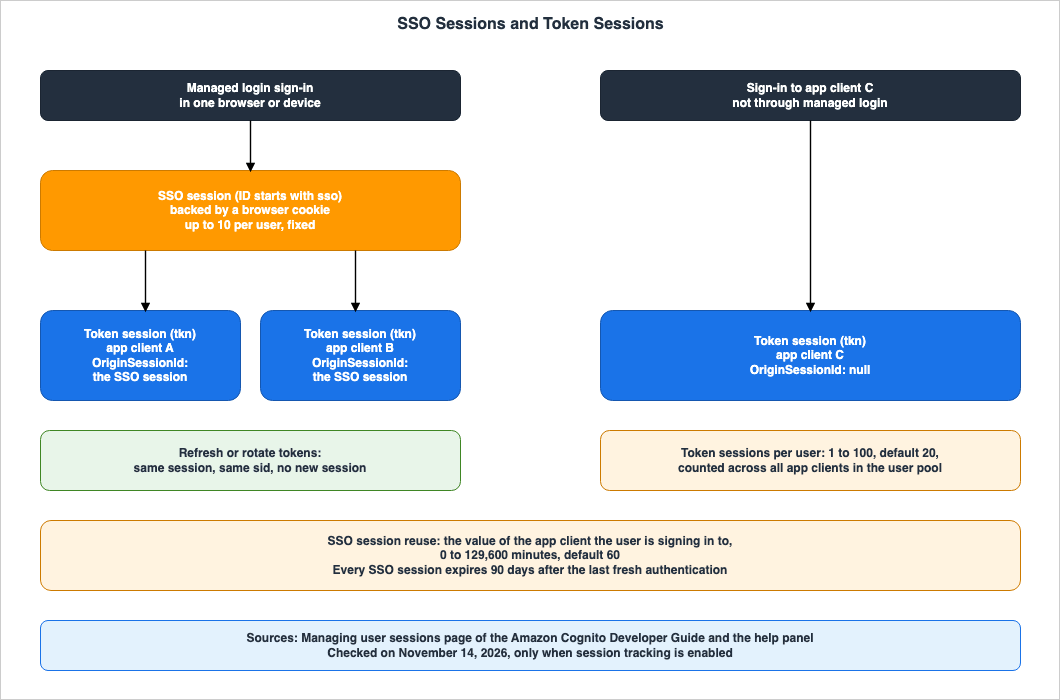
3.1 SSO Sessions and Token Sessions
The Managing user sessions page states that there are two types of sessions within the user pool, and managing these sessions requires tracking both. The same page defines SSO sessions as follows:Single sign-on (SSO) sessions: A server-side session created when a user signs in through managed login. An SSO session lets the user access other app clients in the same user pool without re-authenticating. It is backed by a browser cookie and scoped to a single browser or device.The same page defines token sessions as follows:
Token sessions: A session that represents an app's active authenticated session for a user. A token session tracks the lifecycle of a refresh token issued to a specific app client and is scoped to that app client.A single SSO session is limited to a single browser or device signed in through managed login. A single token session is limited to a single app client. The help panel states that an SSO session is shared across all app clients within the user pool, and is associated with a single browser or device signed in through managed login. The help panel also states that a token session is associated with a single app client, and remains valid as long as the token is valid, with the duration determined by the app client's token expiration settings.
The What's New post states that a token session is created when a user signs in to an app client and receives a token. The Managing user sessions page describes it as tracking the lifecycle of a refresh token. One describes when it is created, while the other describes what it tracks. This article does not consider this a discrepancy and uses the definition provided by the Managing user sessions page.
3.2 Operations That Create Sessions and Operations That Do Not
The Managing user sessions page states that Amazon Cognito creates a new token session each time a user authenticates. The same page continues, stating:Refreshing or rotating tokens does not create a new session. Instead, these actions extend the existing session, and the issued tokens keep the same session identifier.If a single user signs in to the same app client from three different devices, three token sessions will be created. Even if the token is refreshed on one device multiple times, the number of token sessions remains at one.
The same page also states that machine-to-machine client credentials tokens are not tracked as sessions.
Machine-to-machine (client credentials) tokens do not use refresh tokens and are not tracked as sessions.3.3 How SSO Sessions and Token Sessions Are Linked
The Managing user sessions page describes each SSO session and each set of tokens as a separate session with its own start time, last-active time, and lifecycle. When a user authenticates through an SSO session, the resulting token session includes a reference to the original SSO session. This reference is displayed in theOriginSessionId field in the list. Token sessions created without an SSO session have an OriginSessionId value of null (see Section 6.2).Although this reference exists, each session is tracked independently. As described in Section 6.4, the
LINKED option allows you to revoke related sessions by following this reference.4. How Long an SSO Session Is Reused
This chapter describes how long app clients can reuse SSO sessions, and which app client's setting determines that value.4.1 The Maximum Time per App Client
The What's New post announced that you can now configure how long each app client will reuse an SSO session before prompting the user for re-authentication, replacing the previous fixed one-hour duration. In the What's New post, "previous" refers to the duration for which SSO sessions are reused. This article does not extend the word to other settings.The configuration is performed using
SetUserPoolClientSessionConfiguration, with the value specified as SSOSession.MaxValidityMinutes. The Managing user sessions page describes this value as follows:SSOSession.MaxValidityMinutes accepts a value from 0 to 129,600 minutes (90 days), with a default of 60 minutes.The
ClientSSOSessionConfigType page also states that the minimum value is 0, the maximum is 129600, and the default is 60. The GetUserPoolClientSessionConfiguration page indicates that if an app client has never called SetUserPoolClientSessionConfiguration, it will return the default value of 60 minutes. The SetUserPoolClientSessionConfiguration page specifies that this operation requires session tracking to be enabled in the user pool.When the value is greater than 0, the Managing user sessions page explains that the app client will reuse the SSO session for the specified number of minutes after the user last authenticated through managed login, issuing a new token without prompting for sign-in. The same page continues:
Silently reusing the session doesn't reset this period.Once that time has elapsed, the user will need to sign in again to use the app client.
When the value is 0, the app client will not reuse the SSO session and will always prompt the user for sign-in. However, Amazon Cognito will still create an SSO session, which other app clients within the same user pool can reuse.
4.2 The Value That Applies Is That of the App Client Being Signed In To
The Managing user sessions page states which app client's value applies:The validity that Amazon Cognito applies is the validity of the app client the user is currently signing in to, not the client that created the session.The fifth assumption in Section 1.1 is inconsistent with this statement. This article provides an example of how the two statements on the Managing user sessions page can be applied. Suppose that the value for app client A is set to 43,200 minutes, or 30 days, and the value for app client B is left at the default of 60 minutes. If a user signs in to A using managed login and then opens B two hours later, B will prompt them to sign in. This is because, based on B's value, more than 60 minutes have passed since the last authentication. However, if the user opens A at the same time, A will reuse the existing SSO session.
4.3 The 90-Day Lifespan of an SSO Session
In addition to the values associated with the app client, the SSO session itself also has a lifetime. The Managing user sessions page states:Every SSO session expires 90 days after the user's last fresh authentication, unless it is revoked earlier, regardless of the maximum validity configured on any app client.The same page also indicates that a new authentication resets the 90-day period, and that silent reuse does not extend it. During this period, each app client can reuse the SSO session for up to its maximum allowed time.
4.4 The One-Hour Statements
Even on the date of review, two pages of the developer guide describe the managed login session cookie as lasting one hour. The table on the Quotas page lists the Hosted UI session cookie as 1 hour. The Refresh tokens page states:These sessions are set in a browser cookie and are valid for one hour.Elsewhere on the same Refresh tokens page, another paragraph states that managed login session cookies do not expire automatically. The Managing user sessions page states that the time to reuse SSO sessions can be configured between 0 minutes and 90 days per app client, with a default setting of 60 minutes. This article lists this in Section 9.1 as a place where the sources disagree. This article does not decide that either one is wrong.
This article was unable to determine whether the "1 hour" references on the Quotas page and the Refresh tokens page reflect the current behavior for user pools with session tracking disabled, or are statements left from before November 11, 2026 (No statement found).
5. Limits and What Happens at the Limit
This chapter describes the per-user session limits and the system's behavior when those limits are reached.5.1 Four Numbers
Table 1 lists the four numbers that this article could call limits.| Number | Value | Can be Modified? | Documentation | Date of review |
|---|---|---|---|---|
| Number of token sessions per user | 1 to 100, default is 20 | Configurable per user pool using TokenSession.MaxPerUser | Managing user sessions page, UserPoolTokenSessionConfigType page, help panel | 2026-11-14 |
| Number of SSO sessions per user | 10 | Not modifiable | Managing user sessions page, help panel | 2026-11-14 |
| Number of sessions in one list response | Maximum 125 | No configuration available | Managing user sessions page, ListUserSessions and AdminListUserSessions pages | 2026-11-14 |
| SSO session lifetime | 90 days from the last fresh authentication | Not modifiable. The app client value is applied within this range. | Managing user sessions page | 2026-11-14 |
The following provides additional information regarding Table 1.
- For the maximum and default number of token sessions, the Managing user sessions page states, "The default is 20 and the maximum is 100." The minimum value of 1 is documented on the
UserPoolTokenSessionConfigTypepage and in the help panel. The Managing user sessions page does not specify the minimum value. - The limit on the number of token sessions is applied across all app clients within the user pool. The Managing user sessions page states, "The cap applies across all app clients in the user pool." Even if a user is signed in to different app clients using both a web application and a mobile application, they are counted within the same limit.
- Regarding the number of SSO sessions, the Managing user sessions page states, "Each user can hold up to 10 SSO sessions." It also clarifies that this limit cannot be modified.
- The
GetUserPoolSessionConfigurationpage states that for user pools that have never calledSetUserPoolSessionConfiguration, it returnsUserSessionTrackingasDISABLEDandMaxPerUseras 20.
5.2 A Sign-In at the Limit Is Not Denied
The "Session count limits" section of the Managing user sessions page states that when a user's session count reaches its limit, Amazon Cognito revokes the least recently used session. It then lists two types of limits: token sessions and SSO sessions. Regarding token sessions, the "Set active session limits" section on the same page states:When a user reaches the cap and signs in again, the sign-in succeeds and Amazon Cognito automatically revokes the least recently used token session to make room. This eviction behavior is TERMINATE_LEAST_RECENTLY_USED. Amazon Cognito does not deny the new sign-in.The second assumption in Section 1.1 is inconsistent with this statement. When a user attempts to sign in while the limit has been reached, the sign-in will succeed, and the least recently used token session, which may be on a different device or app client, will be revoked. As an inference by this article, the application on the device associated with the revoked token session will no longer be able to obtain a new token using the refresh token, effectively resulting in a sign-out.
This article did not find a statement on which time determines the "least recently used" session (No statement found). The
LastActiveDate in the list represents the time of the last refresh or rotation for token sessions (see Section 6.2). This article does not claim that the two are the same.Regarding the limit of 10 SSO sessions, this article did not find a statement describing what happens at a sign-in that would make an eleventh SSO session, beyond the initial statement in the "Session count limits" section (No statement found).
5.3 When You Lower the Limit
The Managing user sessions page states that even if you lower the limit below the current number of user sessions, Amazon Cognito will not immediately revoke those sessions. Token refresh and rotation do not evict them either. Instead, when the user next signs in, Amazon Cognito revokes sessions, starting with the least recently used, until the number of sessions is within the new limit. The example on that page explains that if a user has five sessions and the limit is reduced to two, after the user's next sign-in, only the new session and the most recently used existing session will remain.Immediately after lowering the limit, not all users will automatically fall within the new limit. The number of sessions in the list right after the limit is lowered may still exceed the new limit.
5.4 Multi-Region User Pools
The Managing user sessions page describes multi-Region user pools as follows: Token session limits are enforced on a per-Region basis, and the count across Regions is eventually consistent. Consequently, when a user signs in nearly simultaneously in different Regions, the total number of sessions may temporarily exceed the limit. Amazon Cognito resolves this by revoking the least recently active sessions at the user's next authentication or token refresh, ensuring that the total remains within the limit.When the limit is lowered (Section 5.3), token refresh does not evict sessions. When the limit is exceeded across Regions (this section), token refresh also evicts sessions. These are distinct scenarios. This article does not treat this as a disagreement.
The page concludes this section with the following:
Session revocation and session data propagate to all Regions.This article does not describe the inner workings of multi-Region user pools. Amazon Cognito Multi-Region Replication on this site covers them.
5.5 Whether One List Response Holds Every Session
The Managing user sessions page states that both theListUserSessions and AdminListUserSessions operations return all user sessions in a single, flat list, with a maximum of 125 entries per page. The API Reference pages for these two operations indicate the presence of a NextToken field in both the request and response.As an inference by this article, within a single Region, the sum of the maximum number of token sessions (100) and the maximum number of SSO sessions (10), totaling 110, can fit within the 125-entry limit. However, as noted in Section 5.4, multi-Region user pools may temporarily exceed the per-user limit. This article does not say that code that lists sessions may ignore the
NextToken field.6. Listing and Revoking Sessions
This chapter describes two APIs for listing sessions, and two APIs for revoking them.6.1 The Four APIs
Table 2 lists the APIs for retrieving a list of sessions, revoking sessions, andRevokeToken.| Operation | Authorization | Target | User's Current Session | Linked Sessions | Date of review |
|---|---|---|---|---|---|
ListUserSessions | User's access token | The user's own sessions | Indicated by IsCurrentSession | Not applicable | 2026-11-14 |
AdminListUserSessions | IAM credentials | Sessions for the user specified by UserPoolId and Username | IsCurrentSession is always false | Not applicable | 2026-11-14 |
RevokeUserSession | User's access token | The user's own session, specified by SessionId | Cannot be revoked | RevokeAssociatedSessions is either NONE or LINKED | 2026-11-14 |
AdminRevokeUserSession | IAM credentials | The session specified by Username and SessionId. The Username must match the user associated with the SessionId. | Documentation does not list | RevokeAssociatedSessions is either NONE or LINKED | 2026-11-14 |
RevokeToken | Refresh token and the app client ID. If available, the client secret as well. | The token session associated with that refresh token | Not applicable | RevokeAssociatedSessions is either NONE or LINKED | 2026-11-14 |
Additional notes for Table 2:
- The Documentation does not list entry for the
AdminRevokeUserSessionrow indicates that theAdminRevokeUserSessionpage does not mention the inability to revoke the user's current session. As an inference by this article, because this operation does not accept an access token, the concept of the user's current session does not apply. - The
RevokeTokenpage states that this operation does not evaluate IAM policies.
6.2 What the List Returns
The Managing user sessions page states that the list returns only active sessions and does not include revoked or expired sessions. TheListUserSessions and AdminListUserSessions pages state that the results are eventually consistent, and new sessions typically appear in the list within seconds. If you retrieve the list immediately after signing in, the session may not yet be present.Each session includes the following fields (as displayed in the table on the Managing user sessions page):
SessionId: A unique 28-character identifier. Token sessions begin withtkn, while SSO sessions begin withsso.SessionType: EitherTOKENorSSO.ClientId: The app client to which the session belongs.CreateDate: The time the session was created.LastActiveDate: The time of the session's last activity. For token sessions, this is the time of the last refresh or rotation. For SSO sessions, it's the time of the last authentication, token issuance, or rotation.DeviceType: The operating system and browser, or application, derived from the user agent during the last use.LastIPAddress: The IP address used during the last use.LastLocation: The city and country derived from the IP address used during the last use.OriginSessionId: Only present for token sessions. This represents the originating SSO session, and is null if the token session was not associated with an SSO session.IsCurrentSession: Indicates whether the session corresponds to the access token for the current request. This is always false forAdminListUserSessions.
The
SessionDescriptionType page notes that the DeviceType can be unknown.6.3 Revoking a Single Session
RevokeUserSession and AdminRevokeUserSession both accept either a token session ID or an SSO session ID. The Managing user sessions page describes the effect of revoking a session as follows:Revoking a session revokes all of the tokens for that session and deletes the session record.The API Reference pages for these two operations define
SessionId as follows:Length Constraints: Fixed length of 28.
Pattern: ^(tkn|sso)[a-z0-9]{25}$The
RevokeUserSession page states:You can't revoke the session that the calling access token belongs to.RevokeUserSession is an operation that allows a user to terminate a session other than the current one. To sign out of the current device, the Managing user sessions page instructs users to use RevokeToken (see Section 6.5).Upon successful execution, both operations return an HTTP 200 status code and an empty body.
6.4 Revoking Linked Sessions Too
RevokeAssociatedSessions determines whether linked sessions are also revoked. The value can be NONE or LINKED, with NONE as the default. The RevokeUserSession and AdminRevokeUserSession pages describe LINKED as follows:LINKED also revokes the directly linked session or sessions, interpreted relative to the type of the targeted session: revoking a token session also revokes the parent SSO session it came through, and revoking an SSO session also revokes the token sessions that came through it. The set of linked sessions is eventually consistent, so associated sessions are typically revoked within a few seconds.The table on the Managing user sessions page states the following for each type of target session:
- When
NONEis specified for token sessions, only that token session is revoked. - When
LINKEDis specified for token sessions, both the token session and its parent SSO session are revoked. Other token sessions originating from that same SSO session will not be revoked. - When
NONEis specified for SSO sessions, only that SSO session is revoked. - When
LINKEDis specified for SSO sessions, both the SSO session and any token sessions originating from it are revoked.
If you want to end the sign-ins that came through the browser on a user's lost device, specify
LINKED for the SSO session associated with that device. Token sessions created without an SSO session (i.e., those with a null OriginSessionId) will not be included in this revocation and should be revoked separately. When LINKED is specified for token sessions, the parent SSO session is revoked, but other token sessions originating from the same SSO session and used by different app clients will remain active. The revocation of linked sessions typically occurs within a few seconds. This article does not describe it as immediate.6.5 RevokeToken or RevokeUserSession
RevokeToken also accepts RevokeAssociatedSessions. Because RevokeToken always targets token sessions, using LINKED will also revoke the parent SSO session. The RevokeToken page states that LINKED is ineffective when session tracking is disabled, or when the token session does not have a parent SSO session. The token revocation page also indicates that when session tracking is enabled, RevokeToken will delete records of token sessions associated with the refresh token.The Managing user sessions page states that both
RevokeToken and RevokeUserSession produce the same result for token sessions, but differ in how they identify the session and the scenarios in which they are used.RevokeToken: Used for typical sign-out scenarios where the application still holds the refresh token.RevokeUserSession: Used to target a session by its ID, obtained fromListUserSessions, and is useful for managing sessions from remote locations. The same page provides examples such as sign-out for lost or stolen devices, where the application no longer possesses the token.
7. What Revocation Does Not Reach
This chapter describes what remains usable after a revocation. Figure 2 shows what a revocation reaches and what it does not.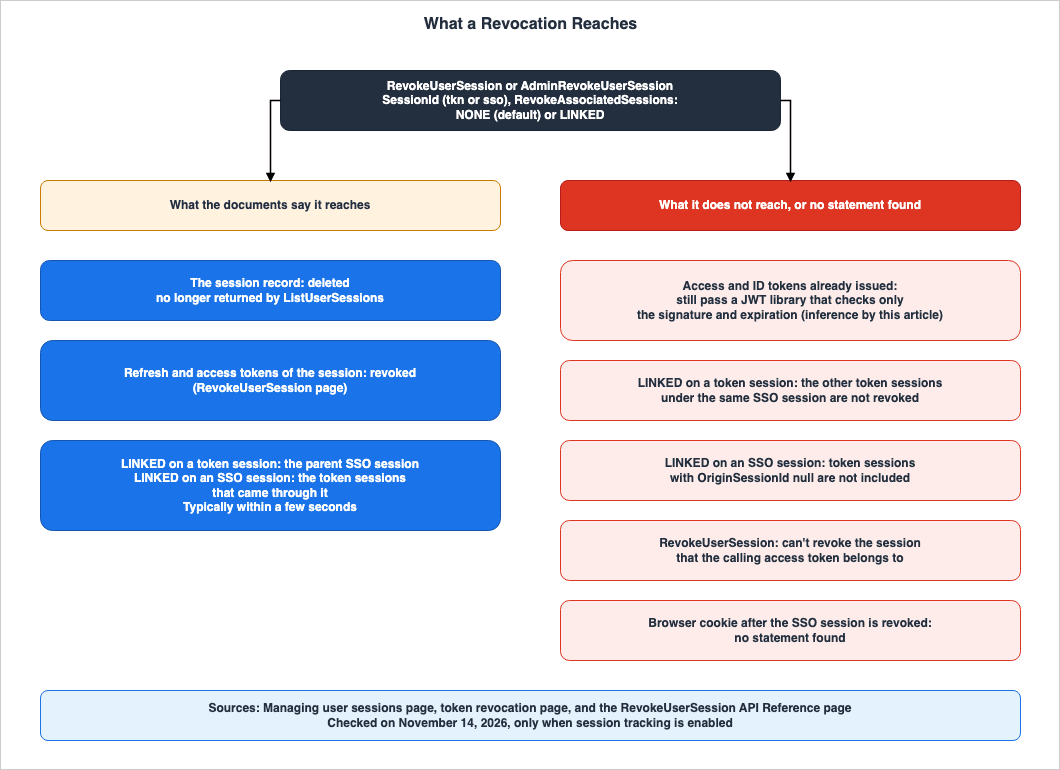
7.1 JWTs That Were Already Issued
The section 'Things to know about revoking tokens' on the token revocation page states:User pool JWTs are self-contained with a signature and expiration time that was assigned when the token was created. Revoked tokens can't be used with any Amazon Cognito API calls that require a token. However, revoked tokens will still be valid if they are verified using any JWT library that verifies the signature and expiration of the token.This passage is about the revocation methods on the token revocation page. This article did not find a statement that says the same about session revocation (No statement found). As an inference by this article, even after a session is revoked, access tokens and ID tokens that were already issued will still pass validation checks based solely on their signature and expiration date. This is because the effect that the
RevokeUserSession page describes is to revoke the refresh and access tokens and to delete the session record; it does not involve changing the signature or expiration date of the JWTs.The third assumption in Section 1.1 does not agree with this inference. To prevent tokens from being accepted after revocation, the validation process must verify not only the signature and expiration date, but also the revocation status. This article does not describe, for each place outside Amazon Cognito that verifies tokens, whether it checks revocation.
The
RevokeUserSession page states that it revokes the refresh token and access token associated with the session. The Managing user sessions page states that it revokes all tokens associated with the session. This article did not find a statement on the API pages of the session operations that names ID tokens (No statement found).7.2 What Token Revocation and Global Sign-Out Reach
The token revocation page states that revoked tokens cannot be used with Amazon Cognito API calls that require tokens (see Section 7.1). TheGlobalSignOut and AdminUserGlobalSignOut pages state the following regarding signed-out users:- Amazon Cognito no longer accepts token-authorized user operations that are authorized with the signed-out user's access token. Requests authorized with a revoked access token, that contains the
aws.cognito.signin.user.adminscope, will return anAccess Token has been revokederror. - In a
GetIdrequest to an identity pool whose user pool IdP configuration hasServerSideTokenCheckenabled, Amazon Cognito does not accept the signed-out user's ID token. - Refresh tokens for signed-out users will not be accepted for refresh requests.
The same two pages continue, stating:
Other requests might be valid until your user's token expires.This article did not find statements on these three points for tokens revoked with
RevokeUserSession (No statement found).7.3 GlobalSignOut, AdminUserGlobalSignOut, AdminDisableUser
The Managing user sessions page states:When session tracking is enabled, GlobalSignOut and AdminUserGlobalSignOut also revoke all of the user's token sessions and SSO sessions, in addition to revoking the user's refresh tokens. This behavior is automatic and requires no new parameters.This same page states that when session tracking is enabled,
AdminDisableUser also revokes all of the user's token sessions. This article found no statement on whether AdminDisableUser revokes SSO sessions (No statement found).The fourth assumption in Section 1.1 is inconsistent with this statement.
GlobalSignOut revokes SSO sessions only when session tracking is enabled. The What's New post states that a global sign-out can terminate all of a user's sessions, but it does not specify this condition (Section 9.1).7.4 Browser Cookies
TheGlobalSignOut and AdminUserGlobalSignOut pages are written as follows:This operation doesn't clear the managed login session cookie. To clear the session for a user who signed in with managed login or the classic hosted UI, direct their browser session to the logout endpoint.These two pages do not address session tracking. The Managing user sessions page states that when session tracking is enabled, these two operations will also revoke the SSO sessions (see Section 7.3). Clearing cookies and revoking the server-side SSO session are separate things. This article does not treat this as a disagreement.
This article did not find any statement on whether, after the server-side SSO session has been revoked, the cookie left in the browser still lets the user skip signing in again (No statement found). The Refresh tokens page says to redirect managed login users to the logout endpoint after signing them out, where Amazon Cognito clears their session cookie.
8. Turning Tracking On and Off
This chapter describes the operations that configure session tracking, the IAM action names, AWS CloudFormation, and whether records are kept.8.1 The Configuration Operations
User pool settings are read and written usingSetUserPoolSessionConfiguration and GetUserPoolSessionConfiguration. The values include UserSessionTracking, which can be either ENABLED or DISABLED, and TokenSession.MaxPerUser. The SetUserPoolSessionConfiguration page states that this operation completely replaces the user pool settings, requiring all parameters to be provided. Even when only changing the limit, you must include the UserSessionTracking setting.App client settings are read and written using
SetUserPoolClientSessionConfiguration and GetUserPoolClientSessionConfiguration. The SetUserPoolClientSessionConfiguration page also states that this operation completely replaces the app client settings, requiring all parameters to be provided.The What's New post indicates that session management is available through the AWS Management Console, API, AWS CLI, and AWS SDK, and that these settings can be configured using AWS CloudFormation.
8.2 When Tracking Is Turned Off
TheSetUserPoolSessionConfiguration page describes the UserSessionTracking feature as follows:When you set this value to DISABLED while the user pool remains active, existing client-level session configurations are retained but dormant, and are reactivated when you enable tracking again.Even when disabled, the reuse time for each app client is not cleared, and it becomes effective again when re-enabled.
This article did not find statements on the following two points (No statement found):
- What happens to existing session records when tracking is disabled.
- For how long session records are retained after revocation and expiration.
8.3 IAM Action Names
The service reference file lists the following eight new IAM actions for Amazon Cognito user pools:cognito-idp:ListUserSessionscognito-idp:AdminListUserSessionscognito-idp:RevokeUserSessioncognito-idp:AdminRevokeUserSessioncognito-idp:SetUserPoolSessionConfigurationcognito-idp:GetUserPoolSessionConfigurationcognito-idp:SetUserPoolClientSessionConfigurationcognito-idp:GetUserPoolClientSessionConfiguration
Within this file, the two operations that begin with
Admin and the four related to configuration utilize the resource type userpool. The ListUserSessions and RevokeUserSession operations do not have a resource type. These two operations are authorized using the user's access token (see Section 6.1).8.4 CloudTrail
The CloudTrail page states that Amazon Cognito logs all of the actions listed on the User pool actions page to CloudTrail, and logs user pool events as management events. The User pool actions link points to the Actions page of the API Reference. On the date of review, that page lists all eight operations in Section 8.3. Read together, the two pages indicate that the eight operations are recorded in CloudTrail as management events. This article did not find a statement that gives the CloudTrail event name of each operation (No statement found).8.5 AWS CloudFormation
The Managing user sessions page states that AWS CloudFormation supports session configuration for two resources:AWS::Cognito::UserPoolSessionConfigurationAttachment: This resource configures the user pool. Creation, updates, and deletion all correspond to theSetUserPoolSessionConfigurationaction. Deletion reverts the user pool to its default settings. Session tracking is disabled, andMaxPerUseris set to 20.AWS::Cognito::UserPoolClientSessionConfigurationAttachment: This resource configures the app client. Creation, updates, and deletion all correspond to theSetUserPoolClientSessionConfigurationaction. Deletion reverts the app client to its default settings.SSOSession.MaxValidityMinutesis set to 60.
The same page states that because session tracking must be enabled for the user pool when the app client's settings are written, the app client resource should include a
DependsOn property referencing the user pool's resource.The CloudFormation resource list and CloudFormation schema file, as reviewed, do not include these two resource types. This article lists this in Section 9.1 as a place where the sources disagree. This article does not say whether these two resources can be used or not.
8.6 Region
The What's New post states that session management is available for user pools in the Essentials or Plus feature plans in all AWS Regions where Amazon Cognito is available. This article has not checked availability Region by Region.The API Reference pages of the session operations list
OperationNotEnabledException as one of the potential errors. The description indicates that this error occurs when the current Region or user pool configuration does not support the requested operation, and it may occur when attempting an unsupported operation in a secondary replica Region. A similar description is also found on the RevokeToken page. This article did not find any specific statements detailing which session operations are unavailable in secondary replica Regions (No statement found).9. Where the Sources Disagree, and Where No Statement Was Found
This chapter summarizes discrepancies found in the source materials and instances where information was not found.9.1 Where the Sources Disagree
This article found four points where the sources disagree. This article does not decide that either side is wrong. The date of review for all of these points is November 14, 2026.- Session Duration for Managed Login: The Managing user sessions page states that the time to reuse SSO sessions can be configured between 0 minutes and 90 days for each app client, with a default of 60 minutes. The What's New post describes this as a replacement for the previous fixed 1-hour setting. The Quotas page table lists the Hosted UI session cookie as 1 hour. The Refresh tokens page states that managed login sessions are stored in a cookie and are valid for 1 hour, while a different section on the same page states that managed login session cookies do not expire automatically (Section 4.4).
- Conditions for Global Sign-Out: The What's New post states that global sign-out can terminate all user sessions, without specifying any conditions. The Managing user sessions page and the token revocation page state that
GlobalSignOutandAdminUserGlobalSignOutrevoke both token sessions and SSO sessions when session tracking is enabled. The pages forGlobalSignOutandAdminUserGlobalSignOutdo not mention session tracking and state that they do not clear the managed login session cookie (Sections 7.3 and 7.4).
- AWS CloudFormation Resources: The Managing user sessions page specifically mentions
AWS::Cognito::UserPoolSessionConfigurationAttachmentandAWS::Cognito::UserPoolClientSessionConfigurationAttachment, and also describes their behavior when deleted. The CloudFormation resource list and the CloudFormation schema file do not include these two types (Section 8.5).
- Usability of Revoked Tokens on the Resource Server: The
RevokeTokenpage states:
After a token is revoked, you can't use the revoked token to access Amazon Cognito user APIs, or to authorize access to your resource server.The token revocation page states that even revoked tokens remain valid if verified using a JWT library that checks the signature and expiration date (Section 7.1). When a resource server verifies tokens only with a JWT library, the two statements do not agree.
Some differences look like disagreements, but this article does not treat them as disagreements.
- Definition of a token session: The What's New post describes when a token session is created, while the Managing user sessions page describes what is tracked (Section 3.1).
- Minimum number of token sessions: The Managing user sessions page does not specify a minimum number, while the
UserPoolTokenSessionConfigTypepage and the help panel state that the minimum is 1. Not stating a value is not the same as stating a different value (Section 5.1). - Lowering the limit and exceeding the limit across Regions: Whether token refresh evicts sessions differs between the two, but these are distinct scenarios (Section 5.4).
- Cookies and SSO sessions: The
GlobalSignOutpage's statement that the cookie is not cleared and the Managing user sessions page's statement that SSO sessions are revoked are about different things (Section 7.4). - Tokens that are revoked: The
RevokeUserSessionpage specifically mentions refresh tokens and access tokens, while the Managing user sessions page states that all tokens within a session are revoked (Section 7.1).
9.2 What the Documentation Does Not List, and Where No Statement Was Found
- Session record retention period: No statement found (Section 8.2).
- Existing records when tracking is disabled: No statement found (Section 8.2).
- How long managed login reuses sign-in status when tracking is disabled: No statement found (Section 2.4).
- Which time determines the least recently used session: No statement found (Section 5.2).
- A specific statement on what happens at a sign-in that would make an eleventh SSO session: No statement found (Section 5.2).
- JWTs already issued after a session is revoked: No statement found regarding session revocation. The inference is based on statements found on the token revocation page (No statement found, Section 7.1).
AdminDisableUserand SSO sessions: No statement found (Section 7.3).- Browser cookies after an SSO session is revoked: No statement found (Section 7.4).
- CloudTrail event names: Read together, two pages indicate that the operations are logged, but no statement gives the event names (No statement found, Section 8.4).
- Session operations in secondary replica Regions: No statement found (Section 8.6).
- Document history entries: This article could not retrieve the page's content (Section 1.3).
10. Failure Modes
This chapter outlines potential failures that may occur when using session management, in the order of symptom, cause, and source.- Symptom: The token has no
sidclaim. Cause: Session tracking is not enabled in the user pool. Session tracking is disabled by default. Reference: Managing user sessions page (Section 2.1). - Symptom:
SetUserPoolSessionConfigurationreturns aFeatureUnavailableInTierException. Cause: The user pool is not on an Essentials or Plus feature plan. Reference: Managing user sessions page,SetUserPoolSessionConfigurationpage (Section 2.2). - Symptom: Even though session tracking is enabled, sessions are not being recorded. Cause: A trigger that runs before token generation is adding its own
sidclaim. Reference: Managing user sessions page (Section 2.3). - Symptom: Attempting to downgrade to the Lite feature plan fails. Cause: Session tracking is still enabled. Reference: Managing user sessions page (Section 2.2).
- Symptom: A user is suddenly signed out on one device. Cause: The user signed in again, on any device or app client, while at the token session limit, so the least recently used token session was revoked. Reference: Managing user sessions page (Section 5.2).
- Symptom: Even after reducing the limit, the number of user sessions is not decreasing. Cause: Even after reducing the limit, sessions are not revoked until the next sign-in. Token refresh also does not revoke sessions. Reference: Managing user sessions page (Section 5.3).
- Symptom:
RevokeUserSessionfails to revoke the session of the access token used for the call. Cause: This operation cannot revoke the session that the calling access token belongs to. Reference:RevokeUserSessionpage (Section 6.3). - Symptom: After revoking a token session with
LINKED, sessions for other app clients on the same browser remain active. Cause:LINKEDfor token sessions only revokes the parent SSO session; it does not revoke other token sessions originating from the same SSO session. Reference: Managing user sessions page (Section 6.4). - Symptom: When retrieving a list immediately after revoking a session, linked sessions are still present. Cause: The set of linked sessions is eventually consistent, and the sessions are typically revoked within a few seconds. Reference:
RevokeUserSessionpage (Section 6.4). - Symptom: Even after revoking a session, the API still accepts requests from that user. Cause: The API only verifies the JWT signature and expiration time. Reference: Token revocation page and an inference by this article (Section 7.1).
- Symptom: After
GlobalSignOut, managed login still signs users in without prompting for credentials. Cause: The managed login session cookie remains. TheGlobalSignOutpage states that this operation does not clear that cookie. The Refresh tokens page states that this cookie does not expire automatically, allowing users to re-authenticate using the cookie without being prompted for credentials. Reference:GlobalSignOutpage, Refresh tokens page (Sections 4.4, 7.4). - Symptom: App client A does not require sign-in, while app client B does. Cause: The reuse time that applies is that of the app client the user is signing in to. Reference: Managing user sessions page (Section 4.2).
- Symptom: Users who are repeatedly returning to managed login are prompted to sign in after the reuse time has passed since their last sign-in. Cause: The reuse time is calculated from the last authentication through managed login. Even if the SSO session is silently reused, it does not extend the reuse time. Reference: Managing user sessions page (Sections 4.1, 4.3).
- Symptom: Requests to only change the limit are rejected. Cause:
SetUserPoolSessionConfigurationreplaces the entire configuration, requiring all request parameters. Reference:SetUserPoolSessionConfigurationpage (Section 8.1). - Symptom: Attempting to set the reuse time for an app client fails. Cause: Session tracking is not enabled in the user pool. Reference:
SetUserPoolClientSessionConfigurationpage (Sections 4.1, 8.5).
11. Frequently Asked Questions About Amazon Cognito User Pool Sessions
This chapter summarizes the assumptions outlined in Section 1.1 and the key points discussed, in a question-and-answer format.Q1. If you create a user pool, are sessions automatically recorded from the beginning?
No, they are not. The Managing user sessions page states that session tracking is an opt-in feature for each user pool and is disabled by default. This feature is available only for user pools on the Essentials and Plus feature plans (see Sections 2.1 and 2.2).Q2. How many sessions can a single user have?
Token sessions can be configured to range from 1 to 100 within the user pool, with a default value of 20. This count applies across all app clients within the user pool. SSO sessions are limited to a maximum of 10 and cannot be modified (see Section 5.1).Q3. If a user reaches the limit and attempts to sign in, will they be denied access?
No. A sign-in at the token session limit is not denied. According to the Managing user sessions page, upon successful sign-in, the least recently used token session is revoked. This behavior is referred to asTERMINATE_LEAST_RECENTLY_USED (see Section 5.2).Q4. Can you terminate only the sessions associated with the lost device?
Yes, it is possible to terminate only the sessions associated with a lost device. You can obtain the session IDs usingListUserSessions or AdminListUserSessions, and then revoke them using RevokeUserSession or AdminRevokeUserSession. To end the sign-ins that came through that device's browser, target that device's SSO session and specify LINKED. Token sessions created without an SSO session (i.e., those with a null OriginSessionId) will not be included in this revocation and should be revoked separately. Linked sessions are typically revoked within a few seconds (see Sections 6.3 and 6.4).Q5. If a session is revoked, will its tokens become unusable everywhere?
Not necessarily. The token revocation page states that even revoked tokens remain valid within JWT libraries that only verify the signature and expiration date. As an inference by this article, the same applies to session revocation. TheRevokeToken page states that revoked tokens cannot be used to authorize access to a resource server either, and the two statements do not agree (Sections 7.1 and 9.1).Q6. Does GlobalSignOut also revoke SSO sessions?
If session tracking is enabled, it will. The Managing user sessions page states that when tracking is enabled, bothGlobalSignOut and AdminUserGlobalSignOut revoke all token sessions and SSO sessions. The GlobalSignOut page states that it does not clear the managed login session cookie and says to send the browser to the logout endpoint (see Sections 7.3 and 7.4).Q7. Which app client's setting determines how long an SSO session is reused?
The setting is determined by the app client the user is attempting to sign in to, not the client that originally created the session. The value can range from 0 to 129,600 minutes (90 days), with a default value of 60 minutes (see Sections 4.1 and 4.2).Q8. Are the cookies for managed login valid for one hour?
On the date of review, the sources disagree. The What's New post and the Managing user sessions page state that the time for reusing SSO sessions can be configured for each app client, and the Managing user sessions page gives a default of 60 minutes. However, the Quotas page and the Refresh tokens page still describe the cookie as 1 hour on the date of review (Sections 4.4 and 9.1).Q9. Does refreshing the token increase the number of sessions?
No, it does not. The Managing user sessions page states that refreshing and rotating tokens do not create new sessions; instead, they extend existing sessions, and the tokens continue to carry the same session identifier (as described in Section 3.2).Q10. For how long are session records retained?
This article did not find a statement that gives the retention period (No statement found). The list only returns active sessions and does not include expired or revoked sessions (see Sections 6.2 and 8.2).12. Summary
Amazon Cognito user pool sessions should be understood in relation to the following five points:- Records: Session tracking is an opt-in feature for each user pool and is disabled by default. It is only available with the Essentials and Plus feature plans. When disabled, no records are kept, and the
sidis not included in the tokens. If a trigger that runs before token generation adds its ownsid, tracking does not operate even when enabled. - Types: SSO sessions are linked to managed login and cookies, while token sessions are linked to a single app client's refresh token. Refresh and rotation do not add sessions. The duration for which SSO sessions can be reused is determined by the app client attempting to sign in. All SSO sessions expire 90 days after the last fresh authentication.
- Limits: The maximum number of token sessions per user is between 1 and 100, with a default of 20, and this count applies across all app clients. The limit for SSO sessions is fixed at 10. A sign-in at the token session limit is not denied; instead, the least recently used token session is revoked.
- Revocation:
RevokeUserSessionandAdminRevokeUserSessionrevoke a single session.LINKEDtypically revokes linked sessions within a few seconds.LINKEDon a token session does not revoke the other token sessions under the same SSO session. That JWTs already issued keep passing verification that checks only the signature and expiration rests on the token revocation page and an inference by this article. - Sources: The sources disagree on four points: the 1-hour cookie statements, the condition for global sign-out, the two AWS CloudFormation resources, and revoked tokens at a resource server. No statement was found for the retention period of the records or for the CloudTrail event names. Tables 1 and 2 reflect the state of the documentation as of November 14, 2026.
13. References
- Amazon Cognito now supports user pool session management - AWS What's New
- Managing user sessions - Amazon Cognito Developer Guide
- Ending user sessions with token revocation - Amazon Cognito Developer Guide
- Refresh tokens - Amazon Cognito Developer Guide
- Quotas in Amazon Cognito - Amazon Cognito Developer Guide
- User pool feature plans - Amazon Cognito Developer Guide
- Amazon Cognito logging in AWS CloudTrail - Amazon Cognito Developer Guide
- Session management - Amazon Cognito console help panel
- ListUserSessions - Amazon Cognito user pools API Reference
- AdminListUserSessions - Amazon Cognito user pools API Reference
- RevokeUserSession - Amazon Cognito user pools API Reference
- AdminRevokeUserSession - Amazon Cognito user pools API Reference
- SetUserPoolSessionConfiguration - Amazon Cognito user pools API Reference
- GetUserPoolSessionConfiguration - Amazon Cognito user pools API Reference
- SetUserPoolClientSessionConfiguration - Amazon Cognito user pools API Reference
- GetUserPoolClientSessionConfiguration - Amazon Cognito user pools API Reference
- UserPoolTokenSessionConfigType - Amazon Cognito user pools API Reference
- ClientSSOSessionConfigType - Amazon Cognito user pools API Reference
- SessionDescriptionType - Amazon Cognito user pools API Reference
- RevokeToken - Amazon Cognito user pools API Reference
- GlobalSignOut - Amazon Cognito user pools API Reference
- AdminUserGlobalSignOut - Amazon Cognito user pools API Reference
- AdminDisableUser - Amazon Cognito user pools API Reference
- Simplified AWS service information for programmatic access - Service Authorization Reference
- Amazon Cognito user pools service reference information (JSON)
- Amazon Cognito resource type reference - AWS CloudFormation Template Reference
- Browser-Based Apps and Cross-Device Flows on Amazon Cognito - RFC 10017 and RFC 10027 Mapped to App Client Settings
- Amazon Cognito Multi-Region Replication - What Only the Primary Accepts, Which Issuer Your Tokens Carry, and What Validators Must Assume
- Amazon Cognito Federation Complete Implementation Guide - Google, Apple, Microsoft, OIDC, and SAML
- What a Cognito Identity Pool Hands Out - Which Role It Picks, Who Calls STS, and What a Guest Gets
References:
Tech Blog with curated related content
Written by Hidekazu Konishi