What AWS Emulator Promises - Fidelity Scores, 501 Not Implemented, and the Checks It Skips
First Published:
Last Updated:
This article outlines what locally-run tests can and cannot tell you about AWS, based on the sources. It will detail the goals for operations that AWS Emulator has implemented, how it handles unimplemented operations, and what is verified through fidelity tests and fidelity scores, as well as what it does not verify. This article is not an introduction to using AWS Emulator. It will not compare it to other emulators or local tools, nor will it discuss pricing.
The conclusions, stated first, are as follows:
- The What's New post and the product page state, in definitive language, that AWS Emulator returns the same results and the same errors as AWS, while the Fidelity page describes this as a goal. Only the behavior that fidelity tests cover is verified. The README of the evaluation suite states that behavior no fidelity test covers is not verified.
- Operations that are not implemented return an HTTP 501 error and the error code
NotImplemented. This article found no statement in the sources on whether an SDK retries this 501. As an inference by this article, an SDK that follows the classification in the SDKs and Tools Reference Guide is not expected to retry it.
- The fidelity score, for each service, lists the number of fidelity tests passed and the total number of tests. For example, "40 of 50." The Fidelity page states that only scores obtained using the same version of the fidelity tests should be compared. This article did not find a field indicating the version of the fidelity tests on the latest release page and the scores file, as of the date of review.
- AWS Emulator is not a tool for verifying security. The Security page states that some services evaluate IAM policies but not the same way as AWS, that AWS Emulator does not deny a request signed with a key it created itself, and that it does not check AWS KMS key policies or Amazon S3 bucket policies. It does not separate resources by Region or account; some services share resources across all Regions, while others have resources specific to each Region. It only stores state in memory and has not been tested under prolonged use or heavy load. In the observations in Chapter 8 on v1.0.342, requests signed with the emulator's key were denied by deny statements in an S3 bucket policy and a KMS key policy, which does not match the Security page.
- It only runs natively on Linux. On macOS and Windows, it runs using self-built Docker images. If the shell running the tests does not have the
AWS_ENDPOINT_URLenvironment variable, the code will attempt to call the real AWS using the credentials it finds.
This article reviewed the sources on November 13, 2026 (Japan Standard Time). The latest release as of the date of review is v1.0.342. Chapter 8 describes observations made on November 14, 2026, while running v1.0.342 in a local Docker container on a Mac, and these observations do not represent promises made in the documentation.
Related articles on this site:
- Endpoint Resolution in the AWS SDKs and CLI - How One Region Name Becomes One URL, Which Layer Wins, and Why the Precedence Lists Do Not Match
- Amazon DynamoDB Single Table Design Complete Guide - Access-Pattern-Driven Data Modeling Patterns
- Comparing Terraform, AWS CDK, AWS SAM, and CloudFormation - A Practitioner's Guide to Mental Models, State Management, and Migration
- Load Testing on AWS - Which Policy Actually Applies, Why the Load Generator Runs Out First, and What a One-Minute Metric Hides
Table of Contents
- 1. Scope and Terms
- 2. AWS Emulator as of November 2026
- 3. What It Aims For
- 4. What Happens When an Operation Is Not Implemented
- 5. How Fidelity Is Measured
- 6. What It Does Not Check
- 7. Running It Without Calling Real AWS
- 8. Observations on a Local Mac
- 9. Where the Sources Disagree, and Where No Statement Was Found
- 10. Failure Modes
- 11. Frequently Asked Questions About AWS Emulator
- 12. Summary
- 13. References
1. Scope and Terms
This chapter defines the scope, audience, materials, and terminology used in this article. The key conclusions are as follows:- This article focuses solely on what AWS Emulator aims to achieve, what it verifies, and what it does not verify. Setup steps are kept to a minimum (Section 1.2).
- The term "support" in the materials has two meanings. This article distinguishes implemented operations from operations that are not implemented (Section 1.4).
- The term "fidelity" is used in relation to goals, tests, and scores (Section 1.4).
- All rows in this article's tables of documented facts reflect the status as of November 13, 2026. Observation tables will indicate the observation date as November 14, 2026.
- This article will not state that something is non-existent or impossible, even if it is not covered in the materials (Sections 1.5 and 9.2).
1.1 Intended Audience
This article is intended for the following readers:- Individuals currently using AWS Emulator to run tests on their local machines or in their CI/CD pipelines, or those considering doing so.
- People who want to know if tests that pass on AWS Emulator will also pass on the actual AWS environment.
- Those interested in verifying IAM policies and bucket policies locally.
- Users who want to test applications that utilize multiple AWS Regions or accounts locally.
This article assumes that readers are considering the following points, and checks each one against the sources:
- AWS Emulator guarantees that it will return the same results as AWS.
- When calling operations that are not implemented, the emulator will return an empty response or a different error, allowing tests to proceed.
- For services with a high fidelity score, your tests should behave in the same way as they would on AWS.
- It can be used to test IAM policies and bucket policies.
- Tests that span multiple Regions or accounts can be written using a single AWS Emulator instance.
1.2 Scope and Exclusions
This article covers the following:- The launch on November 11, 2026, and the status terms that the sources use.
- What AWS Emulator aims for with the operations it implements, and how strongly the sources state it.
- The HTTP 501 that operations that are not implemented return.
- The definitions of fidelity tests and fidelity scores, and how to read them.
- What the sources name as not checked.
- The boundaries for running it without calling real AWS: keys, certificates, config files, and telemetry.
- Versions, and the policy for security fixes.
- Where the sources disagree.
- Observations from running v1.0.342 within Docker on a local Mac.
This article does not cover:
- Pricing.
- Complete installation procedures; only the minimum necessary steps are described.
- Comparisons with other emulators. Only what AWS Emulator guarantees is covered, and what it does not.
- Service-specific local tools such as AWS SAM's
sam localand DynamoDB Local. These are discussed in this site's articles "Comparing Terraform, AWS CDK, AWS SAM, and CloudFormation" and "Amazon DynamoDB Single Table Design Complete Guide." - The complete mechanism by which the SDK determines its target. This is covered in this site's article "Endpoint Resolution in the AWS SDKs and CLI."
- The SDK's retry mechanisms and version-specific details. This site's The New Default Retry Behavior in AWS SDKs addresses this. This article borrows that article's terms and its inference about 501.
- The embedded mode that runs inside tests written with the AWS SDK for Rust, and the skill for AI coding agents. Each gets one line.
- Load testing. This is covered in this site's article "Load Testing on AWS."
1.3 Date of Review and Materials Reviewed
This article reviewed the following sources on November 13, 2026 (Japan Standard Time). In the body, this article uses the English names in parentheses.- AWS What's New: AWS Emulator is now available for building and testing AWS applications locally (What's New post). Published on November 11, 2026.
- The complete AWS Emulator User Guide (User Guide), consisting of 15 pages. Within this article, specific pages are referred to by their English titles. For example, the "Fidelity in AWS Emulator" page is referred to as the "Fidelity page," the "Security in AWS Emulator" page is referred to as the "Security page," and the "What is AWS Emulator?" page is referred to as the "What is page."
- The documentation home page of AWS Emulator (documentation home page).
- The product page of AWS Emulator (product page).
- The README and release page for aws/aws-emulator on GitHub. The latest release as of the date of review was v1.0.342, released at 10:05 UTC on November 13, 2026.
- The
scores.json.gz(scores file) included in the v1.0.342 release. - The README and release page for aws/aws-emulator-evaluation-suite on GitHub (evaluation suite).
- A list of package versions:
versions.json. - The "Retry behavior" page in the AWS SDKs and Tools Reference Guide (Reference Guide page). Used to read how 501 is handled.
- The "General purpose bucket naming rules" page in the Amazon S3 User Guide, the policy evaluation page in the IAM User Guide, and the GetCallerIdentity page in the AWS STS API Reference. These were read on November 14, 2026, to interpret the observations in Chapter 8.
The User Guide pages were read in two forms: the Markdown version of each page fetched with
curl, and the text fetched through the AWS Knowledge MCP Server. The verbatim quotes in this article were checked against these texts. On November 14, 2026, ten pages of the User Guide referenced in this article were re-examined, confirming that they had not changed from the version as of November 13, 2026. This article did not find any articles about AWS Emulator on the AWS News Blog. The product page links to an About Amazon article describing how AWS Emulator was built. This article does not cover the build process, so this article does not cite that article as a source.1.4 Terms, and Different Things with the Same Name
This article will consistently use the following terms with the same meaning:- Implemented operation: An operation for which AWS Emulator has an implementation. This corresponds to "implements" on the Fidelity page.
- Operation that is not implemented: An operation that AWS Emulator answers with HTTP 501 and the error code
NotImplemented. - Fidelity test: A short program that uses the AWS SDK to perform a series of calls and verify the behavior of AWS (see Section 5.1).
- Fidelity score: For each service, this represents the number of fidelity tests that AWS Emulator has passed, compared to the total number of tests (see Section 5.2).
- Evaluation suite: This refers to the GitHub repository aws/aws-emulator-evaluation-suite, which contains the fidelity tests.
- Release: This refers to a release of aws/aws-emulator on GitHub, such as v1.0.342.
- Emulator key: The access key and secret key that AWS Emulator creates each time it starts. In this article, own key refers to this key.
- Retry mode, transient error, throttling error: These terms are borrowed from another article on this site. A transient error is a type of error listed as "transient" in the Reference Guide page.
- Date of review: The date on which this article consulted the referenced materials. This date is November 13, 2026.
The materials consulted for this article contain distinct entities that share the same names.
- support: The Fidelity page states that AWS Emulator supports APIs for services that have AWS API models. The What's New post indicates that supported operations return the same results as AWS, while unsupported operations return a 501 error. The former refers to all APIs with models, and the latter refers to implemented operations. This article avoids using "support" outside of direct quotes, instead using terms like "implemented operations" and "operations that are not implemented."
- fidelity: On the Fidelity page, full fidelity is the goal of the same results and the same errors as AWS. A fidelity test is a program used to verify this goal, and the fidelity score represents the number of tests passed. This article clearly specifies each of these three elements.
- Region: The What's New post states that AWS Emulator is not dependent on AWS Regions. This can be read as meaning that it runs locally and does not use AWS Regions. The What is page indicates that while it accepts the Region specified in the request, it does not divide resources based on Region. The same page clarifies that AWS Emulator's behavior is compared to AWS using us-west-2, while global services are compared using us-east-1. This article will explicitly state the intended meaning of "Region" in each instance.
- evaluate: The What is page states that AWS Emulator does not evaluate IAM policies in the same way as AWS. The Security page indicates that while some services evaluate IAM policies, they do not do so in the same manner as AWS. Both state that the evaluation is not identical to AWS. This article avoids shortening this to simply "does not evaluate."
- Version: AWS Emulator's version is denoted as
MAJOR.MINOR.PATCH, and the latest version as of the date of review is 1.0.342. The GitHub tag is v1.0.342.versions.jsonrefers to the same version, written as 1.0.342.1. Separate versions exist for the fidelity tests. The evaluation suite was released as v1.0.0. This article will specify the version in each instance. - Account: AWS Emulator operates as a single account,
000000000000. However, it accepts any account ID within the request (see Section 6.2).
1.5 Terms for the State of the Sources
This article uses the following six terms to describe the state of the documentation. These terms, including their English spellings, are also used in the tables.- Stated: The documentation contains a statement regarding the matter.
- Stated as not supported: The documentation explicitly states that the matter is not supported or cannot be used.
- Documentation does not list: While a list or table exists, the specific item is not included. This does not necessarily indicate that the matter is unsupported or unavailable.
- No statement found: Despite searching using different keywords and categories of documentation (as described in Section 1.3), no relevant statement could be found. This does not necessarily indicate that the matter is absent or impossible.
- Sources disagree: The statements regarding the same matter in two different documents are contradictory. This article presents both statements, along with their sources, without designating either as incorrect.
- Inference: This is an inference made by this article, and is not a statement found in any of the documentation. This article says in the same sentence that it is an inference.
All dates referenced in this article are presented with the year. Pages may be rewritten after the date of review.
2. AWS Emulator as of November 2026
This chapter describes what AWS Emulator is, as defined in the documentation as of the date of review.2.1 Launch Date: November 11, 2026
The What's New post was published on November 11, 2026, with the following title:AWS Emulator is now available for building and testing AWS applications locallyThe What is page describes AWS Emulator as a local emulator for AWS APIs. It is a tool that allows you to test your software without directly calling AWS, on your local machine, development servers, or within your CI environment. An AWS account is not required. Requests are directed to AWS Emulator instead of AWS, and users interact with emulated resources rather than actual AWS resources. There is no graphical user interface. After launching, you configure environment variables to redirect AWS CLI and AWS SDK calls to AWS Emulator.
The What is page also states that AWS Emulator does not send request, response, or resource data to AWS. The same page explains that by default, it sends anonymous usage and error data, but that this can be disabled (see Section 7.6).
The "Limitations" section of the What is page begins with the following:
AWS Emulator is for building and testing. Don't use it for production workloads.2.2 Services Are Built from API Models
The What's New post states:Services in AWS Emulator are generated from the API models AWS publishes, the same models behind the AWS SDKs.It continues by explaining that when AWS adds new services or APIs, they also appear in AWS Emulator. Their behavior is filled in and verified release by release. The Fidelity page explains that AWS Emulator supports APIs for services that have models available in the AWS API model repository. The same Fidelity page also states that unimplemented operations will return a 501 error (see Section 4.1). Taken together, the two statements mean that an operation in a model is not necessarily an implemented operation.
The What is page, in the section "How AWS Emulator Keeps Improving," describes how AI agents update AWS Emulator to align with AWS, resulting in frequent updates throughout the day. The GitHub releases page shows that v1.0.290 was released at 07:55 UTC on November 10, 2026, and v1.0.342 was released at 10:05 UTC on November 13, 2026. The versions and numbers in this article are as of the date of review.
2.3 Where It Runs
The Setting up page outlines the prerequisites for each method of operation. The Docker section includes the following sentence:The emulator runs natively only on Linux.There are four methods of operation:
- Linux: Install the package on a 64-bit Linux system (x86_64 or aarch64) with glibc 2.17 or later. The product page states that on Linux, it runs as a native binary without a container runtime.
- Docker: This method is used on macOS and Windows. The Getting started with Docker page states that AWS does not publish a prebuilt image and provides a short Dockerfile for installing the package on Linux. For Apple silicon and other Arm processors, use the aarch64 package.
- Embedded Mode: Run it within the process of tests written using the AWS SDK for Rust.
- AI Coding Agent: The
aws-emulatorskill handles installation, startup, and connection. Installing the skill requires AWS CLI version 2.35.0 or later.
2.4 Versions, Security Fixes, and License
The Versions and compatibility page describes versions using theMAJOR.MINOR.PATCH format. MAJOR updates represent changes that may disrupt startup, configuration, or connection processes. MINOR updates introduce new features without breaking existing functionality. PATCH is for bug fixes and fidelity fixes. Packages are located under the LTS/ directory on downloads.aws.com.The same page states the following about security fixes:
We publish security fixes only in the latest release. Older releases don't get fixes.The page also notes that a security fix might need a breaking change, even within a MAJOR version. Items that remain unchanged within the same MAJOR version include
aws-emulator commands, options, and default values; environment variables in the User Guide; control routes such as the health check; package URLs; and the first line of the startup log. Items that may change in any release include the log fields other than the startup line, the help text, and the size and format of the keys that the emulator generates.The status term that the sources use is "is now available," in the What's New post. This article did not find the terms GA, Preview, or Experimental in the What's New post, the User Guide, the product page, or the GitHub release page. This article describes the status of AWS Emulator only as available since November 11, 2026, with the version as of the date of review in the 1.0 series.
Regarding licensing, the Setting up page states that the source code is licensed under CC0 1.0 Universal, while the code within the
vendor/ directory is licensed under the Apache License 2.0. The GitHub README and product page also include the same licensing information. The What's New post only mentions CC0 1.0 Universal (Section 9.1).3. What It Aims For
This chapter shows what AWS Emulator aims for with the operations it implements, along with how strongly the sources state it.3.1 The Goal and the Assertion
The Fidelity page states:Where the emulator implements an operation, it aims for full fidelity: the same results as AWS for valid calls, and the same errors for invalid ones.The What's New post states:
For the operations it supports, AWS Emulator returns the same result as AWS for valid calls and the same errors for invalid ones.The FAQ on the product page also states that AWS Emulator returns the same results as AWS for valid calls, and the same errors for invalid calls. This sentence does not limit itself to the implemented operations. The same FAQ answers No to whether it can be used in production, and states:
It offers no durability, availability or security guarantees.The documentation home page states that implemented operations reject invalid calls with the same errors as AWS.
On the same matter, the Fidelity page states a goal, while the What's New post and the product page make an assertion. This article treats this as a point where the sources disagree (Section 9.1). This article describes returning the same results as AWS as a goal. The behavior being verified is limited to that covered by the fidelity tests (Section 5.4).
3.2 What Constitutes the Same Result?
The "How we determine the fidelity score" section on the Fidelity page states:The emulator passes a fidelity test when its behavior matches AWS for every call in the workflow, including the status code, the resources that it creates, and other side effects. If AWS returns an error, the emulator passes only if it returns the same error.The fidelity test verifies the results, the subsequent state of resources, and errors resulting from invalid calls. The README for the evaluation suite states that the fidelity test verifies error codes and error messages.
The What is page provides Amazon DynamoDB table names as an example. Table names must be three characters or longer. If you attempt to create a table named
ab, AWS Emulator will reject the request with the same error as AWS. The same page displays the following output:An error occurred (ValidationException) when calling the CreateTable operation: 1 validation error detected: Value 'ab' at 'tableName' failed to satisfy constraint: Member must have length greater than or equal to 33.3 Control Plane and Data Plane
Fidelity tests are labeled to indicate whether they target the control plane or the data plane. The control plane, as described on the Fidelity page, refers to APIs that create, retrieve, update, delete, and list resources. The data plane, on the other hand, represents the core functionality of a service, such as retrieving and storing objects in an S3 bucket.The Fidelity page states:
Today, the emulator matches AWS most closely for control plane APIs. Fidelity for data plane APIs, and support for infrastructure as code tools such as AWS CloudFormation, Terraform, and the AWS CDK, varies by service.This article does not detail how closely any particular service's data plane or Infrastructure as Code (IaC) tools align with AWS. Differences by service are read in the scores for each release and in the evaluation suite (Chapter 5).
3.4 What Stays the Same Between Releases, and What Changes
The Fidelity page and the Versions and compatibility page state that fidelity tests that pass do not regress. However, regarding behavior not covered by any fidelity test, the Versions and compatibility page states the following:Behavior that no fidelity test covers – A release can fix a response so it matches AWS. If your tests relied on the earlier response, they can start to fail.The same page suggests several ways to mitigate this issue: installing a specific version so that you decide when to upgrade, writing tests that expect AWS behavior rather than the current AWS Emulator behavior, and ensuring that critical APIs are also tested on AWS.
4. What Happens When an Operation Is Not Implemented
This chapter describes what happens when you call an operation that has not been implemented. Figure 1 shows where a local call ends up.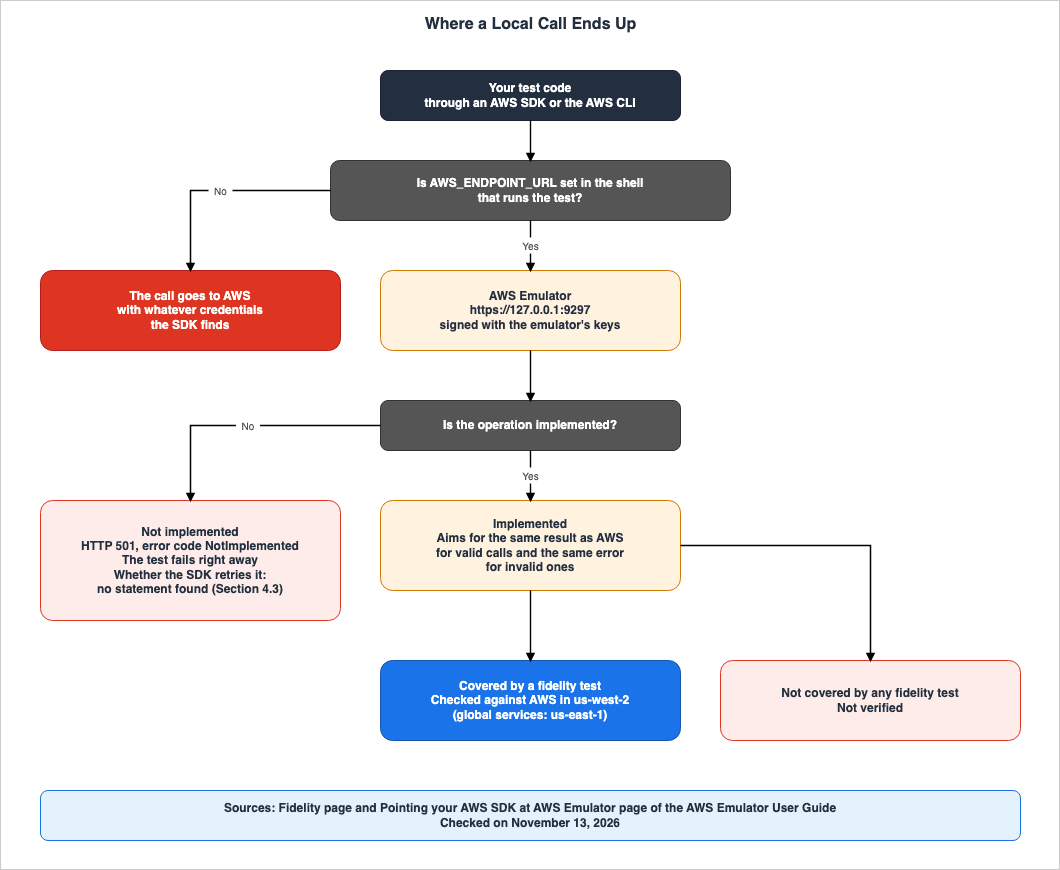
4.1 HTTP 501 and NotImplemented
The Fidelity page states:If it doesn't implement an operation yet, it returns HTTP 501 with the error code NotImplemented, and a test that calls it fails right away.The What's New post states that operations that are not implemented yet return 501 Not Implemented. The Telemetry page lists not implemented yet (HTTP 501) alongside success, client error, and server error as categories of how each call ended.
The User Guide does not describe the format of the 501 response message, body, or headers (No statement found). Section 8.5 shows the 501 responses observed in v1.0.342.
4.2 The Test Fails Right Away
The phrase "a test that calls it fails right away" on the Fidelity page can be read as meaning that a test fails immediately when it attempts an unimplemented operation, rather than proceeding with an empty response. The second assumption in Section 1.1 does not match this statement.4.3 Does the SDK Retry This 501?
This site's The New Default Retry Behavior in AWS SDKs infers how the SDK handles 501 errors based on the classification on the Reference Guide page. This article borrows that inference.The Reference Guide page categorizes failed requests into three types: transient, throttling, and non-retryable. This classification is determined by the error code and HTTP status code. The list of transient errors includes error codes such as
RequestTimeout, as well as HTTP 500, 502, 503, and 504 errors that lack a recognizable error code. The list of throttling errors includes 14 error codes, such as Throttling. Neither list includes NotImplemented or 501 (Documentation does not list). This article found no statement in the User Guide or the Reference Guide page on whether an SDK retries a 501 (No statement found).As an inference by this article, an SDK that follows the classification on the Reference Guide page is not expected to retry a 501 from AWS Emulator. This is an inference, and not a statement found in any documentation. Observations in Section 8.5 indicate that botocore
1.44.2 sent only one request for a 501 in each of five configurations. This article does not discuss other SDKs.4.4 How to Find Which Operations Are Implemented
This article found no official statement giving the number of services and operations that AWS Emulator implements (No statement found). The sources give three clues:- The
manifest.jsonlfile within the evaluation suite: This file lists the operations called and their corresponding labels for each fidelity test. - The scores file of each release: It lists the result of each fidelity test (see Section 5.3).
- The "Known Issues" section of the GitHub README: It states that APIs and behaviors that do not work yet are under
issues/things-that-do-not-work/in the repository, and that ones that have since been fixed move toissues/things-that-now-work/.
You can also determine if an operation is implemented by checking if a 501 response is returned when it is called. However, a response other than 501 does not necessarily indicate that the operation functions identically to AWS (see Section 5.4).
5. How Fidelity Is Measured
This chapter defines fidelity tests and fidelity scores, and what is actually published in the release as of the date of review.5.1 Fidelity Tests and the Evaluation Suite
The Fidelity page describes a fidelity test as a short program that uses the AWS SDK to make a series of calls to AWS services, verifying their behavior. The evaluation suite's README states that the fidelity test is a Python program using boto3, namedcheck_<name>.py. The same README also states:Every fidelity test was verified against at least two sandboxed AWS accounts, so it asserts real AWS behavior.The Fidelity page indicates that fidelity tests are built and verified in the US West (Oregon) Region (us-west-2), and that global services are verified in the US East (N. Virginia) Region (us-east-1). The What is page notes that differences in service and feature availability between Regions are not reflected.
The Fidelity page also mentions that some fidelity tests, which AWS Emulator does not yet pass, are also being published. The evaluation suite's README states that this repository is read-only, that AI agents author and manage it, and that it does not accept issues or pull requests. As of the date of review, the only release of the evaluation suite is v1.0.0, dated November 11, 2026. The release notes for v1.0.0 state that it includes 29,676 behavioral fidelity tests.
5.2 Definition and Interpretation of the Fidelity Score
The Fidelity page defines the fidelity score as follows:A fidelity score is, for each service, the number of fidelity tests that the emulator passes out of the total for that service, such as 40 of 50.The section on "Reading the fidelity scores" on the same page states that the scores are published with each release on the GitHub releases page, and continues:
Each release names the AWS Emulator commit and the version of the fidelity tests that we used. Compare scores only when they use the same version of the fidelity tests.This section further explains:
- The score represents a snapshot at a particular point in time. For example, a score of 40 out of 50 could become 45 out of 60. This might occur if five additional tests pass and ten new tests are added.
- Fidelity tests that pass do not regress.
- The number of failing tests may increase. This can happen when a new test finds a difference that was already there, or when AWS changes how a service behaves and a test is rebuilt. The latter can occur even within the same version of the fidelity test.
- As outdated tests are retired, the overall number may decrease.
Table 1 sets how the Fidelity page says to read the scores against what this article found in the release as of the date of review. The date of review is November 13, 2026, for all rows.
| Question | Fidelity Page Text | Findings from this Article (v1.0.342) | Status |
|---|---|---|---|
| Scores per service | For each service, the number of tests passed and the total number of tests | The scores file lists results for each individual test. There is no column for the total per service. | Documentation does not list |
| Which commit was used to measure the score? | Each release specifies this. | The scores file includes a column indicating the commit. | Stated |
| Which version of the fidelity test was used to measure the score? | Each release specifies this. | This article found no column or text describing this in the release page or the scores file. | No statement found |
| Can the scores be compared? | Only scores obtained using the same version of the fidelity test can be compared. | Because the version is unknown, this article cannot determine whether comparisons are valid. | Inference |
| Behavior without tests | Not verified | Section 5.4 | Stated |
5.3 What Is Actually in the v1.0.342 Release
The body of the v1.0.342 release page lists fixes, each starting withfix:. This article counted 118 lines. In addition to the compressed source code files that GitHub provides, there is one file named scores.json.gz.The top-level items in the scores file are
commit, schemaVersion, scoredAt, and units. The scoredAt value is 07:15 UTC on November 13, 2026. Each element within units includes unitId, services, kind, outcome, and detail. Some elements also include one of retriedAfterTimeout, retriedAfterInfraFault, or cause. The values of kind are behavioral and wire, and the values of outcome are pass, fail, and skipped. This article found no statement defining the two values of kind in the User Guide or the two README files (No statement found).Table 2 gives this article's reference count of the elements in the scores file whose
kind is behavioral. The "Services" column contains identifiers from the scores file. When counting, this article used the first identifier within each element's services as the service. This is not an official score. The number of elements in the scores file does not match the number (29,676) stated in the text for the v1.0.0 release. This article found no statement explaining the difference (No statement found). The count was performed on November 13, 2026.| scores file Service Identifier | Service | Pass | Fail | Skipped |
|---|---|---|---|---|
| DynamoDB_20120810 | Amazon DynamoDB | 1,048 | 299 | 7 |
| AmazonS3 | Amazon S3 | 887 | 196 | 1 |
| AmazonSQS | Amazon SQS | 286 | 20 | 0 |
| AmazonSSM | AWS Systems Manager | 83 | 200 | 0 |
| TrentService | AWS KMS | 300 | 28 | 0 |
| AWSSecurityTokenServiceV20110615 | AWS STS | 83 | 64 | 2 |
| AWSIdentityManagementV20100508 | IAM | 424 | 134 | 2 |
Table 2 provides the following additional information:
- The scores file has 43,548 elements in total: 32,839 with
behavioraland 10,709 withwire. This article does not know whichkindthe official scores include. - The number of elements that recorded
NotImplementedand 501 is 1,074. - This article does not use the numbers in Table 2 to compare performance or quality. The numbers change from release to release.
5.4 Behavior Without Fidelity Tests
The README for the evaluation suite states the following:Behavior that no fidelity test covers is not verified.The Checking whether your project works with AWS Emulator page in the User Guide states the same thing in a slightly different way.
If no fidelity test covers a behavior, the emulator might already handle it correctly, but no fidelity test confirms it yet.The two statements do not disagree. Both describe behavior without a test as not confirmed. The same page lists steps to check your own workflow: list the operations that you call, find their fidelity tests in
manifest.jsonl, examine the scores for the relevant release, and compare the results of your tests running on both AWS Emulator and AWS for operations that lack fidelity tests.In light of the third assumption in Section 1.1, the service's fidelity score does not indicate whether the operations and behavior your tests invoke have associated tests.
6. What It Does Not Check
This chapter outlines aspects that the documentation specifies AWS Emulator does not verify in the same way as AWS. Figure 2 lists what a test that passed locally shows and what it does not.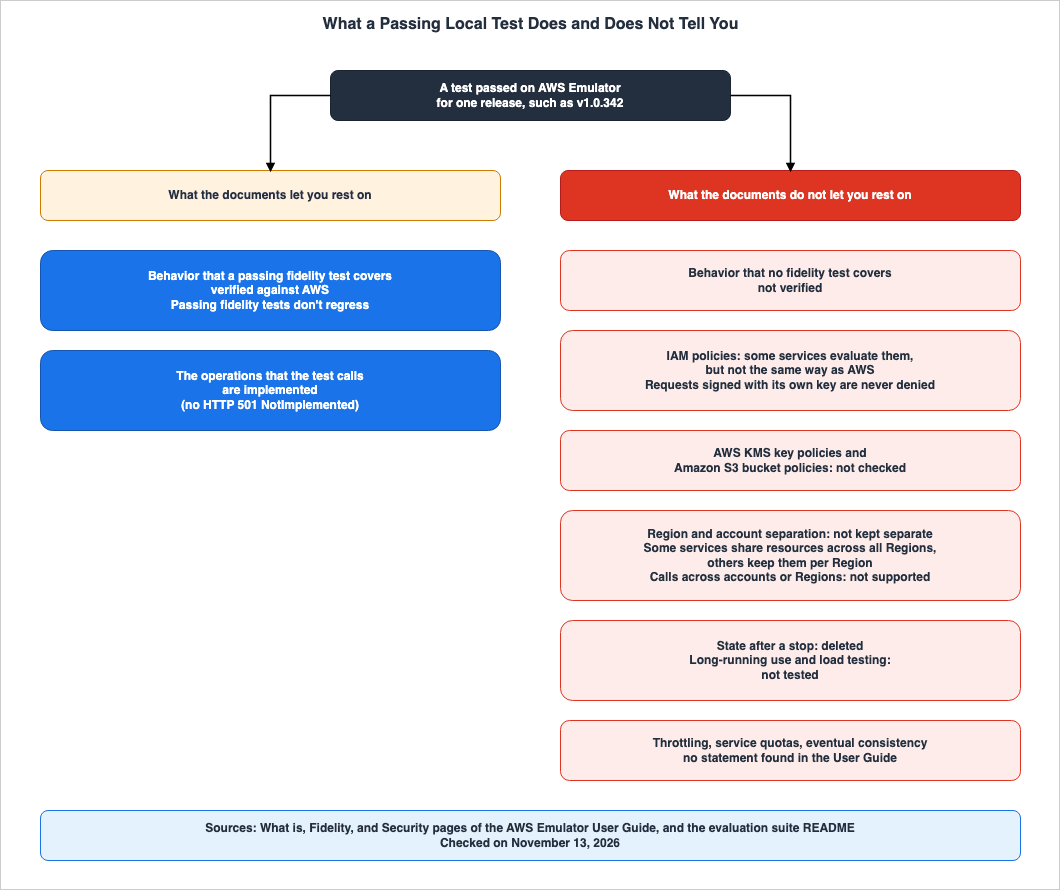
| Item | Summary of Documentation | Source | Status |
|---|---|---|---|
| IAM policies and permissions boundaries | Some services evaluate IAM policies, but not the same way as AWS. | Security page | Stated |
| Requests signed with its own key | Does not deny. | Security page | Stated |
| Resource-based policies, S3 bucket policies | Does not evaluate them the same way as AWS. Does not check S3 bucket policies. | What is page, Security page | Stated |
| AWS KMS key policies | Does not check. | Security page | Stated |
| Calls that span accounts and Regions | Not supported. | Security page | Stated as not supported |
| Resource isolation across Regions and accounts | Does not isolate. Some services are shared across all Regions, while others are specific to each Region. | What is page | Stated |
| Differences in availability by Region | Does not reflect. | What is page | Stated |
| State after stopping | Deletes all resources. | What is page, Command reference | Stated |
| Carrying state over to the next start | Does not keep it. A new run starts from a clean state. | Product page | Stated |
| Long-running use and load testing | Has not been tested. | What is page | Stated |
| Throttling, service quotas, and eventual consistency | No statement found. | User Guide | No statement found |
| Behavior without fidelity testing | Has not been verified. | Evaluation suite README | Stated |
Table 3 reflects the documentation. Of the observations in Chapter 8, the ones on bucket policies and key policies do not match three rows of Table 3: requests signed with its own key, S3 bucket policies, and AWS KMS key policies (see Sections 8.7 and 9.3).
6.1 Do Not Use It to Check Security
The Security page states:Don't use AWS Emulator to test whether your application is secure. Passing tests in the emulator don't show that your permissions are correct or safe.The same page lists what not to test: IAM policies and permissions boundaries, resource-based policies such as bucket policies, AWS KMS key policies, access across accounts or Regions, and any other security control. It continues:
Some services in the emulator evaluate IAM policies for IAM users and roles that you create in the emulator, but not the same way as AWS. The emulator never denies a request signed with its own key. It doesn't check AWS KMS key policies or Amazon S3 bucket policies. It also doesn't support calls across accounts or Regions. So a request that AWS denies might succeed in the emulator. A request that AWS allows might fail.The FAQ on the product page also states that it does not replace testing your security settings on AWS. The last two sentences of the Security page quote cover both directions. There may be instances where requests that AWS rejects are approved by AWS Emulator, and conversely, requests that AWS approves may fail within AWS Emulator. This does not match the fourth assumption outlined in Section 1.1.
The observation in Section 8.7 on v1.0.342 noted that requests signed with the emulator's key were denied by deny statements in a bucket policy and a key policy. This does not match the statements on the Security page (Section 9.3). However, even with this observation, the instruction on the Security page – that it should not be used to verify security – remains unchanged.
6.2 Region and Account
The Limitations section of the What is page states:The emulator accepts any Region and account ID in a request, but it doesn't keep resources separate by Region or account. Some services share resources across all Regions, and others keep them per Region. Use one Region and one account for all requests to an emulator.This section also describes how, to test multiple Regions, you should run a separate AWS Emulator on a different port for each Region. The Command reference page states that each AWS Emulator operates as a single account,
000000000000. The fifth assumption in Section 1.1 is inconsistent with this statement. The User Guide specifies that requests to a single AWS Emulator should be aligned with a single Region and a single account.6.3 State Exists Only in Memory
The What is page states that AWS Emulator stores all resources in memory and deletes them when stopped. The Command reference page notes that there are no routes to reset the state or manipulate state transitions; instead, it states that to start from a clean state, you must restart AWS Emulator. The Getting started with Docker page provides adocker run example that limits memory to 2 GiB using the --memory and --memory-swap flags. The same section explains that if the container exceeds this limit, it will terminate with exit code 137, resulting in the loss of the emulated resources.The FAQ on the product page answers No to whether it keeps data between runs. It clarifies that the state is stored in memory and is lost when the emulator is stopped, and that a new run starts from a clean state.
6.4 Long-Running Use and Load
The What is page states:We haven't tested the emulator for long-running use or load testing.The same section says to start the emulator for your tests and stop it afterwards, or to set
--idle-timeout so that it stops by itself. Restarting AWS Emulator also provides a clean state for testing.6.5 Throttling, Quotas, and Eventual Consistency
The Telemetry page listsThrottling as an example of error classifications reported by telemetry. Apart from that, this article found no statement in the User Guide on how AWS Emulator handles throttling, service quotas, or eventual consistency (No statement found). Following the evaluation suite's README, these are not verified either, unless a fidelity test covers them.7. Running It Without Calling Real AWS
This chapter outlines the boundaries for ensuring that testing does not access real AWS environments, as described in the User Guide.7.1 Keys and Certificates Change on Every Start
The Command reference page states that AWS Emulator defaults to listening on127.0.0.1:9297 via HTTPS. On each startup, AWS Emulator generates new access keys and secret keys, a configuration file for the SDK, and an HTTPS certificate, saving these to directories named after the port under the ~/.aws/emulator/ directory. When it stops cleanly, it deletes these files. If AWS Emulator crashes, the files remain, and the next instance of AWS Emulator launched on the same port will overwrite them.On the format of the keys as of the date of review, the same page states that the access key ID is 20 characters long and begins with
EMULATOR, while the secret key is a 40-character string of uppercase hexadecimal characters. The page also notes that this format may change in future releases, and says not to validate the format in your code.AWS Emulator rejects requests that are not signed, except for operations that AWS would accept without signatures, and also rejects requests signed with other keys. Access keys created with the
CreateAccessKey operation of IAM in AWS Emulator, or keys created with AWS STS, also work. A table on the same page lists the error messages returned for different rejection reasons:- Not signed: The error that the service returns on AWS. For example,
InvalidClientTokenIdfrom AWS STS. - Signed with a key that the emulator does not accept:
AccessDenied, with the message "Sign the request with the emulator credentials." - A key that the emulator accepts, but the signature does not match:
SignatureDoesNotMatch. - The emulator cannot tell which service the request is for: HTTP 404,
UnknownService.
When launched with the
--auth off flag, the emulator will respond to all requests, regardless of whether they are signed. The Security page advises that using this option is at your own risk and should only be done on a machine that is not accessible to others.7.2 Changing the Target with Environment Variables
The Pointing your AWS SDK at AWS Emulator page instructs you to set the following environment variables in your macOS and Linux shells. If you are using a port other than 9297, replace each instance of 9297 with your desired port.export AWS_ENDPOINT_URL=https://127.0.0.1:9297
export AWS_SHARED_CREDENTIALS_FILE=~/.aws/emulator/9297/emulator_credentials
export AWS_CONFIG_FILE=~/.aws/emulator/9297/config
export AWS_CA_BUNDLE=~/.aws/emulator/9297/ca.pem
export AWS_EC2_METADATA_DISABLED=true
export AWS_DISABLE_HOST_PREFIX_INJECTION=true
export AWS_REGION=us-east-1
export AWS_DEFAULT_REGION=us-east-1The same page also instructs you to remove any environment variables that contain real credentials. Environment variables take precedence over credential files, so if they remain, the SDK will sign requests with the real credentials, and AWS Emulator will reject those requests.
The same page includes the following note:
If AWS_ENDPOINT_URL isn't set in the shell that runs your tests, your code calls AWS with whatever credentials it finds.The page also advises setting the variables within the script that runs your tests, ensuring that the test job environment does not contain any real credentials. You can verify if AWS Emulator is receiving the requests by checking the
Account value in the output of aws sts get-caller-identity; if it is 000000000000, AWS Emulator is receiving the requests. This site's Endpoint Resolution in the AWS SDKs and CLI explains how AWS_ENDPOINT_URL determines the SDK's target.7.3 AWS_CONFIG_FILE Replaces Your Own Settings
The same page states:Setting AWS_CONFIG_FILE replaces your own AWS config file for that shell. Settings that you keep there, such as retry or Amazon S3 settings, don't apply while you test against the emulator.Because AWS Emulator writes its config file again each time it starts, the same page says not to add your settings to that file, but to copy it, add your settings to the copy, and point
AWS_CONFIG_FILE to the copy. When you change the port, make the copy again. Settings such as retry_mode and max_attempts that you write in ~/.aws/config will not take effect within the shell targeted at AWS Emulator. The default retry mode is determined by the SDK version. This site's The New Default Retry Behavior in AWS SDKs discusses the defaults for each version.7.4 Host Names That the SDK Changes
The same page states that AWS Emulator serves all services on one endpoint, and lists three cases in which the SDK changes the host name.- Host Prefix: In some operations, the SDK adds a prefix like
data-to the hostname. The request is then sent to a non-existent host, such asdata-127.0.0.1. The AWS CLI and Boto3 can turn this off withAWS_DISABLE_HOST_PREFIX_INJECTION. The same page notes that if this variable is set when calling AWS, operations that use a host prefix fail. - Amazon S3: Because the endpoint is an IP address, the SDK includes the bucket name in the path. AWS Emulator does not accept requests with the bucket name included in the hostname. If
AWS_ENDPOINT_URLis set tolocalhost, the JavaScript, Java, and Go SDKs will, by default, include the bucket name in the hostname. The examples from the SDK documentation that this site's Endpoint Resolution in the AWS SDKs and CLI quotes uselocalhost. When pointing at AWS Emulator, use127.0.0.1, as the User Guide says. - Amazon S3 Control: The SDK always includes the account ID in the hostname, so the requests do not reach AWS Emulator.
7.5 Keeping It Out of Reach of Other People and Machines
The Security page says to run AWS Emulator only on your own machine, and not on a machine that other people can sign in to. Other users and programs on the same machine may access the ports used by AWS Emulator. Ports associated with resources that have their own endpoints, such as databases, do not require signature verification for requests. The Getting started with Docker page says to use-p 127.0.0.1:9297:9297, not -p 9297:9297. The shorter form exposes AWS Emulator to the entire network.The Security page also states that AWS Emulator does not isolate code that it runs for you, such as function code, from your machine. This code runs with the user's permissions and is capable of reading and writing files.
7.6 Telemetry
The Telemetry page states that telemetry is enabled by default. It sends only random IDs, numbers, and values from a fixed list. It explicitly states that it does not transmit any request or response content, code, credentials, or personal data. There are four ways to disable telemetry, and any one of them is sufficient.- Use the
--telemetry offoption. - Set the environment variable
EMULATOR_TELEMETRYtooff. - Set
enabled = falsein theconfig.tomlconfiguration file. - Use the configuration API of embedded mode.
The same page also indicates that setting the variable in your own shell does not turn off telemetry inside a container. In Docker, you can either pass variables using the
-e flag or append --telemetry off to the image name.8. Observations on a Local Mac
This chapter presents observations obtained by running AWS Emulator within Docker on a local Mac. These observations represent a single version and the results of runs on one day; they are not a promise in the sources. An AWS account was not used.8.1 Configuration
The configuration is as follows. The observation date was November 14, 2026 (Japan Standard Time), and v1.0.342 was used.- AWS Emulator: An image was created using the Dockerfile from the Getting started with Docker page, with the package fixed to version
1.0.342for the aarch64 architecture. - Startup: The emulator was launched with the following parameters:
--memory=2g,-p 127.0.0.1:9297:9297, and--telemetry off. The emulator's files were placed in a dedicated working directory. - Invocation: A Python script using botocore
1.44.2. The script unset environment variables holding real credentials and only read the configuration and credentials files generated by AWS Emulator. The script was designed to halt before sending any requests to addresses other than127.0.0.1, and to stop if the initialGetCallerIdentitycall does not return000000000000. - Two verification runs were performed: one immediately after startup, and another after shutting down and restarting the emulator.
8.2 The Version in the Package URL
On November 13, 2026, this article checked the URL of the aarch64 RPM package with HTTP HEAD requests. The URL with the version part set to 1.0.342.1, as written inversions.json, returned 403, while the URL with the version set to 1.0.342 returned a 200 status. The demonstration image was created using the latter URL. This was a single check; other versions and other package formats were not checked.8.3 Startup and Health Check
Theaws-emulator -v command displayed a version of 1.0.342 and a release date of 2026.11.13. The startup log included a line whose message was emulator server information, with an endpoint_url of https://127.0.0.1:9297. The health check endpoint returned an HTTP 200 status code and the body ok.The configuration file written by AWS Emulator specified a
region of us-east-1, an endpoint_url of https://127.0.0.1:9297, and included a ca_bundle along with an s3v4 value for the S3 signature_version. This aligns with the description in the Command reference page. The GetCallerIdentity call returned an Account value of 000000000000 and an Arn of arn:aws:iam::000000000000:user/emulator. The access key ID was 20 characters long, began with EMULATOR, and the rest was uppercase hexadecimal. The secret key was 40 characters long, consisting entirely of uppercase hexadecimal characters.AWS Emulator within the container listens on
0.0.0.0, as defined in the Dockerfile. Consequently, the logs included a warning line indicating that it was listening on an address other than the loopback address. The Command reference page describes this warning line. Because it was launched with -p 127.0.0.1:9297:9297, the port is only exposed to the local machine. The telemetry notice line stated that telemetry was off.8.4 Implemented Operations and Examples from the User Guide
Following the example on the What is page, creating an S3 bucket namedamzn-s3-demo-bucket made AWS Emulator return HTTP 400 with the error code InvalidBucketName. The example on the What is page shows a successful creation in its output. The Amazon S3 User Guide's section on General purpose bucket naming rules states the following:Because it's a reserved prefix, you can't create bucket names that start with amzn-s3-demo-.This observation matches the rule in the Amazon S3 User Guide, and does not match the output of the example on the What is page (Section 9.1).
Creating a DynamoDB table with the name
ab also returned the same error code and message as shown in Section 3.2. Tables with names of three or more characters could be created and were readable using DescribeTable.8.5 The 501 from Operations That Are Not Implemented
From the operations that recorded 501 in the scores file of v1.0.341, eight that can be called without arguments were selected, and each was called once. These were: Athena'sListEngineVersions and ListApplicationDPUSizes, IAM's ListMFADevices, Amazon Translate's ListLanguages, AWS IoT's ListThingTypes and GetRegistrationCode, AWS Glue's ListUsageProfiles, and AWS Lake Formation's ListLakeFormationOptIns. All eight operations returned HTTP 501 and the error code NotImplemented in v1.0.342.The response body for Athena's
ListEngineVersions was as follows:{"__type":"NotImplemented","message":"operation ListEngineVersions is scaffolded but not implemented in this emulator"}In the headers,
content-type was application/x-amz-json-1.1, and the only others were content-length and date. The other seven operations returned messages with the same format.Table 4 shows the number of requests sent by botocore when calling the same
ListEngineVersions operation with different retry modes in botocore 1.44.2. The number of requests reflects the count of events immediately before botocore sent the request.| Configuration | botocore Retry Configuration Resolved | Requests Sent | RetryAttempts |
|---|---|---|---|
| No configuration | mode standard | 1 | 0 |
| standard | mode standard | 1 | 0 |
| standard, max_attempts 5 | mode standard, total_max_attempts 6 | 1 | 0 |
| adaptive | mode adaptive | 1 | 0 |
| legacy | mode legacy | 1 | 0 |
In all configurations, botocore did not retry the 501 error. This matches the inference in Section 4.3. This observation is specific to botocore
1.44.2 and only one operation. It does not provide any information about other SDKs or different versions.8.6 Own Key and IAM User Keys
Within AWS Emulator, two IAM users were created. One had an inline policy that denied all actions and all resources. The other had no policy attached. Keys were created for both users withCreateAccessKey, and the same eight calls were sent with each key as with the emulator's key. Table 5 shows the results.| Request | Emulator Key | User with Deny Policy | User with No Policy |
|---|---|---|---|
| STS GetCallerIdentity | 200 | 200 | 200 |
| S3 ListBuckets | 200 | 200 | 200 |
| S3 CreateBucket | 200 | 403 AccessDenied | 403 AccessDenied |
| DynamoDB ListTables | 200 | 200 | 200 |
| SQS ListQueues | 200 | 200 | 200 |
| SNS ListTopics | 200 | 403 AuthorizationError | 403 AuthorizationError |
| Systems Manager DescribeParameters | 200 | 200 | 200 |
| IAM ListUsers | 200 | 403 AccessDenied | 403 AccessDenied |
The messages for the three rejected requests indicated that the user with the deny policy was denied due to an explicit deny in the identity-based policy, while the user with no policy was denied because there was no identity-based policy granting permission for that action. The AWS STS API Reference states that
GetCallerIdentity does not require any permissions and can be called even with a policy that explicitly denies it.The IAM User Guide states that, with the exception of the AWS account root user, all requests are implicitly denied by default, and explicit denials take precedence over explicit permissions. As an inference by this article, under this rule, the S3 ListBuckets, DynamoDB ListTables, SQS ListQueues, and Systems Manager DescribeParameters calls by the two users are calls that AWS denies. This observation aligns with statements in the Security page, which notes that some services evaluate IAM policies differently than AWS, and that requests rejected by AWS may sometimes succeed in AWS Emulator. Which operations it evaluates was checked only with the eight calls in this observation.
8.7 Bucket Policies and Key Policies
Using the emulator's key, an S3 bucket was created, and a bucket policy that denies all S3 actions to all principals was attached to it. Subsequently, when attempting aPutObject call using the same emulator key, an HTTP 403 AccessDenied error was returned. The message indicated that the s3:PutObject action for the user/emulator principal was being denied by an explicit denial in the resource-based policy. Similarly, GetObject also returned a 403 AccessDenied error, with the message stating that the s3:ListBucket action was being denied.Using the same emulator key, a KMS key was created with a key policy that denied all KMS operations for all principals. The
BypassPolicyLockoutSafetyCheck parameter was included during key creation. When Encrypt was then called, an HTTP 400 AccessDeniedException was returned. The message indicated that the kms:Encrypt action was being denied by an explicit denial in the resource-based policy. However, a DescribeKey call on the same key returned a status code of 200.The Security page states that AWS Emulator does not deny requests signed with its own key, and does not check AWS KMS key policies or S3 bucket policies. This observation, specific to v1.0.342, shows that requests made using the emulator's key were being rejected by the bucket policy and key policy denials. This article does not judge whether the sources or the observation reflect the intended behavior (see Section 9.3). This observation does not indicate that AWS Emulator can be used for security validation. The Security page explicitly states that it should not be used for security testing (see Section 6.1).
8.8 Region
In each of us-west-2 and us-east-1, one S3 bucket, one DynamoDB table, one SQS queue, one SNS topic, and one Systems Manager parameter were created, and each was listed in both Regions. Table 6 shows the results.| Service | Listed in us-east-1 | Listed in us-west-2 |
|---|---|---|
| S3 Bucket | Buckets created in both Regions appear | Buckets created in both Regions appear |
| DynamoDB Table | Only the tables created in us-east-1 | Only the table created in us-west-2 |
| SQS Queue | Only the queue created in us-east-1 | Only the queue created in us-west-2 |
| SNS Topic | Only the topic created in us-east-1 | Only the topic created in us-west-2 |
| Systems Manager Parameter | Only the parameter created in us-east-1 | Only the parameter created in us-west-2 |
When
GetBucketLocation was called from us-east-1 on the us-west-2 bucket, the LocationConstraint returned us-west-2. This observation matches the What is page statement that some services share resources across all Regions, and others keep them per Region. This observation covers only five services.8.9 Another Account ID
Four calls naming another account ID,111122223333, were sent to resources created in us-west-2.- SQS
GetQueueUrlwithQueueOwnerAWSAccountIdreturned HTTP 400 withAWS.SimpleQueueService.NonExistentQueue. - DynamoDB
DescribeTablewith an ARN in that account ID returned 200. The returnedTableArncontained an account ID of000000000000. - SNS
GetTopicAttributeswith an ARN in that account ID returned HTTP 403 withInvalidClientTokenId. - S3
HeadBucketwithExpectedBucketOwnerreturned HTTP 403.
The responses varied depending on the service. As described in Section 6.2, the User Guide says to use one account for all requests to an emulator.
8.10 AWS_CONFIG_FILE
A config containingretry_mode = legacy and max_attempts = 7 was prepared, and the values that botocore resolved were compared in two cases.- When
AWS_CONFIG_FILEpointed to AWS Emulator's configuration file:retry_modewasstandard, andmax_attemptswas not specified. Those settings did not apply. - When the same two lines were added to a copy of AWS Emulator's config file and
AWS_CONFIG_FILEpointed to that copy:retry_modewaslegacy, and the total number of attempts was 7. In this case as well, the calls to AWS Emulator were successful.
This observation matches the User Guide statement in Section 7.3.
standard is the default for botocore version 1.44.2.8.11 Restart
After a clean stop, the directory named for the port was empty. Upon restarting, the access key, secret key, and certificate all differed from the previous startup. The lists for S3, DynamoDB, SNS, and Systems Manager were empty in both Regions, and the KMS list was empty in us-east-1. SQSListQueues returned no queue URLs. The IAM ListUsers command returned only one user, named emulator.Table 7 shows the results of sending requests that were rejected after the restart.
| Request | STS GetCallerIdentity | S3 ListBuckets |
|---|---|---|
| Key from the previous start | 403 InvalidClientTokenId | 403 AccessDenied |
| Current key ID with a wrong secret | 403 SignatureDoesNotMatch | 403 SignatureDoesNotMatch |
| Request without signature | 403 InvalidClientTokenId | 404 UnknownService |
The table on the Command reference page states that a request signed with a key that the emulator does not accept gets
AccessDenied. S3 behaved as described, and the error message matched the text in that same section. STS returned InvalidClientTokenId (Section 9.3). The body of the 404 error returned by an unsigned S3 request stated that the emulator could not determine the target service from the request.8.12 What This Observation Does Not Show
This observation does not demonstrate:- The behavior of versions after v1.0.342, nor the behavior of other versions.
- The behavior of SDKs other than botocore
1.44.2, or the behavior of the AWS CLI. - The behavior of AWS itself. This article does not call AWS services. The results that AWS would return for the calls in Section 8.6 are an inference based on the IAM User Guide.
- Behavior when telemetry is enabled, when running natively on Linux, or when running for extended periods.
- That AWS Emulator can be used to check security. The denials seen in this observation do not show that.
9. Where the Sources Disagree, and Where No Statement Was Found
This chapter summarizes discrepancies found in the source materials and instances where information was not found.9.1 Where the Sources Disagree
This article identified four points where the documentation contains discrepancies. This article does not decide that either one is wrong.The first discrepancy concerns the strength of the wording regarding achieving the same results as AWS. The Fidelity page uses phrasing that indicates an intended outcome ("aims for"). The What's New post and the product page use more definitive statements. The sentence in the product page's FAQ does not limit itself to the implemented operations either (Section 3.1).
The second discrepancy relates to licensing. The What's New post states that the source code is published under the CC0 1.0 Universal license. The Setting up page, the GitHub README, and the product page state that the code within the
vendor/ directory is an exception under the Apache License 2.0 (Section 2.4).The third discrepancy involves the way versions are described. The Versions and compatibility page indicates that when installing a specific version, the version portion of the package file name should be replaced with a version from the list in
versions.json. As of the date of review, versions.json lists the latest version as 1.0.342.1. The GitHub tag is v1.0.342. Section 8.2 shows the results of checking the URL written both ways.The fourth discrepancy concerns the bucket name used in the example within the User Guide. The What is page example shows the successful creation of a bucket named
amzn-s3-demo-bucket. However, the Amazon S3 User Guide's "General purpose bucket naming rules" page states that bucket names beginning with amzn-s3-demo- use a reserved prefix and therefore cannot be created. The observations in Section 8.4 show that AWS Emulator rejected this creation with an InvalidBucketName error.Some points look like disagreements, but this article does not treat them as such.
- IAM: The What is page and the Security page both state that IAM policies are not evaluated the same way as AWS (Section 1.4).
- Region: The What's New post states that AWS Emulator does not depend on an AWS Region, which can be read as meaning that it runs locally. The What is page describes how the Region is handled within requests (Section 1.4).
- Multiple AWS Emulators: The What's New post indicates that each running AWS Emulator has its own ports, keys, and memory state, and that they never see each other's resources. The Getting started with Docker page states that if you change only the port on your machine's side, the containers write to the same directory and replace and delete each other's key and certificate files. The former refers to resources, while the latter refers to files.
- Behavior without a test: "is not verified" in the evaluation suite README and "no fidelity test confirms it yet" on the Checking whether your project works with AWS Emulator page say the same thing (Section 5.4).
9.2 What the Documentation Does Not List, and Where No Statement Was Found
- Fidelity test version: The Fidelity page states that each release names the version of the fidelity tests. This article found neither a field nor a statement for it in the v1.0.342 release page or the scores file (No statement found, Section 5.2).
- Meaning of the
kindValue in the Scores File: This article found no statement defining the valuesbehavioralandwire(No statement found, Section 5.3). - Number of Implemented Services and Operations: This article found no statement giving an official count (No statement found, Section 4.4).
- 501 Response Message, Body, and Header: This information is not documented in the User Guide (No statement found, Section 4.1). Section 8.5 presents observations related to v1.0.342.
- Whether an SDK retries a 501: This article found no statement (No statement found, Section 4.3).
- How throttling, service quotas, and eventual consistency are handled: This article found no statement (No statement found, Section 6.5).
- Status terms such as GA: This article found none in the What's New post, User Guide, product page, or GitHub release page (Section 2.4).
- An AWS News Blog post: This article found none (Section 1.3).
9.3 Where the Sources and the Observations Do Not Match
This article found two points where the observations in Chapter 8 do not match the sources. Both come from a single observation on v1.0.342. This article does not judge whether the sources or the observation reflect the intended behavior.The first discrepancy concerns emulator keys and resource-based policies. The Security page states that AWS Emulator does not deny a request signed with its own key, and does not check AWS KMS key policies or S3 bucket policies. In the observation in Section 8.7, S3
PutObject and GetObject with the emulator's key were denied by a deny in the bucket policy, and KMS Encrypt was denied by a deny in the key policy.The second discrepancy relates to errors encountered when signing requests with keys from an earlier start. The table on the Command reference page states that a request signed with a key that the emulator does not accept gets
AccessDenied. However, the observation in Section 8.11 shows that S3 returned an AccessDenied error, while STS returned an InvalidClientTokenId error.10. Failure Modes
This chapter outlines potential failures that may occur when using AWS Emulator, listing them in order of symptoms, causes, and relevant resources.- Symptoms: Tests that pass locally fail with an
AccessDeniederror on AWS. Cause: According to the Security page, AWS Emulator does not deny requests signed with its own key, and does not evaluate IAM policies the same way as AWS. Reference: Security page (Section 6.1). - Symptoms: Tests that pass locally produce different results on AWS. Cause: The behavior has no fidelity test and was not verified. Reference: Evaluation suite README, and the Checking whether your project works with AWS Emulator page (Section 5.4).
- Symptoms: Tests fail immediately with HTTP 501 and the error code
NotImplemented. Cause: The operation is not implemented. Reference: Fidelity page (Section 4.1). - Symptoms: Upgrading AWS Emulator version causes previously passing tests to fail. Cause: A response that no fidelity test covered was fixed to match AWS. Reference: Versions and compatibility page (Section 3.4).
- Symptoms: Tests intended for AWS Emulator are calling the real AWS. Cause: The shell environment in which the tests are run does not have the
AWS_ENDPOINT_URLvariable set. Reference: Pointing your AWS SDK at AWS Emulator page (Section 7.2). - Symptoms: Requests are denied with an
AccessDeniederror, and the message indicates to "Sign the request with the emulator credentials." Cause: Environment variables containing real credentials remain, or keys from an earlier start are being used. Reference: Command reference page, and Pointing your AWS SDK at AWS Emulator page (Sections 7.1 and 7.2). - Symptoms: Retries and S3 settings configured in
~/.aws/configare not being applied. Cause: TheAWS_CONFIG_FILEvariable is pointing to AWS Emulator's configuration file. Reference: Pointing your AWS SDK at AWS Emulator page (Section 7.3). - Symptoms: S3 requests are not reaching AWS Emulator. Cause:
AWS_ENDPOINT_URLis set tolocalhost, and the SDK is incorporating the bucket name into the hostname. Reference: Same page (Section 7.4). - Symptoms: Certain operations fail to connect to
data-127.0.0.1. Cause: The SDK added a host prefix. Reference: Same page (Section 7.4). - Symptoms: Resources created in one Region appear (or do not appear) in the list for a different Region. Cause: AWS Emulator does not separate resources by Region, and different services have different levels of sharing and isolation. Reference: What is page (Section 6.2).
- Symptoms: A Docker container exits with a code of 137, and resources are lost. Cause: The container exceeded its memory limit. Reference: Getting started with Docker page (Section 6.3).
- Symptoms: Two containers delete each other's key and certificate files. Cause: Only the port on the local side was changed. Reference: Getting started with Docker page (Section 9.1).
- Symptoms: Comparing scores across releases shows an increasing number of failing tests. Cause: Tests have been added or rebuilt. Reference: Fidelity page (Section 5.2).
- Symptoms: Creating the
amzn-s3-demo-bucketas shown in the What is page results in anInvalidBucketNameerror. Cause:amzn-s3-demo-is a reserved prefix for S3. Reference: The General purpose bucket naming rules page of the Amazon S3 User Guide, and the observation in Section 8.4. - Symptoms: In the v1.0.342 observation, calling STS with keys from an earlier start results in an
InvalidClientTokenIderror instead ofAccessDenied. Cause: Restarting AWS Emulator changes the keys. Reference: Command reference page, and the observation in Section 8.11.
11. Frequently Asked Questions About AWS Emulator
This chapter summarizes the assumptions outlined in Section 1.1 and the key points discussed in this article, in a question-and-answer format.Q1. Does AWS Emulator guarantee that it will return the same results as AWS?
The Fidelity page states that it aims to produce the same results and errors as AWS for the operations it implements. The What's New post and the product page explicitly claim that it returns the same results. However, verification is currently limited to the behaviors covered by the fidelity tests (see Sections 3.1 and 5.4).Q2. What happens if you call an operation that has not been implemented?
If you call an operation that has not been implemented, an HTTP 501 error and the error codeNotImplemented will be returned, and the test calling that operation will immediately fail. The Fidelity page states this (Section 4.1).Q3. Does the SDK retry that 501?
This article found no statement on this. NeitherNotImplemented nor 501 errors are listed in the transient and throttling error lists on the Reference Guide page. As an inference by this article, SDKs that follow this classification are not expected to retry it. Observations in Section 8.5 indicate that botocore version 1.44.2 did not retry in any of the five configurations tested (see Sections 4.3 and 8.5).Q4. If the fidelity score is high, will your tests behave the same way as AWS?
Not necessarily. The score represents a count per service and does not show whether the operations and behavior that your tests call have fidelity tests. Search for fidelity tests for your operations inmanifest.jsonl, and examine the scores for the relevant release. For operations without such tests, run your tests on AWS as well and compare the results (see Section 5.4).Q5. Can IAM policies and bucket policies be checked with AWS Emulator?
No, they cannot. The Security page says not to use it to test security. The Security page states that AWS Emulator never denies a request signed with its own key, and does not check AWS KMS key policies or S3 bucket policies (Section 6.1). Observations on v1.0.342 (Section 8.7) showed that requests signed with the emulator's key were rejected by these policies. However, despite this observation, the statement on the Security page, which specifies that it should not be used for security verification, remains unchanged (Section 9.3).Q6. Can an application that uses multiple AWS Regions be tested with a single AWS Emulator?
Not with a single emulator: the User Guide says not to. The What is page states that it does not keep resources separate by Region or account, says to use one Region and one account for all requests to an emulator, and says to run a separate emulator on its own port for each Region (Section 6.2).Q7. Will resources remain after stopping?
No, they will not. The What is page states that it deletes all resources when it stops. The product page states that it does not keep data between runs, and that a new run starts from a clean state (Section 6.3).Q8. Does it run natively on macOS?
No, it does not. The Setting up page states that the emulator runs natively only on Linux. On macOS, you run it from an image that you build yourself from the Dockerfile (see Section 2.3).Q9. Is AWS Emulator generally available?
This article did not find the term GA in the sources. The term in the What's New post is "is now available." This article describes the status only as available since November 11, 2026, with the version as of the date of review in the 1.0 series (Section 2.4).Q10. Does AWS Emulator send test data to AWS?
The What is page states that it does not send requests, responses, or resource data to AWS. Telemetry is enabled by default, and the Telemetry page indicates that it does not include the content of requests or responses. Telemetry can be disabled using options such as--telemetry off (see Section 7.6).12. Summary
AWS Emulator can be understood in terms of the following five points:- Goals: The Fidelity page outlines the goal of returning the same results and errors as AWS for the implemented operations. The What's New post and product page state this definitively. Only behavior that fidelity tests cover is verified.
- Not implemented: Operations that are not implemented return an HTTP 501 status and the
NotImplementederror. Tests will immediately fail in these cases. That the SDK is not expected to retry them is an inference by this article. - Scores: The fidelity score is a count per service; compare scores only when they use the same version of the fidelity tests. In the v1.0.342 release page and scores file as of the date of review, this article did not find the version of the fidelity tests.
- Items Not Verified: According to the Security page, some services evaluate IAM policies differently from AWS, and it does not deny requests signed with its own key. It does not check KMS key policies or S3 bucket policies. In the observations in Chapter 8 on v1.0.342, requests signed with the emulator's key were denied by these two policies, which does not match the sources. The Security page says not to use it to test security. The emulator does not differentiate resources by Region or account; some services share resources across all Regions, while others have Region-specific resources. State is cleared when the emulator is stopped. Long-running operations and load testing have not been tested.
- Running the Emulator: The emulator runs natively only on Linux. macOS and Windows require Docker. If
AWS_ENDPOINT_URLis not set, your code calls real AWS.AWS_CONFIG_FILEreplaces your own config file. Tables 1 through 3 reflect the state of the documentation as of November 13, 2026. Tables 4 through 7 reflect observations from November 14, 2026, using version 1.0.342.
13. References
- AWS Emulator is now available for building and testing AWS applications locally - AWS What's New
- AWS Emulator - Product page
- AWS Emulator Documentation
- What is AWS Emulator? - AWS Emulator User Guide
- Setting up AWS Emulator - AWS Emulator User Guide
- Getting started with Docker - AWS Emulator User Guide
- Pointing your AWS SDK at AWS Emulator - AWS Emulator User Guide
- Checking whether your project works with AWS Emulator - AWS Emulator User Guide
- AWS Emulator command reference - AWS Emulator User Guide
- Fidelity in AWS Emulator - AWS Emulator User Guide
- Versions and compatibility in AWS Emulator - AWS Emulator User Guide
- Security in AWS Emulator - AWS Emulator User Guide
- Telemetry in AWS Emulator - AWS Emulator User Guide
- aws/aws-emulator - GitHub
- Release v1.0.342 - aws/aws-emulator - GitHub
- aws/aws-emulator-evaluation-suite - GitHub
- Release v1.0.0 - aws/aws-emulator-evaluation-suite - GitHub
- AWS Emulator package versions (versions.json)
- Retry behavior - AWS SDKs and Tools Reference Guide
- General purpose bucket naming rules - Amazon S3 User Guide
- How AWS enforcement code logic evaluates requests to allow or deny access - AWS Identity and Access Management User Guide
- GetCallerIdentity - AWS Security Token Service API Reference
References:
Tech Blog with curated related content
Written by Hidekazu Konishi