Step-Up with Amazon Cognito ACR and AMR Claims - What Cognito Records and What Your Application Still Checks
First Published:
Last Updated:
acr claims (representing the level of authentication) and amr claims (representing the authentication methods) in their tokens. The feature is rolling out gradually (Section 1.3). You request the required level with acr_values in managed login or with TARGET_ACR_VALUES in the USER_AUTH API flow. A common design mistake is to assume that "passing acr_values will cause Cognito to prevent operations that do not meet the required level." In reality, Cognito prompts the user for the factors that meet the requested level, and then honestly records the achieved level and the completed methods in the token. It is the application's responsibility to define the required level for each operation and to verify the acr and auth_time values in the returned token. This article clarifies the boundaries, outlining what Cognito handles and what your application must manage.Here is the conclusion first. Cognito has four fixed levels, and the combination of factors that satisfies each level cannot be changed. Only the URI name of each level can be changed. Level 2 consists solely of SMS or email-based one-time codes. A combination of password and an SMS or email code constitutes level 3. Passkeys alone represent level 3, while a combination of password and TOTP constitutes level 4. Requests are evaluated from left to right, and any unrecognized values are ignored. On the Lite plan, you cannot request a level at all; the API returns an exception, but browser flows silently ignore the request and continue with the standard authentication process. Similarly, the classic hosted UI silently ignores requests, regardless of the plan. The
acr and amr values in the token remain unchanged after a refresh, and the auth_time is also preserved. Lambda triggers cannot modify these two claims. For external OIDC identity providers (IdPs), the acr and amr values are passed through a mapping and filtering process and used as is. Cognito does not verify what the IdP actually performed. Therefore, silently ignored requests and claims from the IdP will go unnoticed unless your application validates the returned token.This article is based on reviewing documentation as of November 28, 2026 (Japan Standard Time). It does not include results from practical testing. Pricing information is not included. This article was written prior to AWS re:Invent 2026 (November 30 to December 4, 2026) and does not cover any information that will be presented at that event.
Related articles on this site:
- JWT Signing Algorithms on AWS Endpoints - What IAM, Application Load Balancer, API Gateway, AppSync, Cognito, and IAM Identity Center Accept, and What They Check Besides the Signature
- Synced Passkeys Under NIST SP 800-63B-4 - What Amazon Cognito and IAM Identity Center Let You Set
- User Pool Sessions in Amazon Cognito - SSO and Token Sessions, the Per-User Limit, and What Revocation Does Not Reach
- Amazon Cognito Federation Complete Implementation Guide - Google, Apple, Microsoft, OIDC, and SAML
- What a Cognito Identity Pool Hands Out - Which Role It Picks, Who Calls STS, and What a Guest Gets
- Passkeys and WebAuthn in Practice - Discoverable Credentials, Synced Versus Device-Bound Keys, and Why Account Recovery Decides the Design
- AWS History and Timeline regarding Amazon Cognito - Overview, Functions, Features, Summary of Updates, and Introduction
Table of Contents
- 1. Scope and Assumptions
- 2. The Boundary Between Cognito and Your Application
- 3. Four Levels and amr Values
- 4. Entry Points for Requests and Feature Plans
- 5. Order of Evaluation and the Behavior of USER_AUTH
- 6. Tokens, Refresh, and max_age
- 7. Federation
- 8. What Your Application Keeps Checking
- 9. Frequently Asked Questions Regarding Cognito's ACR and AMR Step-Up
- 10. Summary
- 11. References
1. Scope and Assumptions
This chapter first defines the intended audience, the scope of this article, the referenced materials, the terminology used, and the notation employed. The key conclusions are as follows:- Cognito determines the level and writes it into the token. It is the application that enforces the required level for an operation (Chapter 2).
- There are four fixed levels, and only their names can be changed. Level 2 does not include passkeys (Chapter 3).
- When a request does not go through, the behavior differs by entry point. On an insufficient feature plan, the API returns an exception, while the browser path silently ignores the request. The classic hosted UI silently ignores it on any plan (Chapter 4).
- Even after a refresh,
acr,amr, andauth_timeremain unchanged. Freshness is required withmax_age(Chapter 6). - External OIDC IdPs pass their
acrandamrvalues into the token after a mapping process, but Cognito does not validate the content of these values (Chapter 7).
1.1 Intended Audience
This article is intended for the following audience:- Developers building sign-in functionality with Cognito user pools, who want to require MFA (Multi-Factor Authentication) or passkeys only for sensitive operations such as money transfers or settings changes.
- Security professionals who need to determine how to request
acrandamr, and what to validate in the returned tokens in their own code.
1.2 Scope: What This Article Covers, and What It Does Not
This article covers the following topics:- The four levels and their factor combinations, the
amrvalues, and renaming the levels. - The entry points for requests, and what each feature plan allows.
- The order in which requests are evaluated, and the behavior of
USER_AUTH. - Which tokens carry the claims, what refresh carries over, and
max_ageandauth_time. - The constraints of the pre token generation Lambda trigger.
- The
AcrMappingof OIDC IdPs, SAML, and the classic hosted UI. - Application responsibilities.
- Discrepancies between the sources, and the date of review.
This article does not cover the following topics. An existing article or another article covers most of them:
- The details of Cognito not verifying the claims of external OIDC IdPs. (Covered in: JWT Signing Algorithms on AWS Endpoints)
- How synced passkeys correspond to the authenticator assurance levels (AAL) of NIST SP 800-63B-4. (Covered in: Synced Passkeys Under NIST SP 800-63B-4)
- The mechanisms behind passkeys and WebAuthn. (Covered in: Passkeys and WebAuthn in Practice)
- Listing and revoking sessions, and how SSO sessions continue. (Covered in: User Pool Sessions in Amazon Cognito)
- The
amrvalue in ID tokens from identity pools. (Covered in: What a Cognito Identity Pool Hands Out) - Additional claim rules for the JWT authorizer in API Gateway. (Covered in: What API Gateway Checks in a JWT - REST and HTTP API JWT Authorizers, Cognito Authorizers, and Lambda Authorizers)
- A detailed explanation of the OAuth step-up specification (RFC 9470). (Briefly addressed in: OAuth Standards History and Timeline)
- Explanations of how OIDC and OAuth work, pricing, and attack procedures.
1.3 Date of Review and Reviewed Materials
The materials were reviewed on November 28, 2026 (Japan Standard Time). The following materials were reviewed:- Amazon Cognito Developer Guide: Page on "Authentication levels with ACR and AMR claims" (referred to as the "step-up page" in this article).
- Developer Guide: The section on step-up with
USER_AUTHon the "Manage authentication methods in AWS SDKs" page. - Developer Guide: The pages on the authorize endpoint, the
/loginendpoint, "Using OIDC identity providers with a user pool," "User pool feature plans," "Pre token generation Lambda trigger," the ID token, the access token, the refresh token, "Common Amazon Cognito scenarios," "User pool managed login," "Using SAML identity providers with a user pool," and "Legacy." - Amazon Cognito User Pools API Reference:
InitiateAuth,AdminInitiateAuth,RespondToAuthChallenge,AdminRespondToAuthChallenge,CreateUserPool,UpdateUserPool,AcrLevelConfigType,CreateIdentityProvider,UpdateIdentityProvider. - AWS CloudFormation: Pages on
AWS::Cognito::UserPoolandAWS::Cognito::UserPoolIdentityProvider. - What's New: "Amazon Cognito now supports authentication level and method token claims" (November 17, 2026).
- AWS Security Blog: "Step-up authentication: how to right-size authentication to risk" (November 18, 2026).
- OpenID Connect Core 1.0, RFC 8176, and the IANA registry for Authentication Method Reference Values.
Seven pages of the Developer Guide place the same note at the start of the sections on this feature (Stated).
Authentication levels with ACR and AMR claims is rolling out gradually. This feature might not yet be available to your user pool.In other words, the behavior described in this article may not yet be available in your user pool. On the other hand, the What's New post says the following (Stated).
ACR and AMR token claims are available in all AWS Regions where Amazon Cognito is offered.The two statements appear contradictory. A natural reading is that the feature is available in every Region, while its rollout to individual user pools is gradual (Inference). Before testing, be sure to verify whether
acr actually appears in your own user pool.1.4 Usage of Terms
This article uses the following terms with specific meanings:| Term | Meaning in this Article |
|---|---|
| Level | Cognito's authentication level. It goes in the acr claim. There are levels 1 through 4. |
| Factor | A single authentication that a user completes. The factors are password, SMS one-time code, email one-time code, TOTP, and passkey. |
| Method | A value included in the amr claim. One entry is provided for each completed factor, and mfa is added for two or more distinct factors. |
| Entry Point | The pathway a user uses to sign in. Includes managed login, API and SDK, and federation. |
| Required Level | The level that the application decides each operation needs. |
| Freshness | The time elapsed since the user's last interactive authentication. Measured using auth_time and max_age. |
| Prompt | Cognito, in response to a request, having the user enter a factor. |
| Enforce | The application refusing an operation with a token that does not reach the required level. |
The authorize endpoint page uses the word enforces for Cognito choosing the first level that the user can satisfy. This article uses enforce only for the application and uses prompt for Cognito.
1.5 Notations for Statements
This article marks statements with the following three notations:- (Stated): A primary source contains the statement.
- (Not documented): The statement was not found in the primary sources that were searched. This does not prove that it does not exist.
- (Inference): This article's inference, drawn by combining several statements in the primary sources.
When a statement appears only on an AWS official blog, it is marked (Stated in the blog). When a page and the blog disagree, this article treats the page as authoritative.
2. The Boundary Between Cognito and Your Application
This chapter clarifies the division of responsibilities between Cognito and the application within a single step-up process.2.1 What Cognito Does
The step-up page and the "Manage authentication methods in AWS SDKs" page describe what Cognito does as follows (Stated).- It prompts the user for factors the user has, toward the required level that the application passed.
- From the completed factors, it writes the achieved level to
acrand the completed methods toamr. - The level is the highest level that the completed factors fully satisfy.
- After a refresh, it writes the same
acrandamrto the new tokens.
On the other hand, the same page says the following (Stated):
Amazon Cognito acts only on what you provide. It doesn't infer the level or freshness that you intend.Cognito only follows the values provided by the application. Cognito does not know which level each operation requires.
2.2 What Your Application Does
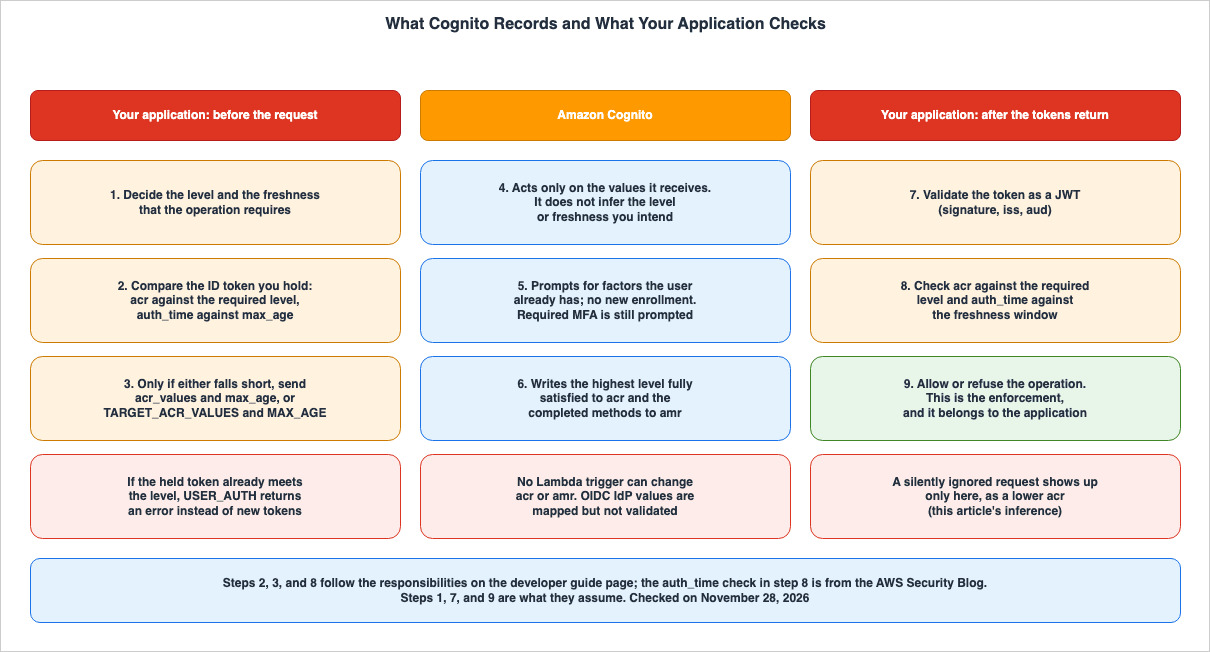
The "Your responsibilities for step-up authentication" section on the step-up page lists four responsibilities of the application (Stated).- Before redirecting, compare the
auth_timeof the ID token you hold with yourmax_age, and itsacrwith the level that the operation requires. Send the user to Cognito only when either falls short. - Pass the correct
TARGET_ACR_VALUESoracr_values, and the correctMAX_AGEormax_age. - Before granting access, verify that the
acrof the returned token matches the level that the operation requires. - Translate Cognito levels to other standards in the application layer, outside the token.
The third item ends with the following two sentences (Stated).
Amazon Cognito issues the token with the achieved level. Enforcing that an operation requires a given level is the responsibility of your application.The Security Blog states the same division in one sentence (Stated in the blog).
Amazon Cognito produces the evidence; your code acts on it.2.3 Even in the Standard, a Level Is Not a Guarantee
This division is not specific to Cognito. OpenID Connect Core 1.0 says the following aboutacr_values (Stated):The acr Claim is requested as a Voluntary Claim by this parameter.acr_values conveys a preference to the authorization server; it does not guarantee that the returned acr will be that value. Making the relying party responsible for checking the returned value follows the design of the standard (Inference).Figure 1 shows a single step-up flow, separating what the application checks from what Cognito writes.
3. Four Levels and amr Values
This chapter lists the levels that Cognito defines and the values that go in theamr claim. Cognito determines both, and the application cannot change them.3.1 Four Levels Are Fixed
The step-up page describes the levels as follows (Stated).Amazon Cognito defines four fixed authentication levels. The authentication factor combinations that satisfy each level are fixed and you can't change them. You can customize only the URI name of each level for your user pool.The levels and the factor combinations that satisfy them are in the following table (Stated).
| Level | Default Value | Combination of Factors |
|---|---|---|
| 1 | urn:cognito:loa:1 | Password only |
| 2 | urn:cognito:loa:2 | A single one-time code delivered by SMS or email (does not include passkeys) |
| 3 | urn:cognito:loa:3 | Passkey only (platform or roaming), or a combination of password and SMS code, or password and email code |
| 4 | urn:cognito:loa:4 | Password and Time-Based One-Time Password (TOTP) from an authenticator app |
There are three points that are easily confused. First, the combination of password and SMS code is associated with level 3, not level 2. Level 2 does not include a password. Second, passkeys can be used alone at level 3. The level 2 row of the table ends with the following words (Stated).
Level 2 doesn't include passkeysThird, only one combination satisfies level 4: password and TOTP. No row combines a passkey with TOTP (Not documented).
On how the level is determined, the step-up page says the following (Stated).
Amazon Cognito assigns the highest authentication level that the user's completed factors fully satisfy.Users who complete both password and TOTP authentication are assigned to level 4. The Security Blog says that they also met the requirements of every level below it (Stated in the blog). Only one level (level 4) is included in the
acr value of the token. The ID token page also says that a token contains exactly one acr level (Stated).3.2 Values in amr
amr is an array of strings, with one value for each completed factor, plus mfa when two or more distinct factors are completed. The step-up page lists the following eight values (Stated).| Method | amr Value | Note on the Page |
|---|---|---|
| Password | pwd | Password-family sign-in, including SRP. |
| Authenticator App TOTP | otp | A time-based one-time password from an app such as an authenticator app. |
| SMS One-Time Code | sms | Code received via SMS. |
| Email One-Time Code | email_otp | Code received via email. |
| Platform Authenticator Passkey | swk | A software-bound key, such as a passkey secured by device biometrics. |
| Roaming Authenticator Passkey | hwk | A hardware-bound key, such as a security key. |
| Multiple Factors | mfa | Added when two or more different factors are completed. |
| Federation | fed | A default placeholder value for sign-in through an IdP that does not support ACR and AMR, or that returns no values Cognito recognizes. |
It is important to understand the relationship between Cognito's values and standard values in this table. First, Cognito's
otp specifically refers to TOTP from an authenticator app. SMS codes are represented as sms, and email codes as email_otp, resulting in different values. Second, neither email_otp nor fed are listed in the IANA Authentication Method Reference Values registry (updated October 4, 2024). These two are Cognito's own values (Inference). When examining amr values in code that handles tokens from issuers other than Cognito, account for these differences.3.3 Changing Only the Level Names
The URI name of each level can be changed with the user pool'sAcrConfiguration (Stated). You set it with CreateUserPool or UpdateUserPool. The keys are Level1 through Level4, and each value is an object with a single string, AcrValue (Stated). The step-up page provides the following example:{
"AcrConfiguration": {
"Level2": { "AcrValue": "urn:my-standard:loa:2" },
"Level3": { "AcrValue": "urn:my-standard:loa:3" }
}
}The rules for the names are as follows (Stated):
- The name must be unique across all four levels, including the default names of levels that you do not change.
- The name must be between 1 and 64 characters in length.
- The name cannot contain spaces, double quotes, or backslashes.
The API Reference for
AcrLevelConfigType specifies that the length of AcrValue must be between 1 and 64 characters, and the pattern must be [\x21\x23-\x5B\x5D-\x7E]+ (Stated). This range is printable ASCII without the space, the double quotation mark, and the backslash, which matches the rules in the Developer Guide (Inference).Changing a name does not change the factor combination that satisfies the level (Stated). After a change, an access token whose
acr has the old name may still arrive. The step-up page describes this case as follows (Stated):Amazon Cognito doesn't respect the stale value and treats it as an unrecognized level, but this isn't an error.Cognito does not credit that level. It still honors the token's
amr, though, and prompts only for factors that are not in amr (Stated). If your application compares levels by name, it also needs to decide how to treat the old names when you change them (Inference).3.4 Cognito Does Not Define a Mapping to AAL
Cognito's level numbers are not mapped to the AALs of NIST SP 800-63B or to other assurance levels. The step-up page places translation to standards such as NIST in the application layer, outside the token (Stated). The ID token page also says that translating to standards such as NIST is the application's responsibility (Stated). Which AAL a level 3 passkey corresponds to cannot be determined from Cognito's documentation. The relationship between synced passkeys and AAL is covered in this site's Synced Passkeys Under NIST SP 800-63B-4.The order of levels within Cognito is a fixed sequence defined by Cognito. A passkey alone (level 3) is placed below a password with TOTP (level 4). This order may not match your organization's criteria (Inference). Even then, you cannot change Cognito's levels. The application examines the
acr and amr values and makes its own determination based on its own criteria.4. Entry Points for Requests and Feature Plans
This chapter lists where you request the required level from, and what each feature plan allows.4.1 Three Entry Points
The step-up page says thatacr and amr go in the tokens from a sign-in through any entry point, but that you can request a required level only with managed login and the API (Stated). The methods for each entry point are as follows (Stated):| Entry Point | How to Pass the Required Level | How to Pass Freshness |
|---|---|---|
| Managed login | acr_values for both /oauth2/authorize and /login | max_age |
| API and SDK | TARGET_ACR_VALUES in the AuthParameters of the USER_AUTH flow | MAX_AGE |
| Federation (OIDC) | The application passes acr_values as used in managed login. Cognito maps these values to the IdP's values and sends them to the IdP. | max_age. Only the blog says that it is passed to the IdP (Section 7.1). |
On the API side, no new operations have been added. The following are used:
InitiateAuth, RespondToAuthChallenge, the server-side AdminInitiateAuth, and AdminRespondToAuthChallenge (Stated). The API Reference for RespondToAuthChallenge does not mention ACR (Not documented).4.2 The Classic Hosted UI Silently Ignores the Request
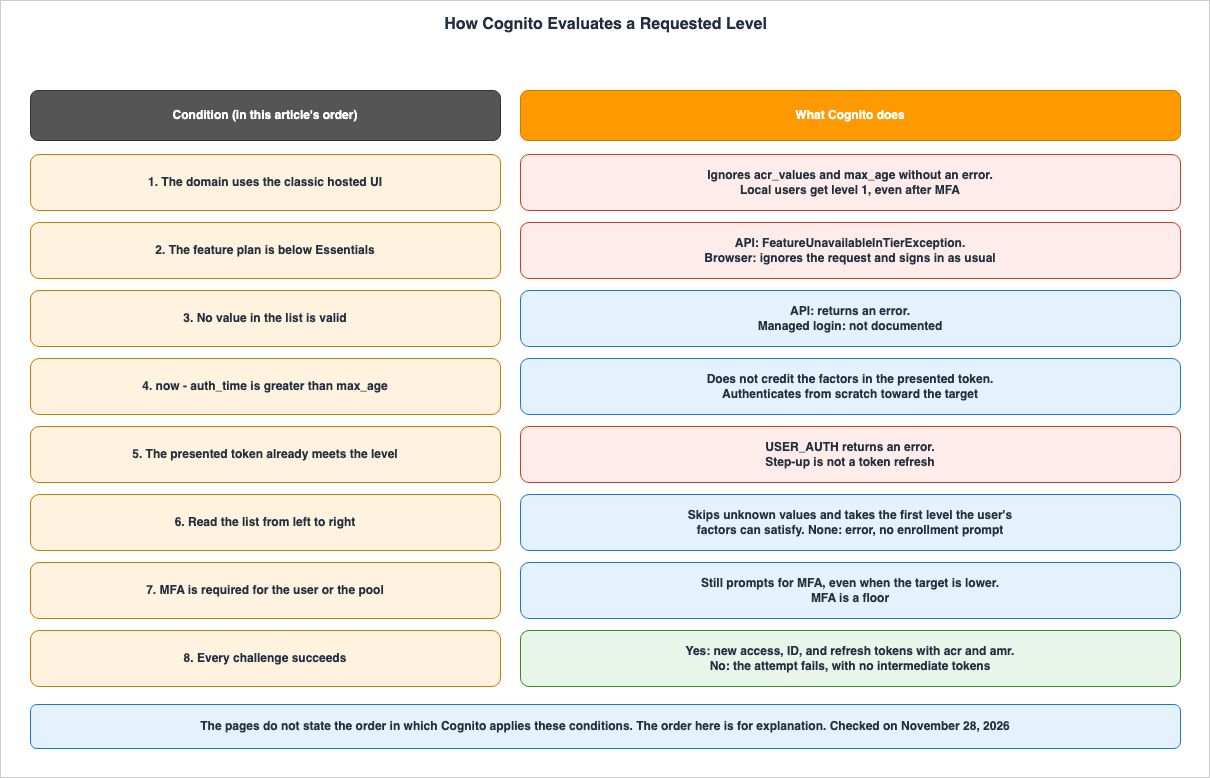
Step-up requires managed login and is not supported in the classic hosted UI (Stated). When the user pool domain uses the classic hosted UI, the step-up page says the following (Stated).Amazon Cognito silently ignores the acr_values and max_age parameters and proceeds with normal sign-in. It doesn't return an error.In this case, the token values are as follows (Stated).
| User | acr | amr |
|---|---|---|
| Local user | Level 1 (even after completing MFA) | Not documented |
| Users federated via OIDC and social providers | Derived from the IdP response | Derived from the IdP response |
| Users federated via SAML | Level 1 | ["fed"] |
In the classic hosted UI, local users have an
acr of level 1, even after completing MFA. If the application checks acr, the operation is refused. If it does not, nobody notices that the request was ignored (Inference). The step-up page says that an application that relies on acr or amr should set the branding version of its domain to managed login (Stated). Managed login requires the Essentials or Plus plan (Section 4.4). The classic hosted UI is an earlier-generation version placed in the Legacy section of the Developer Guide (Stated). No end-of-support announcement was found (Not documented).4.3 What Each Feature Plan Allows
The feature table on the feature plan page lists this feature in two rows (Stated).| Feature | Table Description | Plan |
|---|---|---|
| Step-up authentication | Request a target level at sign-in, and change the URI names of the levels. | Essentials and Plus |
| ACR and AMR claims in tokens | Read the level and the completed methods from tokens. | Lite, Essentials, and Plus |
The What's New post also says the following (Stated).
Every user pool includes ACR and AMR token claims, regardless of feature plan.The claims themselves appear on every plan. Essentials or Plus is required for two things: requesting a required level, and changing the level names (Stated). The
AcrMapping of an external OIDC IdP is not one of the two. The OIDC identity provider page says the following (Stated).Setting AcrMapping on the identity provider is available in all feature plans.4.4 On an Insufficient Plan, the Behavior Differs by Entry Point
When you request a required level in a user pool on an insufficient plan, the behavior differs by entry point (Stated).| Entry Point | Behavior |
|---|---|
InitiateAuth, AdminInitiateAuth | Returns a FeatureUnavailableInTierException (HTTP 400). |
Managed login authorize endpoint, /login endpoint | Silently ignores acr_values and continues with the standard authentication process. |
The step-up page says the following about managed login (Stated).
The managed login authorize endpoint silently ignores acr_values and proceeds with normal authentication, without an error.Managed login itself requires Essentials or Plus. The feature table on the feature plan page lists managed login for Essentials and Plus, and the classic hosted UI for every plan (Stated). The User pool managed login page says the following (Stated).
In the Lite feature plan, the classic hosted UI is your only option for user pool domain services.The pages do not say what state of user pool the managed login row of the table above applies to (Not documented). Putting the two together, the browser path of a Lite user pool is the classic hosted UI. The request for a required level is silently ignored, and a local user's
acr is level 1 (Inference). When you test on Lite, the level does not go up, and no error appears. Only the API path reports it, as an exception.4.5 Ways to Configure It, and What Could Not Be Confirmed
The What's New post lists the AWS Management Console, the AWS CLI, and the AWS SDKs as ways to configure it (Stated). The CloudFormation pages forAWS::Cognito::UserPool and AWS::Cognito::UserPoolIdentityProvider, retrieved on November 28, 2026, did not contain the word acr even once (Not documented). This article has not confirmed whether AcrConfiguration or AcrMapping can be specified within CloudFormation. This does not mean that there is no support. When you configure it with IaC, reopen the CloudFormation pages at that time.5. Order of Evaluation and the Behavior of USER_AUTH
This chapter describes how Cognito evaluates the list of required levels that you pass, and the behavior of theUSER_AUTH flow.5.1 From Left to Right, the First Level the User Can Satisfy
Bothacr_values and TARGET_ACR_VALUES are lists of level URIs separated by spaces, ordered from the highest level to the lowest (Stated). The rules of evaluation are as follows (Stated):- Cognito evaluates from left to right and selects the first valid level that the user can satisfy.
- Cognito ignores values that it does not recognize.
- If no value is valid, the API returns an error.
The example request on the authorize endpoint page passes
acr_values=urn%3Acognito%3Aloa%3A4+urn%3Acognito%3Aloa%3A3 and max_age=3600. A user who has not set up TOTP cannot satisfy level 4, so Cognito falls back to level 3. The page assumes that this user has set up an SMS or email one-time code (Stated).The pages do not say how managed login behaves when no value is valid (Not documented). Only the rule to ignore unrecognized values is specified.
5.2 Four Combinations in USER_AUTH
In theUSER_AUTH flow, TARGET_ACR_VALUES and MAX_AGE are included in the AuthParameters along with the existing USERNAME, ACCESS_TOKEN, and PREFERRED_CHALLENGE (Stated). The USER_AUTH flow itself requires the app client to activate ALLOW_USER_AUTH (Stated). The "Manage authentication methods in AWS SDKs" page gives the behavior for each combination in the following table (Stated).| Provided Parameters | Behavior |
|---|---|
TARGET_ACR_VALUES and ACCESS_TOKEN. MAX_AGE is met. | Steps the user up from the token's factors to the highest-priority level that can be satisfied. |
TARGET_ACR_VALUES and ACCESS_TOKEN. MAX_AGE is not met. | Authenticates the user from scratch toward the required level. |
Only TARGET_ACR_VALUES is provided; ACCESS_TOKEN is not provided. | Authenticates the user from scratch toward the required level. |
| Neither parameter is provided. | Behaves the same as a standard USER_AUTH without step-up. |
The
InitiateAuth API Reference adds the following constraints (Stated).USERNAMEis required.- If
ACCESS_TOKENis provided,TARGET_ACR_VALUESmust also be provided. Otherwise, an error will occur. USERNAMEmust match the user for whom theACCESS_TOKENwas issued.
In the
USER_AUTH section of the InitiateAuth API Reference, ACCESS_TOKEN is not listed as a separate item. It appears only in the sentences of the constraints above (Not documented).5.3 Four Behaviors to Consider in the Design
The same page lists four behaviors to keep in mind when you design a step-up flow (Stated).The first is that step-up is all-or-nothing. When level 4 requires two factors, a password and a TOTP, failing either one fails the whole step-up. The page says the following (Stated).
Amazon Cognito doesn't issue intermediate tokens.The second is that a request with a token that already meets the level results in an error (Stated).
If the presented token already meets or exceeds the requested level, Amazon Cognito returns an error instead of issuing a new token. This prevents applications from using step-up authentication as a token-refresh mechanism.If the application passes the token it holds as
ACCESS_TOKEN and requests step-up every time without checking it, users whose level is already sufficient get an error. The first responsibility in Section 2.2 (check the token you hold before redirecting) is the other side of this behavior (Inference).The third is that the user must already have factors that satisfy the required level. If the user cannot satisfy any of the requested levels, Cognito returns an error. The page says the following (Stated).
Step-up authentication doesn't prompt the user to set up new factors.Prepare factor enrollment as a flow separate from step-up.
The fourth is that MFA is a floor (Stated).
MFA is a floor.If MFA is required in the user or user pool settings, the initial sign-in will require MFA, even if the required level is low. The same applies to MFA that threat protection prompts for (Stated). The page says the following (Stated).
TARGET_ACR_VALUES can't suppress a required MFA prompt.All that the required level can do is influence which MFA factor Cognito prompts for, when several are enabled. If you request level 1 for a user who is required to use MFA, Cognito does not return an error; it prompts for MFA and steps the user up (Stated). The list of required levels does not work in the downward direction.
Figure 2 shows how Cognito evaluates a request for a required level, in this article's order. The pages do not say in what order Cognito makes these decisions (Not documented). The order in the figure is this article's order, for explanation.
6. Tokens, Refresh, and max_age
This chapter lists which tokens carryacr and amr, what refresh carries over, and how to require freshness.6.1 Each Source Words Differently Which Tokens Carry the Claims
Which kinds of tokens carryacr and amr is worded differently in each source.| Source | Wording |
|---|---|
| Step-up page | Access token and ID token |
| Claims table on the Pre token generation page | ID and access |
| ID token page | Has a section saying that acr and amr are in the ID token. |
| Access token page | No mention of acr or amr (Not documented). |
| Feature table on the feature plan page | Read from access, ID, and refresh tokens. |
| What's New | Added to access, ID, and refresh tokens. |
The step-up page says the following (Stated).
Amazon Cognito adds the acr and amr claims to access tokens and ID tokens.The description in the table on the feature plan page is the following (Stated).
Read the authentication level and the completed authentication methods from access, ID, and refresh tokensThe What's New post says the following (Stated).
by adding ACR and AMR claims to access, ID, and refresh tokensThe refresh token page does not mention
acr or amr (Not documented). No page was found that shows how an application reads the level from a refresh token (Not documented). The step-up page says that the application examines the access token or the ID token (Stated). For refresh tokens, this article reads the statements as the level carrying over to the new tokens obtained by refresh, and does not say that the refresh token itself contains acr (Inference).6.2 Refresh Carries Over the Level and auth_time
On refresh, the step-up page says the following (Stated).When a user refreshes their tokens, Amazon Cognito sets the same acr and amr values on the new access and ID tokens. The values carry over without modification.A user who has reached level 4 is not asked to step up at every refresh. The same page also says the following about
auth_time (Stated).Refreshing a token doesn't reset the auth_time claim.auth_time retains the time the user last authenticated interactively. The Security Blog explains the difference from iat as follows (Stated in the blog).The iat claim only records when the token was issued, so a refreshed token carries a new iat but keeps its old auth_time.Only the blog says that
iat changes after a refresh. The step-up page of the Developer Guide does not say this (Not documented). When determining freshness, use auth_time instead of iat.When step-up completes, Cognito issues a new access token, ID token, and refresh token with the new
acr and amr and a fresh validity period (Stated; for the refresh token itself, see Section 6.1).6.3 Requiring Freshness with max_age
Because refresh carries the level over, checking only the level can let a sensitive operation proceed on an authentication from hours ago. You require freshness withmax_age in managed login and with MAX_AGE in the API. The step-up page says that max_age compares the current time with auth_time, regardless of how many times the tokens were refreshed (Stated). The authorize endpoint page says that if the current time minus auth_time is greater than max_age, the user must authenticate again from scratch instead of only stepping up (Stated).On the API's
MAX_AGE, the InitiateAuth API Reference says the following (Stated):Amazon Cognito discards the authentication-methods credit from any access token that you provide and processes the request as a fresh authentication toward the target level. The access token itself remains valid.When
MAX_AGE is exceeded, Cognito authenticates the user from scratch without crediting the factors in the access token that you passed. The access token you passed does not become invalid. An application that still holds the old access token can keep using it (Inference). If you want to allow a sensitive operation only with a fresh authentication, the application checks auth_time at the time of the operation.6.4 Lambda Triggers Cannot Change the Claims
The pre token generation Lambda trigger can add, modify, or suppress many claims.acr and amr are not among them. The step-up page says the following (Stated).Amazon Cognito computes the acr and amr claims from the authentication flow. You can't customize, override, add to, or suppress these claims with a pre token generation Lambda trigger or any other Lambda trigger.The claims table on the Pre token generation page also lists
acr and amr as claims that cannot be added, modified, or suppressed (Stated). auth_time in the same table has the same restriction (Stated).This constraint has two consequences. One is that a Lambda function cannot falsify the level. Even if the trigger code has a bug or malicious intent,
acr stays as computed from the authentication flow. The other is that you cannot put your own system of levels into the token. You can change the names with AcrConfiguration, but any other mapping happens outside the token, in the application layer (Sections 3.3 and 3.4).7. Federation
This chapter lists where theacr and amr of users who sign in through an external IdP come from.7.1 OIDC IdP AcrMapping
For users who sign in through an OIDC IdP, Cognito does not compute the level itself; it passes through the IdP's ACR and AMR values (Stated). Step-up for these users happens at the IdP. Cognito redirects to the IdP withacr_values (Stated). The table in Section 3.1 does not determine the level of federated users (Stated).The IdP's
AcrMapping maps the IdP's values to Cognito's levels. You set it with CreateIdentityProvider or UpdateIdentityProvider (Stated). The OIDC identity provider page gives the following example.{
"ProviderName": "MyOktaIdP",
"ProviderType": "OIDC",
"AcrMapping": {
"Level1": "urn:okta:loa:1",
"Level2": "urn:okta:loa:2",
"Level3": "urn:okta:loa:3",
"Level4": "urn:okta:loa:4"
}
}The flow is as follows (Stated). The application writes
acr_values with the level names of your user pool and sends the user to /oauth2/authorize. Cognito maps the values to the IdP's values with AcrMapping and redirects to the IdP. It maps the ACR and AMR values that the IdP returns back, and writes the level name configured in your user pool into the Cognito token.The API Reference defines the keys for
AcrMapping as Level[1-4], the number of entries as 0 to 4, and the length of each value as 1 to 64 (Stated).Passing
max_age to the IdP is stated only in the Security Blog (Stated in the blog). The OIDC identity provider page has no mention of max_age (Not documented). The blog says that this flow is only for OIDC IdPs (Stated in the blog).Keep in mind that this is only supported with OIDC identity providers.7.2 Values Not in the Mapping, and Unknown Values
The IdP's values are handled as follows (Stated).- If the IdP returns a value for an ACR that is not found in the
AcrMapping, the token'sacris set to the lowest level, which is the defaulturn:cognito:loa:1or the name of level 1 configured for your user pool. This is not an error. - Cognito drops AMR values that it does not recognize and keeps only the known values.
- If the IdP does not support ACR and AMR, or returns no AMR values that Cognito recognizes, Cognito puts
fedinamr.
A value missing from the mapping becomes level 1 without an error. If the application refuses sensitive operations with a level 1 token, a gap in the mapping fails on the safe side. If it does not, nobody notices (Inference).
7.3 Cognito Does Not Verify the IdP's Claims
The OIDC identity provider page says that Cognito trusts theacr and amr values that the IdP asserts, subject to mapping and filtering, and continues with the following sentence (Stated).It doesn't validate which challenges the IdP actually performed.Level 3 for a federated user means that the IdP claimed it performed authentication equivalent to level 3. Whether that IdP can be trusted is decided not by Cognito but by the side that registered the IdP (Inference). What else Cognito does not check is covered in this site's JWT Signing Algorithms on AWS Endpoints.
7.4 SAML and Social IdPs
For users who sign in through a SAML IdP, the documentation gives only the values for the classic hosted UI:acr is level 1 and amr is ["fed"] (Stated). The pages do not say what acr and amr a SAML user gets with managed login (Not documented). The SAML identity provider page has no mention of ACR and AMR either (Not documented). As shown above, the blog treats passing a level through an IdP as OIDC only (Stated in the blog).For social IdPs, the documentation says only that, with the classic hosted UI, the values are derived from the IdP's response (Stated). For managed login, the pages do not say whether social IdPs fall within the scope of the OIDC identity provider page (Not documented). Decide whether to allow sensitive operations for users from SAML and social IdPs by looking at actual tokens.
8. What Your Application Keeps Checking
This chapter gathers Chapters 2 through 7 into a list of what your application's code checks.8.1 The Application Decides the Required Level for Each Operation
The application decides which level each operation requires. Cognito does not infer it (Section 2.1). The Security Blog gives an example in which several applications share one user pool and each requests its own required level withacr_values. It says that each application compares levels by rank, so a level 4 token satisfies a level 2 requirement (Stated in the blog).To compare levels by rank, the application needs a mapping between level names and ranks. If you change the names with
AcrConfiguration, change the application's mapping too (Inference).8.2 Check the Token You Hold Before Redirecting
If theacr of the ID token you hold reaches the required level and its auth_time is within the freshness window, do not send the user to Cognito (Stated; Section 2.2). Only when they fall short, send the user with the required level and max_age. If you pass the token you hold as ACCESS_TOKEN without checking it, USER_AUTH returns an error for users whose level is already sufficient (Section 5.3).8.3 Check the Signature, Level, and Freshness on the Returned Tokens
On the returned tokens, the application checks the following:- Validation as a JWT, including the signature,
iss, and the audience (audin the ID token,client_idin the access token; needed for any JWT). - That
acrreaches the level that the operation requires (Stated). - That
auth_timeis within the operation's freshness window (Stated in the blog). - If the operation requires a specific factor, that its value is in
amr(Stated in the blog). - In managed login flows, that the nonce included in the request matches the nonce in the returned ID token.
On the nonce, the Security Blog says the following (Stated in the blog).
Finally, send a nonce in the request and verify it on the returned ID token, so the result is tied to the request you made.The
USER_AUTH parameters of InitiateAuth have no field for a nonce (Not documented). In the API flow, the application receives the tokens as the response to a call that it made itself.This check is also the only safeguard against a request that was silently ignored. The classic hosted UI and managed login on an insufficient plan continue with normal authentication without returning an error (Sections 4.2 and 4.4). If the application checks the returned
acr, the operation is refused with a level 1 token. If it does not, the misconfiguration appears nowhere (Inference).8.4 Handling Errors in the API Flow
In theUSER_AUTH flow, an error is returned in the following cases (Stated).- None of the requested levels is a valid value.
- The token you hold already meets the requested level.
- The user has no factors that can satisfy any of the requested levels.
- An
ACCESS_TOKENwas provided, butTARGET_ACR_VALUESis missing. - The feature plan is insufficient. In this case, the exception is
FeatureUnavailableInTierException.
Users without factors need a flow that enrolls factors before step-up. Step-up does not prompt for enrollment (Section 5.3).
8.5 Checking on the Resource Server
When you checkacr on the side that protects the API, gateway configuration alone may not be enough. According to this site's What API Gateway Checks in a JWT - REST and HTTP API JWT Authorizers, Cognito Authorizers, and Lambda Authorizers, an additional claim rule of the REST API's JWT authorizer is an exact match against one expected value; rules are set per issuer, and the same rules apply to every method that uses that authorizer. A claim whose value is an array does not match a rule. Comparing levels by rank, requiring a different level per operation, and examining the array amr therefore cannot be expressed with these rules (Inference). These validations should be performed either on the integration side or within a Lambda authorizer.8.6 The amr of an Identity Pool Is a Different Thing
Cognito identity pools also issue ID tokens that include anamr. In this context, the amr indicates whether the user is authenticated or unauthenticated (covered in What a Cognito Identity Pool Hands Out). It is distinct from the amr values of user pools, such as pwd and otp. When handling both types of tokens with the same code, it is necessary to differentiate them based on the issuer.9. Frequently Asked Questions Regarding Cognito's ACR and AMR Step-Up
This chapter briefly restates the conclusions of the body as questions. The evidence is in the sections cited in each answer.Q1. If you pass acr_values, can users without the required level no longer proceed to a sensitive operation?
Not necessarily. Cognito prompts for the factors for the requested level and writes the achieved level to the token, and stops there (Stated). The classic hosted UI and managed login on an insufficient plan silently ignore the request (Stated). What refuses an operation with a token below the required level is the application that checks the returnedacr (Sections 2.2 and 8.3).Q2. On the Lite plan, do acr and amr not appear in tokens?
They appear. The claims are in user pools on every plan (Stated). What Lite cannot do is request a required level or change the level names. However, the browser path on Lite is the classic hosted UI, so a local user'sacr is level 1 even after completing MFA (Inference; Section 4.4).Q3. Which NIST SP 800-63B AAL does a level 3 passkey correspond to?
It cannot be determined from Cognito's documentation. Cognito makes translating levels to standards such as NIST the application's responsibility (Stated). The relationship between synced passkeys and AAL is covered in Synced Passkeys Under NIST SP 800-63B-4 (Section 3.4).Q4. Can a pre token generation Lambda function rewrite acr into your own system of levels?
No. No Lambda trigger can add, modify, or suppressacr and amr (Stated). Only the level names can be changed, with AcrConfiguration. Any other mapping happens in the application layer (Sections 3.3 and 6.4).Q5. Is acr also in the refresh token?
The sources word it differently. The step-up page says the access token and the ID token, while the feature plan page and What's New also list the refresh token (Stated). No page was found that shows how to read the level from a refresh token (Not documented). The application can readacr from the access token or ID token obtained by refresh. After refreshing, the acr, amr, and auth_time values remain unchanged (Sections 6.1 and 6.2).Q6. How far can you trust the acr that an external OIDC IdP returns?
Cognito does not verify which authentication the IdP actually performed (Stated). Values missing from the mapping become level 1, and unknownamr values are dropped (Stated). A level 3 value means that the IdP claimed level 3. The side that registers the IdP decides whether to trust it (Sections 7.2 and 7.3).Q7. Can step-up be used in place of a token refresh?
No. If the token you hold already meets the requested level,USER_AUTH returns an error (Stated). The "Manage authentication methods in AWS SDKs" page says that this behavior keeps applications from using step-up as a token-refresh mechanism. Use refresh to renew tokens (Section 5.3).10. Summary
Cognito'sacr and amr values represent the level a user has reached and the methods used for authentication, calculated by Cognito and written into the token. There are four fixed levels, and the only thing your application can change is their names. Lambda triggers cannot change the claims either. You request the required level with acr_values in managed login or TARGET_ACR_VALUES in USER_AUTH, and the first level that can be satisfied, from the left, is chosen. After a refresh, the level and auth_time remain unchanged, so require freshness with max_age.Cognito does not enforce the required level. The classic hosted UI and managed login on an insufficient plan silently ignore the request. The claims of an external OIDC IdP are used as they are after mapping. In every case, if the application checks the
acr and auth_time of the returned token, an operation without the required level stops. However, a level from an external IdP is reliable only as far as you trust that IdP's claims (Section 7.3). If it does not, none of these mistakes produces an error. When you design step-up, write the code that checks the returned tokens before you write how to request the level.The information presented in this article is based on materials as of November 28, 2026 (Japan Standard Time). This feature is being rolled out gradually, and behavior and descriptions may change as a result of announcements at AWS re:Invent 2026 or updates to the documentation. Before you use it, reopen the step-up page and the pages for the entry points that you use.
11. References
- Authentication levels with ACR and AMR claims - Amazon Cognito
- Manage authentication methods in AWS SDKs - Amazon Cognito
- The redirect and authorization endpoint - Amazon Cognito
- The managed login sign-in endpoint: /login - Amazon Cognito
- Using OIDC identity providers with a user pool - Amazon Cognito
- Using SAML identity providers with a user pool - Amazon Cognito
- User pool feature plans - Amazon Cognito
- User pool managed login - Amazon Cognito
- Pre token generation Lambda trigger - Amazon Cognito
- Understanding the identity (ID) token - Amazon Cognito
- Understanding the access token - Amazon Cognito
- Refresh tokens - Amazon Cognito
- Common Amazon Cognito scenarios - Amazon Cognito
- Legacy - Amazon Cognito
- InitiateAuth - Amazon Cognito User Pools
- AdminInitiateAuth - Amazon Cognito User Pools
- RespondToAuthChallenge - Amazon Cognito User Pools
- CreateUserPool - Amazon Cognito User Pools
- UpdateUserPool - Amazon Cognito User Pools
- AcrLevelConfigType - Amazon Cognito User Pools
- CreateIdentityProvider - Amazon Cognito User Pools
- UpdateIdentityProvider - Amazon Cognito User Pools
- AWS::Cognito::UserPool - AWS CloudFormation
- AWS::Cognito::UserPoolIdentityProvider - AWS CloudFormation
- Amazon Cognito now supports authentication level and method token claims - AWS
- Step-up authentication: how to right-size authentication to risk - AWS Security Blog
- OpenID Connect Core 1.0 incorporating errata set 2
- RFC 8176 - Authentication Method Reference Values
- Authentication Method Reference Values - IANA
References:
Tech Blog with curated related content
Written by Hidekazu Konishi