IAM Identity Center Across Regions - What the Primary Region Keeps, What Additional Regions Serve, and How Trusted Identity Propagation Crosses Them
First Published:
Last Updated:
However, replication does not mean that all Regions can perform the same functions. Creating users and groups, configuring SCIM, managing permission sets, creating trusted token issuers, and managing Regions and KMS keys can only be performed in the primary Region. The additional Regions are responsible for sign-in, read operations, account access, and application launch. Application metadata and assignments are managed in the Region to which the application is connected. When the primary Region has a disruption, the only AWS account access that continues is access with permissions provisioned and replicated before the disruption.
This article outlines this division, presenting it as a single axis that indicates where the authority for identity and configuration resides. It details what is located in each Region, where changes can be made, and what users will experience during primary Region disruptions or replication delays. Furthermore, it describes the extent to which TIP can operate across Regions. Regarding TIP, two pages of the same user guide state it with different strength, and no list of services that can cross Regions was found in the pages this article read. This article distinguishes between what the documentation states and what could not be found in the documentation. On November 3, 2026, this article observed Region addition and removal, reads and writes in the additional Region, change notifications, and sign-in through the portal in the additional Region, in a test organization with
us-east-1 as the primary Region and us-west-2 as the additional Region (Chapter 9).This article is not a step-by-step guide for activating or replicating Identity Center. Those procedures are documented in the user guide. It also does not re-explain the mechanics of TIP, nor does it cover pricing. The information presented here was verified as of November 3, 2026.
Related articles on this site:
- Identity-Aware Data Access on AWS - Propagating Workforce Identity from IAM Identity Center to Lake Formation and S3 Access Grants
- AWS IAM Identity Center Complete Setup Guide - Multi-Account SSO Design Patterns from Organization Structure to ABAC
- Changing the Identity Source in IAM Identity Center Is Not Symmetric - What Survives in Each Direction, and What the Revision Field Guards
- Amazon Cognito Multi-Region Replication - What Only the Primary Accepts, Which Issuer Your Tokens Carry, and What Validators Must Assume
Table of Contents
- 1. Scope and Assumptions
- 2. How to Read the Tables
- 3. Conditions for Replication
- 4. What Is Where?
- 5. Where Can It Be Changed?
- 6. Primary Region Disruptions and Replication Lag
- 7. When Trusted Identity Propagation Crosses Regions
- 8. Operational Building Blocks
- 9. Observations Based on This Configuration
- 10. Discrepancies and Omissions in the Documentation
- 11. Failure Modes
- 12. Frequently Asked Questions About IAM Identity Center Across Regions
- 13. Summary
- 14. References
1. Scope and Assumptions
1.1 Intended Audience
This article is intended for individuals who are centralizing user access through AWS Organizations and IAM Identity Center and are considering or have already implemented replication to additional Regions to prepare for potential disruptions in their primary Region, manage data residency, and perform cross-Region analysis. Specifically, this article is written for readers who are thinking along the following lines:- Replication will allow them to perform the same administration in the additional Regions as in the primary Region.
- If the primary Region has a disruption, an additional Region will take over as the primary Region.
- Since October 26, 2026, TIP crosses Regions for every service and every Region.
- Replication is only possible for instances that use an external Identity Provider (IdP) as the identity source.
None of these holds as stated. Chapters 3 through 7 show how far the AWS documentation supports each one.
1.2 Scope and Exclusions
This article addresses the following: where the authority for IDs and configurations resides when an organization instance is replicated to additional Regions. Specifically, it covers:- Conditions for replication and the maximum number of Regions.
- What is replicated, what is not replicated, and the handling of identical identifiers.
- Actions that can only be performed in the primary Region, those that can be performed in any enabled Region, and those that can be performed in the Region to which the application is connected.
- How disruptions in the primary Region and replication delays are manifested.
- The scope of cross-Region TIP, pre-replication tokens, SCP restrictions, and disagreements between sources.
- APIs for managing Regions, notifications for changes to the Identity Store, and how CloudFormation is handled.
- Disagreements between sources, and statements not found in the sources.
This article does not cover the following.
- Pricing
- Instructions for enabling the Identity Center, connecting identity sources, and designing permission sets. This site's AWS IAM Identity Center Complete Setup Guide covers this.
- Changing the identity source. This site's Changing the Identity Source in IAM Identity Center Is Not Symmetric covers this. This article will only address the fact that instances using Active Directory as an identity source cannot be replicated.
- How trusted identity propagation works. This site's Identity-Aware Data Access on AWS covers token exchange, identity context, and configuring Lake Formation and S3 Access Grants. This article will only address the changes that occur when crossing Regions.
- How AWS KMS multi-Region keys work. This site's AWS KMS Envelope Encryption and Data Key Caching Patterns covers this. This article will only address the key requirements for Identity Center.
- Cross-Region replication of Amazon Cognito user pools. This is covered in a separate article on this site: Amazon Cognito Multi-Region Replication.
- Timeline of Identity Center features.
- Rotating the CA for Amazon EKS clusters, and AWS WAF tokens. Two other articles in this series cover them: Rotating an Amazon EKS Cluster's CA and Where an AWS WAF Token Comes From.
1.3 Checked Date and Reviewed Materials
This article was written after reviewing the following materials on November 3, 2026. Abbreviations enclosed in parentheses will be used throughout the text.- In the multi-Region chapter of the IAM Identity Center User Guide: the chapter's entry page (multi-Region page), the page on replicating to an additional Region (replication page), the page on removing a Region (Region removal page), the table of use cases in the primary and additional Regions (use cases table), the page on workforce access through an additional Region (workforce access page), the page on failover to an additional Region (failover page), and the page on applications across multiple Regions (applications page).
- In the same user guide: the TIP overview page (TIP overview), the TIP prerequisites and considerations page (TIP considerations page), the table of AWS managed applications (applications table), the organization instances page (organization instances page), the Baseline KMS key policy page (Baseline KMS key policy page), the Lake Formation setup page (Lake Formation setup page; reviewed on November 4, 2026), the two pages on Identity Store change notifications (notifications page, notification setup page), the page on receiving events in other accounts and Regions (cross-Region events page; reviewed on November 4, 2026), and the Document history (Document history).
- In the IAM Identity Center API Reference: pages for
AddRegion,RemoveRegion,DescribeRegion,ListRegions,DescribeInstance,ListInstances,DeleteInstance, andRegionMetadata(collectively referred to as the API Reference). - In the AWS General Reference: the page detailing IAM Identity Center endpoints and quotas (General Reference).
- In the AWS CloudFormation Template Reference: pages for
AWS::SSOandAWS::SSO::Instance(CloudFormation Reference). - In the Amazon EventBridge Events Reference: the page detailing Identity Store (Events Reference).
- In AWS What's New: announcements for customer managed keys for organization instances (September 23, 2025), multi-Region support (February 3, 2026; GA announcement), expansion to Identity Center directories (July 29, 2026), one-click functionality (August 7, 2026), expansion of supported Regions (October 1, 2026), cross-Region TIP (October 26, 2026; TIP announcement), and Identity Store change notifications (October 28, 2026; notifications announcement).
- In the AWS News Blog: the article announcing general availability for multi-Region functionality (GA News Blog).
- In the AWS Security Blog: the article detailing deploying applications across multiple Regions and accessing accounts (GA Security Blog).
- In the AWS Big Data Blog: the article describing granular data access across Regions with Lake Formation and TIP (Big Data Blog).
- In the Amazon Quick User Guide: the page detailing TIP within AWS Glue Data Catalog (Amazon Quick page).
- In AWS What's New: AWS Service Availability Updates for June 2026.
1.4 Distinct Entities with the Same Name
- Token: In this article, the term "token" refers to the OAuth tokens issued by IAM Identity Center. It is distinct from the
aws-waf-tokendiscussed in articles related to AWS WAF. - Primary Region and Home Region: The user guide refers to the initial Region enabled as the "primary Region." The AWS IAM Identity Center Complete Setup Guide on this site uses the term "home Region" for the same concept. This article will use the term "primary Region."
- Three "Cross-Region" Scenarios: A "cross-Region" TIP refers to the process of transferring a user's identity context from one Region to AWS services in another Region. The "additional Region deployment" mentioned in the applications table indicates whether AWS managed applications can be placed in additional Regions. The "cross-Region connection" on the applications page is how services like Amazon Q Business connect to an Identity Center located in a different Region. These three scenarios are distinct.
- Region-Local Connection and Cross-Region Connection: Both terms appear on the applications page. A "Region-local connection" refers to an application connecting to an Identity Center in the same Region. A "cross-Region connection" refers to an application connecting to an Identity Center in a different Region.
- Region Status Terminology: The API reference uses the terms
ACTIVE,ADDING, andREMOVINGto describe a Region's status. The console screenshots in the GA Security Blog displayReplicatingandReplicated. This article will use the values from the API. - Two Types of
aws.identitystoreEvents: EventBridge receives events related to the Identity Store, including API calls via CloudTrail, and change notifications (starting October 28, 2026). Both use the samesource. Thedetail-typefor the former isAWS API Call via CloudTrail. - Instance ID and Identity Store ID: IDs that begin with
ssoins-represent Identity Center instance IDs, while those that begin withd-represent Identity Store IDs.
2. How to Read the Tables
This section defines the columns used in the tables in Chapter 4, as well as the terms for the status of the sources. The columns are taken as they are from the EKS CA article in the same series.2.1 Columns
The table in Chapter 4 has the following seven columns. In the EKS CA article, the trust in these columns was a trust bundle. In this article, read it as the authority over identities and configuration.Trust Being Held: The authority held by that row. This indicates the type of data or configuration.Who Holds It: The Region where that data is located.Who Can Update It: The Region that can modify its contents.When It Must Change: The deadline for completing the update, in preparation for disruptions or replication.What Breaks If It Does Not: What will happen if the update is not completed.How You Can Tell: Where you can verify whether the update has been completed.Where It Is Written: The source of the information in that row.
2.2 Terminology for Source Status
The status of the sources is described with the following five terms:- No statement found: Despite searching using different search terms and document categories, the relevant text cannot be located. This does not indicate that the subject matter is nonexistent or does not occur.
- Documentation does not list: The item is not in the list or table.
- Sources disagree: Both statements and their sources are shown. This article does not definitively identify either as incorrect.
- Inference: This is this article's reading, not a statement in any source. The same sentence says so.
- Observation: This refers to what was seen in the configuration in Chapter 9, and does not override information found in existing documents.
2.3 Terminology
This article uses the following terms consistently:- Primary Region: The Region in which the organization instance was initially enabled. (Equivalent to "primary Region" in the user guide.)
- Additional Region: A Region to which a replica has been added. (Equivalent to "additional Region" in the user guide.)
- Enabled Regions: The combination of the primary Region and additional Regions. (Equivalent to "enabled Regions" in the user guide.)
- Connected Region: The IAM Identity Center Region to which an AWS managed application is connected. (Equivalent to "connected IAM Identity Center Region" in the user guide.)
- Authority: The location where data and configurations can be modified.
- Replication: The process by which Identity Center copies data from the primary Region and other Regions to additional Regions. (Equivalent to "replication" in the user guide.)
2.4 Source Reliability
This article treats the sources as stronger in the following order:- Text from user guides.
- Text from API references, General References, and CloudFormation documentation.
- Announcements in the "What's New" section.
- Content from blogs. In the main text, blog posts will be explicitly identified as such.
The GA News Blog and the GA Security Blog describe limitations that existed at the time of their initial release. This article will not consider these two resources as reflecting current conditions; instead, they will be listed in Section 3.6 as representing the state of affairs at that time.
3. Conditions for Replication
3.1 Six Conditions on the Multi-Region Page
The Prerequisites and considerations section of the multi-Region page lists the conditions that must be met before replication. The statements on instance type and identity source are as follows:Instance type - Your IAM Identity Center instance must be an organization instance.
Multi-Region support is not available in account instances.Identity source - Your IAM Identity Center instance must be connected to an external
identity provider (IdP), such as Okta, or use the Identity Center directory as the
identity source. Multi-Region support is not available for instances that use Active
Directory as the identity source.This section also outlines the following additional requirements:
- AWS Regions: Confirm in AWS Capabilities by Region that the primary Region and any additional Regions are supported.
- KMS Key Type: The instance must be encrypted with a multi-Region customer managed key. The key must be located in the same AWS account as Identity Center (see Section 3.3).
- Compatibility with AWS Managed Applications: All AWS managed applications used in the organization must be compatible with the customer managed key configured for Identity Center. Applications that you want to deploy in additional Regions must support that type of deployment (see Section 3.4).
- Compatibility with External IdPs: If using an external IdP, ensure that the IdP supports multiple ACS URLs (see Section 3.5).
The requirements for identity sources were expanded in July 2026. The Document history records the expansion to the Identity Center directory on July 28, 2026. The "What's New" announcement was made on July 29, 2026. Prior to this date, only instances using an external IdP as the identity source could be replicated. Instances using Active Directory as the identity source still cannot be replicated. The process of changing the identity source to Active Directory is described in Section 5.5 of Changing the Identity Source in IAM Identity Center Is Not Symmetric.
3.2 Number of Regions and Supported Regions
The quota table in the General Reference lists the number of Regions that can be enabled within Identity Center, specified in the following line:Total number of regions for IAM Identity Center | Each supported Region: 6 | YesThe description for that line indicates that this number includes the primary Region. The
Yes in the third column means that you can request an increase. By default, this allows for one primary Region and up to five additional Regions. The AddRegion API reference lists ServiceQuotaExceededException as one potential error.The number of supported Regions expanded between September and October of 2026. According to the Document history entry dated September 30, 2026, the list of Regions that support replication now includes opt-in Regions (which are initially disabled), AWS GovCloud (US) Regions, and Regions in China. The announcement in "What's New" was published on October 1, 2026. According to the announcement, replication is now available to opt-in Regions, as well as between Regions within AWS GovCloud (US) and within China. Before that, only the enabled-by-default commercial Regions supported replication. To determine which Regions are supported, consult the AWS Capabilities by Region, following the instructions on the multi-Region page. This article does not copy the list of Regions.
3.3 Multi-Region Customer Managed Key
The conditions for the encryption key are that it must be a multi-Region key and reside in the same account as Identity Center. Before adding additional Regions, you must create a replica of the key in those new Regions. Step 1 of the replication page contains the following note on the key policy:AWS KMS doesn't synchronize your KMS key policy across the Regions of your multi-Region
KMS key.The replication page recommends copying the key policy from the primary key to the replica. While it is possible to use different key policies for each Region, the documentation notes that this can complicate permission management. If you later modify the key policy, you must apply the same changes across all Regions.
According to the organization instances page, when activating a new organization instance, Identity Center creates the key if you choose the "Multi-Region instance" configuration, or if you choose to create a new key in the "Custom instance" configuration. Keys created by Identity Center will be tagged with
CreatedBy: IAM Identity Center. In the "Multi-Region instance" configuration, Identity Center handles the creation of the key and its replication to additional Regions. The Document history notes this one-click configuration on the entry dated August 6, 2026. The "What's New" announcement was made on August 7, 2026.3.4 Every AWS Managed Application in the Organization Must Support the Key
The text in the "Important" box on the applications page reads:If your IAM Identity Center instance is multi-regional, all AWS managed applications in
use by your organization must support IAM Identity Center configured with a
customer-managed KMS key regardless of the application deployment Region.This requirement applies not only to applications deployed in additional Regions, but also to those used solely in the primary Region. In the applications table as of November 3, 2026, the applications listed with
No in the "Customer Managed Key" column are AWS App Studio, AWS IoT Events, and AWS IoT SiteWise. This table is revised, so check it before you replicate.The note accompanying the applications table states that applications that support deployment to additional Regions also support customer managed keys.
3.5 External IdP ACS URL
If you are using an external Identity Provider (IdP) as your identity source, the multi-Region page notes that the IdP must support multiple ACS (Assertion Consumer Service) URLs to fully take advantage of multi-Region support. Examples of compatible IdPs include Okta, Microsoft Entra ID, PingFederate, PingOne, and JumpCloud. Google Workspace is listed as an example of an IdP that does not support this. If you are using an Identity Center directory as your identity source, this requirement does not apply. Section 6.5 describes what happens when an IdP only supports a single ACS URL.3.6 Sources from Different Points in Time
The GA announcement, the GA News Blog, and the GA Security Blog describe the conditions as of the general availability launch, and the announcements dated July 29 and August 7, 2026, describe the conditions at that time. They differ from the user guide dated November 3, 2026, in the following ways:| Material | Conditions at the Time | As of November 3, 2026 |
|---|---|---|
| GA Announcement (February 3, 2026) | Organization instances connected to external IdPs. 17 commercial Regions. | The Identity Center directory is also supported. Check supported Regions using AWS Capabilities by Region. |
| GA News Blog | Active Directory and the Identity Center directory are not supported. The primary and additional Regions must be enabled by default. 17 commercial Regions. | An update was added stating that support was extended to the Identity Center directory on July 29, 2026. |
| GA Security Blog | Active Directory and the Identity Center directory are not supported. Opt-in Regions are not supported. The primary and additional Regions must be commercial Regions enabled by default. | The Identity Center directory is also supported. Opt-in Regions received support as of September 30, 2026, as noted in the Document history. |
| Announcements dated July 29, 2026, and August 7, 2026 | 17 commercial Regions. | The announcement dated October 1, 2026, expanded support to include opt-in Regions, as well as Regions within GovCloud (US) and China. |
This article does not use these four as sources for the current conditions.
4. What Is Where?
4.1 What Is Replicated?
The "What data is replicated?" section of the replication page describes the data being replicated in a table with 6 rows.| Data | Source and Destination |
|---|---|
| Users, groups, and group memberships | From the primary Region to additional Regions |
| Permission sets and their assignments to users and groups | From the primary Region to additional Regions |
| Configuration (e.g., SAML settings for external IdPs) | From the primary Region to additional Regions |
| Application metadata and their assignments to users and groups | From the Region to which the application is connected, to other enabled Regions |
| Trusted token issuer | From the primary Region to additional Regions |
| Sessions | From the Region where the session began, to other enabled Regions |
Four out of the six rows represent a one-way replication from the primary Region to additional Regions. For application metadata, the Region to which the application is connected serves as the source. For sessions, the Region where the session began serves as the source.
This section also includes the following two considerations:
- Users, groups, and permission sets maintain the same identifiers across enabled Regions.
- Replication does not affect IAM roles provisioned through permission set assignments. Existing roles are used during account sign-in from any enabled Region.
4.2 Items That Are Not Replicated
The note at the bottom of the replication page reads:IAM Identity Center doesn't replicate data stored in AWS managed applications. Also, it
doesn't change the regional footprint of an application deployment.As an example, if the primary Region is US East (N. Virginia) and Amazon Redshift is located in the same Region, even if Identity Center is replicated to US West (Oregon), the Region where Redshift is deployed and the data that Redshift holds will not change.
A table listing items that are not replicated is not in the user guide pages this article read. This article has compiled the following four items, gathered from various pages. This list may not be exhaustive.
- Data associated with AWS managed applications (replication page).
- AWS CLI authorization. The workforce access page states that CLI authorization is not replicated between Regions, so you authorize the CLI in each Region.
- Custom aliases for the AWS access portal in additional Regions, as well as the parent domain
awsapps.com. The workforce access page indicates that neither of these is available in additional Regions (Section 5.4). - KMS key policies. KMS does not synchronize them across Regions (Section 3.3).
4.3 The Identity and Configuration Authority Table
The following table lists the rows from Sections 4.1 and 4.2, organized into the seven columns defined in Section 2.1.| Trust Being Held | Who Holds It | Who Can Update It | When It Must Change | What Breaks If It Does Not | How You Can Tell | Where It Is Written |
|---|---|---|---|---|---|---|
| Users, Groups, Memberships | All enabled Regions | Primary Region only | Before a disruption, create and replicate. | Access based on memberships that did not exist before the disruption will be unavailable during the disruption. | Read in additional Regions. | Replication page, use cases table, failover page. |
| Permission Sets and Assignments | All enabled Regions | Primary Region only | Before a disruption, assign and replicate. | Access based on assignments that did not exist before the disruption will be unavailable during the disruption. | View assignment status in the primary Region. | Replication page, use cases table, failover page. |
| External IdP SAML Configuration and SCIM | All enabled Regions | Primary Region only | When adding an additional Region, add the additional Region's ACS URL to the IdP. | If the IdP has only one ACS URL, users can only sign in directly to one Region. | Count the number of ACS URLs in the IdP configuration. | Use cases table, workforce access page, failover page. |
| Trusted Token Issuer | All enabled Regions | Primary Region only (for creation) | Create in the primary Region. | No statement found. | No statement found. | Replication page, use cases table. |
| Application Metadata and Assignments | All enabled Regions | Connected Region | Determine which Region to connect the application to during deployment. | During a disruption of a connected Region, users may be unable to use the application. | View the "Created from" column in the application list. | Replication page, applications page, Region removal page. |
| Sessions | All enabled Regions | Region where the session started. Revocation: all enabled Regions | No statement found. | During a Region disruption, you may need to sign in again in another enabled Region. | No statement found. | Replication page, workforce access page, use cases table. |
| KMS Key Policies | Each Region of the key | Region by Region | After changing the policy, apply the same changes to other Regions. | No statement found. | Compare GetKeyPolicy in each Region. | Replication page, Baseline KMS key policy page. |
| AWS CLI Authorizations | Authorized Region | Region by Region | Before a disruption, create and authorize profiles for additional Regions. | In this article's reading, during a disruption of the primary Region, without an authorized profile for an additional Region, you cannot sign in through the CLI from that Region. | Try authorizing with profiles in additional Regions. | Workforce access page, failover page. |
| AWS Managed Application Data | Region where the application is deployed | Application | Not replicated. | Even if Identity Center is replicated, the data Region remains unchanged. | View on the application side. | Replication page. |
The
No statement found. in the table indicates that no corresponding text describing the item in that column could be found. The two rows saying that access is unavailable during the disruption are based on the Note on the failover page. The wording in those cells is this article's paraphrase of that Note (see Section 6.2). Where the Where It Is Written page does not describe the check in the How You Can Tell column, that check is this article's reading.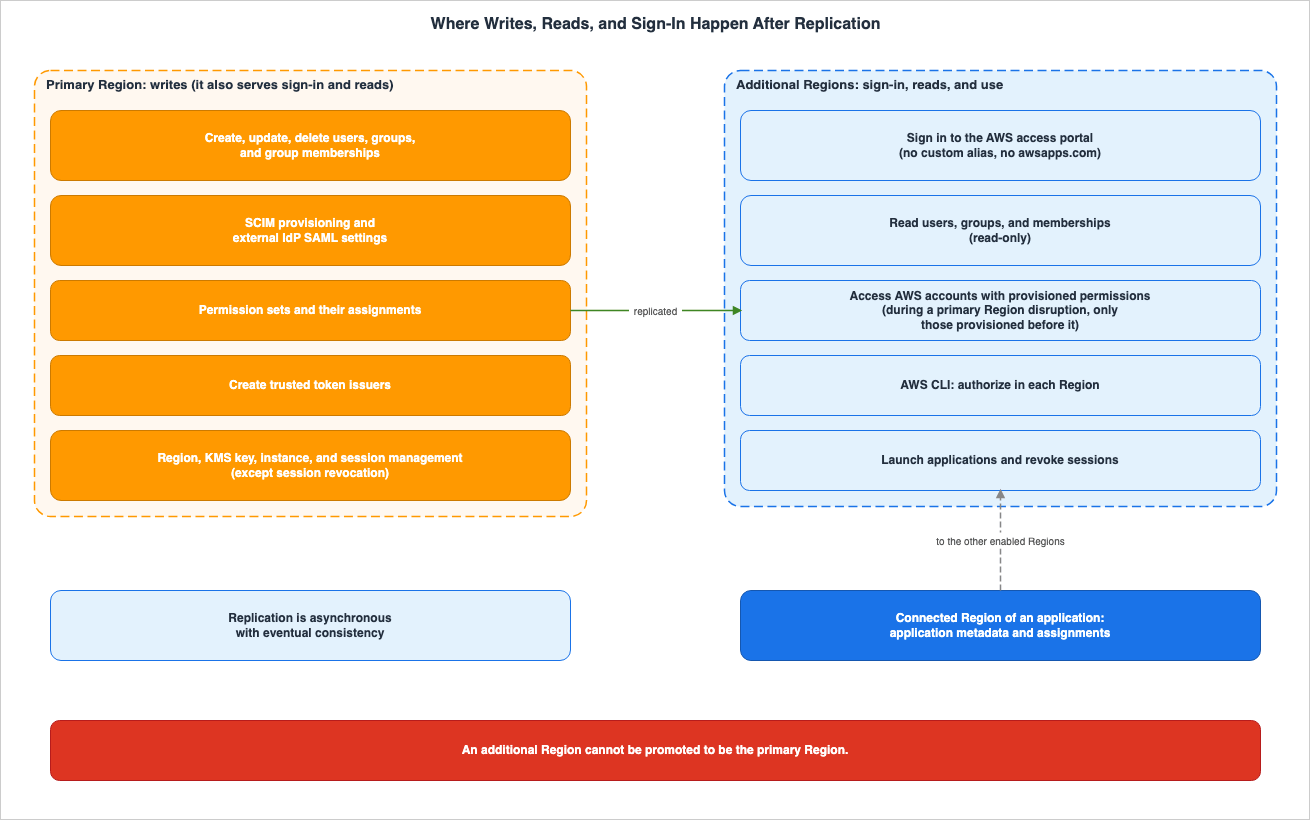
5. Where Can It Be Changed?
5.1 Three Categories in the Use Cases Table
The use cases table outlines which Regions are supported for each feature of Identity Center. The categories are: "Primary Region Only," "All Enabled Regions," and "Application's Connected IAM Identity Center Region." This article will present the table, organized by write access, read/use access, and application management.| Category | Function | Applicable Region(s) |
|---|---|---|
| Write | Automatic synchronization of users and groups from external identity sources (SCIM API or Identity Store API – external IdPs only). | Primary Region only |
| Write | Configuration of automatic provisioning via SCIM. | Primary Region only |
| Write | Configuration of SAML SSO with external IdPs. | Primary Region only. Read access through the console in all enabled Regions. |
| Write | Creation, modification, and deletion of users, groups, and memberships. | Primary Region only. Read-only access is available in additional Regions. |
| Write | Management of permission sets and assignments (including temporary elevated access). | Primary Region only |
| Write | Creation of trusted token issuers. | Primary Region only |
| Write | Management of Regions, KMS keys, instances, and sessions (except session revocation). | Primary Region only. Read access to some data in all enabled Regions (permission set assignments excluded). |
| Read & Use | Sign-in to the AWS access portal and global sessions (one sign-in for all Regions). | All enabled Regions |
| Read & Use | Display of assigned accounts and applications. | All enabled Regions |
| Read & Use | Reading of users, groups, and memberships (via console or Identity Store API). | All enabled Regions |
| Read & Use | Revocation of user sessions. | All enabled Regions |
| Read & Use | Password reset and management of MFA devices (Identity Center directory only). | All enabled Regions |
| Read & Use | Access to accounts via the AWS access portal, AWS CLI, and shortcut links. | All enabled Regions |
| Read & Use | Deployment of AWS managed applications. | All enabled Regions, subject to the application's Regional availability and its support for deployment in additional Regions. |
| Read & Use | Creation of customer managed applications. | All enabled Regions |
| Read & Use | Launching applications and SSO to Amazon EC2 instances. | All enabled Regions |
| Read & Use | Trusted identity propagation with AWS managed applications. | All enabled Regions. However, this row is subject to the same-Region condition (see Section 7.4). |
| Application Management | Management of application metadata and assignments. | Application's connected IAM Identity Center Region |
The row for users, groups, and memberships carries a note on differences by identity source. With the Identity Center directory, writes are available through the console and the Identity Store API in the primary Region. For external IdPs synchronized via SCIM, writing to the console is disabled. However, you can still disable and enable user access, and delete users, through the console.
5.2 Application Management Regions
According to the applications page, AWS managed applications that are deployed with Region-local connections in an additional Region are managed within that Region, along with their associated assignments. Identity Center replicates the application's metadata and assignments to other enabled Regions, allowing users to launch the application from any enabled Region.Applications using cross-Region connections are managed through the Identity Center console and API in the Region to which they are connected, including details such as the application name and description, as well as their assignments. Regardless of the connection method, the application itself can be managed through the application console in the Region where it was deployed.
Customer managed applications (SAML and OAuth2) can be created in any enabled Region. Once created, they are managed in the Region where they were created, along with their associated assignments.
The Region removal page warns that removing a Region may result in the loss of access to applications created within that Region. Before removing a Region, verify the connected Region by checking the "Created from" column in the application list. According to the same page, AWS managed applications that remain connected to a removed Region will continue to be deployed even if access is lost. The page recommends deleting the application's deployment through the application console or API before removing a Region. Even after a Region is removed, adding it back can restore access to the application.
5.3 Deploying AWS Managed Applications to Additional Regions
According to the applications page, all AWS managed applications integrated with Identity Center support deployment to the primary Region. To determine if an application supports deployment to additional Regions, check the final column in the applications table. As of November 3, 2026, the applications markedYes in this column are: Amazon Athena SQL, four forms of Amazon EMR, Amazon Redshift, Amazon S3 Access Grants, Amazon SageMaker Unified Studio, AWS Deadline Cloud, AWS DevOps Agent, AWS Glue, AWS Lake Formation, and AWS Transfer Family web apps. Amazon Quick is listed with a note indicating that it supports deployment via the AWS CLI. AWS Systems Manager only supports Fleet Manager Remote Desktop.This column indicates whether an application can be placed in an additional Region. It does not indicate support for cross-Region TIP functionality (see Section 7.6).
For Amazon Q Business, this column indicates
No. The June 2026 AWS Service Availability Updates list Q Business among the services moving to maintenance, which stop accepting new customers. This article does not include Q Business as an example of applications that can be used in additional Regions.5.4 Additional Region AWS Access Portal
The table on the workforce access page divides AWS access portal endpoints into four types.| Endpoint | Primary Region | Additional Region | URL Format |
|---|---|---|---|
| Classic IPv4 only | Yes | No | https://[Identity Store ID].awsapps.com/start |
| Custom-alias IPv4 only | Yes (Optional) | No | https://[custom alias].awsapps.com/start |
| Alternative IPv4 only | Yes | Yes | https://[Identity Center instance ID].[Region].portal.amazonaws.com |
| Dual-stack | Yes | Yes | https://[Identity Center instance ID].portal.[Region].app.aws |
In additional Regions, custom aliases are not supported, and the
awsapps.com parent domain cannot be used. The last two endpoints do not have /start at the end of the URL. You can verify which Region an endpoint belongs to with "View all AWS access portal URLs" on the Management tab of the Settings page in the console.If users have bookmarked URLs using
awsapps.com, those URLs will only direct them to the primary Region. The failover page recommends promptly informing users of the additional Region endpoints once replication is complete.5.5 ACS URL
For instances utilizing an external Identity Provider (IdP), the table on the workforce access page divides the SAML ACS endpoints into three types.| ACS Endpoint | Primary Region | Additional Region |
|---|---|---|
| IPv4 only | Yes | Yes |
| Alternative IPv4 only | Yes | No |
| Dual-stack | Yes | Yes |
The note associated with the "Alternative IPv4 only" row indicates that instances activated before February 2026 should retain this endpoint as service provider-initiated SAML SSO to the primary Region requires it. For instances activated on or after February 2026, Identity Center will not utilize this endpoint.
5.6 The Primary Region Cannot Be Changed
The replication page contains the following two sentences regarding Region changes:You can add and remove additional Regions. The primary Region cannot be removed other
than by deleting the entire IAM Identity Center instance.You cannot promote an additional Region to be the primary or demote the primary Region
to be additional.The organization instances page also states that the primary Region cannot be changed after it is created. The description of
PrimaryRegion in the DescribeInstance API reference also says that the primary Region cannot be removed.Even if the primary Region experiences a disruption, no additional Regions will become the primary Region. During the disruption, the write rows in Section 5.1 still exist only in the primary Region.
6. Primary Region Disruptions and Replication Lag
6.1 Replication Is Asynchronous and Eventually Consistent
The replication page says that adding a Region automatically starts replicating IAM Identity Center data, and explains this behavior in the following sentence.The replication is asynchronous with eventual consistency.According to the same page, the time required for the initial replication to additional Regions depends on the volume of data on the instance. Subsequent changes are typically replicated within seconds. The GA Security Blog mentions an initial replication time of 15–30 minutes, but this is an example value from the blog and not a figure from the user guide.
While changes made in the primary Region are being propagated to the additional Regions, those Regions may return older data. This is this article's reading of what eventual consistency means, and the documentation does not specify how far back the data returned by the additional Regions might be.
6.2 Access Remains Limited to the Permissions Provisioned Before the Disruption
The Benefits section of the multi-Region page describes the resilience of account access with the following statement:Your workforce can access their AWS accounts even if the IAM Identity Center instance
experiences a service disruption in its primary Region. This applies to access with
permissions provisioned before the disruption.The Note on the failover page expands on this condition. Whether account access continues depends on whether permission set assignments and group memberships were provisioned and replicated before the disruption. If using an external IdP, it also depends on the health of that external IdP. The same Note also recommends preparing break-glass access for a small number of privileged users in anticipation of an identity source disruption.
In this article's reading, it is not possible to add new assignments or memberships during a disruption. As mentioned in Section 5.1, these are only available in the primary Region. The GA Security Blog states that access relies on permissions already provisioned, and that new assignments and memberships can only be managed in the primary Region.
6.3 Sessions and Signing In Again
According to the workforce access page, Identity Center replicates a user's session from its originating Region to other enabled Regions. Session revocation and sign-out in one Region are also replicated to other Regions. The Note on the same page indicates that users may need to sign in again in a different enabled Region to regain access during a Region disruption.Administrators can also revoke sessions in additional Regions. According to the workforce access page, revoking a session in one Region is normally enough, because the change is replicated to the other Regions. When the primary Region has a disruption, administrators can revoke sessions in additional Regions.
6.4 The Application Relies on the Connected Region
According to the final section of the applications page, AWS managed applications connect to a specific Identity Center Region during deployment and depend on that Region for user sign-in. This remains true even if Identity Center is enabled in multiple Regions. If Identity Center has a disruption in that Region, users may be unable to access AWS managed applications connected to it.Applications connected to the primary Region may be affected by disruptions in that primary Region. Similarly, applications connected to additional Regions may be affected by disruptions in those additional Regions. This is this article's reading, applying the statement on the applications page to the two cases.
6.5 When an External IdP Can Support Only One ACS URL
According to the failover page, if an external IdP's Identity Center application can only support one ACS URL, then users can only directly sign in through a single Identity Center Region. In this scenario, the additional Region serves as a backup for accessing the account. If the primary Region experiences a disruption, the external IdP's ACS URL must be updated to point to the ACS URL of the additional Region. After this update, users can access the AWS access portal in the additional Region either through the external IdP's existing application or through a shared direct link.The Note on the same page indicates that while using the additional Region in this manner, users may not be able to access AWS managed applications connected to the primary Region, and that this approach should only be used as a temporary measure. The same page recommends periodically testing this procedure.
The workforce access page also describes how the application functions when there is only one ACS URL. When launched from the application's link, the sign-in process begins in the Region to which the application is connected. If that Region's ACS URL is not recognized by the IdP, the sign-in will fail. However, if the user first signs in to the Region (by default, the primary Region) whose ACS URL is configured in the IdP and establishes a session, they can then launch the application from any enabled Region's AWS access portal or directly from the application's link.
6.6 AWS CLI
As described in Section 4.2, CLI authorization is not replicated across Regions. The failover page recommends that CLI users create a profile for the additional Region for each of their primary Region profiles. In the event of a disruption in the primary Region, switch to the corresponding profile.6.7 Tokens Issued Before Replication
The beginning of the replication page includes the following two sentences:Only tokens created after you enable multi-Region replication work across all enabled
Regions. Existing tokens are not updated.The same type of sentence appears in the section on cross-Region TIP considerations in the TIP considerations page. This sentence, in the context of TIP, reads as follows:
After you enable multi-Region replication for additional Regions, those Regions do not
accept tokens issued before you enabled replication. Your users must re-authenticate
once so that newly issued tokens work across all enabled Regions.
Both sentences refer to tokens. However, neither sentence directly explains what happens to an AWS account's access session when replication is enabled. This article does not expand upon these two sentences to encompass all aspects of account access.
7. When Trusted Identity Propagation Crosses Regions
7.1 User Guide Text
In the section on Cross-Region trusted identity propagation in the TIP overview, the following statement applies:With a multi-Region IAM Identity Center instance, trusted identity propagation works
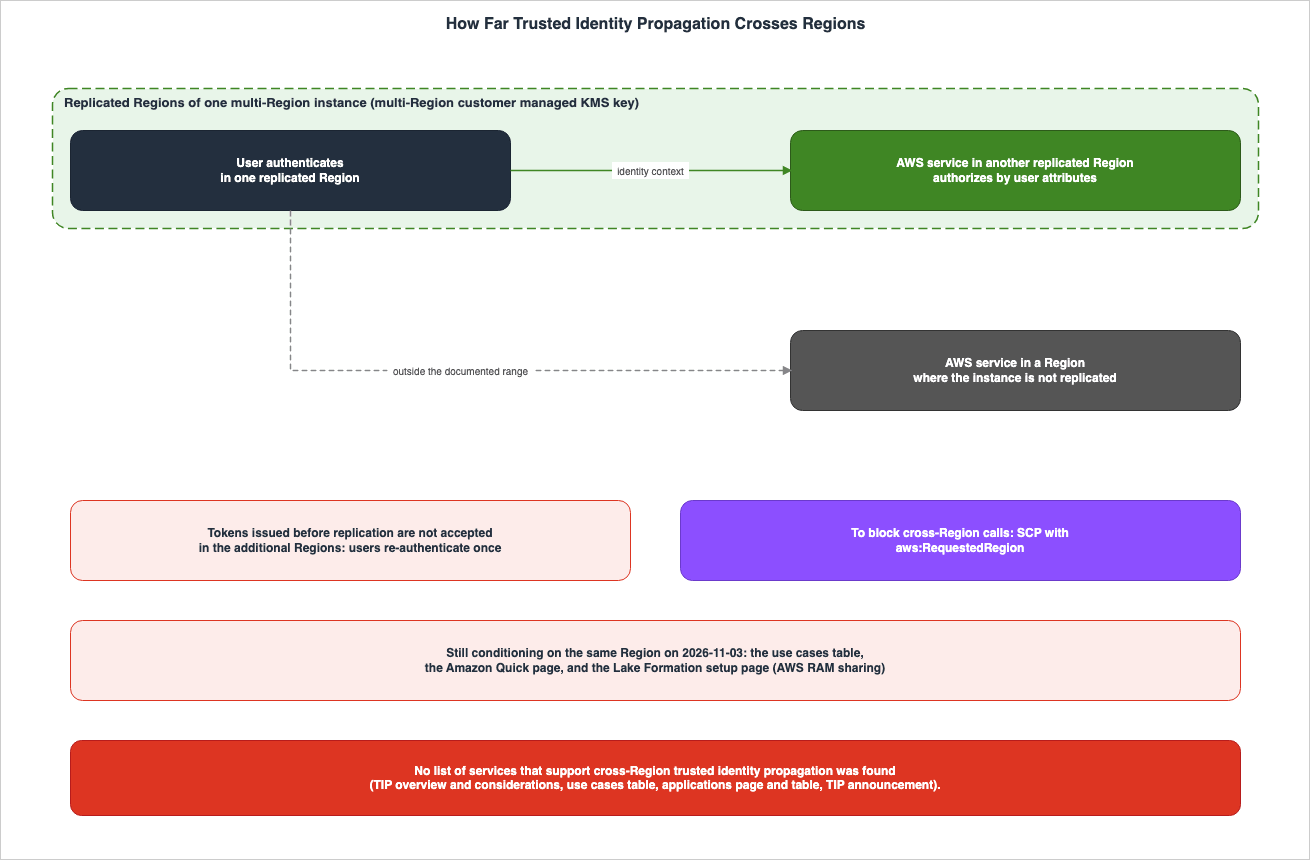
across the Regions where you replicated your instance.According to the same section, a user authenticated in one Region can have their identity context propagated to AWS services in other Regions. The receiving services can then use user attributes, such as group membership, to authorize access. A similar statement appears in the Trusted identity propagation section of the applications page.
The scope of this statement is the Regions where the instance was replicated. Regions where the instance is not replicated are outside that scope.
7.2 Requirements
The TIP overview states that cross-Region TIP requires a multi-Region IAM Identity Center instance and a multi-Region customer managed key. If you have already enabled replication and configured TIP with AWS services, cross-Region TIP will automatically function across additional Regions. The Prerequisites section of the TIP considerations page also states that in cross-Region deployments, TIP will function between replicated Regions without requiring any additional configuration.7.3 Cross-Region TIP Considerations
The section on cross-Region TIP considerations outlines three key points:- Eventual consistency: IAM Identity Center replicates identity metadata to additional Regions asynchronously, with eventual consistency.
- Tokens and Reauthentication: Refer to the statement in Section 6.7.
- Preventing Cross-Region Calls: See the following statement.
If you do not want AWS services to make cross-Region calls, you can block them by using
a service control policy (SCP). You can build this policy using the
aws:RequestedRegion condition key to allow only the Regions you use and deny requests
to all others.
For an example policy, this section points to the IAM User Guide example that denies access to AWS based on the requested Region. When creating SCPs, you can use the AWS Service Control Policy (SCP) Builder and Simulator to construct and evaluate conditions with the
aws:RequestedRegion condition key. General information about SCPs can be found on this site in the AWS Multi-Account Operational Patterns.7.4 A Discrepancy in the Same User Guide
The row in the Trusted identity propagation section of the use cases table is as follows. This row was still present on November 3, 2026.Trusted identity propagation with AWS managed applications | All enabled Regions -
Applications that propagate identity context to each other must be in the same RegionAccording to the TIP overview, TIP operates between replicated Regions. However, this row in the use cases table states that applications that propagate identity context to each other must be in the same Region. Two pages of the same user guide make statements of different strength. The sources disagree.
The Amazon Quick page also includes the following sentence, placed within an "Important" box, as of November 3, 2026:
Your AWS IAM Identity Center instance, Lake Formation, AWS Glue Data Catalog, and Amazon S3
Access Grants must all be deployed in the same AWS Region.
The Lake Formation setup page also includes the following sentence about sharing tables between accounts with AWS RAM. This page was reviewed on November 4, 2026.
AWS Lake Formation supports using AWS Resource Access Manager (RAM) to share tables across AWS accounts
and it works with trusted identity propagation when the grantor account and grantee account are in the
same AWS Region, in the same AWS Organizations, and share the same organization instance of IAM Identity Center.
In contrast, the Big Data Blog in Section 7.6 states that AWS RAM shares and resource links bridge the gap between Regions.
This article does not determine which of these is incorrect. It is unclear from the documentation whether the row in the use cases table, the Amazon Quick page, and the Lake Formation setup page have been updated since October 26, 2026, or whether a specific combination of applications still requires them to be in the same Region. When building cross-Region configurations, be sure to verify Region requirements in the documentation for each service you are using.
7.5 Two Sentences in the TIP Announcement
The TIP announcement describes the earlier condition in the following sentence:Previously, trusted identity propagation required all of the AWS services accessing a
user's identity to reside in the same AWS Region.The announcement concludes with a paragraph stating that this feature is available
in all AWS Regions where IAM Identity Center is available. This phrase, "all Regions," refers to the scope of Regions where the feature is provided. According to the TIP overview, for a single instance, identity context can be carried between the Regions where that instance was replicated. This article does not read this sentence in the announcement as meaning that TIP can cross between all Regions.7.6 Examples and the Missing List
An example of a cross-Region TIP configuration can be found in an article on the Big Data Blog. The blog post is Part 1 of a three-part series, with the second part focusing on Amazon Quick and the third part on Amazon EMR. The configuration is as follows:- It utilizes three accounts and three Regions. Identity Center is located in the management account, specifically in the
us-east-1Region. - The account that holds the data is in the
ap-southeast-2Region and runs Amazon S3, AWS Glue Data Catalog, Lake Formation, and Amazon Redshift Serverless. - The account that performs queries is in the
sa-east-1Region and queries data from either SageMaker Unified Studio using Athena or from Amazon Redshift.
The Big Data Blog describes the conditions for TIP integration in the following sentence:
For the user's identity to propagate, the producer and consumer accounts must be in the
same organization and share the same organization instance of IAM Identity Center.
The blog's prerequisites also list replicating IAM Identity Center to every Region where you operate.
No list of services that support cross-Region TIP was found. This article searched the TIP overview, the TIP considerations page, the use cases table, the applications page, the applications table, and the TIP announcement with varying search terms. None of these sources contains such a list. While the applications table includes columns for TIP and for deployment to additional Regions, neither column indicates support for cross-Region TIP configurations. Therefore, this article will not use the "deployment to additional Regions" column as a substitute for a list of services that support cross-Region TIP.
7.7 Relationship to Previously Published Articles
This site's article, Identity-Aware Data Access on AWS, was written on the premise, from before October 26, 2026, that the IAM Identity Center instance, Lake Formation, the AWS Glue Data Catalog, and S3 Access Grants are in the same Region. The functionality of TIP operates as described in that article. Sections 7.1 through 7.6 of this article detail the changes that occur when operating across Regions.No statement was found that directly describes whether cross-Region TIP works on an instance whose identity source was changed to Active Directory. Section 5.5 of this site's article, Changing the Identity Source in IAM Identity Center Is Not Symmetric, indicates that cross-Region TIP is not available there, although that article presents this as an inference.
8. Operational Building Blocks
8.1 API for Managing Regions
Regions are managed through four operations withinsso-admin: AddRegion, RemoveRegion, DescribeRegion, and ListRegions. The API reference for AddRegion includes the following description:This operation initiates an asynchronous workflow to replicate the IAM Identity Center
instance to the target Region. The Region status is set to ADDING at first and changes
to ACTIVE when the workflow completes.RegionMetadata consists of four fields: RegionName, Status, AddedDate, and IsPrimaryRegion. The possible values for Status are:ACTIVE | ADDING | REMOVINGDescribeInstance returns the PrimaryRegion and a list of Regions that may include Regions with statuses ACTIVE, ADDING, or REMOVING. Encryption configurations are detailed in EncryptionConfigurationDetails, which includes the key type and the key ARN. ListInstances includes a RegionScope parameter, which defaults to CURRENT_REGION and lists only instances in the Region you call from. Setting it to ALL_REGIONS returns the instances that the caller owns or that are shared with the caller, from all Regions.The operations for managing Regions are primary Region operations, as described in Section 5.1. The exception is reading: the API reference says that a DescribeRegion request must be made from one of the enabled Regions.
8.2 Identity Store Change Notifications
Starting October 28, 2026, the Identity Store will send events to EventBridge whenever a user, group, or group membership is created, updated, or deleted, or when the Identity Store itself is modified. The notifications page specifies the location of event names as follows:All events use the event source aws.identitystore. The event name is in the detail-type
field.The event names listed in the table on the notifications page consist of 11 different types:
User Created
User Updated
User Deleted
Group Created
Group Updated
Group Deleted
GroupMembership Created
GroupMembership Deleted
IdentityStore Created
IdentityStore Updated
IdentityStore Deleted
This article focuses on which Regions the events are delivered to. The notifications page states that within an organization instance, events are delivered to the management account's default event bus. You create the rule on the default event bus in the account and Region where the instance is enabled. The page then includes the following statement regarding additional Regions:
If you replicated your IAM Identity Center instance to additional AWS Regions, you also
receive events on the default event bus in each additional AWS Region.
The notifications announcement also says that events are sent in each enabled Region of the instance.
The considerations section on the notifications page includes the following points:
- Events are delivered at least once. It is also possible for the same event to be delivered multiple times, or for events to be delivered in an order different from the changes.
- Delivery time is not guaranteed. Downstream systems should reconcile data with the values returned by the Identity Store API and perform regular checks.
- Events do not include attributes such as names or email addresses.
Updatedevents do not specify what changes were made. Current attributes can be obtained usingDescribeUser,DescribeGroup, andDescribeGroupMembership. - Events do not correspond on a one-to-one basis with CloudTrail events. A single API call may result in zero or multiple change notifications.
According to the "How event notifications work" section on the same page, events are delivered only for changes made after the rules and targets have been configured. Previous changes are not resent. Events include the Region in which they were sent.
The notification setup page recommends including the event name in the pattern, as CloudTrail also sends Identity Store API calls to EventBridge using the same
source. The Identity Store page in the Events Reference, as of November 3, 2026, only describes the format of events that are sent via CloudTrail.The notification setup page says to create the rule in the account and Region where the instance is enabled, and does not say whether to also create rules in additional Regions. The cross-Region events page, reviewed on November 4, 2026, states the following:
A single change results in an event in each of these Regions. To process each change once, create your rule in one Region. To keep receiving events when that Region is unavailable, create rules in more than one Region and handle the duplicate events in your workflow.8.3 CloudFormation
TheAWS::SSO resources listed on the CloudFormation reference page include six resource types: Application, ApplicationAssignment, Assignment, Instance, InstanceAccessControlAttributeConfiguration, and PermissionSet. Resource types related to Region management are not included in this list.AWS::SSO::Instance represents a resource that creates an Identity Center instance, either within a standalone account not managed by AWS Organizations, or within a member account of an organization. Creating this resource from an organization's management account will be rejected. It has two properties: Name and Tags. It does not include properties related to Region or encryption keys.As of November 3, 2026, adding and removing Regions can be performed through the console or API. This article does not specify whether CloudFormation will support these actions in the future.
9. Observations Based on This Configuration
This chapter details the results of a trial in a test organization on November 3, 2026. Each value is from one or two observations in this configuration and is not a promise in the documentation. This article does not let the observations override the documentation.9.1 Configuration
- Organization: The organization was created using an AWS account dedicated for testing, with all features enabled. It contains no member accounts, and Control Tower is not being used.
- Identity Center: An organization instance enabled in that management account with the Custom instance configuration in the console. The primary Region is
us-east-1, the identity source is the Identity Center directory, and permission sets were enabled. - Key: In the Custom instance configuration, the option to create a new key was selected. The created key was a multi-Region key and was tagged with
CreatedBy: IAM Identity Center. At the time of activation, no key replicas existed. - Additional Region: This Region is
us-west-2. After replicating the key tous-west-2(using the key policy from the primary key), it was added withAddRegion. - Operations: The AWS CLI was used with
sso-admin,identitystore,kms,events, andlogs. The status of each Region was checked with a 15-second wait between checks, and reads within the additional Region were checked every 1-2 seconds. The time required for reads includes the round-trip time of the CLI and is not a performance measurement. - Notifications: Rules were placed on both Regions' default event buses, configured to send to CloudWatch Logs. These rules have a
sourceofaws.identitystoreand match the 11detail-typevalues described in Section 8.2.
9.2 Adding and Removing Regions
| Action | Observation |
|---|---|
| Key Replication | The replica key for us-west-2 became Enabled approximately 7 seconds after the ReplicateKey operation. |
First AddRegion | The response status was ADDING. At 81 seconds, the status was still ADDING, but at 97 seconds, it was ACTIVE. |
Second AddRegion (Removed and then re-added) | At 113 seconds, the status was still ADDING. At 129 seconds, the status was ACTIVE. |
Reads in us-west-2 after ACTIVE | ListRegions and DescribeInstance called in us-west-2 succeeded and returned two Regions. |
First RemoveRegion | The response status was REMOVING. Due to a script issue, it was not possible to record the time taken to complete this operation. When checked 13 minutes later, us-west-2 had been removed. |
Second RemoveRegion | At 97 seconds, the status was REMOVING. At 113 seconds, DescribeRegion returned a ResourceNotFoundException. |
| Reading while removing | Approximately 3 seconds after the first RemoveRegion operation, while the status was still REMOVING, calling DescribeUser in us-west-2 returned a ResourceNotFoundException. |
The message returned by
DescribeRegion after the second RemoveRegion operation was:Region us-west-2 is not an additional Region of the IAM Identity Center instance.9.3 Writing in the Primary Region, Reading in Additional Regions
| Item | Operation in Primary Region | Reading in us-west-2 |
|---|---|---|
| Group | CreateGroup | Successfully read during the initial read (0.8 seconds) |
| User | CreateUser | Successfully read during the initial read (0.8 seconds) |
| Group Membership | CreateGroupMembership | Successfully read during the initial read (0.8 seconds) |
| User Display Name Update | UpdateUser | Successfully read during the initial read, displaying the updated name (0.8 seconds) |
| Permission Set | CreatePermissionSet | DescribePermissionSet repeatedly returned a ValidationException for approximately 5 minutes; ListPermissionSets also returned a ValidationException. |
The response from
us-west-2 when reading a permission set was:This operation is supported only in the primary Region of the IAM Identity Center instance.9.4 Writing Operations in Additional Regions
Operations in us-west-2 | Returned Exception |
|---|---|
CreateUser, UpdateUser, CreateGroup | AccessDeniedException |
CreatePermissionSet | ValidationException (same as in Section 9.3) |
The message returned for the user and group writes was as follows:
Write Operations are not allowed in replica region [us-west-2]. Please use home region [us-east-1]This message calls the primary Region
home region and the additional Region replica region. The user guide uses different terms, primary Region and additional Region.9.5 Change Notifications
When checked approximately 7 minutes after the last change, both Regions' log groups contained the same four events. These were one each ofGroup Created, User Created, GroupMembership Created, and User Updated. For each event, the region field corresponded to the Region of the log group. Events related to the changes made in the primary Region also reached the default event bus in the additional Region. The order in which the events arrived and the time they took to arrive were not recorded.9.6 Sign-in with Additional Region Portals
- The Identity Center directory user created in Section 9.3 was able to sign in using the Dual-stack endpoint in
us-west-2(in the formathttps://[Identity Center instance ID].portal.[Region].app.aws). The password was set by email. - During the first sign-in, the user was prompted to register MFA. The options presented were: Built-in authenticators, Security key or other device, and Authenticator app.
- After signing in, the "Applications" tab of the AWS access portal was displayed. No account assignments were created.
- When opening the portal for
us-east-1in the same browser window, the user could enter without signing in again. This observation matches the row on sign-in and global sessions in the use cases table in Section 5.1.
9.7 Deletion
- Approximately 4 seconds after calling
DeleteInstance, the subsequentDescribeInstancecall returned anAccessDeniedException. The API reference states thatAccessDeniedExceptionis returned after deletion is complete. In this configuration, theDELETE_IN_PROGRESSstate was not observed. - The keys indicated that the replica key was in
PendingDeletionand the primary key was inPendingReplicaDeletion(with a waiting period of 7 days). - The deletion check confirmed that no instances, rules, log groups, or log group resource policies remained.
9.8 Reading the Observations Alongside the Sources
- The observations in Sections 9.3 and 9.4 are consistent with the use cases table in Section 5.1, which says that writes are only in the primary Region and that additional Regions are read-only.
- The inability to read the permission set in
us-west-2does not contradict the row of the use cases table that gives read access to some data in all enabled Regions (permission set assignments excluded). The documentation does not provide a list of which specific data can be read. In this configuration,ListRegionsandDescribeInstancewere readable, but the permission set could not be read. - Changes made in the primary Region could be read in
us-west-2within one second, which aligns with the text stating that in most cases, it takes only a few seconds. This was a single observation and does not represent an upper limit. - From
ADDINGtoACTIVE, it took about two minutes both times. The data for this instance was almost empty. The replication page indicates that the initial replication time depends on the amount of data, while the GA Security Blog states a timeframe of 15–30 minutes. This article does not infer a general duration from the values observed in this configuration. - No statement was found in the documentation on how long it takes from
REMOVINGuntil the Region is removed (Section 10.3). The second observation for this configuration was within two minutes.
9.9 What This Configuration Does Not Show
- What a primary Region disruption looks like. A disruption cannot be caused here, so nothing in Chapter 6 was tested.
- Cross-Region TIP. No configuration was built for services such as Lake Formation.
- External IdP and ACS URLs. The identity source was an Identity Center directory.
- Access to AWS accounts. No account assignments were created.
- Replication time for instances with large amounts of data.
- The order in which change notifications are received, the time it takes for them to arrive, and potential duplicates.
10. Discrepancies and Omissions in the Documentation
This section consolidates instances of conflicting information, missing details, and absent passages that have been identified throughout Chapters 3 through 9.10.1 Where the Sources Disagree
- TIP Scope Across Regions: The TIP overview states that its functionality operates across replicated Regions. The TIP row in the use cases table, the Amazon Quick page, and the Lake Formation setup page (for sharing tables between accounts with AWS RAM) specify the same Region as a condition (Section 7.4).
- Dates for KMS Customer Managed Keys: The Document history lists September 17, 2025. The "What's New" announcement indicates September 23, 2025. The GA News Blog post states that this feature was introduced in October 2025. This article does not merge these dates into one.
- One-Day Difference Between Document history and What's New: General availability for multi-Region functionality is listed as February 2, 2026 in the Document history, while "What's New" states February 3, 2026. Expansion to the Identity Center directory is listed as July 28 and July 29, 2026. One-click configuration is listed as August 6 and August 7, 2026. Expansion of supported Regions is listed as September 30 and October 1, 2026. This article cites the source for each date.
- Limitations at General Availability: The GA News Blog and the GA Security Blog state that the Identity Center directory and opt-in Regions are not supported. The user guide, as of November 3, 2026, indicates support for both (Section 3.6).
- Format of Identity Store Events: The notifications page lists 11 different
detail-typevalues for change notifications. The Identity Store page in the Events Reference only describes the format via CloudTrail (Section 8.2).
10.2 Items Not Included in the Documentation
- A table of items that are not replicated is not in the user guide pages this article read. Section 4.2 of this article contains information gathered from multiple pages.
- A list of services that support cross-Region TIP is in none of the user guide pages or announcements that this article read (Section 7.6).
- As of November 3, 2026, the Document history does not include entries for the TIP from October 26, 2026, nor the change notification from October 28, 2026. The most recent entry is dated September 30, 2026.
- The list of resource types for
AWS::SSOin CloudFormation does not include any types that manage Regions (Section 8.3). - The replication page does not specify the maximum time it takes for changes made in the primary Region to propagate to additional Regions. It only states that, in most cases, this occurs within a few seconds (Section 6.1).
10.3 Where No Statement Was Found
- The text describing the time it takes to remove a Region could not be found (Section 9.2 has the values observed in this configuration).
- The text describing what happens to the AWS account access session when replication is enabled could not be found (Section 6.7).
- The text describing the behavior of cross-Region TIP on instances that have their identity source changed to Active Directory could not be found (Section 7.7).
11. Failure Modes
This section outlines failures that can occur when the location of authority is misread, drawing from the content presented in Chapters 3 through 8. Each item represents a potential example of failure.- Concluding that an instance that does not use an external IdP cannot be replicated, and dropping replication for an instance that uses the Identity Center directory. As of July 2026, the Identity Center directory can also be replicated.
- Assuming that AWS managed applications used only in the primary Region are not relevant, and starting replication without verifying compatibility with customer managed keys. All AWS managed applications used in the organization must be compatible with these keys.
- Modifying the key policy in the primary Region and not applying it to the replica. KMS does not synchronize key policies across Regions.
- Planning to add users or assign permission sets in an additional Region during a disruption in the primary Region. Both of these actions can only be performed in the primary Region.
- Planning to designate an additional Region as the primary Region during a disruption. This is not possible.
- Providing users only with the
awsapps.comURL. This will not work in additional Regions. Endpoint information for additional Regions should be provided before a disruption occurs. - Failing to add the additional Region's ACS URL to the external IdP. Users will then be unable to sign in directly to the additional Region.
- Creating CLI profiles only for the primary Region. CLI authorization is Region-specific, and during a disruption, CLI access from an additional Region requires a profile authorized in that Region.
- Leaving an application connected to the primary Region and assuming that it stays usable during a primary Region disruption. Applications rely on the sign-in process of the Region to which they are connected.
- Reading "all Regions" in the TIP announcement and assuming that the identity context will be delivered to services in non-replicated Regions. The scope is limited to replicated Regions.
- Using the "deployment to additional Region" column in the applications table as a list of services that support cross-Region TIP.
- Failing to verify applications created in an additional Region before removing that Region. This can result in loss of access to the application, leaving only the deployment itself.
- Defining rules for Identity Store change notifications based solely on the
source. Events routed through CloudTrail will also be delivered with the samesource.
12. Frequently Asked Questions About IAM Identity Center Across Regions
12.1 Can users and groups be created in additional Regions?
In additional Regions, users and groups cannot be created. According to the use cases table, creation, modification, and deletion of users, groups, and memberships are only supported in the primary Region; additional Regions are read-only. Management of permission sets and creation of trusted token issuers are also only supported in the primary Region (see Section 5.1).12.2 If a disruption occurs in the primary Region, will an additional Region become the primary Region?
No. According to the replication page, it is not possible to designate an additional Region as the primary Region. The primary Region can only be removed when the instance itself is deleted (see Section 5.6).12.3 When the primary Region has a disruption, can users still sign in to their AWS accounts?
Yes, but only with permissions that were provisioned and replicated before the disruption. They can access their AWS account through the AWS access portal for an additional Region, or through a profile configured for an additional Region using the AWS CLI. If using an external identity provider (IdP), access depends on the health of the external IdP and whether the ACS URL for the additional Region has been correctly configured in the IdP. Users may need to sign in again in another enabled Region (see Sections 6.2, 6.3, and 6.5).12.4 Can instances of the Identity Center directory also be replicated?
Yes, it is possible. The multi-Region page requires an instance that uses an external Identity Provider (IdP) or the Identity Center directory as its identity source. The Document history records the expansion to the Identity Center directory on July 28, 2026. Instances using Active Directory as an identity source, and account instances, cannot be replicated (see Section 3.1).12.5 How many additional Regions can be added?
By default, the General Reference quota allows for a total of six Regions, including the primary Region, with up to five additional Regions. Requests to increase this limit can be submitted (see Section 3.2).12.6 Since October 26, 2026, can Trusted Identity Propagation be used between any Regions?
Not between any Regions. According to the TIP overview, the scope is between the Regions where the instance is replicated. The "all Regions" in the TIP announcement refers to the Regions where the feature is offered. The use cases table, the Amazon Quick page, and the Lake Formation setup page (for sharing tables between accounts with AWS RAM) still contain statements that make the same Region a condition (Sections 7.1, 7.4, and 7.5).12.7 Is there a list of services that support trusted identity propagation across Regions?
No such list was found in the pages this article read. An example is the configuration described in the Big Data Blog, which queries Lake Formation-governed data from Athena in SageMaker Unified Studio and from Amazon Redshift. Verify the Region requirements in the documentation for each service (see Section 7.6).12.8 What should you do if you do not want AWS services to make cross-Region TIP calls?
The TIP considerations page says that you can create a service control policy (SCP) that uses theaws:RequestedRegion condition key to allow only the Regions you use and deny requests to all others (see Section 7.3).12.9 Where will notifications about changes to the Identity Store be delivered?
Identity Store change notifications are delivered to the default event bus of the account that enabled the instance. If you have replicated the instance, the notifications are also delivered to the default event buses in each additional Region. Thesource is aws.identitystore, and the event name is found in the detail-type (see Section 8.2).13. Summary
When you replicate an IAM Identity Center organization instance to additional Regions, the authority for identity and configuration is distributed across three locations. Writes for users, groups, memberships, SCIM, external IdP settings, permission sets, trusted token issuers, Regions, and KMS keys are available only in the primary Region. Sign-ins, reads (excluding permission set assignments), account access, and application launches are possible in all enabled Regions. Application metadata and assignments are managed in the Region to which the application is connected.Even if the primary Region experiences a disruption, the additional Regions will not become the primary Region. What continues is AWS account access with permissions provisioned and replicated before the disruption. According to the TIP overview, cross-Region TIP works between the replicated Regions. A row in the use cases table of the same user guide still requires applications that carry identity context to reside in the same Region. The sources disagree. No list of services that can cross Regions was found in the pages this article read.
When preparing your organization, verify the following for each authority location.
- Primary Region: Before a disruption, have all necessary assignments and memberships been completed? Have you removed from your disruption runbook any task that only the primary Region can perform?
- Replication Conditions: Is it an organization instance, and is the identity source an external IdP or the Identity Center directory? Is the key a multi-Region customer managed key, and does it support all AWS managed applications used in the organization?
- KMS Key: Is the replica key policy identical to the primary key policy, or is any difference intentional? If changes are made, is there a documented procedure to apply those changes across all Regions?
- Additional Regions: Does the number of enabled Regions, including the primary Region, fall within the allocated quota? Have the AWS access portal endpoints for the additional Regions been distributed to users?
- External IdP: Has the ACS URL for the additional Regions been added to the IdP? If the ACS URL is limited to one, has a procedure been tested to update it in the event of a disruption?
- AWS CLI: Have profiles been created for the additional Regions, and has authorization been tested?
- Applications: For each application, is it clearly documented which Region it connects to?
- TIP: Have you verified, using the documentation for each service, whether the combination of services you are using can span Regions? If you do not want it to span Regions, is there an SCP in place using
aws:RequestedRegion? - Change Notifications: Have you decided where to place the rules – in the primary Region or the additional Regions? Have you narrowed down the patterns using event names?
14. References
IAM Identity Center User Guide- Using IAM Identity Center across multiple AWS Regions
- Replicate IAM Identity Center to an additional Region
- Remove a Region from IAM Identity Center
- Availability of IAM Identity Center use cases in the primary and additional Regions
- Workforce access through an additional Region
- Failover to an additional Region for AWS account access
- Deploying and managing applications across multiple AWS Regions
- Trusted identity propagation overview
- Prerequisites and considerations
- AWS managed applications that you can use with IAM Identity Center
- Organization instances of IAM Identity Center
- Baseline KMS key policy
- Setting up AWS Lake Formation with IAM Identity Center
- IAM Identity Center event notifications
- Set up event notifications
- Receive events in other accounts and Regions
- Document history
IAM Identity Center API Reference
AWS General Reference, AWS CloudFormation, and Amazon EventBridge
- AWS IAM Identity Center endpoints and quotas
- AWS IAM Identity Center - AWS CloudFormation
- AWS::SSO::Instance
- Identity Store events
Amazon Quick User Guide
AWS What's New and AWS Blogs
- AWS IAM Identity Center enables account access and application use in multiple AWS Regions
- AWS IAM Identity Center extends multi-Region support to Identity Center directory
- AWS IAM Identity Center supports one-click multi-Region option for new organization instances
- AWS IAM Identity Center extends multi-Region support to more AWS Regions
- AWS IAM Identity Center now supports cross-Region trusted identity propagation
- AWS IAM Identity Center's Identity Store now supports change notifications through Amazon EventBridge
- AWS IAM Identity Center organization instances now support customer-managed KMS keys for encryption at rest
- AWS Service Availability Updates (June 2026)
- AWS IAM Identity Center now supports multi-Region replication for AWS account access and application use
- Deploy AWS applications and access AWS accounts across multiple Regions with IAM Identity Center
- Enable cross-Region fine-grained data access with AWS Lake Formation and Trusted Identity Propagation
Related Articles on This Site
- Identity-Aware Data Access on AWS - Propagating Workforce Identity from IAM Identity Center to Lake Formation and S3 Access Grants
- AWS IAM Identity Center Complete Setup Guide - Multi-Account SSO Design Patterns from Organization Structure to ABAC
- Changing the Identity Source in IAM Identity Center Is Not Symmetric - What Survives in Each Direction, and What the Revision Field Guards
- Amazon Cognito Multi-Region Replication - What Only the Primary Accepts, Which Issuer Your Tokens Carry, and What Validators Must Assume
- AWS KMS Envelope Encryption and Data Key Caching Patterns - Design Decisions for the AWS Encryption SDK and Multi-Region Keys
- AWS Multi-Account Operational Patterns - Control Tower, Organizations, SCPs
- AWS History and Timeline regarding AWS Identity and Access Management - Overview, Functions, Features, Summary of Updates, and Introduction to IAM
- AWS Service Control Policy (SCP) Builder and Simulator - Offline Guardrail Evaluator
- AWS KMS Key Policy Builder Tool - Visual Builder and Linter for AWS KMS Key Policies
References:
Tech Blog with curated related content
Written by Hidekazu Konishi