Changing the Identity Source in IAM Identity Center Is Not Symmetric - What Survives in Each Direction, and What the Revision Field Guards
First Published:
Last Updated:
Revision value for optimistic locking. This article details what remains, what is recreated, and what changes across each of the five possible directions when changing an identity source, presenting this information in a parallel format. It also clarifies what the Revision field protects and what it does not, for each path that the sources describe.Only the directions that involve Active Directory are asymmetric. Changes between the Identity Center directory and an external IdP, and changes between two external IdPs, preserve users and assignments in either direction. Even when moving away from Active Directory, some changes do occur. The default access portal URL and alias URL will become unusable, signed-in users will be signed out, and AWS Directory Service RADIUS MFA will no longer apply to access portal sign-in.
This article does not cover migration procedures, external IdP configuration, or guidance on which identity source to choose, nor does it address pricing. The information presented was verified as of October 28, 2026. The records documented in Section 9 of this article are based on requests sent to the Identity Store API specifically for the purpose of this article.
Related articles on this site:
- AWS IAM Identity Center Complete Setup Guide - Multi-Account SSO Design Patterns from Organization Structure to ABAC
- Identity-Aware Data Access on AWS - Propagating Workforce Identity from IAM Identity Center to Lake Formation and S3 Access Grants
- AWS History and Timeline regarding AWS Directory Service - Overview, Functions, Features, Summary of Updates, and Introduction
- AWS History and Timeline regarding AWS Identity and Access Management - Overview, Functions, Features, Summary of Updates, and Introduction to IAM
- Microsoft Identity History and Timeline - Active Directory, AD FS, Microsoft Entra ID, and the Bridge Between Them
- AWS IAM Glossary - Principal, Permission Boundary, SCP, RCP, ABAC, and Cedar Explained
- Moving a Claude Integration to API Version 2026-10-21 on AWS - Requests That Now Return 400, the Authorization Header, and Amazon Bedrock
- What Counts as a Data Plane Action on AWS - IsDataPlane in the Service Reference, CloudTrail Data Events, and What an SCP or RCP Can Scope
Table of Contents
- 1. Scope and Assumptions
- 2. How to Read the Tables
- 3. Five Directions in One Table
- 4. Leaving Active Directory
- 5. Moving into Active Directory
- 6. Between the Identity Center Directory and External IdPs
- 7. Where the Sources Disagree
- 8. Optimistic Locking with Revision
- 9. What This Configuration Returned
- 10. Before Changing the Identity Source
- 11. Failure Modes
- 12. Frequently Asked Questions about Changing the Identity Source in IAM Identity Center
- 13. Summary
- 14. References
1. Scope and Assumptions
This section will first define the intended audience, the scope of this article, the source materials consulted, and how to distinguish between different entities that may share the same name. To begin, the following seven points will be outlined.- The "Considerations for changing your identity source" page of the AWS IAM Identity Center User Guide (hereinafter referred to as UG) is structured to address changes involving Active Directory separately, depending on the direction of the change. When transitioning from Active Directory to the Identity Center directory or an external IdP, IAM Identity Center
retainsusers, groups, memberships, and assignments. When moving from the Identity Center directory or an external IdP to Active Directory, or between two Active Directory directories, itremovesthem. When changing between the Identity Center directory and an external IdP, or between two external IdPs, itpreservesthem. - Even when moving out of Active Directory, certain changes will occur. The
https://d-xxxxxxxxxx.awsapps.com/startURL and any custom alias URL will no longer function, while dual-stack URLs will continue to work. Users who are currently signed in will be signed out. AWS Directory Service RADIUS MFA will no longer work for access portal sign-ins. Attribute-based access control configurations will remain, but the values of Active Directory attributes will no longer be updated. - When moving into Active Directory, the Identity Store ID will change. The UG notes that this change affects the access portal URL and encryption settings. If you are using AWS KMS (hereinafter referred to as KMS) customer managed keys for encryption at rest and have specified an encryption context in the key policy, you will need to temporarily broaden the key policy to a wildcard pattern; otherwise encryption and decryption operations fail.
- When changing between the Identity Center directory and an external IdP, regardless of the direction, assignments will be retained. The Security Blog describes the October 20, 2026 change as working just as this pair already does. For this pair, active sessions continue for the remaining duration of the maximum session time configured in the console.
- There are inconsistencies in the UG. The Warning at the beginning of the "Change your identity source" page, and the "Confirm your identity sources" page, contain conditional statements that do not distinguish between the direction of the change. Conversely, the Important note in the steps on the same page is written separately for each direction. The UG's Document history does not include entries for October 19 and October 20, 2026.
- The
Revisionfield is an optional value that can be passed with the Identity Store API'sUpdateUser,UpdateGroup,DeleteUser, andDeleteGroupoperations. If the value is provided and matches, the operation will proceed. If it does not match, aConflictExceptionwill be returned. If no value is provided, the operation will proceed unconditionally. The text describing which of the twoReasonvalues in theConflictExceptionis returned was not found in the API Reference. Using the configuration described in Section 9, theCONCURRENT_MODIFICATIONreason was returned. - The fact that conditional requests cannot be used at the SCIM endpoint, and the fact that adding or removing group members does not change the
Revisionof either the user or the group, are stated in a sentence only in the What's New post of October 19, 2026. These same statements were not found in the API Reference or the SCIM implementation guide. However, the example response on theServiceProviderConfigpage of the SCIM implementation guide showsetagas not supported.
1.1 Intended Audience
The intended audience for this article consists of Identity Center administrators and platform specialists who are currently managing Identity Center with AWS Managed Microsoft AD or AD Connector as their identity source and are planning to migrate to Okta or Microsoft Entra ID. This also includes those considering a move to Active Directory. Specifically, this article targets readers who hold one of the following five assumptions:- Changing the identity source will result in the deletion of all users and assignments.
- Moving away from Active Directory will result in no changes.
- User accounts and assignments will be deleted when transitioning between the Identity Center directory and external identity providers.
- The Identity Store ID and access portal URLs will remain unchanged.
- Using
Revisionwill prevent conflicts with SCIM synchronization.
These five assumptions are either inconsistent with the documentation or the announcements, or differ by direction. Sections 3 through 8 will present information specific to each document, citing relevant passages from the documentation.
1.2 Scope
This article covers three types of identity sources within Identity Center (the Identity Center directory, Active Directory, and external IdPs), as well as five directions of change between these sources. These five directions are named as follows:From Active Directory: A change from Active Directory to either the Identity Center directory or an external IdP.To Active Directory: A change from either the Identity Center directory or an external IdP to Active Directory.Between two Active Directory directories: A change from one Active Directory directory to another.Between the Identity Center directory and an external IdP: A change from the Identity Center directory to an external IdP, or vice versa.Between two external IdPs: A change from one external IdP to another.
All five of these directions involve changes within an organization instance of Identity Center (as described in Section 4.6). This article also addresses optimistic locking using
Revision. The paths involved are four in number: the Identity Store API, SCIM endpoints, Active Directory synchronization, and the Identity Center console.The following are not covered.
- Initial setup of the Identity Center and how to choose an identity source. The previously published AWS IAM Identity Center Complete Setup Guide covers this.
- The design of trusted identity propagation (referred to as TIP). The previously published Identity-Aware Data Access on AWS covers this as well.
- A timeline for Identity Center and Directory Service.
- Configuration steps and migration procedures for Okta and Microsoft Entra ID. The Security Blog post, "Managing identity source transition for AWS IAM Identity Center," provides these steps.
- The identity source in AWS Verified Permissions, which shares the same name but is a different thing.
- Pricing and a comparison of the strengths and weaknesses of different identity sources.
1.3 Materials Reviewed and Verification Date
The materials consulted for this article fall into six categories. All were obtained on October 28, 2026. When compared to copies obtained on October 27, 2026, the content was found to be identical.- Pages related to UG. Considerations for changing your identity source, Change your identity source, Confirm your identity sources in IAM Identity Center, Encryption at rest, Implementing customer managed KMS keys in AWS IAM Identity Center, Advanced KMS key policy statements, Configure MFA in IAM Identity Center, Attributes for access control, Using IAM Identity Center across multiple AWS Regions, Provision users and groups from an external identity provider using SCIM, Users, groups, and provisioning in IAM Identity Center, Referencing permission sets in resource policies, Amazon EKS Cluster config maps, and AWS KMS key policies, AWS STS condition context keys for IAM Identity Center, Organization and account instances of IAM Identity Center, Document history, and other related topics.
- Pages related to the Identity Store API Reference.
UpdateUser,UpdateGroup,DeleteUser,DeleteGroup,CreateUser,CreateGroup,DescribeUser,DescribeGroup,ListUsers,ListGroups,CreateGroupMembership,DeleteGroupMembership,User,Group, and other related topics. Also reviewed theidentitystoreservice model within botocore, used by the AWS SDK for Python (Boto3) (GitHubdevelopbranch). - Pages related to the IAM Identity Center SCIM implementation guide. What is the IAM Identity Center SCIM implementation?, Supported API operations,
CreateUser,GetUser,PutUser,PatchUser,DeleteUser,PatchGroup,ServiceProviderConfig, and Limitations from SCIM specification. - Announcements for What's New. Changes to identity sources (published October 20, 2026), Optimistic locking (October 19, 2026), Expansion of supported Regions for multi-Region functionality (October 1, 2026), Network control for Identity Store (October 5, 2026), Cross-Region TIP (October 26, 2026).
- Blog posts. AWS Security Blog: Managing identity source transition for AWS IAM Identity Center (republished October 20, 2026). AWS Migration & Modernization Blog: How to switch between Active Directory and External IdP (or vice versa) in AWS IAM Identity Center with Automation (October 30, 2024). AWS Desktop and Application Streaming Blog: Enable federation with AWS Single Sign-On and Amazon AppStream 2.0 (originally published November 20, 2018, updated September 18, 2024). These are listed as blog posts, not as official documentation.
- Copies of the UG's Considerations page archived on the Internet Archive (November 27, 2020, and October 5, 2022; obtained on October 28, 2026). These are listed as copies of earlier versions, not as the official documentation.
The publication date for "What's New" corresponds to the value of the
postDateTime field in the announcement page. The announcement regarding the identity source change is October 20, 2026, at 8:00 AM (UTC), and the announcement regarding optimistic locking is October 19, 2026, at 8:00 AM (UTC).1.4 Words That Look Alike, But Mean Different Things
This article contains many names that are spelled similarly but have different meanings. The following table separates them.| Name | Where it is used | What it is |
|---|---|---|
| Identity source | IAM Identity Center | Where users and groups are managed: the Identity Center directory, Active Directory, or an external IdP |
| Identity source | AWS Verified Permissions | An Amazon Cognito user pool or an OIDC provider for a policy store; not covered here |
| Identity Store | IAM Identity Center | The store of users and groups attached to an instance |
Identity Store ID, IdentityStoreId | UG, Identity Store API | The identifier of an Identity Store, such as d-123456789a; also part of the Identity Store ARN |
Revision | Identity Store API | An opaque token on a user or group, used for optimistic locking |
| Revision | AWS CloudFormation, other services | Unrelated values with the same word |
| Active Directory | UG | AWS Managed Microsoft AD, or a self-managed directory connected through AD Connector |
| Simple AD | AWS Directory Service | Not supported as an identity source in IAM Identity Center |
| External IdP | UG | A SAML 2.0 identity provider such as Okta or Microsoft Entra ID |
| SCIM | UG, SCIM implementation guide | The provisioning protocol an external IdP uses to create and update users and groups |
User ID, externalId, userName | Identity Store, SCIM | The identifier in the Identity Store, the identifier from the source, and the sign-in name |
To refer to the Identity Center directory, the headings on the Considerations page sometimes use the term
IAM Identity Center as well. For example, one heading reads Changing from IAM Identity Center to an external IdP. Throughout this article, the Identity Center directory, used as an identity source, will be consistently referred to as the Identity Center directory.2. How to Read the Tables
This section defines the columns in the tables from Sections 3 through 8, as well as how the values are sourced. The columns are the same as those used in the "Moving a Claude Integration to API Version 2026-10-21 on AWS" and "What Counts as a Data Plane Action on AWS" articles in the same series.2.1 Columns
The contract tables in Sections 4, 5, and 8 use the following seven column names in addition to the first column,Setting. The Setting column contains the names of options the user selects or enters (such as the new identity source, key policy, URL reference, additional Regions, or Revision).| Column | What the cell holds |
|---|---|
You Set | What the user chooses or writes, and where (the console, a key policy, a bookmark or allow-list, an API request) |
Allowed Values | The values the source lists, as of 2026-10-28 |
If You Set Nothing | What happens when the user does nothing |
Source of the Default | Which source states the value in If You Set Nothing |
At the Boundary | What happens at an edge: another direction, a value that does not match, a path that does not accept the value |
Where It Shows | Where the result becomes visible: the sign-in page, an error and its reason, the console |
No Statement Found | What the sources in Section 1.3 do not state |
Each contract table is divided into two tables. The first table (What You Write) includes the columns
Setting, You Set, Allowed Values, If You Set Nothing, and Source of the Default. The second table (What Happens) includes the columns Setting, At the Boundary, Where It Shows, and No Statement Found. The order of rows is the same in both tables.The tables in Section 3 have the first column labeled
Direction, with five directions listed in the rows. Table 8-1 in Section 8 has the first column labeled Path, and lists how Revision is handled for each path.2.2 How the Source of a Default Is Written
In the "Source of the Default" column, and in the "Source" columns of the tables in Sections 3 and 8, one of the following labels is written.| Label | What it means |
|---|---|
Identity source considerations page | Considerations for changing your identity source, UG |
Change identity source page | Change your identity source, UG |
Confirm identity source page | Confirm your identity sources in IAM Identity Center, UG |
Encryption at rest page | Encryption at rest, UG |
Multi-Region page | Using IAM Identity Center across multiple AWS Regions, UG |
Permission set reference page | Referencing permission sets in resource policies, Amazon EKS Cluster config maps, and AWS KMS key policies, UG |
UpdateUser (API Reference) | UpdateUser, Identity Store API Reference; UpdateGroup has the same wording |
DeleteUser (API Reference) | DeleteUser, Identity Store API Reference; DeleteGroup has the same wording |
CreateUser (API Reference) | CreateUser, Identity Store API Reference; CreateGroup has the same wording |
DescribeUser (API Reference) | DescribeUser, Identity Store API Reference; DescribeGroup, ListUsers, and ListGroups return the same element |
What's New (2026-10-19) | AWS IAM Identity Center now supports optimistic locking for users and groups in its identity store |
What's New (2026-10-20) | AWS IAM Identity Center simplifies identity source changes from Active Directory |
Security Blog (republished 2026-10-20) | Managing identity source transition for AWS IAM Identity Center |
No statement found | No source in Section 1.3 states the default |
2.3 No Statement Found, Not Listed, the Sources Disagree, and Differs by Direction
Here are the four states, expressed using different terminology:- No Statement Found: Despite searching the sources in Section 1.3, no text was found describing the matter. This corresponds to the "No Statement Found" column and the phrase
no statement was foundin the main text. This state does not mean that the matter does not exist or will not occur. - The documentation does not list: This refers to the absence of a particular item in a list or table. The main text uses the phrase
the documentation does not list. - The sources disagree: This indicates that two sources provide information on the same matter that is contradictory. The main text uses the phrase
the sources disagree. This article does not assume that either source is incorrect; instead, it lists the sources and their dates. - Differs by direction: The same item yields different results depending on the direction in which the identity source is changed. The main text uses the phrase
differs by direction. This is distinct from a discrepancy between sources.
2.4 Values the Documentation States, Values Only an Announcement States, and Values Returned in This Configuration
This article categorizes the origin of values into three categories.- Values the documentation states: Values found in the documentation (UG, API Reference, and SCIM implementation guide), including the main text, tables, and examples. In the text, this is described as
the documentation states. - Values only an announcement states: Values found exclusively in the "What's New" announcements or the Security Blog, and which are not found in the UG or API Reference. In the text, this is presented as
only the What's New post (October 19, 2026) states, including the source and date. - Values returned in this configuration: Values returned from requests sent to the Identity Store API specifically for this article (Section 9). In the text, this is described as
returned in this configuration.
Sections 3 through 8 contain both values the documentation states and values only an announcement states. When referring to Section 9, the text explicitly indicates that it pertains to records. The values presented in Section 9 are specific to that configuration and the records from that day, and are not guaranteed values provided by the documentation.
3. Five Directions in One Table
This section organizes what remains and what changes for each of the five directions into three tables. The cells in the tables will use the original terminology from the source material.3.1 Three Sentences on the Considerations Page
The Considerations page of the UG states the following at the beginning:Changing your identity source to or from Active Directory behaves differently depending on the direction:The subsequent three sentences detail the results based on the direction of the change.
When you change from Active Directory to the Identity Center directory or an external identity provider (IdP), IAM Identity Center retains your users, groups, memberships, and assignments.When you change to Active Directory from the Identity Center directory or an external IdP, or between two Active Directory directories, IAM Identity Center removes your users, groups, memberships, and assignments.When you change between the Identity Center directory and an external IdP, or between two external IdPs, IAM Identity Center preserves your users, groups, memberships, and assignments.
The first sentence uses the verb
retains, and the third sentence uses the verb preserves. This article will retain these two terms as they appear in the documentation. No sentences were found that explicitly define the difference in meaning between these two terms.The What's New post of October 20, 2026, details what remains when moving away from Active Directory:
Specifically, it preserves your users, groups, group memberships, permission set assignments, and application assignments. The same post describes the time before this change as Previously, this change required you to recreate them in IAM Identity Center. and the other direction as Changing your identity source in the other direction, to Active Directory, works as before.3.2 Users, Groups, Memberships, and Assignments
The following table 3-1 outlines how users, groups, memberships, and assignments are handled in each direction.| Direction | Users, groups, and memberships | Assignments | Word on the considerations page | Source |
|---|---|---|---|---|
From Active Directory | Retained | Retained; the What's New post names permission set assignments and application assignments | retains | Identity source considerations page, What's New (2026-10-20) |
To Active Directory | Removed permanently | Removed; reapply after syncing from Active Directory | removes | Identity source considerations page |
Between two Active Directory directories | Removed | Removed | removes | Identity source considerations page |
Between the Identity Center directory and an external IdP | Preserved, in either direction | Preserved, in either direction | preserves | Identity source considerations page |
Between two external IdPs | Preserved | Preserved | preserves | Identity source considerations page |
The
To Active Directory section of the Considerations page states that IAM Identity Center permanently removes all users, groups, group memberships, and assignments. The change doesn't affect user or group information in the external IdP or Active Directory. This means that only information within Identity Center is removed; user and group information in external IdPs and Active Directory remains unchanged.The Security Blog, regarding application assignments, notes in the table's footnote:
*Test each application in a non-production environment before you migrate. Also inventory any assignments that live inside an application itself, because those sit outside IAM Identity Center. Assignments located within an application sit outside Identity Center.3.3 IDs, the Identity Store ID, the Access Portal URL, and the KMS Encryption Context
The following table 3-2 outlines how user and group IDs, Identity Store IDs, default access portal URLs, and KMS encryption contexts change in each direction.| Direction | User and group IDs | Identity Store ID | Default access portal URL | KMS encryption context |
|---|---|---|---|---|
From Active Directory | Same IDs (What's New); the externalId changes (Security Blog) | The existing identity store remains in place (What's New) | https://d-xxxxxxxxxx.awsapps.com/start and any custom alias URL are no longer supported; the dual-stack URL continues to be supported | What changes: no statement found; the Advanced KMS key policy statements page says the encryption context requires special attention |
To Active Directory | No statement found; users and groups are synced again from Active Directory | Changes | Changes | Changes; widen the key policy temporarily |
Between two Active Directory directories | No statement found | Not determined from the text: the Warning sits in the section that covers this direction, and the Important note is written for changing the identity source type to Active Directory | No statement found | No statement found |
Between the Identity Center directory and an external IdP | No statement found | No statement found | No statement found | No statement found |
Between two external IdPs | No statement found | No statement found | No statement found | No statement found |
The IDs and the Identity Store ID in the
From Active Directory row come from the What's New post of October 20, 2026, which states: When you change your identity source from Active Directory, your existing identity store remains in place, so your users and groups keep the same IDs. This exact phrasing was not found on the Considerations page. The Security Blog, however, states in the first row: Preserved (same user and group IDs; the externalId changes as the new source takes over).The
To Active Directory row is based on the Warning and the Important note on the Considerations page. The final sentence of the warning states: This change also changes the Identity Store ID, which affects your access portal URL and encryption configuration. The Important note begins: Changing your identity source type to Active Directory changes the Identity Store ID. The Warning sits in the section that also covers changes between two Active Directory directories. In contrast, the Important note's subject is the act of changing the identity source type to Active Directory. Based on these two statements alone, it is not possible to determine whether changing between two Active Directory directories will result in a change to the Identity Store ID.The Identity Store API Reference describes the
ResourceId in the ResourceNotFoundException as follows: The format for ResourceId is either UUID or 1234567890-UUID, where UUID is a randomly generated value for each resource when it is created and 1234567890 represents the IdentityStoreId string value. This indicates that there is a format where the Identity Store ID is included in the ID. This article does not present this format as the reason that IDs change in the To Active Directory direction. No statement giving this format as the reason was found.3.4 Sessions, MFA, Attributes, Sync, and Going Back
The following table 3-3 outlines the status of sign-in sessions, multi-factor authentication (MFA), attribute-based access control, Active Directory synchronization, and the effects of going back, for each direction.| Direction | Signed-in sessions | MFA | Attributes for access control | Active Directory sync | Going back |
|---|---|---|---|---|---|
From Active Directory | Signed out; users sign in again | To the Identity Center directory: MFA settings retained. To an external IdP: the IdP handles MFA. RADIUS MFA no longer applies | Configuration kept; values from Active Directory no longer update | Stops; the directory remains but is no longer connected | Changing to Active Directory again removes all users, groups, memberships, and assignments |
To Active Directory | No statement found | No statement found | No statement found | Sync users and groups, then reapply assignments | No statement found |
Between two Active Directory directories | No statement found | No statement found | No statement found | No statement found | No statement found |
Between the Identity Center directory and an external IdP | Active sessions persist for the rest of the maximum session duration | No statement found for the change; while an external IdP is the identity source, MFA in IAM Identity Center is not supported | No statement found | Not applicable | Reverting to the Identity Center directory is possible at any time; stated for a change to an external IdP |
Between two external IdPs | Active sessions persist for the rest of the maximum session duration | No statement found | No statement found | Not applicable | No statement found |
The session column differs by direction. Regarding
From Active Directory, the Considerations page states, Users who are signed in are signed out and must sign in again the next time they access or refresh their session. When changing from the Identity Center directory to an external IdP, the same page notes, Once you change your identity source to an external identity provider, active user sessions persist for the remainder of the maximum session duration configured in the console. It provides an example: if the maximum session duration is eight hours and the change is made four hours into the session, the session will continue for an additional four hours. Similar wording exists for changes from an external IdP to the Identity Center directory, and also for changes between two external IdPs.In the Going back column, the
Between the Identity Center directory and an external IdP row corresponds to the statement in the Considerations page: Rollback – you can revert your identity source back to using IAM Identity Center at any time. This statement is located in the section describing the process of changing from the Identity Center directory to an external IdP.3.5 Only the Directions That Involve Active Directory Are Asymmetric
As shown in Table 3-1, thediffers by direction designation applies only to the two directions that leave or enter Active Directory: From Active Directory and To Active Directory. Changes between the Identity Center directory and an external IdP are described with preserves regardless of the direction. Similarly, changes between two external IdPs are also described with preserves.Tables 3-2 and 3-3 contain a large number of
No statement found entries. In particular, no statements were found describing what happens to the Identity Store ID, the default access portal URL, and the KMS encryption context when changes occur between the Identity Center directory and an external IdP. The Considerations page only addresses changes in URLs and encryption in the From Active Directory and To Active Directory sections. This article does not make any statements regarding changes or lack thereof in the other directions.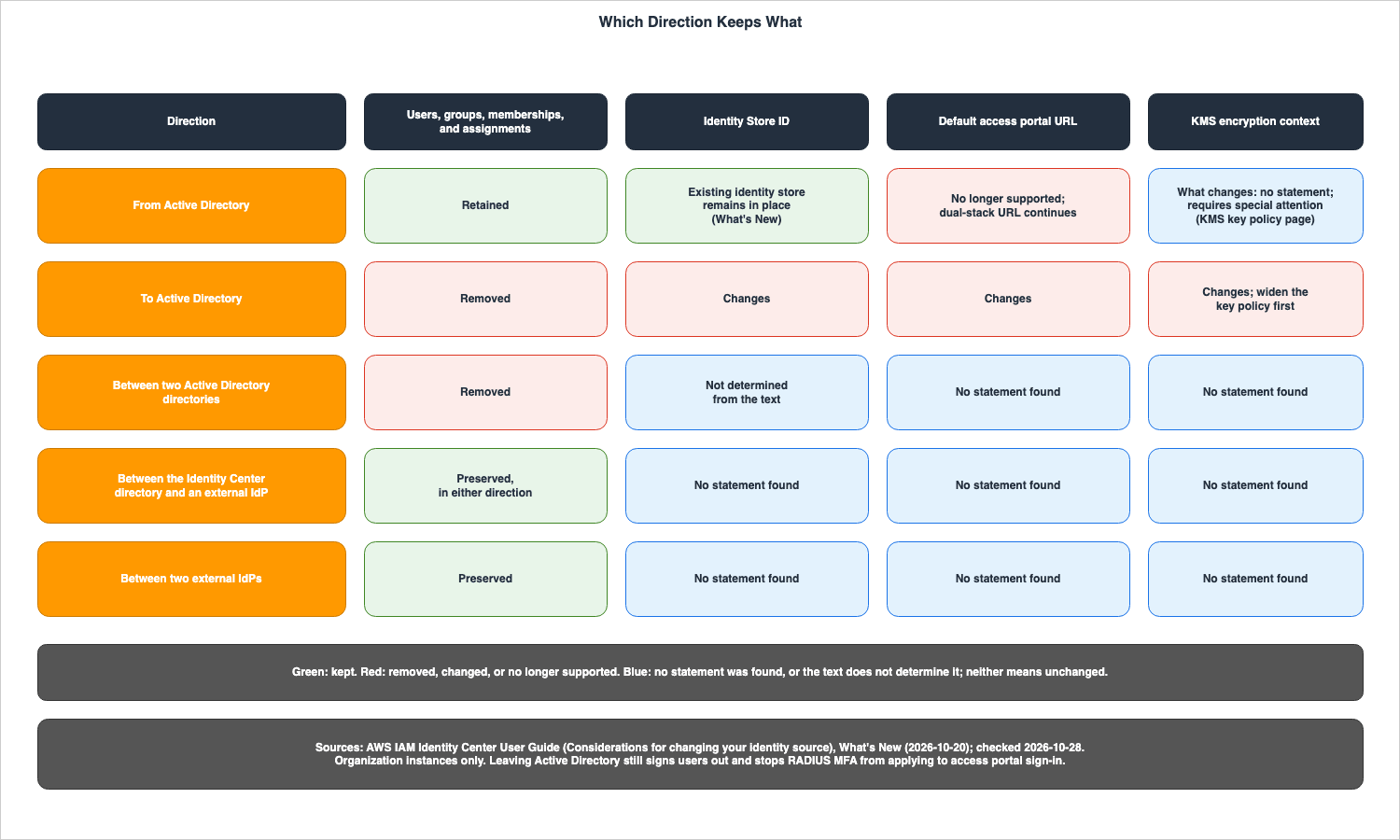
4. Leaving Active Directory
This section outlines what remains and what changes when leaving Active Directory.4.1 What Is Retained
TheFrom Active Directory section of the Considerations page begins with the statement, IAM Identity Center supports changing your identity source from Active Directory to the Identity Center directory or an external IdP, retaining your users, groups, memberships, and their assignments.The What's New post of October 20, 2026, states,
As a result, users retain their access to AWS accounts and applications, and policies that reference your user IDs, group IDs, or identity store ID continue to work. This statement, indicating that policies referencing user IDs, group IDs, or the Identity Store ID will continue to function, is part of the announcement. This exact phrasing was not found on the Considerations page.One element that references the Identity Store ID is the AWS STS condition key
identitystore:IdentityStoreArn. The documentation states, This context key is the ARN of the identity store that is attached to the instance of IAM Identity Center that issued the context assertion. The previously published Identity-Aware Data Access on AWS addresses how these values are utilized in TIP.4.2 Same IDs, a Different externalId
The Security Blog, using the example of migrating from Active Directory to an external IdP, states,IAM Identity Center keeps the same identity store, user IDs, and group IDs, and SCIM updates only the external identifier (externalId) to reflect the new source. The external IdP inherits existing users and groups. The Considerations page states, Also confirm that it matches existing users and groups by a stable identifier (typically user name), so that it takes over users instead of creating duplicates. The same page states that, after the change to an external IdP, you connect the IdP and configure SCIM provisioning, and that For sign-in to work, the attribute that your IdP sends as the Security Assertion Markup Language (SAML) NameID must match the user name in IAM Identity Center.In the steps, the Security Blog writes about the test user:
In the IAM Identity Center console, select Users and confirm that the pilot user still has the same user ID, that no duplicate user was created, and that the user's assignments still work. Whether the migration was successful can be determined by verifying that the user ID has not changed and that no duplicate user has been created.4.3 The Default and Alias Portal URLs Stop Working
The Important note in this section of the Considerations page states the following.After you change your identity source from Active Directory, the default AWS access portal URL changes. The https://d-xxxxxxxxxx.awsapps.com/start URL and any custom alias URL are no longer supported. If you don't update bookmarks, allow-lists, and other references, users and automated systems that use the old URL lose access to the access portal.Only the dual-stack URL continues to be supported. The same page states,
Your dual-stack URL (https://ssoins-<instance-id>.portal.<region>.app.aws) continues to be supported. Additionally, the What's New post of October 20, 2026, notes, After the change, your workforce signs in through your dual-stack AWS access portal URL.According to the What's New post, the Identity Store remains in place, but according to the Considerations page, the default URL is no longer supported. The
d-xxxxxxxxxx portion follows the same format as the Identity Store ID. As one of the prerequisites for using Active Directory as the identity source, the Microsoft AD directory page of the UG states, Also, note that the AWS access portal uses the same access URL as your directory. No statement was found that ties this sentence to the reason that the default URL is no longer supported.4.4 Sign-Out, RADIUS MFA, and Attribute Values
The Considerations page describes the following actions that will occur:- Signed-in users:
Users who are signed in are signed out and must sign in again the next time they access or refresh their session. - MFA: for a change to the Identity Center directory,
IAM Identity Center retains your IAM Identity Center MFA settings and user MFA settings.For a change to an external IdP,your external IdP handles MFA. - RADIUS MFA:
If you use RADIUS MFA through AWS Directory Service, it no longer applies to AWS access portal sign-in after the change.It continues,To require MFA, turn on MFA in IAM Identity Center. Users must register their MFA devices again. - Attribute-based access control:
IAM Identity Center keeps your attributes for access control configuration. Review it after the change, because attribute values from Active Directory no longer update.
For a change to the Identity Center directory, the same page also states that users synced from Active Directory have no password:
Users who are synced from Active Directory don't have an IAM Identity Center password and can't sign in without one. It continues, Turn on Email one-time password so that users created with API or CLI who have no password can choose one at first sign-in.4.5 Sync Stops and the Directory Remains
The Considerations page states:IAM Identity Center stops syncing from Active Directory. Your directory in Directory Service remains intact, but it's no longer connected, and changes that you make in Active Directory after this point don't appear in IAM Identity Center.The note on the same page indicates:
Changing your identity source doesn't delete your AWS Managed Microsoft AD instance. It recommends keeping the directory for a few days after the change, until all access and permissions are validated to work as expected. The Security Blog states, Keep AD online as a fallback. Deleting the AD directory removes the manual rollback option and the AD-based access portal endpoint.4.6 Organization Instances Only
The What's New announcement from October 20, 2026, describes the scope of the change from Active Directory asThis feature is available for organization instances of IAM Identity Center in all AWS Regions where IAM Identity Center is available. The UG's Change page states, regardless of the direction, as a prerequisite of the procedure for changing the identity source: To complete this procedure, you'll need an Organization instance of IAM Identity Center. All five directions described in this article assume an organization instance.4.7 Contract Tables
The following two tables outline the options selected or provided by users, along with the resulting actions, all in the context ofFrom Active Directory.What You Write
| Setting | You Set | Allowed Values | If You Set Nothing | Source of the Default |
|---|---|---|---|---|
| Target identity source | The new identity source on the console's Identity source tab | The Identity Center directory or an external IdP | Nothing changes until the change is confirmed by typing ACCEPT | Change identity source page |
| External IdP readiness | SCIM 2.0 support, matching by a stable identifier, and populated names | User name, given name, family name, and display name for every user | The page gives the purpose as taking over users instead of creating duplicates | Identity source considerations page |
| Access portal URL references | Bookmarks, allow-lists, and other references | The dual-stack URL https://ssoins-<instance-id>.portal.<region>.app.aws | Users and automated systems that use the old URL lose access to the access portal | Identity source considerations page |
| MFA in IAM Identity Center | MFA turned on in IAM Identity Center, to require MFA after RADIUS MFA stops applying | MFA settings in IAM Identity Center | RADIUS MFA no longer applies to access portal sign-in | Identity source considerations page |
| Attributes for access control | A review of the configuration after the change | The existing configuration | The configuration is kept, and values from Active Directory no longer update | Identity source considerations page |
| Passwords after a change to the Identity Center directory | Email one-time password turned on, as the page advises | On or off | Users synced from Active Directory have no IAM Identity Center password and cannot sign in without one | Identity source considerations page |
| AWS Managed Microsoft AD | Keep it for a few days after the change | Keep or delete | The change does not delete it | Identity source considerations page |
The following table lists, in the same row order, what happens at the boundary.
What Happens
| Setting | At the Boundary | Where It Shows | No Statement Found |
|---|---|---|---|
| Target identity source | Only organization instances can make this change | The Identity source tab in the console | The KMS encryption context after the change |
| External IdP readiness | The IdP takes over each existing user and group; the externalId changes | The user ID in the console stays the same, and no duplicate user appears | — |
| Access portal URL references | The custom alias URL also stops working | Sign-in through the old URL fails | Whether the old URL redirects to the dual-stack URL |
| MFA in IAM Identity Center | Users register their MFA devices again; with an external IdP as the target, the IdP handles MFA, and MFA in IAM Identity Center is not supported for external IdPs | The access portal sign-in | — |
| Attributes for access control | Attribute values from Active Directory stop updating | The attribute values used in access control | — |
| Passwords after a change to the Identity Center directory | Applies when the target is the Identity Center directory | Sign-in of a user who has no password | Whether email one-time password also lets users synced from Active Directory choose a password |
| AWS Managed Microsoft AD | The directory remains intact but is no longer connected | Changes made in Active Directory do not appear in IAM Identity Center | — |
5. Moving into Active Directory
This section outlines what will be removed and what will change when moving into Active Directory.5.1 Removal and Rebuild
The Warning in this section of the Considerations page states:Changing your identity source to Active Directory permanently deletes all users, groups, memberships, and assignments in IAM Identity Center. This data loss is irreversible. It continues, Before you proceed, back up your configuration and reapply assignments after the change.The order for rebuilding is given under
Rebuild after the change on the same page. After you change to Active Directory, synchronize your users and groups from Active Directory into IAM Identity Center, and then reapply assignments. The UG's Change page advises that after switching to Active Directory, you can either begin a guided setup or configure the synchronization scope using Manage sync.The same page also describes two characteristics that apply after using Active Directory as your identity source. One concerns assignments when deleting identities.
In Active Directory, when you delete identities (in Active Directory or the synced identities), IAM Identity Center keeps the corresponding assignments. In the Identity Center directory, when you delete identities, IAM Identity Center also deletes their assignments. The other concerns changes made via API. If you use Active Directory as your identity source, use the Create, Update, and Delete APIs with caution. Because Identity Center does not perform outbound synchronization, any changes made to users and groups via the API will not be reflected in Active Directory.5.2 A New Identity Store ID
The Important note on the Considerations page statesChanging your identity source type to Active Directory changes the Identity Store ID. The page lists two potential impacts. First, it mentions the default AWS access portal URL. Your default AWS access portal URL changes. Communicate the new URL to your workforce and update bookmarks, gateway or firewall allow-lists, and configurations that reference this URL. Second, it refers to the KMS encryption context described in Section 5.3.The "Implementing customer managed KMS keys in AWS IAM Identity Center" page describes the Identity Store ID as follows:
Every IAM Identity Center instance has an associated Identity Store that stores the user and group identities. An Identity Store has a unique identifier called Identity Store ID (for example, d-123456789a).No statement was found on what happens in this direction to policies that reference the Identity Store ID. The What's New sentence in Section 4.1, that such policies continue to work, is about the
From Active Directory direction.5.3 The KMS Key Policy and the Encryption Context
The Encryption at rest page of the UG statesIAM Identity Center uses encryption context keys from the following: aws:sso:instance-arn, aws:identitystore:identitystore-arn, and tenant-key-id. The value of aws:identitystore:identitystore-arn is the ARN of the Identity Store, with the Identity Store ID appended to the end.The Important note on the Considerations page states that this value changes in the
To Active Directory direction, as follows.The encryption context for your customer managed AWS KMS key changes. If you use a customer managed AWS KMS key for encryption at rest, with the encryption context configured in the key policy, the encryption context for the Identity Store changes. For example, in the Identity Store Amazon Resource Name (ARN) arn:aws:identitystore::444455556666:identitystore/d-922763e9b3, d-922763e9b3 is the Identity Store ID. To prevent service disruption, temporarily modify your AWS KMS key policy to use a wildcard pattern: arn:aws:identitystore::444455556666:identitystore/*. If you don't update the key policy, encryption and decryption operations fail and service is disrupted.Key policies do not expand automatically. Users must rewrite them in wildcard format before making changes. The Important note says
temporarily, but no statement was found on when to narrow the key policy to the new Identity Store ID. No statement was found, either, on what happens to the encryption context in the From Active Directory direction. The Advanced KMS key policy statements page of the UG states, When changing your identity source to or from Active Directory, the encryption context requires special attention. and refers to the Considerations page. On the Considerations page, the encryption context is described only in the To Active Directory section.5.4 Permission Set Roles and Their Suffix
The Warning at the beginning of the UG's Change page states:Depending on your current deployment, this change removes any user and group assignments that you configured in IAM Identity Center. This change will also remove permission set IAM roles from your AWS accounts. As a result, you may need to update your resource policies, and should ensure this will not disrupt your access to AWS KMS keys and Amazon EKS clusters.This Warning does not distinguish directions (see Section 7.1). The page titled "Referencing permission sets in resource policies, Amazon EKS Cluster config maps, and AWS KMS key policies" states that role names follow the format
AWSReservedSSO_permission-set-name_unique-suffix, and further explains:If you delete all assignments to this permission set in the AWS account, the corresponding role that IAM Identity Center created is also deleted. If you make a new assignment to the same permission set later, IAM Identity Center creates a new role for the permission set. The name and ARN of the new role include a different, unique suffix.In the
To Active Directory direction, assignments are deleted (see Section 3.2). The Considerations page does not say whether the suffix of a role ARN changes when the assignments are reapplied. Combining sentences from two different pages suggests that if resource policies, Amazon EKS cluster configurations, or KMS key policies explicitly reference the role's ARN, it may be necessary to update them after the assignments are reapplied. This is an inference drawn from those two sentences, and is not explicitly stated in the documentation.5.5 Remove Additional Regions First
The Note on the UG's Change page states:If you replicated IAM Identity Center to additional Regions and want to change your identity source to Active Directory, you must remove all additional Regions first. The reason given is: Multi-Region support is not available for instances that use Active Directory as the identity source. The UG's multi-Region page also contains the same statement, adding: Multi-Region support is not available in account instances.The What's New post of October 26, 2026, announced cross-Region trusted identity propagation (TIP). The UG's overview page for TIP states:
Cross-Region trusted identity propagation requires a multi-Region IAM Identity Center instance with a multi-Region customer managed Key Management Service (KMS) key. No statement was found that directly describes what happens to cross-Region TIP on instances that have switched their identity source to Active Directory. Placing the two statements above side by side, it can be read that cross-Region TIP is not available, but this is an inference.5.6 Going Back to Active Directory Removes Everything Again
In theFrom Active Directory section, the Considerations page states, If you later change your identity source to Active Directory, IAM Identity Center permanently removes all users, groups, memberships, and assignments. Going back to Active Directory after leaving it is the To Active Directory direction. The last phase of the procedure in the Security Blog also notes that the same thing happens when you revert manually. Step 7.4 of that phase states, after reverting, Confirm users can authenticate using the original AD-based AWS access portal URL. The Considerations page states that changing to Active Directory changes the Identity Store ID and the default URL. No statement was found on whether changing back to the same directory restores the original Identity Store ID and URL.5.7 Contract Tables
The following two tables outline the options users can select or specify in theTo Active Directory direction, and describe the resulting actions.What You Write
| Setting | You Set | Allowed Values | If You Set Nothing | Source of the Default |
|---|---|---|---|---|
| Target directory | The Active Directory directory chosen on the console | An available directory | Nothing changes until the change is confirmed by typing ACCEPT | Change identity source page |
| Backup of the configuration | An export of users, groups, memberships, and assignments before the change | Any format the user chooses | The deletion is irreversible, and nothing remains to restore from | Identity source considerations page |
| KMS key policy | The Identity Store ARN in the encryption context, widened temporarily | arn:aws:identitystore::444455556666:identitystore/* in the example on the page | Encryption and decryption operations fail, and service is disrupted | Identity source considerations page |
| Access portal URL references | Bookmarks, gateway or firewall allow-lists, and configurations | The new default URL | Users and automated systems that use the old URL lose access to the access portal | Identity source considerations page |
| Additional Regions | Removal of every additional Region before the change | No additional Regions | No statement found | Change identity source page |
| Sync scope and assignments | Guided setup or Manage sync, then the assignments again | Users and groups in the directory | No users, groups, or assignments are in IAM Identity Center | Identity source considerations page |
The following table lists, in the same row order, what happens at the boundary.
What Happens
| Setting | At the Boundary | Where It Shows | No Statement Found |
|---|---|---|---|
| Target directory | The same removal applies between two Active Directory directories | The Identity source tab in the console | Whether the Identity Store ID changes between two Active Directory directories |
| Backup of the configuration | The change does not affect users and groups in the external IdP or Active Directory | Users, groups, and assignments in IAM Identity Center | — |
| KMS key policy | The Identity Store ID is the last part of the Identity Store ARN in the encryption context | Failed encryption and decryption operations | The error that the user sees, and when to narrow the key policy again |
| Access portal URL references | The Identity Store ID changes, and the default URL changes with it | Sign-in through the old URL fails | — |
| Additional Regions | Multi-Region support is not available for instances that use Active Directory | The Regions listed for the instance | What happens if additional Regions are still present |
| Sync scope and assignments | The Warning on the Change page states that the change removes permission set IAM roles, without naming a direction | Role ARNs named in resource policies, Amazon EKS cluster configurations, and KMS key policies | A statement on the considerations page that ties role removal to this direction |
6. Between the Identity Center Directory and External IdPs
This section outlines two directions: one between the Identity Center directory and an external IdP, and another between two external IdPs.6.1 Preserved Before October 20, 2026 as Well
The What's New post of October 20, 2026, only described changes related to departures from Active Directory, and did not address modifications between the Identity Center directory and external IdPs. The Security Blog, republished on the same date, stated:Now, migrations away from Active Directory preserve your users, groups, memberships, and assignments, just as transitions between an external IdP and the Identity Center directory already do.The phrase
already do suggests that changes between the Identity Center directory and external IdPs were already preserving assignments prior to October 20, 2026. No statement was found in the UG or in What's New that gives a date for when this began. However, copies of the Considerations page on the Internet Archive contain the same statements for this pair. The copy of October 5, 2022, states If you change your identity source from IAM Identity Center to an external IdP, IAM Identity Center preserves all your assignments. The copy of November 27, 2020, when the service was named AWS SSO, also states If you switch to an external IdP, AWS SSO preserves all entitlements you had. This article does not describe the preservation for this pair as a new feature of October 20, 2026, and gives this one sentence of the Security Blog and the earlier copies of the UG as the sources.6.2 Active Sessions Last Until the Maximum Session Duration
For a change from the Identity Center directory to an external IdP, the Considerations page writesAssignments and memberships work with correct assertions: assignments and memberships will continue to function as long as the new IdP provides correct assertions (e.g., SAML NameID). These assertions must match the usernames and groups within Identity Center.Regarding sessions, as described in Section 3.4, active sessions will continue until the maximum session time, as configured in the console, has elapsed. The same page also explains that to end a session, you can view and terminate the active sessions of a workforce user. Furthermore, it states
If users are deleted or disabled in the IAM Identity Center console using Identity Store APIs, users with active sessions can continue to access integrated applications and accounts. It is noted that after a user is deleted, their session cannot be revoked through the console.In the
From Active Directory direction, signed-in users are signed out (as described in Section 4.4). Session handling differs by direction.6.3 Passwords, MFA, and SCIM Matching
When changing from an external IdP to the Identity Center directory, the Considerations page states,IAM Identity Center preserves all your assignments. Regarding passwords, it notes that users who previously had passwords in Identity Center will continue to be able to sign in using their existing passwords. For users who were in the external IdP and not in Identity Center, an administrator must force a password reset.Concerning MFA, the UG's Configure MFA in IAM Identity Center page states,
MFA in IAM Identity Center is currently not supported for external identity providers. While an external IdP is the identity source, MFA is handled on the external IdP side.Regarding transitions between two external IdPs, the Considerations page states,
IAM Identity Center preserves all of your assignments. with the condition that the new IdP must send correct assertions. If you are synchronizing via SCIM, it advises verifying that the new IdP correctly maps users and groups, using IdP-specific information.7. Where the Sources Disagree
This section will list instances where the same subject matter is presented with conflicting statements across different sources. This article will not definitively identify any one source as being incorrect. Instead, it will list the sources and their dates, and indicate which statements this article uses as its basis.7.1 The Warning on the Change Page
The Change your identity source page includes a warning at the top that reads:Depending on your current deployment, this change removes any user and group assignments that you configured in IAM Identity Center. It continues, When this occurs, all users and groups, including the administrative user in IAM Identity Center, will lose single sign-on access to their AWS accounts and applications. This warning is presented without any directional qualifiers. The condition Depending on your current deployment applies.In the same page's instructions, the Important note is presented with directional qualifiers.
Changing your identity source to Active Directory deletes users and groups from the Identity Center directory. This change also removes any assignments that you configured in IAM Identity Center. Changing your identity source from Active Directory to the Identity Center directory or an external identity provider (IdP) retains your users, groups, memberships, and assignments.The page contains both statements without directional qualifiers and statements with directional qualifiers. There is no note indicating that the initial warning has been updated to reflect the change on October 20, 2026. This article writes the result for each direction from the three sentences on the Considerations page and the Important note, and does not use the Warning at the top as the basis for the result in each direction.
7.2 The Confirm Page
The UG's Confirm your identity sources in IAM Identity Center page states:If you are already managing users and groups in one identity source in IAM Identity Center, changing to a different identity source might remove all user and group assignments that you configured in IAM Identity Center. This sentence also does not distinguish directions, and uses might. This article does not use this sentence as the basis for the result in each direction, either.7.3 Document History Has No Row for October 19 or October 20, 2026
The latest entry in the Document history table for UG is September 30, 2026, which notes theMulti-Region support extended to additional Regions. There are no entries for October 19, 2026 (regarding optimistic locking) or October 20, 2026 (regarding the identity source change) in the table. The Document history does not include information about the identity source change. It is not possible to determine from the UG itself when the text on the Considerations page was last updated.7.4 Blog Posts from 2024 and 2018
The AWS Migration & Modernization Blog post, "How to switch between Active Directory and External IdP (or vice versa) in AWS IAM Identity Center with Automation" (October 30, 2024), states,Keep in mind that changing your identity source to or from AD deletes users and groups from the IAM Identity Center directory. This change also removes any assignments that you configured in IAM Identity Center. This blog post has no update note for the change of October 20, 2026.The AWS Desktop and Application Streaming Blog post, "Enable federation with AWS Single Sign-On and Amazon AppStream 2.0" (originally published November 20, 2018, and updated September 18, 2024), states,
When switching between Active Directory and other sources, you can switch directories within IAM Identity Center at any time. However, doing so removes all existing permissions to AWS accounts and applications that you previously granted to users and groups in IAM Identity Center.The What's New post of October 20, 2026, states, about the direction from Active Directory,
Previously, this change required you to recreate them in IAM Identity Center. The two blog posts are dated before October 20, 2026. This article does not characterize the two blog posts as incorrect. It simply lists the dates and details of the change implemented on October 20, 2026. Regarding the To Active Directory direction, the text in the two blog posts describes the same result as the Considerations page checked on October 28, 2026.7.5 How This Article Writes Each One
The following figure illustrates two different approaches in the same UG.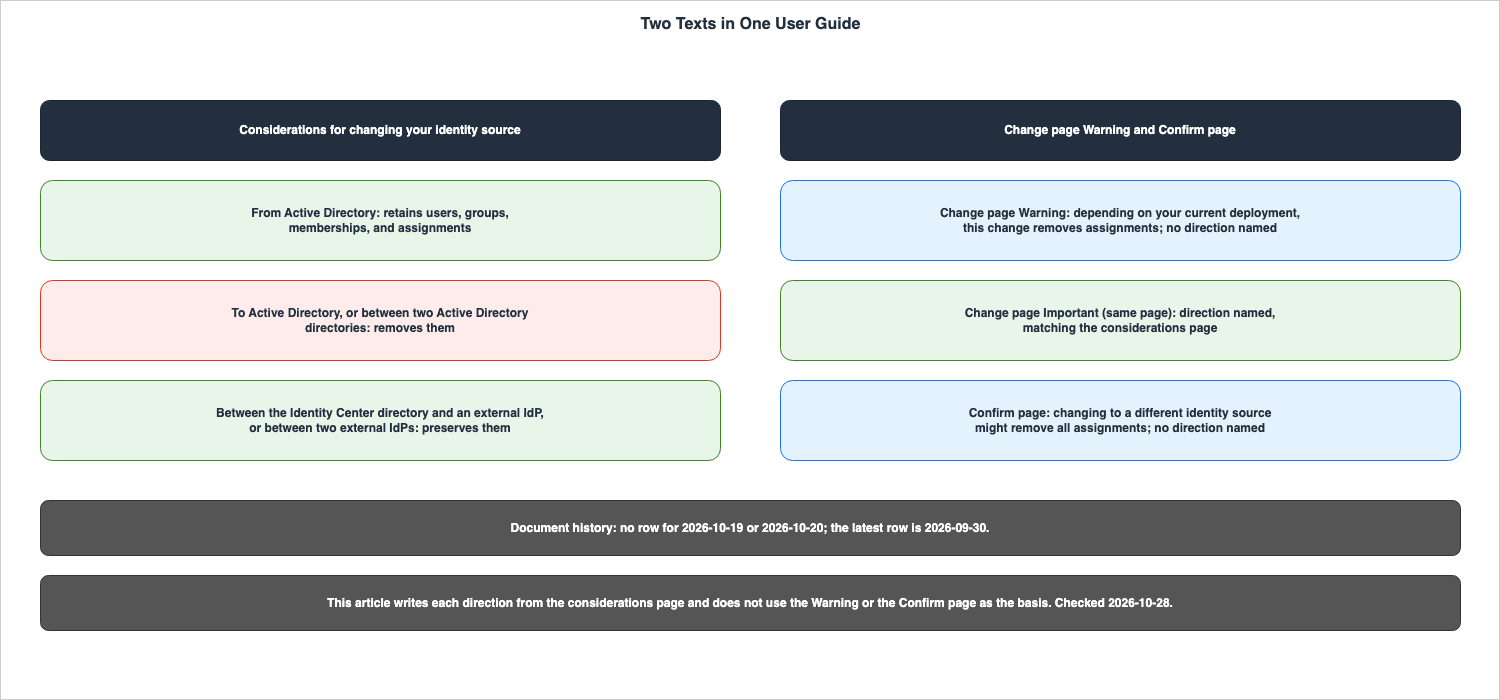
| Setting | One source | Another source | How this article writes it |
|---|---|---|---|
| Result of a change, by direction | Identity source considerations page: retains, removes, and preserves by direction | Change identity source page, Warning: removes assignments Depending on your current deployment, with no direction | By direction, from the considerations page; the Warning is not used as the basis |
| Result of a change, by direction | Identity source considerations page | Confirm identity source page: might remove all user and group assignments, with no direction | By direction, from the considerations page |
| Leaving Active Directory | What's New (2026-10-20): users and assignments are retained | Migration & Modernization Blog (2024-10-30): changing to or from AD deletes users and groups | Dates side by side; the 2024 text describes the behavior before 2026-10-20 |
| Leaving Active Directory | What's New (2026-10-20) | Desktop and Application Streaming Blog (2018-11-20, updated 2024-09-18): switching removes all existing permissions | Dates side by side |
| Changes on 2026-10-19 and 2026-10-20 | What's New (2026-10-19, 2026-10-20) | Document history: latest row is 2026-09-30 | The documentation does not list the changes |
Description of Reason in ConflictException | UpdateUser (API Reference): two values, with a description of each | botocore service model, checked on 2026-10-28: the same two values; the description mentions access to a customer managed KMS key | The two values from the API Reference; neither description says which value a mismatched Revision returns |
A note on the last row. The
identitystore service model in botocore defines two values for the Reason field in the ConflictException: UNIQUENESS_CONSTRAINT_VIOLATION and CONCURRENT_MODIFICATION. These values are consistent with those in the API Reference. However, the description for the Reason field in the same model differs from the description in the API Reference, stating: Indicates the reason for a conflict error when the service is unable to access a Customer Managed KMS key. For non-KMS permission errors, this field is not included. This article will use the values as described in the API Reference.8. Optimistic Locking with Revision
This section outlines how theRevision attribute, applied to users and groups within Identity Store on October 19, 2026, is used and what it protects along various paths.8.1 Where a Revision Comes From
The What's New post of October 19, 2026, states thatRevision now functions as follows: Each user and group now has a Revision value that changes every time the user's or group's attributes are modified, including through SCIM provisioning, Active Directory sync, or the IAM Identity Center console. It continues, Create, describe, update, and list operations return the current Revision, and you can pass it on a later UpdateUser, UpdateGroup, DeleteUser, or DeleteGroup request.The Identity Store API Reference indicates that the responses from
CreateUser, CreateGroup, UpdateUser, and UpdateGroup, as well as the responses from DescribeUser and DescribeGroup, and the User and Group objects returned by ListUsers and ListGroups, all include a Revision value. The description for the User's Revision is as follows:The current revision of the user in the identity store. This value changes each time the user is modified. You can provide it as the Revision parameter of an UpdateUser or DeleteUser request to make the operation conditional on the user not having changed.8.2 Passing It and Omitting It
TheRevision field in the UpdateUser request is optional, and the API Reference indicates Required: No. The API Reference describes it as follows:The expected current revision of the user. When you provide this value, the update is applied only if it matches the current revision of the user in the identity store, which prevents you from overwriting concurrent changes. If the value doesn't match, the operation fails with a ConflictException. If you don't provide this value, the update is applied unconditionally.Similarly, the
Revision field in the DeleteUser request is also optional. When not provided, the description reads: If you don't provide this value, the user is deleted regardless of its current revision. UpdateGroup and DeleteGroup function in the same way, with user simply replaced by group.The What's New post of October 19, 2026, states regarding the case when it is not provided:
Providing a Revision is optional. Requests that omit it behave as before, so existing integrations continue to work without changes. Existing integrations will continue to function with unconditional updates and deletions as long as the Revision field is not provided. Optimistic locking is only applied when the user provides a Revision value.8.3 ConflictException and Its Two Reasons
The API Reference documentation forUpdateUser describes ConflictException as This request cannot be completed for one of the following reasons: It then lists two potential causes: a violation of uniqueness constraints, and simultaneous modification of the resource by another request. The Reason field can take one of two values:UNIQUENESS_CONSTRAINT_VIOLATION indicates that the request would violate an existing uniqueness constraint, such as a user name or other unique attribute that is already in use. CONCURRENT_MODIFICATION indicates that the resource was modified by another request during this operation.The HTTP status code is 400. No statement was found in either the API Reference or the What's New post that explains which of these two
Reason values is returned when the Revision does not match, or whether a Reason is included at all. The description for CONCURRENT_MODIFICATION specifies that it refers to instances where another request modified the resource during this operation; it does not explicitly state that it applies when the provided Revision is outdated. In the configuration used in Section 9, a CONCURRENT_MODIFICATION was returned for an outdated Revision (see Section 9.3).The What's New post of October 19, 2026, describes how to handle a
ConflictException with the phrase so your workflow can re-read the user or group and retry with the latest values.8.4 An Opaque Token
The API Reference describes theRevision of User and Group as Treat this value as an opaque token: don't parse it or rely on its format or ordering. The type on the same page is a string, with a pattern of [0-9]+ and a length between 1 and 64 characters. The UpdateUser example uses a sequence of numbers, such as 1699564800000. It is important to understand that even though it is a sequence of numbers, you should not compare its size or make any assumptions about its structure. Section 9 of this article does not give the actual values of Revision.8.5 SCIM, Group Membership, Active Directory Sync, and the Console
The following table 8-1 outlines howRevision is handled for each path. In the Source column, What's New (2026-10-19) marks values that only the announcement states.| Path | Revision accepted on the request | Does the path change the Revision | Source |
|---|---|---|---|
Identity Store API CreateUser, CreateGroup | Not applicable; the response returns the new Revision | Not applicable | CreateUser (API Reference) |
Identity Store API DescribeUser, DescribeGroup, ListUsers, ListGroups | Not applicable; the response returns the current Revision | Not applicable | DescribeUser (API Reference) |
Identity Store API UpdateUser, UpdateGroup | Optional | Yes; the response returns the revision after the update | UpdateUser (API Reference) |
Identity Store API DeleteUser, DeleteGroup | Optional | Not applicable | DeleteUser (API Reference) |
Identity Store API CreateGroupMembership, DeleteGroupMembership | Not accepted | Adding or removing members does not change the user's or the group's Revision | What's New (2026-10-19); the API Reference has no Revision in the request syntax |
| SCIM endpoint | Conditional requests are not supported | Yes | What's New (2026-10-19); the SCIM guide's ServiceProviderConfig example shows etag as not supported |
| Active Directory sync | Not applicable | Yes | What's New (2026-10-19) |
| IAM Identity Center console | No statement found | Yes | What's New (2026-10-19) |
| Identity source change | Not applicable | No statement found | No statement found |
Regarding the SCIM endpoint, the What's New post of October 19, 2026, states
Conditional requests are supported through the Identity Store API, not the SCIM endpoint. No sentence on conditional requests was found in the SCIM implementation guide. However, the example response on the guide's ServiceProviderConfig page shows "etag": { "supported": false }. This is a value in an example response, not a sentence about conditional requests. The words If-Match and Revision, and status code 412, were not found in the guide's pages. The meta section of the GetUser response includes resourceType, created, and lastModified.Regarding group membership, the same announcement states
Group membership operations don't accept a Revision, and adding or removing members doesn't change the Revision of the user or the group. Neither the CreateGroupMembership nor DeleteGroupMembership requests in the API Reference include a Revision parameter, nor does it appear in the input in the botocore service model. The statement that adding or removing members does not modify the Revision of either the user or the group was not found in the API Reference.The statement that SCIM synchronization, Active Directory synchronization, and changes made through the console also modify the
Revision is the announcement sentence in Section 8.1. Combining the two sentences from the announcement reveals the following two points, both of which are inferences rather than statements found directly in the documentation. First, if the SCIM synchronization modifies a user while a management script is attempting to update it with an older Revision, a ConflictException will stop the script's update. Second, because SCIM cannot utilize conditional requests, it is impossible to prevent SCIM synchronization from overwriting changes made by the management script using Revision.The following diagram lists the paths from Table 8-1, differentiating those that allow
Revision to be used as a condition and those that do not.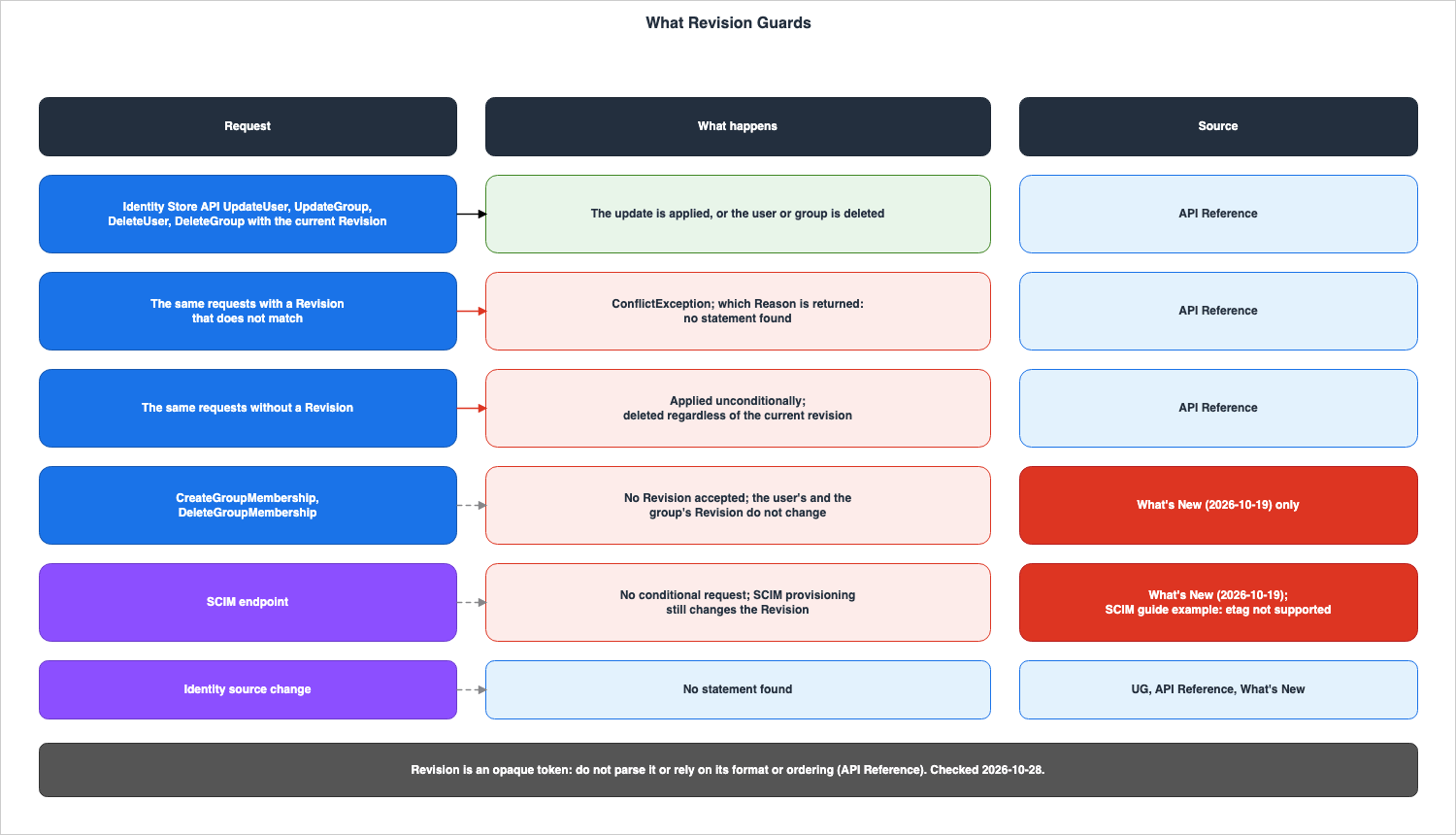
If your organization does not require direct API access, be aware that using mutating Identity Store APIs on a SCIM-provisioned directory can cause the directory in IAM Identity Center to drift from your external IdP.8.6 Revision When the Identity Source Changes
No statement was found in the UG, the API Reference, or What's New on whether theRevision values of the remaining users and groups change when the identity source changes. The instructions in the Security Blog state that after the change, an external IdP takes over existing users and groups via SCIM and updates the externalId. When considered alongside the information in Section 8.1, which states that SCIM synchronization changes the Revision value, it can be read that, in the From Active Directory direction, the Revision value changes during the takeover. This is an inference. The documentation does not provide sufficient information to determine whether the Revision value read before the change can be used after the change.8.7 Contract Tables
The following two tables outline what the user will write regardingRevision and the events that will occur as a result.What You Write
| Setting | You Set | Allowed Values | If You Set Nothing | Source of the Default |
|---|---|---|---|---|
Revision on UpdateUser, UpdateGroup | The current revision read from a create, describe, list, or update response | A string; pattern [0-9]+; length 1 to 64 | The update is applied unconditionally | UpdateUser (API Reference) |
Revision on DeleteUser, DeleteGroup | The current revision | A string; pattern [0-9]+; length 1 to 64 | The user or group is deleted regardless of its current revision | DeleteUser (API Reference) |
Revision on CreateGroupMembership, DeleteGroupMembership | Nothing; the request has no such parameter | — | Not applicable | What's New (2026-10-19); the API Reference has no Revision in the request syntax |
| Conditional request on the SCIM endpoint | Nothing; not supported | — | SCIM requests are not conditional | What's New (2026-10-19) |
| Retry after a conflict | A re-read of the user or group, then the request again with the latest values | — | The workflow stops at the ConflictException | What's New (2026-10-19) |
The following table lists, in the same row order, what happens at the boundary.
What Happens
| Setting | At the Boundary | Where It Shows | No Statement Found |
|---|---|---|---|
Revision on UpdateUser, UpdateGroup | A revision that does not match fails with ConflictException | The exception and its Reason field (HTTP 400) | Which Reason a mismatched Revision returns |
Revision on DeleteUser, DeleteGroup | A revision that does not match fails with ConflictException | The exception and its Reason field (HTTP 400) | Which Reason a mismatched Revision returns |
Revision on CreateGroupMembership, DeleteGroupMembership | Adding or removing members does not change the user's or the group's Revision (What's New) | The Revision returned by DescribeUser and DescribeGroup | The same statement in the API Reference |
| Conditional request on the SCIM endpoint | SCIM provisioning still changes the Revision (What's New) | A different Revision returned by DescribeUser after SCIM provisioning changes the user | A sentence on conditional requests, or If-Match, in the SCIM implementation guide |
| Retry after a conflict | The Revision is an opaque token; do not compare values | The new Revision in the response | — |
9. What This Configuration Returned
This section documents the responses received from the Identity Store API for the requests sent as part of this article. The values presented here reflect the configuration and the data recorded on that particular day, and are not guaranteed values provided by the documentation.9.1 Configuration
The requests were sent from 22:33:02 to 22:33:03 (UTC) on October 27, 2026. The destination was the Identity Store of an existing Identity Center organization instance, using credentials for the organization's management account. The Region was the home Region of that instance, which is notus-east-1. The identity source was the Identity Center directory. The AWS SDK for Python (Boto3) version 1.43.120 was used.A single test user and a single test group were created, along with a single group membership, all of which were deleted in the same execution. No assignments were made to the test user or the group. Changing the identity source, Active Directory, the SCIM endpoint, and changes through the console were not tested.
The following calls were made:
CreateUser, CreateGroup, CreateGroupMembership, DeleteGroupMembership, and DeleteGroup were each called once. UpdateUser was called six times, UpdateGroup was called twice, and DeleteUser was called twice. The DescribeUser, DescribeGroup, and ListUsers calls were used to read the Revision values. Of the six calls to UpdateUser, two used the same Revision value and were sent from two different threads, almost simultaneously. The data was collected from the responses, exceptions, and CloudTrail Event history. Event history was read using LookupEvents. This article does not give the actual Revision values. Instead, it only indicates whether the values changed for each user and group.9.2 Revision on Create, Read, and Update
In this configuration, the responses fromCreateUser and CreateGroup included a Revision value. The subsequent DescribeUser, ListUsers, and DescribeGroup calls returned a Revision value that matched the value in the creation responses. When UpdateUser and UpdateGroup were successful, the responses contained a new Revision value, and subsequent DescribeUser and DescribeGroup calls returned that value. The value was a string consisting solely of numbers. The API Reference asks readers not to rely on the format or ordering of this value (see Section 8.4).9.3 Matching, Stale, and Omitted Revisions
The following table 9-1 lists the results returned in this configuration, categorized by how theRevision is passed.| Request | Revision sent | Result in this configuration | Reason | Message |
|---|---|---|---|---|
UpdateUser | Current | Applied; a new Revision returned | — | — |
UpdateUser | Stale (read before the most recent update) | ConflictException; the attribute and the Revision stayed unchanged | CONCURRENT_MODIFICATION | User updated by another request |
UpdateUser | Omitted | Applied; a new Revision returned | — | — |
UpdateUser | Stale (read before an update that omitted Revision) | ConflictException | CONCURRENT_MODIFICATION | User updated by another request |
UpdateGroup | Current | Applied; a new Revision returned | — | — |
UpdateGroup | Stale | ConflictException | CONCURRENT_MODIFICATION | Group updated by another request |
UpdateUser, two requests at nearly the same time | The same current value in both | One applied; the other ConflictException | CONCURRENT_MODIFICATION | User updated by another request |
DeleteUser | Stale | ConflictException | CONCURRENT_MODIFICATION | User updated by another request |
DeleteUser | Current | Deleted | — | — |
DeleteGroup | Omitted | Deleted | — | — |
In this configuration, the four update and delete operations that used an older
Revision all resulted in ConflictException errors, with the Reason consistently being CONCURRENT_MODIFICATION. Even when two updates were sent simultaneously with the same Revision, the failing side reported the same Reason. As noted in Section 8.3, no documentation was found that specifies which Reason is returned when a Revision mismatch occurs. This table presents the values observed in this configuration, and does not represent values guaranteed by the documentation.Following update failures due to an older
Revision, the Revision and attributes returned by DescribeUser were the same as those before the failure. Updates without a specified Revision were applied regardless of the value at that point in time. This matches applied unconditionally in the API Reference sentence quoted in Section 8.2.9.4 Adding and Removing a Member
In this configuration, neither the user nor the group had itsRevision value changed before or after the CreateGroupMembership and DeleteGroupMembership operations. The CreateGroupMembership response did not include a Revision value. This aligns with the What's New sentence in Section 8.5, which indicates that adding and removing members does not change the Revision values of users or groups. It remains the case that this same statement cannot be found in the API Reference.9.5 What CloudTrail Event History Recorded
In this configuration, CloudTrail Event history contained 15 records fromidentitystore.amazonaws.com, corresponding to the number of modification calls. All records had an eventCategory of Management and a readOnly status of false. The five failures resulting in a ConflictException each had an errorCode of ConflictException and an errorMessage that matched the message from the exception.Whether the
requestParameters included a revision value varied depending on the operation. In this configuration, two records for DeleteUser included a revision value. However, neither the UpdateUser nor the UpdateGroup records included a revision value, even when the calls included a Revision parameter. The responseElements for the successful CreateUser, CreateGroup, UpdateUser, and UpdateGroup records all included a revision value. This article does not investigate what the Identity Store documentation states regarding the fields in CloudTrail logs.9.6 Things That Cannot Be Determined Based on This Configuration
The following points cannot be determined based on this configuration and the records collected:- Whether a
Revisionmismatch returnsCONCURRENT_MODIFICATIONin other Regions, account instances, or on later dates. This article writes the statement in Section 8.3 (whichReasonis not stated) as the statement of the documentation, and does not extend the records of Section 9. - Whether SCIM synchronization, Active Directory synchronization, or changes made through the console will affect the
Revisionvalue. This configuration has not been tested for these scenarios. - What happens to the
Revisionvalue when the identity source is changed. This configuration does not involve changing the identity source. - Whether the absence of
revisionvalues in the CloudTrail logs forUpdateUserandUpdateGroupis consistent across other configurations and on future dates. - The format and pattern of growth for the
Revisionvalue. The API Reference asks readers not to rely on the format or ordering of this value.
10. Before Changing the Identity Source
This section lists, for each direction, the things to verify before making changes, based on the available documentation. This is not a step-by-step procedure; refer to the UG's Change page and the Security Blog for those instructions.10.1 References to the Access Portal URL
In theFrom Active Directory and To Active Directory directions, identify resources that reference the default access portal URL. The Considerations page lists bookmarks, allow lists (including those from gateways and firewalls), and configurations that reference URLs. In the From Active Directory direction, the custom alias URL also stops working, and the dual-stack URL continues to be supported (Section 4.3). The Security Blog notes that, for the From Active Directory direction, proxy servers and bookmarks that rely on redirects should also be updated. No statement was found on what happens to the URL in changes between the Identity Center directory and external IdPs (see Section 3.5).10.2 Key Policies That Name the Identity Store
In theTo Active Directory direction, if Identity Center is using a customer managed KMS key, check whether the Identity Store ARN is written in the encryption context of the key policy. If it is, temporarily expand the key policy to use a wildcard format before making any changes (see Section 5.3).10.3 Policies That Reference Permission Set Roles or Identity Store Values
In theTo Active Directory direction, assignments are removed. Check whether resource policies, Amazon EKS cluster configurations, and KMS key policies explicitly name roles that begin with AWSReservedSSO_ (see Section 5.4; whether the suffix changes when assignments are reapplied is an inference). Also, search for policies that reference Identity Store IDs, user IDs, and group IDs, as well as policies that utilize the AWS STS condition keys identitystore:IdentityStoreArn and identitystore:UserId. In the From Active Directory direction, the What's New post states that policies that reference these IDs continue to work. No statement was found on what happens to these policies in the To Active Directory direction.10.4 MFA Registration, Additional Regions, and the Maintenance Window
If you used RADIUS MFA in theFrom Active Directory direction and the target is the Identity Center directory, turn on MFA in Identity Center to require MFA, and users register their MFA devices again. If migrating to an external IdP, the external IdP manages MFA (see Sections 4.4 and 6.3). If you have additional Regions in the To Active Directory direction, remove them first (see Section 5.5).The Considerations page lists the following steps to perform before migrating from Active Directory: backing up configurations, verifying settings in a test environment that mirrors production, preparing the destination, and scheduling a maintenance window with notice to users:
Schedule a maintenance window and notify users that the change might interrupt access portal sign-in. Regarding destination preparation, the same page asks readers to confirm SCIM 2.0 support and matching by a stable identifier for an external IdP, and to confirm that every user has a user name, given name, family name, and display name. Even in a direction that retains assignments, sign-in can be interrupted. The Security Blog states that the identity source change applies to the entire Identity Center instance at once.When transitioning between the Identity Center directory and an external IdP, active sessions will continue until their maximum duration expires (see Section 6.2). If you need to terminate them sooner, end the sessions.
11. Failure Modes
This section outlines the types of errors that occur when the direction andRevision are confused, and identifies where these errors manifest.| Symptom | Cause | Where it shows | Section |
|---|---|---|---|
| A cutover from Active Directory is planned as a full rebuild | Reading the Warning on the Change page as the result for every direction | The migration plan | 3.1, 7.1 |
| Users cannot reach the access portal after leaving Active Directory | Reading the retained users and Identity Store ID as a sign that the default URL also stays | Sign-in through the old URL or the custom alias URL fails | 4.3 |
| RADIUS MFA no longer applies at access portal sign-in | Reading "retained" as including RADIUS MFA | The access portal sign-in | 4.4 |
| Encryption and decryption fail after moving to Active Directory with a customer managed KMS key | Reading the KMS key policy as following the new Identity Store ID automatically | Failed operations in IAM Identity Center | 5.3 |
| A resource policy no longer matches a permission set role | Reading the reapplied assignments as recreating the same role ARN | Access denied on the resource; Section 5.4 marks this as an inference | 5.4 |
| Additional Regions have to be removed inside the maintenance window | Reading multi-Region support as available for every identity source | The Note on the Change page, and the Regions listed for the instance | 5.5 |
| An old session keeps access after a change from the Identity Center directory to an external IdP | Reading "signed out" from the Active Directory section as applying to every direction | Access through the active session | 3.4, 6.2 |
| SCIM provisioning overwrites a change made by an admin script | Reading Revision as protecting against SCIM provisioning | The user's attributes | 8.5 |
| A rollback to Active Directory removes users, groups, memberships, and assignments again | Reading a rollback to Active Directory as restoring the earlier state | Users, groups, and assignments in IAM Identity Center | 5.6 |
| A retry loop compares two revisions to decide which is newer | Reading Revision as an ordered number | The retry logic | 8.4 |
12. Frequently Asked Questions about Changing the Identity Source in IAM Identity Center
This section answers common questions, referencing the sections within this article.Q1. Does changing the identity source delete all users and assignments?
The answer depends on the direction of the change. When moving into Active Directory, or changing between two Active Directory directories, users, groups, memberships, and assignments will be deleted. When moving out of Active Directory, changing between the Identity Center directory and an external IdP, or changing between two external IdPs, these will remain (see Sections 3.1 and 3.2).Q2. Does nothing change when leaving Active Directory?
Some changes will occur. Thehttps://d-xxxxxxxxxx.awsapps.com/start URL and any custom alias URL will no longer be supported, users who are signed in will be signed out, RADIUS MFA will stop applying to access portal sign-in, Active Directory attribute values will no longer be updated, and synchronization will cease (Sections 4.3 to 4.5).Q3. Have assignments been preserved between the Identity Center directory and an external IdP only since October 20, 2026?
No. The Security Blog describes changes from Active Directory as preserving assignments just as changes between an external IdP and the Identity Center directoryalready do. Copies of the UG on the Internet Archive also contain the same statements for this pair as of October 5, 2022 (and, under the AWS SSO name, November 27, 2020). No text was found that gives the date when this began (Section 6.1).Q4. Does the Identity Store ID change?
It varies depending on the direction. It changes when entering Active Directory. When leaving Active Directory, the What's New post states that the existing Identity Store remains in place. No statement was found regarding changes between the Identity Center directory and an external IdP, nor any changes between two external IdPs. Whether it changes when transitioning between two Active Directory directories cannot be determined from the documentation (Section 3.3).Q5. Does the KMS key policy follow the new Identity Store ID automatically?
No, it does not. In theTo Active Directory direction, if the key policy specifies an encryption context, users must temporarily broaden the key policy to use a wildcard format before any changes are made. If they do not, encryption and decryption will fail (see Section 5.3).Q6. Does using Revision prevent conflicts with SCIM provisioning?
Read from the What's New post of October 19, 2026, changes that SCIM provisioning makes cannot be prevented withRevision. According to that post, SCIM endpoints do not support conditional requests, and SCIM synchronization also modifies the Revision value. You can specify Revision as a condition only when updating or deleting data through the Identity Store API. In that case, if SCIM synchronization changed the user first, the script's update can be read to stop with a ConflictException. Both points are the inferences written in Section 8.5 (see Sections 8.2 and 8.5).Q7. Which Reason is returned when a Revision does not match?
The documentation does not specify. TheConflictException's Reason can take two values: UNIQUENESS_CONSTRAINT_VIOLATION and CONCURRENT_MODIFICATION. However, no text was found that states which of these is returned when there is a revision mismatch. In the configuration used in Section 9, updates and deletions with an older revision returned a CONCURRENT_MODIFICATION error. This is the value returned in that specific configuration, and is not a value guaranteed by the documentation (see Sections 8.3 and 9.3).13. Summary
The outcome of changes to the identity source depends on the direction of the change.- The Considerations page of the UG specifies that changes originating from Active Directory are designated as
retains, changes entering Active Directory are designated asremoves, changes between two Active Directory directories are also designated asremoves, and changes between the Identity Center directory and an external IdP, or between two external IdPs, are designated aspreserves. This asymmetry applies only to changes involving Active Directory. - Changes originating from Active Directory will disable the default access portal URL and any custom alias URL. Users who are signed in will be signed out, and RADIUS MFA will no longer apply to access portal sign-in.
- Changes entering Active Directory will result in a change to the Identity Store ID, as well as changes to the default URL and the KMS encryption context. If a customer managed KMS key with an encryption context in its key policy is used, users temporarily broaden the key policy before the change.
- Changes between the Identity Center directory and an external IdP will leave assignments intact, and active sessions will continue for the remaining duration of the maximum session time.
- The Warning at the top of the UG's Change page and the Confirm page contain conditional statements that do not distinguish between directions. The Document history does not include entries for October 19 and October 20, 2026.
Revisionis an optional value that can be passed with Identity Store API updates and deletions; if not provided, the operation will proceed unconditionally. ARevisionthat does not match results in aConflictException, although no documentation was found specifying the exactReason. Using the configuration from Section 9,CONCURRENT_MODIFICATIONwas returned, and adding or deleting members did not change theRevisionvalues for users or groups.- The fact that conditional requests cannot be used with the SCIM endpoint, and that adding or deleting members does not change the
Revisionvalue, is stated in a sentence only in the What's New post of October 19, 2026. The example response on theServiceProviderConfigpage of the SCIM implementation guide showsetagas not supported.
14. References
- AWS IAM Identity Center User Guide: Considerations for changing your identity source
- AWS IAM Identity Center User Guide: Change your identity source
- AWS IAM Identity Center User Guide: Confirm your identity sources in IAM Identity Center
- AWS IAM Identity Center User Guide: Encryption at rest
- AWS IAM Identity Center User Guide: Implementing customer managed KMS keys in AWS IAM Identity Center
- AWS IAM Identity Center User Guide: Advanced KMS key policy statements
- AWS IAM Identity Center User Guide: Configure MFA in IAM Identity Center
- AWS IAM Identity Center User Guide: Attributes for access control
- AWS IAM Identity Center User Guide: Using IAM Identity Center across multiple AWS Regions
- AWS IAM Identity Center User Guide: Trusted identity propagation overview
- AWS IAM Identity Center User Guide: Provision users and groups from an external identity provider using SCIM
- AWS IAM Identity Center User Guide: Referencing permission sets in resource policies, Amazon EKS Cluster config maps, and AWS KMS key policies
- AWS IAM Identity Center User Guide: AWS STS condition context keys for IAM Identity Center
- AWS IAM Identity Center User Guide: Document history
- Identity Store API Reference: UpdateUser
- Identity Store API Reference: UpdateGroup
- Identity Store API Reference: DeleteUser
- Identity Store API Reference: DeleteGroup
- Identity Store API Reference: User
- Identity Store API Reference: Group
- Identity Store API Reference: CreateGroupMembership
- IAM Identity Center SCIM Implementation Developer Guide: Limitations from SCIM specification
- IAM Identity Center SCIM Implementation Developer Guide: GetUser
- IAM Identity Center SCIM Implementation Developer Guide: ServiceProviderConfig
- What's New: AWS IAM Identity Center simplifies identity source changes from Active Directory
- What's New: AWS IAM Identity Center now supports optimistic locking for users and groups in its identity store
- What's New: AWS IAM Identity Center now supports cross-Region trusted identity propagation
- AWS Security Blog: Managing identity source transition for AWS IAM Identity Center
- AWS Migration & Modernization Blog: How to switch between Active Directory and External IdP (or vice versa) in AWS IAM Identity Center with Automation
- AWS Desktop and Application Streaming Blog: Enable federation with AWS Single Sign-On and Amazon AppStream 2.0
- Internet Archive: Considerations for changing your identity source (captured October 5, 2022)
- Internet Archive: Considerations for Changing Your Identity Source (captured November 27, 2020)
- botocore: identitystore service model
References:
Tech Blog with curated related content
Written by Hidekazu Konishi