Where an AWS WAF Token Comes From - CloudFront's Automatic SDK Integration, the Pages It Can Miss, and What Your Rules Do Then
First Published:
Last Updated:
aws-waf-token. Previously, the responsibility for delivering this token to the browser primarily rested with the application. It was the application developer's task to include a script tag for the AWS WAF JavaScript SDK in the head section of the page.On October 30, 2026, AWS announced automatic SDK integration for Amazon CloudFront distributions as part of the AWS What's New updates. When this setting is enabled in a web ACL, CloudFront will insert a script tag into the HTML response at the edge. This shifts one aspect of token delivery from the application to the CDN.
However, this shift only applies to a portion of the process. The CAPTCHA JavaScript API, mobile SDKs, and code in the application that attaches tokens to its own API calls are not affected by this automatic SDK integration. The automatic SDK integration page lists five cases where pages might not receive the tag. It also states that no metric or log field records whether the tag was inserted. The web ACL rules determine what happens to requests from pages that do not receive the tag, and ATP, ACFP, and Bot Control handle them differently.
This article splits the token supply into four paths and puts the owner of each in a table. It then describes which pages receive the tag and which might not, explaining what happens to requests from pages that did not receive the tag, how CloudFront is affected, and what occurs when you update the web ACL using Infrastructure as Code (IaC). The information presented was verified on November 3, 2026. On November 4, 2026, a CloudFront distribution and web ACL were created within a single AWS account, and the behavior was observed in relation to per-page tagging, response headers, updates without the setting, and CloudFormation stack updates (Chapter 9).
This article is not a step-by-step guide for configuring automatic SDK integration. It is also not an introduction to Bot Control rules, nor does it provide instructions for circumventing bot mitigation techniques. Pricing information is not included.
Related articles on this site:
- AWS History and Timeline regarding AWS WAF - Overview, Functions, Features, Summary of Updates, and Introduction
- Amazon CloudFront Origin Architecture Guide - Origin Access Control, Origin Shield, Failover, and VPC Origins
- HTTP Security Headers Complete Reference - CSP, HSTS, COOP, COEP, Permissions Policy
- AWS WAF AI Traffic Monetization - Returning HTTP 402, and What It Puts on the Request Path
Table of Contents
- 1. Scope and Assumptions
- 2. How to Read the Tables
- 3. Four Pathways for Tokens to Reach the Client
- 4. Conditions Under Which CloudFront Inserts the Script Tag
- 5. Pages That Might Not Receive the Script
- 6. What Happens on the Rule Side When a Request Lacks a Token
- 7. Changes on the CloudFront Side
- 8. Default Values and Infrastructure as Code (IaC)
- 9. Observations Based on This Configuration
- 10. Discrepancies and Omissions in the Documentation
- 11. Failure Modes
- 12. Frequently Asked Questions About AWS WAF Tokens and Automatic SDK Integration
- 13. Summary
- 14. References
1. Scope and Assumptions
This chapter defines the intended audience, the scope of this article, the relevant source materials, and any potentially ambiguous terminology.1.1 Intended Audience
This article is intended for those who are currently using, or planning to use, AWS WAF in front of CloudFront, and using Bot Control at the targeted protection level, ATP, or ACFP. It is written especially for readers who assume the following:- Enabling automatic SDK integration puts a token on every page.
- Automatic SDK integration will also apply tokens to API calls from single-page applications.
- Bot Control immediately blocks requests without tokens.
- Enabling automatic SDK integration in the console will ensure that the setting persists even after updating the web ACL through Infrastructure as Code (IaC).
None of these holds as stated. Chapters 3 through 8 discuss how far the official documentation supports these points.
1.2 Scope and Exclusions
This article covers who hands out AWS WAF tokens to clients, and where tokens stop arriving when automatic SDK integration changes that owner. Specifically, it covers the following:- The four paths for token supply, and what automatic SDK integration takes over and what it does not.
- The conditions under which automatic SDK integration applies tags, and instances where it may fail to apply tags to certain pages.
- Methods for verifying whether a page has been tagged.
- The different ways ATP, ACFP, and Bot Control handle requests that lack a token.
- Changes that occur on the CloudFront side when automatic SDK integration is enabled.
- Default configurations, web ACL updates, CloudFormation, Firewall Manager, and distribution tenants.
- Discrepancies between documentation and instances where descriptions are missing.
This article will not cover the following.
- Methods for circumventing bot detection are not described in this article. Instead, this article focuses on identifying specific pages where tokens may fail to be delivered and detailing what components might be affected during those instances.
- Pricing
- The meaning of tokens. When a token is valid, CAPTCHA and Challenge actions are treated similarly to Count actions. If a token is invalid, evaluation concludes with either a CAPTCHA puzzle or a silent challenge. The How AWS WAF Evaluates a Request and CAPTCHA vs. Challenge sections of this site's AWS History and Timeline regarding AWS WAF cover this. This article only describes the origin of tokens.
- A complete list of Bot Control rules and the classification of AI bots. The Common vs. Targeted Bot Control section of this site's AWS WAF timeline covers the former. The order of the rules and the fact that a Block ends evaluation are covered in AWS WAF AI Traffic Monetization.
- General principles of CSP (Content Security Policy). The mechanisms of
'strict-dynamic', nonce, and hash are explained in Section 4.1 of this site's HTTP Security Headers Complete Reference. This article only addresses the relationship with automatic SDK integration. - The functionality of Origin Shield. This is covered in Chapter 6 of this site's Amazon CloudFront Origin Architecture Guide.
- Determining where to deploy components within AWS WAF, AWS Shield, and AWS Network Firewall. This is addressed in this site's AWS Network and Application Protection Decision Guide.
- AWS WAF Classic. This article assumes the use of AWS WAF (WAFv2). The WAF Classic page states that support for AWS WAF Classic would end on September 30, 2025.
- The rotation of an Amazon EKS cluster's CA and the cross-Region replication of IAM Identity Center, which the other two articles in this series cover: Rotating an Amazon EKS Cluster's CA and IAM Identity Center Across Regions.
1.3 Checked Date and Reviewed Materials
This article was written after reviewing the following materials on November 3, 2026. Abbreviations enclosed in parentheses will be used throughout the text.- The "Automatic SDK integration for CloudFront distributions" section in the AWS WAF Developer Guide (the automatic SDK integration page).
- Within the same guide, the "Client application integrations in AWS WAF" page (client integrations page), the "AWS WAF JavaScript integrations" page (JavaScript integrations page), the "Using the intelligent threat JavaScript API" page (JS API page), the "Using the JavaScript API with content security policies" page (CSP page), and the "AWS WAF mobile application integration" page (mobile SDK page).
- Also in the same guide, the "CAPTCHA and Challenge in AWS WAF" page (CAPTCHA and Challenge page) and the "CAPTCHA and Challenge action behavior" page (action behavior page).
- Further in the same guide, the following six pages of the tokens chapter: "Token use in AWS WAF intelligent threat mitigation" (token use page), "AWS WAF token characteristics" (token characteristics page), "Setting timestamp expiration and token immunity times" (immunity time page), "Specifying token domains and domain lists" (token domain page), "Types of token labels" (token labels page), and "Blocking requests that don't have a valid AWS WAF token" (missing tokens page).
- Also in the same guide, the "Overriding rule group actions in AWS WAF" page (rule group overrides page).
- Within the same guide, the Bot Control, ATP, and ACFP rule group pages (Bot Control page, ATP page, ACFP page), the "Options for intelligent threat mitigation" page (options page), the "Common use cases for protecting CloudFront distributions" page (CloudFront use cases page), the "Using AWS WAF policies with Firewall Manager" page, and Document history.
- The
AssociationConfig,UpdateWebACL, andImmunityTimePropertypages in the AWS WAF API Reference (together, the API reference). - The
AWS::WAFv2::WebACLandAWS::WAFv2::WebACL AssociationConfigpages in the AWS CloudFormation Template Reference (the CloudFormation reference). - The
SecurityServicePolicyDatapage in the AWS Firewall Manager API Reference (the Firewall Manager API reference). - The "Serve compressed files" page in the Amazon CloudFront Developer Guide (compressed files page).
- The
WebACLSummarypage for AWS WAF Classic in the AWS WAF API Reference (WAF Classic page). - The "AWS WAF announces automatic SDK integration for Amazon CloudFront distributions" announcement on AWS What's New (What's New announcement).
- The article on AWS WAF's Challenge and CAPTCHA actions on the AWS Networking & Content Delivery Blog (Challenge and CAPTCHA blog).
- The troubleshooting article on AWS WAF's JavaScript integration on AWS re:Post Knowledge Center (re:Post article).
1.4 Distinct Entities with the Same Name
- Token: In this article, the term "token" refers to the one issued by AWS WAF and placed within a cookie named
aws-waf-token. It is distinct from the OAuth tokens that the IAM Identity Center article in this series covers. It is also different from the scoped access token in Section 11.3 of this site's AWS WAF AI Traffic Monetization. - web ACL and protection pack (web ACL): Many pages in the AWS WAF Developer Guide refer to a "protection pack (web ACL)." These two terms refer to the same thing. The API name remains
WebACL. This article will use the term "web ACL." Within direct quotations, the original terminology from the source material will be preserved. - Automatic SDK Integration: The name of the feature with which AWS WAF has CloudFront insert the SDK script tag. The corresponding API setting is named
ChallengeJavascriptSdkInjection. - Script Tags: In this article, the script tag is the
<script>element that loadschallenge.js. It is distinct fromjsapi.js, which the CAPTCHA JavaScript API loads. - Challenge 202 and CAPTCHA 405: According to the action behavior page, when a request without a token is subjected to the Challenge action, AWS WAF returns an HTTP 202 status code. When the CAPTCHA action is triggered, an HTTP 405 status code is returned.
ETag: TheETagmentioned in Chapter 7 refers to a header in HTTP responses. It is distinct from the ETag used for updating CloudFront KeyValueStore.
2. How to Read the Tables
This section defines the columns used in the tables in Chapter 3, as well as the format for describing the status of the materials. The columns are taken unchanged from the EKS CA article in the same series.2.1 Columns
The table in Chapter 3 has the following seven columns. In the EKS CA article, the trust in these columns was the trust bundle. In this article, it is the supply of the token that a request carries.Trust Being Held: The token distributed along that path.Who Holds It: The entity distributing the token along that path.Who Can Update It: The individual(s) authorized to modify that path.When It Must Change: The point at which that path needs to be reviewed.What Breaks If It Does Not: The consequences of failing to review the path.How You Can Tell: Where you can verify that the path is functioning correctly.Where It Is Written: The source of that row.
2.2 Terminology for Source Status
The state of the sources is described with the following five terms:- No statement found: Despite searching using different keywords and document categories, no relevant text is found. This does not indicate that the matter does not exist or that the event did not occur.
- Documentation does not list: The item is not included in any lists or tables.
- Sources disagree: Both relevant texts and their sources are presented. This article does not definitively identify either source as incorrect.
- Inference: This article's reading, not a statement in any source. The same sentence says so.
- Observation: What was seen in the configuration in Chapter 9. It is not a promise of the documentation. Observations do not override the documentation.
2.3 Terminology
This article uses the following terms consistently:- Token supply: The process by which a client obtains a token and attaches it to a request.
- Owner: The side that holds the mechanism that hands out the token on that path and can change it. One of the application, CloudFront, or AWS WAF.
- Automatic SDK integration: As described in Section 1.4.
- Qualifying rule group: The three rule groups that the automatic SDK integration page sets as a condition. These are
AWSManagedRulesBotControlRuleSet(with its targeted protection level),AWSManagedRulesATPRuleSet, andAWSManagedRulesACFPRuleSet. - Does not receive the tag: CloudFront does not insert the script tag into the response. The page is displayed, but the SDK does not run.
2.4 Source Reliability
This article treats the following resources as authoritative, in the order listed:- Content from the AWS WAF Developer Guide and the CloudFront Developer Guide.
- Text from API references, CloudFormation documentation, and the Firewall Manager API reference.
- Announcements in the "What's New" section.
- Content from AWS blogs and re:Post articles. When a statement comes from a blog or a re:Post article, the body text says so in the same sentence.
3. Four Pathways for Tokens to Reach the Client
This chapter outlines four pathways by which tokens reach the client, detailing the owner of each pathway in a table. It then describes which of these paths automatic SDK integration takes over.3.1 The Four Paths
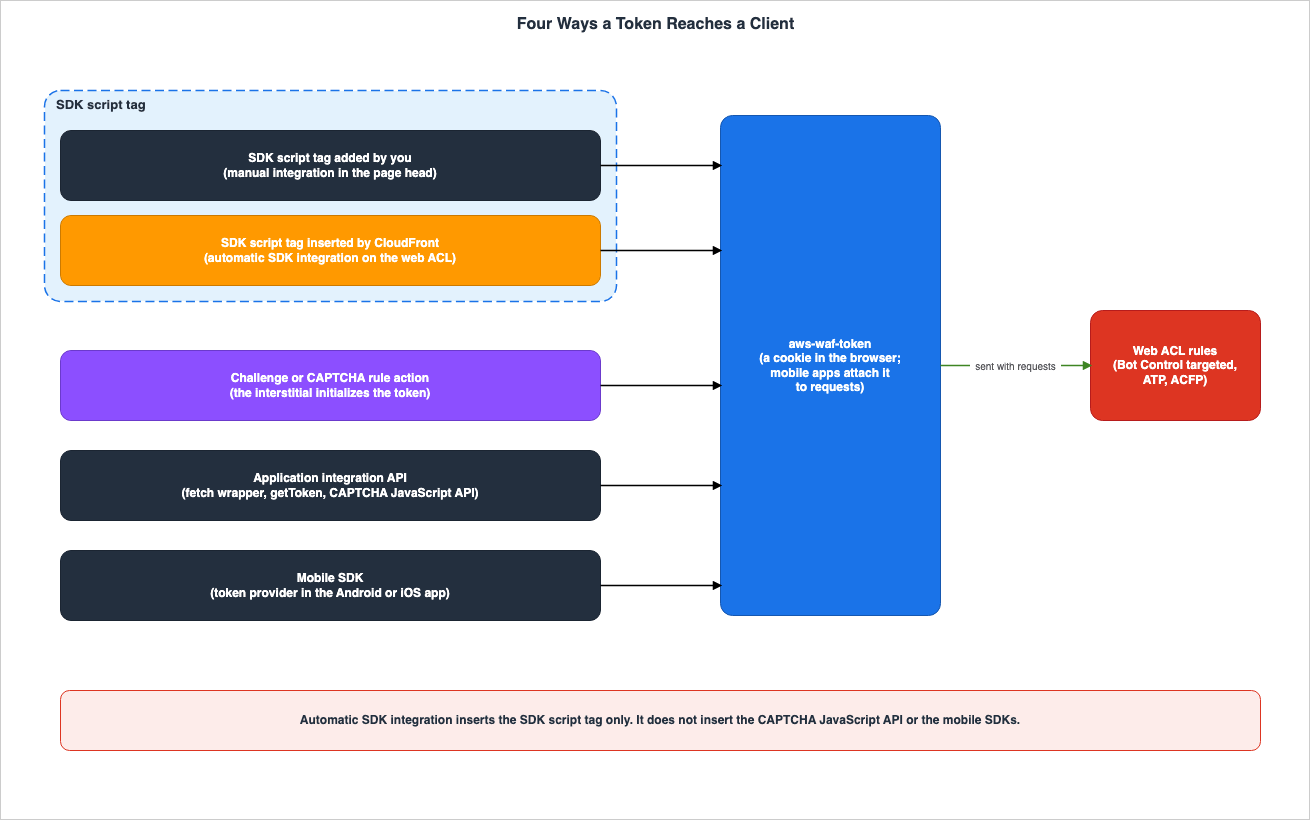
The client integrations page outlines two integration stages for JavaScript applications, and one for mobile applications. The first, "Intelligent Threat Integration," connects qualifying rule groups with token acquisition and management. The second, "CAPTCHA Integration," places a CAPTCHA puzzle in the application. According to the token use page, tokens support the browser and end-user challenges that the application integration SDKs and the Challenge and CAPTCHA rule actions provide. Tokens also enable features of the Bot Control and ATP rule groups. This article divides the paths by which tokens reach the client into four categories:- SDK Script Tag: By placing a tag to load
challenge.jsin the page'shead, the browser will automatically retrieve the token in the background during page loading. - Challenge and CAPTCHA Actions: When a request without a token matches a rule, AWS WAF returns an interstitial, within which the browser obtains the token.
- Application Integration API: The application's code uses either a wrapper for
AwsWafIntegration.fetchor thegetTokenfunction to obtain a token before sending requests to protected endpoints. The CAPTCHA JavaScript API also falls within this path. - Mobile SDK: Android and iOS mobile and TV applications obtain tokens from the token provider and attach them to requests.
The following text, found on the JS API page regarding the script tag, reads:
This inclusion causes your client application to automatically retrieve a token in the background on page load.The following text, found on the action behavior page regarding the Challenge interstitial, reads:
When a challenge interstitial runs, after the client responds successfully, if it doesn't already have a token, the interstitial initializes one for it.The JS API page instructs the application's code to perform the following:
Write your code to ensure that token retrieval completes before the client sends its requests to your protected endpoints.According to the mobile SDK page, the SDK operates on Android API version 23 and above, iOS 13 and above, and tvOS 14 and above. To obtain the SDK, contact AWS. The mobile SDK cannot be used for CAPTCHA customization.
According to the token characteristics page, each token contains information gathered from the browser. When using the application integration SDK, information passively collected from user interactions on the page can also be included in the token.
3.2 Table of Token Supply
Trust Being Held | Who Holds It | Who Can Update It | When It Must Change | What Breaks If It Does Not | How You Can Tell | Where It Is Written |
|---|---|---|---|---|---|---|
| Token for a page loaded in the browser, generated by a script tag added manually. | The application. Within the page's head. | The application's developer. | With each release, ensuring the tag remains on the page. | Pages without the tag will not execute the SDK and will not obtain a token. | The tag in the page's source code, and the browser's aws-waf-token cookie. | JS API page. |
| Token for a page loaded in the browser, generated by a script tag added by CloudFront. | CloudFront. Due to the automatic SDK integration setting in the web ACL. | Those who manage the web ACL. | Each time the web ACL is updated, the setting must be included in the request. | Pages outside the conditions outlined in Chapter 4 do not receive a tag, and pages in Chapter 5 might not receive one. | No metrics or log entries are available. Check the tag in the page's source code, and the aws-waf-token cookie. | Automatic SDK integration page. |
| Token for a client that has completed a challenge or CAPTCHA interstitial. | AWS WAF. Based on the rule's action. | Those who manage the web ACL. | When the immunity time expires. | Requests that do not expect HTML cannot handle the interstitial properly. | The x-amzn-waf-action header in the response. When retrieved from a different domain, the browser's JavaScript cannot read it. | Action behavior page. |
| Token obtained by the application's code. | The application. Through a fetch wrapper or getToken code. | The application's developer. | Before sending a request to a protected endpoint. | Requests that have not completed retrieval will not have a token. | No statement found. | JS API page, JavaScript integrations page. |
| Token for a mobile application. | The mobile application. Through a token provider. | The application's developer. | When the token domain setting is changed. | Automatic SDK integration does not reach it. If the SDK's domainName does not match a domain that the web ACL accepts, the token is not accepted. | No statement found. | mobile SDK page, token domain page, CloudFront use cases page. |
A
No statement found. cell means that no sentence about that column was found. In the Challenge row, the item about requests that cannot receive HTML comes from the following sentence on the action behavior page. The interstitial is included when the request's Accept header is text/html.The scripts are designed to be handled as HTML content, and they can only be handled properly by a client that's expecting HTML content.3.3 What Automatic SDK Integration Takes Over, and What It Does Not
Automatic SDK integration takes over only one of the four paths: the SDK script tag. The note on the automatic SDK integration page states:This setting inserts the AWS WAF SDK script tag only. It doesn't insert the CAPTCHA JavaScript API or the mobile SDKs.The CloudFront use cases page also states the following regarding mobile applications:
This applies to the browser JavaScript SDK; mobile apps still require adding the mobile SDK to your app.The third path is also not covered by automatic SDK integration. According to the "Applications that attach tokens to their own API calls" section on the automatic SDK integration page, if an application uses the SDK to attach tokens to its own API calls, it should continue using the current SDK integration. If it is not integrated, it should integrate the SDK as described on the JS API page.
Web ACL rules handle the second path, the Challenge and CAPTCHA actions. According to the automatic SDK integration page, requests that receive a CAPTCHA or Challenge action will not include a tag in the response. Tags are typically included on the page the user reaches after completing the interstitial.
3.4 Immunity Time and Token Domain
The validity period (immunity time) of a token and the domain it is accepted for are determined differently depending on the path. This article will only discuss aspects related to automatic SDK integration. The CAPTCHA vs. Challenge section of this site's AWS WAF timeline describes the mechanisms in one sentence each.According to the immunity time page, both challenge and CAPTCHA actions have a default immunity time of 300 seconds in the web ACL. The SDK used for application integration utilizes the challenge action's immunity time in the web ACL. The minimum and maximum values are as follows:
The minimum value for the challenge immunity time is 300 seconds. The minimum value for the CAPTCHA immunity time is 60 seconds. The maximum value for both immunity times is 259,200 seconds, or three days.The API reference for
ImmunityTimeProperty also gives a default value of 300, states For the Challenge action, the minimum setting is 300., and sets the value range from 60 to 259200. A re:Post article indicates that the minimum immunity time for rules, regardless of whether they are challenge or CAPTCHA, is 60 seconds. This article will align with the developer guide and API reference, specifying a minimum of 300 seconds for challenge actions and 60 seconds for CAPTCHA actions.According to the token domain page, by default, AWS WAF only accepts tokens associated with the host domain of the resource linked to the web ACL, provided that the domain matches exactly. If a list of token domains is configured in the web ACL, it will also accept tokens for those domains, as well as subdomains that have something prepended to them. The method for determining the domain to include in a token varies depending on the path.
- The JavaScript SDK uses the shortest domain that matches the host domain, selecting from a list of domains provided to the SDK or, if no list is provided, using the host domain of the protected resource. As described in the "Providing domains for use in the tokens" section of the JS API page, this list can be provided through the global variable
window.awsWafCookieDomainList. - The "Challenge" action also selects the shortest domain that matches the host domain, choosing from a list of domains configured in the web ACL or, if no list is provided, using the host domain.
- The mobile SDK does not use the host domain; instead, it uses the
domainNameconfigured in the application's code.
The tags inserted by automatic SDK integration are the same as those inserted manually (see Section 4.6). The following is an inference: the SDK that automatic SDK integration inserts also follows the web ACL's challenge immunity time. No statement was found on the automatic SDK integration page about the relationship between that SDK and the immunity time, or about its relationship with
window.awsWafCookieDomainList.4. Conditions Under Which CloudFront Inserts the Script Tag
This chapter lists the conditions, from the automatic SDK integration page, under which CloudFront inserts the script tag into a response.4.1 Web ACL Eligibility
The Requirements section on the automatic SDK integration page lists two conditions that must all be met. The first is that the web ACL must utilize CloudFront's scope. It cannot be used with regional resources. The second is that the web ACL must have one or more qualifying rule groups. Bot Control is only eligible when the protection level is set to "targeted." The "common" protection level is not eligible because it does not utilize client-side signals. The version of the rule group used in Bot Control is not relevant to eligibility.Even if the behavior of a rule group is overridden to "count," eligibility remains unchanged. The text on the automatic SDK integration page states:
Overriding the rule group's actions to count doesn't affect qualification, so you can add the SDK while you evaluate the rule group, before you enforce it.Qualification depends only on whether a qualifying rule group is present in the web ACL. According to the "Insertion applies across the web ACL" section on the automatic SDK integration page, whether a qualifying rule group has evaluated a request does not affect insertion. Furthermore, scope-down configurations for rule groups, as well as any rules that permit requests before the rule group, do not prevent insertion.
4.2 Status 200 and text/html Only
The text on the automatic SDK integration page states the following:CloudFront inserts the script tag only into responses that it serves with an HTTP 200 status and a Content-Type of text/html.Responses such as images, stylesheets, scripts, and JSON will not contain any tags. Custom error responses that CloudFront serves with a 200 status receive the tag like any other page. This includes the fallback page that single-page applications use for deep links.
4.3 CloudFront Requests Objects from the Origin Uncompressed
According to the automatic SDK integration page, CloudFront requests objects from the origin uncompressed in order to insert the tag. If the origin returns compressed content, the tag is not inserted. This includes HTML files stored in Amazon S3 with theContent-Encoding: gzip setting.If your origin returns compressed content anyway, CloudFront doesn't insert the SDK.This behavior is not limited to HTML, as described in Section 7.1.
4.4 head Near the Beginning
According to the automatic SDK integration page, CloudFront inserts tags immediately after the opening tag of the head section. It searches for head within only the first few kilobytes of the response body.It scans only the first few kilobytes of the response body to find that tag.Tags are not inserted into responses that lack a
head section, or into responses where the head section appears later in the document. The automatic SDK integration page only states that the search range is a few kilobytes, without specifying an exact value.The search method involves scanning the bytes, rather than parsing the HTML. Therefore, a commented-out or otherwise invalid
head tag earlier in the document can cause the tag to be inserted there instead. In such cases, the browser will not execute the inserted tag, and the page will not receive any tokens.Only ASCII-compatible character encodings are supported. Tags will not be inserted into documents using UTF-16 or UTF-32.
4.5 Among Cache-Control Directives, Only no-transform Keeps the Tag Off
When a response includes Cache-Control: no-transform, CloudFront leaves the response unchanged and does not insert the tag. The automatic SDK integration page gives this header as the way to keep the tag off specific pages.This behavior does not apply to other
Cache-Control directives. The text on the automatic SDK integration page states:For example, responses marked no-store or private, which are common on sign-in and account pages, still receive the tag.The automatic SDK integration setting applies to the whole web ACL and cannot be limited to specific paths. To keep the tag off a particular page, the origin server must include the
Cache-Control: no-transform header in the response for that page.4.6 Tag Format and CSP
According to the automatic SDK integration page, CloudFront inserts the same script tag that you add in a manual integration. The current format is as follows:<script type="text/javascript" src="protection pack (web ACL) integration URL/challenge.js" defer></script>The tag points to the web ACL's integration URL. This URL can be found on the Application integration page in the console, or in the
ApplicationIntegrationURL returned by GetWebACL. The automatic SDK integration page notes that this format is current and may change. It also advises against relying on tag attributes, hostnames, or paths within your application's logic, testing, or security policies.When a page utilizes Content Security Policy (CSP), the policy must allow the SDK's loading and requests. The automatic SDK integration page recommends adding
https://*.awswaf.com to the allow list. The CSP page provides examples of including it in the connect-src, script-src, and script-src-elem directives. If not permitted, the browser blocks the script, or loads the script but blocks its requests, preventing the SDK from obtaining a token.The automatic SDK integration does not support policies that combine nonce or hash values with
'strict-dynamic'. The text on the automatic SDK integration page states:Automatic SDK integration doesn't support policies that use 'strict-dynamic' with nonces or hashes.In such policies, the browser will disregard the hostnames listed in the allow list. Because the inserted tag does not carry the page's nonce, the browser blocks it. The automatic SDK integration page says to add the tag yourself with your own nonce on such pages. The tag that CloudFront inserted is still blocked and might appear in the policy's violation reports.
4.7 If Insertion Fails, the Response Is Not Blocked
The text in the Insertion fails open section of the automatic SDK integration page is as follows:If the SDK can't be inserted for any reason, CloudFront returns the response body as your origin sent it. The feature never blocks a response.Even if you manually install the SDK and then enable automatic SDK integration, the SDK will only run once. According to the automatic SDK integration page, enabling automatic SDK integration on applications that already have the SDK installed will not cause the application to malfunction.
If you proxy the SDK's requests through your own domain, that proxy is not used. The inserted tag points to the AWS WAF domain rather than to the proxy.
5. Pages That Might Not Receive the Script
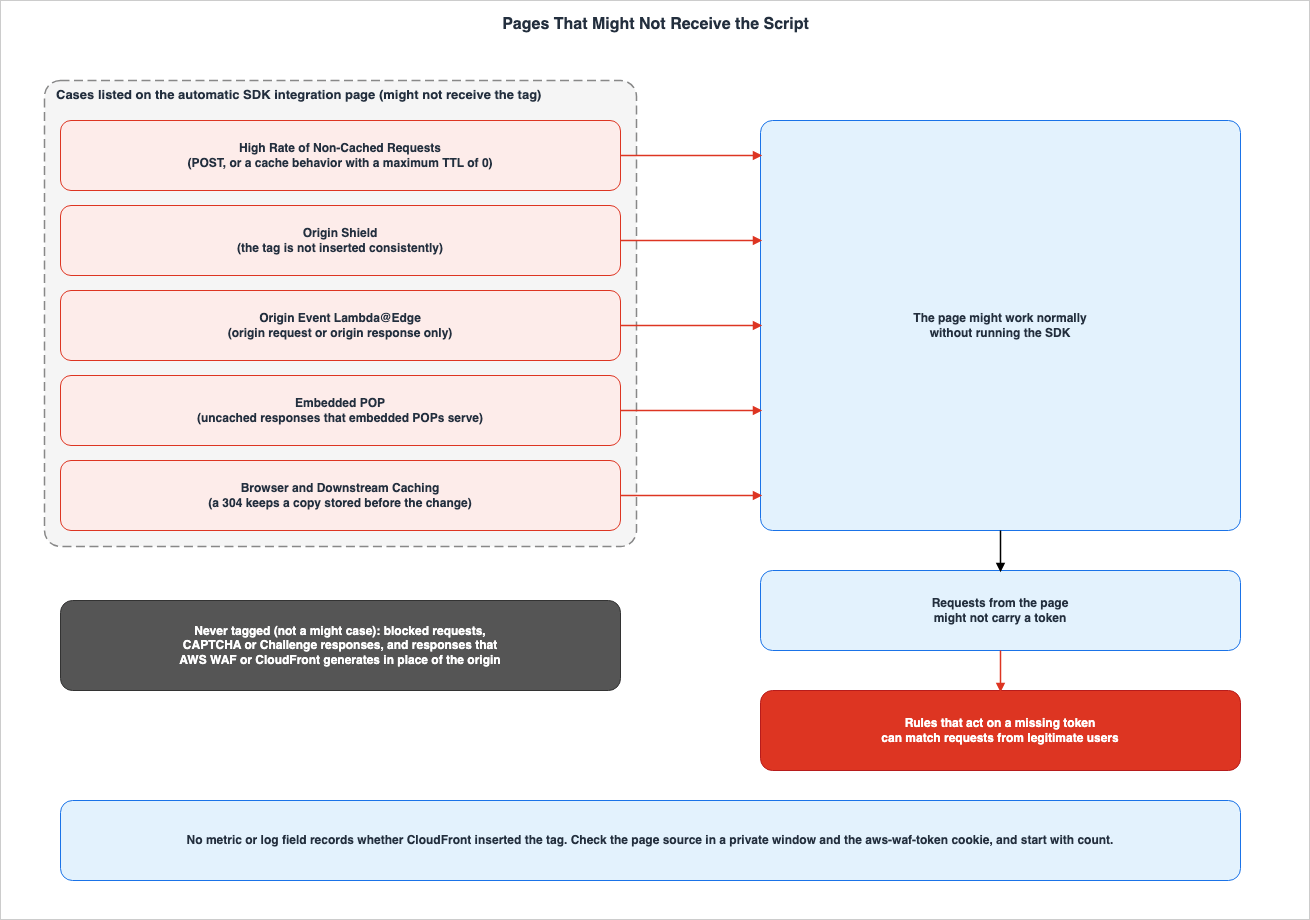
This chapter discusses situations where a page may not receive a tag, even if it meets the conditions outlined in Chapter 4, and explains how to verify whether a tag has been received.5.1 Five Cases on the Automatic SDK Integration Page
The section on the automatic SDK integration page, specifically the When pages don't receive the tag section, lists cases where a page might not receive the tag, even if other conditions are met. The first sentence of this section reads:In the following cases, pages might not receive the script tag, even when a response meets the other conditions in this topic.The section outlines five specific scenarios:
| Case | Scope Condition | Wording on the Automatic SDK Integration Page | Recommendation on the Automatic SDK Integration Page |
|---|---|---|---|
| High Rate of Non-Cached Requests | Requests that CloudFront does not cache, such as POST requests or requests directed to cache behaviors with a maximum TTL of 0. | CloudFront might return some responses without inserting the script tag. | If the application relies on the SDK to attach tokens to its own API calls, such as a single-page application, integrate the SDK directly into the pages. |
| Origin Shield | Responses from origins with Origin Shield enabled. | The tag is not inserted consistently. Cached responses without the tag will continue to be served until their expiration. | Integrate the SDK directly into the pages. |
| Origin Event Lambda@Edge | Cache behaviors that have Lambda@Edge functions associated with either origin request or origin response events (functions associated with viewer events are not affected). | Not supported. | Integrate the SDK directly into the pages. |
| Embedded POP | Distributions that have opted into embedded POP, returning non-cached responses from the embedded POP. | The tag is not inserted into these responses. | Integrate the SDK directly into the pages. |
| Browser and Downstream Caching | When a page that has not changed on the origin receives a conditional request (returning a 304), and the viewer keeps a copy stored before the setting was turned on. | A 304 can be returned. CloudFront cache invalidation does not clear these caches. | No statement found. |
The text associated with the "High Rate of Non-Cached Requests" scenario reads:
When your origin receives a high rate of requests from CloudFront, CloudFront might return some responses without inserting the script tag.The automatic SDK integration page does not specify a threshold for what constitutes a "high rate."
The text associated with the "Origin Shield" scenario reads:
When an origin has Origin Shield turned on, the script tag isn't inserted consistently into responses from that origin, and a cached response without the tag continues to be served until it expires.The text associated with the "Lambda@Edge" scenario reads:
Functions on viewer events don't affect insertion into responses from your origin.The text associated with the "Browser and Downstream Caching" scenario reads:
Invalidating the CloudFront cache doesn't clear these caches.The mechanism behind Origin Shield is described in Chapter 6 of this site's Amazon CloudFront Origin Architecture Guide. This article specifically addresses the issue that when using automatic SDK integration and Origin Shield on the same origin, the tag is not inserted consistently.
5.2 Responses That Are Not from Your Origin
According to the section "Only responses from your origin are modified" on the automatic SDK integration page, the tag is inserted only into responses to requests that AWS WAF lets through. Requests that match a rule configured with the "count" action are allowed and treated the same as other permitted requests.Tags are not included in the following types of responses:
- Responses to requests that a rule blocked. Since the request does not reach the origin, there is no page to tag.
- Responses to requests that have received a CAPTCHA or challenge action. Instead of a page, the user receives a CAPTCHA puzzle or a response to the challenge.
- Responses generated by AWS WAF or CloudFront in place of the origin. Custom responses for the "block" action, even if they are in HTML format, will not be tagged. Responses generated by CloudFront Functions will also not be tagged.
5.3 Pages Outside the Conditions in Chapter 4
Responses that do not meet the conditions in Chapter 4 do not receive the tag either, or, as in two of the items below, receive it in a form that does not run. In summary, this includes:- Responses with a status code other than 200, and responses with a
Content-Typethat is nottext/html. - Responses that the origin returns compressed. This includes HTML content stored in S3 with the
Content-Encoding: gzipheader. - Responses that lack a
headsection, or responses where theheadelement is beyond the first few kilobytes. - Responses with a commented-out
headearlier in the document. The tag will be included in the comment and will not be executed. - Documents encoded in UTF-16 and UTF-32.
- Responses with a
Cache-Control: no-transformheader. - Pages where the CSP (Content Security Policy) does not allow
https://*.awswaf.com, or pages that combine a nonce or hash with the'strict-dynamic'directive. Tags will be included, but the browser blocks the tag or its requests. - Copies cached by CloudFront before the setting is enabled. (See Section 7.4 for details.)
5.4 The First Request of a Single-Page Application
Even on pages with tags, tokens are not immediately available. As stated in the section "Applications that attach tokens to their own API calls" on the automatic SDK integration page, the text reads as follows:The inserted SDK acquires a token shortly after the page loads, and then keeps it refreshed. Requests that your application sends before the first token exists don't carry one.It is the HTML response that receives the tag, so the request for that HTML cannot carry a token that the SDK on that page obtains. If a single-page application attaches tokens to its own API calls, the automatic SDK integration page suggests either continuing the current SDK integration or integrating in the manner described on the JS API page. The JS API page specifies that the token should be acquired before sending requests to protected endpoints (Section 3.1).
5.5 What Happens on Pages That Do Not Receive the Tag
The automatic SDK integration page, after the five cases, has the following text:Those pages work normally, but they don't run the SDK. Without the SDK, a page doesn't acquire or refresh a token, so requests from it might not carry one. Rules that act on a missing token can then match requests from legitimate users.Chapter 6 describes which rules match and how.
5.6 Confirming That the Tag Was Inserted
The automatic SDK integration page states that nothing records whether the tag was inserted.No metric or log field records whether CloudFront inserted the tag into a response.The recommended verification methods outlined in the automatic SDK integration page are as follows:
- View the page source in a private browsing window, or clear your browser's cache and cookies before viewing. This ensures the browser does not display a previously saved copy.
- Verify whether the SDK has executed by checking if the browser receives the
aws-waf-tokencookie. - Before enforcing rules that apply to requests without a token, set the rule's action to "count" and observe the results.
- For pages that absolutely require the SDK, directly embed the SDK. It can be used in conjunction with automatic SDK integration.
6. What Happens on the Rule Side When a Request Lacks a Token
This chapter describes what happens on the rule side of the web ACL to requests that pages without the tag send, for each rule group.6.1 Token Labels
According to the token labels page, when using Bot Control or Fraud Control rule groups, the rule groups invoke AWS WAF's token management to inspect the request's token and apply a label. The token status label begins with eitherawswaf:managed:token: or awswaf:managed:captcha:, followed by one of the following names:accepted: The token is present, and it represents a valid challenge or CAPTCHA response, is not expired, and has a domain that matches the web ACL.rejected: The token is present, but it does not meet the acceptance criteria. The reason for rejection may berejected:not_solved,rejected:expired,rejected:domain_mismatch, orrejected:invalid.absent: The request either does not contain a token, or the token management system was unable to read it.
The note on the token labels page states:
AWS WAF applies token labels only when you use one of these intelligent threat mitigation managed rule groups.6.2 Handling of Three Rule Groups
The missing tokens page describes, for each rule group, how token requirements are handled. This article places the scope sentences from the rule group pages next to it.| Rule Group | Handling of Requests Without Tokens | Scope | Source |
|---|---|---|---|
| ACFP | The AllRequests rule runs the Challenge action, effectively stopping requests that do not have an accepted label. | According to the ACFP page, AllRequests applies to requests directed to registration page paths, as defined in the rule group settings. | missing tokens page, ACFP page |
| ATP | Stops requests with a rejected label, but does not stop requests with an absent label. | According to the ATP page, ATP examines login attempts directed to application login endpoints. | missing tokens page, ATP page |
| Bot Control (targeted) | Applies a challenge to clients who send five requests without an accepted label. Does not individually stop requests lacking a valid token. | Requests evaluated by the rule group. | missing tokens page, Bot Control page |
| Bot Control (common) | Does not handle token requirements. | — | missing tokens page |
The text associated with the ACFP row is:
The AWSManagedRulesACFPRuleSet AllRequests rule is configured to run the Challenge action against all requests, effectively blocking any that don't have the accepted token label.The text associated with the
AllRequests section on the ACFP page is:Applies the rule action to requests that access the registration page path.The missing tokens page refers to all requests, while the ACFP page specifically addresses requests directed to registration page paths. This article reads it in the scope of the ACFP page. The ACFP page also indicates that users should load the registration page path before sending account creation requests.
The text associated with the Bot Control (targeted) row is:
It doesn't block an individual request that doesn't have a valid token.6.3 Two Bot Control Rules
The Bot Control page states at the top that it covers the most recent static version of the rule group. This article describes the Bot Control rules as of November 3, 2026, according to this page. The Bot Control page lists two rules related to requests without tokens.TGT_VolumetricIpTokenAbsent: This rule examines requests that are not from verified bots that have had five or more requests from a single client in the previous five minutes without a valid challenge token. The rule's action is Challenge.TGT_TokenAbsent: This rule examines requests that are not from verified bots that do not have a valid challenge token. The rule's action is Count.
According to the note for
TGT_VolumetricIpTokenAbsent, this rule may also flag requests with tokens if those requests are from the same client that recently had requests without tokens. This rule counts the number of requests without tokens for each client's IP address. The label awswaf:managed:token:absent is used to identify individual requests that do not have a token. The rule and the label count differently.The Bot Control page states, regarding rules such as
TGT_VolumetricSession, TGT_VolumetricSessionMaximum, and TGT_SignalAutomatedBrowser, This inspection only applies when the web request has a token. These rules do not apply to requests without tokens. A similar statement is also found in the ATP page, associated with other rules.The document history entry dated October 15, 2026, notes the release of version 7.0 of the Bot Control rule group. At the targeted protection level, this version added the token provenance label
awswaf:managed:aws:bot-control:token_provenance:ip_category_mismatch:<level>. According to the Bot Control page, this label is only applied to requests that provide a token. There are no rules in the rule group that specifically act upon this label.6.4 Requests from Pages Where the SDK Was Not Executed
Pages that do not receive the tag do not run the SDK. If a user accessing such a page does not yet possess a token, requests originating from that page will be labeled asabsent. The row in the table in Section 6.2 determines what the rules do then. The following are inferences based on that table:- If only ATP is enabled,
absentrequests will not be blocked. Requests without a token will be evaluated against the ATP rule group and then proceed to other rules in the web ACL. The missing tokens page describes this process in relation to Bot Control and ATP. - By default, ACFP's
AllRequestsrule applies a Challenge to requests to the registration page path. - At the targeted protection level, Bot Control applies a Challenge through
TGT_VolumetricIpTokenAbsentif a single client IP generates five or more requests without a token in the preceding five minutes. The Bot Control page says that the threshold can vary slightly due to latency. - If the web ACL contains rules that block requests labeled with
awswaf:managed:token:absent, those rules will be triggered.
Requests that receive a challenge will receive an HTTP 202 response. An interstitial page is displayed when the request includes
Accept: text/html (as described in Section 3.2). The following are inferences: When a single-page application's fetch request receives a challenge, the application will receive a 202 response instead of the expected response. The automatic SDK integration page has no sentence on this case. The Challenge and CAPTCHA blog states that if the SDK is not integrated, non-HTML requests that trigger a challenge will receive an HTTP 202 response, which breaks asset and fetch requests.6.5 Preventing Requests Without Tokens
According to the missing tokens page, with Bot Control and ATP, a request without a valid token can leave the rule group evaluation and continue through the web ACL. If you want to block all requests without tokens, or requests whose token isrejected, add a rule immediately after the rule group. The example on the missing tokens page is a rule that matches the awswaf:managed:token:absent label and narrows its scope to POST requests to the login path. This article does not reproduce that example verbatim; the complete example is on the missing tokens page.Such rules may also affect legitimate user requests that are sent from pages that did not receive a tag (see Section 5.5). The automatic SDK integration page says to set the actions of rules that act on a missing token to count and review the results before enforcing them (see Section 5.6).
There are two ways to count the rules in a managed rule group. According to the rule group overrides page, overriding the action of a rule within a rule group means that any requests matched by that rule will be treated as if they were subject to the overridden action. If you override the action that the rule group returns to Count, AWS WAF evaluates the rule group as usual and replaces only a returned terminating action with Count. The rule group overrides page states that the latter is not a good option for testing the rules in a rule group.
This is not a good option for testing the rules in a rule group, because it doesn't alter how AWS WAF evaluates the rule group itself.7. Changes on the CloudFront Side
This chapter describes the changes that occur within CloudFront when automatic SDK integration is enabled, regardless of whether the content being delivered is an HTML page or other types of files.7.1 Retrieving All Objects Without Compression
When automatic SDK integration is enabled, the way CloudFront retrieves objects from the origin changes for distributions protected by a web ACL. This applies not only to HTML pages. The automatic SDK integration page states:To insert the tag, CloudFront requests objects from your origin uncompressed. This applies to every request that AWS WAF allows, not only to requests for HTML pages.The automatic SDK integration page says that to keep serving compressed objects to viewers, you turn on compression in the cache behavior so that CloudFront compresses objects before it serves them. According to the compressed files page, CloudFront compresses objects ranging from 1,000 bytes to 10,000,000 bytes, and only certain file types are eligible for compression. The compressed files page also notes that CloudFront's compression is a "best-effort" process, and that in rare cases it skips compressing an object under high traffic load.
7.2 Range Requests Return the Entire Object
The section on Range requests in the automatic SDK integration page states the following:When the setting is on, CloudFront removes the Range and If-Range headers from requests that AWS WAF allows, for every content type, and returns the complete object with an HTTP 200 status.This behavior applies to all content types. It affects clients that request objects in parts, such as video and audio players, and download management tools, and it increases data transfer for those requests. For HTML pages, if a tool begins a download while the setting is enabled, and then resumes the download after the setting is disabled, the resulting content may be mixed up. To obtain a correct copy, it is necessary to request the entire page again.
7.3 Response Headers
According to the automatic SDK integration page, CloudFront adjusts theContent-Length header to match the new body after adding tags. In chunked responses, this header is omitted. The ETag header is replaced with a weak validator that differs from the value sent by the origin. Clients and tools that compare the response's ETag with the origin's value will observe this difference.CloudFront does not recalculate headers related to the integrity of the body. The text on the automatic SDK integration page states:
CloudFront doesn't recompute body-integrity headers such as Content-MD5, Digest, Content-Digest, or Repr-Digest.The four headers mentioned are examples, and the automatic SDK integration page does not limit the number of headers that are not recalculated. The values of these headers remain representative of the response before the tags were added.
According to the compressed files page, CloudFront may also modify the
ETag header when compressing objects. It is reasonable to infer that when the response's ETag differs from the origin's value, it is impossible to determine solely from the ETag value whether this difference is due to the automatic SDK integration or to the compression process. The format of the ETag values observed in this configuration is described in Section 9.3.7.4 Copies Cached Before a Change Remain
According to the section "Cached responses keep the version they were stored with" on the automatic SDK integration page, when CloudFront caches HTML responses, it returns copies that are already present in the cache. Copies saved before the setting is enabled will not have tags, while copies saved before the setting is disabled will retain tags. These copies are replaced as they expire or are evicted, so changes take effect over time. To apply changes immediately, you can invalidate the cached HTML paths in the distribution.The
AssociationConfig page of the API reference also contains the following statement regarding disabling the setting:When you omit it from a web ACL that previously used it, cached HTML that already contains the SDK is still served until it expires, or until you invalidate the cache for that distribution.CloudFront invalidations do not propagate to browsers or downstream caches (see Section 5.1).
8. Default Values and Infrastructure as Code (IaC)
This chapter describes the initial state of automatic SDK integration settings – whether they are enabled or disabled by default – and how these settings are affected when web ACLs are updated using APIs or Infrastructure as Code (IaC).8.1 Three Starting States
According to the automatic SDK integration page, how you create your web ACL determines the initial state of automatic SDK integration.- When you create a new CloudFront web ACL with a qualifying rule group in the console, the setting is on by default. To disable it, deselect the "Enable automatic SDK integration" option before saving.
- When creating a web ACL programmatically (e.g., using the API), it is disabled by default. If you do not include the
ChallengeJavascriptSdkInjectionsetting, it will remain disabled. - Adding a qualifying rule group to an existing web ACL also leaves it disabled. This applies to web ACLs created before this feature was released.
The "What's New" announcement also states that when creating a new web ACL in the console, it is enabled by default; when creating it programmatically, it is disabled by default; and that web ACLs created before this release are unchanged.
8.2 API Configuration
In the API, add theChallengeJavascriptSdkInjection setting to the AssociationConfig of the web ACL, using the CLOUDFRONT map key. The object within is empty. The automatic SDK integration page shows the setting in a CreateWebACL or UpdateWebACL request as follows."AssociationConfig": {
"ChallengeJavascriptSdkInjection": {
"CLOUDFRONT": { }
}
}According to the API reference documentation for
AssociationConfig, this setting can only be configured using the CLOUDFRONT map key. AWS WAF rejects any other resource type, and the setting is not available for regional resources.8.3 An Update That Omits the Setting Turns It Off
The text on the automatic SDK integration page states:An UpdateWebACL request that doesn't include the setting turns automatic SDK integration off. This applies even if you turned the setting on in the console.The
UpdateWebACL API reference page also includes the following note regarding this operation:This operation completely replaces the mutable specifications that you already have for the web ACL with the ones that you provide to this call.The
UpdateWebACL page explains that to modify a web ACL, you must retrieve it using GetWebACL, make the necessary changes to the configuration, and then provide the complete specification of the web ACL. The following is an inference from the automatic SDK integration page's sentence above. If you have the web ACL specification in an Infrastructure as Code (IaC) template or your own scripts, and that specification does not include the automatic SDK integration setting, the setting will be disabled during the next update. Any setting enabled through the console will not be preserved during that update.8.4 CloudFormation
The "What's New" announcement states that automatic SDK integration can be configured through the console, CLI, SDK, CDK, and CloudFormation. On November 3, 2026, when reviewing the CloudFormation reference documentation forAWS::WAFv2::WebACL AssociationConfig, the introductory description stated that you can use this setting to have CloudFront distributions insert the SDK. However, the "Syntax" and "Properties" sections of the same page only list the RequestBody property. The CloudFormation reference does not list the automatic SDK integration setting as a property. This article cannot show from the CloudFormation reference how to write this setting in a CloudFormation template.The following is an inference. If CloudFormation does not include this setting when updating a web ACL, the setting will be disabled as described in Section 8.3. No statement on this case was found in the CloudFormation reference. In this configuration, the setting was disabled during a stack update (as described in Section 9.7).
8.5 Removing a Qualifying Rule Group
The automatic SDK integration page and theAssociationConfig page in the API reference outline the conditions for removing a qualifying rule group. The text on the automatic SDK integration page reads as follows:If you remove the last qualifying rule group, or change the Bot Control inspection level to common, remove this setting in the same update. Otherwise, AWS WAF rejects the update.8.6 Firewall Manager and Distribution Tenants
According to the Firewall Manager API reference, specifically theSecurityServicePolicyData page, updating the values of a policy's associationConfig, captchaConfig, challengeConfig, and tokenDomains will cause Firewall Manager to overwrite the local web ACL with these new values. If these policy values are not updated, the local web ACL will remain unchanged. The example provided on this page for associationConfig only includes the requestBody. No statement was found on whether Firewall Manager's overwrites reach the automatic SDK integration setting.According to the CloudFront use cases page, in multi-tenant distributions, distribution tenants that inherit the multi-tenant distribution's web ACL also inherit its automatic SDK integration settings. Distribution tenants that have their own web ACL will use the settings configured for that web ACL.
9. Observations Based on This Configuration
This chapter gives the results of creating a CloudFront distribution and a CloudFront-scoped web ACL in a single AWS account in us-east-1 on November 4, 2026, and observing how automatic SDK integration behaved. The observations are what was seen in this configuration, not promises of the documentation. The values come from a single observation in this configuration, and this article does not use them for performance comparisons.9.1 Configuration
The configuration is as follows:- The origin is a private Amazon S3 bucket that only CloudFront can read through OAC.
- The web ACL is scoped to CloudFront and contains a single rule, the Bot Control rule group. The protection level is set to targeted. The web ACL overrides the rule group's actions to Count, and its default action is Allow. It blocks no requests.
- There are four cache behaviors. The default cache behavior uses the "CachingOptimized" cache policy and has compression enabled. The
/nocache/*path uses the "CachingDisabled" cache policy. For the two CSP paths, response headers policies add theContent-Security-Policyheader. - A custom error response replaces the 403 that S3 returns with
/spa-fallback.htmland a 200 status. It stands in for the deep links of a single-page application. - The demo turned automatic SDK integration on after creating the web ACL, by adding the setting with the
update-web-aclcommand of AWS CLI version 2.39.3. The CloudFormation template does not include this setting. - The demo fetched pages with
curlin two ways: requests that do not ask for compression, and requests withAccept-Encoding: gzip. A private browsing window showed the page source and the cookies.
9.2 Presence of Tags on a Page-by-Page Basis
The demo fetched the same pages with the setting off, and again after turning it on through the API and invalidating/*. When the setting was off, no tags were present on any page. The results when the setting was on are as follows:| Page | Response Condition | Tag |
|---|---|---|
index.html | head present at the beginning | Yes. CloudFront inserted the tag immediately after the start of the head element, before the meta element. |
late-head-1k.html | Approximately 1.2 KB of comments before head | Yes |
late-head-4k.html, late-head-16k.html, late-head-64k.html | Approximately 4.3 KB, 16.6 KB, and 65.7 KB of comments before head | No |
commented-head.html | A commented-out head before the real head | Yes. CloudFront inserted the tag inside the comment. |
no-head.html | No head element present | No |
no-transform.html | Cache-Control: no-transform | No |
no-store.html, private.html | Cache-Control: no-store, Cache-Control: private | Yes |
gzip.html | Stored on S3 with Content-Encoding: gzip | No |
utf16.html | UTF-16 document | No |
xhtml.html | Content-Type set to application/xhtml+xml | No |
nocache/page.html | Route where CloudFront does not cache | Yes |
csp-allow/page.html, csp-strict/page.html | Routes with CSP headers | Yes. Present in the body. Browser results are in Section 9.5. |
app/deep/link | Custom error response that turns the S3 403 into a 200 status | Yes. The response's X-Cache value was Error from cloudfront. |
In this configuration, pages with approximately 1.2 KB of content before the
head element had tags inserted, while pages with approximately 4.3 KB of content did not. Sizes between these two were not measured. These observations do not give the exact value of the first few kilobytes on the automatic SDK integration page.9.3 Response Headers
In responses containing tags, both theETag and Content-Length values changed.- The
ETagforindex.htmlwas the same as the origin's value when disabled, representing a strong validator. When enabled, it became a weak validatorW/"…-waf", with-wafappended to the origin's value. - The
Content-Lengthforindex.htmlincreased from 181 bytes to 313 bytes. - The
ETagvalues forapp.jsandblob.bin, which do not contain tags, remained unchanged even when enabled. - When disabled, responses compressed by CloudFront using gzip had an
ETagvalue representing a weak validator, formatted asW/"…". These weak validators did not end with-waf.
Section 7.3 inferred that it was not possible to differentiate between responses generated by automatic SDK integration and those resulting from compression based solely on the
ETag value. In this configuration, the trailing -waf made that distinction. Whether this pattern holds true in other configurations is not stated in the documentation. The automatic SDK integration page does not describe this pattern.The result of a request with
Range: bytes=0-99 is as follows:- When disabled,
blob.bin,app.js, andindex.htmlall returned 100 bytes with a status code of 206. - When enabled, all three returned the entire object with a status code of 200. Even
blob.binandapp.js, which are not HTML files, returned the entire object.
9.4 Propagation and Caching
Regarding configuration changes and caching, this configuration revealed the following:- After the setting was turned on, the demo fetched the page on the uncached path every 15 seconds. The initial retrieval lacked tags, while the second retrieval, approximately 16 seconds later, included the tags. When the setting was disabled, the tags also disappeared after approximately 16 seconds during the second retrieval.
- Immediately after enabling the setting, the
index.htmlresource cached by CloudFront did not have any tags. After the/*invalidation, the cached copy had the tag. - Immediately after disabling the setting, the
index.htmlresource cached by CloudFront still had tags. The/*invalidation removed the tag. - When reloading
app/deep/linkin the browser, the browser received a 304 status code and used a previously saved copy. As described in Section 5.1, this mechanism allows previously cached copies to persist in browsers and downstream caches.
9.5 Checks in the Browser
A private window showed the following:- Opening
index.htmlresulted in the browser receiving theaws-waf-tokencookie. - In the source code of the
commented-head.htmlpage, the tag was located within a comment. - On
csp-allow/page.html, there were no errors displayed in the developer tools console. - On
csp-strict/page.html, the browser blocked the tag. The console message was as follows (the integration URL has been redacted).
Loading the script '<integration URL>' violates the following Content Security Policy directive: "script-src 'nonce-blogdemo2026' 'strict-dynamic' https://*.awswaf.com". Note that 'strict-dynamic' is present, so host-based allowlisting is disabled. Note that 'script-src-elem' was not explicitly set, so 'script-src' is used as a fallback. The action has been blocked.- On
app/deep/link, the browser displayed thespa-fallbackpage, and the page source contained the tag.
9.6 WAF Log Token Labels
The logs from AWS WAF showed the following:- For every request, the rule actions were all ALLOW. Because the web ACL overrides the rule group's action to Count, AWS WAF served no Challenge responses.
- Even with the rule group's action overridden to Count, AWS WAF still labeled the requests with either
awswaf:managed:token:absentorawswaf:managed:token:accepted. - AWS WAF also labeled some requests to
late-head-64k.html, which did not receive the tag, withawswaf:managed:token:accepted. In this article's reading, the browser was carrying a cookie received on another page, and therefore sent a token even from the untagged page. Themightinmight not carry onein Section 5.5 can be read to include such cases. This is an inference. - The logs recorded no labels of Bot Control rules starting with
TGT_. Based on the available logs, it's not possible to determine the reason for this.
9.7 UpdateWebACL Without the Setting, and a CloudFormation Stack Update
This configuration tested the two cases in Sections 8.3 and 8.4.- After the demo sent an
update-web-aclcommand without the setting, the setting disappeared from the result ofGetWebACL. On the uncached path, the tag disappeared after approximately 16 seconds during a second retrieval. The tag remained onindex.html, which CloudFront was caching, until it was invalidated. - After the setting was turned on again through the API, the demo ran CloudFormation drift detection against the web ACL. The result was
IN_SYNC, indicating no drift. CloudFormation did not report the setting added outside the template as drift. - Next, the demo updated the stack, changing only the web ACL description in the template. The update succeeded, and the setting disappeared from the result of
GetWebACL. On the uncached path, the tag was missing during the initial retrieval after the update. - The schema for
AWS::WAFv2::WebACLwithin the CloudFormation registry did not mention the termChallengeJavascriptSdkInjectionat all.
As Section 8.4 inferred, the stack update turned the setting off in this configuration. This configuration did not observe which API calls CloudFormation used to update the web ACL.
9.8 Reading the Observations Alongside the Sources
The observations in this configuration align with the following statements in the documentation:- Statements in Chapter 4: Tags are only included in responses with status code 200 and of type
text/html. They are not included in compressed responses, UTF-16 documents, responses withno-transform, or responses without ahead. They are included in responses withno-storeandprivate. With a commented-outhead, the tag is inserted there. - Statements in Chapter 7: CloudFront removes
RangeandIf-Rangefor all content types and returns the entire object with status code 200. TheETagof a response containing tags becomes a weak validator, andContent-Lengthis adjusted to match the new body. Cached copies will continue to return the previous version until invalidated. - Statements in Section 8.3: An
UpdateWebACLrequest without the setting turns the setting off. - Statements in Section 4.6: When using a policy that combines
'strict-dynamic'with a nonce, the browser ignores the allowlisted hosts and blocks the inserted tag.
9.9 What This Configuration Does Not Show
The following items were not observed within this configuration:- Four of the five cases outlined in Section 5.1: uncached requests at high rates, Origin Shield, origin events utilizing Lambda@Edge, and embedded POPs. These scenarios were not triggered in this configuration.
- The exact number of bytes in which
headis searched for. The sizes between approximately 1.2 KB and approximately 4.3 KB were not measured. - The behavior of the
TGT_rules within Bot Control, and the response to the Challenge. The rules were left at a Count setting. - The APIs called by CloudFormation during stack updates.
- The distinction between
curlrequests and browser requests within the WAF logs. In this configuration, curl was set to send a browser's User-Agent.
10. Discrepancies and Omissions in the Documentation
This section consolidates instances of conflicting information, missing details, and absent passages that have been identified throughout chapters 3 through 9.10.1 Where the Sources Disagree
- Publication date: The Document history row for Automatic SDK integration for CloudFront distributions is dated October 29, 2026. The What's New announcement is dated October 30, 2026. This article does not combine these two dates into a single statement.
- ACFP scope: The missing tokens page states that
AllRequestsruns the Challenge action against all requests. The ACFP page states that it applies to requests to the registration page path (Section 6.2). - Whether to prevent requests without tokens: The JS API page and the missing tokens page make statements of different strength about ACFP. This section places the two statements after this list.
- Handling cases where tokens are not received: The automatic SDK integration page lists five cases where a page might not receive the tag. The JavaScript integrations page states that CloudFront can add the SDK script tag to a page, except in the cases listed in the automatic SDK integration page. This article follows the strength of the automatic SDK integration page.
- Valid keys for
AssociationConfig: TheAssociationConfigsection in the API reference lists six resource types as the Valid Keys ofChallengeJavascriptSdkInjection. The description on the same page states that AWS WAF rejects resource types other thanCLOUDFRONT. This article will not reproduce this list as a comprehensive list of resources compatible with automatic SDK integration. - CloudFormation: The "What's New" announcement mentions that this feature can be configured in CloudFormation. The
AssociationConfigsection in the CloudFormation reference only lists theRequestBodyproperty (Section 8.4). - Token refresh for single-page applications: The automatic SDK integration page states that the integrated SDK obtains a token after the page loads and continues to refresh it. A re:Post article explains that in single-page applications, even when routes change, the page does not reload, so the SDK does not re-execute the challenge logic, and the token may expire or become invalid for subsequent API calls. The re:Post article is considered a less authoritative source.
The text regarding requests without tokens on the JS API page reads as follows:
If you use the APIs with the ACFP managed rule group, the ATP managed rule group, or the targeted rules of the Bot Control rule group, these rules don't block requests that are missing tokens.The text regarding ACFP on the page concerning "missing tokens" reads as follows:
The AWSManagedRulesACFPRuleSet AllRequests rule is configured to run the Challenge action against all requests, effectively blocking any that don't have the accepted token label.Two pages of the same guide make statements of different strength. The sources disagree. In this article's reading, one page may describe whether a rule's action is "Block," while the other describes the outcome of a "Challenge." This article does not definitively identify either as being incorrect.
10.2 Items Not Included in the Documentation
- The automatic SDK integration page only mentions searching for the
headin the first few KB, without specifying the number of bytes. The findings observed with this configuration are detailed in Section 9.2. - The automatic SDK integration page does not state what rate counts as a high rate for uncached requests.
- There are no metrics or log entries to indicate whether tags are present. This is noted on the automatic SDK integration page (Section 5.6).
- The automatic SDK integration page gives the integrity headers that CloudFront does not recompute as four examples with
such as, not as a complete list. - The
AWS::WAFv2::WebACL AssociationConfigpage of the CloudFormation reference does not list theChallengeJavascriptSdkInjectionproperty.
10.3 Where No Statement Was Found
- A dedicated AWS blog post on automatic SDK integration: No statement found.
- Text describing whether overwriting the
associationConfigin Firewall Manager policies affects the settings of automatic SDK integration: No statement found (Section 8.6). - Text describing how the settings of automatic SDK integration are affected when a CloudFormation stack update modifies a web ACL: No statement found (Section 8.4). Observations regarding this configuration are detailed in Section 9.7.
- Text describing the relationship between the automatic SDK integration SDK and the web ACL's immunity time, as well as its relationship with
window.awsWafCookieDomainList: No statement found (Section 3.4). - A recommendation from the automatic SDK integration page for the browser and downstream caches case: No statement found (Section 5.1).
11. Failure Modes
This section lists potential failures that may occur when the token supply owner is incorrectly identified, drawing from the content presented in Chapters 3 through 8. Each item represents a possible failure scenario.- Issue: Because automatic SDK integration is on, the operations team removes all hand-written script tags from the pages. Reason: With Origin Shield, Lambda@Edge on origin events, embedded POPs (for uncached responses), and uncached requests at high rates, pages might not receive the tag.
- Issue: The operations team believes that automatic SDK integration delivers tokens to mobile applications. Reason: Automatic SDK integration only inserts script tags for the browser's JavaScript SDK.
- Issue: The operations team believes that automatic SDK integration also includes the CAPTCHA JavaScript API. Reason: The CAPTCHA JavaScript API is not included.
- Issue: The operations team believes that the first API call in a single-page application also receives a token. Reason: Requests made before the initial token is generated do not include a token.
- Issue: The operations team believes that because the login page uses
Cache-Control: no-store, tags are not being included. Reason: Tags are actually included on pages withno-storeandprivatedirectives. AmongCache-Controldirectives, onlyno-transformprevents tag insertion. - Issue: The operations team believes that tags are included in HTML files stored on S3 using gzip compression. Reason: Responses delivered by the origin after compression do not include tags.
- Issue: The operations team attempts to verify tag inclusion using CloudWatch metrics or AWS WAF logs. Reason: There are no corresponding metrics or log entries for this purpose.
- Issue: The operations team examines the page source in their regular browser and, because they see no tags, conclude that automatic SDK integration is not working. Reason: The browser may be displaying a previously cached copy of the page.
- Issue: Immediately after enabling automatic SDK integration, the operations team enforces a rule that blocks requests with
awswaf:managed:token:absent. Reason: This rule can block legitimate requests from users whose pages did not receive a tag. - Issue: The operations team believes that simply deploying ATP will prevent login requests without tokens. Reason: ATP does not block requests that are missing tokens.
- Issue: The operations team believes that Bot Control's targeted rules block individual requests that are missing tokens. Reason: The rules do not block requests one by one. Instead, they challenge clients who have sent five requests without the
acceptedlabel within five minutes (Section 6.3). - Issue: The operations team relies on automatic SDK integration for pages using nonce and
'strict-dynamic'within their Content Security Policy (CSP). Reason: The browser blocks the inserted tag. - Issue: After enabling automatic SDK integration, the operations team fails to verify the delivery of videos or downloads that rely on
Rangerequests. Reason: For requests that AWS WAF allows, CloudFront removesRangefor every content type. - Issue: The operations team leaves in place a mechanism that compares the
ETagandContent-MD5values in the response with the values from the origin. Reason: In responses that receive the tag,ETagis replaced with a weak validator, and integrity headers are not recalculated. - Issue: The operations team updates a web ACL with automatic SDK integration enabled in the console using IaC templates or scripts that do not include the setting. Reason: The update inadvertently disables the setting.
- Issue: When updating a web ACL to remove a qualifying rule group, the operations team leaves the automatic SDK integration setting in place. Reason: AWS WAF rejects the update.
- Issue: After disabling the setting, the operations team assumes that tags will immediately disappear without invalidating the cache. Reason: Cached copies of the page will continue to be served until their expiration date or until the cache is invalidated.
12. Frequently Asked Questions About AWS WAF Tokens and Automatic SDK Integration
This chapter answers common questions that readers of Section 1.1 may have, with references to relevant sections in the text.12.1 Will enabling automatic SDK integration ensure that a token is added to every page?
No. A token does not reach every page. CloudFront only adds tags to responses with a status code of 200 and atext/html content type, specifically those returned by the origin without compression, and where the head tag is located near the beginning. The automatic SDK integration page also states that pages may not receive the tag in five cases: Origin Shield, Lambda@Edge for origin events, embedded POP, a high rate of requests that are not cached, and caching issues with browsers and downstream caches (see Chapters 4 and 5).12.2 Does automatic SDK integration also handle the mobile application and CAPTCHA's JavaScript API?
Automatic SDK integration does not handle the mobile application or the CAPTCHA JavaScript API. According to the automatic SDK integration page, this setting inserts only the SDK script tag; it does not insert the CAPTCHA JavaScript API or the mobile SDK (see Section 3.3).12.3 Can you confirm in CloudWatch that the tag was inserted?
No. CloudWatch cannot confirm that the tag was inserted. According to the automatic SDK integration page, there are no metrics or log entries to record whether tags have been added. The automatic SDK integration page recommends checking the page source in a private window and verifying whether the browser receives theaws-waf-token cookie (see Section 5.6).12.4 Can requests without tokens be immediately rejected?
The behavior varies depending on the rule group. ATP does not block requests with theabsent label. In this article's reading, ACFP's AllRequests applies a challenge by default to requests directed to the registration page path (the sources disagree; see Section 10.1). At the targeted protection level, Bot Control does not block requests lacking a valid token one by one, but instead applies a Challenge to client IPs that have sent five requests without the accepted label within five minutes (Section 6.3). The common protection level of Bot Control does not handle token requirements (see Section 6.2).12.5 Can a single-page application's API calls be handled with automatic SDK integration?
There may be cases where this is not sufficient. According to the automatic SDK integration page, requests sent by the application before the initial token is generated do not include a token. If the application is using the SDK to add tokens to its API calls, the automatic SDK integration page says to continue the current SDK integration or to integrate as described on the JS API page (Section 5.4).12.6 Is it possible to avoid adding tags to just certain pages?
It is possible to keep the tag off specific pages. To do this for a particular page, the origin server must include theCache-Control: no-transform header in the response for that page. Note that the automatic SDK integration settings apply to the entire web ACL and cannot be limited to specific paths (see Section 4.5).12.7 Does a setting turned on in the console survive an IaC update of the web ACL?
Settings enabled in the console do not persist if an update of the web ACL using Infrastructure as Code (IaC) omits the setting. According to the automatic SDK integration page, requests toUpdateWebACL that do not include settings will disable automatic SDK integration, even if the setting was previously enabled in the console. If your IaC templates or scripts define the web ACL specifications, ensure those settings are included within them. However, as of November 3, 2026, the CloudFormation reference does not include this setting in the AssociationConfig property. Before using your IaC tools, verify that they support this setting (see Sections 8.3, 8.4, and 9.7).12.8 Does enabling automatic SDK integration affect content delivery that is not in HTML format?
Enabling automatic SDK integration can also affect non-HTML content delivery. According to the automatic SDK integration page, CloudFront requests objects from the origin uncompressed for every request that AWS WAF allows. CloudFront removes theRange and If-Range headers for every content type, and the entire object is returned with a status code of 200 (see Sections 7.1 and 7.2).13. Summary
AWS WAF tokens reach clients through four pathways: SDK script tags, Challenge and CAPTCHA actions, application integration APIs, and mobile SDKs. CloudFront's automatic SDK integration allows CloudFront to insert the SDK script tags on behalf of the application. The ownership of the remaining three pathways remains unchanged.The automatic SDK integration page details the conditions under which tags are inserted, as well as five cases where a page might not receive the tag. No metric or log field records whether the tag was inserted. The web ACL rules determine what happens to requests from pages that do not receive the tag, and ATP, ACFP, and Bot Control handle them differently. When automatic SDK integration is enabled, for requests that AWS WAF allows, CloudFront retrieves objects from the origin without compression and removes the
Range and If-Range headers. In responses that receive the tag, it replaces the ETag with a weak validator. Requests for UpdateWebACL that do not include automatic SDK integration settings effectively disable automatic SDK integration.When verifying your configuration, consider the following for each area.
- Applications: Are there any remaining integrations for the SDK in single-page applications, mobile applications, or the CAPTCHA JavaScript API? Are tags being directly embedded on pages that absolutely require the SDK?
- CloudFront: Is Origin Shield enabled in the distribution path? Is a Lambda@Edge function being used in the origin event of the cache behavior? Has the distribution been opted into embedded POPs? Is the maximum TTL set to 0 for requests that arrive at a high rate? Is compression enabled in the cache behavior? Is content being delivered relying on
Rangerequests, and is there a mechanism to compareETagor integrity headers? - Origin: Is the origin serving compressed HTML? Does the
headtag appear near the beginning of the document, and are there noheadtags within comments earlier in the document? Is the document encoded using an ASCII-compatible encoding? Do the pages that should not get the tag sendCache-Control: no-transform? - Browser: Does the Content Security Policy (CSP) allow
https://*.awswaf.com? For pages using nonce or hash values in conjunction with'strict-dynamic', have you added the tag yourself with your own nonce? Has the source code of the page and theaws-waf-tokencookie been viewed in a private browsing window? - Rules: Do you know how the rule groups you use handle requests without tokens? Before enforcing rules that stop requests with the
absentlabel, did you set them to count and review the results? - Infrastructure as Code (IaC): Does the template or script used to update the web ACL include settings for automatic SDK integration? Does the IaC tool being used support these settings? When removing a qualifying rule group, are the associated settings also removed in the same update? After changing settings, is cached HTML being invalidated?
14. References
AWS WAF Developer Guide- Automatic SDK integration for CloudFront distributions
- Client application integrations in AWS WAF
- AWS WAF JavaScript integrations
- Using the intelligent threat JavaScript API
- Using the JavaScript API with content security policies
- AWS WAF mobile application integration
- CAPTCHA and Challenge in AWS WAF
- CAPTCHA and Challenge action behavior
- Token use in AWS WAF intelligent threat mitigation
- AWS WAF token characteristics
- Setting timestamp expiration and token immunity times in AWS WAF
- Specifying token domains and domain lists in AWS WAF
- Types of token labels in AWS WAF
- Blocking requests that don't have a valid AWS WAF token
- AWS WAF Bot Control rule group
- AWS WAF Fraud Control account takeover prevention (ATP) rule group
- AWS WAF Fraud Control account creation fraud prevention (ACFP) rule group
- Options for intelligent threat mitigation in AWS WAF
- Overriding rule group actions in AWS WAF
- Providing domains for use in the tokens
- Common use cases for protecting CloudFront distributions with AWS WAF
- Using AWS WAF policies with Firewall Manager
- Document history
AWS WAF API Reference, AWS CloudFormation, and AWS Firewall Manager
- AssociationConfig
- UpdateWebACL
- ImmunityTimeProperty
- WebACLSummary (AWS WAF Classic)
- AWS::WAFv2::WebACL
- AWS::WAFv2::WebACL AssociationConfig
- SecurityServicePolicyData
Amazon CloudFront Developer Guide
AWS What's New, AWS Blogs, and AWS re:Post
- AWS WAF announces automatic SDK integration for Amazon CloudFront distributions
- Protect against bots with AWS WAF Challenge and CAPTCHA actions
- Troubleshoot AWS WAF JavaScript integration
Related Articles on This Site
- AWS History and Timeline regarding AWS WAF - Overview, Functions, Features, Summary of Updates, and Introduction
- Amazon CloudFront Origin Architecture Guide - Origin Access Control, Origin Shield, Failover, and VPC Origins
- HTTP Security Headers Complete Reference - CSP, HSTS, COOP, COEP, Permissions Policy
- AWS WAF AI Traffic Monetization - Returning HTTP 402, and What It Puts on the Request Path
- AWS Network and Application Protection Decision Guide - Where AWS WAF, AWS Shield, AWS Network Firewall, and AWS Firewall Manager Sit on the Request Path and What Each One Does Not Stop
- CloudFront KeyValueStore and Edge Functions Cookbook: A/B Testing, Geo Routing, Feature Flags, and Token Validation
- AWS History and Timeline regarding Amazon CloudFront - Overview, Functions, Features, Summary of Updates, and Introduction
- HTTP Security Header Analyzer Tool - CSP HSTS X-Frame-Options Audit with Grade and Recommendations
References:
Tech Blog with curated related content
Written by Hidekazu Konishi