AI Contact Center Architecture on AWS - Voice and Chat Automation with Amazon Connect, Lex, Bedrock, and Q in Connect
First Published:
Last Updated:
1. Introduction
The hard part of automating a contact center is not recognizing what the customer said. Speech-to-text and natural-language understanding have been solved well enough for years. The hard parts are the two things a customer actually feels: whether the answer is grounded — current, account-specific, and traceable to a source of truth rather than invented — and whether the hand-off to a human, when it happens, is seamless — the person who picks up already knows who is calling, what they wanted, and what has been tried. Get those two right and an automated contact center feels like good service. Get them wrong and it feels like a phone tree that wastes the caller's time before transferring them to an agent who asks for their account number again.This article is a Level 400 implementation walkthrough of one named reference architecture for an AI contact center on AWS. A customer reaches you over voice or chat through Amazon Connect; a deterministic layer built on Amazon Lex captures structured intents and slots; an agentic layer built on Amazon Connect AI agents reasons across multiple steps and takes actions through tools; answers are grounded with Amazon Bedrock Knowledge Bases and Amazon Q in Connect; business actions run through AWS Lambda; and when self-service reaches its limit, the contact escalates to a human with full context preserved. We trace one contact end to end, we go deep on each component's reproducible implementation, and we work through the failure modes that only appear once real customers are on the line.
One framing note before we start, because the landscape shifted recently and a stale mental model will lead you to the wrong design. Amazon Connect now centers self-service on AI agents: configurable, model-driven agents that can plan, call tools through the Model Context Protocol (MCP), and hold a continuous conversation until the issue is resolved or escalated. The capability formerly marketed as Amazon Q in Connect, and called agent assist in the Administrator Guide since 2026-08-04, is now positioned as one of these AI agents — specifically the real-time agent-assist and knowledge agent. (AWS now calls the contact-center product itself Amazon Connect Customer, and "Amazon Connect" names a set of agentic AI solutions; the API Reference uses the legacy name interchangeably, and this article keeps the name Amazon Connect. When each name changed is recorded in AWS History and Timeline regarding Amazon Connect.) So the modern architecture is a hybrid: Amazon Lex still does what it does best — fast, deterministic intent and slot capture for well-defined tasks and IVR menus — while AI agents handle open-ended, multi-step requests. The two are complementary, and a production contact center uses both.
What this article is not. It is not an introduction to retrieval-augmented generation: static and agentic RAG, retrieval grading, and reranking live in Production RAG Architecture on Amazon Bedrock and Agentic RAG Architecture on Amazon Bedrock, and we call into them rather than re-deriving them. It is not a guide to real-time speech-to-speech voice agents: the low-latency bidirectional voice path is the subject of Real-Time Voice AI Agent Architecture with Amazon Nova Sonic. And it is not a guide to content safety: independent guardrails, PII handling, and prompt-injection defense are covered in Responsible-AI Guardrails Architecture on AWS, which we reference where safety controls belong. We also quote no prices here; for cost, follow the official AWS pricing pages linked at the end. Because this design records calls and chats and handles personal data, the article is deliberate about one thing: passing a configuration checklist is necessary but never sufficient for safety, and we say where the real boundaries are.
2. The Reference Architecture at a Glance
The reference architecture has five planes, and the discipline of the whole design is keeping them straight. A contact enters and is orchestrated on one plane; self-service happens on two more (a deterministic one and an agentic one); grounding and generation happen on a fourth; and integration with your business systems happens on a fifth. Identity, recording, and observability wrap all of them.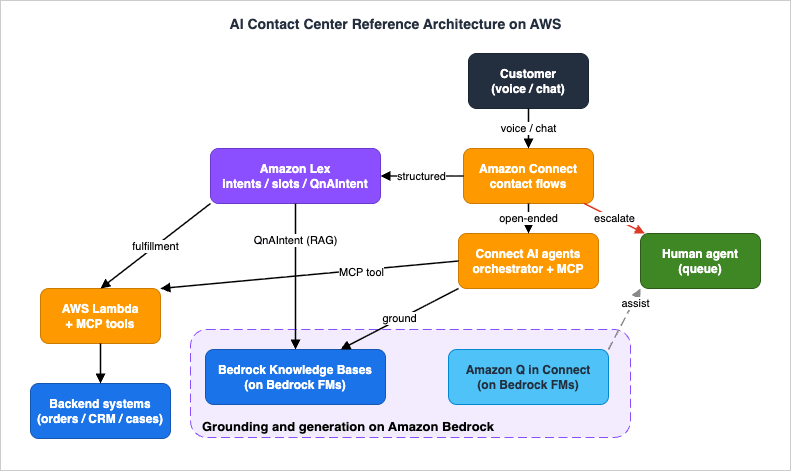
- Amazon Connect (contact flows) — The omnichannel entry point and orchestration spine. A contact flow is a drag-and-drop workflow that greets the caller, sets channel and logging behavior, routes the contact to a bot or AI agent, branches on the result, and ultimately resolves or transfers the contact. The same flow design serves voice (IVR) and chat.
- Amazon Lex (deterministic self-service) — The natural-language layer for well-defined tasks: it classifies intents (what the customer wants) and elicits slots (the parameters needed to act), invoking AWS Lambda code hooks to validate and fulfill. This is the right tool for "check my balance," "track order 12345," or a structured IVR menu.
- Amazon Connect AI agents (agentic self-service) — Model-driven orchestrator agents that reason across multiple steps, call MCP tools to take actions on the customer's behalf, and keep the conversation going until the issue is resolved or escalation is needed. This is the right tool for "I moved and three things are wrong with my account" — open-ended requests that do not fit a single intent.
- Amazon Bedrock Knowledge Bases and Amazon Q in Connect (grounding and generation) — The sources of grounded answers. Knowledge Bases provide retrieval-augmented answers from your documents; Amazon Q in Connect, an Amazon Bedrock-powered agent, delivers real-time recommendations to human agents and powers knowledge answers. Both run on Amazon Bedrock foundation models.
- AWS Lambda (integration) — The code that turns intent into action: Lex dialog and fulfillment code hooks, the Amazon Connect "Invoke AWS Lambda function" block, and the implementation behind MCP tools and flow modules. Lambda is where the contact center touches your databases, order systems, and CRMs.
- Human plane (escalation) — Routing to queues and human agents when self-service cannot or should not proceed, with the conversation context handed across so the customer never repeats themselves. Human agents work inside the Connect agent workspace, assisted in real time by Q in Connect.
Three framing points the rest of the article depends on.
First, Amazon Lex and AI agents are complementary, not competitors. A common mistake is to assume the new agentic capability replaces Lex. It does not. Lex remains the foundation for predefined intents and specific conversational flows; AI agents handle the open-ended, multi-step interactions. A mature contact flow routes structured requests to Lex and ambiguous or compound requests to an orchestrator AI agent — and, as you will see, the orchestrator is itself surfaced through Lex's "Get customer input" mechanism, so the two share plumbing.
Second, the model never touches your systems directly. Whether the answer comes from Lex's QnAIntent or an orchestrator AI agent, every side effect — reading an order, processing a refund, updating a record — goes through a controlled boundary: a Lambda function or an MCP tool that you define, gate with permissions, time-box, and observe. That indirection is the Level 400 substance of the design; it is what lets you authorize and audit every action a generative system takes.
Third, three of the five planes are untrusted from the orchestration spine's point of view. The caller is untrusted: a phone or browser can send any audio or text, including input crafted to manipulate the agent. The model's output is untrusted in the specific sense that a tool call it proposes may be hallucinated, malformed, or aimed at data the caller is not entitled to. And the tools run with their own least-privilege identities so a buggy or abused tool cannot reach beyond its remit. Amazon Connect's contact flow and its security-profile governance are the trusted coordinators in the middle. Keeping that boundary crisp — untrusted caller, untrusted model output, least-privilege tools, one trusted coordinator — is what makes the architecture safe to expose to real customers.
3. Contact Flows and Intent Handling
Everything starts in a contact flow. This section builds the deterministic backbone: the flow skeleton, the Lex intents and slots it invokes, the generative slot resolution that makes free-form responses work, and the branching that decides what happens next. Before the details, here is the path a single contact takes through the whole architecture, end to end.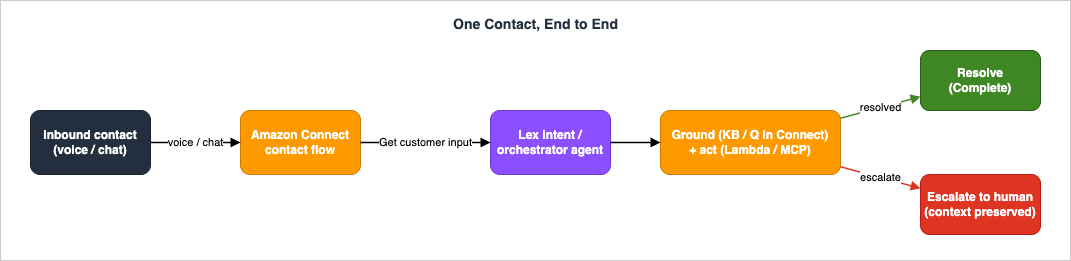
3.1 The contact flow skeleton
A contact flow is a sequence of blocks you assemble in the Amazon Connect flow designer. For a self-service flow, the spine is small and predictable: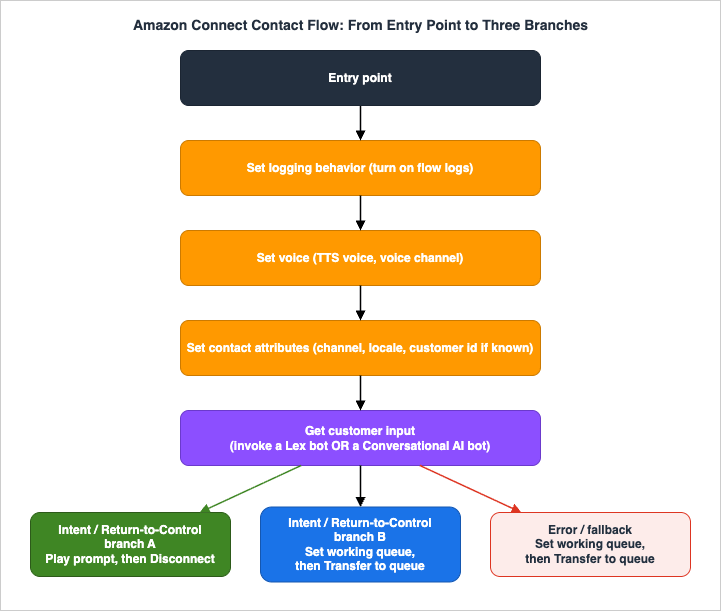
The Get customer input block is the hinge. On its Amazon Lex tab you attach a Lex bot (and bot alias) to capture voice or chat input; the bot must be granted permission to interact with the Connect instance before it appears in the list. The same block is also how you invoke an orchestrator AI agent, through a Conversational AI bot that wraps the agent (covered in section 5). After the block returns, you branch: on a recognized intent, on a Return-to-Control signal from an AI agent, or on the fallback path when nothing matched.
Two channel notes matter here. The flow is channel-agnostic by design — the same blocks drive both IVR (voice) and chat — but voice adds the Set voice block (text-to-speech configuration) and DTMF handling, while chat can stream partial responses. Keep channel-specific configuration in clearly separated branches so a single flow can serve both without surprises.
3.2 Lex intents and slots
Inside the Lex bot, you model the structured tasks. An intent represents a goal ("CheckOrderStatus"); slots are the parameters that goal needs ("orderId"). Lex elicits each required slot in turn, validates it, and once all required slots are filled it fulfills the intent — typically by calling a Lambda function (section 6). Sample utterances train the intent classifier; Lex can also generate utterance variations for you using a foundation model, which improves classification with minimal authoring effort.The mechanics that make this Level 400 rather than a toy are the dialog and fulfillment code hooks and the conversation-state model behind them, both detailed in section 6. For now, the design rule is: model only the well-defined tasks as Lex intents. If you find yourself trying to express "anything the customer might ask" as intents and slots, that is the signal to route to an AI agent instead.
3.3 Assisted slot resolution
Customers do not speak in slot formats. They say "next Tuesday" for a date, or read a confirmation number with pauses and corrections. Lex's assisted slot resolution uses Amazon Bedrock large language models to resolve supported built-in slots when the native NLU cannot. When an utterance fails to resolve normally, Lex makes a second attempt using a Bedrock model, improving recognition for built-in slots such asAMAZON.Date, AMAZON.Number, AMAZON.PhoneNumber, AMAZON.Confirmation, AMAZON.City, AMAZON.Country, and AMAZON.Alphanumeric (without regex). It applies to those built-in slots, not to custom slots.To use it, you turn on the generative AI capabilities for the bot locale (a one-time prerequisite that also gates QnAIntent and the descriptive bot builder), then enable assisted slot resolution per slot. AWS notes that Anthropic Claude models tend to give the best results for this feature. When Bedrock resolves a slot, you can see it in observability: conversation-log interpretations carry an
interpretationSource of Bedrock, and CloudWatch metrics break the behavior out so you can measure the accuracy lift (section 10).3.4 Routing decisions
After Get customer input returns, the flow decides. The deterministic cases are simple: a recognized intent that was fulfilled by Lambda goes to a confirmation Play prompt and Disconnect; an intent that requested an agent goes to Set working queue and Transfer to queue. The interesting routing — branching on what an AI agent decided, by reading Lex session attributes with a Check contact attributes block — is covered in section 7, because it is the mechanism that ties agentic self-service to human escalation. The point to internalize here is that the contact flow remains the deterministic router even when a non-deterministic agent did the talking: the agent proposes, the flow disposes.4. Generative Responses with Bedrock and Q in Connect
Deterministic intents answer "what is my order status." They do not answer "does my warranty cover water damage if the device was in a case." For those, you need grounded generative answers. AWS gives you two complementary mechanisms, both running on Amazon Bedrock foundation models: Lex's built-inAMAZON.QnAIntent for in-conversation FAQ, and Amazon Q in Connect for real-time agent assist and knowledge.4.1 QnAIntent for conversational FAQ
AMAZON.QnAIntent is a built-in Lex intent that answers customer questions by using a Bedrock foundation model to search and summarize a knowledge store. It activates when an utterance is not classified into any other intent in the bot — so it acts as an intelligent fallback for the long tail of questions — and it recognizes follow-up questions from the conversation history ("what about international shipping?" after a domestic-shipping answer).You configure it with a Bedrock model and a knowledge store. The supported stores are an Amazon Bedrock Knowledge Base, an Amazon OpenSearch Service domain, or an Amazon Kendra index. (You cannot use
AMAZON.QnAIntent and the older AMAZON.KendraSearchIntent in the same bot locale.) For new builds that want managed retrieval-augmented generation, the Bedrock Knowledge Base option is the natural choice — you point QnAIntent at the knowledge base ID, and the heavy lifting of ingestion, chunking, embedding, and retrieval is handled by the knowledge base (the deep design of which belongs to the agentic RAG guide).# Create a Lex V2 intent of the built-in QnA type, grounded on a Bedrock Knowledge Base.
# (Generative AI must already be enabled for the bot locale.)
aws lexv2-models create-intent \
--bot-id "$BOT_ID" \
--bot-version "DRAFT" \
--locale-id "en_US" \
--intent-name "FallbackFAQ" \
--parent-intent-signature "AMAZON.QnAIntent" \
--qn-a-intent-configuration '{
"dataSourceConfiguration": {
"bedrockKnowledgeStoreConfiguration": {
"bedrockKnowledgeBaseArn": "arn:aws:bedrock:REGION:ACCOUNT_ID:knowledge-base/KB_ID"
}
},
"bedrockModelConfiguration": {
"modelArn": "arn:aws:bedrock:REGION::foundation-model/MODEL_ID"
}
}'MODEL_ID is intentionally left as a placeholder: the set of Bedrock models available for QnAIntent and their lifecycle change over time, so choose a currently available model and check the Bedrock model lifecycle before you commit. Anthropic Claude models on Amazon Bedrock are a common choice; this article quotes no model pricing.Two implementation details earn their keep. First, QnAIntent can return either a model-synthesized answer or, with the exact response option, a verbatim answer field from the store — useful when compliance requires that approved wording be read back word-for-word rather than paraphrased. Second, QnAIntent writes its results into request attributes you can read downstream:
x-amz-lex:qnA-search-response (the answer), x-amz-lex:qnA-search-response-source (the source document or documents), and x-amz-lex:qna-additional-context. Surfacing the source in the response — "according to the warranty policy…" — is how you make a grounded answer feel grounded and give the customer a way to verify it.4.2 Amazon Q in Connect for agent assist
Amazon Q in Connect is the real-time, generative agent-assist capability — the Amazon Bedrock-powered evolution of Amazon Connect Wisdom, and today one of Amazon Connect's AI agents. During a live voice or chat contact it detects customer intent using conversational analytics and natural-language understanding, then surfaces, to the human agent, immediate generative responses, suggested actions, and links to relevant documents and articles. Agents can also query it directly with natural language or keywords. Two interaction modes matter in practice: an answer recommendation agent that proactively surfaces a suggested response at each turn of the conversation, and a manual search agent the human can query on demand — both configurable, both versioned, and both grounded in the same knowledge base. Crucially, this runs while a human is handling the contact, which makes it the bridge between self-service and the human plane: even after escalation, the assistant keeps working, now for the agent.You provision it through the
qconnect APIs: create an assistant, create a knowledge base, and associate the two; add content by uploading files or connecting data sources. The assistant's behavior is itself shaped by configurable AI agents (for example the ANSWER_RECOMMENDATION and MANUAL_SEARCH types), AI prompts, and AI guardrails, each of which is versioned. A minimal provisioning sketch:# Create a Q in Connect assistant and a knowledge base, then associate them.
ASSISTANT_ID=$(aws qconnect create-assistant \
--name "support-assistant" --type "AGENT" \
--query "assistant.assistantId" --output text)
KB_ID=$(aws qconnect create-knowledge-base \
--name "support-kb" --knowledge-base-type "CUSTOM" \
--query "knowledgeBase.knowledgeBaseId" --output text)
aws qconnect create-assistant-association \
--assistant-id "$ASSISTANT_ID" \
--association-type "KNOWLEDGE_BASE" \
--association "{\"knowledgeBaseId\": \"$KB_ID\"}"Because Amazon Q in Connect is built on Amazon Bedrock, it inherits Bedrock's automated abuse detection and you can layer Bedrock's safety controls on top — relevant in section 9, where guardrails belong.
4.3 Grounding is a property of the architecture, not the model
A grounded answer is one the system can trace to a source. Both mechanisms above achieve grounding the same way: the foundation model is constrained to answer from retrieved passages, and the source is carried alongside the answer. That is the entirety of why this design earns trust — not the eloquence of the model, but the discipline of retrieval plus attribution. The detailed retrieval-quality controls (metadata filtering for tenant or sensitivity boundaries, retrieval grading, reranking, and the corrective loop when retrieval misses) are the subject of the agentic RAG guide; in the contact center they are the knobs you turn when section 10's "ungrounded answer" failure mode shows up.5. Agentic Self-Service and MCP Tools
Deterministic intents and grounded FAQ cover a lot, but they cannot resolve a request that requires reasoning across several steps and systems — "I was charged twice, refund the duplicate and email me a confirmation." For that, Amazon Connect provides agentic self-service: orchestrator AI agents that plan, call tools, and converse continuously until the issue is resolved or escalated. This is the current recommended approach for new self-service builds.5.1 Orchestrator agents versus Lex intents
Connect AI agents offer two self-service approaches. Agentic self-service uses an orchestrator AI agent that can reason across multiple steps, invoke MCP tools to take action, and maintain a single continuous conversation — greeting the customer by name, asking clarifying questions, looking up a booking, and processing a change, all without returning control to the contact flow between steps. Legacy self-service uses an AI agent that answers from a configured knowledge base and selects custom tools that return control to the contact flow for routing; AWS has stated this approach is not receiving new feature updates and recommends agentic self-service for new implementations, so this article builds on the agentic path.The division of labor with Lex is the design decision that matters: use Lex for the deterministic, well-scoped tasks where you want predictable, auditable behavior (IVR menus, single-intent lookups, compliance-sensitive confirmations), and use an orchestrator AI agent for the open-ended, compound requests where rigid decision trees break down. The orchestrator considers the available tools, the accumulated conversation context, and the current need, and chooses the next best action at each turn — adaptive workflows instead of hard-coded ones.
5.2 MCP tools, and where Lambda fits
An orchestrator agent acts through tools, and Amazon Connect standardizes tools on the Model Context Protocol (MCP). There are three ways to give an agent a tool:- Out-of-the-box MCP tools for common tasks such as updating contact attributes and retrieving case information — available immediately, no custom code.
- Flow-module tools — you create a flow module (or convert an existing one) into an MCP tool, which lets you reuse the same business logic across both static contact flows and generative AI workflows. This is the bridge that lets your existing, tested Connect automation become callable by an agent.
- Third-party MCP tools through Amazon Bedrock AgentCore Gateway — you register an AgentCore Gateway in the AWS Management Console and the agent gains access to whatever tools that gateway exposes, including remote MCP servers. This is how you reach external systems and your own services without bespoke per-system integration. (The deeper mechanics of MCP servers and AgentCore Gateway as an interoperability layer are covered in Building an MCP Server on AWS Lambda.)
This is where AWS Lambda sits in the agentic path: not as a Lex code hook, but as the implementation behind a tool. A flow-module tool can invoke Lambda; an MCP server you front with AgentCore Gateway can be a Lambda function. So Lambda remains the place your business logic lives — the agent decides when to call it, and the MCP layer decides how the call is shaped, gated, and timed. One hard limit to design around: an MCP tool invocation has a 30-second timeout; if the underlying work can exceed that, make the tool start an asynchronous job and return a handle the agent can poll, rather than blocking.
5.3 Prompts, versions, and the message contract
You configure orchestrator agents in the AI agent designer in the Amazon Connect admin console — a visual surface where you select which tools the agent may use, add per-tool usage instructions, and attach an orchestration prompt that defines the agent's persona, behavior, and tool-use guidance. A typical setup starts from the systemSelfServiceOrchestrator agent and its default SelfServiceOrchestration prompt, then customizes from there. Both AI agents and prompts support versioning with immutable versions and a LATEST alias, so you can update a prompt or model configuration without re-wiring the agent that references it — and pin a known-good version for reproducibility.One contract is easy to miss and produces a confusing failure: an orchestrator agent's responses must be wrapped in
<message> tags, or the customer sees nothing. If you build a custom orchestration prompt and the agent appears to "go silent" while logs show it is working, the missing message wrapper is the first thing to check (section 10).5.4 Governing what the agent can do
Because an agent takes real actions on untrusted input, governance is not optional. Amazon Connect reuses the same security profiles that govern human agents to govern AI agents: a security profile defines which tools an AI agent may access, exactly as it defines what a human representative may do. You attach a security profile to the orchestrator agent and grant only the tools that role needs. On top of that, per-tool configuration lets you add instructions on how to use a tool, override input values to constrain how it is called, filter output values to return only what is relevant, and require user confirmation for sensitive operations so a refund or a record change pauses for explicit approval. These controls are the agentic counterpart to least-privilege IAM, and section 9 ties them together with the IAM that backs the tools themselves.5.5 Wiring an orchestrator into a contact flow
Putting the agentic layer together is a short, repeatable sequence in the Amazon Connect admin console. The high-level steps:- AI agent designer → AI agents → Create AI agent (type: Orchestration), copying from the system
SelfServiceOrchestratoras the starting point. - Create a security profile that grants only the tools this agent needs, then select it in the agent's Security Profiles section.
- Add the agent's tools: MCP tools (from connected namespaces) and the default Return to Control tools (Complete and Escalate).
- Attach an orchestration prompt (the default
SelfServiceOrchestration, or a custom one) defining persona, behavior, and tool-use guidance. - Set the agent as the default Self Service AI agent.
- Routing → Flows → Conversational AI: create a bot with the Connect AI agents intent enabled.
- Build a contact flow: a Get customer input block that invokes the Conversational AI bot, then a Check contact attributes block that routes on the Return to Control tool the agent selected.
The shape to notice is that the orchestrator is invoked through the same Get customer input block that invokes a Lex bot — which is exactly why Lex and AI agents are complementary rather than separate stacks: they share the contact-flow plumbing, and the deterministic flow stays in charge of routing on what the agent decided.
6. Backend Integration with Lambda Fulfillment
Self-service that only talks is a search box with a voice. The value is in doing: reading the real order, applying the real refund, updating the real record. AWS Lambda is the integration substrate, reached two ways — as Lex code hooks in the deterministic layer, and as the implementation behind MCP tools and flow modules in the agentic layer.6.1 Lex code hooks
A Lex bot can invoke Lambda at two points, distinguished by theinvocationSource field in the event:DialogCodeHookruns after each user input, during the dialog. Use it to validate slots as they are filled, to elicit a specific slot next, to set session attributes, or to branch the conversation.FulfillmentCodeHookruns once all required slots are filled and confirmed. This is where the business logic that fulfills the intent lives — placing the order, returning the balance.
The Lambda function is associated with the bot alias, so the same code serves whichever bot version that alias points to. Whether each hook is active and enabled is controlled per intent through the
fulfillmentCodeHook and dialog code-hook settings (active, enabled, and the post-fulfillment and update specifications), so you can turn a hook on without changing code.6.2 The fulfillment Lambda
The contract is precise and worth getting exactly right, because the most common Lex integration bug is a malformed response. The function receives an event carryinginvocationSource, the current sessionState (intent, slots, session attributes), and the input transcript; it must return a sessionState whose dialogAction.type tells Lex what to do next. For fulfillment that succeeded, that is a Close with the intent state set to Fulfilled:import json
def handler(event, context):
intent = event["sessionState"]["intent"]
slots = intent.get("slots") or {}
if event["invocationSource"] == "DialogCodeHook":
# Validate / elicit during the dialog. Delegate lets Lex pick the next step.
return _delegate(intent)
# FulfillmentCodeHook: all required slots are filled and confirmed.
order_id = _slot_value(slots, "orderId")
try:
status = lookup_order_status(order_id) # your backend call (idempotent)
intent["state"] = "Fulfilled"
message = f"Order {order_id} is {status}."
except OrderNotFound:
intent["state"] = "Failed"
message = "I could not find that order number. Let me get you to an agent."
return {
"sessionState": {
"dialogAction": {"type": "Close"},
"intent": {"name": intent["name"], "state": intent["state"]},
},
"messages": [{"contentType": "PlainText", "content": message}],
}
def _delegate(intent):
return {"sessionState": {"dialogAction": {"type": "Delegate"},
"intent": {"name": intent["name"]}}}
def _slot_value(slots, name):
slot = slots.get(name)
return slot["value"]["interpretedValue"] if slot else NoneThe
dialogAction.type values are the full state machine you have to drive: Delegate (let Lex decide the next step), ElicitSlot (ask for a named slot — requires slotToElicit and the intent name), ElicitIntent (ask the customer what they want — requires a message), ConfirmIntent (read the slots back for yes/no confirmation), and Close (end the turn with the intent state as Fulfilled, Failed, or InProgress). Returning the wrong shape — for example, a Close without intent.state, or an ElicitSlot without slotToElicit — is what produces "the bot just stopped responding," and it is the first thing to check when a Lex integration misbehaves.6.3 Lambda behind MCP tools and flow modules
In the agentic layer the same Lambda business logic is reached differently. A flow-module tool can invoke a Lambda function through the contact flow's "Invoke AWS Lambda function" block; a third-party MCP tool fronted by AgentCore Gateway can be a Lambda-backed MCP server. The function does not need to know which path called it — keep the order-lookup logic in one place and expose it both as a Lex fulfillment hook and as a tool. The difference is the envelope and the limits: a Lex hook returns thesessionState contract above and runs within the Lex dialog; an MCP tool returns a tool result and must finish within the 30-second MCP timeout. Design the function to be agnostic to the caller and adapt only at the thin edge.6.4 Idempotency, timeouts, and errors
Three properties keep backend integration from causing customer-visible damage. Idempotency: a refund tool may be retried — by the agent, by a dropped connection, by a flow re-entry — so key every state-changing action on a client-supplied token and make repeats safe. Timeouts: budget the whole turn, not just the function; an MCP tool that blocks for 30 seconds will be terminated, and a Lex hook that runs long stalls the conversation, so push slow work to asynchronous jobs and return a handle. Errors as conversation, not stack traces: when a backend call fails, return aFailed intent state or a tool error the agent can reason about ("I could not reach the order system"), so self-service can apologize and escalate gracefully instead of dropping the contact.7. Escalation and Human Handoff
Every self-service design needs a clean answer to "what happens when this cannot or should not continue." In this architecture the answer is Return to Control: the agent signals that it is done or stuck, the contact flow regains control, and a human receives the contact with full context.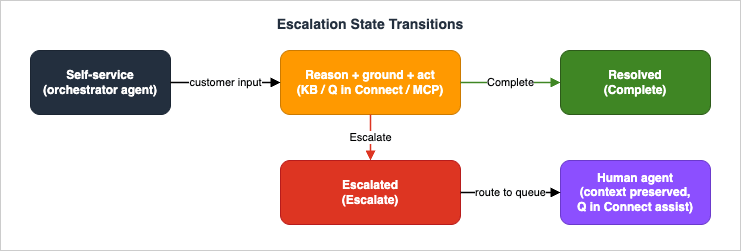
7.1 Return to Control
An orchestrator agent's vocabulary of "I am finished" is a small set of Return to Control tools. By default theSelfServiceOrchestrator includes two: Complete (end the interaction successfully) and Escalate (transfer to a human). You can remove these defaults or define your own — for example a custom Escalate tool that carries structured context (a reason code, a summary, the entities gathered) as inputs. While the agent is invoking MCP tools, it stays in control and the contact flow waits; only when it invokes a Return to Control tool does the contact flow take over again.7.2 Routing in the contact flow
The handshake between the agent and the flow runs over Lex session attributes. When a Return to Control tool is invoked, its tool name and input parameters are stored as Amazon Lex session attributes, which the contact flow reads with a Check contact attributes block to decide what to do next: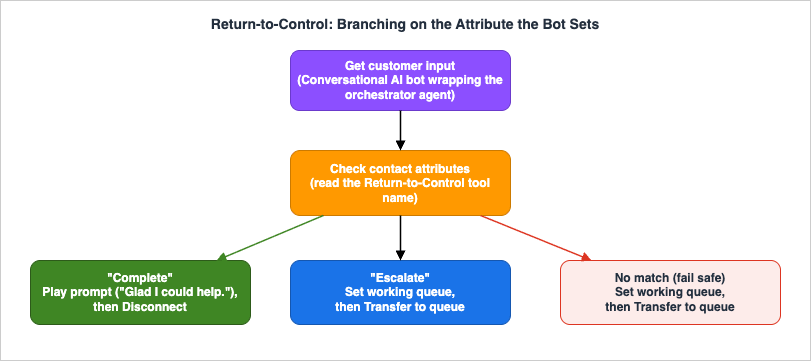
Because the routing decision lives in the deterministic contact flow rather than inside the model, you can audit and change it without touching the agent — and you can fail safe: anything the flow does not recognize routes to a human rather than dropping the contact.
7.3 Preserving context for the human
A handoff that loses context is barely better than a cold transfer. Preserve context on three levels. Contact attributes carry the structured facts the agent gathered (customer ID, order number, theEscalate reason and summary) so the agent workspace can display them on screen pop. The transcript of the self-service conversation travels with the contact, so the human can read what was already said. And Amazon Q in Connect keeps working after the transfer — now assisting the human agent with real-time recommendations grounded in the same knowledge base, so the resolution path the customer started in self-service continues seamlessly with a person. The customer's experience of all this is the one thing they actually judge: they do not repeat themselves.7.4 When to escalate
Escalation should be a designed decision, not an accident. The triggers worth encoding: low confidence or repeated failure (the agent cannot resolve after a bounded number of attempts — set that bound, because an agent that loops forever is worse than one that escalates), a sensitive or high-stakes action that policy says a human must approve, an explicit customer request for a person, and no grounded answer available (retrieval returned nothing relevant, so the honest move is to escalate rather than improvise). Encode these as conditions the agent's prompt and your contact flow both understand, and measure the escalation rate as a first-class metric (section 10) — both a too-high and a too-low rate are signals worth investigating.8. Voice: Bidirectional Streaming (Delegated to Nova Sonic)
This architecture is channel-agnostic: the same contact flows, Lex bots, AI agents, grounding, and escalation serve both chat and voice. Amazon Connect handles the telephony edge — bringing PSTN and SIP audio into the contact, rendering text-to-speech, and passing voice input to Lex through the Get customer input block — so everything in sections 3 through 7 works on a phone call without change.What this article deliberately does not cover is the low-latency, full-duplex, speech-to-speech voice agent: a single bidirectional stream where the model listens and speaks concurrently, supports barge-in (the caller interrupting mid-sentence), and collapses the recognize-think-synthesize cascade. That is a different architecture with its own latency budget, event model, and failure modes, and it is the entire subject of Real-Time Voice AI Agent Architecture with Amazon Nova Sonic. If your contact center needs conversational, interruptible voice rather than turn-based IVR, read that guide and treat the speech-to-speech agent as a component this contact-center architecture can route to — Amazon Connect remains the entry, routing, and escalation spine; the real-time voice model becomes the self-service engine on the voice channel.
9. Cross-Cutting: IAM, Recording, PII, and Guardrails
A contact center records calls and chats and handles personal data, so the cross-cutting concerns are not an appendix — they are load-bearing. This section covers least-privilege identity, recording and PII, data boundaries, and where guardrails belong.9.1 Least-privilege IAM
Every plane runs under its own scoped identity. Lex uses a service role that grants only what its features need —bedrock:InvokeModel for the specific models behind QnAIntent and assisted slot resolution, and retrieval permission on the specific knowledge base it queries. Lambda functions run with execution roles scoped to the exact backend they touch (one table, one API), never a broad data-access role. Q in Connect is granted access to its own assistant and knowledge base. And for AI agents, Amazon Connect governs tool access through the same security profiles that govern human agents — the agentic counterpart to IAM — so an agent can only call the tools its profile allows.{
"Version": "2012-10-17",
"Statement": [
{
"Sid": "LexInvokeBedrockForGenAIFeatures",
"Effect": "Allow",
"Action": "bedrock:InvokeModel",
"Resource": "arn:aws:bedrock:REGION::foundation-model/MODEL_ID"
},
{
"Sid": "LexRetrieveFromKnowledgeBase",
"Effect": "Allow",
"Action": "bedrock:Retrieve",
"Resource": "arn:aws:bedrock:REGION:ACCOUNT_ID:knowledge-base/KB_ID"
}
]
}Scope every
Resource to the specific model and knowledge base; resist the convenience of "*". The blast radius of a compromised or confused component is exactly the union of what its identity allows.9.2 Recording, PII, and the honesty about it
Lex can obfuscate slot values in conversation logs: set the slot'sObfuscationSettingType to DefaultObfuscation and Lex replaces the value with the slot name (a captured name logs as {full_name}). This is a useful control, and it is also a good example of why "the setting is on" is not the same as "the data is safe." The caveats are real and you must design around them: obfuscation applies to conversation logs only — the slot value is still passed in full to your validation and fulfillment Lambda functions; it is not obfuscated when stored in request or session attributes (if you stash a slot value as an attribute, you must encrypt or mask it yourself); it does not obfuscate the value in recorded audio, only in the transcription; and if you reuse a slot value in a prompt or response, that copy is not obfuscated.Layer the rest accordingly: turn on encryption with AWS KMS for recordings, transcripts, and logs; use conversational analytics (formerly Contact Lens) with sensitive-data redaction on the analytics it produces; and set retention deliberately rather than keeping everything forever. The honest framing for the whole section: each of these controls reduces exposure on a specific surface, and a real data-protection posture is the combination, audited end to end — not any single toggle.
9.3 Data boundaries
When the same contact center serves multiple tenants, brands, or sensitivity tiers, the boundary must be enforced in retrieval, not hoped for in the prompt. Knowledge Bases support metadata filtering so a query can be constrained to the caller's tenant or to non-sensitive content; the contact flow seeds the identifying attributes (tenant ID, channel) that the retrieval and tool calls then enforce. The detailed pattern — metadata filters as the tenant boundary, and what happens when they are misconfigured — is in the agentic RAG guide; the contact-center rule is simply that a caller must never be able to retrieve another caller's data, and that property is a retrieval-filter and IAM property, not a wording property.9.4 Guardrails (delegated)
Generative answers and agent actions need content safety: blocking disallowed topics, checking that answers are grounded in retrieved context (contextual grounding), and filtering harmful input and output. Amazon Q in Connect supports configurable AI guardrails, and Amazon Bedrock Guardrails can be applied independently across the pipeline. The full design — independent guardrails withApplyGuardrail, contextual grounding checks, PII policies, and prompt-injection defense — is the subject of Responsible-AI Guardrails Architecture on AWS, and prompt-injection patterns specifically are covered there. The contact-center-specific point is the honest one this article keeps making: do not present a guardrail as a guarantee. It is one layer of defense in depth; you still need least-privilege tools, retrieval boundaries, human review of sensitive actions, and observability to catch what slips through. This guide does not publish attack steps or working prompt-injection payloads — defense is described in terms of the layers, not the exploits.10. Observability and Failure Modes
You cannot run a contact center you cannot see. This section covers what to instrument and the specific failures that show up once real customers arrive — each as symptom, root cause, triage, and remediation.10.1 What to observe
Instrument every plane. Lex conversation logs capture each turn (with slot obfuscation as configured) and tag interpretations — recall that Bedrock-resolved slots carryinterpretationSource: Bedrock, so you can measure the assisted-slot-resolution lift. CloudWatch metrics from Lex track intent recognition and the generative features. Amazon Connect flow logs and Contact Lens (now conversational analytics) give you the contact's path through the flow and conversational analytics (sentiment, talk time, redacted transcript). Q in Connect analytics show recommendation usage and effectiveness. Lambda logs and AWS X-Ray trace the backend calls behind hooks and tools. Tie them together by contact ID so one customer's journey is reconstructable end to end.Beyond raw telemetry, track a handful of outcome metrics as first-class signals: containment (resolved in self-service without a human), escalation rate (and its reasons), grounded-answer rate versus fallback, tool success and timeout rates, and turn latency. These are the numbers that tell you whether the design is working, not just running.
10.2 The failure catalog
- Intent misclassification — Symptom: the customer asks for X and gets the flow for Y, or lands in fallback repeatedly. Root cause: thin or overlapping sample utterances, or a task modeled as an intent that should have gone to an agent. Triage: read conversation logs for the misrouted utterances; check intent confidence. Remediation: add utterances (or generate variations), disambiguate overlapping intents, or route the long tail to QnAIntent / an orchestrator agent.
- Ungrounded or hallucinated answer — Symptom: a confident answer that is wrong or unsourced. Root cause: retrieval returned nothing relevant but the model answered anyway, or the knowledge base is stale. Triage: inspect
x-amz-lex:qnA-search-response-source(was there a source?) and the retrieved passages. Remediation: tune retrieval and metadata filters (see the agentic RAG guide), enable contextual grounding guardrails, prefer exact-response for compliance answers, and make "no grounded answer" escalate rather than improvise. - Tool failure or MCP timeout — Symptom: the agent stalls, apologizes, or escalates mid-task. Root cause: a backend error, or work that exceeds the 30-second MCP timeout. Triage: correlate the tool invocation with Lambda/X-Ray traces. Remediation: make tools idempotent, move slow work to async jobs with a poll handle, and return structured tool errors the agent can reason about.
- Silent orchestrator — Symptom: the agent appears to work in logs but the customer hears or sees nothing. Root cause: orchestrator responses not wrapped in
<message>tags. Triage: inspect the agent's raw output. Remediation: fix the orchestration prompt's message formatting. - Escalation gap — Symptom: a customer who needed a human stayed stuck in self-service, or a transfer arrived with no context. Root cause: missing or unhandled Return to Control branches, or context not written to contact attributes. Triage: check the Check contact attributes routing and the attributes set at escalation. Remediation: add a fail-safe default route to a human, and carry summary/reason/entities as attributes (section 7).
- Latency budget overrun — Symptom: long silences on voice, slow replies on chat. Root cause: serial slow tool calls, cold starts, or large retrievals. Triage: trace the turn end to end with X-Ray. Remediation: parallelize independent tool calls, async the slow ones, warm critical Lambdas, and bound retrieval result counts.
10.3 Detect and recover
Turn the catalog into alarms and runbooks. Alarm on a rising fallback rate (classification drift), a rising tool-timeout rate (a slow or failing backend), a dropping grounded-answer rate (a stale or misconfigured knowledge base), and an escalation rate that moves sharply in either direction. The recovery move that prevents most customer-visible damage is the one this whole architecture is built around: when in doubt, fail safe to a human with context preserved. An automated contact center that escalates cleanly under uncertainty is trusted; one that improvises under uncertainty is not.11. Frequently Asked Questions
Is Amazon Q in Connect deprecated now that Amazon Connect has "AI agents"?No. The capability formerly marketed as Amazon Q in Connect is now positioned as one of Amazon Connect's AI agents — specifically the real-time agent-assist and knowledge agent — and its
qconnect APIs remain current. Since 2026-08-04, the Administrator Guide has called it agent assist. What also changed is the framing: AI agents are the broader capability, and Q in Connect is one member of that family.Do I still need Amazon Lex if I have AI agents?
Yes, for the right jobs. Lex is the foundation for predefined intents and specific conversational flows — deterministic, auditable tasks and IVR menus — while AI agents handle open-ended, multi-step requests. They are complementary, and the orchestrator agent is itself surfaced through Lex's "Get customer input" plumbing.
Agentic self-service or legacy self-service for a new build?
Agentic self-service. AWS recommends it for new implementations and has stated that legacy self-service is not receiving new feature updates. Agentic self-service adds multi-step reasoning, MCP tool integration, and continuous conversations.
Where does AWS Lambda fit — code hook or MCP tool?
Both. In the Lex layer, Lambda is the dialog/fulfillment code hook that returns the
sessionState contract. In the agentic layer, Lambda is the implementation behind a flow-module tool or a third-party MCP tool (via AgentCore Gateway). Keep the business logic in one function and adapt only at the thin edge — and respect the 30-second MCP tool timeout.How does context survive escalation to a human?
Through contact attributes (the structured facts and the escalation reason/summary), the conversation transcript that travels with the contact, and Amazon Q in Connect, which keeps assisting the human agent after the transfer. The customer does not repeat themselves.
Is slot obfuscation enough to protect PII?
No — it is necessary but not sufficient.
DefaultObfuscation masks slot values in conversation logs only; the value is still passed to your Lambda, is not obfuscated in session/request attributes or recorded audio, and is not masked if reused in a prompt or response. Combine it with KMS encryption, redaction in conversational analytics (formerly Contact Lens), retention policy, and least-privilege access.Does this cover real-time, interruptible voice?
No. This architecture covers turn-based voice (IVR) and chat. Low-latency, full-duplex speech-to-speech with barge-in is the subject of the Nova Sonic guide; treat that voice agent as a self-service engine this contact-center spine can route to.
12. Summary
An AI contact center on AWS is not a single product you switch on; it is five planes you compose. Amazon Connect contact flows are the omnichannel entry and the deterministic router. Amazon Lex handles well-defined intents and slots, with generative assisted slot resolution and a QnAIntent that grounds FAQ answers on a Bedrock Knowledge Base. Amazon Connect AI agents handle open-ended requests with orchestrator reasoning and MCP tools — out-of-the-box, flow-module, and third-party via AgentCore Gateway — while Amazon Q in Connect grounds answers and assists humans in real time, all on Amazon Bedrock foundation models. AWS Lambda is the integration substrate behind both code hooks and tools. And Return to Control plus the contact flow's Check contact attributes routing is the seam that hands a stuck contact to a human with full context.The Level 400 substance is in the seams, not the boxes: the
sessionState contract that Lex Lambda must return exactly; the <message> wrapper an orchestrator must emit; the 30-second MCP timeout that forces async design; the session attributes that carry an agent's decision into a deterministic route; the security profiles and scoped IAM that bound what any component can do; and the obfuscation caveats that keep you honest about PII. Build those seams well and the architecture does the two things a customer actually feels — grounded answers and a seamless hand-off — and fails safe to a human when it cannot. That is what makes an automated contact center worth deploying.For the broader cluster, this guide pairs with the voice and RAG guides it delegates to: route conversational voice to the Nova Sonic real-time voice architecture, ground answers with the agentic RAG architecture, and harden the whole pipeline with the responsible-AI guardrails architecture.
13. References
- Amazon Connect Customer Administrator Guide — contact flows, AI agents, escalation, Lambda and Lex integration.
- Use Connect AI agent self-service and Use agentic self-service — orchestrator agents, Return to Control, contact-flow routing.
- Enable AI agents to retrieve information and complete actions with MCP tools — out-of-the-box, flow-module, and third-party MCP tools; the 30-second timeout; governance.
- Add an Amazon Lex bot to Amazon Connect and Invoke AWS Lambda functions from contact flows.
- Amazon Lex V2 Developer Guide — generative AI features, AMAZON.QnAIntent, and assisted slot resolution.
- Amazon Lex V2 — AWS Lambda response format and input event format.
- Amazon Lex V2 — obscuring slot values in conversation logs.
- Amazon Connect Customer API Reference — Amazon Q Connect actions and the contact-center guidance on real-time agent assistance.
- Amazon Bedrock Knowledge Bases and the Bedrock model lifecycle.
- AWS What's New and the AWS Contact Center blog — AI agents for contact centers, Create smarter contact center experiences with the Amazon Connect assistant.
- Pricing: Amazon Connect pricing, Amazon Lex pricing, Amazon Bedrock pricing.
Related Articles in This Series
- Real-Time Voice AI Agent Architecture with Amazon Nova Sonic
The low-latency, bidirectional speech-to-speech voice path this guide delegates voice to. - Agentic RAG Architecture on Amazon Bedrock
Query planning, retrieval grading, and self-correction for the grounding layer. - Responsible-AI Guardrails Architecture on AWS
Independent content safety, PII, and prompt-injection defense. - AI Agent Engineering Glossary and Amazon Bedrock Glossary
Terminology references for the agentic and Bedrock concepts used here. - Building an MCP Server on AWS Lambda
The MCP server and AgentCore Gateway mechanics behind agent tools.
References:
Tech Blog with curated related content
Written by Hidekazu Konishi