Real-Time Voice AI Agent Architecture with Amazon Nova Sonic - Bidirectional Streaming, Tool Use, and Knowledge Grounding
First Published:
Last Updated:
1. Introduction
Most teams that try to build a voice agent discover the same thing: the hard part is not turning speech into text and text back into speech. The hard part is time. A spoken conversation is a real-time, full-duplex system. The person on the other end expects the agent to start answering within a few hundred milliseconds, expects to be able to interrupt it mid-sentence, and expects it to remember what was just said when they do. Stitch together a separate speech-to-text service, a text large language model, and a text-to-speech service and you inherit the sum of their latencies, the awkwardness of fixed turn boundaries, and a barge-in story that never quite feels natural.Amazon Nova Sonic takes a different shape. It is a speech-to-speech foundation model on Amazon Bedrock that unifies speech understanding and speech generation in one model, invoked over a single bidirectional streaming connection. Audio flows in while audio flows out, the model emits transcripts and tool-call requests as it goes, and interruptions are a first-class part of the protocol rather than something you bolt on afterward. That collapses the cascade and makes a genuinely conversational agent achievable — but it also means the architecture you build around it looks nothing like a request/response API call.
It helps to be concrete about what the cascade costs. In a stitched pipeline, the user finishes speaking, the speech-to-text service needs a moment of trailing silence to decide the utterance is over and then returns a transcript, the text model takes that transcript and generates a response, and only then does the text-to-speech service begin synthesizing audio — each stage waiting for the previous one to finish before it starts. Those waits compound, and they are structural, not a tuning problem: the pipeline cannot start speaking until the text is done, and it cannot finish the text until the transcript is complete. A speech-to-speech model on a bidirectional stream overlaps all of it — recognizing, deciding, and synthesizing concurrently as audio arrives — which is why the felt latency drops from "noticeably laggy" to "conversational."
This article is a Level 400 implementation walkthrough of one named reference architecture: a real-time voice agent in which a client streams microphone audio to Nova Sonic over
InvokeModelWithBidirectionalStream, Nova Sonic drives the dialog and decides when to call tools, a tool dispatcher executes those tools (Lambda functions, or tools federated through Amazon Bedrock AgentCore Gateway), and grounding answers come from Amazon Bedrock Knowledge Bases. We trace one conversational turn end to end, we go deep on the event model, barge-in, and turn management, and we work through the failure modes that only show up when you put a streaming model in front of real users: dropped streams, latency-budget overruns, interruption races, and tool timeouts.What this article is not: it is not an introduction to retrieval-augmented generation, to AgentCore's runtime and memory primitives, or to contact-center design. Those each have their own home. Static and agentic RAG live in Production RAG Architecture on Amazon Bedrock and the Agentic RAG guide in this series; the contact-center pattern (Amazon Connect, Lex, and agent assist, formerly Q in Connect) is its own guide. Here we stay on the voice-agent control loop and treat retrieval and orchestration as components we call into.
One important note before we start, because it changes which model you should build on. The Amazon Nova Sonic family has two members on Bedrock today: the original Nova Sonic (
amazon.nova-sonic-v1:0) and Nova 2 Sonic (amazon.nova-2-sonic-v1:0). As of this writing the original Nova Sonic has been moved to the Legacy lifecycle state with a scheduled end-of-life, while Nova 2 Sonic is the current Active model. New builds should target Nova 2 Sonic. The two share the same bidirectional streaming API, so almost everything here applies to both, but we use Nova 2 Sonic as the protagonist throughout and devote a dedicated section (§9) to the lifecycle situation and migration. We will not quote any prices in this article; for cost, follow the official Amazon Bedrock pricing page.2. The Reference Architecture at a Glance
The reference architecture has four planes, and the discipline of the whole design is keeping them straight. Audio and dialog live on one plane; tools and side effects live on another; knowledge lives on a third; and the cross-cutting concerns — identity, recording, observability — wrap all of them.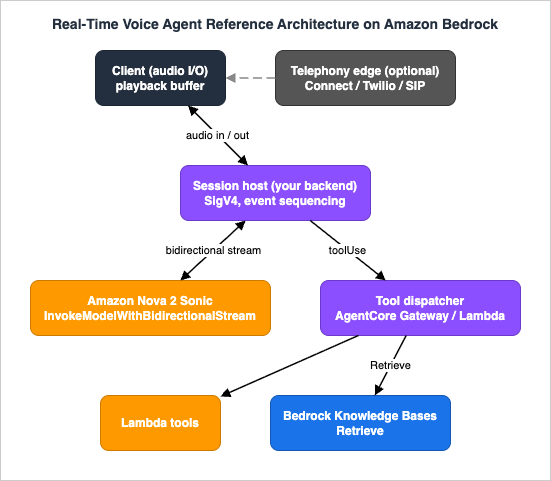
- Client (audio I/O) — Captures microphone audio, plays back synthesized audio, and owns the playback buffer. In a browser or mobile app it talks to your own backend over WebSocket/WebRTC; in a phone call it is a telephony provider's media stream. Crucially, the client is responsible for clearing its own audio queue the instant the model signals an interruption.
- Session host (your backend) — The process that actually holds the
InvokeModelWithBidirectionalStreamconnection to Bedrock. It signs requests with SigV4, sequences the input events, fans out the output events, executes (or dispatches) tool calls, and enforces the latency budget and session limits. This is the heart of the system and where most of your code lives. - Amazon Nova Sonic (
amazon.nova-2-sonic-v1:0) — The speech-to-speech model. It performs automatic speech recognition (ASR), runs the dialog, decides when a tool is needed, and synthesizes spoken responses — all streamed concurrently over the open channel. - Tool dispatcher — The code path that turns a model
toolUserequest into a real action. For a simple function it is a Lambda invocation. For a fleet of tools shared across agents and protocols it can be Amazon Bedrock AgentCore Gateway, which federates Lambda functions and external APIs as callable tools (the basics of AgentCore are deferred to the existing AgentCore guides). Either way, the dispatcher is a component the session host calls; it does not "wrap" the streaming session. - Amazon Bedrock Knowledge Bases — The grounding source. A retrieval tool calls the Knowledge Bases
RetrieveAPI and returns passages, which the session host hands back to the model as a tool result. Retrieval quality and agentic correction are the subject of the RAG guides; here it is one tool among several. - Optional telephony edge — Amazon Connect or a third-party provider bridges PSTN/SIP audio into the session. Nova 2 Sonic offers direct integrations here. The telephony deep dive belongs to the AI contact-center guide.
Two framing points that the rest of the article depends on. First, there is exactly one model invocation per conversation, not one per turn.
InvokeModelWithBidirectionalStream opens a long-lived channel that carries many user turns and many model responses until you close it. Second, the model never calls your tools directly. It emits a toolUse request on the output stream; your session host executes the work and feeds the result back as an input event. That indirection is what lets you gate, time-box, authorize, and observe every side effect — the Level 400 substance of the design.A third framing point is about trust, and it determines where your security controls live. Three of the four planes are untrusted from the session host's point of view. The client is untrusted: a browser or phone can send any audio, including audio crafted to manipulate the agent, so the session host must never grant the client direct authority over tools or data. The model's output is untrusted in the specific sense that a tool call it emits may be hallucinated, malformed, or aimed at something the caller is not entitled to — which is why every
toolUse passes through validation in the dispatcher. And the tools themselves run with their own least-privilege identities, so a compromised or buggy tool cannot reach beyond its remit. The session host is the one trusted coordinator in the middle, and keeping that boundary crisp — untrusted client, untrusted model output, least-privilege tools, one trusted coordinator — is what makes the architecture safe to expose to real callers.3. Bidirectional Streaming with Nova Sonic
This is the core of everything else, so we go slowly.3.1 Why a bidirectional stream, and what it rules out
Nova Sonic is invoked only through the Amazon Bedrock Runtime operationInvokeModelWithBidirectionalStream. It is not available through InvokeModel, InvokeModelWithResponseStream, or the Converse / ConverseStream APIs. The reason is structural: a speech-to-speech model needs a persistent, full-duplex channel so the user's audio can arrive continuously while generated speech streams back, without waiting for either side to finish an utterance. A request-then-response API cannot express that.Two consequences follow immediately and both are easy to trip over.
- Authentication must be SigV4.
InvokeModelWithBidirectionalStreamcannot be used with Amazon Bedrock API keys; it requires standard AWS credential-based authentication (SigV4), reflecting its more complex session lifecycle. A long-term Bedrock API key that works fine forConversewill simply not work here. Your session host signs the stream with IAM credentials (an execution role, instance/task role, or assumed role). - The connection has an 8-minute ceiling. A single bidirectional stream stays open for up to 8 minutes. A single session can carry multiple prompts and responses within that window, but a conversation that outlives 8 minutes must be continued onto a fresh stream. AWS publishes a connection-renewal / conversation-continuation pattern for exactly this; you re-establish the stream and replay enough conversation history to preserve context. Plan for renewal from day one rather than discovering it in production.
3.2 The three phases and the event envelope
Every interaction is a sequence of JSON events, each wrapped in anevent envelope, sent and received over the open stream. The interaction has three phases:- Session initialization — the client opens the stream and sends configuration events.
- Audio streaming — captured audio is encoded and streamed as a continuous series of events.
- Response streaming — concurrently, the model returns ASR transcripts, tool-use requests, text responses, and synthesized audio.
The identifiers form a hierarchy that ties the whole conversation together. A
promptName (a UUID you choose) is attached to every event after promptStart and binds the conversation. Each block of content within it is delimited by a contentName. Getting this hierarchy right is what keeps the model's context coherent.3.3 The input event flow
The input events must be sent in order. The minimal lifecycle is: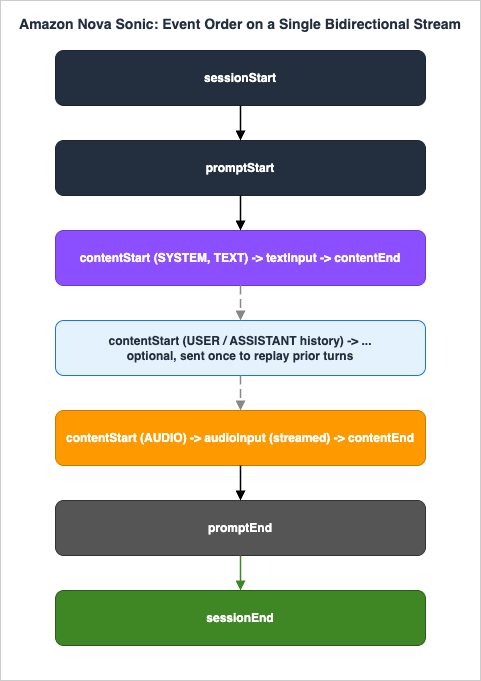
sessionStart carries the inference configuration and turn-detection configuration:{
"event": {
"sessionStart": {
"inferenceConfiguration": {
"maxTokens": 2048,
"topP": 0.9,
"temperature": 0.7
},
"turnDetectionConfiguration": {
"endpointingSensitivity": "MEDIUM"
}
}
}
}maxTokens, topP, and temperature shape generation. turnDetectionConfiguration.endpointingSensitivity is the knob that controls how aggressively the model decides a user has finished speaking — covered in §4.promptStart declares the output formats, the voice, and the tools for the whole prompt. The promptName you assign here must appear on every subsequent event:{
"event": {
"promptStart": {
"promptName": "conv-7f3a...",
"textOutputConfiguration": { "mediaType": "text/plain" },
"audioOutputConfiguration": {
"mediaType": "audio/lpcm",
"sampleRateHertz": 24000,
"sampleSizeBits": 16,
"channelCount": 1,
"voiceId": "matthew",
"encoding": "base64",
"audioType": "SPEECH"
},
"toolUseOutputConfiguration": { "mediaType": "application/json" },
"toolConfiguration": { "tools": [ /* toolSpec entries -- see section 5 */ ] }
}
}
}audio/lpcm), 16-bit, mono, base64-encoded. The output sample rate is selectable from 8000, 16000, or 24000 Hz — 24 kHz gives the best fidelity, while 8 kHz matches narrowband telephony. The voiceId selects from the model's voices (for example matthew, tiffany, amy, olivia, lupe, carlos, ambre, florian, lennart, beatrice, lorenzo, tina, carolina, leo, kiara, arjun); Nova 2 Sonic offers a larger, multilingual voice set than the original model. For the authoritative voice and language list, see the language-support documentation linked in References.contentStart / content / contentEnd is the universal three-part pattern for every content block. contentStart declares the block's type (TEXT, AUDIO, or TOOL), its role (SYSTEM, USER, ASSISTANT, TOOL, or SYSTEM_SPEECH), and a contentName. The system prompt is sent as a TEXT block with role: "SYSTEM":{
"event": {
"contentStart": {
"promptName": "conv-7f3a...",
"contentName": "system-1",
"type": "TEXT",
"interactive": false,
"role": "SYSTEM",
"textInputConfiguration": { "mediaType": "text/plain" }
}
}
}textInput event carrying the prompt string, then a contentEnd. Conversation history, when you carry it across a stream renewal, is injected exactly once, after the system prompt and before any audio, as a series of TEXT blocks with USER and ASSISTANT roles.Audio streaming opens an
AUDIO content block (role: "USER", interactive: true) and then emits a continuous series of audioInput events — approximately 32 ms of microphone audio per frame — all sharing one contentName until the conversation closes:{
"event": {
"audioInput": {
"promptName": "conv-7f3a...",
"contentName": "audio-1",
"content": "<base64-encoded 16 kHz LPCM frame>"
}
}
}Closing is a strict sequence and skipping any step leaks resources: send
contentEnd for any open content block, then promptEnd (referencing the promptName), then sessionEnd. The session is not properly terminated until all three are sent.A condensed Python skeleton of the session host, using the AWS SDK for Bedrock Runtime bidirectional streaming and explicit SigV4, looks like this:
from aws_sdk_bedrock_runtime.client import (
    BedrockRuntimeClient,
    InvokeModelWithBidirectionalStreamOperationInput,
)
from aws_sdk_bedrock_runtime.models import (
    InvokeModelWithBidirectionalStreamInputChunk,
    BidirectionalInputPayloadPart,
)
from aws_sdk_bedrock_runtime.config import (
    Config, HTTPAuthSchemeResolver, SigV4AuthScheme,
)
from smithy_aws_core.identity import EnvironmentCredentialsResolver

MODEL_ID = "amazon.nova-2-sonic-v1:0"
REGION = "us-east-1"

config = Config(
    endpoint_uri=f"https://bedrock-runtime.{REGION}.amazonaws.com",
    region=REGION,
    aws_credentials_identity_resolver=EnvironmentCredentialsResolver(),
    auth_scheme_resolver=HTTPAuthSchemeResolver(),
    auth_schemes={"aws.auth#sigv4": SigV4AuthScheme(service="bedrock")},
)
client = BedrockRuntimeClient(config=config)

stream = await client.invoke_model_with_bidirectional_stream(
    InvokeModelWithBidirectionalStreamOperationInput(model_id=MODEL_ID)
)

async def send_event(event_json: str) -> None:
    chunk = InvokeModelWithBidirectionalStreamInputChunk(
        value=BidirectionalInputPayloadPart(bytes_=event_json.encode("utf-8"))
    )
await stream.input_stream.send(chunk)service="bedrock" SigV4 scheme and the credential resolver are the concrete expression of "SigV4, not API keys." Everything after this is sending the events of §3.3 and consuming the output events of §3.4.3.4 The output event flow
While you stream audio in, the model streams events out, and they interleave. The output sequence within a turn is:usageEvent— token-accounting events delivered throughout the response. They report input and output token counts split intospeechTokensandtextTokens, with both incremental (delta) and cumulative (total) figures. This is your real-time meter — capture it for observability (§8).completionStart— opens the response, carryingsessionId,promptName, and acompletionIdthat unifies the turn's events.- ASR transcription — a
TEXTblock withrole: "USER"andadditionalModelFieldsof{"generationStage":"FINAL"}: the model's transcription of what the user said. It arrives first. toolUse— when the model needs external data or an action, it emits a tool-use block naming the tool and its parameters (see §5).- Text response (speculative) — a
TEXTblock withrole: "ASSISTANT"and{"generationStage":"SPECULATIVE"}: a preview of what the model plans to say. Treat it as provisional; it can be superseded if the turn is interrupted. - Audio response —
audioOutputevents delivering base64 LPCM speech chunks that share a singlecontentId. - Final transcription — after the audio completes (or is interrupted), an additional
TEXTblock withrole: "ASSISTANT"and{"generationStage":"FINAL"}gives the sentence-level transcript of what was actually spoken. completionEnd— closes the turn with astopReason.
Each content block also closes with a
contentEnd carrying a content-level stopReason of PARTIAL_TURN, END_TURN, or INTERRUPTED. That INTERRUPTED value is the barge-in signal, and it is the single most important output field for conversational quality — which is the entire subject of the next section.The asymmetry between the speculative and final assistant transcripts deserves a design note: render the speculative text if you want an instant on-screen caption, but persist only the final transcript to your transcript log, because the speculative one may describe speech the user never actually heard if they barged in.
A consumer loop over the output stream dispatches on event type; the shape that scales is a single async reader that updates captions, queues audio, runs tool calls, and watches for the interruption signal:
async for chunk in stream.output_stream:
    event = json.loads(chunk.value.bytes_.decode("utf-8"))["event"]
    if "textOutput" in event:
        on_caption(event["textOutput"]["content"])        # ASR or speculative text
    elif "audioOutput" in event:
        playback_queue.put(base64.b64decode(event["audioOutput"]["content"]))
    elif "toolUse" in event:
        await dispatch_tool(event["toolUse"])              # see section 5
    elif "contentEnd" in event:
        if event["contentEnd"].get("stopReason") == "INTERRUPTED":
            playback_queue.clear()                         # barge-in: flush now
    elif "usageEvent" in event:
record_usage(event["usageEvent"]) # observabilityINTERRUPTED check: it is the only place the client learns it must stop talking. Keep it cheap and unconditional.3.5 Session continuation across the 8-minute boundary
Because a stream lives at most 8 minutes, any conversation that can run longer needs a continuation strategy, and it is cleaner to build it as a normal state transition than as error handling. Track the stream's open time; a minute or so before the ceiling, open a second stream, replay the conversation as history, and cut over on a turn boundary so the user never hears the seam.Replaying history uses the same input events as a fresh session, with the history injected once after the system prompt and before audio:
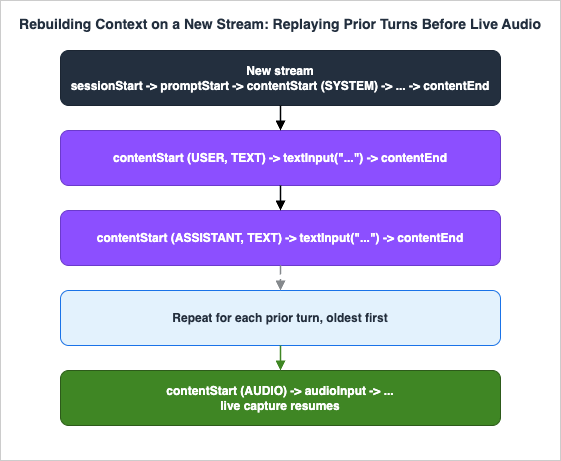
3.6 Prompting for speech, not text
The system prompt you send in §3.3 is the same mechanism you know from text models, but the content should be written for the ear, not the eye. Optimize for auditory comprehension: define the assistant's persona with conversational attributes (warm, patient, concise) rather than text-oriented ones (detailed, comprehensive, systematic), and instruct it to keep turns short — two or three sentences before checking understanding works well for chatty scenarios. Avoid asking for anything that only makes sense visually: bullet lists, tables, code blocks, headings, or markdown will be read aloud verbatim and sound wrong. Likewise, do not ask the model to change voice characteristics (accent, age, singing) or to produce sound effects; the voice is selected byvoiceId, not by the prompt. A useful baseline persona is a single sentence — "You are a friendly assistant engaged in a natural spoken dialog; keep responses short" — that you then specialize with the task. One niche control worth knowing: the SYSTEM_SPEECH role exists to steer transcription formatting for Hindi code-switching (Latin, Devanagari, or mixed scripts), which matters when your callers mix scripts mid-sentence.4. Barge-In and Turn Management
A voice agent that cannot be interrupted feels broken. People interrupt constantly — to correct themselves, to answer before the agent finishes a long policy recitation, to say "no, the other reservation." Nova Sonic treats interruption (barge-in) as a native capability, but realizing it correctly is a shared responsibility between the model and your client.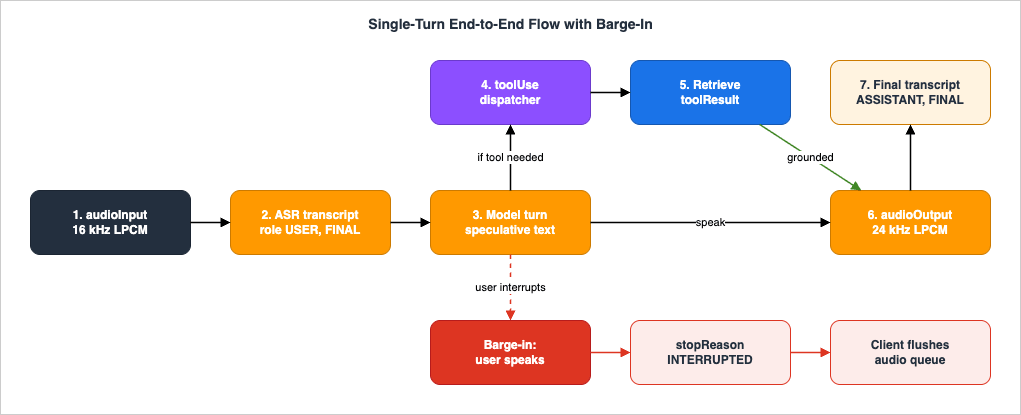
4.1 What the model does, and what you must do
When the user starts speaking while the model is mid-response, Nova Sonic immediately stops generating speech, preserves the full conversational context, sends an interruption notification, and begins processing the new user input. Context preservation is the subtle, valuable part: the model still remembers what it was saying, the topic, and the history, so the conversation stays coherent rather than resetting.There is one timing reality you must design around. Nova Sonic generates audio faster than real-time. By the time the user interrupts, the model has already sent you audio chunks that your client has buffered but not yet played. The model stopping generation is therefore not enough — if your client keeps draining its buffer, the user hears the agent keep talking over them for a second after they interrupted, which is exactly the failure barge-in is supposed to prevent.
So the contract is: when you observe the interruption signal (the
contentEnd with stopReason: "INTERRUPTED", and the accompanying content notification), your client must clear its audio queue and stop playback immediately. This is non-negotiable client logic, not an optimization. The state machine below makes the responsibility explicit.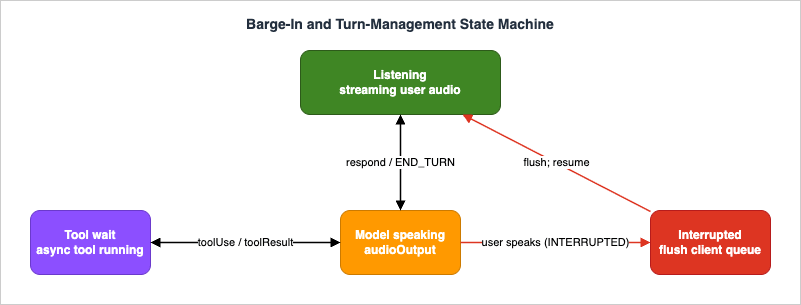
4.2 Turn detection and endpointing
How does the model decide the user has finished a turn so it can respond? That is endpointing, configured per session viaturnDetectionConfiguration.endpointingSensitivity:HIGH— detects pauses quickly, enabling faster responses, but may cut off slower or more deliberate speakers.MEDIUM— balanced sensitivity for most conversational scenarios; the recommended default.LOW— waits longer before deciding the user has stopped, which suits thoughtful or hesitant speakers but adds response latency.
This is a genuine product decision, not a default to accept blindly. A fast-paced retail assistant might use
HIGH; an agent that takes dictation of an address or a long account number should use LOW so it does not truncate the user mid-number. Because it is set on sessionStart, you can choose it per call type, or even per user if you know their speaking style.4.3 The latency budget
"Real-time" has to be quantified or it cannot be engineered. Define a per-turn latency budget — the wall-clock time from the user finishing speaking to the first audio chunk reaching their ear — and account for every component that spends it: network transit client→backend→Bedrock, endpointing delay (a direct function ofendpointingSensitivity), model time-to-first-audio, any tool round-trips on the critical path, and playback buffering on the client. The streaming model removes the largest cascade cost, but you can squander the savings: a synchronous tool call on the response path, a chatty backend hop, or an over-large client jitter buffer each add hundreds of milliseconds.Two levers keep the budget intact. First, keep tools off the critical path whenever possible — Nova 2 Sonic's asynchronous tool calling (§5.2) lets the model keep conversing while a tool runs, so a slow lookup does not freeze the turn. Second, instrument the budget: derive time-to-first-audio from the gap between the last inbound
audioInput and the first outbound audioOutput, and alarm when the p95 crosses your threshold. You cannot defend a budget you do not measure.A worked budget makes the trade-offs concrete. Treating roughly 800 ms mouth-to-ear as a comfortable conversational target, a representative allocation is:
| Component | Typical contribution | Lever |
|---|---|---|
| Client capture and encode | Small, fixed | Frame size (~32 ms) |
| Network client → backend → Bedrock | Varies by geography | Choose the nearest supported Region |
| Endpointing delay | Tens to hundreds of ms | endpointingSensitivity (HIGH/MEDIUM/LOW) |
| Model time-to-first-audio | Often the dominant term | Keep tools off the critical path |
| Tool round-trip (if on the path) | Can dominate | Async tool use; pre-fetch; cache |
| Client jitter buffer | Tens of ms | Size to the minimum that hides loss |
The numbers are workload-specific and are not a benchmark — measure your own — but the structure holds: endpointing and any synchronous tool call are the two terms you control most directly, and they are exactly the two that async tool use and a tuned
endpointingSensitivity address.5. Tool Use and Knowledge Grounding
A voice agent that can only talk is a demo. A voice agent that can check a reservation, look up an order, or answer from your documentation is a product. Both come from the same mechanism: tool use (function calling).5.1 Defining and choosing tools
Tools are declared in thepromptStart event as toolSpec entries — each with a name, a description, and a JSON-schema inputSchema. The description is what the model reasons over to decide when to call the tool, so write it as a precise trigger ("Call this to fetch the current status of a hotel reservation by confirmation number"), not a vague label.{
"toolConfiguration": {
"tools": [
{
"toolSpec": {
"name": "lookup_reservation",
"description": "Retrieve a hotel reservation's status by confirmation number.",
"inputSchema": {
"json": {
"type": "object",
"properties": {
"confirmation_number": {
"type": "string",
"description": "The 6-character confirmation code."
}
},
"required": ["confirmation_number"]
}
}
}
}
],
"toolChoice": { "auto": {} }
}
}toolChoice controls invocation policy and has three modes:auto(default) — the model decides whether any tools are needed and may call several. Maximum flexibility.any— at least one tool is called at the start of the response, with the model choosing which. Useful when you have several knowledge sources and want to guarantee the agent consults one.tool— a specific named tool is called exactly once at the start of the response, regardless of whether the model thinks it is needed. This is the knowledge-grounding lever: point it at a retrieval tool and every answer is grounded in retrieved context before the model speaks.
5.2 Asynchronous tool use
Nova 2 Sonic introduces asynchronous tool calling: when the model needs a tool, it does not freeze the dialog waiting for the result. It continues to respond to new user input while the tool runs in the background, and folds the result into the conversation when it returns. Concretely, a user can ask "What's the weather, and what's next on my list?" and the agent answers the second question immediately while the weather tool resolves. For latency this is decisive — a slow backend no longer stalls the whole turn — but it does mean your dispatcher must correlate results back to the righttoolUseId rather than assuming a strict call-then-result ordering.5.3 Executing a tool and returning the result
The model never executes anything. The loop is:- The model emits a
toolUseoutput event carrying atoolUseId, the tool name, and parameters (a JSON string extracted from the user's request). - Your session host validates the parameters and dispatches the work — invoke a Lambda function directly, or route through AgentCore Gateway, which exposes Lambda functions and external APIs as governed, callable tools. (AgentCore Gateway is the place to centralize auth, throttling, and a shared tool catalog across multiple agents; its setup is covered in the AgentCore guides and is out of scope here.)
- Your host returns the result as an input
TOOLcontent block: acontentStartwithtype: "TOOL",role: "TOOL", and atoolResultInputConfigurationreferencing the originaltoolUseId, followed by atoolResultevent whosecontentis a stringified JSON object, then acontentEnd.
contentStart of type TOOL that references the original call:{
"event": {
"contentStart": {
"promptName": "conv-7f3a...",
"contentName": "toolresult-1",
"type": "TOOL",
"role": "TOOL",
"toolResultInputConfiguration": {
"toolUseId": "<id from the toolUse event>",
"type": "TEXT",
"textInputConfiguration": { "mediaType": "text/plain" }
}
}
}
}toolResult payload and a contentEnd:{
"event": {
"toolResult": {
"promptName": "conv-7f3a...",
"contentName": "toolresult-1",
"content": "{\"status\":\"confirmed\",\"checkin\":\"2026-07-02\"}"
}
}
}5.4 Knowledge grounding via Knowledge Bases
Grounding an answer in your own content is just a tool whose implementation calls Amazon Bedrock Knowledge Bases. The retrieval tool's Lambda invokes the Knowledge BasesRetrieve API with the user's query (lifted from the ASR transcript or synthesized by the model), receives ranked passages, and returns them as the tool result. Force it with toolChoice: tool when every answer must be grounded, or leave it on auto when the agent should retrieve only for knowledge questions.import boto3
agent_rt = boto3.client("bedrock-agent-runtime")
def retrieve(query: str, kb_id: str) -> list[dict]:
resp = agent_rt.retrieve(
knowledgeBaseId=kb_id,
retrievalQuery={"text": query},
retrievalConfiguration={
"vectorSearchConfiguration": {"numberOfResults": 5}
},
)
return [
{"text": r["content"]["text"], "score": r.get("score")}
for r in resp["retrievalResults"]
]5.5 Cross-modal input
Nova 2 Sonic also accepts text mid-conversation while a voice session is active — cross-modal input. You send aTEXT contentStart with interactive: true and role: "USER", then a textInput. This is how you let a user switch from speaking to typing (in a noisy environment, or to enter a code precisely) without tearing down the session, and how an application can inject context the user did not speak.6. Telephony Integration (Optional)
Many voice agents live on a phone line, not in a browser. Telephony adds three problems the bidirectional API does not solve for you: bridging PSTN/SIP audio into the session, codec optimization (phone audio is narrowband), and call lifecycle management. There are two ways to handle them.The first is to put Amazon Connect (or another contact-center platform) at the edge and bridge its media stream to your Nova Sonic session host. The agent becomes the conversational brain of a contact flow. This is the contact-center architecture, and its depth — contact flows, Lex front-ends, agent assist (formerly Q in Connect), fulfillment Lambdas — is the subject of the dedicated AI Contact Center Architecture guide, not this one.
The second, newer path is Nova 2 Sonic's direct telephony integrations. Nova 2 Sonic includes integrations with leading telephony providers — Amazon Connect, Vonage, Twilio, and Audiocodes — and media platforms such as LiveKit and Pipecat. These handle the hard parts of phone audio (codec optimization, session lifecycle, bidirectional event handling, telephony acoustics) so you can drop a Nova 2 Sonic agent into existing call-center infrastructure without managing the underlying telephony complexity yourself.
For this article the takeaway is narrow: telephony is an audio transport in front of the same session host and the same event model. Choosing 8 kHz output in
audioOutputConfiguration to match narrowband telephony, and accounting for the extra network legs in your latency budget, are the only places telephony changes the voice-agent design. Everything in §3–§5 is unchanged.7. Cross-Cutting: IAM, Recording, and PII
A voice agent ingests, by definition, some of the most sensitive data a system can touch — a person's voice, what they say, and often account numbers, health details, or payment information spoken aloud. The cross-cutting controls are not optional polish.7.1 Least-privilege IAM
The session host's role needs permission to invoke the model and to call the tools' downstream services — and nothing more. The non-obvious part, and a frequent source of confusion, is the action name.InvokeModelWithBidirectionalStream is authorized by the bedrock:InvokeModel IAM action, not by a separate action of the same name as the API. Scope it to the specific model:{
"Version": "2012-10-17",
"Statement": [
{
"Sid": "AllowNova2SonicBidirectional",
"Effect": "Allow",
"Action": "bedrock:InvokeModel",
"Resource": "arn:aws:bedrock:us-east-1::foundation-model/amazon.nova-2-sonic-v1:0"
}
]
}{
"Version": "2012-10-17",
"Statement": [
{
"Sid": "AllowRetrieveOnTenantKB",
"Effect": "Allow",
"Action": "bedrock:Retrieve",
"Resource": "arn:aws:bedrock:us-east-1:123456789012:knowledge-base/KB123EXAMPLE"
}
]
}bedrock:Retrieve on the specific Knowledge Base; each other tool's role gets only what that tool needs. Keep these on separate roles — the session host should not be able to read your database, and the database tool should not be able to open a model stream. That separation is what bounds the blast radius when one component is compromised.7.2 Recording, retention, and PII
Recording a call is a product and legal decision, not a default. Decide deliberately what you capture — raw audio, the ASR transcripts, the final assistant transcripts, tool inputs and outputs — and for each, where it is stored, how long it is retained, who can read it, and how it is deleted. Encrypt recordings and transcripts at rest with KMS and in transit. Tool inputs and outputs are an easily-overlooked PII sink: alookup_reservation result contains a guest's stay dates; a payment tool's arguments may contain card data. Apply the same retention and access discipline to tool payloads as to the audio itself.For redaction and detection of PII in transcripts, Amazon Comprehend can identify and redact entities before transcripts are persisted or indexed; that responsible-AI and content-safety layer (Bedrock Guardrails, Comprehend, audit) is its own guide in this series. Two honest boundaries to hold here. First, do not equate "encrypted and access-controlled" with "compliant" — your regulatory obligations (PCI, HIPAA, GDPR, and regional voice-recording consent law) are determined by your data and jurisdiction, and architecture is necessary but not sufficient. Second, establish data boundaries in multi-tenant or multi-purpose deployments: tag every recording, transcript, and retrieval call with the tenant and purpose, and enforce that a retrieval tool can only reach the caller's own Knowledge Base partition. Tenant isolation is the subject of the multi-tenant SaaS guide.
8. Observability and Failure Modes
Streaming systems fail differently from request/response systems, and the failures are time-shaped: a stream that dies at minute seven, a turn that blows its latency budget, an interruption that races a tool result. You cannot debug what you cannot see, so observability comes first, then the failure catalog.8.1 What to observe
Three sources, layered:- The stream itself. The
usageEventstream gives you per-turnspeechTokensandtextTokens(delta and total) — your real-time token meter. From the event timestamps, derive time-to-first-audio (lastaudioInput→ firstaudioOutput), turn duration, interruption rate (fraction of turns ending instopReason: INTERRUPTED), and tool latency (pertoolUseId). These are the KPIs of a voice agent. - Bedrock invocation logging. Enable Amazon Bedrock model-invocation logging to capture invocation metadata to CloudWatch Logs and/or S3 for audit and offline analysis.
- CloudTrail. Logging
InvokeModelWithBidirectionalStreamcalls requires configuring advanced event selectors to record data events for both theAWS::Bedrock::ModelandAWS::Bedrock::AsyncInvokeresource types — management-event logging alone will not capture these data-plane calls. Wire this up if you need an audit trail of who opened streams against which model.
Emit your derived metrics to CloudWatch as custom metrics and build the alarms in §8.3 on them.
Emitting them is a few lines per turn. The CloudWatch embedded metric format (EMF) lets you log a structured record that CloudWatch ingests as metrics without a separate API call:
import json, time

def emit_turn_metrics(ttfa_ms, tool_ms, interrupted):
    print(json.dumps({
        "_aws": {
            "Timestamp": int(time.time() * 1000),
            "CloudWatchMetrics": [{
                "Namespace": "VoiceAgent",
                "Dimensions": [["Model"]],
                "Metrics": [
                    {"Name": "TimeToFirstAudioMs", "Unit": "Milliseconds"},
                    {"Name": "ToolLatencyMs", "Unit": "Milliseconds"},
                    {"Name": "Interrupted", "Unit": "Count"},
                ],
            }],
        },
        "Model": "amazon.nova-2-sonic-v1:0",
        "TimeToFirstAudioMs": ttfa_ms,
        "ToolLatencyMs": tool_ms,
        "Interrupted": 1 if interrupted else 0,
}))TimeToFirstAudioMs against your latency budget, and watch Interrupted as a rate — a rising interruption rate often means the agent is too verbose or endpointing is too slow, not that users are unhappy.8.2 The failure catalog
* You can sort the table by clicking on the column name.| Failure | Symptom | Likely cause | Triage → remediation |
|---|---|---|---|
| Stream disconnect / 8-minute cap | Audio cuts off mid-conversation; stream closes | Hit the 8-minute connection ceiling, or a network/credential drop | Check session age against 8 min and connection errors → implement the renewal/continuation pattern; replay history on the new stream |
| Latency-budget overrun | Noticeable lag before the agent responds | Synchronous tool on the critical path; chatty backend hop; endpointingSensitivity: LOW; oversized jitter buffer | Inspect time-to-first-audio and tool latency per turn → move tools off the path via async tool use; tune endpointing; shrink the client buffer |
| Interruption race | Agent talks over the user for ~1 s after they interrupt | Client did not flush its audio queue on INTERRUPTED | Confirm the client clears playback on the interruption signal → fix client barge-in handling (model stop is not client stop) |
| Tool timeout | Turn stalls or the agent says it cannot complete the action | Downstream tool slow or failing; no per-tool deadline | Check tool latency and error rate per toolUseId → enforce per-tool timeouts; return a graceful is_error tool result so the model can recover verbally |
| Endpointing too aggressive | Agent cuts users off mid-sentence | endpointingSensitivity: HIGH for slow speakers or long inputs (codes, addresses) | Correlate truncation with sensitivity → lower to MEDIUM/LOW for the affected call types |
| Retrieval miss / ungrounded answer | Agent answers vaguely or hallucinates | Retrieval returned nothing relevant; results too long to speak | Inspect retrieval results and scores → improve the Knowledge Base and query (see the RAG guides); summarize results to speakable length |
| Region / model error | AccessDenied or model-not-found at stream open | Calling in an unsupported Region, wrong model ID, or missing bedrock:InvokeModel | Verify Region against the supported list and the IAM action/resource → correct Region, model ID, or policy |
8.3 Detect and recover
Two recovery patterns are load-bearing. Stream renewal turns the 8-minute ceiling from an outage into a seam: track session age, and before the cap, open a fresh stream, replay the conversation history once (after the system prompt, before audio), and hand the user over without their noticing. Graceful tool failure keeps a stuck backend from killing the conversation: give every tool a deadline, and on timeout or error return a tool result withis_error set and a short message, so the model apologizes and offers an alternative in speech rather than the turn hanging. Both are the difference between a demo and a system real users trust.A third pattern is quieter but matters under asynchronous tool use: idempotency. Because the model can keep talking while a tool runs and can, in edge cases, ask for the same action twice (a stream renewal mid-tool, or a user who repeats themselves), any tool with a side effect — charging a card, cancelling a reservation, sending a message — should be safe to invoke twice with the same effect as once. Carry an idempotency key derived from the
toolUseId (or a business key like the confirmation number) into the downstream call, and have the backend deduplicate on it. Read-only tools like retrieval need none of this, but the moment a tool mutates state, idempotency is the difference between "the agent double-charged me" and a clean retry. Pair it with the per-tool timeout from the failure catalog: a tool that times out on your side may still have succeeded downstream, and only an idempotent design lets you retry without fear.9. Variations and Lifecycle Notes
This section exists because of a fact that materially affects what you should build, and it is the one thing to get right before writing a line of code.9.1 Nova Sonic v1 is Legacy; build on Nova 2 Sonic
The Amazon Nova Sonic family has two members on Bedrock, and they are at very different points in their lifecycle:| Model | Model ID | Lifecycle | Notes |
|---|---|---|---|
| Nova Sonic (v1) | amazon.nova-sonic-v1:0 | Legacy (scheduled end-of-life) | New customers cannot adopt Legacy models; existing users should migrate before the EOL date |
| Nova 2 Sonic | amazon.nova-2-sonic-v1:0 | Active | Current model; 1M-token context, larger multilingual voice set, async tool use, configurable turn taking, cross-modal input, direct telephony integrations |
On Amazon Bedrock, a model in the Legacy state is on a path to end-of-life (EOL), after which requests to it fail. The original Nova Sonic carries a published Legacy date and EOL date; new builds should target Nova 2 Sonic. Always confirm the current lifecycle state and dates on the official Amazon Bedrock model lifecycle page before you commit, because lifecycle dates are specific to Bedrock and can change.
The good news is that migration is nearly free. Nova 2 Sonic uses the same bidirectional streaming API as the original; existing integration patterns and event-handling code continue to work. For many applications, migrating is as simple as changing the model ID to
amazon.nova-2-sonic-v1:0 — the enhancements that do not require new configuration apply immediately. New capabilities (cross-modal input, configurable turn taking) are opt-in through additional parameters and events you can adopt incrementally.9.2 Regional availability and quotas
As anInvokeModelWithBidirectionalStream-only model, Nova 2 Sonic has a focused availability footprint. At the time of writing it is offered with In-Region inference in US East (N. Virginia) us-east-1, US West (Oregon) us-west-2, Europe (Stockholm) eu-north-1, and Asia Pacific (Tokyo) ap-northeast-1, on the Standard service tier (cross-Region geo/global inference and Priority/Flex/Reserved tiers are not offered for this model). Confirm the current list against the model card and the Regional availability by models page before deploying, and check your account's service quotas — concurrent bidirectional sessions are governed by Bedrock quotas and may need an increase for production load.9.3 Alternative shapes (no cost figures)
The reference architecture flexes along a few axes, and the choice is about control, latency, and operational model — not price (for cost, consult the official pricing page):- Cascade vs. speech-to-speech. You can assemble a pipeline from Amazon Transcribe (STT) → a text model via
Converse→ Amazon Polly (TTS). It gives you maximum control over each stage and is the right tool when you need a transcription artifact or a non-conversational batch flow — but it reintroduces the cascade latency and the brittle turn boundaries that Nova Sonic exists to remove. Use speech-to-speech for live conversation; reach for the cascade only when its control outweighs its latency. - Direct vs. AgentCore-mediated tools. Direct Lambda invocation is the simplest dispatcher and is right for a single agent with a few tools. AgentCore Gateway earns its place when many agents share a governed tool catalog, or when tools must be reached over MCP/A2A.
- Browser/app vs. telephony edge. The same session host serves both; only the audio transport and sample rate change (§6).
10. Frequently Asked Questions
Can I call Nova Sonic withConverse or InvokeModel?No. Both Nova Sonic and Nova 2 Sonic are invoked only through
InvokeModelWithBidirectionalStream; the speech-to-speech architecture requires a live, full-duplex channel that InvokeModel and Converse cannot provide.Can I authenticate the stream with a Bedrock API key?
No.
InvokeModelWithBidirectionalStream cannot be used with Amazon Bedrock API keys; it requires SigV4 / standard AWS credentials. Sign with an IAM role or assumed credentials.Which IAM action authorizes the bidirectional stream?
bedrock:InvokeModel — despite the API being named InvokeModelWithBidirectionalStream, the IAM action is bedrock:InvokeModel, scoped to the model's foundation-model ARN.How long can a single stream stay open?
Up to 8 minutes. A session can carry many turns within that window; for longer conversations use the connection-renewal / conversation-continuation pattern and replay history onto a fresh stream.
How does barge-in actually work?
When the user speaks over the agent, the model stops generating, preserves context, and signals an interruption (a content
stopReason of INTERRUPTED). Because the model generates faster than real-time, your client must clear its audio queue and stop playback on that signal — the model stopping is not enough.How do I ground answers in my own documents?
Expose a retrieval tool whose implementation calls the Bedrock Knowledge Bases
Retrieve API, and either let the model call it (toolChoice: auto) or force it (toolChoice: tool) when every answer must be grounded. Keep returned context short enough to speak.Should I build on Nova Sonic or Nova 2 Sonic?
Nova 2 Sonic. The original Nova Sonic is in the Legacy lifecycle state with a scheduled EOL; Nova 2 Sonic is the Active model and uses the same API, so migration is typically just a model-ID change.
Does a tool call freeze the conversation?
Not on Nova 2 Sonic. Its asynchronous tool calling lets the model keep conversing while a tool runs in the background and fold in the result when it returns — which is also why keeping tools off the critical path protects your latency budget.
11. Summary
A production voice agent is an exercise in managing time and turns, and Amazon Nova Sonic reshapes the problem by replacing the STT→LLM→TTS cascade with a single speech-to-speech model on one bidirectional stream. The reference architecture is small but disciplined: a client that owns audio capture, playback, and — critically — flushing its buffer on barge-in; a session host that holds the SigV4-signedInvokeModelWithBidirectionalStream connection, sequences the event protocol, dispatches tools, and defends the latency budget; Nova 2 Sonic driving ASR, dialog, tool decisions, and speech synthesis concurrently; a tool dispatcher (Lambda or AgentCore Gateway) that is the gate for every side effect; and Knowledge Bases reached as a grounding tool.The Level 400 substance is in the seams. The event model (
sessionStart → promptStart → contentStart/content/contentEnd → promptEnd → sessionEnd) and its output counterpart (completionStart, ASR, toolUse, speculative then final text, audio, completionEnd) are the contract you program against. Barge-in is a shared responsibility where the model signals INTERRUPTED and the client must act. Tools are indirect by design, which is exactly what lets you authorize, time-box, and observe them. And the failure modes — the 8-minute cap, latency overruns, interruption races, tool timeouts — are predictable and recoverable once you instrument time-to-first-audio, interruption rate, and per-tool latency, and build stream renewal and graceful tool failure in from the start. Build on Nova 2 Sonic, keep tools off the critical path, and the result is an agent that feels less like software and more like a conversation.For adjacent depth, see the related guides: grounding and retrieval quality in Production RAG Architecture on Amazon Bedrock and the Agentic RAG guide; the model landscape in Amazon Bedrock Model Catalog 2026; agent vocabulary in the AI Agent Engineering Glossary and Amazon Bedrock Glossary; and the telephony/contact-center pattern in the AI Contact Center Architecture guide.
12. References
- Using the Amazon Nova Sonic Speech-to-Speech model - Amazon Nova User Guide
- Getting started with speech-to-speech - Amazon Nova 2 User Guide
- Handling input events with the bidirectional API - Amazon Nova 2 User Guide
- Handling output events with the bidirectional API - Amazon Nova 2 User Guide
- Barge-in - Amazon Nova 2 User Guide
- Tool configuration - Amazon Nova 2 User Guide
- InvokeModelWithBidirectionalStream - Amazon Bedrock Runtime API Reference
- API compatibility by models - Amazon Bedrock User Guide
- Nova 2 Sonic model card - Amazon Bedrock User Guide
- Amazon Bedrock model lifecycle
- Regional availability by models - Amazon Bedrock User Guide
- Retrieve - Amazon Bedrock Agent Runtime API Reference
- Introducing Amazon Nova 2 Sonic - AWS News Blog
- Production RAG Architecture on Amazon Bedrock
- Agentic RAG Architecture on Amazon Bedrock
- Amazon Bedrock Model Catalog 2026
- AI Agent Engineering Glossary
- Amazon Bedrock Glossary
References:
Tech Blog with curated related content
Written by Hidekazu Konishi