When a Step Functions Workflow Is an Agent Tool - Pinned Parameters, Standard Versus Express, and Task Tokens
First Published:
Last Updated:
states for the connectorId enables this functionality. The connector exposes ten Step Functions operations as tools in the Model Context Protocol (MCP), allowing agents to discover tools using tools/list and invoke them using tools/call. Existing Standard and Express state machines can be directly integrated into agents without writing any Lambda functions or MCP servers.However, once integrated, the ability for the agent to modify certain aspects varies depending on the specific operation. Four of the ten operations reach only the state machine that was pinned when the target was created. Three operations cannot be pinned, and the IAM policy of the Gateway service role scopes them to execution Amazon Resource Names (ARNs). For the remaining three, IAM cannot scope the resources, and whether the caller holds a task token is the boundary. Furthermore, the available operations differ between Standard and Express workflows.
This article outlines these distinctions, presenting them in a table detailing each operation and illustrating the layers involved in a diagram. It will specify, for each operation, what limitations are imposed by pinning, the Gateway's service role IAM policy, task tokens, or Gateway inbound authorization, as well as by policies or interceptors. It will then differentiate between information explicitly stated in the documentation and what is not found in the documentation. This article is not a step-by-step guide for configuring the connector; that information is available in the AgentCore developer guide and the Step Functions tutorial. Pricing details will not be included. The information presented here was verified as of November 4, 2026.
On November 4, 2026, testing was conducted in a validation account within the
us-east-1 region, testing pinning, Express executions, task tokens, denials by the service role, and Policy. Chapter 10 describes the results.Related articles on this site:
- AWS Step Functions Orchestration Patterns for Generative AI - Direct Service Integration, Parallelism, Callbacks, and Payload Limits
- Amazon Bedrock AgentCore Master Index - A Hub for AgentCore Articles and Decision Patterns
- Amazon Bedrock AgentCore Policy Implementation Guide - Cedar-Based Agent Authorization and Default-Deny Design
- Where a Web Search Domain Filter Is Enforced - Who Can Override It and What Comes Back in Amazon Bedrock, AgentCore Gateway, and Claude's Web Tools
Table of Contents
- 1. Scope and Assumptions
- 2. How to Read the Tables
- 3. Call Directions and Boundary Layers
- 4. The Ten Operations
- 5. Pinning
- 6. Gateway Service Role
- 7. Task Tokens
- 8. Standard and Express
- 9. Where Sources Disagree, What the Documentation Does Not List, and Statements Not Found
- 10. Observations from This Configuration
- 11. Failure Modes
- 12. Frequently Asked Questions About Making Step Functions Workflows Agent Tools
- 13. Summary
- 14. References
1. Scope and Assumptions
This chapter defines the intended audience for this article, outlines the scope of its content, specifies the date when the source materials were verified, and establishes the terminology used.1.1 Intended Audience
This article is intended for platform and security professionals who want to enable agents, through MCP, to invoke existing Step Functions workflows, such as order processing, approvals, and batch processing. In particular, it is written for readers who think the following:- Agents can only operate state machines that are configured as tools.
- Even with Express state machines, the same operations are available as with Standard state machines.
- By restricting the service role,
SendTaskSuccesscan be limited to specific executions. - By applying a policy to the Gateway, any operation can be blocked.
None of these holds as stated. Only four out of ten available operations can be pinned to a specific state machine. In Express, four out of ten operations (
ListExecutions, DescribeExecution, GetExecutionHistory, and StopExecution) are not supported. Furthermore, three operations, including SendTaskSuccess, cannot be scoped to resources in IAM. No statement that Policy applies to connector targets was found in the documentation this article read. Chapters 4 through 9 will outline the extent to which the information presented can be verified against existing documentation.Regarding Policy, in the configuration of Chapter 10, Policy in
ENFORCE mode denied calls to the connector's tools (Observation).1.2 Scope of Coverage and Exclusions
This article addresses scenarios where an agent is invoking Step Functions through the AgentCore Gateway’s Step Functions connector, specifically focusing on what prevents the agent from proceeding. More precisely, it covers the following:- The ten operations and the type of boundary for each.
- The pinning mechanism and the point at which failures become visible.
- The IAM policy of the Gateway service role and the IAM resource types of Step Functions.
- The passing of task tokens and the scope within which tokens act as boundaries.
- The differences in operations available for Standard and Express.
- The Gateway’s inbound authorization, policies, and interceptors, and their relationship to the connector’s target.
- Discrepancies between documentation and missing descriptions in the documentation.
This article does not cover:
- Pricing.
- Workflow design patterns and methods for avoiding payload limits. AWS Step Functions Orchestration Patterns for Generative AI on this site covers them.
- Writing Cedar policies. Amazon Bedrock AgentCore Policy Implementation Guide and Amazon Bedrock AgentCore Cedar Policy Builder and Tester on this site cover them.
- The limits on the size of requests from applications to Claude. Another article in the same series covers this topic (Which Request Size Limit Hits First Between Your App and Claude).
- Methods for stealing or reusing task tokens.
Amazon Bedrock Agents Classic is a separate service from AgentCore. The Bedrock user guide states that Agents Classic is no longer accepting new customers as of July 30, 2026. This article does not cover Agents Classic.
1.3 Verification Date and Materials
The information presented was verified on November 4, 2026. The table detailing the operations for the connector is specific to version1.0.0 of the connector. Operations and items may change with subsequent versions.This article primarily draws upon the following materials:
- The Step Functions connector page of the AgentCore Developer Guide (the connector page in this article).
- The Step Functions section of the target configuration page of the AgentCore Developer Guide (the target configuration page).
- The tutorial in the Step Functions Developer Guide that uses AgentCore Gateway (the tutorial).
- The workflow type page and the service integration patterns page of the Step Functions Developer Guide.
- The Step Functions API Reference.
- The Step Functions page and the AgentCore page of the Service Authorization Reference.
- The inbound authorization page, the Policy pages, and the interceptor page of the AgentCore Developer Guide.
- The What's New announcement of October 29, 2026, and the AgentCore release notes.
1.4 Terminology
This article uses the following terms consistently:- Connector: The built-in Step Functions connector of AgentCore Gateway. Its
connectorIdisstates. - Target: A Gateway target that uses the connector. One target lists the operations to expose as tools.
- Pinning: When creating a target, this refers to specifying the state machine's ARN in the operation's
parameterValues.stateMachineArn. - Service Role: The IAM role used by the Gateway when calling Step Functions. The target configuration page calls it the Gateway service role.
- Task Token: A token created by Step Functions for tasks using the callback pattern (
.waitForTaskToken). This is separate from OAuth access tokens. - Execution: A single run of a state machine. This is distinct from the state machine itself. The execution ARN and the state machine ARN represent different IAM resource types.
- Tool Name: The Gateway prefixes the name of a tool with the target's name. For example, in the tutorial, the
StartExecutionoperation for thehellotarget becomeshello___StartExecution. In this article, this format is written as<target>___<Operation>. There are three underscores.
2. How to Read the Tables
This chapter defines the columns in the tables of this article, as well as how this article describes the state of the sources. The three articles in the same series share the columns of the summary table.2.1 Table Columns
The summary table in Section 3.3 has the following seven columns:Layer: The layer to which the boundary applies. The values are Inbound authorization, Pinning, Gateway service role (IAM), Task token, Policy and interceptors, and Workflow type.Limit or Control: What this layer restricts or controls. This could be a setting name, an IAM action, or a parameter.Set By: The entity that defines this boundary.What Happens at the Boundary: How a call outside the boundary is handled.How You Can Tell: Where you can verify that the boundary is in effect.Where It Is Written: The origin of the information for this row.Source State: The state of the sources, written with the terms in Section 2.2.
Detailed tables in Chapters 4 through 8 use columns specific to each article.
2.2 Terms for the State of the Sources
This article describes the state of the sources with the following eight terms. Table cells use the same English spellings.- Stated: The documentation contains a statement regarding the matter.
- Stated as not supported: The documentation explicitly states that the matter is not supported or cannot be used.
- Documentation does not list: While a list or table exists, the specific item is not included. This does not necessarily indicate that the matter is unsupported or unavailable.
- Not recorded (stated): The documentation states that the information is not included in logs or records.
- No statement found: Despite searching using different search terms and examining different categories of documentation, no relevant statement could be found. This does not necessarily indicate that the matter is absent or does not occur.
- Sources disagree: The statements in two different documents contradict each other. This article presents both statements and their sources and does not decide that either is wrong.
- Inference: An inference of this article, not a statement in any of the sources. This article says so in the same sentence.
- Observation: This is based on observations made during testing (as described in Chapter 10) and is not a statement from the documentation itself. This article does not override statements in the sources with observations.
This article does not merge Stated as not supported and No statement found. The former is a statement in the sources; the latter means that this article could not find a statement.
2.3 Strength of Sources
This article treats the sources as stronger in the following order:- The AgentCore and Step Functions developer guides, as well as the API reference documentation.
- The Service Authorization Reference and the CloudFormation reference documentation.
- What's New announcements and release notes.
- Content from AWS blog posts. The body states in the same sentence that a statement comes from a blog post.
The connector page and the target configuration page sometimes describe the same information using slightly different wording. This article will indicate which page the information originates from.
3. Call Directions and Boundary Layers
This chapter differentiates the orientation of agents and workflows and outlines the layers through which agent calls pass. It then gives a summary table with the columns shared by the three articles.3.1 Workflows That Wait for an Agent, and Agents That Call a Workflow
There are two ways in which agents and workflows can interact. The connector page also describes these two approaches. The first is when an agent initiates a workflow, monitors its progress, and, if necessary, stops it. The second is when a workflow pauses and waits for the agent to complete a task. In the second approach, the workflow creates a task token using a callback pattern, and the agent then returns that token usingSendTaskSuccess.Chapter 5 of AWS Step Functions Orchestration Patterns for Generative AI on this site describes workflows that wait for external entities or processes, using callback patterns. Section 5.1 explains the mechanism of task tokens, so this article will not re-explain that mechanism. Instead, this article focuses on the scenario where an agent calls Step Functions through a Gateway. Even in the second approach described above, the agent is the one that calls
SendTaskSuccess.The Amazon Bedrock AgentCore Master Index article on this site describes, in one paragraph, a split in which AgentCore decides what needs to happen and Step Functions executes the multi-step process. This article makes that split concrete at the level of connector operations.
The release notes from July 2026 describe an integration where Step Functions workflows call the AgentCore harness. This represents the scenario where the workflow calls the agent, and is outside the scope of this article.
3.2 Boundary Layers
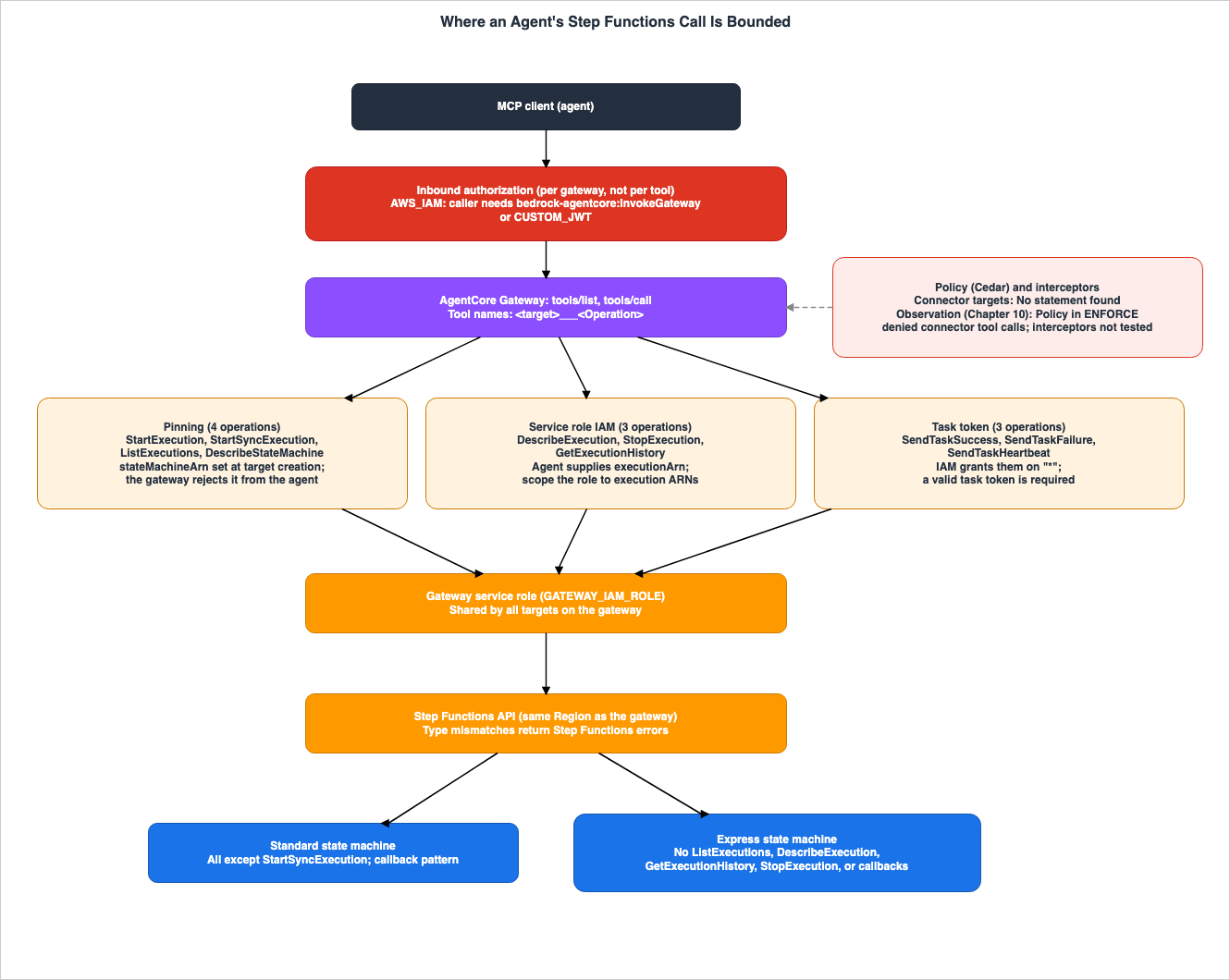
Agent invocations pass through the following layers:- Gateway inbound authorization: Who is allowed to call the Gateway? Selecting
AWS_IAMrequires the invoking IAM principal to have thebedrock-agentcore:InvokeGatewaypermission. Authorization using a JSON Web Token (JWT) (CUSTOM_JWT) is also an option. - Pinning: Which state machine will receive the request? This applies to only four of the ten operations.
- Gateway service role (IAM): What can the Gateway call in Step Functions? The service role is shared across all of the Gateway's targets.
- Task token: Which tasks can be completed? This acts as a boundary for the
SendTaskSuccess,SendTaskFailure, andSendTaskHeartbeatoperations. - Policy and interceptors: Who can call which tools, and with what arguments? No statement was found indicating that this applies to connector targets. In the configuration of Chapter 10, however, Policy denied calls to the connector's tools (Observation).
- Workflow type: Standard or Express. If an operation does not match the workflow type, Step Functions will return an error.
Inbound authorization determines whether a caller is permitted to call the Gateway. Pinning and the service role IAM determine what the Gateway can access within Step Functions. These two factors are independent of which caller invoked the Gateway. Policy and interceptors are used when you want to differentiate based on the caller and the specific tool being used.
The connector page states that the Gateway calls the Step Functions endpoint in the same Region as the Gateway. The tutorial states that a state machine in a different Region is not reachable through the connector. This article did not test calls across Regions.
3.3 Summary Table
The following table outlines what is filtered at each layer and what happens to calls that fall outside the boundaries.| Layer | Limit or Control | Set By | What Happens at the Boundary | How You Can Tell | Where It Is Written | Source State |
|---|---|---|---|---|---|---|
| Inbound authorization | For AWS_IAM types, the calling IAM principal requires bedrock-agentcore:InvokeGateway permission. Other types are CUSTOM_JWT, AUTHENTICATE_ONLY, and NONE. | The person creating the Gateway and the IAM administrator of the caller. | With AWS_IAM and CUSTOM_JWT, unauthorized callers cannot call the Gateway. Authorized callers can call the Gateway's tools. With AUTHENTICATE_ONLY and NONE, the Gateway does not perform authorization. | 401 or 403 with the WWW-Authenticate header for JWT Gateways. | Inbound authorization page. | Stated. An IAM condition key for tool names: Documentation does not list |
| Pinning | The stateMachineArn of four operations. | The person creating the target. | Pinned arguments do not appear in the tool's schema. If the agent provides them, the Gateway will reject them. If the pin is left out, the target can still be created, but the tool fails on every call. | The schema for tools/list and rejection messages. | Connector page, target configuration page. | Stated. |
| Gateway service role (IAM) | Execution ARNs for the three execution operations; state machine ARNs for the four state machine operations. | The administrator of the service role. | If the role does not permit a call, it will not be authorized, even if it reaches Step Functions. No documentation was found describing how rejections appear in tool results. In the configuration of Chapter 10, AccessDeniedException was returned. | CloudTrail shows the caller as the service role. | Target configuration page, tutorial, Service Authorization Reference. | Stated. No statement found regarding how rejections are displayed. Chapter 10 provides an observation. |
| Task token | The taskToken of SendTaskSuccess, SendTaskFailure, and SendTaskHeartbeat. | The workflow creates the token, and the workflow and application distribute it. | Agents with valid tokens can complete the task. Expired tokens and tokens of closed tasks return TaskTimedOut. | Execution status and history. | Connector page, target configuration page, API reference. | Stated. |
| Policy and interceptors | Cedar policies, REQUEST and RESPONSE interceptors. | The Gateway administrator. | The documentation generally states that all tool calls are evaluated. No explicit statement was found for connector targets. In the configuration of Chapter 10, Policy in ENFORCE mode denied calls with a JSON-RPC error. | Policy evaluation traces, interceptor Lambda logs. | Policy page, interceptor page. | No statement found for connector targets. Policy is observed in Chapter 10. Interceptors have not been tested. |
| Workflow type | Standard and Express. | The person creating the state machine. The type cannot be changed after it is created. | Operations that do not match the type will result in a Step Functions error. | The isError and text fields in the tool's result. | Connector page, API reference, Workflow type page. | Stated. |
In the Policy and interceptors row, the reading that they apply is an inference of this article, based on the information presented in the document (Section 9.3). For Policy, the configuration of Chapter 10 observed denials. Interceptors were not tested.
4. The Ten Operations
This chapter divides the operations for the connector into three categories based on the type of boundary. Subsequently, tables detailing each operation are provided.4.1 Three Categories by Type of Boundary
The connector page categorizes the ten operations into two groups: four that can be pinned and six that cannot. The four operations that can be pinned act on a state machine.The connector exposes ten operations. Four of them act on a state machine that you pin to the operation when you create the target: StartExecution, StartSyncExecution, ListExecutions, and DescribeStateMachine.The six operations that cannot be pinned determine their target by an execution ARN or a task token that the agent passes. The connector page states that these six operations are not limited to the pinned state machine and that the IAM policy of the service role decides what they can reach. Furthermore, these six operations are further divided into two categories based on whether they can be restricted within IAM.
- Three operations –
DescribeExecution,StopExecution, andGetExecutionHistory– can be scoped, in the service role's policy, to the execution ARNs of the state machines exposed as tools. - The remaining three operations –
SendTaskSuccess,SendTaskFailure, andSendTaskHeartbeat– cannot be restricted to a specific execution within IAM.
This article calls these three categories Pinning (four operations), Gateway service role (IAM) (three operations), and Task token (three operations), as in the tables. The names are this article's, not the documentation's. The content of these categories is based on the descriptions provided on the connector page.
4.2 Table of Operations
The following table lists ten operations, categorized by boundary type, the identifier passed by the agent, the available workflow types, the items visible to the agent by default, and the items that can be exposed withparameterOverrides. The columns for workflow type and items refer to the table on the connector page (connector version 1.0.0).| Operation | Boundary Type | Agent-Provided Identifier | Workflow Type | Visible by Default | Visible via parameterOverrides |
|---|---|---|---|---|---|
StartExecution | Pinning | None (state machine is pinned) | Both | input | name, traceHeader |
StartSyncExecution | Pinning | None (state machine is pinned) | Express only | input | name, traceHeader |
ListExecutions | Pinning | None (state machine is pinned) | Standard only | statusFilter | maxResults, nextToken |
DescribeStateMachine | Pinning | None (state machine is pinned) | Both | includedData | None |
DescribeExecution | Gateway service role (IAM) | executionArn | Standard executions only | executionArn, includedData | None |
StopExecution | Gateway service role (IAM) | executionArn | Standard executions only | executionArn | error, cause |
GetExecutionHistory | Gateway service role (IAM) | executionArn | Standard executions only | executionArn | includeExecutionData, maxResults, reverseOrder, nextToken |
SendTaskSuccess | Task token | taskToken | Both | taskToken, output | None |
SendTaskFailure | Task token | taskToken | Both | taskToken, error, cause | None |
SendTaskHeartbeat | Task token | taskToken | Both | taskToken | None |
Even for the four pinned operations,
stateMachineArn cannot be exposed with parameterOverrides. The connector page states that the only way to configure the stateMachineArn is through pinning.The
Both value in the table means that the operation works with both Standard and Express state machines. Even though SendTaskSuccess and the other two task-token operations show Both, Express workflows cannot use the callback pattern (see Section 8.1).4.3 Meaning of Default Items
By default, theincludedData field in DescribeExecution is set to METADATA_ONLY. The connector page states that when set to ALL_DATA, the execution's input and output are included. Similarly, the includedData field in DescribeStateMachine also defaults to METADATA_ONLY, and when set to ALL_DATA, the definition of the state machine is included.includedData is an item that agents can configure by default. Therefore, agents can specify ALL_DATA to read the input and output of an execution, as well as the definition of a state machine. If the service role policy permits, agents can also read the input and output of executions outside of pinned state machines using DescribeExecution. When designing workflows that include sensitive data in inputs or outputs that you do not want the agent to see, this behavior should be taken into consideration. This paragraph is an inference of this article from the table on the connector page and the statements in Section 4.1 (Inference).4.4 Shape of Tool Results
The connector page describes the tool results as follows: Each tool returns an MCPtools/call result wrapped in a JSON-RPC envelope. The text field contains the response from the Step Functions API. When Step Functions returns an error, the result's isError field becomes true, and the text field indicates the name of the Step Functions error. The connector page provides examples such as ExecutionDoesNotExist and StateMachineTypeNotSupported.Regarding errors related to operations that are incompatible with the workflow type, the connector page includes the following statement:
Step Functions returns these errors. They aren't connector failures.In the configuration of Chapter 10, Step Functions errors came back in the
text field as DependencyFailedException - followed by the Step Functions error in JSON. Violations of pinning came back in the text field beginning with IllegalArgumentException - . Policy denials came back as a JSON-RPC error rather than as a tool result (Observation). The Policy page illustrates a denial as a tool result (Section 10.9).5. Pinning
This chapter describes how pinning works. Pinning only applies to four operations against the state machine:StartExecution, StartSyncExecution, ListExecutions, and DescribeStateMachine.5.1 Pins Are Set When the Target Is Created
Pins are written inconfigurations of the target configuration when the target is created. configurations lists the operations to expose as tools. For the four operations that can be pinned, you must specify the state machine ARN in the parameterValues.stateMachineArn field. The tutorial states that the configurations list chooses which operations become tools.The AWS CLI example on the target configuration page has the following format. The ARN values in the example have been replaced with example values for this article.
{
  "mcp": {
    "connector": {
      "source": { "connectorId": "states", "version": "1.0.0" },
      "configurations": [
        { "name": "StartExecution", "parameterValues": { "stateMachineArn": "arn:aws:states:us-east-1:111122223333:stateMachine:OrderWorkflow" } },
        { "name": "ListExecutions", "parameterValues": { "stateMachineArn": "arn:aws:states:us-east-1:111122223333:stateMachine:OrderWorkflow" } },
        { "name": "DescribeStateMachine", "parameterValues": { "stateMachineArn": "arn:aws:states:us-east-1:111122223333:stateMachine:OrderWorkflow" } },
        { "name": "DescribeExecution" },
        { "name": "GetExecutionHistory" },
        { "name": "StopExecution" }
      ]
    }
  }
}
According to the target configuration page, if you need to change a pinned value later, you must call
UpdateGatewayTarget with a new list of configurations.5.2 Pinned Arguments Are Hidden from the Schema and Rejected If Passed
The connector page states that pinned arguments do not appear in the tool schemas. For example, theStartExecution tool only exposes the input argument. The Gateway combines the pinned arguments with the agent's arguments before it calls Step Functions with the Gateway service role.If the agent still passes the
stateMachineArn, the Gateway will reject the invocation. The rejection message, as described in the connector page, is:Invalid request parameters: cannot set parameter(s): [/stateMachineArn]This rejection is handled by the Gateway and does not reach Step Functions. This is different from the IAM-based rejections described in Chapter 6, which relate to the service role.
5.3 When You Forget to Pin
When you include any of the four pinnable operations inconfigurations and leave out parameterValues, the connector page and the target configuration page have the following statements, one on each page:If you leave it out, the Gateway can still create the target, but the tool fails on every call because no state machine is supplied.An entry without parameterValues can pass target creation, but its tool fails on every call.Neither statement guarantees that the target will always be created. Both use the word
can, indicating that it may be possible to create the target. Failures are observed not during target creation, but when the tool is called. Both pages emphasize the importance of always specifying the pin.Even if you forget to specify the pin, the agent will not reach other state machines. It will fail on every call. However, a missing pin may not be caught when the target is created. After creating the target, it is necessary to verify it using the schema for
tools/list and by attempting to call the tool. The latter half of this paragraph is an inference of this article from the two statements (Inference).In the configuration of Chapter 10, a target that listed both a pinned operation and an operation whose pin was left out was created, and the operation without the pin failed on every call. Targets that listed only operations without
parameterValues were rejected at creation (Observation).5.4 One Pin per Operation
The connector page states that within a single target, only one pin can be associated with a single operation. If you want to expose several state machines for the same operation, create a separate target for each state machine.Because pins are associated with individual operations, you can combine Standard and Express state machines within a single target. The connector page's example pins
StartExecution to the Standard state machine and StartSyncExecution to the Express state machine. The page also states that if you want to place both types behind a single target, you should pin StartSyncExecution to the Express state machine and pin the other pinnable operations to the Standard state machine.When targets are separated, the names of the tools also separate based on the target names. The agent distinguishes between them using names like
orders___StartExecution and refunds___StartExecution.5.5 configurations and Enabled
The tutorial and the connector page state that the operations listed in configurations become tools. However, the ConnectorTargetConfiguration in the CloudFormation AWS::BedrockAgentCore::GatewayTarget includes both Configurations and an Enabled field. The CloudFormation reference states the following about Enabled.A list of tool names to enable from this connector. If absent, all tools provided by the connector are enabled.For the Step Functions connector, no statement was found on whether operations that are not in
Configurations become tools when only Configurations is written and Enabled is omitted (No statement found). The examples in the developer guide all list operations in configurations. This article reads that only the operations listed in configurations become tools; this reading comes from the developer guide's wording and has not been checked against Enabled (Inference).5.6 Specifying the Connector Version
The target configuration page indicates that you can lock the target to a specific version of the connector by entering aversion number in the source field. If you do not specify a version, the target will use the connector's default version at that point in time.The same page also states that when updating an existing target, the updated tool description and schema will be imported. The connector versions page states that an update without a
version keeps the target's current version, and that existing targets keep their pinned version when the connector's default version changes. The tool schema visible to the agent can change when you move a target to a new version. The connector versions page lists what changed in each version; for the Step Functions connector (states), version 1.0.0 was released on 2026-10-21 and is the default version.6. Gateway Service Role
This chapter details the IAM policy for the Gateway service role. Of the six operations that cannot be pinned, three can be scoped to execution ARNs in this role's policy, while the remaining three cannot.6.1 The Service Role Is Shared by All Targets on a Gateway
When calling Step Functions, the Gateway uses its designated service role. In the target configuration, you specifyGATEWAY_IAM_ROLE as the type of credential provider. The trust policy for the service role allows bedrock-agentcore.amazonaws.com to assume the role.The tutorial states that all targets within a Gateway share the same service role. It is not possible to use a different role for each target. Both the target configuration page and the tutorial recommend using a separate Gateway for workflows with different IAM boundaries.
The following excerpt is from the tutorial:
All targets on a gateway share its service role. If different workflows need different IAM boundaries, use a separate gateway for each.For example, if a Gateway has two targets,
orders and refunds, and the service role allows access to both execution ARNs, you will be able to view the execution of the refunds state machine even when using orders___DescribeExecution. While the tool names may differ between targets, the policies in the service role determine what DescribeExecution can access. This paragraph is an inference of this article from the statements in this section and in Section 4.1 (Inference).6.2 Operations and IAM Resource Types
The IAM resource types vary depending on the operation. The target configuration page specifies that the service role policy should have three statements. The following table lists ten operations, along with the resource types listed in the "Actions" table for Step Functions in the Service Authorization Reference.| Operation | IAM Action | Resource Types (Service Authorization Reference) | Target Configuration Page Policy Resource |
|---|---|---|---|
StartExecution | states:StartExecution | statemachine* | State machine ARN |
StartSyncExecution | states:StartSyncExecution | statemachine* | State machine ARN |
ListExecutions | states:ListExecutions | statemachine*, maprun* | State machine ARN |
DescribeStateMachine | states:DescribeStateMachine | statemachine* | State machine ARN |
DescribeExecution | states:DescribeExecution | execution*, express* | Execution ARN (e.g., execution:OrderWorkflow:*) |
StopExecution | states:StopExecution | execution* | Execution ARN (e.g., execution:OrderWorkflow:*) |
GetExecutionHistory | states:GetExecutionHistory | execution* | Execution ARN (e.g., execution:OrderWorkflow:*) |
SendTaskSuccess | states:SendTaskSuccess | Blank | "*" |
SendTaskFailure | states:SendTaskFailure | Blank | "*" |
SendTaskHeartbeat | states:SendTaskHeartbeat | Blank | "*" |
In the Service Authorization Reference table, the three rows for
SendTaskSuccess, SendTaskFailure, and SendTaskHeartbeat have a blank value in the Resource Types column. The connector page also states that these three operations do not have IAM resource-level permissions.The
DescribeExecution row includes both execution* and express*. express* refers to the ARN type for Express executions. The StopExecution and GetExecutionHistory rows do not include express*. This difference will be discussed in Section 9.1.6.3 Wildcard for Execution ARN
The example policy on the target configuration page specifies the "Resource" for the three execution operations asarn:aws:states:<REGION>:<ACCOUNT_ID>:execution:OrderWorkflow:*. The same page explains why the ARN uses a wildcard at the end and clarifies the scope of the wildcard, stating:The execution ARN ends in a * wildcard because Step Functions generates execution names when each execution starts, so you can't list them in advance. The wildcard covers only executions of OrderWorkflow, not executions of other state machines.The wildcard applies only to executions of
OrderWorkflow and does not apply to executions of other state machines. This is how the three execution operations can be limited to executions of the state machines exposed as tools.The same page also recommends against granting
states:* on Resource: "*". It states that, for the six operations other than the four that can be pinned, this policy is the only boundary on which executions the agent can inspect, stop, or complete. Pinning therefore does not narrow what states:* allows for those six operations (Inference). For the three task-token operations among them, see Section 7.2. The connector page states that pinning and IAM complement each other and are not alternatives to choose between.Pinning and IAM are complementary controls, not alternatives.6.4 SendTaskSuccess and the Other Two Operations Are Granted on "*"
The connector page describes SendTaskSuccess, SendTaskFailure, and SendTaskHeartbeat as follows:SendTaskSuccess, SendTaskFailure, and SendTaskHeartbeat have no resource-level permissions in IAM, so you must grant them on "*".Even when the service role is narrowed down, these three operations are not tied to a specific execution or state machine. The task token defines their boundary, as described in Chapter 7.
The target configuration page indicates that these three operations should be added once per Gateway, on a separate target.
Add them once for each gateway, on a separate target, instead of on every target.Because these three operations are not associated with a state machine, their reach remains the same regardless of where they are placed. Given that there is only one service role per Gateway, their reach is consistent regardless of the target. The latter half of this paragraph is an inference of this article (Inference).
In the configuration of Chapter 10, a target that listed only the three
SendTask* operations without parameterValues was rejected at creation. When parameterValues was written as an empty {}, the target was created (Observation).6.5 Attaching Policy Adds Permissions to the Same Role
When you attach a policy engine to the Gateway, the execution role of the Gateway needs three permissions for Policy. The policy permissions page listsbedrock-agentcore:AuthorizeAction, bedrock-agentcore:PartiallyAuthorizeActions, and bedrock-agentcore:GetPolicyEngine. The policy permissions page refers to this role as the "execution role," while the target configuration page refers to it as the "service role." Since only one role is configured for the Gateway, this article infers that the two pages refer to the same role (Inference). If that is the case, the Gateway's service role will have both the permission to call Step Functions and the permission to request policy evaluations, all in the same role.6.6 The Caller That CloudTrail Shows
The tutorial states that executions initiated by the Gateway appear the same as other executions, and that in AWS CloudTrail, the Gateway's service role is identified as the caller. CloudTrail alone does not allow you to distinguish which agent or which Gateway was the origin of an operation based solely on the service role name. However, by separating the service roles by Gateway, you can at least differentiate them on a Gateway-by-Gateway basis. The second and third sentences of this paragraph are an inference of this article (Inference).7. Task Tokens
This chapter describes the task tokens that mark the boundaries forSendTaskSuccess, SendTaskFailure, and SendTaskHeartbeat. The underlying mechanism of task tokens is detailed in Section 5.1 of AWS Step Functions Orchestration Patterns for Generative AI on this site.7.1 Callback Flow
The connector page describes the workflow's process of waiting for the agent as follows: The workflow pauses on a task using the callback pattern (.waitForTaskToken), and Step Functions creates a task token. The workflow then needs to deliver the token and the task details to the agent's application. The connector page provides examples of how to do this, citing an Amazon SQS queue and an Activity that the application polls. When the agent completes its work, it calls SendTaskSuccess with the result. If it cannot complete the task, it calls SendTaskFailure. For long-running tasks, SendTaskHeartbeat is used to indicate that the agent is still working.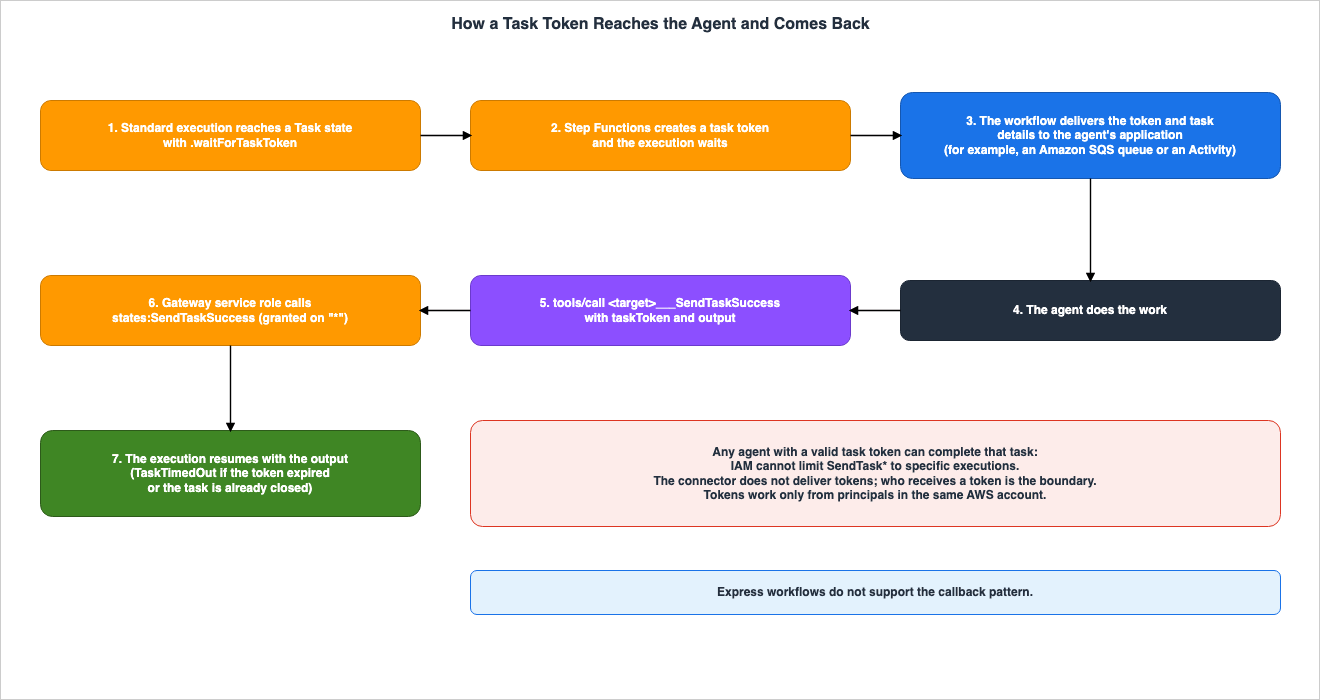
7.2 Reading the Two Sentences Together
Regarding the role of task tokens as boundaries, both the connector page and the target configuration page contain the following two sentences. The first sentence is from the connector page, and the second is from the target configuration page.Because IAM can't limit SendTaskSuccess, SendTaskFailure, and SendTaskHeartbeat to specific executions, any agent with a valid task token can complete that task. Treat task tokens as secrets and send them only to the agent that should act on them.The task-token operations are granted on "*" because IAM doesn't support resource-level permissions for these actions. A caller also needs a valid task token from one of your executions.The first sentence states that any agent possessing a valid token can complete the task. The second sentence states that the caller also needs a valid task token from one of your executions. The two sentences do not contradict each other. Because IAM cannot scope these three operations to resources, they are granted on "*". On top of that, the only tasks that can actually be completed are those for which the caller holds a valid token.
For the same three task-token operations, the two pages call different things the only boundary. For these operations, the connector page states that the task token is the only control. The target configuration page states that, for the six operations that cannot be pinned, the service role policy is the only boundary on which executions the agent can inspect, stop, or complete. Those six include the three task-token operations, which the same policy grants on
"*" (Sources disagree).Therefore, the range of tasks that an agent can complete is determined by which agents the tokens are delivered to. The connector page specifies that tokens should be treated as secrets and only sent to the agent that should act upon them. The tutorial also states that tokens are the sole boundary that determines which tasks an agent can complete.
7.3 From Principals Within the Same AWS Account
The service integration patterns page of the Step Functions Developer Guide includes the following note on the callback pattern:You must pass task tokens from principals within the same AWS account. The tokens won't work if you send them from principals in a different AWS account.Through the connector, the principal that sends
SendTaskSuccess to Step Functions is the Gateway service role. According to this note, the token functions correctly only when sent from a principal in the same AWS account as the execution. OWASP Top 10 for Agentic Applications Mapped to AWS Controls on this site also states this limitation. This article has not checked what happens when a token is returned from a Gateway in a different account.7.4 Token Expiration and Closed Tasks
TheSendTaskSuccess API reference states that it will return a TaskTimedOut error if the token has expired or if the task associated with the token has already been closed. It will return InvalidToken if the token is not valid. The service integration patterns page indicates that a new, randomly generated token will be created if the callback task times out.It is not possible to complete a task using an expired token or a token associated with a closed task. However, Standard workflows can run for up to one year. The connector page also states that Standard workflows can run for up to one year and that work can continue even after the agent's session has ended. During that time, the records held by agents that received tokens and by applications that keep them need to be treated as secrets. The last sentence of this paragraph is an inference of this article (Inference).
7.5 The output of SendTaskSuccess
The output of SendTaskSuccess is a JSON string that the agent returns to the workflow. The API reference states that the maximum length of the output is 262144, and this length restriction is based on the size in bytes when encoded in UTF-8. The content returned by the agent becomes the result of the waiting Task state, and the workflow's settings, such as ResultPath, decide how it is combined with the state's input before the next state receives it. Whether the workflow validates the value returned by the agent is a design consideration for the workflow itself. The last two sentences of this paragraph are an inference of this article (Inference).8. Standard and Express
This chapter describes how the available operations differ depending on the workflow type. If you attempt an operation that is not supported by the workflow type, Step Functions will return an error.8.1 Available Operations
The following table is a reorganized version of the table on the connector page.| Operation | Workflow Type | Result when types differ |
|---|---|---|
StartSyncExecution | Express only | Fails when used with a Standard state machine. The connector page recommends using StartExecution instead and checking the status with DescribeExecution. |
ListExecutions | Standard only | Fails with a StateMachineTypeNotSupported error when used with an Express state machine. |
DescribeExecution, GetExecutionHistory, StopExecution | Standard executions only | Fails with an InvalidArn error when used with an Express execution ARN. |
StartExecution, DescribeStateMachine, SendTaskSuccess, SendTaskFailure, SendTaskHeartbeat | Both | N/A |
Although three operations (
SendTaskSuccess, etc.) are listed in the Both row, the callback pattern that creates tokens works only with Standard workflows. The connector page notes that this pattern works only with Standard workflows because Express workflows do not support the callback pattern. The workflow type page also states that Express workflows do not support the integration patterns for .sync and .waitForTaskToken.The connector page indicates that these limitations are documented in the tool descriptions returned by
tools/list, ensuring that the agent can select the correct tool.8.2 Express Executions Cannot Be Addressed by ARN After They Start
The connector page explains thatDescribeExecution, GetExecutionHistory, and StopExecution operations fail when using the ARN of an Express execution, stating:Fail with InvalidArn on an Express execution ARN, because Express executions cannot be addressed by ARN after they start.The AWS Step Functions API reference also notes that these three operations are not supported for Express. Both the
StopExecution and GetExecutionHistory pages include the following statement:This API action is not supported by EXPRESS state machines.The
DescribeExecution page makes executions dispatched by a Map Run the exception.Executions of an EXPRESS state machine aren't supported by DescribeExecution unless a Map Run dispatched them.When an agent starts an Express state machine using
StartExecution, the response includes the execution's ARN. However, even when passing that ARN to DescribeExecution, the state cannot be determined. When you hand an Express state machine to an agent, receiving the result in the same call with StartSyncExecution matches the use case on the connector page. The last sentence of this paragraph is an inference of this article (Inference).8.3 Express Records
Express executions cannot be addressed by ARN, but that does not mean that no records are kept. The workflow type page states that enabling state machine logging will allow you to view Express executions in either CloudWatch Logs or the Step Functions console. Standard executions can be viewed in detail through the Step Functions API, and execution history can be retrieved for up to 90 days after completion.Agents cannot read records of Express executions using the connector's tools. If you want to view records of Express executions, you will need to provide the agent with a separate tool that can read CloudWatch Logs. This paragraph is an inference of this article (Inference).
8.4 Execution Guarantees and Immutability of Type
The workflow type page details the execution guarantees for each type. Standard workflows execute exactly once. Asynchronous Express workflows execute at least once, meaning the same execution might run multiple times. Synchronous Express workflows execute at most once.When an agent initiates an Express state machine using
StartExecution, it triggers an asynchronous Express execution. The agent may also call StartExecution again with the same input. In either case, it is necessary to design each state in the workflow to be resilient to performing the same processing multiple times. This paragraph is an inference of this article (Inference).The same page also states that once a state machine is created, the workflow type cannot be changed. If you wish to transition from Standard to Express, you must recreate the state machine and update the target pinning to new ARNs.
8.5 Input Size
Theinput passed to StartExecution and StartSyncExecution is subject to the payload limit of Step Functions. The maximum limit and methods for avoiding it are detailed in Chapter 6 of AWS Step Functions Orchestration Patterns for Generative AI on this site.9. Where Sources Disagree, What the Documentation Does Not List, and Statements Not Found
This chapter collects, in one place, the sources that disagree, the items that the documentation does not list, and the statements that were not found in Chapters 3 through 8.9.1 Where Sources Disagree
DescribeExecutionand Map Run: The API reference states thatDescribeExecutiondoes not apply to Express executions, while it makes an exception for executions dispatched by a Map Run. The table on the connector page indicates that attempts to retrieve an Express execution using its ARN will result in anInvalidArnerror, but it does not mention this exception. This article has not checked whether the Map Run exception applies through the connector (Sources disagree).- Tool Name Formatting: The main text on the connector page writes the tool name format as
<target-name>_<operation>_StartExecution). However, examples on the same page in the JSON-RPC section, as well as examples on the tutorial and the target configuration page, use a format that combines the target name and operation name with three underscores, such asorders___StartExecutionorhello___StartExecution. The page on how AgentCore Gateway tools are named gives the pattern${target_name}___${tool_name}, which matches the examples. Only the main text of the connector page differs. This article will use the format shown in the examples (Sources disagree). - Only boundary for the task-token operations: The connector page states that the task token is the only control for the three task-token operations. The target configuration page states that, for the six operations that cannot be pinned, which include those three, the service role policy is the only boundary on which executions the agent can inspect, stop, or complete (Section 7.2) (Sources disagree).
The
DescribeExecution row of the Service Authorization Reference includes express*, the ARN type for Express executions, in addition to execution*. The StopExecution and GetExecutionHistory rows do not include express*. The connector page states that Express executions cannot be addressed by ARN after they start. While this may appear contradictory, considering that the API reference places the exception for Map Run only within DescribeExecution, it can be interpreted that express* refers to the ARN type specifically for Express executions dispatched by a Map Run (Inference). This article does not state that Express executions cannot be authorized through IAM. It is important to note that allowing Express execution ARNs in an IAM policy and being able to inspect Express executions through the connector are separate concerns.9.2 What the Documentation Does Not List
- IAM Condition Keys Filtered by Tool Name: The list of condition keys on the AgentCore page of the Service Authorization Reference does not include keys that represent tool names or MCP operations. When IAM allows
InvokeGateway, IAM does not distinguish the tools of that gateway (Documentation does not list).
9.3 Statements Not Found
For the following items, this article searched the Policy pages and the interceptor page of the AgentCore Developer Guide, the release notes, and the AWS blog with different search terms. No statement was found (No statement found).- Whether Policy applies to connector targets: The Policy page states that all tool invocations are intercepted and evaluated against all policies. The schema constraints page indicates that the Policy's Cedar schema is automatically created from the Gateway's MCP tool list, and that each MCP tool becomes an action. Since connector tools are also part of the Gateway's MCP tool list, this article infers that they are subject to Policy evaluation (Inference). However, no statements explicitly mentioning connector targets were found. In the configuration of Chapter 10, Policy validated connector tool names and, in
ENFORCEmode, denied calls (Observation). - Whether Policy can use
SendTaskSuccess'staskTokenorDescribeExecution'sexecutionArnas conditions: The schema constraints page states that onlycontext.inputcan be used as a condition, and that tool inputs (parameters) are included. No examples related to connector tools were found. In the configuration of Chapter 10, a Policy was created that usedcontext.input.taskTokenandcontext.input.executionArnas conditions, and it was effective when set toENFORCE(Observation). - Whether interceptors function with connector targets: The interceptor page lists fine-grained access control for tools and MCP operations as use cases. No statements specifically mentioning connector targets were found. An AWS blog post states that interceptors work with AgentCore Gateway target types and gives Lambda functions, OpenAPI endpoints, and MCP servers as examples. Connectors are not listed.
- How a denial by the service role's IAM appears: No statements were found describing the specific errors that tools return when the agent passes an ARN that the service role does not permit. The connector page lists examples of errors, such as
ExecutionDoesNotExistandStateMachineTypeNotSupported. In the configuration of Chapter 10, anAccessDeniedExceptionwas returned wrapped within aDependencyFailedException(Observation). - Public connector samples: This article has not thoroughly searched repositories such as GitHub's aws-samples. It does not state that samples are unavailable.
9.4 Statements Found by Searching Other Sources
That Express executions do not supportDescribeExecution, StopExecution, and GetExecutionHistory is stated not only on the connector page but also on three pages of the Step Functions API reference (Section 8.2). That task tokens must be returned from principals in the same AWS account is stated on the service integration patterns page (Section 7.3).10. Observations from This Configuration
This chapter details the results of testing a portion of the claims made in this article, conducted on November 4, 2026 (UTC), within a validation AWS account in theus-east-1 region. Each observation was made once and is not a commitment of the sources. This article does not override statements in the sources with observations.10.1 Configuration
The configuration was as follows:- Three state machines:
BlogDemoSfnStd(Standard - if the inputmodeiswait, it sends a token to an Amazon SQS queue via the.waitForTaskTokentask; otherwise, it ends withPass),BlogDemoSfnExp(Express - onlyPass), andBlogDemoSfnOutside(Standard; the service role does not allow it). - One Gateway: Inbound authorization uses
AWS_IAM, the credential type isGATEWAY_IAM_ROLE, and the connector version is1.0.0. - Service Role: The four state machine operations on the ARNs of
BlogDemoSfnStdandBlogDemoSfnExp; the three execution operations on the execution ARNs ofBlogDemoSfnStdand the Express execution ARNs ofBlogDemoSfnExp;SendTask*on"*"; and the three permissions for Policy. - Four Targets:
main(pins three operations from Standard and one operation from Express –StartSyncExecution; also includes the three execution operations),wrongtype(pins operations with deliberately incorrect workflow types),tasks(the threeSendTask*operations), andnopin(includes operations where pinning was omitted). - Invocation: From a local environment, it invokes
tools/listandtools/callusing JSON-RPC requests signed with SigV4.
Certain values, such as account IDs, portions of ARNs, IDs, and task tokens, have been redacted from this article.
10.2 Target Creation
Targets consisting solely of the threeSendTask* operations, without specifying parameterValues, were rejected at the time of creation. Similarly, targets containing only two operations that could be pinned, also without specifying parameterValues, were rejected with the same error. The error message was:An error occurred (ValidationException) when calling the CreateGatewayTarget operation: Connector configurations must not be empty.However, when the same three operations were defined with an empty
{} for parameterValues, the target was successfully created and transitioned to the READY state. A target containing a pinned DescribeStateMachine operation and an unpinned StartExecution operation was also created and transitioned to the READY state.The target configuration page describes adding three
SendTask* operations to another target without specifying parameterValues (see Section 6.4). In this configuration, a target made only of such entries could not be created. This article does not conclude that the documentation is incorrect based on this single observation.10.3 Schemas and Pinning
Thetools/list command returned 16 tools. The schema for main___StartExecution only included input and did not include stateMachineArn. The schema for nopin___StartExecution, which was missing a pin, also only included input.When the pinned
main___StartExecution was called with stateMachineArn from the agent's perspective, the tool's result had isError set to true, and the text was as follows:IllegalArgumentException - Invalid request parameters: cannot set parameter(s): [/stateMachineArn]When the unpinned
nopin___StartExecution was called, the tool's text was as follows:ValidationException - Parameter validation failed: Invalid request parameters:
- Missing required field(s): 'stateMachineArn'Since the schema does not include
stateMachineArn, the agent has no cue to pass this value. As a result, this tool will fail on every call (see Section 5.3). This paragraph is an inference of this article (Inference).10.4 Default Fields and Stopping a Finished Execution
DescribeExecution did not return the input and output of the execution when includedData was not specified, and returned them when ALL_DATA was specified. DescribeStateMachine returned the definition as {} when includedData was not specified. Calling StopExecution on a completed execution did not result in an error and instead returned the original stop time of the execution. This behavior is as described in the tutorial.10.5 Express Executions and Workflow Types
When an execution was started with thewrongtype___StartExecution tool pinned to Express, the ARN (Amazon Resource Name) of the execution was in the format arn:aws:states:us-east-1:111122223333:express:BlogDemoSfnExp:.... Passing this ARN to main___DescribeExecution, main___GetExecutionHistory, and main___StopExecution resulted in all three failing with an InvalidArn error. The service role permitted the ARN of this Express execution. The text field in the result of DescribeExecution was as follows:DependencyFailedException - {"errorType":"com.amazonaws.swf.service.v2.model#InvalidArn","errorMessage":"Invalid Arn: 'Resource type not valid in this context: express'","statusCode":400,"service":"states","operation":"DescribeExecution"}The
main___StartSyncExecution tool pinned to Express returned the execution output within the same invocation. Both the wrongtype___ListExecutions tool pinned to Express and the wrongtype___StartSyncExecution tool pinned to Standard failed with a StateMachineTypeNotSupported error.10.6 Denials by the Service Role's IAM
When the ARN for theBlogDemoSfnOutside execution, which the service role does not permit, was passed to main___DescribeExecution, Step Functions returned an AccessDeniedException wrapped within a DependencyFailedException. The message originated from a session assuming the service role of the Gateway. The message was:User: arn:aws:sts::111122223333:assumed-role/blog-demo-sfn-agent-gateway/gateway-session-invocation is not authorized to perform: states:DescribeExecution on resource: arn:aws:states:us-east-1:111122223333:execution:BlogDemoSfnOutside:<execution-name> because no identity-based policy allows the states:DescribeExecution action10.7 Task Tokens
Upon initiating execution withmain___StartExecution and setting mode to wait, the execution remained in the RUNNING state and a token arrived in the SQS queue. When this token was used to call both tasks___SendTaskHeartbeat and tasks___SendTaskSuccess, both calls were successful. After SendTaskSuccess, the execution transitioned to the SUCCEEDED state, and the execution output was the output value passed to SendTaskSuccess.Attempting to call
SendTaskSuccess again with the same token resulted in a failure with the TaskTimedOut error. The message was Task Timed Out: 'Provided task does not exist anymore'. When an arbitrary string was used as the token, the call failed with an InvalidToken error.10.8 Policy
The Policy engine was attached to the Gateway with theLOG_ONLY setting. Subsequently, the following four policies were created. During creation, validation was set to IGNORE_ALL_FINDINGS, enabling only schema checks.- Policy 1: Allows all actions on the Gateway.
- Policy 2: Prohibits the
tasks___SendTaskSuccessaction whencontext.input.taskTokenbegins withBLOCKED. - Policy 3: Prohibits the
main___DescribeExecutionaction whencontext.input.executionArnis an execution ofBlogDemoSfnOutside. - Policy 4: Allows the non-existent tool name
main___NoSuchOperation.
Policies 1 through 3 became
ACTIVE. Policy 4 became CREATE_FAILED, and the reason provided included the following text. The reason also mentioned a similarly named operation, main___StopExecution.unrecognized action `AgentCore::Action::"main___NoSuchOperation"`While in
LOG_ONLY mode, calls that matched Policy 3 were not blocked by the Policy engine, and an IAM AccessDeniedException was returned. When the mode was changed to ENFORCE, the same calls were rejected, not with tool results, but with a JSON-RPC error. The error code was -32002, and the message was as follows:Tool Execution Denied: Tool call not allowed due to policy enforcement [Policy evaluation denied due to <policy-id>]Calls to
tasks___SendTaskSuccess with a taskToken that began with BLOCKED were also rejected in the same way by Policy 2. main___DescribeExecution on an allowed execution went through. Even in ENFORCE mode, tools/list returned all 16 tools. The Policy page says that a principal can list a tool if there exists any set of circumstances under which a call to it would be permitted, and Policy 1 permitted every action. This result therefore does not show whether Policy filters the list (Inference).10.9 Reading the Observations Alongside the Sources
- The observations regarding pinning, Express operations, workflow types, and token expiration all aligned with the documentation.
- The following, for which no statement was found in the sources, were observed in this configuration: the Policy schema included connector tool names and arguments; Policy in
ENFORCEmode denied calls to connector tools; a Policy condition stoppedSendTaskSuccessby the value of the token; and a denial by the service role's IAM came back asAccessDeniedException. - The Policy page illustrates a denial as a tool result with
isErrorset totrueand atextthat begins withAuthorizeActionException - Tool Execution Denied. The denials in this configuration were JSON-RPC errors with thecode-32002(Observation). This article does not determine which kind of denial takes which form. - With
ENFORCE, the Policy rejected first even the calls that IAM would also reject. This article reads that Policy is evaluated before the Gateway calls Step Functions (Inference). - The conditions within the Policy can only utilize the caller and the values provided as input to the tool. Because the execution that a token belongs to does not appear in the input, where the tokens are delivered remains the boundary (Inference).
10.10 What This Configuration Does Not Show
- This is a single observation in one account and one Region, with connector version
1.0.0only. - This configuration did not test interceptors, inbound authorization via JWT, tokens returned from a gateway of a different account, calls across Regions, or exceptions related to Map Runs.
- The traces of
LOG_ONLYdecisions were not checked, because observability was not enabled. - CloudTrail records were not checked.
- The response when an agent still passes
stateMachineArnto a tool whose schema does not include it was not checked.
11. Failure Modes
This chapter lists common failures that occur when passing workflows to agents, based on the content from Chapters 3 through 9. These are compiled from the documentation and do not represent a collection of actual, reported cases.- Allowing
states:*onResource: "*"in the service role: While the four pinned operations reach the pinned state machine, the three execution operations reach any Standard execution in the account and Region.StopExecutioncan be used to stop the execution of workflows that are not tools (see Section 6.3). - Putting workflows that need different IAM boundaries on a single Gateway: Because the service role is singular at the Gateway, even if targets are separated, the three execution operations reach the same scope (see Section 6.1).
- Placing task tokens in a queue accessible by any agent: Because IAM does not restrict
SendTaskSuccessto a specific execution, any agent that can read the token can complete the task (see Section 7.2). - Forgetting to define pins: It may be possible to create targets, and failures become apparent when the tool is invoked (see Section 5.3).
- Passing Express state machines solely with
StartExecution: The agent cannot verify the state using the ARN of the returned execution (see Section 8.2). - Attempting to have agents wait for tasks within an Express state machine: Express does not support callback patterns (see Section 8.1).
- Broadening the service role, assuming that a policy restricts the connector's tools: No statement was found that Policy applies to connector targets. Both pinning and the service role's IAM permissions are effective regardless of the presence of a policy. In the configuration of Chapter 10, Policy denied calls, but that is a single observation (see Sections 9.3 and 10.8).
12. Frequently Asked Questions About Making Step Functions Workflows Agent Tools
This chapter answers common questions based on the content from Chapters 3 through 9.12.1 Can the agent operate only the state machines exposed as tools?
The four pinned operations (StartExecution, StartSyncExecution, ListExecutions, and DescribeStateMachine) reach only the pinned state machines. The operations DescribeExecution, StopExecution, and GetExecutionHistory target executions by the ARN that the agent provides, and reach the executions that the IAM policy of the Gateway service role allows. SendTaskSuccess, SendTaskFailure, and SendTaskHeartbeat reach the tasks for which the caller has a valid task token (see Section 4.1).12.2 What happens when the agent provides the stateMachineArn?
If the agent provides a stateMachineArn, the Gateway will reject the request. The message that the connector page shows is Invalid request parameters: cannot set parameter(s): [/stateMachineArn]. Pinned arguments do not appear in the tool's schema (see Section 5.2).12.3 If you forget a pin, does target creation fail?
Not necessarily. The connector page and the target configuration page state that the target can be created and that its tool fails on every call (see Section 5.3).12.4 Can Express state machines also use the same operations as Standard?
In Express state machines, not all operations available with Standard state machines can be used.ListExecutions is only available with Standard state machines. DescribeExecution, GetExecutionHistory, and StopExecution are only usable with Standard executions. StartSyncExecution is exclusively available in Express. Callback patterns are only supported with Standard workflows (see Section 8.1).12.5 If the service role is narrowed down, can SendTaskSuccess also be limited to specific executions?
No. SendTaskSuccess, SendTaskFailure, and SendTaskHeartbeat have no resource-level permissions in IAM and must be granted on "*". The boundary for these three operations is which agents the task tokens are delivered to (see Sections 6.4 and 7.2).12.6 Can anyone who has a task token complete the task?
The connector page states that an agent with a valid task token can complete that task. The target configuration page states that the caller also needs a valid task token from one of your executions. The service integration patterns page states that tokens must be passed from principals in the same AWS account (see Sections 7.2 and 7.3).12.7 Can a Gateway policy stop the connector's operations?
While no documentation reviewed for this article directly states that the policy affects connector targets, the policy documentation indicates that all tool calls are evaluated. This article interprets that to include connector tools, although this is an inference. Pinning and the service role's IAM apply whether or not a policy is attached (see Section 9.3). In the configuration of Chapter 10, Policy inENFORCE mode denied calls to the connector's tools; however, this is a single observation (see Section 10.8).12.8 Can different targets use different service roles?
No. All targets within a Gateway share the same Gateway service role. For workflows that need different IAM boundaries, use a separate Gateway (see Section 6.1).12.9 Will any record of the Express execution be kept?
It is possible to retain records. When the state machine's logging is enabled, the execution of Express can be reviewed in CloudWatch Logs. What you cannot do is address an Express execution by ARN through the connector's tools (see Section 8.3).13. Summary
When the AgentCore Gateway connector transforms Step Functions workflows into agent tools, the mechanism that stops the agent differs across the ten operations:- Pinning (four operations):
StartExecution,StartSyncExecution,ListExecutions, andDescribeStateMachinereach only the pinned state machine. Pinned arguments are not included in the schema, and the Gateway will reject them if the agent provides them. If you forget to pin, the target might be created, but the tool will fail every time it is called. - Service role IAM (three operations):
DescribeExecution,StopExecution, andGetExecutionHistoryoperate based on the execution ARN provided by the agent, and are restricted by the service role's policy. The service role is shared across all targets in the Gateway. - Task token (three operations):
SendTaskSuccess,SendTaskFailure, andSendTaskHeartbeatcannot be scoped to resources in IAM and are granted on "*". Agents with valid tokens can complete the task. The distribution of tokens defines the boundaries. - Workflow type: In Express,
ListExecutions,DescribeExecution,GetExecutionHistory,StopExecution, and the callback pattern are not available.StartSyncExecutionis exclusively available in Express. - Gateway inbound authorization determines whether the Gateway can be called. No statement was found that Policy or interceptors apply to connector targets. In the configuration of Chapter 10, Policy in
ENFORCEmode was observed denying calls to the connector's tools.
Before passing workflows to the agent, ensure the following.
- Have you included the
parameterValues.stateMachineArnfor all four operations that can be pinned? Also, have you verified that thetools/listschema does not includestateMachineArn? - Does the service role policy restrict the three execution operations to the execution ARNs of the state machines exposed as tools? Also, are you avoiding the use of
states:*withResource: "*"? - Have you avoided putting workflows that need different IAM boundaries on the same gateway?
- Are you delivering task tokens only to the agents that should be acting upon them?
- Have you avoided assigning operations that can only be used with Standard state machines to Express state machines?
14. References
Amazon Bedrock AgentCore Gateway- AWS Step Functions as Connector Target
- Define the gateway target configuration
- Built-in connectors as targets
- Connector versions
- Understand how AgentCore Gateway tools are named
- Set up inbound authorization for your gateway
- Using interceptors with Gateway
- Release notes for Amazon Bedrock AgentCore
Policy in Amazon Bedrock AgentCore
- Getting started with Policy in AgentCore
- Schema constraints
- Use an AgentCore Gateway with Policy in AgentCore
- AgentCore Gateway and Policy in AgentCore IAM Permissions
AWS Step Functions
- Use your Step Functions workflows as tools for AI agents
- Choosing workflow type in Step Functions
- Discover service integration patterns in Step Functions
- StartSyncExecution
- ListExecutions
- DescribeExecution
- StopExecution
- GetExecutionHistory
- SendTaskSuccess
IAM and AWS CloudFormation
- Actions, resources, and condition keys for AWS Step Functions
- Actions, resources, and condition keys for Amazon Bedrock Agentcore
- AWS::BedrockAgentCore::GatewayTarget ConnectorTargetConfiguration
Announcements and Other AWS Pages
- AWS Step Functions workflows now available as AI agent tools
- Amazon Bedrock Agents Classic maintenance mode
- Apply fine-grained access control with Bedrock AgentCore Gateway interceptors
Related Articles on This Site
- AWS Step Functions Orchestration Patterns for Generative AI - Direct Service Integration, Parallelism, Callbacks, and Payload Limits
- Amazon Bedrock AgentCore Master Index - A Hub for AgentCore Articles and Decision Patterns
- Amazon Bedrock AgentCore Policy Implementation Guide - Cedar-Based Agent Authorization and Default-Deny Design
- Model Fallback in Amazon Bedrock AgentCore Gateway - What Triggers It, What the Circuit Breaker Skips, and Why It Stops at the First Byte
- Where a Web Search Domain Filter Is Enforced - Who Can Override It and What Comes Back in Amazon Bedrock, AgentCore Gateway, and Claude's Web Tools
- Which MCP Clients a Remote MCP Server Lets In - Client ID Metadata Documents, Pre-Registration, Deprecated Dynamic Client Registration, and the Allowlists Layered on Top
- OWASP Top 10 for Agentic Applications Mapped to AWS Controls - What Each Control Mitigates and What Residual Risk Remains
- AWS History and Timeline regarding AWS Step Functions - Overview, Functions, Features, Summary of Updates, and Introduction
- Amazon Bedrock AgentCore Cedar Policy Builder and Tester - Client-Side Cedar Authorization Policy Editor and Evaluator
References:
Tech Blog with curated related content
Written by Hidekazu Konishi