What Scales a Pod and What Scales a Node on Amazon EKS - HPA Signals, Karpenter Consolidation, and What Holds Scale-In Back
First Published:
Last Updated:
This article focuses on identifying whose settings decide when Pod and Node scale-in ends, what holds that end back, and what does not. HPA scale-in is held back by a default stabilization window of 300 seconds. Karpenter scale-in is governed by the NodePool's
consolidationPolicy and consolidateAfter settings, as well as disruption budgets. PodDisruptionBudgets and the karpenter.sh/do-not-disrupt annotation hold it back. However, the annotation and the budget do not hold back Expiration, Interruption, or manual deletion.This article presents a design guide that outlines the rules and default values for both systems, referencing Kubernetes documentation, Karpenter documentation, the Amazon EKS user guide, and EKS Best Practices. It clearly identifies the default values as stated in each document, distinguishes between what each document describes and what it does not, and highlights any discrepancies between the documents. This article has not been tested in an actual environment. It does not cover Karpenter deployment procedures, NodePool configuration basics, cost optimization, or explanations of EKS Auto Mode.
Related articles on this site:
- Scaling Signals on AWS - Metric Resolution, Policy Type, and What Holds Scale-In Back
- Self-Managed LLM Inference on Amazon EKS - Serving Open-Weight Models with vLLM, Neuron/GPU, and Karpenter
- Amazon EKS Control Plane Configuration - What You Can Set, What Blocks the Way Back, and How Far Each Setting Reaches
- Rotating an Amazon EKS Cluster's CA - Who Updates Which Trust Bundle, and What Breaks at Activation
- Rolling Back an Amazon EKS Cluster Version - What Decides Eligibility, What Rollback Readiness Insights Do Not Decide, and Where the Primary Sources Disagree
- Gang Scheduling and Dynamic Resource Allocation on Amazon EKS - Why One Half of the Vocabulary Is Still Alpha, and What Decides Which Device Allocation Path You Get
Table of Contents
- 1. Scope and Assumptions
- 2. How to Read the Tables
- 3. Two Control Loops and Who Runs Them
- 4. The Pod Layer — What HPA Reads and When It Acts
- 5. What Holds Pod Scale-In Back
- 6. Node Layer Scale-Out
- 7. Node Layer Scale-In
- 8. What Holds Node Scale-In Back, and What Does Not
- 9. How Cluster Autoscaler Differs
- 10. Where the Sources Disagree and What They Do Not Say
- 11. Failure Modes
- 12. Frequently Asked Questions About Pod and Node Scaling on Amazon EKS
- 13. Summary
- 14. References
1. Scope and Assumptions
This chapter will first define the intended audience, the scope of this article, the relevant source materials, and the terminology used. The following ten points will outline the key conclusions.- On EKS, HPA runs inside the kube-controller-manager in the control plane, and AWS runs it. Karpenter is software that users run within their clusters. The EKS user guide states that there is no AWS SLA for Karpenter (Chapter 3).
- HPA, by default, reads metrics every 15 seconds according to Kubernetes documentation. The only kube-controller-manager HPA value that EKS documents as changeable is this interval, within a range of 10 to 15 seconds, and only for clusters with a Provisioned Control Plane (Sections 4.2 and 5.4).
- HPA scale-out does not have a stabilization window, while scale-in has a default stabilization window of 300 seconds according to Kubernetes documentation. This window is the first reason Pods may not decrease right away even when the load decreases (Sections 4.3 and 5.1).
- For HPAs that use multiple metrics, if one metric becomes unavailable and the remaining metrics indicate a need to scale in, the HPA does not scale in (Section 5.2).
- In Kubernetes 1.37, HPA scaling to zero became a beta feature and is enabled by default. However, scaling to zero is only supported with object and external metrics. HPAs based on CPU or memory utilization cannot be scaled to zero (Section 5.3).
- The EKS 1.37 What's New document states that HPA scaling to zero became a beta feature and is enabled by default in Kubernetes 1.37, and also mentions the requirements for object and external metrics. The EKS user guide does not specify how the
HPAScaleToZerofeature gate is configured on the EKS control plane (Sections 5.3 and 10.4).
- By default, the Karpenter documentation specifies that the
consolidationPolicyfor NodePools isWhenEmptyOrUnderutilizedandconsolidateAfteris0s. The current Karpenter documentation lists three values forconsolidationPolicy, withBalancedbeing added in Karpenter 1.14.0 (Chapter 7).
- By default, the Karpenter documentation specifies that the disruption budget for NodePools is
nodes: 10%, and this number is rounded up. The budget does not hold back Expiration (Sections 7.3 and 8.1).
- Node scale-in has two stages: the stage where a method selects the node, and the drain stage that empties it. In the selection stage, the Pod
karpenter.sh/do-not-disruptannotation holds back Consolidation, conditionally holds back Drift, and does not hold back Expiration, Interruption, or manual deletion. In the drain stage, PDBs and annotated Pods make the emptying of the node wait, and the NodeClaim'sterminationGracePeriodcuts that wait off (Chapter 8).
- The EKS BP Karpenter page states that the
karpenter.sh/do-not-disruptannotation will keep nodes around until Pods terminate, even if the TTL expires. The Karpenter documentation states that the annotation does not hold back Expiration (Sources disagree - Section 10.1).
1.1 Intended Audience
This article is intended for the following audience:- Operators who are using EKS clusters and combining HPA and Karpenter.
- Individuals responsible for investigating why Pods do not scale in even when load decreases, or why Nodes remain even after Pods have been reduced.
- Individuals investigating why Nodes unexpectedly terminate despite efforts to prevent them from doing so.
- Architects responsible for determining who manages HPA configurations, Karpenter NodePools, and application PodDisruptionBudgets.
This article assumes that readers are thinking the following, and each point is checked against the sources:
- When load decreases, Pods should scale in quickly.
- Even with CPU-based HPA, setting
minReplicasto 0 should allow it to scale to 0. - When Pods are reduced, Nodes should also scale in quickly.
- Adding the
karpenter.sh/do-not-disruptannotation keeps that Node from disappearing. - Setting the disruption budget for a NodePool to 0 should prevent Nodes from being replaced.
- The default values in Kubernetes and Karpenter documentation also apply to EKS.
1.2 What This Article Covers and What It Does Not
This article addresses the following topics: the placement and ownership of two control loops, HPA signals and default values and stabilization windows, conditions for scaling to zero, Karpenter's scale-out and scale-in rules, what holds scale-in back and what does not, and the differences from the Cluster Autoscaler.This article does not cover:
- Signals, policies, and what holds scale-in back in Application Auto Scaling and EC2 Auto Scaling. This site's Scaling Signals on AWS covers it. This article covers the EKS HPA and Karpenter, which that article excluded from its scope.
- Karpenter's NodePool configurations and the list of Pending Pods in the context of LLM inference. This site's Self-Managed LLM Inference on Amazon EKS covers it.
- The overall configuration of the EKS control plane and the Provisioned Control Plane tiers. This site's Amazon EKS Control Plane Configuration covers it.
- The mechanics of EKS Auto Mode. This article will only briefly mention that Auto Mode is built on top of Karpenter.
- The steps involved in deploying Karpenter, NodePools, and EC2NodeClasses.
- KEDA, an event-driven autoscaler that is not part of Kubernetes itself, which falls outside the scope of this article's two layers.
- Vertical Pod Autoscaler.
- Pricing, cost reduction, Spot pricing, product comparisons, and configuration recommendations.
1.3 Date of Review and Materials Reviewed
This article was written after reviewing the following materials on November 15, 2026 (Japan Standard Time). This article uses the name at the start of each line.- HPA page: The Horizontal Pod Autoscaling page in the Kubernetes documentation. On November 15, 2026, the URL
docs/tasks/run-application/horizontal-pod-autoscale/was redirected todocs/concepts/workloads/autoscaling/horizontal-pod-autoscale/. - HPA walkthrough page: The HorizontalPodAutoscaler Walkthrough page in the Kubernetes documentation.
- Feature gates page: The Feature Gates page in the Kubernetes documentation.
- Disruptions page: The Disruptions page in the Kubernetes documentation.
- Karpenter disruption page: The Disruption page in the Karpenter documentation. The page displayed version
v1.15 (latest). This article also reviewed the same page for versions v1.14, v1.13, and v1.0 to verify differences. - Karpenter settings page, Karpenter NodePools page, Karpenter upgrade guide, Karpenter compatibility page: The Settings, NodePools, Upgrade Guide, and Compatibility pages in the Karpenter documentation.
- EKS autoscaling page: The "Scale cluster compute with Karpenter and Cluster Autoscaler" page in the EKS user guide.
- EKS HPA page: The "Scale pod deployments with Horizontal Pod Autoscaler" page in the EKS user guide.
- EKS Metrics Server page: The "View resource usage with the Kubernetes Metrics Server" page in the EKS user guide.
- EKS control plane configuration page: The "Advanced Kubernetes control plane configuration" page in the EKS user guide.
- EKS versions page: The "Understand the Kubernetes version lifecycle on EKS" page in the EKS user guide.
- EKS Auto Mode page: The "Automate cluster infrastructure with EKS Auto Mode" page in the EKS user guide.
- EKS 1.37 What's New: Announcement regarding Amazon EKS and Amazon EKS Distro now supporting Kubernetes version 1.37.
- EKS BP Karpenter page, EKS BP Cluster Autoscaler page: The Karpenter and Cluster Autoscaler pages in the EKS Best Practices Guide.
- Prescriptive Guidance page: The "Spread workloads across nodes and Availability Zones" page in AWS Prescriptive Guidance.
- Cluster Autoscaler FAQ: The Cluster Autoscaler FAQ from the
masterbranch of the kubernetes/autoscaler repository.
1.4 Terms, and Different Things with the Same Spelling
This article uses the following terms consistently:- Pod layer: The layer that determines the number of Pods. In this article, this refers to HPA.
- Node layer: The layer that determines the number of Nodes. In this article, this refers to Karpenter and Cluster Autoscaler.
- Scale out and scale in: Increasing and decreasing the number of resources, respectively. While some materials may use "scale up" and "scale down," this article will consistently use "scale out" and "scale in." However, the identifiers
scaleUpandscaleDownkeep their original spelling. - Ends and holds back: This article will use "ends" to describe when a scaling operation completes, and "holds back" to describe anything that stops or delays that scaling operation. When it writes "holds back," it states in the same sentence which component in which layer holds back which method.
The following terms may have the same spelling but refer to different concepts. This article will differentiate them as follows:
- scale to zero: Scaling HPA to zero means reducing the number of Pods to zero. This is distinct from Karpenter eliminating empty nodes to reduce the number of nodes to zero. This article refers to the former as "HPA scaling to zero."
- consolidation: Karpenter's "consolidation" is the name of one of Karpenter's automated methods. This article writes this method as Consolidation, differentiating it from the general meaning of "combining" or "merging."
- disruption: Karpenter's "disruption" refers to the overall process of Karpenter stopping nodes. Kubernetes' "voluntary disruption" on the disruptions page refers to disruptions caused by application owners or cluster administrators. EC2 Spot interruptions are referred to as "interruption."
- budget: A NodePool's disruption budget is the maximum number of nodes that Karpenter can stop simultaneously, specified in the NodePool's
spec.disruption.budgets. A PodDisruptionBudget (PDB) is a limit on the number of an application's Pods that can be stopped concurrently, and the application owner configures it. This article refers to the former as "NodePool budget" and the latter as "PDB." - stabilization window: An HPA's stabilization window is determined by two factors:
stabilizationWindowSecondsin thebehaviorof each HPA, and the--horizontal-pod-autoscaler-downscale-stabilizationflag in kube-controller-manager. This article refers to the former as the "per-HPA value" and the latter as the "flag." - default: Defaults in the Kubernetes documentation, defaults in the Karpenter documentation, and EKS defaults are values from different sources. When this article writes "default," it states in the same sentence which source the default comes from.
EKS Auto Mode and Karpenter are separate entities. The EKS autoscaling page states that Auto Mode is built on top of Karpenter. The EKS Auto Mode page states that, in Auto Mode, AWS manages the cluster infrastructure, including compute autoscaling. The user runs Karpenter. This article covers Karpenter as run by the user.
2. How to Read the Tables
This chapter defines the terms for the state of the sources used in the tables of this article, and how this article writes default values and versions.2.1 Terms for the State of the Sources
This article uses six terms to describe the state of the documentation. These terms, including their English spellings, will also be used in the tables.- Stated: The documentation contains a statement regarding the matter.
- Stated as not supported: The documentation explicitly states that the matter is not supported or cannot be used.
- Documentation does not list: While a list or table exists, the specific item is not included. This does not necessarily indicate that the matter is unsupported or unavailable.
- No statement found: Despite searching using different keywords and categories of the sources in Section 1.3, no relevant statement could be found. This does not indicate that the matter is absent or does not occur.
- Sources disagree: The documentation from two different sources provides conflicting statements regarding the same matter. This includes cases where the statements directly contradict each other, as well as cases where the scope, strength, or subject matter differs, and the text alone does not settle which one applies. This article presents both statements and their sources without designating either as incorrect.
- Inference: This represents an inference made by this article, and is not a statement found in any of the documentation. This article says in the same sentence that it is an inference.
This article does not call the following two kinds of difference a disagreement:
- Different versions: This refers to variations in values between different versions of the same type of documentation. This includes differences between older documentation describing previous versions and newer documentation.
- General statement: This refers to a situation where one document provides a shortened description of a portion of the information contained in another document. This often involves omitting certain conditions or details.
2.2 How This Article Writes Default Values and Versions
The default values referenced in this article are based on the data as of November 15, 2026. The values presented in the Kubernetes documentation reflect the current version available on that date; the HPA page described a feature status of v1.37. On the EKS versions page, the latest Kubernetes version supported by EKS was 1.37. The values presented in the Karpenter documentation refer to thev1.15 (latest) page. The Karpenter compatibility page lists Karpenter version 1.15.x as compatible with Kubernetes 1.37.The defaults in the Kubernetes documentation and the Karpenter documentation are upstream defaults. This article writes how EKS sets those values in the control plane or add-ons as EKS values only when the EKS documentation states them. When it does not, this article says so.
The source states in the tables of this article are all as of November 15, 2026. Readers should update the values based on the documentation they are using at the time of their own use.
3. Two Control Loops and Who Runs Them
This chapter separates where the Pod layer and the Node layer run, and who runs them.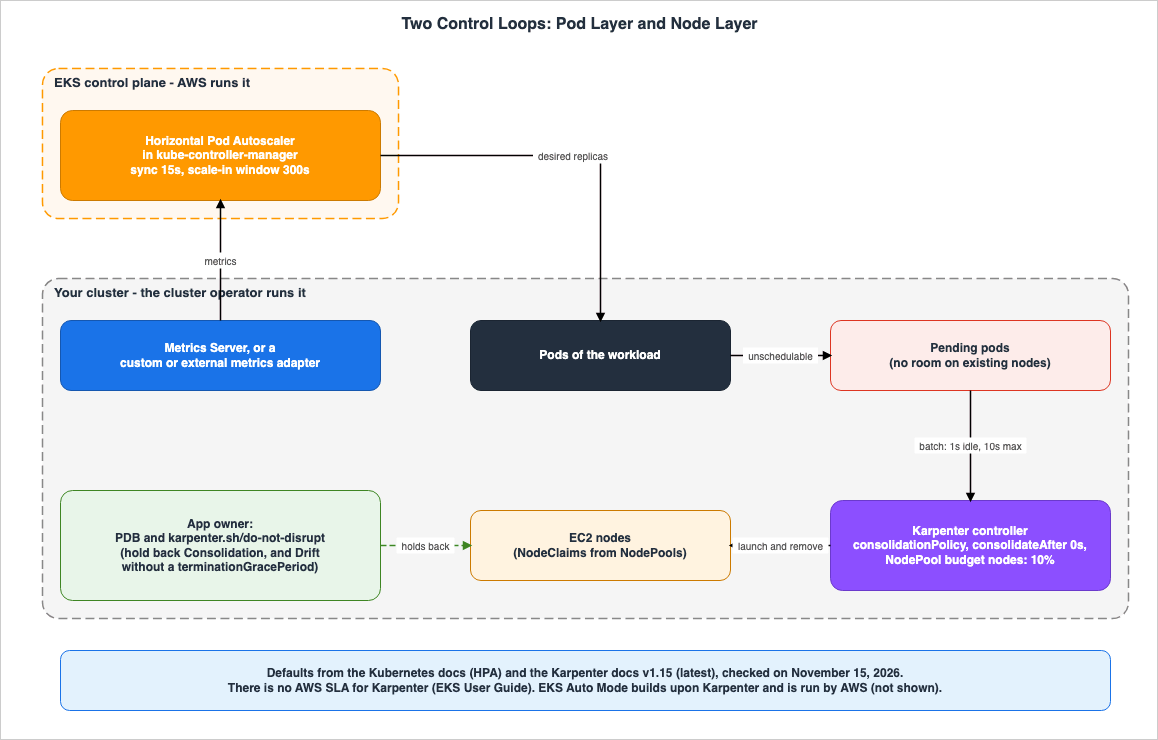
| Layer | What Scales It | Where It Runs | Who Runs It | Who Owns the Settings | Status (as of 2026-11-15) |
|---|---|---|---|---|---|
| Pod Layer | HPA | EKS Control Plane (kube-controller-manager) | AWS | Creator of the HPA; author of the HorizontalPodAutoscaler object. | Stated |
| Node Layer | Karpenter | Within the user's cluster | User | Cluster operator (NodePool and EC2NodeClass). | Stated |
| Node Layer | EKS Auto Mode | AWS-side | AWS | Cluster operator (Auto Mode NodePool). | Stated (not covered in this article) |
| Node Layer | Cluster Autoscaler | Within the user's cluster | User | Cluster operator (Auto Scaling Group). | Stated |
| Node Layer, from the application side | PDB and karpenter.sh/do-not-disrupt | Within the user's cluster | — | Application owner | Stated |
3.1 HPA Is in the Control Plane
The HPA page describes HPA as a control loop that runs intermittently. A flag of kube-controller-manager determines the interval for this loop.The interval is set by the --horizontal-pod-autoscaler-sync-period parameter to the kube-controller-manager (and the default interval is 15 seconds).The EKS control plane configuration page states that EKS manages the Kubernetes control plane, including the API server, scheduler, and controller manager. Within the EKS control plane, kube-controller-manager operates, and AWS manages its operation. The EKS HPA page states that users do not need to install HPA within their cluster.
You do not need to deploy or install the Horizontal Pod Autoscaler on your cluster to begin scaling your applications.Users are responsible for configuring the
HorizontalPodAutoscaler object and specifying the source of the metrics that the HPA reads. Only a few kube-controller-manager flags are documented as changeable on EKS (see Section 5.4).3.2 Karpenter Is in the Cluster
The EKS autoscaling page describes Karpenter as software that users install and manage within their own clusters.Karpenter is open-source software which AWS customers are responsible for installing, configuring, and managing in their Kubernetes clusters.The same page states that AWS provides technical support when running Karpenter on an EKS cluster using a compatible version, without modifying Karpenter itself. Furthermore, the page describes the Service Level Agreement (SLA) as follows.
There is no AWS Service Level Agreement (SLA) for Karpenter and customers are responsible for ensuring that the EC2 instances launched by Karpenter meet their business requirements.The same page clarifies that users are responsible for maintaining the availability and security of Karpenter's controller, as well as performing testing procedures when updating Karpenter and the cluster. Therefore, the responsibility for managing the Node scaling rules, including Karpenter's NodePool configuration and the availability and version of Karpenter's controller, rests with the cluster operators.
3.3 What the Application Owner Places
The disruptions page states that app owners can create Pod Disruption Budgets (PDBs) for each application, and describes a PDB as follows:A PDB limits the number of Pods of a replicated application that are down simultaneously from voluntary disruptions.The same page also instructs cluster administrators and hosting providers to use tools that respect PDBs by calling the Eviction API, rather than directly deleting Pods. Karpenter's Pod annotation
karpenter.sh/do-not-disrupt is also placed on the Pod side. PDBs and the annotation both hold back Consolidation, and Drift without a terminationGracePeriod, in the Node layer from the application side (see Section 8.1).3.4 How This Article Handles EKS Auto Mode and Cluster Autoscaler
The EKS autoscaling page describes EKS Auto Mode as follows:EKS Auto Mode builds upon Karpenter.The same page also states that Auto Mode consolidates workloads and deletes nodes. In Auto Mode, AWS runs the Node layer. This article does not discuss the mechanics of Auto Mode.
In addition to Auto Mode, the page lists two autoscaling products supported by EKS: Karpenter and Cluster Autoscaler. Cluster Autoscaler utilizes Auto Scaling groups. This article will address Cluster Autoscaler in a section of Chapter 9.
4. The Pod Layer — What HPA Reads and When It Acts
This section outlines what the HPA reads, when, and how many Pods it increases. Values are from the HPA page unless otherwise specified.| Item | Value | Source of Value | Status (as of 2026-11-15) |
|---|---|---|---|
| Metric Reading Interval | 15 seconds | Kubernetes documentation default | Stated |
| Tolerance | 0.1 | Kubernetes documentation default | Stated |
| Stabilization Window for Scale-Out | 0 seconds | Kubernetes documentation default | Stated |
| Scale-Out Policy | Every 15 seconds, 4 Pods or 100%, whichever is greater | Kubernetes documentation default | Stated |
| Time Considered Not Ready | 30 seconds | Kubernetes documentation default | Stated |
| CPU Initialization Period | 5 minutes | Kubernetes documentation default | Stated |
| Metrics Server | Not included by default | EKS documentation | Stated |
4.1 Signal Types and Metrics Server
The HPA page states that the HPA reads metrics from three aggregated APIs. These metrics are categorized as follows:metrics.k8s.io for resource metrics, custom.metrics.k8s.io for custom metrics, and external.metrics.k8s.io for external metrics. metrics.k8s.io is typically provided by Metrics Server. Custom APIs are provided by adapter APIs provided by the vendors of metric products. External APIs may also be provided by the same custom adapters.The HPA page and the HPA walkthrough page list the metric types supported by the HPA's
autoscaling/v2 API, including Resource (for Pod CPU and memory), ContainerResource (for individual containers), Pods (for custom metrics per Pod), Object (representing a single object), and External (for metrics from outside the cluster). This article focuses on Object and External in the context of scaling to zero (see Section 5.3).The EKS Metrics Server page states that Metrics Server is not included by default in EKS clusters. The same page indicates that Metrics Server can be installed as a community add-on. The EKS HPA page explains that to run HPA, it is necessary to install a metric source, such as Metrics Server, in the cluster. In other words, on EKS the cluster operator provides the source of signals for the Pod layer.
The EKS HPA page describes HPA in terms of CPU utilization. The HPA page lists other metrics, including memory, custom, object, and external, in addition to CPU. This article treats this difference as a General statement (see Section 10.3).
For HPAs that specify multiple metrics, the system calculates the number of Pods for each metric and selects the highest value.
4.2 The 15-Second Interval and Tolerance
HPA reads metrics for each autoscaler every 15 seconds, as defined by default in the Kubernetes documentation, and calculates the number of Pods based on the ratio to the target value. When this ratio is sufficiently close to 1.0, the HPA does not adjust the number of Pods. This acceptable proximity is defined by the "tolerance," and its default on the HPA page is 0.1.The HPA page says that each HPA can set a tolerance in the
behavior section, under both scaleUp and scaleDown. This feature was introduced in Kubernetes 1.33 and became stable in version 1.37. The HPAConfigurableTolerance row on the feature gates page shows alpha from Kubernetes 1.33 to 1.34, beta from 1.35 to 1.36, and stable from 1.37 onwards. If a specific value is not defined for an HPA, it uses the following default value.If you don't set this field, the HPA applies the default cluster-wide tolerance of 10%.The HPA page says that this cluster-wide default can be changed with the
--horizontal-pod-autoscaler-tolerance flag of kube-controller-manager, and cannot be changed through the Kubernetes API.The EKS control plane configuration page lists
horizontalPodAutoscalerSyncPeriod as a parameter configurable within EKS, representing the HPA synchronization interval. The value ranges from 10 to 15 seconds, with a default of 15 seconds. This page also states that a Provisioned Control Plane is required for this parameter. Furthermore, the page indicates that the default value and range are based on the Kubernetes version available at the time of publication (EKS v1.31 and later) and may change in future versions, and says to treat the values returned by the DescribeClusterVersions operation as the source of truth. The tolerance flag is not in the table on this page (Documentation does not list, Section 5.4).4.3 Scale-Out Policies
The HPA page defines the default behavior when thebehavior field is not specified, using the following values:behavior:
scaleDown:
stabilizationWindowSeconds: 300
policies:
- type: Percent
value: 100
periodSeconds: 15
scaleUp:
stabilizationWindowSeconds: 0
policies:
- type: Percent
value: 100
periodSeconds: 15
- type: Pods
value: 4
periodSeconds: 15
selectPolicy: MaxRegarding scale-out, the HPA page states:
For scaling up there is no stabilization window.The same page says that when the metrics indicate a scale-out, the HPA scales out immediately. Under the two default policies, the HPA can add up to 4 Pods or 100% of the currently running Pods, whichever is greater, every 15 seconds.
4.4 Missing Metrics and Pods Not Yet Ready
The HPA page states that Pods with missing metrics and Pods that are not yet ready are treated separately in the Pod count calculations.- Pods with missing metrics are initially excluded from the calculations. During scale-in, they are assumed to have utilized 100% of their target value, and during scale-out, they are assumed to have utilized 0%. An average is then recalculated based on these assumptions, minimizing fluctuations in either direction.
- When calculating based on CPU usage, Pods that are not yet ready, or Pods whose most recent metric is from before they became Ready, are also excluded from the calculations. If these excluded Pods would have resulted in a scale-out event, the recalculated value assumes they utilized 0%. This dampens the scale-out.
- The time a Pod is considered "not ready" is determined by the
--horizontal-pod-autoscaler-initial-readiness-delayflag, with a default value of 30 seconds. The CPU initialization period is determined by the--horizontal-pod-autoscaler-cpu-initialization-periodflag, with a default value of 5 minutes.
If the recalculated ratio reverses the scale direction, or falls in the tolerance, the HPA does not change the number of Pods.
5. What Holds Pod Scale-In Back
This chapter lists what holds Pod scale-in back. When the load decreases but Pods are not being reduced, first check the six items in this chapter's table.| What Holds It Back | What It Holds Back | Default | Source of the Value | Status (as of 2026-11-15) |
|---|---|---|---|---|
| Scale-In Stabilization Window | Holds the scale-in recommendation to the highest recommendation within the window. | 300 seconds | Default in Kubernetes documentation | Stated |
| Scale-In Policy | The amount of one scale-in. | 100% every 15 seconds | Default in Kubernetes documentation | Stated |
selectPolicy: Disabled | All scale-in in that direction. | — | HPA page | Stated |
| Metrics That Cannot Be Fetched | Scale-in when one of multiple metrics cannot be fetched. | — | HPA page | Stated |
minReplicas | Scale-in below that number. | — | HPA page | Stated |
| Tolerance | Scale-in when the ratio is close to 1.0. | 0.1 | Default in Kubernetes documentation | Stated |
5.1 The 300-Second Stabilization Window
The HPA page specifies the default stabilization window for scale-in as follows:For scaling down the stabilization window is 300 seconds (or the value of the --horizontal-pod-autoscaler-downscale-stabilization command line option, if provided).Before adjusting the number of Pods, the HPA records the calculated recommended number. During scale-in, it uses the highest recommended value in the stabilization window. Therefore, even if the load decreases, the number of Pods will not be reduced as long as a higher recommended value remains in the previous 300 seconds. The EKS HPA page also specifies a default scale-in time of 5 minutes, and indicates that this time can be modified.
The stabilization window can be adjusted for each HPA using the
behavior.scaleDown.stabilizationWindowSeconds setting. The HPA page provides an example setting it to 1 minute. If a specific value is not defined for each HPA, the window defaults to the value of a flag, or if no flag is set, it defaults to 300 seconds.5.2 Scale-In Policies and Settings That Stop Scale-In
The default scale-in policy is a single rule: every 15 seconds, it is possible to reduce up to 100% of currently running Pods. This means that once the window has passed, the default scale-in policy allows the number of Pods to be reduced to theminReplicas value all at once. The HPA page provides an example of a more conservative scale-in policy, reducing the number of Pods by 10% or 5 Pods (whichever is smaller) every 60 seconds.The HPA page states that setting
selectPolicy to Disabled stops scaling in that direction. An HPA configured with behavior.scaleDown.selectPolicy set to Disabled does not scale in.Regarding HPAs that utilize multiple metrics, the HPA page states the following:
If any of these metrics cannot be converted into a desired replica count (e.g. due to an error fetching the metrics from the metrics APIs) and a scale down is suggested by the metrics which can be fetched, scaling is skipped.Specifically, if a custom or external metric adapter is stopped, the HPA does not scale in, even if other metrics indicate a scale-in. However, the same page also notes that in this scenario, scale-out is still possible if the available metrics indicate a need to increase the number of Pods.
5.3 Conditions for Scaling to Zero
The HPA page describes the scaling to and from zero functionality, stating that it isBeta since Kubernetes v1.37; enabled by default. For HPAs that operate on object or external metrics, the spec.minReplicas field can be set to 0, allowing the number of Pods to scale to zero when there is no load, and then scale back up when metrics return. The conditions for this behavior are as follows:Scaling to zero is only supported for object and external metrics. It is not available for resource metrics (such as CPU or memory utilization), because those can only be measured on running Pods.Setting minReplicas: 0 requires at least one object or external metric to be configured; the API server rejects the HorizontalPodAutoscaler otherwise.This behavior is controlled by the
HPAScaleToZero feature gate. The HPA page specifies that this feature gate must be enabled on both the kube-apiserver and kube-controller-manager. The HPAScaleToZero entry on the feature gates page indicates that it was in alpha from version 1.16 to 1.36, with a default value of disabled, and is in beta from version 1.37, with a default value of enabled. While the HPA is maintaining a Pod count of zero, the HPA's status will record a ScaledToZero condition as True.Regarding EKS, the EKS versions page states that Kubernetes 1.37 was released on EKS on October 1, 2026. The date is specified as UTC+0. The EKS 1.37 What's New, posted on October 2, 2026, lists the following as an improvement in 1.37:
Horizontal Pod Autoscaler scale-to-zero graduates to beta and is enabled by default, allowing autoscalers with minReplicas: 0 that use object or external metrics to scale workloads to zero Pods when idle and back up when demand returns.This announcement is a statement from AWS regarding EKS version 1.37. The EKS user guide does not specify how the
HPAScaleToZero feature gate is configured on the kube-apiserver and kube-controller-manager of the EKS control plane. Searching three times with different terms and different families of sources, this article found no such statement in the user guide (No statement found). What this article can state is that the EKS announcement says it is enabled by default, and that the user guide does not state the feature gate setting.If you want to scale CPU or memory-based HPAs to zero, you cannot use the scaling to zero functionality described on the HPA page. Another section of the HPA page states that if you manually set the number of Pods for a workload to zero, and the HPA's
minReplicas is greater than zero, the HPA will stop making adjustments. This is not HPA scale-in; it stops the HPA.5.4 What EKS Lets You Change, and What It Does Not Say You Can Change
The Pod layer rules can change in two places: thebehavior setting for each Horizontal Pod Autoscaler (HPA) and the flags for kube-controller-manager. The HPA creator specifies the behavior setting in the HorizontalPodAutoscaler object. The flags are part of the control plane configuration.The EKS control plane configuration page lists the control plane parameters that can be configured in EKS in a table with five rows. The row for kube-controller-manager includes two settings:
horizontalPodAutoscalerSyncPeriod, which controls the HPA synchronization period, and terminatedPodGcThreshold, which sets the threshold for removing terminated Pods. Both of these require a Provisioned Control Plane. The flags for the scale-in stabilization window and tolerance are not in this table (Documentation does not list). Their absence from the table does not show that EKS states these values cannot be changed. This article only states that the EKS documentation does not list these flags as parameters that users can change. The stabilizationWindowSeconds and tolerance settings for each HPA are values in the Kubernetes API object and are changed through a different path from this table.This site's Amazon EKS Control Plane Configuration covers the relationship between the number of HPAs and the load on the control plane when the synchronization period is shortened.
6. Node Layer Scale-Out
This chapter details Node layer scale-out following an increase in Pods, listing each step with corresponding numbers and sources. The HPA increases the number of Pods; if these Pods cannot be placed on existing nodes, they enter a "Pending" state. Karpenter then observes these Pending Pods and initiates the launch of new nodes.| Step | What Happens | Number | Source | Status (as of 2026-11-15) |
|---|---|---|---|---|
| 1 | The HPA reads metrics and increases the number of Pods. | Every 15 seconds | HPA page (Kubernetes documentation default) | Stated |
| 2 | The scheduler is unable to place the Pods, and the Pods enter a Pending state. | — | — | No statement found (time) |
| 3 | Karpenter batches Pending Pods. | Batching window of 1 second, up to a maximum of 10 seconds. | Karpenter settings page (Karpenter documentation default) | Stated |
| 4 | Karpenter launches EC2 instances. | Under a minute | EKS autoscaling page | Stated |
| 5 | The node becomes Ready, and the Pods are placed. | — | — | No statement found (time) |
The Karpenter settings page specifies two values for batching Pending Pods.
BATCH_IDLE_DURATION closes the batching window when no new Pending Pods arrive for longer than this value; the default value is 1s. BATCH_MAX_DURATION is the maximum length of the batching window, with a default value of 10s. If Pods continue to arrive at intervals shorter than one second, the window can extend to a maximum of 10 seconds. The same page describes the relationship between these two values as follows:Reducing these values may trade off a slightly faster time from pending pod to node launch, in exchange for launching smaller nodes.The EKS autoscaling page describes Karpenter's launch process as follows:
Karpenter launches right-sized compute resources (for example, Amazon EC2 instances) in response to changing application load in under a minute.This one-minute timeframe is based on a description in the EKS user guide. The page does not specify the conditions under which this value applies.
This article does not sum these numbers to determine the total time from Pod increase to node availability. Data regarding the timeframes in steps 2 and 5 could not be found on the pages in Section 1.3 (No statement found). Data regarding the total time taken through HPA and Karpenter could also not be found.
7. Node Layer Scale-In
This chapter outlines the rules by which Karpenter reduces the number of nodes. Unless otherwise specified, the values presented are those found in the Karpenter disruption page, versionv1.15 (latest).7.1 The Three Values of consolidationPolicy
The Karpenter disruption page describes the default behavior for NodePool disruptions as follows:Karpenter will configure these fields with the following values by default if they are not set:spec:
disruption:
consolidationPolicy: WhenEmptyOrUnderutilized
consolidateAfter: 0sThe
consolidationPolicy determines which nodes Karpenter considers for consolidation. The table on the Karpenter disruption page defines the three values in its "Nodes it considers" column as follows. Each of the following three lines combines the value name at the start of a row with the text of that row's "Nodes it considers" column; this article joined them into one line.WhenEmpty: Only empty nodes (a node is empty when it has only pods with no disruption cost, such as daemonsets, user overrides, and ephemeral pods that the user has annotated as cheap to disrupt)
Balanced: Nodes where the cost savings outweigh the disruption to running pods
WhenEmptyOrUnderutilized: Any node that can be removed or replaced to reduce costconsolidationPolicy | Candidate Nodes | Which Version Pages Include It | Status (as of 2026-11-15) |
|---|---|---|---|
WhenEmpty | Only empty nodes | Pages v1.0, v1.13, v1.14, and v1.15 | Stated |
Balanced | Nodes where the savings outweigh the disruption to running Pods | Pages v1.14 and v1.15 (added in Karpenter 1.14.0) | Stated |
WhenEmptyOrUnderutilized | All nodes that can be removed or replaced | Pages v1.0, v1.13, v1.14, and v1.15 | Stated |
The section "Upgrading to 1.14.0+" in the Karpenter upgrade guide states:
This version adds a Balanced consolidation policy.Versions v1.0 and v1.13 of the Karpenter disruption page only list two values:
WhenEmpty and WhenEmptyOrUnderutilized, while version v1.14 includes Balanced. The Karpenter disruption page states that, for each Consolidation action, Balanced weighs how much of the NodePool's cost it saves against how much of the NodePool's total Pod disruption it causes, and acts only when the former is large enough relative to the latter. This article does not cover the details of the calculation used in this comparison, nor does it discuss cost estimations.There are three consolidation methods. The Karpenter disruption page says Karpenter tries them in the following order: Empty Node Consolidation, which removes empty nodes concurrently; Multi Node Consolidation, which removes two or more nodes concurrently and, if necessary, initiates a replacement; and Single Node Consolidation, which removes one node and, if necessary, initiates a replacement.
7.2 consolidateAfter
consolidateAfter is the amount of time Karpenter waits for new Pods to land on a node before making that node a Consolidation candidate. The Karpenter disruption page states that this time is reset each time a Pod is added or removed from a node. With the default setting of 0s, a node becomes a consolidation candidate as soon as Pod additions and removals cease. Setting it to Never will halt all consolidation activities for that NodePool.7.3 The NodePool Disruption Budget
The NodePool budget limits the number of nodes that Karpenter can simultaneously stop. The Karpenter disruption page specifies a default budget ofnodes: 10% when a budget is not explicitly defined.The budget is calculated by rounding percentages up. The Karpenter disruption page provides an example with a NodePool containing 10 nodes, where 2 are in a NotReady state. In this scenario, a 10% budget is applied, allowing only one Node Auto Repair disruption, while other disruptions are not permitted. The same page notes that any non-zero percentage budget will allow at least one disruption on a NodePool, due to the rounding calculation. When multiple budgets are defined, the smallest value is used.
The budget can include a
reasons section, specifying which reasons—Drifted, Underutilized, Empty, or Unhealthy—it applies to. A budget without a reasons section applies to all reasons. The schedule and duration settings allow you to define the time window during which the budget is active.The budget holds back only Karpenter's voluntary disruptions. The Karpenter disruption page states that the budget only blocks voluntary disruptions through drift, emptiness, Consolidation, and Node Auto Repair. It continues with:
Note that NodePool Disruption Budgets do not prevent Karpenter from terminating expired nodes.7.4 The Order of the Automated Methods
The Karpenter disruption page describes the operation of the Karpenter Disruption Controller as follows:Karpenter disrupts nodes by executing one automated method at a time, first doing Node Repair (when enabled), then Drift, then Consolidation.Each method begins by listing potential candidate nodes. If a node contains Pods that cannot be evicted, Karpenter removes that node from consideration and will try it later. However, Node Auto Repair, and Drift when the NodeClaim has a
terminationGracePeriod, still select that node. Next, it verifies that stopping the node will not exceed the NodePool's budget and performs a simulation to relocate the Pods. If necessary, it will start the replacement nodes first.The Karpenter disruption page marks Node Auto Repair as
Karpenter v1.1.0 alpha. The default setting in the Karpenter settings page, under FEATURE_GATES, is NodeRepair=false. The "Upgrading to 1.15.0+" section in the Karpenter upgrade guide states:Breaking: Node Auto Repair (alpha, NodeRepair feature gate) is now a voluntary disruption method.The same section states that, from Karpenter version 1.15.0, Node Auto Repair will start the replacement nodes first, respect the
Unhealthy reason of the NodePool budget, and drain the node while respecting PDBs. The drain is bounded by a per-condition termination grace period. The v1.0 version of the Karpenter disruption page counted Node Repair among the forceful methods that the karpenter.sh/do-not-disrupt annotation does not hold back. This article treats this difference as a version-specific change (Section 10.2).8. What Holds Node Scale-In Back, and What Does Not
This chapter forms the core of this article. It outlines the circumstances under which Nodes remain despite a reduction in Pods, and instances where Nodes that were intended to be removed disappear. It lays out which component in which layer holds back which method, and which methods it does not hold back.According to the Karpenter disruption page, Node scale-in involves two stages. The first is the selection stage, where a method selects a node. The second is the drain stage, where Pods are evicted from the selected Nodes to empty them. Both PDBs (Pod Disruption Budgets) and the
karpenter.sh/do-not-disrupt annotation appear in both stages, but their effects differ depending on the stage. This article presents these two stages in separate tables.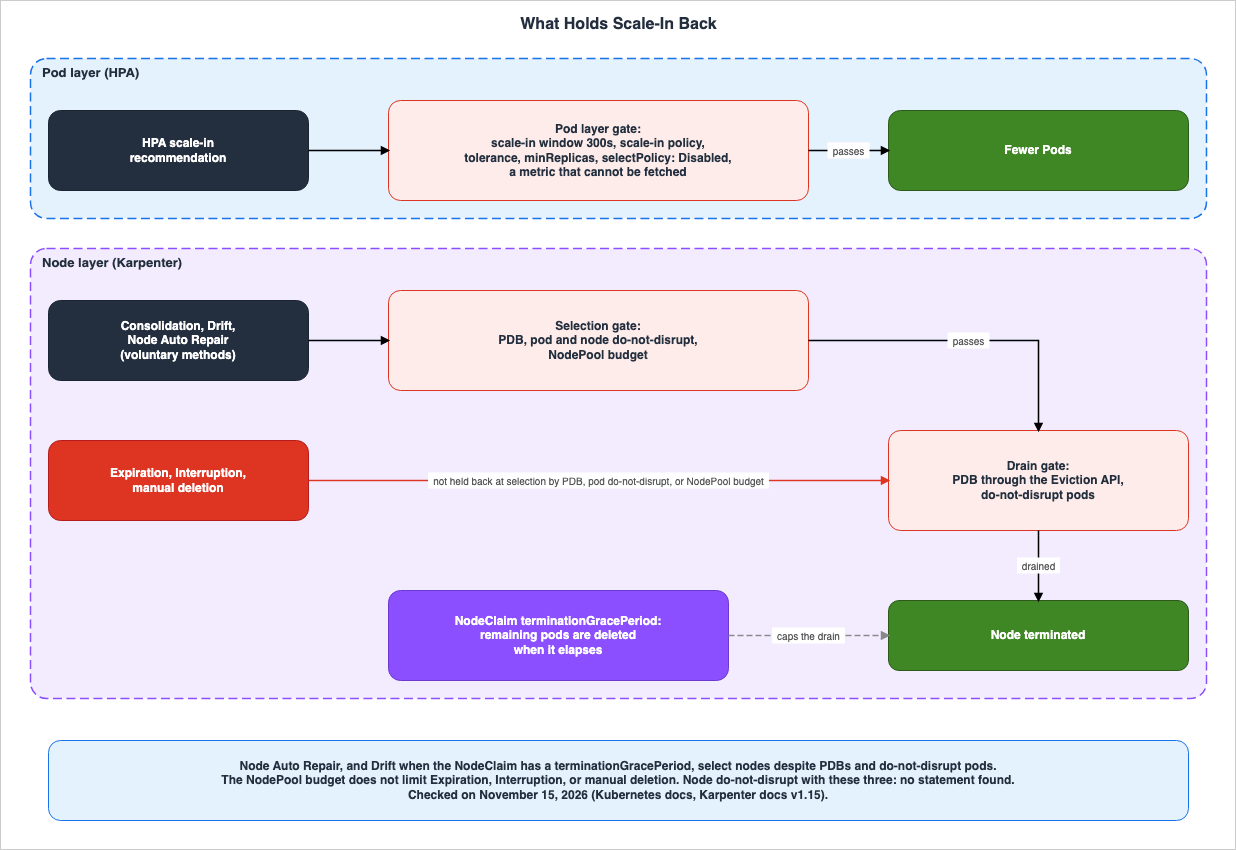
8.1 The Stage Where a Method Selects a Node
| What Is Placed | Who Places It | Consolidation | Drift | Node Auto Repair | Expiration | Interruption | Manual Deletion |
|---|---|---|---|---|---|---|---|
| PDB | Application Owner | Holds back | Holds back. Does not hold back if there is a terminationGracePeriod | Does not hold back | Does not hold back | Does not hold back | — (the user selects) |
Pod karpenter.sh/do-not-disrupt | Application Owner | Holds back | Holds back. Does not hold back if there is a terminationGracePeriod | Does not hold back | Does not hold back | Does not hold back | Does not hold back |
Node karpenter.sh/do-not-disrupt | Cluster Operator | Holds back | Holds back | Does not hold back | No statement found | No statement found | No statement found |
| NodePool Budget | Cluster Operator | Holds back | Holds back | Holds back. From Karpenter 1.15.0, with the reason Unhealthy | Does not hold back | Does not hold back | Does not hold back |
Each cell in this table reflects the wording from the Karpenter disruption page
v1.15 (latest) as of November 15, 2026, and the Karpenter upgrade guide. The status of the information is "Stated" for all cells except those marked with "—" or "No statement found." The "—" cells indicate that manual deletion allows the user to select the node, so there is no selection stage. "No statement found" indicates that no text was found describing that specific combination, and does not show that it holds back or that it does not hold back.Voluntary methods: The Karpenter disruption page describes Consolidation, Drift, and Node Auto Repair as automated, graceful methods. Each method first identifies a list of candidate nodes and then eliminates any nodes that have Pods that cannot be evicted. Regarding PDBs, the Karpenter disruption page states:
the more PDBs there are affecting a Node, the more difficult it will be for Karpenter to find an opportunity to perform voluntary disruption actions.The Pod
karpenter.sh/do-not-disrupt annotation has a value of either "true" or a duration like "30m". When a duration is specified, the annotation is active for that duration after the Pod starts running. The Karpenter disruption page states:Nodes with active karpenter.sh/do-not-disrupt pods will be excluded from Consolidation, and conditionally excluded from Drift.The Drift condition is the NodeClaim's
terminationGracePeriod. The Karpenter disruption page states that terminationGracePeriod changes which nodes are eligible for Drift.When configured, a node may be disrupted via drift even if there are pods with blocking PDBs or the karpenter.sh/do-not-disrupt annotation scheduled to it.The same page further explains that this behavior lets cluster administrators ensure that crucial updates, such as AMI updates, cannot be blocked by misconfigured applications. The
terminationGracePeriod is a value set by the cluster operator for the NodePool, and, for Drift, it overrides the PDBs and annotations that the application owner placed.Node Auto Repair selects nodes even if PDBs and Pod annotations are present. The annotation that stops node repair is a separate one,
karpenter.sh/do-not-repair. Placing the same annotation, karpenter.sh/do-not-disrupt, on a node, according to the Karpenter disruption page, prevents voluntary disruptions, except for Node Auto Repair, from occurring on that node.Preferred anti-affinity and topology spread are not mechanisms for preventing disruptions. The Karpenter disruption page states:
Using preferred anti-affinity and topology spreads can reduce the effectiveness of consolidation.The same page explains that Karpenter attempts to satisfy these preferences during node provisioning and that Consolidation also attempts to meet them, aiming to reduce node replacements.
Forceful methods: The Karpenter disruption page describes Expiration and Interruption as automated, forceful methods. When the conditions are met, a drain is initiated immediately. These methods cannot be rate-limited by the NodePool budget and do not wait for replacement nodes to become healthy.
- Expiration: When a node's lifetime exceeds the
spec.expireAftervalue defined in its NodeClaim, Karpenter will begin draining the node. The default value in Karpenter's documentation is720h, which is 30 days.expireAfterrepresents an upper limit for lifetime; it does not guarantee that the node will remain active until that point.
- Interruption: When Karpenter has interruption handling enabled, it watches for Spot interruption warnings, scheduled maintenance events, instance terminating and stopping events, and instance status check failures, and before the event it taints, drains, and terminates the node.
- Manual Deletion: This refers to deleting nodes using commands such as
kubectl delete nodeorkubectl delete nodeclaim. Karpenter's finalizer runs the drain stage below in place of the normal Kubernetes deletion process.
The Karpenter disruption page describes the relationship between the Pod annotation and these three methods.
The karpenter.sh/do-not-disrupt annotation does not exclude nodes from the forceful disruption methods: Expiration, Interruption, and manual deletion (e.g. kubectl delete node ...).The same page also states, as described in Section 7.3, that the budget does not stop Expiration.
8.2 The Drain Stage
| What Is Placed | Role in the Drain Stage | Upper Limit on the Wait | Status (as of 2026-11-15) |
|---|---|---|---|
| PDB | Karpenter uses the Eviction API to evict Pods, so the PDB makes eviction wait. | Remaining Pods are deleted after the terminationGracePeriod elapses. | Stated |
Pod with karpenter.sh/do-not-disrupt | Makes the drain wait. | Interruption and Node Auto Repair have implicit upper bounds. Expiration and manual deletion have none, and without a terminationGracePeriod the Pod can make the drain wait indefinitely. | Stated |
NodeClaim terminationGracePeriod | Maximum time for drain. | — | Stated |
The Karpenter disruption page describes the node termination process, stating that it uses the Kubernetes Eviction API to evict Pods while respecting Pod Disruption Budgets (PDBs) and waiting for the node to become empty. This also applies to methods that went past PDBs in the selection stage. Regarding forceful methods, the same page states that PDBs can control the speed at which applications are disrupted.
Regarding Pod annotations, the section on Expiration includes the following warning:
Misconfigured PDBs and pods with the karpenter.sh/do-not-disrupt annotation may block draining indefinitely.The same page further explains that in this scenario, a partially drained node might remain in the cluster, requiring manual removal of the annotated Pods. Therefore, the page does not recommend setting
expireAfter without terminationGracePeriod in clusters that have annotated Pods.Once the
terminationGracePeriod elapses, any remaining Pods are deleted, and the instance is terminated. The Karpenter disruption page states that combining expireAfter and terminationGracePeriod results in a maximum limit for node lifetime, which is the sum of these two values. The same page also notes that to ensure the terminationGracePeriodSeconds of Pods are respected, Pods protected by PDBs or annotations may be terminated before the node's terminationGracePeriod expires.In other words, "does not hold back" refers to the selection stage. Expiration, Interruption, and manual deletion select the node and start the drain even when PDBs and annotations are present. In the drain stage, PDBs and annotated Pods make the emptying of the node wait, and
terminationGracePeriod cuts that wait off.8.3 Scale-In in the Two Layers Is Decided Separately
The HPA stabilization window and policies decide Pod layer scale-in. Node layer scale-in follows the NodePool'sconsolidationPolicy, consolidateAfter setting, and budget. No statement among the sources in Section 1.3 gives the HPA scale-in time and the Karpenter scale-in time together (No statement found).As an inference by this article, nodes eligible for Karpenter Consolidation are those that have become empty because Pods decreased, or those that are underutilized. Therefore, Node scale-in through Consolidation begins after the Pods on a node have decreased. In this inference, while Pod scale-in is held back by the default 300-second window, the node does not become empty even if Karpenter's
consolidateAfter is 0s.Conversely, Node layer scale-in does not reduce the number of Pods. When Karpenter terminates a node, the Pods running on that node are evicted and rescheduled onto a different node.
9. How Cluster Autoscaler Differs
The EKS autoscaling page states that Cluster Autoscaler utilizes Auto Scaling groups. The EKS BP Cluster Autoscaler page states that SIG Autoscaling maintains Cluster Autoscaler, and that the AWS implementation adjusts the desired capacity of EC2 Auto Scaling groups. The Cluster Autoscaler values are the defaults in the Cluster Autoscaler FAQ.| Item | Default Value in Cluster Autoscaler FAQ | Corresponding Value in Karpenter | Status (as of 2026-11-15) |
|---|---|---|---|
| Interval for checking Pending Pods | --scan-interval 10 seconds | Batching window: 1 second, up to a maximum of 10 seconds | Stated |
| Time before removing unnecessary nodes | --scale-down-unneeded-time 10 minutes | consolidateAfter 0s | Stated |
| Time to wait before scale-in after scale-out | --scale-down-delay-after-add 10 minutes | No statement found | Stated (Cluster Autoscaler) |
| Pod settings that hold back scale-in | PDB and cluster-autoscaler.kubernetes.io/safe-to-evict: "false" | PDB and karpenter.sh/do-not-disrupt | Stated |
| Node unit | Auto Scaling group | NodeClaim | Stated |
The Cluster Autoscaler FAQ states that it does not remove a candidate node if the node has been unneeded for less than 10 minutes, if there was a scale-out in the last 10 minutes, or if a scale-in failed in the last 3 minutes. The two columns in this table represent values with different meanings, specific to different software. This article does not use this table to compare which one is faster.
10. Where the Sources Disagree and What They Do Not Say
This chapter summarizes the items to which this article attached a source-state term.10.1 Where the Sources Disagree
- Pod
karpenter.sh/do-not-disruptand Expiration: The EKS BP Karpenter page states the following (Sources disagree):
By adding a karpenter.sh/do-not-disrupt annotation to the pod, you are instructing Karpenter to preserve the node until the Pod is terminated or the karpenter.sh/do-not-disrupt annotation is removed.The same page also states, just before that sentence, that an application will be interrupted when a node's TTL expires. However, the Karpenter disruption page, version
v1.15 (latest), indicates that Pod annotations do not hold back Expiration. Expiration selects a node and begins the drain process, evicting Pods without annotations. Annotated Pods make the drain wait, and if a terminationGracePeriod is not specified, they may make it wait indefinitely. If a terminationGracePeriod is set, the annotated Pods are also deleted when it elapses (see Sections 8.1 and 8.2). The v1.0 version of the Karpenter disruption page also states that annotations do not hold back Expiration.The two pages agree that in clusters without a
terminationGracePeriod, the node remains active until the annotated Pods are terminated. However, they disagree on whether the node is selected for Expiration and begins the drain process, and on whether annotated Pods are terminated when a terminationGracePeriod is in place. This article does not decide that either is incorrect. As of November 15, 2026, the statements on the two pages remain inconsistent.10.2 What This Article Reads as Different Versions
consolidationPolicyValues: The Prescriptive Guidance page describes an example NodePool forkarpenter.sh/v1beta1as follows (Different versions).
For consolidationPolicy, you can use WhenUnderutilized or WhenEmpty:The Karpenter upgrade guide states,
Karpenter 1.1.0 drops the support for v1beta1 APIs. The values for v1.15 (latest) in the Karpenter disruption page are WhenEmpty, Balanced, and WhenEmptyOrUnderutilized. The NodePool example on the EKS BP Karpenter page uses WhenEmptyOrUnderutilized and does not list Balanced (Documentation does not list).- Node Auto Repair Types: The v1.0 version of the Karpenter disruption page counts Node Repair among the forceful methods, while the Karpenter upgrade guide states that, from 1.15.0, it is a voluntary method (Different versions, Section 7.4).
10.3 What This Article Reads as General Statements
- HPA Signals: The EKS HPA page describes the HPA in terms of CPU utilization. The same page says it is based on the walkthrough in the Kubernetes documentation. The HPA page also covers metrics such as memory, custom, object, and external (General statement, Section 4.1).
The Kubernetes Horizontal Pod Autoscaler automatically scales the number of Pods in a deployment, replication controller, or replica set based on that resource’s CPU utilization.10.4 Items with No Statement Found, and What the Documentation Does Not List
- The setting for
HPAScaleToZeroon the EKS control plane, as described in the EKS user guide. EKS 1.37 What's New states it is enabled by default (No statement found - Section 5.3). - The kube-controller-manager flags for the scale-in stabilization window and tolerance are not listed in the table of configurable parameters for EKS (Documentation does not list - Section 5.4).
- The time it takes for a Pod to transition to the Pending state, and the time it takes for a newly launched node to become Ready before a Pod is placed on it (No statement found - Chapter 6).
- The time from a Pod increase to a usable node through HPA and Karpenter, and the scale-in time across the two layers (No statement found - Chapter 6, Section 8.3).
- The
Balancedsetting on the EKS BP Karpenter page (Documentation does not list - Section 10.2).
The absence of a description does not necessarily mean that the feature or functionality does not exist.
11. Failure Modes
This chapter collects common failures from the statements in Chapters 2 through 10.- The assumption that Pods decrease right away when the load drops: HPA scale-in follows the highest recommendation in the default 300-second stabilization window specified in the Kubernetes documentation (Section 5.1).
- The assumption that scale-in continues on CPU even when a custom or external metrics adapter stops: If one metric is unavailable, but the remaining metrics indicate a need to scale in, the HPA does not scale in (Section 5.2).
- Setting
minReplicasto 0 on a CPU-based HPA: In Kubernetes 1.37, HPA scaling to zero only occurs when using object and external metrics. The API server will reject HPAs that do not meet the conditions (Section 5.3). - Reading "enabled by default" in the EKS 1.37 What's New as meaning that any HPA can scale to 0: The same text specifies that this applies only to HPAs that use object or external metrics with
minReplicas: 0(Section 5.3). - Trying to change the scale-in stabilization window in the EKS control plane settings: That flag is not in the table of configurable parameters for EKS. The
behaviorsetting for each HPA is configured through a separate process (Section 5.4). - The assumption that Nodes decrease right away when Pods decrease: Node scale-in is determined by the Karpenter NodePool configuration, and its Consolidation can be held back by PDBs, annotations, and the NodePool budget, while affinity preferences can reduce the effectiveness of Consolidation (Chapter 7, Section 8.1).
- The assumption that a node is not selected once a Pod on it has the
karpenter.sh/do-not-disruptannotation: In the selection stage, the annotation does not hold back Expiration, Interruption, manual deletion, or Node Auto Repair, nor Drift when there is aterminationGracePeriod. On a selected node, the Pods other than the annotated Pod are evicted (Section 8.1). - Combining the
karpenter.sh/do-not-disruptannotation andexpireAfterwithout aterminationGracePeriod: Annotated Pods can make the drain wait indefinitely, and some nodes may remain partially drained (Section 8.2). - The assumption that a NodePool budget of 0 means no node is replaced: The budget holds back only voluntary disruptions and does not hold back Expiration (Section 7.3).
- Reading
expireAfteras a guarantee that the node stays until then:expireAfteris the upper limit on node lifetime (Section 8.1). - Writing the
consolidationPolicyvalues with the two values from older materials:WhenUnderutilizedis a v1beta1 value, and Karpenter 1.1.0 dropped support for the v1beta1 APIs.Balancedwas introduced in Karpenter 1.14.0 (Section 7.1, Section 10.2). - Writing the defaults in the Kubernetes and Karpenter documentation as EKS defaults: The default values mentioned in this article are explicitly linked to the values described in the relevant documentation. Only values documented in the EKS documentation can be considered as the default settings for EKS (Section 2.2).
- Adding up the numbers in Chapter 6 to get the time from Pod to Node: No source was found that states the times for steps 2 and 5, or the total time (Chapter 6).
- Treating Karpenter's behavior as in the scope of an AWS SLA: The EKS autoscaling page states that there is no AWS SLA for Karpenter (Section 3.2).
12. Frequently Asked Questions About Pod and Node Scaling on Amazon EKS
This chapter answers the reader assumptions in Section 1.1, and related questions, with the statements in Chapters 2 through 10.Q1. Why do Pods not decrease right away even though the load has dropped?
HPA scale-in has a default stabilization window of 300 seconds, as defined in the Kubernetes documentation. The HPA uses the highest recommended value within that window. Additionally, factors such astolerance, minReplicas, selectPolicy: Disabled, and metrics that cannot be fetched hold scale-in back. There is no stabilization window for scale-out (see Chapter 5).Q2. Can a CPU-based HPA also bring the number of Pods to 0?
No, it cannot. The HPA page states that scaling to zero only works using object and external metrics; it does not support CPU or memory utilization. TheminReplicas: 0 setting requires at least one object or external metric, and if none are provided, the API server will reject the HPA request. Scaling to zero has been in beta since Kubernetes 1.37 and is enabled by default (see Section 5.3).Q3. Is HPA scaling to zero enabled on an EKS cluster running 1.37?
The EKS 1.37 What's New states that, in 1.37, HPA scaling to zero became beta and is enabled by default. This applies only to HPAs that use object or external metrics and are configured withminReplicas: 0. The EKS user guide does not provide information on how HPAScaleToZero is configured in the EKS control plane's kube-apiserver and kube-controller-manager (No statement found). In the Kubernetes documentation, the 1.37 default is also enabled (see Section 5.3).Q4. Why do Nodes remain even though Pods have decreased?
The configuration of the Karpenter NodePool decides Node scale-in. If theconsolidationPolicy is set to WhenEmpty, Nodes that are not empty will not be considered for consolidation. The consolidateAfter timer restarts each time a Pod is added or removed. PDBs, the Pod and node karpenter.sh/do-not-disrupt annotations, and the NodePool budget hold back Consolidation. Preferred anti-affinity and topology spread configurations can reduce the effectiveness of consolidation (see Chapter 7, Section 8.1).Q5. Why did a node disappear when its Pods had karpenter.sh/do-not-disrupt?
Pod annotations do not hold back Expiration, Interruption, or manual deletion from selecting nodes. They also do not hold back Node Auto Repair. If the NodeClaim has a terminationGracePeriod, Drift also selects a node that has annotated Pods. During the drain process for the selected node, the annotated Pod makes the drain wait, but once the terminationGracePeriod elapses, that Pod is also deleted, and the node is terminated. The EKS BP Karpenter page states that annotations keep nodes alive until the Pods are terminated, which disagrees with the Karpenter documentation (Sections 8.1, 8.2, and 10.1).Q6. If you set the NodePool budget to 0, will nodes never be replaced?
Nodes can still be replaced. The budget holds back only voluntary disruptions through Drift, empty nodes, Consolidation, and Node Auto Repair. The Karpenter disruption page states that the budget does not stop Expiration, and that forceful methods cannot be rate-limited with the budget (see Sections 7.3 and 8.1).Q7. Are the default values in the Kubernetes or Karpenter documentation also the default values on EKS?
This article does not write them as EKS values. The EKS documentation gives values only where it has a row for them, such as the default 15-second HPA sync period. Karpenter is software that users install within their clusters, so the defaults that apply are those of the Karpenter version the user installed (see Sections 2.2 and 3.2).Q8. What's different about Cluster Autoscaler?
Cluster Autoscaler utilizes Auto Scaling groups. By default, according to the Cluster Autoscaler FAQ, it waits 10 minutes before deleting nodes that are no longer needed, and it does not scale in for 10 minutes after a scale-out. The Pod settings that hold back scale-in are PDB (Pod Disruption Budget) andcluster-autoscaler.kubernetes.io/safe-to-evict: "false" (see Chapter 9).13. Summary
When designing Pod and Node scaling in EKS, check the following:- The Horizontal Pod Autoscaler (HPA) for the Pod layer is assumed to reside in the AWS-managed control plane, while the Karpenter for the Node layer is assumed to operate in the user-managed cluster.
- Determine whether to configure the scale-in stabilization window and tolerance for each HPA individually, or to rely on the default settings.
- For HPAs that use multiple metrics, assume that scale-in stops if one metric cannot be fetched.
- If scaling to zero is implemented, utilize either object or external metrics, and check the cluster's Kubernetes version and how the EKS announcement and the user guide describe the feature.
- Verify the values for the NodePool's
consolidationPolicy,consolidateAfter, and budget against the default values documented in the Karpenter documentation, and against the specific version of Karpenter being used. - Ensure that the application owner and cluster operator share information regarding who is responsible for deploying Pod Disruption Budgets (PDBs) and the
karpenter.sh/do-not-disruptannotation, and which methods each holds back and which it does not. - Assume that Expiration, Interruption, manual deletion, Drift with a
terminationGracePeriod, and Node Auto Repair select nodes even when annotations are present, and that Expiration, Interruption, and manual deletion select nodes even when a NodePool budget is present. - During the drain process, determine how long PDBs and annotated Pods can make the drain wait, and how to configure the
terminationGracePeriod. - When documenting default values, clearly specify which values are taken from the Kubernetes documentation, the Karpenter documentation, and the EKS documentation.
- Establish a process for re-evaluating and updating values and versions after the verification date.
14. References
- Horizontal Pod Autoscaling - Kubernetes
- HorizontalPodAutoscaler Walkthrough - Kubernetes
- Feature Gates - Kubernetes
- Disruptions - Kubernetes
- Disruption - Karpenter
- Disruption - Karpenter (v1.14)
- Disruption - Karpenter (v1.13)
- Disruption - Karpenter (v1.0)
- NodePools - Karpenter
- Settings - Karpenter
- Upgrade Guide - Karpenter
- Compatibility - Karpenter
- Scale cluster compute with Karpenter and Cluster Autoscaler - Amazon EKS
- Scale pod deployments with Horizontal Pod Autoscaler - Amazon EKS
- View resource usage with the Kubernetes Metrics Server - Amazon EKS
- Advanced Kubernetes control plane configuration - Amazon EKS
- Understand the Kubernetes version lifecycle on EKS - Amazon EKS
- Automate cluster infrastructure with EKS Auto Mode - Amazon EKS
- Amazon EKS and Amazon EKS Distro now support Kubernetes version 1.37
- Karpenter - Amazon EKS Best Practices Guide
- Cluster Autoscaler - Amazon EKS Best Practices Guide
- Spread workloads across nodes and Availability Zones - AWS Prescriptive Guidance
- Cluster Autoscaler FAQ - kubernetes/autoscaler
References:
Tech Blog with curated related content
Written by Hidekazu Konishi