Sharing KMS Keys and Secrets Across AWS Accounts - Who Can Still Stop, Delete, Rotate, and Audit Them
First Published:
Last Updated:
This article addresses this question by dividing it into four key operations: stop, delete, rotate, and audit. "Stop" means preventing new use by the other account. "Delete" means removing the key or secret itself. "Rotate" involves changing the key material or the secret value. "Audit" means checking from records who used the key or secret, and when. The four routes are writing statements in the KMS key policy, sharing KMS keys using AWS Resource Access Manager (AWS RAM), writing statements in the secret's resource policy, and placing cross-account replicas in Secrets Manager.
In November 2026, two developments impacted this area. On November 13, 2026, Secrets Manager introduced the ability to replicate secrets to a different account. On November 16, 2026, AWS KMS added support for key sharing using AWS RAM. Both of these changes alter the division of control after sharing.
Within the scope that the sources state explicitly, the answer is as follows: When sharing KMS keys using AWS RAM, the key will have an additional key policy,
AWS_RAM, managed by AWS RAM, in addition to the default key policy that the owner writes. These two policies are evaluated together, and a permission in either one can allow access. An explicit Deny in the default key policy takes precedence over an Allow in the AWS_RAM key policy. Even after sharing stops, grants that AWS services created for consumers during sharing remain until they are retired or revoked. Secrets Manager replicas are independent secrets with their own access policies, KMS keys, and lifecycles. Replicas accept neither value writes nor rotation; the primary account rotates the value. Replication can be stopped from either account, and even after stopping, the replica remains in the other account.This article is neither an introduction to AWS KMS or Secrets Manager, nor an overview of new features. It does not discuss general encryption concepts, AWS RAM concepts, organizational policy design, or pricing. It shows, in the words of the sources, only who holds stop, delete, rotate, and audit after the handoff. The information presented was verified on November 18, 2026.
Related articles on this site:
- Cross-Account Sharing by Service on AWS - AWS RAM Resource Shares, Service-Native Sharing, and What Each Route Leaves the Owner Able to Stop
- Resource-Based Policies by Service on AWS - Where the Second Policy Lives, What It Can Say, and When It Is Required
- AWS Secrets Manager and Parameter Store Decision Guide - Storing, Rotating, and Accessing Secrets and Configuration
- Deletions You Schedule on AWS - KMS Waiting Periods, Secrets Manager Recovery Windows, and What Can Be Read or Undone Meanwhile
- IAM Policy Evaluation Logic Step-by-Step - Explicit Deny, RCP, SCP, Resource Policy, Identity Policy, Permission Boundary, and Session Policy
- AWS Organization Guardrails - Service Control Policies, Resource Control Policies, and Data Perimeter Design
- AWS KMS Envelope Encryption and Data Key Caching Patterns - Design Decisions for the AWS Encryption SDK and Multi-Region Keys
- Forensic Evidence on AWS - Acquisition Order, the Forensics Account, Re-Encryption, and EBS Snapshot Lock
Table of Contents
- 1. Scope and Assumptions
- 2. Four Routes for Handing Over a Key or a Secret
- 3. AWS KMS - Two Key Policies Evaluated Together
- 4. AWS KMS - What Remains After You Stop Sharing
- 5. Secrets Manager - Sharing Through a Resource Policy
- 6. Secrets Manager - Cross-Account Replicas
- 7. Who Holds Stop, Delete, Rotate, and Audit
- 8. Choosing a Route, and Where Organization Guardrails Take Over
- 9. Where the Sources Disagree and What They Do Not Say
- 10. Failure Modes
- 11. Frequently Asked Questions About Sharing KMS Keys and Secrets Across Accounts
- 12. Summary
- 13. References
1. Scope and Assumptions
This chapter defines the intended audience, scope, relevant materials, and terminology used in this article. The key conclusions are as follows:- There are two routes for allowing a different account to use a KMS key: modifying the
defaultkey policy by adding statements, and sharing the key through AWS RAM. The AWS KMS Developer Guide states that both routes can be used on the same key. - When a key is shared through AWS RAM, both the
defaultandAWS_RAMkey policies are evaluated. TheAWS_RAMkey policy holds only Allow statements. Deny statements, and condition keys that managed permissions do not support, go in thedefaultkey policy. - Even after the owner stops sharing a key, grants created by AWS services during the sharing period will remain. These grants can be found using
ListGrantsand revoked usingRevokeGrant. - Even if a shared key is disabled or a deletion schedule is set, the key is not removed from the resource share. The AWS KMS Developer Guide says to remove the key from the resource share before scheduling its deletion.
- When using the resource policy for secrets to grant access, both the value and the key remain on the owner side. However, the AWS managed key
aws/secretsmanagercannot be used across accounts. The consumer must also be allowed to use the customer managed key that encrypts the secret. - A Secrets Manager replica is an independent secret held by the replica account. The primary account rotates the value, while the replica account holds the replica's key, resource policy, and tags.
- Replication can be stopped from either the primary account or the replica account. After replication stops, the replica secret remains, and the primary account cannot delete it (inference by this article; Section 6.7).
1.1 Who This Article Is For
This article is intended for cloud infrastructure and security engineers responsible for managing multiple AWS accounts and designing how workloads in one account use encrypted data or application credentials from another account. Specifically, this article is aimed at readers who believe one of the following statements to be true:- Deleting an AWS RAM resource share stops all of the consumer's access to the shared KMS key.
- Disabling a shared KMS key removes it from the consumer's list of shared keys.
- After a secret replica is created, the primary account keeps managing the replica.
- Stopping secret replication also deletes the value held by the other account.
1.2 What This Article Covers and What It Does Not
This article addresses the following topics:- The four routes for handing KMS keys and secrets to a different account.
- Two key policies for keys shared via AWS RAM, and their evaluation.
- What AWS RAM managed permissions allow consumers to do.
- What remains after stopping sharing, disabling a key, or scheduling its deletion.
- Procedures, limitations, what is replicated, and what is not replicated within AWS Secrets Manager replicas, as well as how to stop them.
- A table of who holds stop, delete, rotate, and audit for each of the four routes.
This article does not cover the following topics:
- Introductions to AWS KMS and Secrets Manager, or general concepts of encryption.
- General information about AWS RAM, including inviting users, enabling sharing with organizations, and procedures for the recipient. This is covered in this site's Cross-Account Sharing by Service on AWS.
- A list of where the second policy resides for each service. This is covered in this site's Resource-Based Policies by Service on AWS.
- How to choose between Secrets Manager and Parameter Store, and the mechanisms for rotation. This is covered in this site's AWS Secrets Manager and Parameter Store Decision Guide.
- Detailed information regarding the waiting period for KMS key deletion and the recovery period for secrets. This is covered in this site's Deletions You Schedule on AWS.
- Designing organizational Service Control Policies (SCPs) and Resource Control Policies (RCPs). This is covered in this site's AWS Organization Guardrails.
- Transferring keys for the purpose of preserving forensic evidence. This is covered in this site's Forensic Evidence on AWS.
- Pricing.
- Replicas of Secrets Manager that span regions. This article only refers to replicas that span accounts.
This article did not test anything on real resources. What it writes is the text of the sources and inferences drawn from that text. Any inferences are clearly indicated within the text.
1.3 Confirmation Date and Sources
This article was verified between November 17 and November 18, 2026, using the following materials. Throughout the text, the materials are referred to by their English titles.- Sharing KMS keys with AWS RAM in the AWS KMS Developer Guide. This page has the following sections: Terminology, When to use AWS RAM, Managed permissions, How permissions are evaluated, Revoking access, Security best practices, Grants after you stop sharing, and Other considerations.
- In the AWS KMS Developer Guide: Key policies in AWS KMS, Allowing users in other accounts to use a KMS key, Grants in AWS KMS, Retiring and revoking grants, Key states of AWS KMS keys, and Delete an AWS KMS key.
- In the AWS KMS API Reference:
DisableKey,ListKeys,ListGrants,ScheduleKeyDeletion. - In the AWS Secrets Manager User Guide: Replicate AWS Secrets Manager secrets across accounts, including the following topics: Create a replica secret, Associate the replica with a primary secret, How Secrets Manager authorizes cross-account replication, Monitor cross-account replication, and Stop cross-account replication.
- In the AWS Secrets Manager User Guide: Access AWS Secrets Manager secrets from a different account.
- In the AWS Secrets Manager API Reference:
AssociateCrossAccountReplica,DisassociateCrossAccountReplica,StopReplicationToReplica,CreateSecret. - What's New: Two entries. November 16, 2026: AWS KMS now supports key sharing with AWS Resource Access Manager. November 13, 2026: AWS Secrets Manager now supports cross-account replication.
KMS key sharing through AWS RAM, according to What's New, is available in all Regions where both AWS KMS and AWS RAM are available, except Middle East (UAE) and Middle East (Bahrain). The Sharing KMS keys with AWS RAM page also states that this feature is unavailable in those two Regions. According to What's New, cross-account replication for Secrets Manager is available in all Regions where Secrets Manager is offered. Both features are relatively new. The pages may be updated after the verification date.
1.4 Terms Used in This Article
This article uses the following terms with the following meanings:- Owner: The account that holds the key or the primary secret. Corresponds to owner on the Sharing KMS keys with AWS RAM page.
- Consumer: An account, and the principals in it, allowed to use the owner's key or secret. Corresponds to consumer on the Sharing KMS keys with AWS RAM page.
- Primary account, primary secret: The account and secret that serve as the original source for Secrets Manager replication. Corresponds to the "primary account" and "primary secret" in the documentation.
- Replica account, replica secret: The account and secret that receive the replication. Corresponds to the "replica account" and "replica secret" in the documentation.
- Route 1 through Route 4: The four ways of handing over defined in Chapter 2. This article refers to them by route number and name, rather than grouping them under the single word "sharing."
- Stop: To prevent new use by the consumer.
- Delete: To permanently remove a key or secret.
- Rotate: To replace the material of a KMS key or the value of a secret.
- Audit: To verify who used a key or secret and when, by examining logs and API records.
- Explicit Deny: A statement within an IAM policy that uses the
"Effect": "Deny"construct. - Account Principal: A value in the format
arn:aws:iam::<account-id>:rootthat is specified in a key policy'sPrincipalsection. This refers to the entire account, and does not refer to the root user.
This article uses the following four terms for the state of the sources. It uses these English terms in tables and throughout the text:
- Stated: A source contains a statement on the matter.
- No statement found: Despite searching the sources in Section 1.3 with different search terms, no relevant statement can be found. This does not necessarily indicate that the matter is nonexistent or impossible.
- Sources disagree: The statements regarding the same matter in two sources do not agree.
- Inference: An inference by this article, not a statement in any source.
2. Four Routes for Handing Over a Key or a Secret
This chapter defines the four routes this article covers, and clarifies which account holds the policy, key, and value within each route.2.1 Where Each Route Places the Policy, the Key, and the Value
The four routes are as follows:- Route 1: Key Policy Statement - The owner names the consumer account in the
defaultkey policy of its own KMS key. - Route 2: AWS RAM Resource Share - The owner adds its own KMS key to a resource share and chooses a managed permission and the consumers. AWS RAM writes the
AWS_RAMkey policy. - Route 3: Secret Resource Policy - The owner names the consumer in the resource policy of its own secret.
- Route 4: Cross-Account Replica - The consumer's account creates a replica secret, and the owner's account associates it with the primary secret. Secrets Manager replicates the value.
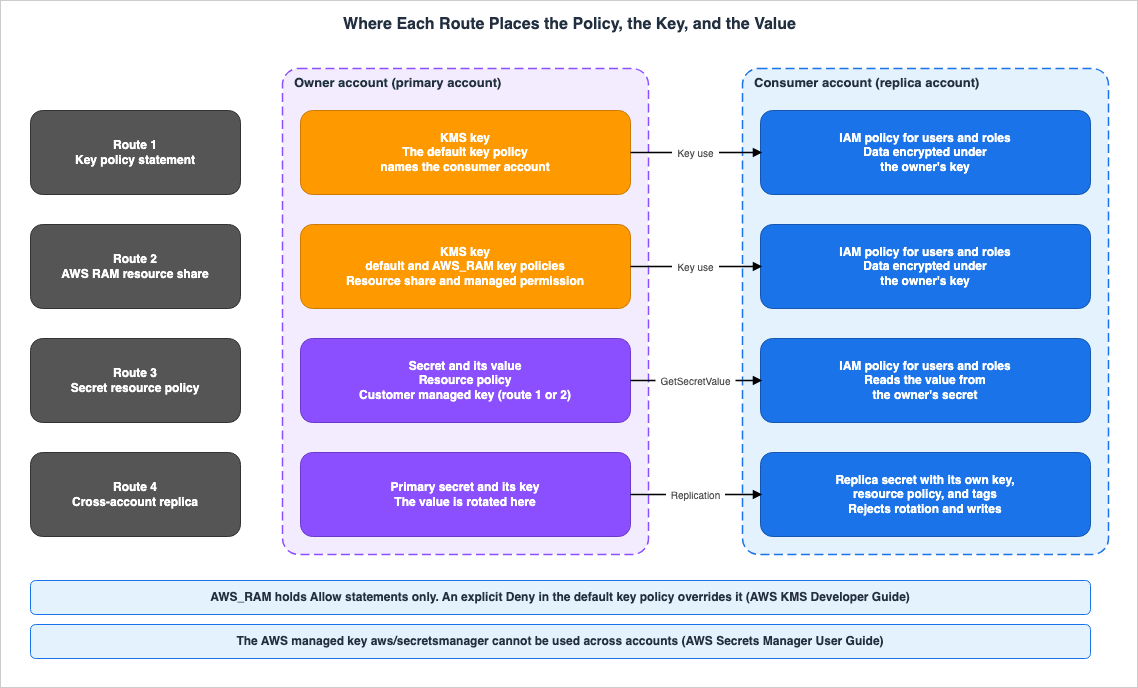
| Route | Location to Update Permissions | Location of Encryption Key | Location of Values or Data | Source |
|---|---|---|---|---|
| Route 1: Key Policy Statement | The owner's default key policy, and IAM policies in the consumer account | Owner | Data that the consumer encrypts can sit on the consumer side | Allowing users in other accounts to use a KMS key page |
| Route 2: AWS RAM Resource Share | The owner's resource share (AWS RAM reflects it in AWS_RAM), and IAM policies in the consumer account | Owner | Same as above | Sharing KMS keys with AWS RAM page |
| Route 3: Secret Resource Policy | The owner's secret resource policy, the permission on the owner's key (Route 1 or Route 2), and IAM policies in the consumer account | Owner | Owner | Access AWS Secrets Manager secrets from a different account page |
| Route 4: Cross-Account Replica | IAM policies in the primary account (the identities that associate and replicate), the replica key's key policy (kms:Encrypt for the primary account), the replica secret's resource policy, and IAM policies in the replica account (the principals that read the replica) | The primary secret's key: owner. The replica key: consumer | Both. The replica's value sits on the consumer side | Replicate AWS Secrets Manager secrets across accounts page |
The Allowing users in other accounts to use a KMS key page states that cross-account use requires both the key policy of the key and an IAM policy in the other account. The key policy determines who can access the key, while the IAM policy determines who actually has access. This two-tiered structure remains consistent whether using Route 1 or Route 2.
2.2 Route 3 Depends on Route 1 or Route 2 for the Key
Route 3 does not stand on its own. The Access AWS Secrets Manager secrets from a different account page states that the consumer also needs access to the KMS key that encrypts the secret. The AWS managed keyaws/secretsmanager cannot be used across accounts. Therefore, the owner encrypts the secret with a customer managed key that it creates, and lets the consumer use that key.From KMS's perspective, the key for Route 3 will be provided either through Route 1 or Route 2 (inference; the Access AWS Secrets Manager secrets from a different account page gives a key policy example and does not mention AWS RAM). To stop Route 3, there are two places: the secret's resource policy and the permission on the key.
2.3 Two Releases in November 2026
Route 2 and Route 4 were added in November 2026. The What's New post describes the two features as follows:Regarding Route 2, the What's New post states that sharing through AWS RAM provides access across accounts while maintaining full control over keys and key policies. Trusted parties can publish permissions as customer managed permissions without modifying key policies.
Concerning Route 4, the What's New post states that platform or security teams can manage and rotate secrets centrally, while each consuming account receives an up-to-date copy. It also states that this requires no shared KMS keys or cross-account secret policies. Chapter 9 covers the scope of this sentence.
3. AWS KMS - Two Key Policies Evaluated Together
This chapter describes the relationship between theAWS_RAM key policy and the default key policy, both of which apply to keys within Route 2.3.1 The default Key Policy and the AWS_RAM Key Policy
According to the page on Sharing KMS keys with AWS RAM, sharing a key with AWS RAM does not modify the existing key policy. The name of this existing key policy isdefault. All KMS keys have the default key policy. AWS RAM creates a second key policy, named AWS_RAM, from the managed permission chosen for the resource share. The key stays in the owner's account, and the owner continues to manage the key and the default key policy.The Key policies in AWS KMS page, as of the verification date, states the same. All KMS keys have the
default key policy, and keys shared through AWS RAM have a key policy named AWS_RAM that AWS RAM creates and manages.The
AWS_RAM key policy has the following characteristics:- The owner cannot create, modify, or delete the
AWS_RAMkey policy. AWS RAM manages it. To change who can use the key through AWS RAM, change the resource share. - AWS RAM combines the permissions from all resource shares that include the key into the key's single
AWS_RAMkey policy. Resource shares that use different managed permissions get separate statements. - With
kms:GetKeyPolicypermission in the owner's account, you can read theAWS_RAMkey policy. If theListKeyPoliciesresponse includesAWS_RAM, the key is shared through AWS RAM. - The
AWS_RAMkey policy can be up to 32,768 characters in length. It is not subject to the size limit of thedefaultkey policy.
The following AWS CLI example shows how the owner can list the names of the key policies for their key. The key ID is an example value.
aws kms list-key-policies \
    --region us-east-1 \
    --key-id 1234abcd-12ab-34cd-56ef-1234567890ab
If the key is shared through AWS RAM, the response's
PolicyNames will list both AWS_RAM and default.3.2 How AWS KMS Evaluates the Two
The Sharing KMS keys with AWS RAM page describes the evaluation of the two key policies as follows:AWS KMS evaluates the default key policy and the AWS_RAM key policy together. A permission in either key policy can allow access to the KMS key.An explicit Deny statement in the default key policy overrides an Allow statement in the AWS_RAM key policy.Because managed permissions can only allow actions, the
AWS_RAM key policy cannot include Deny statements. Therefore, to keep consumers from a specific operation, put a Deny statement in the default key policy. The Sharing KMS keys with AWS RAM page presents this as the recommendation Keep guardrails in the default key policy. The same recommendation also mentions using resource control policies (RCPs) to set the maximum permissions for the KMS keys in an organization.Regarding choosing between the two routes, the Sharing KMS keys with AWS RAM page recommends using AWS RAM in the following cases:
- When you want to share a key together with related AWS resources in one resource share.
- When you want to share keys in the same way across multiple accounts, organizations, and organizational units (OUs) using a single managed permission.
- When you want a central security team or a trusted third party to write and manage permissions as customer managed permissions.
Conversely, the same page recommends key policy statements when you need fine-grained control, such as Deny statements or condition keys that managed permissions do not support. Both routes can be used together on the same key. This article does not call either route the safer one. Whichever route grants a permission, a Deny statement in the
default key policy can narrow it from above.The policy lockout safety check only examines the
default key policy. The BypassPolicyLockoutSafetyCheck parameter of PutKeyPolicy has no effect on the AWS_RAM key policy.3.3 What the Managed Permissions Allow
Managed permissions come in two types: AWS managed permissions and customer managed permissions. As of the verification date, KMS keys have the following two AWS managed permissions.| AWS managed permission | Allowed Operations | Use Cases | Source |
|---|---|---|---|
AWSRAMPermissionKMSKeySymmetricEncryption (Default) | kms:Encrypt, kms:Decrypt, kms:ReEncrypt*, kms:GenerateDataKey*, kms:DescribeKey, kms:ListGrants. kms:CreateGrant is permitted only when the condition kms:GrantIsForAWSResource is true. | Symmetric encryption usage, key and grant viewing, AWS services creating grants for consumers. | Sharing KMS keys with AWS RAM page |
AWSRAMPermissionKMSKeyLockoutResistant | kms:DescribeKey, kms:GetKeyPolicy, kms:List*, kms:PutKeyPolicy. The page follows this list with: only when the caller is the root user of the AWS account that owns the KMS key. | Allows the account holding the key to read and replace the key policy of the shared key through the root user. | Sharing KMS keys with AWS RAM page |
Two points apply to the default managed permission. First, consumers cannot create grants directly. Because of the condition on
kms:CreateGrant, grants can be created only when AWS services integrated with KMS call KMS on behalf of the consumer. Second, the default managed permission only permits symmetric encryption operations. To allow operations with signing keys or HMAC keys, use a customer managed permission that permits the operations corresponding to the key, such as kms:Sign, kms:Verify, kms:GenerateMac, and kms:VerifyMac.A customer managed permission is used when you want to allow a different set of actions than the AWS managed permissions do, or when you want to add conditions. Customer managed permissions have the following limitations and characteristics.
- They cannot include
kms:PutKeyPolicy. - Statements that include
kms:CreateGrantmust include conditions. - They can only allow actions; some condition keys are not supported.
- They can have versions.
The Sharing KMS keys with AWS RAM page recommends allowing consumers only the actions they need. Use the default managed permission only when consumers need all of its actions. Otherwise, create a customer managed permission that allows only the actions the consumers need.
3.4 Who Can Share the Key
The Sharing KMS keys with AWS RAM page lists the following four prerequisites for sharing a key:- Only customer managed keys can be shared through AWS RAM. AWS managed keys cannot be shared.
- Only keys that your own account possesses can be shared. Keys that have been shared with you cannot be further shared.
- The key and the resource share must be in the same Region.
- Add the key to a resource share by its key ARN. It cannot be added by its alias ARN.
When a resource share is created or changed, AWS RAM calls
PutKeyPolicy on behalf of the owner to write the AWS_RAM key policy. Therefore, a principal that shares a key must have the ram:CreateResourceShare or ram:AssociateResourceShare permission, and the kms:PutKeyPolicy permission for that specific key.Principals with the
kms:PutKeyPolicy permission can also modify the default key policy. The Sharing KMS keys with AWS RAM page recommends that, for principals that should only share keys, the kms:PutKeyPolicy permission should only be granted when the condition key kms:PolicyName is set to AWS_RAM. The example statement on the page is as follows:{
"Sid": "AllowSharingThroughRAM",
"Effect": "Allow",
"Principal": {
"AWS": "arn:aws:iam::111122223333:role/kms-key-sharing-role"
},
"Action": "kms:PutKeyPolicy",
"Resource": "*",
"Condition": {
"StringEquals": {
"kms:PolicyName": "AWS_RAM"
}
}
}Conversely, it is also important to consider this from the other direction. Principals with the
kms:PutKeyPolicy permission but without the kms:PolicyName condition – for example, key administrators – can share keys if they have permission to use AWS RAM. Granting key administrators permission to use AWS RAM is also granting them permission to share keys.From the organization's perspective, the condition key
ram:RequestedResourceType identifies requests to share KMS keys. The value for this key is kms:Key. The Sharing KMS keys with AWS RAM page provides an example of an SCP that uses this condition key (see Section 8.2).3.5 What the Consumer Still Needs
For a consumer to use a shared key, two permissions are required. First, a key policy (default or AWS_RAM) must allow the operation for the consumer account. Second, an IAM policy in the consumer account must allow the operation for the principal making the request. In the IAM policy, the Resource element specifies the key ARN.Consumers can locate shared keys either through the Keys shared with me page in the AWS KMS console, or by using the
ListKeys operation with the ResourceOwners value set to OTHER_ACCOUNTS_VIA_RAM. According to the ListKeys API reference, AWS KMS does not evaluate the key policy when listing shared keys. Being listed does not necessarily mean the key is usable.Only certain KMS operations work across accounts. According to the Allowing users in other accounts to use a KMS key page, they are the cryptographic operations,
CreateGrant, DescribeKey, GetKeyRotationStatus, GetPublicKey, ListGrants, RetireGrant, and RevokeGrant. Granting other operations to a principal in a different account has no effect. The page notes, for example, that even if the key policy includes kms:ScheduleKeyDeletion, calls by a principal in another account still fail.4. AWS KMS - What Remains After You Stop Sharing
This chapter describes what remains on the consumer side when the owner stops sharing a key through Route 2, disables the key, or schedules its deletion.4.1 Removing the Key from a Resource Share
The owner revokes Route 2 access by removing the key from the resource share or by deleting the resource share. If the key is shared together with other resources that should stay shared, remove only the key. If none of the resources in the share should stay shared, delete the resource share.When a key is associated with only one resource share, removing the key from that resource share or deleting the share causes AWS RAM to delete the
AWS_RAM key policy. The consumer loses the permissions that the resource share gave. The key also disappears from the shared keys in the consumer's ListKeys results. If the key is in two resource shares that use different managed permissions, removing it from one will cause AWS RAM to delete only that resource share's statement from AWS_RAM.The following AWS CLI example shows how the owner removes a key from a resource share. The ARN values are examples.
aws ram disassociate-resource-share \
    --region us-east-1 \
    --resource-share-arn arn:aws:ram:us-east-1:111122223333:resource-share/example-share-id \
    --resource-arns arn:aws:kms:us-east-1:111122223333:key/1234abcd-12ab-34cd-56ef-1234567890ab
Only the permissions that the resource share gave are affected. The Sharing KMS keys with AWS RAM page states that the
default key policy and permissions granted through grants are not affected. The changes are eventually consistent, so it may take some time for the change to the resource share to be reflected in the ListKeys results and access to the key.4.2 Grants Stay in Effect
Of what remains after sharing stops, grants are the easiest to overlook. The Sharing KMS keys with AWS RAM page states the following in its Grants after you stop sharing section:Grants that AWS services created for principals in a consumer account while the KMS key was shared stay in effect until they're retired or revoked.The default managed permission allows
kms:CreateGrant with the kms:GrantIsForAWSResource condition. When a consumer uses the shared key through an AWS service integrated with AWS KMS, that service can create grants for the consumer. Deleting the resource share does not remove those grants.The owner finds these grants by calling
ListGrants on the key. The IssuingAccount field for each grant indicates the account that created it. To delete a grant, you must call RevokeGrant. The following AWS CLI example shows the owner listing the grants on its key that the consumer account created.aws kms list-grants \
--region us-east-1 \
--key-id arn:aws:kms:us-east-1:111122223333:key/1234abcd-12ab-34cd-56ef-1234567890ab \
--query "Grants[?IssuingAccount=='arn:aws:iam::444455556666:root'].[GrantId,GranteePrincipal,Operations]"aws kms revoke-grant \
--region us-east-1 \
--key-id arn:aws:kms:us-east-1:111122223333:key/1234abcd-12ab-34cd-56ef-1234567890ab \
--grant-id <grant-id>When you revoke a grant, all permissions that the grant previously allowed are also revoked. According to the Retiring and revoking grants page, any principal with the
kms:RevokeGrant permission can call RevokeGrant, and that permission is included in the standard permissions for key administrators. Creating, retiring, and revoking a grant are also eventually consistent, and a change can take several minutes to be reflected.The same situation can occur when you remove a statement in Route 1. The KMS grant pages state that to delete a grant, you must either retire or revoke it, and it does not list removing key policy statements as a means of deleting a grant. Therefore, it is safest to assume that grants created by AWS services under a Route 1 statement will remain even after the statement is removed (inference).
4.3 Disabling the Key and Scheduling Its Deletion
Disabling a key and scheduling its deletion are separate actions from stopping sharing. The Sharing KMS keys with AWS RAM page states:Disabling a shared KMS key, or scheduling its deletion, doesn't remove it from the resource share or change its AWS_RAM key policy.While the key is disabled, or while its deletion is pending, the consumer can still see the key, and it will appear in the results of
ListKeys for shared keys. However, it cannot be used for data encryption. The DisableKey API reference states that disabling the key prevents it from being used for cryptographic operations. The table on the Key states of AWS KMS keys page indicates that attempting to Decrypt a disabled key will return a DisabledException. Therefore, while the key is disabled, the consumer cannot decrypt data encrypted under the owner's key.Only the owner can disable the key or schedule its deletion. Neither
DisableKey nor ScheduleKeyDeletion supports cross-account use.The Sharing KMS keys with AWS RAM page advises that before scheduling the deletion of a shared key, you should first remove it from its resource shares. Details regarding the waiting period length and the operations available during the waiting period can be found on this site under Deletions You Schedule on AWS.
4.4 Data Already Encrypted
Data that the consumer encrypts with a shared key stays on the consumer side. Even if sharing is stopped or the key is disabled, the data will not be deleted. What changes is whether that data can be decrypted.The Delete an AWS KMS key page states that deleting a key will prevent data encrypted with that key from being decrypted, and that the data will then be unrecoverable. If the owner deletes the key, data that the consumer encrypted under it also becomes unrecoverable (inference; the page describes the general consequences of deletion without specifically mentioning shared keys).
For the owner, disabling or deleting the key is the strongest way to stop the consumer's use. It is also a way to make the consumer's data unreadable. When the owner ends its relationship with a consumer, whether to give the consumer time to move its data off the owner's key is a design decision.
5. Secrets Manager - Sharing Through a Resource Policy
This chapter shows what the owner keeps hold of in Route 3.5.1 Two Policies and a Customer Managed Key
The Access AWS Secrets Manager secrets from a different account page states that to allow a principal in a different account to read secrets, you must grant permission using both a resource policy and an identity-based policy. This differs from granting permission to a principal within the same account.In addition, the consumer must be able to use the KMS key that encrypts the secret. The AWS managed key
aws/secretsmanager cannot be used across accounts. The owner encrypts the secret with a KMS key that it creates, and allows the consumer in that key's key policy.In Route 3, the secret value exists only in the owner's secret. The consumer retrieves the value from the owner's secret each time it uses it.
5.2 Operations Effective Across Accounts
The Access AWS Secrets Manager secrets from a different account page lists the following 20 operations that work across accounts:CancelRotateSecretDeleteResourcePolicyDeleteSecretDescribeSecretGetRandomPasswordGetResourcePolicyGetSecretValueListSecretVersionIdsPutResourcePolicyPutSecretValueRemoveRegionsFromReplicationReplicateSecretToRegionsRestoreSecretRotateSecretStopReplicationToReplicaTagResourceUntagResourceUpdateSecretUpdateSecretVersionStageValidateResourcePolicy
This list includes
DeleteSecret, RotateSecret, PutSecretValue, and PutResourcePolicy. In other words, in Route 3, if the owner allows it in the resource policy, the consumer can also delete, rotate, and modify the secret. Whether the owner keeps hold of stop, delete, and rotate depends on the operations the owner writes into the resource policy.The Access AWS Secrets Manager secrets from a different account page warns in particular about granting
secretsmanager:PutResourcePolicy. Principals with this permission, even principals in other accounts, can modify the resource policy and potentially expand their own permissions. The page recommends adhering to the principle of least privilege. The BlockPublicPolicy setting for PutResourcePolicy and IAM Access Analyzer are both listed on the page as tools to prevent public permissions and verify cross-account access.5.3 How the Owner Stops It
The owner has two ways to stop Route 3: removing the consumer's statement from the secret resource policy, and removing the permission on the key that encrypts the secret. Both are operations in the owner's account and need no cooperation from the consumer (inference from the two-tier structure in Section 2.1).Even when stopped, some things cannot be undone. Values the consumer already retrieved stay with the consumer. When a leak through Route 3 is suspected, removing permissions is not enough; the value also needs to be rotated (inference). The owner rotates the value in its own secret.
6. Secrets Manager - Cross-Account Replicas
This chapter outlines the procedures, limitations, scope, and methods for stopping cross-account replicas within Route 4.6.1 A Two-Party Procedure
The Replicate AWS Secrets Manager secrets across accounts page defines the replica as follows:The replica secret is an independent secret that has its own access policies, KMS key, and lifecycle.When the value of the primary secret changes, Secrets Manager transmits the new value to the replica. Replication is asynchronous and eventually consistent.
Cross-account replication is a two-party process.
- The replica account creates a customer managed key.
- The replica account creates the replica secret with
CreateSecret, specifying the ARN of the primary secret in theCrossAccountPrimaryARNparameter and the ARN of the key in theKmsKeyIdparameter. At this point, the replica does not hold a value. - The replica account updates the replica key's key policy to allow
kms:Encryptfor the primary account. The Create a replica secret page states that this statement can be limited to the replica secret with thekms:EncryptionContext:SecretARNcondition. - The primary account uses the
AssociateCrossAccountReplicaaction to associate the replica with the primary secret. This initiates the replication process.
When creating a replica, Secrets Manager applies a system-managed resource policy named
cross-account-replication to the replica. This policy allows the owner of the primary secret to set up replication to this replica. The replica account cannot edit this policy directly. However, it can be overridden by explicitly denying the secretsmanager:AcceptCrossAccountReplication permission. If it does, the primary account can no longer replicate to this replica.During the association process, Secrets Manager performs dry-run AWS KMS permission checks on both keys. If the association fails, Secrets Manager modifies neither the primary secret nor the replica secret.
6.2 Three Constraints
The Replicate AWS Secrets Manager secrets across accounts page states the following three constraints:- The primary secret and the replica secret must be in the same AWS Region. The API reference also requires them to be within the same partition.
- A primary secret can have at most one cross-account replica. If a replica already exists, attempting to associate another replica will fail.
- The replica secret must be encrypted with a customer managed key. The
aws/secretsmanagerkey cannot be used.
6.3 What Is Replicated and What Is Not
Secrets Manager replicates the following from the primary secret. Each account manages the items that are not replicated on its own.| Replicated Items | Non-Replicated Items | Source |
|---|---|---|
| Secret values and associated version data | Tags | Replicate AWS Secrets Manager secrets across accounts page |
| Secret descriptions | Resource policies | Same as above |
| Secret types | KMS keys | Same as above |
| Version and staging label mappings | — | Same as above |
All three non-replicated items are controls of the replica account. The replica account's resource policy and IAM policies, and the replica key's key policy, decide who can read the replica secret. The primary account cannot decide, through its own policies, who reads the replica secret (inference from the list of what is not replicated).
6.4 Operations a Replica Does Not Accept
The Create a replica secret page states that while a secret is a cross-account replica, Secrets Manager does not accept the following operations on it. Calling one of them returnsInvalidRequestException.PutSecretValueUpdateSecretDeleteSecretRotateSecretCancelRotateSecretUpdateSecretVersionStageReplicateSecretToRegionsRemoveRegionsFromReplication
The operations that remain available on a replica secret include
GetSecretValue, DescribeSecret, resource policy operations (GetResourcePolicy, PutResourcePolicy, DeleteResourcePolicy), tag operations, and StopReplicationToReplica.This list shows that the primary account rotates the replica's value. While the secret is a replica, the replica account can neither change its value nor set up rotation. When the value of the primary secret is rotated, the new version is replicated to the replica. The How Secrets Manager authorizes cross-account replication page states that when
PutSecretValue is called on the primary secret, Secrets Manager creates the new version, moves the AWSCURRENT staging label to it, and replicates that version to the replica.6.5 Whose Identity Performs Replication
Secrets Manager decrypts values with the primary secret's key and re-encrypts them with the replica secret's key each time a value is replicated. The primary account chooses the identity that performs these two KMS operations.- Replication role: Pass an IAM role in the primary account as
ReplicationRoleARN. Secrets Manager assumes this role, using it as the identity for the two KMS operations. With this approach, the primary secret must also be encrypted with a customer managed key. - Forward Access Session (FAS): If
ReplicationRoleARNis omitted, Secrets Manager performs the two KMS operations under the identity that called the operation that triggered the replication. The initial replication is performed using the identity of the caller ofAssociateCrossAccountReplica.
The API reference for
AssociateCrossAccountReplica describes the behavior when ReplicationRoleARN is omitted as follows:If you don't include this field, Secrets Manager replicates using the credentials of caller who updates the primary secret.With FAS, every identity that modifies the primary secret needs cross-account
kms:Encrypt permission on the replica key. The How Secrets Manager authorizes cross-account replication page recommends a replication role for most use cases.That same page also notes that organizational resource control policies (RCPs) and service control policies (SCPs) may prevent these KMS operations, even if the identity's policy and the key policy grant the necessary permissions.
6.6 Replica Restriction
TheReplicaRestriction parameter of AssociateCrossAccountReplica determines whether the replica account must belong to the same organization as the primary account. The value can be either SameOrg or NoRestriction, with SameOrg being the default. To replicate to an account outside of the organization, specify NoRestriction. If the replica account does not meet this condition, Secrets Manager will return an AccessDeniedException when the internal AcceptCrossAccountReplication call is made.The Associate the replica with a primary secret page describes when this restriction applies as follows:
Secrets Manager enforces the replica restriction only during the initial association.Even if you call
AssociateCrossAccountReplica with a different value, the existing association will not change. Therefore, even if the replica account leaves the organization after the association, this restriction can be read as not stopping replication (inference; the page does not name the case where the account leaves the organization). This restriction can only be relied upon to prevent cross-organizational replication during the initial association.6.7 Stopping Replication from Either Side
The Stop cross-account replication page states that either account can stop replication at any time, and there is no predetermined order between the two accounts.- The primary account stops it with
DisassociateCrossAccountReplica. - The replica account stops it with
StopReplicationToReplica.
These two operations produce different results. The API reference for
DisassociateCrossAccountReplica states:Disassociating the replica from the primary does not delete the replica secret or convert the replica secret to a standalone secret.The replica secret remains in the other account, and its replication status becomes
Detached. After disassociation, Secrets Manager no longer sends updates from the primary secret to the replica. To make the detached replica a standalone secret, the replica account calls StopReplicationToReplica.StopReplicationToReplica promotes the replica to a standalone secret and stops replication from the primary secret. On the primary secret side, the replication status of that replica becomes Detached. This operation also removes the system-managed resource policy named cross-account-replication, so the caller must also have permission to call secretsmanager:DeleteResourcePolicy.The following AWS CLI example shows the primary account stopping replication. The ARN values are examples.
aws secretsmanager disassociate-cross-account-replica \
    --region us-east-1 \
    --secret-id MyPrimarySecret \
    --cross-account-replica-arn arn:aws:secretsmanager:us-east-1:444455556666:secret:MyReplicaSecret-a1b2c3
There is also a specific order for deletion. Secrets Manager blocks deletion of a secret until that account has stopped replication from its own side. Before deleting the primary secret, call
DisassociateCrossAccountReplica in the primary account. Before deleting the replica secret, call StopReplicationToReplica in the replica account.From this, the primary account can be read as unable to delete the replica that remains in the other account (inference). The replica does not accept
DeleteSecret, and the replica account calls StopReplicationToReplica, which promotes it to a standalone secret. What the primary account controls is that later values are no longer sent. When a leak of the value is suspected, disassociating is not enough; the primary secret's value needs to be rotated, and the credential that the value protects on the other side replaced as well (inference).The replica account also has a way to make replication fail: removing the
kms:Encrypt permission for the primary account from the replica key's key policy. The Monitor cross-account replication page states that many replication failures are due to authorization issues, and one such issue is the absence of the kms:Encrypt permission on the replica's key. In such cases, the replication status will become Failed (inference; the page describes this as a cause of failure, not as a way to stop replication).The replication status is visible from both accounts using
DescribeSecret. On the replica side, it appears under the CrossAccountPrimary field, while on the primary side, it appears under the CrossAccountReplicas field. Both locations display the ReplicationStatus and StatusMessage. The status value can be one of five options: Pending, InProgress, InSync, Failed, or Detached.7. Who Holds Stop, Delete, Rotate, and Audit
This chapter puts who holds stop, delete, rotate, and audit for the four routes into one table.7.1 How to Read the Table
Each cell states whether the owner or the consumer holds the operation. The end of each cell gives the state of the sources (Stated, Inference, No statement found) and the section of this article to which it refers. Cells marked "Inference" are inferences by this article, not statements in any source.7.2 The Control Table by Route
| Route | Stop | Delete | Rotate | Audit |
|---|---|---|---|---|
| Route 1: Key Policy Statement | The owner removes the statement from default. Grants created under the statement remain, and the owner revokes them with RevokeGrant (Inference, Section 4.2). | Only the owner. The consumer's ScheduleKeyDeletion has no effect (Stated, Section 3.5). | Only the owner. Operations that rotate the key are not among the operations that work across accounts (Stated, Section 3.5). | Key usage operations are recorded in both the caller's and the key owner's CloudTrail logs (Stated, Section 7.3). |
| Route 2: AWS RAM Resource Share | The owner removes the key from the resource share or deletes the share. Grants remain, and the owner revokes them with RevokeGrant. A Deny in default can also block individual operations (Stated, Sections 3.2, 4.1, and 4.2). | Only the owner. Scheduling deletion does not remove the key from the share, so remove it from the share first (Stated, Section 4.3). | Only the owner (Stated, Section 3.5). | The owner sees the AWS_RAM key policy, the PutKeyPolicy records, and IssuingAccount in ListGrants. The consumer sees shared keys with ListKeys (Stated, Sections 3.1, 4.2, and 7.3). |
| Route 3: Secret Resource Policy | The owner removes the statement from the resource policy, or the permission on the key. Values already retrieved do not come back (Inference, Section 5.3). | The owner. If the resource policy allows DeleteSecret, the consumer can also call it (Stated, Section 5.2). | The owner. If the resource policy allows RotateSecret, the consumer can also call it (Stated, Section 5.2). | Operations on the owner's key are also recorded in the owner account's CloudTrail (Inference, Section 7.3). Which account records GetSecretValue is not stated on the pages this article read (No statement found, Section 7.3). |
| Route 4: Cross-Account Replica | Both. The primary account uses DisassociateCrossAccountReplica, and the replica account uses StopReplicationToReplica (Stated, Section 6.7). Removing kms:Encrypt on the replica key makes replication fail (Inference, Section 6.7). | The primary account deletes the primary secret, and the replica account deletes the replica secret. Each first stops replication from its own side (Stated, Section 6.7). The primary account cannot delete the replica (Inference, Section 6.7). | Only the primary account. The replica does not accept RotateSecret or PutSecretValue (Stated, Section 6.4). After disassociation, new values no longer reach the replica (Stated, Section 6.7). | Both accounts can see the replication status with DescribeSecret (Stated, Section 6.7). Reads of the replica's value are recorded in the replica account and are not visible from the primary account (Inference, Section 7.3). |
Reading the table vertically shows two things. First, in both KMS key routes, delete and rotate always stay with the owner. The consumer holds only the use of the key and of the grants on its side. Second, in both secret routes, who holds delete and rotate changes with the route. In Route 3, it depends on what the owner writes into the resource policy; in Route 4, it is split between the primary and the replica.
Reading the table horizontally shows that stopping and cleaning up what remains are separate operations. In Route 2, grants remain even after the resource share is deleted. In Route 4, the replica remains even after the association is removed. In either route, the operational runbook needs a step that checks what remains after stopping.
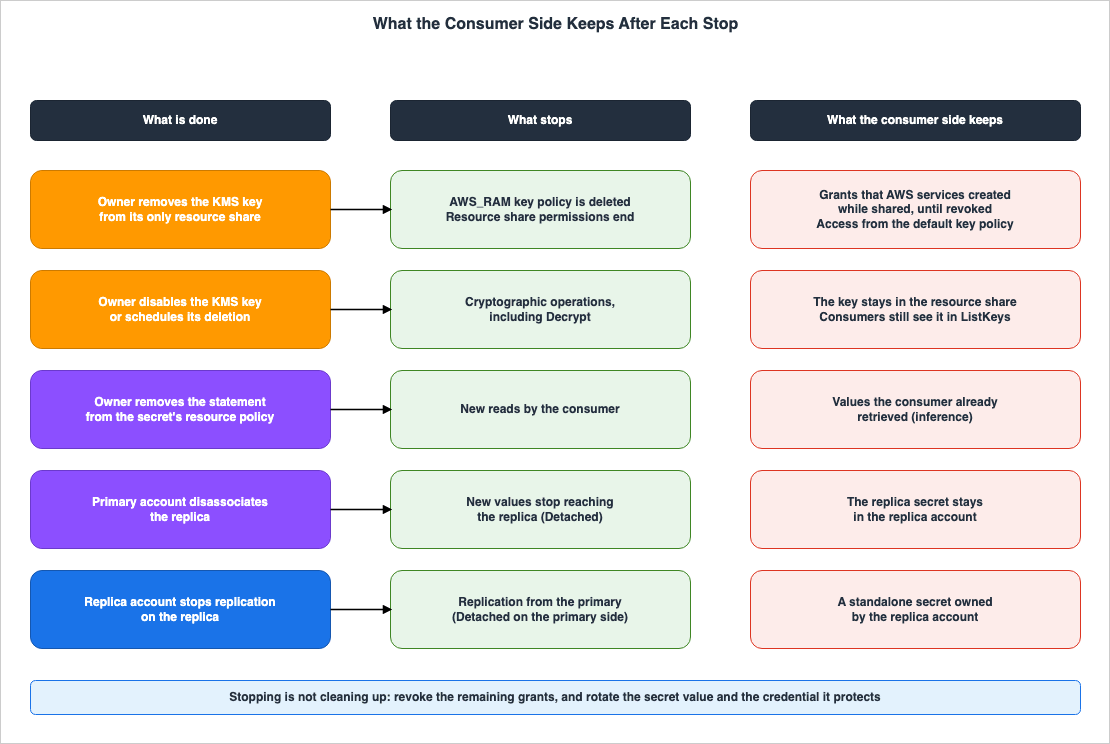
7.3 What Each Side Can See
The Allowing users in other accounts to use a KMS key page states the following about logging:Operations that use KMS keys in other accounts are logged in both the caller's account and the KMS key owner account.In Route 1 and Route 2, whenever the consumer uses the owner's key, a record is also stored in the owner account's CloudTrail. In Route 2, additionally, whenever AWS RAM writes the
AWS_RAM key policy, a PutKeyPolicy record is stored in the owner's account. The Sharing KMS keys with AWS RAM page recommends creating alerts for these events, together with CreateResourceShare, AssociateResourceShare, and DisassociateResourceShare. The owner should review the resource shares and the AWS_RAM key policy regularly. The consumer should also review the keys shared with it regularly.In Route 3, because the owner's key is used, the key operations can be read as also recorded in the owner's account (inference). The Secrets Manager pages this article read do not say which account records the
GetSecretValue call itself.In Route 4, the replica's value is protected by the replica account's key and is read in the replica account. Neither the primary account's key nor the primary secret is involved in that read. Therefore, the primary account's CloudTrail can be read as not recording who read the replica's value, or when (inference). What the primary account can see is the replication status in
DescribeSecret.8. Choosing a Route, and Where Organization Guardrails Take Over
This chapter outlines the key considerations for choosing a route and what this article leaves to the organization's SCPs and RCPs.8.1 Axes for Choosing
This article does not definitively determine the superiority of any particular route. From the statements in the sources, the key factors to consider when choosing a route are as follows:| Axis | Route Differences | Source |
|---|---|---|
| Does the route involve passing a key or a value? | Route 1 and Route 2 hand over the use of a key, and the data can sit on the consumer side. Route 3 hands over reads of the value, and the value stays on the owner side. Route 4 hands over a copy of the value, and the copy sits on the consumer side. | Section 2.1 |
| Does it rely on fine-grained control with Deny statements and conditions? | Managed permissions in Route 2 hold only Allow statements, and customer managed permissions do not support some condition keys. Deny statements and unsupported condition keys go in Route 1's default key policy. | Sections 3.2 and 3.3 |
| Does it provide the same permissions to a large number of accounts? | Route 2 allows a single managed permission to provide the same permissions to organizations and OUs. | Section 3.2 |
| Who is responsible for defining the permissions? | Route 2 can use customer managed permissions, allowing central teams or third parties to define permissions. | Section 3.2 |
| Is the value needed even when the owner's account is unavailable? | The Route 4 replica is a secret independent of the primary account. The What's New post mentions availability even if the primary account is compromised. | Section 6.1 and the What's New post for Route 4 |
| Does it centralize the authority to rotate values? | In Route 4, the replica accepts neither value writes nor rotation. In Route 3, it depends on the operations written in the resource policy. | Sections 5.2 and 6.4 |
| After the handoff, does the owner need to be able to delete the consumer's copy? | In Route 4, the primary account cannot delete the replica (inference). | Section 6.7 |
The Sharing KMS keys with AWS RAM page states that Route 1 and Route 2 can be used together on the same key. In this article's reading, a combination that follows the sources' recommendations is to hand out the usual permissions to many accounts through Route 2, and to narrow, from above, the operations consumers should not have with Deny statements in Route 1's
default key policy (inference).8.2 Organization-Level Controls
The organization's SCPs and RCPs define the permitted limits, from outside the four routes in this article. Their design is covered in this site's AWS Organization Guardrails. The evaluation order is covered in this site's IAM Policy Evaluation Logic Step-by-Step. This article shows only the statements that bear directly on two of the routes.The Sharing KMS keys with AWS RAM page provides an example of an SCP that limits KMS key sharing to a single role. By using the
StringEqualsIfExists operator, it applies to requests that do not specify a resource type, such as requests to add principals to an existing resource share. The example on the page is as follows:{
"Version": "2012-10-17",
"Statement": [
{
"Sid": "RestrictKMSKeySharingToOneRole",
"Effect": "Deny",
"Action": [
"ram:CreateResourceShare",
"ram:AssociateResourceShare"
],
"Resource": "*",
"Condition": {
"StringEqualsIfExists": {
"ram:RequestedResourceType": "kms:Key"
},
"ArnNotEquals": {
"aws:PrincipalArn": "arn:aws:iam::111122223333:role/kms-key-sharing-role"
}
}
}
]
}The same page states that to prevent sharing with accounts outside the organization, you deny
ram:CreateResourceShare and ram:UpdateResourceShare when the condition key ram:RequestedAllowsExternalPrincipals is set to true.Regarding Secrets Manager, the How Secrets Manager authorizes cross-account replication page explains that the organization's RCPs and SCPs can prevent KMS operations related to replication (see Section 6.5). When organizational policies constrain Route 4, the runbook also needs a step that reads the
StatusMessage of a failed replication as a possible effect of those policies (inference).9. Where the Sources Disagree and What They Do Not Say
This chapter lists where the scope of the sources differs, and what the pages this article opened do not say.9.1 Where the Scope of the Sources Differs
- The What's New post for Route 2 states that sharing through AWS RAM lets you maintain full control over keys and key policies. The Sharing KMS keys with AWS RAM page states that even after sharing stops, grants that AWS services created during sharing remain. These two statements are not contradictory. The former concerns keys and key policies, without mentioning grants. This article reads the owner's control as kept only when it includes the step of finding and revoking grants (inference).
- The What's New post for Route 4 states that each account receives an up-to-date copy without shared KMS keys or cross-account secret policies. The Create a replica secret page describes a step that grants the primary account permission to perform the
kms:Encryptaction on the replica key. These two statements are not contradictory. The former means that the consumer needs no permission to use the primary secret's key or the primary secret; the cross-account permission on the replica key side is still required as a step (inference).
9.2 What the Sources Do Not Say
The pages this article opened do not describe the following. The absence of a description does not necessarily mean that the feature or process does not exist.- The reason why the Sharing KMS keys with AWS RAM page states that the key should be removed from its resource shares before scheduling the deletion of a shared key.
- Which account's CloudTrail records a cross-account
GetSecretValuecall. - Whether a replica that has been disassociated and is now in the
Detachedstate will continue to return the last replicated value when the replica account callsGetSecretValue. The API reference forDisassociateCrossAccountReplicastates that the replica remains in the other account. - Whether the
SameOrgrestriction applies to replication when the replica account leaves the organization after the association. - Specific documentation describing what happens to grants created from a statement that has been removed from the
defaultkey policy in Route 1. The KMS grant pages list only retiring and revoking as ways to remove grants.
10. Failure Modes
This chapter lists failures that can happen in the four routes, with the statements behind them.- Treating all of the consumer's access to the shared key as ended because the resource share was deleted. Grants that AWS services created during sharing remain (see Section 4.2).
- Treating a disabled shared key as gone from the consumer's list. Disabled keys, as well as keys awaiting deletion, are not removed from the resource share and still appear in the consumer's
ListKeysresults (see Section 4.3). - Scheduling deletion of a shared key first, and cleaning up the resource share afterward. The Sharing KMS keys with AWS RAM page says to remove the key from its resource shares first (see Section 4.3).
- Treating AWS RAM permissions for key administrators as unrelated to key sharing. Principals with the
kms:PutKeyPolicypermission can share keys if they have AWS RAM permissions (see Section 3.4). - Attempting to restrict access by adding a Deny statement to the
AWS_RAMkey policy.AWS_RAMholds only Allow statements, and the owner cannot edit it. Deny statements go indefault(see Section 3.2). - Sharing a signing key with the default managed permission. The default managed permission only permits symmetric encryption operations (see Section 3.3).
- Trying, in Route 3, to let another account read a secret encrypted with
aws/secretsmanager. AWS managed keys cannot be used across accounts (see Section 5.1). - Allowing
PutResourcePolicyin a Route 3 resource policy. The consumer can then expand its own permissions (see Section 5.2). - Trying to configure rotation for the replica in the replica account. Replicas do not accept the
RotateSecretoperation (see Section 6.4). - Treating the value in the other account as gone because the association was removed. The replica secret remains in the other account (see Section 6.7).
- Treating replication to an account that left the organization as stopped because of the
SameOrgrestriction. This restriction only applies at the initial association (see Section 6.6). - Granting replica key permissions to only some of the identities that modify the primary secret, without a replication role. If an identity without permissions attempts to modify the value, replication will fail (see Section 6.5).
11. Frequently Asked Questions About Sharing KMS Keys and Secrets Across Accounts
This chapter briefly summarizes the content of this article in response to six common questions.Does deleting an AWS RAM resource share stop all access to a shared KMS key?
Deleting an AWS RAM resource share does not stop all access to a shared KMS key. If the key is in only one resource share, deleting the resource share will remove theAWS_RAM key policy, and the permissions that the resource share gave are lost. However, grants that AWS services created for consumers remain active until they are retired or revoked. Permissions granted through the default key policy will also persist. The owner finds these grants with ListGrants by their IssuingAccount, and removes them with RevokeGrant.Can I add a Deny statement to the AWS_RAM key policy?
You cannot. AWS RAM creates and manages theAWS_RAM key policy, and you cannot create, modify, or delete it. Managed permissions can only allow actions. To block operations consumers should not have, use a Deny statement in the default key policy. An explicit Deny in the default key policy takes precedence over an Allow in the AWS_RAM key policy.Does disabling a shared KMS key remove it from the resource share?
No. Even if you disable or schedule the deletion of the key, it stays in the resource share, and theAWS_RAM key policy also stays unchanged. The consumer can see the key but cannot use it in cryptographic operations. Before scheduling the deletion, remove the key from its resource shares.Can the replica account rotate a cross-account replica secret?
No. While the secret is a cross-account replica, it accepts neitherRotateSecret nor PutSecretValue. The primary account rotates the value, and the new version is replicated to the replica. To manage the value on its own, the replica account calls StopReplicationToReplica to make the replica a standalone secret.Who can stop cross-account replication?
Both accounts can stop it. The primary account callsDisassociateCrossAccountReplica, and the replica account calls StopReplicationToReplica. The former does not delete the replica and does not make it a standalone secret. The latter makes the replica a standalone secret. In either case, the replica secret remains in the replica account.Does ReplicaRestriction keep a replica inside my organization?
ReplicaRestriction applies only during the initial association. The default setting for ReplicaRestriction is SameOrg, which prevents association with accounts outside of your organization. However, Secrets Manager only checks this restriction during the initial association; calling AssociateCrossAccountReplica again with a different value does not change an existing association.12. Summary
There are four routes for handing KMS keys and secrets to a different account: key policy statements, AWS RAM resource shares, secret resource policies, and cross-account replicas. This article showed, in the words of the sources, who holds stop, delete, rotate, and audit after the handoff.In the two KMS key routes, delete and rotate always stay with the owner. When a key is shared via AWS RAM, both the
default and AWS_RAM key policies are evaluated, and an explicit Deny in the default key policy takes precedence over an Allow in the AWS_RAM key policy. Even after sharing is discontinued, grants that AWS services created during sharing remain. Even if the key is disabled or its deletion is scheduled, the key is not removed from the resource share.In the two secret routes, who holds delete and rotate changes with the route. In the resource policy route, the value stays on the owner's side, and the operations the owner writes into the resource policy decide who holds them. A replica is an independent secret with its own access policies, KMS key, and lifecycle, and the primary account rotates the value. Replication can be stopped from either account, but even after it stops, the replica secret remains in the other account.
In every route, stopping and cleaning up what remains afterward are separate steps. The statements of the sources are as of November 18, 2026.
13. References
- AWS KMS Developer Guide: Sharing KMS keys with AWS RAM
- AWS KMS Developer Guide: Key policies in AWS KMS
- AWS KMS Developer Guide: Allowing users in other accounts to use a KMS key
- AWS KMS Developer Guide: Grants in AWS KMS
- AWS KMS Developer Guide: Retiring and revoking grants
- AWS KMS Developer Guide: Key states of AWS KMS keys
- AWS KMS Developer Guide: Delete an AWS KMS key
- AWS KMS API Reference: DisableKey
- AWS KMS API Reference: ListKeys
- AWS KMS API Reference: ListGrants
- AWS KMS API Reference: ScheduleKeyDeletion
- AWS Secrets Manager User Guide: Replicate AWS Secrets Manager secrets across accounts
- AWS Secrets Manager User Guide: Create a replica secret
- AWS Secrets Manager User Guide: Associate the replica with a primary secret
- AWS Secrets Manager User Guide: How Secrets Manager authorizes cross-account replication
- AWS Secrets Manager User Guide: Monitor cross-account replication
- AWS Secrets Manager User Guide: Stop cross-account replication
- AWS Secrets Manager User Guide: Access AWS Secrets Manager secrets from a different account
- AWS Secrets Manager API Reference: AssociateCrossAccountReplica
- AWS Secrets Manager API Reference: DisassociateCrossAccountReplica
- AWS Secrets Manager API Reference: StopReplicationToReplica
- AWS Secrets Manager API Reference: CreateSecret
- What's New: AWS KMS now supports key sharing with AWS Resource Access Manager
- What's New: AWS Secrets Manager now supports cross-account replication
References:
Tech Blog with curated related content
Written by Hidekazu Konishi