Masking at Ingestion - CloudWatch Logs Data Protection Policies, Egress Points, and Who Can Unmask
First Published:
Last Updated:
The question this article answers is when, at which egress points, and to whom the original values are visible. Within what the primary sources state explicitly, the answer is as follows: data protection policies detect and mask values when log events are ingested into a log group. Events ingested before the policy is in place will not be masked. By default, masking applies at egress points including CloudWatch Logs Insights, metric filters, and subscription filters. Only principals with the
logs:Unmask permission can view the original values. Masking does not delete the values; instead, principals with the logs:Unmask permission can retrieve the original values.This article does not cover general principles of personal information protection, the use of Amazon Comprehend or Amazon Bedrock Guardrails, or pricing. This article did not test anything on real resources. The sources were checked on November 19, 2026.
Related articles on this site:
- Amazon CloudWatch Omni and CloudWatch - What Stays in CloudWatch, What Omni Adds With Domains, Spaces, and Grants, and Where Each Setting Is Configured
- PII Detection and Redaction Patterns for Generative AI on AWS - Layered Defenses with Amazon Comprehend, Bedrock Guardrails, and Macie
- What Decides How Much a CloudWatch Logs Insights Query Scans - What You Choose, What CloudWatch Logs Indexes for You, What Can Change the Result, and Where Each Shows Up
- Centralized Logging and Audit Architecture on AWS - Multi-Account Log Aggregation, Detection, and Query with CloudTrail, Config, Security Hub, and OpenSearch
- IAM Policy Evaluation Logic Step-by-Step - Explicit Deny, RCP, SCP, Resource Policy, Identity Policy, Permission Boundary, and Session Policy
- AWS History and Timeline regarding Amazon CloudWatch - Overview, Functions, Features, Summary of Updates, and Introduction
Table of Contents
- 1. Scope and Assumptions
- 2. Masking Starts at Ingestion
- 3. Account-Level and Log Group-Level Policies
- 4. What Each Egress Point Shows
- 5. Who Can Unmask - logs:Unmask
- 6. Audit Findings and the LogEventsWithFindings Metric
- 7. What Detection Can Miss
- 8. Downstream and Adjacent Features
- 9. Decisions Before You Turn It On
- 10. Where the Sources Disagree and What They Do Not Say
- 11. Failure Modes
- 12. Frequently Asked Questions About CloudWatch Logs Data Protection
- 13. Summary
- 14. References
1. Scope and Assumptions
This chapter defines the intended audience for this article, the terminology used, and the sources it read. The following seven points outline the key conclusions:- Data protection policies detect and mask sensitive data during log event ingestion. Events ingested before a policy is applied will not be masked.
- An account-level policy is applied to existing log groups with eventual consistency, and it can take up to five minutes for masking to begin.
- Account-level and log group-level policies both apply. Data identifiers specified in either policy are masked in that log group.
- By default, masking applies at egress points including Logs Insights, metric filters, and subscription filters. The documentation gives these three as examples and does not close the list of egress points.
- Only principals with the
logs:Unmaskpermission can view the original values. Masking does not delete the data; it simply obscures it. - Log groups associated with the Essentials log class (formerly known as Infrequent Access) also support masking. However, they do not support the
unmaskcommand in Logs Insights, nor do they support theGetLogEventsandFilterLogEventsAPIs. - Detection relies on data identifiers and, for some identifiers, on keywords found near the sensitive data. Values that are not detected will not be masked.
1.1 Who This Article Is For
This article is intended for cloud infrastructure, security, and operations professionals who are considering implementing data protection policies in CloudWatch Logs, particularly those concerned about the potential for personal information or credentials to be included in application or agent logs. It also aims to assist those who have already implemented data protection policies and need to explain who can see what. Specifically, this article is relevant to readers who may believe any of the following:- Implementing a data protection policy will also mask values in historical logs.
- Masked values are completely removed from CloudWatch Logs.
- Masking always applies to every path by which log events leave CloudWatch Logs.
- Authorized users can still view the original values in any log group, regardless of the log class.
1.2 Terms Used in This Article
This article uses the following terminology to align with the documentation for CloudWatch Logs:| Term Used in This Article | Definition |
|---|---|
| Mask | The process of obscuring sensitive data that has been detected, when displaying or outputting it. In the examples provided, the value is replaced with asterisks. |
| Unmask | The action performed by principals with the logs:Unmask permission, allowing them to display masked values in their original form. |
| Audit | The process of generating results based on detected information, presented as metrics and findings reports. |
| Egress Point | The pathway through which log events leave CloudWatch Logs for display or distribution. The documentation refers to these as egress points. |
| Data Identifier | The type of sensitive data being detected. This includes AWS-provided managed data identifiers and custom data identifiers defined using regular expressions. |
| Standard Log Class, Essentials Log Class | The log class of a log group. "Essentials" is the renamed version of "Infrequent Access." |
In the context of JSON policies, the operation that performs masking is named
Deidentify. This article uses the term "Deidentify" solely to refer to this operation.The "Essentials" log class is distinct from the "Essentials" feature plan within Amazon Cognito. Additionally, CloudWatch Logs introduced a storage tiering feature (intelligent tiering) in July 2026, which also includes a tier named "Infrequent Access." In this article, "Infrequent Access" refers only to the previous name of the log class.
1.3 Sources and the Date Checked
This article is based on the following materials. The article checked them on November 19, 2026.- CloudWatch Logs User Guide: "Help protect sensitive log data with masking," and its sub-sections (Understanding data protection policies, IAM permissions required to create or work with a data protection policy, Create an account-wide data protection policy, Create a data protection policy for a single log group, View unmasked data, Audit findings reports, Types of data that you can protect, Custom data identifiers).
- CloudWatch Logs User Guide: "Log classes," "Logs Insights QL commands supported in log classes," "unmask," "Troubleshoot with CloudWatch Logs Live Tail," "Exporting log data to Amazon S3," "Cross-account cross-Region log centralization."
- CloudWatch Logs API Reference:
PutDataProtectionPolicy,PutAccountPolicy,GetLogEvents,FilterLogEvents,GetLogObject,CreateExportTask. - Service Authorization Reference: Amazon CloudWatch Logs.
- CloudWatch User Guide: CloudWatch Omni, "Protect sensitive data."
- Amazon SNS Developer Guide: "Amazon SNS message data protection availability change."
- What's New (November 27, 2022, June 8, 2023, March 27, 2026), AWS News Blog (Announcement of the Infrequent Access log class in 2023).
This article is not based on hands-on testing. What it writes is the text of the sources and inferences drawn from that text. Each inference is marked as an inference.
2. Masking Starts at Ingestion
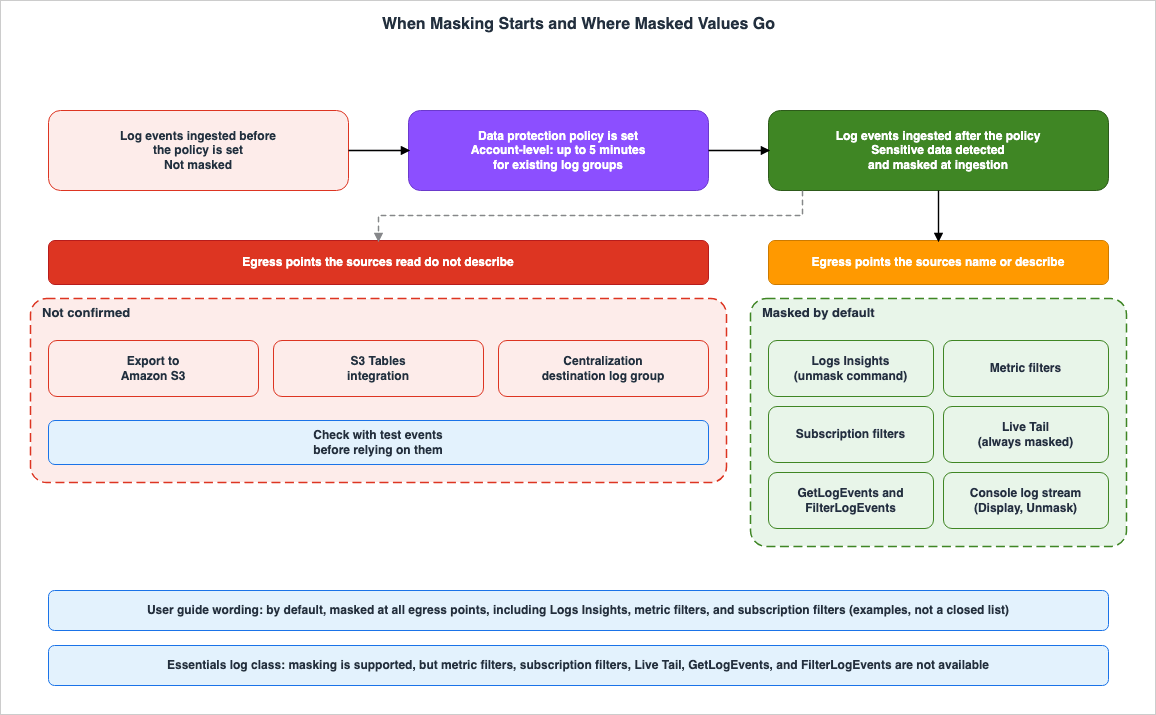
2.1 Events Ingested Before the Policy Are Not Masked
The "Help protect sensitive log data with masking" page of the user guide states:Sensitive data is detected and masked when it is ingested into the log group. When you set a data protection policy, log events ingested to the log group before that time are not masked.The account-level policy creation page, as well as the API references for
PutDataProtectionPolicy and PutAccountPolicy, also include similar wording marked as "Important." In essence, data protection policies only apply to log events ingested after the policy is implemented. Even after a policy is in place, the values of events already present in a log group will continue to appear as they did before the policy was applied.Therefore, even if you implement a data protection policy after discovering that a log contains sensitive data, events ingested prior to the policy's implementation will not be masked. How to handle these existing events must be determined separately from the data protection policy (see Chapter 9).
2.2 Up to Five Minutes for an Account-Level Policy
The API reference forPutAccountPolicy notes that applying the policy to existing log groups can take some time.The account-level policy is applied to existing log groups with eventual consistency. It might take up to 5 minutes before sensitive data in existing log groups begins to be masked.Events ingested into existing log groups within the first few minutes after an account-level policy is implemented may not be masked (this article's inference). The sources read include no similar note on timing for log group-level policies.
2.3 Masked Is Not Deleted
Masking is not a process that removes values from CloudWatch Logs. ThePutDataProtectionPolicy API reference describes how masked values are displayed and how to access the original values as follows:By default, when a user views a log event that includes masked data, the sensitive data is replaced by asterisks. A user who has the logs:Unmask permission can use a GetLogEvents or FilterLogEvents operation with the unmask parameter set to true to view the unmasked log events.As long as principals with the
logs:Unmask permission can retrieve the original values, the original values remain within CloudWatch Logs (this article's inference). Masking is a mechanism to prevent unauthorized individuals from seeing the data; it is not a mechanism to eliminate the data itself. If you do not want values to be stored in logs, you must exclude them before writing them to the logs, rather than using masking. The "Protect sensitive data" page of CloudWatch Omni presents masking at the ingestion point and data removal before sending as separate layers (Section 8.2).3. Account-Level and Log Group-Level Policies
3.1 The Shape of a Data Protection Policy
A data protection policy is a JSON document. According to the user guide and API reference, the policy must contain exactly two statements.| Statement | Content | Role |
|---|---|---|
| First | A DataIdentifier array and an Audit operation. | Used to identify sensitive data. The Audit operation must include a FindingsDestination. Listing destinations in it is optional. |
| Second | A DataIdentifier array and a Deidentify operation. | Used to mask values. The Deidentify operation must include an empty MaskConfig. |
The two
DataIdentifier arrays must match exactly. The length of the policy document can be up to 30,720 characters. The policy can also include a Name, Description, and Version (the sources differ on whether they are required; see Section 10.1). According to the API reference, the Name is used as a dimension when sending audit metrics to CloudWatch. The current Version is 2021-06-01.The following is a policy, based on an example from the user guide, that limits the
FindingsDestination to a CloudWatch Logs log group and modifies the Description.{
"Name": "data-protection-policy",
"Description": "Mask email addresses and US driver's licenses",
"Version": "2021-06-01",
"Statement": [
{
"Sid": "audit-policy",
"DataIdentifier": [
"arn:aws:dataprotection::aws:data-identifier/EmailAddress",
"arn:aws:dataprotection::aws:data-identifier/DriversLicense-US"
],
"Operation": {
"Audit": {
"FindingsDestination": {
"CloudWatchLogs": {
"LogGroup": "EXISTING_LOG_GROUP_IN_YOUR_ACCOUNT"
}
}
}
}
},
{
"Sid": "redact-policy",
"DataIdentifier": [
"arn:aws:dataprotection::aws:data-identifier/EmailAddress",
"arn:aws:dataprotection::aws:data-identifier/DriversLicense-US"
],
"Operation": {
"Deidentify": {
"MaskConfig": {}
}
}
}
]
}3.2 The Account-Level Policy
Account-level policies are created using thePutAccountPolicy API, specifying policyType as DATA_PROTECTION_POLICY. According to the API reference, these policies have the following characteristics:- An account can only have one account-level data protection policy.
- Account-level policies apply to each Region individually. They apply only to log groups in the Region where they are created. To apply the policy to multiple Regions, you must create a policy in each Region.
- These policies apply to both existing and newly created log groups.
- The only valid value for
scopeisALL. TheselectionCriteriaparameter cannot be specified for data protection policies. Therefore, you cannot restrict an account-level data protection policy to apply to only a subset of log groups. - Creating a data protection policy requires both the
logs:PutDataProtectionPolicyandlogs:PutAccountPolicypermissions.
The API reference describes
PutAccountPolicy as an account-wide administrative operation and recommends granting the logs:PutAccountPolicy permission only to administrators who manage logging configuration across the account. In AWS CloudFormation, you can create these policies by setting the PolicyType of AWS::Logs::AccountPolicy to DATA_PROTECTION_POLICY.3.3 The Log Group-Level Policy
Log group-level policies are created using thePutDataProtectionPolicy API. A single log group can have only one log group-level policy. A single policy can contain multiple managed data identifiers.3.4 When Both Apply
When a log group has both an account-level policy and a log group-level policy, the API reference forPutAccountPolicy describes the behavior as follows:Data protection — The two policies are cumulative. Any sensitive term specified in either the account-level or the log-group-level policy is masked.The user guide also states that all managed data identifiers specified in either policy are audited and masked. Regarding custom data identifiers, the user guide's Custom data identifiers page explains that account-level policy identifiers and log group-level policy identifiers work in combination.
The same
PutAccountPolicy page notes that different types of account-level policies are handled differently. For example, a log group-level transformer takes precedence over an account-level one, while an account-level retention policy takes precedence over the log group's retention setting. Data protection policies are additive rather than prioritized; they combine to create the overall policy. Therefore, it is not possible to remove data identifiers defined in an account-level policy through a log group-level policy (this article's inference).4. What Each Egress Point Shows
4.1 Read "including" as Examples
The "Help protect sensitive log data with masking" page of the user guide states that the masking applies as follows:When you create a data protection policy, then by default, sensitive data that matches the data identifiers you've selected is masked at all egress points, including CloudWatch Logs Insights, metric filters, and subscription filters. Only users who have the logs:Unmask IAM permission can view unmasked data.This sentence contains two limitations. The first is the default behavior: by default, the values are masked. However, when a principal with the
logs:Unmask permission requests it, the original values are displayed. The second limitation is that Logs Insights, metric filters, and subscription filters are examples; they are not an exhaustive list. This article checked the other egress points against the page for each.4.2 Egress Points by Log Class
The following table details how data is displayed at each egress point, categorized by log class. According to the Log classes page, the Essentials log class also supports masking, but fewer egress points are available than in the Standard log class.| Egress Point | Standard Log Class | Essentials Log Class | Reference |
|---|---|---|---|
| Logs Insights Queries | Masked. The original value can be retrieved using the unmask command. | Queries are supported. The unmask command is not supported. | User Guide - Masking, Logs Insights QL commands supported in log classes |
GetLogEvents, FilterLogEvents | Masked. Setting unmask to true will display the original value. | The APIs are not supported. | API Reference, Log classes |
| Log stream view in the console | Masked. The original value can be displayed with Display, Unmask. | Not described in the sources read. | View unmasked data |
GetLogObject | Setting unmask to true will display the original value. | Not described in the sources read. | API Reference |
| Metric filters | Masked. | Metric filters are not supported. | User Guide - Masking, Log classes |
| Subscription filters | Masked. | Subscription filters are not supported. | User Guide - Masking, Log classes |
| Live Tail | Always displayed as masked. | Live Tail is not supported. | Troubleshoot with CloudWatch Logs Live Tail, Log classes |
| Export to Amazon S3 | Masking is not described in the sources read. | Masking is not described in the sources read. | Exporting log data to Amazon S3, CreateExportTask |
The Live Tail page notes that when viewing log groups masked by data protection policies using Live Tail, sensitive data always appears masked in the Live Tail session.
If you are using data protection policies to mask sensitive data in a log group that you are viewing with Live Tail, the sensitive data always appears masked in the Live Tail session.GetLogObject is an API used to retrieve large log objects (LLOs). According to the API reference, when events ingested by PutOpenTelemetryLogs exceed 1 MB, CloudWatch Logs may truncate large fields and store the remaining data separately as an LLO. The API reference also states that this API includes an unmask parameter; when set to true, it displays masked data in the log object in its original form.4.3 Egress Points the Sources Do Not Describe
The user guide's "Exporting log data to Amazon S3" page, as well as theCreateExportTask API reference, do not mention masking. This article was unable to verify whether values are masked in the exported files. If you intend to use the export as an egress point, check the contents of the exported files with a small number of test events before deciding.The table on the "Log classes" page also lists S3 Tables Integration, Scheduled Queries, and log transformation with CloudWatch Pipeline. The relationship between these features and masking is not described in the sources read. This article does not state that masking is ineffective with these egress points; it simply notes that this could not be confirmed in the sources read.
5. Who Can Unmask - logs:Unmask
5.1 Where Unmasked Values Appear
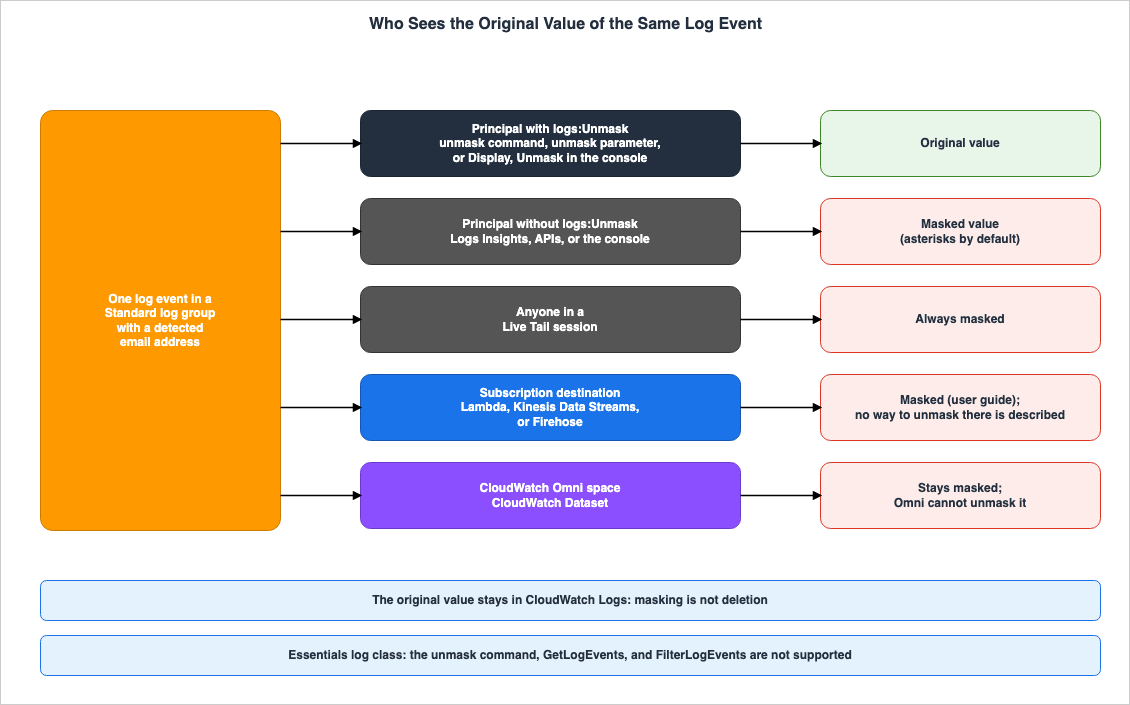
The View unmasked data page in the user guide lists three ways for users with thelogs:Unmask permission to view the original values:- When viewing events in a log stream, choose Display, Unmask.
- Execute a Logs Insights query that includes
unmask(@message). - Include the
unmaskparameter in theGetLogEventsorFilterLogEventsoperations.
The Logs Insights query example on the same page is as follows.
fields @timestamp, @message, unmask(@message)
| sort @timestamp desc
| limit 20
The
unmask parameter in both GetLogEvents and FilterLogEvents is a boolean value, with a default value of false. According to the API reference, using this parameter requires being signed in with the logs:Unmask permission. As described in Section 4.2, the GetLogObject operation also has a parameter with the same name.5.2 What logs:Unmask Is in IAM
The Service Authorization Reference defineslogs:Unmask as follows:| Item | Value |
|---|---|
| Description | Grants permission to fetch unmasked log events that have been redacted with a data protection policy. |
| Access Level | Read |
| Resource Type | log-group |
| Condition Key | aws:ResourceTag/${TagKey} |
The permissions table in the user guide indicates that the action of viewing the original values applies to log groups, and specifies the ARN of the log group in the following format:
arn:aws:logs:::log-group:YOUR_LOG_GROUP:*logs:Unmask grants permission to view the original values; it does not grant permission to read logs in and of itself. In the Service Authorization Reference's table of API and IAM actions, logs:Unmask appears alongside the corresponding read actions for GetLogEvents, FilterLogEvents, StartQuery, GetQueryResults, and GetLogRecord. Viewing the original values requires both permission to read logs and the logs:Unmask permission (this article's inference).The user guide states that the AWS managed policy CloudWatchLogsFullAccess includes the
logs:Unmask permission.The CloudWatchLogsFullAccess policy includes the logs:Unmask permission.If operations personnel are assigned the CloudWatchLogsFullAccess policy, they will be able to view the original values. When implementing data protection policies, it is necessary to verify who holds this policy (this article's inference).
5.3 Narrowing Who Can Unmask
Thelogs:Unmask resource type is a log group, so you can restrict access by ARN to specify which log groups can be used to view the original values. You can also filter based on tags using the condition key aws:ResourceTag/${TagKey}. In the permissions table in the user guide, the rows for account-level policies show log-group:*, while the rows for log group-level policies show the ARN of a specific log group as the resource for logs:Unmask.It is generally advisable to limit the ability to unmask to only a small number of principals who genuinely need to view the original values (this article's inference). In addition to not granting
logs:Unmask in IAM identity-based policies, you can also remove it from many principals in the organization with an explicit Deny in service control policies (SCPs). The order of evaluation, where explicit Deny statements take precedence over Allow statements, is detailed in the earlier article IAM Policy Evaluation Logic Step-by-Step.5.4 The Essentials Log Class and Unmasking
The user guide's "Help protect sensitive log data with masking" page states that masking is available for both Standard and Essentials log classes.Masking sensitive data is supported for log groups in both the Standard and Essentials (formerly Infrequent Access) log classes.However, the "Logs Insights QL commands supported in log classes" page indicates that the
unmask command is not supported in log groups in the Essentials log class.Log groups in the Essentials log class (formerly Infrequent Access) support all query commands except pattern, diff, filterIndex, and unmask.According to the "Log classes" page, the Essentials log class also does not support
GetLogEvents and FilterLogEvents. That page advises using Logs Insights to view events in the Essentials log class. Two out of the three methods listed on the "View unmasked data" page are unavailable for the Essentials log class. Whether the remaining method—the log stream view in the console—works with the Essentials log class is not specified in the sources read. This article was unable to find documentation detailing how to view the original values within log groups in the Essentials log class.Before selecting the Essentials log class, it is necessary to determine whether you need to view the original values (this article's inference). Once a log group is created, the log class cannot be changed.
6. Audit Findings and the LogEventsWithFindings Metric
6.1 The Audit Statement and Findings Destinations
A policy always needs theAudit operation. The API reference states that the Audit operation is necessary to identify instances of sensitive data. The FindingsDestination of Audit allows you to specify where findings reports should be sent. Destinations can be a CloudWatch Logs log group, an Amazon Data Firehose stream, or an Amazon S3 bucket, and all must already exist.Specifying a destination is optional. The user guide's console instructions indicate that even if you do not select a destination, the selected types of sensitive data will still be masked. If the S3 bucket is encrypted with SSE-KMS, you will need to update the KMS key policy to ensure that the log delivery account has permission to write to the bucket.
6.2 What a Findings Report Contains
According to the "Audit findings reports" page of the user guide, CloudWatch Logs writes one findings report for each log event containing sensitive data. The example provided includes the following fields:| Field | Description |
|---|---|
auditTimestamp | The time of the audit. |
resourceArn | The ARN of the log group where the sensitive data was found. |
dataIdentifiers | Results for each data identifier, including name, count, and detections. |
detections | The location where the data was found. start and end represent the character positions within the log event. |
The example provided does not include the actual values that were found. Instead, a findings report indicates which log group, which event, and at what location within that event, a particular type of value was detected (as read from the example).
6.3 What LogEventsWithFindings Counts
When data matching a data identifier is found, CloudWatch Logs emits theLogEventsWithFindings metric in the AWS/Logs namespace. You can create alarms based on this metric. The Audit findings reports page describes what this metric counts as follows:Even though this log event has two email addresses, the value of the LogEventsWithFindings metric is incremented only by one, because that metric counts the number of log events that contain sensitive data, not the number of occurrences of sensitive data.In essence,
LogEventsWithFindings represents the number of events containing sensitive data, and not the number of values found. If you want to know the number of values, refer to the count field in the findings report.Events ingested before a policy is in place will not be detected, so neither this metric nor the findings report will provide any information about events ingested before the policy was implemented (this article's inference). To determine when sensitive data first began appearing in the logs, you will need to use an alternative method.
7. What Detection Can Miss
7.1 Managed Data Identifiers and Keywords
According to the user guide, the sensitive data detected by managed data identifiers falls into five categories:- Credentials (such as private keys and AWS secret access keys)
- Financial information (such as credit card numbers)
- Personally Identifiable Information (PII) (such as driver's licenses and social security numbers)
- Protected Health Information (PHI) (such as health insurance and medical identification numbers)
- Device identifiers (such as IP addresses and MAC addresses)
The user guide states that detection relies on machine learning and pattern matching, and that some identifiers require keywords.
For some types of managed data identifiers, the detection depends on also finding certain keywords in proximity with the sensitive data.For example, according to the Credentials page, the identifier
AwsSecretKey for AWS secret access keys requires one of the following keywords: aws_secret_access_key, credentials, secret access key, secret key, or set-awscredential. Four types of private key identifiers do not require keywords. The PII page includes a table of keywords, categorized by country and region, for driver's licenses, national identification numbers, passport numbers, and taxpayer identification numbers.For an identifier that requires keywords, a value that appears in the logs without a keyword nearby may not be detected (this article's inference). Undetected values will not be masked and will not appear in either the findings report or
LogEventsWithFindings.7.2 Custom Data Identifiers
You can detect values that managed data identifiers do not handle by defining regular expressions in custom data identifiers. The Custom data identifiers page of the user guide outlines the following restrictions:- A single data protection policy can contain a maximum of 10 custom data identifiers.
- Names can be up to 128 characters long and can include alphanumeric characters,
_, and-. - Regular expressions can be up to 200 characters long and must adhere to a defined set of supported characters.
- A custom data identifier cannot have the same name as a managed data identifier.
Values that do not match the format specified in the regular expression will not be detected (this article's inference). For example, if the format of an employee ID changes, or if the delimiters are different, the same regular expression may fail to identify it.
7.3 Choosing Identifiers
The console steps in the user guide recommend selecting only the data identifiers that are relevant to your log data and your business, noting that choosing too many types can lead to false positives. The table on the "Protect sensitive data" page in CloudWatch Omni also explains that masking performed during ingestion has limitations, as the data has already been sent, and masking relies on pattern detection.Data has been sent; masking depends on pattern detectionData protection policies are not designed to prevent sensitive data from being written to logs. Instead, they are a mechanism for masking values that have already been written and that the data identifiers have detected. Given that detection can miss values, the pattern is to put application-level measures that keep sensitive data out of logs first, and to use data protection policies as a net behind them (this article's inference).
8. Downstream and Adjacent Features
8.1 Subscription Destinations
The user guide states that masking also applies at subscription filters (Section 4.1). The AWS Lambda function, Amazon Kinesis Data Streams, or Amazon Data Firehose at the destination of a subscription filter receives the masked values (this article's inference). The sources read describe no way to turn them back into the original values at the subscription destination. Whatlogs:Unmask allows is the CloudWatch Logs read paths in Section 5.1.8.2 The CloudWatch Dataset in CloudWatch Omni
The "Protect sensitive data" page within CloudWatch Omni describes the data regarding logs masked by data protection policies as follows:Log data that a CloudWatch Logs data protection policy masks stays masked in your space. It is forwarded to the CloudWatch Dataset in masked form, and Omni cannot unmask it. Unmasked values are available only in CloudWatch Logs, to principals with the logs:Unmask permission.In the Omni space, the values are visible only in masked form. The original values are only visible to principals with the
logs:Unmask permission within CloudWatch Logs. The same page lists various layers of protection for sensitive data, including removal within the application, removal by the collector, masking at ingestion, row filtering at read time, and encryption. The mechanisms behind Omni's space, grant, and data scope are detailed in the earlier article Amazon CloudWatch Omni and CloudWatch.8.3 CloudWatch Logs Centralization
CloudWatch Logs Centralization is a feature that replicates logs from multiple accounts and Regions within an AWS Organizations setup to log groups in a central account. The Cross-account cross-Region log centralization page states the following in its explanation of encryption, about source log groups that have data protection policies:Data Protection and Redaction: When source log groups have data protection policies enabled, CloudWatch Logs requires decrypt permissions to access raw log data to centralize it.This statement indicates that CloudWatch Logs accesses the original log data to centralize it. The page does not specify whether the values replicated to the destination log group will appear masked. This article could not confirm how they look there. It is necessary to decide whether to apply data protection policies to the destination log group as well (this article's inference).
8.4 Amazon SNS Message Data Protection
Amazon SNS also offers features for message data protection. However, according to the SNS developer guide, this feature has not been available to new customers since April 30, 2026. Customers who have already configured these policies can continue to use them within their existing accounts. This article does not cover data protection features in SNS. The historical development of SNS features is detailed in the earlier article AWS History and Timeline regarding Amazon SNS.9. Decisions Before You Turn It On
From the sources described so far, here are six decisions to make before implementing a data protection policy (this article's summary).- Timing of Policy Implementation: Events prior to policy implementation will not be masked. Implement the policy as soon as you identify that sensitive data may be included in logs. The handling of previously ingested events (retention period, log group management) should be determined separately.
- Allocation Between Account-Level and Log Group-Level Policies: An account-level policy is one per Region and applies to all log groups. These policies are additive, so log group-level policies serve to add identifiers to specific log groups (see Section 3.4). Place identifiers that must always be masked at the account level, and identifiers specific to particular applications at the log group level.
- Principals with
logs:UnmaskPermission: Identify all principals that have thelogs:Unmaskpermission, including those with the CloudWatchLogsFullAccess policy. Narrow the permission by log group ARN and tags. - Log Class: The Essentials log class does not support the
unmaskcommand, nor does it supportGetLogEventsandFilterLogEvents. If you need to view the original values, consider placing those logs in the Standard log class. Note that log classes cannot be changed later. - Egress Points the Sources Do Not Describe: If you use export to S3, S3 Tables Integration, or a Centralization destination log group, check how values look with test events.
- Detection Gaps: Check which identifiers require keywords and what format each custom data identifier's regular expression matches. Even if
LogEventsWithFindingsis zero, it does not necessarily mean that sensitive data is absent.
9.1 Facts That Change Over Time
The relationship between data protection and log classes has evolved over time. The following table outlines key dates and descriptions from relevant documentation.| Date | Document | Description |
|---|---|---|
| November 27, 2022 | What's New | Announcement of data protection for CloudWatch Logs. |
| June 8, 2023 | What's New | Setting data protection policies at the account level. |
| November 2023 | AWS News Blog | Announcement of the Infrequent Access log class. Data protection was listed as a feature of the Standard log class, but not available for Infrequent Access. |
| March 27, 2026 | What's New | The Infrequent Access log class now supports data protection, OpenSearch PPL, and OpenSearch SQL. |
| Checked on November 19, 2026 | Log classes page | The Infrequent Access log class has been renamed to Essentials. It now accepts both INFREQUENT_ACCESS and ESSENTIALS as input. |
The Log classes page states that, starting in December 2026, read-path APIs such as
DescribeLogGroups and ListLogGroups will return ESSENTIALS instead of INFREQUENT_ACCESS for the logGroupClass field. The same page clarifies that this is a name change only. Scripts that process log class values may need to handle both values (this article's inference).If you remember from the 2023 announcement that Infrequent Access has no data protection, that memory conflicts with the current page. When reading sources, check the date of each source. The history of data protection is also covered in the earlier article AWS History and Timeline regarding Amazon CloudWatch.
10. Where the Sources Disagree and What They Do Not Say
10.1 Where the Sources Disagree
- How the Timing of Masking Is Described: The Help protect sensitive log data with masking page and the API reference state that sensitive data is detected and masked when it is ingested. The "Understanding data protection policies" page states that sensitive data is masked when log events are viewed. The two descriptions are consistent if detection happens at ingestion and the masked values are what appear at display or output (this article's inference). The sources read do not specify in what form the original values are stored.
- Spelling in the Policy Descriptions: Both the user guide and the API reference use the spelling
DataIdentiferwhen describing policies, while the JSON examples useDataIdentifier. This article follows the spelling used in the JSON examples. - Whether
NameandVersionAre Required: The API reference states that the policy document can also includeName,Description, andVersionfields. The "Understanding data protection policies" page listsName,Description, andVersionas the basic information that a policy requires, and marks onlyDescriptionas Optional. The same page also describes this information at the top of the document as optional. The examples in this article include all three.
10.2 What the Sources Do Not Say
- How masking relates to export to S3, S3 Tables Integration, Scheduled Queries, and log transformation with CloudWatch Pipeline (Section 4.3).
- Methods for viewing the original values within log groups for the Essentials log class (Section 5.4).
- How values appear in the Centralization destination log group (Section 8.3).
- How already-ingested events appear after a policy is changed or deleted.
- Whether the filter patterns in metric filters match masked values or original values. The user guide only states that masking applies at metric filters.
- The time it takes for a log group-level policy to start masking (Section 2.2).
- The permissions required to set
unmasktotruewithGetLogObject. There is no entry forGetLogObjectin the CloudWatch Logs table within the Service Authorization Reference (Section 5.1).
11. Failure Modes
| Symptom | Cause | Reference |
|---|---|---|
| Even though a policy is in place, historical log values are visible. | Events ingested before the policy is applied are not masked. | Section 2.1 |
| Events immediately after applying an account-level policy are not masked. | Applying an account-level policy to existing log groups is eventually consistent and can take up to 5 minutes. | Section 2.2 |
| Log groups in a different Region are not masked. | Account-level policies only apply within each Region. | Section 3.2 |
| A log group-level policy cannot remove identifiers specified in the account-level policy. | The two policies are cumulative. | Section 3.4 |
| People you did not expect can view the original values. | The CloudWatchLogsFullAccess policy includes the logs:Unmask permission. | Section 5.2 |
The unmask command cannot be used with log groups in the Essentials log class. | The Essentials log class does not support the unmask command. | Section 5.4 |
| In Live Tail, even with the necessary permissions, the original values are not displayed. | Live Tail always displays masked values. | Section 4.2 |
| Secret access keys are not masked. | AwsSecretKey requires a keyword near the value. | Section 7.1 |
The value of LogEventsWithFindings is less than the number of values found. | The metric counts the number of events. | Section 6.3 |
| It is not possible to view the original values in an Omni space. | Masked values are sent to the Dataset in a masked state. | Section 8.2 |
12. Frequently Asked Questions About CloudWatch Logs Data Protection
Does a data protection policy mask log events that were ingested before the policy was created?
No, it does not. The user guide and API reference state that sensitive data is detected and masked upon ingestion, and that events ingested before a policy is created are not masked.Does masking delete the original values?
No, masking does not delete the original values. Principals with thelogs:Unmask permission can view the original values through the console, the Logs Insights unmask command, and the unmask parameters in GetLogEvents and FilterLogEvents. If you do not want to retain the values, you must remove them before writing them to the logs.Who can see the original values?
Only principals with thelogs:Unmask permission can view the original values. The access level of logs:Unmask is Read, and the resource type is a log group. The AWS managed policy CloudWatchLogsFullAccess includes the logs:Unmask permission.Are values masked in Live Tail?
Yes. The Live Tail page states that when you view a log group that a data protection policy masks, sensitive data always appears masked in the Live Tail session.Are logs exported to Amazon S3 masked?
This could not be confirmed in the sources read. Neither the export page nor theCreateExportTask API reference mentions masking. If you use export, check it with test events before deciding.Does the Essentials log class support data protection?
Yes, it supports masking. However, the Essentials log class does not support the Logs Insightsunmask command, nor does it support the GetLogEvents and FilterLogEvents APIs.What does the LogEventsWithFindings metric count?
TheLogEventsWithFindings metric counts the number of log events that contain sensitive data. Even if a single event includes two values, the metric only increments by one.Can CloudWatch Omni unmask masked log data?
No, it cannot. The Omni documentation states that log data masked by data protection policies remains masked when sent to the CloudWatch Dataset, and Omni is unable to unmask it.13. Summary
- The data protection policy detects and masks sensitive data during ingestion. Events ingested before the policy is applied will not be masked. It can take up to 5 minutes for an account-level policy to start masking in existing log groups.
- An account-level policy is one per Region and applies to all log groups. Log group-level policies are limited to one per log group, and these policies are cumulative.
- By default, masking applies at egress points including Logs Insights, metric filters, and subscription filters. In Live Tail, sensitive data always appears masked. How values look in exports to S3 and in the Centralization destination could not be confirmed in the sources read.
- Only principals with the
logs:Unmaskpermission can view the original values; masking does not delete the data. CloudWatchLogsFullAccess includes thelogs:Unmaskpermission. - The Essentials log class also supports masking, but does not support the
unmaskcommand,GetLogEvents, orFilterLogEvents. LogEventsWithFindingscounts the number of events, while findings reports indicate the location of detected data rather than the data itself.- Detection relies on data identifiers and keywords. Use data protection policies as a net behind the measures that keep values out of logs.
14. References
- Amazon CloudWatch Logs User Guide: Help protect sensitive log data with masking
- Amazon CloudWatch Logs User Guide: Understanding data protection policies
- Amazon CloudWatch Logs User Guide: IAM permissions required to create or work with a data protection policy
- Amazon CloudWatch Logs User Guide: Create an account-wide data protection policy
- Amazon CloudWatch Logs User Guide: Create a data protection policy for a single log group
- Amazon CloudWatch Logs User Guide: View unmasked data
- Amazon CloudWatch Logs User Guide: Audit findings reports
- Amazon CloudWatch Logs User Guide: Credentials
- Amazon CloudWatch Logs User Guide: Personally identifiable information (PII)
- Amazon CloudWatch Logs User Guide: Custom data identifiers
- Amazon CloudWatch Logs User Guide: Log classes
- Amazon CloudWatch Logs User Guide: Logs Insights QL commands supported in log classes
- Amazon CloudWatch Logs User Guide: unmask
- Amazon CloudWatch Logs User Guide: Troubleshoot with CloudWatch Logs Live Tail
- Amazon CloudWatch Logs User Guide: Exporting log data to Amazon S3
- Amazon CloudWatch Logs User Guide: Cross-account, cross-Region log centralization
- Amazon CloudWatch Logs API Reference: PutDataProtectionPolicy
- Amazon CloudWatch Logs API Reference: PutAccountPolicy
- Amazon CloudWatch Logs API Reference: GetLogEvents
- Amazon CloudWatch Logs API Reference: FilterLogEvents
- Amazon CloudWatch Logs API Reference: GetLogObject
- Amazon CloudWatch Logs API Reference: CreateExportTask
- Service Authorization Reference: Actions, resources, and condition keys for Amazon CloudWatch Logs
- Amazon CloudWatch User Guide: Protect sensitive data (CloudWatch Omni)
- Amazon SNS Developer Guide: Amazon SNS message data protection availability change
- What's New: Announcing data protection in Amazon CloudWatch Logs, helping you detect and protect sensitive data in transit
- What's New: Amazon CloudWatch Logs data protection account-level policy configuration
- What's New: Amazon CloudWatch Logs now supports data protection, OpenSearch PPL and OpenSearch SQL for the Infrequent Access ingestion class
- AWS News Blog: New Amazon CloudWatch log class for infrequent access logs at a reduced price
References:
Tech Blog with curated related content
Written by Hidekazu Konishi