How an AgentCore Agent Gets a Secret - API Key and OAuth Credential Providers, Secrets Manager, Private Key JWT, and Gateway Targets
First Published:
Last Updated:
Here is the conclusion first. Path 1 is AgentCore Identity's credential provider and token vault. In this path, API keys and access tokens are delivered to the agent's code as function arguments. Client secrets and refresh tokens are not delivered to the code. Path 2 is
EXTERNAL, which references an existing AWS Secrets Manager secret. It changes the principals that can read the secret and the owner of rotation, but the information delivered to the code at runtime is the same as in path 1. Path 3 is client authentication without a shared secret, in two forms: private key JWT and AWS_IAM_ID_TOKEN_JWT. While the client secret itself is eliminated, the access token obtained is still delivered to the code. Path 4 is outbound authorization on an AgentCore Gateway target. The Gateway's service role reads the secret, and the Gateway attaches it to the request. The agent is kept from seeing the secrets only when it cannot reach external services except through the Gateway and its execution role cannot retrieve the secrets either. Apart from the EKS guide's conditional statement for path 4 (section 6.2), no official statement was found, on any path, that guarantees a secret does not pass through the model context. Whether or not secrets enter the context depends on how the agent's code is written.This article is based on reviewing documentation as of November 28, 2026 (Japan Standard Time). It does not include results from practical testing. Pricing information is not included. This article was written before AWS re:Invent 2026 (November 30 to December 4, 2026) and does not include any information that will be presented at that event.
Related articles on this site:
- Amazon Bedrock AgentCore Implementation Guide Part 2: Multi-Layer Security with Identity, Gateway, and Policy
- Who Is Consenting - OAuth Session Binding and the Consent Portal in AgentCore Identity
- Whose Identity Is in the Audit Record for an AgentCore Tool Call - Users, Agents, and Tools in Gateway, Identity, and Runtime
- Who Can Change the Restrictions on an AgentCore Agent - Gateway Targets, Policies, Credential Providers, and Registry Approvals
- Identity Lifecycle for AI Agents - Registration, Delegated Authorization, Access Review, and What Retirement Leaves Behind
- Agent Sandboxing and Blast-Radius Isolation on AWS - Choosing the Unit of Each Containment Boundary and What Each One Does Not Stop
- AWS Secrets Manager and Parameter Store Decision Guide - Storing, Rotating, and Accessing Secrets and Configuration
Table of Contents
- 1. Scope and Assumptions
- 2. Parties Involved and Types of Secrets
- 3. Path 1: Credential Provider and Token Vault
- 4. Path 2: Referencing Existing Secrets Manager Secrets via EXTERNAL
- 5. Path 3: Client Authentication Without a Shared Secret
- 6. Path 4: Outbound Authorization for Gateway Targets
- 7. Decision Table
- 8. A Separate Track: Local AI Coding Agents and the Secrets Manager Page
- 9. Frequently Asked Questions About How an AgentCore Agent Gets a Secret
- 10. Summary
- 11. References
1. Scope and Assumptions
This chapter first defines the intended audience, the scope of this article, the relevant materials, the terms used for secrets, and the notations for statements. The conclusions come first, in six points:- Depending on the type of secret, some will be delivered to the agent's code, while others will not. API keys and access tokens will be delivered. Client secrets, refresh tokens, and the private key for private key JWT will not be delivered (Chapters 2 and 3).
- The official wording of path 1 can be interpreted in two ways. The Developer Guide says that secrets are not exposed to agent code, and also says that access tokens are returned to the agent (Chapter 3).
EXTERNALmoves the principals that can read the Secrets Manager secret, and the owner of rotation, to your side. This does not change what is delivered to the code at runtime (Chapter 4).- Private key JWT and
AWS_IAM_ID_TOKEN_JWTeliminate the need for client secrets. Access tokens still reach the code (Chapter 5). - When secrets are attached to a Gateway target, the principal responsible for reading the secrets becomes the Gateway's service role. Whether the agent can avoid seeing the secrets depends on whether the agent can bypass the Gateway and whether its execution role still has permission to retrieve the secrets (Chapter 6, Q5).
- The decision table lists, for each path, where plaintext appears, who can read the secret, who changes it, and what is recorded (Chapter 7).
1.1 Intended Audience
This article is intended for the following audience:- Engineers developing agents that use external SaaS API keys and OAuth client secrets on either the AgentCore Runtime or AgentCore Gateway.
- Security professionals who need to determine, during the design process, whether secrets might appear in the model context or logs, which path keeps the secret away from the agent's execution role, and who owns rotation.
1.2 Scope and Exclusions
This article covers the following topics:- The mechanisms and configuration names of the four paths.
- For each path, the locations where plaintext appears.
- The principals that can access secrets and the necessary permissions.
- Rotation and token caching.
- What the documentation says about CloudTrail records.
- The decision table.
- The Secrets Manager page for AI coding agents (as a separate track).
This article does not cover the following topics. An existing article or another article covers most of them:
- The creation of credential providers and the use of decorators. (Covered in Chapter 4 of the Amazon Bedrock AgentCore Implementation Guide Part 2.)
- 3LO consent and session binding. (Covered in the "Who Is Consenting" article.)
- How to interpret the
userIdentityin CloudTrail logs. (Covered in the "Whose Identity Is in the Audit Record for an AgentCore Tool Call" article.) - The principals that can change credential providers or Gateway targets. (Covered in the "Who Can Change the Restrictions on an AgentCore Agent" article.)
- The list of keys: the token vault key, the keys for
MANAGEDandEXTERNALsecrets, and the private key JWT key. (Covered in Which Key Protects Which AgentCore Data - Customer Managed Keys by Component, When You Choose Them, and Who Calls AWS KMS.) - The lifetime and deletion of credential providers. (Covered in "Identity Lifecycle for AI Agents".)
- Explanations of OAuth mechanisms, pricing, and attack procedures.
1.3 Date of Review and Reviewed Materials
The materials were reviewed on November 28, 2026 (Japan Standard Time). The following materials were reviewed:- Sections from the AgentCore Developer Guide, in the "Identity" outbound section: Manage credential providers, Supported authentication patterns, Client authentication methods, Configure credential provider, Obtain credentials, Obtain API key, Obtain OAuth 2.0 access token, Private Key JWT client authentication, and Scope down access to credential providers by workload identity.
- Sections from the AgentCore Developer Guide: the "Gateway" outbound section and the page on authorization for Gateway targets.
- AgentCore Control Plane and Data Plane API Reference, including:
CreateApiKeyCredentialProvider,UpdateApiKeyCredentialProvider,CreateOauth2CredentialProvider,CustomOauth2ProviderConfigInput,PrivateKeyJwtConfig,SecretReference,CredentialProviderConfiguration,GetResourceApiKey, andGetResourceOauth2Token. - Pages from the AgentCore Developer Guide regarding AWS managed policies, runtime permissions, the consent portal execution role, Gateway event types, VPC configuration for AgentCore Runtime, interface VPC endpoints, resource control policies, and release notes.
- Two posts from the AWS Machine Learning Blog: one on referencing secrets from Secrets Manager, and another on private key JWT.
- The "Call third-party APIs from agents without giving them credentials" and "Route agent egress through a gateway" pages from the Amazon EKS User Guide.
- The "Use secrets safely with AI Coding Agents" page from the AWS Secrets Manager User Guide.
- The "Rotate AWS KMS keys" page from the AWS KMS Developer Guide.
1.4 Terminology
This article uses the following terms with specific meanings:| Term | Meaning in this Article |
|---|---|
| Secret | A general term encompassing the following five items: API keys, client secrets, access tokens, refresh tokens, and private keys. |
| API Key | A value that an external API issues and that you store in an API key credential provider. |
| Client Secret | A shared secret issued by an external authorization server to an OAuth client. |
| Access Token | A token issued by an external authorization server and used when calling an external API. |
| Refresh Token | A token issued by an authorization server to obtain a new access token. |
| Private Key | The private side of an asymmetric key used to sign client assertions in private key JWT. |
| Secrets Manager Secret | A resource within AWS Secrets Manager. It is a container for secret values and is referred to separately from the secret itself. |
| Workload Access Token | A token issued by AgentCore Identity and provided when an agent retrieves secrets from the token vault. It is not used with external APIs. |
1.5 Notations for Statements
This article marks statements with the following three notations:- (Stated): A primary source contains the statement.
- (Not documented): The statement was not found in the primary sources that were searched. This does not prove that it does not exist.
- (Inference): This article's inference, drawn by combining several statements in the primary sources.
When a statement appears only on an AWS official blog, it is marked (Stated in the blog). When a statement is in the Amazon EKS User Guide rather than the AgentCore Developer Guide, it is marked (Stated in the EKS guide).
2. Parties Involved and Types of Secrets
This chapter lists the parties that appear where secrets pass, and specifies what AgentCore Identity returns for each type of secret. For any given path, whether the agent's code receives the information depends on the type of secret.2.1 Parties Involved
Seven parties appear where secrets pass:| Party | Role in this Article |
|---|---|
| Agent Code | A program that runs on platforms like AgentCore Runtime. It receives secrets through decorators and SDKs. |
| Model Context | The prompt passed to the model, as well as tool inputs and outputs, and conversation history. |
| AgentCore Identity and Token Vault | Holds credential provider configurations and the tokens it obtains. It handles the exchanges with external authorization servers on your behalf. |
| Secrets Manager Secrets | Stores API keys and client secrets. These are created within your own account, even when using a MANAGED configuration (see section 3.1). |
| AWS KMS Key | Used to encrypt Secrets Manager secrets and the token vault. Also used for signing in private key JWTs. |
| Gateway and its Service Role | For outbound authorization on a target, retrieves the secret and attaches it to the request. |
| External Authorization Server and API | Issues secrets and receives and validates them. |
2.2 Types of Secrets and What AgentCore Identity Returns
Below is a table outlining the different types of secrets, their storage locations, and the API field that returns each one to the agent.| Secret | Storage Location | API Field That Returns It to the Agent |
|---|---|---|
| API Key | Secrets Manager Secret | GetResourceApiKey response's apiKey (Stated) |
| Client Secret | Secrets Manager Secret | No field returns it. The GetResourceOauth2Token response includes accessToken, authorizationUrl, sessionStatus, and sessionUri (Stated). |
| Access Token | Token Vault | GetResourceOauth2Token response's accessToken (Stated) |
| Refresh Token | Token Vault | No field returns it (Stated: it is not among the four response fields). |
| Private Key (private key JWT) | AWS KMS | No API returns it. It does not leave KMS (Stated). If an IdP creates the key pair and you import it, the key exists outside KMS until it is imported (Inference, section 5.2). |
The management-side APIs,
GetApiKeyCredentialProvider and GetOauth2CredentialProvider, also do not return values; instead, they return the ARN of the Secrets Manager secret (Stated). This table demonstrates that AgentCore Identity handles long-term secrets in two distinct ways. Client secrets and refresh tokens are used directly by AgentCore Identity and are not returned to the agent. API keys, while also long-term secrets, are returned to the agent.2.3 Where Plaintext Appears on the Four Paths
Figure 1 illustrates the paths through which secrets travel and where plaintext appears. From left to right, the diagram shows the location of the secret, the principal retrieving the secret, and the location where the plaintext is received.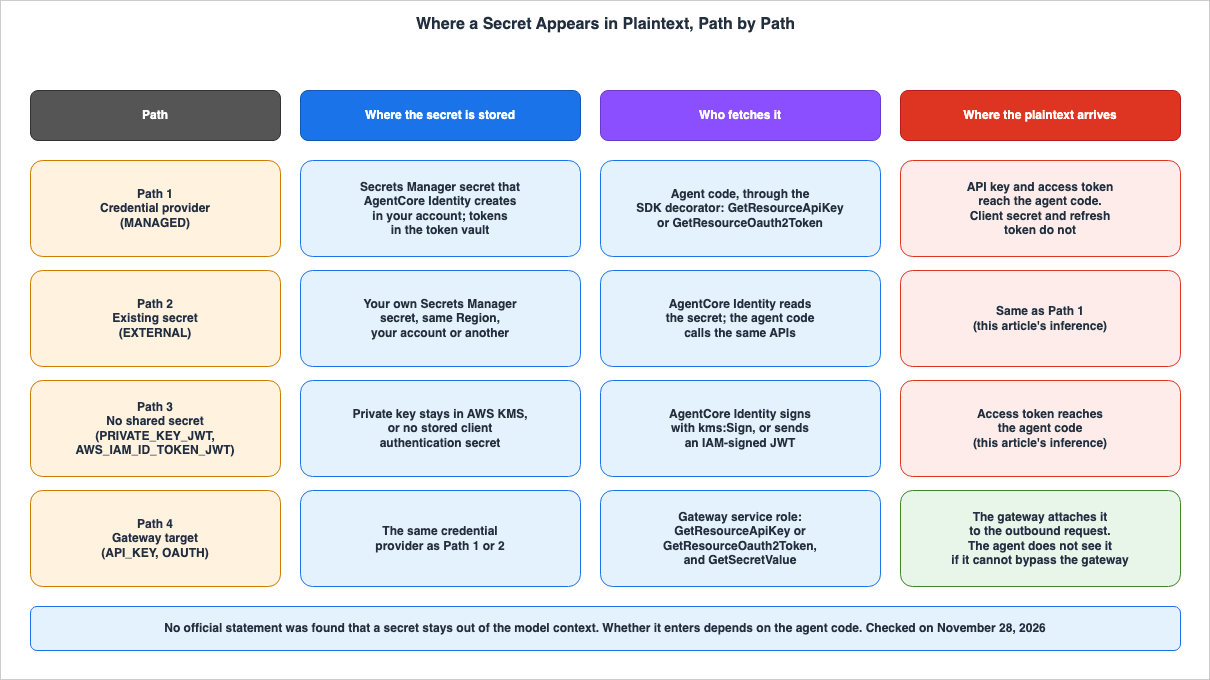
3. Path 1: Credential Provider and Token Vault
This chapter covers the most basic path, which uses the AgentCore Identity credential provider and token vault.MANAGED is the form in which you pass the secret value to AgentCore Identity, and AgentCore Identity creates and manages the Secrets Manager secret.3.1 Even with MANAGED, the Secrets Manager Secret Is in Your Account
Even if you chooseMANAGED, the secrets are not outside your account. The AWS Machine Learning Blog post that announced the ability to reference Secrets Manager secrets says (Stated in the blog):Amazon Bedrock AgentCore Identity meets this challenge through credential providers and a token vault that automatically create and manage a secret in AWS Secrets Manager in your account for each Outbound credential provider resource.The response from
CreateApiKeyCredentialProvider also returns the ARN of a Secrets Manager secret in the apiKeySecretArn field (Stated). Similarly, the response from CreateOauth2CredentialProvider returns the clientSecretArn (Stated). Therefore, even when using MANAGED, you are still using Secrets Manager.These secrets are also visible to principals with Secrets Manager permissions. The Developer Guide, regarding the
BedrockAgentCoreFullAccess AWS managed policy, states (Stated):Allows principals to create, update, retrieve, and delete secrets with names that begin with "bedrock-agentcore".The example policy for the execution role of the consent portal limits the target of
secretsmanager:GetSecretValue to secrets with the name bedrock-agentcore-identity!default/oauth2/* (Stated). No page was found that states that MANAGED secrets are created with this naming convention (Not documented). However, principals with the FullAccess policy can directly read secrets whose names begin with bedrock-agentcore, bypassing AgentCore Identity (Inference).3.2 The Official Statements Can Be Read in Two Ways
The Developer Guide's statements on how far AgentCore Identity hides secrets can be read in two ways. The introductory page of the credential provider chapter states (Stated):AgentCore Identity’s credential management architecture separates credential storage from credential access, helping to ensure that agents never have direct access to long-term secrets or refresh tokens.The "Supported Authentication Patterns" page lists the following as one of the benefits common to all authentication types (Stated):
Secure credential storage without exposing secrets to agent codeMeanwhile, the "Configure Credential Provider" page states (Stated):
Credential providers store the credentials they obtain in the token vault and return access tokens to the agent.When these three passages are compared with the table in section 2.2, the following interpretation emerges (Inference). The secrets that the agent's code does not see are the client secret and the refresh token. The access token is returned to the agent. While API keys are long-term secrets, they are passed as function arguments, as described in section 3.3. Therefore, if the word secrets in the second passage is read as every secret, the reading is wrong for API keys and access tokens.
3.3 The API Key Is Passed as a Function Argument
The "Obtain API Key" page provides an example using@requires_api_key, as follows (Stated).import asyncio
from bedrock_agentcore.identity.auth import requires_api_key
@requires_api_key(
provider_name= "your-service-name" # replace with your own credential provider name
)
async def need_api_key(*, api_key: str):
# Use the API key
pass
# To invoke:
# asyncio.run(need_api_key())The decorator passes the retrieved API key as an argument named
api_key to the function. The apiKey value returned by GetResourceApiKey, which the decorator calls (Inference), is described in the API Reference as follows (Stated).The API key associated with the resource requested.Therefore, the API key for path 1 appears in the agent's code as plaintext (Stated).
3.4 The Access Token Is Also Passed as a Function Argument
The page detailing how to obtain an OAuth 2.0 access token provides an example using@requires_access_token (Stated).# Injects Google Access Token
@requires_access_token(
# Uses the same credential provider name created above
provider_name= "google-provider",
# Requires Google OAuth2 scope to access Google Drive
scopes= ["https://www.googleapis.com/auth/drive.metadata.readonly"],
# Sets to OAuth 2.0 Authorization Code flow
auth_flow= "USER_FEDERATION",
# Prints authorization URL to console
on_auth_url= lambda x: print("\nPlease copy and paste this URL in your browser:\n" + x),
# If false, caches obtained access token
force_authentication= False,
callback_url='insert_oauth2_callback_url_for_session_binding',
)
async def write_to_google_drive(*, access_token: str):
# Use the token to call Google Drive
passThe access token is passed to the function as an argument labeled
access_token. Machine-to-machine (M2M) examples follow the same format (Stated). The refresh token stays in the token vault, and AgentCore Identity uses it to obtain a new access token (Stated).The comments in this example say that if
force_authentication is false, the obtained access token is cached (Stated). No page was found that describes where this cache is or how long it is kept (Not documented). The same page also notes that the access token returned by AgentCore may not always be valid (Stated).Access tokens returned by AgentCore are not guaranteed to be valid. Tokens can be revoked by customers on the federated provider side, which AgentCore cannot detect.3.5 Whether a Secret Enters the Model Context Depends on the Code
No official statement was found that guarantees a secret does not pass through the model context (Not documented). The Developer Guide, the API Reference, and the AWS Machine Learning Blog were searched three times with different search terms. The terms were "access token never exposed to LLM context window," "requires_access_token decorator token hidden from model prompt," and "Gateway API key credential provider agent never sees API key." The official documentation only addresses the scope described in section 3.2.As described in sections 3.3 and 3.4, API keys and access tokens do reach the agent's code. Subsequently, whether they enter the model context depends on how the code handles those values (Inference). For example, if a tool's function includes the secret in its return value, that value enters the model context. If the secret is written to a log, it becomes visible to anyone who can read those logs. Any value that enters the model context may appear in the model's output.
The Amazon Bedrock AgentCore Implementation Guide Part 2, section 4.5, discusses coding practices that keep secrets out of the model context. It is a two-layer pattern: the tool function that the model calls has no secret parameter, and the decorator goes on an inner function. This article does not repeat the pattern. However, even with two layers, the secret is still in the agent's code (Inference). Other code running in the same execution environment can read the value. The Amazon EKS User Guide says the following about API keys and OAuth tokens in an agent's pod (Stated in the EKS guide):
A third-party API key or OAuth token in an agent’s pod is exposed to everything that runs there, including model-generated code, which can read it and use it from anywhere the agent can reach.3.6 Principals That Can Read the Secret
On path 1, an IAM principal that meets both of the following can retrieve API keys and access tokens (Inference, from the example execution role and the page quoted below).- They can obtain a workload access token. The example Runtime execution role has
bedrock-agentcore:GetWorkloadAccessToken,GetWorkloadAccessTokenForJWT, andGetWorkloadAccessTokenForUserId. - They possess the
bedrock-agentcore:GetResourceApiKeyorbedrock-agentcore:GetResourceOauth2Tokenpermission on the credential provider.
Regarding this combination of two conditions, the "Scope down access to credential providers by workload identity" page notes (Stated):
The IAM role you assign to an agent controls which credential providers the agent can call. The service does not enforce additional binding between workload identities and credential providers in the same account.In the same account, the page recommends restricting which credential providers each agent can access by using the
Resource element in IAM policies (Stated). However, the secrets an agent can retrieve are scoped to the user in the workload access token. For 3LO providers, there are no secrets that can be retrieved until the user completes the consent process (Stated).There are also principals that can read secrets without going through AgentCore Identity. As described in section 3.1, API keys and client secrets are stored within Secrets Manager secrets. Principals with
secretsmanager:GetSecretValue on that secret can read the value directly (Inference). The example policy for the Gateway's service role includes secretsmanager:GetSecretValue (section 6.2), and the example for the consent portal's execution role includes the same permission (Stated).3.7 Principals That Change the Secret
On path 1, the principals that can callUpdateApiKeyCredentialProvider change the API key. The API Reference describes the apiKey parameter as follows (Stated):The new API key to use for authentication. This value replaces the existing API key and is encrypted and stored securely.Client secrets are changed with
UpdateOauth2CredentialProvider (Stated). No page was found on how long the new value takes to reach the agent, or how it relates to the cache in section 3.4 (Not documented). You decide when to invalidate the old value on the external side (Inference). The article Who Can Change the Restrictions on an AgentCore Agent covers which principals can call these APIs.3.8 Contrast: The Payment Credential Provider Passes Only ARNs
Even in the same AgentCore Identity, the payment credential provider passes secrets differently. The Configure credential provider page says the following (Stated).For services that use payment-processor credentials such as Coinbase CDP or Stripe Privy, AgentCore Identity securely stores the associated API keys, app secrets, and wallet/authorization secrets in Secrets Manager and surfaces only their ARNs to your agents.Compared with the API key credential provider, the difference is whether the agent receives the value or the ARN. The article Agentic Payments on AWS covers the payment mechanism.
4. Path 2: Referencing Existing Secrets Manager Secrets via EXTERNAL
This chapter covers the path that references a Secrets Manager secret you created from a credential provider. The release notes list this feature under July 2026 (Stated).4.1 Configuration Fields
In the API key credential provider, specifyEXTERNAL for apiKeySecretSource and provide the secret in the apiKeySecretConfig field. For the OAuth credential provider, use the clientSecretSource and clientSecretConfig fields. Both source fields take MANAGED or EXTERNAL (Stated).The
apiKeySecretConfig and clientSecretConfig fields are of type SecretReference and have the following two fields (Stated):| Field | Meaning | Constraint |
|---|---|---|
secretId | The ID of the secret in Secrets Manager | Required. 1 to 2048 characters |
jsonKey | The key in the JSON of the secret value used to extract the secret | Required. 1 to 128 characters |
The API Reference specifies that
apiKeySecretConfig is required when apiKeySecretSource is set to EXTERNAL (Stated).4.2 What Reaches the Code at Runtime Does Not Change
EXTERNAL changes how secrets are created and managed, but it does not alter their handling at runtime. The release notes say the following (Stated).This gives you full ownership of how your secrets are created, classified, and governed, without changing how AgentCore Identity uses them at runtime.Therefore, as on path 1,
GetResourceApiKey returns the API key, and the decorator passes it to the function as an argument. As with path 1, the client secret is not returned to the agent (Inference). Even with the change to EXTERNAL, the issue described in section 3.5 remains.4.3 Principals That Can Read the Secret
WithEXTERNAL, you grant AgentCore Identity the permissions to read your secret. The AWS Machine Learning Blog lists the following two prerequisites (Stated in the blog).- Grant the service principal of AgentCore Identity the
secretsmanager:GetSecretValuepermission. - If the secrets are encrypted with a CMK, grant the service principal the
kms:Decryptpermission for that key.
No page was found that names the service principal for this resource policy (Not documented). The same blog says that you decide which IAM principals can read the secret, in the secret's resource policy (Stated in the blog). In other words, the read permission that AgentCore Identity managed on path 1 is something you write in your own resource policy on path 2 (Inference).
Regarding which secrets can be referenced, the blog says (Stated in the blog):
You can also choose a secret from another AWS account within the same AWS Region, though cross-Region secret sharing isn’t supported.The blog also says that secrets brought in through Secrets Manager external connectors can be referenced (Stated in the blog).
4.4 Principals That Change the Secret
WithEXTERNAL, rotation is done on the Secrets Manager side. The blog says the following (Stated in the blog):When you rotate the secret value, AgentCore Identity retrieves the updated value on its next read. You don’t need to update or recreate the credential provider resources.No page was found that says when the next read happens, or whether AgentCore Identity caches the value (Not documented). Therefore, the documentation does not tell you when the new value starts being used. Invalidate the old value on the external side only after you confirm that calls succeed with the new value (Inference). The mechanisms used by Secrets Manager for rotation are described in Chapter 4 of the AWS Secrets Manager and Parameter Store Decision Guide.
4.5 How MANAGED and EXTERNAL Differ
The following table compares path 1 and path 2.| Item | MANAGED (path 1) | EXTERNAL (path 2) |
|---|---|---|
| Principal that creates the Secrets Manager secret | AgentCore Identity (Stated) | You (Stated) |
| Where the secret is | Your account (Stated in the blog) | Your account or another account, in the same Region (Stated in the blog) |
| Can a CMK, tags, and rotation be set at creation? | Could not be set (Stated in the blog) | Can be set (Stated) |
| Permissions for AgentCore Identity to read the secret | Not documented | secretsmanager:GetSecretValue and kms:Decrypt for the service principal (Stated in the blog) |
| Rotation process | Values are updated using Update…CredentialProvider (Stated) | Updated in Secrets Manager; reflected on the next read (Stated in the blog) |
| What reaches the agent's code at runtime | API key and access token (Stated) | Same (Inference) |
5. Path 3: Client Authentication Without a Shared Secret
This chapter covers the path that removes the client secret itself. When an OAuth client requests an access token from the authorization server's token endpoint, it must authenticate itself. By using an authentication method other than a shared secret, the need to protect a client secret is removed.5.1 Client Authentication Methods
TheclientAuthenticationMethod field in the CustomOauth2ProviderConfigInput can take one of four values (Stated).| Value | Shared Secret | Key Points |
|---|---|---|
CLIENT_SECRET_BASIC | Used | Default. Sends the client secret using HTTP Basic Authentication. |
CLIENT_SECRET_POST | Used | Sends the client secret in the request body. |
AWS_IAM_ID_TOKEN_JWT | Not Used | Sends an IAM-signed JWT as a client assertion. |
PRIVATE_KEY_JWT | Not Used | Sends a JWT signed with an AWS KMS asymmetric key as a client assertion. |
The method can be chosen on a custom provider. The Client authentication methods page notes that, for built-in providers, AgentCore Identity manages the method based on vendor-specific requirements (Stated).
5.2 PRIVATE_KEY_JWT
With private key JWT, the private key does not leave AWS KMS. The page describing Private Key JWT client authentication states the following (Stated).The private key never leaves AWS Key Management Service (KMS). AgentCore Identity signs each assertion via kms:Sign.Only custom OAuth credential providers can use this method. The same page further states (Stated).
Private Key JWT is available on the custom OAuth 2.0 credential provider (CustomOauth2). It works for all grant flows: client credentials (M2M), token exchange with JWT authorization grant (OBO), and authorization code (user-delegated access).This method is not available on API key credential providers (Stated: the
CreateApiKeyCredentialProvider request has no client authentication field).The key must be an asymmetric key with the usage
SIGN_VERIFY and located in the same Region as the credential provider (Stated). A key in another account can be used when its key policy grants kms:DescribeKey and kms:Sign to the calling identity (Stated). If your identity provider creates the key pair and provides the private key material, you import it into a KMS key with the usage SIGN_VERIFY (Stated). In that case, the private key exists outside KMS until it is imported (Inference). The supported signing algorithms and key specifications are as follows (Stated).signingAlgorithm | Supported Key Specifications |
|---|---|
RS256 | RSA_2048, RSA_3072, RSA_4096 |
PS256 | RSA_2048, RSA_3072, RSA_4096 |
ES256 | ECC_NIST_P256 |
An example key policy grants the
kms:Sign and kms:DescribeKey permissions to the root of the account that calls AgentCore Identity (Stated). Furthermore, it restricts usage to requests that pass through AgentCore Identity using the kms:ViaService condition (Stated).The kms:ViaService condition ensures the key can only be used when the request originates through Amazon Bedrock AgentCore Identity.The Client authentication methods page lists as a prerequisite that the AgentCore Identity execution role, or the calling identity, has the
kms:DescribeKey and kms:Sign permissions on the key (Stated). No page was found that says whether this role is the agent's execution role (Not documented). The list of keys and the comparison of key policies are covered in Which Key Protects Which AgentCore Data - Customer Managed Keys by Component, When You Choose Them, and Who Calls AWS KMS.5.3 What Changes, and What Remains the Same
What private key JWT changes is that the client secret goes away. The documentation states that this method removes the shared secret between AgentCore Identity and the authorization server (Stated). The private key does not leave KMS (Stated). Therefore, it appears neither in the agent's code nor in a Secrets Manager secret (Inference).What remains unchanged is what the agent receives. In the CloudTrail example from the blog post regarding private key JWT, the agent calls
GetResourceOauth2Token, the same as on path 1 (Stated in the blog). The response returns an accessToken (Stated). Consequently, the access token is delivered to the agent's code, just as it is in path 1 (Inference). The issue discussed in section 3.5 persists even with private key JWT.5.4 Changing Keys
The private key JWT key is not covered by KMS automatic rotation. The AWS KMS Developer Guide lists asymmetric keys as keys that are not eligible for automatic or on-demand rotation. For such keys, it says that manual rotation, which creates a new key to replace the old one, is a good choice (Stated).Manual rotation is a good choice when you want to rotate KMS keys that are not eligible for automatic or on-demand key rotation, including asymmetric KMS keys, HMAC KMS keys and KMS keys in custom key stores.The AgentCore pages do not describe the key change procedure in one place (Not documented). Combining what the pages say, three steps are needed (Inference):
- Create a new asymmetric key and retrieve the public key using
kms:GetPublicKey. - Re-register the public key with the authorization server. The documentation specifies that Microsoft Entra requires X.509 certificates, while Okta requires JSON Web Keys (Stated).
- Update the
kmsKeyArnin the credential provider to the new key. If you are usingkidorx5t#S256withinadditionalHeaderClaims, you should update those as well.
Compared with the shared-secret paths, more principals change the secret (Inference): the KMS key administrator, the authorization server administrator, and the principal that can update the credential provider.
5.5 AWS_IAM_ID_TOKEN_JWT
AWS_IAM_ID_TOKEN_JWT also does not use a shared secret. The Client authentication methods page says the following (Stated).Authenticates to the authorization server’s token endpoint by sending an AWS IAM-signed JWT assertion for the agent’s execution role (obtained via sts:GetWebIdentityToken) as client assertion, per RFC 7523, Section 2.2.The prerequisite for this method is that outbound web identity federation is enabled on the account, and the calling IAM principal must have the
sts:GetWebIdentityToken permission (Stated). The authorization server must trust AWS IAM as the issuer (Stated). This method does not require a client secret or a KMS key. IAM generates the signature. The article AWS IAM Outbound Identity Federation covers how IAM outbound identity federation works.As in section 5.3, the access token obtained is still delivered to the agent's code (Inference).
5.6 What CloudTrail Records
The blog post on private key JWT shows three example events that CloudTrail records when a token is obtained (Stated in the blog). They areGetWorkloadAccessToken, GetResourceOauth2Token, and the KMS Sign event. About the Sign event, the blog post says (Stated in the blog):userIdentity.invokedBy, sourceIPAddress, and userAgent are all bedrock-agentcore.amazonaws.com, confirming that AgentCore Identity called kms:Sign on your behalf.The blog also says that the
Sign event records the KMS signing algorithm name, not the name of the JWT algorithm you configured (Stated in the blog). The blog's example Sign event records RSASSA_PKCS1_V1_5_SHA_256 (Stated in the blog). The blog does not show the credential provider configuration for this example, and the blog's own key-creation example uses ES256 (Stated in the blog).6. Path 4: Outbound Authorization for Gateway Targets
This chapter covers the path that attaches authorization to an AgentCore Gateway target. The agent calls the Gateway, and the Gateway calls the target. The Gateway attaches the secret.6.1 Five Values for credentialProviderType
The elements withincredentialProviderConfigurations for CreateGatewayTarget are of type CredentialProviderConfiguration. The credentialProviderType within these configurations can take one of five values (Stated).GATEWAY_IAM_ROLE | OAUTH | API_KEY | CALLER_IAM_CREDENTIALS | JWT_PASSTHROUGHThe Developer Guide's Gateway outbound page adds "No authorization" to these, splits OAuth into three grant types, and shows a table with eight authorization columns (Stated). The types you can use differ by target type.
| Target Type | No Authorization | Service Role | Caller IAM | OAuth (Client Credentials) | OAuth (Authorization Code) | OAuth (Token Exchange) | Token Passthrough | API Key |
|---|---|---|---|---|---|---|---|---|
| API Gateway Stage | Yes | Yes | No | No | No | No | No | Yes |
| Lambda Function | No | Yes | No | No | No | No | No | No |
| MCP Server | Yes | Yes | No | Yes | Yes | Yes | No | Yes |
| OpenAPI Schema | Yes | Yes | No | Yes | Yes | Yes | No | Yes |
| Smithy Schema | No | Yes | No | Yes | No | No | No | No |
| AgentCore Runtime (HTTP) | No | Yes | Yes | Yes | No | No | Yes | No |
6.2 API_KEY and OAUTH: The Gateway's Service Role Reads the Secret
BothAPI_KEY and OAUTH use the same AgentCore Identity credential provider as path 1. The difference is who retrieves the secret. The example policy for a custom Gateway service role includes the following three permissions (Stated):bedrock-agentcore:GetWorkloadAccessTokenbedrock-agentcore:GetResourceApiKey(for API Key) orbedrock-agentcore:GetResourceOauth2Token(for OAuth)secretsmanager:GetSecretValuefor the Secrets Manager secret created by the credential provider.
When creating a Gateway using the AWS Management Console or the AgentCore CLI, you can let AgentCore create a service role automatically, and the necessary permissions are added each time a target is added (Stated). Therefore, in path 4, the Gateway's service role is the principal that reads the secrets (Stated). For API Keys, you specify where the Gateway places the key with
credentialLocation (HEADER or QUERY_PARAMETER), credentialParameterName, and credentialPrefix (Stated).No statement was found in the Gateway pages of the AgentCore Developer Guide on whether the agent avoids seeing the secret (Not documented). The Amazon EKS User Guide describes the pattern in which the gateway holds the secret as follows (Stated in the EKS guide):
The gateway holds the credential and attaches it to requests from the agent it belongs to, and network policy lets the agent reach only the gateway, so the agent can use the API without ever seeing the credential.This statement is conditional. When network policy lets the agent reach only the Gateway, the agent can use the API without seeing the secret (Stated in the EKS guide). If the agent can bypass the Gateway and call external APIs, it can build another path that holds the secret (Inference). The same set of EKS pages says that the Gateway holds every agent's secrets, and that you should secure and monitor it as the highest-value target in the architecture (Stated in the EKS guide).
For an agent on AgentCore Runtime, the counterpart of this network policy is the runtime's network configuration. A runtime connected to a VPC does not have internet access by default (Stated). The Gateway has an interface VPC endpoint (Stated). If the agent needs no other internet access, for example to obtain its inbound token from an IdP, combining the two can make the Gateway the only route from the agent to external APIs (Inference).
6.3 GATEWAY_IAM_ROLE and CALLER_IAM_CREDENTIALS: Types With No Secret Value
GATEWAY_IAM_ROLE signs requests with AWS Signature Version 4, using the credentials of the Gateway's service role (Stated). It does not use any external SaaS secret. The page notes the following about this type (Stated).The gateway execution role is shared across all targets configured with GATEWAY_IAM_ROLE. Its permissions are the upper bound for what any authorized caller can exercise through the gateway.The page calls this role both a service role and an execution role. This article calls it the Gateway's service role.
With
CALLER_IAM_CREDENTIALS, the Gateway signs requests with the caller's IAM credentials (Stated). The Gateway assumes a role on behalf of the caller through the Federated Access Service (FAS) (Stated). This type is available only on Gateways whose inbound authorizer type is AWS_IAM or AUTHENTICATE_ONLY (Stated). Neither type holds a secret in this article's sense.6.4 JWT_PASSTHROUGH: The Caller's Token Reaches the Target
JWT_PASSTHROUGH allows the Gateway to pass the received bearer token to the target without modification (Stated). The Gateway validates the inbound token before passing it on (Stated). This type is only supported by HTTP targets, specifically with passthrough and AgentCore Runtime (Stated).This type does not use secrets from AgentCore Identity. The secret passed to the target is the caller's token itself (Inference). It is the target's responsibility to validate the token (Stated).
6.5 What CloudTrail Records
Records for path 4 are split into two locations.- The
InvokeGatewaycall made by the agent to the Gateway is a data event in CloudTrail. By default, it is not recorded and must be explicitly enabled (Stated). - For the Identity requests that AgentCore makes for you, the resource control policies page says the following (Stated).
CloudTrail logs the AgentCore Identity requests that AgentCore makes for you, such as GetWorkloadAccessToken, GetResourceOauth2Token, and GetResourceApiKey, as management events in the account that owns the resource.The three APIs mentioned in this passage are examples and not an exhaustive list. Chapter 5 of Whose Identity Is in the Audit Record for an AgentCore Tool Call covers how to read
userIdentity in these records, and how calls are classified when the agent's code calls Identity directly.7. Decision Table
This chapter presents the results from Chapters 2 through 6, organized by path. The notations follow section 1.5.7.1 Where Plaintext Appears and Who Can Read It
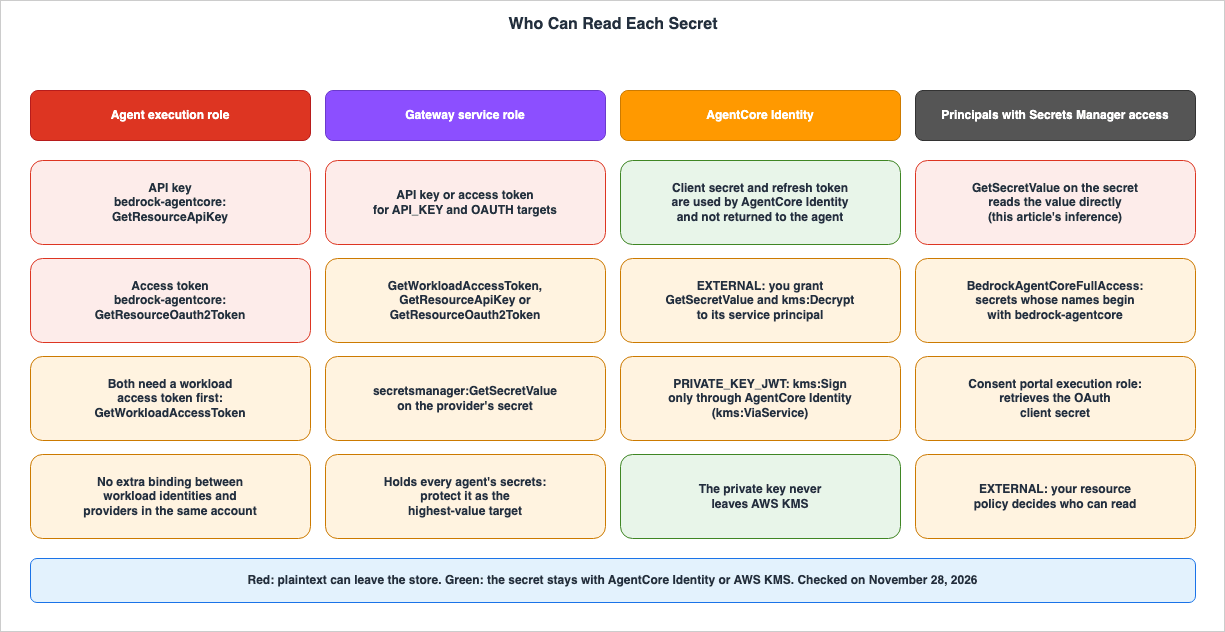
| Path | Plaintext That Reaches the Agent's Code | Principals That Can Read the Secret, and Required Actions |
|---|---|---|
Path 1, API key (MANAGED) | API key (Stated) | Principals with GetResourceApiKey (Stated). Principals with secretsmanager:GetSecretValue on the secret (Inference). |
Path 1, OAuth (MANAGED) | Access token (Stated). The client secret and the refresh token do not reach it (Stated). | Principals with GetResourceOauth2Token (Stated). For the client secret, principals with secretsmanager:GetSecretValue on the secret (Inference). |
Path 2, EXTERNAL | Same as path 1 (Inference) | In addition to path 1, principals that your resource policy allows. For AgentCore Identity's service principal, grant secretsmanager:GetSecretValue and kms:Decrypt (Stated in the blog). |
Path 3, PRIVATE_KEY_JWT | Access token (Inference). The private key does not reach it (Stated). | No API returns the private key (Stated). If an IdP created the key pair and you imported it, the key existed outside KMS before the import (Inference, section 5.2). With the example key policy, signing is possible only for requests that hold kms:Sign and pass through AgentCore Identity (Stated). |
Path 3, AWS_IAM_ID_TOKEN_JWT | Access token (Inference) | There is no client secret. Principals with sts:GetWebIdentityToken obtain a signed JWT (Stated). |
Path 4, API_KEY and OAUTH | Nothing reaches it, if the agent cannot bypass the Gateway (Stated in the EKS guide). | The Gateway's service role. Requires GetWorkloadAccessToken, GetResourceApiKey or GetResourceOauth2Token, and secretsmanager:GetSecretValue (Stated). |
Path 4, GATEWAY_IAM_ROLE and CALLER_IAM_CREDENTIALS | There is no external secret (Inference). | The Gateway's service role or the caller's credentials are used for signing (Stated). |
Path 4, JWT_PASSTHROUGH | The caller's token reaches the target (Stated). | The caller possessing the token and the target receiving it (Inference). |
Figure 2 redraws the right-hand column of the table in section 7.1 by principal.
7.2 Who Changes the Secret, and What Is Recorded
| Path | Principals That Change the Secret, and the Operation | What CloudTrail Records |
|---|---|---|
Path 1, MANAGED | Principals that can call UpdateApiKeyCredentialProvider or UpdateOauth2CredentialProvider (Stated). The time to take effect is not documented. | Identity requests that AgentCore makes for you are management events (Stated). How calls are classified when the agent's code calls Identity directly is not documented. |
Path 2, EXTERNAL | Principals that can update the Secrets Manager secret. Reflected on the next read (Stated in the blog). The time to take effect is not documented. | In addition to path 1, the Secrets Manager GetSecretValue record (Inference). Which principal it is recorded as is not documented. |
Path 3, PRIVATE_KEY_JWT | The KMS key administrator, the authorization server administrator, and principals that can update the credential provider (Inference). Asymmetric keys are not eligible for automatic rotation (Stated). | GetWorkloadAccessToken, GetResourceOauth2Token, and KMS's Sign (Stated in the blog). |
Path 3, AWS_IAM_ID_TOKEN_JWT | There is no secret to change. The trust setting is on the authorization server side (Inference). | The page says that the JWT is for the agent's execution role (Stated). No example record is documented. |
Path 4, API_KEY and OAUTH | Same as path 1 or path 2 (Inference). | InvokeGateway is a data event and is not recorded by default (Stated). Identity requests are recorded as management events (Stated). |
Path 4, JWT_PASSTHROUGH | The issuer of the caller's token (Inference). | InvokeGateway is a data event (Stated). |
7.3 Choosing a Path
From the decision table, the choice comes down to four points (Inference).- If you do not want secrets in your agent's code, choose path 4. Also make sure that the agent cannot bypass the Gateway to reach external resources, and remove the permissions to retrieve secrets from its execution role. Because the principal that reads secrets concentrates in the Gateway's service role, keep that role to minimum permissions, and use a separate Gateway for each trust boundary.
- If you want to manage secrets through your own Secrets Manager operations (CMK, tags, resource policies, and rotation), choose path 2. However, what reaches your code does not change.
- If you want to eliminate the need to protect client secrets, choose path 3. Both private key JWT and
AWS_IAM_ID_TOKEN_JWTare chosen on a custom OAuth provider (section 5.1). For private key JWT, prepare the key change procedure yourself. - If you are using paths 1, 2, or 3, write the code on the assumption that secrets reach it. Keep secrets out of tool return values and logs, and narrow the credential providers with the
Resourceelement of IAM policies.
8. A Separate Track: Local AI Coding Agents and the Secrets Manager Page
This chapter covers a page on a separate track from the four AgentCore paths. The Use secrets safely with AI Coding Agents page in the Secrets Manager User Guide has a similar name, but it protects something different.8.1 The Agent the Page Assumes
The page assumes an AI coding agent that can use a shell or AWS APIs. The page says the following (Stated):When AI coding agents have shell or AWS API access, they can call get-secret-value and receive plaintext secrets in their context window.In other words, the problem the page addresses is that the agent itself calls
get-secret-value, and the response from that call enters the model context. It is not about how an AgentCore agent receives secrets from a credential provider.8.2 Two Layers of Protection and Their Limit
The page places two layers of protection with a skill and a hook in the Agent Toolkit for AWS (Stated). The first layer involves using the{{resolve:secretsmanager:...}} reference and the asm-exec wrapper to ensure that plaintext data is only present within subprocesses. The second layer uses the PreToolUse hook to prevent calls to get-secret-value and batch-get-secret-value. The page states the limit of this protection as follows (Stated):This is a best-effort defense, not a security boundary.The page says to combine it with IAM least privilege, CloudTrail monitoring, and VPC endpoint policies (Stated).
8.3 How It Differs from the AgentCore Paths
The following table compares the two tracks.| Item | Secrets Manager Page for AI Coding Agents | The Four AgentCore Paths |
|---|---|---|
| Intended Agent | An AI coding agent that uses a shell or AWS APIs (Stated). | Runs on AgentCore Runtime or a similar platform, and calls external APIs. |
| Principal That Retrieves the Secret | The agent itself (Stated). | AgentCore Identity, Decorators, Gateway. |
| Security Mechanisms | Skills, asm-exec, and PreToolUse hooks (Stated). | IAM permissions, differentiation based on secret type, and Gateway configuration. |
| Limit That the Pages State | Best-effort, not a boundary (Stated). | No statement was found that guarantees secrets stay out of the model context (Not documented) |
Both tracks share the premise that a secret in the model context can leak (Inference). The key difference lies in where the security measures are applied. The agent on the developer's machine aims to prevent the model from retrieving secrets by stopping the call itself. In AgentCore's paths, security is achieved either by preventing the agent's code from passing the retrieved secrets to the model, or by configuring the system so that the secrets never reach the code in the first place (path 4, under the conditions in Chapter 6).
9. Frequently Asked Questions About How an AgentCore Agent Gets a Secret
This chapter restates the article's conclusions briefly as questions. The basis for each answer is in the section it cites.Q1. If you use AgentCore Identity, does the agent's code never see the secret?
It depends on the type of secret. API keys and access tokens are passed to the code as function arguments via decorators (Stated). For client secrets and refresh tokens, no API field returns them to the agent (Stated). The Developer Guide contains a sentence that can be read as saying secrets are not exposed to agent code, but the guide's examples and the API Reference's responses show that this reading holds only for some of the long-term secrets (section 3.2).Q2. Do the official documents guarantee that a secret does not enter the model context?
No official statement that guarantees it was found (Not documented). Whether a secret enters the context depends on whether tool return values or logs contain it (Inference). Section 4.5 of Amazon Bedrock AgentCore Implementation Guide Part 2 covers how to write the code.Q3. Can private key JWTs also be used with API key credential providers?
No, they cannot. Private key JWT is available only on the custom OAuth credential provider (specifically,CustomOauth2) (Stated). The request that creates an API key credential provider has no client authentication field (Stated).Q4. With EXTERNAL, do you need to update the credential provider at each rotation?
No, you do not. The AWS Machine Learning Blog states that when the secret value is changed, AgentCore Identity will retrieve the new value on the next read, and that you do not need to update or recreate the credential provider (Stated in the blog). However, the blog does not specify when that next read will occur (Not documented). Invalidate the old value only after you confirm that calls succeed with the new value (Inference).Q5. If you attach secrets to a Gateway target, can the agent's execution role no longer read them?
If the Gateway retrieves the secrets, the agent's execution role will not require eitherGetResourceApiKey or GetResourceOauth2Token (Inference). Instead, the Gateway's service role will be responsible for reading the secrets (Stated). However, if the agent's execution role retains these permissions for other reasons, the agent can retrieve the secrets directly from the same credential provider (Inference). Within the same account, the service does not enforce a binding between workload identities and credential providers (Stated). Verify that these permissions, and secretsmanager:GetSecretValue on the provider's secrets, have been removed from the execution role's policy.Q6. Does the Secrets Manager page for AI coding agents also apply to AgentCore agents?
No, it does not. The page assumes AI coding agents that use a shell or AWS APIs (Stated). It does not cover how AgentCore agents receive secrets from a credential provider. The page itself says that its protection is best-effort and not a boundary (Stated).10. Summary
Where AgentCore agents receive secrets in plaintext depends on the path and the type of secret. In paths 1 and 2, API keys and access tokens are delivered to the agent's code as function arguments. Client secrets and refresh tokens are not delivered. On path 2,EXTERNAL moves the principals that can read the Secrets Manager secret, and the owner of rotation, to your side, but the information delivered to the code at runtime remains unchanged. In path 3, private key JWTs and AWS_IAM_ID_TOKEN_JWT eliminate the need for client secrets, but access tokens still reach the code. In path 4, the service role of the Gateway reads the secrets and attaches them to the request. Agents are kept from seeing the secrets only when they cannot bypass the Gateway and their execution role cannot retrieve the secrets either.Apart from the EKS guide's conditional statement for path 4, no official statement was found that guarantees a secret does not pass through the model context. If using paths 1 through 3, assume that secrets are delivered to the code and avoid including them in tool return values or logs. If using path 4, treat the Gateway and its service role as the highest-value targets.
This article is based on materials as of November 28, 2026 (Japan Standard Time). Announcements and page revisions at AWS re:Invent 2026 may change the paths and descriptions. Before using these methods, be sure to review the credential provider and Gateway outbound documentation.
11. References
- Manage credential providers with AgentCore Identity - Amazon Bedrock AgentCore
- Supported authentication patterns - Amazon Bedrock AgentCore
- Client authentication methods - Amazon Bedrock AgentCore
- Configure credential provider - Amazon Bedrock AgentCore
- Obtain credentials - Amazon Bedrock AgentCore
- Obtain API key - Amazon Bedrock AgentCore
- Obtain OAuth 2.0 access token - Amazon Bedrock AgentCore
- Private Key JWT client authentication - Amazon Bedrock AgentCore
- Scope down access to credential providers by workload identity - Amazon Bedrock AgentCore
- Set up outbound authorization for your gateway - Amazon Bedrock AgentCore
- Specify the authorization type and credentials to access the gateway target - Amazon Bedrock AgentCore
- IAM Permissions for AgentCore Runtime - Amazon Bedrock AgentCore
- Configure Amazon Bedrock AgentCore Runtime and tools for VPC - Amazon Bedrock AgentCore
- Use interface VPC endpoints (AWS PrivateLink) to create a private connection between your VPC and your Amazon Bedrock AgentCore resources - Amazon Bedrock AgentCore
- AWS managed policies for Amazon Bedrock AgentCore - Amazon Bedrock AgentCore
- Consent portal execution role - Amazon Bedrock AgentCore
- Resource control policies for Amazon Bedrock AgentCore - Amazon Bedrock AgentCore
- Amazon Bedrock AgentCore Gateway event types - Amazon Bedrock AgentCore
- Release notes for Amazon Bedrock AgentCore - Amazon Bedrock AgentCore
- CreateApiKeyCredentialProvider - Amazon Bedrock AgentCore Control Plane
- UpdateApiKeyCredentialProvider - Amazon Bedrock AgentCore Control Plane
- CreateOauth2CredentialProvider - Amazon Bedrock AgentCore Control Plane
- UpdateOauth2CredentialProvider - Amazon Bedrock AgentCore Control Plane
- CustomOauth2ProviderConfigInput - Amazon Bedrock AgentCore Control Plane
- PrivateKeyJwtConfig - Amazon Bedrock AgentCore Control Plane
- SecretReference - Amazon Bedrock AgentCore Control Plane
- CredentialProviderConfiguration - Amazon Bedrock AgentCore Control Plane
- GetResourceApiKey - Amazon Bedrock AgentCore Data Plane
- GetResourceOauth2Token - Amazon Bedrock AgentCore Data Plane
- Reference your own AWS Secrets Manager secrets in Amazon Bedrock AgentCore Identity
- Authenticate with Private Key JWT using Amazon Bedrock AgentCore Identity
- Call third-party APIs from agents without giving them credentials - Amazon EKS
- Route agent egress through a gateway - Amazon EKS
- Use secrets safely with AI Coding Agents - AWS Secrets Manager
- Rotate AWS KMS keys - AWS Key Management Service
- Amazon Bedrock AgentCore Implementation Guide Part 2: Multi-Layer Security with Identity, Gateway, and Policy
- Who Is Consenting - OAuth Session Binding and the Consent Portal in AgentCore Identity
- Whose Identity Is in the Audit Record for an AgentCore Tool Call - Users, Agents, and Tools in Gateway, Identity, and Runtime
- Who Can Change the Restrictions on an AgentCore Agent - Gateway Targets, Policies, Credential Providers, and Registry Approvals
- Identity Lifecycle for AI Agents - Registration, Delegated Authorization, Access Review, and What Retirement Leaves Behind
- Agent Sandboxing and Blast-Radius Isolation on AWS - Choosing the Unit of Each Containment Boundary and What Each One Does Not Stop
- AWS Secrets Manager and Parameter Store Decision Guide - Storing, Rotating, and Accessing Secrets and Configuration
- AWS IAM Outbound Identity Federation - Issuing Short-Lived Tokens from AWS to External Services
- Agentic Payments on AWS - Where the Spending Limit Is Enforced, and What It Does Not Stop
References:
Tech Blog with curated related content
Written by Hidekazu Konishi