End-to-End Response Streaming Architecture for Generative AI on AWS - WebSocket APIs, Lambda Response Streaming, AppSync, and Voice Pipelines
First Published:
Last Updated:
This article is a Level 400 implementation walkthrough of that delivery layer on AWS. It defines one named reference architecture — a streaming response delivery platform — and traces a single request through it end to end, then shows three delivery-layer variations and the failure modes that come with each. The model-side streaming APIs,
ConverseStream and InvokeModelWithResponseStream, are the source of the token stream; everything downstream of them is what this article is about.Adjacent components are delegated to existing articles rather than rebuilt here. Whole-system voice agent design lives in the Real-Time Voice AI Agent Architecture with Amazon Nova Sonic article, end-to-end contact-center design in the AI Contact Center Architecture on AWS article, and Bedrock API fundamentals in the Amazon Bedrock Basic Information and API Examples article. This article stays on the delivery layer.
1. Introduction
The perceived quality of a generative AI experience is governed less by total latency than by time to first token (TTFT) — the interval between the user's request and the first visible piece of the answer. A model that emits 400 tokens over 8 seconds can feel responsive if the first token lands in 300 ms and the rest flow in steadily, or sluggish if the client waits for all 8 seconds and then dumps the paragraph at once. The model does the same work either way; only the delivery differs.Model-side streaming solves the first half of the problem. Amazon Bedrock exposes two streaming inference APIs —
InvokeModelWithResponseStream and ConverseStream — that return output as a sequence of events as the model generates it, rather than as one buffered response. But a server-side stream is not a user-visible stream. Something has to carry those events across the network to a browser, a mobile app, or a voice channel, connection by connection, and render them incrementally. That transport is the delivery layer, and choosing it wrong is where streaming projects stall: teams get the model streaming perfectly, then discover their API can only return a single buffered response, or that a 29-second integration timeout severs the stream halfway through a long answer.This article covers the full path from model to client:
- Model-side streaming — the event structure of
ConverseStreamandInvokeModelWithResponseStream, how to consume it, and how guardrails and tool use behave in streaming mode. - A decision entry point — when to reach for API Gateway WebSocket APIs, Lambda response streaming, or AWS AppSync.
- Three implemented delivery patterns, each with connection management, relay code, authorization, and failure handling.
- A voice pipeline where streaming runs all the way through: Amazon Transcribe partial results feed generation, and generated tokens are pushed back — with whole-agent design delegated to the existing voice article.
Retry, backoff, and circuit-breaker design is delegated to the resilience article in this series (see the cross-references in Section 9); observability specifics are delegated to the monitoring article (see Section 10). This article covers the streaming-specific slices of both.
2. The Reference Architecture at a Glance
The named reference architecture used throughout this article is a streaming response delivery platform: a browser, mobile, or voice client on one side; Amazon Bedrock on the other; and, in between, a bidirectional transport plus a relay compute layer that reads model events and forwards them to the client as they arrive.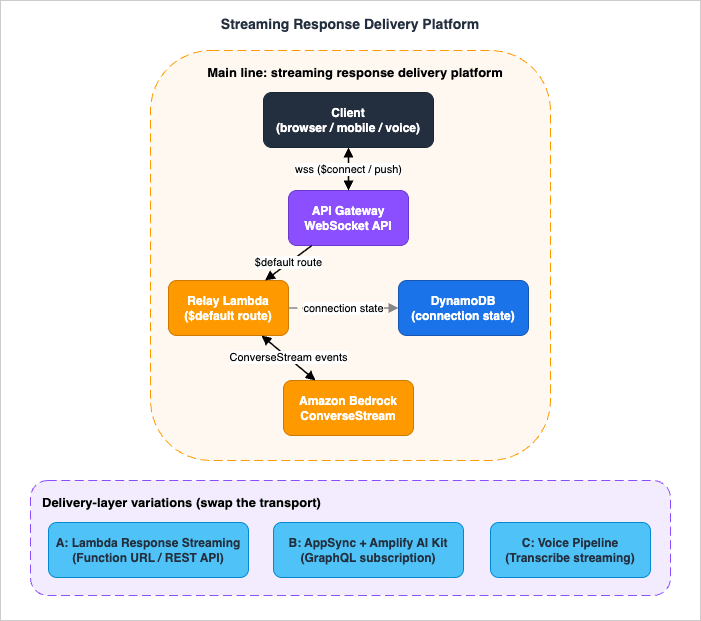
- Client — a browser, mobile app, or voice front end that holds a persistent connection and renders tokens incrementally.
- API Gateway WebSocket API — a persistent, bidirectional transport. The client connects once and both sides push messages for the life of the connection.
- Relay compute (Lambda) — invoked per message, it calls a Bedrock streaming API and forwards each output chunk back to the client over the open connection.
- Amazon Bedrock — the source of the token stream via
ConverseStreamorInvokeModelWithResponseStream. - Connection store (DynamoDB) — a table that maps connection IDs to session state so the relay knows where to push and can recover after failures.
Around that main line sit three variations, each swapping out the transport or the compute model to fit a different constraint:
- Variation A — Lambda response streaming. A single request/response streamed over HTTP through a Lambda function URL or an API Gateway REST API proxy integration. Simpler than a WebSocket API when the interaction is one prompt in, one streamed answer out.
- Variation B — AppSync and the Amplify AI Kit. GraphQL subscriptions over serverless WebSockets deliver the tokens, and the Amplify AI Kit wires the whole conversation route (authorization, history, and streaming) for teams already on an Amplify GraphQL stack.
- Variation C — voice pipeline. Amazon Transcribe streams partial transcripts of the user's speech; those feed generation; the generated tokens are pushed back over the same delivery transport. Streaming runs through every stage.
The rest of the article implements the main line and each variation in turn. Section 3 establishes the model-side stream that all of them consume; Section 4 is the decision entry point; Sections 5 through 8 implement the patterns.
3. Model-Side Streaming: ConverseStream and InvokeModelWithResponseStream
Every delivery pattern in this article consumes the same upstream: a Bedrock streaming inference call. Getting the event structure right here is what lets the relay layer forward tokens correctly, so this is the foundation section.3.1 Two streaming APIs, one IAM action
Amazon Bedrock exposes two ways to stream model output:InvokeModelWithResponseStream— takes a model-native request body (the exact JSON shape the specific model expects) and returns model-native chunks. Use it when you need a model-specific field that the unified API does not surface.ConverseStream— a unified, model-agnostic interface. You write the request once and it works across Bedrock models that support messages; the event shapes are normalized. This is the recommended default for new applications, and the one this article uses.
A detail worth internalizing: even when you call
ConverseStream, the operation requires the IAM permission for the bedrock:InvokeModelWithResponseStream action — the streaming permission is shared. A least-privilege policy for a streaming relay therefore grants bedrock:InvokeModelWithResponseStream (and, if you also make non-streaming calls, bedrock:InvokeModel / bedrock:Converse), scoped to the specific model ARNs the application uses.Two operational facts shape how you consume the stream. First, to check whether a given model supports streaming at all, call
GetFoundationModel and read the responseStreamingSupported field rather than hard-coding a model list — this keeps the code evergreen as the model catalog changes. Second, the AWS CLI does not support streaming operations in Amazon Bedrock, including ConverseStream; streaming is an SDK-only path. For the full Converse API surface (tool use, conversation state, request shape), this article delegates to the Amazon Bedrock Converse API Deep Dive article.3.2 The ConverseStream event sequence
ConverseStream returns its output in a stream field that emits a defined sequence of events. Understanding the order is what lets a relay forward text without also forwarding tool-use JSON fragments or metadata to the wrong place.| Order | Event | Emitted | Carries |
|---|---|---|---|
| 1 | messageStart | Once, at the start | The assistant role |
| 2 | contentBlockStart | Once per content block (grouped by contentBlockIndex; tool use only) | Tool-use block start |
| 3 | contentBlockDelta | One or more times per content block | The incremental payload |
| 4 | contentBlockStop | Once per content block | Block completion |
| 5 | messageStop | Once, near the end | stopReason |
| 6 | metadata | Once, last | usage + metrics |
messageStart— the start of the assistant message; includes the role.contentBlockStart— the start of a content block. Emitted for tool use only.contentBlockDelta— the incremental payload, emitted one or more times per block. Each delta carries exactly one member of the delta union — most commonlytext(a partial text fragment — the thing you forward to the user),reasoningContent(partial model reasoning; if you send it back in a laterConverseturn you must return the accompanyingsignatureunchanged), ortoolUse(a partial JSON fragment of the tool input). The API reference also definescitation,image, andtoolResultdelta members, which are outside the scope of this article's text-relay patterns.contentBlockStop— the block is complete.messageStop— the message is complete; carriesstopReason(for exampleend_turn,max_tokens,tool_use).metadata— request-level metadata: tokenusageandmetrics. This is where you read the token counts for logging and cost attribution.
The output stream can also carry error events in place of a normal continuation:
internalServerException, modelStreamErrorException, serviceUnavailableException, throttlingException, and validationException. A relay must treat these as first-class stream events — a throttlingException can arrive after several successful contentBlockDelta events, mid-answer, and the client already sees a partial response. Section 9 covers how to surface these to the client.3.3 Consuming the stream
The following relay-side consumer reads aConverseStream response and yields only the user-visible text, while separately capturing the stop reason and usage. This is the core loop that every delivery pattern wraps.import boto3
bedrock = boto3.client("bedrock-runtime")
def stream_text(model_id: str, messages: list, system: list | None = None):
"""Yield text fragments from ConverseStream; capture stop reason + usage."""
params = {
"modelId": model_id,
"messages": messages,
"inferenceConfig": {"maxTokens": 1024, "temperature": 0.7},
}
if system:
params["system"] = system
response = bedrock.converse_stream(**params)
for event in response["stream"]:
if "contentBlockDelta" in event:
delta = event["contentBlockDelta"]["delta"]
if "text" in delta: # user-visible token fragment
yield {"type": "token", "text": delta["text"]}
elif "messageStop" in event:
yield {"type": "stop", "reason": event["messageStop"]["stopReason"]}
elif "metadata" in event:
usage = event["metadata"].get("usage", {})
yield {"type": "usage", "usage": usage}
# Stream-level errors surface as their own event keys:
elif "throttlingException" in event:
yield {"type": "error", "code": "throttling"}
elif "modelStreamErrorException" in event:
yield {"type": "error", "code": "model_stream_error"}
elif "internalServerException" in event:
yield {"type": "error", "code": "internal"}
text inside contentBlockDelta rather than forwarding the whole delta — this keeps tool-use JSON fragments and reasoning content out of the user-facing token stream. If your application uses tool calling, accumulate the toolUse partial JSON across deltas for the relevant contentBlockIndex and act on it after contentBlockStop; do not stream those fragments to the screen.3.4 Guardrails and tool use in streaming mode
Two features change shape when you stream, and both matter to a delivery-layer design.Guardrails. When you attach an Amazon Bedrock guardrail to
ConverseStream or InvokeModelWithResponseStream, the native integration applies a dual-checkpoint pattern: user input is evaluated first (via the ApplyGuardrail path), and if it passes, the request proceeds to the model; the model's output is then evaluated before it reaches the user. For the streaming APIs specifically, the guardrail buffers the model's streaming output and evaluates it in chunks rather than token by token. The behavior is controlled by GuardrailStreamConfiguration.streamProcessingMode:sync(the default) — the guardrail evaluates each buffered chunk before it is released to the client. This maximizes safety but adds latency to each chunk, because a chunk is held until it clears the guardrail.async— the guardrail evaluates in parallel while chunks continue to flow to the client. This preserves low TTFT, at the cost of a small window in which unreviewed content may have already been delivered before the guardrail flags it.
The choice is an explicit latency-versus-safety trade-off, and it belongs in your streaming design, not as an afterthought. A customer-facing assistant handling regulated content usually wants
sync; a low-stakes internal tool that prizes responsiveness may accept async. Note also that each ApplyGuardrail evaluation is a billable unit — this article does not quote prices, but see the official Amazon Bedrock pricing page and factor guardrail evaluation into the cost of a streaming path. Guardrail policy design, cross-region guardrail profiles, and detection modes are delegated to the Amazon Bedrock Guardrails Implementation Deep Dive article.Tool use. In a streaming turn, tool input arrives as
toolUse partial-JSON fragments across contentBlockDelta events, framed by a contentBlockStart and contentBlockStop. The relay must buffer those fragments, reassemble the complete tool input at contentBlockStop, execute the tool, and continue the conversation — and it must not stream the raw JSON to the user. The user-visible stream is the text deltas only.3.5 Where the TTFT budget goes
TTFT is not a single number you optimize in one place — it is a budget spent across several stages, and a streaming design is really an exercise in keeping each stage's share small. Walking the main line, the budget for the first visible token is spent on: establishing the transport (the WebSocket handshake and$connect authorization, paid once per session rather than per message); the relay's own startup (a Lambda cold start, if the invocation is cold); the model's time to its first token; any hold the guardrail imposes before releasing the first chunk (the sync processing mode from Section 3.4 adds to exactly this line item); and one relay hop to push the first fragment over the connection.Reading the budget this way tells you where to act. A cold-start share argues for provisioned concurrency on the relay if TTFT is user-visible and traffic is spiky. A large guardrail share argues for reconsidering
sync versus async on a low-stakes path. The transport-setup share is why a persistent WebSocket connection beats re-establishing a connection per request for chatty, multi-turn sessions — the handshake cost is amortized across the whole session rather than paid on every turn. And because the model's time-to-first-token is usually the largest single line item, the delivery layer's job is narrow but strict: add as little as possible on top of it, and never let a buffering step (waiting for a whole content block, or batching many tokens into one push) reintroduce the latency streaming was meant to remove.4. Choosing the Delivery Layer
This is the entry-point decision. Once the model-side stream from Section 3 exists, four questions determine which transport carries it to the client.1. Do you need bidirectional, long-lived interaction, or one request and one streamed answer? A chat session where the user interrupts, sends follow-ups, and receives server-initiated pushes wants a persistent bidirectional channel — a WebSocket API. A single "prompt in, streamed answer out" wants the simpler HTTP streaming of a Lambda function URL.
2. How long does a single response run? API Gateway integration timeouts cap how long a synchronous integration can hold a request. A long generation that exceeds those caps must decouple the model call from the request/response cycle and push results over a persistent connection instead of returning them through the integration.
3. Are you already on a GraphQL / Amplify stack? If your app is built on AWS AppSync with GraphQL subscriptions, delivering tokens as subscription events reuses the connection management, authorization, and client libraries you already have. The Amplify AI Kit goes further and wires the whole conversation route for you.
4. How much infrastructure do you want to manage? A WebSocket API gives the most control and the most moving parts (routes, a connection store, a relay, and the push path). Lambda response streaming is the least infrastructure for a one-shot answer. AppSync sits in between, managing connection state and fan-out for you.
The following table summarizes the trade-offs. It is a starting point, not an absolute ranking — the right answer depends on the four questions above.
* You can sort the table by clicking on the column name.
| Dimension | WebSocket API | Lambda response streaming | AppSync + Amplify AI Kit |
|---|---|---|---|
| Interaction shape | Bidirectional, multi-turn, server push | One request, one streamed response | Bidirectional via subscriptions |
| Connection lifetime | Up to 2 hours (idle timeout 10 min) | Single response duration | Managed by AppSync |
| Long-generation fit | Strong: model call decoupled from a 29 s integration timeout | Bounded by the streaming path's own limits | Strong: decoupled via mutation and subscription |
| Existing stack fit | Any client that speaks WebSocket | Any HTTP client | GraphQL / Amplify apps |
| Infrastructure to own | Highest (routes, connection store, relay, push) | Lowest (function plus URL or REST proxy) | Medium (schema plus resolver; kit wires the rest) |
| Client management | You handle reconnect and dedup | Standard HTTP stream reader | Client libraries handle reconnect |
5. Pattern A: API Gateway WebSocket API
This is the main line of the reference architecture and the most general delivery pattern: a persistent, bidirectional connection that both the client and the backend can push to for the life of the session. The figure below traces one request through it end to end — the same flow the code in this section implements.
5.1 Routes and the connection lifecycle
A WebSocket API in API Gateway directs incoming JSON messages to backend integrations by route. There are three predefined routes plus any custom routes you define:$connect— called when a client initiates the persistent connection. This is where you authorize the connection and record it.$disconnect— called when either side disconnects. This is a best-effort cleanup hook, not a guarantee (an abrupt network drop may not fire it promptly), so treat connection records as expirable rather than relying solely on$disconnect.$default— called when the route selection expression finds no matching custom route. This is a natural home for the "send a prompt" message in a simple design.- Custom routes — matched by a route selection expression against a field in the incoming message (for example, an
actionfield), letting you routeprompt,cancel, and other message types to different integrations.
The relay never returns generated tokens through the route's integration response. The reason is a hard limit: the WebSocket integration timeout ranges from 50 ms to 29 seconds and cannot be increased. A model generation routinely runs longer than 29 seconds, and even when it does not, the integration response is a single buffered reply, not a stream. The correct pattern is asymmetric: the
$default integration acknowledges the message quickly, and the tokens are pushed back over the persistent connection through a separate path — the @connections management API — decoupled from the integration timeout entirely.The connection-related quotas that shape the design, all confirmed against the API Gateway documentation and all fixed (not increasable):
* You can sort the table by clicking on the column name.
| Quota | Value | Implication for a streaming relay |
|---|---|---|
| Integration timeout | 50 ms – 29 s | Cannot hold a long generation; push via @connections instead |
| Connection duration | 2 hours (max) | Very long sessions must reconnect; carry session state in DynamoDB |
| Idle connection timeout | 10 minutes | Send periodic keep-alive pings during long silences (close code 1001 on idle) |
| Message payload size | 128 KB | Fine for text tokens; a message > 128 KB closes the connection (code 1009) |
| WebSocket frame size | 32 KB | Messages > 32 KB must be split into frames ≤ 32 KB each |
| New connections per second | 500 per account per Region | Increasable; sizes your connection-establishment burst |
5.2 Authorizing the connection
Authorization happens at$connect, before the connection is accepted. API Gateway WebSocket APIs support a Lambda REQUEST authorizer (evaluating headers, query string, and source IP), IAM authorization, or — commonly for browser clients that cannot set custom headers — a token passed as a query-string parameter and validated by the authorizer. A $connect authorizer that denies the request prevents the connection from ever being established, which is the cheapest place to reject unauthenticated clients.A JWT-based
$connect authorizer typically validates the token, extracts a tenant or user identity, and returns an IAM policy plus a context map. That context is then available to the $default relay via event.requestContext.authorizer, so the relay can scope the Bedrock call and the connection record to the authenticated principal without re-parsing the token.Note: Do not treat "the connection authorized once at
$connect" as authorization for every subsequent action. If different message types carry different privileges, re-check authorization in the relay, using the identity captured in the connection record.5.3 The relay: reading Bedrock and pushing over @connections
The relay Lambda is invoked on the$default (or a custom prompt) route. It reads the ConverseStream events and pushes each text fragment back to the client using the API Gateway Management API — the @connections command surface. The callback URL is built from the request context, and the calls are SigV4-signed (they require the execute-api:ManageConnections IAM permission on the connection resource).import json
import boto3
bedrock = boto3.client("bedrock-runtime")
def handler(event, context):
ctx = event["requestContext"]
connection_id = ctx["connectionId"]
# Build the callback endpoint from the request context (no hard-coding).
endpoint = f"https://{ctx['domainName']}/{ctx['stage']}"
mgmt = boto3.client("apigatewaymanagementapi", endpoint_url=endpoint)
body = json.loads(event.get("body") or "{}")
prompt = body.get("prompt", "")
model_id = body.get("modelId", "MODEL_ID") # resolve to a current model
messages = [{"role": "user", "content": [{"text": prompt}]}]
def push(payload: dict):
try:
mgmt.post_to_connection(
ConnectionId=connection_id,
Data=json.dumps(payload).encode("utf-8"),
)
except mgmt.exceptions.GoneException:
# Client disconnected mid-stream; stop pushing and let cleanup run.
raise
try:
response = bedrock.converse_stream(
modelId=model_id,
messages=messages,
inferenceConfig={"maxTokens": 1024, "temperature": 0.7},
)
for ev in response["stream"]:
if "contentBlockDelta" in ev:
delta = ev["contentBlockDelta"]["delta"]
if "text" in delta:
push({"type": "token", "text": delta["text"]})
elif "messageStop" in ev:
push({"type": "done", "reason": ev["messageStop"]["stopReason"]})
elif "throttlingException" in ev:
push({"type": "error", "code": "throttling"})
break
except bedrock.exceptions.ThrottlingException:
push({"type": "error", "code": "throttling"})
return {"statusCode": 200}
event.requestContext.domainName and stage, so the same code works across stages and custom domains. Second, a GoneException from post_to_connection means the client has disconnected — the relay stops pushing rather than burning through the rest of the generation into a dead connection. Third, stream-level errors from Bedrock (a mid-stream throttlingException) are forwarded to the client as a typed error message, so the front end can distinguish "the model stopped" from "the network dropped."5.4 Connection state and scale
Because a WebSocket connection can last up to two hours and the relay is stateless between invocations, connection and session state lives in a DynamoDB table keyed by connection ID: the authenticated principal, the conversation history reference, and a TTL attribute so abandoned connections expire even if$disconnect never fires. On $connect you write the record; on $disconnect you delete it; the TTL is the backstop.Concretely, the connection record is keyed by the connection ID and carries the fields the relay needs to act without re-deriving them: the authenticated principal (from the
$connect authorizer context), a pointer to the conversation history, the stage and domain needed to rebuild the callback endpoint, and an epoch-seconds TTL attribute set a little beyond the two-hour maximum connection duration. Making the TTL the source of truth for liveness — rather than trusting $disconnect to always fire — is what keeps the table from filling with ghost connections after abrupt network drops. If your design fans a single generation out to several connections (a shared session on multiple devices), the same table is where you look up every target connection ID for that session before pushing.API Gateway does not enforce a quota on concurrent connections directly — the ceiling is a function of the new-connections-per-second rate and the two-hour maximum duration. At the default 500 new connections per second, a WebSocket API can sustain millions of concurrent connections. The relay's own scale is Lambda concurrency: each in-flight generation holds a Lambda invocation for its duration, so a burst of long generations consumes reserved or on-demand concurrency accordingly, and Bedrock throughput quotas (delegated to the throughput-optimization article in this series) bound the fan-in to the model.
5.5 Backpressure and flow control
A relay reads model events faster than a client can render them or a network can drain them, so a streaming design has to decide what happens to the difference. In the WebSocket relay, the natural throttle is the push itself:post_to_connection is a network call, and awaiting it per fragment paces the read loop to the speed of the slowest link between the relay and the client. That simplicity is a feature — it means a slow client slows the loop rather than accumulating an unbounded in-memory backlog. The temptation to "optimize" by batching many tokens into one push works against you twice: it raises TTFT for the batched tokens, and it risks the 128 KB message limit (a message over that limit closes the connection with code 1009).Lambda response streaming makes backpressure explicit in the runtime. This is precisely why the documentation recommends
pipeline() over raw responseStream.write() where the source is itself a stream: pipeline() ensures the writable is not overwhelmed by a faster readable, applying backpressure between them automatically. When you do call write() directly — as the token relay in Section 6.2 does, because each Bedrock event is a discrete fragment rather than a continuous readable — you are relying on the write buffer, which is fine for small text tokens arriving at model speed but is another reason large payloads want pipeline(). Either way, the design rule is the same: never accumulate the whole answer before you start sending, and let the transport, not an in-memory buffer, absorb the mismatch between how fast the model produces and how fast the client consumes.6. Pattern B: Lambda Response Streaming
When the interaction is a single request and a single streamed answer — no server-initiated pushes, no multi-turn bidirectional channel — a full WebSocket API is more infrastructure than the job needs. Lambda response streaming delivers a streamed HTTP response directly, with far less to own.6.1 Invoke modes and supported paths
A Lambda function returns results in one of two invoke modes:BUFFERED(the default) — Lambda invokes the function with theInvokeoperation and returns the result only when the payload is complete. Maximum payload: 6 MB.RESPONSE_STREAM— Lambda invokes the function with theInvokeWithResponseStreamoperation and streams payload results as they become available. Maximum response payload: 200 MB.
RESPONSE_STREAM improves TTFT precisely because partial results reach the client as they are produced instead of waiting for the whole response, and it removes the need to hold the entire response in memory — which for large outputs can lower the memory you must configure.The supported invocation paths — and their limits — must be verified rather than assumed, because they are exactly where streaming projects trip:
* You can sort the table by clicking on the column name.
| Path | Supported | Notes |
|---|---|---|
| Lambda function URL (RESPONSE_STREAM) | Yes | Set the URL's invoke mode to RESPONSE_STREAM |
InvokeWithResponseStream API (SDK / direct) | Yes | Call the streaming operation directly from a backend |
| API Gateway REST API proxy integration | Yes | Set responseTransferMode to STREAM; works for Lambda proxy and HTTP proxy integrations |
| API Gateway HTTP API (API Gateway v2) | No | The streaming proxy integration is a REST API feature; HTTP APIs do not offer it |
stream, and API Gateway begins forwarding the payload as soon as it receives valid metadata and a delimiter from Lambda, rather than waiting for the complete response. This works for all REST API endpoint types and for both Lambda proxy and HTTP proxy integrations. One implementation detail matters: a Lambda proxy integration for response streaming uses the same input format as an ordinary proxy integration but a different output format, and API Gateway invokes it through a distinct integration URI (the /response-streaming-invocations path) rather than the buffered one — the console wires this for you when you set the transfer mode to stream, but an infrastructure-as-code definition has to name the streaming URI explicitly. The streaming proxy integration does not apply to HTTP APIs — if your front door is an API Gateway HTTP API, a Lambda function URL is the streaming path. The REST API streaming path also has its own ceilings, which are the concrete numbers behind "bounded by the streaming path's own limits" in the Section 4 comparison table: a response can stream for up to 15 minutes, and the connection's idle timeout is 5 minutes for Regional and private endpoints and 30 seconds for edge-optimized endpoints — a long silent gap between tokens can therefore close an edge-optimized stream that a Regional endpoint would keep alive.Runtime support is the other constraint that surprises teams. Lambda supports response streaming natively on the Node.js managed runtimes. For other languages, including Python, you use a custom runtime with a custom Runtime API integration, or the Lambda Web Adapter. So a "stream Bedrock through a Lambda function URL" design is straightforward in Node.js and requires an adapter in Python.
6.2 A streaming relay in Node.js
A Node.js streaming handler wraps its logic in theawslambda.streamifyResponse() decorator. The awslambda global is provided by the runtime — no import. The handler receives a writable responseStream; the documentation recommends pipeline() over raw write() where possible, so that a fast readable does not overwhelm the writable. The following relay streams Bedrock tokens straight to the HTTP response:import {
BedrockRuntimeClient,
ConverseStreamCommand,
} from "@aws-sdk/client-bedrock-runtime";
const bedrock = new BedrockRuntimeClient({});
export const handler = awslambda.streamifyResponse(
async (event, responseStream, _context) => {
responseStream = awslambda.HttpResponseStream.from(responseStream, {
statusCode: 200,
headers: { "Content-Type": "text/plain; charset=utf-8" },
});
const body = JSON.parse(event.body || "{}");
const command = new ConverseStreamCommand({
modelId: body.modelId, // resolve to a current model
messages: [{ role: "user", content: [{ text: body.prompt || "" }] }],
inferenceConfig: { maxTokens: 1024, temperature: 0.7 },
});
const response = await bedrock.send(command);
for await (const ev of response.stream) {
const text = ev.contentBlockDelta?.delta?.text;
if (text) {
responseStream.write(text); // flush each fragment to the client
}
if (ev.messageStop) break;
}
responseStream.end();
}
);
responseStream.write() flushes a token fragment to the client, which is what produces the low TTFT. HttpResponseStream.from() sets the status and headers on the streamed response before the body begins.6.3 Cost and operational caveats
Two behaviors of response streaming are easy to miss and directly affect a production design:- Streamed responses are not stopped when the client disconnects. If the caller's connection breaks mid-stream, the function keeps running to completion, and you are billed for the full function duration. This makes long function timeouts a real cost risk on a streaming path — set the timeout to the shortest value that fits your generations, and consider cancellation signaling for very long ones.
- Bandwidth is capped after the first 6 MB (function URL path). When streaming through a Lambda function URL, the streaming rate for the first 6 MB of the response is uncapped; beyond 6 MB, the remainder is subject to a bandwidth cap. The API Gateway REST API proxy path has its own, different thresholds (the first 10 MB unrestricted, then a per-second cap). For token-by-token text neither is usually a factor, but they matter for large multimodal payloads.
Response streaming is also not available in every Region — check the current Region availability rather than assuming parity, and keep your design evergreen by not hard-coding a Region list into the article-worthy parts of your system. This article does not quote prices; see the AWS Lambda pricing page for the duration and streaming cost model.
7. Pattern C: AppSync and the Amplify AI Kit
For teams already building on AWS AppSync — or on AWS Amplify's GraphQL stack — the delivery layer can be a GraphQL subscription. This reuses connection management, authorization, and client libraries the app already has, rather than standing up a separate WebSocket API.7.1 GraphQL subscriptions as a delivery channel
AWS AppSync implements GraphQL subscriptions over serverless WebSocket connections. A subscription is declared in the schema and bound to a mutation with the@aws_subscribe directive; when that mutation runs, AppSync pushes the result to every subscribed client. Connection management, scaling, fan-out, and broadcasting are handled by AppSync; the client libraries handle the WebSocket lifecycle (connect, acknowledge, keep-alive, reconnect) automatically, and subscriptions support the full range of AppSync authorization modes — API key, Amazon Cognito user pools, IAM, and Lambda.The streaming pattern maps cleanly onto this: a client subscribes to assistant-response events for its session; a resolver (typically a Lambda) calls
ConverseStream; and as tokens arrive, the resolver publishes them via a mutation, which AppSync fans out to the subscriber. The token stream becomes a stream of subscription events.The
sessionId argument on onAssistantChunk is what isolates one user's token stream from every other subscriber's: a client subscribes with its own session identifier, and AppSync delivers only the chunks published for that session. For stronger, centrally enforced isolation — so that a client cannot subscribe to a session it does not own — AppSync supports backend-defined subscription filters and per-field authorization in the resolver, keeping the isolation logic in the API rather than trusting the client to ask only for its own data. This matters for a multi-tenant assistant: the delivery layer, not the application code, is where you guarantee that tenant A never receives tenant B's tokens.type AssistantChunk {
sessionId: ID!
seq: Int!
text: String
done: Boolean
}
type Mutation {
# Called by the streaming resolver as tokens arrive (server-side).
publishAssistantChunk(sessionId: ID!, seq: Int!, text: String, done: Boolean): AssistantChunk
}
type Subscription {
# The client subscribes to its own session's chunks.
onAssistantChunk(sessionId: ID!): AssistantChunk
@aws_subscribe(mutations: ["publishAssistantChunk"])
}
7.2 The Amplify AI Kit conversation route
The Amplify AI Kit raises the abstraction one level. It is built around AI routes — an AI route is like an API endpoint for backend AI functionality, configured in an Amplify backend with its authorization rules, route type, model and inference configuration, inputs and outputs, and the data it can access. There are two route types:- Conversation — an asynchronous, multi-turn API. Conversations and messages are stored automatically in Amazon DynamoDB. This is the route for any chat-based or conversational UI, and it is where streaming assistant responses fit: the assistant's tokens are delivered to the client as they are generated, over the AppSync subscription channel the kit provisions.
- Generation — a single, synchronous request/response API. A generation route is an AppSync query that returns structured data according to the route definition — useful for generating structured output from unstructured input, or for summarization.
Under the hood, an Amplify AI route uses AWS AppSync as the API layer that authorizes and routes requests, Amazon DynamoDB for conversation history, AWS Lambda for conversation execution, and Amazon Bedrock for the foundation models. In other words, the kit assembles the same components this article describes by hand, and exposes them as a typed route. The trade-off is the usual one: less control over the internals, far less code to write, and a delivery layer that is coherent with an existing Amplify GraphQL app.
When to choose this pattern: reach for AppSync subscriptions or the Amplify AI Kit when the application is already a GraphQL / Amplify app, or when you value managed connection state and client libraries over low-level control. Reach for the WebSocket pattern (Section 5) when you need full control of routes, authorization, and the push path, or when the client is not a GraphQL client.
8. Voice Pipelines: Streaming All the Way
A voice interface is the most demanding test of a streaming delivery layer because the stream never stops: audio streams in, transcripts stream out of speech recognition, tokens stream out of generation, and audio or text streams back to the user. A stall at any stage is audible. This section covers the delivery-layer slice of that pipeline; whole-agent design — turn-taking, barge-in, speech synthesis, and orchestration — is delegated to the Real-Time Voice AI Agent Architecture with Amazon Nova Sonic article.8.1 Streaming speech in: Transcribe partial results
Amazon Transcribe'sStartStreamTranscription opens a bidirectional HTTP/2 or WebSocket stream: audio is streamed to Transcribe and transcription results stream back. The required parameters are a language selection (language-code, or identify-language / identify-multiple-language), media-encoding, and sample-rate. Over HTTP/2, one stream is allowed per session.The property that makes low-latency voice possible is partial results. Transcribe returns interim results while the speaker is still talking, marked with an
IsPartial flag: while IsPartial is true, the segment is not final and its words may still change; when it flips to false, the segment is stabilized. A voice pipeline uses partial results to start generating — or at least to start displaying the recognized speech — before the speaker finishes, rather than waiting for the final transcript.Partial results can churn, though: a word shown early may be revised as more audio arrives. Partial results stabilization trades a little accuracy for less churn. You enable it with the
enable-partial-results-stabilization flag and choose a partial-results-stability level of low, medium, or high; Transcribe then marks individual items with a Stable flag. An item with Stable: true will not change regardless of subsequent context, even while the surrounding segment is still IsPartial. A pipeline can safely act on stable items immediately and defer only the unstable tail.import asyncio
from amazon_transcribe.client import TranscribeStreamingClient
from amazon_transcribe.handlers import TranscriptResultStreamHandler
class PartialHandler(TranscriptResultStreamHandler):
async def handle_transcript_event(self, transcript_event):
for result in transcript_event.transcript.results:
for alt in result.alternatives:
if result.is_partial:
stable = [i.content for i in alt.items if getattr(i, "stable", False)]
# Act on stable items now; hold the unstable tail.
if stable:
forward_partial(" ".join(stable))
else:
forward_final(alt.transcript) # segment finalized
async def transcribe(audio_chunks):
client = TranscribeStreamingClient(region="us-east-1")
stream = await client.start_stream_transcription(
language_code="en-US",
media_sample_rate_hz=16000,
media_encoding="pcm",
enable_partial_results_stabilization=True,
partial_results_stability="high",
)
async def write_chunks():
async for chunk in audio_chunks:
await stream.input_stream.send_audio_event(audio_chunk=chunk)
await stream.input_stream.end_stream()
handler = PartialHandler(stream.output_stream)
await asyncio.gather(write_chunks(), handler.handle_events())
8.2 Streaming through: transcript to generation to delivery
The stable partial transcript feeds generation: as the recognized text firms up, it becomes the prompt (or the incremental input) toConverseStream, and the generated tokens flow back out through whichever delivery transport the front end uses — the WebSocket relay of Section 5 for a browser voice UI, or the voice channel's own audio path. The delivery-layer requirement is the same as everywhere in this article: forward each fragment as it arrives, do not buffer the whole answer, and keep TTFT low so the pause between the user finishing and the assistant beginning is short.The end-to-end shape, all streaming, is: microphone audio → Transcribe partial results (
IsPartial / Stable) → stabilized transcript → ConverseStream token deltas → push to client. Every arrow is a stream, and the perceived latency of the whole interaction is dominated by TTFT at the generation stage plus the stabilization delay at the recognition stage — which is exactly why the partial-results-stability level and the guardrail streamProcessingMode from Section 3 are the two knobs that most affect how responsive the voice experience feels.9. Failure Modes and Recovery
Streaming changes the failure surface. In a buffered API, a request either succeeds with a complete response or fails with an error — the client never sees a half-answer. In a streaming delivery layer, the client can be mid-render when something breaks, and the design has to decide what a partial response means. This section covers the streaming-specific failure modes; general retry, backoff, and circuit-breaker patterns are delegated to the LLM Inference Resilience Patterns on AWS article.* You can sort the table by clicking on the column name.
| Symptom | Cause | Correction |
|---|---|---|
| Stream stops mid-answer, no error at the client | A stream-level exception event (modelStreamErrorException, throttlingException) was received by the relay but not forwarded | Treat stream exception events as first-class; forward a typed error frame to the client so it can show "response interrupted" |
| Connection closes with code 1001 | WebSocket idle timeout (10 min) or the 2-hour maximum connection duration was reached | Send periodic keep-alive pings during silences; on the 2-hour cap, reconnect and rehydrate session state from DynamoDB |
| Connection closes with code 1009 | A message exceeded the 128 KB payload limit (or a frame exceeded 32 KB) | Keep per-message payloads small; stream tokens in many small frames rather than few large ones |
GoneException when pushing | The client disconnected before the generation finished | Stop the push loop; a WebSocket relay cannot cancel the Bedrock stream, but it can stop forwarding and release resources |
| Streaming Lambda keeps running after the client left | Response streaming is not interrupted on client disconnect; the function runs to completion | Set the shortest workable function timeout; add cancellation signaling for very long generations |
| Out-of-order or duplicated tokens after reconnect | The client reconnected and re-subscribed without deduplicating already-rendered content | Attach a monotonic sequence number to each pushed chunk; the client discards sequences it has already applied |
10. Cross-Cutting: Auth, Throttling, and TTFT Observability
Three concerns apply across every pattern in this article.Authorization. For WebSocket APIs, authorize at
$connect with a Lambda REQUEST authorizer, IAM, or a validated query-string token, and carry the resulting identity in the connection record so the relay can scope each action (Section 5.2). For the @connections push path, the relay needs the execute-api:ManageConnections permission on the connection resource, scoped to the specific API and stage. For AppSync, subscriptions inherit the API's authorization mode (API key, Cognito, IAM, or Lambda), so per-session authorization is expressed in the schema and resolvers rather than in bespoke connection code. Across all paths, the Bedrock relay's execution role should grant only bedrock:InvokeModelWithResponseStream (and any non-streaming actions it genuinely uses), scoped to the specific model ARNs — nothing wider.Throttling. Streaming does not exempt you from Bedrock's throughput quotas: a
throttlingException can arrive as a stream event mid-answer, and a relay that ignores it leaves the client hanging. Forward it as a typed error, and design the fan-in to the model — concurrency limits on the relay, request pacing — with the throughput and quota patterns delegated to the throughput-optimization article in this series. On the transport side, the WebSocket new-connections-per-second quota (500 per account per Region, increasable) bounds how fast you can accept a connection surge.TTFT observability. Because TTFT is the metric that governs perceived quality, it is the metric to instrument first. The relay is the right place to measure it: record a timestamp when the request arrives and another when the first
contentBlockDelta (the first user-visible token) is pushed, and emit the difference as a custom metric. Complement it with total generation duration and token counts read from the metadata event's usage field. This gives you the two numbers that matter — how long until the user sees something, and how long until the answer is complete — separately, so a regression in one does not hide behind the other. The broader observability architecture (dashboards, tracing, invocation logging) is delegated to the LLMOps Observability and Evaluation Architecture on AWS article; here the point is narrow: measure TTFT at the relay, per response.11. Frequently Asked Questions
Do I need a WebSocket API to stream from Bedrock?No. If the interaction is one prompt in and one streamed answer out, Lambda response streaming over a function URL or an API Gateway REST API proxy integration is simpler and needs less infrastructure. A WebSocket API earns its complexity when you need bidirectional, multi-turn interaction with server-initiated pushes, or when generations run long enough that decoupling from a synchronous request/response cycle matters.
Why can't the WebSocket relay just return tokens through the route's integration response?
Two reasons. The WebSocket integration timeout maxes out at 29 seconds and cannot be increased, and many generations run longer. More fundamentally, the integration response is a single buffered reply, not a stream. The correct pattern is to acknowledge the message through the integration and push tokens back over the persistent connection via the
@connections management API, decoupled from the integration timeout.Can I use Lambda response streaming with an API Gateway HTTP API?
No. The streaming proxy integration (
responseTransferMode: STREAM) is a REST API feature and applies to REST API endpoint types for both Lambda proxy and HTTP proxy integrations. API Gateway HTTP APIs (API Gateway v2) do not offer it. If your front door is an HTTP API, stream through a Lambda function URL instead.Does response streaming work in Python?
Lambda supports response streaming natively on the Node.js managed runtimes. For Python and other languages, you use a custom runtime with a custom Runtime API integration, or the Lambda Web Adapter. The Bedrock consumption code is the same across languages; only the streaming handler wrapper differs.
What happens to my cost if a user closes the tab mid-answer?
For Lambda response streaming, the function is not interrupted when the client disconnects — it runs to completion and you are billed for the full duration. Keep function timeouts tight on a streaming path. For a WebSocket relay, a
GoneException on the next push tells you the client left, so you can stop the push loop, though a WebSocket relay cannot cancel the underlying Bedrock stream. This article does not quote prices; see the official AWS pricing pages.How do guardrails affect streaming latency?
With a guardrail attached to a streaming call, Bedrock buffers the model's output and evaluates it in chunks.
GuardrailStreamConfiguration.streamProcessingMode set to sync (the default) holds each chunk until it clears the guardrail — safest, but it adds latency per chunk. Set to async, the guardrail evaluates in parallel while chunks flow, preserving low TTFT but allowing a brief window before flagged content is caught. It is an explicit safety-versus-latency choice.How do I keep the stream from breaking during a long, quiet pause?
The WebSocket idle connection timeout is 10 minutes; a connection idle that long is closed with code 1001. If your interaction has long silences (a user thinking, or a voice pause), send periodic keep-alive pings to reset the idle timer, and be ready to reconnect and rehydrate session state from DynamoDB if the 2-hour maximum connection duration is reached.
12. Summary
The perceived quality of a generative AI application is set by TTFT, and TTFT is a property of the delivery layer, not the model. This article defined one named reference architecture — a streaming response delivery platform — and implemented it three ways, each fed by the same Bedrock streaming source.The load-bearing points to carry away:
- Model side:
ConverseStreamemits a defined event sequence (messageStart→ per-blockcontentBlockDelta→messageStop→metadata); forward only thetextdeltas, treat stream-exception events as first-class, and remember thatConverseStreamuses thebedrock:InvokeModelWithResponseStreamIAM action. Guardrails buffer and evaluate output in chunks, with async/asynclatency-versus-safety switch. - WebSocket pattern: never return tokens through the 29-second integration response; acknowledge the message and push tokens over the persistent connection via
@connections. Design around the fixed connection limits (2-hour max, 10-minute idle, 128 KB payload) and carry connection state in DynamoDB. - Lambda response streaming:
RESPONSE_STREAMmode via a function URL, theInvokeWithResponseStreamAPI, or a REST API proxy integration (responseTransferMode: STREAM) — not HTTP APIs. Native on Node.js; Python needs a custom runtime or the Lambda Web Adapter. The function runs to completion even if the client disconnects. - AppSync and Amplify AI Kit: deliver tokens as GraphQL subscription events; the Amplify AI Kit's Conversation route wires the whole thing for GraphQL/Amplify apps.
- Voice: stream all the way through — Transcribe partial results (
IsPartial/ stabilizedStableitems) feed generation, and tokens are pushed back — with whole-agent design delegated to the existing voice article.
Pick the transport from the four questions in Section 4 — interaction shape, generation length, existing stack, and how much infrastructure you want to own — then implement the relay so that every fragment reaches the client the moment it exists.
13. References
- Amazon Bedrock User Guide - Use the Converse API (streaming response events)
- Amazon Bedrock Runtime API Reference - ConverseStream
- Amazon Bedrock Runtime API Reference - InvokeModelWithResponseStream
- Amazon Bedrock User Guide - Configure streaming response behavior for guardrails
- Amazon API Gateway Developer Guide - Overview of WebSocket APIs
- Amazon API Gateway Developer Guide - Quotas for WebSocket APIs
- Amazon API Gateway Developer Guide - Use @connections commands in your backend service
- AWS Lambda Developer Guide - Response streaming for Lambda functions
- AWS Lambda Developer Guide - Writing response streaming-enabled Lambda functions
- Amazon API Gateway Developer Guide - Lambda proxy integration with payload response streaming
- AWS AppSync Developer Guide - Building a real-time WebSocket client
- AWS Amplify Documentation - AI kit architecture
- Amazon Transcribe Developer Guide - Streaming transcription
- Amazon Transcribe Developer Guide - Streaming and partial results
- Amazon Transcribe API Reference - StartStreamTranscription
Related Articles
- Amazon Bedrock Basic Information and API Examples
- Real-Time Voice AI Agent Architecture with Amazon Nova Sonic
- AI Contact Center Architecture on AWS
- Amazon Bedrock Glossary
References:
Tech Blog with curated related content
Written by Hidekazu Konishi