Amazon Bedrock Converse API Deep Dive - Unified Model Interface, Conversation State, Tool Use, and Streaming
First Published:
Last Updated:
InvokeModel, you learned that each model family carries a native payload: Anthropic Claude expects a Messages-style body with anthropic_version and max_tokens; other providers expect entirely different field names and response envelopes. Switching models, or supporting two of them side by side, meant writing and maintaining a serializer and a parser per model.The Converse API removes that per-model coupling. It is a single, message-based interface that works across every Amazon Bedrock model that supports messages, with one normalized request shape and one normalized response envelope. You write the call once and swap the
modelId when you change models. Where a model has capabilities the common schema does not cover, Converse still lets you reach them through a dedicated passthrough field rather than forcing you back to a model-native payload.This article is an implementation reference for the Converse API. It walks through the anatomy of a request, how multi-turn conversation state is carried, multimodal inputs, the tool-use loop, streaming with
ConverseStream, guardrail integration, model-specific parameters, and the cross-language shape in both Python (boto3) and JavaScript (AWS SDK for JavaScript v3). It closes with a migration path from InvokeModel and a diagnostics section.The scope here is deliberately narrow: this is about the API surface you call to run inference on a message-based model. For an older, gentler introduction to Bedrock and model invocation, see Amazon Bedrock Basic Information and API Examples — this article is the modern, Converse-first successor to it. For an exhaustive catalog of Bedrock runtime errors and exceptions, that is delegated to Amazon Bedrock Errors and Exceptions Reference; this article covers only the diagnostics specific to Converse. Terminology is delegated to the Amazon Bedrock Glossary.
Note: This article is written against the Amazon Bedrock Converse API, which is a Bedrock-native operation on the
bedrock-runtime endpoint. The code examples therefore use the AWS SDKs (boto3, AWS SDK for JavaScript v3) — not a provider-specific SDK. Model IDs, model-specific parameters, and context windows change frequently; verify them against the official model cards before you rely on any specific value. This article does not include pricing figures; consult the official Amazon Bedrock pricing page for cost.1. Introduction: One Interface Across Models
The Converse API is exposed through two operations on thebedrock-runtime endpoint:Converse— send a list of messages and receive a single, buffered response.ConverseStream— send the same request and receive the response incrementally as a stream of events.
Both operations accept the same request body; the difference is only in how the response is delivered. The value proposition is portability: because Bedrock supports messages consistently across providers, the same
messages, system, inferenceConfig, toolConfig, and guardrailConfig fields work whether you point modelId at an Anthropic Claude model, an Amazon Nova model, a Meta Llama model, or another supported provider. When a model has a unique inference parameter that is not part of the common set — Anthropic Claude's top_k, for example — you pass it through additionalModelRequestFields in a model-specific structure, without abandoning the unified request.The permissions map cleanly onto the base inference actions: calling
Converse requires the bedrock:InvokeModel IAM action, and calling ConverseStream requires bedrock:InvokeModelWithResponseStream. This is worth knowing for the diagnostics section — an AccessDeniedException on Converse is resolved by granting the same action you would grant for InvokeModel.This article assumes you already have model access enabled in your account and Region and a working AWS credentials chain. Everything below focuses on the request and response contract.
2. Converse vs InvokeModel: When to Use Which
Amazon Bedrock's runtime surface today spans several inference interfaces — alongsideConverse and InvokeModel, Bedrock also offers OpenAI-compatible Chat Completions, a Responses API, and provider-native paths such as the Anthropic Messages API — but for the message-based workloads this article covers, the practical choice is between two families of operations that overlap in what they can do and differ in how much they abstract.Converse/ConverseStreampresent a normalized, provider-agnostic contract. You write to one schema and Bedrock adapts it to each model. Tool use and guardrails are first-class, structured fields. This is the recommended default for conversational and message-based workloads.InvokeModel/InvokeModelWithResponseStreamsend a model-native request body and return a model-native response. You get the model provider's full surface exactly as they define it, at the cost of writing model-specific serialization and parsing, and rewriting it when you switch models.
The decision usually comes down to a single question: do you value a single interface across models, or do you need a model-specific capability that the common schema does not surface?
Reach for Converse when:
- You want to write inference code once and swap models by changing
modelId. - You need standardized tool use (
toolConfig), guardrails (guardrailConfig), multimodal inputs (image, document, video content blocks), or a normalized token-usage and stop-reason envelope. - You want prompt caching, service tiers, or latency-optimized inference expressed through common fields rather than model-native ones.
Reach for InvokeModel (or a provider-specific path) when:
- You need a model-native feature that Converse does not expose. For Anthropic Claude, this includes the Anthropic-defined tool types (
computer_*,bash_*,text_editor_*,memory_*) and fine-grained tool streaming, which use the Anthropic Messages API request format rather than the Converse schema. - You depend on the exact model-native response fields and prefer to parse them yourself instead of requesting them through
additionalModelResponseFieldPaths.
A practical middle ground exists: Converse's
additionalModelRequestFields lets you pass model-specific request parameters, and additionalModelResponseFieldPaths lets you surface specific model-native response fields — so many "I need a model-specific parameter" cases do not actually force you off Converse. The relationship to Anthropic-defined agentic tools and the Claude Agent SDK is discussed in Claude Agent SDK Complete Guide; when you need those agentic tool types, that is where the Converse boundary ends and the Messages-format path begins.3. Anatomy of a Converse Request
A Converse request is a JSON body plus amodelId supplied in the request path. The following diagram shows the request and response structure and where each optional block sits.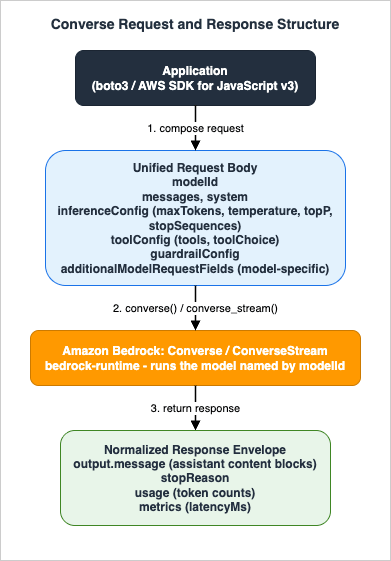
3.1 The request envelope
The full set of top-level request fields is:modelId(required) — the model ID, model ARN, cross-region inference profile ID/ARN, provisioned-throughput ARN, custom-model deployment ARN, or a Prompt management prompt ARN. This is a URI/header parameter, not part of the JSON body.messages— the conversation, as an ordered array of message objects.system— system prompts (instructions, persona, response guidelines).inferenceConfig— the common inference parameters (maxTokens,temperature,topP,stopSequences).additionalModelRequestFields— model-specific inference parameters not in the common set.toolConfig— tool definitions and tool-choice policy.guardrailConfig— a guardrail to apply to the request.additionalModelResponseFieldPaths— model-native response fields to surface in the response.promptVariables— variable values whenmodelIdpoints at a Prompt management prompt.requestMetadata— key/value tags recorded in model invocation logs.serviceTier— the service tier for the request.performanceConfig— latency profile (standard or optimized).outputConfig— output formatting, including structured (validated JSON) output.
3.2 messages and content blocks
messages is an array of Message objects. Each Message has:role—user(input from your application) orassistant(a model response). The API also defines asystemvalue for this field, but system prompts are normally passed in the top-levelsystemfield instead.content— an array ofContentBlockobjects.
A single message can carry multiple content blocks, and a
ContentBlock is a union: within one block you set exactly one of the block types. The available block types are:text— a string prompt.image— anImageBlock(formatofpng,jpeg,gif, orwebp, plus asource).document— aDocumentBlockfor document chat.video— aVideoBlock.audio— anAudioBlockcarrying audio data in the conversation.cachePoint— a prompt-caching checkpoint.guardContent— content scoped for guardrail evaluation.reasoningContent— reasoning output (for reasoning-capable models).citationsContent— generated text paired with citation information that traces the response back to source documents.searchResult— aSearchResultBlockfor including search results in a message.toolUse— a tool-call request emitted by the model.toolResult— a tool-execution result you send back.
Which block types a given model accepts varies by model; the authoritative per-model support is on the model cards. A minimal text message looks like this:
{
  "role": "user",
  "content": [
    { "text": "Explain the Amazon Bedrock Converse API in two sentences." }
  ]
}
Amazon Bedrock does not store the text, images, or documents you send as content — the data is used only to generate the response. This is a useful fact when reasoning about data handling for a conversational workload.
3.3 system prompts
system is an array of system content blocks, typically text blocks. System prompts define instructions, a persona, or output constraints that apply to the whole conversation rather than to a single turn:[
{ "text": "You are a terse technical support assistant. Answer only with the steps to resolve the issue." }
]3.4 inferenceConfig: the common parameters
inferenceConfig holds the base set of inference parameters that Converse supports across all models. There are exactly four:* You can sort the table by clicking on the column name.
| Parameter | Type | Meaning |
|---|---|---|
maxTokens | integer | The maximum number of tokens to allow in the generated response. |
stopSequences | array of strings | Sequences of characters that cause the model to stop generating. |
temperature | number | The likelihood of the model selecting higher-probability options while generating. |
topP | number | The percentage of most-likely candidates the model considers for the next token. |
{ "temperature": 0.5, "maxTokens": 512 }Two implementation details matter here. First, the valid ranges and default values of these parameters are model-specific, not fixed by the Converse API — the API defines the common names, and each model defines what those names mean and default to. Consult the model's inference parameters documentation for the exact ranges. Second,
topK is not part of the common set. Some models (Anthropic Claude among them) support a top_k parameter, but because it is not universal, you pass it through additionalModelRequestFields (see section 9), not through inferenceConfig.3.5 The normalized response envelope
By design,Converse and ConverseStream drop most model-native response fields and return a normalized envelope. Four top-level fields are always the core of it — output, stopReason, usage, and metrics — and the API reference defines four more that appear when the corresponding feature is in play: additionalModelResponseFields (model-native fields you explicitly requested), trace (guardrail assessment detail when a guardrail is attached with tracing enabled — read it at response["trace"]["guardrail"]), performanceConfig (the latency-optimization setting that served the request), and serviceTier (which service tier served the request). A typical buffered Converse response looks like this:{
"output": {
"message": {
"role": "assistant",
"content": [
{ "text": "The Converse API is a unified interface for message-based inference on Amazon Bedrock..." }
]
}
},
"stopReason": "end_turn",
"usage": {
"inputTokens": 125,
"outputTokens": 60,
"totalTokens": 185
},
"metrics": {
"latencyMs": 1175
}
}output.message— aMessagewithrole: assistantand acontentarray of content blocks (text,toolUse,reasoningContent, and so on).stopReason— why generation stopped. The valid values areend_turn(the model finished naturally),tool_use(the model requested a tool),max_tokens(the response hit themaxTokenslimit),stop_sequence(a stop sequence was produced),guardrail_intervened(a guardrail acted),content_filtered,model_context_window_exceeded(the conversation no longer fits the model's context window), and the malformed-output signalsmalformed_model_outputandmalformed_tool_use. Always branch onstopReasonbefore assuming the assistant text is complete.usage— token accounting:inputTokens,outputTokens, andtotalTokens. When prompt caching is in effect,cacheReadInputTokensandcacheWriteInputTokensreport cache activity, andcacheDetailsbreaks down cache writes by TTL.metrics— call metrics such aslatencyMs.
If you requested model-native fields through
additionalModelResponseFieldPaths, they are returned in an additionalModelResponseFields field. If you used a service tier, the response reports which tier served the request.3.6 A minimal call in Python
Putting the request and response together, the smallest useful Converse call in boto3 is:import boto3
client = boto3.client("bedrock-runtime", region_name="us-east-1")
MODEL_ID = "us.anthropic.claude-sonnet-5"
response = client.converse(
modelId=MODEL_ID,
system=[{"text": "You are a concise technical writer."}],
messages=[
{"role": "user", "content": [{"text": "Summarize the Converse API in one sentence."}]}
],
inferenceConfig={"maxTokens": 256},
)
message = response["output"]["message"]
print(message["content"][0]["text"])
print("stopReason:", response["stopReason"])
print("usage:", response["usage"])The
MODEL_ID above is a US geographic cross-region inference profile ID; you can equally pass a base model ID, an ARN, or a global inference profile ID (section 4 explains the difference). Model IDs change with each model generation, so take the exact current ID from the Bedrock model catalog or the model's model card before copying these examples.4. Multi-Turn Conversations and State
The Converse API is stateless. Bedrock does not remember prior turns for you; there is no server-side session handle. You maintain conversation state by keeping the fullmessages array on the caller side and sending it in its entirety on every request. Each new user turn is appended as a user message, and each model response — the output.message object exactly as returned — is appended as the assistant message before the next call.The critical rule is: append
output.message verbatim. Do not reconstruct the assistant turn from the text alone. The assistant message may carry more than text — toolUse blocks, reasoningContent blocks — and those must be preserved for the next turn to be valid. This is especially strict for reasoning-capable models: a streamed reasoningContent block carries a signature that must be resubmitted unchanged in subsequent requests. If any prior message is altered, the request is rejected.A minimal multi-turn loop in Python:
import boto3

client = boto3.client("bedrock-runtime", region_name="us-east-1")
MODEL_ID = "us.anthropic.claude-sonnet-5"

messages = []

def send(user_text: str) -> str:
    # Append the new user turn.
    messages.append({"role": "user", "content": [{"text": user_text}]})

    response = client.converse(
        modelId=MODEL_ID,
        messages=messages,
        inferenceConfig={"maxTokens": 512},
    )

    # Append the assistant turn verbatim so context is preserved.
    assistant_message = response["output"]["message"]
    messages.append(assistant_message)

    return assistant_message["content"][0]["text"]

print(send("My name is Hidekazu."))
print(send("What is my name?"))   # The model can answer because the history is resent.
4.1 Roles and ordering
The conversation must alternate coherently. The first message is auser message, and user and assistant messages generally alternate. A tool-use turn is a specific case of this: the model's assistant message contains a toolUse block, and your reply is a user message containing a toolResult block (section 6).4.2 State and the token budget
Because you resend the entire history every turn, input tokens grow with the length of the conversation. Each request re-processes all prior turns, andusage.inputTokens reflects the full re-sent context. Two levers manage this:- Prompt caching. Add
cachePointcheckpoints in thesystemortoolsfields (or supported message positions) so that a stable prefix is served from cache instead of re-processed. The response'susage.cacheReadInputTokensandusage.cacheWriteInputTokensconfirm whether caching is active. Prompt caching support is model-specific. - History management. For long-running conversations, trim or summarize older turns on the caller side. Bedrock will not do this for you because it holds no state.
Keeping the stable content (system prompt, tool definitions) first and the volatile content (the latest question) last is the pattern that makes caching effective, since caching is a prefix match.
4.3 Model IDs and inference profiles
ThemodelId you pass determines routing. Three shapes are common for a message-based model:- Base model ID — e.g.
anthropic.claude-sonnet-5, pinned to the Region you call. - Geographic cross-region inference profile — e.g.
us.anthropic.claude-sonnet-5(or theeu./apac./jp./au.prefixes; which geographies exist varies by model), which routes requests across Regions within a geography for higher throughput and resilience while respecting data residency. - Global cross-region inference profile — e.g.
global.anthropic.claude-sonnet-5, which can route anywhere for maximum throughput when there are no residency constraints.
Using a cross-region inference profile requires model access to be enabled in every destination Region of the profile. For production message workloads, a cross-region inference profile is the usual choice; the data-residency and inference-profile design details are a topic of their own and are out of scope here.
5. Multimodal Inputs
Converse expresses non-text inputs as content blocks alongside text in the samecontent array. The non-text input modalities are image, document, video, and audio. Whether a specific model accepts a given modality is model-specific — check the model card before assuming support.5.1 Images
Animage block carries a format (png, jpeg, gif, or webp) and a source. The source can be raw bytes or an Amazon S3 URI. When you use an AWS SDK, you pass the raw bytes and the SDK handles base64 encoding for you. A single message can include up to 20 images, each no more than 3.75 MB in size and 8,000 px in height and width, and image blocks are only accepted in user messages.with open("diagram.png", "rb") as f:
image_bytes = f.read()
response = client.converse(
modelId=MODEL_ID,
messages=[
{
"role": "user",
"content": [
{"text": "What does this architecture diagram show?"},
{"image": {"format": "png", "source": {"bytes": image_bytes}}},
],
}
],
)To reference an object in S3 instead of inlining the bytes, use an
s3Location source:{
"image": {
"format": "png",
"source": {
"s3Location": { "uri": "s3://amzn-s3-demo-bucket/myImage", "bucketOwner": "111122223333" }
}
}
}If you omit the accompanying
text block, the model describes the image.5.2 Documents
Adocument block enables document chat — querying a document or a collection of documents. A document block has a format (such as pdf), a name, and a source (bytes or s3Location). Three constraints are important:- The message must also include a
textblock with a prompt related to the document. - A single message can include up to five documents, each no more than 4.5 MB, and document blocks are only accepted in
usermessages. - The
namefield is restricted to alphanumeric characters, single whitespace characters, hyphens, parentheses, and square brackets.
There is a security note here that is easy to miss: the document
name is a prompt-injection surface. The model may inadvertently interpret the name as instructions, so use a neutral, non-instructive name rather than something that reads like a directive. Document blocks can also enable a citations tag to return document-specific citations in the response.{
"role": "user",
"content": [
{ "text": "What is the termination clause in this contract?" },
{
"document": {
"format": "pdf",
"name": "contract",
"source": { "bytes": "...document bytes..." }
}
}
]
}5.3 Video
Avideo block carries video bytes (or an s3Location) in a VideoBlock. As with images, omitting the text block asks the model to describe the video, and the AWS SDK handles base64 encoding of raw bytes.The uniform lesson across all three modalities: multimodal input is just another content-block type in the same message array, so the surrounding request stays identical — only the block changes.
6. Tool Use with Converse
Tool use (function calling) lets a model request that your application run a tool and feed the result back so the model can complete its answer. In Amazon Bedrock, the model never calls the tool directly. With the Converse API you use client-side tool use: the model returns a tool-call request, your code executes the tool, and you return the result in a follow-up message. The following sequence diagram shows the full loop.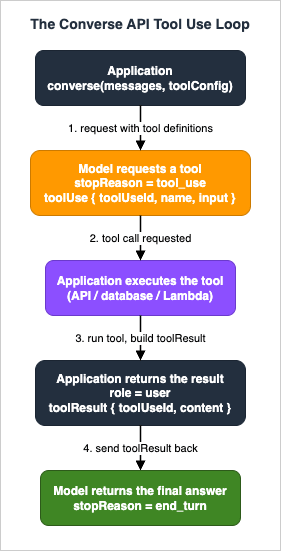
6.1 toolConfig: defining tools
Tools are declared intoolConfig, which has two parts: tools (the definitions) and toolChoice (the selection policy). Each entry in tools is a toolSpec with a name, a description, and an inputSchema expressed as a JSON Schema under a json key:{
"tools": [
{
"toolSpec": {
"name": "top_song",
"description": "Get the most popular song played on a radio station.",
"inputSchema": {
"json": {
"type": "object",
"properties": {
"sign": {
"type": "string",
"description": "The call sign for the radio station, for example WZPZ or WKRP."
}
},
"required": ["sign"]
}
}
}
}
]
}The
description matters: the model uses it to decide when the tool applies, so write it to describe when the tool should be called, not only what it does.6.2 toolChoice: controlling selection
toolChoice determines which tools the model may or must request:* You can sort the table by clicking on the column name.
| toolChoice | Behavior |
|---|---|
auto | (Default) The model decides whether to call a tool or generate text. |
any | The model must request at least one tool; no plain text is generated. |
tool (with a name) | The model must request the named tool. |
Per the API reference, the
tool (specific) choice is supported only by Anthropic Claude 3 and Amazon Nova models. If toolChoice is omitted, auto applies.6.3 The tool-use loop
The loop has a fixed shape:- Send a
Converserequest withmessagesandtoolConfig. - Inspect
response["stopReason"]. If it istool_use, the model wants a tool. - Append the model's
output.message(which contains thetoolUseblock) tomessages. - Find each
toolUseblock. It carries atoolUseId, aname, and aninputobject (the arguments, already parsed). - Execute the tool. Build a
toolResultblock with the sametoolUseIdand the result content. On success, return the result (commonly as ajsoncontent item); on failure, setstatus: "error"and return an error message. - Append a
usermessage whose content is thetoolResultblock(s), and callConverseagain. - The model incorporates the tool result and returns its final answer (
stopReason: end_turn).
A complete client-side loop in Python, adapted from the official example shape:
import boto3

client = boto3.client("bedrock-runtime", region_name="us-east-1")
MODEL_ID = "us.anthropic.claude-sonnet-5"

tool_config = {
    "tools": [
        {
            "toolSpec": {
                "name": "top_song",
                "description": "Get the most popular song played on a radio station.",
                "inputSchema": {
                    "json": {
                        "type": "object",
                        "properties": {
                            "sign": {"type": "string", "description": "The call sign, e.g. WZPZ."}
                        },
                        "required": ["sign"],
                    }
                },
            }
        }
    ]
}

def get_top_song(sign: str) -> dict:
    if sign == "WZPZ":
        return {"song": "Elemental Hotel", "artist": "8 Storey Hike"}
    raise ValueError(f"Station {sign} not found.")

messages = [{"role": "user", "content": [{"text": "What is the most popular song on WZPZ?"}]}]

response = client.converse(modelId=MODEL_ID, messages=messages, toolConfig=tool_config)
messages.append(response["output"]["message"])   # append verbatim

if response["stopReason"] == "tool_use":
    for block in response["output"]["message"]["content"]:
        if "toolUse" not in block:
            continue
        tool = block["toolUse"]
        try:
            result = get_top_song(tool["input"]["sign"])
            tool_result = {"toolUseId": tool["toolUseId"], "content": [{"json": result}]}
        except ValueError as err:
            tool_result = {
                "toolUseId": tool["toolUseId"],
                "content": [{"text": str(err)}],
                "status": "error",
            }
        messages.append({"role": "user", "content": [{"toolResult": tool_result}]})

    # Second call: the model now sees the tool result.
    response = client.converse(modelId=MODEL_ID, messages=messages, toolConfig=tool_config)

print(response["output"]["message"]["content"][0]["text"])
6.4 Parallel tool calls and errors
A single assistant response can contain more than onetoolUse block. When it does, execute all of them and return all of the corresponding toolResult blocks in a single follow-up user message. Returning a toolResult for every toolUse the model emitted is required — a missing result leaves the conversation in an invalid state.For a failing tool, do not drop the result. Return a
toolResult with status: "error" and an informative message so the model can recover, retry with different arguments, or ask a clarifying question rather than stalling.For the boundary of Converse tool use: the Anthropic-defined agentic tool types (
computer_*, bash_*, text_editor_*, memory_*) and fine-grained tool streaming are not part of the Converse toolConfig schema. Those use the Anthropic Messages API request format on bedrock-runtime (or bedrock-mantle), and are the domain of the Claude Agent SDK Complete Guide.7. Streaming with ConverseStream
ConverseStream takes the same request body as Converse and returns the response as an ordered stream of events rather than a single buffered object. This is what you use for chat UIs and any workload where you want to render tokens as they are generated instead of waiting for the whole response.7.1 The event sequence
The stream emits a fixed set of event types in a deterministic order. A response begins with amessageStart, then repeats a group of content-block events once per content block (correlated by contentBlockIndex), then ends with messageStop and metadata:* You can sort the table by clicking on the column name.
| Order | Event | When it fires | What it carries |
|---|---|---|---|
| 1 | messageStart | Once, at the start | The message role. |
| 2 | contentBlockStart | Start of a content block (tool use only) | For a toolUse block, the toolUseId and tool name. |
| 3 | contentBlockDelta | One or more times per block | A text fragment, a reasoningContent fragment, or a toolUse.input partial JSON fragment. |
| 4 | contentBlockStop | End of a content block | Marks the block complete. |
| 5 | messageStop | Once, at the end | The stopReason. |
| 6 | metadata | Once, at the end | usage (token counts) and metrics. |
Events 2–4 repeat once per content block, grouped by
contentBlockIndex; use that index to correlate the contentBlockStart, contentBlockDelta, and contentBlockStop events that make up a single block. For a tool call delivered over the stream, the argument JSON arrives as a series of partial-JSON toolUse.input fragments across multiple contentBlockDelta events — you accumulate the fragments and parse the JSON once the block stops.The stream can also surface exception events in place of a normal event:
internalServerException, modelStreamErrorException, validationException, throttlingException, and serviceUnavailableException. Your event loop must handle these, not only the content events.7.2 Consuming the stream in Python
response = client.converse_stream(
    modelId=MODEL_ID,
    messages=[{"role": "user", "content": [{"text": "Write a short haiku about streaming."}]}],
    inferenceConfig={"maxTokens": 256},
)

for event in response["stream"]:
    if "contentBlockDelta" in event:
        delta = event["contentBlockDelta"]["delta"]
        if "text" in delta:
            print(delta["text"], end="", flush=True)
    elif "messageStop" in event:
        print("\nstopReason:", event["messageStop"]["stopReason"])
    elif "metadata" in event:
        print("usage:", event["metadata"]["usage"])
7.3 Reasoning content over the stream
For reasoning-capable models,contentBlockDelta can carry reasoningContent fragments. The reasoning block includes a signature, and that signature — along with every prior message — must be resubmitted unchanged if you continue the conversation. Altering any message causes the follow-up request to fail. Treat streamed reasoning blocks as opaque and echo them back exactly.The end-to-end delivery architecture around streaming — WebSocket APIs, Lambda response streaming, and voice pipelines that sit in front of
ConverseStream — is delegated to End-to-End Response Streaming Architecture for Generative AI on AWS. This section covers only the API-level event contract.8. Guardrails Integration
Amazon Bedrock Guardrails apply configurable safety and policy controls to a request, and Converse integrates them through theguardrailConfig field so you do not have to build a separate moderation call.8.1 Applying a guardrail with Converse
ForConverse, guardrailConfig is a GuardrailConfiguration object with the guardrail identifier, the version, and an optional trace flag:{
"guardrailIdentifier": "your-guardrail-id",
"guardrailVersion": "1",
"trace": "enabled"
}With
trace enabled, the response includes information about what the guardrail acted on, which is invaluable for diagnosing why content was blocked. By default, the guardrail applies to all messages in the request. To scope it to specific content, wrap that content in guardContent blocks; then the guardrail evaluates only those blocks.response = client.converse(
modelId=MODEL_ID,
messages=[{"role": "user", "content": [{"text": "..."}]}],
guardrailConfig={
"guardrailIdentifier": "your-guardrail-id",
"guardrailVersion": "1",
"trace": "enabled",
},
)8.2 Guardrails with ConverseStream
Streaming adds a timing dimension. ForConverseStream, you pass a GuardrailStreamConfiguration, which supports a streamProcessingMode field:- Synchronous — the guardrail completes its assessment before response chunks are returned, so nothing reaches the client until it has been evaluated.
- Asynchronous — the model streams chunks while the guardrail assesses in the background, trading earlier first-token latency for the possibility that some content is emitted before the assessment concludes.
When a guardrail intervenes,
stopReason reflects it (guardrail_intervened), which is why you branch on stopReason rather than assuming the assistant content is a complete answer.Guardrail policy types, the standalone
ApplyGuardrail API, detection modes, and cross-region guardrail profiles are covered in depth in Amazon Bedrock Guardrails Implementation Deep Dive; this section covers only how a guardrail is attached to a Converse call. As a matter of honesty about safety: a guardrail passing does not by itself mean content is safe. Guardrails are one layer, and a production system should combine them with input validation, least-privilege permissions, and monitoring rather than treating a single pass as a guarantee.9. Model-Specific Parameters: additionalModelRequestFields
The commoninferenceConfig intentionally covers only what every model shares. When you need a parameter that is specific to one model, you pass it as JSON in additionalModelRequestFields, and Bedrock forwards it to the model in its native structure. This is the mechanism that keeps the request unified while still giving you access to model-specific capabilities.The canonical example is Anthropic Claude's
top_k, which is a real Claude parameter but is not a base inference parameter in the messages schema:{ "top_k": 200 }Used in a full call:
response = client.converse(
    # Pinned to a Claude generation that accepts top_k; newer generations have dropped this parameter.
    modelId="us.anthropic.claude-sonnet-4-5-20250929-v1:0",
    messages=[{"role": "user", "content": [{"text": "Give me three ideas."}]}],
    inferenceConfig={"maxTokens": 512, "temperature": 0.7},
    additionalModelRequestFields={"top_k": 200},
)
Model reasoning is another parameter passed this way on models that support it. On the extended-thinking generation of Claude models (Claude Sonnet 4.5 and its contemporaries), it is enabled through
additionalModelRequestFields with a reasoning_config object:{
"reasoning_config": { "type": "enabled", "budget_tokens": 1024 }
}Newer Claude generations have moved to adaptive thinking, where the model decides when and how much to think: a fixed
budget_tokens is no longer accepted there, and on Claude Sonnet 5 adaptive thinking is always on, with thinking depth guided by an effort level passed in a separate output_config object through the same additionalModelRequestFields mechanism.The exact field names and the set of models that support each parameter are model-specific and change over time, so treat the examples above as representative rather than exhaustive, and confirm the current fields against the official model parameters documentation and model cards before you rely on them. What those reasoning fields cap once they are through
additionalModelRequestFields - and why effort is a depth setting rather than a second ceiling on top of maxTokens - is worked through in Controlling How Much a Model Thinks.The complementary field on the response side is
additionalModelResponseFieldPaths. Because Converse normalizes the response and drops most model-native fields, you use this array of JSON Pointers (RFC 6901) to ask for specific native fields back. For example, to surface Anthropic Claude's native stop_sequence field:[ "/stop_sequence" ]The requested fields come back in the response's
additionalModelResponseFields. An empty or malformed JSON Pointer returns a 400; a valid pointer to a field that is not present is silently ignored. The array is limited to 10 items. Note that this controls which model-native response fields are surfaced — it does not control text-output formatting; for validated JSON output you use the outputConfig structured-output field instead.10. Cross-Language Implementations: Python and JavaScript
Because Converse is a Bedrock API rather than a language SDK feature, the request and response shapes are identical across languages — only the call syntax differs. The same request runs the same way whether it originates from a Lambda function or a container on Amazon ECS or EKS; there is no runtime-specific variation in the Converse call itself.10.1 Python (boto3)
The Python examples throughout this article use boto3'sconverse and converse_stream methods on a bedrock-runtime client. The request fields are Python dicts that mirror the JSON body one-to-one:import boto3
client = boto3.client("bedrock-runtime", region_name="us-east-1")
response = client.converse(
modelId="us.anthropic.claude-sonnet-5",
system=[{"text": "You are a helpful assistant."}],
messages=[{"role": "user", "content": [{"text": "Hello!"}]}],
inferenceConfig={"maxTokens": 256},
)
print(response["output"]["message"]["content"][0]["text"])10.2 JavaScript / TypeScript (AWS SDK for JavaScript v3)
In the AWS SDK for JavaScript v3, you useBedrockRuntimeClient with ConverseCommand (or ConverseStreamCommand). The field names are camelCase in the SDK but map to the same request body:import {
BedrockRuntimeClient,
ConverseCommand,
} from "@aws-sdk/client-bedrock-runtime";
const client = new BedrockRuntimeClient({ region: "us-east-1" });
const response = await client.send(
new ConverseCommand({
modelId: "us.anthropic.claude-sonnet-5",
system: [{ text: "You are a helpful assistant." }],
messages: [{ role: "user", content: [{ text: "Hello!" }] }],
inferenceConfig: { maxTokens: 256 },
})
);
console.log(response.output.message.content[0].text);Streaming in JavaScript uses
ConverseStreamCommand and an async iterator over the returned stream:import {
BedrockRuntimeClient,
ConverseStreamCommand,
} from "@aws-sdk/client-bedrock-runtime";
const client = new BedrockRuntimeClient({ region: "us-east-1" });
const response = await client.send(
new ConverseStreamCommand({
modelId: "us.anthropic.claude-sonnet-5",
messages: [{ role: "user", content: [{ text: "Write a haiku about streaming." }] }],
inferenceConfig: { maxTokens: 256 },
})
);
for await (const event of response.stream) {
if (event.contentBlockDelta?.delta?.text) {
process.stdout.write(event.contentBlockDelta.delta.text);
}
}The takeaway is that the mental model transfers wholesale:
messages, system, inferenceConfig, toolConfig, guardrailConfig, the output / stopReason / usage / metrics envelope, and the stream event sequence are the same everywhere. Learning the Converse contract once means you can implement it in any AWS SDK.11. Migrating from InvokeModel
If you have existingInvokeModel code, moving it to Converse is mostly a matter of replacing a model-native body and parser with the normalized schema. The differences fall into two buckets: the prompt template and the response schema.11.1 What changes on the request side
WithInvokeModel, you build a model-native body and serialize it yourself. For an Anthropic Claude model, that body is the Anthropic Messages API shape:import json, boto3
client = boto3.client("bedrock-runtime")
# InvokeModel: model-native body (Anthropic Messages format).
resp = client.invoke_model(
modelId="anthropic.claude-sonnet-5",
body=json.dumps({
"anthropic_version": "bedrock-2023-05-31",
"max_tokens": 256,
"messages": [{"role": "user", "content": "Hello!"}],
}),
)
native = json.loads(resp["body"].read())
print(native["content"][0]["text"])The Converse equivalent drops the model-native envelope.
anthropic_version disappears, max_tokens becomes inferenceConfig.maxTokens, and the plain-string message content becomes a content-block array:resp = client.converse(
modelId="us.anthropic.claude-sonnet-5",
messages=[{"role": "user", "content": [{"text": "Hello!"}]}],
inferenceConfig={"maxTokens": 256},
)
print(resp["output"]["message"]["content"][0]["text"])Migration notes:
- Message content becomes a block array. A bare string in
InvokeModelbecomescontent: [{"text": "..."}]. - Common inference parameters move into
inferenceConfig.max_tokens→maxTokens,temperature→temperature,top_p→topP,stop_sequences→stopSequences. - Model-specific parameters move into
additionalModelRequestFields. Anything that is not one of the four common parameters —top_k, reasoning config — goes here. - System prompts move to the
systemfield instead of being embedded in the body. - Drop the model-native version envelope. Fields like
anthropic_versionare not part of the Converse request.
11.2 What changes on the response side
InvokeModel returns the model's native response, which you read from response["body"] and parse per the model's schema. Converse returns the normalized envelope, so parsing becomes model-independent: read output.message.content, stopReason, and usage.totalTokens regardless of which model produced them. If you specifically need a native field the envelope dropped, request it with additionalModelResponseFieldPaths rather than switching back to InvokeModel.The payoff of the migration is that the same parsing and prompting code now works across models. The one thing to check before migrating a given call is whether it depends on a model-native capability that Converse does not surface — if it does, that call may need to stay on
InvokeModel (see section 2).12. Diagnostics
Most Converse failures fall into a few recognizable categories. The exhaustive catalog of Bedrock runtime exceptions is in Amazon Bedrock Errors and Exceptions Reference; this section covers the ones specific to shaping a Converse request.* You can sort the table by clicking on the column name.
| Symptom | Likely cause | Resolution |
|---|---|---|
ValidationException on a request that "looks right" | A model-specific parameter placed in inferenceConfig instead of additionalModelRequestFields (e.g. topK), or a content-block type the model does not support | Move model-specific parameters to additionalModelRequestFields; verify block-type support on the model card. |
ValidationException referencing a JSON Pointer | Empty or malformed additionalModelResponseFieldPaths pointer | Provide a valid RFC 6901 pointer; a valid-but-absent field is ignored, only malformed pointers error. |
AccessDeniedException | Missing IAM action, or model access not enabled in the Region (or a destination Region of a cross-region profile) | Grant bedrock:InvokeModel (or bedrock:InvokeModelWithResponseStream for streaming); enable model access in all involved Regions. |
| A model-specific feature is silently missing | The model does not support that Converse feature (a modality, tool use, or a specific block type) | Check the model card for supported features; not every model supports every content block or capability. |
| Follow-up request fails after a reasoning turn | A prior message (or a reasoning signature) was altered before resending | Resend the full history unchanged, including reasoning blocks and their signatures. |
Truncated answer with stopReason: max_tokens | inferenceConfig.maxTokens too low | Raise maxTokens, or stream with ConverseStream to render partial output as it arrives. |
Two general practices prevent most of these. First, always branch on
stopReason before treating the assistant content as a finished answer — tool_use, max_tokens, guardrail_intervened, and content_filtered each mean something different from end_turn. Second, when a feature does not behave as expected, confirm model support on the model card rather than assuming the API is at fault; Converse is uniform, but the models behind it are not, and a block type or parameter that works on one model may not exist on another.For confirming which parameters and features a specific model supports, the model cards (linked from the "models at a glance" page) are the authoritative source. When choosing which parameter to send and where, the model parameters reference and the
InferenceConfiguration API reference give the exact common-parameter definitions.13. Frequently Asked Questions
Is the Converse API stateful? Does Bedrock remember my conversation?No. Converse is stateless. You maintain the
messages array on the caller side and resend the full history on every request. There is no server-side session.What is the difference between
Converse and ConverseStream?They accept the same request body.
Converse returns one buffered response object; ConverseStream returns the response as an ordered stream of events (messageStart, contentBlockDelta, messageStop, metadata, and so on) for incremental rendering.Why is
topK not working in inferenceConfig?inferenceConfig holds only the four common parameters (maxTokens, temperature, topP, stopSequences). top_k is model-specific and must be passed through additionalModelRequestFields, for example {"top_k": 200}.Should I use Converse or InvokeModel?
Use Converse for a unified, portable interface across models, with standardized tool use and guardrails. Use InvokeModel when you need a model-native capability Converse does not surface — for Anthropic Claude, that includes the Anthropic-defined tool types (
computer_*, bash_*, text_editor_*, memory_*) and fine-grained tool streaming.How do I return a tool result to the model?
After you see
stopReason: tool_use, append the model's output.message verbatim, then append a user message whose content is a toolResult block carrying the same toolUseId and your result (a json item on success, or status: "error" with a message on failure). Call Converse again.Can the model call more than one tool at a time?
Yes. A single assistant response can contain multiple
toolUse blocks. Execute all of them and return all corresponding toolResult blocks in one follow-up user message; every toolUse must get a matching toolResult.Do I have to write different code for Claude, Nova, and Llama?
No. That is the point of Converse — the request and response shapes are the same across message-based models. You change the
modelId and, if needed, the contents of additionalModelRequestFields.Does the Converse call differ between Lambda and a container on EKS?
No. The Converse request is identical regardless of where it runs; it is an AWS SDK call to the
bedrock-runtime endpoint.14. Summary
The Converse API is the modern, provider-agnostic way to run inference on message-based models in Amazon Bedrock. Its value is a single request contract —messages, system, inferenceConfig, toolConfig, guardrailConfig — and a single normalized response envelope of output, stopReason, usage, and metrics, that works across models by changing only the modelId.The implementation essentials are: the four common inference parameters live in
inferenceConfig while everything model-specific goes through additionalModelRequestFields; conversation state is stateless and caller-managed, so you resend the full history and append output.message verbatim each turn; tool use is a deterministic loop keyed on stopReason: tool_use and matched toolUseIds; ConverseStream delivers a fixed event sequence for incremental rendering; and guardrails attach through guardrailConfig with a synchronous or asynchronous streaming mode. Migration from InvokeModel is largely mechanical — move common parameters into inferenceConfig, model-specific ones into additionalModelRequestFields, and read the normalized envelope instead of a model-native body — with the one caveat that a call depending on a model-native capability Converse does not expose may need to remain on InvokeModel.Because Converse is an API rather than an SDK feature, the same contract implements identically in boto3 and the AWS SDK for JavaScript v3, and behaves the same in Lambda or in a container. Learn the schema once and you can invoke any supported model, anywhere, with one interface.
15. References
- Inference using Converse API - Amazon Bedrock User Guide
- Converse - Amazon Bedrock API Reference
- ConverseStream - Amazon Bedrock API Reference
- InferenceConfiguration - Amazon Bedrock API Reference
- Use a tool to complete an Amazon Bedrock model response - Amazon Bedrock User Guide
- Client-side tool use - Amazon Bedrock User Guide
- Include a guardrail with the Converse API - Amazon Bedrock User Guide
- Models at a glance - Amazon Bedrock User Guide
- Inference request parameters and response fields for foundation models - Amazon Bedrock User Guide
- Prompt caching for faster model inference - Amazon Bedrock User Guide
- converse - Boto3 Bedrock Runtime documentation
- Amazon Bedrock Basic Information and API Examples - hidekazu-konishi.com
- Amazon Bedrock Errors and Exceptions Reference - hidekazu-konishi.com
- Claude Agent SDK Complete Guide - hidekazu-konishi.com
- Amazon Bedrock Guardrails Implementation Deep Dive - hidekazu-konishi.com
- Amazon Bedrock Glossary - hidekazu-konishi.com
References:
Tech Blog with curated related content
Written by Hidekazu Konishi