Amazon OpenSearch Service Cross-Region Disaster Recovery - What a Failover Loses and What Is Never Replicated
First Published:
Last Updated:
This article details what is lost and what is never replicated during pairing, switchovers, failovers, and re-pairing, referencing the OpenSearch Service Developer Guide, API Reference, What's New, and the AWS Big Data Blog. This article is not an introduction to OpenSearch, nor is it a general discussion of DR strategies or an upgrade guide. Pricing information is not included.
In conclusion:
- The two domains must reside in different AWS Regions within the same AWS account. Both domains must use the same version of OpenSearch (3.7 or later) and have fine-grained access control and node-to-node encryption enabled. The secondary domain must be empty.
- There are five items that will not be replicated: index templates, ingest pipelines, ISM (Index State Management) policies, roles, and cluster settings. The DR page requests that, before a switchover or failover, you create these items (templates, pipelines, ISM policies, and roles) in the secondary domain.
- A switchover exchanges the roles of the primary and secondary domains without data loss. During the switchover, neither domain accepts writes for a short time.
- Failover is performed manually. The
FailoverReplicationaction will be rejected unlessAllowDataLossis set to true. Any data loss will be limited to write operations that were not yet replicated, and the amount of potential loss is limited by the replication lag at the time of the failover. - After a failover, the former primary domain will enter an
EJECTEDstate and will not rejoin automatically. To protect the new primary domain, you must pair it with an empty domain again and copy all indexes again. - The objectives, as stated in the What's New post on DR, are a Recovery Point Objective (RPO) of less than one minute and a Recovery Time Objective (RTO) of less than 20 minutes. The Big Data Blog post calls them targets. The DR page in the developer guide does not include these figures.
This article reviewed the documentation on November 14, 2026 (Japan Standard Time). It does not include observations from actual AWS accounts.
Related articles on this site:
- AWS History and Timeline regarding Amazon OpenSearch Service - Overview, Functions, Features, Summary of Updates, and Introduction
- AWS Disaster Recovery Strategies Guide - Backup and Restore, Pilot Light, Warm Standby, and Multi-Site Active-Active
- AWS Multi-Region Active-Active Architecture Guide - Global Data Replication, Routing, and Failover with Route 53, DynamoDB Global Tables, and Aurora Global Database
- Orchestrating Regional Failover with Amazon Application Recovery Controller Region Switch - What Plan Evaluation Checks, Which Region the Plan Runs From, and What a Green Status Does Not Guarantee
- Where AWS Publishes Version End Dates - The AWS Health Version Catalog, DescribeServiceLifecycle, and the Calendars of RDS, Aurora, EKS, Lambda, OpenSearch Service, and ElastiCache
Table of Contents
- 1. Scope and Terms
- 2. What Changed on November 10, 2026
- 3. What Pairing Requires
- 4. What Is Replicated and What Is Not
- 5. Switchover and Failover
- 6. After a Failover
- 7. What Stays With Your Application
- 8. Versions for DR, and Upgrading Domains That Use DR
- 9. Where the Sources Disagree, and Where No Statement Was Found
- 10. Failure Modes
- 11. Frequently Asked Questions About Cross-Region DR in OpenSearch Service
- 12. Summary
- 13. References
1. Scope and Terms
This chapter defines the scope, terminology, and resources used in this article, and outlines the key conclusions upfront. Those conclusions are as follows:- This article focuses solely on the managed disaster recovery (DR) features of OpenSearch Service and upgrades related to DR. General DR strategies and the history of OpenSearch Service are covered in separate articles on this site (see Section 1.2).
- The terms "replication," "rollback," "primary," "settings," and "optimized" may refer to different concepts in the documentation (see Section 1.4).
- "Switchover" and "failover" represent distinct operations. This article will not conflate the two (see Section 1.4 and Chapter 5).
- This article will not state that something is "unavailable" or "impossible" if it is not explicitly mentioned in the documentation (see Sections 1.5 and 9.3).
1.1 Intended Audience
This article is intended for readers who:- Want to enable their OpenSearch Service domain to function in a different Region.
- Have previously implemented their own replication solutions, such as cross-cluster replication or writing to two Regions.
- Want to know in advance what a failover loses and what is needed to return to the original state.
- Are using domains from versions prior to 3.7 and want to know how to upgrade them to utilize disaster recovery (DR) features.
This article assumes readers are considering the following points, and each assumption is checked against the documentation:
- After a switchover or failover, application writes are automatically redirected to the new primary.
- Everything in the domain, including templates and pipelines, is present in the other Region.
- In the event of a primary failure, automatic failover will occur.
- The Recovery Point Objective (RPO) of less than one minute and the Recovery Time Objective (RTO) of less than 20 minutes are guaranteed values.
- Following a failover, the former primary will automatically resume its original role once it is restored.
1.2 Scope and Exclusions
This article covers the following topics:- The announcement of managed disaster recovery on November 10, 2026, and the DR page of the developer guide.
- Requirements for pairing and unsupported configurations.
- What is replicated and what is not replicated.
- What is lost during switchover and failover, respectively.
- Recovery procedures after failover and steps to return to the original Region.
- What remains on the application side.
- Supported versions for using DR and domain upgrade procedures for using DR.
This article does not cover:
- General discussions of DR strategies. Topics such as backup, pilot light, warm standby, RPO, and RTO are covered in the AWS Disaster Recovery Strategies Guide on this site.
- The timeline of features for OpenSearch Service. This is covered in the AWS History and Timeline regarding Amazon OpenSearch Service on this site.
- End-of-support dates for each version. This information is available on the Where AWS Publishes Version End Dates page on this site.
- Configuration procedures for cross-cluster replication.
- The complete process for clone-based upgrades. This article only covers the aspects related to DR, in Chapter 8.
- Orchestration of failover across multiple Regions. This is covered in the Orchestrating Regional Failover with Amazon Application Recovery Controller Region Switch on this site.
- Pricing.
1.3 Date of Review and Materials Reviewed
This article was written after reviewing the following materials on November 14, 2026 (Japan Standard Time). Throughout this article, English names will be used for the items mentioned within parentheses.- The Setting up managed disaster recovery in Amazon OpenSearch Service page in the Amazon OpenSearch Service Developer Guide (DR page)
- The Upgrading Amazon OpenSearch Service domains page in the Amazon OpenSearch Service Developer Guide (upgrade page)
- The Validating, cutting over, and rolling back during a clone-based upgrade page in the Amazon OpenSearch Service Developer Guide (clone-based upgrade page)
- The Cross-cluster replication for Amazon OpenSearch Service page in the Amazon OpenSearch Service Developer Guide (cross-cluster replication page)
- The Standard and extended support section of the What is Amazon OpenSearch Service? page in the Amazon OpenSearch Service Developer Guide (version support section)
- The OpenSearch Optimized Instances page and the Optimized for log analytics page in the Amazon OpenSearch Service Developer Guide
- The pages for seven operations in the Amazon OpenSearch Service API Reference:
AddReplicationPeer,RemoveReplicationPeer,SwitchoverReplication,FailoverReplication,DescribeDomainReplication,CompareDomainConfiguration, andUpdateClone. - The What's New post Amazon OpenSearch Service announces managed cross-Region disaster recovery, published on November 10, 2026 (What's New post on DR)
- The What's New post Amazon OpenSearch Service now lets you validate and roll back version upgrades, published on November 10, 2026 (What's New post on upgrades)
- The What's New post Amazon OpenSearch Service now supports OpenSearch version 3.7, published on July 30, 2026 (What's New post on 3.7)
- The AWS Big Data Blog post Managed cross-Region disaster recovery for Amazon OpenSearch Service, published on November 11, 2026 (Big Data Blog post)
- The
AWS::OpenSearchService::Domainpage in the AWS CloudFormation Template Reference.
The AWS documentation was reviewed by examining the content obtained through curl and the AWS Knowledge MCP Server on the date of review. Direct quotes in this article have been cross-referenced with this documentation.
This article differentiates between the developer guide and API reference, and also distinguishes them from the What's New posts and the blog. The What's New posts and the blog represent the language used at the time of their respective announcements and are separate resources from the developer guide. This article aims to indicate which type of documentation a particular topic is found in, in the same sentence.
1.4 Terms, and Different Things with the Same Name
This article will consistently use the following terms to refer to specific meanings:- Managed DR: Refers to the managed disaster recovery feature for OpenSearch Service. This is the name used on the DR page. The heading of the What's New post on DR says "managed cross-Region disaster recovery."
- Primary domain and secondary domain: These refer to the two domains that operate as a pair. The primary domain handles both read and write operations, while the secondary domain handles read operations only.
- Replication peer: This refers to the domain that pairs with another domain. The API's
PeerDomainArnrefers to it. - Switchover: A planned operation that involves switching the roles of the primary and secondary domains when both are available. This is performed using
SwitchoverReplication. - Failover: An unplanned operation that involves promoting the secondary domain to become the primary domain when the primary domain is unavailable. This is performed using
FailoverReplication. - Fail back: Returning the primary role to the original Region after a failover. This term is used in the "Fail back after a failover" section of the DR page.
- Date of review: The date on which this article consulted the source materials, which is November 14, 2026.
The source materials consulted for this article contain terms that have different meanings depending on the context.
- replication: There are three types. The first is managed disaster recovery (DR) replication. The second is cross-cluster replication, a separate feature that replicates the leader index to the follower index; this site addresses this feature in relation to the timeline entry dated October 5, 2021. Cross-cluster replication is available in Elasticsearch 7.10 or OpenSearch 1.1 and later. The third is the copying of data by a clone-based upgrade from the original cluster to a cluster on the new version, which keeps the two in sync. This article will specify which type is being referred to each time.
- rollback: This is a clone-based upgrade term. After the cutover, it means reverting to the original version of the cluster within a specified retention period. The API value is
RollbackToPrimaryCluster. In managed DR, reverting to the original Region is referred to in this article as "fail back," not "rollback." - primary: There are two meanings. The first is the primary domain in managed DR, and the second is the primary cluster in clone-based upgrade. In clone-based upgrade, the primary cluster refers to the original cluster running on the previous version. The DR page uses this name with the note that the upgrade documentation calls it the primary cluster.
- settings: There are two types. Index settings are replicated, while cluster settings are not (Section 4.1).
- Optimized: There are two. OpenSearch Optimized Instances refer to a series of instance types, such as OR1 and OR2. The "Optimized engine for log analytics" is an engine option that combines column-oriented storage and full-text search, and is available in OpenSearch 3.5 and later. Two documents list these two options separately as configurations that do not support DR (Section 3.2, Section 9.2).
1.5 Terms for the State of the Sources
This article uses the following six terms to describe the state of the documentation. These terms, including their English spellings, are also used in the tables.- Stated: The documentation contains a statement regarding the matter.
- Stated as not supported: The documentation explicitly states that the matter is not supported or cannot be used.
- Documentation does not list: While a list or table exists, the specific item is not included. This does not necessarily indicate that the matter is unsupported or unavailable.
- No statement found: Despite searching using different keywords and categories of documentation (as described in Section 1.3), no relevant statement could be found. This does not necessarily indicate that the matter is absent or impossible.
- Sources disagree: The statements regarding the same matter in two different documents are contradictory. This article presents both statements, along with their sources, without designating either as incorrect.
- Inference: This is an inference made by this article, and is not a statement found in any of the documentation. This article says in the same sentence that it is an inference.
All dates referenced in this article are presented with the year. Pages may be rewritten after the date of review.
2. What Changed on November 10, 2026
This chapter confirms the meanings of the terms RPO and RTO, and details two announcements made on November 10, 2026.2.1 Two Announcements
On November 10, 2026, two posts related to OpenSearch Service were published on What's New.The first is the What's New post on DR. It states that after creating domains in two Regions, the two domains can be paired with a single API call or a few steps in the console. It explains that a "switchover" involves role swapping without data loss, while a "failover" loses data limited to the replication lag.
The second is the What's New post on upgrades. It announced a new upgrade method called "clone-based upgrade." This method involves running a new cluster alongside the existing cluster, verifying it, and then cutting over to it when satisfied. If any issues arise, you can cancel before the cutover or roll back after it.
These two announcements are interconnected. Managed DR requires OpenSearch version 3.7 or later. The What's New post on DR indicates that users on earlier versions can use the clone-based upgrade to test version 3.7 before cutting over. This article examines this path in Chapter 8.
2.2 The Wording of RPO and RTO
The What's New post on DR describes the RPO and RTO for managed DR as follows:Managed disaster recovery delivers a recovery point objective (RPO) of under one minute and a recovery time objective (RTO) of under 20 minutes.The Big Data Blog post states, in its introduction, that it "provides" an RPO of less than one minute and an RTO of less than 20 minutes. The conclusion of the same post indicates that the measured values fell well within the under-1-minute RPO target and the under-20-minute RTO target.
The DR page does not include any figures for RPO and RTO.
This article describes these two figures as objectives, following the wording of the What's New post. This article does not describe them as guarantees. A review of the materials consulted for this article found no statements that explicitly guarantee these figures.
The introduction of the Big Data Blog post says that until now, users had to build their own replication with cross-cluster replication or writes to multiple Regions, and that there was no guaranteed RPO. This statement refers to scenarios where users manually configure replication. This article does not interpret this statement as implying that managed DR provides a guaranteed RPO.
2.3 Version 3.7
The What's New post on 3.7 announced that OpenSearch 3.7 became available on OpenSearch Service on July 30, 2026. Managed DR was released approximately three months later.The table in the version support section indicates that standard support for OpenSearch 3.1 and later is
Not announced. As of the date of review, no end of support has been announced for version 3.7.3. What Pairing Requires
This chapter outlines the requirements for pairing two domains, identifies unsupported configurations, and verifies the pairing operation.3.1 Requirements
The Requirements and limitations section of the DR page lists the following requirements:Table 1: Requirements for Pairing (as of November 14, 2026)
| Requirement | Description | Source |
|---|---|---|
| Version | Both domains must be running the same version of OpenSearch 3.7 or later. If the versions later differ, a switchover will not be possible until both domains are brought back to the same version. | DR page |
| Account and Region | The domains must reside in different AWS Regions within the same AWS account. | DR page, AddReplicationPeer |
| Number of Peers | A single domain can have only one replication peer. | DR page, AddReplicationPeer |
| Security Features | Both domains must have fine-grained access control and node-to-node encryption enabled. | DR page |
| Secondary Content | The secondary domain must be empty, containing no indexes other than system indexes. | DR page |
| Number of Shards | For each index, the number of primary and replica shards must be the same on both domains. | DR page |
| Storage | The total storage capacity of the secondary domain must be greater than or equal to that of the primary domain, and there must be sufficient free space to accommodate the current data in the primary domain's indexes. DR checks storage only when the domains are paired. | DR page |
| Encryption Key | Domains encrypted with customer-managed AWS KMS keys are also supported. | What's New post on DR, Big Data Blog post |
The DR page recommends that both domains have similar CPU, memory, and storage resources to maintain consistent performance after a switchover or failover, as both domains index all data.
The DR page states that storage is only verified during the pairing process. As an inference by this article, even if the data in the primary domain increases after pairing, DR does not prevent a storage shortage on the secondary domain in advance. Users will need to monitor the storage capacity of the secondary domain.
3.2 Unsupported Configurations
The sources list different items as unsupported configurations.Table 2: Items listed as unsupported configurations in various documents (as of November 14, 2026).
| Configuration | DR page | What's New post on DR | Big Data Blog post |
|---|---|---|---|
| UltraWarm | Stated as not supported | Stated as not supported | Stated as not supported |
| Cold storage | Stated as not supported | Documentation does not list | Documentation does not list |
| Multi-tier storage – writable warm tier | Stated as not supported | Documentation does not list | Stated as not supported |
| Optimized engine for log analytics | Stated as not supported | Documentation does not list | Stated as not supported |
| OpenSearch Optimized Instances – OR1 and OR2 | Documentation does not list | Stated as not supported | Documentation does not list |
| Index with automatic semantic enrichment enabled | Stated as not supported | Documentation does not list | Documentation does not list |
The DR page states the following regarding automatic semantic enrichment: If either domain contains an index with automatic semantic enrichment enabled, the domains cannot be paired. While the domains are paired, you cannot enable automatic semantic enrichment on either new or existing indexes within either domain.
The terms OR1 and OR2 are mentioned in the developer guide, but not on the DR page. Instead, they appear in the section describing limitations for clone-based upgrades. The Optimized engine for log analytics and OpenSearch Optimized Instances are distinct, as outlined in Section 1.4. This article reads Table 2 as listing different items for each source and does not call it a disagreement between sources (see Section 9.2). "Documentation does not list" in the table does not mean that DR can be used in that configuration.
3.3 The Pairing Operation
The operation to add a replication peer isAddReplicationPeer. The DR page indicates that this should be called in the Region of the primary domain. The AddReplicationPeer page states that the calling domain will become the primary, while the peer will become the secondary.When
DryRun is set to true, the request only checks whether the domains can be paired, without changing either domain. In the AWS CLI example on the DR page, this corresponds to the --dry-run option. In the console, the "Validate prerequisites" button performs the same check and provides a list of reasons why the domains cannot be paired.The pairing process runs asynchronously. Immediately after invoking
AddReplicationPeer, the Status in the response will be PENDING_SETUP. The DR page notes that it may take several minutes to establish the replication relationship. While replication is active, the Status will be ACTIVE.The DR page states that immediately after establishing the replication relationship, the existing indexes from the primary domain are copied to the secondary domain. Subsequently, any new changes on the primary domain are replicated asynchronously, and the secondary domain indexes them. The Big Data Blog post indicates that initially, Lucene segments are copied, and then new documents and updates are indexed on both the primary and secondary domains.
4. What Is Replicated and What Is Not
This chapter clarifies what managed DR replicates to the secondary domain and what it does not.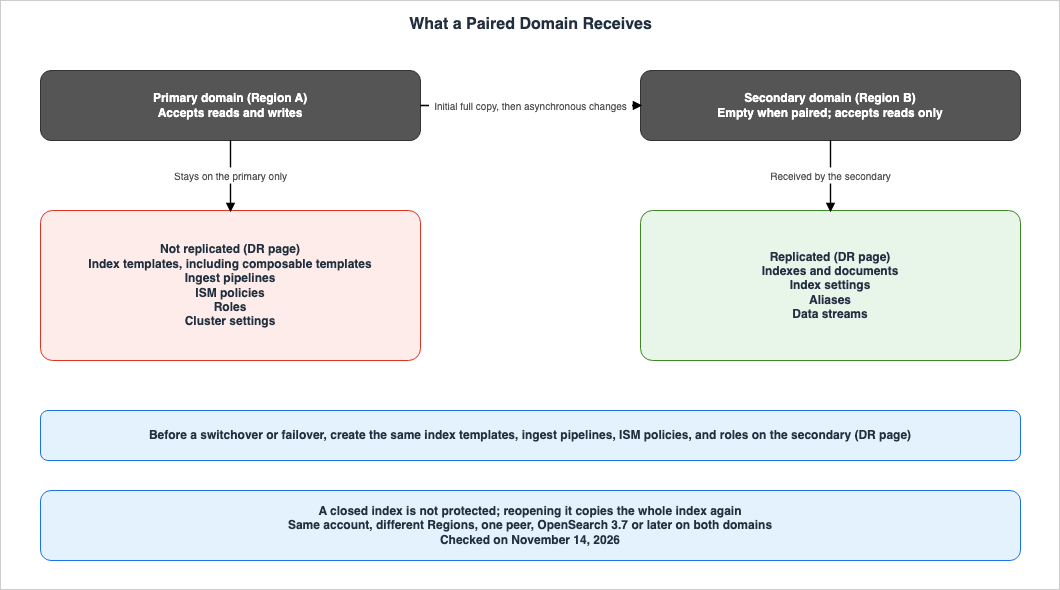
4.1 What Is Replicated, and What Is Not
The "Data and resources that DR replicates" section on the DR page lists four items that are replicated and five that are not.Table 3: What Managed DR Replicates (as of November 14, 2026)
| Item | Replicated? | Source |
|---|---|---|
| Indexes and Documents | Yes (Stated) | DR page |
| Index Settings | Yes (Stated) | DR page |
| Aliases | Yes (Stated) | DR page |
| Data Streams | Yes (Stated) | DR page |
| Index Templates (including composable templates) | No (Stated) | DR page |
| Ingest Pipelines | No (Stated) | DR page |
| Index State Management (ISM) Policies | No (Stated) | DR page |
| Roles | No (Stated) | DR page |
| Cluster Settings | No (Stated) | DR page |
| Closed Indexes | Not Protected (Stated) | DR page |
The handling of index settings and cluster settings differs. The Big Data Blog post lists ISM policies, index templates, settings, and roles as items that are not replicated. This article addresses the scope of "settings" in Section 9.1.
4.2 What Happens When the Non-Replicated Resources Are Missing
The DR page requests that before a switchover or failover, index templates, ingest pipelines, ISM policies, and roles are created on the secondary domain. It describes the following consequences if this is not done:Without the required resources on the new primary, data stream rollover can fail, new indexes don't inherit the expected settings and mappings, and writes that use an ingest pipeline fail.As an inference by this article, the effects on data stream rollover and on new indexes will not become apparent until the next rollover occurs or a new index is created. As an inference by this article, even if writes and searches work immediately after the switchover, that does not confirm that the resources that are not replicated are in place.
4.3 Closed Indexes
The DR page states that closed indexes are not protected by DR. When an index is closed on the primary domain, DR will delete the secondary copy. If a failover occurs while an index is closed, that index will not be available on the secondary domain.When an index is reopened, DR will copy the entire index to the secondary domain again. Until the copy is complete, the index will not be protected. The DR page also notes that copying large indexes can take a significant amount of time.
4.4 Indexes That Cannot Catch Up
The DR page states that the primary domain keeps a limited history of index operations so that the secondary domain can replay changes after an interruption. If the period during which the secondary domain is unavailable exceeds the duration that this history is retained, DR cannot bring the affected indexes up to date.These indexes can still be searched using the secondary domain, but the results will be outdated. The DR page notes that this may return older versions of updated documents, or documents that have been deleted on the primary domain. During this time, the overall replication status of the domains can remain
ACTIVE, while the status of individual indexes may indicate that the affected indexes are "failed."To recover, you start a new full copy of the index from the secondary domain. The DR page refers to this process as "re-bootstrap." Once the copy is complete, the index is again protected.
This article found no statement specifying the length of time this history is retained (see Section 9.3).
5. Switchover and Failover
This chapter compares the two operations that move the primary role to another Region, and examines what is lost in each.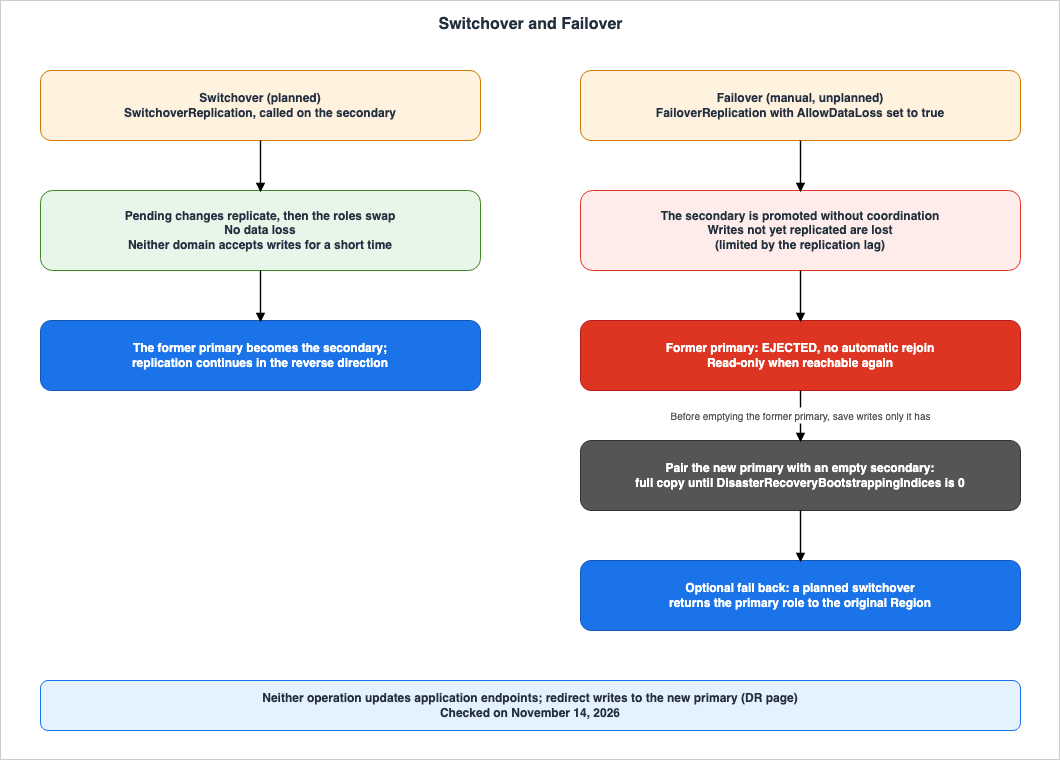
5.1 Differences Between the Two Operations
Table 4: Switchover and Failover (as of November 14, 2026)| Item | Switchover | Failover |
|---|---|---|
| Use Case | When both domains are available and you plan the move. | When the primary domain is unavailable and you decide to designate the secondary domain as the new primary. |
| Operation | SwitchoverReplication | FailoverReplication |
| Region Called | The Region of the secondary domain that will become the primary. | The Region of the secondary domain that will become the primary. |
| Coordination with Current Primary | Coordinates. Replicates pending changes before switching roles. | Does not coordinate. |
| Potential Data Loss | No data loss. | Writes that have not yet been replicated. The amount of potential data loss is limited by the replication lag at the time of the failover. |
| Writes | For a short period, neither domain accepts writes. | Writes that continue to be sent to the former primary domain will not be replicated to the new primary domain. |
| Required Values | PeerDomainArn | PeerDomainArn and AllowDataLoss (set to true). |
Ongoing Status | SWITCHING_OVER | FAILING_OVER |
| State After Completion | The former primary becomes the secondary, and replication continues in the reverse direction. | The relationship ends. The former primary is set to the EJECTED state. |
| Source | DR page, SwitchoverReplication | DR page, FailoverReplication |
Both operations are called on the secondary domain that will become the primary. The
PeerDomainArn specifies the current primary domain. The pages for both APIs state that if the specified domain is no longer the peer of the domain you call, the request is rejected.5.2 Switchover
The DR page describes using switchover when both domains are operational and you want to migrate workloads to the secondary Region. It provides examples such as practicing recovery procedures and performing maintenance.The DR page also states that before initiating a switchover, you should verify three things: that both domains are running the same engine version, that you compare the domain configurations, and that the secondary domain contains the resources that are not replicated.
OpenSearch Service coordinates with the current primary domain, replicates any pending changes, and then switches the roles without data loss. The DR page describes the handling of writes during this process as follows:
During the switchover, neither domain accepts writes for a short time, so configure your applications to retry failed writes.Once the switchover is complete, the former primary domain becomes the secondary domain, and replication continues in the reverse direction.
The
SwitchoverReplication page indicates that if the current primary domain is unavailable, you should use FailoverReplication instead.5.3 Failover
The DR page states that failover is manual, as follows:Failover is manual. OpenSearch Service doesn't determine when to fail over or automatically promote the secondary domain.The DR page says that to automate failover, users build their own mechanism that calls
FailoverReplication, for example in response to CloudWatch alarms.FailoverReplication promotes the secondary to primary without coordinating with the current primary. Regarding potential data loss, the DR page provides the following warnings:- Any writes received by the former primary that were not replicated before the failover will be lost.
- The amount of data lost is limited by the replication lag at the time of the failover.
- If clients continue to write to the former primary after the failover, those writes will not be replicated to the new primary.
The
AllowDataLoss parameter for FailoverReplication is a required value. The FailoverReplication page says the following:Acknowledges that writes which had not yet replicated are lost. You must set this to true; the request is rejected otherwise.The AWS CLI example on the DR page is as follows:
aws opensearch failover-replication \
  --domain-name secondary-domain-name \
  --peer-domain-arn arn:aws:es:primary-region:account-id:domain/primary-domain-name \
  --allow-data-loss \
  --region secondary-region
In the console, select the checkbox acknowledging potential data loss, enter "failover," and then select "Fail over."
The DR page also states that after failover, before using the new primary for recovery, users should check the replication status for each index. As described in Section 4.4, even if the overall replication status is
ACTIVE, some indexes may not have caught up.5.4 Status Values
TheStatus field in the responses for AddReplicationPeer, SwitchoverReplication, FailoverReplication, and RemoveReplicationPeer can take one of eight possible values.PENDING_SETUP | ACTIVE | SWITCHING_OVER | FAILING_OVER | PENDING_REMOVAL | DETACHED | EJECTED | FAILEDBetween them, the DR page and the API pages describe the meanings of six of these eight values.
PENDING_SETUP indicates that a request to pair has just been accepted. ACTIVE signifies that replication is currently in progress. SWITCHING_OVER and FAILING_OVER indicate that a switchover or failover is in progress. PENDING_REMOVAL signifies that a replication relationship is being removed. EJECTED is the state of the former primary after a failover (see Section 6.1). This article found no statement describing the meanings of DETACHED and FAILED (Section 9.3).DescribeDomainReplication returns the Role of the specified domain, along with the PeerDomainArn, PeerRole, Status, and StatusMessage for each peer. The Role value can be either PRIMARY or SECONDARY. Domains that are not part of a replication relationship will have an empty Peers list and no Role. An example response from the DR page is as follows:{
"DomainArn": "arn:aws:es:primary-region:account-id:domain/primary-domain-name",
"Role": "PRIMARY",
"Peers": [
{
"PeerDomainArn": "arn:aws:es:secondary-region:account-id:domain/secondary-domain-name",
"PeerRole": "SECONDARY",
"Status": "ACTIVE"
}
]
}5.5 One Example of Measurements in the Big Data Blog Post
The Big Data Blog post presents values measured on domains with r7g instances while continuously writing synthetic Apache log data at 240 MB per second. Each domain consists of six data nodes and three m7g.large cluster managers, with 12 TiB of gp3 storage per node. The index configuration uses 12 primary shards and one replica. The post notes that the results can vary depending on the workload, data size, and configuration.Table 5: Measurement Values in the Big Data Blog Post (an example under the configuration of the Big Data Blog post. As of November 14, 2026)
| Measured Value | 1 TiB, r7g.4xlarge | 10 TiB, r7g.4xlarge | 10 TiB, r7g.8xlarge |
|---|---|---|---|
| Pairing | Approximately 1 minute | Approximately 1 minute | Approximately 1 minute |
| Initial Full Copy | 20 minutes | 2 hours 31 minutes | 2 hours 18 minutes |
| Steady-State Replication Lag (p95) | Approximately 10 seconds | Approximately 10 seconds | Approximately 10 seconds |
| Time Writes Were Down During Switchover | 36.8 seconds | 38 seconds | 57 seconds |
| Data Loss During Switchover | 0 | 0 | 0 |
| Time Until Role Switch Confirmed During Failover | 6.4 seconds | 8.1 seconds | 5.8 seconds |
| Time Writes Were Down During Failover | 69 seconds | 61 seconds | 60 seconds |
| Data Loss During Failover | Approximately 8 seconds worth | Approximately 10 seconds worth | Approximately 10 seconds worth |
The text of the post says that pairing completed in 1 to 3 minutes for data sizes from 1 TiB to 10 TiB. The value of approximately 1 minute in the table is the value in the post's table.
This article cites Table 5 as one example under the configuration of the Big Data Blog post. This article does not claim that these values are representative of what can be expected with other configurations.
6. After a Failover
This chapter examines what happens to the former primary domain after a failover, and what steps are required to restore protection.6.1 What Happens to the Former Primary
The DR page states the following regarding the former primary after a failover:- The former primary does not rejoin replication automatically. Its replication status is
EJECTED. - DR does not protect the new primary until it is paired with a secondary domain again.
- When OpenSearch Service can reach the former primary again, it becomes read-only.
- If the former primary remained operational during the outage, such as due to a network partition, clients may have written data to it after the failover. That data will not be replicated to the new primary.
The DR page also states that after a failover, applications should redirect write operations to the new primary and prevent clients from writing to the former primary.
6.2 Returning to the Original Region
The DR page states that after a failover, DR does not resynchronize the former primary. To protect the new primary, pair it with an empty secondary and copy all indexes. To revert the primary role back to the original Region, configure the original Region's domain as the secondary, and then perform a switchover after the copy is complete.The steps outlined in the "Fail back after a failover" section of the DR page are as follows:
- Once the original Region is available, remove the replication relationship from the former primary. Using the AWS CLI, specify the former primary with the
--domain-nameparameter and the new primary as the peer. - From the former primary, either delete all indexes except system indexes or create a new domain in the original Region. The secondary must be empty when pairing it.
- Pair the new primary as the primary and the empty domain from the original Region as the secondary.
- Wait for the initial copy to complete. When all indexes have been copied, the
DisasterRecoveryBootstrappingIndicesmetric will return to 0. The DR page notes that copying a large amount of data may take several hours. - If you want to reassign the original Region's domain as the primary, perform a switchover. This step is optional.
Before step 2, the DR page includes the following caution: The former primary may contain writes that are not present on the new primary. These may include writes that were not replicated before the failover, or writes that clients made after the failover while the former primary was still active. Before deleting indexes, save any data that you need, for example by taking a manual snapshot.
6.3 Until the Pair Is Re-Established
Until step 4 completes following the failover, no replication protects the new primary. The Operational Guidance section on the DR page states that a failover ends the replication relationship and that a full copy is required to protect the new primary again, and recommends testing the failover process in a non-production domain.As an inference by this article, if the original Region's domain is designated as the new secondary, the gap in protection after a failover is the sum of the time until the original Region is restored and the time for the full copy. As an inference by this article, by pairing the new primary with an empty domain created in a third Region, it is possible to restore protection without waiting for the original Region to be recovered. The DR page describes the domain that protects the new primary as an empty secondary, and has no statement that limits its Region to the original Region. The DR page makes the original Region's domain the secondary when the primary role is being returned to the original Region.
7. What Stays With Your Application
This chapter identifies what managed DR does not take on and leaves to the user.7.1 Endpoints Do Not Switch
The DR page places the following sentence in the "Requirements and limitations" section:DR doesn't redirect your applications after a switchover or failover.The section on switchover states that OpenSearch Service does not update either the application configuration or the endpoints. After a switchover or failover, the application will need to route writes to the new primary endpoint.
The Big Data Blog post recommends making the redirection of writes part of the same runbook step as the API call, providing examples such as updating DNS records, configuration parameters, and service discovery entries.
The "Operational Guidance" section of the DR page recommends regularly rehearsing Region moves with a switchover, including how the application can locate and connect to the current primary.
7.2 Retrying Writes
During a switchover, neither domain accepts writes for a short time. The DR page says to configure the application to retry failed write operations (see Section 5.2). As an inference by this article, following a failover, the application will also need to handle write operations that fail before writes are redirected to the new primary.7.3 Keeping the Non-Replicated Resources in Sync
The DR page recommends aligning the domain configuration and non-replicated resources across the two domains using infrastructure as code.CompareDomainConfiguration compares the configuration of two domains for the categories you specify. The API page lists eleven such categories, noting that this list is not fixed and may expand.aliasesalerting_monitorscluster_settingscomponent_templatesingest_pipelinesism_policiessecurity_action_groupssecurity_internal_userssecurity_role_mappingssecurity_rolestemplates
This list includes the categories that correspond to the five items that the DR page lists as not replicated. On the other hand, alerting monitors, internal users, role mappings, and action groups are not in either of the two lists on the DR page (Section 4.1). This article found no statement that explicitly states whether managed DR replicates them (Section 9.3). As an inference by this article, comparing these categories with
CompareDomainConfiguration as well finds differences before a switchover, whether or not they are replicated.The API page explains the reason for using this operation as follows:
Use this operation to check that a secondary domain is configured consistently with its primary before you rely on it, because replication copies index data but does not copy domain metadata such as index templates, ingest pipelines, or security roles.This statement only provides examples of domain metadata and does not explicitly mention the four categories listed above. The list of categories also includes
aliases, which the DR page states is replicated. This article does not apply this statement to all eleven categories.7.4 Values to Watch
The DR page states that the secondary domain sends five metrics to CloudWatch every minute. The primary domain does not. The DR page recommends creating alarms for these metrics.Table 6: Metrics for Managed DR (as of November 14, 2026)
| Metric | Meaning | Unit | Values Given on the DR page |
|---|---|---|---|
DisasterRecoveryReplicationLagTime | Approximate time by which the secondary domain lags behind the primary domain. | Milliseconds | May indicate a value of up to 10 seconds, even when the secondary is fully caught up. |
DisasterRecoveryReplicationLagOps | Number of changes that the secondary domain has not yet applied. | Count | A value of 0 means that the secondary is caught up. Typically greater than 0 while the primary domain is receiving write operations. |
DisasterRecoveryBootstrappingIndices | Number of indexes currently undergoing the initial full copy process. | Count | May be greater than 0 immediately after pairing and when new indexes are created. Returns to 0 once the copy process is complete. |
DisasterRecoveryDegradedIndices | Number of indexes currently being replicated but are not fully healthy. | Count | Should be 0. |
DisasterRecoveryFailedIndices | Number of indexes for which replication has stopped due to an error and are no longer receiving changes from the primary domain. | Count | Should be 0. |
The DR page states that the data loss during a failover is limited by the replication lag at the time of the failover (Section 5.3).
DisasterRecoveryReplicationLagTime is the metric that shows this lag. The DR page describes the value of this metric as an approximate time, and states that it may indicate a value of up to 10 seconds even when the secondary is fully caught up. As an inference by this article, the value of this metric is read as an estimate rather than as an upper limit of the loss. This is because the value is approximate and is sent every minute, so it is not necessarily the same as the lag at the time of the failover.The Big Data Blog post provides an example alarm, suggesting that an alert should be triggered when the
DisasterRecoveryReplicationLagTime stays above the RPO budget, such as when it exceeds 30,000 milliseconds for five consecutive minutes.7.5 If You Automate Failover
Managed DR does not determine when failover should occur (see Section 5.3). The Big Data Blog post explains that failover is manual by design because the appropriate trigger varies depending on the business requirements. If you want to automate it, you can build event-driven automation using CloudWatch alarms and the failover and switchover APIs.This article does not cover how to build an automated failover mechanism. The management of switching between multiple Regions is addressed in this site's Orchestrating Regional Failover with Amazon Application Recovery Controller Region Switch article.
8. Versions for DR, and Upgrading Domains That Use DR
This chapter covers upgrading domains from versions prior to 3.7 to versions compatible with DR, and upgrading domains that use DR. It does not cover the complete procedure for clone-based upgrades.8.1 The Path to 3.7
The upgrade page lists two methods for upgrading.- In-place upgrade: This updates the existing cluster to the new version. It operates as a blue/green deployment. It cannot be paused, canceled, or rolled back. Available with OpenSearch 1.0 or later, or Elasticsearch 5.1 or later.
- Clone-based upgrade: This creates a new cluster with the new version and continues processing on the original cluster while maintaining data synchronization. After verification, you can perform a cutover. You can cancel before the cutover, and within the retention period after the cutover, you can roll back to the original cluster. Available with Elasticsearch 7.10 or later, or OpenSearch 1.1 or later.
Regarding the in-place upgrade, the upgrade page states:
You can't pause, cancel, or roll back an in-place upgrade.The in-place upgrade table on the upgrade page says the following about the path to version 3.x:
If you're running OpenSearch 1.3 or 2.x, you must first upgrade to OpenSearch 2.19 before upgrading to OpenSearch 3.x.The upgrade page lists five paths where a clone-based upgrade is available:
- From Elasticsearch 7.10 to OpenSearch 1.3
- From OpenSearch 1.1 to 1.3
- From OpenSearch 1.3 to 2.19
- From OpenSearch 2.x to 2.19
- From OpenSearch 2.19 to 3.x
As an inference by this article, upgrading from a version prior to 2.19 to 3.7 using a clone-based upgrade requires at least two upgrades, with 2.19 as an intermediary. From Elasticsearch 7.10, this involves three upgrades: 1.3, 2.19, and 3.x. Going through 2.19 also applies to in-place upgrades.
The clone-based upgrade is not available in four Regions: Asia Pacific (New Zealand), Asia Pacific (Taipei), Asia Pacific (Thailand), and Mexico (Central). Both the What's New post on upgrades and the upgrade page list these same four Regions.
The upgrade page lists the following as domains where clone-based upgrades cannot be used: domains that use OR1 and OR2 instances, UltraWarm instances, cross-cluster replication, or custom or third-party plugin packages, and domains that use SAML authentication or Amazon Cognito authentication for OpenSearch Dashboards. During the upgrade process, the domain's configuration cannot be modified.
The table in the version support section indicates that OpenSearch versions 1.0 through 1.2 reached the end of standard support on November 7, 2025, and are currently in the Extended Support period. OpenSearch 1.1, the starting point for the clone-based upgrade from OpenSearch 1.1 to 1.3, is a version within this Extended Support period.
8.2 Upgrading Domains That Use DR
The DR page specifies that when upgrading domains that use DR, the secondary domain should be upgraded first, followed by the primary domain. While the two versions are different, a switchover is not possible. The specific steps vary depending on the upgrade method.Table 7: Upgrading Domains That Use DR (as of November 14, 2026)
| Item | In-place Upgrade | Clone-based Upgrade |
|---|---|---|
| Replication Relationship | Keep it. The domains can be upgraded while DR is active. | Remove it before upgrading. |
| Order | Upgrade the secondary domain, verify, then upgrade the primary domain. | Remove the relationship, upgrade the secondary domain, verify, then upgrade the primary domain. |
| Reconfiguration | Not required. | After the original clusters of both domains are deleted, pair again with an empty secondary domain. All indexes are copied again. |
| DR Protection | Continues. | The primary domain is not protected from the removal of the relationship until it is paired again and the initial copy finishes. |
| Source | DR page | DR page, Upgrade page |
The DR page states that for clone-based upgrades, after both upgrades are complete and the original cluster for both domains is deleted, DR should be set up again. It also notes that domains can be rolled back to the original cluster as long as the original cluster remains. If a retention period is not specified, OpenSearch Service will delete the original cluster immediately after the cutover. The clone-based upgrade page specifies a maximum retention period of 336 hours (14 days) and indicates that longer retention periods require contacting support.
As an inference by this article, when upgrading domains using DR with a clone-based upgrade, the period without protection includes the time for both upgrades, the retention period for the original cluster, and the time required for the initial full copy. A longer retention period provides a longer rollback window but also increases the period without protection. If you want to upgrade while DR is active, you would use an in-place upgrade. However, in-place upgrades cannot be rolled back.
8.3 What Is Lost During a Rollback of a Clone-Based Upgrade
The clone-based upgrade page states that a rollback returns to the retained original cluster, and includes the following warning:Any data written to the domain after cutover will not be present unless you replay it manually.The page also explains that during the cutover, writes are blocked until the cutover completes. It notes that the cutover is rejected if either cluster has a red status, and that the cutover will fail if the new cluster does not catch up within 5 minutes. The upgrade page further states that after the cutover, the domain endpoints will remain unchanged.
This article differentiates this rollback process from a managed DR fail back. A clone-based upgrade rollback involves reverting to a previous version in the same domain. A fail back, on the other hand, involves restoring the primary role from a domain in a different Region back to the original Region's domain.
9. Where the Sources Disagree, and Where No Statement Was Found
This chapter summarizes the disagreements found in the sources and the points where no statement was found.9.1 Where the Sources Disagree
This article identified two points where the sources disagree. This article does not definitively state that either source is incorrect.First, regarding available Regions. The What's New post on DR states:
Managed disaster recovery is available today in all commercial AWS Regions where Amazon OpenSearch Service is availableWhen querying the AWS Knowledge MCP Server to check the availability of features by Region,
AddReplicationPeer and FailoverReplication were reported as "isAvailableIn" for us-east-1, us-west-2, and eu-west-1. They were reported as "Not Found" for us-east-2, ap-northeast-1, ap-southeast-1, and eu-central-1. In the same query, UpdateClone was reported as "isAvailableIn" across all seven Regions. This article does not determine which source is correct. Users will need to verify availability within their chosen Region, using either the console or the API.Second, regarding the scope of settings that are not replicated. The DR page divides settings into those that are replicated and those that are not, specifically differentiating index settings from cluster settings. The Big Data Blog post states:
Index State Management (ISM) policies, index templates, settings, and roles aren’t replicatedThe Big Data Blog post does not specify which settings are included. This article follows the categorization used on the DR page and presents the text from the Big Data Blog post alongside it (Section 4.1).
9.2 What This Article Does Not Call a Disagreement
This article does not consider the following four items as disagreements between the sources.The first is the variation in the listed configurations. The What's New post on DR lists UltraWarm and OR1, OR2, while the DR page lists UltraWarm, cold storage, writable warm tier, and Optimized engine for log analytics. The Big Data Blog post lists UltraWarm, writable warm, and Optimized engine for log analytics. OpenSearch Optimized Instances and Optimized engine for log analytics are distinct (see Section 1.4). This article interprets these differences as variations in the items listed on each document (see Section 3.2). The DR page does not list OR1 and OR2 (Documentation does not list).
The second is the use of the terms RPO and RTO. The What's New post on DR uses the term "objective," the Big Data Blog post uses "providing" at the beginning and "target" at the end, and the DR page does not include any numerical values. The numerical values are consistent, and there are no statements that contradict each other (see Section 2.2).
The third is the publication dates. The What's New post on DR indicates a publication date of November 10, 2026, at 19:00 UTC (November 11, 2026, at 4:00 AM Japan Standard Time). The Big Data Blog post indicates a publication date of November 11, 2026. The Big Data Blog post does not state the date when the feature became available. This article gives that date as November 10, 2026, as stated in the What's New post on DR.
The fourth is the method of upgrading to version 3.7. The Big Data Blog post states that older versions of the domain can be upgraded to version 3.7 using a clone-based upgrade, without mentioning version 2.19. The upgrade page describes the upgrade path that includes version 2.19 (see Section 8.1). This article interprets the Big Data Blog post as omitting certain details regarding the upgrade path.
9.3 Where No Statement Was Found
This article found no statement on the following seven items on the date of review. None of these means that the matter is absent or impossible.- Whether managed DR is built on top of cross-cluster replication. The Big Data Blog post says that managed DR replaces building your own replication with cross-cluster replication or writes to multiple Regions. There is no text describing the relationship between these two mechanisms.
- Whether alerting monitors, internal users, role mappings, action groups, and OpenSearch Dashboards saved objects are replicated. The two lists on the DR page do not include these (Section 7.3).
- Whether managed DR replicates the s3vector engine and k-NN indexes. As described in the Amazon S3 Vectors Design Decision Guide on this site, the s3vector engine does not support cross-cluster replication. Neither the DR page nor the Big Data Blog post has a statement on this point for managed DR.
- Whether it is possible to configure replication using CloudFormation. The page for
AWS::OpenSearchService::Domaindoes not include a section on replication configuration. This article does not state that it is not possible to use CloudFormation. The cross-cluster replication page states that CloudFormation cannot be used for cross-cluster replication connections, but this is specific to cross-cluster replication. - Restrictions on the Region combinations that can be used for replication. The cross-cluster replication page states that cross-cluster replication cannot be used between default Regions and opt-in Regions. There is no such statement for managed DR.
- The meaning of the
StatusvaluesDETACHEDandFAILED(Section 5.4). - How long the operational history is retained to allow the secondary domain to catch up after an interruption (Section 4.4).
10. Failure Modes
This chapter outlines potential failures related to managed disaster recovery, organizing them by symptom, cause, and source.- Symptoms: After a switchover or failover, the application continues to attempt writing to the former primary, resulting in failures. Cause: Managed DR does not change the application's connection destination. Reference: DR page (Section 7.1).
- Symptoms: After a failover, data stream rollover fails on the new primary. The expected mapping is not applied to the new index. Cause: Resources that are not replicated, such as index templates or ISM policies, were missing on the secondary. Reference: DR page (Section 4.2).
- Symptoms: After a failover, write operations using the ingest pipeline fail. Cause: The ingest pipeline is not replicated. Reference: DR page (Section 4.2).
- Symptoms: After a failover, the role that was used on the former primary is missing on the new primary. Cause: The role is not replicated. Reference: DR page (Section 4.1).
- Symptoms: Even though the primary has failed, the secondary does not become the primary. Cause: The failover is performed manually. Reference: DR page (Section 5.3).
- Symptoms:
FailoverReplicationis rejected. Cause:AllowDataLossis not set to true, or thePeerDomainArnis no longer the peer of the domain you call. Reference:FailoverReplication(Sections 5.1 and 5.3). - Symptoms: Even after the original Region is restored, the former primary does not rejoin replication. Cause: The former primary enters an
EJECTEDstate and does not automatically rejoin. Reference: DR page (Section 6.1). - Symptoms: Attempts to make the former primary a secondary fail. Cause: The secondary must be empty. Reference: DR page (Section 6.2).
- Symptoms: After deleting the indexes on the former primary, recent write operations are missing. Cause: Write operations that were only present on the former primary were not preserved before deletion. Reference: DR page (Section 6.2).
- Symptoms: Although the overall replication status is
ACTIVE, the search results for the secondary are outdated. Cause: The secondary was down for an extended period, and some indexes were unable to catch up. Reference: DR page (Section 4.4). - Symptoms: After a failover, a particular index is missing on the new primary. Cause: At the time of the failover, that index was closed. Reference: DR page (Section 4.3).
- Symptoms: During a version upgrade, switchover fails. Cause: The versions of the two domains are different. Reference: DR page (Section 8.2).
- Symptoms: After a clone-based upgrade, DR protection is temporarily unavailable. Cause: The replication relationship is removed before the clone-based upgrade and can be set up again only after the original clusters are deleted. Reference: DR page (Section 8.2).
- Symptoms: After a clone-based upgrade rollback, data written after the cutover is missing. Cause: The rollback reverts to the original cluster, and it does not include data written after the cutover. Reference: Clone-based upgrade page (Section 8.3).
11. Frequently Asked Questions About Cross-Region DR in OpenSearch Service
Q1. Does the application automatically begin writing to the new primary after a switchover or failover?
No, it does not. The DR page states that DR does not redirect applications after a switchover or failover. The application side redirects writes to the new primary (see Section 7.1).Q2. Are index templates and ingest pipelines also replicated to the secondary?
No, they are not. The DR page lists index templates, ingest pipelines, ISM (Index State Management) policies, roles, and cluster settings as items that are not replicated. The DR page requests that, prior to a switchover or failover, these items – specifically the templates, pipelines, and ISM policies, as well as roles – be created on the secondary domain (see Sections 4.1 and 4.2).Q3. If the primary fails, does failover happen automatically?
No. The DR page states that failover is a manual process, and that OpenSearch Service does not determine when a failover will occur. If you want to enable automatic failover, you will need to build a mechanism that callsFailoverReplication (see Sections 5.3 and 7.5).Q4. What amount of data will be lost during a failover?
When a failover occurs, the amount of data lost is limited by the replication lag, as indicated on the DR page. This lag, which limits the amount of data lost due to writes not being replicated from the former primary, can be viewed using theDisasterRecoveryReplicationLagTime. In the measurements under the Big Data Blog post's configuration, about 8 to 10 seconds of writes were lost (see Sections 5.3, 5.5, and 7.4).Q5. Will data be lost during the switchover?
No, it will not. The DR page states that the switchover will replicate any pending changes before transitioning roles without data loss. However, for a brief period, neither domain will accept write operations (see Section 5.2).Q6. Are the RPO of less than one minute and the RTO of less than 20 minutes guaranteed?
The documentation reviewed does not contain any statements explicitly guaranteeing these values. The What's New post on DR uses "objective," the Big Data Blog post uses "target," and the DR page does not include numerical values (Section 2.2).Q7. After a failover, does the former primary return to the original pair when it recovers?
No. The former primary enters anEJECTED state and becomes read-only when OpenSearch Service can reach it again. To return to the original Region, you either empty the former primary or create a new domain, pair it as the secondary, and then perform a switchover after the full copy completes (see Sections 6.1 and 6.2).Q8. Can managed disaster recovery be used with domains that predate version 3.7?
No. The DR page requires both domains to be running the same version of OpenSearch 3.7 or later. Upgrading from version 1.3 or 2.x goes through version 2.19 to reach version 3.x. Both clone-based upgrades and in-place upgrades go through this same path (see Sections 3.1 and 8.1).Q9. Can domains using DR be upgraded without stopping DR?
With an in-place upgrade, it is possible to upgrade without stopping DR. In a clone-based upgrade, you must first remove the replication relationship and pair the domains again after the original clusters of both domains are deleted. During this time, DR does not protect the primary (see Section 8.2).Q10. Is managed DR built upon cross-cluster replication?
This article found no statement on this. The Big Data Blog post says that managed DR replaces replication that you build yourself with cross-cluster replication or writes to multiple Regions, but it does not describe the relationship between the two mechanisms (Section 9.3).12. Summary
Managed disaster recovery (DR) for OpenSearch Service across Regions can be understood in terms of the following five points:- Pairing: Pair OpenSearch domains (version 3.7 or later) running the same version, located in different Regions within the same account. Enable fine-grained access control and node-to-node encryption, and configure an empty secondary domain as the paired instance. Note that the sources list different items as unsupported configurations.
- Non-replicated items: Index templates, ingest pipelines, ISM (Index State Management) policies, roles, and cluster settings are not replicated. If these are not created on the secondary domain before a switchover or failover, operations such as rollover and writes using ingest pipelines may fail after the switch.
- Switchover and failover: Switchover loses no data, with a brief interruption to write operations. Failover is a manual process that requires setting
AllowDataLossto true, and loses the writes up to the replication lag. - After a failover: The former primary domain will transition to an
EJECTEDstate. Once it becomes accessible, it will operate in read-only mode. To restore protection, pair the new primary with an empty domain and copy all data again. The primary role can then return to its original Region with a subsequent switchover. - What stays with the user: Users are responsible for switching application connection endpoints, implementing write retries, synchronizing non-replicated items, and making the decision to initiate a failover. The stated RPO (Recovery Point Objective) and RTO (Recovery Time Objective) values are objectives, and are not described as guarantees.
13. References
- Setting up managed disaster recovery in Amazon OpenSearch Service - Amazon OpenSearch Service
- Upgrading Amazon OpenSearch Service domains - Amazon OpenSearch Service
- Validating, cutting over, and rolling back during a clone-based upgrade - Amazon OpenSearch Service
- Cross-cluster replication for Amazon OpenSearch Service - Amazon OpenSearch Service
- What is Amazon OpenSearch Service? - Amazon OpenSearch Service
- OpenSearch Optimized Instances for Amazon OpenSearch Service domains - Amazon OpenSearch Service
- Optimized for log analytics - Amazon OpenSearch Service
- AddReplicationPeer - Amazon OpenSearch Service API Reference
- RemoveReplicationPeer - Amazon OpenSearch Service API Reference
- SwitchoverReplication - Amazon OpenSearch Service API Reference
- FailoverReplication - Amazon OpenSearch Service API Reference
- DescribeDomainReplication - Amazon OpenSearch Service API Reference
- CompareDomainConfiguration - Amazon OpenSearch Service API Reference
- UpdateClone - Amazon OpenSearch Service API Reference
- AWS::OpenSearchService::Domain - AWS CloudFormation Template Reference
- Amazon OpenSearch Service announces managed cross-Region disaster recovery - AWS What's New
- Amazon OpenSearch Service now lets you validate and roll back version upgrades - AWS What's New
- Amazon OpenSearch Service now supports OpenSearch version 3.7 - AWS What's New
- Managed cross-Region disaster recovery for Amazon OpenSearch Service - AWS Big Data Blog
References:
Tech Blog with curated related content
Written by Hidekazu Konishi