Amazon S3 Vectors Design Decision Guide - When to Use It, When Not to, and Tiered Designs with Amazon OpenSearch Service
First Published:
Last Updated:
1. Introduction
For roughly two years, the standard answer to "where should I store my vector embeddings on AWS?" was a short list of dedicated engines: Amazon OpenSearch Service for teams that wanted hybrid search and analytics, pgvector on Amazon Aurora or Amazon RDS for teams that wanted vectors next to relational data, and a handful of purpose-built vector databases for everyone else. Every option in that list shares one architectural assumption: vectors live inside a provisioned, always-on search engine whose compute runs whether you query it or not.Amazon S3 Vectors breaks that assumption. It is the first cloud object storage with native support for storing and querying vectors, and since its general availability in December 2025 it has turned the vector storage decision from a single-engine choice into a genuine design decision with trade-offs in both directions. The capability is compelling: vector indexes that scale to billions of vectors with the elasticity, durability, and pay-for-what-you-use model of Amazon S3, with no infrastructure to provision. But S3 Vectors is not a drop-in replacement for a dedicated vector database, and AWS itself positions it for a specific class of workloads. Most of the writing published since GA explains what S3 Vectors is and how to call its APIs. Far less has been written about the question architects actually face: when should you choose it, when should you explicitly not choose it, and how do you combine it with Amazon OpenSearch Service when your workload has both hot and cold access patterns? That second question — the "when not" — is where most production mistakes are made, because the constraints that matter are scattered across several documentation pages and none of them announces itself at design time.
This guide answers three questions:
- What is Amazon S3 Vectors actually good at? — its architecture, official capabilities, and the workload shape it was designed for
- When should you not use it? — disqualifying requirements, grounded in the official limitations and documented behavior rather than speculation
- How do you design a tiered architecture with Amazon OpenSearch Service? — using the official integrations to serve hot queries from OpenSearch while keeping the full corpus in S3 Vectors
The intended readers are architects selecting a vector store for RAG (Retrieval Augmented Generation) or AI agent memory systems, and operators of existing OpenSearch or pgvector deployments who are evaluating whether tiering part of their vector corpus into S3 Vectors makes sense. Everything stated as fact below is traceable to the official AWS documentation, What's New posts, and official blog posts listed in the References section.
Note: This article is a design guide based on the official AWS documentation, AWS What's New announcements, and official AWS blog posts as of June 2026. Amazon S3 Vectors is a fast-moving service: limits, regional availability, and integration status can change. This article deliberately avoids pricing figures in line with this site's editorial policy and because they change frequently; always confirm current behavior, limits, and pricing against the official documentation and the official pricing page linked in the References section before committing to a design.
2. What Amazon S3 Vectors Is
2.1 Vector Buckets, Vector Indexes, and Vectors
Amazon S3 Vectors introduces a new S3 bucket type and three core concepts, all defined in the official documentation:- Vector bucket — a bucket type purpose-built to store and query vectors. Access is controlled with the familiar S3 mechanisms (IAM identity-based policies, resource-based policies), but through a dedicated service namespace,
s3vectors, so you can write policies that target vector resources specifically. All S3 Block Public Access settings are always enabled for vector buckets and cannot be disabled. - Vector index — a resource inside a vector bucket that stores and organizes vectors for similarity search. When you create an index you fix three things permanently: the dimension (1 to 4,096), the distance metric (
CosineorEuclidean), and the list of non-filterable metadata keys. None of these can be changed after creation — to change any of them, you create a new index. - Vector — an embedding stored under a key (a name unique within the index), with the numeric data in
float32format and optional metadata key-value pairs attached for filtering and for returning context alongside results.
Each vector index has its own ARN of the form
arn:aws:s3vectors:region:account-id:bucket/bucket-name/index/index-name, which means IAM policies can grant access at the level of an individual index, all indexes in a bucket, or all vector buckets in an account. Vector keys deserve the same naming discipline as S3 object keys — stable identifiers, no embedded mutable attributes — a topic I covered for general-purpose buckets in Amazon S3 Object Key Design Best Practices; the durable-identifier mindset carries over directly.Two behavioral properties from the official documentation are worth highlighting because they shape everything downstream:
- Writes are strongly consistent. A vector you put is immediately visible to queries. There is no eventual-consistency window to design around, which is unusual and welcome for a storage-priced system.
- The service optimizes storage automatically. As you write, update, and delete vectors over time, S3 Vectors reorganizes the data behind the scenes to maintain price-performance as datasets scale and evolve. You do not manage index builds, merges, compactions, or shard counts.
For readers who enjoy the historical perspective: S3 began in 2006 as a flat object store with eleven nines of durability and has steadily absorbed adjacent workloads ever since — static websites, data lakes, table storage, and now vector search. I traced that evolution in AWS History and Timeline of Amazon S3; S3 Vectors is the latest example of S3 moving up the stack from "where data rests" toward "where data is queried."
2.2 General Availability and Regional Footprint
Amazon S3 Vectors was introduced in preview in July 2025 and became generally available on December 2, 2025, announced at AWS re:Invent 2025. The GA release dramatically raised the scale ceiling — up to two billion vectors per index, a 40-fold increase over the preview — and expanded availability to 14 AWS Regions: US East (Ohio), US East (N. Virginia), US West (Oregon), Asia Pacific (Mumbai), Asia Pacific (Seoul), Asia Pacific (Singapore), Asia Pacific (Sydney), Asia Pacific (Tokyo), Canada (Central), Europe (Frankfurt), Europe (Ireland), Europe (London), Europe (Paris), and Europe (Stockholm). Regional availability expands over time, so check the official documentation for the current list.On the performance side, the official documentation and GA announcement describe the latency profile in deliberately qualitative terms: sub-second results for infrequent queries, and latencies around 100 milliseconds or less for more frequent queries. For writes, applications can achieve up to 1,000 PUT transactions per second per index when streaming single-vector updates. Keep both characterizations in mind — they are the single most important input to the "when not to use it" analysis in Section 5.
Security and governance features at GA include encryption at rest with SSE-S3 by default or SSE-KMS with customer managed keys, configurable per bucket and overridable per index (a dedicated KMS key per vector index is an explicit pattern for multi-tenant isolation), plus tagging on buckets and indexes for attribute-based access control and cost allocation.
2.3 A Minimal Working Example
The fastest way to internalize the programming model is to see it end to end. Creating a vector bucket and index takes two CLI calls (the AWS CLI namespace iss3vectors):# Create a vector bucket (SSE-S3 encryption by default)
aws s3vectors create-vector-bucket \
--vector-bucket-name "media-embeddings"
# Create a vector index: dimension and distance metric are permanent,
# and so is the list of non-filterable metadata keys
aws s3vectors create-index \
--vector-bucket-name "media-embeddings" \
--index-name "movies" \
--data-type "float32" \
--dimension 1024 \
--distance-metric "cosine" \
--metadata-configuration '{"nonFilterableMetadataKeys":["source_text"]}'
Inserting and querying vectors uses the dedicated data-plane operations —
PutVectors and QueryVectors — through the s3vectors client. The following example, adapted from the official getting-started tutorial, generates embeddings with the Amazon Titan Text Embeddings V2 model (1,024 dimensions) on Amazon Bedrock and stores them with both filterable metadata (genre) and non-filterable metadata (source_text):import boto3
import json
bedrock = boto3.client("bedrock-runtime", region_name="us-west-2")
s3vectors = boto3.client("s3vectors", region_name="us-west-2")
texts = [
"Star Wars: A farm boy joins rebels to fight an evil empire in space",
"Jurassic Park: Scientists create dinosaurs in a theme park that goes wrong",
"Finding Nemo: A father fish searches the ocean to find his lost son"
]
# Generate embeddings with Amazon Titan Text Embeddings V2
embeddings = []
for text in texts:
response = bedrock.invoke_model(
modelId="amazon.titan-embed-text-v2:0",
body=json.dumps({"inputText": text})
)
embeddings.append(json.loads(response["body"].read())["embedding"])
# Write vectors in a batch (up to 500 vectors per PutVectors call)
s3vectors.put_vectors(
vectorBucketName="media-embeddings",
indexName="movies",
vectors=[
{"key": "Star Wars",
"data": {"float32": embeddings[0]},
"metadata": {"source_text": texts[0], "genre": "scifi"}},
{"key": "Jurassic Park",
"data": {"float32": embeddings[1]},
"metadata": {"source_text": texts[1], "genre": "scifi"}},
{"key": "Finding Nemo",
"data": {"float32": embeddings[2]},
"metadata": {"source_text": texts[2], "genre": "family"}}
]
)
Queries embed the query text with the same model, then call
QueryVectors with an optional metadata filter:response = bedrock.invoke_model(
modelId="amazon.titan-embed-text-v2:0",
body=json.dumps({"inputText": "adventures in space"})
)
embedding = json.loads(response["body"].read())["embedding"]
response = s3vectors.query_vectors(
vectorBucketName="media-embeddings",
indexName="movies",
queryVector={"float32": embedding},
topK=3,
filter={"genre": "scifi"},
returnDistance=True,
returnMetadata=True
)
print(json.dumps(response["vectors"], indent=2))
For teams that want to skip the embedding plumbing entirely, AWS publishes a standalone
s3vectors-embed-cli tool that wraps "embed with Amazon Bedrock, then put or query" into single commands (s3vectors-embed put, s3vectors-embed query).2.4 Metadata and Filtering
Metadata is central to how real applications use S3 Vectors, and it comes in two flavors with different rules:- Filterable metadata (the default) can be used in query filters. Vector search and filter evaluation run in tandem — S3 Vectors validates filter conditions while searching for the top-K similar vectors rather than post-filtering afterward, which means filtered queries are more likely to return a full result set, though queries with highly selective filters can still return fewer than topK results.
- Non-filterable metadata is declared at index creation, cannot be used in filters, and exists to carry larger contextual payloads — typically the original text chunk that an embedding was derived from — back with query results without consuming the filterable budget.
The filter language supports
$eq, $ne, $gt, $gte, $lt, $lte, $in, $nin, $exists, and the logical operators $and and $or, over string, number, boolean, and list metadata types:{
"$and": [
{"genre": {"$eq": "drama"}},
{"year": {"$gte": 2020}},
{"region": {"$in": ["us", "eu"]}}
]
}
This is a capable single-index filter language, but note what it is not: there is no full-text relevance scoring, no aggregations, no faceting, no joins. That boundary is one of the main inputs to Section 5.
3. How It Differs from Dedicated Vector Databases
The temptation is to read S3 Vectors as "a cheaper OpenSearch." That framing leads to bad designs in both directions. The accurate framing is architectural: dedicated vector engines are compute-attached — vectors live in or near memory on provisioned nodes, ready to serve queries at consistently low latency and high concurrency. S3 Vectors is storage-first — vectors live in object storage, query compute is fully managed and invoked on demand, and the system optimizes for elasticity and scale rather than per-query speed. (For the broader taxonomy of AWS data stores and the vocabulary used below, see my AWS Database Glossary.) For the full selection landscape this comparison sits inside — Amazon OpenSearch Service and Serverless, Amazon Aurora PostgreSQL with pgvector, Amazon MemoryDB, and S3 Vectors, together with the HNSW and IVF index-algorithm internals that drive their trade-offs — see Vector Database Selection on AWS; this article is the S3 Vectors deep dive within that landscape.That single architectural difference fans out into every row of the comparison:
| Design Axis | Amazon S3 Vectors | Dedicated vector engine (e.g., Amazon OpenSearch Service) |
|---|---|---|
| Latency profile | Sub-second for infrequent queries; around 100 ms or less when queried frequently (official characterization) | Consistently low latency designed for interactive serving, including high-concurrency workloads |
| Throughput model | Per-index write and query characteristics suited to batch and moderate streaming; up to 1,000 PUT transactions per second per index | Scales with provisioned compute; designed for sustained high QPS |
| Query capabilities | Similarity search (top-K up to 100) plus metadata filtering | Vector search plus full-text, hybrid search, aggregations, faceting, advanced filtering and relevance tuning |
| Index management | Fully automatic; no shards, merges, or rebuilds to operate | Index/shard/instance sizing and lifecycle are part of operations (managed to varying degrees) |
| Schema flexibility | Dimension, distance metric, and non-filterable keys fixed at index creation | Varies; generally more room to evolve mappings, or rebuild online |
| Elasticity | Storage-elastic from zero to billions of vectors per index; no capacity planning | Capacity planned around peak query load and dataset size |
| Consistency | Strongly consistent writes | Engine-dependent; often near-real-time visibility after refresh |
| Operational burden | None beyond IAM, encryption, and tagging | Cluster or collection operations, version upgrades, scaling decisions |
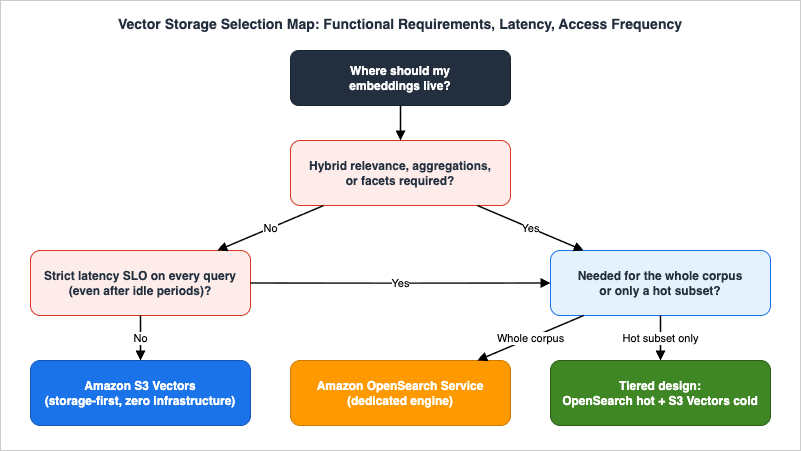
Three axes deserve emphasis beyond the table, because they are the three questions the selection map in Section 4 is built from.
3.1 The Access-Pattern Axis: Latency Is a Profile, Not a Number
AWS describes S3 Vectors latency in terms of query frequency — frequently queried indexes serve at around 100 milliseconds or less, infrequently queried ones at sub-second latency. A dedicated engine gives you a latency budget you can engineer toward regardless of how rarely an index is touched; compute-attached architectures keep index structures resident and pay for that residence whether or not queries arrive. The storage-first model inverts the trade: you stop paying for idleness, and in exchange the latency of any individual query depends on how warm the index is. If your product requirement is "every query, including the first one after a quiet weekend, returns in double-digit milliseconds," that requirement alone decides the question. If your requirement is "analysts and batch jobs get answers in well under a second," the storage-first profile is not a compromise at all — it is simply sufficient.The same axis applies to writes. S3 Vectors write throughput is defined per index (Section 5.3 covers the ceilings), which is ample for document pipelines, scheduled refreshes, and steady agent-memory accretion, but it is not the shape of a streaming feature store. Dedicated engines let you buy ingestion capacity; S3 Vectors gives you a fixed, generous-but-bounded envelope per index.
3.2 The Functional Axis: Scope Is a Hard Boundary, Not a Tuning Knob
S3 Vectors performs semantic similarity search with metadata filtering. It does not do hybrid (lexical + vector) retrieval, aggregations, faceted navigation, or relevance tuning — and the official S3 Vectors documentation itself points workloads needing those capabilities to Amazon OpenSearch Service. No amount of clever client-side code changes this economically; if you need hybrid relevance on every query, you need an engine that computes it. The honest design question is therefore not "can I make S3 Vectors do hybrid?" but "what fraction of my queries genuinely need more than similarity plus filters?" — because that fraction defines the size (and cost) of the hot tier you will keep in a dedicated engine.3.3 The Operational Axis: What You Stop Managing
An S3 Vectors index requires no capacity decisions at all — not at creation, not at the billionth vector. There are no shards to count, no instance families to compare, no version upgrades to schedule, no index rebuilds after parameter changes; the service reorganizes vector data automatically as it grows and changes. What remains on your plate is exactly the S3-shaped operational surface: IAM policies in thes3vectors namespace, encryption configuration, tags, and limits awareness. For teams without a search-operations background, removing the "how many nodes, what instance type, when do we reshard" class of decisions is sometimes worth more than any performance delta — and for platform teams serving many internal tenants, it converts a cluster-sizing problem into a quota-and-policy problem, which is usually the better problem to have.4. When to Use S3 Vectors
S3 Vectors is the right choice when the workload matches the shape it was built for: large vector corpora, moderate or bursty query rates, latency tolerance measured in hundreds of milliseconds, and a strong preference for zero infrastructure. The official use cases include semantic search over large media and document collections (medical imaging, video understanding, deduplication, enterprise document search) — all of which share that shape. Four patterns come up repeatedly in RAG and agent system design, plus a fifth that platform teams should know about.4.1 Large Embedding Corpora with Infrequent or Bursty Queries
The canonical fit: you have tens of millions to billions of embeddings, and any individual vector is queried rarely. Examples include semantic search over an enterprise document archive, similarity search across a media library, compliance or e-discovery corpora that are queried in investigative bursts, and historical logs embedded for occasional semantic lookups. With up to two billion vectors per index and 10,000 indexes per vector bucket, a single bucket can hold corpora that would require substantial cluster fleets in a compute-attached engine — with zero idle capacity when nobody is querying.4.2 The Cold Tier of a RAG Knowledge Base
Most production RAG corpora obey a steep popularity curve: a small fraction of documents answers most queries, while the long tail is touched rarely but cannot be deleted, because the rare question that needs it is often the highest-value question. S3 Vectors is purpose-built for that long tail. Keep the hot fraction in a low-latency engine and the full corpus in S3 Vectors, and route by required latency and query type — Section 6 develops this into a concrete two-tier architecture with Amazon OpenSearch Service.4.3 Agent Memory Archives
AI agent memory systems generate embeddings continuously — episode summaries, extracted facts, observations — but recall any individual memory rarely. The economics of an always-on vector cluster sized for a corpus that grows without bound and is queried sparsely are unattractive; the storage-first model fits naturally. A common design keeps recent, frequently recalled memories in a fast store and ages older memories into S3 Vectors, where they remain semantically searchable forever at object-storage economics. The metadata model supports this aging directly: store each memory's creation time and last-recall time as filterable metadata, and the aging job becomes a metadata-filtered query against the index rather than a separate bookkeeping database. I cover the memory-design side of this decision — what to store, when to recall, when to forget — in AI Agent Memory Design Guide - Working, Long-Term, and Procedural Memory with Forgetting and Staleness Management; this article covers the storage-substrate side. Note one important caveat developed in Section 7: Amazon Bedrock AgentCore Memory does not currently expose S3 Vectors as a backing store, so this pattern applies to self-managed memory pipelines.4.4 Batch Evaluation and Offline Workloads
Evaluation harnesses for RAG and agents re-run large retrieval suites on every model or prompt change. These workloads are throughput-oriented, fully latency-tolerant, and idle between runs — the exact opposite of what provisioned clusters are priced for. The same applies to embedding-model A/B testing (keep one index per candidate model, since dimension and metric are per-index), periodic clustering or deduplication jobs, and any pipeline that reads vectors in bulk viaListVectors (which supports parallel listing across up to 16 segments).4.5 Multi-Tenant Embedding Platforms
A less obvious but well-supported fit: platform teams offering "vector search as an internal service" to many tenants. Three GA capabilities combine nicely here. First, isolation boundaries are cheap — a vector bucket holds up to 10,000 indexes, and an account holds up to 10,000 vector buckets per Region, so giving each tenant (or each tenant-dataset pair) its own index costs nothing operationally. Second, IAM granularity follows the resource model: because every index has its own ARN under thes3vectors namespace, per-tenant access policies are ordinary IAM, not application logic. Third, encryption isolation is first-class — the documentation explicitly supports a dedicated customer managed KMS key per vector index for multi-tenant applications, and tags on buckets and indexes support attribute-based access control and per-tenant cost allocation. Building the same isolation story on a shared search cluster requires index-level security plumbing inside the engine; here it falls out of the AWS resource model.The figure below summarizes the decision as a map from access pattern and functional requirements to a storage choice. The decision flow is deliberately ordered: functional requirements first (they are hard constraints), then latency, then access frequency.
5. When Not to Use S3 Vectors
This section is the core of the guide. Every item below is grounded in the official limitations page, the official integration documentation, or AWS's own published positioning — not in benchmarks of my own (I have run none) or in speculation. The pattern to internalize: S3 Vectors says no quietly. Most of these constraints do not throw errors at design time; they surface as latency SLO misses, throttled migrations, or missing search features in month three.5.1 Strict Low-Latency Serving Requirements
If your retrieval path has a latency budget that requires consistently fast responses regardless of query frequency — interactive product search, real-time recommendation serving, conversational RAG where retrieval sits inside a tight time budget on every turn — the official latency characterization ("sub-second for infrequent queries, around 100 milliseconds or less for more frequent queries") tells you S3 Vectors is the wrong serving tier. The phrasing matters: latency is coupled to access frequency. An index that has been quiet serves its next query at sub-second latency, not at the warm figure. Architectures that cannot tolerate that first-query behavior need a compute-attached hot tier in front (Section 6), or a dedicated engine outright.5.2 Hybrid Search, Aggregations, and Advanced Relevance
S3 Vectors supports semantic similarity search with metadata filtering — nothing else. The official documentation is explicit that workloads needing hybrid search, aggregations, advanced filtering, and faceted search should use Amazon OpenSearch Service, and the Bedrock Knowledge Bases documentation states the same boundary from the consumer side: with S3 Vectors as the vector store, Knowledge Bases supports semantic search but not hybrid search. If your relevance quality depends on combining lexical signals (exact product codes, names, rare terms) with vector similarity — which is common in enterprise search — S3 Vectors cannot be your only retrieval engine.5.3 High-Frequency Updates and Write-Heavy Streams
The official per-index write limits are 1,000 combinedPutVectors and DeleteVectors requests per second and 2,500 combined vectors inserted and deleted per second. These are generous for document pipelines and batch refreshes, and you can batch up to 500 vectors into a single PutVectors call (20 MiB maximum request payload). But they disqualify workloads that look like high-velocity feature streams: clickstream or telemetry embeddings written at tens of thousands of vectors per second, per-event upserts from a busy fleet, or any design where a single index absorbs an unbounded firehose. Those workloads belong in engines designed for sustained ingestion — or need a sharding strategy across indexes that you must design and own yourself.5.4 Result Sets, Filters, and Metadata Beyond the Budgets
Three numeric budgets on the limitations page quietly shape what query patterns are possible:- Top-K is capped at 100 per
QueryVectorsrequest. Re-ranking pipelines that want 500 candidates from the first stage, or analytical queries that pull large neighbor sets, cannot get them in one call. - Filterable metadata is capped at 2 KB per vector (within a 40 KB total metadata budget and at most 50 metadata keys per vector). Rich, deeply structured filter attributes — long ACL lists per document, many-valued tag sets — exhaust this budget quickly.
- Non-filterable metadata keys are capped at 10 per index and are fixed at creation. If you later discover that a field you stored as filterable should have been non-filterable (or vice versa), there is no migration path other than a new index.
None of these is a problem for the typical RAG corpus (a handful of filter attributes, source text in one non-filterable key). All of them are problems for "vector store as a serving database" designs that try to push application-data responsibilities into vector metadata.
5.5 Schemas That Need to Evolve
A vector index permanently fixes its name, dimension, distance metric, and non-filterable metadata keys. The practical consequence: changing your embedding model is a new-index event. If you switch from a 1,024-dimension model to a 1,536-dimension one, or your new model recommends a different distance metric, you create a new index, re-embed the corpus, backfill, and cut over. This is true of many vector stores to a degree, but engines with flexible mappings or online reindex pipelines can soften it; S3 Vectors makes it a hard boundary. Teams that expect frequent embedding-model iteration should design index naming and cutover automation for that reality from day one — or keep the fast-iterating subset of the corpus in a more schema-flexible engine until the model choice stabilizes.5.6 Disqualifier Quick Reference
| If your requirement is... | The relevant official constraint | Use instead / in front |
|---|---|---|
| Consistently low latency on every query, including after idle periods | Latency is frequency-dependent: sub-second (infrequent) to around 100 ms (frequent) | OpenSearch Service or another compute-attached engine as the hot tier |
| Hybrid lexical + vector relevance, aggregations, facets | Semantic search and metadata filtering only; official guidance points to OpenSearch | OpenSearch Service (alone or as hot tier) |
| More than 100 results per query | QueryVectors topK maximum of 100 | Engine with large result windows, or multi-query merge logic you own |
| Sustained writes beyond per-index ceilings | 1,000 combined put/delete requests per second; 2,500 vectors per second per index | Streaming-oriented engine, or app-level sharding across indexes |
| Rich filter payloads per vector | 2 KB filterable metadata per vector | Engine with full filtering/query DSL |
| Frequent embedding model changes with in-place migration | Dimension, distance metric, non-filterable keys immutable per index | New-index cutover automation, or schema-flexible engine during iteration |
| Vector store doubling as an application database | Metadata budgets (40 KB / 50 keys), no secondary query model beyond similarity + filter | Purpose-built database alongside (see Section 8 checklist) |
6. Tiered Architecture with Amazon OpenSearch Service
The most interesting design space is not "S3 Vectors or OpenSearch" but "S3 Vectors and OpenSearch." AWS ships two official integration paths between them, announced as generally available alongside the S3 Vectors GA. They point in opposite directions architecturally, and choosing the right one is most of the design work. (Status note: both paths were announced as generally available alongside the S3 Vectors GA, and the OpenSearch Service developer guide now documents them without preview caveats as of this writing. As with any recently released integration, confirm the current status and regional support in the official documentation before building.)6.1 Path One: Export from S3 Vectors to Amazon OpenSearch Serverless
The export path treats S3 Vectors as the system of record and OpenSearch as a serving copy. From the S3 console you select a vector index and choose Advanced search export; the export creates an Amazon OpenSearch Ingestion pipeline that copies the index contents into a vector search collection on OpenSearch Serverless, along with the IAM role and a dead-letter queue bucket for failed records. After the export your vectors exist in both places: the S3 vector index remains intact, and the OpenSearch collection serves high-QPS, low-latency, hybrid-capable queries.Two properties of this export define the consistency model you must design around:
- It is point-in-time. The export captures data up to initiation; writes that land during the export may not be reflected.
- It is one-time. The collection does not stay in sync with the source index. Capturing subsequent changes means re-exporting (or dual-writing at the application level).
In other words, AWS gives you a promotion mechanism, not a replication mechanism. That is a reasonable design — hot tiers are usually rebuilt, not incrementally maintained — but it means "freshness of the hot tier" is your responsibility, on your schedule.
6.2 Path Two: S3 Vectors as a Storage Engine Inside OpenSearch Service
The second path inverts the relationship: an Amazon OpenSearch Service managed domain (OpenSearch 2.19 or later, on OpenSearch Optimized instances) can use S3 Vectors as the backend engine forknn_vector fields. You enable the S3 Vectors engine option on the domain, then declare "method": {"engine": "s3vector"} in the index mapping at creation time. From then on, documents ingested through the standard _bulk API have their vector fields offloaded to an S3 vector index in real time, while all other fields stay in cluster storage; k-NN and hybrid queries through the standard _search API are transparently routed to S3 Vectors for the vector portion.This path keeps the OpenSearch programming model — including hybrid queries and filters (applied as post-filters with oversampling for the vector leg) — while moving vector bytes off the cluster. The trade-offs are documented and concrete: k is capped at 100 for
s3vector-backed fields, the engine choice is fixed at index creation, and s3vector-backed indexes do not support snapshots, UltraWarm migration, cross-cluster replication, or radial search. It suits teams already operating OpenSearch domains whose cluster storage is dominated by vector data they query at moderate intensity.6.3 The Hot/Cold Tier Design
Combining the pieces yields the architecture in the figure below: S3 Vectors as the authoritative, complete, cheap-to-keep corpus; OpenSearch as a deliberately small hot tier serving the queries that need speed or hybrid relevance; and your ingestion pipeline writing to the system of record first.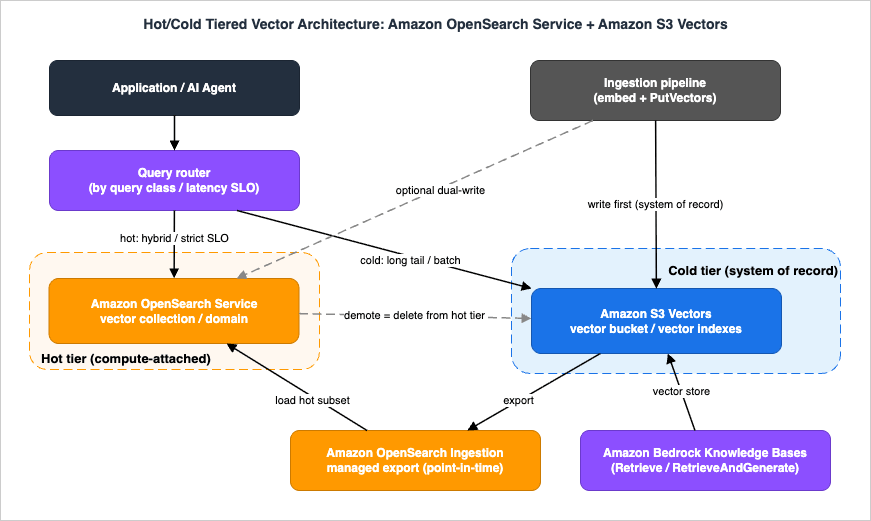
The design decisions that make or break this architecture:
- Decide tier membership by query class, not by document age alone. The hot tier should hold whatever must be answered fast or with hybrid relevance: the popular head of the corpus, the current product catalog, this quarter's documents. Age is a useful proxy but query telemetry is the real signal — promote what is actually being asked for.
- Promotion is an export or a dual-write. For corpus-level promotion ("this collection is now hot"), the managed export to OpenSearch Serverless is the low-effort tool. For continuous freshness of a small hot set, dual-write from the ingestion pipeline to both tiers and accept that you own the consistency.
- Demotion is usually just deletion from the hot tier. Because S3 Vectors already holds everything, demoting cold documents means removing them from OpenSearch and letting queries for them fall through to S3 Vectors. This is the great simplification of system-of-record designs: the cold tier never needs backfilling from the hot tier.
- Route in the application or retrieval layer. A thin router maps query intent to tier: interactive search with lexical components goes to OpenSearch; long-tail semantic recall, batch jobs, and evaluation traffic go to S3 Vectors directly. Keep the routing rule dumb and observable — "if the query needs hybrid or sub-100 ms, hot; otherwise cold" is a perfectly good first version.
- Budget for re-export. Since the managed export is point-in-time, decide upfront how stale the hot tier may be (a day? an hour?) and schedule re-exports or dual-writes accordingly. Treat staleness as a stated SLO, not a surprise.
A reference walkthrough of this hot/cold pattern, including the cost-optimization framing, is published on the official AWS Big Data Blog (linked in the References); it validates the shape described here with AWS's own positioning: keep frequently queried vectors in OpenSearch, keep the rest in S3 Vectors.
6.4 Choosing Between the Two Paths
Both integrations produce "OpenSearch speed over S3 Vectors data," so it is worth being precise about when each fits:- Choose the export path (S3 Vectors to OpenSearch Serverless) when the two tiers serve genuinely different query populations and the hot tier can be rebuilt on a schedule. It keeps the systems loosely coupled: the cold tier's write path never touches OpenSearch, the hot tier is disposable, and the blast radius of either system's problems is contained. The costs are the staleness window between exports and the duplicate storage of the promoted subset (after an export, the data exists in both places by design).
- Choose the engine path (
s3vectorengine inside an OpenSearch domain) when you want a single OpenSearch programming model — one_bulkingestion path, one_searchAPI, hybrid queries included — but your cluster storage is dominated by vector bytes queried at moderate intensity. You keep OpenSearch semantics and offload the vector storage in real time. The costs are the documented functional exclusions (no snapshots, UltraWarm, cross-cluster replication, or radial search ons3vector-backed indexes; k capped at 100; engine fixed at index creation) and the domain prerequisites (OpenSearch 2.19 or later on OpenSearch Optimized instances). - They compose. A realistic estate runs both: raw corpus and long-tail indexes in plain S3 Vectors, an exported hot collection for the interactive product surface, and an
s3vector-engine index inside an existing domain for an internal search application that wants OpenSearch ergonomics without cluster-storage growth.
One operational note belongs in any design document you write today: both integration paths reached general availability only recently — announced alongside the S3 Vectors GA at re:Invent 2025 — so their feature sets and regional coverage are still expanding release by release. Re-verify the current status, the engine path's functional limitations enumerated above (snapshots, UltraWarm, cross-cluster replication, radial search), and regional support in the official documentation at design time, because a constraint that blocks your architecture today may simply disappear in a later release — and a design document that records which limitation it accepted, and why, ages far better than one that records none.
7. Integration with Amazon Bedrock Knowledge Bases and Agent Memory
7.1 S3 Vectors as a Knowledge Bases Vector Store
For many teams the first contact with S3 Vectors will not be its API at all, but a dropdown in the Amazon Bedrock console: when creating a knowledge base, S3 vector bucket is one of the vector store options, generally available since the S3 Vectors GA. Two setup modes exist: Quick create, where Bedrock provisions and configures the vector bucket and index for you, and use an existing vector store, where you point at an index you created (with a bucket policy restricting access to the Knowledge Bases service role if you bring your own). Bedrock then handles the full RAG pipeline — fetching from the S3 data source, chunking, embedding, writing to the index, and servingRetrieve and RetrieveAndGenerate calls. (For Bedrock fundamentals and API examples, see my earlier article Exploring the Basic Information and API Usage Examples of Amazon Bedrock.)The constraints that matter at design time, all from the official integration documentation:
- Semantic search only. Knowledge Bases hybrid search is not available with S3 Vectors as the store. If your retrieval quality depends on hybrid, choose a different vector store option for that knowledge base.
- Floating-point embeddings only. Binary embedding types are not supported; the embedding model must emit
float32vectors. - Tighter metadata budgets than raw S3 Vectors. Through Knowledge Bases you can attach up to 1 KB of custom metadata and 35 metadata keys per vector — the rest of the budget is reserved for Bedrock's own bookkeeping. Metadata-filtered retrieval designs need to fit inside this.
- Hierarchical chunking can exhaust metadata limits. Parent-child chunk relationships are stored as non-filterable metadata, and very high token counts with hierarchical chunking can exceed the size limits — a documented failure mode worth testing before committing to a chunking strategy.
- Deletion policy applies to your vectors. Deleting a knowledge base with the default
Deletepolicy removes the vectors from your index;Retainkeeps them. With bring-your-own-index, choose deliberately.
The official guidance also recommends one vector store per knowledge base to keep data synchronization clean. The decision logic from Sections 4 and 5 applies unchanged inside this integration: a Knowledge Base on S3 Vectors is the cost-rational default for large, latency-tolerant corpora, and the wrong choice for hybrid-dependent or strict-latency retrieval.
7.2 Agent Memory: Where S3 Vectors Fits and Where It Does Not
A frequent misconception is that Amazon Bedrock AgentCore Memory can use S3 Vectors as its vector store. As of this writing, it cannot: AgentCore Memory manages its own internal storage, and there is no integration to select S3 Vectors (or any other store) as its backing engine. The documented touchpoints between agents and S3 Vectors are indirect:- Knowledge-based recall via Bedrock Knowledge Bases. An agent retrieves from a knowledge base whose vector store is S3 Vectors — the standard RAG path, fully managed, with the constraints of Section 7.1.
- Self-managed memory pipelines. AgentCore Memory's self-managed strategy hands raw conversation events to your own pipeline (via Amazon SNS notification and S3 payload delivery) for custom extraction and consolidation. A pipeline like that — or any fully self-built memory system — is free to use S3 Vectors as its long-term semantic store, which is exactly the agent-memory-archive pattern of Section 4.3.
So the accurate statement is: S3 Vectors is a strong substrate for the self-managed layers of agent memory (archives, episodic stores, evaluation corpora), and is reachable from managed agents through Knowledge Bases, but it is not a drop-in backend for managed AgentCore Memory. For the full memory-architecture picture this paragraph compresses — memory taxonomies, forgetting, staleness — see AI Agent Memory Design Guide.
8. Design Checklist
A condensed pass/fail worksheet for the decision. "Yes" answers in the left column accumulate toward S3 Vectors; any "yes" in the right column means S3 Vectors cannot be the only engine in the design.| Points toward S3 Vectors | Points away from S3 Vectors (alone) |
|---|---|
| Corpus is large (tens of millions to billions of vectors) and grows continuously | Every query must be consistently fast, including the first after idle |
| Queries are infrequent, bursty, or batch-oriented | Relevance depends on hybrid lexical + vector ranking, aggregations, or facets |
| Sub-second latency (cold) / around 100 ms (warm) meets the SLO | Need more than 100 results per query |
| Write rate fits 1,000 put/delete requests and 2,500 vectors per second per index | Sustained ingestion beyond per-index write ceilings |
| Filter needs fit in 2 KB filterable metadata per vector, at most 50 keys, at most 10 non-filterable keys | Per-vector filter payloads are large or schema churns frequently |
| Embedding model is stable, or new-index cutover automation is acceptable | Frequent in-place schema/model evolution is expected |
| Zero infrastructure operation is a priority | An OpenSearch domain already exists with spare capacity and ops expertise |
| Need per-index KMS keys / index-level IAM granularity for tenant isolation | Vector store must double as an application database |
Operational items to settle before production, regardless of which side wins:
- Index naming and versioning convention that encodes embedding model and dimension (e.g.,
docs-titan-v2-1024), since model changes mean new indexes - Region check against the current availability list (14 Regions at GA; growing)
- Metadata budget allocation — which keys are filterable, which non-filterable, measured against the 2 KB / 40 KB / 50-key / 10-key limits (1 KB / 35 keys if going through Knowledge Bases)
- Batching strategy for bulk loads (up to 500 vectors per
PutVectors, 20 MiB payload) and backoff for the per-index request ceilings - Tiering and staleness SLO if pairing with OpenSearch (export schedule or dual-write, demotion rule, router logic)
- Encryption and tenancy model (SSE-S3 vs SSE-KMS; per-index keys for multi-tenant isolation; ABAC tags)
- Deletion semantics for Knowledge Bases integrations (
DeletevsRetain)
9. Common Pitfalls
Treating S3 Vectors as a hot serving database. The most common failure mode is adopting it purely on cost grounds for an interactive search feature, then discovering the frequency-dependent latency profile in production. The latency characterization in the official documentation is the design contract; if your SLO is tighter, you need a hot tier.Discovering immutability after the corpus is loaded. Dimension, distance metric, and non-filterable keys are fixed at index creation, and the metadata-shape decision (filterable vs non-filterable) is easy to get wrong on the first try. Load a pilot slice, run real queries with real filters, and only then commit the full corpus. Bake the new-index cutover path into your pipeline before you need it.
Blowing the filterable metadata budget. 2 KB per vector disappears fast when teams serialize document ACLs or tag arrays into metadata. Anything you do not filter on belongs in non-filterable keys (or outside the vector store entirely); anything large and filterable is a sign the design wants a different engine for that query class.
Assuming the OpenSearch export stays in sync. It is point-in-time and one-time. Hot tiers built on the export silently age unless re-export or dual-write is scheduled. State the staleness SLO explicitly.
Ignoring per-index write ceilings during migrations. Bulk backfills from an existing vector database hit the 1,000 requests / 2,500 vectors per second per-index limits long before network bandwidth matters. Batch at up to 500 vectors per call, parallelize across indexes rather than within one, and budget migration time accordingly.
Expecting hybrid search through Knowledge Bases. Selecting S3 Vectors as a knowledge base's vector store silently selects semantic-only retrieval. If A/B tests later show hybrid lifts answer quality, that is a vector-store migration, not a configuration change.
Assuming AgentCore Memory can sit on S3 Vectors. It cannot, as of this writing. Designs that promise "managed agent memory on object-storage economics" need either the Knowledge Bases path or a self-managed memory pipeline — different commitments with different operational weight.
Forgetting the operational exclusions of the
s3vector engine. Teams adopting the engine path inside an existing OpenSearch domain sometimes carry over operational assumptions that no longer hold: s3vector-backed indexes cannot be snapshotted, cannot migrate to UltraWarm, and cannot participate in cross-cluster replication. If your disaster-recovery runbook depends on snapshots of those indexes, it is silently broken on day one — durability comes from S3, but point-in-time recovery and replication workflows need redesigning around that fact.Choosing the distance metric casually. Cosine and Euclidean are the only options, the choice is permanent per index, and the right answer is whatever your embedding model's documentation recommends — not a preference. A metric mismatched to the model degrades recall quietly; nothing errors, results are just worse. Pin the metric to the model in your index-naming convention so the pairing is auditable.
10. Frequently Asked Questions
Q1. Is Amazon S3 Vectors a replacement for Amazon OpenSearch Service?No — and AWS does not position it as one. S3 Vectors covers semantic similarity search with metadata filtering over very large corpora at storage-first economics. OpenSearch covers consistently low-latency serving, hybrid lexical-plus-vector relevance, aggregations, faceting, and analytics. The official S3 Vectors documentation itself directs workloads needing those capabilities to OpenSearch, and the two official integrations (export, and the
s3vector engine inside OpenSearch domains) exist precisely because the services are designed to be combined, not substituted.Q2. Can I use S3 Vectors for real-time RAG?
It depends on the latency budget of "real-time." For conversational applications that tolerate retrieval in the low hundreds of milliseconds on frequently queried indexes — and sub-second on cold ones — S3 Vectors can serve RAG directly, and Bedrock Knowledge Bases offers it as a fully managed path. For products where retrieval must be consistently fast on every turn regardless of traffic patterns, or where hybrid relevance is required, put a hot tier (OpenSearch) in front and reserve S3 Vectors for the long tail.
Q3. How do I tier between S3 Vectors and OpenSearch in practice?
Make S3 Vectors the system of record holding the full corpus; build the hot tier with either the managed export to an OpenSearch Serverless vector collection (corpus-level promotion, point-in-time) or dual-writes from your ingestion pipeline (continuous freshness for a small hot set); demote by deleting from the hot tier, since the cold tier already has everything; and route queries by class — hybrid or strict-latency to OpenSearch, long-tail semantic and batch to S3 Vectors. Decide the hot tier's staleness SLO explicitly, because the export does not sync.
Q4. Can I change the dimension or distance metric of a vector index later?
No. Dimension, distance metric, index name, and non-filterable metadata keys are permanent at index creation. Changing embedding models therefore means creating a new index, re-embedding, and cutting over. Encode the model identity in index names and automate the cutover path if you expect model iteration.
Q5. Does hybrid search work when S3 Vectors backs Amazon Bedrock Knowledge Bases?
No. The official integration documentation states that S3 Vectors supports semantic search but not hybrid search through Knowledge Bases, alongside tighter metadata budgets (up to 1 KB of custom metadata and 35 keys per vector) and a floating-point-only embedding requirement. If hybrid retrieval is a requirement, choose a different vector store for that knowledge base.
Q6. Can Amazon Bedrock AgentCore Memory use S3 Vectors as its vector store?
No, not as of this writing. AgentCore Memory manages its own internal storage and does not expose a pluggable vector store. Agents reach S3 Vectors indirectly — through a Knowledge Base backed by it, or through self-managed memory pipelines (for example, ones built on AgentCore Memory's self-managed strategy event delivery) that you point at S3 Vectors yourself. In that combination the integration point is code you own rather than a configuration checkbox: AgentCore Memory handles event capture, and your pipeline decides what gets embedded and archived into S3 Vectors.
Q7. How should I isolate tenants in a multi-tenant design on S3 Vectors?
Use the resource model rather than application logic: one vector index (or one vector bucket) per tenant, IAM policies scoped to individual index ARNs in the
s3vectors namespace, optionally a dedicated customer managed KMS key per index — a pattern the official documentation calls out for multi-tenant applications — and tags for attribute-based access control and per-tenant cost allocation. The generous resource ceilings (10,000 indexes per bucket, 10,000 buckets per Region per account) make per-tenant isolation practical at a scale where per-tenant indexes inside a shared search cluster would be an operational liability. Remember that all Block Public Access settings are permanently enabled on vector buckets, which removes one class of multi-tenant exposure risk by construction.11. Summary
Amazon S3 Vectors is best understood not as a cheaper vector database but as a different point in the design space: storage-first vector search that trades consistent low latency and rich query semantics for elasticity, scale, durability, and the absence of infrastructure. The decision discipline this guide proposes:- Choose S3 Vectors for large, growing, latency-tolerant corpora with infrequent or bursty access — embedding archives, RAG long tails, self-managed agent memory stores, batch evaluation corpora — and enjoy strong consistency, index-level IAM and KMS granularity, and zero capacity planning up to two billion vectors per index.
- Do not choose it alone when the workload requires consistently fast queries independent of access frequency, hybrid relevance, aggregations, more than 100 results per query, sustained writes beyond per-index ceilings, large filterable metadata, or frequent in-place schema evolution — all boundaries documented by AWS, not implementation accidents.
- Combine it with Amazon OpenSearch Service when the workload has both shapes: S3 Vectors as the system of record, OpenSearch as a deliberately small hot tier built via the managed export or dual-writes, demotion by deletion, and a stated staleness SLO.
- Inside Amazon Bedrock, treat the Knowledge Bases integration as the managed on-ramp with the same decision logic plus tighter budgets — and remember that AgentCore Memory is not a consumer of S3 Vectors today.
The vector storage decision has become a real architecture decision. The good news is that it decomposes cleanly along documented lines: functional requirements first, latency second, access frequency third — and when in doubt, tier.
12. References
- Amazon S3 Vectors (product page)
- Working with S3 Vectors and vector buckets - Amazon S3 User Guide
- S3 Vectors limitations and restrictions - Amazon S3 User Guide
- Vector indexes - Amazon S3 User Guide
- Metadata filtering - Amazon S3 User Guide
- Tutorial: Getting started with S3 Vectors - Amazon S3 User Guide
- Using S3 Vectors with Amazon Bedrock Knowledge Bases - Amazon S3 User Guide
- Using S3 Vectors with OpenSearch Service - Amazon S3 User Guide
- Import from Amazon S3 Vectors to OpenSearch Serverless - Amazon OpenSearch Service Developer Guide
- Advanced search capabilities with an Amazon S3 vector engine - Amazon OpenSearch Service Developer Guide
- Amazon S3 Vectors is now generally available with 40 times the scale of preview - AWS What's New
- Amazon S3 Vectors now generally available with increased scale and performance - AWS News Blog
- Optimizing vector search using Amazon S3 Vectors and Amazon OpenSearch Service - AWS Big Data Blog
- Self-managed strategy - Amazon Bedrock AgentCore Developer Guide
- Amazon S3 Vectors Embed CLI - GitHub (awslabs)
- Amazon S3 pricing
Related Articles in This Series
- AI Agent Memory Design Guide - Working, Long-Term, and Procedural Memory with Forgetting and Staleness Management
The memory-design companion to this article: what agent memories to store, when to recall them, and when to forget them — with S3 Vectors as one of the storage substrates. - AWS History and Timeline regarding Amazon S3
How S3 evolved from a flat object store in 2006 to the multi-workload storage platform that now includes native vector search. - Amazon S3 Object Key Design Best Practices
Naming-design discipline for S3 keys that carries over directly to vector key design. - Exploring the Basic Information and API Usage Examples of Amazon Bedrock
Bedrock fundamentals, including the embedding and retrieval APIs referenced in this article. - AWS Database Glossary
The broader taxonomy of AWS data stores used as vocabulary throughout this guide.
References:
Tech Blog with curated related content
Written by Hidekazu Konishi