Real-Time and GraphQL API Architecture with AWS AppSync - Resolvers, Subscriptions, Authorization, and Conflict Resolution
First Published:
Last Updated:
This is a Level 400 implementation guide: the backbone is a single architecture that several AWS services cooperate to deliver, and the body follows one request through all of them. Where a topic is really a selection decision — REST versus GraphQL, which Cognito federation pattern, how to model a DynamoDB table — this guide compresses it to a pointer and delegates the depth to an existing guide, so the focus stays on the assembly.
1. Introduction
AWS AppSync is a managed service for GraphQL and real-time APIs. You upload a GraphQL schema, attach data sources (Amazon DynamoDB, AWS Lambda, Amazon RDS, Amazon EventBridge, Amazon OpenSearch Service, HTTP endpoints, or a local "None" source), and attach resolvers that translate each GraphQL field into operations against those data sources. AppSync also runs a managed WebSocket fleet so clients can subscribe to data changes without you operating any connection infrastructure.The reason teams reach for GraphQL is usually the client experience: one endpoint, a typed schema, and each screen asks for exactly the fields it needs in a single round trip. But that client convenience pushes complexity to the server. A single query can fan out to several tables; a single mutation may need to write transactionally and then notify everyone watching; a field that one user may read must be hidden from another. AppSync gives you primitives for all of this, and the goal here is to show how they fit together rather than describing each in isolation.
GraphQL has exactly three operation types, and AppSync maps each to a distinct runtime path: a query reads (resolved synchronously over HTTPS), a mutation writes (also synchronous, and the trigger for real-time delivery), and a subscription receives pushes (held open over WebSocket). Every request — query or mutation — flows through the same lifecycle: AppSync authorizes it against the configured mode(s), runs the field's resolver (which may be a one-step unit resolver or a multi-step pipeline), the resolver issues an operation against its data source, and AppSync shapes the result back into the response. Subscriptions add a fourth step that only fires for mutations: matching the result against registered subscriptions and fanning it out. Holding that lifecycle in mind is what makes the rest of this guide cohere, because every later section is really about one stage of it — resolvers (Section 3), the subscription fan-out (Section 4), authorization (Section 5), and the failure points along the way (Section 9).
What this guide deliberately does not do is argue REST versus GraphQL, or re-derive Amazon Cognito federation, DynamoDB single-table modeling, or Lambda concurrency tuning. Those are their own decisions with their own guides, linked at the relevant points. If you are still choosing between a REST API on Amazon API Gateway and a GraphQL API on AppSync, read the companion API selection guide first and come back when GraphQL is the decision:
Amazon API Gateway Decision Guide — REST/HTTP/WebSocket selection and authorization for API Gateway.
API Design Paradigms History and Timeline — when GraphQL arrived, and what the conventions before it were built to carry.
Everything below assumes GraphQL is the chosen shape, and concentrates on making it work in production.
2. The Reference Architecture at a Glance
The architecture this guide implements is a collaborative order-and-activity application — the kind of workload where GraphQL and subscriptions earn their place. Clients (web and mobile) talk to a single AppSync GraphQL endpoint. Reads and writes flow through resolvers to the right data source; writes that other users care about are pushed back out over WebSocket subscriptions; and domain events are emitted to an event-driven backend for asynchronous processing.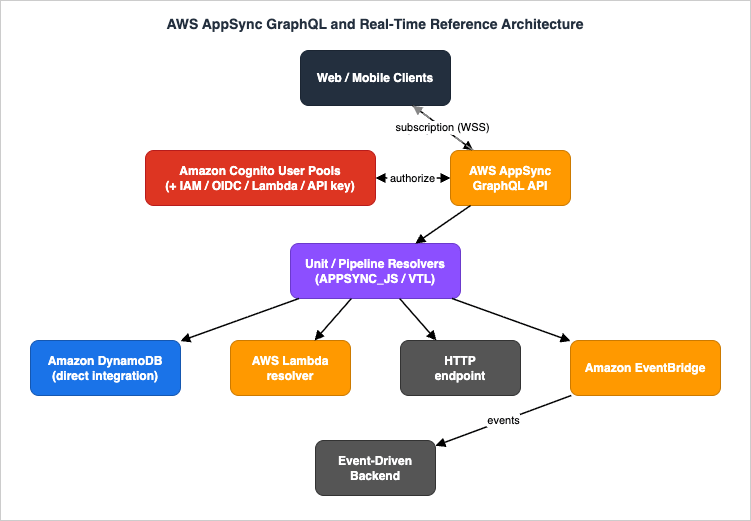
- Clients — web/mobile apps using a GraphQL client (for example AWS Amplify libraries). They send
query/mutationover HTTPS and hold asubscriptionopen over WebSocket. - AppSync GraphQL API — the single endpoint. Hosts the schema, enforces authorization, runs resolvers, manages the WebSocket subscription fleet, and optionally caches responses.
- Resolvers (unit and pipeline) — the glue between a schema field and a data source. Written in JavaScript on the
APPSYNC_JSruntime or in VTL. - Amazon DynamoDB — the primary item store, integrated directly (no Lambda hop) for the hot read/write paths.
- AWS Lambda — a resolver data source for logic that does not map cleanly to a single DynamoDB call (aggregation, third-party calls, custom validation).
- HTTP endpoint — a resolver data source for calling existing REST services from inside a GraphQL field.
- Amazon EventBridge — a resolver data source used to publish domain events, which connects this API to the asynchronous, event-driven backend.
- Amazon Cognito User Pools (plus IAM/OIDC/Lambda/API key) — the authorization providers. Different fields can require different providers.
Each component is backed by a concrete AWS resource, plays one role, and is bounded by a service limit you must design against:
| Component | AWS resource | Role in this architecture | Governing limit (verified) |
|---|---|---|---|
| GraphQL API | AWS::AppSync::GraphQLApi | Single endpoint, schema host, authz, WebSocket fleet | Schema document ≤ 1 MB; 50 GraphQL APIs/Region |
| Resolver / function | AWS::AppSync::Resolver / FunctionConfiguration | Field → data source mapping | APPSYNC_JS code ≤ 32 KB; ≤ 10 functions/pipeline; ≤ 10,000 resolvers/request |
| DynamoDB data source | AWS::AppSync::DataSource (AMAZON_DYNAMODB) | Primary item store, direct integration | BatchGetItem per call; conditional writes |
| Lambda data source | AWS::AppSync::DataSource (AWS_LAMBDA) | Custom logic, aggregation, third-party calls | BatchInvoke ≤ 2,000 entries |
| EventBridge data source | AWS::AppSync::DataSource (AMAZON_EVENTBRIDGE) | Emit domain events to the async backend | PutEvents per resolver step |
| Subscription (WebSocket) | Real-time endpoint (managed) | Push mutation results to clients | 200 subscriptions/connection; 240 KB payload |
| Authorization | API config (AuthenticationType + additional) | Per-field/-type access control | 50 auth providers/API |
The control flow has two complementary styles. Synchronous reads and writes are request/response through resolvers. Change notification is publish/subscribe: a mutation that resolves successfully becomes the trigger for any subscription that names it, and AppSync fans the result out to matching subscribers. Keeping these two flows distinct in your head is the key to reasoning about the system — a subscription never "queries" the database; it only ever delivers the selection set produced by its triggering mutation.
A note on scope and naming: AppSync now has two API shapes. This guide is about GraphQL APIs. AppSync also offers Event APIs (a generic pub/sub service), noted in the FAQ (Section 11) as an adjacent option — it is a different resource type, not a mode of the GraphQL API, and the two should not be conflated.
3. Schema and Resolvers (JavaScript and Direct DynamoDB)
3.1 The schema is the contract, not the implementation
Start from the schema. It defines the types, the entry points (Query, Mutation, Subscription), and — through directives — the authorization rules. Here is a trimmed schema for the order application:type Order {
id: ID!
tenantId: ID!
status: OrderStatus!
total: Float!
items: [OrderItem!]! # resolved separately to avoid N+1
createdAt: AWSDateTime!
version: Int!
}
type OrderItem {
sku: ID!
name: String!
quantity: Int!
}
enum OrderStatus { PENDING CONFIRMED SHIPPED CANCELLED }
input CreateOrderInput {
clientRequestId: ID! # idempotency token supplied by the client
items: [OrderItemInput!]!
}
type Query {
getOrder(id: ID!): Order
listOrders(limit: Int, nextToken: String): OrderConnection
}
type Mutation {
createOrder(input: CreateOrderInput!): Order
updateOrderStatus(id: ID!, status: OrderStatus!, expectedVersion: Int!): Order
}
type Subscription {
onOrderChanged(tenantId: ID!): Order
@aws_subscribe(mutations: ["createOrder", "updateOrderStatus"])
}
getOrder reads or createOrder writes. That is the resolver's job. The separation matters: you can move items from an embedded attribute to a separate table, or swap a DynamoDB read for a Lambda call, without touching the schema or the client.3.2 Unit resolvers versus pipeline resolvers
AppSync has two resolver kinds, and choosing correctly is the first design decision:- A unit resolver runs a single request/response handler against one data source. Use it when a field maps to exactly one operation —
getOrderis a single DynamoDBGetItem. - A pipeline resolver runs an ordered list of functions, each with its own request/response handler and its own data source, sharing state through
ctx.stashand reading the previous step's output throughctx.prev.result. Use it when a field needs several steps — authorize, then write, then emit an event. A pipeline resolver can hold up to 10 functions (a hard service limit), so keep pipelines focused.
The mental model: a unit resolver is one step; a pipeline resolver is a small, ordered, in-API workflow. Anything more elaborate than ~10 sequential steps belongs in Lambda or Step Functions, not in a pipeline resolver.
3.3 The APPSYNC_JS runtime (and where VTL still fits)
AppSync resolvers and functions run on one of two runtimes:APPSYNC_JS— a JavaScript runtime providing a subset of the language plus built-in utilities (theutilmodule,ctx.stash,ctx.prev.result). This is the current default choice for new resolvers because it is far easier to read and test than templates. Each handler exports arequestfunction (build the data source operation) and aresponsefunction (shape the result). The total code size of a single handler/resolver/function onAPPSYNC_JSis capped at 32 KB, and loop iterations are capped at 1,000.- VTL (Apache Velocity Template Language) — the original mapping-template language, still fully supported. Request and response mapping templates are capped at 64 KB each. Reach for VTL only when you are maintaining existing templates or need a behavior that the JS runtime does not yet expose.
A direct-DynamoDB unit resolver for
getOrder in APPSYNC_JS:import { util } from '@aws-appsync/utils';
export function request(ctx) {
// Build a DynamoDB GetItem directly - no Lambda in the path.
return {
operation: 'GetItem',
key: util.dynamodb.toMapValues({ id: ctx.args.id }),
};
}
export function response(ctx) {
if (ctx.error) {
util.error(ctx.error.message, ctx.error.type);
}
return ctx.result; // null is a valid "not found" response for a nullable field
}
GetItem itself. For the high-traffic read and write paths, direct DynamoDB integration is the default, and Lambda is the exception.Both handlers receive the context object (
ctx), which is the single most important object to understand because every authorization, batching, and idempotency decision reads from it:ctx field | Contents | Used for |
|---|---|---|
ctx.args (ctx.arguments) | The field's GraphQL arguments | Building keys/inputs |
ctx.identity | Caller identity (claims, groups, sub, resolverContext) | Authorization, tenant scoping |
ctx.source | The parent object (for nested field resolvers) | Avoiding N+1 on child fields |
ctx.stash | Mutable map shared across pipeline functions | Passing state between steps |
ctx.prev.result | Output of the previous pipeline function | Chaining steps |
ctx.result | The data source's response (response handler) | Shaping the GraphQL result |
ctx.error | Any data source / mapping error | Failing the field with util.error |
ctx.info | Selection set, field name, variables | Conditional logic, projections |
The same logic written as a VTL request/response mapping template — useful when reading or maintaining older APIs — looks like this:
## request mapping template (VTL) - GetItem
{
  "version": "2018-05-29",
  "operation": "GetItem",
  "key": { "id": $util.dynamodb.toDynamoDBJson($ctx.args.id) }
}
## response mapping template (VTL)
#if($ctx.error)
  $util.error($ctx.error.message, $ctx.error.type)
#end
$util.toJson($ctx.result)
APPSYNC_JS is preferred for new code because it is ordinary JavaScript with unit-testable functions, while VTL remains fully supported for existing templates.3.4 Avoiding N+1 with pipeline functions and batching
The classic GraphQL failure is N+1: alistOrders query returns 50 orders, and a naive items resolver then fires 50 separate reads. AppSync gives you two tools to avoid it.First, direct batch operations. A field that must read many keys can issue a single
BatchGetItem instead of one GetItem per parent:import { util } from '@aws-appsync/utils';
export function request(ctx) {
// ctx.source is the parent Order; read all its item rows in one call.
const keys = ctx.source.itemKeys.map((k) =>
util.dynamodb.toMapValues({ pk: ctx.source.id, sk: k }));
return {
operation: 'BatchGetItem',
tables: {
'OrderItems': { keys },
},
};
}
export function response(ctx) {
if (ctx.error) util.error(ctx.error.message, ctx.error.type);
return ctx.result.data['OrderItems'];
}
BatchInvoke: AppSync collects the per-parent requests and sends them to your function as one list (up to 2,000 entries per batch), so one Lambda invocation serves many parents. Your function returns a result array aligned to the request order. Either approach turns "N reads" into "one call," which is the single highest-leverage performance change in most AppSync APIs.Choosing between the two:
| Situation | Use | Why |
|---|---|---|
| Child field reads rows from one DynamoDB table by key | Direct BatchGetItem in a unit/pipeline function | No Lambda hop; lowest latency |
| Child field needs aggregation, joins across systems, or external calls | Lambda data source with BatchInvoke | Arbitrary logic, still one invocation per batch |
| Child field is computed and stable for seconds | Per-resolver caching (Section 8.1) | Skips the read entirely on cache hits |
The anti-pattern to avoid is a plain per-parent unit resolver on a list field: a
listOrders returning 50 orders, each triggering one items read, is 50 sequential calls and the most common reason an AppSync API is slow under load. Batching or caching the child field is the fix, and Section 9 shows the metric (Latency plus Enhanced per-resolver metrics) that exposes it.3.5 A pipeline resolver for a mutation
createOrder is more than one step: authorize the caller, write the item idempotently, and (in Section 7) emit a domain event. That is a pipeline resolver. A "before" handler can prepare shared state, each function does its step, and an "after" handler shapes the final response:// Pipeline resolver - top-level handler.
export function request(ctx) {
// Stash values every function can read via ctx.stash.
ctx.stash.tenantId = ctx.identity.claims['custom:tenantId'];
ctx.stash.now = util.time.nowISO8601();
return {};
}
export function response(ctx) {
return ctx.prev.result; // result of the last function in the pipeline
}
// Function 2 of the pipeline: idempotent DynamoDB write.
import { util } from '@aws-appsync/utils';

export function request(ctx) {
  const id = util.autoId();
  return {
    operation: 'PutItem',
    key: util.dynamodb.toMapValues({ id }),
    attributeValues: util.dynamodb.toMapValues({
      tenantId: ctx.stash.tenantId,
      status: 'PENDING',
      createdAt: ctx.stash.now,
      clientRequestId: ctx.args.input.clientRequestId,
      version: 1,
    }),
    // Idempotency: refuse to overwrite an existing client request.
    condition: {
      expression: 'attribute_not_exists(id)',
    },
  };
}

export function response(ctx) {
  if (ctx.error) util.error(ctx.error.message, ctx.error.type);
  return ctx.result;
}
3.6 Reproducible setup (infrastructure as code)
The API, its schema, a DynamoDB data source with a scoped role, and a JavaScript resolver are all declarable in AWS CloudFormation. This is the floor for a Level 400 component — it should be reproducible, not click-driven:Resources:
OrdersApi:
Type: AWS::AppSync::GraphQLApi
Properties:
Name: orders-graphql
AuthenticationType: AMAZON_COGNITO_USER_POOLS
UserPoolConfig:
UserPoolId: !Ref UserPool
DefaultAction: ALLOW
AwsRegion: !Ref AWS::Region
XrayEnabled: true # active tracing for cross-resolver tracing
LogConfig:
FieldLogLevel: ERROR # field-level logs (set ALL when debugging)
CloudWatchLogsRoleArn: !GetAtt AppSyncLogsRole.Arn
OrdersSchema:
Type: AWS::AppSync::GraphQLSchema
Properties:
ApiId: !GetAtt OrdersApi.ApiId
DefinitionS3Location: s3://my-artifacts/schema.graphql
OrdersTableDataSource:
Type: AWS::AppSync::DataSource
Properties:
ApiId: !GetAtt OrdersApi.ApiId
Name: OrdersTable
Type: AMAZON_DYNAMODB
ServiceRoleArn: !GetAtt OrdersDataSourceRole.Arn # least-privilege, see 8.2
DynamoDBConfig:
TableName: !Ref OrdersTable
AwsRegion: !Ref AWS::Region
GetOrderResolver:
Type: AWS::AppSync::Resolver
Properties:
ApiId: !GetAtt OrdersApi.ApiId
TypeName: Query
FieldName: getOrder
DataSourceName: !GetAtt OrdersTableDataSource.Name
Runtime: { Name: APPSYNC_JS, RuntimeVersion: "1.0.0" }
CodeS3Location: s3://my-artifacts/resolvers/getOrder.js
DataSourceName for Kind: PIPELINE and a PipelineConfig.Functions list of AWS::AppSync::FunctionConfiguration ARNs. The same can be expressed in the AWS CDK (aws-cdk-lib/aws-appsync), AWS SAM, or Terraform; the resource shapes are identical. The key habit: every resolver names exactly one runtime and (for unit resolvers) exactly one data source, so the dependency graph is explicit.3.7 Testing resolvers before they ship
BecauseAPPSYNC_JS handlers are ordinary functions, the request/response logic is unit-testable without deploying. AppSync also exposes the EvaluateCode API (CLI: aws appsync evaluate-code, IAM permission appsync:evaluateCode), which runs a handler against a mocked context and returns the handler's output plus execution logs:aws appsync evaluate-code \
--runtime name=APPSYNC_JS,runtimeVersion=1.0.0 \
--code file://getOrder.js \
--function request \
--context '{"arguments":{"id":"o-123"},"identity":{"claims":{"custom:tenantId":"t-1"}}}'
evaluationResult (the operation the resolver would issue) and logs. Wired into a test runner such as Jest, this turns resolver mapping bugs — the most common AppSync defect — into failing unit tests rather than production nulls, before a single resource is deployed.The end-to-end path of a mutation — through the pipeline, into DynamoDB, and back out as a subscription — is the subject of the next section's flow diagram.
4. Real-Time Subscriptions
4.1 Subscriptions are linked to mutations
This is the most misunderstood part of AppSync, so state it plainly: a subscription is not a query against the database. A subscription field is connected to one or more mutations with the@aws_subscribe directive (see the schema in Section 3.1). When a client subscribes to onOrderChanged, AppSync registers that subscription on the managed WebSocket fleet. Later, when createOrder or updateOrderStatus completes successfully, AppSync takes the result of that mutation and delivers it to every matching subscriber. The database is never re-read for the subscription; the mutation's selection-set result is the message.A consequence developers hit immediately: the fields a client can receive on a subscription must be a subset of the fields the triggering mutation returned. If the mutation did not return
total, no subscriber can receive total, regardless of what the subscription's selection set asks for.
createOrder:- The client sends the
createOrdermutation over HTTPS to the GraphQL endpoint. - AppSync authorizes the request, then runs the pipeline resolver: stash → idempotent
PutItem→ (event emission, Section 7). - The resolver returns the new
Orderas the mutation result. - AppSync matches the mutation against registered subscriptions on
onOrderChangedand applies any subscription filters. - AppSync pushes the
Orderto every matching client over its WebSocket connection.
4.2 The WebSocket layer and connection scale
Subscriptions ride a dedicated real-time endpoint (appsync-realtime-api.<region>.amazonaws.com) that AppSync operates for you — there is no connection table or fan-out fleet to run. Two service limits shape the design:- Subscriptions per client connection: 200 (adjustable). A single WebSocket connection can carry up to 200 distinct subscription statements. A client that wants to watch many entities should consolidate into fewer, filtered subscriptions rather than opening hundreds.
- Subscription payload size: 240 KB (the maximum size of a message delivered via a subscription). If your mutation result can exceed this, deliver a lightweight "changed" notification (IDs and a version) and let the client fetch the heavy fields with a query.
For metering and throughput planning, AppSync counts outbound delivery in units of 5 KB per metered message, and inbound is one message per subscription invoked by a mutation. Designing slimmer subscription payloads therefore both stays under the 240 KB ceiling and reduces the number of metered messages.
4.3 Enhanced subscription filtering
By default a subscriber receives every event from its triggering mutations. Enhanced subscription filtering lets you push per-subscriber filters into AppSync so each client receives only relevant events — critical for multi-tenant isolation and for not flooding clients. You set the filter from the subscription's resolver using theextensions helpers:import { util, extensions } from '@aws-appsync/utils';
export function request(ctx) {
return {}; // subscription connect resolvers typically return an empty payload
}
export function response(ctx) {
// Only deliver orders for this caller's tenant and not in CANCELLED state.
const filter = {
tenantId: { eq: ctx.args.tenantId },
status: { ne: 'CANCELLED' },
};
extensions.setSubscriptionFilter(util.transform.toSubscriptionFilter(filter));
return null;
}
4.4 Forced unsubscribe (subscription invalidation)
Sometimes a server-side event must terminate a subscription — for example, when a user is removed from a tenant and should stop receiving its updates immediately. AppSync supports this from a mutation resolver with twoextensions helpers:extensions.invalidateSubscriptions()— names the subscription field and a payload to match.extensions.setSubscriptionInvalidationFilter()— sets the criteria (same syntax as enhanced filters) that decide which connections are forcibly unsubscribed.
Because invalidation forcibly disconnects clients, the mutations that trigger it should be treated as administrative operations with tightly scoped authorization. The account-wide rate of invalidation requests is capped at 100 per second, so invalidation is for membership/permission changes, not for routine traffic.
4.5 The subscription connection lifecycle
Understanding the lifecycle makes the failure modes in Section 9 obvious. A subscription is a two-phase handshake, not a single request:- Connect — the client opens a WebSocket to the real-time endpoint, presenting the same authorization (for example a Cognito JWT) it would use for a query. AppSync records this as a
ConnectSuccess(orConnectClientErrorif the authorization or throttle limit fails). - Subscribe — over the open connection, the client sends one or more subscription registrations. Each successful registration runs the subscription's resolver (where you set the enhanced filter, Section 4.3) and counts toward the 200-per-connection limit; AppSync records
SubscribeSuccess. - Deliver — when a linked mutation completes, AppSync evaluates the filters and pushes matching results; each delivery is metered in 5 KB units.
- Reconnect — if the socket drops, the client re-opens and re-subscribes; AppSync surfaces
DisconnectSuccess/DisconnectClientError. A correct offline client (Delta Sync, Section 6.4) re-runs a base/delta query on reconnect to fill any gap that occurred while disconnected, because events are not buffered for a disconnected client.
ConnectSuccess versus SubscribeSuccess separates the two immediately.5. Authorization Modes
5.1 Five providers, a default, and additional modes
AppSync GraphQL APIs support five authorization types:| Mode | How the caller proves identity | Typical use |
|---|---|---|
| Amazon Cognito User Pools | JWT from a user pool | End users; group- and claim-based rules |
| OpenID Connect (OIDC) | JWT from any compliant IdP | Federated users from a non-Cognito IdP |
| AWS IAM | SigV4-signed request | Backend services, other AWS principals, server-to-server |
| AWS Lambda | Custom token validated by your function | Bespoke/legacy token schemes |
| API key | Static key | Public read paths, prototypes, throttled access |
One mode is the default; you can add additional modes for advanced cases (an API that serves both Cognito end users and IAM-signed services). A practical constraint to remember:
API_KEY, AWS_LAMBDA, and AWS_IAM cannot be duplicated across the default and additional modes — each may appear once. An API can have up to 50 authentication providers in total. Cognito User Pools and OIDC may appear multiple times (different pools/issuers).For the Lambda authorizer specifically, your function returns an
isAuthorized boolean, an optional resolverContext map (made available to resolvers as ctx.identity.resolverContext), an optional deniedFields list, and a ttlOverride controlling how long the decision is cached.The deep design of the identity provider itself — Cognito federation, group mapping, token customization — is its own topic:
Amazon Cognito Federation Implementation Guide — user pools, identity pools, and external IdP federation.
5.2 Field- and type-level authorization
The real power is applying different rules to different parts of the schema with directives. The same JWT can grant a caller read access to public fields while a sensitive field requires a specific Cognito group:type Order
@aws_cognito_user_pools # type default: any signed-in user
{
id: ID!
status: OrderStatus!
total: Float! @aws_auth(cognito_groups: ["Finance"]) # field-level tighten
internalNotes: String @aws_cognito_user_pools(cognito_groups: ["Ops"])
}
type Query {
getOrder(id: ID!): Order @aws_cognito_user_pools
publicCatalog: [Item!]! @aws_api_key # a different mode for a public path
}
@aws_cognito_user_pools, @aws_oidc, @aws_iam, @aws_api_key, and the group-aware @aws_auth(cognito_groups: [...]). Subscriptions carry @aws_subscribe. When multiple modes are configured, each field declares which modes may reach it; a request authenticated with one mode simply cannot resolve a field reserved for another. This is how a single API safely serves public catalog reads (API key), end-user order operations (Cognito), and backend reconciliation jobs (IAM) at once.Authorization is evaluated before resolvers run, and a denied field returns an authorization error for that field while the rest of the response proceeds — so partial responses are normal and clients must handle per-field errors.
5.3 The Lambda authorizer contract and configuring multiple modes
When the built-in modes do not fit (a legacy token, a custom claim service), a Lambda authorizer runs your function on each request and returns a decision object:{
"isAuthorized": true,
"resolverContext": { "tenantId": "t-42", "role": "editor" },
"deniedFields": ["Mutation.deleteTenant", "Order.internalNotes"],
"ttlOverride": 300
}
resolverContext is surfaced to resolvers as ctx.identity.resolverContext (so you can scope a DynamoDB query by tenant without a second lookup), deniedFields blocks specific fields regardless of the schema, and ttlOverride controls how long AppSync caches this decision to avoid invoking the function on every request.Adding a second mode is a property on the API. Here the API defaults to Cognito for end users and adds IAM for backend callers:
  OrdersApi:
    Type: AWS::AppSync::GraphQLApi
    Properties:
      Name: orders-graphql
      AuthenticationType: AMAZON_COGNITO_USER_POOLS   # default mode
      UserPoolConfig: { UserPoolId: !Ref UserPool, DefaultAction: ALLOW, AwsRegion: !Ref AWS::Region }
      AdditionalAuthenticationProviders:
        - AuthenticationType: AWS_IAM                  # backend/services
@aws_iam-marked fields become reachable only to those signed callers. Remember the constraint from Section 5.1: AWS_IAM (like API_KEY and AWS_LAMBDA) can appear only once across the default and additional providers.6. Conflict Resolution and Offline
6.1 Why conflicts happen and what "versioned" means
Collaborative and offline-capable apps generate write conflicts: two clients edit the same item, or a client that went offline replays a stale write. AppSync addresses this with conflict detection and resolution on versioned data sources. When you enable versioning on a DynamoDB data source, AppSync maintains a_version (and _lastChangedAt, _deleted) on each item and keeps a Delta table of recent changes. Every mutation carries the version the client believes it is updating; AppSync compares that to the item's current version before applying the write.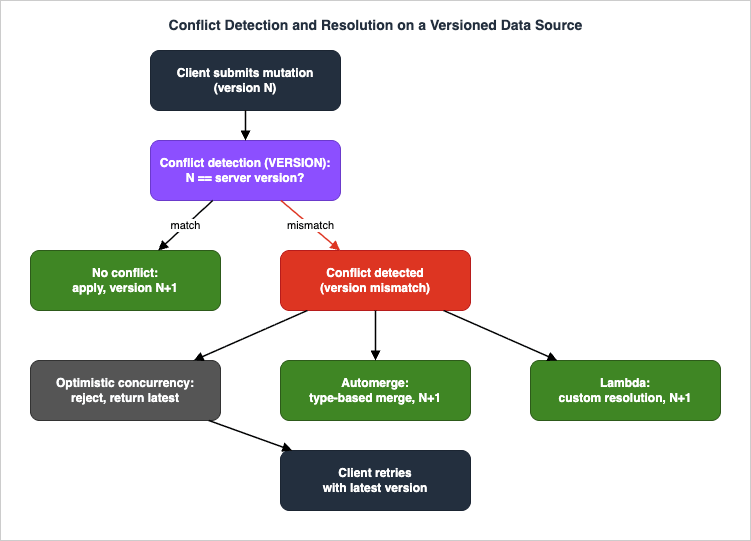
6.2 The three resolution strategies
When the submitted version does not match the stored version, AppSync applies the strategy you configured:- Optimistic Concurrency — reject the conflicting write and return the latest server version to the client, which decides how to retry. Simplest and safest; the client owns the merge. This is the natural fit for the
updateOrderStatus(expectedVersion:)mutation in Section 3.1. - Automerge — AppSync merges automatically using type-based rules with no client logic: server value wins for conflicting scalars, lists are concatenated, sets use union, and maps are merged recursively. Great for additive, non-conflicting fields (tags, collaborative lists).
- Lambda — a function you own receives both versions and returns the resolved item. Use it when the merge needs domain logic ("the higher status wins," "sum the quantities").
Automerge follows strict, type-based rules: a conflicting scalar keeps the server value, lists are concatenated (duplicates retained), sets take the union, maps merge recursively, and any new or previously-
null field is added. The Lambda strategy is for when those rules are wrong for your domain — for example, an order's status should resolve to "the further-along state wins" (a SHIPPED write must not be overwritten by a stale PENDING), which is a few lines of comparison in your function returning the resolved item.Versions are managed by AppSync and must not be modified by clients, or you risk silent data loss. Choosing a strategy is per-resolver, so a single API can use optimistic concurrency for status changes and automerge for tag edits.
6.3 Offline clients and where AppSync ends
On the client, AWS Amplify DataStore is the offline-first companion: it persists a local model, queues mutations made while offline, and reconciles them through AppSync's versioned sync (base query + delta sync + subscriptions) using the conflict strategy above. This guide treats the client as a black box — the architecture point is that the server-side versioning and resolution strategy is what makes a correct offline client possible; without it, DataStore would have nothing to reconcile against.6.4 Delta Sync: base query plus deltas
The mechanism that makes offline reconciliation efficient is Delta Sync. A versioned DynamoDB data source is backed by two tables: a Base table holding current items and a Delta table recording recent changes. A Delta Sync client does three things:- Base query — on first load (or after a long offline period), hydrate the local cache with a full query against the Base table.
- Subscribe — open a subscription so live changes arrive while online.
- Delta query — on reconnect, query only the Delta table for changes since the last sync instead of re-reading everything.
6.5 Merged APIs for multi-team schemas
A different kind of "conflict" appears at the organizational scale: several teams each own part of the graph. Merged APIs let each team build and deploy its own source API (its own schema, resolvers, and data sources), and AppSync composes them at build time into one unified endpoint. AppSync detects merge conflicts such as type-name collisions, and aMergedApiExecutionRole lets the merged endpoint invoke each source API's resources. A Merged API can associate up to 10 source APIs. This is the federation answer when you want one client-facing graph without forcing all teams into one codebase — distinct from runtime schema stitching because the composition happens when you merge, not on every request.7. Connecting to an Event-Driven Backend
A GraphQL API should not try to do everything synchronously inside a resolver. Long-running work — fulfillment, notifications, analytics — belongs on an asynchronous backend, and AppSync connects to it cleanly because Amazon EventBridge is a first-class resolver data source. A resolver can put an event onto an event bus as one step of a pipeline, right after the database write:// Pipeline function (EventBridge data source): emit a domain event.
export function request(ctx) {
return {
operation: 'PutEvents',
events: [
{
source: 'app.orders',
detailType: 'OrderCreated',
detail: {
orderId: ctx.prev.result.id,
tenantId: ctx.stash.tenantId,
status: ctx.prev.result.status,
},
},
],
};
}
export function response(ctx) {
// Do not fail the mutation if the bus put has a soft error you can tolerate;
// here we surface hard errors and otherwise return the order from the prior step.
if (ctx.error) util.error(ctx.error.message, ctx.error.type);
return ctx.prev.result;
}
  OrderEventsDataSource:
    Type: AWS::AppSync::DataSource
    Properties:
      ApiId: !GetAtt OrdersApi.ApiId
      Name: OrderEvents
      Type: AMAZON_EVENTBRIDGE
      ServiceRoleArn: !GetAtt EventBridgePutRole.Arn   # grants events:PutEvents on one bus only
      EventBridgeConfig:
        EventBusArn: !GetAtt OrdersBus.Arn
Once
OrderCreated is on the bus, the event-driven backend — rules routing to Lambda, queues, Step Functions workflows, and DynamoDB — takes over with its own retries, dead-letter queues, and idempotency. The synchronous API stays fast (it returns as soon as the item is written and the event is accepted), and the heavy, failure-prone work happens behind the bus. The design of that backend (choreography vs. orchestration, DLQ strategy, sagas) is the subject of the companion guide:Event-Driven Serverless Architecture on AWS — the asynchronous backend this API emits into.
The complementary direction also exists: AppSync can serve as the real-time delivery layer for that backend. A backend process can call a mutation (for example via IAM authorization) whose only purpose is to trigger
@aws_subscribe, turning a backend state change into a live push to connected clients. The cheapest version of that "mutation-trigger" uses a local (None) data source — a resolver that returns its input without touching any backend, existing only to fan a payload out to subscribers:// Local (None) data source resolver: no backend call, just publish to subscribers.
export function request(ctx) {
return { payload: ctx.args.input };
}
export function response(ctx) {
return ctx.result.payload; // becomes the @aws_subscribe message
}
8. Cross-Cutting: Caching, Least Privilege, Idempotency
8.1 Server-side caching
AppSync has an optional managed cache that sits in front of resolvers, in three modes:- Full request caching — every resolver invoked during a request is cached automatically, with each resolver cached separately, keyed on
$context.argumentsand$context.identity. - Per-resolver caching — cache individual resolver results, with caching keys derived from
$context.arguments,$context.source, and$context.identity(so a cache entry can be scoped per-user or per-tenant). Up to 25 caching keys are allowed. - Operation-level caching — cache an entire GraphQL query operation response as a whole (up to 15 MB); subsequent matching queries are served straight from the cache without executing any resolvers.
Time-to-live is configurable from 1 to 3,600 seconds. Per-resolver caching keyed on identity is the sweet spot for read-heavy fields that are expensive to compute but stable for a few seconds — it cuts data source load without leaking one caller's data to another. Mutations should never be cached; only read resolvers.
In CloudFormation the cache is a single resource; turning on per-resolver caching plus encryption is a few lines:
  OrdersApiCache:
    Type: AWS::AppSync::ApiCache
    Properties:
      ApiId: !GetAtt OrdersApi.ApiId
      ApiCachingBehavior: PER_RESOLVER_CACHING
      Type: SMALL
      Ttl: 5                       # seconds (1-3600); short TTL for near-real-time reads
      AtRestEncryptionEnabled: true
      TransitEncryptionEnabled: true
cachingConfig with keys drawn from $context.identity and $context.arguments, so an entry is scoped to a caller and a tenant never receives another tenant's cached result.8.2 Least-privilege data source roles
Each data source has an IAM service role that AppSync assumes to reach the underlying resource. The single most important security control here is to scope each role to exactly the resource and actions that data source needs:{
"Version": "2012-10-17",
"Statement": [
{
"Effect": "Allow",
"Action": ["dynamodb:GetItem", "dynamodb:PutItem", "dynamodb:Query", "dynamodb:BatchGetItem"],
"Resource": [
"arn:aws:dynamodb:ap-northeast-1:111122223333:table/Orders",
"arn:aws:dynamodb:ap-northeast-1:111122223333:table/Orders/index/*"
]
}
]
}
events:PutEvents on the one bus; the Lambda data source role grants only lambda:InvokeFunction on the one function. Because each field's blast radius is its data source role, narrow roles mean a logic bug in one resolver cannot touch another subsystem's data.8.3 Idempotent mutations
At-least-once delivery and client retries mean the same mutation can arrive twice. Make mutations idempotent with a client-supplied request id and a DynamoDB conditional write (as in Section 3.5): thePutItem uses attribute_not_exists(id) (or a condition on the clientRequestId) so a replay fails the condition instead of creating a duplicate. For status transitions, a condition on expectedVersion (optimistic concurrency, Section 6.2) gives the same guarantee for updates. Idempotency at the data layer is what lets the rest of the system retry freely.8.4 Encryption and edge protection
Two controls complete the security posture. Encryption: the managed cache supports at-rest and in-transit encryption (theAtRestEncryptionEnabled/TransitEncryptionEnabled flags above), and all client traffic is HTTPS for queries/mutations and WSS for subscriptions. AWS WAF: you can associate a WAF web ACL with the AppSync API, and its rules (IP, geo, rate-based, and managed rule groups) are evaluated before all other AppSync access controls — making WAF the first line of defense against request floods and common web exploits. The association is declarable in CloudFormation (AWS::WAFv2::WebACLAssociation pointing at the API ARN), so edge protection ships with the rest of the stack instead of being bolted on later.9. Observability and Failure Modes
9.1 What AppSync emits
AppSync integrates with Amazon CloudWatch and AWS X-Ray:- CloudWatch metrics — request-level metrics (
4XXError,5XXError,Latency, request counts) and real-time subscription metrics (connection successes/failures, subscription registrations, messages published/delivered). - CloudWatch Logs — request-level logging and field-level logging; you set the log verbosity and the field resolver log level. Field-level logs are what you read to see exactly which resolver failed and with what mapping error.
- Enhanced Metrics — finer-grained per-resolver and per-data-source metrics for pinpointing the slow or failing field.
- X-Ray tracing — enable active tracing on the API to follow a request across resolvers and into data sources.
The metrics worth alarming on, by name:
| Metric | Meaning | Alarm when |
|---|---|---|
5XXError | Server-side GraphQL processing errors | Any sustained non-zero |
4XXError | Bad requests, throttling, misconfigured authz | Spikes after a deploy |
Latency | Receive-to-respond time | p99 exceeds your SLO |
TokensConsumed | Resource cost of requests (token allocation) | Approaching the request-token quota |
ConnectSuccess / ConnectClientError | WebSocket connect outcomes | Client errors rising (authz/throttle) |
SubscribeSuccess | Subscription registrations | Drops to zero while traffic continues |
Enhanced Metrics add per-resolver and per-data-source dimensions so you can attribute a latency spike to a single field, and conflict detection/sync emit their own metrics for versioned data sources.
9.2 Failure modes and how to triage them
| Symptom | Likely cause | Where to look / fix |
|---|---|---|
Field returns null with a resolver error | Resolver mapping error (bad key shape, wrong operation) | Field-level logs; inspect the request object the resolver built |
| Field returns an authorization error | Caller's mode not permitted on that field/type | Auth mode + @aws_* directive on the field; check JWT claims/groups |
| Subscription connects but no messages arrive | Subscription not actually linked to the mutation, or filter excludes the event | Confirm @aws_subscribe lists the mutation; check the subscription filter and that the mutation returned the fields |
| A list query is slow / hot on the database | N+1 (per-parent reads) | Switch the child field to BatchGetItem or Lambda BatchInvoke (Section 3.4) |
Sporadic 429/throttling under load | Request-token or connection-rate quota reached | CloudWatch throttling metrics; request quota increase or add caching |
| Mutation rejected with a version error | Optimistic concurrency conflict | Expected — return latest version to client and retry (Section 6.2) |
The triage discipline is always the same: read the field-level log for the failing field, confirm whether the failure is authorization (before the resolver) or resolver mapping (inside it) or data source (downstream), and fix at that layer. For deep tracing across an event-driven backend, hand off to the observability guide:
AWS Lambda Concurrency and Scaling Guide — for Lambda-resolver and event-consumer scaling behavior referenced above.
9.3 Querying logs to find the failing field
Field-level logs land in CloudWatch Logs, and CloudWatch Logs Insights is the fastest way to find the offending resolver during an incident:fields @timestamp, resolverArn, parentType, fieldName, logType
| filter (logType = "RequestMapping" or logType = "ResponseMapping") and fieldInError
| sort @timestamp desc
| limit 50
10. Variations: AppSync vs API Gateway, and When GraphQL Fits
GraphQL on AppSync is the right tool when clients need to compose data from several sources in one round trip, when the field set varies per screen, and especially when you need managed real-time subscriptions. It is not automatically better than REST. A simple resource CRUD service, a webhook receiver, or an API that mostly returns one fixed shape is usually simpler and cheaper as a REST or HTTP API on Amazon API Gateway. A WebSocket API on API Gateway is the alternative when you need raw bidirectional messaging without a GraphQL schema.A useful rule of thumb: choose AppSync when the data graph is the hard part (many related types, per-client shaping, live updates); choose API Gateway when the protocol surface is the hard part (REST semantics, request validation, usage plans, broad integration types). At a glance:
| Concern | AppSync (GraphQL) | API Gateway (REST/HTTP) | API Gateway (WebSocket) |
|---|---|---|---|
| Client shaping | Per-field selection in one request | Fixed per-endpoint response | Raw messages |
| Real-time | Built-in subscriptions on mutations | Not native (poll/webhook) | Bidirectional, you build the protocol |
| Typed schema | Yes (GraphQL SDL) | Optional (OpenAPI) | No |
| Best when | The data graph is the hard part | REST semantics/usage plans are the hard part | You need raw two-way messaging |
This is a pointer, not the decision: the deep, criteria-by-criteria comparison — including authorization, integrations, and migration — lives in the API selection guide rather than here:
Amazon API Gateway Decision Guide — REST vs. HTTP vs. WebSocket selection and when to prefer each over AppSync.
For modeling the data tier behind either choice, the DynamoDB design guides apply directly:
Amazon DynamoDB Single-Table Design Guide — item and access-pattern modeling for the tables behind your resolvers.
Amazon DynamoDB Key Design and GSI/LSI Dictionary — partition/sort key and index design for the query patterns your schema exposes.
11. Frequently Asked Questions
Is a subscription a live query against my database?No. A subscription delivers the result of its triggering mutation(s) named in
@aws_subscribe. The database is not re-read for the subscription, and a subscriber can only receive fields the mutation returned.Should I use JavaScript (APPSYNC_JS) or VTL resolvers?
Use
APPSYNC_JS for new work — it is easier to read, test, and reason about. Keep VTL where it already exists or where you need a behavior the JS runtime does not yet provide. Both are first-class and can coexist in one API.When do I use a Lambda resolver instead of direct DynamoDB?
Use direct DynamoDB for the hot CRUD paths (lower latency, no cold start, fewer moving parts). Use a Lambda resolver when a field needs logic that does not map to a single data source operation — aggregation, calling third parties, or complex validation. Avoid Lambda purely to "read a table"; that is what direct integration and
BatchGetItem are for.How do I keep one tenant from receiving another tenant's real-time events?
Apply enhanced subscription filtering in the subscription resolver (server-side, per-connection) and tighten the field/type with the authorization directives. Filtering is a delivery-time security boundary, not just a convenience.
Which conflict resolution strategy should I pick?
Optimistic Concurrency when the client should own retries (status changes); Automerge for additive, non-conflicting fields; Lambda when the merge needs domain logic. Choose per-resolver.
What is the difference between AppSync GraphQL APIs and AppSync Events?
A GraphQL API serves a typed schema with queries, mutations, and
@aws_subscribe subscriptions. AppSync Events is a separate resource: a generic WebSocket pub/sub service (channel namespaces, publish/subscribe of JSON) that does not require GraphQL. Use Events when you want pub/sub without a schema; use a GraphQL API when you want a typed data graph with real-time updates on mutations.Can a GraphQL field read from a relational database or a search index?
Yes. Beyond DynamoDB, Lambda, HTTP, and EventBridge, AppSync supports an Amazon RDS data source (Amazon Aurora Serverless through the Data API, so resolvers run SQL without managing connections) and an Amazon OpenSearch Service data source (for full-text and faceted search fields). A single API can mix them — for example,
getOrder from DynamoDB, searchOrders from OpenSearch, and a reporting field from Aurora — each as its own data source with its own least-privilege role, all behind one schema.12. Summary
A production GraphQL API on AWS AppSync is an assembly, not a single feature. The schema is the contract; unit and pipeline resolvers on theAPPSYNC_JS runtime connect it to DynamoDB (directly), Lambda, HTTP, and EventBridge data sources, with BatchGetItem/BatchInvoke to defeat N+1. Real-time subscriptions push mutation results to clients over a managed WebSocket fleet, scoped by enhanced filtering and bounded by clear limits (200 subscriptions per connection, 240 KB payloads). Five authorization modes plus field/type directives let one API serve public, end-user, and service callers safely. Versioned conflict resolution (optimistic / automerge / Lambda) makes correct offline clients possible, and Merged APIs scale the schema across teams. Cross-cutting concerns — caching, least-privilege data source roles, and idempotent mutations — keep it fast, contained, and retry-safe, and EventBridge wires it into an asynchronous backend.The discipline that holds it together is the request lifecycle from Section 1: authorize, resolve, hit a data source, respond, and (for mutations) fan out. Every operational question — why a field is
null, why a subscriber sees nothing, why latency spiked — maps to one stage of that lifecycle, and the matching metric or field-level log points at it. Design each stage explicitly (one runtime and one data source per resolver, one filter per subscription, one scoped role per data source) and the system stays diagnosable as it grows.From here, follow the cluster: the event-driven serverless backend that this API emits into, the API Gateway decision guide for the REST/GraphQL choice, and the SaaS multi-tenant architecture guide for taking the tenant isolation shown here to a full multi-tenant platform.
13. References
- What is AWS AppSync? (Developer Guide)
- AWS AppSync system overview and architecture
- JavaScript resolvers overview (unit and pipeline)
- Configuring resolvers (JavaScript)
- Resolver context reference (ctx)
- Testing resolver and function handlers (EvaluateCode)
- Attaching a data source (DynamoDB, Lambda, RDS, EventBridge, OpenSearch, HTTP)
- Real-time data with subscriptions
- Enhanced subscription filtering
- Unsubscribing WebSocket connections using filters (invalidation)
- Authorization and authentication (five modes, field/type rules)
- Conflict detection and resolution
- Delta Sync on versioned data sources
- Merging APIs in AWS AppSync
- Caching and compression
- Using AWS WAF to protect AppSync APIs
- Monitoring and logging GraphQL APIs (CloudWatch, X-Ray, Enhanced Metrics)
- What is AWS AppSync Events?
- AWS AppSync Events concepts
- AWS AppSync endpoints and quotas
- AWS AppSync pricing (official)
References:
Tech Blog with curated related content
Written by Hidekazu Konishi