Tuning Security Hub CSPM Without Hiding Findings - Control Parameters, Automation Rules, Suppression, and Disabled Controls
First Published:
Last Updated:
This article shows, from the primary sources, at which stage each of the four methods acts and what it removes. Adjusting parameters moves the passing line. Disabling a control halts its evaluation. Automation rules modify findings during the ingestion process. Suppression simply hides findings, but new findings related to the same issue will continue to appear. This article also covers two mechanisms for distributing settings to an organization (central configuration and the AWS Organizations declarative policies added on November 13, 2026), and the relationship with the automation rules of the new AWS Security Hub.
To summarize, suppression does not represent a resolution; it simply makes the findings invisible. Suppressing only FAILED findings will change the control status to Passed, while suppressing all findings will result in the control displaying No data and being excluded from the security score calculation. Either scenario can potentially improve the score. If you want to reduce findings without misrepresenting the score, it's crucial to first understand, for each method, what continues to be evaluated and what is excluded from the calculation.
This article is based on documentation reviewed on November 24, 2026 (Japan Standard Time). It has not been tested in a live environment. Pricing information is not included. This article was written before AWS re:Invent 2026 (November 30 – December 4, 2026) and does not include any information that may be presented at that event.
Related articles on this site:
- Centralized Logging and Audit Architecture on AWS - Multi-Account Log Aggregation, Detection, and Query with CloudTrail, Config, Security Hub, and OpenSearch
- AWS Config Rules and Conformance Packs - Compliance Detection, Automated Remediation, and Organizations Deployment
- Detection Engineering on AWS - What a Custom Source Must Satisfy Before a Detection Can Be Written, and What the Detection Still Does Not See
- Amazon GuardDuty Extended Threat Detection Architecture - Attack Sequences, Runtime Monitoring, and Response Automation
- AWS Organization Guardrails - Service Control Policies, Resource Control Policies, and Data Perimeter Design
Table of Contents
- 1. Scope and Assumptions
- 2. How to Read the Tables
- 3. Where the Four Methods Act
- 4. Parameters — Moving the Passing Line
- 5. Automation Rules — Rewriting at Ingestion
- 6. Suppression and Disabling — Hiding Findings and Stopping Evaluation
- 7. Distributing Across an Organization — Central Configuration and Declarative Policies
- 8. When Used with the New Security Hub
- 9. Where the Sources Disagree and What They Do Not Say
- 10. How to Choose and Failure Patterns
- 11. Frequently Asked Questions About Tuning Security Hub CSPM Findings
- 12. Summary
- 13. References
1. Scope and Assumptions
This chapter first defines the intended audience, the scope of this article, the sources this article read, and the terms it uses. The following nine points represent the key conclusions:- When parameters are changed, Security Hub CSPM re-evaluates controls using the new values. The passing line itself moves, and the results are recorded as findings, indicating either PASSED or FAILED (Chapter 4).
- Automation rules can modify fields within findings when Security Hub CSPM ingests them, provided the findings meet the rule's conditions. Only administrator accounts can create these rules, and they apply only in the Region where they are created. They take effect before EventBridge rules (Chapter 5).
- Automation rules evaluate only new and updated findings that arrive after the rule is created. They are not triggered when using
BatchUpdateFindingsto update findings (Section 5.3). - Suppression (setting a workflow status to
SUPPRESSED) does not prevent the creation of new findings for the same issue. When calculating the status of a control, suppressed findings are ignored (Sections 6.1 and 6.2). - Suppressing only FAILED findings will change the control status to Passed. Suppressing all findings will result in a status of No data. Controls with No data are excluded from the security score calculation. Either way, the score can rise (Section 6.3).
- Disabling a control across all standards will stop the checks. Existing findings will typically be archived within 3–5 days, and the AWS Config rules created by Security Hub CSPM will be deleted. Disabling is not permanent; enabling a standard that includes the control enables it again (Sections 6.5 and 6.6).
- There are two mechanisms for distributing settings to an organization, central configuration and declarative policies, and they are mutually exclusive. AWS recommends using declarative policies. Declarative policies can be used to configure enablement, standards, control enablement/disablement, and parameters, but no statement was found about distributing automation rules or suppression through them (Chapter 7).
- Security Hub CSPM automation rules and new Security Hub automation rules are not synchronized. When both services are used, the FAQ recommends, with a condition, migrating rules to the new Security Hub (Chapter 8).
- No statement was found in which AWS recommends changing parameters. The user guide states that parameters can be used as an alternative to suppression (Section 4.1).
1.1 Intended Audience
This article is intended for the following audience:- Security operations engineers who manage Security Hub CSPM across multiple accounts and are struggling with a high volume of FAILED findings, handling business exceptions, and addressing false positives.
- Individuals who want to determine which approach – parameters, automation rules, suppression, or disabling – will lighten operations without misrepresenting the score.
- Users who are currently using the new Security Hub and Security Hub CSPM together, as well as those who plan to integrate them in the future.
1.2 Scope and Exclusions
This article covers the following topics:- How control parameters work and how to find the controls that support them.
- The conditions, behavior, order, and scope of automation rules in Security Hub CSPM.
- The workflow status
SUPPRESSED, and its impact on control status and security score. - Disabling controls and standards.
- Distribution to organizations using central configuration and declarative policies.
- The relationship with the automation rules of the new Security Hub, and the migration recommendation.
This article does not cover the following topics:
- Enabling Security Hub CSPM, and explaining controls for each standard.
- Analyzing exposures and risks with the new Security Hub.
- AWS Config rules and conformance packs. These are covered on this site in AWS Config Rules and Conformance Packs.
- Designing suppression rules for Amazon GuardDuty. This is covered on this site in Amazon GuardDuty Extended Threat Detection Architecture. This article provides a single comparison in Section 6.8.
- Writing detections using OCSF findings. This is covered on this site in Detection Engineering on AWS.
- Designing centralized logging. This is covered on this site in Centralized Logging and Audit Architecture on AWS.
- General concepts related to Organizations policies, including SCP and RCP. This is covered on this site in AWS Organization Guardrails.
- Pricing and the costs associated with AWS Config evaluations.
- Methods for avoiding detection.
1.3 Verification Date and Sources Read
This article read the following sources on November 24, 2026 (Japan Standard Time). In the text, this article uses the English names in parentheses.First, this article read the following pages in the Security Hub CSPM chapter of the AWS Security Hub User Guide. Their HTTP
Last-Modified dates were all between November 23, 2026, 21:41 and 21:42 GMT.- Understanding control parameters in Security Hub CSPM (parameters page) and Customizing control parameter values (customize page).
- Understanding automation rules in Security Hub CSPM (automation rules page) and Automatically modifying and acting on findings in Security Hub CSPM (automations page).
- Setting the workflow status of findings in Security Hub CSPM (workflow status page).
- Evaluating compliance status and control status (control status page) and Calculating security scores (security score page).
- Disabling controls in Security Hub CSPM (disabling controls page), Disabling a control across standards (cross-standard page), Disabling a control in a specific standard (specific-standard page), Disabling a security standard (disabling standards page).
- BatchUpdateFindings for customers (BatchUpdateFindings page).
- Declarative policies and central configuration in Security Hub CSPM (declarative policies page).
This article also read the following sources.
- In the same guide, What are Security Hub and Security Hub CSPM? (services page), Automation rules in Security Hub (Security Hub automation rules page), EventBridge event types (Security Hub event types page), and Document history.
- In the AWS Security Hub API Reference, the pages for
UpdateSecurityControl,SecurityControlDefinition,CreateAutomationRule,BatchUpdateFindings,Workflow, andBatchUpdateFindingsV2(API reference). TheLast-Modifieddate was consistently between November 23, 2026, 21:42 and 21:43 GMT. - In the AWS Organizations User Guide, the pages for Security Hub CSPM policies and its syntax (Organizations policy pages). The
Last-Modifieddate was November 23, 2026, 21:42 GMT. - In AWS What's New, AWS Security Hub CSPM now supports centralized configuration with AWS Organizations declarative policies (What's New). Its Posted On date is November 13, 2026.
- AWS Security Hub FAQ (FAQ).
- In the AWS Security Blog, Security Hub CSPM automation rule migration to Security Hub (migration blog post). The page's publication date is December 17, 2025.
- In the Amazon GuardDuty User Guide, the page for Suppression rules in GuardDuty (GuardDuty suppression page).
- In the Security Hub CSPM console help panel, the page for Configuring control parameters (help panel) and the page describing the features of AWS Security Hub CSPM (features page).
This article read every source in the original text fetched with curl and through searches of the AWS documentation. When re-downloaded on the same day, the
Last-Modified dates for many of the pages above had changed to between November 24, 2026, 11:29 GMT and 11:32 GMT. However, the text cited in this article remained unchanged between the two retrievals.1.4 Terms, and Different Things With the Same Name
This article uses the following terms consistently:- Security Hub CSPM: AWS Security Hub CSPM. This service handles findings in the AWS Security Finding Format (ASFF) and performs security checks based on standards and controls.
- New Security Hub (the new Security Hub): AWS Security Hub. This service handles findings in the Open Cybersecurity Schema Framework (OCSF). This article names the two separately every time.
- Parameter: A value used in control evaluations that the user can modify. For example,
daysToExpirationin ACM.1. - Automation rule: A rule that automatically modifies fields in findings that meet certain conditions. This article refers to automation rules for Security Hub CSPM unless otherwise specified.
- Suppression: Setting the workflow status (
Workflow.Status) of a finding toSUPPRESSED. Whether performed manually usingBatchUpdateFindingsor through an automation rule, the resulting status is the same. - Disabling: Turning off a control or a standard. This article does not refer to suppression as "disabling."
- Archiving: When a finding's
RecordStatebecomesARCHIVED. This is a separate field from suppression. - Control status: One of the following: Passed, Failed, Unknown, No data, or Disabled. This is derived from a finding's
Compliance.Status(which can bePASSED,FAILED,WARNING, orNOT_AVAILABLE).
The sources this article read use the same name for different things.
- Suppression rules: A GuardDuty feature that automatically archives new findings that meet specified criteria. This is distinct from suppression within Security Hub CSPM. (See Section 6.8 for clarification.)
- Security Hub: Both the new Security Hub and Security Hub CSPM utilize
aws.securityhubas thesourcefor EventBridge events (see Section 8.5). Both services have their respective pages in the same AWS Security Hub User Guide, with the page titles ending in "AWS Security Hub." The API reference pages, however, end with "AWS Security Hub CSPM." This article determines which service is being discussed based on the subject matter of the text, rather than the page title itself.
2. How to Read the Tables
This chapter defines the words used in the tables of this article, specifically the words for the state of the sources, and how this article writes the verification date.2.1 Words for the State of the Sources
This article uses the following five terms to describe the state of the sources. In the tables, this article also uses these English terms.- Stated: A source contains a statement on the matter.
- No statement found: Despite searching using different keywords and document categories, no relevant statement could be found in the sources listed in Section 1.3. This does not indicate that the subject matter is nonexistent or does not occur.
- Sources disagree: The statements on the same matter differ between two sources. This article will present both statements, along with their sources, without designating either as incorrect.
- Inference: This is an inference made by this article, and is not a statement found in any of the sources. This article marks an inference in the same sentence.
- Example by this article: This is an example created by this article, and is not an example from AWS documentation.
2.2 How the Verification Date Is Written
The verification date for this article is November 24, 2026 (Japan Standard Time). The quota values, the numbers of days, the controls that support parameters, and the relationship between the two services are all as of the verification date. These values may change after the verification date. Throughout this article, all dates are written with the year included.3. Where the Four Methods Act
This chapter outlines the process from when a Security Hub CSPM control finding is generated to when it is factored into the score, and shows where in that flow the four methods act.3.1 The Flow of a Finding
The findings from Security Hub CSPM controls follow the order below, which this article infers by putting the sources' statements together (Inference). The statement for each step is Stated.- Evaluation: Security Hub CSPM performs security checks on enabled controls. Control findings are updated every 12 to 24 hours, or when the state of the target resource changes (Stated).
- Ingestion: When Security Hub CSPM ingests a finding, automation rules modify the fields of findings that meet their conditions (Stated).
- EventBridge: EventBridge receives the findings after the automation rules have modified them (Stated).
- Workflow: Users or external tools can modify aspects of a finding's workflow, such as its status, using the
BatchUpdateFindingsoperation (Stated). - Control Status: Security Hub CSPM determines the control status based on the finding's
Compliance.Status. Findings marked asARCHIVEDandSUPPRESSEDare ignored (Stated). After initial generation, the status is updated every 24 hours (Stated). - Security Score: Security Hub CSPM calculates the percentage of Passed controls among the enabled controls. Controls with No data are excluded from this calculation (Stated). After initial generation, the score is updated every 24 hours (Stated).
3.2 Where the Four Methods Act
Figure 1 shows the step in this flow at which each of the four methods acts.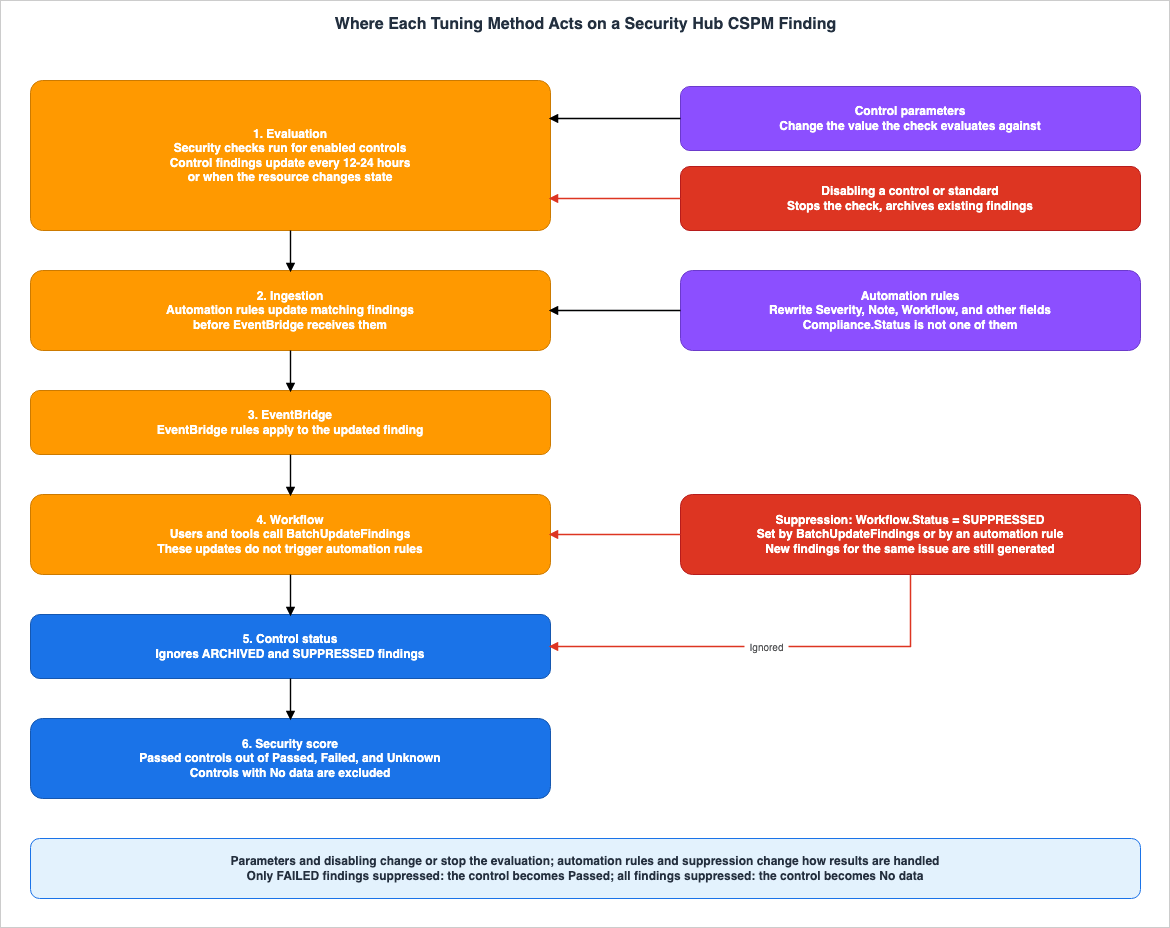
- Parameters act at step 1, evaluation. Because the values used in the evaluation change, the
Compliance.Statusitself changes (Chapter 4). - Disabling also acts at step 1, evaluation. The checks are stopped, and no new findings are generated (Section 6.5).
- Automation rules act at step 2, ingestion. While
Compliance.Statusis not modified, the rules can update severity levels or workflow status (Chapter 5). - Suppression is defined by the workflow status. It is set at step 4 if set manually, or at step 2 if set by an automation rule. In either case, the finding drops out of the control status calculation at step 5 (Sections 6.1 and 6.2).
The fields that automation rules can modify do not include
Compliance (Stated, Section 5.2). Therefore, this article reads that automation rules and suppression are methods for changing how the results are handled, without altering the evaluation itself (Inference). Conversely, parameters and disabling are methods for changing or stopping the evaluation process (Inference).4. Parameters — Moving the Passing Line
This chapter describes what happens when you modify the control parameters.4.1 Re-evaluating with New Values
The parameters page describes the evaluation after a parameter change as follows:When you modify a control parameter value, Security Hub CSPM starts evaluating the control against the value that you specify. If the resource underlying the control satisfies the custom value, Security Hub CSPM generates a PASSED finding. If the resource doesn't satisfy the custom value, Security Hub CSPM generates a FAILED finding.Parameters change the values used in the evaluation (Stated). Resources are then evaluated with these new values, and the result is recorded as a finding, indicating either PASSED or FAILED. This article interprets this to mean that findings resulting from parameter changes are counted in the control status and security score as they are (Inference). The features page also states that security score calculations continue for controls that have had their parameters modified (Stated).
The help panel within the Security Hub CSPM console states that parameters can be adjusted to align controls with business requirements, whether they are currently too lenient or too strict (Stated). This article infers that parameters can therefore be used both to relax the line and to tighten it (Inference).
The parameters page describes the relationship between parameters and suppression as follows:
Instead of suppressing findings for a control, you can customize one or more of its parameters to get findings that suit your security needs.This passage states that parameters can be used in place of suppression (Stated). It does not use the word "recommend." This article does not state that AWS recommends changing parameters. In the sources this article read, the word "recommend" is attached to other methods. The automation rules page recommends disabling controls rather than using automation rules to stop findings (Section 5.6). What's New recommends using declarative policies for organizational management (Section 7.2). The services page recommends enabling both the new Security Hub and Security Hub CSPM (Section 8.1).
The parameters page provides four examples of how parameters can be used (Stated):
- [CloudWatch.16]: Allows you to specify the retention period for log groups.
- [IAM.7]: Allows you to specify values related to the strength of IAM user password policies.
- [EC2.18]: Allows you to specify ports that may be permitted for unrestricted inbound traffic.
- [Lambda.5]: Allows you to specify the minimum number of Availability Zones that a VPC-connected Lambda function can use.
4.2 The Check That Runs After a Change
The parameters page states that changing a parameter triggers a new security check.When you change a parameter value, you also trigger a new security check that evaluates the control based on the new value.New findings are generated based on the new values, and these values are also used in subsequent regular updates (Stated).
However, Security Hub CSPM will not perform checks using the new values if no standards that include that control are enabled (Stated). To have the values evaluated, you must enable at least one relevant standard (Stated).
The parameter values apply to all enabled standards (Stated).
Custom parameter values apply across your enabled standards.Therefore, this article reads that it is not possible to have different values for the same parameter based on different standards (Inference). You cannot change the parameters for controls that are not available in the current Region (Stated). For parameters with a defined range, Security Hub CSPM indicates the acceptable range of values (Stated). The parameter types are eight in total: Boolean, Double, Enum, EnumList, Integer, IntegerList, String, and StringList (Stated).
4.3 The Value Stops Tracking the Default
Security Hub CSPM selects and occasionally updates parameter default values (Stated). When a user modifies a parameter, that value remains unchanged unless the user changes it. The value does not track updates to the default value, even if it matches the current default value (Stated).The parameters page provides an example, ACM.1, as follows:
{
    "SecurityControlId": "ACM.1",
    "Parameters": {
        "daysToExpiration": {
            "ValueType": "CUSTOM",
            "Value": {
                "Integer": 30
            }
        }
    }
}
In this example, the
daysToExpiration value is set to 30, and the current default value is also 30. Even if Security Hub CSPM changes the default value to 14, this example's value will remain at 30 (Stated). If you want the value to follow updates to the default value, set the ValueType to DEFAULT instead of CUSTOM (Stated).Therefore, this article reads that even if a value is the same as the default, if it is defined as
CUSTOM, it will no longer receive updates to the default value (Inference). This article reads that you should choose CUSTOM if you want to fix a parameter to your organization's standards, and DEFAULT if you want to rely on AWS updates (Inference).4.4 Finding the Controls That Support Parameters
Not all controls have parameters. Of the controls that do have parameters, only a portion can have their values modified by the user (Stated).The parameters page instructs users to find the controls that support parameters either in the Security Hub CSPM console under the Controls page, or through the Control reference (Stated). If you are querying programmatically, examine the
CustomizableProperties in the response from ListSecurityControlDefinitions (Stated). The API reference for SecurityControlDefinition describes CustomizableProperties as follows (Stated).Security control properties that you can customize. Currently, only parameter customization is supported for select controls. An empty array is returned for controls that don't support custom properties.The valid values for
CustomizableProperties are limited to Parameters only (Stated). An empty array indicates that the control's parameters cannot be modified (Stated). Because the list of supporting controls may change after the verification date, this article does not copy it.For accounts not using central configuration and for self-managed accounts, parameters are modified on a Region-by-Region basis (Stated, customize page). The modified values apply only to the current account and Region, allowing the same control to use different values in different Regions (Stated). The API used to modify parameters for an account and Region is
UpdateSecurityControl (Stated). The request requires SecurityControlId and Parameters, and you can include LastUpdateReason (Stated). Any parameters not included in the request will retain their current values (Stated, customize page). LastUpdateReason only accepts alphanumeric characters, spaces, hyphens, and underscores (Stated).The customize page provides an example of how to modify parameters using the AWS CLI (Stated).
aws securityhub update-security-control \
  --region us-east-1 \
  --security-control-id ACM.1 \
  --parameters '{"daysToExpiration": {"ValueType": "CUSTOM", "Value": {"Integer": 15}}}' \
  --last-update-reason "Internal compliance requirement"
This article reads that including a reason in
LastUpdateReason allows you to track, at a later date, who made changes and why (Inference).4.5 When Parameters Fit and When They Do Not
This article considers that parameters fit when you agree with the intent of a control but its passing line differs from the organization's standard (Inference). Examples include log retention periods, password lengths, and permitted ports. Even after moving the line, the evaluation continues, and resources that do not meet the standard will remain marked as FAILED (Inference).This article considers that parameters do not fit when the goal is to make an exception for specific resources (Inference). This article reads that the value of a parameter applies to all resources in the account and Region that fall under that control (Inference). Relaxing the line for a single resource also relaxes it for other resources (Inference). Resource-level exceptions are covered in Chapter 5 (automation rules) and Chapter 6 (suppression).
5. Automation Rules — Rewriting at Ingestion
This chapter describes the automation rules of Security Hub CSPM. Chapter 8 describes the automation rules of the new Security Hub.5.1 Which Account Creates Them, Where They Apply, and the Quota
The automation rules page states that only a Security Hub CSPM administrator account can create and manage automation rules (Stated). These rules apply to matching findings in the administrator account and all of its member accounts (Stated). By including member account IDs in the rule's conditions, you can modify or suppress findings in specific member accounts (Stated).Rules apply only in the Region where they are created (Stated).
An automation rule applies only in the AWS Region in which it's created. To apply a rule in multiple Regions, the administrator must create the rule in each Region.To deploy the same rule across multiple Regions, you can use the console, API, AWS CloudFormation, or a script that distributes the rule to those Regions (Stated).
The quota is 100 rules per administrator account (Stated).
Security Hub CSPM currently supports a maximum of 100 automation rules for each administrator account.The word "currently" in this sentence refers to the value as of the verification date, November 24, 2026.
5.2 Conditions and Actions
The conditions for automation rules can utilize fields from ASFF. The table on the automation rules page lists fields such asAwsAccountId, ComplianceSecurityControlId, ComplianceStatus, ResourceId, ResourceTags, SeverityLabel, and WorkflowStatus (Stated). The automations page recommends that, when automation rules target control findings, you filter by control ID rather than title or description (Stated). This is because titles and descriptions can change, while control IDs remain consistent (Stated).Automation rules can modify the following nine ASFF fields (Stated). The
CreateAutomationRule API reference, specifically the FindingFieldsUpdate section, also lists these same nine fields (Stated):ConfidenceCriticalityNoteRelatedFindingsSeverityTypesUserDefinedFieldsVerificationStateWorkflow
These nine fields do not include
Compliance or RecordState (Stated). Therefore, this article reads that automation rules cannot modify the result of a finding's evaluation (Compliance.Status) nor can they archive findings (Inference). The only way an automation rule affects a control's status is by setting the Workflow to SUPPRESSED (Inference, see Section 6.2).5.3 Not Retroactive, and Not Triggered by BatchUpdateFindings
Automation rules evaluate new and updated findings that Security Hub CSPM generates, or ingests through BatchImportFindings, after the rule is created (Stated).An automation rule evaluates new and updated findings that Security Hub CSPM generates or ingests through the BatchImportFindings operation after you create the rule.The same paragraph states that control findings are updated every 12 to 24 hours, or when the resource changes state (Stated). Therefore, this article reads that the rule will also evaluate existing control findings at their next update (Inference). Existing findings are not all rewritten at once right after a rule is created (Inference).
Automation rules evaluate the original finding provided by the source (Stated). If the original finding lacks
AwsAccountName, CompanyName, ProductName, Resource.Tags, or Workflow.Status, Security Hub CSPM will populate these fields before the rule evaluates it (Stated).Automation rules do not trigger with updates performed via
BatchUpdateFindings (Stated).After you create one or more automation rules, the rules aren't triggered if you update finding fields by using the BatchUpdateFindings operation. If you create an automation rule and make a BatchUpdateFindings update that both affect the same finding field, the last update sets the value for that field.The automation rules page provides the following example (Stated).
- Using
BatchUpdateFindings, theWorkflow.Statusof a finding is changed fromNEWtoNOTIFIED. - A rule is created to change the
Workflow.StatusfromNEWtoSUPPRESSED. - The source updates the finding via
BatchImportFindings, setting theWorkflow.Statusback toNEW. - The rule is triggered, and the
Workflow.Statuschanges toSUPPRESSEDbecause the rule was the last one applied.
Therefore, this article reads that the rule may overwrite manually set workflow statuses at the source's next update (Inference). To prevent this, it is necessary to refine the rule's conditions to ensure that it does not apply to manually modified statuses (Inference).
When creating rules in the console, the preview displays the final findings resulting from the rule or update (Stated). In contrast, the rule evaluates the original findings provided by the source (Stated). Therefore, this article reads that the set of findings shown in the preview and the set of findings actually affected by the rule may not always match (Inference).
5.4 Order: RuleOrder, IsTerminal, and Console Numbering
When multiple rules apply to the same finding or field, the rule with the highest RuleOrder value is applied last, determining the final value (Stated).When multiple rule actions relate to the same finding or finding field, the rule with the highest numerical value for rule order applies last and has the ultimate effect.Rules created through the API and AWS CLI are applied in ascending order of
RuleOrder (Stated). If RuleOrder values are the same, the rule with the earliest UpdatedAt is applied first, and the most recently edited rule is applied last (Stated). RuleOrder must be an integer between 1 and 1000 (Stated).If a rule has
IsTerminal set to true, after the rule's action is applied to a matching finding, no other rules are evaluated for that finding (Stated). By default, rules are not terminal (Stated).For rules created in the console, Security Hub CSPM assigns numbers in the order of creation. However, the direction needs attention (Stated).
The most recently created rule has the lowest numerical value for rule order and therefore applies first.In the Security Hub CSPM console, the most recently created rules are assigned the lowest numbers and are applied first (Stated). Therefore, this article reads that an exception rule added later in the console applies first, and older rules can overwrite the same field (Inference). The new Security Hub console assigns numbers in the opposite direction (see Section 8.3). The order can be changed at any time (Stated).
Rules with a
RuleStatus of ENABLED begin applying to findings and finding updates after the rule is created (Stated). The RuleStatus value can be either ENABLED or DISABLED, and to change it after creation, use the BatchUpdateAutomationRules operation (Stated).5.5 Acting Before EventBridge
The automations page describes the order of automation rules and EventBridge rules as follows:Automation rules take effect before EventBridge rules are applied. That is, automation rules are triggered and update a finding before EventBridge receives the finding. EventBridge rules then apply to the updated finding.EventBridge rules process findings that the automation rules have modified (Stated). Therefore, this article reads that if an automation rule elevates the severity to
CRITICAL, EventBridge rules will receive that finding as CRITICAL (Inference). The statement does not say that findings set to SUPPRESSED by automation rules are excluded. No statement was found indicating that EventBridge does not receive SUPPRESSED findings (No statement found). Therefore, this article infers that findings suppressed by automation rules are also processed by EventBridge rules as modified findings (Inference). This article considers that it is safer to filter by Workflow.Status in the EventBridge rules (Inference, Section 6.8).5.6 To Stop Findings, Disable the Control: The Tip on the Automation Rules Page
The tip on the automation rules page states:If you want Security Hub CSPM to stop generating findings for a specific control, we recommend disabling the control instead of using an automation rule.This same tip recommends using automation rules to modify the values of specific fields within findings that meet certain criteria (Stated). The scope of the recommendation is this split: disable the control when you want to stop its findings, and use automation rules when you want to change field values (Stated). This article does not expand on that recommendation to suggest that disabling should be used in all circumstances.
6. Suppression and Disabling — Hiding Findings and Stopping Evaluation
This chapter explains how suppression and disabling affect new findings, control status, and security scores.6.1 Suppression Does Not Prevent New Findings
The workflow status page describes the workflow status as follows:Workflow status is specific to an individual finding and doesn't affect generation of new findings. For example, if you change the workflow status of a finding to SUPPRESSED or RESOLVED, your change doesn't prevent Security Hub CSPM from generating a new finding for the same issue.The workflow status can be one of four states:
NEW, NOTIFIED, SUPPRESSED, and RESOLVED (Stated). The SUPPRESSED status indicates that, after reviewing the finding, it was determined that no action is required (Stated). Even when a finding is suppressed, Security Hub CSPM will continue to generate new findings for the same issue (Stated).The workflow status of a suppressed finding remains
SUPPRESSED, even if the RecordState changes from ARCHIVED to ACTIVE (Stated). The statuses NOTIFIED and RESOLVED will revert to NEW if the Compliance.Status changes from PASSED to FAILED, WARNING, or NOT_AVAILABLE (Stated). The workflow status page does not list SUPPRESSED among the statuses that revert in this way (Stated).The
Workflow section in the API reference includes a statement about SUPPRESSED that is not documented in the user guide (Stated).SUPPRESSED - Indicates that you reviewed the finding and don't believe that any action is needed. The finding is no longer updated.The workflow status page does not contain the phrase "The finding is no longer updated" (No statement found). This article will only present the statement from the API reference, and will not define the relationship between the two statements (Section 9.3).
6.2 Dropping Out of the Control Status Calculation
The control status page describes how the control status is determined.When determining control status, Security Hub CSPM ignores findings that have a RecordState of ARCHIVED and findings that have a Workflow.Status of SUPPRESSED.The control status can be one of five states (Stated):
- Passed: All findings have a
Compliance.StatusofPASSED. - Failed: At least one finding has a
FAILEDstatus. - Unknown: At least one finding has a status of
WARNINGorNOT_AVAILABLE, and none have a status ofFAILED. - No data: There are no findings for that control. Newly enabled controls will be in this state until findings are generated. This state also applies when all findings are
SUPPRESSEDor when the control is not currently supported in the current Region. - Disabled: The control is disabled for the current account and Region. For up to 24 hours after being disabled, the disabled control may still display a
Compliance.Statusvalue for its findings.
For administrator accounts, the control status reflects the status of both the administrator account and all member accounts. If any account has a finding with a
FAILED status, the overall status will be Failed (Stated). If an aggregation Region is configured, the status of all linked Regions will also be reflected (Stated).6.3 Impact on the Security Score
The security score page describes the score as the percentage of Passed controls out of enabled controls (Stated). Enabled controls include those with a status of Passed, Failed, or Unknown. Controls with No data are excluded from the calculation (Stated).Controls with a status of No data are excluded from the score calculation.The same page also states how suppression affects the score.
Security Hub CSPM ignores archived and suppressed findings when calculating control status. This can impact security scores. For example, if you suppress all failed findings for a control, its status becomes Passed, which can in turn improve your security scores.Therefore, suppression has two outcomes (Stated, the control status page and the security score page together).
- Suppress only the FAILED findings for a control, while leaving the PASSED findings unchanged: The control status changes to Passed. The numerator of the score increases by one.
- Suppress all findings for a control: The control status changes to No data. The control is removed from the denominator of the score.
The following example illustrates these two impacts with numerical values (Example by this article). Assume there are 10 enabled controls, with 7 marked as Passed and 3 marked as Failed. The score is currently 70%.
| Action | Passed | Controls Included in Calculation | Score |
|---|---|---|---|
| No action | 7 | 10 | 70% |
| Suppress only the FAILED findings for one Failed control | 8 | 10 | 80% |
| Suppress all findings for one Failed control | 7 | 9 | 78% |
Despite these actions, the underlying resource configuration remains unchanged. Nevertheless, the score increases. Therefore, this article reads that raising the score through suppression is not fixing the issue but hiding it from the calculation (Inference).
The security score page also shows a summary security score, in addition to the score for each individual standard. The summary security score calculation counts controls that fall under multiple standards as a single control (Stated).
6.4 Who Can Suppress
To suppress findings manually, you use the console or theBatchUpdateFindings operation (Stated). The API reference for BatchUpdateFindings states that administrator accounts can update findings for themselves and member accounts, while member accounts can only update their own findings (Stated). A single request can update up to 100 findings (Stated, BatchUpdateFindings page).Regarding findings updated using
BatchUpdateFindings, Security Hub CSPM generates "Security Hub Findings - Imported" events in EventBridge (Stated, BatchUpdateFindings page).The API reference notes that there may be instances where you do not want member accounts to be able to suppress findings, and that you can limit the fields and values that can be updated using IAM policies (Stated). The BatchUpdateFindings page names the condition key for this as
securityhub:ASFFSyntaxPath/<fieldName>, and shows an example that denies updates to the Workflow.Status field (Stated).{
"Sid": "VisualEditor0",
"Effect": "Deny",
"Action": "securityhub:BatchUpdateFindings",
"Resource": "*",
"Condition": {
"Null": {
"securityhub:ASFFSyntaxPath/Workflow.Status": "false"
}
}
}The same page also states that you must specify concrete fields, such as
Workflow.Status, rather than the parent field Workflow (Stated). Therefore, this article considers that suppression is an operation that anyone with securityhub:BatchUpdateFindings can perform, and given its impact on scores, it is an operation that should be handled with carefully defined permissions (Inference).6.5 Disabling Controls
The disabling controls page lists five things that occur when a control is disabled across all standards.Security checks for the control are no longer performed.
No additional findings are generated for the control.
Existing findings are no longer updated for the control.
Existing findings for the control are archived automatically, typically within 3–5 days on a best-effort basis.
Security Hub CSPM removes any related AWS Config rules that it created for the control.Disabling the controls stops the evaluation process (Stated). Existing findings are archived, and archived findings are excluded from the calculation of control status (Stated, Section 6.2). The control status becomes Disabled, and Disabled is not one of the three statuses (Passed, Failed, Unknown) considered in the security score calculation (Stated, Sections 6.2 and 6.3 together).
When a control is disabled for a specific standard only, Security Hub CSPM stops checks only for that standard and excludes it from the security score calculation for that standard (Stated). If the control is enabled for other standards, Security Hub CSPM retains the relevant AWS Config rules and continues checks for those other standards (Stated). The cross-standard page recommends disabling controls across all standards to ensure consistency in the organization (Stated). The specific-standard page also recommends aligning the control's status (enabled or disabled) across all enabled standards that the control applies to (Stated).
To disable a control from all standards within a single account and Region, you must first identify the standards the control is associated with using
ListStandardsControlAssociations, and then update the AssociationStatus to DISABLED using BatchUpdateStandardsControlAssociations (Stated). In the console, you must select a reason for disabling before proceeding (Stated). API examples include specifying a reason in the UpdatedReason field (Stated).The disabling controls page clarifies that disabling a control is not a permanent action.
Disabling a control isn't a permanent action. Suppose you disable a control, and then enable a standard that includes the control. The control is then enabled for that standard.Therefore, a disabled control is enabled again in a standard when you later enable a standard that includes it (Stated). When a standard is enabled, all controls associated with that standard automatically become enabled (Stated).
6.6 Disabling Standards
The disabling standards page describes what happens when a standard is disabled (Stated):- All controls that apply to that standard will be disabled, except for those also associated with another standard that is currently enabled.
- Checks for disabled controls will not be performed, and no new findings will be generated.
- Existing findings for disabled controls will be automatically archived after approximately 3‐5 days.
- AWS Config rules created by Security Hub CSPM will be deleted.
How the number of days is written differs by page (Stated). The disabling controls page states "typically within 3–5 days on a best-effort basis," while the disabling standards page states "approximately 3‐5 days." This article treats both as estimates.
Deleting AWS Config rules typically occurs within a few minutes, but it may take longer (Stated). If the initial deletion fails, Security Hub CSPM will retry every 12 hours (Stated). However, if Security Hub CSPM is disabled, or if there are no other enabled standards, the deletion will not be retried, and you will need to contact AWS Support to remove the rules (Stated).
If you disable a standard and then re-enable it, all controls associated with that standard will be re-enabled (Stated). This information is found on the disabling controls page, not the disabling standards page.
When you disable a standard, Security Hub CSPM doesn't track which controls were disabled for the standard. Consequently, if you later re-enable the same standard, all the controls that apply to it are automatically enabled.Therefore, this article reads that controls previously disabled individually within a standard will be re-enabled without a record when the standard is disabled and then re-enabled (Inference). It is necessary to document any controls that were individually disabled and the reasons for their disabling before temporarily disabling the standard (Inference).
The API for disabling a standard within a single account and Region is
BatchDisableStandards (Stated).6.7 Comparison of Four Methods
Figure 2 shows what each of the four methods removes from control status and the security score.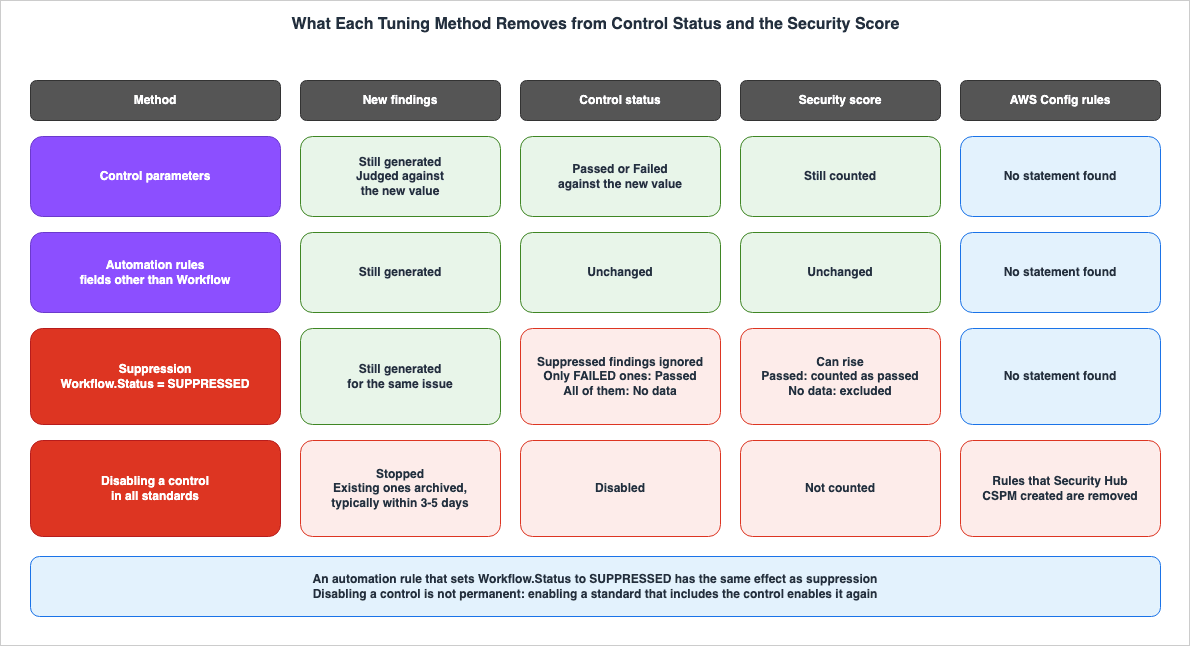
| Method | Stage where it acts | Control status | Security score | New findings | AWS Config rules |
|---|---|---|---|---|---|
| Parameters | Evaluation | Results with new values remain as Passed or Failed (Stated). | Remains in the calculation (Stated, features page). | Continues to appear; evaluated with the new value (Stated). | No statement found. |
| Automation rules | Ingestion | Unchanged unless the rule sets Workflow to SUPPRESSED (Inference). | Likewise, unchanged unless the rule sets SUPPRESSED (Inference). | Continues to appear (Inference). | No statement found. |
Suppression (SUPPRESSED) | Workflow | Suppressed findings are excluded from the calculation. If only FAILED findings are suppressed, Passed; if all are suppressed, No data (Stated). | If Passed, it counts in the numerator; if No data, it is excluded from the calculation. The score can rise either way (Stated). | Continues to appear (Stated). | No statement found. |
| Disabling (control) | Evaluation | Disabled (Stated). | If disabled across all standards, it is excluded from all standard calculations (Inference). | No longer appears. Existing findings are typically archived within 3–5 days (Stated). | Rules created by Security Hub CSPM are deleted (Stated). |
The row for Automation Rules in the table refers to rules that modify fields other than
Workflow (e.g., severity, notes). Rules that set Workflow to SUPPRESSED produce the same result as the Suppression row (Inference).6.8 How This Differs From GuardDuty Suppression Rules
GuardDuty suppression rules automatically archive new findings that meet the specified conditions (Stated, GuardDuty suppression page). Suppressed GuardDuty findings are not sent to Security Hub CSPM, Amazon S3, Amazon Detective, or Amazon EventBridge (Stated). In multi-account environments, only GuardDuty administrators can create suppression rules (Stated).Unlike GuardDuty suppression, Security Hub CSPM suppression does not archive findings; it only modifies the status of the workflow (Stated, Section 6.1). When suppressing findings using
BatchUpdateFindings, an event is triggered in EventBridge (Stated, Section 6.4). This article reads that findings suppressed through automation rules are also treated as modified findings and will trigger EventBridge rules (Inference, Section 5.5). Therefore, this article reads that if you use EventBridge to drive notifications or remediation, your rules can also react to suppressed findings unless the event pattern filters on Workflow.Status (Inference).The following is an example of an EventBridge event pattern that reacts only to findings with a status of
NEW or NOTIFIED (Example by this article).{
"source": ["aws.securityhub"],
"detail-type": ["Security Hub Findings - Imported"],
"detail": {
"findings": {
"RecordState": ["ACTIVE"],
"Workflow": {
"Status": ["NEW", "NOTIFIED"]
}
}
}
}The design of GuardDuty suppression rules and how they handle archiving are discussed in detail in this site's Amazon GuardDuty Extended Threat Detection Architecture.
7. Distributing Across an Organization — Central Configuration and Declarative Policies
This chapter describes two mechanisms for distributing parameters and control settings across an organization: central configuration and declarative policies.7.1 Central Configuration
With central configuration, Security Hub CSPM delegated administrators create configuration policies and associate them with accounts, organizational units (OUs), and the root (Stated, disabling standards page and cross-standard page). These configuration policies apply to the home Region (also referred to as the aggregation Region) and all linked Regions (Stated). Central configuration itself is covered in Section 4.2 of Centralized Logging and Audit Architecture on AWS.7.2 Declarative Policies
What's New announced on November 13, 2026, that Security Hub CSPM now supports AWS Organizations declarative policies (Stated).Declarative policies are now the recommended way to manage Security Hub CSPM across an organization.You can continue to use central configuration until you're ready to migrate.What's New also stated that declarative policies are available in all commercial, AWS GovCloud (US), and China Regions (Stated).
The Organizations policy pages describe what Security Hub CSPM policies define, specifically whether Security Hub CSPM is enabled, which standards are enabled, which controls are enabled or disabled, and the values of configurable parameters (Stated). Standards that a policy does not list as enabled are disabled, and parameters not specified in the policy use their default values (Stated).
Standards that the policy doesn't list as enabled are disabled in Security Hub CSPM. Customizable control parameters that the policy doesn't specify use their default values.Therefore, this article reads that, in accounts governed by a policy, any parameters modified at the account level revert to their default values unless the policy defines them (Inference). If you want parameters to follow the organization's standard, you must define them in the policy (Inference).
The Organizations policy pages list these four things as what the policies define (Stated). No statement was found about distributing automation rules or suppression through declarative policies (No statement found). Therefore, this article reads that the administrator account continues to create automation rules Region by Region (Inference, Section 5.1).
New accounts joining the organization, or accounts moved to an OU with a policy applied, will automatically inherit the policy (Stated). Before using declarative policies, enable trusted access for Security Hub CSPM, and enable the Security Hub CSPM policy type at the root (Stated). Designating a delegated administrator is recommended (Stated).
7.3 The Two Mechanisms Are Mutually Exclusive
The declarative policies page describes the relationship between the two mechanisms as follows:The two mechanisms are mutually exclusive, so they can't apply conflicting configurations to the same accounts.When a Security Hub CSPM declarative policy first governs an account in your organization, Security Hub CSPM disables central configuration for the entire organization.Even if a declarative policy governs only one account, the central configuration becomes disabled across the entire organization (Stated). If the policy is attached to an OU that contains no accounts, the central configuration remains enabled (Stated). When the central configuration is disabled, the following occurs (Stated):
- The organization configuration status returned by
DescribeOrganizationConfigurationbecomesDISABLED. - The configuration policy and its associations are not deleted. The associations have their
AssociationStatusset toDISABLEDand no longer apply. - Declarative policies govern the accounts they are configured to manage.
- Accounts currently governed by the central configuration, and not covered by any declarative policy, become self-managed, retaining their current settings.
- Security Hub CSPM records this change as an event in AWS CloudTrail.
A warning on the same page states that even a narrowly scoped declarative policy applied to a single account can completely replace the central configuration's governance (Stated). It recommends using the import tool to transition without gaps (Stated).
While the central configuration is disabled, calls to
CreateConfigurationPolicy, UpdateConfigurationPolicy, and StartConfigurationPolicyAssociation will be rejected with an error (Stated). As long as any declarative policy is applied anywhere in the organization, calls to UpdateOrganizationConfiguration with a ConfigurationType of CENTRAL will be rejected with a ConflictException (Stated).7.4 Import Tool
The new Security Hub console includes an import tool that converts central configuration settings into equivalent declarative policies (Stated). The procedure on the declarative policies page openshttps://console.aws.amazon.com/securityhub/v2/home, the same console that the procedures on the new Security Hub pages open (Stated). This tool is only accessible to delegated administrators, only in the console, and only while central configuration is enabled (Stated). The import tool creates a declarative policy for each configuration policy, applying it to the same targets as the original association (Stated). In large organizations, this process may take several minutes, and you will need to keep the console page open until it is complete (Stated).The declarative policies page includes a note indicating that, after the migration, declarative policies and cross-Region aggregation are configured independently (Stated). If a declarative policy enables Security Hub CSPM in a Region that is not a linked Region of the aggregation, delegated administrators will not be able to view findings in that Region (Stated).
8. When Used with the New Security Hub
This chapter describes the relationship between the automation rules in Security Hub CSPM and the automation rules in the new Security Hub.8.1 Relationship Between the Two Services
The services page describes the relationship between the two services as follows:AWS Security Hub and AWS Security Hub CSPM are AWS services that protect your cloud environment. The services complement each other.As a best practice, we recommend enabling both services.Findings from Security Hub CSPM are automatically sent to the new Security Hub and associated with findings from other security services (Stated). No statement announcing the end of new sign-ups for Security Hub CSPM or its deprecation was found in the sources this article read (No statement found). This article does not describe Security Hub CSPM as a legacy service being replaced.
8.2 The Rules Are Not Synchronized
The migration blog post states that rules are not synchronized between the two services (Stated).While both services offer similar automation rule functionality, rules aren't synchronized across the two services.The FAQ answers the question of whether automation rules created in Security Hub CSPM will automatically apply to the new Security Hub, stating the following (Stated).
When using Security Hub and Security Hub CSPM together, it is recommended that you migrate any automation rules in CSPM to Security Hub when the rule applies to finding sources that are also present in Security Hub. This ensures that there is visibility in Security Hub to the final finding state and also ensures there is no conflicting use of rules for the same finding type in CSPM and Security Hub.The FAQ's recommendation comes with a condition: it applies when you use both services and the rule applies to finding sources that are also present in the new Security Hub (Stated). This article does not expand that recommendation to mean that all Security Hub CSPM rules should be migrated.
No statement was found regarding how findings marked as
SUPPRESSED in Security Hub CSPM appear in the new Security Hub (No statement found). Because the FAQ gives visibility of the final state in the new Security Hub as a reason to migrate, this article reads that the results of Security Hub CSPM rules are not necessarily visible in the new Security Hub (Inference).8.3 Automation Rules in the New Security Hub
The Security Hub automation rules page describes the automation rules of the new Security Hub as follows (Stated):- Rules are created in a single Region and apply to all configured Regions. If you are using Region aggregation, rules can be created only in the home Region and apply to all linked Regions. For Regions that are not linked, you must create a rule in that Region.
- There are two rule types: finding rules and resource rules. The maximum number of rules, combined, is 100 per account and per Region.
- Conditions use OCSF fields, such as
compliance.control,compliance.status,cloud.account.uid, andresources.tags. - The OCSF fields that can be modified are
Comment,SeverityId, andStatusId. - Rules evaluate new and updated findings after the rule is created. They are not triggered on updates performed using
BatchUpdateFindingsV2. - Like Security Hub CSPM, rules with a higher
RuleOrdervalue are applied last.
The numbering direction in the console is reversed compared to Security Hub CSPM (Stated).
The first rule you create will have a rule order of 1. When more than one rule exists each subsequently created rule will have the next highest available numerical value for rule order.In the new Security Hub console, rules created later have higher numbers and are applied later (Stated). In contrast, in the Security Hub CSPM console, rules created later have lower numbers and are applied earlier (Stated, see Section 5.4). Therefore, this article reads that even if you create rules in the same order in both consoles, the order in which they are applied is reversed (Inference).
The following table outlines the differences between the two automation rule systems.
| Item | Security Hub CSPM | New Security Hub |
|---|---|---|
| Finding Format | ASFF | OCSF |
| API for Creation | CreateAutomationRule | CreateAutomationRuleV2 |
| Applicable Regions | Only the Region where it was created (Stated). | When created in the home Region, it applies to all linked Regions (Stated). |
| Quota | 100 per administrator account (Stated). | 100 per account and per Region. This is the combined total for finding and resource rules (Stated). |
| Modifiable Fields | 9 (Section 5.2) (Stated) | Comment, SeverityId, StatusId (Stated) |
| Non-Triggering Updates | BatchUpdateFindings (Stated) | BatchUpdateFindingsV2 (Stated) |
| Console Numbering | Newer rules get lower numbers and apply first (Stated). | Newer rules get higher numbers and apply later (Stated). |
8.4 Fields That Cannot Be Migrated
The migration blog post notes that due to the differences between ASFF and OCSF, there are rules that cannot be automatically migrated and rules that require review after migration (Stated). The table in the same post indicates that for the ASFF fields used as criteria, the corresponding OCSF fields for the following are listed as "N/A" (Stated):Criticality,GeneratorId,NoteUpdatedAt,NoteUpdatedBy,RelatedFindingsId,RelatedFindingsProductArn,ResourceApplicationArn,ResourceApplicationName,ResourceDetailsOther,UserDefinedFields,VerificationState
The migration blog post states that among the ASFF fields used in rule actions,
Confidence, Criticality, RelatedFindings, Types, UserDefinedFields, and VerificationState do not have corresponding fields in OCSF (Stated). The same table maps Note to "Comment," Severity to "Severity," and "Workflow Status" to "Status" (Stated). The same post also states that this mapping may change in future releases (Stated).The proposed solution in the migration blog post involves identifying automation rules within Security Hub CSPM, converting them to the OCSF format, and creating AWS CloudFormation templates (Stated). The solution does not migrate rules with criteria that have no mapping, and lists them in a report (Stated). For rules with actions that have no mapping, it migrates only the mapped actions and records the rule as partially migrated (Stated).
8.5 EventBridge Detail Types
The Security Hub event types page states that both the new Security Hub and Security Hub CSPM send findings to EventBridge withsource set to aws.securityhub (Stated). To avoid duplicate notifications, the page recommends that EventBridge rules use a detail type specific to the new Security Hub (Stated). The detail type for the new Security Hub is "Findings Imported V2," while the detail type for Security Hub CSPM is "Security Hub Findings - Imported" (Stated).Therefore, if you are using both services, this article reads that EventBridge rules need to separate the two by detail type, not only by
source (Inference).9. Where the Sources Disagree and What They Do Not Say
This chapter lists where the sources disagree, and statements that could not be found.9.1 How to Disable Across Multiple Accounts
The cross-standard page states that using the central configuration is necessary to disable controls across multiple accounts and Regions (Stated).To disable a security control across multiple AWS accounts and AWS Regions, you must use central configuration.The disabling standards page also states that using the central configuration is required to disable standards across multiple accounts and Regions (Stated). In contrast, the Organizations policy pages and the declarative policies page state that declarative policies can also set the enablement of controls and standards, and recommend declarative policies (Stated). This article lists this as Sources disagree. This article reads that, as of the verification date, the disabling pages may not have been updated for the addition of declarative policies (Inference).
9.2 Days Until Archiving
The disabling controls page says typically within 3–5 days on a best-effort basis, and the disabling standards page says approximately 3‐5 days (Stated). Although the timeframes are similar, the phrase "best-effort" appears only in relation to the disabling controls page. This article will treat both as estimates (see Section 6.6).9.3 Is a SUPPRESSED Finding Updated?
The API reference pages for Workflow and WorkflowUpdate state, for SUPPRESSED, "The finding is no longer updated" (Stated). This sentence was not found on the workflow status page (No statement found). The workflow status page states that new findings are still generated for the same issue after suppression (Stated). This article does not decide how the two statements relate.9.4 What Was Not Found
The following were not found in the sources in Section 1.3 (No statement found).- That EventBridge does not receive findings set to
SUPPRESSEDby automation rules. The automations page says EventBridge rules apply to the updated finding and does not say thatSUPPRESSEDfindings are excluded (Section 5.5). - The status displayed for findings marked
SUPPRESSEDin Security Hub CSPM within the new Security Hub (Section 8.2). - Distributing automation rules and suppression through declarative policies (Section 7.2).
- How AWS Config rules behave when parameters are changed or findings are suppressed (Section 6.7).
- The entry related to declarative policies within the document history. As of the verification date, the most recent entry in the document history was November 17, 2026.
- An announcement of the end of new sign-ups for Security Hub CSPM, or of its deprecation (Section 8.1).
10. How to Choose and Failure Patterns
This chapter outlines how to choose among the four methods, and lists failure patterns. The choices in this chapter are this article's judgment (Inference).10.1 How to Choose
| Situation | Method | Reason |
|---|---|---|
| You agree with the control's intent, but the passing line differs from the organization's standards | Parameters | The evaluation continues, and resources that fail the new line stay in the score (Chapter 4). |
| The control is not relevant to the environment | Disable the control (for all standards) | The check will stop. The Tip on the automation rules page recommends this when you want to stop the findings (Section 5.6). |
| The standard itself is unnecessary | Disable the standard | All controls within the standard will stop. Re-enabling the standard will restore all controls (Section 6.6). |
| A specific resource has an approved exception | Set it to SUPPRESSED using an automation rule, and document the reason in the Note field. | You can narrow it to the resource. New findings will continue to appear, so the rule will continue to apply (Chapter 5, Section 6.1). |
| You want to adjust the severity level based on the environment | Use an automation rule to modify the Severity level. | This takes effect before EventBridge and can also affect notification routing (Section 5.5). |
| After investigation, you determine that no action is required for a single finding | Manually set it to SUPPRESSED and document the reason in the Note field. | New findings related to the same issue will continue to appear. The status can be overwritten by a rule when the provider updates the finding (Section 5.3). |
This article considers that, when you choose suppression, you should keep a record (the
Note field and the rule name and description) that explains why the score went up (Inference). If suppression raised the score, that is not a fix but a choice not to count an approved exception (Inference, Section 6.3).10.2 Failure Patterns
- Suppressing to raise the score: If you suppress only FAILED findings, the status becomes Passed. If you suppress everything, the result is No data. In either case, the score rises. The underlying resource is not being corrected (Section 6.3).
- Assuming that suppression stops new findings: New findings for the same issue are still generated (Section 6.1).
- Creating automation rules for a single Region: Security Hub CSPM rules only apply in the Region where they are created (Section 5.1).
- Adding exception rules in the console: In the Security Hub CSPM console, newer rules apply first and can be overwritten by older rules (Section 5.4).
- Manual status changes being reverted by rules: Updates from the provider can override manual status changes made with
BatchUpdateFindings(Section 5.3). - Writing the default value with
CUSTOM: The parameter stops tracking updates to the default value (Section 4.3). - Disabling and then re-enabling standards: Individually disabled controls will all be re-enabled (Section 6.6).
- Testing declarative policies in a single account: This disables central configuration across the entire organization (Section 7.3).
- Parameters not specified in the policy: In accounts governed by declarative policies, these parameters will revert to their default values (Section 7.2).
- Creating EventBridge rules based solely on
source: This will receive findings from both services. Without filtering byWorkflow.Status, it may also react to suppressed findings (Sections 6.8 and 8.5).
11. Frequently Asked Questions About Tuning Security Hub CSPM Findings
Q1. Once a finding is suppressed, does it stop appearing?
No, it does not. The workflow status page states that settingSUPPRESSED does not stop the generation of new findings for the same issue. If you want to stop findings from being generated, disable the control (see Sections 6.1 and 6.5).Q2. Does suppression raise the security score?
Yes, the security score can rise. If only the FAILED findings are suppressed, the control status will change to Passed. If all findings are suppressed, the control becomes No data and is excluded from the calculation. The security score page states that suppressing all FAILED findings may result in a higher score (Section 6.3).Q3. Does AWS recommend changing parameters rather than suppression?
No such recommendation was found. The parameters page states that parameters can be modified instead of suppression. The recommending verb is attached to disabling a control when you want to stop its findings, and to declarative policies for managing an organization (see Section 4.1).Q4. Does creating an automation rule rewrite existing findings?
Not right after the rule is created. Automation rules evaluate new and updated findings that arrive after the rule is created. Control findings are updated every 12 to 24 hours, so this article reads that existing control findings are evaluated at their next update (Section 5.3).Q5. Do the automation rules apply to all Regions?
Security Hub CSPM rules only work in the Region where they are created. Rules in the new Security Hub, when created in the home Region, apply to all linked Regions (see Sections 5.1 and 8.3).Q6. Can a disabled control be enabled again?
Yes, it can. The disabling controls page states that disabling a control is not a permanent action. If you enable a standard that includes that control, it will be re-enabled within that standard (see Section 6.5).Q7. Can declarative policies and central configuration be used side by side in an organization?
No, they cannot. The two are mutually exclusive. When a declarative policy first governs one account, central configuration is disabled across the entire organization (see Section 7.3).Q8. Do the automation rules in Security Hub CSPM also apply to the new Security Hub?
No, they do not. The rules for the two services are not synchronized. The FAQ recommends migrating a rule to the new Security Hub when you use both services and the rule applies to finding sources that are also present in the new Security Hub (see Section 8.2).12. Summary
Before reducing findings in Security Hub CSPM, ensure the following:- You have distinguished whether you are moving the line with parameters, stopping the evaluation by disabling, rewriting with automation rules, or hiding with suppression (Chapter 3).
- When adjusting parameters, you have selected either
CUSTOMorDEFAULTfor theValueTypeand have documented the reason in theLastUpdateReasonfield (Chapter 4). - You have created automation rules across all relevant Regions and have verified the
RuleOrderandIsTerminalsettings (Chapter 5). - You understand that suppression does not stop new findings, drops out of the control status calculation, and can raise the score (Sections 6.1 through 6.3).
- You have identified the entities that have the
securityhub:BatchUpdateFindingspermission and have decided whether to narrow the principals that can suppress withsecurityhub:ASFFSyntaxPath/Workflow.Status(Section 6.4). - Before disabling standards, you have written down each control you disabled individually and the reason (Section 6.6).
- You have configured EventBridge rules to filter based on detail-type and
Workflow.Status(Sections 6.8 and 8.5). - When migrating to declarative policies, you will use the import tool, and you expect that a trial on a single account turns off central configuration for the whole organization (Chapter 7).
- If you use the new Security Hub alongside Security Hub CSPM, you have decided which rules go in which service (Chapter 8).
- You have reopened the pages to confirm that the quotas, the numbers of days, and the relationship between the two services have not changed since the verification date, November 24, 2026 (Section 2.2).
13. References
- Understanding control parameters in Security Hub CSPM - AWS Security Hub
- Customizing control parameter values - AWS Security Hub
- Configuring control parameters - Security Hub CSPM console help panel
- Understanding automation rules in Security Hub CSPM - AWS Security Hub
- Automatically modifying and acting on findings in Security Hub CSPM - AWS Security Hub
- Setting the workflow status of findings in Security Hub CSPM - AWS Security Hub
- Evaluating compliance status and control status - AWS Security Hub
- Calculating security scores - AWS Security Hub
- Disabling controls in Security Hub CSPM - AWS Security Hub
- Disabling a control across standards - AWS Security Hub
- Disabling a control in a specific standard - AWS Security Hub
- Disabling a security standard - AWS Security Hub
- BatchUpdateFindings for customers - AWS Security Hub
- Declarative policies and central configuration in Security Hub CSPM - AWS Security Hub
- What are Security Hub and Security Hub CSPM? - AWS Security Hub
- Automation rules in Security Hub - AWS Security Hub
- EventBridge event types - AWS Security Hub
- Document history for the AWS Security Hub User Guide - AWS Security Hub
- UpdateSecurityControl - AWS Security Hub CSPM
- SecurityControlDefinition - AWS Security Hub CSPM
- CreateAutomationRule - AWS Security Hub CSPM
- BatchUpdateFindings - AWS Security Hub CSPM
- Workflow - AWS Security Hub CSPM
- BatchUpdateFindingsV2 - AWS Security Hub CSPM
- Security Hub CSPM policies - AWS Organizations
- Security Hub CSPM policy syntax and examples - AWS Organizations
- AWS Security Hub CSPM now supports centralized configuration with AWS Organizations declarative policies - AWS What's New
- AWS Security Hub FAQ
- Security Hub CSPM automation rule migration to Security Hub - AWS Security Blog
- Suppression rules in GuardDuty - Amazon GuardDuty
- AWS Security Hub CSPM features
- Centralized Logging and Audit Architecture on AWS - Multi-Account Log Aggregation, Detection, and Query with CloudTrail, Config, Security Hub, and OpenSearch
- AWS Config Rules and Conformance Packs - Compliance Detection, Automated Remediation, and Organizations Deployment
- Detection Engineering on AWS - What a Custom Source Must Satisfy Before a Detection Can Be Written, and What the Detection Still Does Not See
- Amazon GuardDuty Extended Threat Detection Architecture - Attack Sequences, Runtime Monitoring, and Response Automation
- AWS Organization Guardrails - Service Control Policies, Resource Control Policies, and Data Perimeter Design
References:
Tech Blog with curated related content
Written by Hidekazu Konishi