Route 53 API Throttling - Request Rate, Change Throughput, and Why an UPSERT Costs Two Tokens
First Published:
Last Updated:
This article details how many tokens a single
ChangeResourceRecordSets request consumes from each bucket, citing original documentation. It also describes the responses received when throttling occurs, what actions should be retried, why the fix points in opposite directions depending on which limit stopped the request, and that the changes in one request are applied all or none.In conclusion, an
UPSERT operation consumes two tokens from the change throughput bucket. If throttling occurs due to the request rate limit, combining changes into fewer requests resolves the issue. However, if throttling occurs due to the change throughput limit, simply combining requests will not resolve the problem; you must reduce the total change rate.This article is based on a review of the documentation as of November 11, 2026 (Japan Standard Time). It does not include any practical testing or information regarding pricing.
Related articles on this site:
- AWS History and Timeline regarding Amazon Route 53 - Overview, Functions, Features, Summary of Updates, and Introduction
- Amazon Route 53 DNS Architecture Guide - Routing Policies, Resolver, Private Hosted Zones, and Hybrid DNS
- What Consistent Means, Service by Service on AWS - The Same Word, a Different Contract, and What You Must Not Carry Across
- AWS Service Quotas - A Practical Cheat Sheet for Major AWS Services
- Route 53 Health Check and Failover - Common Pitfalls and Designs
- How Elastic Load Balancing Scales - Scaling Rate, Capacity, and Load Balancer Capacity Unit Reservation
- Cell-Based Architecture and Shuffle Sharding on AWS - Blast Radius Reduction Patterns for Large-Scale Workloads
Table of Contents
- 1. Scope and Assumptions
- 2. How to Read the Tables
- 3. Changes Effective July 30, 2026
- 4. Two Independent Limits and the Token Bucket
- 5. Request Rate
- 6. Change Throughput
- 7. Two Rules That Count an UPSERT Twice
- 8. The Response to a Throttled Request, and Retries
- 9. Which Limit Stopped the Request, and Fixes That Point in Opposite Directions
- 10. PriorRequestNotComplete and APIs Outside the Scope
- 11. Where the Sources Disagree and What They Do Not Say
- 12. Failure Modes
- 13. Frequently Asked Questions About Route 53 API Throttling
- 14. Summary
- 15. References
1. Scope and Assumptions
This chapter first defines the intended audience, the scope of this article, the materials referenced, and the terminology used. The following ten points outline the key conclusions.- The Route 53 DNS API has two limits: the request rate and the change throughput. These limits are independent, and a request can be throttled by either (Chapter 4).
- The request rate is governed by two levels: one for the entire account and another specific to each API. Each request consumes one token from each level (Chapter 5).
- The change throughput is limited by a single bucket for the entire account, with a capacity of 1,500 and a refill rate of 100 per second. There is no separate bucket for individual APIs (Chapter 6).
- Change throughput tokens are consumed as follows:
CREATEandDELETEoperations consume 1 token each, whileUPSERToperations consume 2. Creating and deleting hosted zones, and associating or disassociating VPCs, each consume 2 tokens, while all other APIs consume 0 (Chapter 6). - This article reads that a single call to
ChangeResourceRecordSetsconsumes tokens from three buckets: the account-wide request rate bucket, this API's request rate bucket, and the account's change throughput bucket (Inference, Section 4.3). - There are two rules regarding the counting of
UPSERToperations. One rule limits the number of elements and characters per request, while the other governs change throughput tokens. These are separate limits (Chapter 7). - When a request is throttled, the response will return an HTTP 400 status code, along with a
Codevalue ofThrottling. It will not return an HTTP 429 status code (Chapter 8). - If a request is throttled by the request rate limit, combine the changes into fewer requests. If it is throttled by the change throughput limit, reduce the total change rate. The two fixes point in opposite directions (Chapter 9).
- The error
PriorRequestNotCompleteindicates that a previous request for the same hosted zone is still being processed, representing a separate error mechanism (Chapter 10). - The two limits do not apply to the Route 53 Resolver, Route 53 Profiles, or the APIs for domain registration (Chapter 10).
1.1 Intended Audience
This article is intended for the following audience:- Operations personnel who use AWS CloudFormation, AWS CDK, Terraform, or custom scripts to rewrite large numbers of Route 53 records.
- Individuals responsible for migrations or switchovers that require updating a large number of records at once.
- Developers who are reviewing their retry strategies and how they batch changes in response to
ThrottlingorPriorRequestNotCompleteerrors.
This article assumes that readers are considering the following points, and checks each one against the statements in the sources:
- Batching changes into a single request stops requests from being throttled.
- An
UPSERTis counted as a single change, just like aCREATE. - When a request is throttled, an HTTP 429 error is returned.
- Enabling adaptive retry also adapts to the change throughput limit.
PriorRequestNotCompleteis an alternative name for throttling.
1.2 What This Article Covers and What It Does Not
This article addresses two limits related to the Route 53 DNS API (hosted zones, records, and health checks), as well as token counting, the response to a throttled request, retries, how changes are batched, the per-request limits, thePriorRequestNotComplete error, the APIs outside the scope, the change that has applied since July 30, 2026, and the differences between the sources.This article does not cover:
- Pricing
- Limits for Route 53 Resolver, Route 53 Profiles, and domain registration APIs, as well as limits for DNS queries.
- Routing policies, private hosted zones, and hybrid DNS design. This is covered in the Amazon Route 53 DNS Architecture Guide on this site.
- Consistency of changes as they propagate to DNS servers. Section 5.1 of the What Consistent Means, Service by Service on AWS on this site covers this topic.
- Health check evaluation and failover. This is covered in the Route 53 Health Check and Failover on this site.
- A timeline of Route 53 features. This is covered in the AWS History and Timeline regarding Amazon Route 53 on this site.
- The internal implementation of tools such as ExternalDNS and Terraform.
- Methods for intentionally emptying buckets.
1.3 Date of Review and Materials Reviewed
This article was written after reviewing the following materials on November 11, 2026 (Japan Standard Time). In the text, this article refers to them by the English names in parentheses.- Amazon Route 53 Developer Guide: The "Throttling for Amazon Route 53 API requests" section (throttling page).
- Same guide: The "Quotas" section (quotas page).
- Same guide: The "Document history" section (document history).
- Amazon Route 53 API Reference: The sections on
ChangeResourceRecordSets,GetChange, and "Common Error Types" (API reference). - AWS Networking & Content Delivery Blog: The article "Introducing change-based throttling for Amazon Route 53 APIs" (launch blog post).
- AWS re:Post Knowledge Center: The article "How can I avoid Route 53 API throttling errors?" (re:Post article).
- Amazon CloudWatch User Guide: The "AWS API usage metrics" section (CloudWatch usage metrics page).
All materials were reviewed in their original form, as obtained through
curl. While searches were conducted using various search terms and methods, no announcement regarding this change was found on AWS What's New (see Section 3.3).1.4 Terms, and Different Things with the Same Spelling
This article will consistently use the following terms:- Request rate: The maximum number of API requests per second.
- Change throughput: The maximum number of DNS record changes per second.
- Bucket: A container within the token bucket algorithm that holds tokens.
- Maximum capacity: The maximum number of tokens that the bucket can hold. This is also referred to as "burst" in some documentation.
- Refill rate: The number of tokens added to the bucket per second. This is also referred to as "sustained" in some documentation.
- Change: A single element within a
ChangeResourceRecordSetsrequest, representing an action such asCREATE,DELETE, orUPSERT. - Change batch: A list of changes contained within a single
ChangeResourceRecordSetsrequest. - Throttle: To reject requests exceeding the limit with an HTTP 400 error.
The sources read for this article contain different things with the same spelling.
- "Counting
UPSERToperations": The quotas page outlines rules regarding limits on the elements and characters per request, while the throttling page gives the rule on change throughput tokens. This article separates the two in Chapter 7. PriorRequestNotComplete: In Route 53, this is an HTTP 400 error that occurs when a previous request to the same hosted zone is still being processed. Elastic Load Balancing also has an error with the same name; as described on this site's How Elastic Load Balancing Scales, it returns an HTTP 429 error. In this article,PriorRequestNotCompleterefers only to the Route 53 error.- 5 requests per second: Prior to July 30, 2026, this was the default request rate for the Route 53 DNS API. The API limit for Route 53 VPC Resolver on the quotas page is also 5 requests per second. The latter remains a separate, valid limit.
- Throttling: In this article, throttling refers only to throttling API requests. It does not address limits on responses to DNS queries.
- Change: In this article, "change" refers to the
Changeelement. Both the change ID returned byChangeResourceRecordSetsand theGetChangeaction, which returns its status, apply to the whole change batch. - Token: In this article, "token" refers only to tokens within a token bucket. It is not related to authentication tokens.
2. How to Read the Tables
This chapter defines the terms for the state of the sources used in the tables of this article, and how this article writes verification dates and dates.2.1 Terms for the State of the Sources
This article uses six terms to describe the state of the documentation. These terms, including their English spellings, will also be used in the tables.- Stated: The documentation contains a statement regarding the matter.
- Stated as not supported: The documentation explicitly states that the matter is not supported or cannot be used.
- Documentation does not list: While a list or table exists, the specific item is not included. This does not necessarily indicate that the matter is unsupported or unavailable.
- No statement found: Despite searching using different search terms and examining different categories of documentation (as described in Section 1.3), no relevant statement could be found. This does not necessarily indicate that the matter is absent or does not occur.
- Sources disagree: The documentation from two different sources provides conflicting statements regarding the same matter. This includes cases where the statements directly contradict each other, as well as cases where the scope, strength, or subject matter differs, and the text alone does not settle which one applies. This article presents both statements and their sources without designating either as incorrect.
- Inference: This represents an inference made by this article, and is not a statement found in any of the documentation. This article says in the same sentence that it is an inference.
This article distinguishes between "Stated as not supported" and "No statement found." The former refers to a statement in the documentation, while the latter indicates that this article was unable to find a relevant statement.
This article does not call two statements that differ only in what they count "Sources disagree." For example, a statement that one request can hold 1,000 changes and a statement that one request can hold up to 1,000
ResourceRecord elements simply differ in the unit counted (Section 11.1).2.2 How This Article Writes Verification Dates and Dates
The verification date for this article is November 11, 2026 (Japan Standard Time). The values in the throttling page table reflect the values as of the verification date. These values may change after the verification date.This article writes every date with its year. The date when changes are applied and the date when the launch blog post is published are written as separate dates (see Section 3.1).
3. Changes Effective July 30, 2026
This chapter shows what changed and when, and where those dates come from.3.1 The Date of Application and the Date of Publication
The launch blog post was published on November 3, 2026. The launch blog post describes the date from which the changes have applied as follows:Since July 30, 2026, two updates have applied to all Route 53 accounts:
The default API request rate is 10 requests per second (up from 5).
A new change throughput limit of 100 DNS record changes per second (sustained) keeps the service stable for customers.The update has applied since July 30, 2026, and the publication date was November 3, 2026. This article cites the date of application as a statement of the launch blog post. Of the sources in Section 1.3, only the launch blog post gives this date; the throttling page does not give a date.
This site's AWS History and Timeline regarding Amazon Route 53 also places the row for this change on July 30, 2026, and states that this was explained in the launch blog post on November 3, 2026.
3.2 The Two Changes
There are two significant changes:- The default request rate has increased from 5 requests per second to 10 requests per second.
- A change throughput limit was newly added.
In the important note at the top of the page, the throttling page describes this change as follows:
Amazon Route 53 updated its API throttling behavior. The update includes increasing the requests per second limit and introducing change-based throttling.The launch blog post details that the request rate has doubled and calls the new mechanism that measures change throughput "change-based throttling" (CBT).
3.3 Where the Announcement Is
This article searched AWS What's New three times for an announcement of this change, varying the search terms and the type of source, and did not find one (No statement found). This does not indicate that an announcement is absent. The most recent entry in the document history, as of the date of this review, is December 15, 2025, and there are no entries for 2026.4. Two Independent Limits and the Token Bucket
This chapter explains the relationship between the two independent limits and how the token bucket functions.4.1 The Two Limits
The throttling page describes the two limits as follows:Amazon Route 53 throttles API requests on a per-account basis to maintain service stability and ensure fair usage for all customers. Route 53 applies two independent limits:
Request rate: the number of API requests per second.
Change throughput: the number of individual DNS record changes per second, aggregated across the API actions that modify DNS data.
A request can be throttled by either limit.The request rate counts requests. The change throughput counts the DNS record changes within those requests. A request is throttled when it hits either one of the limits.
4.2 Capacity and Refill
The throttling page describes how the two limits function using a token bucket algorithm. For the request rate, tokens are removed from the bucket for each request. For the change throughput, tokens are removed for each change. The bucket is refilled at a fixed rate per second, and any excess tokens that would cause the bucket to exceed its capacity are discarded.The bucket refills at a fixed rate every second, up to its maximum capacity. If refill tokens arrive when the bucket is already full, Route 53 discards them.The bucket's behavior is determined by two values: its capacity and its refill rate. The capacity is the amount the bucket can absorb at once when it is full, and the refill rate is the amount per second that can be sustained indefinitely. The throttling page states that tokens are available for use immediately after being added to the bucket, and that there is no need to wait for the bucket to fill.
The capacity is designed to handle occasional bursts of activity, and does not represent a continuous, maximum throughput. The best practices section of the throttling page states the following:
Rely on burst for occasional spikes, not sustained throughput: Burst capacity accommodates legitimate traffic spikes; it is not a sustained operating ceiling.4.3 The Tokens One Call Takes
Figure 1 illustrates the tokens consumed by a singleChangeResourceRecordSets call.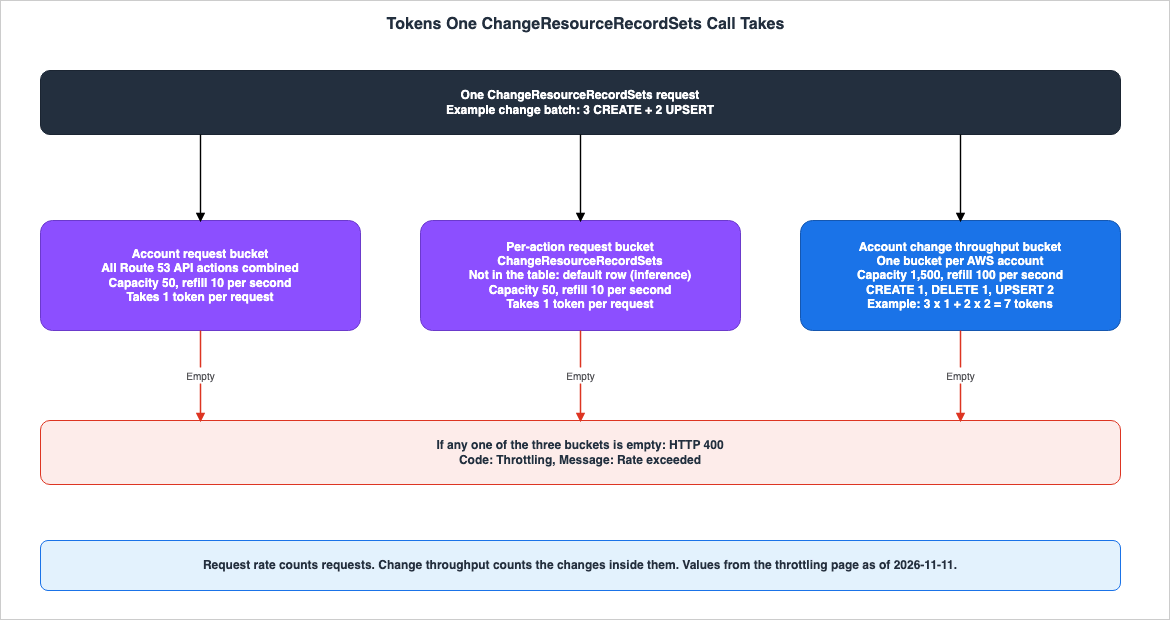
UPSERT operations consume two tokens (see Section 6.2). Therefore, a single ChangeResourceRecordSets call consumes tokens from three buckets: the account-wide request rate bucket, this API's request rate bucket, and the account's change throughput bucket. This is this article's inference (Inference), combining statements in two sections of the throttling page. The throttling page states that requests are throttled if either request rate bucket is empty, and that requests are throttled until the change throughput bucket is refilled when it is exhausted. No statement was found regarding how requests are handled when the number of changes requested exceeds the number of tokens remaining in the change throughput bucket, even though the bucket does not have zero tokens (No statement found).5. Request Rate
This chapter shows the two levels of request rate buckets and the values for each API.5.1 Two Levels of Buckets
The throttling page describes the request rate buckets at two levels.- Account-Wide: All Route 53 API requests from an account draw from a single bucket.
- Account and API-Specific: For each API action, there is a separate bucket.
A request consumes a token from both buckets and is throttled if either bucket is empty.The account-wide bucket is shared across all API requests. For example, requests to check the health status and requests to modify records both draw from the same account-wide bucket. This is evident from the description of the account-wide bucket on the throttling page.
5.2 Values per API
The following table presents all 19 rows of the request rate table on the throttling page. The values are as of November 11, 2026 (Stated).| API Action | Capacity | Refill (per second) |
|---|---|---|
| Route 53 API (Account-wide) | 50 | 10 |
| Default for APIs not listed (per API) | 50 | 10 |
AssociateVPCWithHostedZone | 20 | 5 |
ChangeCidrCollection | 40 | 5 |
CreateCidrCollection | 40 | 5 |
CreateHealthCheck | 50 | 0.5 |
CreateHostedZone | 40 | 2 |
CreateReusableDelegationSet | 40 | 2 |
CreateTrafficPolicyInstance | 1 | 1 |
DeleteCidrCollection | 40 | 5 |
DeleteHealthCheck | 15 | 3 |
DeleteHostedZone | 40 | 5 |
DeleteReusableDelegationSet | 40 | 5 |
DeleteTrafficPolicyInstance | 1 | 1 |
DisassociateVPCFromHostedZone | 10 | 5 |
GetHealthCheckLastFailureReason | 4 | 1 |
GetHealthCheckStatus | 4 | 1 |
UpdateHealthCheck | 50 | 5 |
UpdateTrafficPolicyInstance | 1 | 1 |
The
ChangeResourceRecordSets action is not included in this table. This article reads that the default values in the second row, a capacity of 50 and a refill rate of 10, apply to ChangeResourceRecordSets (Inference).Regarding the refill rate of 0.5 for
CreateHealthCheck, the throttling page states that it is possible to send one CreateHealthCheck per account every 2 seconds, and this value corresponds to the 0.5 shown in the table. This article reads that automation that creates many health checks at once slows to one every 2 seconds after using up the capacity of 50 (Inference).5.3 Sharing with Other Calls from the Same Account
The account-wide bucket applies to all Route 53 API requests made within that account. The re:Post article states that calls made by IAM users in the same account also count against the account-wide limit, and this can impact calls made from the console.API calls from AWS Identity and Access Management (IAM) users in the same account count towards global rate throttling for the account. API calls from these IAM users also impact API calls that are made from the AWS Management Console.The limit value mentioned in the re:Post article is a value that was in effect prior to July 30, 2026 (see Section 11.2). The statement that the bucket is shared aligns with the description of the account-wide bucket on the throttling page. When an Infrastructure as Code (IaC) pipeline, a resident tool such as ExternalDNS, and operators using the console share one account, many requests from one tool can cause the requests of the others to be throttled, this article reads (Inference).
6. Change Throughput
This chapter describes the change throughput bucket and how tokens are counted.6.1 One Bucket per Account
The throttling page describes the change throughput bucket as follows:Change throughput is limited per AWS account, not per API action. All of the following actions draw from one bucket, which has a maximum capacity of 1,500 changes (burst) and refills at 100 changes per second (sustained).This bucket is associated with the account as a whole, and there are no separate buckets for individual APIs. Its capacity is 1,500, and it is refilled at a rate of 100 per second (Stated). This bucket is depleted based on the number of changes within requests, rather than the number of requests themselves.
6.2 Token Counting
The following table is the change throughput token table on the throttling page.| Action | Tokens Required |
|---|---|
ChangeResourceRecordSets | 1 token for each CREATE, 1 token for each DELETE, 2 tokens for each UPSERT |
AssociateVPCWithHostedZone | 2 |
DisassociateVPCFromHostedZone | 2 |
CreateHostedZone | 2 |
DeleteHostedZone | 2 |
The throttling page describes the other APIs as follows.
All other Amazon Route 53 API actions consume no change throughput tokens and are limited only by the request rate.Therefore, for example,
CreateHealthCheck does not take change throughput tokens. The health check API is limited solely by the request rate (Stated).UPSERT is an operation that creates a record if one with the same name and type does not exist, and updates its values if one does. The table on the throttling page assigns 2 tokens to UPSERT, but the page does not provide a reason for this (No statement found).While creating and deleting hosted zones, and associating a VPC with a private hosted zone and disassociating it, do not involve changes to records, they each consume 2 tokens (Stated). Automation that creates many hosted zones uses the same bucket as record changes.
6.3 Two Examples
The throttling page gives the following example:Example: You can submit a single request containing 1,000 changes (a burst), which consumes 1,000 tokens. After the burst, the bucket refills at 100 tokens per second. If you continue submitting 100 changes per second, you can sustain that rate indefinitely. If you attempt to sustain 500 changes per second, the bucket depletes and subsequent requests are throttled until it refills.The launch blog post gives an example that combines the two limits. For instance, if there are 10 requests per second, and each request includes 5 changes, the system consumes 10 request rate tokens and 50 change throughput tokens. Both values remain within their respective limits. However, if there are 10 requests per second, and each request includes 100 changes, the request rate remains within the limit, but the system consumes 1,000 change throughput tokens per second, far above the refill rate of 100.
The launch blog post describes the difference between the two limits as follows:
The request rate controls how frequently you call the API. The change throughput controls how much work those calls collectively represent.7. Two Rules That Count an UPSERT Twice
This chapter differentiates two rules that countUPSERT operations twice. These two rules differ in both what is being counted and the unit of the limit.7.1 The Element and Character Limits for One Request
The quotas page specifies the maximum size for a singleChangeResourceRecordSets request as follows:A request cannot contain more than 1,000 ResourceRecord elements (including alias records). When the value of the Action element is UPSERT, each ResourceRecord element is counted twice.The sum of the number of characters (including spaces) in all Value elements in a request cannot exceed 32,000 characters. When the value of the Action element is UPSERT, each character in a Value element is counted twice.This rule defines the maximum size limit for a single request, and does not include any time-based constraints. The quotas page does not specify what is returned when a request exceeds this limit (No statement found). This article reads that a request made up only of
UPSERT changes for records with one value each can hold up to 500 records, provided it does not reach the character limit first (Inference).7.2 Change Throughput Tokens
The rule on the throttling page, as shown in the table in Section 6.2, is that eachUPSERT takes two tokens from the change throughput bucket. This rule is a per-second limit on the single bucket for the account.If only
UPSERT operations are sent at a rate of 100 per second, the system will consume 200 tokens per second, exceeding the refill rate. If the same number of changes are sent using CREATE operations, the system will consume 100 tokens per second, matching the refill rate. This is this article's inference (Inference), calculated from the table in Section 6.2 and the refill value in Section 6.1.7.3 Differences Between the Two Rules
The following table outlines the differences between the two rules.| Item | Limit for One Request | Change Throughput Tokens |
|---|---|---|
| Page | Quotas page | Throttling page |
| Counting Subject | Elements of ResourceRecord and characters of Value elements | Operations on Change elements |
| Scope | Single request | Across the entire account, per second |
| Limit | 1,000 elements, 32,000 characters | Capacity: 1,500, Refill: 100 per second |
How UPSERT is Counted | Counts elements and characters twice | Two tokens per change |
| Response when Exceeded | No statement found | HTTP 400 and Throttling |
The elements of
ResourceRecord are each individual values within a record. When a single change involves multiple values, the number of elements and the number of tokens do not align, according to this article (Inference). For example, a CREATE operation for an A record with four values consumes one change throughput token, and uses four ResourceRecord elements, according to this article (Inference).The re:Post article's sentence on
UPSERT reads as follows, in the context of the element and character limits:UPSERT requests count twice. There are quotas for the elements and characters in change-resource-record-sets API calls.This article reads that this sentence in the re:Post article was written before July 30, 2026, and does not refer to the change throughput token rule (Inference). The re:Post article currently displays "Updated 3 years ago" as of the date of verification.
8. The Response to a Throttled Request, and Retries
This chapter describes what a throttled request returns, and what to retry and how.8.1 Response
The throttling page describes the response to a throttled request as follows:When a request is throttled, Amazon Route 53 returns an HTTP 400 error (Bad request). The response header also includes a Code element with a value of Throttling and a Message element with a value of Rate exceeded.The HTTP status code is 400, not 429. The
Code value is Throttling, and the Message value is Rate exceeded (Stated).The throttling page has no statement on anything in the response that distinguishes which limit was hit (No statement found). This article therefore reads that a
Throttling response alone does not tell whether the request hit the request rate or the change throughput (Inference). The way of telling them apart in Chapter 9 is an estimate from the number of requests sent and the number of changes.The API reference, under Common Error Types, lists the same HTTP 400 error as
ThrottlingException (see Section 11.2).8.2 What to Retry
The launch blog post narrows down the responses to retry as follows:Retry only HTTP 400 responses with the Throttling error code. Other 400 errors mean the request itself is invalid, and they fail again on retry.HTTP 400 is returned not only for throttled requests but also when the request itself is invalid. According to the launch blog post, the only responses to retry as throttled requests are those whose
Code is Throttling. Both the throttling page and the launch blog post recommend using an exponential backoff to increase the wait time between attempts, and the throttling page suggests defining a maximum wait time and a maximum number of retries, as well as adding a random jitter.PriorRequestNotComplete also returns an HTTP 400 error. The API reference states that when this error is repeatedly returned for the same request, you should wait, increasing the interval, before retrying (see Section 10.1). The launch blog post's statement that other 400 errors fail again on retry does not address PriorRequestNotComplete (see Section 11.1).8.3 What Adaptive Retry Does Not Limit
The throttling page states that the AWS SDK's retry mechanism includes an adaptive mode that adjusts the rate of requests based on throttling, and, for workloads that regularly approach the limits, suggests considering enabling this mode. The launch blog post describes the limitations of this mode as follows:AWS SDKs retry with backoff by default. Adaptive retry mode is opt-in, and it limits how often you send requests, not how many changes they contain.Adaptive retries reduce the frequency with which requests are sent, but do not limit the number of changes contained within a single request. For example, if a request includes 1,000
CREATE operations, even with a reduced frequency, it still needs 1,000 tokens for each attempt, this article reads (Inference). The launch blog post advises that while retries can handle short bursts, operations that consistently send more than 100 changes per second on average should either reduce the rate of changes or request an increase in their limit.8.4 Monitoring
The throttling page indicates that you can monitor by observing HTTP 400 responses in application logs, or by tracking API usage through CloudWatch metrics. The launch blog post specifically mentions looking for HTTP 400 responses with aCode of Throttling in the logs.The throttling page does not list the names of CloudWatch metrics. The table on the CloudWatch usage metrics page, which lists services that send API usage metrics, includes rows for Route 53 Domains and Route 53 Resolver, but does not include a row for Route 53 DNS APIs (Documentation does not list). As of the verification date, this article cannot provide the names and dimensions of the metrics for Route 53 DNS APIs based on the available documentation.
9. Which Limit Stopped the Request, and Fixes That Point in Opposite Directions
This chapter shows that the fix points in opposite directions depending on which limit stopped the request.Figure 2 shows the limit that stopped the request and the fix.
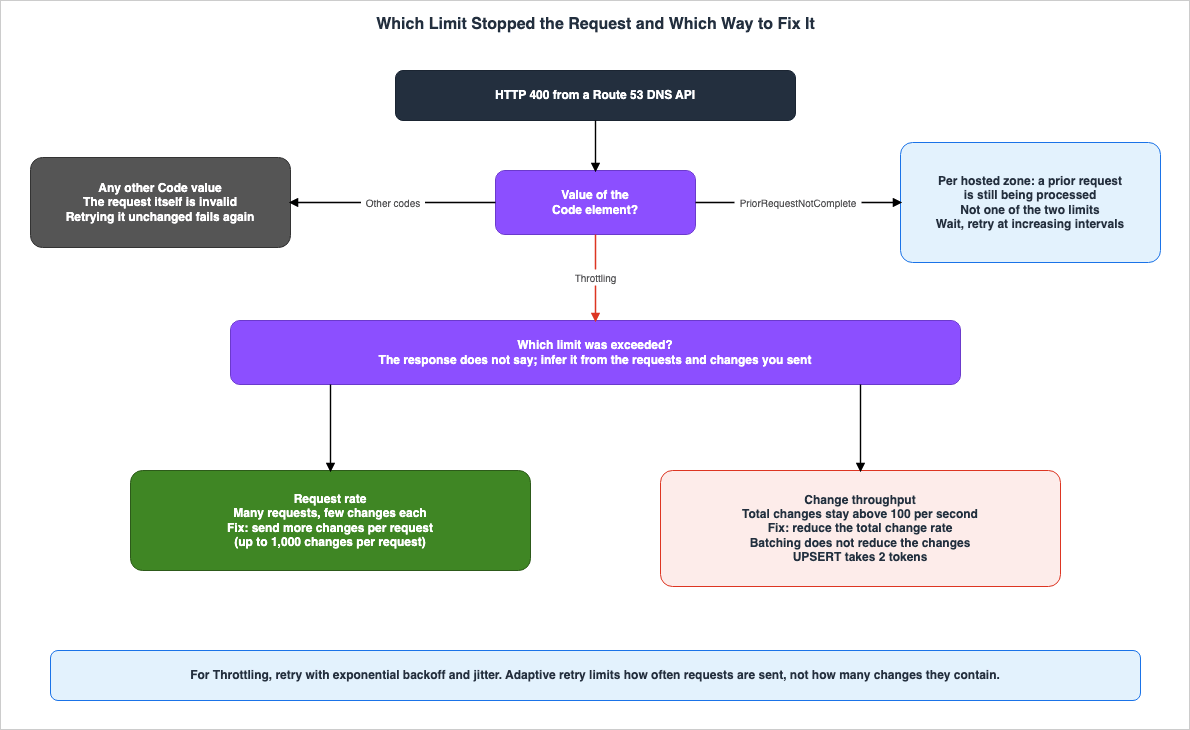
Balance request rate against batch size: If you are throttled by the request rate limit, send more changes per request. If you are throttled by the change throughput limit, reduce your total change rate. Neither very small nor very large batches are optimal on their own.9.1 When Stopped by the Request Rate
Requests stop at the request rate when many requests, each with few changes, are sent. The solution is to consolidate those changes into fewer, larger requests. The launch blog post states that a single request can accommodate up to 1,000 changes. The quotas page counts a different unit, theResourceRecord elements, and counts them twice for UPSERT (Section 7.1).The launch blog post also mentions Infrastructure as Code (IaC) as follows:
If your automation submits fewer than 100 total changes per second, which is typical for most Terraform and AWS CDK deployments, the change throughput limit requires no adjustment to your workflow.This passage is from an AWS blog post and is not from the documentation for Terraform or AWS CDK. The launch blog post notes that when using IaC tools, it is common to send many requests, each containing a small number of changes, and that the main benefit is the doubled request rate.
9.2 When Stopped by the Change Throughput
Requests stop at the change throughput when the total number of changes stays above the refill rate of 100 per second. Batching the changes does not fix this, because batching does not reduce the number of changes. To resolve the issue, you must either reduce the total number of changes or spread them out over time.The launch blog post describes an example of migrating 10,000 A records to a new hosted zone. It suggests submitting changes in batches of 100, once per second, which would consume change throughput tokens at a rate of 100 per second, the same as the refill rate, and the migration completes in 100 seconds. The launch blog post also notes that increasing the number of changes included in each batch will not raise the throughput.
Batching more changes per call doesn’t raise throughput. It only spends the burst sooner, so 10,000 changes finish in about 86 seconds instead of 100. After the burst is spent, throughput stays at 100 changes per second and further calls are throttled.The launch blog post further suggests that for 6,000 changes, it is advisable not to submit them all at once, but rather to spread them out over 60 seconds, maintaining a rate of 100 changes per second.
9.3 A Change Batch Is All or None
The API reference describes the change batch of a singleChangeResourceRecordSets request as follows:Route 53 validates the changes in the request and then either makes all or none of the changes in the change batch request.The best practices section of the throttling page also states that a single request's changes either all succeed or all fail. Therefore, batching changes reduces the request rate tokens, but if one change in the batch fails validation, none of the batch is applied. This article reads that both the request rate and the range of changes that may fail together decide which changes go into one batch (Inference).
GetChange shows whether the changes in a batch have been reflected on the DNS servers by returning a status of PENDING or INSYNC. The consistency of these updates is discussed in Section 5.1 of What Consistent Means, Service by Service on AWS.No statement in the sources in Section 1.3 directly addresses whether the change batch of a throttled request is applied even in part (No statement found).
9.4 The Option of Creating Records in Advance
This site's Cell-Based Architecture and Shuffle Sharding on AWS states that creating DNS records is considered an operation on the control plane, and recommends creating records in batches in advance, rather than on demand. Because the change throughput bucket is one per account, this article reads that keeping work that creates many records away from the time of incident response helps with both limits (Inference).10. PriorRequestNotComplete and APIs Outside the Scope
This chapter describes errors related to a different mechanism than the two previously discussed limits, as well as the APIs to which the two limits do not apply.10.1 A Separate Mechanism per Hosted Zone
The quotas page describesPriorRequestNotComplete as follows. The API reference uses almost the same wording.If Route 53 can't process a request before the next request arrives, it will reject subsequent requests for the same hosted zone and return an HTTP 400 error (Bad request).PriorRequestNotComplete indicates that a previous request to the same hosted zone is still being processed. While the two limits apply to the account, this error applies to a hosted zone. The quotas page describes the Message value in the following way.The request was rejected because Route 53 was still processing a prior request.The API reference describes how this error is handled when it is repeatedly returned for the same request, as follows.
If Route 53 returns this error repeatedly for the same request, we recommend that you wait, in intervals of increasing duration, before you try the request again.The throttling page and the launch blog post do not mention
PriorRequestNotComplete. No statement was found on whether PriorRequestNotComplete takes tokens (No statement found).10.2 APIs Outside the Scope
The launch blog post describes the APIs to which the two limits apply as follows:Note: These limits apply to Route 53 DNS APIs (hosted zones, records, and health checks). They don’t apply to Route 53 Resolver, Route 53 Profiles, or domain registration APIs, which have their own separate limits.The quotas page specifies the API limits for the Route 53 VPC Resolver API, stating that each account can make up to 5 requests per second, per Region. This value is the same as the default value for Route 53 DNS APIs prior to July 30, 2026, but represents a separate limit.
10.3 Requesting a Limit Increase
The throttling page states that you can request an increase in both the request rate and the change throughput limits through AWS Support. The process involves creating a case in the AWS Support Center, selecting "Service limit increase," choosing "Route 53" for the Limit type, and then specifying your current usage and the desired limit. The throttling page's best practices section advises that if you anticipate increased activity, you should request the limit increase before reaching the current limit.The quotas page indicates that you can view Route 53 quotas in Service Quotas and request increases. Neither the throttling page nor the quotas page states whether the two limits are in Service Quotas (Documentation does not list).
11. Where the Sources Disagree and What They Do Not Say
This chapter collects the differences between the sources and the matters for which no statement was found.11.1 Differences Only in Counting or Premise
The following differences are only differences in what is counted or in the premise, and this article does not call them Sources disagree.- 1,000 per request: The launch blog post states that a single
ChangeResourceRecordSetsrequest can accommodate up to 1,000 changes. The quotas page states that a single request can handle up to 1,000ResourceRecordelements, and countsUPSERToperations twice. The unit counted differs: changes in one, and the value elements of records in the other. The throttling page uses an example of a single request containing 1,000 changes, but does not state a limit for a single request. - Retrying HTTP 400 errors: The launch blog post specifies that only HTTP 400 errors with the
Codeset toThrottlingshould be retried, stating that other 400 errors fail again on retry. The API reference recommends that, when thePriorRequestNotCompleteerror is returned repeatedly for the same request, you wait in intervals of increasing duration before retrying. The launch blog post does not addressPriorRequestNotComplete. The throttling page's best practices section recommends delaying and retrying after receiving an HTTP 400 error, without specifying a particularCode. - "Counting
UPSERTtwice": The language in the quotas page refers to rules regarding elements and characters within a single request, and this article reads the re:Post article's sentence the same way (Inference, Section 7.3). In contrast, the throttling page's language refers to the change throughput token rule (see Chapter 7).
11.2 Where the Sources Disagree
- Error Name: The throttling page, the quotas page, and the launch blog post give the
Codevalue asThrottling. The API reference's "Common Error Types" section lists the HTTP 400 error asThrottlingException(Sources disagree). This article does not specify the name of the exception thrown by the SDK. When code branches on the error, check the error name in the documentation for the SDK in use.
ThrottlingException
Your request rate is too high. The AWS SDKs automatically retry requests that receive this exception. Reduce the frequency of requests.
HTTP Status Code: 400- Default Request Rate: The re:Post article gives the request rate limit as 5 requests per second per account. The launch blog post and the throttling page give a default rate of 10 requests per second, effective from July 30, 2026 (Sources disagree). The re:Post article display reads "Updated 3 years ago," which, according to this article, indicates that the article was written before July 30, 2026 (Inference).
Rate throttling happens when the number of API requests is greater than the hard limit of five requests per second, per account.11.3 Items Not Found
The following items could not be found in the materials in Section 1.3, even after searching using different search terms and categories of documentation (No statement found). None of these items indicate the absence of the subject matter or its non-occurrence.- The announcement for this change in AWS What's New, and the document history entry (Section 3.3).
- The reason an
UPSERTtakes two change throughput tokens (Section 6.2). - The response when a single request exceeds the limits for elements or characters (Section 7.1).
- How the system handles cases where the number of tokens remaining in the change throughput bucket is non-zero, but less than the number of changes requested (Section 4.3).
- Anything in a
Throttlingresponse that distinguishes which limit was hit (Section 8.1). - The names and dimensions of the CloudWatch metrics for Route 53 DNS API calls. The CloudWatch usage metrics page does not list an entry for Route 53 DNS API (Documentation does not list, Section 8.4).
- Whether the change batch of a throttled request is applied even in part (Section 9.3).
- Whether
PriorRequestNotCompletetakes tokens from the buckets of the two limits (Section 10.1). - Whether the two limits are listed in Service Quotas (Documentation does not list, Section 10.3).
12. Failure Modes
This chapter collects common misreadings from the statements in Chapters 3 through 11.- The misreading that combining changes into a single request means requests are no longer throttled by either limit: Combining requests reduces the number of request tokens used, but does not reduce the number of changes. When throttled by the change throughput, combining requests does not resolve the issue (Section 9.2).
- The misreading that
UPSERTconsumes only one token, the same asCREATE:UPSERTconsumes two change throughput tokens (Section 6.2). - The misreading that the quotas page stating "
UPSERTis counted twice" and the throttling page stating "UPSERTis 2" refer to the same rule: The former refers to limits on the number of elements and characters within a single request, while the latter is a per-second limit on the account's change throughput tokens (Section 7.3). - The misreading that an HTTP 429 error is returned when a limit is reached: Instead, an HTTP 400 error is returned, with the
Codeset toThrottling(Section 8.1). - The misreading that all HTTP 400 errors should be retried: HTTP 400 errors resulting from an inherently invalid request will continue to fail, even after retries (Section 8.2).
- The misreading that adaptive retries also adapt to the change throughput limit: Adaptive retries limit how often requests are sent, not the number of changes within a request (Section 8.3).
- The misreading that change throughput buckets are specific to each API and each hosted zone: Instead, there is a single bucket per account (Section 6.1).
- The misreading that health check APIs take change throughput tokens: Health check APIs are only limited by the request rate. The request rate refill for
CreateHealthCheckis 0.5 per second (Sections 5.2 and 6.2). - The misreading that creating a hosted zone is not a record change and is therefore not counted in the change throughput:
CreateHostedZoneandDeleteHostedZoneeach consume two tokens (Section 6.2). - The misreading that
PriorRequestNotCompleteis simply another name for throttling: It is a separate mechanism, specific to each hosted zone, indicating that a previous request to the same hosted zone is still being processed (Section 10.1). - The misreading that Route 53 Resolver APIs are also limited to 10 requests per second: The two limits do not apply to Resolver APIs. The quotas page states that the limit for Resolver APIs is 5 requests per second (Section 10.2).
- The misreading that the "5 requests per second" mentioned in the re:Post article refers to the current values for Route 53's DNS APIs: The default, starting July 30, 2026, is 10 requests per second (Section 11.2).
- The misreading that the changes were applied on the launch blog post's publication date, November 3, 2026: The changes were applied starting July 30, 2026 (Section 3.1).
- The misreading that only the valid changes within a batch are applied: Changes within a batch are either all applied, or none are applied (Section 9.3).
13. Frequently Asked Questions About Route 53 API Throttling
This chapter answers the reader assumptions in Section 1.1 using the statements in Chapters 3 through 11.Q1. If changes are combined into one request, will requests no longer be throttled?
If requests are throttled by the request rate, consolidating changes fixes it. However, if the throttling is by the change throughput, consolidating them will not fix it. The throttling page says to put more changes into each request when throttled by the request rate, and to reduce the total change rate when throttled by the change throughput (Chapter 9). The launch blog post notes that even if you increase the number of changes included in a single request, it will not raise the throughput; it will only deplete the capacity more quickly (Section 9.2).Q2. Is an UPSERT, like a CREATE, counted as a single change?
Not for change throughput tokens. The throttling page table assigns one token for CREATE and DELETE, but two tokens for UPSERT (Section 6.2). Furthermore, the quotas page counts the elements and characters of an UPSERT twice (Section 7.1).Q3. If a request is throttled, is an HTTP 429 returned?
No. The throttling page states that an HTTP 400 is returned, with theCode value set to Throttling and the Message value set to Rate exceeded (see Section 8.1). The API reference, under "Common Error Types" (Section 11.2), lists the error name as ThrottlingException.Q4. If adaptive retry is enabled, does it also adapt to the change throughput limit?
No. The launch blog post states that adaptive retry mode controls the frequency of requests, but not the number of changes each request contains (Section 8.3). Both the number of changes included in each request and the rate at which those requests are sent determine the change throughput.Q5. Is PriorRequestNotComplete another name for throttling?
No. The quotas page and the API reference state that this error occurs when a subsequent request is rejected because a previous request to the same hosted zone is still being processed (Section 10.1). The two limits relate to the account, while PriorRequestNotComplete pertains to the hosted zone. The API reference also advises that when this error is repeatedly returned, users should wait, gradually increasing the interval, before retrying.Q6. Did the Route 53 Resolver API also go up to 10 requests per second?
The launch blog post states that the two limits do not apply to Route 53 Resolver, Route 53 Profiles, and the APIs for domain registration (Section 10.2). The quotas page states that the API limit for Route 53 VPC Resolver is 5 requests per second, per account, per Region.Q7. When did this change take effect?
The launch blog post states that the change has applied to all Route 53 accounts since July 30, 2026. The launch blog post was published on November 3, 2026 (Section 3.1). This article was unable to find an AWS What's New announcement regarding this change (Section 3.3).Q8. Can the limits be raised?
The throttling page states that you can request AWS Support to increase both the request rate limit and the change throughput limit (Section 10.3). Whether the two limits are in Service Quotas is not in the sources (Documentation does not list).14. Summary
Before building a system to make large-scale changes to Route 53 records, ensure the following:- You expect a single
ChangeResourceRecordSetsrequest to take tokens from three buckets: the account-wide request rate bucket, this API's request rate bucket, and the account's change throughput bucket (Section 4.3). - You have counted the total number of changes as 2 for each
UPSERTand 1 for eachCREATEandDELETE, and compared it with the refill rate of 100 per second (Chapter 6, Section 7.2). - You have checked the size of each request, separately from the change throughput, against the limits of 1,000
ResourceRecordelements and 32,000 characters.UPSERToperations count elements and characters twice (Section 7.1). - Retries are limited to HTTP 400 errors with the
Codeset toThrottlingand toPriorRequestNotCompleteerrors, using exponential backoff with jitter (Section 8.2, Section 10.1). - You do not expect adaptive retry alone to keep requests within the change throughput limit (Section 8.3).
- The fix is chosen by the limit: batch the changes when the request rate limit is hit, and reduce the total change rate when the change throughput limit is hit (Chapter 9).
- The changes put into one batch are decided by the range of changes that may fail together (Section 9.3).
- You expect Infrastructure as Code (IaC), resident tools, and the console in the same account to use the same account-wide bucket (Section 5.3).
- You have reopened the throttling page and checked that the values in its tables have not changed since the verification date of November 11, 2026 (Section 2.2).
15. References
- Throttling for Amazon Route 53 API requests - Amazon Route 53
- Quotas - Amazon Route 53
- Document history - Amazon Route 53
- ChangeResourceRecordSets - Amazon Route 53
- GetChange - Amazon Route 53
- Common Error Types - Amazon Route 53
- Introducing change-based throttling for Amazon Route 53 APIs - AWS Networking & Content Delivery Blog
- How can I avoid Route 53 API throttling errors? - AWS re:Post
- AWS API usage metrics - Amazon CloudWatch
- AWS History and Timeline regarding Amazon Route 53 - Overview, Functions, Features, Summary of Updates, and Introduction
- Amazon Route 53 DNS Architecture Guide - Routing Policies, Resolver, Private Hosted Zones, and Hybrid DNS
- What Consistent Means, Service by Service on AWS - The Same Word, a Different Contract, and What You Must Not Carry Across
- AWS Service Quotas - A Practical Cheat Sheet for Major AWS Services
- Route 53 Health Check and Failover - Common Pitfalls and Designs
- How Elastic Load Balancing Scales - Scaling Rate, Capacity, and Load Balancer Capacity Unit Reservation
- Cell-Based Architecture and Shuffle Sharding on AWS - Blast Radius Reduction Patterns for Large-Scale Workloads
References:
Tech Blog with curated related content
Written by Hidekazu Konishi