Amazon Bedrock Knowledge Bases Ingestion and Isolation Patterns - Direct Ingestion, Sync Strategies, S3 Metadata Design, and Tenant Boundaries
First Published:
Last Updated:
The read-side counterpart — chunking strategies, hybrid search, metadata filtering at query time, reranking, and query decomposition — is covered in Amazon Bedrock Knowledge Bases Retrieval Quality Engineering. The whole-system RAG architecture (ingestion to generation to evaluation as one design) is in Amazon Bedrock RAG Architecture Guide. This article stays on the ingestion and isolation layer: the operations of getting data in, keeping it current, and keeping it separate.
1. Introduction: What You Put In Decides What You Can Get Out
A knowledge base has two sides that mirror each other. The read side answers "given a query, which passages come back?" The write side answers "which passages exist to be returned, how current are they, and which of them is this caller allowed to see?" The read side is tuned per request and is cheap to change. The write side is an operational pipeline with jobs, freshness lag, failure modes, and physical layout decisions that are expensive to change once data is loaded. Getting the write side wrong produces symptoms that look like retrieval bugs — "the new document doesn't come up", "a deleted record still appears", "tenant A can see tenant B's answer" — but none of them are fixed by touching a query-time knob.The scope of this article is the write side and only the write side:
- How ingestion works internally, and what a sync job actually does.
- The three ways to keep a knowledge base current — scheduled sync, event-driven sync, and direct ingestion — and how to choose among them.
- The direct ingestion API, which writes to the index without a sync job, for near-real-time updates.
- How to design the S3 sidecar metadata that later powers filtering and tenant isolation.
- What happens on updates, deletions, and embedding-model changes, and the traps in each.
- How ingestion design draws isolation boundaries: metadata filters, multiple knowledge bases, and account boundaries.
- How to monitor ingestion and how to diagnose the two classic failures ("updated but not searchable", "deleted but still there").
It deliberately does not re-derive retrieval tuning, the end-to-end RAG architecture, chunking-strategy selection, or vector-store selection. Those are each their own topic:
- Retrieval tuning (chunking, hybrid search, query-time metadata filtering, reranking): Amazon Bedrock Knowledge Bases Retrieval Quality Engineering
- Whole RAG architecture (ingestion to generation to evaluation): Amazon Bedrock RAG Architecture Guide
- Choosing a vector store and understanding index internals: Vector Database Selection on AWS
- Multi-tenant SaaS as a whole (identity, ABAC, per-tenant guardrails, usage metering): Multi-Tenant Generative AI SaaS Architecture on AWS
- Terminology: Amazon Bedrock Glossary
Where this article touches isolation, it does so purely from the ingestion-design angle: which partitioning unit to ingest into and how to lay out the physical data. The authorization mechanics — how a caller's identity becomes a scoped session, how ABAC enforces the boundary, why a filter is a quality control and not a complete security boundary by itself — belong to the multi-tenant SaaS article, and are delegated there rather than repeated here.
A note on scope: two Knowledge Bases products now coexist
One scoping point up front, because it decides which mechanisms in this article apply to you. As of 2026-06-17, Amazon Bedrock offers two distinct Knowledge Bases products:- Customer-managed Knowledge Bases — the original product (generally available since 2023). You own the vector store, the embedding model, the chunking strategy, and the ingestion mechanics: you run sync jobs, you can push documents directly through the API, and you design the S3 layout and sidecar metadata yourself.
- Amazon Bedrock Managed Knowledge Base — a newer, more fully managed product (generally available since 2026-06-17). AWS manages the vector store, embeddings, reranker, and data syncing for you across a fixed set of native connectors. The construction pages for customer-managed knowledge bases now carry a banner recommending the managed product for a lower-overhead experience; it is a recommendation, not a deprecation — the customer-managed product remains fully supported.
This article covers Customer-managed Knowledge Bases, because ingestion and isolation are things you operate only when the mechanics are exposed to you. If your priority is minimal operational overhead rather than control over sync timing, S3 layout, and direct API ingestion, evaluate the managed product first. The techniques below assume you have deliberately chosen the customer-managed path — most often because you need a specific vector store, event-driven or near-real-time freshness, or account-level data boundaries that you control end to end.
2. How Ingestion Works in Knowledge Bases
To operate ingestion you need a model of what a knowledge base does when it "ingests", and a clear separation between the two moments when data moves: the offline pipeline that builds the index, and the online pipeline that reads it. This article is about the first one.2.1 The ingestion pipeline
A data source is attached to a knowledge base. The most common and most controllable data source is an Amazon S3 prefix, but connectors also exist for SharePoint, Confluence, Salesforce, web crawling (all four of which are, as of this writing, in preview for customer-managed knowledge bases and limited to Amazon OpenSearch Serverless vector stores), and a custom data source that you feed through the API. When a data source is ingested, every document runs through the same four stages:- Parse — the raw file is turned into text. The default is a built-in text extractor; for documents whose meaning lives in tables, forms, or figures, foundation-model parsing can be enabled so layout survives into the text.
- Chunk — the text is split into passages according to the chunking strategy configured on the data source (fixed-size, semantic, hierarchical, custom via a Lambda transformation, or none). Chunking-strategy selection is a retrieval-quality decision and is covered in the retrieval article; here it matters only because it is set at ingestion time and baked into the index.
- Embed — each chunk is turned into a vector by the embedding model configured on the knowledge base.
- Index — the vector, the chunk text, and the chunk's metadata are written into the vector store.
The crucial framing: this entire pipeline runs during an ingestion job — a "sync" — not at query time. Nothing about a document is reflected in retrieval until an ingestion job has parsed, chunked, embedded, and indexed it. That is the source of the freshness lag every ingestion strategy in Section 3 is trying to manage.
2.2 What a sync job actually does
When you sync an S3 (or connector) data source, Bedrock does not blindly reprocess everything. The ingestion job is incremental: the connector crawls the data source, compares each document against what is already indexed, and acts only on the difference. The behavior per document is well defined:* You can sort the table by clicking on the column name.
| Scenario | What the sync job does |
|---|---|
| No changes detected | The document is skipped. |
| Content or metadata changed | The document is re-ingested: re-parsed, re-chunked, re-embedded, and re-indexed. |
| New document added | Only the new document is ingested. |
| Document deleted from the source | The document's chunks are removed from the vector store. |
Two consequences follow. First, for content changes, re-ingestion is the unit of change — the full parse-chunk-embed-index path re-runs for that document. Metadata-only edits are the documented carve-out: when only the
.metadata.json file changes, the associated content is not a CSV file, and the data source uses no custom transformation Lambda function, Amazon Bedrock applies a metadata-only optimization that merges the new metadata into the existing vector embeddings without calling the embedding model. If any of those conditions fails, the document is fully re-ingested — CSV files in particular are always re-ingested on metadata changes, because their column structure is controlled from the metadata (Section 5). Second, an ingestion job is idempotent with respect to the source: running it again when nothing changed is a no-op that skips every document. That is what makes it safe to trigger syncs generously in an automated pipeline.You drive sync jobs with the Agents for Amazon Bedrock build-time API (the
bedrock-agent client):import boto3
agent = boto3.client("bedrock-agent")
# Start an incremental ingestion job for one data source
resp = agent.start_ingestion_job(
knowledgeBaseId="KB1234567890",
dataSourceId="DS1234567890",
description="nightly-sync",
)
job_id = resp["ingestionJob"]["ingestionJobId"]
# Track it to completion
job = agent.get_ingestion_job(
knowledgeBaseId="KB1234567890",
dataSourceId="DS1234567890",
ingestionJobId=job_id,
)
print(job["ingestionJob"]["status"]) # STARTING | IN_PROGRESS | COMPLETE | FAILED
print(job["ingestionJob"]["statistics"]) # per-document counts (see Section 8)StopIngestionJob (cancel a running job — you can restart later to ingest the remainder) and ListIngestionJobs (enumerate jobs for a data source, filterable by status and sortable by start time). These four operations — StartIngestionJob, StopIngestionJob, GetIngestionJob, ListIngestionJobs — are the entire sync control surface.2.3 The one map to keep in your head
The rest of this article hangs off a single distinction: a sync job reconciles a data source against the index; direct ingestion writes to the index without a sync job. Everything else — freshness strategy, deletion behavior, isolation layout — is a consequence of which of those two paths a change takes. The figure below shows both paths writing into the same vector store.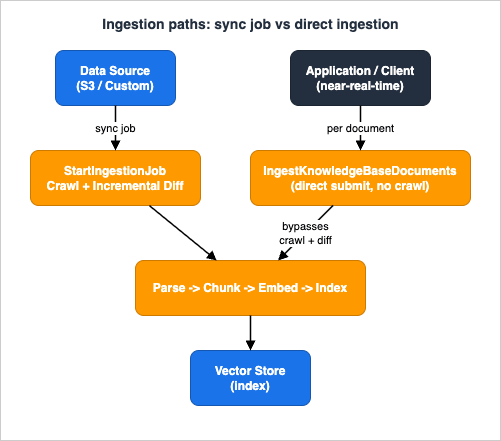
3. Sync Strategies: Scheduled, Event-Driven, and Direct Ingestion
Because ingestion is a job and not a continuous process, "how fresh is the knowledge base?" is a design decision, not a given. There are three ways to keep a customer-managed knowledge base current, and they trade freshness against operational load in different ways.3.1 Scheduled sync
The simplest strategy is to runStartIngestionJob on a fixed cadence — hourly, nightly, weekly — typically from an Amazon EventBridge Scheduler rule that invokes a small Lambda function. Freshness is bounded by the interval: a document added just after a nightly sync is invisible until the next night. Load is predictable and batched, which is exactly what you want for large corpora that change slowly (policy libraries, product manuals, archived tickets). Scheduled sync is the right default when a freshness lag measured in hours is acceptable and the corpus is too large to reprocess reactively on every change.3.2 Event-driven sync
When freshness needs to be measured in minutes rather than hours, drive the sync off the change itself. An S3 upload emits an event (via S3 Event Notifications or Amazon EventBridge); a Lambda function receives it and callsStartIngestionJob. The knowledge base re-syncs shortly after each change instead of on a clock.The trap here is job concurrency, and it is a real one. Ingestion jobs are quota-limited — as a customer-managed knowledge base, concurrency is bounded per account, per knowledge base, and per data source (historically a small number; confirm the current values in the Amazon Bedrock service quotas reference rather than hard-coding an assumption).
StartIngestionJob itself is also request-rate-limited per Region (again, confirm the current rate in the same quotas reference). A naive "one event, one sync" handler will therefore fail under a burst — a content team publishing forty files at release time will generate forty near-simultaneous StartIngestionJob calls, most of which are rejected or queued.The fix is to coalesce: buffer events over a short window and launch a single sync per window instead of one per event. Because a sync is incremental, one job started after a burst settles picks up all the changed documents at once — you lose nothing by waiting a minute for the burst to end. A common shape is an Amazon SQS queue with a batching window between the S3 events and the Lambda that calls
StartIngestionJob, with the Lambda checking whether a job is already running (ListIngestionJobs filtered to IN_PROGRESS) and skipping if so.3.3 Direct ingestion
For the freshest tier — near-real-time updates where even a minute of coalescing lag is too much — a sync job is the wrong tool, because the job's whole value (reconciling an entire data source) is exactly the overhead you want to skip when a single record changes. Direct ingestion writes one document (or a small batch) straight into the vector store through theKnowledgeBaseDocuments API, with no crawl and no diff. This is the subject of Section 4.3.4 Choosing among the three
The decision is a function of three variables: how often the data changes, how fresh retrieval must be, and how large the change set is.* You can sort the table by clicking on the column name.
| Strategy | Freshness | Best when | Watch out for |
|---|---|---|---|
| Scheduled sync | Bounded by the interval (hours) | Large, slowly-changing corpora; predictable batch load | Freshness lag; a full-source crawl even when little changed |
| Event-driven sync | Minutes | Moderate change rate; freshness matters but not per-second | Job-concurrency limits and the StartIngestionJob rate limit — coalesce bursts |
| Direct ingestion | Seconds (no job) | High-value, frequently-updated records; small change sets (inventory, breaking news, live prices) | S3-source changes are not written back to S3 (Section 4); per-call document limits |
These are not mutually exclusive. A production system commonly runs a nightly scheduled sync as a backstop that reconciles the whole source, plus direct ingestion for the handful of records that must be current within seconds. The scheduled job guarantees eventual consistency of the full corpus; direct ingestion handles the hot path. One coordination rule makes the combination safe: AWS explicitly warns against submitting an
IngestKnowledgeBaseDocuments request and a StartIngestionJob request at the same time. Serialize the two paths — pause or queue direct-ingestion calls while a sync job is running (gate both behind a per-data-source lock, or check the job status before dispatching), and let the hot path resume once the job completes.4. Direct Ingestion for Near-Real-Time Updates
Direct ingestion is the customer-managed feature that most sharply separates "operating a knowledge base" from "building one once and syncing it". It deserves its own section because its semantics differ meaningfully between the two data-source types it supports.4.1 What it is and what it supports
Direct ingestion indexes documents you submit directly into the vector store, skipping the step of putting them in a data source and running a sync job. It is exposed through theKnowledgeBaseDocuments API — principally IngestKnowledgeBaseDocuments (add/update) and DeleteKnowledgeBaseDocuments (remove), with companion operations to list and retrieve the documents currently indexed. It works only with two data-source types:* You can sort the table by clicking on the column name.
| Data source type | Document defined inline | Document referenced in S3 |
|---|---|---|
| Amazon S3 | No | Yes |
| Custom | Yes | Yes |
Per-call limits are modest and worth planning around: the console lets you ingest up to 10 documents directly, and the
IngestKnowledgeBaseDocuments API accepts only a small batch per request — the user guide states up to 25 documents while the API reference caps the documents array at 10, so confirm the current limit and size batches conservatively. For anything larger, batch across calls or fall back to a sync job. If you submit a document whose identifier or S3 location already exists in the knowledge base, the existing content is overwritten — direct ingestion is an upsert.4.2 The custom data source: no sync, ever
A custom data source has no external store to reconcile against; it exists so that direct ingestion can be the only way documents enter. Add, update, or delete documents with theKnowledgeBaseDocuments operations and they become part of both the custom data source and the knowledge base in a single step. You never call StartIngestionJob for a custom data source. This is the cleanest model for streaming and application-driven ingestion — an application that produces records (support-ticket summaries, generated documents, IoT events) writes them straight to the index as they are produced.import boto3
agent = boto3.client("bedrock-agent")
agent.ingest_knowledge_base_documents(
knowledgeBaseId="KB1234567890",
dataSourceId="DS_CUSTOM_0001",
documents=[
{
"content": {
"dataSourceType": "CUSTOM",
"custom": {
"customDocumentIdentifier": {"id": "ticket-88213"},
"sourceType": "IN_LINE",
"inlineContent": {
"type": "TEXT",
"textContent": {
"data": "Resolution summary for ticket 88213: ...",
},
},
},
},
"metadata": {
"type": "IN_LINE_ATTRIBUTE",
"inlineAttributes": [
{"key": "tenant_id", "value": {"type": "STRING", "stringValue": "acme"}},
{"key": "product", "value": {"type": "STRING", "stringValue": "billing"}},
],
},
}
],
)DeleteKnowledgeBaseDocuments with the document identifiers removes the chunks from the index and from the custom data source at once.4.3 The S3 data source: the write-back trap
Direct ingestion also works against an S3 data source, and here is the single most important operational caveat in this section: for an S3 data source, changes you index through theKnowledgeBaseDocuments API are not reflected back into the S3 location. You have made a change immediately available in retrieval, but the S3 bucket — the source of truth for the next sync — still has the old content (or lacks the new document entirely). AWS states this plainly, recommending that you also add such documents to the S3 data source so they are not removed or overwritten when you next sync.That creates a consistency hazard. The next
StartIngestionJob reconciles the index against S3, and it will happily undo your direct change: if you direct-deleted a document but left the object in S3, the sync re-ingests it; if you direct-added a document that is not in S3, the sync's diff may treat it inconsistently. The correct pattern for an S3 data source is to treat direct ingestion as the fast path and S3 as the durable path, and keep them in step: after a direct change, also update the S3 object (put the new version, or delete the removed one) so the next sync agrees with the index. Direct ingestion buys you seconds-level freshness; the follow-up S3 write buys you durability and consistency with the reconciling sync.# Fast path: make the change visible in retrieval immediately
agent.ingest_knowledge_base_documents(
knowledgeBaseId="KB1234567890",
dataSourceId="DS_S3_0001",
documents=[
{
"content": {
"dataSourceType": "S3",
"s3": {"s3Location": {"uri": "s3://my-kb-bucket/live/sku-4471.txt"}},
}
}
],
)
# Durable path: keep S3 (the reconciliation source of truth) in step
s3 = boto3.client("s3")
s3.put_object(
Bucket="my-kb-bucket",
Key="live/sku-4471.txt",
Body=b"In stock: 42 units. Updated 2026-07-14T09:15Z.",
)4.4 What direct ingestion is for — and what it isn't
Direct ingestion suits data that is high-value, small-per-change, and freshness-critical: live inventory, price changes, breaking operational status, records produced by an application in real time. It is a poor fit for bulk loads (per-call document limits make it slow and chatty for thousands of files — sync a data source instead) and for anything where a few minutes of lag is acceptable (event-driven sync is simpler and keeps S3 authoritative without a write-back dance).5. S3 Metadata Design
Metadata is where ingestion design and retrieval quality meet. At query time, filtering restricts results to a partition — this year's documents, this tenant's documents, this department's documents. But a filter can only reference an attribute that was attached at ingestion time. The query-time filter operators and their per-store support are covered in the retrieval article; this section is about the other half of the contract: designing and attaching the metadata itself, which is an ingestion decision you cannot defer.5.1 The sidecar metadata file
For an Amazon S3 data source, metadata is attached with a sidecar JSON file that sits next to the source document and shares its name with.metadata.json appended. For a document at documents/legal/contract.pdf, the metadata file is documents/legal/contract.pdf.metadata.json, stored in the same folder. The file must not exceed 10 KB. Its shape is a metadataAttributes map, where each attribute carries a typed value and a flag controlling whether it participates in the embedding:{
"metadataAttributes": {
"tenant_id": {
"value": { "type": "STRING", "stringValue": "acme" },
"includeForEmbedding": false
},
"department": {
"value": { "type": "STRING", "stringValue": "legal" },
"includeForEmbedding": true
},
"effective_date": {
"value": { "type": "NUMBER", "numberValue": 20230115 },
"includeForEmbedding": false
},
"language": {
"value": { "type": "STRING", "stringValue": "en" },
"includeForEmbedding": false
},
"is_current": {
"value": { "type": "BOOLEAN", "booleanValue": true },
"includeForEmbedding": false
}
}
}type is one of STRING, NUMBER, BOOLEAN, or STRING_LIST (a list of up to ten strings, useful with the in filter operator); the sidecar format supports all four types plus the includeForEmbedding option. The attribute values become filterable fields on every chunk derived from that document. If the vector store is an Amazon OpenSearch Serverless index, the index must use the faiss engine for metadata filtering to work; the older nmslib engine does not support it. CSV data sources have a separate, record-based metadata mechanism (a <filename>.csv.metadata.json file that maps some columns to content and others to metadata) — that is distinct from the per-document sidecar format shown here.5.2 The includeForEmbedding decision
includeForEmbedding is the one field in the metadata file that changes retrieval behavior, and it is easy to get wrong because both values "work". The distinction:includeForEmbedding: false— only the chunk text is embedded. The metadata is stored and available for filtering, but does not influence semantic similarity. This is the right default for pure partitioning keys:tenant_id,language,effective_date,is_current. You want to filter on these, not to have the string "acme" nudge the embedding.includeForEmbedding: true— the attribute's key-value pair is concatenated to the chunk text before it is embedded (roughlykey: valuefollowed by the chunk text), so a query that mentions the attribute contributes to the similarity score. Use it when the attribute is genuinely part of what the chunk is about — adepartmentorproductortopicthat a user might name in a natural-language query. The pair is not returned in the chunk text that appears in results; it only shapes the vector.
The design rule: turn
includeForEmbedding on for attributes that carry semantic meaning a user might search for, and off for structural keys that exist only to slice the index. Getting this backwards makes tenant IDs leak into similarity (harmless but wasteful) or makes topical attributes invisible to semantic matching (a missed recall opportunity).5.3 Designing the schema before you ingest
The attributes you will want to filter on at query time must exist as metadata at ingestion time — and adding an attribute later still means re-syncing every affected document so the new values land in the index. The sync is cheaper than it looks when only the metadata files changed — the metadata-only optimization merges new attributes into existing embeddings without re-embedding (Section 2.2) — but CSV sources and custom-transform pipelines fall outside that optimization and re-ingest in full. So the schema is still a design-time decision. A durable set of dimensions covers most needs:* You can sort the table by clicking on the column name.
| Dimension | Example attributes | Typical includeForEmbedding |
|---|---|---|
| Time / recency | effective_date, year, is_current | false (filter, not embed) |
| Organizational | department, product, region | often true (users name these) |
| Tenant / customer | tenant_id, customer_id | false (structural key) |
| Language | language | false |
| Sensitivity | classification, access_level | false |
Design for the filters you will want, not just the ones you want today. A
tenant_id you did not attach at first load is the most expensive attribute to add, because it means re-syncing the entire corpus so every stored chunk carries it — a full re-ingestion wherever the metadata-only optimization does not apply — and, until it is present, tenant isolation by filter is simply not available.5.4 Sidecar metadata versus S3 object metadata and tags
A frequent source of confusion: Amazon S3 objects carry their own metadata and tags, and those are not the same thing as the knowledge base sidecar file. Bedrock Knowledge Bases reads the.metadata.json sidecar for filterable attributes; it does not consume S3 object user-defined metadata, S3 object tags, or S3 object-level annotations for retrieval filtering. Those S3 mechanisms serve different, S3-level purposes and should be used for them, not repurposed as filter attributes:* You can sort the table by clicking on the column name.
| Mechanism | Layer | Role | Used by KB retrieval filtering? |
|---|---|---|---|
<file>.metadata.json sidecar | Knowledge base | Filterable attributes on each chunk; optional embedding contribution | Yes — this is the source of filter attributes |
| S3 object user-defined metadata | S3 object | Small, immutable key-values set at upload (content-type hints, provenance) | No |
| S3 object tags | S3 object | Mutable labels for IAM conditions, lifecycle rules, cost allocation, analytics | No |
| S3 object annotations | S3 object | Large, mutable business context attached to objects | No |
The practical implication: keep operational concerns (lifecycle transitions, access control, cost allocation) in S3 tags where they belong, and keep retrieval-filter attributes in the sidecar file. Reserve field names carefully, too — for customer-managed knowledge bases, metadata fields prefixed with
x-amz-bedrock are reserved by the service and cannot be overridden.6. Updates, Deletions, and Re-Ingestion
Getting data in is the easy half. Keeping it correct as it changes — and, critically, as it is removed — is where knowledge bases accumulate quiet inconsistencies.6.1 Updates propagate through re-ingestion
An update is not an in-place edit of a stored chunk. When a document's content changes, the next sync (or a direct-ingestion upsert) re-runs the whole path for that document: re-parse, re-chunk, re-embed, re-index. The old chunks are replaced. A metadata-only correction is cheaper in the common case: when only the.metadata.json file changed, the content is not a CSV file, and no custom transformation Lambda is configured, Amazon Bedrock merges the new metadata into the existing embeddings without calling the embedding model. Outside those conditions — CSV sources, whose column structure is controlled from the metadata, and custom-transform pipelines — a metadata edit costs the same as a content change, so budget a metadata schema migration there as a full re-ingestion of every affected document rather than a cheap attribute patch.6.2 Deletions and orphan chunks
Deletion is where consistency most often breaks, because there are two "deletes" and they behave differently:- Sync-driven deletion. Remove the object from the S3 data source and run a sync. The incremental job detects the missing document and removes its chunks from the vector store. This keeps S3 and the index consistent — the source of truth (S3) and the derived index agree.
- Direct deletion. Call
DeleteKnowledgeBaseDocumentswith the document identifiers. For a custom data source, this removes the document from both the custom data source and the index. For an S3 data source, it removes the chunks from the index but — per the write-back trap in Section 4.3 — does not delete the S3 object. If you stop there, the next sync sees the object still present in S3 and re-ingests it. The "deleted" document reappears.
The classic orphan is the mirror image: an object deleted from S3 whose chunks were never removed because no sync ran after the deletion. The chunks sit in the index with no source document, surfacing in retrieval as content that "should not exist anymore". The discipline that prevents both failures is simple: after any deletion, make the index and S3 agree — delete from S3 and ensure a sync runs (or direct-delete and delete the S3 object). Never delete on only one side.
6.3 The data-source deletion policy
When you delete a data source or the knowledge base itself, a separate policy governs what happens to the vectors already produced from it: a data source's deletion policy is eitherDELETE (the derived vector embeddings are removed when the resource is deleted) or RETAIN (they are kept). Two facts to internalize: the vector store itself is never deleted by deleting a knowledge base or data source — only the derived data is affected, and only if the policy says so; and RETAIN is how you end up with vectors in a store that no longer have a managing data source. Choose RETAIN deliberately (for example, when several knowledge bases share a store), not by accident.6.4 Changing the embedding model means rebuilding the index
The single most expensive change is swapping the embedding model, and the API makes the constraint explicit.UpdateKnowledgeBase lets you change the name, description, and IAM role — but not the knowledgeBaseConfiguration (which contains the embedding model ARN) or the storageConfiguration; you must pass the same values you created the knowledge base with. In other words, the embedding model is fixed at knowledge base creation and cannot be changed in place.This is not an arbitrary restriction. Retrieval requires the stored chunk vectors and the query vector to come from the same model in the same vector space; a query embedded by model B cannot meaningfully search vectors written by model A. Changing the embedding model therefore means standing up a new knowledge base with the new model and re-ingesting the entire corpus so every chunk is re-embedded in the new space, then cutting traffic over. There is no incremental migration. Treat the embedding-model choice as a long-lived commitment made at creation, and if you must change it, plan the change as a full rebuild-and-cutover, not an update.
7. Isolation Patterns: Filters, Multiple KBs, and Account Boundaries
Isolation is often framed as an authorization problem, and ultimately it is — but the ingestion design decides which isolation mechanisms are even available. Before you can enforce "tenant A sees only tenant A's data", you have to have ingested the data into a structure that can express that boundary. There are three such structures, in increasing order of strength and operational cost. This section is about choosing the ingestion structure; the authorization layer that enforces it (identity, session scoping, ABAC) is covered end to end in Multi-Tenant Generative AI SaaS Architecture on AWS.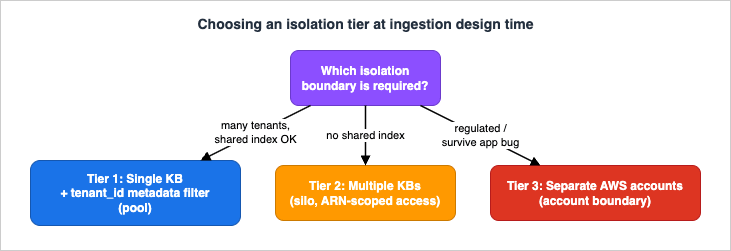
7.1 Tier 1 — single knowledge base with metadata filtering (pool)
The cheapest and most scalable structure is one shared knowledge base into which every tenant's documents are ingested, each chunk tagged with atenant_id attribute, and every retrieval call constrained by a tenant_id filter. On the ingestion side this is a two-part discipline: a clean S3 prefix-per-tenant layout, and a sidecar metadata file on every document that carries a non-empty tenant_id.s3://kb-bucket/tenants/acme/policies/handbook.pdf
s3://kb-bucket/tenants/acme/policies/handbook.pdf.metadata.json (tenant_id = "acme")
s3://kb-bucket/tenants/globex/policies/handbook.pdf
s3://kb-bucket/tenants/globex/policies/handbook.pdf.metadata.json (tenant_id = "globex")tenant_id becomes filter-invisible-but-present — it will never match a tenant-scoped filter, yet it sits in the shared index. Validate at ingestion that every document carries a non-empty tenant_id, and reject (or quarantine) any that does not. This tier suits large numbers of tenants whose data is of comparable sensitivity and who tolerate sharing an index. Its limit is blast radius: every tenant lives in one index, so a mislabeled document or an application bug that omits the filter is a cross-tenant exposure. (The retrieval article covers why the filter is a quality control that must be paired with correct labeling and least-privilege IAM, not a standalone security boundary.)7.2 Tier 2 — multiple knowledge bases (silo)
The next tier gives each tenant (or department, or sensitivity class) its own knowledge base, with its own data source and its own vector index. Isolation is now structural: there is no shared index to leak across, and access is scoped by grantingbedrock:Retrieve on a specific knowledge base ARN rather than by trusting a filter value. Ingestion cost rises — each knowledge base is a separate resource to create, sync, and monitor, and the number of knowledge bases per account is quota-bounded — so this tier fits a smaller number of higher-value or higher-sensitivity tenants where a shared index is unacceptable. The operational shift is that "sync the corpus" becomes "sync N corpora", which is where the monitoring in Section 8 stops being optional.7.3 Tier 3 — account boundaries
The strongest boundary places tenants (or environments, or regulated workloads) in separate AWS accounts, so that isolation is enforced by the account boundary itself — the hardest boundary AWS offers. Ingestion design has to accommodate this because data does not always live where the knowledge base does. A knowledge base can attach multiple data sources, including S3 buckets in other AWS accounts (cross-account data access), so you can keep a tenant's data in the tenant's own account and still ingest it into a central knowledge base, or run a knowledge base per account. The exact number of data sources a knowledge base may attach is quota-bounded — consult the Amazon Bedrock service quotas reference rather than assuming a fixed count. This tier carries the highest operational overhead (cross-account roles, per-account resources) and is reserved for the strongest separation requirements: regulated data, strict blast-radius limits, or contractual single-tenancy.7.4 Choosing a tier
Match the structure to the requirement rather than defaulting to the strongest:* You can sort the table by clicking on the column name.
| Tier | Isolation strength | Ingestion / operational cost | Fits |
|---|---|---|---|
| Single KB + metadata filter | Logical (filter + label discipline) | Lowest — one index, one sync pipeline | Many tenants, comparable sensitivity, shared-index acceptable |
| Multiple KBs | Structural (separate indexes + ARN-scoped access) | Medium — N resources to sync and monitor | Fewer, higher-value/sensitivity tenants |
| Account boundaries | Strongest (account boundary) | Highest — cross-account roles, per-account resources | Regulated data, strict blast-radius, contractual single-tenancy |
A useful heuristic: share by default for low-sensitivity, high-cardinality tenants; escalate to a dedicated knowledge base when a tenant's data cannot share an index; escalate to a dedicated account only when the boundary must survive an application bug. Many real systems are hybrids — a shared pooled knowledge base for the long tail of small tenants, plus dedicated knowledge bases for the few large or regulated ones.
8. Operational Monitoring of Ingestion
Ingestion fails quietly. A sync job can complete with some documents failed and still report overall success at a glance; a scheduled sync can silently stop firing; a tenant's data source can drift stale while the rest of the corpus is current. The write side needs its own observability, distinct from the retrieval and generation monitoring covered in LLMOps Observability and Evaluation Architecture on AWS, to which the broader monitoring platform is delegated. Here the concern is narrow: is ingestion succeeding, and is the index fresh?8.1 Watch the job statistics, not just the status
GetIngestionJob returns a statistics object with per-document counts that tell you far more than the top-level status. A job can be COMPLETE while numberOfDocumentsFailed is non-zero — the job finished, but some documents never made it into the index. The fields to track:stats = agent.get_ingestion_job(
knowledgeBaseId="KB1234567890",
dataSourceId="DS1234567890",
ingestionJobId=job_id,
)["ingestionJob"]["statistics"]
# Documents that failed to ingest - alarm on any non-zero value
stats["numberOfDocumentsFailed"]
# Reconciliation counts for the incremental diff
stats["numberOfNewDocumentsIndexed"]
stats["numberOfModifiedDocumentsIndexed"]
stats["numberOfDocumentsDeleted"]
stats["numberOfDocumentsScanned"]
stats["numberOfDocumentsSkipped"]
# Metadata-only changes
stats["numberOfMetadataDocumentsModified"]
stats["numberOfMetadataDocumentsScanned"]numberOfDocumentsFailed > 0, and read failureReasons on the job to see why (a malformed file, an oversized document, a metadata file that exceeds 10 KB, a .metadata.json whose name does not exactly match its source file). Treat a failed count as a page-worthy signal, not a warning — a failed document is a silent recall gap, indistinguishable at query time from a document that was never supposed to exist.8.2 Measure freshness
Status tells you the last job's outcome; it does not tell you whether the index is current. Measure freshness as the age of the last successful sync per data source — for a scheduled pipeline, alarm when the newestCOMPLETE job for a data source is older than the interval plus a margin (a nightly sync that has not succeeded in 30 hours is a stalled scheduler, even though nothing "failed"). For event-driven pipelines, the equivalent signal is the age of the oldest un-synced S3 change; for direct ingestion, it is the lag between the application event and the IngestKnowledgeBaseDocuments call. In a multi-knowledge-base or multi-tenant deployment, track this per data source, because the failure that hurts most is one tenant's source going stale while the aggregate looks healthy.8.3 Least-privilege for the ingestion identity
The identity that runs ingestion needs only the ingestion actions, scoped to the specific knowledge base and data source — separate from the retrieval identity, which needs onlybedrock:Retrieve. Keep the two roles distinct so that a component that reads the knowledge base cannot also rewrite it.{
"Version": "2012-10-17",
"Statement": [
{
"Sid": "IngestionControl",
"Effect": "Allow",
"Action": [
"bedrock:StartIngestionJob",
"bedrock:StopIngestionJob",
"bedrock:GetIngestionJob",
"bedrock:ListIngestionJobs",
"bedrock:IngestKnowledgeBaseDocuments",
"bedrock:DeleteKnowledgeBaseDocuments"
],
"Resource": "arn:aws:bedrock:us-east-1:<account-id>:knowledge-base/KB1234567890"
}
]
}bedrock:Retrieve on a knowledge base can retrieve everything synced into it, so the isolation tiers in Section 7 depend on getting these role scopes right, not only on filters.9. Diagnostics
Two ingestion failures account for most "the retriever is broken" reports that are actually write-side problems. Both are diagnosed by walking the pipeline from the source to the index, not by touching a query-time setting.9.1 "I updated the document, but the answer is stale"
The symptom is that a change made in the source is not reflected in retrieval. Walk the ingestion path in order:- Did a sync run after the change? For an S3 data source, an edit is invisible until an ingestion job processes it. Check
ListIngestionJobsfor aCOMPLETEjob started after your change. If the last job predates the change, the scheduler or event handler did not fire — that is the bug. - Did the sync see the change? Read the job's
statistics. IfnumberOfModifiedDocumentsIndexedis zero and you expected a change, the connector's change-detection did not register it — verify the object was actually rewritten (a re-upload with identical bytes and timestamp may be skipped). - Did the document fail? If
numberOfDocumentsFailedis non-zero, your document may be the one that failed. ReadfailureReasons. - Is it a metadata mismatch? If the content updated but a filter still excludes it, the metadata file may be wrong — a
.metadata.jsonwhose name does not exactly match the source file is silently ignored, leaving the chunk with stale or missing attributes. - Direct-ingestion path? If you used
IngestKnowledgeBaseDocumentsagainst an S3 data source and then a scheduled sync ran, the sync may have reconciled your direct change away because S3 was never updated (Section 4.3). Confirm S3 and the index agree.
9.2 "I deleted the document, but it still comes up"
The symptom is content surfacing in retrieval after it was supposedly removed — the orphan problem. Walk it:- Which delete did you do? If you deleted the S3 object but never ran a sync, the chunks are still in the index. Run a sync; the incremental job will remove them.
- Direct-delete without S3 delete? If you called
DeleteKnowledgeBaseDocumentsagainst an S3 data source but left the object in S3, the next sync re-ingested it. Delete the S3 object too, then let a sync run. - Retain policy on a deleted data source? If you deleted a data source with a
RETAINdeletion policy, its vectors are still in the store by design. That isRETAINworking as configured — remove them explicitly if they should be gone. - Wrong identifier? For a direct delete, confirm the document identifier (custom
id, or S3 URI) exactly matches what was ingested. A near-miss deletes nothing and reports success on the documents it did match.
The through-line for both diagnostics: the index is a derived artifact of the data source, and they are only consistent immediately after a successful reconciliation. Every stale-or-orphan symptom is a gap between "what the source says now" and "what the last successful ingestion wrote", and the fix is always to make a reconciliation run, not to re-tune retrieval.
10. Frequently Asked Questions
What is the difference between a sync job and direct ingestion?A sync job (
StartIngestionJob) reconciles an entire data source against the index incrementally — it crawls, diffs, and processes only what changed. Direct ingestion (IngestKnowledgeBaseDocuments) writes one document or a small batch straight into the vector store with no crawl and no diff. Use sync for bulk correctness and freshness in minutes-to-hours; use direct ingestion for seconds-level freshness on individual high-value records.Do I have to run a sync for a custom data source?
No. A custom data source has no external store to reconcile; documents enter only through the
KnowledgeBaseDocuments API, which makes them part of both the custom data source and the knowledge base in one step. StartIngestionJob is for S3 and connector data sources.Why did my directly-ingested change to an S3 data source disappear after a sync?
For an S3 data source,
KnowledgeBaseDocuments changes are not written back to the S3 location. The next sync reconciles the index against S3 — which still holds the old state — and undoes your direct change. After a direct change to an S3 data source, also update the S3 object so the source of truth agrees with the index.Where does metadata for filtering come from, and is it the same as S3 object metadata?
It comes from a sidecar
<file>.metadata.json file next to each document (for S3 data sources) or from inline attributes (for direct ingestion). It is not S3 object user-defined metadata or S3 object tags — Bedrock does not read those for retrieval filtering. Keep filter attributes in the sidecar and keep S3 tags for lifecycle, access, and cost allocation.What does
includeForEmbedding do?When
true, the attribute's key and value are concatenated to the chunk text before embedding, so a query mentioning the attribute contributes to semantic similarity. When false, only the chunk text is embedded and the attribute is available for filtering only. Use true for topical attributes a user might name, false for structural keys like tenant_id.Can I change the embedding model on an existing knowledge base?
No.
UpdateKnowledgeBase cannot change the knowledgeBaseConfiguration (which holds the embedding model) or the storageConfiguration. The stored vectors and the query vector must come from the same model, so changing it requires a new knowledge base and a full re-ingestion of the corpus, then a cutover.How do I keep a deleted document from reappearing?
Delete on both sides. If you remove the S3 object, run a sync so the incremental job removes the chunks. If you direct-delete via
DeleteKnowledgeBaseDocuments against an S3 data source, also delete the S3 object so the next sync does not re-ingest it. Never delete on only one side.What is the cheapest way to isolate tenants at ingestion time?
A single shared knowledge base with a
tenant_id attribute on every document and a tenant_id filter on every retrieval call, backed by a prefix-per-tenant S3 layout. Escalate to a dedicated knowledge base per tenant when a shared index is unacceptable, and to a dedicated account when the boundary must survive an application bug. The authorization that enforces the filter is a separate concern, covered in the multi-tenant SaaS article.11. Summary
The write side of an Amazon Bedrock knowledge base is an operational pipeline, and its decisions surface later as retrieval behavior. Ingestion runs offline as a job — parse, chunk, embed, index — so freshness is a strategy, not a given: scheduled sync for large slow corpora, event-driven sync (with burst coalescing) for minutes-level freshness, and direct ingestion through theKnowledgeBaseDocuments API for seconds-level updates on individual records. Direct ingestion's sharpest trap is that, for an S3 data source, its changes are not written back to S3, so the next reconciling sync can undo them unless you keep S3 in step. Metadata for filtering is designed at ingestion time in a sidecar .metadata.json file — distinct from S3 object metadata and tags — where includeForEmbedding decides whether an attribute shapes similarity or only slices the index, and where a missing tenant_id silently breaks isolation. Updates and deletions propagate only through reconciliation, so orphan chunks and reappearing documents are consistency gaps between S3 and the index, not query bugs; and the embedding model, fixed at creation, can only be changed by rebuilding. Isolation is chosen at ingestion time across three tiers — shared knowledge base with metadata filters, multiple knowledge bases, and account boundaries — matched to blast-radius requirements, with the enforcing authorization delegated to the multi-tenant SaaS design. Monitor the job statistics rather than the status, measure freshness per data source, and diagnose every stale-or-orphan symptom as a reconciliation gap. For the read side these ingestion decisions feed, follow the retrieval and architecture articles referenced throughout.12. References
- Amazon Bedrock Knowledge Bases – User Guide
- Sync your data with your Amazon Bedrock knowledge base
- Ingest changes directly into a knowledge base
- Ingest documents directly into a knowledge base
- Connect to Amazon S3 for your knowledge base (Document metadata fields)
- Add metadata to your files to allow for filtering
- Modify a data source for your Amazon Bedrock knowledge base
- Prerequisites for your Amazon Bedrock knowledge base data (formats and limits)
- GetIngestionJob – Amazon Bedrock API Reference
- StartIngestionJob – Amazon Bedrock API Reference
- IngestKnowledgeBaseDocuments – Amazon Bedrock API Reference
- DeleteKnowledgeBaseDocuments – Amazon Bedrock API Reference
- UpdateKnowledgeBase – Amazon Bedrock API Reference
- Multi-tenancy in RAG applications in a single Amazon Bedrock knowledge base with metadata filtering
- Build and deploy an automatic sync solution for Amazon Bedrock Knowledge Bases
- Amazon Bedrock Managed Knowledge Base is now generally available
- Amazon Bedrock endpoints and quotas
- Amazon Bedrock pricing
Related Articles in This Series
- Amazon Bedrock Knowledge Bases Retrieval Quality Engineering
- Vector Database Selection on AWS
- Amazon Bedrock Cross-Region Inference and Data Residency
- Amazon Bedrock RAG Architecture Guide
- Multi-Tenant Generative AI SaaS Architecture on AWS
- LLMOps Observability and Evaluation Architecture on AWS
References:
Tech Blog with curated related content
Written by Hidekazu Konishi