Claude Code /goal - What the Evaluator Sees, When a Goal Clears, and How It Differs from a Stop Hook
First Published:
Last Updated:
/goal is a command that instructs Claude to continue its turns until a specified condition is met. After each turn, another model evaluates that condition. If the verdict is that the condition is not yet met, Claude Code does not return control to you and will begin the next turn.This article focuses on what decides the end of a goal, what holds that verdict back, and what makes
/goal unavailable. The evaluator is responsible for the verdicts that end a goal. It does not call tools and judges only what Claude has surfaced in the conversation. Even if Claude passes a test, if the result does not appear in the conversation, the evaluator cannot use it as material. Background work holds the verdict back, and automatic retries hold the next turn back, while disableAllHooks and allowManagedHooksOnly can render /goal itself unusable.This article explains how
/goal is built, the routes by which a goal clears, what holds the verdict back, the conditions under which /goal becomes unavailable, and what comes back on resume. It draws on documentation from code.claude.com, the Claude Code CHANGELOG, the npm registry publication times, and observations made on a local Mac. The information presented is divided into what the documentation states, what is not explicitly mentioned in the documentation, and what was observed through direct experimentation. This article is not an introduction to using /goal, does not give guidance on writing conditions, and does not discuss pricing.Related articles on this site:
- Claude Code Hooks Complete Guide - Deterministic Enforcement Across the Tool Lifecycle
- Claude Code Mods Next to Settings Hooks - What a Mod Can Approve, and What allowManagedModsOnly and disableAllHooks Stop
- Where Claude Code Auto Mode Gets Its Verdict - Server Review, the Local Classifier, and the Denial When No Verdict Arrives
- Claude Code in CI/CD and Headless Automation - Running the Agent Unattended in Pipelines
- Claude Code Version History and Timeline - Release Channels, Changed Defaults, and Where Each Version Date Comes From
Table of Contents
- 1. Scope and Assumptions
- 2. How to Read the Tables
- 3. How /goal Is Built
- 4. What the Evaluator Sees, and What It Does Not
- 5. The Three Verdicts and the Routes by Which a Goal Clears
- 6. What Holds the Verdict Back
- 7. When
/goalBecomes Unavailable - 8. What Is Restored Upon Resuming, and What Returns to Zero
- 9. How It Differs from a Stop Hook and /loop
- 10. Version History for
/goal - 11. Observations on the Local Machine
- 12. Differences Between the Sources, and What Is Not Stated
- 13. Failure Modes
- 14. Frequently Asked Questions about Claude Code's /goal
- 15. Summary
- 16. References
1. Scope and Assumptions
This chapter will first define the intended audience, the scope of this article, the sources read, and how terms are used. The following eleven points will outline the conclusions./goalencapsulates a prompt-based Stop hook that is only valid during a session. Each time Claude completes a turn, Claude Code sends the condition and the conversation so far to the configured small fast model (Chapter 3).- The evaluator does not call any tools. The evaluator can only use information provided in the conversation by Claude; it does not execute commands or read files (Chapter 4).
- The verdicts are
Not yet met,Met, andImpossible. OnMet, the goal clears and an achieved entry remains. OnImpossible, the goal clears and a failed entry and the reason remain. (Chapter 5) - If a turn fails on an error you have to fix, Claude Code clears the goal and prints a warning. In other error scenarios, the goal remains active. In interactive sessions on 2.1.269 or later, Claude Code then retries automatically or pauses; the goal pauses after three automatic retries (Chapters 5 and 6).
- While a subagent or background shell command is running, Claude Code skips the verdict for that turn. If background work keeps the goal waiting for 30 minutes, a check-in comes due (Chapter 6).
- Setting
CLAUDE_CODE_GOAL_CHECKIN_MINUTESto0will, according to the goal page, disable both the check-in and automatic retries (Chapter 6). - If
disableAllHooksistrueafter settings precedence applies, or if the managed settings includeallowManagedHooksOnly,/goalcannot be used. The project's setting offalsewill override the user's setting oftrue(Chapter 7). - When resuming, only the condition is restored; the turn count, elapsed time, and token-spend baseline are reset to zero. Goals the goal page calls achieved or cleared will not be restored (Chapter 8).
- Your own prompt-based Stop hook is placed in a settings file and applies to every session in its scope. The model receives the hook's input JSON.
/goal, on the other hand, is only effective during that specific session and sends the condition and the conversation to the evaluator (Chapter 9). - In observations on 2.1.325, under the condition that keeps the result out of the conversation, the first verdict was not yet met in all four runs, even though
./make_out.shran without errors, and the goal never reachedMet. Under the condition that cannot be satisfied, the verdict wasImpossiblein two of three runs; in one run, Claude looked for a way to satisfy the condition and auto mode stopped it (Chapter 11). /goalwas added in Claude Code version 2.1.139. According to the npm registry, it was released on May 11, 2026 (UTC), and 11 subsequent versions, up to 2.1.314, modified the behavior or display of/goal(Chapter 10).
1.1 Intended Audience
This article is intended for the following readers:- Developers who have begun using Claude Code's
/goalfeature for fixing tests or for migration tasks. - People investigating why a goal does not clear, or why it cleared sooner than expected.
- Administrators examining reasons why
/goalmight be unavailable due to organizational settings. - Designers deciding whether to use
/goal, their own Stop hook, or/loop.
This article assumes readers are considering the following points, and each point is checked against the sources in this article:
- The evaluator checks conditions by running tests or reading files.
- If Claude passes the tests, the goal clears in that turn.
- Setting conditions that cannot be met will cause the goal to continue indefinitely.
- The evaluator performs checks on each turn, even while background processes are running.
- If you remove
disableAllHooks: truefrom your user settings,/goalis always available. - Resuming the process will continue the count of both turns and elapsed time from where it left off.
1.2 Scope and Exclusions
This article covers how/goal is built, what the evaluator can and cannot see, the three verdicts and their records, the routes by which a goal clears, what holds the verdict back, the conditions under which /goal becomes unavailable, resume, the differences from your own Stop hook and /loop, the version history in the CHANGELOG, and the observations on a local Mac.This article does not cover:
- The overall mechanics of hooks, or the specific implementation details for different types of hooks. This is covered in the Claude Code Hooks Complete Guide on this site.
- The full extent to which
disableAllHooksandallowManagedHooksOnlyaffect mods, the status line, and hooks. This is covered in the Claude Code Mods Next to Settings Hooks on this site. This article only describes the conditions under which/goalbecomes unavailable. - The classifier used in auto mode and the logic for determining tool call permissions. This is covered in the Where Claude Code Auto Mode Gets Its Verdict on this site. This article will briefly describe the complementary relationship between auto mode and
/goalin a single paragraph. - The operation of Claude Code in CI/CD environments and headless automation using
claude -p. This is covered in the Claude Code in CI/CD and Headless Automation on this site. - Guidance on writing conditions and a collection of example conditions. This article will only provide examples from the goal page.
- Pricing and token billing, as well as the names of the models used for evaluation.
- Flags and settings related to disabling permission checks. These are not used in the observations presented in this article.
- Comparisons with other agents, or product superiority.
1.3 Check Date and Sources Read
This article read the following sources on November 15, 2026 (Japan time). Throughout the article, the English name at the start of each line is used.- goal page: The "Keep Claude working toward a goal" page on code.claude.com. This is the central source of this article.
- hooks reference: The "Hooks reference" page of the same documentation. This article read the prompt-based hooks and the input and cap of the Stop hook.
- hooks guide: The "Automate actions with hooks" page of the same documentation.
- settings page: The "Settings files and precedence" page of the same documentation.
- settings reference: The "All settings" page of the same documentation. This article read the sections on
disableAllHooksandallowManagedHooksOnly. - env-vars page: The "Environment variables" page of the same documentation.
- permissions page: The "Configure permissions" page of the same documentation. This article read the section on workspace trust.
- sessions page: The "Manage sessions" page of the same documentation.
- commands page: The "Commands" page of the same documentation.
- scheduled tasks page: The "Run prompts on a schedule" page of the same documentation. This article read the
/loopsection. - model config page: The "Model configuration" page of the same documentation.
- CHANGELOG: The
CHANGELOG.mdfile in the anthropics/claude-code repository on GitHub. The latest entry as of November 15, 2026, was 2.1.325. - npm registry: The record for the
@anthropic-ai/claude-codepackage. Thetimefield lists the publish time of each version in UTC.
The observations in this article were made using Claude Code version 2.1.325 (Chapter 11). As of November 15, 2026, the npm registry's
latest tag pointed to 2.1.325. While version 2.1.324 is also listed in the npm registry, there is no corresponding entry for version 2.1.324 in the CHANGELOG.1.4 Terms, and Same Spelling with Different Meanings
This article uses the following terms consistently:- Condition: A statement, written after
/goal, that defines the ending criteria. - Goal: What holds a condition and is active within a session. The goal page allows one active goal per session.
- Evaluator: A model that, at the end of each turn, reads the condition and the conversation to return a verdict. The goal page calls it the small fast model.
- Verdict: The output from the evaluator, which can be
Not yet met,Met, orImpossible. The verdict comes with a short reason. - Turn: The period from when Claude begins responding to when it finishes, including any tool calls.
- Ends and Holds back: In this article, "ends" refers to a goal clearing, while "holds back" refers to something delaying a verdict or the next turn. When this article writes "holds back," it states in the same sentence what holds back which verdict or which turn.
The following terms may have the same spelling but refer to different concepts. This article differentiates them as follows:
- Goal: The term "goal" as used after
/goalis distinct from the general use of the word "goal." For example, the entry in the CHANGELOG, version 2.1.154, refers to a fix for an issue where the background-session classifier lost the user's goal; it is not related to the/goalfunctionality. This article will not include this entry in the table in Chapter 10.
Fixed background-session classifier losing the user's goal when a scheduled /command fires- Stop hook: The Stop hook configured in your settings file, and the Stop hook encompassed by
/goalare distinct. This article refers to the former as "your own Stop hook" and the latter as "the/goalStop hook." - Evaluator: The evaluator associated with
/goal, the classifier used in auto mode, and the model of your own prompt-based hook are different uses of a model. This article will only refer to the one associated with/goalas the "evaluator." The auto mode classifier determines whether to allow tool calls, but does not determine the end of a goal. - Clear:
/goal clearis a command that removes an active goal./clearis a command that initiates a new conversation, and during that process, any active goal is also removed. The goal page also writes "clear" when a verdict or an error removes a goal. This article writes the first two with the command spelling, and the third as "the goal clears." - Check-in: An idle check-in refers to the check-in that Claude Code initiates on its own while an interactive session is waiting for input. A turn-end check-in is delivered when the next turn ends.
- Retry and Pause: An automatic retry involves Claude Code waiting and then attempting again. A pause involves maintaining the goal and waiting for either user input or a limit to reset.
- Entry: An achieved entry and a failed entry are the records that the goal page says remain in the transcript.
2. How to Read the Tables
This chapter defines the terms for the state of the sources used in the tables of this article, and how this article writes versions and dates.2.1 Terms for the State of the Sources
This article uses six terms to describe the state of the documentation. These terms, including their English spellings, will also be used in the tables.- Stated: The documentation contains a statement regarding the matter.
- Stated as not supported: The documentation explicitly states that the matter is not supported or cannot be used.
- Documentation does not list: While a list or table exists, the specific item is not included. This does not necessarily indicate that the matter is unsupported or unavailable.
- No statement found: Despite searching using different keywords and categories of the sources in Section 1.3, no relevant statement could be found. This does not indicate that the matter is absent or does not occur.
- Sources disagree: The documentation from two different sources provides conflicting statements regarding the same matter. This includes cases where the statements directly contradict each other, as well as cases where the scope, strength, or subject matter differs, and the text alone does not settle which one applies. This article presents both statements and their sources without designating either as incorrect.
- Inference: This represents an inference made by this article, and is not a statement found in any of the documentation. This article says in the same sentence that it is an inference.
This article does not call the following two kinds of difference a disagreement:
- Different versions: This refers to differences between different versions of the same type of documentation. An example is the difference between an older CHANGELOG line and the current goal page.
- General statement: This refers to a situation where one document provides a shortened description of a portion of what another document covers.
Observations on a local Mac are not a state of the sources. This article collects the observations in Chapter 11 and writes Observation in table cells. An observation is a record of a few runs on one version and does not show that the same thing always happens.
2.2 How This Article Writes Versions and Dates
This article refers to Claude Code versions using a format like2.1.139. The goal page uses a version notation such as v2.1.239. This article uses that spelling only when quoting the goal page.The version dates in this article are the publish times in the
time field of the npm registry, written in UTC. There are no dates listed in the CHANGELOG. The npm publish time indicates when the version was released on npm, and is not the date of the announcement. For some versions, the time will correspond to a date one day later in Japan time.The data presented in the tables within this article reflects the state as of November 15, 2026. The goal page documents behavioral changes associated with each version. Readers should verify the information against the specific version they are using and the corresponding data for that version.
3. How /goal Is Built
This chapter describes where, when, and what/goal determines.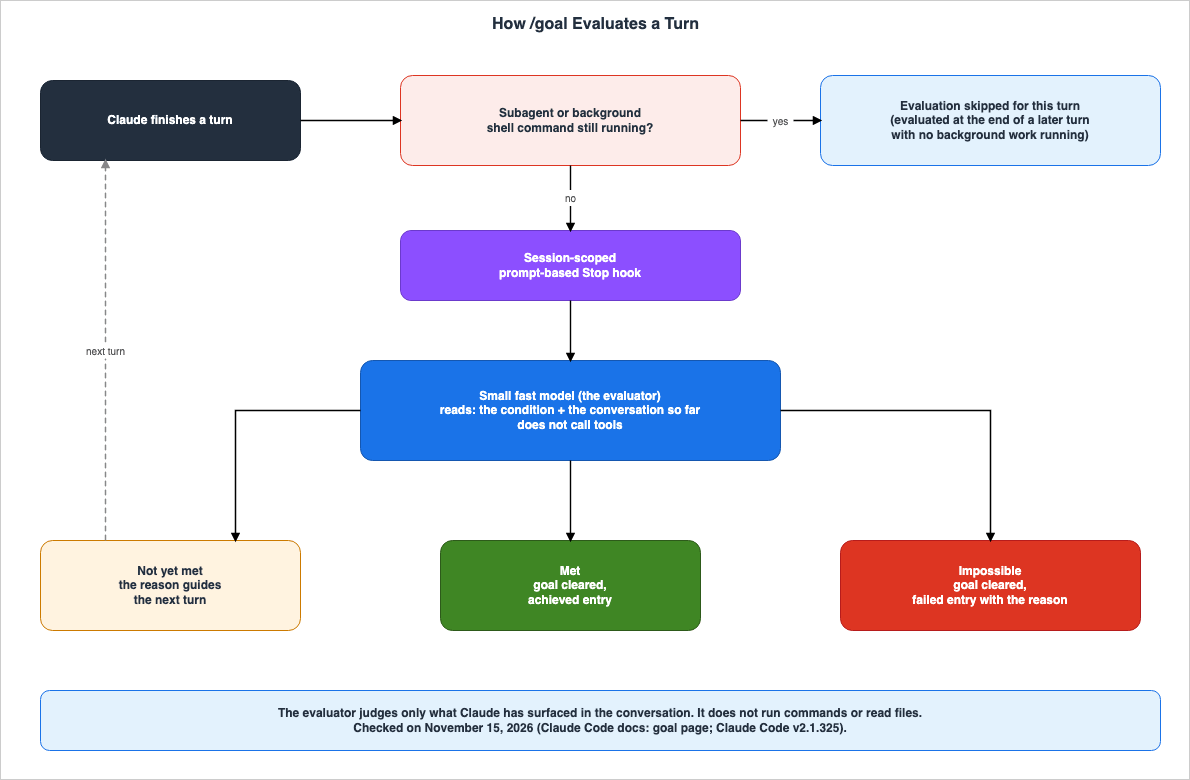
/goal is built as follows:/goal is a wrapper around a session-scoped prompt-based Stop hook. Each time Claude finishes a turn, Claude Code sends the condition and the conversation so far to your configured small fast model.The "Stop" section of the hooks reference also describes
/goal as a built-in shortcut for a prompt-based Stop hook that is only valid during a session. Using /goal allows users to avoid writing hook configurations.The fundamental behavior of
/goal is determined by the following statements on the goal page:- Only one goal is valid within a single session. If a new
/goalis entered while a goal is active, the new goal will replace the previous one. - When a goal is set, a turn begins immediately, with the condition as the directive. No separate prompt is required.
- While the goal is active, the
◎ /goal activeindicator shows how long the goal has been running. - The verdicts the evaluator returns appear in the transcript, and Ctrl+O shows the reason behind each. The status view also shows the most recent reason.
/goaldoes not change the permission mode. In Manual mode, Claude will request confirmation before calling tools that the settings do not permit. For running goal turns without a person confirming each tool call, the goal page names running/goalin auto mode.
/goal works not only in interactive sessions, but also in non-interactive mode, on the desktop app, and with Remote Control. Setting a goal with -p will cause the loop to continue until it completes within a single launch.claude -p "/goal CHANGELOG.md has an entry for every PR merged this week"By default, the text output only shows Claude's final response after the loop completes. The goal page notes that, sometimes, a goal that has progressed through many turns may appear to have stopped. To see the messages in sequence during the loop, use
--output-format stream-json --verbose. To stop a non-interactive goal before it resolves, press Ctrl+C to stop the process.4. What the Evaluator Sees, and What It Does Not
This chapter is at the core of this article. It separates what the evaluator uses as material and what it does not, using the statements on the goal page.The goal page describes the evaluator as follows:
It does not call tools, so it can only judge what Claude has already surfaced in the conversation.The section on how to define conditions, found on the same page, reads as follows:
It doesn't run commands or read files independently, so write the condition as something Claude's own output can demonstrate.Based on these two statements, the evaluator uses as material the condition and what Claude has surfaced in the conversation. The evaluator does not read the contents of files on its own, nor does it run tests independently. The goal page explains that a condition that the tests in
test/auth pass works because Claude runs the tests, the result appears in the transcript, and the evaluator can read it.| Item | Does the Evaluator Use It as Material? | Status (as of 2026-11-15) |
|---|---|---|
Conditions written after /goal | Yes | Stated |
| The conversation so far | Yes | Stated |
| Results of tests run by Claude, as displayed in the transcript | Yes | Stated (example on the goal page) |
| Contents of files not mentioned in the conversation | No. The evaluator does not read files. | Stated |
| Results of commands not mentioned in the conversation | No. The evaluator does not run commands. | Stated |
A turn or time clause, such as or stop after 20 turns | Judged from the conversation. Claude reports progress against the clause each turn. | Stated |
| The turn count and elapsed time in the status view | Not stated whether the evaluator reads them | No statement found |
| What portion of the conversation is passed to the evaluator | Not stated. | No statement found |
| Specific names of models used for evaluation | Not stated. Only mentions "small fast model" and settings that can be changed. | No statement found |
A condition can be up to 4,000 characters. The goal page lists, as what a condition that holds up across many turns has, a single, measurable end state, how Claude can demonstrate that state, and what should not be changed during the process. For example,
npm test exits 0, git status is clean, and no other test file is modified. This article does not treat this as a guide for writing conditions. What is important for this article is that all three of these elements are written in a form that can be presented in Claude's output in the conversation.To bound how long a goal runs, include a turn or time clause such as
or stop after 20 turns in the condition. The goal page says that Claude reports progress against that clause each turn and that the evaluator judges it from the conversation. Like the rest of the condition, this clause is also judged from what has surfaced in the conversation.The model used for evaluation can be changed using
ANTHROPIC_DEFAULT_HAIKU_MODEL. The goal page notes that this setting applies not only to the evaluation of /goal, but also to any location where Claude Code uses the small fast model. When this setting is enabled, the alias haiku also refers to that model, and background tasks such as session title generation will also use that model. The evaluator operates using the provider configured for the session.Regarding its relationship with auto mode, the goal page states the following: Auto mode allows tool calls within a single turn but does not initiate new turns. Claude will stop when it determines that the task is complete. Because
/goal adds a separate evaluator that checks the condition at each turn, the decision to end the process is made not by the model currently working on the task, but by a new model. The goal page describes auto mode and /goal as complementary features: auto mode removes per-tool prompts, while /goal removes per-turn prompts.5. The Three Verdicts and the Routes by Which a Goal Clears
This chapter lists the evaluator's three verdicts and the other routes by which a goal clears.The goal page describes the three verdicts as follows:
Not yet met: Claude keeps working and takes the reason as guidance for the next turn.Met: Claude Code clears the goal and records an achieved entry in the transcript.Impossible: The evaluator has determined that the condition can never be met. Claude Code clears the goal and records a failed entry in the transcript, along with the reason. You do not need to clear the goal yourself.
The goal page's text for
Impossible reads as follows:Impossible: the evaluator judged that the condition can never be satisfied. Claude Code clears the goal and records a failed entry in the transcript along with the reason.The prompt-based hook's response format in the hooks reference has three fields:
ok, reason, and impossible. When using "Stop" or "SubagentStop," if ok is false, the reason is returned as Claude's next instruction, and the turn continues. If the response also includes impossible: true, Claude Code is permitted to stop, and the turn ends. Agent hooks and other events ignore impossible. The goal page names the verdicts of /goal Not yet met, Met, and Impossible, and does not state how they map to the fields in the hooks reference (No statement found).| Route | What Ends the Goal | Records and Messages Left | The Goal Afterward | Status (as of 2026-11-15) |
|---|---|---|---|---|
Met | The evaluator's verdict | Achieved entry in the transcript | Clears | Stated |
Impossible | The evaluator's verdict | Failed entry and the reason in the transcript | Clears | Stated |
| An error you have to fix | A failed turn | A warning naming the cause. Its start and end are quoted below the table | Clears | Stated |
/goal clear | Your command | Goal cleared: and the condition. If no goal is active, No goal set | Clears | Stated |
/clear | A command that starts a new conversation | Not stated | Clears | Stated (record: No statement found) |
A new /goal | Your command | Not stated | Replaced by the new goal | Stated (record: No statement found) |
| Other errors | A failed turn | A line starting with Goal still active or Goal paused, in interactive sessions on 2.1.269 or later | Stays set | Stated |
| Turns without progress in a row | Claude Code stops the loop | A warning | Stays set. Evaluation resumes after your next prompt | Stated |
/goal clear has five alternative names: stop, off, reset, none, and cancel. The goal page describes /goal clear as the command that removes an active goal before it resolves.The goal page gives the following five as examples of failures that clear the goal. The goal page writes "include" and does not say that these five are the only ones.
- An authentication failure, only when Claude Code manages its own credentials. When a host such as the desktop app or a cloud session manages them, the host restores access on its own, and Claude Code leaves the goal active.
- Insufficient disk space to update the login for claude.ai. This also applies only when Claude Code manages its own credentials, and the warning shows
(disk full). - Credit balance depleted.
- Context exceeding the limit, which could not be resolved by auto-compaction.
- Unavailable model.
For this warning, the goal page gives its start and end as follows:
The warning starts with Goal cleared after an unrecoverable error and ends with Run /goal again to continue.The goal page will instruct the user, after resolving the underlying cause, to re-establish the goal by entering
/goal <condition>.After a goal clears, running
/goal with no arguments shows, if a goal was achieved earlier in the session, its condition, elapsed time, turn count, and tokens. The goal page does not say whether a goal that cleared on Impossible appears in the status view (No statement found). The observations in Chapter 11 did not record the status view either.6. What Holds the Verdict Back
This chapter lists what delays a verdict or the next turn. None of them clears the goal.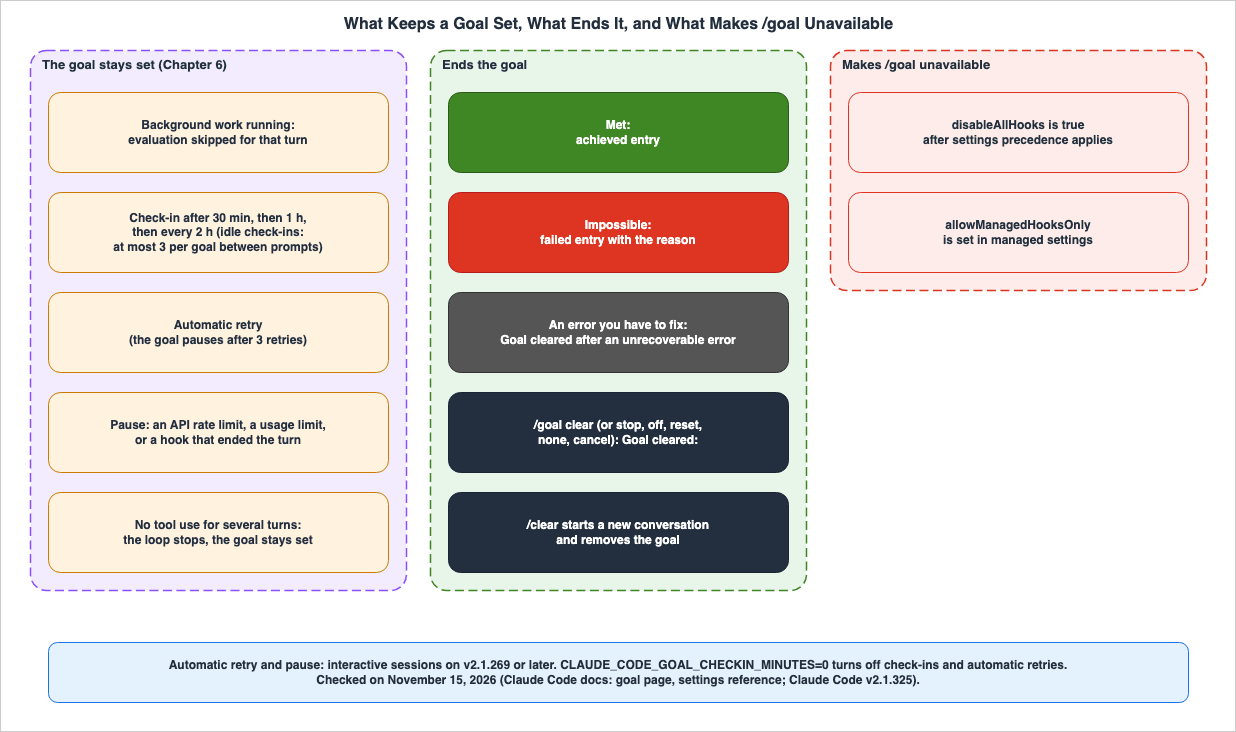
| What Holds Back | When It Applies | What It Holds Back, and What It Does Not | Version Condition | Status (as of 2026-11-15) |
|---|---|---|---|---|
| Background work | At the end of a turn, a subagent or background shell command is running | Skips the verdict for that turn. The goal stays set | 2.1.143 fixed the evaluator firing while that work was running | Stated |
| Turn-end check-in | A turn ends after background work has kept the goal waiting for 30 minutes | Makes the next turn a check-in | 2.1.234 or later | Stated |
| Idle check-in | A check-in comes due while an interactive session waits for input | Claude Code starts a turn on its own. Up to 3 times per goal between your prompts | 2.1.236 or later. The cap of 3 is from 2.1.246 | Stated |
| Automatic retry | A failure that tends to clear on its own. Examples are an overloaded server or a dropped connection | Waits and tries again. Pauses after 3 retries | Interactive sessions on 2.1.269 or later | Stated |
| Pause | A failure that a retry would only repeat. Examples are an API rate limit, a claude.ai usage limit, or a hook that ended the turn | Waits for your input or for the usage limit to reset | Interactive sessions on 2.1.269 or later | Stated |
| Turns without progress | Claude keeps answering the evaluator without using tools, turn after turn | Claude Code stops the loop, prints a warning, and returns control to you. The goal stays set | — | Stated (number of turns: No statement found) |
6.1 Background Work and Check-ins
The goal page states that if a subagent or background shell command is still running when a turn ends, Claude Code skips the evaluation for that turn. It evaluates at the end of the next turn that finishes with no background work running. When the background work finishes, Claude Code delivers the results to Claude as a new turn, eliminating the need for the user to send a prompt.If background work keeps the goal waiting for 30 minutes, a check-in comes due. During a check-in, Claude Code lists the running tasks and asks Claude to read their output. If the tasks are progressing, Claude should continue waiting; otherwise, Claude should either correct or stop the tasks. After the initial check-in, the interval between subsequent check-ins is doubled, stopping at four times the initial interval. By default, this is one hour after the initial check-in, followed by two-hour intervals.
Check-ins are delivered in two forms:
- At the end of a turn: This occurs when a turn ends while tasks are still running. In non-interactive sessions, such as those initiated with
-p, this is the only form in which check-ins are delivered. - During idle time: In interactive sessions, Claude Code initiates a check-in. If a background task has stopped without reporting a result, Claude Code requests that Claude continue the goal. A maximum of three idle check-ins are allowed per goal, between user prompts. During the third idle check-in, Claude Code says that idle check-ins are paused until the next user prompt.
The goal page notes three version-specific considerations. Idle check-ins require version 2.1.236 or later. Prior to version 2.1.246, there was no limit to the number of idle check-ins. Before version 2.1.239, only idle check-ins extended the interval, while check-ins delivered at the end of a turn repeated the initial interval. Check-ins in general require version 2.1.234 or later.
The initial interval can be modified using the
CLAUDE_CODE_GOAL_CHECKIN_MINUTES environment variable. The env-vars page gives the default as 30, says that 0 turns check-ins off, and allows whole minutes up to 10080 (one week). Any other value is treated as undefined, reverting to the default. The goal page indicates that this value also proportionally affects the subsequent intervals.6.2 Automatic Retries and Pauses
If a turn fails on an error other than one you have to fix (Chapter 5), the goal stays set. The goal page says that in interactive sessions on 2.1.269 or later, Claude Code prints a line naming the cause and either retries on its own or waits for you.- Retry: Following failures that are likely to resolve themselves, such as overloaded servers or disconnected connections, a notice starting with
Goal still activeappears, indicating a waiting period before the next attempt. After three consecutive automatic retries, the goal will instead be paused.
- Pause: Following failures that consistently produce the same result, such as API rate limits, claude.ai usage limits, or a hook that ended the turn, a notice starting with
Goal pausednames the cause. If the session is configured to automatically resume once the usage limit is restored, Claude will automatically resume working towards the goal at that time.
Users can send a message at any time to initiate the next turn immediately. To disable automatic retries, set the
CLAUDE_CODE_GOAL_CHECKIN_MINUTES variable to 0. According to the goal page, this will also disable check-ins.6.3 Turns Without Progress, and the Stop Hook Block Cap
The goal page says that when Claude keeps answering the evaluator without making progress, that is, without using tools for several turns in a row, Claude Code stops the loop, prints a warning, and returns control to you with the goal still set. Evaluation resumes after your next prompt. The goal page does not give the number of turns, and points to the section of the hooks guide on a Stop hook hitting the block cap for the mechanism.The hooks reference describes the cap on consecutive Stop hook continuations as follows:
Claude Code applies an 8-consecutive-continuation cap: after stop hooks have continued the turn eight times in a row, Claude Code overrides the next block and ends the turn. The count of consecutive continuations resets each time Claude calls a tool.This limit can be modified using the
CLAUDE_CODE_STOP_HOOK_BLOCK_CAP variable, and setting it to 0 removes the limit. This article does not write the goal page's "several turns" as 8 turns, because the goal page does not give a number and only points to the section on the mechanism. In the observations in Section 11.2, the warning for this cap and the Goal paused notice appeared after the ninth verdict.7. When /goal Becomes Unavailable
This chapter describes the conditions under which /goal itself becomes unavailable. The Requirements section of the goal page states the following:/goal is also unavailable when disableAllHooks is true after settings precedence applies, or when allowManagedHooksOnly is set in managed settings.| Condition | Location | /goal | Status (as of 2026-11-15) |
|---|---|---|---|
disableAllHooks is true after settings precedence applies | Any settings file | Unavailable | Stated |
allowManagedHooksOnly | Managed settings | Unavailable | Stated |
| Workspace trust | The same rule as hooks in settings files | Available under the same rule as hooks in settings files | Stated (rule: permissions page) |
Started with --safe-mode | — | Not stated | No statement found |
7.1 disableAllHooks Takes Effect After Settings Precedence
disableAllHooks can be placed in any settings file. The hooks reference says that Claude Code reads the value left after settings precedence applies, and gives the following example:Claude Code reads the value left after settings precedence applies, so a "disableAllHooks": false in a project's .claude/settings.json overrides a true in your user settings.The settings page lists the precedence, from highest to lowest: managed settings, command line, project local settings, shared project settings, and user settings. The command line is the JSON passed with
--settings. Project local settings are in .claude/settings.local.json, shared project settings are in .claude/settings.json, and user settings are in ~/.claude/settings.json. Higher-level settings override values for the same key at lower levels.Therefore, a
disableAllHooks: true in your user settings is overridden by a false in the repository's .claude/settings.json. Conversely, even if you remove true from your user settings, /goal stays unavailable if a true remains at a higher level. As a precaution before running claude -p in a repository someone else wrote, the permissions page also says that putting the key in your user settings alone is not enough and gives passing it with --settings '{"disableAllHooks": true}' instead.The settings reference states that while
disableAllHooks is active, the /goal functionality will be unavailable, and instead of displaying hooks, a notification will appear in the /hooks menu. The entry in the CHANGELOG, version 2.1.140, describes a fix that addresses an issue where /goal would silently stop working when disableAllHooks or allowManagedHooksOnly were present, and now displays a clear message instead of an indefinite loading state. The exact wording of that message is not documented (No statement found). The observations described in this article are detailed in Section 11.4.7.2 allowManagedHooksOnly Is a Managed Settings Key
allowManagedHooksOnly is a key that can be set only in managed settings, and it runs only the hooks your organization deploys. The settings reference states that when this key is present, /goal will not execute because it relies on hooks. The settings page says that your own settings files and --settings do not override a key in managed settings.7.3 Workspace Trust
The goal page says that, because the evaluator is part of the hooks system, Claude Code makes/goal available under the same workspace trust rule as hooks in settings files. The table on the permissions page shows that hooks in settings files are used both when you trusted only a parent folder and in a folder never trusted with claude -p or the SDK. This article leaves the whole trust rule to the permissions page, and does not write that /goal is unavailable before trust.8. What Is Restored Upon Resuming, and What Returns to Zero
This chapter describes what of a goal comes back when you resume a session. The goal page states the following:Claude Code carries the condition over but resets the turn count, timer, and token-spend baseline. It doesn't restore a goal that was already achieved or cleared.| Item | After Resume | Status (as of 2026-11-15) |
|---|---|---|
| Condition | Restored | Stated |
| Turn Count | Resets to 0 | Stated |
| Elapsed Time | Resets to 0 | Stated |
| Token-spend baseline | Resets to 0 | Stated |
| Goals Achieved | Not Restored | Stated |
| Goals the goal page calls cleared | Not Restored | Stated |
A goal that cleared on Impossible | As an inference by this article, Not Restored: the goal page writes that Claude Code clears the goal on Impossible, and that resume does not restore a cleared goal | Inference |
| Whether Claude Code starts a turn on its own right after resuming | Not stated. In the observation in Section 11.5, it did not | No statement found |
The goal page lists the resume routes that restore the goal:
--continue, --resume with a session ID, name, or transcript file path, and the session picker. The sessions page also lists what is restored when a session is resumed, noting that an active goal carries over and that its turn count, elapsed time, and token-spend baseline reset.The version notes for the goal page are as follows:
Before v2.1.239, Claude Code restored the goal on every route except the claude --resume picker.An entry in the CHANGELOG, version 2.1.274, states that a bug has been fixed where using
--continue or --resume to resume a compacted session lost an active goal.9. How It Differs from a Stop Hook and /loop
This chapter lists/goal, your own Stop hook, and /loop, drawing from the goal page comparison table and the hooks reference documentation. This article does not aim to determine which option is best.The goal page describes how to choose between these three methods based on when the next turn begins.
| Approach | Next Turn Starts When | Stops When | Status (as of 2026-11-15) |
|---|---|---|---|
/goal | The previous turn finishes. In an interactive session, also when an idle check-in or an automatic retry comes due | A model confirms the condition is met or judges it impossible. Also when a turn fails on an error you have to fix, or when you run /goal clear | Stated |
/loop | After a specified time interval. | When the user stops it, or when Claude determines that the task is complete. | Stated |
| Your own Stop hook | The previous turn finishes | Your own script or prompt decides | Stated |
Both
/goal and your own Stop hook fire after every turn. The goal page describes /goal as a session-scoped shortcut. You type a condition, and it is active for the current session only. Your own Stop hook lives in a settings file, applies to every session in its scope, and can run a script for deterministic checks or send a prompt for the model to judge.Comparing the descriptions from the hooks reference and the goal page reveals differences in what is passed to the model for evaluation, and the default settings surrounding it.
| Item | /goal | Your own prompt-based Stop hook | Status (as of 2026-11-15) |
|---|---|---|---|
| Where it is set | Type /goal in a session | hooks in a settings file | Stated |
| Scope | The current session only | Every session in the scope of the settings file | Stated |
| What the Model Receives | The condition and the conversation so far | Your prompt and the hook's input JSON. The Stop input includes the common input fields, plus stop_hook_active, last_assistant_message, background_tasks, and session_crons. | Stated |
| Default model | The configured small fast model | The model Claude Code uses for background functionality. Can be changed with the model field | Stated |
| Default timeout | Not stated | 30 seconds | No statement found / Stated |
| Response | Not yet met, Met, Impossible with a short reason | A JSON object with ok, reason, and impossible. | Stated |
| Record after the goal clears | Achieved entry and failed entry | Not stated | Stated / No statement found |
| Background work | Skips the verdict for that turn and delivers check-ins | The hook tells them apart with the background_tasks and session_crons fields of the Stop input | Stated |
The hooks reference states that the Stop input's
last_assistant_message contains the text of Claude's last response, and that the hook can use this without reading the transcript file. Whether your own prompt-based hook sees the whole transcript cannot be determined from the hooks reference. This article does not compare the quality of the verdicts of the two models.Regarding
/loop, the scheduled tasks page explains how to repeatedly run prompts while a session is active, either at a specified interval or allowing Claude to determine the interval. The same page says to see /goal if you want to keep the session working toward a condition rather than on an interval. For work that runs independently of any open session, the goal page names cloud and Desktop scheduled tasks.10. Version History for /goal
This chapter lists the CHANGELOG lines that changed the behavior or display of /goal, with the publish times from the npm registry. There are 17 lines with the word goal in the CHANGELOG, spanning 13 versions. This article lists 16 of those lines (excluding the entry from version 2.1.154 mentioned in Section 1.4), combined into one row per version.| Version | npm Publish Time (UTC) | What the CHANGELOG Line Says | Status (as of 2026-11-15) |
|---|---|---|---|
| 2.1.139 | 2026-05-11 18:09 | Added the /goal command. It works in interactive sessions, -p, and Remote Control, and shows elapsed time, turns, and tokens in an overlay panel. | Stated |
| 2.1.140 | 2026-05-12 19:50 | Fixed an issue where /goal would silently stop when disableAllHooks or allowManagedHooksOnly were enabled, and now displays an explicit message. | Stated |
| 2.1.143 | 2026-05-15 18:45 | Fixed an issue where the evaluator would run while background shells or delegated subagents were running. | Stated |
| 2.1.172 | 2026-06-10 17:55 | Stopped the status chip from redrawing the terminal at 5 Hz while idle. | Stated |
| 2.1.234 | 2026-08-17 18:19 | When a non-recoverable error occurs and the turn ends, the goal now clears itself and shows a notice. When background work keeps a goal waiting for 30 minutes or more, Claude now checks in. This can be disabled with CLAUDE_CODE_GOAL_CHECKIN_MINUTES=0. | Stated |
| 2.1.236 | 2026-08-19 18:45 | An idle session whose goal waits behind long-running background work now checks in on its own after 30 minutes, then 1 hour, then 2 hours. Aligned the margin of right-aligned items, including the goal indicator. | Stated |
| 2.1.239 | 2026-08-21 17:18 | Repeat check-ins now back off: 30 minutes, then 1 hour, then every 2 hours. Resuming from the claude --resume picker now restores the active goal. | Stated |
| 2.1.246 | 2026-08-25 19:17 | Limited check-ins for idle sessions to 3 times per goal. A subsequent message will allow another 3 check-ins. | Stated |
| 2.1.269 | 2026-09-11 18:12 | Fixed an issue where /goal would silently stop after API errors, connection interruptions, or token limits. The goal now retries after a wait, or pauses and says why. | Stated |
| 2.1.274 | 2026-09-16 22:36 | Fixed an active goal being lost when resuming a session that had undergone compaction, and hook-driven sessions, such as one with an active goal, ending with Prompt is too long when the context overflowed again. | Stated |
| 2.1.309 | 2026-10-22 20:34 | In VS Code, long slash-command messages such as /goal now fold so they do not fill the chat panel. | Stated |
| 2.1.314 | 2026-10-30 00:12 | Fixed automatic continuation at a usage limit going on more than 3 times without a prompt when a task restarted itself between waits. The examples include a /goal check-in. | Stated |
Of the twelve versions listed, all eleven except for 2.1.314 were released the day after the dates shown, in Japan time. For example, version 2.1.139 was published in the early hours of May 12, 2026, in Japan time. The Claude Code Version History and Timeline on this site is a timeline that lists October 21, 2026, as the check date and does not include the
/goal entry for version 2.1.139. This article will not modify that timeline.11. Observations on the Local Machine
This chapter records running/goal on a local Mac. As stated in Section 2.1, observations are not a state of the sources. Because the evaluator's verdicts depend on the model, this article gives the number of runs, the version, and the date, and does not write that the results always come out this way.11.1 Methodology
The observations were conducted on November 15, 2026, using Claude Code 2.1.325. Throwaway git repositories were created undermktemp -d, and a new session was started for each observation. The permission mode remained at the user's default auto mode, and no flags were used to disable permission checks. The user's setting ANTHROPIC_DEFAULT_HAIKU_MODEL determined the model used for the evaluator, and the name of that model is not specified in this article. No AWS account was used.There were four observations conducted:
- Observation 1: An achievement that does not appear in the conversation. The same job ran under two conditions, one that shows the result in the conversation and one that does not, two and four times, respectively. The job is for
./make_out.sh, a script that prints nothing, to write the single lineoktoout.txt. - Observation 2: An impossible condition. The condition was set that
python3 -c 'print(1+1)'should output3and should not create or modify any files. - Observation 3: When
/goalis unavailable. The shared project settings file.claude/settings.jsonwas set to include"disableAllHooks": true, and/goalwas entered. Then, the project local settings file.claude/settings.local.jsonwas given"disableAllHooks": false, and/goalwas entered again. - Observation 4: Resume. A condition requiring several turns was set. After about two turns, the turn was stopped with Esc, the session was ended, and the session was resumed using
claude --continue. The output of/goal clearwas then used to determine if the goal remained active.
The two conditions for Observation 1 are as follows:
/goal the file out.txt in this repository contains exactly the line ok. Create it by running ./make_out.sh, then show its contents with cat out.txt./goal the file out.txt in this repository contains exactly the line ok. Create it by running ./make_out.sh, which prints nothing. Do not run any other command and do not read out.txt.The results were obtained by comparing the text displayed on the screen by Claude Code with the records from the JSONL file containing the session transcript. The state displayed when using
/goal without any arguments is not recorded in the JSONL file, and this article does not include records of that display.11.2 Observation 1 — An Achievement That Does Not Appear in the Conversation
| Condition | Runs | First Verdict | How It Ended | Status (2026-11-15, 2.1.325) |
|---|---|---|---|---|
| Shows the result in the conversation | 2 | Met | In both runs, the goal cleared on the first verdict | Observation |
| Keeps the result out of the conversation | 4 | Not yet met | In 3 runs, Claude Code stopped the loop after 9 not yet met verdicts in a row. In 1 run, the session ended after the 4th verdict | Observation |
Under the condition that shows the result, Claude executed
./make_out.sh and displayed its contents using cat out.txt. The evaluator's reason cited commands and outputs in the conversation as justification.Under the condition that keeps the result out of the conversation,
./make_out.sh, which writes the single line ok to out.txt, ran without errors in all 4 runs. Even so, the first verdict was not yet met in all 4 runs. The evaluator's reason in every run said, in substance, that the transcript showed ./make_out.sh executing without producing any output, and there was no evidence of the contents of out.txt. The reason in the first run begins as follows:The transcript shows only that ./make_out.sh was run and printed nothing with no error.In all 4 runs, Claude adhered to the condition's constraints, executing no other commands besides
./make_out.sh and not reading out.txt. From the second turn onward, it stated that it could not provide evidence due to the condition's rules, and suggested /goal clear and other steps to the user. The evaluator never returned Impossible in these 4 runs.In the 3 runs that went to the end, after the 9th not yet met verdict, Claude Code printed the following warning and notice, and then ended the turn.
A hook blocked the turn from ending 9 consecutive times — overriding and ending turn. For Stop/SubagentStop hooks, check stop_hook_active in the input and return success while it's true. Set CLAUDE_CODE_STOP_HOOK_BLOCK_CAP to raise this limit.Goal paused · goal checks kept finding it unmet this turn · send a message to continueThese two lines match the source statements in Section 6.3. The hooks reference says that after Stop hooks have continued the turn 8 times in a row, Claude Code overrides the next block and ends the turn. In the observation, the 9th block was overridden. The goal page says that when turns without progress continue, Claude Code stops the loop, prints a warning, and returns control with the goal still set. In the observation, the notice used
Goal paused, the same words as the pause in Section 6.2.Three of the runs under the condition that keeps the result out of the conversation ran, each as a new session, in the repository folder made for the second run under the other condition. That folder held the
out.txt from that run. Since Claude did not read out.txt in any of these runs, this article counts these three runs as observations under the same condition.11.3 Observation 2 — A Condition That Cannot Be Satisfied
| Run | Sequence of Verdicts | How It Ended | /goal clear Afterward | Status (2026-11-15, 2.1.325) |
|---|---|---|---|---|
| 1 | Not yet met 5 times, then Impossible on the 6th | The goal cleared | No goal set | Observation |
| 2 | Impossible on the 1st | The goal cleared | No goal set | Observation |
| 3 | No verdict recorded | Claude tried to satisfy the condition, then offered the user options, and the turn did not end | Goal cleared: and the condition | Observation |
In run 1, Claude changed no file in any of the 6 turns, showed that
print(1+1) produced the result 2, and stated that it would not falsify the Python output without the user's permission. Each time "Not yet met" was triggered, a new line appeared on the screen.◯ Goal not yet met… continuing (ctrl+o to expand)When the goal cleared on the 6th verdict, the line started with
✘ Goal could not be achieved and showed the elapsed time, turn count, and tokens in parentheses. The reason below it said that, of the two clauses of the condition, the clause about not modifying files was satisfied but both could not be. /goal clear after that returned No goal set, so the goal was no longer active. This matches the goal page statement in Chapter 5 that you do not need to clear the goal yourself on Impossible.In run 3, Claude did not treat the situation as an inability to meet the condition. Instead, Claude attempted to use a mechanism that runs at Python startup, outside the repository, to make
print(1+1) produce the result 3. The auto mode classifier rejected both attempts to write files to the user's Python environment. Claude then showed the user options and waited for an answer; the turn did not end, so no verdict ran. When the user ran /goal clear, Goal cleared: and the condition appeared. No changes remained in the user's Python environment or the repository. The user deleted, after the observation, the file that Claude created in a temporary folder outside the repository to verify the mechanism. This article does not describe how to use this mechanism.Run 3 is an instance of the goal page statement in Chapter 3 that a goal does not change the permission mode. What stopped the writes was the auto mode classifier, not the
/goal evaluator. As an inference by this article, Impossible is the evaluator's verdict from the conversation at that point and does not guarantee that the condition can never be met. Even with the same condition, one run reached Impossible on the first verdict, and another run had Claude look for a way to satisfy the condition.At the beginning of runs 2 and 3, a notification appeared indicating that the conversation model's safeguards had stopped the response. This was not a verdict of the
/goal evaluator. This article does not address this notification.11.4 Observation 3 — disableAllHooks and Settings Precedence
In a repository whose shared project settings set only "disableAllHooks": true, running /goal set no goal, and the following text appeared:/goal can't run while hooks are restricted (disableAllHooks or allowManagedHooksOnly is set in settings or by policy).After
"disableAllHooks": false was added to the same repository as project local settings and the same /goal was run in a new session, Goal set: and the condition appeared, Claude created hello.txt, and the first verdict was Met. The false in the local settings overrode the true in the project settings. This matches the settings page precedence in Section 7.1.11.5 Observation 4 — Resume
With a condition to create 30 files, one per turn, Esc was pressed in the middle of the turn that created the third file, after two not yet met verdicts. The screen displayed the following line, and the◎ /goal active indicator remained visible.Interrupted · What should Claude do instead?There was no record of a verdict after the stopped turn.
The session was ended with
/exit and resumed with claude --continue. The following observations were made:- Claude did not initiate a new turn during the 15 to 20 seconds the user waited.
- The time displayed for
◎ /goal activedid not continue from the value before stopping; instead, it began counting from a smaller value. /goal clearreturnedGoal cleared:and the condition. The goal had come back as active after the resume. Running/goal clearagain returnedNo goal set.- The records after resuming were appended to the same JSONL file.
This article did not record the turn count or token-spend baseline in the status view after the resume. In the first attempt, with a condition of 6 files, each turn took about 5 to 10 seconds, and the goal cleared on
Met before Esc could be pressed. In that attempt, this article did not check that an achieved goal does not come back on resume.11.6 Format of Transcript Records
The goal page says that achieved entries and failed entries remain in the transcript, but it does not specify their format (No statement found). In the observation's JSONL files, the following records were observed:| When | JSONL Record | Status (2026-11-15, 2.1.325) |
|---|---|---|
| When a goal is set | A record with type set to attachment and the attachment's type set to goal_status. It includes met set to false, sentinel set to true, and condition. The output on screen and in the record is Goal set: and the condition. | Observation |
| On each verdict | The same goal_status record. It includes met, reason, and condition. On Met, it also includes durationMs, iterations, and tokens. On Impossible, failed is true, and it also includes durationMs and iterations. | Observation |
| On each verdict | A record with type set to system and subtype set to stop_hook_summary. | Observation |
| In the next turn | The evaluator's reason is delivered to Claude as a user record, starting with Stop hook feedback: | Observation |
| When the loop stops | A record with type set to system and subtype set to informational. It includes two items: a warning and a notice. | Observation |
When /goal clear is executed | A goal_status record with met set to true and sentinel set to true. | Observation |
When a goal is set, Claude Code also adds a user record to inform Claude that the goal is active. This record begins as follows:
A session-scoped Stop hook is now active with condition:This matches the goal page statement in Chapter 3 that
/goal wraps a session-scoped Stop hook. The format of the JSONL records is an internal format not given in the documentation, and it may vary between versions. This article describes it as an observation based on one particular version.11.7 What These Observations Cannot Tell Us
- The observations are 1 to 4 runs per observation on 2.1.325. Because the verdicts depend on the model, this article does not write that they always come out this way.
- The user's settings determine the model used for evaluation, and this article does not specify the names of those models. It is not possible to know whether the same results would be obtained with different models.
- The condition that keeps the result out of the conversation is an artificial condition that forbids reading, made for the observation. In real work, there can be other reasons a test result does not appear in the conversation.
- This article did not record the status view or the resume of an achieved goal.
12. Differences Between the Sources, and What Is Not Stated
This chapter collects the items in this article that carry a term for the state of the sources.12.1 Where the Sources Disagree
In the sources this article read, no case of two statements that disagree about the same matter (Sources disagree) was found as of November 15, 2026. This article reads the differences in the next two sections not as disagreements but as different versions or general statements.12.2 Differences Read as Different Versions
- Examples of Unrecoverable Errors: The CHANGELOG entry for version 2.1.234 lists examples such as revoked authentication, depleted credit balances, and context exceeding limits. The current goal page adds cases such as when the disk is full or when an unavailable model is selected, and notes that the goal stays set when a host manages the credentials (Different versions, Chapter 5).
- Display of Status: The CHANGELOG entry for version 2.1.139 describes showing elapsed time, turns, and tokens in an overlay panel. The current goal page describes the
◎ /goal activeindicator and the status view shown when/goalis run with no arguments (Different versions, Chapter 3). - Extending Check-in Intervals: The CHANGELOG line for 2.1.236 is about idle check-ins, and the line for 2.1.239 is about repeat check-ins as a whole. The goal page says that before 2.1.239, only idle check-ins backed off, which matches the two lines (Different versions, Section 6.1).
12.3 Differences Read as General Statements
CLAUDE_CODE_GOAL_CHECKIN_MINUTESset to0: The row on the env-vars page simply states that setting this value to0will stop the check-in process. The goal page, however, indicates that setting it to0will also disable automatic retries (General statement, Section 6.2).disableAllHooksand/goal: The settings reference states that/goalcannot run while hooks are disabled, and leaves precedence to the hooks reference. The goal page writes the value after settings precedence applies (General statement, Section 7.1).
12.4 No Statement Found
- Which portion of the conversation is passed to the evaluator (No statement found, Chapter 4)
- The specific name of the model used for evaluation. The documentation mentions the "small fast model," and lists the variables that can be changed (No statement found, Chapter 4)
- Does the evaluator read the turn count and elapsed time in the status view? (No statement found, Chapter 4)
- The correspondence between the
impossiblefield in the "hooks reference" and the three verdicts of/goal(No statement found, Chapter 5) - The record when
/clearor a new/goalremoves the goal (No statement found, Chapter 5) - Whether a goal that cleared on
Impossibleappears in the status view (No statement found, Chapter 5. Also not recorded in observations from Chapter 11) - The number of turns before the loop is stopped due to a lack of progress (No statement found, Section 6.3. In the observation in Section 11.2, after the 9th verdict)
- The wording of the message when
/goalis unavailable (No statement found, Section 7.1. The wording was observed in Section 11.4) /goalwhen launched with--safe-mode(No statement found, Chapter 7)- Whether Claude Code starts a turn on its own right after a resume (No statement found, Chapter 8. In the observation in Section 11.5, it did not)
- The default timeout for evaluating
/goal(No statement found, Chapter 9) - The format of goal records in the transcript files (No statement found. Observed in Section 11.6)
The fact that a description was not found does not necessarily mean that the item does not exist. Items observed in Chapter 11 have been documented as observations in Chapter 11.
13. Failure Modes
This chapter collects common failures from the source statements in Chapters 3 to 11 and the terms in Section 1.4.- Assuming that the evaluator runs tests or reads files to check the condition: The evaluator does not call any tools; it judges only what Claude has surfaced in the conversation (Chapter 4).
- Assuming that the goal clears in the turn where the tests pass: If the test result does not appear in the conversation, the evaluator cannot use it as material (Chapter 4).
- Assuming that the
or stop after 20 turnsclause is a cap that Claude Code counts and enforces: The goal page states that Claude reports progress against that clause each turn, and the evaluator determines this based on the conversation (Chapter 4). - Assuming that a condition that cannot be satisfied keeps the goal running forever: The evaluator can return
Impossible, and then the goal clears and a failed entry remains (Chapter 5). - Reading an
Impossibleas a guarantee that the condition truly cannot be satisfied: As an inference by this article,Impossibleis a verdict the evaluator reaches from the conversation at that point. In the observations in Section 11.3, under the same condition, one run reachedImpossibleon the first verdict, and another had Claude look for a way to satisfy the condition (Section 11.3). - Assuming that the goal always stays set when an error stops a turn: On an error you have to fix, the goal clears, and you need to run
/goalagain (Chapter 5). - Assuming that a verdict runs every turn even while background work is running: The verdict for that turn is skipped, and a check-in comes due after 30 minutes (Section 6.1).
- Assuming that
CLAUDE_CODE_GOAL_CHECKIN_MINUTES=0stops only check-ins: The goal page states that this setting also stops automatic retries (Section 6.2). - Reading the goal page's "several turns" as the same number as the Stop hook cap of 8: The goal page does not specify a number of turns (Section 6.3).
- Deciding whether
/goalis available fromdisableAllHooksin your user settings alone: It is decided by the value after settings precedence applies, and project settings, local settings, and--settingsoverride your user settings (Section 7.1). - Assuming that
/goalcannot be used before trust: The goal page gives the same trust rule as for hooks in settings files, and the permissions page describes how that rule applies case by case (Section 7.3). - Assuming that a resume continues the turn count and elapsed time from where they left off: Only the condition comes back; the turn count, elapsed time, and token-spend baseline reset to 0 (Chapter 8).
- Treating the
/goalevaluator and the auto mode classifier as the same thing: Auto mode determines whether to allow tool calls within a single turn, while the evaluator for/goaljudges the condition after each turn (Chapter 4, Section 1.4). - Reading every CHANGELOG line with the word
goalas a change to/goal: The line for 2.1.154 usesgoalas a general word (Section 1.4).
14. Frequently Asked Questions about Claude Code's /goal
This chapter answers the reader assumptions in Section 1.1, and related questions, with the statements in Chapters 3 to 11.Q1. Does the evaluator run tests to check the condition?
No. The goal page states that the evaluator does not call tools and judges only what Claude has surfaced in the conversation. The evaluator does not execute any commands or read any files. Test results can only be used as material when Claude runs the test, and the results appear in the transcript (Chapter 4).Q2. Why does the goal not clear even though Claude passed the tests?
First, check whether the test results appear in the conversation. Results that do not appear in the conversation are not material for the evaluator. Next, check whether background work is running. While a subagent or background shell command is running, the verdict for that turn is skipped. The verdict lines in the transcript and the reasons shown with Ctrl+O show what the evaluator found missing (see Chapter 4, Section 6.1).Q3. What happens when you set a condition that cannot be satisfied?
If the evaluator judges that the condition can never be satisfied, it returnsImpossible. Claude Code clears the goal and records a failed entry in the transcript with the reason. You do not need to clear the goal yourself (see Chapters 5 and 11).Q4. What happens to the goal after an API error or a usage limit?
On an error you have to fix, such as an authentication failure when Claude Code manages its own credentials, or an exhausted credit balance, the goal clears. For other types of errors, the goal remains active. In interactive sessions on 2.1.269 or later, after an overloaded server or a dropped connection, Claude Code retries automatically, and after 3 retries, the goal pauses. In those sessions, after a rate limit or a usage limit, the goal pauses (see Chapter 5, Section 6.2).Q5. Why is /goal still unavailable after removing disableAllHooks?
disableAllHooks takes effect with the value left after settings precedence applies. Even if you remove true from your user settings, /goal will remain unavailable if the value left after precedence is a true from one of the following locations: managed settings, --settings, .claude/settings.local.json, or .claude/settings.json. Additionally, /goal is unavailable when allowManagedHooksOnly is enabled in managed settings (see Chapters 7 and 11).Q6. After a resume, how much of the goal comes back?
The condition of a goal that was still active comes back. The turn count, elapsed time, and token-spend baseline reset to 0. A goal that the goal page calls achieved or cleared does not come back. Prior to version 2.1.239, resuming using theclaude --resume picker did not restore any goals (see Chapters 8 and 11).Q7. How does /goal differ from your own Stop hook?
/goal is typed in a session, applies only to that session, and passes the condition and the conversation to the evaluator. Your own Stop hook is placed in a settings file, applies to every session in its scope, and decides with a script or a prompt. The model of your own prompt-based Stop hook receives your prompt and the hook's input JSON (see Chapter 9).Q8. How does /goal differ from /loop?
/goal starts the next turn after the previous turn ends, progressing towards a specific condition. /loop starts the next turn after a certain time interval has passed (see Chapter 9).15. Summary
When using Claude Code's/goal command, check the following:- The end state in the condition is written so that Claude's output can demonstrate it in the conversation, on the premise that the evaluator does not call tools and judges only what has surfaced in the conversation.
- The routes by which a goal clears are read separately:
Met,Impossible, an error you have to fix,/goal clear, and/clear. - You work from the fact that background work skips the verdict, and that automatic retries and pauses hold back the next turn without clearing the goal.
- If you modify
CLAUDE_CODE_GOAL_CHECKIN_MINUTES, be aware that a value of0will disable both check-ins and automatic retries. - If
/goalis unavailable, you checkdisableAllHooksafter settings precedence applies andallowManagedHooksOnlyin managed settings. - You work from the fact that after a resume, only the condition comes back, and the turn count, elapsed time, and token-spend baseline reset to 0.
- You choose among
/goal, your own Stop hook, and/loopby when the next turn starts, the scope, and what the model receives. - You have a procedure to recheck the version notes against the Claude Code version you use.
16. References
- Keep Claude working toward a goal - Claude Code Docs
- Hooks reference - Claude Code Docs
- Automate actions with hooks - Claude Code Docs
- Settings files and precedence - Claude Code Docs
- All settings - Claude Code Docs
- Environment variables - Claude Code Docs
- Configure permissions - Claude Code Docs
- Manage sessions - Claude Code Docs
- Commands - Claude Code Docs
- Run prompts on a schedule - Claude Code Docs
- Model configuration - Claude Code Docs
- CHANGELOG.md - anthropics/claude-code
- @anthropic-ai/claude-code - npm registry
References:
Tech Blog with curated related content
Written by Hidekazu Konishi