How Wrong Can the Clock on an EC2 Instance Be - Clock Error Bounds over NTP and the PTP Hardware Clock, phc_error_bound, and ClockBound
First Published:
Last Updated:
Who reports the clock error bound, where you read it, and how it is calculated all depend on how the instance gets its time. The EC2 User Guide states that when directly connected to a PTP hardware clock, a time daemon such as chrony will underestimate the clock error bound. The value that makes up for it is
phc_error_bound, which the Nitro System provides, and it is the user who adds it. This article presents a table, derived from official documentation, outlining who provides the clock error bound for each time acquisition method, the formula used, where the value is read, where it might be underestimated, and what users need to add. It also includes a record of reading these values on one instance.This article does not cover comprehensive setup procedures for time synchronization, leap seconds, performance, or pricing. It also does not evaluate the merits of different time acquisition methods. The information presented here was verified on October 18, 2026. The values presented in this article were obtained on October 18, 2026 (UTC) from a single instance created for this article in the US East (N. Virginia) Region.
Related articles on this site:
- Computer Time and Leap Seconds History and Timeline - UT1, TAI, UTC, Leap Smearing, and Who Decides When a Second Is Added
- Elastic Fabric Adapter and the AWS Network Fabric - SRD, ENA Express, and Placement Group Design
- Amazon Aurora DSQL Design Decision Guide - Distributed SQL Between Amazon DynamoDB and Aurora PostgreSQL
- Amazon EC2 Instance Types History and Timeline - Instance Families, Generations, and Introduction
- Unix Timestamp Converter Tool - Epoch Time and Date Converter with Timezone Support
- AWS Lambda Web Functions as a Contract - Endpoint Types, Authentication, Scaling Limits, 429s and 503s, and What Is Fixed at Creation
Table of Contents
- 1. Scope and Assumptions
- 2. How to Read the Tables
- 3. Four Ways an EC2 Instance Gets Time
- 4. The Clock Error Bound That chrony Reports
- 5. When the PTP Hardware Clock Is Connected Directly
- 6. What One Instance Returned
- 7. ClockBound: Versions That Run Alongside chronyd and the Version That Replaces It
- 8. Using the Bound to Order Two Events
- 9. Failure Modes
- 10. Frequently Asked Questions About Clock Error Bounds on EC2 Instances
- 11. Summary
- 12. References
1. Scope and Assumptions
This section defines the terms used throughout this article, including the intended audience, the scope, the sources read and their versions, and the term clock error bound. The conclusions of this section are as follows:- EC2 instances can obtain time through four pathways: link-local NTP (
169.254.169.123andfd00:ec2::123), the same NTP server within a precision time placement group, Precision Time Protocol (PTP) hardware clock (PHC), and the publicly accessibletime.aws.com. According to the EC2 User Guide, PHC is currently only supported on Linux instances and requires a precision time placement group and ENA driver version 2.10.0 or later. - When using NTP, chrony calculates the clock error bound based on root delay, root dispersion, and offset. The chrony documentation states that this clock error bound is conditional:
assuming the stratum-1 computer is correct. - When directly connected to a PHC, chrony assumes the PHC itself is accurate against UTC and treats the PHC's clock error bound as
0. The Nitro System provides the PHC's clock error bound in nanoseconds, asphc_error_boundin the ENA driver'ssysfs. The EC2 User Guide instructs users to add this value to the clock error bound reported by either chrony or ClockBound. The user performs the addition (adding it again to the bound of a ClockBound given-rand-icounts the PHC portion twice; Section 7.5). - ClockBound's configuration varies depending on the version. Daemons from version 0.1.4 through 2.x operate alongside chronyd, reading the PHC's clock error bound and adding it to the value provided by chronyd when given a reference ID and interface. The daemon in version 3.0.0-beta.0 replaces chronyd and synchronizes the clock itself, also reading the
phc_error_bounddirectly. The differences in how the EC2 User Guide and the ClockBound 3.x README are written are not contradictory; rather, they reflect the different versions being assumed. - When the clock error bound is used to decide which of two instances' timestamps came first, the question is whether the two intervals overlap. If the intervals overlap, it is not possible to definitively determine which instance's timestamp occurred earlier. What the bound does not include, such as whether the reference time source is smeared, stays with the user as a question outside the bound.
1.1 Intended Audience
This article is intended for developers and infrastructure engineers working with EC2 instances and dealing with distributed transactions, event ordering, audit log timestamps, and comparing timestamps across multiple instances.Readers who think any of the following should read Sections 5 and 7 in particular:
- If your systems are synchronized with Amazon Time Sync Service, you do not need to worry about clock error.
- If you connect directly to the PHC, the clock error bound from chrony is small, so you can use that value as it is.
- If you install ClockBound, the PHC's share is added to the clock error bound from chrony.
The sources this article read do not support any of these as stated. Sections 5 and 7 give the reasons, together with the text of the sources.
1.2 What This Article Covers and What It Does Not
This article focuses on four key areas: the clock error bounds associated with different timekeeping methods (including the source, formula, unit, and location), the phenomenon where error bounds may appear smaller when directly connected to a PHC, andphc_error_bound; the versions and arrangements of ClockBound; and what stays with the user when ordering events with the bound.This article does not cover the following:
- The history of leap seconds, how different AWS time sources handle "smear," resolutions from the 27th and 28th General Conference on Weights and Measures (CGPM), and changes associated with continuous UTC. These are the main subject of the previously published Computer Time and Leap Seconds History and Timeline. This article briefly mentions the relationship with error bounds in Section 8.4.
- Combinations of precision time placement groups and cluster placement groups. The previously published Elastic Fabric Adapter and the AWS Network Fabric covers this.
- Designing transaction ordering based on time. The previously published Amazon Aurora DSQL Design Decision Guide covers this. This article does not delve into the internal workings of DSQL.
- The NTP item in DHCP option sets. The previously published Running VMware Workloads on AWS with Amazon EVS covers this.
- Comprehensive configuration steps for time synchronization and detailed information on building the ENA driver. The EC2 User Guide and the ENA driver documentation cover these.
- Authenticated time services such as NTS or Roughtime, detailed information on Windows time synchronization, pricing, and performance comparisons.
1.3 Sources Read and What Was Run
This article consulted the following primary materials. With the exception of the information on version 3.0.0-beta.1 in Section 7.4 (October 19, 2026), all materials were accessed on October 18, 2026.- EC2 User Guide: Section on Time – including the introduction page (Precision clock and time synchronization on your EC2 instance), the page on configuring the local Amazon Time Sync Service, the page on the public Amazon Time Sync Service, and the page comparing timestamps with ClockBound.
- What's New: November 16, 2023 (announcement of microsecond precision), June 30, 2026 (support for 26 instance types with precision time placement groups), October 15, 2026 (support for 135 instance types).
- Two official AWS blog posts: "It's About Time" from the Compute Blog (published November 16, 2023) and "Manage Amazon EC2 instance clock accuracy… Part 1" from the Cloud Operations Blog (published March 3, 2021).
- EC2 FAQ: Section on the Amazon Time Sync Service.
- chrony documentation (
chronycandchrony.conf, doc/latest). The latest version of chrony is 4.9 (released August 27, 2026). - ClockBound GitHub repository (
aws/clock-bound): README for the main branch, thedocs/directory, CHANGELOG, source code, and tags. Also includes the README files and version listings from the 1.x and 2.x branches (main-1.0andmain-2.0), as well as the version listings on crates.io.
The publication dates of these materials vary. The Cloud Operations Blog post from 2021, the Compute Blog post from 2023, the current EC2 User Guide, and the ClockBound source code of August 2026 all describe the same service from different points in time, and their scope differs (the 2021 Cloud Operations Blog post covers only NTP). When quoting text from these materials, this article will specify the source and the date of the specific text.
The values presented in Section 6 were obtained from a single instance created specifically for this article. The instance used Amazon Linux 2023, and the included version of chrony was 4.3. ClockBound was not installed.
1.4 The Term Clock Error Bound
In its explanation of thechronyc tracking fields, the chrony documentation gives the absolute bound of a clock's accuracy with the following formula:clock_error <= |system_time_offset| + root_dispersion + (0.5 * root_delay)Prior to this formula, the chrony documentation states
An absolute bound on the computer's clock accuracy (assuming the stratum-1 computer is correct) is given by: This bound is predicated on the assumption that the stratum 1 computer at the top of the time chain is accurate.The ClockBound README defines the "Clock Error Bound" as a measure of a clock's accuracy relative to the reference time (UTC), representing the maximum difference between the local clock and the reference time. The README further explains that this is not simply the clock's offset, but the worst case, the sum of all errors from the reference time to the local computer.
This article uses the term clock error bound in this sense. While values produced by chrony, the
phc_error_bound value from the Nitro System, and the earliest and latest ranges returned by ClockBound all relate to error bounds, they represent distinct values. This article names the value it means each time.2. How to Read the Tables
This section defines the columns in the table presented in this article, as well as how units are handled.2.1 Common Columns
The table in this article uses six columns. The first five columns are common to two related articles on this site, while the sixth column is specific to this article.| Column | What the cell holds |
|---|---|
AWS Runs | What AWS operates for this particular path. |
You Set | What the user configures, and where. |
If You Set Nothing | The behavior or default when the user configures nothing, along with the source of that behavior. |
Where It Shows | Where the time source and its error bound become visible: chronyc output, sysfs, ClockBound fields. |
What Stays With You | What AWS does not take over and remains the user's responsibility. |
Error Bound Comes From | Who computes the clock error bound for this path, and from which values. |
2.2 Units
This article uses the units of the sources as they are. The root delay and root dispersion values fromchronyc tracking are given in seconds. The phc_error_bound is in nanoseconds. The reference values from the 2023 Compute Blog are in microseconds.When converting units, this article writes the formula in the text. For example, 17409 ns of
phc_error_bound is equal to 0.000017409 seconds.2.3 Values from the Sources and Values Read on the Instance
The tables in Sections 3 through 5 and Section 7 contain only values from the sources. The tables in Section 6 hold values read in this article's configuration, separate from the output examples in the sources. The two are not mixed in one table. The values in Section 6 are a record of that configuration on that day, not values the sources guarantee. They cannot be used for performance comparisons.When no statement is found, this article says so, with the sources searched and the date checked. It does not say that the feature does not exist.
3. Four Ways an EC2 Instance Gets Time
This section outlines four methods for EC2 instances to obtain the time, as described in the EC2 user guide.3.1 Link-Local NTP
The EC2 User Guide states that every EC2 instance can obtain the time from a local time source via NTP. This time source is reachable using a link-local IP address, and communication stays inside the VPC without requiring any VPC configuration changes. The addresses are as follows:- IPv4:
169.254.169.123 - IPv6:
fd00:ec2::123(only for Nitro-based instances)
The user guide notes that the AMI may already be configured to use this time source by default. Specifically, it states
AL2023 and recent versions of Amazon Linux 2 are configured to use the Amazon Time Sync Service IPv4 endpoint by default. The user guide does not recommend configuring both IPv4 and IPv6. It explains that because both NTP packets originate from the same local server, configuring both will not improve accuracy.Services that utilize the link-local address are subject to a limit of 1024 packets per second. This limit encompasses requests to Route 53 Resolver DNS, requests to the Instance Metadata Service, requests to the Amazon Time Sync Service via NTP, and requests to Windows licensing services.
3.2 NTP Inside a Precision Time Placement Group
When a supported instance is launched in a placement group with theprecision-time strategy, it reaches the enhanced Amazon Time Sync Service. The user guide states that if you are currently using link-local NTP addresses, you do not need to modify your instance configuration to benefit from this improvement, and that this enhancement is available across all operating systems.The user guide’s example output shows that on an instance in the placement group,
chronyc sources displays a Stratum of 1 for 169.254.169.123. Precision time placement groups are available in all commercial Regions. The user guide also notes that if the hardware required to connect to the enhanced time source is unavailable during instance launch or startup, the request will fail.The design of the placement group, especially its combination with cluster placement groups, is covered in the previously published Elastic Fabric Adapter and the AWS Network Fabric.
3.3 The PTP Hardware Clock (PHC)
The Precision Time Protocol (PTP) Hardware Clock (PHC) is a component of the AWS Nitro System and is directly accessible from supported instances launched within a precision time placement group. The user guide states that PHC devices are currently only supported on Linux instances; Windows instances reach the enhanced time source over NTP.The user guide lists three requirements:
- The instance must have version 2.10.0 or later of the Elastic Network Adapter (ENA) driver installed on the corresponding operating system.
- The instance must be an EC2 instance running Linux.
- The instance must be launched within a precision time placement group.
The user guide lists legacy access, under which certain instance families in certain Regions reach the enhanced time source and the PHC even outside a placement group. This article does not reproduce that list.
According to the user guide, to enable PHC, the ENA driver must be built with PHC support, loaded with the
phc_enable=1 parameter, and the existence of the symbolic link /dev/ptp_ena must be verified before adding the following line to the chrony configuration:refclock PHC /dev/ptp_ena poll 0 delay 0.000010 preferThe user guide also states that the latest Amazon Linux 2023 AMI includes
udev rules that create the symbolic link /dev/ptp_ena. After restarting chrony, the user guide indicates that chronyc sources will show PHC0 as the preferred time source with Stratum 0, while the local NTP time source shows Stratum 1.3.4 The Public time.aws.com
Amazon Time Sync Service, publicly available, is accessible via time.aws.com. The user guide recommends using the local Amazon Time Sync Service on instances, and using the public service only as a backup. It can also be used to connect resources outside of EC2 to Amazon Time Sync Service.3.5 Table by Time Path
| Time Path | AWS Runs | You Set | If You Set Nothing | Where It Shows | What Stays With You | Error Bound Comes From |
|---|---|---|---|---|---|---|
Link-local NTP (169.254.169.123, fd00:ec2::123) | The local NTP source, reachable from any instance without VPC changes. | The NTP client configuration (server … prefer iburst minpoll 4 maxpoll 4). | AL2023 and recent Amazon Linux 2: IPv4 endpoint configured by default (EC2 User Guide). | chronyc sources, chronyc tracking. | Reading the bound; the 1024 PPS link-local limit. | chrony: offset, root delay, root dispersion. |
| NTP inside a precision time placement group | The enhanced local NTP source on supported hardware. | The placement group (precision-time) at launch. | No instance configuration needed if the link-local addresses are used (EC2 User Guide). | chronyc sources (Stratum 1 in the guide's example), chronyc tracking. | Launch can fail if supported hardware is insufficient. | chrony: offset, root delay, root dispersion. |
| PTP hardware clock (Linux only) | The PHC in the Nitro System, and phc_error_bound in sysfs. | ENA driver with PHC, /dev/ptp_ena, refclock PHC line. | Not used until configured (EC2 User Guide procedure). | chronyc sources (PHC0), /sys/bus/pci/devices/<slot>/phc_error_bound (ns). | Adding phc_error_bound to the chrony or ClockBound bound (not again to a ClockBound bound that already includes it; Section 7.5). | chrony for its part (it treats the PHC's own bound as 0), plus Nitro's phc_error_bound. |
Public time.aws.com | The public NTP pool. | pool time.aws.com iburst. | Recommended only as a backup (EC2 User Guide). | chronyc sources. | Not mixing smeared and non-smeared sources. | chrony: offset, root delay, root dispersion. |
The
If You Set Nothing column lists only cases where the documentation states that a specific outcome results if no configuration is performed. The "Not used until configured" in the PHC row refers to the user guide's instructions, which assume that the driver is configured and that the user will add a line related to chrony. In Amazon Linux 2023, as discussed in Section 6, PHC is disabled by default.3.6 Where the Sources Disagree on Supported Instances
The user guide lists the instance families that support precision time placement groups asGen7 and later. A "What's New" update from October 15, 2026, states that 135 instance types and 12 instance families have been added, including C8id. However, when reviewing the user guide's list as of October 18, 2026, C8id was not included.The sources disagree. This article does not claim that either source is incorrect. Since the list of supported instances grows month by month, this article recommends verifying the information by checking both the user guide's list and the "What's New" updates.
4. The Clock Error Bound That chrony Reports
This section examines the values reported by chrony along NTP paths, and explains the formulas used.4.1 Three Fields in chronyc tracking
The chrony documentation describes three items used in the formula as follows:- System time: The current offset between the NTP clock and the system clock. chronyd keeps this software clock (the NTP clock) and synchronizes the system clock to it.
- Root delay: The total network latency along the path to the stratum 1 server with which synchronization is ultimately achieved.
- Root dispersion: The total accumulated dispersion from all servers along the path to the stratum 1 server. Dispersion comes from factors such as the system clock's resolution and statistical variations in measurements.
The documentation also states that all other offsets are values relative to the NTP clock, and not relative to the system clock.
4.2 The Formula in Four Sources
Four different documents present similar formulas, each with slightly different notations.| Source | Date | Absolute value on the offset | PHC term | Note |
|---|---|---|---|---|
chrony documentation, chronyc (doc/latest) | Fetched 2026-10-18 | Yes | No | Stratum-1 computer assumed correct |
| ClockBound README (main) | Fetched 2026-10-18 | Yes | No | Written for NTP sources |
| AWS Compute Blog, It's About Time | 2023-11-16 | No | Yes | Written for the PHC connection |
| AWS Cloud Operations Blog, Part 1 | 2021-03-03 | No | No | The ? after the name is as published |
The four formulas follow, in each source's original notation.
# chrony documentation (chronyc, tracking)
clock_error <= |system_time_offset| + root_dispersion + (0.5 * root_delay)

# ClockBound README (main)
Clock Error Bound = |Local Offset| + Root Dispersion + (Root Delay / 2)

# AWS Compute Blog (2023-11-16)
CLOCK ERROR BOUND = SYSTEM TIME + (.5 * ROOT DELAY) + ROOTDISPERSION + PHC Error Bound

# AWS Cloud Operations Blog, Part 1 (2021-03-03)
ClockErrorBound(?) = Local Offset + Root Dispersion + (0.5 * Root delay)
The terms are the same; the differences lie in whether an absolute value is used and in the notation itself. The 2023 Compute Blog includes a PHC term as the fourth element. This article presents the formulas without altering the original notation. Since offsets can be positive or negative, when adding them into a bound, use absolute values as shown in the chrony documentation and the ClockBound README.
4.3 Output Examples in the User Guide
The user guide includes examples of the output fromchronyc tracking, both within and outside of placement groups. The following table reproduces three items from those examples, calculated using the chrony formulas described in Section 4.2. The values are from the user guide's output examples and do not represent values observed by this article.| User guide example | System time (seconds) | Root delay (seconds) | Root dispersion (seconds) | chrony formula (seconds) |
|---|---|---|---|---|
| Amazon Linux, IPv4 endpoint | 0.000002191 fast | 0.000362541 | 0.000225028 | 0.000408490 |
| Inside a precision time placement group | 0.000000276 fast | 0.000107584 | 0.000036476 | 0.000090544 |
As an example, the calculation for the first row is: 0.000002191 + 0.000225028 + 0.5 × 0.000362541 = 0.000408490 seconds.
4.4 The +/- in chronyc sources
Regarding the numbers following the +/- indicators at the end of each line in the chronyc sources output, the chrony documentation states The number following the +/- indicator shows the margin of error in the measurement (NTP root distance). This value is the range of measurement error for each time source and is distinct from the bound on the system clock computed from chronyc tracking.4.5 The Bound Widens Between Clock Updates
The ClockBound README includes a figure showing how the clock error bound grows between clock updates, and states that at any point a ClockBound client can read a pair of timestamps that bound the clock error. Similarly, in Section 6, the NTP values showed root dispersion increasing between updates and dropping at each update. The clock error bound represents a value at a specific moment and does not necessarily persist after it has been read.The README for the ClockBound 2.x daemon states that chrony's
maxclockerror setting – with its default of 1 PPM – is appropriate for a clock error estimate but not for a bound. It recommends verifying the appropriate value based on the hardware and suggests that 50 PPM is suitable for most configurations if a precise value is not determined. If users intend to use chrony's output as a bound, they should also verify the assumptions upon which that value is calculated.5. When the PTP Hardware Clock Is Connected Directly
This section explains why the bound from chrony looks small with a direct PHC connection, and reads thephc_error_bound value that makes up for it.5.1 What the User Guide Says
If you're using the direct PTP connection to the PTP hardware clock, your time daemon, such as chrony, will underestimate the clock error bound. This is because a PTP hardware clock does not pass the correct error bound information to chrony, the way that NTP does. As a result, your clock synchronization daemon assumes the clock is accurate to UTC and thus has an error bound of 0. To measure the full error bound, the Nitro System calculates the error bound of the PTP hardware clock, and makes it available to your EC2 instance over the ENA driver sysfs filesystem. You can read this directly as a value, in nanoseconds.
This applies only when connected directly to the PHC. When using the NTP path, the time source provides both the root delay and root dispersion to chrony, so this issue does not occur.
"Assumes 0" does not mean that chrony will output all values as 0. chrony's values will still include settings such as the
delay that you configure, as described in Section 6. What is assumed to be 0 is the bound of the PHC's own error relative to UTC. The README files for the 1.x and 2.x daemon versions also state the same thing, writing chronyd assumes the PHC itself has 0 error bound which is not necesarily true (Section 7.2).5.2 Reading phc_error_bound
The user guide instructs you to first identify the location of the PHC device (the name of the PCI slot) and then read the phc_error_bound value for that location. The interface name varies depending on the AMI; Amazon Linux 2 uses eth0, while Amazon Linux 2023 uses ens5.# Amazon Linux 2023 (use eth0 on Amazon Linux 2)
cat /sys/class/net/ens5/device/uevent | grep PCI_SLOT_NAME
# Example output from the EC2 User Guide: PCI_SLOT_NAME=0000:00:03.0
cat /sys/bus/pci/devices/0000:00:03.0/phc_error_bound
# The output is the PHC clock error bound, in nanoseconds0000:00:03.0 is an example value provided in the user guide. In the instance used in Section 6, it was 0000:00:05.0. Check your own instance to determine the correct slot.5.3 The User Adds It, at the Time chrony Polls the PHC
To calculate the correct clock error bound at a specific point in time when using the direct PTP connection to the PTP hardware clock, you must add the clock error bound from chrony or ClockBound at the time that chrony polls the PTP hardware clock.
The subject is the user (you). The user guide does not state that chrony automatically adds the
phc_error_bound value. The specific time for adding the value is also specified. You must add the clock error bound from chrony or ClockBound to the phc_error_bound value at the moment chrony reads the PHC.With the units aligned, the formula in this article's notation is as follows: chrony's value is in seconds, while
phc_error_bound is in nanoseconds, so you must divide by 1 billion (10 to the power of 9).bound_seconds = |System time| + Root dispersion + 0.5 * Root delay + phc_error_bound_ns / 1e9The Compute Blog from 2023 also includes a formula that adds the PHC value (Section 4.2). The Compute Blog states
To get your clock error bound at some instant, you would need to add the clock error bound from chrony or ClockBound at the time that chronyd polls the PTP Hardware Clock and add it to this phc_error_bound value.5.4 The delay in the refclock Line
The refclock line in the user guide includes delay 0.000010. The chrony chrony.conf documentation states regarding this delay: This option sets the NTP delay of the source (in seconds). Half of this value is included in the maximum assumed error, which is used in the source selection algorithm.A Compute Blog post from 2023 describes the same value as follows:
This example uses a +/-5 microsecond range in receiving the reference signal from the PHC. These 10 microseconds are needed to account for operating system latency.In other words, when chrony is directly connected to the PHC, chrony's value includes the
delay that you configured. This value does not represent the error of the PHC itself relative to UTC. The PHC's own error is phc_error_bound, and that value is not included in chrony's value.5.5 Paths That Differ Between Sources
The 2023 Compute Blog and user guide use different conventions for describing device andsysfs paths.| Item | EC2 User Guide (current) | AWS Compute Blog (2023-11-16) |
|---|---|---|
Device in the refclock line | /dev/ptp_ena | /dev/ptp0 |
Path to phc_error_bound | /sys/bus/pci/devices/0000:00:03.0/phc_error_bound | /sys/devices/pci0000:00/0000:00:05.0/phc_error_bound |
The user guide notes that the names of PTP devices (e.g.,
/dev/ptp0, /dev/ptp1) depend on the order of hardware initialization, and suggests that creating symbolic links can ensure that applications like chrony always point to the correct device. This article will use the user guide as the standard procedure.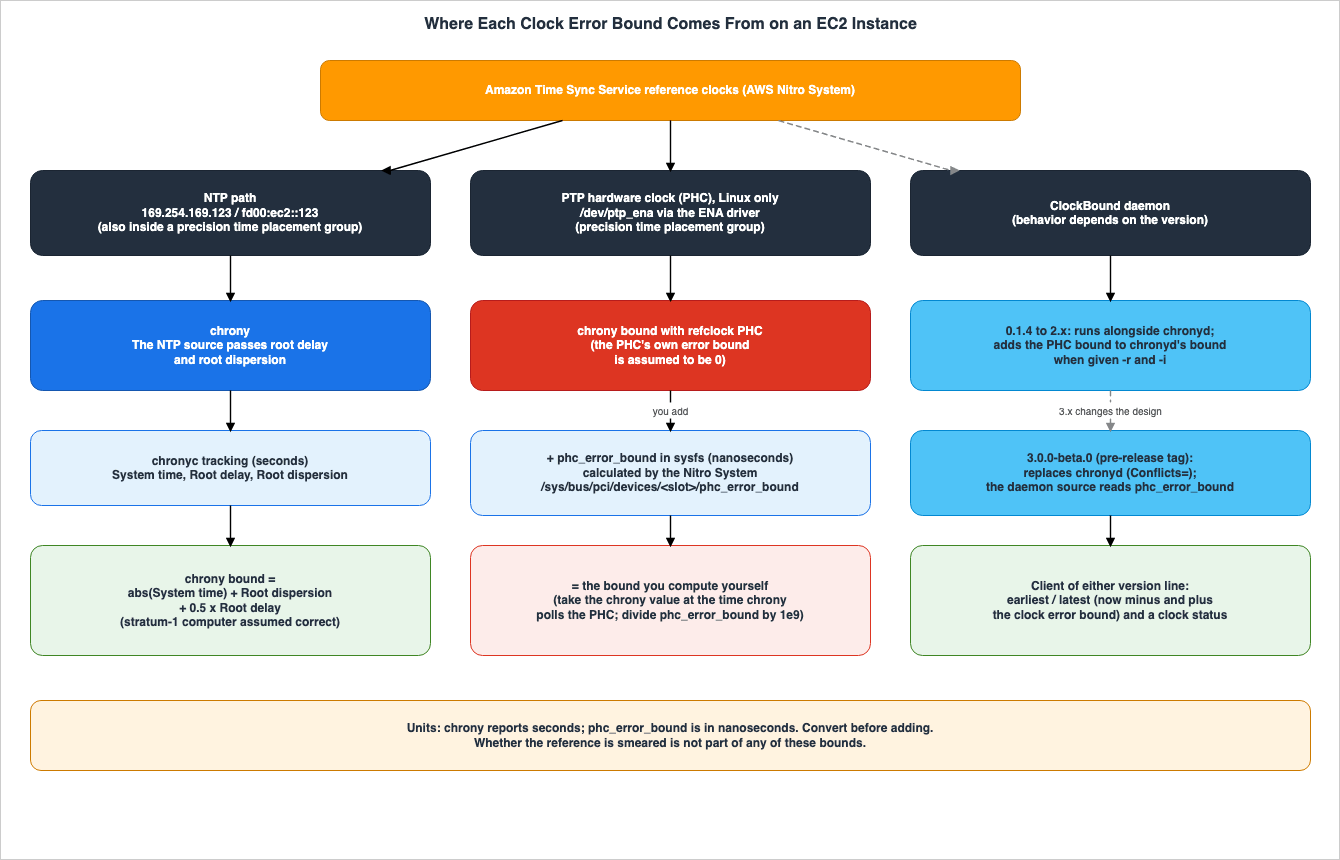
6. What One Instance Returned
The values presented in this section were obtained on October 18, 2026 (UTC) using the following configuration. They are not values that the sources guarantee, and they cannot be used for performance comparisons.- Region:
us-east-1(created using CloudFormation) - Instance: One
m7g.mediuminstance launched within a precision time placement group. - AMI: Amazon Linux 2023 (
2023.12.20261016, kernel6.18.54-121.166.amzn2023.aarch64) - chrony: Version 4.3, included with the AMI.
- ENA Driver: Version 2.17.4g, included with the kernel.
- Procedure: Initially, the system was run with the default settings, and NTP values were read every 2 seconds for a total of 30 readings. Subsequently, PHC was enabled, the
refclockline was added to the configuration, chrony was restarted, and the system was allowed to run for 3 minutes. Finally,chronyc trackingandphc_error_boundwere read every 1 second for a total of 60 readings.
6.1 What the Default Configuration Showed
The default chrony service on Amazon Linux 2023 used two time sources. Both came from files under the/run/chrony.d/ directory.server 169.254.169.123 prefer iburst minpoll 4 maxpoll 4
pool time.aws.com iburstSpecifically, on this instance, in addition to a local NTP server, the publicly available
time.aws.com was also included as a default time source. In chronyc sources, chrony had selected 169.254.169.123 as the current time source (^*), and its Stratum showed as 1.PHC was not enabled by default. The
phc_enable parameter in the ENA driver was set to 0, and neither /dev/ptp* nor the phc_error_bound file existed. When the ENA driver was reloaded with phc_enable=1, symbolic links for /dev/ptp0 and /dev/ptp_ena appeared. On this instance, no driver compilation was required. The AMI included the udev rules that create these symbolic links.6.2 Values Read
| Stage | Samples | Item | Minimum | Median | Maximum |
|---|---|---|---|---|---|
| NTP inside the placement group | 30 (every 2 s) | System time, absolute (us) | 0.001 | 3.264 | 8.140 |
| NTP inside the placement group | 30 (every 2 s) | Root delay (us) | 106.943 | 124.961 | 125.959 |
| NTP inside the placement group | 30 (every 2 s) | Root dispersion (us) | 26.727 | 41.194 | 58.146 |
| NTP inside the placement group | 30 (every 2 s) | chrony formula (us) | 92.062 | 104.736 | 113.389 |
PHC direct, refclock PHC | 60 (every 1 s) | System time, absolute (us) | 0.002 | 0.059 | 0.539 |
PHC direct, refclock PHC | 60 (every 1 s) | Root delay (us) | 10.000 | 10.000 | 10.000 |
PHC direct, refclock PHC | 60 (every 1 s) | Root dispersion (us) | 0.199 | 1.306 | 2.908 |
PHC direct, refclock PHC | 60 (every 1 s) | chrony formula (us) | 5.258 | 6.377 | 7.967 |
PHC direct, refclock PHC | 60 (every 1 s) | phc_error_bound (ns) | 15,311 | 16,999 | 17,877 |
PHC direct, refclock PHC | 60 (every 1 s) | chrony formula + phc_error_bound (us) | 21.259 | 23.145 | 24.923 |
The first output of
chronyc tracking after connecting directly to the PHC was as follows:Reference ID : 50484330 (PHC0)
Stratum : 1
Ref time (UTC) : Sun Oct 18 21:08:49 2026
System time : 0.000000023 seconds slow of NTP time
Last offset : -0.000000069 seconds
RMS offset : 0.000000234 seconds
Frequency : 5.791 ppm fast
Residual freq : -0.001 ppm
Skew : 0.122 ppm
Root delay : 0.000010000 seconds
Root dispersion : 0.000001477 seconds
Update interval : 1.0 seconds
Leap status : NormalAt that time, the
phc_error_bound was 17409 ns. Calculating the formula in Section 5.3 with this first value yields 0.000000023 + 0.000001477 + 0.5 × 0.000010000 + 17409 / 1e9 = 0.000023909 seconds. The slight difference from the first of the 60 samples (0.000023919 seconds) is due to the fact that the samples are being re-read using chronyc tracking.6.3 What This Record Supports
This record supports the following:- Even after connecting directly to the PHC, the chrony value was not 0. The root delay showed the configured value of
delay 0.000010as 0.000010000 seconds. - The
phc_error_boundvalue was not included in the chrony value. Across 60 samples, the percentage of thephc_error_boundin the summed value ranged from 68.0% to 76.7%. In other words, the chrony value represented 23.3% to 32.0% of the summed value. - In the NTP stage, the root dispersion increased between updates and decreased with each update. The value calculated by chrony also exhibited a similar pattern (Section 4.5).
- For the PHC0 line in the output of
chronyc sources, the+/-value was 5031ns both times. The chronychrony.confdocumentation states that half of thedelayvalue is included in the maximum assumed error (Section 5.4). The fact that this value and half of thedelay(5 us) are so close is this article's inference, and it was not checked in the chrony source code.
The samples were not taken in conjunction with the exact moment when chrony reads the PHC. Instead,
chronyc tracking and phc_error_bound were read sequentially every second. This does not precisely match the "value at the moment when chrony reads the PHC" as specified in the user guide.7. ClockBound: Versions That Run Alongside chronyd and the Version That Replaces It
This section lays out the arrangements of ClockBound by version and maps them to the EC2 User Guide. Counting the arrangement in which chrony is used alone and the user addsphc_error_bound, three arrangements handle the PHC's error bound.7.1 What ClockBound Returns
About ClockBound, the EC2 User Guide statesClockBound measures the clock accuracy of your EC2 instance, and allows you to check if a given timestamp is in the past or future with respect to your instance's current clock. It also states that ClockBound is an open source daemon and library, and that it is supported only for Linux instances.According to the ClockBound README, for every event of interest the client reports a window of uncertainty and the status of the daemon. This window, referred to as the Clock Error Bound, is defined by two timestamps (
earliest and latest), within which true time exists.7.2 From 0.1.4 Through 2.x: Running Alongside chronyd
The README files for versions 1.x and 2.x state that ClockBound creates bounded timestamps that include the error reported by the local chronyd. The latest version of 2.x isclock-bound-d 2.0.3 on crates.io. Its date is September 10, 2025, on crates.io and August 13, 2025, in the CHANGELOG. The sources disagree.According to the CHANGELOG for the 1.x branch, the ability to read PHC error bounds was added in version 0.1.4 (released on November 16, 2023). The README files for the 1.x and 2.x daemons both state the following regarding PHC:
To get accurate clock error bound values when chronyd is synchronizing to the PHC (since chronyd assumes the PHC itself has 0 error bound which is not necesarily true), a PHC reference ID and PHC network interface (i.e. ENA interface like eth0) need to be supplied for ClockBound to read the clock error bound of the PHC and add it to chronyd's clock error bound.
The spelling
necesarily in the quote is as in the original. With this configuration, providing a reference ID and interface, such as -r PHC0 -i eth0, makes ClockBound read the PHC's error bound and add it to chronyd's bound.7.3 3.0.0-beta.0: Replacing chronyd
The main README describes the daemon asThe clockbound daemon that keeps the system clock synchronized by accessing local PTP Hardware Clock (PHC) device or NTP sources, and offers extra information over a shared memory segment. The docs/clockbound-daemon.md documentation refers to the daemon as a batteries-included clock synchronization daemon that runs with zero configuration, and states that the daemon automatically configures itself to read from the Amazon Time Sync Service (169.254.169.123) and time.aws.com, and automatically detects the PHC from the ENA driver. It also states that the daemon uses a feed-forward synchronization algorithm to adjust the system clock.The 3.0.0-alpha.0 entry in the CHANGELOG states
The clockbound daemon does not require chronyd., and deprecates support for 2.x clients. The systemd unit file in the repository (clock-bound/assets/clockbound.service) includes Conflicts=ntpd.service systemd-timesyncd.service chronyd.service, so, with this unit file, the 3.x daemon does not run alongside chronyd.The source code associated with the 3.0.0-beta.0 tag shows that the daemon reads the
phc_error_bound value directly. The file clock-bound/src/daemon/io/phc.rs constructs the path /sys/bus/pci/devices/{pci_slot_name}/phc_error_bound and reads the contents of that file. This article verified that the source code reads this file. It did not verify how the value is used in calculating the bound. This is a fact about pre-release source code, not something the documentation guarantees.The public functions of the 3.0.0-beta.0 Rust client are the ones that create a client and
now(). The now() function returns the earliest time, latest time, and the current clock state. The source code comments indicate that the interval is (earliest, latest) = ((now - ceb), (now + ceb)), with a width of twice the clock error bound. There were no dedicated functions for determining whether a timestamp is in the past or the future in the client.rs file for this tag.7.4 Version Status
| Version line | Where | Latest as of 2026-10-18 | Relationship with chronyd | Who reads the PHC error bound |
|---|---|---|---|---|
| 1.x (PHC support since 0.1.4) | Branch main-1.0, crates.io clock-bound-d | 1.0.0 (crates.io 2024-04-09; CHANGELOG 2024-04-05) | Runs alongside chronyd and reads its error | ClockBound, when given -r and -i |
| 2.x | Branch main-2.0, crates.io clock-bound-d | 2.0.3 (crates.io 2025-09-10; CHANGELOG 2025-08-13) | Runs alongside chronyd and reads its error | ClockBound, when given -r and -i |
| 3.x | Branch main, tag and crates.io clock-bound | 3.0.0-beta.0 (tag 2026-08-27) | Replaces chronyd (Conflicts=) | The ClockBound daemon (source of the tag) |
Version 3.0.0-beta.0 has three dates in the sources: August 24, 2026, in the CHANGELOG; August 25, 2026, in the commit that points to the tag; and August 27, 2026, for the tag and its publication on crates.io. The GitHub Releases list shows only the pre-release versions 3.0.0-alpha.0 and 3.0.0-alpha.1. Version 3.0.0-beta.0 is only present as a tag. As of October 18, 2026, there is no version 3.x without a suffix.
Following that, version 3.0.0-beta.1 was added. The CHANGELOG entry is dated October 12, 2026, and the tag and its publication on crates.io are dated October 19, 2026. In the source code for 3.0.0-beta.1, the
Conflicts= line in the systemd unit file, the path for phc_error_bound that phc.rs constructs, the public functions of the Rust client, and the four states of the clock, along with their associated comments, were identical to those in 3.0.0-beta.0. The descriptions of version 3.x in this article are based on the source code for 3.0.0-beta.0. As of October 19, 2026, there was no version 3.x released without a suffix.7.5 How This Maps to the EC2 User Guide
The EC2 User Guide's instructionyou must add the clock error bound from chrony or ClockBound assumes a configuration where the user adds phc_error_bound to the bound from chrony or from ClockBound running alongside chronyd. This configuration has the same shape as the one in the README files for 1.x and 2.x (where ClockBound adds the PHC bound to chronyd's bound).However, this sentence in the user guide does not specify whether ClockBound should be passed the
-r and -i flags. As described in the README files for the 1.x and 2.x versions, the bound of ClockBound when passed these flags already includes the PHC bound (Section 7.2). Adding phc_error_bound to that bound would effectively count the PHC portion twice. This paragraph is this article's inference.The README file for version 3.x describes configurations that do not use chronyd. The two documents do not contradict each other; they describe the arrangements of different versions. This article does not claim that either configuration is incorrect. When using ClockBound, first check which version you are using and whether that version works alongside chronyd or replaces it.
8. Using the Bound to Order Two Events
This section covers what stays with the user who relies on the clock error bound.8.1 Thinking in Intervals
The ClockBound README defines the window of uncertainty as the time reported by the daemon plus or minus the clock error bound. Even without using ClockBound, it's possible to create a similar range based on the chrony values and thephc_error_bound.earliest = timestamp - bound
latest = timestamp + bound8.2 When the Intervals Overlap and When They Do Not
Take events A and B on two instances and build an interval for each. This paragraph is this article's inference. If A'slatest timestamp precedes B's earliest timestamp, then A occurred before B in true time. If the two intervals overlap, the clock error bounds cannot tell which came first. The inference rests on the ClockBound README's definition of the window (true time exists within it) and on the EC2 User Guide's statement that this information is valuable for determining the order and consistency of events and transactions across EC2 instances.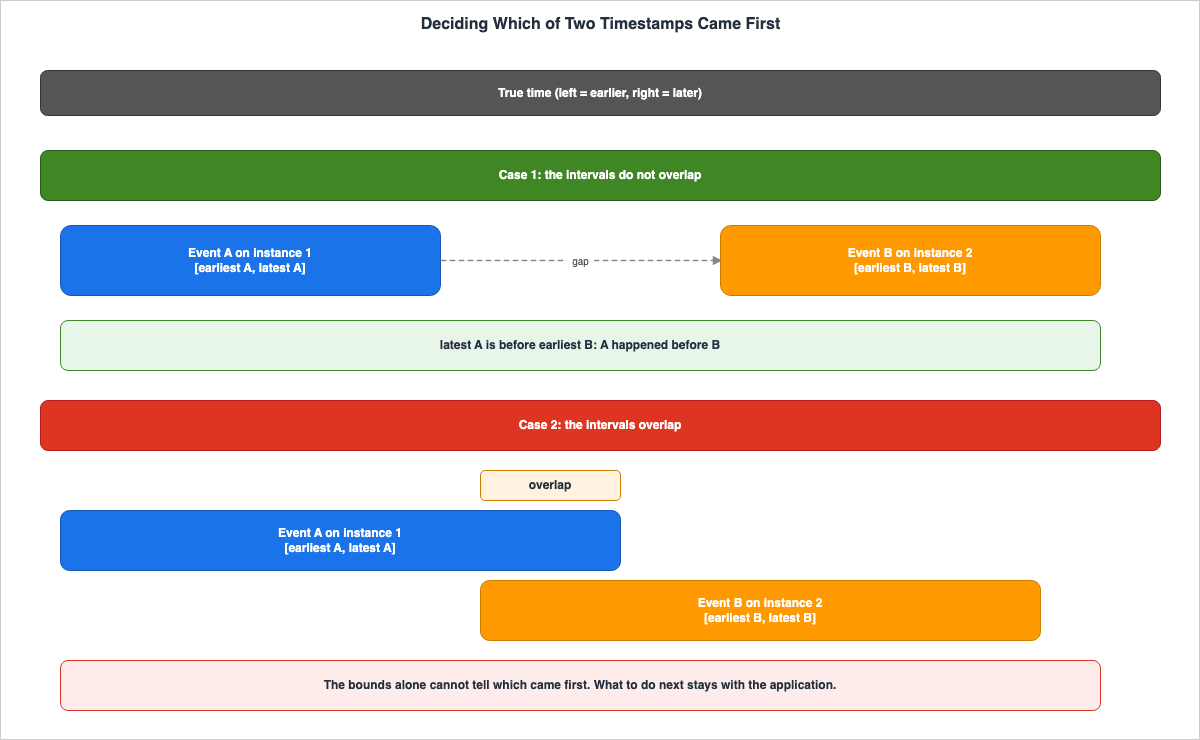
8.3 When the Bound Can Be Trusted
In the source code for version 3.0.0-beta.0, the clock's state has four possibilities. The source code comments indicate that you should not trust bounded timestamps when the clock is in theUnknown or Disrupted states. The comments say they can be trusted in the Synchronized and FreeRunning states. The FreeRunning state refers to a condition where the daemon is not updating the clock. As Section 4.5 describes, the bound widens between clock updates.Even when creating your own bounds based on chrony's values, you must verify that chrony is synchronized (that the
Leap status shown by chronyc tracking is not Not synchronised) along with the bound itself.8.4 What the Bound Does Not Include
chrony's bound assumes that the stratum-1 computer is correct (Section 1.4). The EC2 User Guide states that NTP time sources present UTC time with leap smear applied, while PHC does not. The user guide recommends against using smeared and non-smeared time sources on the same client during leap seconds.The formula for the bound does not account for whether the reference time source applies leap smear. What continuous UTC from May 20, 2027 changes and does not change for leap seconds and smear is covered in the previously published Computer Time and Leap Seconds History and Timeline. The AWS documentation reviewed for this article does not describe the relationship between the clock error bound and continuous UTC.
8.5 Build Both Bounds with the Same Formula
When comparing the intervals of two instances, it's necessary to use the same formula and units for both. If one instance is directly connected to PHC without adding thephc_error_bound, while the other uses chrony's values over NTP, the resulting interval widths will not represent the same meaning. The ClockBound README states that the bound provides a general measure for comparing timestamps between nodes, regardless of location or synchronization protocol. This is true when the bound is calculated as the sum of all potential errors, representing a worst-case scenario.9. Failure Modes
The following are common errors that can occur when misinterpreting the tables in this article:- Using the value from chrony as the bound while connected directly to the PHC: The chrony value does not include
phc_error_bound. In the configuration in Section 6,phc_error_boundmade up 68.0-76.7% of the sum (Sections 5.3 and 6.3). - Misreading "chrony outputs 0": The value of 0 refers to the bound of PHC's own error, while the chrony value itself includes settings such as
delay(Sections 5.1 and 5.4). - Adding values without consistent units: The chrony value is in seconds, while
phc_error_boundis in nanoseconds (Sections 2.2 and 5.3). - Using paths and devices from the 2023 Compute Blog: The user guide uses
/dev/ptp_enaand/sys/bus/pci/devices/<slot>/phc_error_bound, and notes that numbered names such as/dev/ptp0depend on the order of hardware initialization (Section 5.5). - Attempting to run ClockBound 3.x simultaneously with chronyd: The unit file for 3.x has a
Conflicts=setting that conflicts with chronyd (Section 7.3). - Combining procedures from the user guide with an unverified version of ClockBound: The procedures in the user guide assume chrony, or ClockBound running alongside chronyd (Section 7.5).
- Interpreting the guideline values from the 2023 Compute Blog as current guarantees: See Q6 in Section 10.
- Using smeared and non-smeared time sources together during leap seconds: The user guide does not recommend this (Section 8.4).
- Determining order even when two intervals overlap: When intervals overlap, it is not possible to determine order based on the clock error bound (Section 8.2).
10. Frequently Asked Questions About Clock Error Bounds on EC2 Instances
This section addresses common questions related to the content of this article, providing concise answers with references to the relevant sections.Q1. With a direct PHC connection, does the clock error bound from chrony become 0?
No, it does not. The EC2 User Guide describes a scenario where chrony considers the PHC itself to be accurate against UTC and treats the PHC's own error bound as 0. In the configuration described in Section 6, the chrony formula gave 5.258 to 7.967 us, and the Root delay showed the configureddelay value (Sections 5.1 and 6.3).Q2. Does chrony add phc_error_bound automatically?
The user guide says that the user adds it to the bound from chrony or ClockBound. It does not say that chrony adds it automatically. In versions of ClockBound from 0.1.4 to 2.x, passing the -r and -i flags will add the PHC bound to the chronyd bound. In ClockBound 3.0.0-beta.0, the daemon's source code reads phc_error_bound (Sections 5.3 and 7).Q3. Is ClockBound used together with chrony?
It depends on the version. Versions 1.x and 2.x work with chronyd. Version 3.0.0-beta.0 replaces chronyd, and its systemd unit file hasConflicts= for chronyd (Section 7).Q4. Which time sources does Amazon Linux 2023 use if nothing is configured?
The user guide says that Amazon Linux 2023 uses the Amazon Time Sync Service IPv4 endpoint by default. In Amazon Linux 2023 (version2023.12.20261016), both the 169.254.169.123 endpoint and the time.aws.com pool were configured as default. The PHC was disabled by default (Sections 3.1 and 6.1).Q5. Can Windows instances use the PHC?
The user guide states that the PHC device is currently accessible only on Linux instances, and that Windows instances reach the enhanced time source over NTP (Section 3.3).Q6. Are the 2023 figures of under 100 microseconds over NTP and under 40 microseconds with the PHC guarantees?
They are not guarantees. The Compute Blog post from November 16, 2023, states that where the microsecond-accurate enhancement is available,you will typically see a clock error bound of under 100us using the NTP connection, and that when configured and synchronized correctly with the PHC connection, you will typically see a clock error bound of under 40us. Both figures are estimates from the 2023 announcement, indicated by the word typically. The current EC2 FAQ describes the PHC as microsecond-accurate and the NTP endpoint as millisecond-accuracy. The documentation uses different wording, and this article does not state that either is incorrect.Q7. Does continuous UTC change how the clock error bound is handled?
The AWS documentation that this article read does not describe the relationship between the clock error bound and continuous UTC. What changes and what does not for leap seconds and smear is covered in the previously published Computer Time and Leap Seconds History and Timeline (Section 8.4).Q8. When were the statements in this article checked?
The information in the documentation was verified on October 18, 2026. The results presented in Section 6 are as of October 18, 2026 (UTC). The supported instances, the version of ClockBound, and the version of chrony may have changed after the verification date (Sections 1.3, 3.6, and 7.4).11. Summary
- Four time paths: Link-local NTP, NTP inside a precision time placement group, PHC (currently only supported on Linux, according to the user guide), and the public
time.aws.com. The PHC requires a precision time placement group and ENA driver version 2.10.0 or later (Section 3). - chrony calculates the clock error bound on the NTP path: It is the absolute value of System time plus Root dispersion plus half of Root delay, assuming the stratum-1 computer is correct. The bound widens between clock updates (Section 4).
- When directly connected to the PHC, chrony assumes the PHC itself has zero error: The Nitro System provides this error bound as
phc_error_bound(in nanoseconds), which, according to the user guide, users then add to either chrony's or ClockBound's bound (adding it to the bound of ClockBound when using the-rand-ioptions results in double-counting the PHC contribution; Section 7.5). In the configuration in Section 6,phc_error_boundmade up 68.0-76.7% of the sum (Sections 5 and 6). - ClockBound's configuration varies by version: Versions 0.1.4 through 2.x run alongside chronyd and, when given
-rand-i, add the PHC bound to chronyd's bound. Version 3.0.0-beta.0 replaces chronyd and independently reads thephc_error_bound. The differences between the user guide and the 3.x README are due to these version differences (Section 7). - Determining precedence requires examining the overlap between time intervals: If there is overlap, precedence cannot be definitively established. Build both instances' bounds with the same formula and units, and also verify the state of the clocks. Whether the reference time source is smeared stays outside the bound (Section 8).
12. References
- Precision clock and time synchronization on your EC2 instance - Amazon Elastic Compute Cloud User Guide
- Set the time reference on your EC2 instance to use the local Amazon Time Sync Service - Amazon Elastic Compute Cloud User Guide
- Set the time reference on your EC2 instance or any internet-connected device to use the public Amazon Time Sync Service - Amazon Elastic Compute Cloud User Guide
- Compare timestamps for your Linux instances - Amazon Elastic Compute Cloud User Guide
- Placement strategies for your placement groups - Amazon Elastic Compute Cloud User Guide
- AWS::EC2::PlacementGroup - AWS CloudFormation Template Reference
- Amazon EC2 FAQs
- Amazon Time Sync Service now supports microsecond-accurate time - AWS What's New
- Amazon Time Sync Service adds support for Microsecond accurate time on 26 additional EC2 instance types in all commercial regions - AWS What's New
- Amazon Time Sync Service adds support for microsecond-accurate time on 135 additional EC2 instance types in all commercial regions - AWS What's New
- It's About Time: Microsecond-Accurate Clocks on Amazon EC2 Instances - AWS Compute Blog
- Manage Amazon EC2 instance clock accuracy using Amazon Time Sync Service and Amazon CloudWatch - Part 1 - AWS Cloud Operations Blog
- chronyc Manual Page - chrony
- chrony.conf Manual Page - chrony
- chrony News
- ClockBound - GitHub (aws/clock-bound)
- ClockBound Daemon documentation - GitHub (aws/clock-bound)
- ClockBound CHANGELOG - GitHub (aws/clock-bound)
- ClockBound 2.x daemon README - GitHub (aws/clock-bound, branch main-2.0)
- ClockBound 3.0.0-beta.0 tag - GitHub (aws/clock-bound)
- ClockBound 3.0.0-beta.1 tag - GitHub (aws/clock-bound)
- clock-bound - crates.io
- clock-bound-d - crates.io
References:
Tech Blog with curated related content
Written by Hidekazu Konishi