Trusting the Clock When Certificates Expire Fast - What NTP, NTS, and Roughtime Protect, and Where Amazon Time Sync Fits
First Published:
Last Updated:
Those verifying the certificates rely on their own clocks to determine if the current time falls in the validity period. As validity periods shorten, even slight discrepancies in the verifier's clock can easily lead to verification failures. Therefore, it becomes necessary to assert that verification will succeed if the clock is accurate. However, who vouches for the time on that clock varies depending on how the time is obtained.
This article outlines five methods for obtaining time: unauthenticated NTP (Network Time Protocol), authentication using symmetric keys, Autokey, NTS (Network Time Security, RFC 8915), and Roughtime (RFC 10049). It details what each method guarantees and what it does not. The guarantees are divided into two categories: authenticity, which verifies who is providing the time and whether it has been altered, and accuracy, which assesses how closely the time matches the true time. Furthermore, the article discusses the loop in which NTS requires time to verify its own certificates, and how Roughtime stands on the side that breaks that loop. Finally, it examines the role of Amazon Time Sync Service, differentiating between what AWS documentation states and where no statement is found. The documentation was verified as of November 4, 2026.
This article is neither a step-by-step guide for configuring chrony nor an introductory overview of time synchronization. It does not evaluate which time synchronization method should be used, nor does it discuss pricing.
Related articles on this site:
- How Wrong Can the Clock on an EC2 Instance Be - Clock Error Bounds over NTP and the PTP Hardware Clock, phc_error_bound, and ClockBound
- Computer Time and Leap Seconds History and Timeline - UT1, TAI, UTC, Leap Smearing, and Who Decides When a Second Is Added
- TLS Certificate Ecosystem History and Timeline - Certificate Authorities, Automation, and Shrinking Certificate Lifetimes
- AWS Private CA Hierarchy Design - Root and Subordinate CAs, Revocation, Short-Lived Mode, and mTLS on ALB
- Certificate Distribution in Kubernetes with AWS Private CA - Issue, Request, Store, Consume, and the Layer Where Renewal Stops
- SSL/TLS Certificate Decoder and Chain Inspector - X.509 PEM/DER Viewer
- Unix Timestamp Converter Tool - Epoch Time and Date Converter with Timezone Support
Table of Contents
- 1. Scope and Assumptions
- 2. Understanding the Tables
- 3. What Fails When the Verifier's Clock Is Wrong
- 4. What Each Way of Getting Time Protects
- 5. The Certificate Loop and Where It Can Be Broken
- 6. Where Amazon Time Sync Service Fits
- 7. Devices Without a Clock and the First Moments After Startup
- 8. Dates in the Sources and Statements Not Found
- 9. What the Demo Showed
- 10. Frequently Asked Questions Regarding Certificate Validation and Time
- 11. Summary
- 12. References
1. Scope and Assumptions
This chapter defines the intended audience, the scope of this article, the relevant source materials, and any potentially ambiguous terminology.1.1 Intended Audience
This article is intended for individuals responsible for managing certificates with short validity periods, as well as those responsible for verifying such certificates. Examples of certificates with short validity periods include Let's Encrypt's 6-day certificates, certificates issued under BR's phased reduction in validity, and certificates issued in AWS Private CA's short-lived mode. Examples of verifiers include IoT devices, containers, newly launched instances, and offline devices.Specifically, this article targets readers who hold one or more of the following assumptions, all of which, in this article's conclusion, are either conditional or lack explicit documentation:
- Amazon EC2 has Amazon Time Sync Service, so time synchronization is secure.
- Using NTS ensures accurate time.
- Roughtime can provide accurate time.
- Certificate Authorities will account for clock skew by setting the
notBeforevalue in the past.
1.2 Scope and Exclusions
This article addresses the following topics:- The relationship between discrepancies in the clocks used for verification and failures in certificate validation.
- What five different time acquisition methods guarantee and what they do not.
- The loop between NTS certificate validation and time, and where Roughtime breaks that loop.
- Details regarding the two entry points of the Amazon Time Sync Service, including what is documented in AWS documentation and where no statement is found.
- Information from AWS documentation concerning devices without clocks and machines immediately after startup.
- A listing of dates for BR and Let's Encrypt certificates, including those that are in effect and those that are scheduled.
- RFC classifications.
This article does not cover the following topics:
- Pricing.
- Clock error limits, ClockBound, and PTP configurations. These are covered in the existing article on EC2 clocks.
- The history of leap seconds and time scales. This is covered in the existing leap seconds timeline.
- Timelines related to shortening certificate validity periods. This is covered in the existing TLS certificate timeline. This article only extracts the necessary dates in Chapters 3 and 8.
- Explanations regarding AWS Private CA's short-lived mode. This is covered in the existing AWS Private CA design article.
- Detailed information on Windows time synchronization.
- Procedures for NTP spoofing and delay attacks. This article covers defense and assurance aspects only.
- TLS key exchange and OAuth tokens. These are covered in two other articles in this series: When Does a Connection to an AWS Endpoint Actually Use ML-KEM? and Browser-Based Apps and Cross-Device Flows on Amazon Cognito.
1.3 Verification Date and Reviewed Materials
The information was verified on November 4, 2026. The materials reviewed are as follows:- RFC 5905 (NTPv4, Standards Track, June 2010)
- RFC 5906 (Autokey, Informational, June 2010)
- RFC 8573 (Message Authentication Codes for NTP, Standards Track, June 2019, updates RFC 5905)
- RFC 8915 (NTS, Standards Track, September 2020)
- RFC 10049 (Roughtime, Experimental, October 2026)
- RFC 5280 (Profiles for X.509 Certificates and CRLs, Standards Track, May 2008)
- CA/Browser Forum Baseline Requirements version 2.3.1 (October 4, 2026)
- Three announcements from Let's Encrypt (December 2, 2025; January 15, 2026; October 7, 2026)
- Three pages from the Amazon EC2 User Guide on time, and the Amazon EC2 FAQ.
- A page from the AWS re:Post knowledge center on NTP synchronization for Linux EC2 instances.
- A page from the AWS re:Post knowledge center on Lambda console errors.
- A page on security best practices from the AWS IoT Core Developer Guide, and a page with the same name from the AWS IoT Greengrass V2 Developer Guide.
- An article from the official AWS IoT blog on verifying server certificates with device time (February 6, 2018).
- The
IssueCertificatepage from the AWS Private CA API reference. - Documentation for chrony version 4.6, specifically the
chrony.confandchronydpages. - The
components/ssl_errors/error_classification.ccfile from the Chromium source code (obtained from the main branch on November 4, 2026). - The
ecosystem.jsonfile and theprotocol/version.gofile from the Cloudflare Roughtime repository.
As of November 4, 2026, there were no errata for RFC 8915, and one erratum for RFC 10049. The erratum for RFC 10049 is a report, in the Reported state, that replaces an example in Appendix B, and is not relevant to the claims made in this article.
1.4 Terminology and Distinctions of Similar Terms
- Verifier: The client or device that receives and validates a certificate. This article calls the clock on this device the verifier's clock.
notBeforeandnotAfter: The start and end dates of a certificate's validity period, as defined in X.509 (RFC 5280 §4.1.2.5). TheNotBeforeandNotAftervalues for Amazon EC2 scheduled events represent separate time periods for maintenance.- Short-Lived Certificates: In this article, this term refers to certificates with a validity period of a few days. BR defines a Short-lived Subscriber Certificate as a subscriber certificate with a validity period of 7 days (604,800 seconds) or less for certificates issued on or after March 15, 2026.
- NTS-KE (NTS Key Establishment): The initial stage of NTS, which establishes keys and cookies over TLS 1.3. The key exchange process itself is covered in a separate article in this series.
- Roughtime CERT: A certificate for a delegated key, signed with the server's long-term key, which is included in the Roughtime response. It is not an X.509 certificate.
- Local Time Sync and public Time Sync: The two entry points for Amazon Time Sync Service. Local Time Sync is accessible via the link-local addresses
169.254.169.123andfd00:ec2::123. Public Time Sync is accessible via the internet addresstime.aws.com. These names are consistent with the "local" and "public" designations in the EC2 User Guide. - Leap Smear: A method of distributing a single leap second over a period of time. In this article, this term refers to the implementation within Amazon Time Sync Service. A comprehensive overview and historical context of leap seconds are covered in the existing leap seconds timeline.
- RTC (real-time clock): A component of a clock that maintains the time even when power is off.
1.5 Relationship to Previously Published Articles
The previously published article, "How Wrong Can the Clock on an EC2 Instance Be," excludes, in its Section 1.2, authentication-based time services such as NTS and Roughtime. This article addresses that gap. The previous article focuses on the upper limits of clock errors on EC2 instances, specifically using chrony, the PTP hardware clock, and ClockBound. This article does not derive formulas for those upper limits. The previous article's Section 3.4 mentions using the public Time Sync as a backup. This article adds a focus on authentication aspects to that consideration.The schedule for shortening certificate validity periods is documented in the existing TLS certificate timeline. This article does not reproduce that schedule, but instead extracts only the dates relevant to Chapters 3 and 8.
2. Understanding the Tables
This chapter defines the columns in the table presented in this article, as well as the terminology used to describe the condition of the materials, and the terms related to guarantees.2.1 Columns
The summary table in Section 3.5 has seven columns, all of which are common to three articles in the same series. In this article, the first column holds guarantees as well as requirements.- Requirement or Guarantee: What this mechanism promises.
- Source and Strength: The section of the text and the strength of the statement.
- AWS Setting or Endpoint: The name of the AWS setting or the endpoint.
- Default: The value when nothing is specified.
- What It Does Not Cover: What this mechanism does not promise.
- How You Can Tell: Where to verify this.
- Where It Is Written: The page where this is documented.
The table in Section 4.6 lists methods for obtaining time, and also has seven columns.
- Method: The method for obtaining time.
- RFC and Category: The RFC number and category.
- Authenticity: Can you verify who provided the time and whether it has been altered?
- Accuracy: What can be said about how close the received time is to the actual time?
- Evidence of Misbehavior: If the server returns an incorrect time, will any evidence remain that can be shown to a third party?
- What It Needs First: What the verifier must have before using this.
- Source State: A term describing the state of the sources from Section 2.2.
The table in Section 6.5 lists entry points for Amazon Time Sync Service and has five columns.
- Endpoint: The address or name of the entry point.
- What the Documentation States: What the AWS documentation states.
- Authentication: Descriptions related to time authentication.
- Leap Seconds: How leap seconds are handled.
- Source State: A term describing the state of the sources from Section 2.2.
2.2 Terms for the State of the Sources
The following seven terms represent the state of the sources. This article, as well as the cells in the table, uses these English terms. These are the same terms used in the second article of the same series.- Stated: The source contains a statement regarding the matter.
- Stated as not supported: The source explicitly states that it does not support, is not yet supporting, or has no plans to support.
- Documentation does not list: While a list, table, or enumeration exists, the specific item is not included. This does not indicate that the matter is absent or unsupported.
- No statement found: Despite searching the sources in Section 1.3 and the additional sources listed in Section 8.3 using different keywords and material categories, no relevant statement could be found. This does not indicate that the matter is absent or will not occur.
- Sources disagree: Both statements and sources are presented. This article does not designate either as incorrect.
- Inference: This is an inference made by this article, and is not a statement found in any of the sources. This article says so in the same sentence.
- Observation: This is based on observations made in Chapter 9 and is not a commitment made by the sources. This article does not use observations to overwrite statements found in the sources.
This article found no instances where AWS documentation explicitly states that it does not support time authentication (Stated as not supported).
2.3 Authenticity and Accuracy
This article divides time assurance into two distinct properties.- Authenticity: This refers to the assurance that the received time originated from the verified source and has not been altered during transmission. RFC 8915 §1.1 uses the term "Authentication" to describe this property.
- Accuracy: This refers to how closely the received time corresponds to the actual, true time.
Authenticity does not guarantee accuracy. RFC 8915 §8.6 notes that cryptographic methods cannot prevent delay attacks, where the outbound and return delays are made asymmetrical without altering the packet's contents (see Section 4.4). RFC 10049 §5.4 states that even if a Roughtime response is properly validated, it does not prove that the time in the response is correct (see Section 4.5).
This article avoids using the term "precision." That term is typically used to describe the granularity of hardware timestamps, as used in the existing article on EC2 clocks.
This article refers to the interdependent relationship between the validation of NTS certificates and the time itself as "the certificate loop." This terminology is specific to this article and is not a term used in RFC documentation.
2.4 RFC Classification and the State of Dates
The RFC classification, aligning with the "Category" notation on the RFC Editor's website, is categorized as Standards Track, Informational, or Experimental. RFC 10049 is classified as Experimental and is not a Standards Track document. Autokey, as described in RFC 5906, is categorized as Informational.The dates mentioned include those that have already taken effect and those that are planned for the future. This article will distinguish between dates that have already taken effect and planned dates in the text. Dates will be presented with the year included.
3. What Fails When the Verifier's Clock Is Wrong
This chapter discusses the relationship between certificate validity periods and the verifier's clock, referencing the RFC 5280, BR, and AWS Private CA documentation.3.1 Validity Period and Two Error Conditions
RFC 5280 §4.1.2.5 defines the validity period of a certificate as the period inclusive of both thenotBefore and notAfter times. BR also references this section in its definition of Validity Period.The validity period for a certificate is the period of time from notBefore through notAfter, inclusive.The certificate path validation process, as described in RFC 5280 §6.1.3, verifies that each certificate's validity period includes the current time.
(2) The certificate validity period includes the current time.The "current time" referred to here is the time maintained by the verifier. The certificate has no knowledge of whether the verifier's clock is accurate. If the verifier's clock indicates a time before the
notBefore time, the certificate will be considered not yet valid. If the clock indicates a time after the notAfter time, the certificate will be considered expired. In OpenSSL, these two conditions result in the errors X509_V_ERR_CERT_NOT_YET_VALID and X509_V_ERR_CERT_HAS_EXPIRED. An AWS IoT blog post from 2018 also notes that devices that do not know the time may return these two errors (Section 7.2).3.2 The Shorter the Validity Period, the Smaller the Acceptable Clock Skew
How far the verifier's clock can be off while validation still passes is determined by the remaining validity period of the certificate the server is currently presenting, and the time elapsed since its issuance. The figures in this section are based on examples created for this article. This section assumes that the server renews its certificate at approximately two-thirds of its validity period and immediately begins using the renewed certificate. Let's Encrypt's announcements for December 2, 2025, and October 7, 2026, recommend renewing certificates at approximately two-thirds of their validity period to subscribers whose renewal timing is fixed.If the verifier's clock is running ahead, it will prematurely determine that a certificate has expired. Under this assumption, the remaining validity period of the certificate the server is presenting is at least one-third of its original validity period. Therefore, if the clock is running ahead by more than one-third of the validity period, the validation process will fail shortly before a renewal.
Conversely, if the verifier's clock is running behind, it determines that a newly issued certificate is not yet valid. Immediately after a renewal, the time elapsed since issuance is close to zero. Therefore, if the clock is behind by an amount exceeding the difference between the issuance time and the
notBefore time, the validation process will fail shortly after the renewal. This difference is not determined by the certificate's validity period but is instead set by the issuer (see Section 3.3). As the validity period becomes shorter, the number of renewals increases, which means this time window occurs more frequently.| Validity Period (Example) | Renewal Interval (Approximately 2/3 of Validity Period) | Safe Range for Clock Ahead (Approximately 1/3 of Validity Period) | How Often the Clock-Behind Failure Window Comes |
|---|---|---|---|
| 398 days | Approximately 265 days | Approximately 133 days | Every 265 days or so |
| 200 days | Approximately 133 days | Approximately 67 days | Every 133 days or so |
| 47 days | Approximately 31 days | Approximately 16 days | Every 31 days or so |
| 160 hours (just over 6 days) | Approximately 107 hours | Approximately 53 hours | Every 107 hours or so |
This table is an example built by inference in this article (Inference). The actual timing of renewals will vary depending on clients using ACME Renewal Information (ARI) and the server's operational practices.
3.3 The Issuer's Margin — BR and AWS Private CA
If the issuer sets thenotBefore value before the issuance time, it provides a margin even for clocks that are running behind. Regarding this margin, both the BR and AWS Private CA documentation state the following:The BR 7.1.2.7 subscriber certificate profile defines the
notBefore value as follows:A value within 48 hours of the certificate signing operation.The BR only defines the
notBefore value as a value within 48 hours of the signing operation, without indicating whether it should be before or after. There is no statement found in the BR documentation that requires CAs to set the notBefore value in the past to account for clock discrepancies (No statement found). The term "backdating" appears only in the section discussing the handling of the CRL's revocationDate. Similarly, no statement was found in the BR documentation that defines the acceptable clock discrepancy for the verifier (No statement found).The AWS Private CA API reference, in the description of the
IssueCertificate's ValidityNotBefore parameter, states the default notBefore value as follows:By default, when issuing a certificate, AWS Private CA sets the "Not Before" date to the issuance time minus 60 minutes. This compensates for clock inconsistencies across computer systems.The same documentation indicates that the
ValidityNotBefore parameter allows users to specify the notBefore value. The ValidityNotBefore parameter is optional, and its value is specified as a date and time. Regarding the Validity parameter, which determines the end of the validity period, the same page states that specifying a ValidityNotBefore value does not affect the notAfter value. In other words, by default, AWS Private CA provides a 60-minute margin for clocks that are running behind. A clock that is more than 60 minutes behind will judge a certificate as not yet valid immediately after it is issued. The relationship between this default behavior and AWS Private CA's short-lived mode was not investigated in this article.This article does not investigate how far in the past public CAs set the
notBefore value. Based on the BR documentation, the only range specified is within 48 hours.3.4 The Two Failures on a Timeline
The following figure illustrates Sections 3.1 through 3.3, presented as a timeline within a single certificate.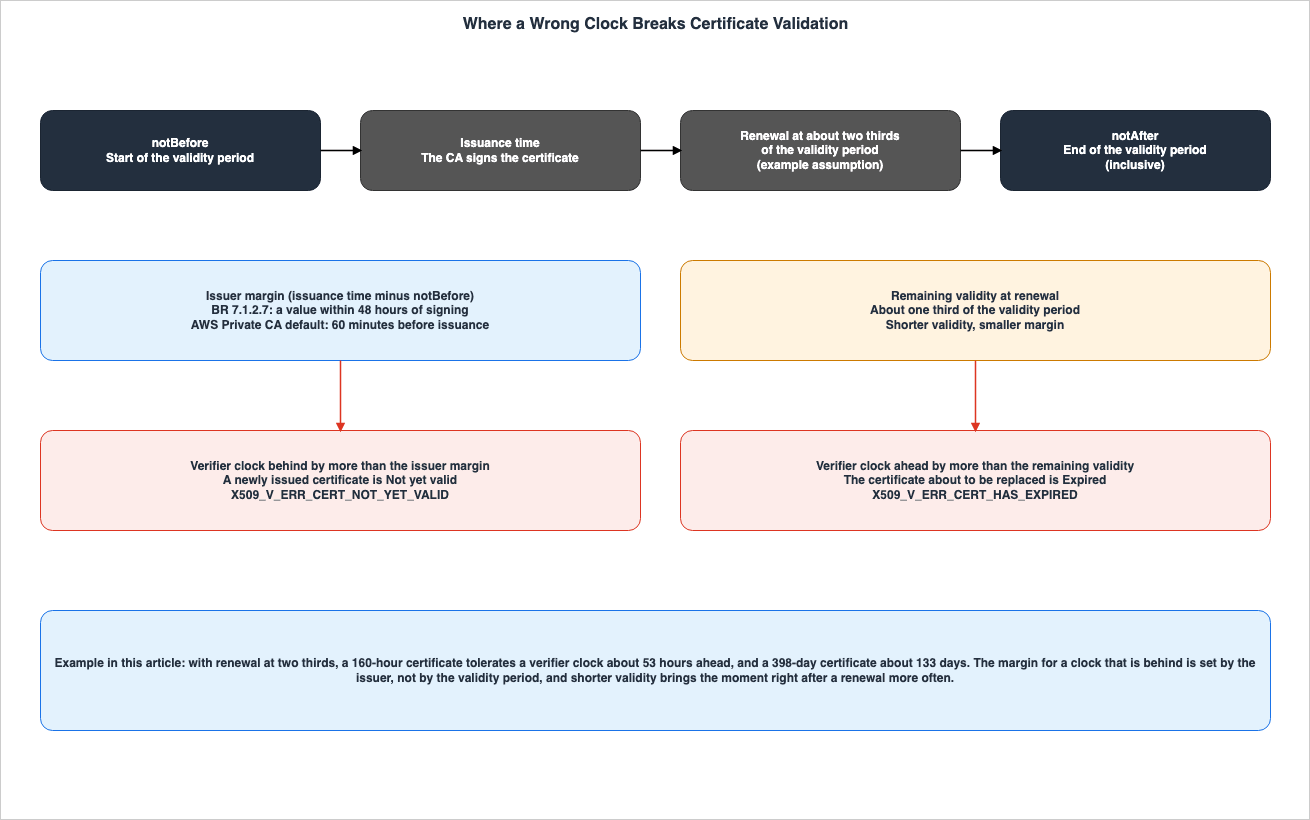
notBefore, issuance time, renewal time, and notAfter. The middle section indicates the margin available to the issuer and the remaining validity period at the time of renewal. The bottom section shows in which scenarios a clock that is behind and a clock that is ahead will fail, respectively. As the validity period decreases, the notAfter time approaches the issuance time, and the range within which a clock that is ahead will not fail becomes smaller.3.5 Summary Table
The following table summarizes the guarantees and assumptions from Chapters 3 through 7, presenting them across seven common columns in the same series. Detailed information is provided in Chapters 4 through 7.| Requirement or Guarantee | Source and Strength | AWS Setting or Endpoint | Default | What It Does Not Cover | How You Can Tell | Where It Is Written |
|---|---|---|---|---|---|---|
| The clock used by the verifier must indicate a time in the validity period. | RFC 5280 §6.1.3, Path Validation Requirements | On EC2, local Time Sync may be a source of time. | AL2023 and recent Amazon Linux 2 use the IPv4 endpoint as the default. | Whether the clock itself is accurate. | chronyc tracking and chronyc sources | RFC 5280, EC2 User Guide (local Time Sync page) |
The notBefore value in a publicly trusted TLS server (subscriber) certificate is a value within 48 hours of the signing operation. | BR 7.1.2.7, Profile Requirements | No AWS-specific setting. | No statement found on the direction (No statement found). | How much margin a clock that is behind has. | The notBefore value in the certificate. | BR |
AWS Private CA sets the notBefore value to 60 minutes prior to the issuance time. | IssueCertificate API Reference, Default Behavior | ValidityNotBefore | 60 minutes prior to the issuance time. | A clock more than 60 minutes behind. Relationship with short-lived mode has not been verified. | The notBefore value in the issued certificate. | API Reference |
| Network Time Security (NTS) protects the authenticity of time. | RFC 8915 §1.1, Standards Track | No statement found regarding Time Sync authentication. | In chrony, sources without nts or key are not authenticated. | Accuracy. Residual error from potential delay attacks (see §8.6). | chronyc -N authdata | RFC 8915, chrony documentation |
| Roughtime returns the server's stated certainty and, across multiple servers, evidence of misbehavior. | RFC 10049 §3 and §5.2.5, Experimental | No statement found in AWS documentation. | None | Proof that the returned time is correct (see §5.4). | Output from the Roughtime client. | RFC 10049 |
| Devices synchronize their time using NTP before connecting to AWS IoT Core. | AWS IoT Core Developer Guide, should | AWS IoT Core | The current page gives no number for the acceptable clock skew. | How devices without a clock obtain their initial time. | Device time synchronization logs. | AWS IoT Core Developer Guide |
4. What Each Way of Getting Time Protects
This chapter examines five different methods of timekeeping, considering them from the perspectives of authenticity, accuracy, evidence of misbehavior, and prerequisites for use. A summary table is provided in Section 4.6.4.1 Unauthenticated NTP
RFC 5905 is a Standards Track RFC defining NTPv4, published in June 2010. RFC 5905 does not require authentication.There is no specific requirement for authentication; however, if authentication is implemented, then the MD5-keyed hash algorithm described in [RFC1321] must be supported.In unauthenticated NTP, the verifier cannot verify who sent the received time, nor can it determine if the time has been altered during transmission. The authenticity of the time is not protected. NTP's time synchronization calculations rely on the assumption that the network latency for the outgoing and incoming signals is roughly equal. This assumption is explained in RFC 8915 §8.6 (Section 4.4). As an inference of this article (Inference), because unauthenticated NTP does not detect if the contents of a packet have been modified, there is no upper limit on the error that a party on the path can introduce.
4.2 Authentication Using Symmetric Keys — From MD5 to AES-CMAC
NTP provides a method where the server and client share the same key to attach a message authentication code (MAC) to packets. RFC 5905 carries this method forward from NTPv3. RFC 8573, a Standards Track RFC published in June 2019, updates RFC 5905. RFC 8573 deprecates authentication using MD5 and instead recommends AES-CMAC.This document deprecates MD5-based authentication, which is considered too weak, and recommends the use of AES-CMAC as described in RFC 4493 as a replacement.In symmetric key authentication, authenticity is ensured between parties who share the key. Before use, this key must be securely distributed. As an inference of this article (Inference), since anyone possessing the key can generate a valid authentication code, it cannot be used as definitive proof to a third party if the server returns an incorrect time. RFC 8915 §8.1 states that, for the NTP modes other than the client and server modes that NTS covers, symmetric key authentication as defined in RFC 5905 and RFC 8573 is the current best practice.
4.3 Autokey
RFC 5906 describes Autokey, a method for authenticating NTPv4 using public keys. This RFC is categorized as Informational and is not part of the Standards Track. The abstract of RFC 5906, as of 2010, already addresses the issue that the foundation of public keys and time authentication are mutually dependent.In addition, Public Key Infrastructure (PKI) schemes presume authenticated time values are always available to enforce certificate lifetimes; however, cryptographically verified timestamps require interaction between the timekeeping and authentication functions.This issue mirrors the certificate loop described in Chapter 5. This article does not detail the specifics of Autokey's operation, nor does it provide a subsequent evaluation. RFC 8915 does not mention Autokey.
4.4 NTS
RFC 8915 is a Standards Track RFC that defines NTS, published in September 2020. NTS initially establishes keys and cookies over TLS via NTS-KE. Subsequent NTP packets are then protected using AEAD (Authenticated Encryption with Associated Data). WithMUST NOT, RFC 8915 §3 forbids NTS-KE implementations from negotiating TLS versions earlier than 1.3. The details of TLS key exchange are covered in the first article of the same series.RFC 8915 §1.1 lists the purposes of NTS. Two items related to authenticity are:
Identity: Through the use of a X.509 public key infrastructure, implementations can cryptographically establish the identity of the parties they are communicating with.

Authentication: Implementations can cryptographically verify that any time synchronization packets are authentic, i.e., that they were produced by an identified party and have not been modified in transit.
The same section states that the basic time data is transmitted in plaintext, and that NTS supports encrypting NTP extension fields.
NTS does not provide protection against everything. RFC 8915 §8.6 describes potential delay attacks:
The delay attack does not reorder or modify the content of the exchanged synchronization packets. Therefore, cryptographic means do not provide a feasible way to mitigate this attack. However, the maximum error that an adversary can introduce is bounded by half of the round-trip delay.The same section mentions the MAXDIST parameter from RFC 5905, stating that the maximum error a delay attack can introduce is half of the MAXDIST value. The standard value for MAXDIST is 1 second. Therefore, while NTS protects the authenticity of the time, it does not guarantee the accuracy of the time. There is a limit to the error that can occur with NTS, but round-trip latency determines that limit, and it is not zero.
RFC 10049 §1 states that regarding NTS, there is no mechanism to observe whether the server is functioning correctly.
Unfortunately, widely deployed protocols such as the Network Time Protocol (NTP) [RFC5905] lack essential security features, and even newer protocols like Network Time Security (NTS) [RFC8915] lack mechanisms to observe that the servers behave correctly.RFC 8915 §8.7 discusses attacks that revert to unauthenticated NTP following an NTS-KE failure. With
SHOULD NOT, it asks implementations not to transition, without explicit user intervention, from NTP protected by NTS back to unprotected NTP.In chrony, specifying
nts after server or pool indicates that NTS should be used with that source. chrony's documentation describes the function of nts as follows:This option enables authentication using the Network Time Security (NTS) mechanism. Unlike with the key option, the server and client do not need to share a key in a key file.Before using NTS, the verifier must validate the X.509 certificate of the NTS-KE server. Certificate validation requires the current time. This point will be discussed in Chapter 5.
4.5 Roughtime
RFC 10049, which defines Roughtime, was published in October 2026. Classified as Experimental, RFC 10049 states that it is a document intended for experimental implementation and evaluation.This document is not an Internet Standards Track specification; it is published for examination, experimental implementation, and evaluation.RFC 10049 §3 describes the purpose of Roughtime as follows:
Roughtime is a protocol for authenticated, rough time synchronization that enables clients to provide cryptographic proof of server malfeasance.A Roughtime server signs a value generated in response to a client's request, which includes a nonce. This allows for cryptographic verification that the response was created after the client's request was received. By querying multiple servers in sequence, it is possible to detect, prove, and report discrepancies between the servers (§3.2).
A Roughtime response includes a time value (MIDP) and a radius value (RADI). RFC 10049 §5.2.5 defines RADI as the server's estimate of the accuracy of MIDP, expressed as an integer in seconds.
The RADI tag value is a uint32 representing the server's estimate of the accuracy of MIDP in seconds.The same section requires servers with
MUST to ensure that the true time falls in the range defined by RADI, both before and after MIDP, and prohibits RADI from being zero. The same section asks servers without leap second information with SHOULD to set RADI to a value of 3 or greater. In essence, RADI is the server's stated certainty, not the maximum error that the client has verified. Given that the unit is seconds, Roughtime's time is, as its name suggests, a rough time.RFC 10049 §5.4 lists four items that a client verifies upon receiving a response, and notes that even if the response is valid, it does not prove that the time itself is correct.
Validity of a response does not prove that the timestamp's value in the response is correct, but merely that the server guarantees that it signed the timestamp and computed its signature during the time interval (MIDP-RADI, MIDP+RADI).The level of protection is also limited. RFC 10049 §9.2 states that only the data in the SREP portion is protected against tampering and forgery. §9.1 states that confidentiality is not provided. §9.4 states that querying multiple servers is necessary in the event that a server's key is compromised.
The Roughtime protocol only provides integrity and authenticity protection for data contained in the SREP tag.Before using Roughtime, it is necessary to have a list of servers and the long-term public keys for each server. RFC 10049 §1 identifies these long-term public keys as the foundation of trust for Roughtime. §8.1 states that measurements require a list of at least three servers that are operational and not managed by the same entity.
To carry out a Roughtime measurement, a client needs a list of servers, a minimum of three of which are operational and not run by the same parties.The four verification items outlined in RFC 10049 §5.4 are: a signature from CERT using a long-term key, confirmation that MIDP falls in the delegation key's validity period (MINT and MAXT), verification that the request is included in a Merkle tree, and confirmation of the signature over SREP made with the delegation key. What is compared with MINT and MAXT is the MIDP returned by the server, not the client's clock. None of these four items rely on the client's clock. This is why Roughtime can function even with clients that have no idea of the time.
4.6 Table of the Ways of Getting Time
The following table summarizes Sections 4.1 through 4.5. Details regarding the entry point for Amazon Time Sync Service are provided in a separate table in Chapter 6.| Method | RFC and Category | Authenticity | Accuracy | Evidence of Misbehavior | What It Needs First | Source State |
|---|---|---|---|---|---|---|
| Unauthenticated NTP | RFC 5905, Standards Track | Not protected | Calculated based on the assumption that the outbound and return delays are equal. No tampering can be detected, so there is no bound on the error against a party on the path (Inference). | No evidence is retained. | None | Stated |
| Symmetric Key Authentication | RFC 5905 and RFC 8573, Standards Track | Protected between parties sharing the key. | Effects of delay attacks persist (Inference). | Not evidence that can be shown to a third party (Inference). | Securely distributed shared key. | Stated |
| Autokey | RFC 5906, Informational | Authenticates the server to the client using a public key. | Not covered in this article. | Not covered in this article. | Public key infrastructure and authenticated time. | Stated |
| NTS | RFC 8915, Standards Track | Verifies the party using X.509 and protects packets using AEAD. | Effects of delay attacks persist. The limit is one-half of the round-trip delay. | No mechanism exists to observe the correct behavior of the server (RFC 10049 §1). | Ability to verify the X.509 certificate of the NTS-KE server. This requires the current time. | Stated |
| Roughtime | RFC 10049, Experimental | Protects only the data in the SREP. | Rough. RADI is an estimate by the server, and even a valid response does not prove that the time is correct. | By combining responses from multiple servers, misbehavior can be demonstrated cryptographically. | List of servers and long-term public keys. Requires three or more servers operated by different entities. | Stated |
5. The Certificate Loop and Where It Can Be Broken
This chapter examines the loop in which validating NTS certificates requires the time, as described in RFC 8915 §8.5 and RFC 10049 §6, and compares methods for breaking this loop.5.1 Verifying NTS Certificates Requires the Current Time
RFC 8915 §8.5 describes the verification of certificates for NTS-KE servers as follows:However, the expectation that the client does not yet have a correctly-set system clock at the time of certificate verification presents difficulties with verifying that the certificate is within its validity period, i.e., that the current time lies between the times specified in the certificate's notBefore and notAfter fields. It may be operationally necessary in some cases for a client to accept a certificate that appears to be expired or not yet valid.To synchronize with NTS, it is necessary to verify the certificates of the NTS-KE servers. To verify these certificates, the client must know the current time. Clients whose clocks are not yet synchronized cannot simultaneously satisfy these two requirements. This article refers to this condition as the certificate loop. As described in Chapter 3, short-lived certificates are particularly susceptible to failure due to clock discrepancies. As an inference of this article (Inference), if the certificates for NTS-KE servers are short-lived, this loop is more likely to occur.
5.2 RFC 8915 §8.5: Five Mitigation Strategies
RFC 8915 §8.5 outlines five mitigation strategies designed to make it more difficult for attackers to exploit expired certificates, acknowledging that a complete solution is not possible. Focusing solely on the initial portion of §8.5 — the statement that there may be situations where accepting certificates that appear expired is necessary — would misrepresent the section's intent. The five mitigation strategies are as follows:- Verify whether the system's time source is genuinely unreliable. In environments with the
ntp_adjtime()system call, if the return value is anything other thanTIME_ERROR, it indicates that trusted software has synchronized the time, allowing for more stringent certificate validation. - Allow administrators to configure the system to always perform strict certificate validation. This approach is suitable for systems with battery-backed clocks or those where users can reasonably set an approximately correct time.
- After synchronizing the system clock, periodically write the current time to persistent storage. Do not accept certificates with a
notAfterdate that precedes the last recorded time. - Verify that the time received immediately after the NTS-KE handshake falls in the validity period of the TLS certificate used in the NTS-KE handshake.
- Use multiple time sources. If an attacker only possesses keys for a subset of servers, the NTP selection algorithm can protect the client from incorrect time information.
The wording for the third mitigation strategy is:
Once the clock has been synchronized, periodically write the current system time to persistent storage. Do not accept any certificate whose notAfter field is earlier than the last recorded time.5.3 Breaking the Loop with Roughtime Time
RFC 10049 §6 states that a Roughtime time estimate can be used to validate X.509 certificates, citing, as an example, the validation of certificates for the NTS-KE servers.An application that needs to verify X.509 certificates (which requires knowledge of the current time) but lacks an accurate and trusted time source can use Roughtime to obtain a time estimate. In particular, securely establishing NTS-protected NTP time synchronization requires verification of the NTS-KE server's certificate, which is not possible if the client has no idea of the current time (see Section 8.5 of [RFC8915]). In that case, a Roughtime time estimate can be used for certificate validation.Roughtime can break the loop because of the fact, as described in Section 4.5, that Roughtime responses are verified without relying on the client's clock. The foundation of Roughtime's trust lies in a pre-existing list of trusted servers and long-term public keys, rather than X.509 certificates.
The same §6 also notes that the range of timestamps obtained from Roughtime can be used to limit the error that attackers might introduce into NTP or PTP measurements.
This bound can be used as a simple and effective means to limit the error an attacker can introduce into NTP or Precision Time Protocol (PTP) measurements.Roughtime also has its own prerequisites. RFC 10049 §8.1 recommends that clients periodically update their list of trusted servers (
SHOULD). RFC 10049 §1 and §9.6 explicitly state that the mechanisms for maintaining and distributing the server list, as well as the procedures for dealing with servers that violate the rules, are outside the scope of this document. RFC 10049 is designated as Experimental, and §1 indicates that operational experience is required.5.4 chrony's nocerttimecheck
chrony includes the nocerttimecheck option, which allows you to temporarily disable certificate validity checks. chrony's documentation states:This directive disables the checks of the activation and expiration times of certificates for the specified number of clock updates. It allows the NTS authentication mechanism to be used on computers which start with wrong time (e.g. due to not having an RTC or backup battery). Disabling the time checks has important security implications and should be used only as a last resort, preferably with a minimal number of trusted certificates.The default value is 0, meaning checks are always enabled. The documentation provides an example using
nocerttimecheck 1, which disables checks only until the first clock update. The documentation notes that this example assumes the clock will be correct after the initial update. The documentation for chrony version 4.6 does not mention the term "Roughtime."5.5 What the Three Ways Newly Trust
Each way to break the loop relies on trusting something other than the certificate validity check. The following figure and table outline three options: the recorded time as defined in RFC 8915 §8.5, Roughtime as described in RFC 10049 §6, and thenocerttimecheck feature in chrony.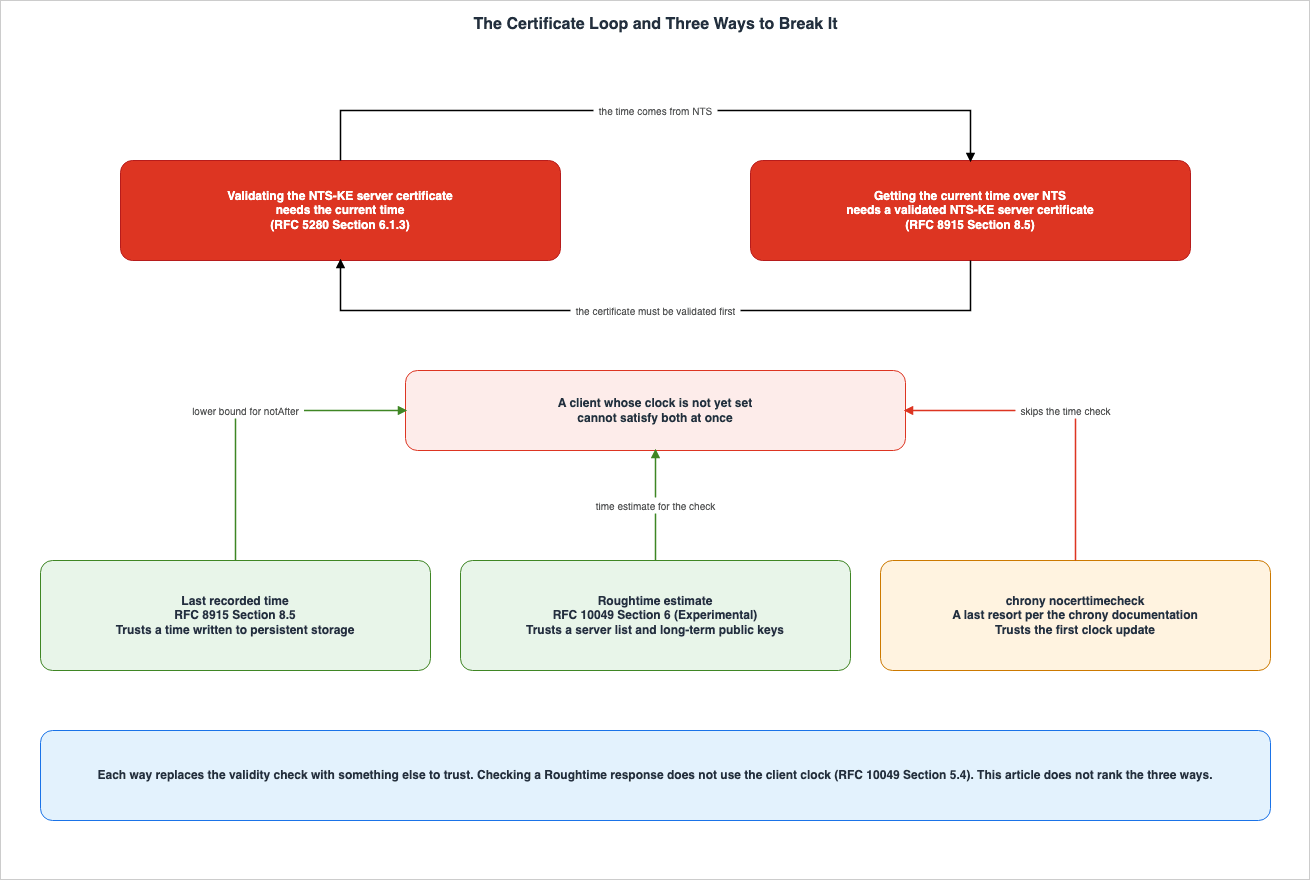
| Method | What It Newly Trusts | Remaining Weakness | Source |
|---|---|---|---|
| Last Recorded Time | A previously stored time from persistent storage | This method does not account for certificates that have expired since the time was recorded (Inference). | RFC 8915 §8.5 |
| Roughtime Time | A pre-existing list of servers and long-term public keys, and multiple operators. | The mechanisms for updating and distributing this list are outside the scope of the RFC. The protocol is experimental. | RFC 10049 §6, §8.1, §9.6 |
nocerttimecheck | The NTS-KE servers used while certificate checking is disabled, along with the initial clock update. | The documentation states that this option has significant security implications and should be considered a last resort. | chrony documentation |
This article does not evaluate which of these three options is preferable. RFC 8915 §8.5 states that for systems with battery-backed clocks, a strictly verified configuration is appropriate.
6. Where Amazon Time Sync Service Fits
This chapter discusses two entry points for the Amazon Time Sync Service, outlining what is documented in AWS documentation and noting where no statement is found. The clock error bound is addressed in the existing article on EC2 clocks.6.1 Local Time Sync
The EC2 User Guide's section on local Time Sync states that every EC2 instance can reach an NTP source using a link-local address.You can reach the NTP source over a link-local IP address, which restricts this traffic to within your VPC without the need for specific VPC configuration changes.The addresses are IPv4, which is
169.254.169.123, and IPv6, which is fd00:ec2::123. The IPv6 address is only available on instances running on Nitro. The same section also states that AL2023 and recent versions of Amazon Linux 2 are configured by default to use the IPv4 address. Services using link-local addresses have a combined limit of 1024 packets per second.The Amazon EC2 FAQ states that the Amazon Time Sync Service can be safely used from instances without modifying VPC settings.
Built on Amazon's proven network infrastructure with redundant reference time sources, Amazon Time Sync offers an accurate reference time source that can be securely accessed from an instance without requiring VPC configuration changes.Both the User Guide page and the FAQ describe the security of this method based on the fact that communication remains in the VPC. Neither document contains a statement regarding the authentication of time packets (No statement found). Similarly, there is no statement explaining why authentication is not required on the link-local path (No statement found). This article does not evaluate whether the characteristics of this path are sufficient for the reader's threat model.
6.2 Public Time Sync — time.aws.com
The EC2 User Guide's section on time synchronization states the following regarding public Time Sync:For a backup to the local Amazon Time Sync Service on your instances, or to connect resources outside of Amazon EC2 to the Amazon Time Sync Service, you can use the public Amazon Time Sync Service located at time.aws.com.The public Time Sync page recommends that instances use local Time Sync, using public Time Sync only as a backup. The example configuration for chrony suggests adding
pool time.aws.com iburst while keeping the line for local Time Sync, server 169.254.169.123 prefer iburst minpoll 4 maxpoll 4.Regarding public Time Sync, no mention was found concerning time authentication, Network Time Security (NTS), or Roughtime (No statement found). This article does not use the result of any attempt to connect to the NTS-KE port on
time.aws.com as a basis for any conclusions. The inability to connect does not constitute evidence that the service is not supported.6.3 Leap Seconds and Smearing
The EC2 User Guide's section on time states that both local Time Sync and public Time Sync smear leap seconds.The public Amazon Time Sync Service, like the local Amazon Time Sync Service, automatically smears any leap seconds that are added to UTC.The same section indicates that the PTP hardware clock does not smear, and advises against mixing sources that smear leap seconds with those that do not in a time client configuration during a leap second event.
But because they differ during a leap second event, we do not recommend using both smeared and non-smeared time sources in your time client configuration during a leap second event.When NTS servers are added alongside local Time Sync, how those servers handle leap seconds is also a factor to consider. This article does not verify whether public NTS servers smear leap seconds. A comprehensive overview of how leap seconds are handled is available in the existing leap seconds timeline.
6.4 Request Signing and Time Synchronization
The EC2 User Guide's section on time states that accurate time is required for request signing using the AWS CLI and AWS SDK.If your instance's date and time settings are inaccurate, it can result in a discrepancy between the date in the signature and the date of the request, leading to AWS rejecting your requests.This represents a point where time synchronization issues, separate from certificate validation, can lead to failures. Discrepancies between the
exp (expiration) time in OAuth tokens and the system clock are in the scope of the second article in this series, and this article will not cover that topic.6.5 Time Sync Table
The following table lists the endpoints referenced in Sections 6.1 through 6.3. The PTP hardware clock is not a source of network time, so it is not included in this table.| Endpoint | What the Documentation States | Authentication | Leap Seconds | Source State |
|---|---|---|---|---|
169.254.169.123 | Accessible from any EC2 instance. Communication is contained in the VPC. AL2023 uses it by default. | No authentication details found. | Smear | No statement found |
fd00:ec2::123 | Only accessible from instances running on Nitro. | No authentication details found. | Smear | No statement found |
time.aws.com | Used for local Time Sync backup and accessing resources outside of EC2. | No authentication details found. | Smear | No statement found |
The "Source State" column indicates the status of documentation regarding time authentication. For both path information and leap seconds, each row contains a statement in the documentation (Stated).
7. Devices Without a Clock and the First Moments After Startup
This chapter discusses AWS documentation and browser source code related to devices without clocks and machines immediately after startup.7.1 Current AWS IoT Core Documentation
The security best practices section of the AWS IoT Core Developer Guide addresses synchronizing device clocks.It's important to have an accurate time on your device. X.509 certificates have an expiry date and time. The clock on your device is used to verify that a server certificate is still valid.The same section of the guide notes that commercial devices may be stored for extended periods before being sold, and that simply setting the time at the factory is not sufficient, as real-time clocks (RTCs) can drift or batteries can die. It states that, for most systems, the device's software must include an NTP client, and that the device should wait until it synchronizes with an NTP server before it connects to AWS IoT Core. If that is not possible, it recommends providing a mechanism that allows users to set the device's time.
The device should wait until it synchronizes with an NTP server before it tries to connect to AWS IoT Core.The current documentation does not specify acceptable clock skew tolerances.
How much clock skew that is allowed depends on what you're trying to do with the connection.In the same section, the section on validating server certificates states that AWS IoT Core server certificates have a limited validity period, providing an example of one year.
7.2 Values from the 2018 AWS IoT Blog
An article on the official AWS IoT blog, published on February 6, 2018, contains numerical values regarding acceptable clock skew. These values are from the 2018 article and are not present in the current documentation in Section 7.1. This article does not treat these values as the current specification.In order for a device to validate the server certificate presented by AWS IoT Core for an MQTT connection, the device's time should be within some reasonable distance of the server's time, e.g. no more than a few hours. Devices connecting using WebSocket/SigV4 authentication have an additional and more stringent requirement on the server side and must be within 15 minutes of the server's time.The article discusses two different scenarios. When verifying the server's certificate during an MQTT connection, the example provided is within a few hours. For WebSocket and SigV4 authentication, the requirement on the server side is within 15 minutes. These two values are based on different verification processes and underlying assumptions. Taking only one of these values would disregard the conditions of the other. The same article also notes that low-cost IoT devices without a real-time clock (RTC) do not know the time when they are first powered on.
Such devices will not have any idea what time it is when they're powered on7.3 AWS IoT Greengrass V2
The AWS IoT Greengrass V2 Developer Guide's security best practices section also includes a section on synchronizing device clocks, referencing a section in the AWS IoT Core Developer Guide.It's important to have an accurate time on your device. X.509 certificates have an expiry date and time. The clock on your device is used to verify that a server certificate is still valid. Device clocks can drift over time or batteries can get discharged.The AWS General Reference's "Services in Sunset" page lists October 7, 2026, as the end-of-support date for AWS IoT Greengrass V1. This article only refers to the information on the V2 page.
7.4 Browser — Behavior of Chromium's Source Code
The AWS re:Post knowledge center page regarding Lambda console errors states that if the user's machine clock is incorrect, the browser cannot establish a TLS connection to AWS endpoints.If your system clock is incorrect, then your browser can't establish a TLS connection to AWS endpoints.This article does not examine the documentation for various browser products regarding how they handle discrepancies in the clock used for verification. Instead, it describes the behavior observed in Chromium's source code. The source code was obtained from the main branch on November 4, 2026, and is not evidence of the behavior of released versions or other browsers.
In the
components/ssl_errors/error_classification.cc file, the GetClockState function compares the system's time with network time when a certificate date error occurs. Network time is obtained using the GetNetworkTime function. If the system's time is earlier than the network time by more than its uncertainty plus 5 minutes, it is classified as NETWORK_CLOCK_STATE_CLOCK_IN_PAST; if it is later by more than that, it is classified as NETWORK_CLOCK_STATE_CLOCK_IN_FUTURE. If network time is unavailable, the function compares the system's time with the browser's build time. If the system's time is earlier than two days before the build time, it is considered in the past; if it is later than 365 days after the build time, it is considered in the future. As this article reads it (Inference), this classification determines whether the certificate error is due to a clock issue and does not affect whether the certificate is accepted.7.5 Instances and Containers Immediately After Startup
The EC2 User Guide notes that AMIs may be configured by default to use local Time Sync. The behavior of clock discrepancies immediately after an instance or container starts is covered in the existing article on EC2 clocks. No statement was found addressing how the execution environment's time is handled in relation to AWS Lambda and Amazon EKS (No statement found).8. Dates in the Sources and Statements Not Found
This chapter documents the state of dates, version correspondence that cannot be verified, statements not found, and items not confirmed.8.1 Effective Dates and Planned Dates
The following table lists the effective dates and planned dates for various provisions, categorized by status.| Item | Status | Date | Source |
|---|---|---|---|
| Maximum validity period for BR: 200 days | Effective | Issued on or after March 15, 2026 | BR 6.3.2 |
| Maximum validity period for BR: 100 days | Planned | Issued on or after March 15, 2027 | BR 6.3.2 |
| Maximum validity period for BR: 47 days | Planned | Issued on or after March 15, 2029 | BR 6.3.2 |
| Definition of a "Short-lived Subscriber Certificate" with a validity period of 7 days or less | Effective | Issued on or after March 15, 2026 | BR 1.6.1 |
| Let's Encrypt 160-hour certificate | Generally available | January 15, 2026 | Let's Encrypt announcement |
| Setting the default validity period for Let's Encrypt to 64 days | Planned | February 10, 2027 | Let's Encrypt announcement (October 7, 2026) |
| Setting the validity period for Let's Encrypt's "classic" profile to 45 days | Planned | February 16, 2028 | Let's Encrypt announcement (December 2, 2025) |
| Erratum 9238 for RFC 10049 | Reported | October 25, 2026 | RFC Editor errata page |
| Acceptable clock skew values for AWS IoT | Value in a 2018 blog post | February 6, 2018 | AWS IoT official blog |
A Let's Encrypt announcement from January 15, 2026, states that short-lived certificates are opt-in, and there are currently no plans to set them as the default. An announcement from October 7, 2026, indicates that the last 90-day certificate is expected to expire on May 11, 2027.
8.2 Version Correspondence That Could Not Be Confirmed
Theecosystem.json file in the Cloudflare Roughtime repository lists four public Roughtime servers, all of which are labeled with the version IETF-Roughtime. RFC 10049 §5 defines the version number for Roughtime in this document as 1.The version of Roughtime specified by this document has version number 1.In the same repository, the reference client's
protocol/version.go file defines three versions: VersionGoogle, VersionDraft08, and VersionDraft11, with corresponding values of 0, 0x80000008, and 0x8000000b, respectively. There is no constant defined for version number 1. The repository's last update was April 28, 2026, which occurred before the publication of RFC 10049. This article was unable to confirm whether the notation IETF-Roughtime refers to version 1 of RFC 10049. This article does not describe this as Sources disagree. No statement was found that explicitly links the notation with a specific version number (No statement found).8.3 Statements Not Found
Despite searching using various search terms and document categories, no statement was found (No statement found) for the following topics.| Topic | Search Terms Used | Document Categories Searched |
|---|---|---|
| Amazon Time Sync Service time authentication and NTS | NTS, Network Time Security, NTS-KE, Roughtime, authenticated, authentication | Three pages on time synchronization in the EC2 User Guide (including the Windows section), Amazon EC2 FAQ, Time Sync announcement in "What's New" (up to October 15, 2026), AWS News Blog post from 2017, NTP synchronization page in the AWS re:Post knowledge center |
| Reason why authentication is not required on link-local paths | link-local, secure, securely, spoofing | local Time Sync page in the EC2 User Guide, Amazon EC2 FAQ, AWS News Blog post from 2017 |
| Handling of time in AWS Lambda and Amazon EKS execution environments | clock, time synchronization, Time Sync, chrony, execution environment | AWS documentation search (three searches with different terms), NTP synchronization page in the AWS re:Post knowledge center |
Requirement that CAs set notBefore to a past date | backdat, notBefore, clock, skew | Full text of BR version 2.3.1 |
Correspondence between IETF-Roughtime notation and version numbers in RFC 10049 | IETF-Roughtime, version | ecosystem.json and protocol/version.go in the Cloudflare Roughtime repository, RFC 10049 |
| Roughtime support in chrony | Roughtime | Documentation for chrony.conf in chrony version 4.6 |
8.4 Items Not Verified
The following items were not verified in this article. This is not a claim that no statement exists.- How public CAs set the
notBeforevalue relative to the issuance time. - How the default
notBeforeof AWS Private CA relates to short-lived mode. - Whether public NTS (Network Time Security) servers smear leap seconds.
- How Chrome and Firefox product documentation describe errors related to clock skew.
- Implementations of the Roughtime client that support version 1 of RFC 10049.
9. What the Demo Showed
This chapter documents the results of testing aspects described in Chapters 3 and 5, all while keeping the system clock unchanged, on a local machine. The information presented here consists of observations, and does not constitute a commitment of the sources. This article does not use these observations to overwrite the content in Chapters 3 through 8.9.1 Configuration Tested
The test ran from 03:37 to 03:43 UTC on November 4, 2026, and used no AWS resources. The configuration details are as follows:- Local Machine: Apple Silicon Mac, running OpenSSL version 4.1.0.
- Container: Debian 13.7 running on Docker Desktop 29.9.2 (linux/arm64). The container includes chrony version 4.6.1, built with NTS enabled.
- Time Provisioning: The verification time was passed to OpenSSL using the
-attimeoption withopenssl verify. chronyd was launched with the-xoption, preventing it from controlling the system clock. A time two years in the future was only visible to the chronyd process, using libfaketime. The clocks on the local machine and within the container were not modified. - Certificates: The setup used a self-signed CA certificate, along with three certificates issued by that CA. These certificates are not associated with any public CA and are not in the scope of the BR.
- Time Sources: The time sources used were the public NTS servers
time.cloudflare.comandnts.netnod.se, as well astime.aws.comwithout specifying NTS.
9.2 Validity Period Boundaries and Two Errors
Three certificates were created and validated in eleven cases. The "T0" value in the table represents thenotBefore values for the first and second certificates.- 1-day certificate:
notBeforeis T0,notAfteris one day after T0. - 90-day certificate:
notBeforeis T0,notAfteris 90 days after T0. - Certificate backdated by 60 minutes:
notBeforeis 60 minutes before T0,notAfteris one day after T0. This mimics the defaultnotBeforesetting of AWS Private CA, although AWS Private CA is not being used.
| Case | Certificate | Validation Time | Result |
|---|---|---|---|
| A1 | 1-day | 1 hour before T0 | error 9 |
| A2 | 1-day | 1 second before notBefore | error 9 |
| A3 | 1-day | Exactly notBefore | OK |
| A4 | 1-day | 1 hour after T0 | OK |
| A5 | 1-day | Exactly notAfter | OK |
| A6 | 1-day | 1 second after notAfter | error 10 |
| A7 | 1-day | 2 days after T0 | error 10 |
| A8 | 90-day | 2 days after T0 | OK |
| A9 | 90-day | 1 hour before T0 | error 9 |
| A10 | Backdated 60 minutes | 30 minutes before T0 | OK |
| A11 | Backdated 60 minutes | 90 minutes before T0 | error 9 |
OpenSSL 4.1.0 returned the following two error messages:
error 9 at 0 depth lookup: certificate is not yet valid or the system clock is incorrect
error 10 at 0 depth lookup: certificate has expired
This observation (Observation) showed the following:
- Both validating at exactly
notBeforeand exactlynotAfterwere successful. Deviating by even one second resulted in failure. This aligns with RFC 5280 §4.1.2.5, which includes both endpoints. - When the validation time was advanced by two days, the 1-day certificate expired, while the 90-day certificate was successful. With the same clock skew, only the certificate with the shorter validity period failed.
- When the validation time was delayed by one hour, both the 1-day and 90-day certificates failed. The failure due to a delay immediately after issuance was independent of the certificate's validity period. This points in the same direction as the example in Section 3.2.
- The certificate with
notBeforeset 60 minutes in the past was successful with a 30-minute delay, but failed with a 90-minute delay.
9.3 Two NTS Servers and time.aws.com Without NTS
chronyd was run with the -x option for 60 seconds, recording data from three sources. The output of chronyc -N authdata is as follows:| Name/IP address | Mode | KeyID | Type | KLen | Cook |
|---|---|---|---|---|---|
time.cloudflare.com | NTS | 1 | 30 | 128 | 8 |
nts.netnod.se | NTS | 1 | 15 | 256 | 8 |
time.aws.com | - | 0 | 0 | 0 | 0 |
According to the chronyc documentation, the
- in the Mode column indicates that authentication is disabled. The KeyID for NTS sources represents the number of successful key establishments using NTS-KE. The Type values of 30 and 15 indicate AEAD-AES-128-GCM-SIV and AEAD-AES-SIV-CMAC-256, respectively. The row for time.aws.com represents a source that was not configured to use NTS. This observation does not indicate whether Amazon Time Sync Service supports NTS. This article did not try NTS with time.aws.com.The output of
chronyc -N selectdata is as follows:| S | Name/IP Address | Auth | COpts | EOpts |
|---|---|---|---|---|
| D | time.cloudflare.com | Y | ----- | --TR- |
| + | nts.netnod.se | Y | ----- | --TR- |
| * | time.aws.com | N | ----- | ----- |
The two NTS sources have selection options for trust and require (the
T and R in EOpts) that are not specified in the configuration. The chronyc documentation states that EOpts represent effective options that may differ from the configured options due to the authselectmode setting. This points in the same direction as the default behavior of mix described in Section 10.6. In this single observation, the unauthenticated time.aws.com was selected as the best source (*). According to the chronyc documentation, the state D indicates a source that has, or recently had, a root distance too large to be combined with other sources. This article does not compare the time differences or errors between the sources. This is because a 60-second observation period is insufficient to gather data for such a comparison.9.4 chronyd Seeing a Time Two Years Ahead, and NTS-KE
The chronyd process was shown a time two years in the future. The time of the container at the same point was November 4, 2026, while the time chronyd observed was November 3, 2028. The configuration used only the two NTS sources, andnocerttimecheck was not specified. The chronyd logs showed failures in TLS certificate validation for both servers (the addresses have been redacted).TLS handshake with <address>:4460 (time.cloudflare.com) failed : Error in the certificate verification. The certificate is NOT trusted. The certificate chain uses expired certificate.
TLS handshake with <address>:4460 (nts.netnod.se) failed : Error in the certificate verification. The certificate is NOT trusted. The certificate chain uses expired certificate.
Can't synchronise: no selectable sourcesUsing
chronyc -N authdata, both sources showed a KeyID of 0, Atmp of 1, and Cook of 0. The key establishment never succeeded. From chronyd's perspective, at the time two years in the future, the servers' certificates were expired. Consequently, it was unable to obtain time from NTS, and therefore could not correct the clock. This is the certificate loop described in Section 5.1.9.5 When nocerttimecheck 1 Is Added
With the same time two years ahead, nocerttimecheck 1 was added to the configuration. Using chronyc -N authdata, both sources now showed a KeyID of 1 and a Cook value of 8. The chronyd logs and chronyc tracking output included the following line:System clock wrong by -63071999.994203 seconds
System time : 63072000.000000000 seconds fast of NTP time63,072,000 seconds corresponds to 730 days. By disabling certificate validity checks, NTS-KE was accepted, and chronyd measured a two-year discrepancy between its own time and the time it received from NTS. Because chronyd was running with the
-x option, the clock was not adjusted.This observation points in the same direction as the chrony documentation, which provides
nocerttimecheck for machines that start up with an incorrect time. While the time checks are disabled, the validity periods of the certificates are not being checked. This article did not test servers using expired certificates.9.6 What This Observation Does Not Show
- Whether the Amazon Time Sync Service supports NTS, or not.
- A comparison of the accuracy of time between NTS servers and the Amazon Time Sync Service.
- The behavior of certificates issued by public CAs, and the behavior of other OpenSSL versions and other TLS implementations.
- The behavior of systems whose clocks themselves are inaccurate. libfaketime only modifies the time seen by the chronyd process.
- The behavior of Roughtime. As noted in Section 8.2, Roughtime was not tested because the correspondence between the reference client's versions and the RFC 10049 version could not be confirmed.
- General behavior beyond a single observation.
10. Frequently Asked Questions Regarding Certificate Validation and Time
This chapter addresses the four beliefs from Section 1.1, as well as common questions that arise throughout the text. The answers provided do not go beyond the sections of the main text.10.1 Does Amazon Time Sync Service Support NTS?
No statement regarding the time authentication or NTS functionality of Amazon Time Sync Service was found in AWS documentation (No statement found). The search terms and source categories used are detailed in Section 8.3. The absence of such information does not indicate that the service does not support NTS. This article does not state whether Amazon Time Sync Service supports NTS or does not support it. AWS documentation describes the characteristics of local Time Sync, specifically that communication is contained in the VPC (see Section 6.1).10.2 Does NTS Guarantee Accuracy?
NTS ensures the authenticity of timestamps. It verifies who sent the timestamp and whether it has been altered during transmission. However, NTS does not guarantee the accuracy of the timestamp itself. RFC 8915 §8.6 notes that cryptographic methods cannot prevent delay attacks that do not modify the content of packets, and specifies a maximum error of one-half the round-trip delay (see Section 4.4). Furthermore, validating the certificates of NTS-KE servers requires the current time (see Chapter 5).10.3 Does RADI, in the Context of Roughtime, Represent an Upper Limit for Error?
RADI represents the range reported by the server, and is not the upper limit of error verified by the client (Section 4.5). RADI represents a server's estimate of the accuracy of MIDP, expressed in seconds. RFC 10049 §5.2.5 requires withMUST that the server ensure the actual time falls within that range. However, §5.4 states that even if a response is successfully validated, it does not prove the time is correct. What a client can verify is only that the server guarantees it signed the time within that specified range. To demonstrate misbehavior, it is necessary to query multiple servers (Section 4.5).10.4 Do CAs Adjust notBefore to a Past Date?
Regarding publicly trusted TLS server (subscriber) certificates, BR 7.1.2.7 only defines the notBefore value as a value within 48 hours of the signing operation, and no statement requiring it to be set to a past date was found. By default, AWS Private CA sets the notBefore value to 60 minutes prior to the issuance time. The API reference states that this is to account for potential clock discrepancies. You can also specify a value using the ValidityNotBefore parameter (see Section 3.3). This article does not investigate how far back public CAs actually set the notBefore value (see Section 3.3).10.5 How to Obtain the Initial Time for Devices Without Clocks or Machines Immediately After Startup
The AWS IoT Core Developer Guide states that, for most systems, the device's software must include an NTP client, and recommends synchronizing the time before connecting to AWS IoT Core. If that is not possible, it recommends providing a mechanism that allows users to set the device's time (see Section 7.1). When synchronizing time using NTS, there is the certificate loop. Various methods can be used to break this loop, including five mitigations from RFC 8915 §8.5, the Roughtime time from RFC 10049 §6, and thenocerttimecheck feature in chrony, each trusting something different (see Chapter 5). This article does not evaluate which of these options is preferable.10.6 What Changes When You Add an NTS Server Alongside Local Time Sync?
In chrony, only sources specified withnts or key are authenticated. The line from the EC2 User Guide example configuration, server 169.254.169.123 prefer iburst minpoll 4 maxpoll 4, does not specify either of these, so the source is not authenticated. chrony's default authselectmode is set to mix. According to the documentation, when both authenticated and unauthenticated sources are present, chrony will not use unauthenticated sources if they do not align with the majority of authenticated sources. The chrony documentation also states that, when authentication is enabled for a source, it is important to disable unauthenticated sources that could potentially be exploited in an attack. Furthermore, the EC2 User Guide does not recommend mixing sources that apply smear corrections with those that do not, during leap seconds (Section 6.3). In one observation documented in Section 9.3, with the default mix setting, the unauthenticated source time.aws.com was selected as the best source (*).10.7 When Certificates Are Valid for Six Days, What Degree of Clock Skew Is Acceptable?
In the example from Section 3.2, if a 160-hour certificate is renewed at two-thirds of its validity period, the acceptable time difference with clocks that are ahead is approximately 53 hours. For clocks that are behind, the acceptable difference is not determined by the length of the validity period, but by the difference between the certificate's issuance time and itsnotBefore value. If that difference is zero, even a slight delay causes a failure immediately after a renewal. The value mentioned in this article is an example, and the actual acceptable difference will depend on the timing of the renewal and how the issuer sets the notBefore value.11. Summary
- Certificate validation involves the verifier checking whether the current time falls in the period from
notBeforetonotAfter. As the validity period shortens, the margin within which a clock that is ahead will succeed decreases, and the periods right after a renewal, during which a clock that is behind might fail, come more often.
- Regarding publicly trusted TLS server (subscriber) certificates, BR only defines
notBeforeas a value within 48 hours of the signing operation. By default, AWS Private CA setsnotBeforeto 60 minutes prior to the certificate issuance time.
- Time assurance can be divided into authenticity and accuracy. Unauthenticated NTP provides neither. NTS (RFC 8915, Standards Track) protects authenticity but does not guarantee accuracy, as it leaves room for error due to potential delay attacks. Roughtime (RFC 10049, Experimental) returns a rough time and, across multiple servers, cryptographic evidence of server misbehavior, but even a valid response does not prove that the time is correct.
- NTS requires the current time for validating the server certificate in NTS-KE (RFC 8915 §8.5). Verification of Roughtime responses does not rely on the client's clock, and RFC 10049 §6 states that Roughtime time can be used for certificate validation. All methods for breaking the loop ultimately require trusting something else.
- Regarding Amazon Time Sync Service, AWS documentation states that local paths are contained in the VPC, a public entry point exists for backup and resources outside of EC2, and both smear leap seconds. No mention of time authentication or NTS is found. This article does not state that it is unsupported.
- The current AWS IoT Core page does not specify acceptable clock skew values. The figures presented in a 2018 blog post represent values current at that time.
12. References
IETF- RFC 5905: Network Time Protocol Version 4: Protocol and Algorithms Specification
- RFC 5906: Network Time Protocol Version 4: Autokey Specification
- RFC 8573: Message Authentication Code for the Network Time Protocol
- RFC 8915: Network Time Security for the Network Time Protocol
- RFC 10049: Roughtime: A Protocol for Rough Time Synchronization
- RFC 5280: Internet X.509 Public Key Infrastructure Certificate and Certificate Revocation List (CRL) Profile
- RFC Errata for RFC 10049
CA/Browser Forum and Let's Encrypt
- Baseline Requirements for the Issuance and Management of Publicly-Trusted TLS Server Certificates (GitHub)
- 6-day and IP Address Certificates are Generally Available (January 15, 2026)
- 64-Day Certificate Lifetimes Coming Feb 2027 (October 7, 2026)
- Decreasing Certificate Lifetimes to 45 Days (December 2, 2025)
Amazon EC2 and Amazon Time Sync Service
- Precision clock and time synchronization on your EC2 instance
- Set the time reference on your EC2 instance to use the local Amazon Time Sync Service
- Set the time reference on your EC2 instance or any internet-connected device to use the public Amazon Time Sync Service
- Amazon EC2 FAQs
- How do I troubleshoot NTP synchronization issues on my Amazon EC2 Linux instance? (AWS re:Post)
- Keeping Time With Amazon Time Sync Service (AWS News Blog)
AWS IoT, AWS Private CA, and AWS General Reference
- Security best practices in AWS IoT Core
- Security best practices for AWS IoT Greengrass (V2)
- Using Device Time to Validate AWS IoT Server Certificates (February 6, 2018)
- IssueCertificate (AWS Private CA API Reference)
- Services in Sunset (AWS General Reference)
- How do I resolve "Unable to retrieve code" Lambda errors? (AWS re:Post)
chrony, Chromium, and Roughtime Implementations
- chrony.conf(5) Manual Page (chrony 4.6)
- chronyd(8) Manual Page (chrony 4.6)
- components/ssl_errors/error_classification.cc (Chromium source)
- cloudflare/roughtime (GitHub)
Related Articles on This Site
- How Wrong Can the Clock on an EC2 Instance Be - Clock Error Bounds over NTP and the PTP Hardware Clock, phc_error_bound, and ClockBound
- Computer Time and Leap Seconds History and Timeline - UT1, TAI, UTC, Leap Smearing, and Who Decides When a Second Is Added
- TLS Certificate Ecosystem History and Timeline - Certificate Authorities, Automation, and Shrinking Certificate Lifetimes
- AWS Private CA Hierarchy Design - Root and Subordinate CAs, Revocation, Short-Lived Mode, and mTLS on ALB
- Certificate Distribution in Kubernetes with AWS Private CA - Issue, Request, Store, Consume, and the Layer Where Renewal Stops
- How AWS Certificate Manager Issues Public Certificates - Managed, Exportable, and ACME: Where the Private Key Lives, Who Renews, Where It Can Be Attached, and What Gets Recorded
- SSL/TLS Certificate Decoder and Chain Inspector - X.509 PEM/DER Viewer
- Unix Timestamp Converter Tool - Epoch Time and Date Converter with Timezone Support
References:
Tech Blog with curated related content
Written by Hidekazu Konishi