What Happens to a Failed Batch in a Lambda Event Source Mapping - Retries, Partial Batch Responses, and On-Failure Destinations by Source
First Published:
Last Updated:
This article outlines these differences in a table, organized by source and feature. It compares how settings with the same names – such as retry counts, maximum record age, batch splitting, partial batch responses, and on-failure destinations – apply to different sources, what they stop, and where clues about discarded items are left. This article separates what the documentation states from what cannot be found in it. Conclusions that come from combining statements in two or more sources are presented as this article's reading. The article also details observations made by configuring SQS and DynamoDB Streams in the us-east-1 Region, described in Section 9. Kinesis Data Streams, Kafka, Amazon MQ, and DocumentDB were not tested.
This article is neither a step-by-step guide to configuring ESM error handling, nor a general discussion of retry design. It does not recommend which source to choose, nor does it cover pricing. The information presented was verified as of November 1, 2026, and the SQS partial batch response re:Post article was read on November 2, 2026.
Related articles on this site:
- Lambda Event Pollers in Provisioned Mode for Kafka and SQS - MinimumPollers, MaximumPollers, Poller Groups, and Setting Only One Side
- What Breaks Ordering, Service by Service on AWS - SQS FIFO, SNS FIFO, Kinesis, Amazon MSK, DynamoDB Streams, and the EventBridge Custom Event Bus
- Event-Driven Architecture Anti-Patterns on AWS - Failure Modes, Root Causes, and How to Design Around Them
- How AWS Lambda Authenticates to Apache Kafka - Where Each Event Source Mapping Method Keeps the Credential, Who Refreshes the Token, and What the Brokers Must Trust
- AWS Real-Time Streaming Data Pipeline Architecture Guide - Ingestion, Processing, and Delivery with Kinesis, Managed Service for Apache Flink, and OpenSearch
- Event-Driven Serverless Architecture on AWS - Building Resilient Workflows with API Gateway, Lambda, EventBridge, Step Functions, and DynamoDB
Table of Contents
- 1. Scope and Assumptions
- 2. How to Read the Tables
- 3. Contract Table by Source and Item
- 4. Default Behavior — What Happens When No Settings Are Configured
- 5. Sources Where Retries, Record Age, and Batch Splitting Apply
- 6. Partial Batch Responses — What Will Be Retried
- 7. Where Discarded Batches Go and What They Carry
- 8. Observing It — Event Source Mapping Metrics
- 9. What This Setup Showed
- 10. Where the Sources Disagree and What Is Not Written
- 11. Failure Modes
- 12. Frequently Asked Questions About Failed Batches
- 13. Summary
- 14. References
1. Scope and Assumptions
This section will first define the intended audience, the scope of this article, the source materials consulted, and how to distinguish between different entities that may share the same name. The conclusions come first, in the following ten points.- When a function returns an error, the default behavior of the event source mapping (ESM) is to retry the entire batch, according to the ESM overview page (Section 4.1); in this article's reading, self-managed Kafka in Queue mode is an exception, because its default retry count is
0and, without a destination, the Kafka broker performs retries (Section 4.6). What stops varies by source. For Kinesis Data Streams and DynamoDB Streams, the shard stops; with the default settings, the Kinesis destination page says up to one week and the DynamoDB Streams destination page says up to one day. For SQS standard queues, the messages of the failed batch stay hidden for the visibility timeout. For SQS FIFO queues, later messages in the same message group stop. - Sources that allow configuration of
MaximumRetryAttempts(number of retries),MaximumRecordAgeInSeconds(record age),BisectBatchOnFunctionError(batch splitting), andDestinationConfig(destination) are listed in the API reference as Kinesis, DynamoDB Streams, Amazon MSK, and self-managed Apache Kafka. SQS, Amazon MQ, and DocumentDB are not listed for these four settings. The ESM overview page and the CloudFormation reference describe this scope differently from the API reference. - In the API reference, the defaults for both the retry count and the maximum record age are
-1(infinite). The statement that setting both infinite retries and an on-failure destination results in a maximum of 10 retries is only found on the Kafka pages. No statement was found that the same limit applies to Kinesis and DynamoDB Streams (Section 5.4). - The troubleshooting page states that Kafka retry settings and destinations require provisioned mode. The troubleshooting page says that, in Kafka, you cannot enable batch splitting while retries are infinite. For self-managed Kafka in Queue mode, the default number of retries is
0, and if no destination is specified, the Kafka broker will retry the message. - What is retried in a partial batch response varies depending on the source. For SQS standard queues, only the messages whose IDs the function returns come back. For SQS FIFO queues, the SQS error handling page asks the function to return everything from the first failure onward. For Kinesis and DynamoDB Streams, the lowest returned sequence number becomes the checkpoint, and all records from that point onward are retried. For Kafka, the identifier is an object containing the partition and offset.
- Evidence of discarded messages is found in five different locations. For SNS and SQS destinations, only failure metadata is delivered. The original records must be re-read from the original stream within its retention period. For S3 destinations, the metadata and the entire invocation record are delivered. For Kafka topic destinations, the actual records and metadata are delivered. For SQS, the queue's redrive policy moves the message to the queue's dead-letter queue. For Amazon MQ, the MQ troubleshooting page says that a dead-letter queue on the broker can be used.
- No page explicitly states that SQS ESM does not have an on-failure destination (Section 7.5). This conclusion is derived from the API reference, the recommendation for redrive policies in the SQS configuration page, and the error handling patterns blog.
- The API reference states that ESM destinations are only used in the event of a failure; they cannot be used for successful events. Destinations for asynchronous invocations are a separate mechanism, with different destination types and conditions.
- The
DroppedEventCountmetric in ESM does not count records sent to a destination or records that expired under the source's retention settings. It does count records that failed to be delivered to the destination. - In the setup in Section 9, a DynamoDB Streams ESM with infinite retries and an S3 destination did not stop at 10 retries but kept retrying until the 900-second maximum record age. The
conditionin the destination record wasRecordAgeExceeded, a value not in the documentation's examples, and a later record that had succeeded every time was discarded with it. The SQS ESM rejected settings for retries, maximum record age, batch splitting, and destinations when the API was called.
1.1 Intended Audience
This article is intended for developers and operations personnel who are currently managing architectures that utilize SQS, Kinesis Data Streams, DynamoDB Streams, and Kafka, reading data within Lambda functions using ESM. Specifically, it targets readers who believe at least one of the following statements to be true:- Failed messages, regardless of their source, are sent to a dead-letter queue or an on-failure destination.
- Once
MaximumRetryAttemptsis configured, retries will stop in the same way, regardless of the message source. - If a partial batch response is returned, only the failed record will be reprocessed.
- The on-failure destination will retain the failed records themselves.
It is important to note that each of these assumptions can be true or false depending on the message source, mode, and destination type.
1.2 What This Article Covers and What It Does Not
This article addresses where failed batches go and where error handling settings apply. Specifically, it covers the following:- The default behavior of seven sources and what stops.
- The ranges and defaults for the retry count, maximum record age, and batch splitting settings, along with the sources where these settings apply.
- Changes to Kafka error handling as of November 24, 2025, including self-managed Kafka's Queue mode.
- The identifiers in partial batch responses and what gets retried.
- The types of on-failure destinations and what the delivered records contain. This includes SQS redrive policies, Amazon MQ broker redelivery, and DocumentDB ESM disabling.
- Metrics related to ESM, specifically those concerning failed batches.
- Where the sources disagree and statements that were not found.
This article does not cover the following.
- Pricing and billing mechanisms.
- Service-specific ordering guarantees. This site's What Breaks Ordering, Service by Service on AWS covers this. Section 7.1 of that article also covers how the sources disagree on how long a shard stops.
- A list of anti-patterns for event-driven architectures. This site's Event-Driven Architecture Anti-Patterns on AWS covers this.
- Determining which shard or partition a consumer reads. A related article Who Assigns Shards and Partitions to a Stream Consumer on AWS covers this.
- Where a consumer resumes reading after a shard is split or merged. A related article Where a Kinesis Consumer Resumes After a Shard Splits or Merges covers this. This article focuses solely on where to resume reading within a single shard after a failure.
- Where a stream consumer can begin reading. This site's Where a Stream Consumer Can Start on AWS covers this.
- The number of pollers for Lambda's provisioned mode. This site's Lambda Event Pollers in Provisioned Mode for Kafka and SQS covers this. This article takes over the discussion of failure destinations and partial batch responses, which that article excluded in Section 1.2.
- Authentication for Kafka's ESM. This site's How AWS Lambda Authenticates to Apache Kafka covers this. This article only mentions that Kafka topic destinations utilize ESM authentication.
- Designing a system to replay discarded records. Section 8.2 of this site's AWS Real-Time Streaming Data Pipeline Architecture Guide covers this.
- Details of retries for asynchronous invocations and of failure handling in Amazon EventBridge Pipes. This article shows how each differs from the ESM in one paragraph each.
- General considerations for designing idempotent processing.
1.3 Date of Review and Materials Reviewed
This article reviewed the following materials on November 1, 2026. The body of the article uses the short names in parentheses.- AWS Lambda Developer Guide: the page on how ESMs work (the ESM overview page)
- AWS Lambda Developer Guide: the Kinesis page (the Kinesis page), the page on recording failures for Kinesis (the Kinesis destination page), the Kinesis partial batch response page (the Kinesis partial batch response page), and the Kinesis ESM parameters page (the Kinesis parameters page)
- AWS Lambda Developer Guide: the DynamoDB page (the DynamoDB page), the page on recording failures for DynamoDB Streams (the DynamoDB Streams destination page), the DynamoDB Streams partial batch response page (the DynamoDB Streams partial batch response page), and the DynamoDB Streams ESM parameters page (the DynamoDB Streams parameters page)
- AWS Lambda Developer Guide: the page on recording failures for Kafka (the Kafka destination page), the page on using a Kafka topic as a destination (the Kafka topic destination page), the Kafka error handling page (the Kafka error handling page), the Queue mode page (the Queue mode page), the MSK ESM configuration page (the MSK configuration page), and the Kafka event poller scaling modes page (the scaling modes page)
- AWS Lambda Developer Guide: the page on troubleshooting execution (the troubleshooting page)
- AWS Lambda Developer Guide: the SQS page (the SQS page), the SQS error handling page (the SQS error handling page), the SQS ESM configuration page (the SQS configuration page), the SQS ESM scaling page (the SQS scaling page), and the SQS ESM parameters page
- AWS Lambda Developer Guide: the Amazon MQ page (the MQ page), the Amazon MQ troubleshooting page (the MQ troubleshooting page), and the Amazon MQ ESM parameters page
- AWS Lambda Developer Guide: the DocumentDB page (the DocumentDB page)
- AWS Lambda Developer Guide: the page on metric types (the metrics page)
- AWS Lambda Developer Guide: the page on recording asynchronous invocations (the asynchronous records page)
- Pages in the AWS Lambda API Reference for
CreateEventSourceMapping,DestinationConfig,OnFailure,EventSourceMappingMetricsConfig,SelfManagedKafkaEventSourceConfig, andAmazonManagedKafkaEventSourceConfig(together, the API reference). - Page in the console help for handling ESM failures in Lambda (the console help).
- Page for
AWS::Lambda::EventSourceMappingin the AWS CloudFormation Template Reference (the CloudFormation reference). - AWS SDK for Python (botocore) Lambda service model (the botocore service model). Taken from the develop branch on GitHub.
- Page in the Amazon DocumentDB Developer Guide on processing change streams with Lambda (the DocumentDB-side page).
- Pages in the Amazon SQS Developer Guide for dead-letter queues (the SQS DLQ page) and FIFO queue delivery (the SQS FIFO page).
- Pages in the Amazon EventBridge User Guide for Pipes batch and concurrency, and Pipes error handling (together, the Pipes pages).
- AWS What's New: Announcement for Kafka error handling dated November 24, 2025, and announcement for Kafka ESM observability dated January 30, 2026. Dates are the
postDateTimevalues from the announcements. - Three posts on the AWS Compute Blog: the post introducing ESM metrics (the ESM metrics blog), the 2019 post introducing stream processing controls (the 2019 controls blog), and the post on Lambda error handling patterns (the error handling patterns blog).
- Post on the AWS News Blog announcing Lambda Web Functions on October 12, 2026 (read only for the naming in Section 1.4).
- An article in the AWS re:Post Knowledge Center on SQS ReportBatchItemFailures response types (the SQS partial batch response re:Post article), read on November 2, 2026.
1.4 Distinguishing Terms with Similar Spellings
This article distinguishes similar terms as follows:- on-failure destination: In this article, the on-failure destination is where the ESM sends the record of a batch it discards, set with
OnFailureinDestinationConfig. Destinations for asynchronous invocations are a separate mechanism that sends the results of a function's asynchronous invocations, and they can also use an on-success destination, a Lambda function, or an EventBridge event bus (Section 7.8). - Dead-letter queue: This article differentiates between three types. An SQS queue's dead-letter queue is the destination where messages are moved based on the original queue's redrive policy. A dead-letter queue for an Amazon MQ broker operates using ActiveMQ or RabbitMQ mechanisms. A dead-letter queue for asynchronous invocations is a function setting. The ESM's on-failure destination is none of these.
- Retries: In this article, a retry is the ESM invoking the function again with the same batch. This is distinct from retries for AWS SDK requests. Redelivery by an Amazon MQ broker, and retries performed by a Kafka broker in Queue mode, are mechanisms external to the ESM.
- Checkpoint: In this article, a checkpoint is the position up to which the Lambda ESM treats a Kinesis or DynamoDB Streams shard as processed. It is different from the checkpoint that KCL writes to the lease table, which the assignment article in the same series covers.
- Stream sources: Some passages of the ESM overview page and the metrics page use stream sources to mean only DynamoDB and Kinesis. The beginning of the API reference includes MSK and self-managed Kafka as well. This article uses the term only inside quotations, and otherwise specifies the names of the sources.
- Function names: The Lambda developer guide, following the announcement of Lambda Web Functions on October 12, 2026, calls what used to be Lambda functions Lambda Event Functions. The announcement on the AWS News Blog stated that Event Functions are the functions that previously existed, and that a new name has been introduced. All functions in this article are Event Functions.
2. How to Read the Tables
This section defines the columns in the tables from Sections 3 through 8, and how this article states the status of the sources. The three articles in the same series share the columns and the status terms.2.1 Columns
The tables in Section 3 have aSource column at the beginning. The rows represent nine items: SQS standard queues, SQS FIFO queues, Kinesis Data Streams, DynamoDB Streams, Amazon MSK, self-managed Kafka in Stream mode, self-managed Kafka in Queue mode, Amazon MQ, and DocumentDB. Amazon MSK currently supports only Stream mode (Section 4.6).The table in Section 3.1 includes the following columns describing behavior:
Default on a Function Error: What happens after a function error when no settings are configured.What Stops: What stops while a failed batch is retried.Who Counts the Retries: The entity that counts the number of retries and sets the maximum limit.Where the State Lives: The location where the number of retries and the progress of processing are stored.
The table in Section 3.2 includes the following columns describing configuration and destination:
Valid For: Whether the parentheses in the API reference include the source for the retry count, maximum record age, batch splitting, and destination settings.FunctionResponseTypes, which turns on partial batch responses, is listed separately.Partial Batch Response Retries: What is retried when a partial batch response is returned.Where the Discarded Batch Goes: The destination for batches that have exhausted all retry attempts.What the Record Carries: What information is retained at that destination – metadata only, the entire invocation record, or the actual records.
Both tables include the following two columns at the end:
Where It Is Written: The source of the statement in that row. It names the document and the page.No Statement Found: Matters for which no statement was found in the sources in Section 1.3, even after changing the search terms and the kinds of sources.—means there is nothing to list.
A non-empty
No Statement Found does not indicate that the matter is absent or will not occur.2.2 Five States
This article states the status of the sources with the following five terms:- No statement found: In the text, this is written as
no statement was found, accompanied by the scope of the search. - Documentation does not list: The item is not present in the list or table. In the text, this is written as
the documentation does not list. - Sources disagree: In the text, this is written as
the sources disagree, and both statements, along with their sources, are presented. This article does not definitively identify either source as incorrect. - Inference: This article's reading, not a statement in any source. The same sentence says that it is this article's reading.
- Observation: What was seen in the setup in Section 9, not a promise in the sources. The same sentence says that it was observed in this setup. An observation does not override a statement in the sources.
2.3 Terminology
This article uses the following terms consistently:- Source names: SQS standard queues, SQS FIFO queues, Kinesis Data Streams, DynamoDB Streams, Amazon MSK, self-managed Kafka, Amazon MQ, and DocumentDB. When referring to Kinesis Data Streams and DynamoDB Streams together, use "the two stream sources." When referring to Amazon MSK and self-managed Kafka together, use "the two Kafka sources."
- Stream mode and Queue mode: The two consumption modes of the self-managed Kafka ESM. Stream mode is the default.
- Event poller: The AWS-side resource in an ESM that reads the source.
- Clues to what was discarded: metadata of the failure record, the invocation record, the actual records, the queue's dead-letter queue, and the broker's dead-letter queue.
2.4 Source Reliability
This article treats the following resources as authoritative, in the order listed:- Developer guides and API reference documentation.
- CloudFormation references, console help, and botocore service models.
- What's New posts.
- Content from AWS blogs. Within this article, blog names will be included in the same sentence.
- Observations in the setup in Section 9, written as observations in the sense of Section 2.2.
3. Contract Table by Source and Item
This section lists the seven sources in nine rows, with SQS split into standard and FIFO queues and self-managed Kafka split into its two modes, arranged according to the columns outlined in Section 2.1. Sections 4 through 8 give the detailed source of each cell.3.1 Behavior Table
| Source | Default on a Function Error | What Stops | Who Counts the Retries | Where the State Lives | Where It Is Written | No Statement Found |
|---|---|---|---|---|---|---|
| SQS Standard Queue | All messages in a batch, including successful ones, are returned to the queue after the visibility timeout. | The messages of the failed batch stay hidden for the visibility timeout. Unless partial batch responses are enabled, Lambda gradually reduces the concurrency allocated to the ESM (Section 6.4). | SQS queue. maxReceiveCount in the redrive policy. | SQS queue: message receive count and visibility. | SQS page, SQS error handling page, SQS configuration page. | — |
| SQS FIFO Queue | Same as the standard queue. | Subsequent messages within the same message group. | SQS queue. maxReceiveCount in the redrive policy. | SQS queue: message receive count and visibility. | SQS scaling page, SQS FIFO page. | — |
| Kinesis Data Streams | Retries the entire batch until successful or records expire. | The shard. Up to one week with the default settings. | ESM: MaximumRetryAttempts and MaximumRecordAgeInSeconds. | ESM checkpoint. No statement on where it is kept. | ESM overview page, Kinesis page, Kinesis destination page. | Where the checkpoint is kept. |
| DynamoDB Streams | Same as Kinesis Data Streams. | The shard. Up to one day with the default settings. | ESM: MaximumRetryAttempts and MaximumRecordAgeInSeconds. | ESM checkpoint. No statement on where it is kept. | ESM overview page, DynamoDB Streams destination page. | Where the checkpoint is kept. |
| Amazon MSK | Retries the entire batch until successful or messages expire. | No statement on what stops. | The ESM. The troubleshooting page requires provisioned mode for the settings. | Kafka consumer group offsets. | MSK configuration page, Kafka error handling page, troubleshooting page. | What stops; the position after a partial batch response. |
| Self-Managed Kafka (Stream Mode) | Same as Amazon MSK. | No statement on what stops. | The ESM. The troubleshooting page requires provisioned mode for the settings. | Kafka consumer group offsets. | Kafka error handling page, troubleshooting page. | What stops; the position after a partial batch response. |
| Self-Managed Kafka (Queue Mode) | The default retry count is 0. Without a destination, the Kafka broker retries. | No statement on what stops after a failure. The Queue mode page says, as the reason the batching window is not supported, that all records in a batch must be acknowledged before the consumer fetches new ones. | The Kafka broker, when there is no destination. | Kafka share group. | Queue mode page, botocore service model. | Number of times the broker retries, what stops after a failure. |
| Amazon MQ | Retries the entire batch until successful or messages expire. | No statement on what stops while the batch is retried. The MQ troubleshooting page says that the consumer stops when the function encounters an unrecoverable error, and lists four error codes for the ESM configuration, authentication, authorization, and the function configuration as possible causes. | Broker's redelivery policy. maximumRedeliveries is 6 and cannot be changed. | Broker. | MQ page, MQ troubleshooting page. | What stops while the batch is retried. |
| DocumentDB | Retries the batch until successful. | Records are processed in the order received, one invocation at a time. | No setting for the retry count. | No statement on where the position is kept. | DocumentDB-side page, DocumentDB page. | A sentence that states what stops; where the position is kept. |
3.2 Configuration and Destination Table
| Source | Valid For | Partial Batch Response Retries | Where the Discarded Batch Goes | What the Record Carries | Where It Is Written | No Statement Found |
|---|---|---|---|---|---|---|
| SQS Standard Queue | Not covered for the retry count, record age, batch splitting, or destinations. FunctionResponseTypes is covered. | Only the messages with the returned messageId values become visible again. | In this article's reading, the ESM does not discard it. The redrive policy moves the message to the queue's dead-letter queue. | The original message itself. | API reference, SQS error handling page, SQS configuration page | A single sentence stating that ESM has no destination. |
| SQS FIFO Queue | Same as Standard Queue. | The function is asked to return everything from the first failure onward. | Same as Standard Queue. | The original message itself. | API reference, SQS error handling page | A single sentence stating that ESM has no destination. |
| Kinesis Data Streams | Covered for the retry count, record age, batch splitting, destinations, and FunctionResponseTypes. | The lowest returned sequence number becomes the checkpoint, and everything from there is retried. | Discarded. If a destination is set, a record is sent to SNS, SQS, or S3. | SNS and SQS carry only metadata. S3 also carries the entire invocation record. | API reference, Kinesis destination page, Kinesis partial batch response page | The upper limit when both infinite retries and a destination are configured. |
| DynamoDB Streams | Same as Kinesis Data Streams. | Same as Kinesis Data Streams. | Same as Kinesis Data Streams. | Same as Kinesis Data Streams. | API reference, DynamoDB Streams destination page, DynamoDB Streams partial batch response page | The upper limit when both infinite retries and a destination are configured. |
| Amazon MSK | Covered for all of them. The troubleshooting page requires provisioned mode. | Returns an object with partition and offset. The Kafka error handling page states that only failed messages are retried. | Discarded. If a destination is specified, the data is sent to SNS, SQS, S3, or a Kafka topic. When both infinite retries and a destination are configured, the maximum number of retries is 10. | SNS and SQS carry only metadata. S3 also carries the entire invocation record. Kafka topics carry the actual records and metadata. | API reference, Kafka destination page, Kafka topic destination page, Kafka error handling page | The position after a partial batch response; whether batch splitting counts toward the retry count. |
| Self-Managed Kafka (Stream Mode) | Same as Amazon MSK. | Same as Amazon MSK. | Same as Amazon MSK. | Same as Amazon MSK. | Same as Amazon MSK. | Same as Amazon MSK. |
| Self-Managed Kafka (Queue Mode) | The table on the Queue mode page lists only the retry count and batch splitting. | Not listed in the table on the Queue mode page. | Kafka topics, SNS, SQS. There is no entry for S3. | No statement on the Queue mode page. | Queue mode page | Whether maximum record age and partial batch responses can be used. |
| Amazon MQ | Not covered for any of them. | Not listed in the API reference. | A dead-letter queue on the broker, which the MQ troubleshooting page says can be used. | No statement in the Lambda documentation. | API reference, MQ troubleshooting page | — |
| DocumentDB | Not covered for any of them. | Not listed in the API reference. | No destination setting. When change stream events expire, the ESM is disabled. | — | API reference, DocumentDB-side page | — |
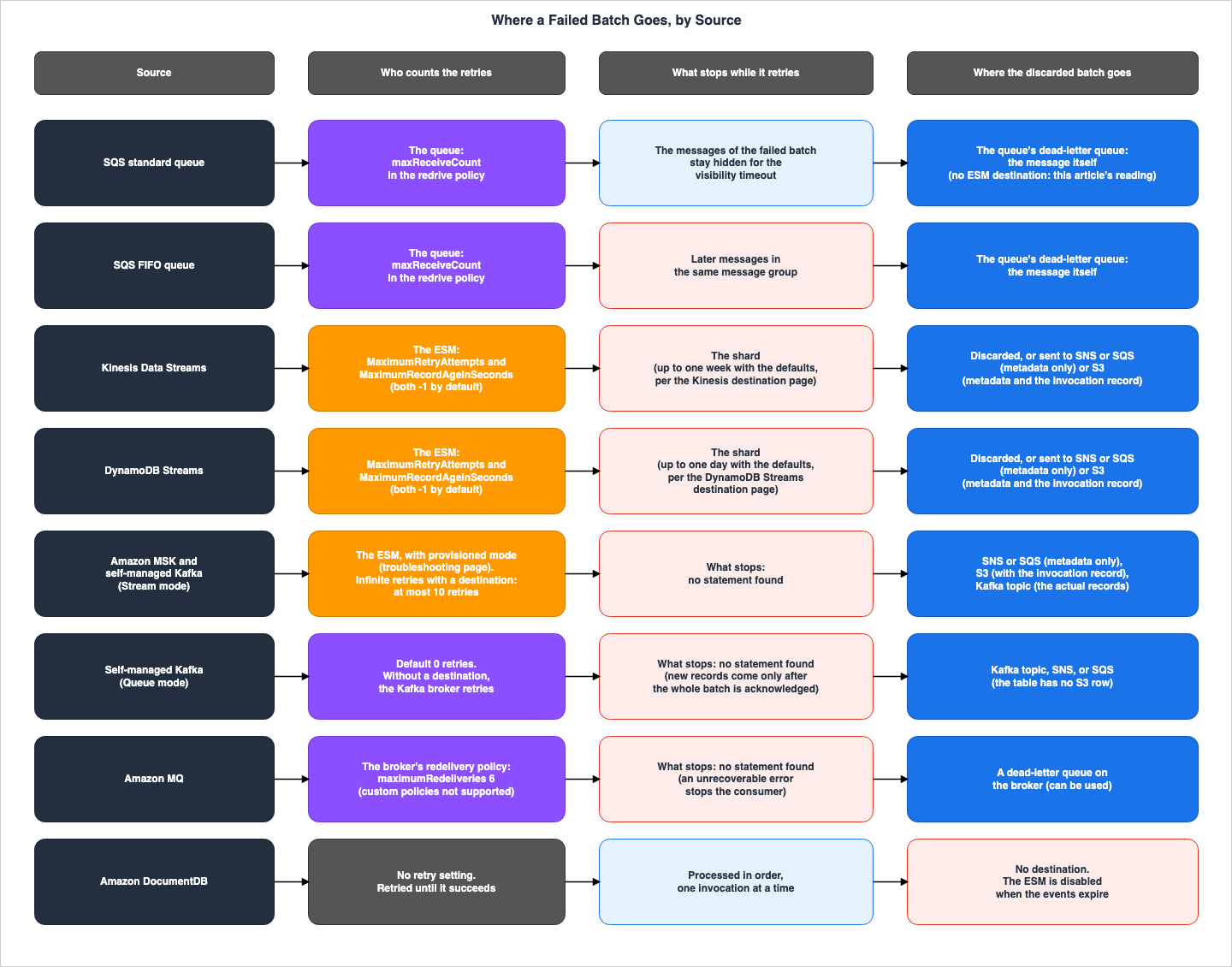
4. Default Behavior — What Happens When No Settings Are Configured
This section describes, for each source, what occurs after a function encounters an error when no error handling settings have been configured.4.1 A Statement Common to All Sources
The ESM overview page states the default behavior as follows:By default, if your function returns an error, the event source mapping reprocesses the entire batch until the
function succeeds, or the items in the batch expire. To ensure in-order processing, the event source mapping
pauses processing for the affected shard until the error is resolved. For stream sources (DynamoDB and Kinesis),
you can configure the maximum number of times that Lambda retries when your function returns an error.
Service errors or throttles where the batch does not reach your function do not count toward retry
attempts.This article interprets the first sentence of this paragraph as the default behavior for all sources. It reads the second sentence, about the shard, and the third sentence, about the retry count, as statements about DynamoDB and Kinesis. Section 5.3 sets the third sentence, which does not include the two Kafka sources, beside the API reference. Finally, the last sentence clarifies that service errors or throttling that prevent a function from being invoked will not be counted as retries.
The same page also states that ESM processes events at least once, and that duplicates may occur. Each retry delivers the same records to the function again.
Lambda event source mappings process each event at least once, and duplicate processing of records can occur.4.2 Kinesis Data Streams and DynamoDB Streams
The Kinesis destination page describes retries separately for errors that occur before the function is invoked and errors that occur during the invocation. The DynamoDB Streams destination page carries the same text.Before invocation: If a Lambda event source mapping is unable to invoke the function due to throttling or other
issues, it retries until the records expire or exceed the maximum age configured on the event source mapping
(MaximumRecordAgeInSeconds).
During invocation: If the function is invoked but returns an error, Lambda retries until the records expire,
exceed the maximum age (MaximumRecordAgeInSeconds), or reach the configured retry quota (MaximumRetryAttempts).While retries are in progress, processing of the shard stops. The Kinesis page says:
Lambda processes records in each shard in order. It stops processing additional records in a shard if your
function returns an error.
On how long it stops, the Kinesis destination page says:
If the error handling measures fail, Lambda discards the records and continues processing
batches from the stream. With the default settings, this means that a bad record can block processing on the affected
shard for up to one week.
The same place on the DynamoDB Streams destination page says
up to one day. The two parameters pages describe what the infinite value -1 means as follows. The first line describes the MaximumRecordAgeInSeconds parameter for Kinesis, while the second and third lines describe the same parameter for DynamoDB Streams.-1 means infinite: Lambda doesn't discard records (Kinesis Data Streams data retention settings still apply)
-1 means infinite: failed records are retried until the record expires. The data retention limit for DynamoDB
Streams is 24 hours.In this article's reading, the maximum time a shard stops, using the default settings, is determined by the time it takes for a record to be deleted from its source. The Kinesis destination page mentions a period of one week, but it does not specify which retention period this value is based on. This is
no statement was found; the search covered the Kinesis pages in Section 1.3. The discrepancy between the default retention period for Kinesis Data Streams and this value is addressed in Section 7.1 of this site's What Breaks Ordering, Service by Service on AWS.4.3 SQS Standard Queues
The SQS page describes the default behavior after a function error as follows:By default, if your function encounters an error while processing a batch, all messages in that batch become
visible in the queue again after the visibility timeout expires.Within a batch, successful messages are also returned to the queue. The SQS error handling page describes Lambda's behavior separately for errors in the function code and for throttling.
If your Event Function code caused the error, Lambda stops processing and retrying the invocation.
In the meantime, Lambda gradually backs off, reducing the amount of concurrency allocated to your Amazon SQS
event source mapping. After your queue's visibility timeout runs out, the message reappears in the queue.
If the invocation fails due to throttling, Lambda gradually backs off retries by reducing the amount of
concurrency allocated to your Amazon SQS event source mapping. Lambda continues to retry the message until the
message's timestamp exceeds your queue's visibility timeout, at which point Lambda drops the message.The page does not say whether "drops" in the second quotation means removing the message from the queue. This is
no statement was found; the search covered the SQS error handling page and the SQS configuration page.In this article's reading, the SQS ESM itself does not count retry attempts. Each time a message is received, the SQS queue increments the message's receive count. When the message's receive count exceeds the
maxReceiveCount specified in the queue's redrive policy, the message is moved to the queue's dead-letter queue (see Sections 5.6 and 7.5). The SQS configuration page recommends setting the visibility timeout to be at least six times the function's timeout.set the source queue's visibility timeout to at least six times the configuration timeout on your function.
The extra time allows Lambda to retry if your function is throttled while processing a previous batch.The same page also states that if the function's timeout exceeds the queue's visibility timeout, creating and updating the ESM will result in an error.
4.4 SQS FIFO Queues
The SQS scaling page describes how functions behave when they return an error with FIFO queues as follows:If your function returns an error, the function attempts all retries on the affected messages before Lambda
receives additional messages from the same group.The delivery rules on the SQS side say the same. The SQS FIFO page says:
No additional messages from the same message group ID are returned until the first message is deleted or
becomes visible again.
In a FIFO queue, what stops is the later messages in the same message group as the failed message. Other message groups do not stop. The guarantees regarding FIFO queue ordering are discussed in Section 5.2 of this site's What Breaks Ordering, Service by Service on AWS.
4.5 Kafka in Stream Mode
The MSK configuration page states the default behavior of the Amazon MSK ESM as follows:After Lambda processes each batch, it commits the offsets of the messages in that batch. If your function
returns an error for any of the messages in a batch, Lambda retries the whole batch of messages until
processing succeeds or the messages expire.The Kafka error handling page specifies default values of
-1 (infinite) for both the retry count and the maximum record age, for both Amazon MSK and self-managed Kafka. The What's New post dated November 24, 2025, describes previous ESM retry behavior for Kafka as follows:Kafka ESM offers robust error handling of failed events by retrying events with exponential backoff, and
retaining failed events in on-failure destinations like Amazon SQS, Amazon S3, Amazon SNS.No statement was found on whether the Kafka ESM stops processing per partition while it retries a failed batch. This is
no statement was found; the search covered the MSK configuration page, the Kafka error handling page, the Queue mode page, and the troubleshooting page. The Queue mode page describes Stream mode, stating that Lambda assigns each partition to a single consumer, maintaining order in the partition.4.6 Self-Managed Kafka: Queue Mode
Queue mode is a consumption mode available only with the ESM for self-managed Kafka, and uses Kafka share groups. The page describing Queue mode states, regarding Amazon MSK compatibility:Amazon Managed Streaming for Apache Kafka (Amazon MSK) does not currently support Queue mode.The parameters table on the Queue mode page specifies a range of
-1 to 10,000 for MaximumRetryAttempts and gives a default that differs from Stream mode, as follows.Default: 0 (in Queue mode, the Kafka broker performs retries when no on-failure destination is configured)The same page also states that in Queue mode, consumers will not retrieve the next record until they have acknowledged all records within a batch. The page gives this as the reason that the batching window
MaximumBatchingWindowInSeconds cannot be used in Queue mode.The Kafka Share Consumer uses explicit acknowledgement. All records in a batch must be explicitly acknowledged
before the consumer can fetch new ones.The Queue mode page further indicates that Queue mode does not guarantee order within a partition. How many times the Kafka broker retries when there is no destination, and what stops after a failure, were not found in the Lambda documentation. This is
no statement was found; the search covered the Queue mode page and the botocore service model.4.7 Amazon MQ
The MQ page describes the default behavior following a function error as follows:If your function returns an error for any of the messages in a batch, Lambda retries the whole batch of messages
until processing succeeds or the messages expire.The MQ troubleshooting page details the actions taken in the event of an unrecoverable error. This page lists four error codes related to ESM configuration, source authentication and authorization, and function configuration.
When a Lambda Event Function encounters an unrecoverable error, your Amazon MQ consumer stops processing records.
Any other consumers can continue processing, provided that they do not encounter the same error.
The same page describes the broker's redelivery policy as follows:
Lambda does not support custom redelivery policies. Instead, Lambda uses a policy with the default values from
the Redelivery Policy page on the Apache ActiveMQ website, with maximumRedeliveries set to 6.
What stops while a failed batch is retried was not found. This is
no statement was found; the search covered the MQ page and the MQ troubleshooting page.4.8 DocumentDB
The DocumentDB-side page describes the behavior after a function error as follows:If your function returns an error, Lambda retries the batch until it processes successfully.
In case the events in the change stream have expired, Lambda will disable the event source mapping.
In this case, you can create a new event source mapping and configure it with a starting position of your choice.The DocumentDB page states that Lambda processes change stream events in the order they arrive and makes only one invocation from DocumentDB at a time. In this article's reading, the ESM does not move forward while a failed batch is retried.
The DocumentDB page also notes that the ESM can be disabled in another situation, when no events arrive for an extended period. That is a different context from a failed batch, so this article does not mix the two.
If your Amazon DocumentDB event source doesn't receive any events for an extended period of time, Lambda might
disable the event source mapping.
4.9 Function Timeout Limits
In ESMs for Amazon MSK, self-managed Kafka, DocumentDB, and Amazon MQ, the function timeout limit is shorter than the usual 15 minutes. The MSK configuration page gives the handling of errors and retries as the reason.event source mappings for Amazon MSK, self-managed Apache Kafka, Amazon DocumentDB, and Amazon MQ for ActiveMQ
and RabbitMQ only support functions with maximum timeout limits of 14 minutes. This constraint ensures that the
event source mapping can properly handle function errors and retries.5. Sources Where Retries, Record Age, and Batch Splitting Apply
This section describes which sources the settings for the retry count, maximum record age, batch splitting, and destinations apply to. The parentheses in the API reference show whether a setting can be configured for a source, while the body of each source's page shows how it behaves. This article does not say that a setting applies on the strength of only one of the two.5.1 Parentheses in the API Reference
TheCreateEventSourceMapping page in the API reference uses parentheses to indicate the supported sources for each parameter. The description for MaximumRetryAttempts is as follows:(Kinesis, DynamoDB Streams, Amazon MSK, and self-managed Apache Kafka) Discard records after the specified number
of retries. The default value is infinite (-1). When set to infinite (-1), failed
records are retried until the record expires.The parentheses for
MaximumRecordAgeInSeconds, BisectBatchOnFunctionError, and DestinationConfig also list the same four sources. Only the parentheses for FunctionResponseTypes include SQS.(Kinesis, DynamoDB Streams, Amazon MSK, self-managed Apache Kafka, and Amazon SQS)The following table illustrates this:
Yes indicates that the corresponding source is listed in the parentheses, while No indicates that it is not.| Setting | SQS | Kinesis Data Streams | DynamoDB Streams | Amazon MSK | Self-Managed Kafka | Amazon MQ | DocumentDB |
|---|---|---|---|---|---|---|---|
MaximumRetryAttempts | No | Yes | Yes | Yes | Yes | No | No |
MaximumRecordAgeInSeconds | No | Yes | Yes | Yes | Yes | No | No |
BisectBatchOnFunctionError | No | Yes | Yes | Yes | Yes | No | No |
DestinationConfig | No | Yes | Yes | Yes | Yes | No | No |
FunctionResponseTypes | Yes | Yes | Yes | Yes | Yes | No | No |
ProvisionedPollerConfig | Yes | No | No | Yes | Yes | No | No |
Although
ProvisionedPollerConfig is not related to error handling, it was included in the table because the troubleshooting page says that the error handling settings of the two Kafka sources require provisioned mode (Section 5.4).5.2 Ranges and Defaults
The API reference specifies a range of-1 to 10000 for MaximumRetryAttempts and a range of -1 to 604800 for MaximumRecordAgeInSeconds, with both parameters defaulting to -1. The Kinesis parameters page also states that both parameters have a minimum value of -1.The DynamoDB Streams parameters page, under the
MaximumRetryAttempts row, indicates a default value of -1 while specifying a minimum value of 0. Within a single row, this is the sources disagree.The console instructions on the Kafka error handling page, regarding input values, state:
For Retry attempts, enter the maximum number of retry attempts (0-10000, or -1 for infinite).
For Maximum record age, enter the maximum age in seconds (60-604800, or -1 for infinite).
The console's lower limit of 60 seconds for the maximum record age is narrower than the range in the API reference. In the setup in Section 9.7, an API error message also allowed only
-1 or a value from 60 to 604800 for the maximum record age. The same page also states that the retry count does not include the initial invocation.This doesn't count the initial invocation attempt.The 2019 controls blog described the values when this setting was added: a retry count from 0 to 10,000 with a default of 10,000, and a maximum record age with a minimum of 60 seconds and 604,800 seconds as both the default and the maximum. These are the values of the 2019 post, and they differ from the current ranges and defaults in the API reference. This article uses the current values in the API reference.
5.3 The ESM Overview Page and the CloudFormation Reference
In the paragraph quoted in Section 4.1, the ESM overview page names DynamoDB and Kinesis as the sources whose retry count can be configured, and it does not include the two Kafka sources. The API reference lists four sources in its parentheses. This isthe sources disagree. In this article's reading, that paragraph of the ESM overview page still reflects the scope before November 24, 2025, when the Kafka error handling settings were added.The parentheses in the CloudFormation reference are not consistent across parameters. The parentheses for
MaximumRetryAttempts and MaximumRecordAgeInSeconds list four sources. The parentheses for BisectBatchOnFunctionError and FunctionResponseTypes do not include Kafka. The first line describes BisectBatchOnFunctionError, and the second line describes FunctionResponseTypes.(Kinesis and DynamoDB Streams only) If the function returns an error, split the batch in two and retry.
(Kinesis, DynamoDB Streams, and SQS) A list of current response type enums applied to the event source mapping.The
DestinationConfig row on the Kinesis parameters page states that the destination can be either an SQS queue or an SNS topic. The Kinesis destination page indicates that S3 buckets can also be designated as destinations (see Section 7.2). This article uses the API reference as the source for which sources can be configured, and the behavior and destination types are referenced from the destination pages for each source.5.4 Changes on November 24, 2025, for Kafka
The What's New post of November 24, 2025, announced that the Kafka ESM gained settings for the retry count and the maximum record age, improved retries of failed records, and Kafka topic destinations. The announcement describes these as features of the provisioned mode ESM.developers can now exercise precise control over failed event processing and leverage Kafka topics as an
additional on-failure destination when using Provisioned mode for Kafka ESM. Customers can now define specific
retry limits and time boundaries for retry, automatically discarding failed records beyond these limits to
customer-specified destination.The troubleshooting page states the provisioned mode requirement as follows:
Kafka retry configurations and on-failure destinations are only available for event source mappings with
provisioned mode enabled. Ensure that you have configured MinimumPollers in your ProvisionedPollerConfig before
attempting to set retry configurations.
However, the documentation is inconsistent regarding whether provisioned mode is a prerequisite. This is
the sources disagree, and the following three points set the statements side by side:- The troubleshooting page, as mentioned above, describes both retry configuration and destination settings for Kafka as features of provisioned mode. The console instructions on the Kafka error handling page also instruct users to select provisioned mode, and the Kafka topic destination page lists provisioned mode as a requirement.
- The Kafka destination page does not specify any provisioned mode requirements for configuring destinations such as SNS, SQS, and S3. The What's New post also states that the Kafka ESM before that date already had SQS, S3, and SNS destinations (Section 4.5).
- The feature table on the Queue mode page indicates that a Queue mode ESM can use both on-demand mode and provisioned mode, and the same table lists retry configurations as
Yeswithout a provisioned mode condition. However, the table does include a provisioned mode requirement for the low-latency processing row.
Regarding infinite retries and destination combinations, both the Kafka error handling page and the Kafka topic destination page contain the same statement.
When you configure both infinite retries and an on-failure destination, Lambda automatically applies a maximum
of 10 retry attempts.
The description of
MaximumRetryAttempts in the botocore service model also describes this limit in the context of Kafka's Stream mode.For Kafka Stream consumption mode, the default is -1 (infinite retries; capped at 10 when an on-failure destination
is configured). For Kafka Queue consumption mode, the default is 0, and if no on-failure destination is configured
the Kafka broker performs retries.No statement was found that a limit applies when both infinite retries and a destination are configured for Kinesis Data Streams and DynamoDB Streams. This is
no statement was found; the search covered the destination and parameters pages for Kinesis and DynamoDB Streams, the API reference, and the botocore service model. In the setup in Section 9.5, a DynamoDB Streams ESM had infinite retries and an S3 destination, and the retries did not stop at 10 but continued until the 900-second maximum record age.In Kafka, you cannot enable batch splitting while retries are infinite. The troubleshooting page states:
Infinite retries with bisect batch – You cannot enable BisectBatchOnFunctionError when MaximumRetryAttempts is set
to -1 (infinite). Set a finite retry limit or disable bisect batch.
This constraint is in the Kafka section of the troubleshooting page and was not found in the pages for Kinesis and DynamoDB Streams. This is also
no statement was found; the search covered the Kinesis and DynamoDB Streams destination pages, partial batch response pages, and parameters pages. In the setup in Section 9.7, the DynamoDB Streams ESM accepted a change that set MaximumRetryAttempts to -1 while batch splitting stayed enabled.5.5 Batch Splitting
WhenBisectBatchOnFunctionError is enabled, a batch for which the function returns an error is split in two and retried. The Kinesis and DynamoDB Streams destination pages state that splitting does not use up the retry quota.For function errors, you can also configure BisectBatchOnFunctionError, which splits a failed batch into two
smaller batches, isolating bad records and avoiding timeouts. Splitting batches doesn't consume the retry quota.The Kinesis and DynamoDB Streams partial batch response pages describe the case where both batch splitting and partial batch responses are enabled as follows.
If your invocation fails and BisectBatchOnFunctionError is turned on, the batch is bisected regardless of your
ReportBatchItemFailures setting.
When a partial batch success response is received and both BisectBatchOnFunctionError and ReportBatchItemFailures
are turned on, the batch is bisected at the returned sequence number and Lambda retries only the remaining records.
The Kafka error handling page calls splitting
Split batch on error and states that a failed batch is split in two and each half is retried separately. No statement was found on whether batch splitting in Kafka counts toward the retry count. This is no statement was found; the search covered the Kafka error handling page, the Kafka destination page, and the troubleshooting page.5.6 Retry Counts for SQS, Amazon MQ, and DocumentDB
SQS, Amazon MQ, and DocumentDB are not covered by the four settings in Section 5.1. In this article's reading, for SQS and Amazon MQ the retry count is decided by a mechanism outside the ESM.In SQS, the
maxReceiveCount in the queue's redrive policy determines the retry count. The SQS DLQ page specifies this value as follows:The maxReceiveCount is the number of times a consumer can receive a message from a source queue before it is
moved to a dead-letter queue.The SQS configuration page recommends setting this value to 5 or greater.
We recommend setting the maxReceiveCount on your source queue's redrive policy to at least 5. This gives Lambda
a few chances to retry before sending failed messages directly to the dead-letter queue.
In Amazon MQ, as described in Section 4.7, the
maximumRedeliveries in the broker's redelivery policy is fixed at 6. No setting that decides the retry count was found for DocumentDB; the search covered the DocumentDB page of the Lambda Developer Guide, the Lambda page of the DocumentDB Developer Guide, and the API reference. As described in Section 4.8, retries continue until a successful outcome or the event expires.6. Partial Batch Responses — What Will Be Retried
This section describes what is retried when a function with partial batch responses enabled returns the identifiers of failed records.6.1 Enabling Partial Batch Responses
Partial batch responses are enabled by includingReportBatchItemFailures in the ESM FunctionResponseTypes. As Section 5.1 shows, the parentheses in the API reference cover SQS, Kinesis Data Streams, DynamoDB Streams, Amazon MSK, and self-managed Kafka. They do not cover Amazon MQ or DocumentDB. The feature table on the Queue mode page has no row for partial batch responses. This is the documentation does not list.Even when partial batch responses are enabled, the function must still return the identifiers of any failed records. If the function throws an exception, the entire batch will be treated as a failure. The SQS error handling page states:
If your function throws an exception, the entire batch is considered a complete failure.6.2 Three Kinds of Identifiers
Each element of thebatchItemFailures returned by the function has an itemIdentifier. This identifier falls into one of three categories, depending on the source.In SQS, this identifier is the message ID. The SQS error handling page shows the response when two of five messages fail (the second and fourth), as follows:
{
  "batchItemFailures": [
    { "itemIdentifier": "id2" },
    { "itemIdentifier": "id4" }
  ]
}
In Kinesis Data Streams and DynamoDB Streams, the identifier is the sequence number of a record. The Kinesis partial batch response page shows this form:
{
  "batchItemFailures": [
    { "itemIdentifier": "<SequenceNumber>" }
  ]
}
For the two Kafka sources, the identifier is an object containing the partition and offset. The Kafka error handling page shows this form:
{
  "batchItemFailures": [
    {
      "itemIdentifier": {
        "partition": "topic-partition_number",
        "offset": 100
      }
    }
  ]
}
EventBridge Pipes uses
eventID instead of a sequence number to refer to identifiers in Kinesis and DynamoDB (see Section 7.9). The three types described in this article refer to identifiers used by Lambda's ESM.6.3 Kinesis Data Streams and DynamoDB Streams
When a partial batch response is not received, ESM only advances the checkpoint when the batch completes successfully. The DynamoDB Streams partial batch response page says:When consuming and processing streaming data from an event source, by default Lambda checkpoints to the highest
sequence number of a batch only when the batch is a complete success. Lambda treats all other results as a
complete failure and retries processing the batch up to the retry limit.When a partial batch response is returned, the lowest of the returned sequence numbers becomes the checkpoint. The Kinesis partial batch response page says:
If the batchItemFailures array contains multiple items, Lambda uses the record with the lowest sequence number as
the checkpoint. Lambda then retries all records starting from that checkpoint.
It is important to note that when a partial batch response is received, it is not just the returned records that are reprocessed. All records from the record with the lowest sequence number, including those that were successful, will be delivered to the function again. In this article's reading, records before the checkpoint are not delivered again.
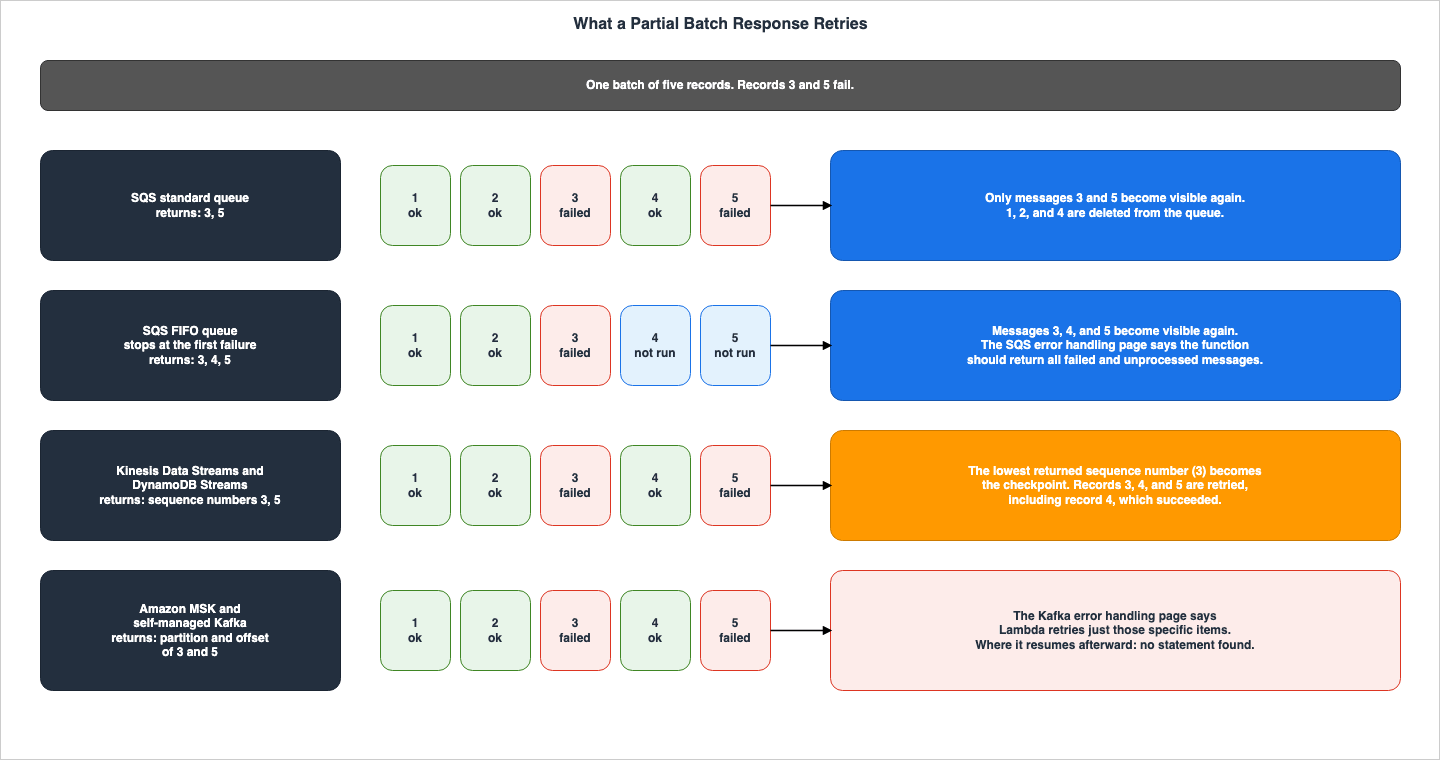
6.4 SQS Standard Queues
In SQS standard queues, only messages with returned IDs become visible again in the queue. Lambda deletes the other messages. TheDeletedEventCount metric on the metrics page tracks these deletions (see Section 8.2). The SQS error handling page states:To avoid reprocessing successfully processed messages in a failed batch, you can configure your event source
mapping to make only the failed messages visible again.The same page also indicates that when partial batch responses are enabled, message polling will not decrease even if function invocations fail.
When ReportBatchItemFailures is activated, Lambda doesn't scale down message polling when function invocations
fail.
6.5 SQS FIFO Queues
When a FIFO queue uses partial batch responses, the SQS error handling page says the function should stop processing at the first failure and return all the rest.If you're using this feature with a FIFO queue, your function should stop processing messages after the first
failure and return all failed and unprocessed messages in batchItemFailures. This helps preserve the ordering of
messages in your queue.This is the responsibility of the function itself. No statement was found on what the ESM does when the function does not return in this form. This is
no statement was found; the search covered the SQS error handling page and the SQS scaling page. Returned messages move closer to the queue's maxReceiveCount because their receive count has gone up. In this article's reading, unprocessed messages returned after the first failure may also be moved to the queue's dead-letter queue, just like the failed messages. In the setup in Section 9.3, two messages that were never processed were moved to the dead-letter queue along with the failed message.6.6 The Two Kafka Sources
The Kafka error handling page describes what a partial batch response retries as follows:With partial batch response enabled and implemented, the handler returns identifiers only for the failed
messages, allowing Lambda to retry just those specific items.The same page describes how the content of the response is handled as follows:
If you return an empty valid JSON or null, the event source mapping considers a batch as successfully processed.
Any invalid topic-partition_number or offset returned that was not present in the invoked event is treated as
failure and the entire batch is retried.
The wording of the Kafka error handling page differs from the pages for the two stream sources, which say that everything from the lowest sequence number onward is retried. No statement was found that says from which offset reading resumes after a partial batch response, that is, where the checkpoint is. This is
no statement was found; the search covered the Kafka error handling page, the MSK configuration page, and the Queue mode page. This article does not extend the rules for the two stream sources to Kafka.6.7 Determining Success and Failure
The following table lists the responses that ESM considers successful or unsuccessful, with the number of rows varying depending on the source page.| Response | SQS | Kinesis Data Streams and DynamoDB Streams | Two Kafka Sources |
|---|---|---|---|
Empty list of batchItemFailures | Success | Success | Success (the page says only "empty valid JSON or null") |
Null list of batchItemFailures | Success | Success | Success (the page says only "empty valid JSON or null") |
Empty EventResponse | Success | Success | Success (the page says only "empty valid JSON or null") |
Null EventResponse | Success | Success | Success (the page says only "empty valid JSON or null") |
| Invalid JSON response | Failure | No rows on the page | No rows on the page |
Empty string itemIdentifier | Failure | Failure | No rows on the page |
Null itemIdentifier | Failure | Failure | No rows on the page |
itemIdentifier with a bad key name | Failure | Failure | No rows on the page |
itemIdentifier referencing a record not in the batch | Failure | No rows on the page | Failure, and the entire batch is retried |
The SQS error handling page lists invalid JSON responses and non-existent message IDs as batch failures. The two stream pages do not list these two rows. This is
the documentation does not list, and this article does not say how the two stream sources handle these two responses.The SQS partial batch response re:Post article lists the same kinds of responses under the following heading:
Troubleshoot ReportBatchItemFailures where Lambda retries an entire message batch when there wasn't a function errorThe note under that heading reads as follows:
Lambda treats a batch as a complete success when your function returns any of the following responses.Following the note are invalid JSON responses, empty or null
itemIdentifier values, itemIdentifier values with incorrect key names, and non-existent message IDs. The SQS error handling page lists these as batch failures, and the heading above the note also describes a retry of the entire batch. This is the sources disagree, and the SQS column in the table above follows the SQS error handling page.7. Where Discarded Batches Go and What They Carry
This section describes where batches that have exhausted their retry attempts end up, and what is left there.7.1 ESM Destinations Are for Failures Only
The ESM destination is where the record of a discarded batch is sent, and it is used only on failure. The console instructions on the Kinesis destination page state the destination condition as follows:For Condition, select On failure. For event source mapping invocations, this is the only accepted condition.The
DestinationConfig page in the API reference also states that an on-success destination cannot be used with ESMs.OnSuccess
The destination configuration for successful invocations. Not supported in CreateEventSourceMapping or
UpdateEventSourceMapping.The console help describes the behavior when a destination is not configured as follows:
By default, Lambda discards oversized records (>6MB) and records that fail all retry attempts.7.2 Destination Types
The Kinesis destination page, the DynamoDB Streams destination page, and the Kafka destination page all contain the following text:You can configure any Amazon SNS topic, Amazon SQS queue, Amazon S3 bucket, or Kafka as a destination.However, the Kinesis and DynamoDB Streams destination pages, in the same section, describe Kafka topic destinations as part of Kafka's ESM.
You can configure a Kafka topic as an on-failure destination for your Kafka event source mappings.The Kafka topic destination page states that the destination topic must reside in the same Kafka cluster as the original topic.
Same cluster requirement – The destination topic must exist in the same Kafka cluster as your source topics.In this article's reading, only the two Kafka sources can use Kafka topic destinations, and the destinations for Kinesis Data Streams and DynamoDB Streams are SNS, SQS, and S3. In this article's reading, the Kinesis and DynamoDB Streams pages name Kafka only because the three pages share that sentence. In the setup in Section 9.7, an attempt to configure a Kafka topic destination within DynamoDB Streams' ESM failed, but the error was an
InternalFailure rather than a validation message. An SQS FIFO queue as the destination of the DynamoDB Streams ESM was rejected at the time of configuration.On destination types, the sources conflict as follows. This is
the sources disagree.- The API reference's
OnFailurepage includes two separate statements on the same page: one that includes Kafka topics and one that does not. The first lists destinations for recording failures from Kinesis, DynamoDB, self-managed Kafka, and Amazon MSK as SNS topics, SQS queues, S3 buckets, and Kafka topics. The second lists the destinations for the same four sources as SNS topics, SQS queues, and S3 buckets. - The
DestinationConfigrow on the Kinesis parameters page specifies destinations as either an SQS queue or an SNS topic, but does not mention S3. - The
DestinationConfigrow on the DynamoDB Streams parameters page describes the destination asStandard Amazon SQS queue or standard Amazon SNS topic destination.
Regarding FIFO destinations, the metrics page states:
Errors can also occur if the destination you have configured is an unsupported type such as an Amazon SQS FIFO
queue or an Amazon SNS FIFO topic.
The API reference's
OnFailure page describes the size limit for SNS destinations as follows:Amazon SNS destinations have a message size limit of 256 KB. If the combined size of the function request and
response payload exceeds the limit, Lambda will drop the payload when sending OnFailure event to the destination.For each destination, the permissions required for the function execution role are as follows: SQS requires
sqs:SendMessage, SNS requires sns:Publish, S3 requires s3:PutObject and s3:ListBucket, and Kafka topics require kafka-cluster:WriteData. The Kafka destination page says to place the VPC endpoint of the destination service inside the Kafka cluster's VPC.You must deploy a VPC endpoint for your on-failure destination service inside your Kafka cluster VPC.On the other hand, the scaling modes page states that in provisioned mode, you do not need to create AWS PrivateLink VPC endpoints as part of the network configuration. No statement was found that explains how these two statements relate for the VPC endpoint of the destination service of a provisioned mode ESM. This is
no statement was found; the search covered the Kafka destination page, the scaling modes page, and the Kafka topic destination page.7.3 What Remains at the Destination
Only the metadata of the failure record is delivered to SNS and SQS destinations. The Kinesis destination page says:Because Lambda sends only the metadata for these destination types, use the streamArn, shardId,
startSequenceNumber, and endSequenceNumber fields to obtain the full original record.After the metadata example, the same page says:
The actual records aren't included, so you must process this record and retrieve them from the stream before they
expire and are lost.
For the two stream sources, the records at SNS and SQS destinations only point to where the original records are. The original record can only be retrieved during the source's retention period. The records include
requestContext with condition and approximateInvokeCount. In the examples on the Kinesis and DynamoDB Streams destination pages, condition is RetryAttemptsExhausted. Kinesis includes a KinesisBatchInfo and DynamoDB Streams includes a DDBStreamBatchInfo, which contain the shard ID and sequence number range.For S3 destinations, the entire invocation record is delivered in addition to the metadata. The Kinesis destination page says:
In addition to all of the fields from the previous example for SQS and SNS destinations, the payload field
contains the original invocation record as an escaped JSON string.
The same page shows the format of the S3 object name:
aws/lambda/<ESM-UUID>/<shardID>/YYYY/MM/DD/YYYY-MM-DDTHH.MM.SS-<Random UUID>For the two Kafka sources, the records at SNS and SQS destinations include a
KafkaBatchInfo with recordsInfo, which contains the first and last offset and timestamp for each topic and partition. The Kafka destination page describes how to use it:For each topic and partition, you can use the offsets and timestamp data to find the original invocation records.The same page provides examples where the
condition value is either RetryAttemptsExhausted or MaximumPayloadSizeExceeded. For records that are too large, the responseContext is null.For Kafka topic destinations, the actual records and the metadata are delivered. The Kafka topic destination page says:
Actual record content – Kafka destinations receive the actual failed records along with failure metadata.Kafka topic destinations differ from other destinations in the following ways.
- The destination is specified using the
kafka://prefix. - Lambda does not accept a configuration in which the source and destination topics are the same.
- Lambda writes to the destination topic using the key from the original record. Records without a key are distributed round-robin across the partitions of the destination topic.
- Destinations for Kafka topics do not have their own authentication settings. Lambda writes to the destination using the authentication configured in the ESM's
SourceAccessConfigurations. Detailed information about authentication can be found in Section 7.4 of How AWS Lambda Authenticates to Apache Kafka on this site.
In the example record for the Kafka topic destination, the
condition is set to RetriesExhausted, which is different from RetryAttemptsExhausted in the example on the Kafka destination page. This is the sources disagree.7.4 Important Notes Regarding S3 Destinations
The Kinesis destination page and the Kafka destination page describe the risk of deleting a bucket while it is still configured as a destination.Deleting an S3 bucket that's configured as a destination without removing the destination from your function's
configuration can create a security risk. If another user knows your destination bucket's name, they can
recreate the bucket in their AWS account.The same pages also recommend adding a condition to the execution role that limits the
s3:PutObject permission to only buckets within your own account.7.5 SQS — The Queue's Dead-Letter Queue
No page was found that says in one sentence that the SQS ESM has no on-failure destination. This isno statement was found; the search covered the SQS page, the SQS error handling page, the SQS configuration page, the SQS ESM parameters page, and the API reference. From the following three statements, this article reads that a message that has exhausted its retries in an SQS ESM goes to the queue's dead-letter queue and that the ESM destination is not used.First, the parentheses of
DestinationConfig in the API reference list four sources: Kinesis, DynamoDB Streams, Amazon MSK, and self-managed Kafka, and do not include SQS (Section 5.1).Second, the SQS configuration page recommends the queue's redrive policy (Section 5.6).
In addition, if your function fails to process a message multiple times, Amazon SQS can send it to a dead-letter
queue.
Third, the error handling patterns blog says the following.
In the poll-based invocation scenario, the Lambda function itself does not maintain a DLQ. It relies on the
external DLQ configured in SQS.
In this article's reading, the clue to what SQS discarded is the message itself, moved to the queue's dead-letter queue. Unlike the SNS and SQS destinations of the two stream sources, the message body is kept. On the other hand, in the setup in Section 9.2, the message in the dead-letter queue carried its body, its receive count, and the ARN of the source queue, but no record of which function or which invocation failed. In the setup in Section 9.7, a call that set a destination on an SQS ESM was rejected with
Unsupported DestinationConfig parameter for given event source mapping type. In the setup in Section 9.2, only the failed message moved to the dead-letter queue.7.6 Amazon MQ — Broker Dead-Letter Queue
Amazon MQ is not in the parentheses ofDestinationConfig in the API reference, and the MQ ESM parameters page has no destination row. The MQ troubleshooting page says that you can use the broker's dead-letter queue.Records also go unprocessed if Lambda drops them due to their size. The size limit for Lambda records is 6 MB.
To redeliver messages upon function error, you can use a dead-letter queue (DLQ).The same page also references the ActiveMQ page on message redelivery and DLQ handling, as well as the RabbitMQ reliability guide. The broker's own mechanism determines what remains in its dead-letter queue, and the Lambda documentation does not describe it.
7.7 DocumentDB — No Destination Setting
DocumentDB is not in any of the parentheses in the API reference for the retry count, record age, batch splitting, or destinations. As described in Section 4.8, when events from the change stream expire, Lambda disables the existing ESM, and the DocumentDB page says you can create a new one. On events that are too large, the DocumentDB page states:If your change stream tries to send Lambda an event larger than 6 MB, then Lambda drops the message and emits the
OversizedRecordCount metric.7.8 How Destinations for Asynchronous Invocations Differ
Destinations for asynchronous invocations are a different mechanism from the ESM on-failure destination. The asynchronous records page lists the destinations for asynchronous invocations as standard SQS queues, standard SNS topics, S3 buckets (only in the event of failure), Lambda functions, and EventBridge event buses. You can configure separate destinations for successful and failed invocations.You can configure separate destinations for events that are processed successfully, and events that fail all
processing attempts.Asynchronous invocations also have a dead-letter queue in the function settings. The same page indicates that this destination can be a standard SQS queue or a standard SNS topic.
ESM destinations, as described in Section 7.1, are used only in the event of failure, and the supported destination types include SNS, SQS, S3, and Kafka topics. Lambda functions and EventBridge event buses are not listed as supported destination types for ESM. A tip on the asynchronous records page mentions ESMs as follows.
You can also retain records of failed invocations for the following event source mapping types: Amazon Kinesis,
Amazon DynamoDB, and Apache Kafka (Amazon MSK and self-managed Apache Kafka).
No sentence was found that states the difference between destinations for asynchronous invocations and ESM destinations in one sentence. This is
no statement was found; the search covered the asynchronous records page, the ESM overview page, the Kinesis destination page, and the API reference. The explanation of these differences is based on the preceding sentences. Distinctions among dead-letter queue mechanisms, four in that article, are also discussed in Section 9.2 of Event-Driven Serverless Architecture on AWS on this site.7.9 How EventBridge Pipes Differs
EventBridge Pipes also reads SQS and streams and handles partial batch failures. However, its identifiers and destination settings differ from the ESM. The Pipes pages describe the identifier as follows:For Amazon SQS, this is the messageId. For Kinesis and DynamoDB, this is the eventID.The Pipes pages describe dead-letter queue handling as follows:
A pipe inherits dead-letter queue (DLQ) behavior from the source: If the source Amazon SQS queue has a configured
DLQ, messages are automatically delivered there after the specified number of attempts. For stream sources, such
as DynamoDB and Kinesis streams, you can configure a DLQ for the pipe and route events.
This article does not use Pipes values as values for the Lambda ESM. This site's EventBridge Pipes Event-Driven Architecture Implementation Patterns covers the implementation patterns for Pipes.
8. Observing It — Event Source Mapping Metrics
This section describes how to see where failed batches went by using CloudWatch metrics.8.1 Enabling Metrics
ESM metrics are enabled per ESM withMetricsConfig. The metrics page lists the covered sources as follows:Currently, event source mapping metrics are available for Amazon SQS, Kinesis, DynamoDB, Amazon MSK and
self-managed Apache Kafka event sources.Amazon MQ and DocumentDB are not in this list. This is
the documentation does not list. The metrics are categorized into three groups: EventCount, ErrorCount, and KafkaMetrics. The API reference page for EventSourceMappingMetricsConfig also lists these three as valid options. The ESM metrics blog initially introduced metrics for SQS, Kinesis, and DynamoDB. The What's New post of January 30, 2026, announced that these three groups could now be enabled for Kafka ESMs.8.2 Metrics by Source
The following rows in the table on the metrics page relate to failed batches:| ESM Metric | Group | Amazon SQS | Kinesis Data Streams & DynamoDB Streams | Amazon MSK & Self-Managed Kafka |
|---|---|---|---|---|
PolledEventCount | EventCount | Yes | Yes | Yes |
InvokedEventCount | EventCount | Yes | Yes | Yes |
FailedInvokeEventCount | EventCount | Yes | Yes | Yes |
DroppedEventCount | EventCount | No | Yes | Yes |
OnFailureDestinationDeliveredEventCount | EventCount | No | Yes | Yes |
DeletedEventCount | EventCount | Yes | No | No |
CommittedEventCount | EventCount | No | No | Yes |
OnFailureDestinationDeliveryErrorCount | ErrorCount | No | No | Yes |
The fact that
DroppedEventCount and OnFailureDestinationDeliveredEventCount are No for SQS matches, in this article's reading, the SQS ESM not discarding messages by itself and not having a destination.8.3 DroppedEventCount
The DroppedEventCount metric is defined as follows:DroppedEventCount – The number of events that Lambda dropped due to expiry or retry exhaustion. Specifically,
this is the number of records that exceed your configured values for MaximumRecordAgeInSeconds or
MaximumRetryAttempts. Importantly, this doesn't include the number of records that expire due to exceeding your
event source's retention settings. Dropped events also excludes events that you send to an on-failure destination.DroppedEventCount does not represent the number of lost records. It does not count records that expired under the source's retention settings, nor records sent to the destination. On the other hand, it counts records that failed to be delivered to the destination. The metrics page describes what happens when delivery fails as follows:Lambda doesn't emit the OnFailureDestinationDeliveredEventCount metric.
For the DestinationDeliveryFailures metric, Lambda emits a 1.
For the DroppedEventCount metric, Lambda emits a number equal to the number of events that failed delivery.8.4 FailedInvokeEventCount and InvokedEventCount
In an ESM with partial batch responses enabled, FailedInvokeEventCount counts the events associated with batches that returned a failure. The metrics page states:If your event source mapping has partial batch responses enabled, FailedInvokeEventCount includes any event with
a non-empty BatchItemFailures in the response.The same page also notes that, due to function errors or throttling retries,
InvokedEventCount may count the same event multiple times. In the setup in Section 9.6, FailedInvokeEventCount counted only the returned messages for SQS, while for DynamoDB Streams it also counted the records after the returned record.8.5 The Scope of DestinationDeliveryFailures
DestinationDeliveryFailures is a metric measured on a per-function basis, not per ESM. The metrics page describes the destination for the ESM as follows:For event source mappings, Lambda supports destinations for stream sources (DynamoDB and Kinesis).The table on the same page, displaying ESM metrics, marks
OnFailureDestinationDeliveredEventCount as Yes for the two Kafka sources, and lists OnFailureDestinationDeliveryErrorCount for Kafka only. This is the sources disagree. In this article's reading, the description of DestinationDeliveryFailures remains in its original scope, prior to the inclusion of Kafka destinations.OnFailureDestinationDeliveryErrorCount is listed in the table, but no statement defining it was found. This is no statement was found; the search covered the metrics page and the ESM metrics blog.8.6 Source-Side Metrics
In addition to ESM metrics, source-side metrics can also reveal the impact of failed batches. The SQS error handling page describes how to use SQS metrics to verify that partial batch responses are functioning correctly.NumberOfMessagesDeleted tracks the number of messages removed from your queue. If this drops to 0, this is a sign
that your function response is not correctly returning failed messages.For the two stream sources and DocumentDB, the function metrics'
IteratorAge indicates the lag of stalled shards. The metrics page describes this as follows:IteratorAge – For DynamoDB, Kinesis, and Amazon DocumentDB event sources, the age of the last record in the event
in milliseconds.9. What This Setup Showed
This section describes what was observed in the setup built for this article. Observations are not promises made by the sources. The values in this setup are not necessarily the same in other setups.9.1 Setup
On November 1, 2026, the following setup was created with CloudFormation in us-east-1. Kinesis Data Streams, Kafka, Amazon MQ, and DocumentDB were not included.- Two SQS standard queues were created. One does not use partial batch responses, while the other does. Both have a visibility timeout of 30 seconds, a
maxReceiveCountof 2, and are associated with a dead-letter queue. The SQS configuration page recommends 5 or higher, but it was set to 2 to shorten the wait. - One SQS FIFO queue was created, using partial batch responses. The visibility timeout and
maxReceiveCountwere set to the same values as the standard queues. - One on-demand DynamoDB table was created, and DynamoDB Streams were enabled. Two ESMs were attached to this stream. D1 enables batch splitting, sets
MaximumRetryAttemptsto 2, and uses an SQS queue as its destination. D2 uses partial batch responses, setsMaximumRetryAttemptsto-1andMaximumRecordAgeInSecondsto 900, and uses an S3 bucket as its destination. - Three Python Event Functions were created. All three treat messages with the marker
POISONin the body, and items whosepoisonattribute is true, as failures. - For all five ESMs,
MetricsConfigwas configured to enableEventCounttracking.
Five messages (m1 through m5) were sent to the two SQS standard queues in a single call, with a marker applied to message m3. To the FIFO queue, messages a1, a2, a3, and a4 (group A), and b1 and b2 (group B) were sent in the order a1, b1, a2, b2, a3, a4, with a marker applied to message a2. Six items (d1 through d6) were written to the DynamoDB table in a single call, with a marker applied to item d3. Sixty seconds later, item d7 (without a marker) was written.
API calls that change the ESM settings to combinations the documentation says cannot be used, or combinations it does not mention, were also tried. Any accepted change was reverted at once.
9.2 SQS Standard Queues
In the queue that does not use partial batch responses, the ESM delivered five messages to the function in two batches: one batch containing only m1, and another containing messages m2 through m5. The batch containing m2 through m5 failed because the function threw an exception at message m3. Although message m2 had already been processed, the entire batch was treated as a failure.About 28 seconds later, m5 was delivered again, and about 43 seconds later m3, and m2 and m4, arrived in separate batches. The receive count was 2 for each of them. Messages m2, m4, and m5 were successfully processed on their second attempt, while message m3 failed again. Only message m3 was moved to the dead-letter queue. In this setup, m2 was processed twice, but the second time it was in a different batch from m3, so it did not move to the dead-letter queue. In this article's reading, if a failing message keeps landing in the same batch on redelivery, even messages that would succeed can reach
maxReceiveCount. That did not happen in this setup.In the queue that uses partial batch responses, the ESM divided the five messages into three batches: one containing messages m2, m3, and m4; one containing only message m5; and one containing only message m1. The function only returned the ID of message m3. About 41 seconds later, only m3 was delivered again, with a receive count of 2, and failed again. Only message m3 was moved to the dead-letter queue; all other messages were processed only once.
9.3 SQS FIFO Queues
The ESM split the messages into two batches: one with b1 and b2 of group B, and one with a1, a2, a3, and a4 of group A. The group B batch succeeded. In the group A batch, the function stopped processing at a2 and returned a2, a3, and a4.Approximately 30 seconds later, a2, a3, and a4 arrived again, in the same order, with a receive count of 2. The function stopped again at a2 and returned the three messages. After that, none of the three reached the function, and a2, a3, and a4 moved to the FIFO queue's dead-letter queue. Messages a3 and a4 moved to the dead-letter queue without ever being processed by the function. This matches the reading in Section 6.5. The
maxReceiveCount in this setup is 2, lower than the 5 or higher that the SQS configuration page recommends.9.4 DynamoDB Streams D1 — Batch Splitting and Retry Count
The six items written to the DynamoDB table reached the ESM in three batches: d5 and d6, d1 and d4, and d3 and d2. In this article's reading, this table's stream has multiple shards, and each of the three pairs was read from a different shard. In the d3 and d2 pair, the sequence number for d3 was smaller than that for d2.In D1, after the failure of the batch containing d3 and d2, the batch containing only d3 was invoked three times, and all three invocations failed. Subsequently, a batch containing only d2 succeeded. It took less than one second from the initial invocation to the success of d2. One record of the following form arrived at the destination SQS queue. Some values are masked.
{
  "requestContext": {
    "requestId": "<redacted>",
    "functionArn": "<redacted>",
    "condition": "RetryAttemptsExhausted",
    "approximateInvokeCount": 3
  },
  "responseContext": {
    "statusCode": 200,
    "executedVersion": "$LATEST",
    "functionError": "Unhandled"
  },
  "version": "1.0",
  "timestamp": "2026-11-01T21:24:13.782Z",
  "DDBStreamBatchInfo": {
    "shardId": "<redacted>",
    "startSequenceNumber": "<sequence number of d3>",
    "endSequenceNumber": "<sequence number of d3>",
    "approximateArrivalOfFirstRecord": "2026-11-01T21:24:09Z",
    "approximateArrivalOfLastRecord": "2026-11-01T21:24:09Z",
    "batchSize": 1,
    "streamArn": "<redacted>"
  }
}
This record refers to the batch containing only d3 after the split, and its
batchSize was 1. The record does not contain the actual content of d3. The value of approximateInvokeCount, which is 3, corresponds to the number of times the batch containing only d3 was invoked. In this article's reading, the failure and split of the first two-item batch did not count toward the two MaximumRetryAttempts, and the first invocation of the d3-only batch plus two retries made three. This matches the statement on the destination pages that splitting does not consume the retry quota.9.5 DynamoDB Streams D2 — Partial Batch Responses, Infinite Retries, and Maximum Record Age
In D2, each time the function received the batch of d3 and d2, it returned only the sequence number of d3. The ESM kept invoking the function with d3 and d2 in the same batch. d2 succeeded every time, but it was retried every time because it came after d3. This aligns with the statement in Section 6.3, which describes re-processing from the lowest sequence number.In the function logs, the batch of d3 and d2 was invoked 23 times in about 900 seconds. Initially, the intervals between invocations were less than one second, but later increased to roughly between 44 and 75 seconds. This setup had
MaximumRetryAttempts set to -1 and an S3 destination. However, the retries did not stop after 10 attempts. The behavior described on the Kafka pages, where setting both infinite retries and a destination limits the retries to a maximum of 10, did not occur in this DynamoDB Streams setup.During this time, the shard that held d3 and d2 did not advance past that batch. Both D1 and D2 processed d7, written 60 seconds later, within about 10 seconds of the write. In this article's reading, d7 went to a different shard from d3.
One record of the following form arrived in the S3 bucket. The object name followed the pattern in Section 7.3. Some values are masked, and the content of
payload is omitted.{
"requestContext": {
"requestId": "<redacted>",
"functionArn": "<redacted>",
"condition": "RecordAgeExceeded",
"approximateInvokeCount": 24
},
"version": "1.0",
"timestamp": "2026-11-01T21:40:01.780Z",
"DDBStreamBatchInfo": {
"shardId": "<redacted>",
"startSequenceNumber": "<sequence number of d3>",
"endSequenceNumber": "<sequence number of d2>",
"approximateArrivalOfFirstRecord": "2026-11-01T21:24:09Z",
"approximateArrivalOfLastRecord": "2026-11-01T21:24:09Z",
"batchSize": 2,
"streamArn": "<redacted>"
},
"payload": "<the original invocation record as an escaped JSON string>"
}This record reveals five key observations:
- The
conditionwasRecordAgeExceeded. This value is not in the record examples in the sources in Section 1.3. The examples listRetryAttemptsExhausted,MaximumPayloadSizeExceeded, andRetriesExhausted. This isthe documentation does not list. - The discarded batch contained two items, d3 and d2. d2 had succeeded every time, but it was discarded with d3 at the maximum record age and sent to the destination.
- The
payloadcontained the entire invocation record for d3 and d2 as an escaped JSON string. This aligns with the description in Section 7.3 regarding the S3 destination. - This record lacked the
responseContextfield that was present in the records delivered to the D1 SQS destination. The D2 function did not throw any exceptions and instead returned a partial batch response. - The
approximateInvokeCountwas 24. The function logs showed 23 invocations of this batch; the function'sInvocationsmetric, which also counts the other batches of this function, showed 26. In this article's reading, the 24 also counts the attempt at which the batch was discarded for exceeding the maximum record age.
The record's
timestamp was about 950 seconds after the items arrived. In this article's reading, the batch was discarded after the 900-second maximum record age passed and before the next invocation.9.6 Metrics
The metrics for ESM revealed the following:DroppedEventCounthad no data for any of the five ESMs. D1 and D2 sent the records they discarded to their destinations. This matches the definition in Section 8.3, which says records sent to a destination are not counted.OnFailureDestinationDeliveredEventCountwas 1 on D1 and 2 on D2. The 2 on D2 corresponds to d3 and d2.- The
InvokedEventCountfor D2 was 51, incrementing by 2 each time d3 and d2 were invoked. TheErrorscount for D2's function was 0. Partial batch responses were not counted as function errors. - The method for counting
FailedInvokeEventCountdiffered between SQS and DynamoDB Streams. In the SQS queue with partial batch responses, when only m3 was returned from the batch of m2, m3, and m4, it was counted as 1, for a total of 2 (m3 twice). In the FIFO queue, the three returned messages were counted each time, for a total of 6. In DynamoDB Streams D2, when only d3 was returned for a batch, both d3 and d2 were counted, for a total of 46. The sentence on the metrics page that includes events with a non-emptyBatchItemFailurescan be read either way. No statement was found that says which counting is promised. This isno statement was found; the search covered the metrics page and the ESM metrics blog. - For SQS queues not using partial batch responses,
FailedInvokeEventCountwas 5: the four messages in the batch of m2 through m5 and the second receipt of m3. m2, which had finished processing, was counted too.
9.7 Trying API Calls
API calls that change the ESM settings to the following combinations were tried.| Probe | Result | Message |
|---|---|---|
| SQS ESM with an on-failure destination | Rejected | Unsupported DestinationConfig parameter for given event source mapping type. |
SQS ESM with MaximumRetryAttempts | Rejected | Unsupported MaximumRetryAttempts parameter for given event source mapping type. |
SQS ESM with BisectBatchOnFunctionError | Rejected | Unsupported BisectBatchOnFunctionError parameter for given event source mapping type. |
SQS ESM with MaximumRecordAgeInSeconds | Rejected | Unsupported MaximumRecordAgeInSeconds parameter for given event source mapping type. |
| DynamoDB Streams ESM with a Kafka topic destination | Failed | InternalFailure persisted after two retry attempts. |
DynamoDB Streams ESM, MaximumRetryAttempts set to -1 while batch splitting is enabled | Accepted | The setting was saved and immediately reverted. |
| DynamoDB Streams ESM with an SQS FIFO queue destination | Rejected | FIFO-type Amazon SQS queues aren't supported as a destination. |
DynamoDB Streams ESM with an OnSuccess destination | Rejected | OnSuccess configuration is not supported for event source mappings. |
DynamoDB Streams ESM with MaximumRecordAgeInSeconds set to 30 | Rejected | MaximumRecordAgeInSeconds must be either -1 (forever) or between 60 and 604800 (inclusive) |
DynamoDB Streams ESM with MaximumRetryAttempts set to 10001 | Rejected | Member must have value less than or equal to 10000 |
From these results, the following can be said. All of them are observations in this setup.
- The SQS ESM rejected four settings, the retry count, maximum record age, batch splitting, and destination, at the time of the API call. This matches the reading in Section 7.5.
- The DynamoDB Streams ESM accepted a setting that keeps batch splitting enabled with infinite retries. The constraint in the Kafka section of the troubleshooting page did not apply to DynamoDB Streams in this setup.
- An SQS FIFO queue as the destination of the DynamoDB Streams ESM was rejected during configuration, not during delivery. The metrics page describes FIFO destinations as a potential cause of delivery errors.
- For the maximum record age, a value of 30 was rejected with a message that allows only
-1or a value from 60 to 604800. While the API reference specifies a range of-1to604800, it does not mention the rejection of values between 0 and 59. The console range starting at 60 seconds in the Kafka error handling page's instructions matches this error message. - For Kafka topics, the destination failed with an
InternalFailureerror, rather than a validation error. Based on these results alone, it is not possible to tell why Kafka topic destinations cannot be used with the two stream sources.
9.8 What This Setup Cannot Show
This setup does not include Kinesis Data Streams, the two Kafka sources, Amazon MQ, or DocumentDB. This article does not present what was observed in this setup as the behavior of those sources. It also does not extend what was observed in DynamoDB Streams to Kinesis Data Streams. The retry intervals are the values of this setup, not a promise in the sources.10. Where the Sources Disagree and What Is Not Written
This section gathers in one place where the sources disagree, what they do not list, and the statements that were not found in Sections 4 through 9.10.1 Where the Sources Disagree
- Sources whose retry count can be configured: The ESM overview page names DynamoDB and Kinesis, while the API reference also includes the two Kafka sources (Section 5.3).
- Parentheses in the CloudFormation reference: The retry count and record age list four sources, batch splitting lists only the two stream sources, and partial batch responses list the two stream sources and SQS (Section 5.3).
MaximumRetryAttemptson the DynamoDB Streams parameters page: The page states the default is-1and the minimum is0(Section 5.2).- Whether Kafka error handling settings require provisioned mode: The troubleshooting page says they do, while the SNS, SQS, and S3 destinations on the Kafka destination page and the feature table on the Queue mode page state no such condition (Section 5.4).
- Destination types: On the API reference's
OnFailurepage, some sentences refer to Kafka topics while others do not. The Kinesis parameters page lists only SQS and SNS. The DynamoDB Streams parameters page lists standard SQS and SNS (Section 7.2). - The
conditionvalue in Kafka records: The Kafka destination page showsRetryAttemptsExhausted, while the Kafka topic destination page showsRetriesExhausted(Section 7.3). - The scope of
DestinationDeliveryFailures: The description names only the two stream sources. The ESM metrics table includes destination metrics for Kafka as well (Section 8.5). - Lower limit of the maximum record age: The API reference specifies
-1as the minimum, and the console instructions on the Kafka error handling page start at 60 seconds. In the setup in Section 9.7, the API rejected 30 with a message that gives 60 as the lower limit (Section 5.2). - 2019 values: The ranges and default values in the 2019 controls blog differ from the current API reference (Section 5.2).
- Identifiers: EventBridge Pipes uses
eventIDfor both Kinesis and DynamoDB. For Lambda's ESM, the identifier is a sequence number (Sections 6.2 and 7.9). - Success or failure of SQS partial batch responses: The SQS error handling page lists invalid JSON responses, empty or null
itemIdentifiervalues,itemIdentifiervalues with incorrect key names, and non-existent message IDs as failures, while a note in the SQS partial batch response re:Post article says the same responses are treated as a complete success, under a heading that describes a retry of the entire batch (Section 6.7).
10.2 What the Documentation Does Not List
- Rows for partial batch responses,
MaximumRecordAgeInSeconds, and the S3 destination in the feature table on the Queue mode page (Sections 3.2 and 6.1). - Amazon MQ and DocumentDB in the ESM metrics (Section 8.1).
RecordAgeExceededas aconditionvalue in destination records. It was observed in the setup in Section 9.5 but is not in the record examples in the sources.- On the two stream pages for success and failure, the rows for an invalid JSON response and for an
itemIdentifierthat points to a record not in the batch (Section 6.7). - The
ConsumptionModefield in theSelfManagedKafkaEventSourceConfigAPI reference page. As of November 1, 2026, this field is present in the Queue mode page and in the botocore service model, but is not in this page, theCreateEventSourceMappingpage, or theAmazonManagedKafkaEventSourceConfigpage.
10.3 Statements Not Found
- The upper limit when both infinite retries and a destination are configured for Kinesis Data Streams and DynamoDB Streams (Section 5.4).
- Whether batch splitting can be enabled with infinite retries for Kinesis Data Streams and DynamoDB Streams (Section 5.4).
- For Kafka, whether batch splitting counts toward the retry count (Section 5.5).
- For Kafka, from which offset reading resumes after a partial batch response (Section 6.6).
- For Kafka, whether processing pauses on a per-partition basis during retries for failed batches (Section 4.5).
- For Kafka, how many times the broker retries in Queue mode when there is no destination, and what stops after a failure in Queue mode (Section 4.6).
- For Amazon MQ, what stops while a failed batch is retried (Section 4.7).
- A sentence that says the SQS ESM has no on-failure destination. This article derived it from three statements (Section 7.5).
- The meaning of Lambda dropping messages after throttling in SQS (Section 4.3).
- The retention period assumed for the one-week value displayed on the destination page for Kinesis (Section 4.2).
- A sentence describing the difference between destinations for asynchronous invocations and destinations for ESM (Section 7.8).
- The relationship between the sentence regarding the VPC endpoint for Kafka destinations and the sentence stating that PrivateLink VPC endpoints are not required in provisioned mode (Section 7.2).
- The definition of
OnFailureDestinationDeliveryErrorCount(Section 8.5). - With partial batch responses, whether
FailedInvokeEventCountcounts only the returned records or also the records after them. The setup in Section 9.6 showed different behavior for SQS and DynamoDB Streams. - The location where ESM checkpoints are stored (Section 3.1).
- For SQS FIFO queues, what the ESM does when the function does not return everything from the first failure onward (Section 6.5).
- For DocumentDB, the setting that decides the retry count, a single sentence that states what stops, and where the position is kept (Sections 3.1 and 5.6).
11. Failure Modes
This section lists failures that can occur when the per-source contracts are mixed up, drawing from the content presented in Sections 4 through 9. Each item represents an example of a failure that can occur.- When using the ESM for Kinesis Data Streams or DynamoDB Streams without modifying the error handling configuration, a single bad record can halt processing of the shard until the retention period expires.
- Attempting to configure
MaximumRetryAttemptsorDestinationConfigon an SQS ESM. In the setup of Section 9.7, such calls were rejected. The parentheses in the API reference do not include SQS. ThemaxReceiveCountsetting in the queue's redrive policy determines the number of attempts for SQS. - When using SQS standard queues without partial batch responses, the failure of a single message can trigger reprocessing of the successful messages in the batch. In the setup in Section 9.2, messages that had already been processed were processed again. In this article's reading, if a failing message keeps landing in the same batch on redelivery, even messages that should succeed may reach their
maxReceiveCount. - For SQS FIFO queues, the function returns only the failed message, and the messages after it are processed. The SQS error handling page says to return everything from the first failure onward.
- Reducing the
maxReceiveCountfor SQS FIFO queues can result in unprocessed messages returned after the first failure being moved to the dead-letter queue without ever being processed (Section 9.3). - Assuming that partial batch responses from the two stream sources will only trigger reprocessing of failed records, and not designing downstream components to be idempotent. In reality, processing is retried from the lowest returned sequence number onward. In the setup in Section 9.5, records that had succeeded every time were included in a batch that was discarded at the maximum record age.
- Assuming that partial batch responses still work while the function throws an exception. Exceptions result in the failure of the entire batch.
- Assuming that, for the two stream sources, the failed records themselves are left at SNS or SQS destinations, and letting the retention period expire before re-reading the original records from the source.
- Attempting to use Kafka topics or SQS FIFO queues as destinations for Kinesis Data Streams or DynamoDB Streams. In this article's reading, Kafka topic destinations are for the two Kafka sources. The metrics page lists SQS FIFO queues as a destination type that is not supported.
- Configuring a Kafka ESM with infinite retries and a destination, and assuming that retries will continue indefinitely. The Kafka pages state that this combination allows a maximum of 10 retries, and the botocore service model states this cap for Stream mode.
- Conversely, configuring Kinesis Data Streams or DynamoDB Streams with infinite retries and a destination, and assuming that processing will stop after a maximum of 10 attempts. No such statement was found, and in the DynamoDB Streams setup in Section 9.5, processing did not stop.
- Attempting to configure retry settings for a Kafka ESM without enabling provisioned mode. The troubleshooting page requires provisioned mode, though the sources disagree (Section 5.4).
- Assuming that a
DroppedEventCountof 0 indicates that no records have been lost. Records that expired under the retention settings are not included in this metric. - Attempting to configure retry counts and destinations on the ESM side for Amazon MQ. The broker's redelivery policy determines the number of retries, and Lambda does not support custom redelivery policies.
- Not noticing that a DocumentDB ESM has been disabled because events in the change stream have expired.
12. Frequently Asked Questions About Failed Batches
This section answers questions that the readers in Section 1.1 are likely to have, using Sections 4 through 9. The sources of each answer are the ones named in those sections.Q1. Regardless of the source, do failed messages go to a dead-letter queue or an on-failure destination?
Not for every source. In SQS, the queue's redrive policy moves messages to the queue's dead-letter queue. For Kinesis Data Streams, DynamoDB Streams, and Kafka in Stream mode, if a destination is not configured, the ESM discards records that reach the retry count or the maximum record age (Section 7.1). In Amazon MQ, a dead-letter queue on the broker can be used, according to the MQ troubleshooting page. In DocumentDB, there is no destination setting, and the ESM is disabled when events expire.Q2. Does the MaximumRetryAttempts setting also apply to the SQS ESM?
SQS is not covered by that setting. The parentheses in the API reference specify that MaximumRetryAttempts applies to Kinesis, DynamoDB Streams, Amazon MSK, and self-managed Kafka, but not SQS. For SQS, the maxReceiveCount in the queue's redrive policy determines the retry count. In the setup in Section 9.7, a call that set MaximumRetryAttempts on the SQS ESM was rejected.Q3. If a partial batch response is returned, will only the failed records be reprocessed?
The answer depends on the source. With SQS standard queues, only the messages whose IDs were returned come back. In Kinesis Data Streams and DynamoDB Streams, all records from the lowest returned sequence number onward are retried, including successful ones. With SQS FIFO queues, the function is asked to return everything from the first failure onward. The Kafka error handling page says only the failed messages are retried, but no statement was found on the offset from which reading resumes (Section 6.6).Q4. Does the on-failure destination retain the actual record that failed?
The answer depends on the destination type. With SNS and SQS destinations, only metadata is delivered, and the original records must be read again from the source within its retention period. With S3 destinations, the entire invocation record is delivered in addition to the metadata. In the setup of Section 9.5, the invocation record in the S3 object contained the records of the failed batch. For Kafka topic destinations, the actual records and metadata are delivered.Q5. If both infinite retries and an on-failure destination are configured, is the retry count capped at 10?
For the two Kafka sources, the Kafka error handling page and the Kafka topic destination page say so, and the botocore service model states the cap for Stream mode. No statement was found that the same limit applies to Kinesis Data Streams and DynamoDB Streams (Section 5.4). In the setup in Section 9.5, a DynamoDB Streams ESM with both settings did not stop at 10 retries but continued until the 900-second maximum record age.Q6. Does configuring the number of retry attempts in Kafka's ESM require provisioned mode?
The troubleshooting page states that Kafka retry settings and destinations are available only for ESMs with provisioned mode. However, the SNS, SQS, and S3 destinations on the Kafka destination page and the feature table on the Queue mode page state no such condition. Because the sources disagree, this article does not decide either way.Q7. Does batch splitting with BisectBatchOnFunctionError use up retry attempts?
For Kinesis Data Streams and DynamoDB Streams, the destination pages say it does not. No statement was found on whether batch splitting counts toward the retry count in Kafka (Section 5.5). The troubleshooting page says that, in Kafka, you cannot enable batch splitting while MaximumRetryAttempts is -1.Q8. Can you configure an on-failure destination on an SQS ESM?
SQS is not in the parentheses ofDestinationConfig in the API reference. No page says in one sentence that the SQS ESM has no destination, so this article reads, from the parentheses in the API reference, the SQS configuration page's recommendation of a redrive policy, and the statement in the error handling patterns blog, that SQS uses the queue's dead-letter queue. In the setup in Section 9.7, a call that set a destination on the SQS ESM was rejected.Q9. Are ESM destinations and destinations for asynchronous invocations the same?
No, they are different. The destination for ESM is used only in the event of a failure, and can be SNS, SQS, S3, or a Kafka topic. For asynchronous invocations, separate destinations can be configured for both successful and failed events, and you can also choose Lambda functions and EventBridge event buses.Q10. If the DroppedEventCount is 0, does that mean no records were lost?
Not necessarily. DroppedEventCount does not count records that expired under the source's retention settings. It also does not count records sent to the destination. However, it does count records that failed to be delivered to the destination.13. Summary
Where a batch that the function failed goes in a Lambda ESM depends on the source. In SQS, in this article's reading, the ESM does not count attempts, and the queue's redrive policy moves messages to the queue's dead-letter queue. With Kinesis Data Streams and DynamoDB Streams, the ESM stops the shard, retries, and discards records based on the retry count and maximum record age settings, sending metadata or invocation records to the destination. For the two Kafka sources, a provisioned mode ESM can use the retry count, maximum record age, batch splitting, and Kafka topic destinations; the retry count, the maximum record age, and Kafka topic destinations were added on November 24, 2025 (Section 5.4). In Stream mode, when both infinite retries and a destination are configured, the maximum number of retries will be limited to 10. Amazon MQ relies on the broker's redelivery policy, and a dead-letter queue on the broker can be used, while DocumentDB retries until successful and disables the ESM when events expire.Even for settings with the same name, the sources they apply to and their defaults differ. What a partial batch response retries also varies across SQS standard queues, FIFO queues, streams, and Kafka. The documentation contains discrepancies on a page-by-page basis, regarding which sources allow setting retry counts, the types of destinations available, the prerequisites for provisioned mode, and the scope of metrics. In the setup in Section 9, a DynamoDB Streams ESM with both infinite retries and a destination did not stop at 10 retries, and the
condition in the destination record was RecordAgeExceeded, a value not in the documentation's examples.When you review your own ESM settings, first find the source's row in the table in Section 3, then check the parentheses in the API reference to see whether the setting can be configured, and then read the body of the source's page for how it behaves. Also, confirm whether the clues for discarded messages are limited to metadata, or if the full message itself is available.
14. References
- AWS Lambda Developer Guide: How Lambda processes records from stream and queue-based event sources
- AWS Lambda Developer Guide: Using Lambda to process records from Amazon Kinesis Data Streams
- AWS Lambda Developer Guide: Retain discarded batch records for a Kinesis Data Streams event source in Lambda
- AWS Lambda Developer Guide: Configuring partial batch response with Kinesis Data Streams and Lambda
- AWS Lambda Developer Guide: Lambda parameters for Amazon Kinesis Data Streams event source mappings
- AWS Lambda Developer Guide: Using AWS Lambda with Amazon DynamoDB
- AWS Lambda Developer Guide: Retain discarded records for a DynamoDB event source in Lambda
- AWS Lambda Developer Guide: Configuring partial batch response with DynamoDB and Lambda
- AWS Lambda Developer Guide: Lambda parameters for Amazon DynamoDB event source mappings
- AWS Lambda Developer Guide: Capturing discarded batches for Amazon MSK and self-managed Apache Kafka event sources
- AWS Lambda Developer Guide: Using a Kafka topic as an on-failure destination
- AWS Lambda Developer Guide: Configuring error handling controls for Kafka event sources
- AWS Lambda Developer Guide: Polling Kafka topics in Queue mode
- AWS Lambda Developer Guide: Configuring Amazon MSK event sources for Lambda
- AWS Lambda Developer Guide: Apache Kafka event poller scaling modes in Lambda
- AWS Lambda Developer Guide: Troubleshooting execution issues in Lambda
- AWS Lambda Developer Guide: Using Lambda with Amazon SQS
- AWS Lambda Developer Guide: Handling errors for an SQS event source in Lambda
- AWS Lambda Developer Guide: Creating and configuring an Amazon SQS event source mapping
- AWS Lambda Developer Guide: Configuring scaling behavior for SQS event source mappings
- AWS Lambda Developer Guide: Lambda parameters for Amazon SQS event source mappings
- AWS Lambda Developer Guide: Using Lambda with Amazon MQ
- AWS Lambda Developer Guide: Troubleshooting Amazon MQ event source mapping errors
- AWS Lambda Developer Guide: Event source mapping parameters
- AWS Lambda Developer Guide: Processing Amazon DocumentDB events with Lambda
- AWS Lambda Developer Guide: Types of metrics for Lambda Event Functions
- AWS Lambda Developer Guide: Capturing records of Lambda asynchronous invocations
- AWS Lambda API Reference: CreateEventSourceMapping
- AWS Lambda API Reference: DestinationConfig
- AWS Lambda API Reference: OnFailure
- AWS Lambda API Reference: EventSourceMappingMetricsConfig
- AWS Lambda API Reference: SelfManagedKafkaEventSourceConfig
- AWS Lambda API Reference: AmazonManagedKafkaEventSourceConfig
- AWS Lambda console help: Failure handling
- AWS CloudFormation Template Reference: AWS::Lambda::EventSourceMapping
- AWS SDK for Python (botocore): Lambda service model
- Amazon DocumentDB Developer Guide: Using AWS Lambda with change streams
- Amazon SQS Developer Guide: Using dead-letter queues in Amazon SQS
- Amazon SQS Developer Guide: FIFO queue delivery logic in Amazon SQS
- Amazon EventBridge User Guide: Amazon EventBridge Pipes batching and concurrency
- Amazon EventBridge User Guide: Amazon EventBridge Pipes error handling and troubleshooting
- AWS What's New: AWS Lambda announces enhanced error handling capabilities for Kafka event processing
- AWS What's New: AWS Lambda launches enhanced observability for Kafka event source mappings
- AWS re:Post Knowledge Center: How do I troubleshoot Lambda function Amazon SQS ReportBatchItemFailures response types?
- AWS Compute Blog: Introducing new Event Source Mapping (ESM) metrics for AWS Lambda
- AWS Compute Blog: New AWS Lambda controls for stream processing and asynchronous invocations
- AWS Compute Blog: Implementing AWS Lambda error handling patterns
- AWS News Blog: Announcing AWS Lambda Web Functions
References:
Tech Blog with curated related content
Written by Hidekazu Konishi