Receiving Claude API OpenTelemetry Traces on AWS - What the Destination Must Accept, What CloudWatch Accepts, and What Sits In Between
First Published:
Last Updated:
OpenTelemetry export is in beta.When attempting to receive these spans in Amazon CloudWatch, discrepancies arise between the requirements of the sending and receiving sides. Anthropic's API setup page specifies the destination as an "HTTPS URL on port 443" and says
Put credentials only in header values. The CloudWatch traces OTLP endpoint, by contrast, authenticates callers with SigV4. The CloudWatch User Guide says Bearer token authentication is not supported for traces. Therefore, something needs to be placed between the sender, which sends credentials in the header, and the receiver, which only accepts SigV4 signatures.This article analyzes the documentation from both the sending and receiving sides, presenting the information in a table with corresponding columns. The six columns are what the platform provides, where you read it, the authentication it expects, what happens if you do nothing, what the documentation does not state, and what stays with you. It then sets out, for each option for what sits in between, who holds what. This is not a step-by-step configuration guide, and it will not address pricing. It does not rank the options.
The information presented in this article was verified as of October 19, 2026. This article is based solely on reviewing the documentation and does not involve deploying or testing any configurations in a live environment.
Related articles on this site:
- OpenTelemetry-Native Observability on AWS - OTLP Ingestion, PromQL, and the X-Ray SDK Transition
- OpenTelemetry GenAI Semantic Conventions Implementation Guide - Vendor-Neutral Instrumentation for LLM and Agent Applications
- LLMOps Observability and Evaluation Architecture on AWS - Tracing, Metrics, and Automated Evaluation Gates with CloudWatch and OpenTelemetry
- AWS Observability Architecture Guide - End-to-End Tracing, Metrics, and Logs with CloudWatch, X-Ray, Application Signals, and OpenTelemetry
- Running Claude Apps Gateway on AWS - What the Gateway Holds and Enforces, What Stays on Developer Machines, and Where the Worked Example Stops
- AWS Lambda Web Functions as a Contract - Endpoint Types, Authentication, Scaling Limits, 429s and 503s, and What Is Fixed at Creation
Table of Contents
- 1. Scope and Assumptions
- 2. How to Read the Tables
- 3. The Sending Side: What a Destination Must Accept
- 4. Delivery Behavior and When a Destination Becomes Disabled
- 5. The Receiving Side: What the CloudWatch Traces Endpoint Accepts
- 6. What Sits In Between
- 7. What Stays With You
- 8. Failure Modes
- 9. Frequently Asked Questions About Receiving Claude API Traces on AWS
- 10. Summary
- 11. References
1. Scope and Assumptions
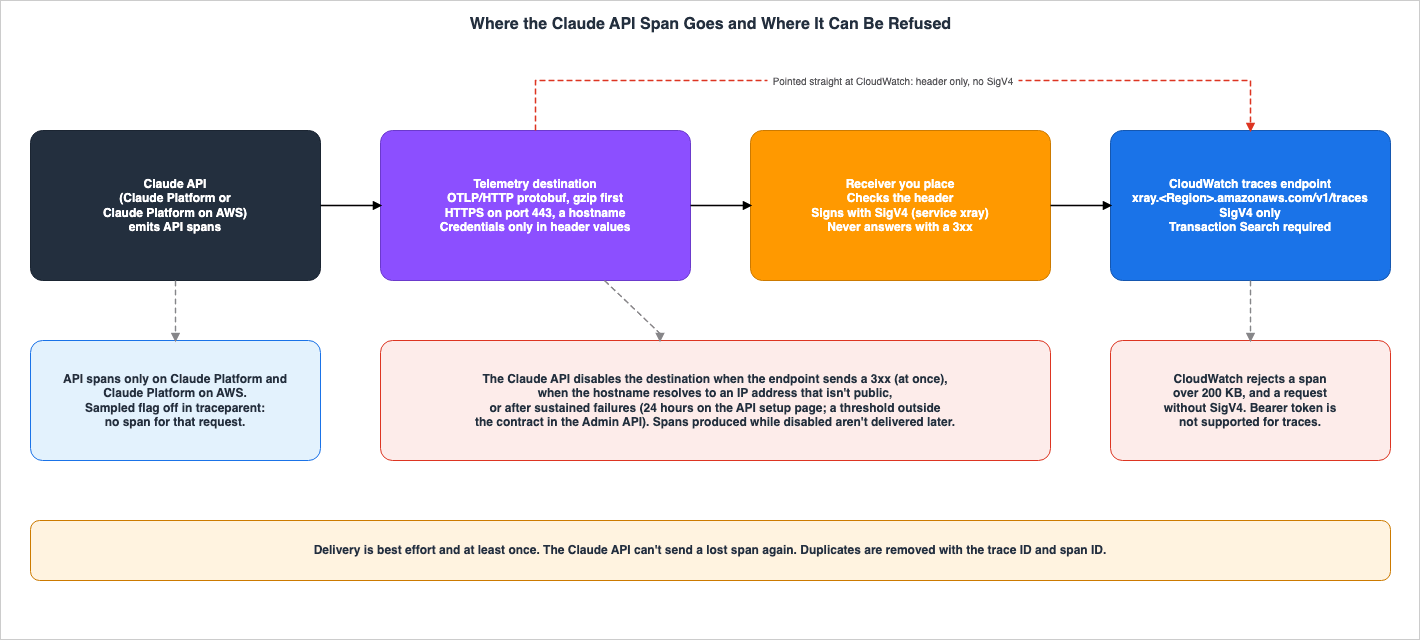
This section first defines the intended audience of this article, the scope of discussion, the two kinds of spans, and the sources read and the release status. The conclusions are presented upfront, and they are as follows:- Sender: The Claude API sends protobuf messages via OTLP/HTTP to the destination, using HTTPS on port 443. The URL should be specified using a hostname, not an IP address. Credentials are included as header values. Delivery is "best effort," and the same span can arrive more than once. If the endpoint returns a 3xx status code, if the hostname resolves to a non-public IP address, or if failures persist, the API will disable the destination.
- Receiver: The CloudWatch traces OTLP endpoint authenticates the caller using SigV4. It is necessary to enable Transaction Search before use. Spans exceeding 200 KB are rejected. The destination sends a registered, fixed header value, and the traces endpoint does not accept Bearer tokens. Putting the two documents together, this article infers that a destination pointed straight at this endpoint is not accepted. This article has not tried it.
- In between: Something is needed that checks the header, signs the request again with SigV4, and forwards it. This article sets out three options: a small relay on a Lambda function URL, the OpenTelemetry Collector contrib (
bearertokenauthon the receiver andsigv4authon the exporter), and ADOT Collector v0.50.0 with a front end. In each option, the header check, HTTPS on port 443, SigV4 signing, and running all the time are held by different parts.
- What stays with you: The size of Full content spans (with a default limit of 0.75 MB and CloudWatch's 200 KB limit), monitoring when the destination is disabled, counting tokens (spans are not a complete record of usage, and on Claude Platform on AWS the Usage and Cost API endpoints are not available), and the fact that upgrading the SDK alone starts SDK spans in an application that already uses OpenTelemetry. All of these stay with you.
1.1 Intended Readers
This article is intended for the following audience:- Developers who are already collecting traces from applications using the Claude API (or Claude Platform on AWS) into CloudWatch, or who are planning to do so.
- Operations personnel responsible for managing the flow of these traces.
- Readers who think that writing the CloudWatch traces URL in the Console is enough for the spans to arrive, that switching the Collector to ADOT also takes care of authentication at the receiver, that Full content spans go into CloudWatch as they are, that adding up spans gives usage, or that API spans are emitted through Amazon Bedrock too.
None of these matches the documentation that this article read. The CloudWatch User Guide says
Bearer token authentication is not supported for traces. Furthermore, a review of the components table and go.mod file for ADOT Collector v0.50.0 reveals no extension that authenticates at the receiver (see section 6.4). CloudWatch rejects spans exceeding 200 KB per span, and Anthropic's overview page states that the default limit for Full content is 0.75 MB (see section 7.1). Anthropic's overview page also states that Exported spans aren't guaranteed to be a complete record of your API usage. API spans are emitted on two platforms, Claude Platform and Claude Platform on AWS (see section 1.3).1.2 What This Article Covers and What It Does Not
This article addresses the contractual aspects related to receiving spans from the Claude API within AWS. Specifically, it covers the conditions of a destination, delivery behavior, the conditions under which the destination becomes disabled, the requirements for the CloudWatch traces endpoint, the options for what sits in between, and what stays with you.This article does not cover:
- Pricing and billing, for any of the Claude API, CloudWatch, Transaction Search, or Lambda.
- Comparisons and rankings of observability products or collector types.
- The complete table outlining the limits for the CloudWatch traces endpoint. This information is available in section 10.5 of OpenTelemetry-Native Observability on AWS.
- Explanations of the semantic conventions for GenAI (attributes starting with
gen_ai.*). This information is provided in the OpenTelemetry GenAI Semantic Conventions Implementation Guide. - Telemetry for Claude Code. The
OTEL_*environment variables and theCLAUDE_CODE_ENABLE_TELEMETRYsetting are separate mechanisms from the OpenTelemetry export discussed in this article. Anthropic's overview page directs users to separate pages for information on Claude Code, Agent SDK, and Cowork. Configurations that relay Claude Code telemetry through a gateway are detailed in section 3.4 of Running Claude Apps Gateway on AWS. - Functionality related to Claude Managed Agents. This article goes only as far as span names.
- Procedures for guessing a destination's header values or for collecting another organization's spans.
1.3 API Spans and SDK Spans
Claude spans originate from two different sources. This article distinguishes between the following two terms:- API spans: The Claude API creates these spans, and Anthropic sends them to the destination. The
service.nameisclaude-platform. Request spans have a kind ofSERVER, while all other spans areINTERNAL. They are set up in the Console or with the Admin API, which needs the admin role in the organization. - SDK spans: The Claude SDK creates these spans in the user's application. The
service.namereflects the application itself. Request spans have a kind ofCLIENT, while all other spans areINTERNAL. These spans are sent by the application's OpenTelemetry exporter and are not sent by Anthropic.
The table on Anthropic's overview page describes cloud platform support as follows: SDK spans are listed as
Any, while API spans are listed as Claude Platform and Claude Platform on AWS. Therefore, when using Claude with Amazon Bedrock or Google Cloud, only SDK spans are generated. The span reference page notes that for SDK spans, the gen_ai.provider.name is aws.bedrock for clients using Amazon Bedrock and gcp.vertex_ai for clients using Google Cloud's Agent Platform.For a single Messages API request, both types of spans may exist. Both will have the name
anthropic.messages.create. They are told apart by kind: the SDK span (CLIENT) is the parent, and the API span (SERVER) is its child. This article focuses on how the API spans are received within AWS. The application's exporter sends SDK spans over the path that the application already uses (see section 7.4).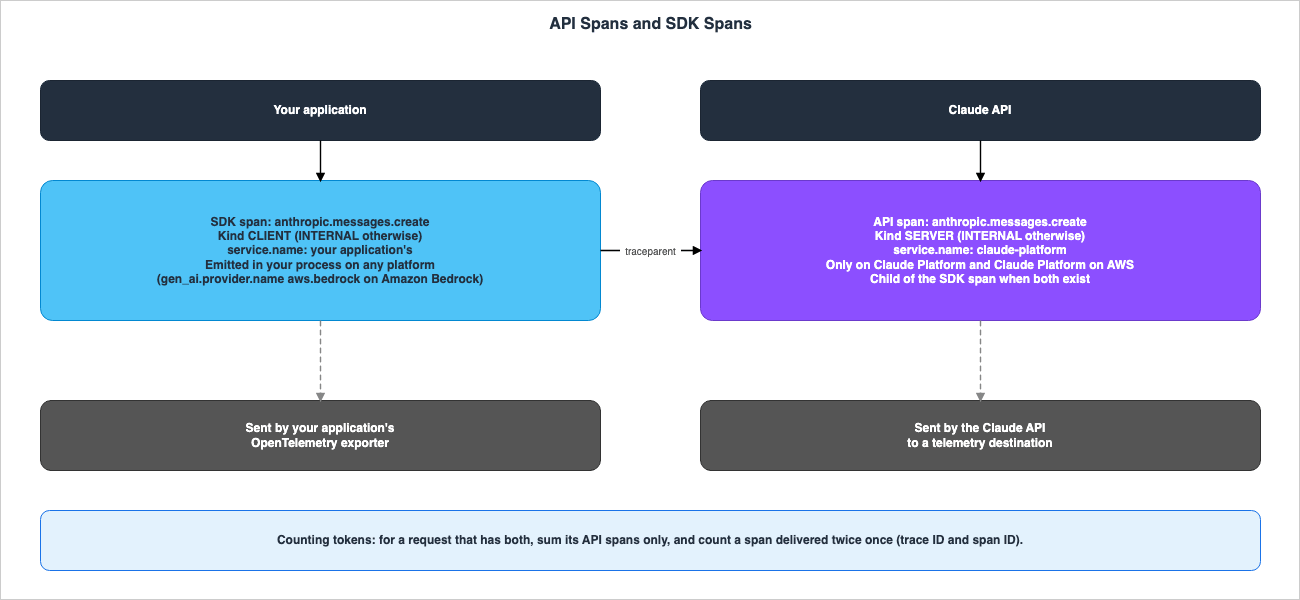
1.4 Sources Read and Release Status
This article was written after reviewing the following materials from Anthropic on October 19, 2026: the OpenTelemetry overview page, the API setup page, the SDK setup page, the span reference page, the Admin API page, the Admin API pages fortelemetry_destinations (create, update, retrieve, list, delete, test), Usage and Cost API page, Claude Platform on AWS page, IAM actions page, release notes, Python SDK CHANGELOG, and TypeScript SDK CHANGELOG.On the same day, the following materials from AWS were also reviewed: the CloudWatch User Guide pages on OTLP endpoints, simple OTLP setup, and enabling Transaction Search, the three function URL pages and the quotas page of the Lambda Developer Guide, the two SigV4 signing pages of the IAM User Guide, and the X-Ray page of the Service Authorization Reference. Regarding OpenTelemetry, the README files for Collector contrib's
bearertokenauthextension, sigv4authextension, and headerssetterextension were reviewed, as well as the README files for Collector's otlpreceiver and configauth, along with the README and the go.mod file of ADOT Collector.The status descriptions are presented as they appear in the original materials. The OpenTelemetry overview page and the span reference page say
OpenTelemetry export is in beta. This article does not use the term "Generally Available" (GA). The span reference page says Span names and attributes can change during the beta. Operations on destinations in the Admin API require the beta header telemetry-destinations-2026-08-11. The date within this value is part of an identifier and is not a publication date.SDK spans were added in version 1.14.0 of the Python SDK and version 0.134.0 of the TypeScript SDK, both released on October 14, 2026. As of October 19, 2026, the latest versions are version 1.15.0 of the Python SDK and version 0.135.0 of the TypeScript SDK (both released on October 15, 2026). The SDK setup page notes that, during the beta period, span names and attributes, SDK options, and environment variables may change. It says
Pin the SDK version in your dependencies to choose when you adopt the changes.2. How to Read the Tables
This section defines the columns and terms used in the tables in this article.2.1 Common Columns
The tables in this article use the following six column headings. The third,Auth It Expects, is specific to this article. The other five are common to two related articles on this site.| Column | What the cell holds |
|---|---|
Platform Provides | What the platform emits, accepts, or commits to, in the words of its documentation |
Where You Read It | The page, Console screen, or API field where the value or state can be read |
Auth It Expects | The authentication that this side sends or requires |
If You Do Nothing | What happens with the defaults, including rejection, truncation, and disabling |
No Statement Found | What the documentation does not state, with the sources searched |
What Stays With You | What the platform does not take over and remains the user's responsibility |
2.2 Wording Conventions
This article keeps the documentation's own words in English.beta, best effort, and at least once are words from the documentation.When the documentation has no statement on a point, this article writes
No statement found and names the sources searched in the same cell or sentence. It does not say that the feature does not exist. What this article derives by combining statements from the documentation, it calls inference.The Console and Admin API use different terminology for the same settings. This article will list both terms on their first appearance.
| Console | Admin API |
|---|---|
| Workspaces: All / Selected / All except | workspaces.type: all / include / exclude |
| OTLP endpoint URL | endpoint_url |
| OTLP traces endpoint URL | traces.endpoint_url |
| Content mode: Metadata only / Full content | traces.content_mode: metadata_only / content |
| Maximum content size in MB | traces.max_content_bytes (bytes) |
| Request headers | headers (write), header_names (read) |
2.3 Documented Values and This Article's Inferences
The tables in this article hold only documented values. What this article derives by combining statements from the documentation is called inference in the text. This article has not checked the options in chapter 6 or the inference in section 7.1 on a real system.3. The Sending Side: What a Destination Must Accept
This chapter reads what the Claude API requires of a destination, drawing on the API setup page and the Admin API pages.3.1 What You Need
The "What you need" section of the API setup page lists the following three items:- The admin role in a Claude Console organization. This role is required to add and modify destinations. The developer role only allows viewing. For organizations using Claude Platform on AWS, sign in to the Console from the AWS Management Console.
An OTLP/HTTP endpoint that accepts protobuf encoding at an HTTPS URL on port 443.- Endpoint credentials. An example provided is an API key.
The Admin API page says
The Admin API is unavailable for individual accounts. The same passage tells readers to set up an organization on the Organization page of the Claude Console to collaborate with teammates and add members. No statement was found, in the four OpenTelemetry pages and the Admin API page that this article read, about whether an individual account can add a destination from the Console.For a self-run OpenTelemetry Collector, the same item says that the default port for the OTLP/HTTP receiver is 4318. It further suggests configuring the receiver to accept connections over HTTPS on port 443, or placing a load balancer or reverse proxy in front of the Collector.
3.2 URL Conditions
The URL conditions appear on both the API setup page and the Admin API create page. The following table puts the two pages side by side.| Condition | API setup page | Admin API (create) |
|---|---|---|
| Scheme and port | HTTPS URL on port 443 | Must use https; the port, if given, must be 443 |
| Host | A hostname, not an IP address | A hostname, not an IP address |
| Path | Can have a path prefix, for example https://gateway.example.com/otlp | A path prefix such as /otlp is allowed |
/v1/traces | Don't add /v1/traces, because the API adds it. | Don't include the per-signal path; the API appends it on delivery |
| Other path for traces | OTLP traces endpoint URL, same host as the OTLP endpoint URL | traces.endpoint_url: same scheme, host, and port; posted to exactly as given |
| Other parts of the URL | No statement found (API setup page) | No query string, fragment, or user name and password |
| Length | 2,048 characters (Limits table) | At most 2,048 characters |
If you manually include
/v1/traces in the URL, the API will add /v1/traces again. The troubleshooting table for the API setup page lists errors in the path for the OTLP endpoint URL or the OTLP traces endpoint URL as potential causes of HTTP 404 errors.3.3 Headers
Credentials are to be included in the header values. The API setup page saysPut credentials only in header values. and says that after you save, the Console doesn't show the values again. The Admin API create page specifies that the API encrypts and stores these values, and does not return them. During retrieval, only header_names are visible.The two pages write the header limits in different units.
| Limit | API setup page (Limits) | Admin API (create) |
|---|---|---|
| Headers for each destination | 20 | At most 20 headers |
| Header name | 128 bytes | At most 128 characters |
| Header value | 4,096 bytes | Printable ASCII, at most 4,096 characters, no leading or trailing space |
| All names and values together | 16,384 bytes | At most 16,384 bytes |
| Names that differ only in case | No statement found (API setup page) | Not allowed |
The Admin API create page states that it rejects reserved names. The examples are
host, cookie, user-agent, and names that start with content-, proxy-, x-forwarded-, or anthropic-. In this validation process, underscores (_) are treated the same as hyphens (-). authorization is not among these examples. The code example on the API setup page demonstrates using authorization with the value Bearer YOUR_OBSERVABILITY_API_KEY. The Admin API create page describes the headers as typically your collector's authentication header and gives authorization as the example.Header values may disappear when the URL changes. The update page for the Admin API states that if you change the hostname or port of the endpoint, all previously registered headers are cleared. New headers should be sent in the same request. If only the path is changed, the headers will remain. The API setup page indicates that when changing the host of the OTLP endpoint URL in the Console, you need to re-enter the header values. This page writes only the host and does not mention the port.
When updating the value of a single header in the Admin API, include the
endpoint_url in the same request. You can keep the current URL. The update page says that when a request sets a value, each stored value that it does not set counts as 4,096 bytes toward the 16,384-byte limit, because the API cannot read the real length of those values. Therefore, when changing a single header on a destination that has four or more other headers, you should resend all other values in the same request.3.4 Content Mode and the Content Limit per Span
For each destination, a content mode is selected. The default is Metadata only (metadata_only), which includes identifiers, timestamps, status, token count, and user-selected names within each span. With Full content (content), the span also includes the prompt and response. The overview page says that for an organization with a HIPAA, FERPA, or K-12 data-handling restriction with Anthropic, destinations receive only metadata regardless of the content mode. This restriction does not apply to SDK spans.Different pages state the default content limit per span for Full content differently.
- The overview page says
With Full content, each span holds up to 0.75 MB of content by default.It goes on to say that this fits a 200k-token context of English text andstays below the 1 MB request limit of many observability platforms and proxies. - The overview page also states that when selecting a partner's platform in the Console under Provider, the Console fills in a limit that the platform accepts.
- On the API setup page, leaving Maximum content size in MB empty means that the API sends as much content as it allows.
- On the Admin API create page, omitting
traces.max_content_bytesis equivalent tonull, which means no limit is imposed, and only the API's limit applies. The specific value of the API's limit was not found in the documentation reviewed.
If the content exceeds the limit, the SDK or API will truncate the content and set
anthropic.content.truncated to true. Request spans drop the system prompt and the earliest messages first, and tool spans drop blocks from the end of the result. The relationship between this limit and CloudWatch's 200 KB per span limit is discussed in section 7.1.3.5 Which Workspaces' Spans Are Sent
A destination receives the spans of the workspaces that it covers. All in the Console refers to all workspaces in the organization, including the Default Workspace and any subsequently created workspaces. Selected refers only to the workspaces you have chosen, and All except refers to all workspaces except those you have selected. Up to 1,000 workspaces can be selected for one destination.The API setup page states that the API sends spans to every enabled destination that covers the workspace where a request or session runs. If two destinations cover one workspace, the same span is sent to both.
3.6 Test Spans
The Test function in the Console, and the/test endpoint in the Admin API, allow you to send a single test span to the destination. The Admin API test page says the following:- It sends a single span named
anthropic.test, including the registered headers, and attempts delivery only once, without retries. - The response is HTTP 200, regardless of whether the destination returns a 2xx status code. Its
resultissuccess, orfailurewith the reason inerror. - The destination's configuration, status, and
delivery_healthremain unchanged. You can also test destinations that have been disabled. - A 10-second interval should be maintained between tests for the same destination. Sending tests too quickly may result in a 429 error.
Test spans are a way to check the delivery path to the destination without sending requests through the Messages API.
3.7 On Claude Platform on AWS
Even within organizations using Claude Platform on AWS, API spans are generated. The API setup page states that requests to the Admin API are sent tohttps://aws-external-anthropic.{region}.api.aws, signed with AWS credentials. IAM policies decide who can manage destinations. The IAM actions page lists nine actions for destinations, all prefixed with aws-external-anthropic, including CreateAccountTelemetryDestination, UpdateAccountTelemetryDestination, and TestAccountTelemetryDestination. The Claude Platform on AWS page says that operations on the telemetry destination are, by default, logged as management events in CloudTrail.Two planes need to be kept apart here. On Claude Platform on AWS, the operations that create a destination (the management plane) are signed with SigV4. The delivery of spans from the API to the destination (the data plane), by contrast, is handled using registered headers, whether using Claude Platform or Claude Platform on AWS. A management plane that uses SigV4 does not make the delivery use SigV4. The span reference page says that API spans within Claude Platform on AWS do not include
server.address, server.port, or url.full.The following is the cURL example from the API setup page, with the documentation's example values. It is a request to Claude Platform (
api.anthropic.com with an x-api-key header). The same page says that on Claude Platform on AWS, requests go to https://aws-external-anthropic.{region}.api.aws instead and are signed with AWS credentials.curl --fail-with-body -sS "https://api.anthropic.com/v1/organizations/telemetry_destinations" \
-H "x-api-key: $ANTHROPIC_API_KEY" \
-H "anthropic-version: 2023-06-01" \
-H "anthropic-beta: telemetry-destinations-2026-08-11" \
-H "content-type: application/json" \
-d '{
"endpoint_url": "https://gateway.example.com/otlp",
"headers": {"authorization": "Bearer YOUR_OBSERVABILITY_API_KEY"},
"traces": {"content_mode": "metadata_only"},
"workspaces": {"type": "all"}
}'4. Delivery Behavior and When a Destination Becomes Disabled
This chapter explains how the API delivers spans and under what conditions a destination is disabled. These rules decide what a receiver has to do.4.1 Delivery Rules
The "Delivery and health" section of the API setup page lists the following rules:- At least once: The same span may be delivered multiple times. To remove duplicates, use the trace ID and span ID.
- Best effort:
A span can be lost before delivery. The API can't send a lost span again. - Compression: The API compresses the initial delivery request using gzip and includes the
Content-Encoding: gzipheader. If the endpoint returns a 400 or 415 error, the API will immediately resend the same span without compression. - Retries: After timeouts, connection errors, TLS errors, DNS failures, 408, 429, and 5xx errors, the API retries the delivery later, a limited number of times. It will not retry after any other types of failures.
- Timeouts: Endpoints must complete the TLS handshake within 5 seconds and return the response headers within 5 seconds. Each delivery times out after 10 seconds in total, including the resend without compression.
- User agent: Requests will include the
User-Agent: Claude-Platformheader.
4.2 Delivery States
The Delivery column indicates the status of each destination. The status may be delayed by up to one minute.| Delivery state | Meaning (API setup page) |
|---|---|
| Healthy | The last delivery succeeded |
| Failing | The last delivery failed; hover over Failing to see the error |
| No data | The API hasn't tried a delivery yet |
| Disabled | The destination doesn't receive spans; hover over Disabled to see why |
In the Admin API, the
delivery_health fields last_error, last_error_at, and last_success_at provide the same information. Examples of last_error include: temporary DNS failure, TLS failure, timeout, connection failure, invalid address, HTTP error (status 503), and redirect (status 301). The create page notes that last_error does not include the endpoint's response body, header values, network address, or TLS details. Even after a subsequent delivery is successful, the last_error will not clear. If last_success_at is later than last_error_at, it indicates that a failure occurred, followed by a successful delivery.4.3 When a Destination Becomes Disabled
The API setup page states that the API will disable a destination under the following circumstances:- When the endpoint returns a
3xxredirect. The endpoint's hostname resolves to an IP address that isn't public.All deliveries fail for 24 hours.
The Admin API create page gives four types of reason for a disabled destination:
caller (disabled by the user), sustained_failure, invalid_address, and redirect. The wording on this page differs in two places compared to the API setup page.| Reason | API setup page | Admin API (create) |
|---|---|---|
| Redirect | The endpoint sends a 3xx redirect | redirect: redirects are never followed, and one such answer disables the destination at once |
| Address that isn't public | The hostname resolves to an IP address that isn't public | invalid_address: deliveries failed for longer than the same threshold as for sustained_failure, and the most recent failure was an invalid address |
| Sustained failure | All deliveries fail for 24 hours | sustained_failure: failed, with no success in between, for longer than a threshold that Anthropic configures and that is not part of this contract |
This article does not state that either of the two pages contains errors. A
3xx redirect results in immediate disabling. A non-public IP address results in disabling after a period of failures. Regarding the duration of failures, the API setup page states 24 hours, while the Admin API page puts the threshold outside the contract.The create page says that spans produced while a destination is disabled aren't delivered later (
Spans produced while it is disabled aren't delivered later.). No statement was found, in the pages this article read, that the API enables a destination again on its own. The API setup page says to fix the cause and then click Enable.4.4 The Sampled Flag
The API reads the trace context from the W3Ctraceparent header in the request. The API setup page says If the sampled flag in the header is off, the API doesn't emit the request's span or the spans under it. The SDK writes the traceparent using the application's propagator, and the sampled flag follows the application's sampler. The API setup page also indicates that when the application uses non-W3C propagators (such as B3), it should include the W3C trace context propagator as well.Spans created by the API for requests without a
traceparent header will each become independent traces. To associate these spans with the application's trace, set up SDK tracing or add a traceparent header yourself.4.5 What This Asks of a Receiver
Based on the information in sections 4.1 through 4.4, the following are requirements for a receiver. Each follows directly from the documentation, and none depends on which option is chosen.- Accepts connections over HTTPS on port 443, using a hostname that resolves to a public IP address.
- Never answers with a 3xx. One 3xx disables the destination.
- Completes the TLS handshake within 5 seconds and returns the response headers within 5 seconds.
- Accepts a gzip body, or answers 400 or 415 and then accepts the resend without compression.
- Returns 2xx only when it has accepted the spans. Retries happen only after a timeout, a connection failure or the like, 408, 429, or 5xx.
- Expects the same span to arrive more than once.
5. The Receiving Side: What the CloudWatch Traces Endpoint Accepts
The conditions for the CloudWatch traces OTLP endpoint are detailed in section 10.5 of OpenTelemetry-Native Observability on AWS, as verified on August 9, 2026. This article reread the CloudWatch User Guide on October 19, 2026, and confirmed that the following points remain consistent with the description in section 10.5.- The endpoint has the form
https://xray.<Region>.amazonaws.com/v1/traces. The CloudWatch User Guide saysThe endpoint authenticates callers using Signature 4 authentication., and the simple setup page for OTLP saysBearer token authentication is not supported for traces.Bearer token authentication is only supported for metrics and logs endpoints. Prerequisite – If using the OTLP endpoint for tracing, make sure that Transaction Search is enabled.The page describing how to enable Transaction Search says that this setting applies to the whole account (Transaction search is configured for the entire account).- The single span maximum size is 200 KB:
Spans more than 200KB will be rejected by the endpoint.The maximum size for a single request, uncompressed, is 5 MB. The supported compression methods are gzip and none.
SigV4 signatures are calculated for each request. The IAM User Guide page detailing the signature process states that the string to sign is created from the canonical request plus
the algorithm, request date, credential scope, and the hash of the canonical request. The canonical request is created from the request's contents, including the host and headers. The same guide, on the page describing signature elements, says about the date and time Including the date and time in a request helps prevent third parties from intercepting your request and resubmitting it later.To sign using SigV4, you need IAM permissions. The X-Ray section of the service authorization reference describes
xray:PutSpans as Grants permission to upload OpenTelemetry spans to AWS X-Ray.This site's tool shows the SigV4 signing steps one by one: AWS Signature Version 4 Request Signer and Explainer.
6. What Sits In Between
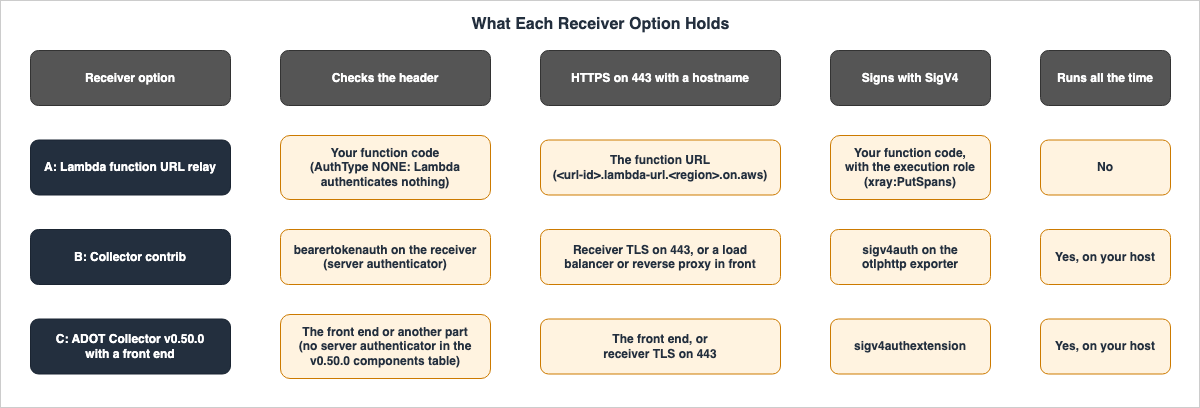
Summarizing chapters 3 through 5, the sending side sends credentials in headers, while the receiving side accepts only SigV4 signatures. This chapter sets out three options for what sits in between. It does not specify which of these options is preferable.6.1 The Jobs of What Sits In Between
Whatever sits in between has the following jobs. They combine the conditions outlined in section 4.5 (the receiver) and chapter 5 (CloudWatch requirements).- Accept HTTPS connections on port 443, using a public hostname.
- Verify the headers sent by the destination.
- Forward the body (typically protobuf, often gzipped) to CloudWatch. CloudWatch supports gzipped data.
- Sign the forwarded requests using SigV4 (service name:
xray). This requires appropriate IAM credentials. - Respond with the response headers within 5 seconds, and do not return 3xx status codes.
- Decide what to do with a span larger than 200 KB (pass it on, drop it, or shorten it).
6.2 Option A: A Small Relay on a Lambda function URL
A Lambda function URL is an HTTPS endpoint of the formhttps://<url-id>.lambda-url.<region>.on.aws. It has a hostname, and the port is 443. When AuthType is set to NONE, the Lambda Developer Guide says Lambda doesn't perform any authentication before invoking your function. However, the function's resource-based policy must explicitly allow lambda:InvokeFunctionUrl and lambda:InvokeFunction. Header validation is handled in the function's code.The function URL passes a binary body to the function base64-encoded (
If the content type of the request is binary, the body is base64-encoded.). The function decodes the body, signs a request with SigV4, forwards it to CloudWatch, and returns CloudWatch's response. The credentials used for the SigV4 signature are those associated with the function's execution role. The required permission is xray:PutSpans. The maximum size of the payload for a Lambda synchronous invocation is 6 MB for both the request and response (see the Lambda quota page).In this option, the user provides the code for header validation and the code for signing and forwarding with SigV4, makes sure that the function never answers with a 3xx and answers within 5 seconds, and keeps the expected value somewhere. There is no persistent server involved. This article has not run this configuration. No AWS description of a function URL used as an OTLP relay was found in the AWS documentation reviewed (the three OTLP pages of the CloudWatch User Guide and the three function URL pages of the Lambda Developer Guide). This configuration is a combination of components from various parts of the documentation.
The
ApplicationManaged endpoint, introduced with Lambda Web Functions on October 12, 2026, is also an entry point where Lambda does not authenticate and the application holds authentication. This article has not tried it. The contract of that entry point is covered in this site's AWS Lambda Web Functions as a Contract.6.3 Option B: OpenTelemetry Collector Contrib with bearertokenauth and sigv4auth
The README for configauth in the OpenTelemetry Collector describes authentication extensions as being divided into two categories. One is Server type authenticators perform authentication for incoming HTTP/gRPC requests and are typically used in receivers., and the other is the client type, used when sending requests. The same README lists three extensions for Server Authenticators: Basic Auth, Bearer Token, and OIDC, and provides an example of using OIDC within a receiver's auth: configuration.The README for the
bearertokenauthextension in the Collector contrib says This extension implements both configauth.ServerAuthenticator and configauth.ClientAuthenticator. Therefore, including this extension in a receiver's auth: configuration allows verification of the authorization header received. However, examples of using bearertokenauth within otlpreceiver were not found in the three README files examined (bearertokenauthextension, otlpreceiver, and configauth). The examples provided in the bearertokenauthextension README all place the extension on the exporter side.On the sending side,
sigv4authextension is used. The CloudWatch simple setup page for OTLP provides an example that writes https://xray.us-east-1.amazonaws.com/v1/traces to the traces_endpoint of the otlphttp exporter and sets the service in sigv4auth to "xray".The following configuration combines two examples from the documentation. This article has not run it. The paths to the certificate and token files are placeholders.
extensions:
  bearertokenauth/in:
    scheme: "Bearer"
    filename: /etc/otelcol/destination.token   # token that the destination sends
  sigv4auth/traces:
    region: "us-east-1"
    service: "xray"

receivers:
  otlp:
    protocols:
      http:
        endpoint: 0.0.0.0:443          # the destination sends HTTPS on port 443
        tls:
          cert_file: /etc/otelcol/tls/cert.pem
          key_file: /etc/otelcol/tls/key.pem
        auth:
          authenticator: bearertokenauth/in

exporters:
  otlphttp/traces:
    compression: gzip
    traces_endpoint: https://xray.us-east-1.amazonaws.com/v1/traces
    auth:
      authenticator: sigv4auth/traces

service:
  extensions: [bearertokenauth/in, sigv4auth/traces]
  pipelines:
    traces:
      receivers: [otlp]
      exporters: [otlphttp/traces]
In this option, the user provides a location for the Collector to run, a public hostname, a TLS certificate (or a load balancer or reverse proxy in front), a token file, and SigV4 credentials. The README of the Collector contrib
headers_setter extension says that it implements ClientAuthenticator. It adds headers to outgoing requests, and this article does not use it for the receiver's header check.6.4 Option C: ADOT Collector v0.50.0 with a Front End
The components table in the README of AWS Distro for OpenTelemetry (ADOT) Collector (This table represents the supported components of the ADOT Collector.) lists seven extensions: healthcheckextension, pprofextension, zpagesextension, ecsobserver, awsproxy, sigv4authextension, and filestorage. As of October 19, 2026, the latest release is v0.50.0 (released August 31, 2026), and the extensions listed in its go.mod file are the same seven. The go.mod file locks the Collector contrib components to version v0.158.0.The three Server Authenticators listed in the
configauth README (Basic Auth, Bearer Token, and OIDC) were not found in either the components table for ADOT Collector v0.50.0 or the go.mod file. What the documentation supports is only that this version contains no extension that authenticates at the receiver. This article does not say that ADOT Collector cannot handle headers at all. A configuration that passes the metadata of incoming requests to the processing stage and combines it with the attributesprocessor or filterprocessor in ADOT Collector is conceivable, but this article has not checked it.In this option, the
sigv4authextension in ADOT Collector handles the SigV4 signature. The header check is held by a front-end load balancer or reverse proxy, or by another part. The components table may change as future versions of ADOT Collector are released.6.5 Contract Tables
The following two tables set the sending side, the receiving side, and the three options in between against the six columns of section 2.1. The first table has three columns, while the second table contains the remaining three.| Side | Platform Provides | Where You Read It | Auth It Expects |
|---|---|---|---|
| Claude API destination (sender) | API spans over OTLP/HTTP protobuf, HTTPS on port 443, gzip first; best effort, at least once | API setup page; Admin API telemetry_destinations; Console Delivery column | Sends the registered header values; credentials only in header values |
| CloudWatch traces endpoint (receiver) | OTLP/HTTP at https://xray.<Region>.amazonaws.com/v1/traces; gzip or none; 200 KB per span | CloudWatch User Guide, OTLP endpoint pages | SigV4 only; Bearer token authentication is not supported for traces. |
| A: Lambda function URL relay | HTTPS endpoint with a hostname on port 443; binary body passed base64-encoded | Lambda Developer Guide, function URL pages | AuthType: NONE does no authentication; the function checks the header and signs with SigV4 |
B: Collector contrib with bearertokenauth and sigv4auth | bearertokenauthextension implements the server and client authenticator; sigv4authextension signs requests | Collector contrib READMEs; CloudWatch example configuration | Server side: bearer token in authorization; client side: SigV4 with service xray |
| C: ADOT Collector v0.50.0 with a front end | sigv4authextension and six other extensions in the components table | ADOT README components table; go.mod | SigV4 to CloudWatch; the header check is held by the front end |
| Side | If You Do Nothing | No Statement Found | What Stays With You |
|---|---|---|---|
| Claude API destination (sender) | metadata_only; 3xx disables at once; sustained failures disable; spans produced while disabled aren't delivered later | The API's maximum content size; automatic re-enabling (OTel pages, Admin API pages) | Watching Delivery and delivery_health; enabling again; deduplicating |
| CloudWatch traces endpoint (receiver) | Rejects spans over 200 KB; needs Transaction Search, which applies to the whole account | An announcement of Bearer token support for traces (User Guide OTLP pages, What's New) | IAM permission xray:PutSpans; turning on Transaction Search |
| A: Lambda function URL relay | Public URL; anyone with the URL can invoke the function | An AWS description of this relay pattern (CloudWatch OTLP pages, Lambda function URL pages) | Header check code, SigV4 code, no 3xx, 5-second response, where the expected value is kept |
B: Collector contrib with bearertokenauth and sigv4auth | The OTLP/HTTP receiver listens on localhost:4318 by default | An example of bearertokenauth on otlpreceiver (three READMEs) | A host that runs all the time, a public hostname and TLS on 443, the token file |
| C: ADOT Collector v0.50.0 with a front end | No server authenticator in the components table of v0.50.0 | A documented way to check the header inside ADOT Collector v0.50.0 (README, go.mod) | The front end that checks the header; tracking the ADOT Collector version |
7. What Stays With You
This chapter lists the items that will remain with the user, regardless of which option they choose.7.1 The Size of Full Content Spans
Anthropic's overview page states that the default content limit for Full content is 0.75 MB per span. The CloudWatch User Guide states that spans exceeding 200 KB are rejected. 0.75 MB is more than three times 200 KB. When these two statements are considered together, it suggests that if a large request is sent in Full content with the default limit in place, CloudWatch may reject some spans. This conclusion is derived from the numbers presented on both pages, although neither document explicitly mentions this specific combination. This article has not checked this inference on a real system.The following related facts should also be considered:
- 0.75 MB is the content limit, and a span may contain other attributes in addition to the content. Even if the content is less than 200 KB, the total size of the span may still exceed 200 KB.
- The limit can be reduced. In the Console, this is controlled by Maximum content size in MB, while in the Admin API and SDK, it is controlled by
traces.max_content_bytes. The overview page says to lower the limit when your observability platform or a proxy in front of it rejects large requests. - When the limit is exceeded, the content is not rejected but truncated, and
anthropic.content.truncatedis set totrue(see section 3.4). - When selecting a partner's platform in the Console under Provider, the Console will apply that platform's accepted limit. For Custom destinations and destinations created through the Admin API, the user determines the limit. If
traces.max_content_bytesis not specified in the Admin API, the limit will default to the API's limit (see section 3.4).
7.2 Noticing That a Destination Is Disabled
When a destination becomes disabled, the API will not send spans, and spans from the disabled period are not delivered later (see section 4.3). According to the documentation, you can detect this by monitoring the Delivery column in the Console, as well as thestate and delivery_health fields in the Admin API. No statement about a notification when a destination becomes disabled was found in the four OpenTelemetry pages and the six destination pages of the Admin API that this article read.Therefore, it is the responsibility of the user to periodically check the
state and delivery_health and, if a destination becomes disabled, to fix the cause and click Enable. On Claude Platform on AWS, operations performed on a destination are recorded in CloudTrail management events (see section 3.7). CloudTrail records the operations themselves, not instances of delivery failures.7.3 Counting Tokens and Usage
Spans contain token counts. To count each token once, the overview page says to sum the spans of only one source for each request. When a request to the Messages API includes both spans from the SDK and spans from the API, sum its API spans. For API spans, sum either theanthropic.messages.create spans or the anthropic.model_request spans, not both. In cases where a span is received multiple times due to retries, if the observability platform doesn't deduplicate, count it only once using the trace ID and span ID. The gen_ai.usage.input_tokens field already includes the tokens read from and written to the prompt cache.However, spans do not represent a complete record of usage. The overview page says
Exported spans aren't guaranteed to be a complete record of your API usage. This is because delivery is best-effort, and spans may not be generated if the caller disables the sampled flag in the traceparent header. The same note says to use the Usage API to track each API key's usage, as the Usage API accounts for requests that don't generate spans.On Claude Platform on AWS, this advice does not carry over. The Usage and Cost API page says
Claude Platform on AWS: The programmatic Usage and Cost API endpoints are not currently available. Instead, it directs users to the Usage and Cost pages in the Claude Console. Organizations using Claude Platform on AWS should treat values derived from spans as separate from the values displayed on the Console's Usage page.7.4 SDK Span Defaults
The CHANGELOG for Python SDK version 1.14.0 says the following, in substance. If an application has registered a global tracer provider, after upgrading the SDK, the SDK will create spans and export them along with other traces. Requests will include trace context headers provided by the global propagator. To disable this, passopen_telemetry=False to the client, or set the environment variable ANTHROPIC_OPEN_TELEMETRY=false.Applications already using OpenTelemetry will begin seeing spans created by the SDK simply by upgrading the SDK version. The SDK setup page states that if the propagator also writes baggage, the SDK will send that baggage to the API. To send only the trace context, register only the W3C trace context propagator. Setting
ANTHROPIC_OPEN_TELEMETRY_PROPAGATION=false will disable the sending of both trace context and baggage headers, but spans will continue to be emitted. The SDK setup page indicates that this setting is available in the Python, TypeScript, Go, Java, Ruby, and PHP SDKs.The path for the SDK spans to be sent to AWS is the same as the path currently used by the application. The SDK's configuration sets the content mode of SDK spans, and the default is
metadata_only. When Full content SDK spans are sent to CloudWatch, the same inference as in section 7.1 applies.8. Failure Modes
Here are some common errors that can occur when misinterpreting the data presented in this article.- Reading that writing the CloudWatch traces URL in the Console is enough: The CloudWatch traces endpoint accepts only SigV4, and the destination sends credentials in headers. Put something in between (chapters 5 and 6).
- Writing
/v1/tracesin the URL: The API adds/v1/traces, so the path doubles and returns 404. When receiving data on a different path, use the OTLP traces endpoint URL (traces.endpoint_url) (section 3.2). - Reading that a receiver may answer with a 3xx: One 3xx disables the destination at once. This also applies to 3xx responses from a load balancer or reverse proxy in front of the receiver (section 4.3).
- Reading that switching the receiver to ADOT Collector also takes care of authentication: The components table of ADOT Collector v0.50.0 contains no extension that authenticates at the receiver. The header check is held by a front end or another part (section 6.4).
- Reading that
headers_setterchecks the receiver's header: The README describesheaders_setteras aClientAuthenticator, a part that adds headers to outgoing requests (section 6.3). - Reading that Full content spans go into CloudWatch as they are: Set next to each other, the default limit of 0.75 MB and CloudWatch's 200 KB suggest that some spans may not fit. Lower the limit (section 7.1).
- Reading that headers survive a change of host: In an Admin API update, a change of hostname or port removes every header (section 3.3).
- Reading that adding up spans gives usage: Spans are not a complete record of usage. On Claude Platform on AWS, the Usage and Cost API endpoints are not available (section 7.3).
- Reading that API spans are emitted through Amazon Bedrock too: API spans are emitted only on Claude Platform and Claude Platform on AWS (section 1.3).
- Reading that a disabled destination comes back on its own once the cause is fixed: No such statement was found. Fix the cause, then click Enable. Spans from the disabled period are not delivered (section 4.3).
9. Frequently Asked Questions About Receiving Claude API Traces on AWS
Q1. Is the Claude API's OpenTelemetry export generally available (GA)?
As of October 19, 2026, Anthropic's overview page states thatOpenTelemetry export is in beta. The span reference page notes that span names and attributes may change during the beta period. This article does not state that it is generally available (GA) (section 1.4).Q2. Can a destination point straight at the CloudWatch traces endpoint?
Putting together the documentation that this article read, this article infers that it is not accepted. The destination sends a fixed header value. The CloudWatch traces endpoint uses SigV4 to authenticate the caller and does not accept Bearer tokens. Since SigV4 signatures are calculated for each request based on the request's date and content, a fixed header value cannot substitute for this (chapter 5). This article has not tried a direct registration. Put something in between that checks the header, signs again with SigV4, and forwards (chapters 5 and 6).Q3. When Claude runs on Amazon Bedrock, are API spans emitted?
No. The table on the overview page lists the cloud platforms for API tracing asClaude Platform and Claude Platform on AWS. On Amazon Bedrock, only SDK spans are emitted; the gen_ai.provider.name is aws.bedrock (see section 1.3).Q4. Must the receiving endpoint use port 443?
Yes. The API setup page requires an HTTPS URL on port 443. The Admin API create page specifies that if a port is specified, it must be 443. A Collector's OTLP/HTTP receiver left on its default port 4318 cannot be used as is. Configure the receiver to accept connections over HTTPS on port 443, or place a load balancer or reverse proxy in front of it (see sections 3.1 and 3.2).Q5. Do Full content spans fit in CloudWatch?
It depends on the size of the content. If you send large prompts without changing the default limit of 0.75 MB, spans exceeding 200 KB may be generated. This is an inference from the numbers on two pages, and this article has not checked it on a real system. The limit can be reduced usingtraces.max_content_bytes or the Console's Maximum content size in MB (see section 7.1).Q6. How can you tell that a destination is disabled?
You can check the Delivery column in the Console, or read thestate and delivery_health values from the Admin API. No statement about a notification when a destination becomes disabled was found in the pages this article read. After fixing the cause, click Enable. Spans from the disabled period are not delivered later (section 7.2).Q7. Can usage be counted from the token counts on spans?
If you count, sum the spans of only one source for each request, and count a span that arrives twice once, by its trace ID and span ID. However, spans do not represent a complete record of usage. On Claude Platform, use the Usage API. On Claude Platform on AWS, the Usage and Cost API endpoints are not available, so refer to the Usage page in the Console (see section 7.3).Q8. When was this article checked?
This article read the documentation of Anthropic, AWS, and OpenTelemetry on October 19, 2026. It has not run the configurations it describes on a real system. Because the features described are in beta, the content on these pages may change after the verification date (see section 1.4).10. Summary
- Sender uses headers, receiver uses SigV4: A destination sends credentials as header values, and the CloudWatch traces endpoint accepts only SigV4. By inference, they do not connect directly (see chapters 3 and 5).
- Sender requirements: port 443, hostname, and exclusion of
/v1/traces: There are header limits and reserved names, and changing the hostname or port removes the headers (see chapter 3). - Delivery is best effort, and one 3xx disables a destination: A destination is also disabled when the hostname resolves to an IP address that isn't public, or after sustained failures. Spans from the disabled period are not delivered, and the user clicks Enable (see chapter 4).
- What sits in between holds the header check, HTTPS on port 443, and SigV4 signing: A relay on a Lambda function URL, Collector contrib with
bearertokenauthandsigv4auth, and ADOT Collector v0.50.0 with a front end each hold different parts (see chapter 6). - Limits of 0.75 MB and 200 KB, watching for a disabled destination, token counting, and SDK defaults stay with you: On Claude Platform on AWS, the Usage and Cost API endpoints are not available (see chapter 7).
11. References
- OpenTelemetry for the Claude API - Claude Docs
- Set up OpenTelemetry with the Claude API - Claude Docs
- Set up OpenTelemetry with the Claude SDK - Claude Docs
- OpenTelemetry span reference - Claude Docs
- Telemetry Destinations - Claude API Reference
- Create a Telemetry Destination - Claude API Reference
- Update a Telemetry Destination - Claude API Reference
- Test a Telemetry Destination - Claude API Reference
- Admin API - Claude Docs
- Usage and Cost API - Claude Docs
- Claude Platform on AWS - Claude Docs
- Claude Platform on AWS IAM actions - Claude Docs
- Release notes - Claude Docs
- anthropic-sdk-python CHANGELOG - GitHub
- anthropic-sdk-typescript CHANGELOG - GitHub
- OTLP Endpoints - Amazon CloudWatch User Guide
- Simple setup for the OTLP endpoint - Amazon CloudWatch User Guide
- Enable Transaction Search - Amazon CloudWatch User Guide
- Create a signed AWS API request - AWS Identity and Access Management
- Elements of an AWS API request signature - AWS Identity and Access Management
- Actions, resources, and condition keys for AWS X-Ray - Service Authorization Reference
- Creating and managing Lambda function URLs - AWS Lambda Developer Guide
- Invoking Lambda function URLs - AWS Lambda Developer Guide
- Control access to Lambda function URLs - AWS Lambda Developer Guide
- Lambda quotas - AWS Lambda Developer Guide
- Bearer token authenticator extension - OpenTelemetry Collector contrib
- Sigv4 authenticator extension - OpenTelemetry Collector contrib
- Headers setter extension - OpenTelemetry Collector contrib
- OTLP receiver - OpenTelemetry Collector
- Authentication configuration (configauth) - OpenTelemetry Collector
- AWS Distro for OpenTelemetry Collector - GitHub
- AWS Distro for OpenTelemetry Collector v0.50.0 go.mod - GitHub
References:
Tech Blog with curated related content
Written by Hidekazu Konishi