Which Lines of the AWS Helm Instructions Change Under Helm 4 - Server-Side Apply, Wait Strategies, Post-Renderer Plugins, and Amazon ECR Login
First Published:
Last Updated:
Install the latest version of the Helm client. These steps were written using Helm version 3.18.6. For compatibility with Amazon EKS supported Kubernetes versions, use Helm version 3.9 or later.As of October 16, 2026, the latest version of Helm is 4.3.1. The stable version of the
helm formula in Homebrew is also 4.3.1. If you install Helm following the instructions today, you will install Helm 4. However, the body of the instructions is written using Helm 3 versions. Helm 4 is a major release, the first in six years since Helm 3, and introduces commands with altered default behavior, commands that now require specific syntax, and flags with changed names.This article will examine each line of the AWS-published Helm instructions, identifying which lines correspond to changes in Helm 4, and which do not. It will cross-reference these lines with Helm documentation. The instructions it will review include: ECR push and install instructions, the Helm section of the Amazon EKS user guide, the AWS Load Balancer Controller instructions, the Karpenter Getting Started guide, the ACK controller instructions, and the instructions for the Amazon CloudWatch Observability Helm charts. It will also list the version of Helm that each page states. It will not offer opinions on whether Helm 3 or Helm 4 is preferable, nor will it discuss pricing. The information in this article was verified as of October 16, 2026. This article has not executed the instructions. Within what this article read on the verification date, the
helm install lines that create a new release (Sections 4.2, 4.3, 4.4, 4.6, and 4.7) and Karpenter's helm upgrade --install line when no release exists (Section 4.5) use server-side apply, and the lines on the CloudWatch Observability and Karpenter pages that write --wait alone use the watcher strategy. The ECR helm registry login and helm push lines do not fall under the Helm 4 changes.Related articles on this site:
- Amazon EKS Capabilities - Managed Argo CD, ACK, and kro, and What Changes When the Controllers Move Off Your Cluster
- What a GitHub-Hosted Runner Label Resolves To - ubuntu-latest to Ubuntu 26.04, the macos-14 Retirement, and Tool Versions in AWS Deploy Jobs
- Software Supply Chain Security on AWS - Signing, Attestation, and Admission Control
- AWS End-of-Support and EOL Reference - Lambda, EKS, RDS and Aurora, ElastiCache, and OpenSearch Service
- AWS History and Timeline regarding Amazon EKS - Overview, Functions, Features, Summary of Updates, and Introduction
- Life After Ingress NGINX on Amazon EKS - Where the Upstream and AWS Disagree About the Order of Migration, and What GatewayClass Actually Decides
- Certificate Distribution in Kubernetes with AWS Private CA - Issue, Request, Store, Consume, and the Layer Where Renewal Stops
Table of Contents
- 1. The AWS Helm Instructions Name a Helm Version, and the Helm Underneath Has Moved On
- 2. How to Read the Tables
- 3. Helm 4 Changes, by Kind
- 4. The AWS Instructions, Line by Line
- 5. Amazon ECR Login Under Helm 4
- 6. The Helm Versions the AWS Pages Name, and Kubernetes Version Skew
- 7. Dates
- 8. Failure Modes
- 9. Frequently Asked Questions About Helm 4 and the AWS Helm Instructions
- 10. Summary
- 11. References
1. The AWS Helm Instructions Name a Helm Version, and the Helm Underneath Has Moved On
This section first defines the intended audience for this article, the terminology used within it, the scope of the content, and the date of verification, as well as the materials consulted.1.1 Intended Audience
This article is intended for:- Operations and platform engineers who are deploying Helm charts on ECR, as well as charts from eks-charts, Karpenter, and ACK, using GitHub Actions or AWS CodeBuild CI, or using
helmlocally to deploy to Amazon EKS. - Individuals who want to understand which lines in the AWS instructions will change, which lines need to be modified, and which lines will continue to function as is when their CI runners or locally installed Homebrew
helmare upgraded to Helm 4.
GitHub-hosted runners now include Helm 4 on the Ubuntu 26.04 image. The article What a GitHub-Hosted Runner Label Resolves To on this site details when the runner labels will point to Ubuntu 26.04. This article focuses on how each line of the AWS instructions behaves when running on this Helm 4 environment.
1.2 Terms Used in This Article
This article uses the following terms with specific meanings:- Helm Release: An instance of a chart deployed within a cluster using Helm. It is created with
helm installand its revision progresses withhelm upgradeandhelm rollback. When this article refers to "release," it refers to this meaning. - Helm Version: This refers to the version of the Helm client, such as
4.3.1or3.22.1. It is distinct from the term "release." - Server-Side Apply and Client-Side Apply: These terms describe the method used to apply changes to Kubernetes resources – either by calculating and applying changes on the API server, or by calculating and applying changes on the client. Helm 4 documentation indicates that Helm determines, on a release-by-release basis, which method is used to apply resources.
- Wait Strategies: These are the possible values accepted by the
--waitflag in Helm 4. The available options arewatcher,hookOnly, andlegacy.
1.3 What This Article Covers, and What It Does Not
This article addresses the following:- Changes in Helm 4 that may affect lines in the AWS instructions: server-side apply and how existing releases keep their previous apply method,
--waitstrategies, pluginization of post-renderers, hosts passed tohelm registry login, flag renames, and chart API version v3. - Which lines in the AWS Helm instructions correspond to which changes in Helm 4, and which lines do not correspond to any changes.
- The versions of Helm referenced in AWS documentation, and areas where information about Helm 4 was not found.
- The supported Kubernetes versions for Helm 4, and the Kubernetes versions supported by EKS.
- The publication date of Helm 4.0.0, and the end-of-support date for Helm 3.
This article does not cover:
- The managed Argo CD of EKS Capabilities: The EKS user guide states that the Argo CD capability handles access to sources (
This means your worker nodes don’t need direct access to Git repositories or Helm registries—the capability handles source access from the AWS account.). Managed Argo CD is covered on this site under Amazon EKS Capabilities. This article only addresses thehelmcommands that users run themselves. - Image signing and verification in ECR: This is covered on this site under Software Supply Chain Security on AWS.
- End-of-support dates for Kubernetes versions in EKS: This is covered on this site under AWS End-of-Support and EOL Reference. This article only uses lists of versions as of the date of review.
- Helm used by the
HelmChartconstruct in AWS CDK: This refers to the internal workings of CDK and is not included in the steps outlined in this article. - Chart creation, writing Wasm plugins, comparisons between Helm 3 and Helm 4, recommendations for migration, and pricing.
1.4 Verification Date and the Sources Read
This article was verified on October 16, 2026. All descriptions within this article reflect the state as of that date. The materials consulted for this article are as follows:- Helm Documentation: Helm 4 Overview,
helm install,helm upgrade,helm rollback,helm registry login,helm push,helm templatereference, Helm Version Support Policy, Release schedule policy, Advanced Helm Techniques, Use OCI-based registries. The documentation version reviewed was4.3.1. For comparison, thehelm installandhelm upgradereferences for Helm3.22.1were also reviewed. - Helm Blog: Helm 4 Released (November 17, 2025), Helm 3 End of Life (June 2, 2026).
- helm/helm Repository: A list of releases on GitHub, and the release pages for
v4.0.0,v4.3.0,v4.3.1,v3.22.0, andv3.22.1. Portions of the source code for tagsv4.0.0andv4.3.1(specificallypkg/cmd/flags.go,pkg/cmd/install.go,pkg/kube/client.go,pkg/registry/client.go,pkg/action/install.go,pkg/action/upgrade.go,pkg/cmd/upgrade.go) were examined. Thepkg/registry/client.gofile was also reviewed for tagsv4.0.1,v4.0.5,v4.1.0, andv4.2.0. - AWS Documentation: Review of "Pushing a Helm chart to an Amazon ECR private repository" and "Installing a Helm chart on an Amazon EKS cluster" from the Amazon ECR User Guide, and "Deploy applications with Helm on Amazon EKS" from the Amazon EKS User Guide. Also reviewed "Install AWS Load Balancer Controller with Helm," "Continuous Deployment with Argo CD," "Understand the Kubernetes version lifecycle on EKS," "Secure Kubernetes Workloads with ACM Certificates" from the AWS Certificate Manager User Guide, "Using Lambda with Kubernetes" from the AWS Lambda Developer Guide, and two pages from the Amazon CloudWatch User Guide. These pages were read through aws-knowledge MCP searches and in the HTML of the documentation.
- AWS Blog: "Implement SPIFFE/SPIRE authorization on Amazon EKS" (April 27, 2026) from the AWS Containers Blog.
- Karpenter Documentation: Reviewed "Getting Started with Karpenter" and "Upgrade Guide" (karpenter.sh).
- Homebrew: Reviewed information for the
helmformula (formulae.brew.sh).
This article did not run any
helm commands. All the behavior described in this article regarding Helm is based on Helm's documentation, blog posts, or the source code. Whenever information comes from the source code, the article says so.2. How to Read the Tables
This section defines the columns and terms used in the tables in this article. The tables write, in the same columns, the lines users write, how those lines are resolved by Helm 4, and the types of changes involved.2.1 Table Columns
The table in Section 3 uses the following columns. The tables in Section 4 use four of these columns:What You Write, Kind of Change, Resolves To (Helm 4.3.1), and To Keep the Old Behavior.What You Write: This column is the commands or flags that the user will input. In Section 4, this column will contain the lines from the AWS documentation, written exactly as they appear. Example values (e.g.,aws_account_id,region,my-cluster) are also written as they appear in the documentation.Kind of Change: This column indicates the type of change in Helm 4. The values for this column are defined in Section 2.2.Resolves To (Helm 4.3.1): According to the Helm 4.3.1 documentation, this column describes how the corresponding line is resolved.Changed By: This column identifies who made the change. In this article's tables, the values will be eitherHelm maintainers,You (your workflow or command), orThe source does not say.The AWS documentation describes versions of Helm but does not change Helm's default behavior.Takes Effect: This column indicates when the change takes effect. Changes in Helm 4 take effect when you run commands usinghelmversion 4.0.0 or later. Where the source code differs by version, the relevant version is given.To Keep the Old Behavior: This column describes how to maintain the behavior from Helm 3. This article writes only what the documentation states. Where the documentation states nothing, the column saysThe source does not say.Where the column does not apply, it saysNot applicable.Source: This column indicates the name of the documentation that served as the basis for that row.
In every row of the tables in Section 4,
Changed By is Helm maintainers, and Takes Effect is when the corresponding line is executed using helm version 4.0.0 or later. The tables in Section 4 omit these two columns.2.2 Kinds of Change
TheKind of Change column takes one of the following values:Default changed: The same line stays as written, but the default behavior has changed in Helm 4. For lines that omit--wait, this refers to the default being documented ashookOnly; it does not state that the behavior differs from Helm 3 (Section 3.2).Now required: In Helm 4, the way this line is written is now mandatory. A form that worked in Helm 3 may no longer function, or may be handled differently, in Helm 4.Renamed: The flag name has changed. The old name remains, with a warning.Experimental: This is a feature added in Helm 4 as an experimental option, and only takes effect when enabled by the user.Not affected: This line is not impacted by any of the changes listed in the Helm 4 Overview and the Helm 3 End of Life blog. It also covers lines to which a listed change applies but whose result is the same as in Helm 3 (for example, the apply method of an upgrade of a release created by Helm 3; Section 3.1).
Not affected does not mean that nothing has changed in Helm 4. It means that the lists in the two documents this article read contain no change that applies to that line. The Helm 4 Overview states that the technical details for all changes can be found in the Full Changelog. This article has not checked every entry of the Full Changelog against the rows. Items listed under Improvements in the Helm 4 Overview (such as Better OAuth and token support for private registries.) have not been checked against the rows either (Section 5.1).2.3 Version and Date Formatting
Helm versions are written in a code format, such as4.3.1. Helm versions stated on AWS pages are written as the pages write them (e.g., 3.18.6, 3.9.0, v3.17.2, 3.9 or later, 3.8 or later). Dates in the tables are written as year, month, and day in numbers. Dates for the Helm blog are the publication dates shown on the blog. The publication dates for Helm versions use the date and time (UTC) on the GitHub Releases page.When the source does not state something, this article writes
The source does not say. When a statement could not be found after searching, this article writes no statement was found and gives the scope of the search in the same paragraph.3. Helm 4 Changes, by Kind
This section outlines potential changes in Helm 4 that you may encounter in the AWS instructions, categorized by type. First, a table provides an overview, followed by detailed explanations in each subsequent section, examining the relevant documentation.| What You Write | Kind of Change | Resolves To (Helm 4.3.1) | Changed By | Takes Effect | To Keep the Old Behavior | Source |
|---|---|---|---|---|---|---|
helm install without --server-side | Default changed | Server-side apply. The --server-side flag of helm install defaults to true | Helm maintainers | Helm 4.0.0 or later | --server-side=false | Helm 4 Overview; helm install reference |
helm upgrade or helm rollback without --server-side, on a release created by Helm 3 | Not affected | Client-side apply, following the previous apply method of the release | Helm maintainers | Helm 4.0.0 or later | Not applicable | Helm 4 Overview; helm upgrade reference |
helm upgrade or helm rollback without --server-side, on a release first installed by Helm 4 | Default changed | The previous apply method of the release. --server-side defaults to "auto" | Helm maintainers | Helm 4.0.0 or later | --server-side=false | Helm 4 Overview; helm upgrade reference |
helm install or helm upgrade without --wait | Default changed | The hookOnly strategy. Default when flag is omitted: 'hookOnly'. | Helm maintainers | Helm 4.0.0 or later | The source does not say. | helm install and helm upgrade references |
helm install or helm upgrade with --wait alone | Default changed | The watcher strategy. Use '--wait' alone for 'watcher' strategy | Helm maintainers | Helm 4.0.0 or later | The source does not say. A v4.3.1 source comment calls the legacy strategy Helm 3-style periodic polling (Section 3.2). | helm install and helm upgrade references |
--post-renderer with a path to an executable | Now required | A plugin name must be passed | Helm maintainers | Helm 4.0.0 or later | Not applicable | Helm 4 Overview |
helm registry login with a host that includes a repository path | Now required | The domain name only | Helm maintainers | Helm 4.0.0 or later | Not applicable | Helm 4 Overview; Helm 3 End of Life blog |
--atomic | Renamed | --rollback-on-failure. The old flag remains and emits a deprecation warning | Helm maintainers | Helm 4.0.0 or later | The old flag still works, with a warning | Helm 4 Overview; Helm 3 End of Life blog |
--force | Renamed | --force-replace. The old flag remains and emits a deprecation warning | Helm maintainers | Helm 4.0.0 or later | The old flag still works, with a warning | Helm 4 Overview; Helm 3 End of Life blog |
| A chart with the v3 chart API version | Experimental | Requires HELM_EXPERIMENTAL_CHART_V3=1. v2 charts continue to work unchanged | You (your workflow or command) | Only when you set the environment variable | Not applicable | Helm 4 Overview |
3.1 New Installs Use Server-Side Apply, and Upgrades Follow the Previous Method
The Helm 4 Overview describes how Helm determines which apply method a release uses as follows:Helm 4 will default to server-side apply when installing a new Chart release.
When upgrading (or rolling back), Helm will by default follow the previous apply method of the release.
This latching behavior is done to ensure continuity of operation for existing releases that used client-side apply.
The behavior can be overridden by setting the --server-side flag explicitly.
As such, all releases created by Helm 3 will default to using client-side apply after upgrading to Helm 4.This statement indicates three distinct scenarios:
- Releases newly installed with Helm 4: The default is server-side apply. The
helm installreference describes the--server-sideflag asobject updates run in the server instead of the client (default true). - Releases installed with Helm 4 that are subsequently upgraded or rolled back with Helm 4: These inherit the previous method, which remains server-side apply.
- Releases created with Helm 3 that are upgraded or rolled back with Helm 4: These inherit the previous method, which remains client-side apply.
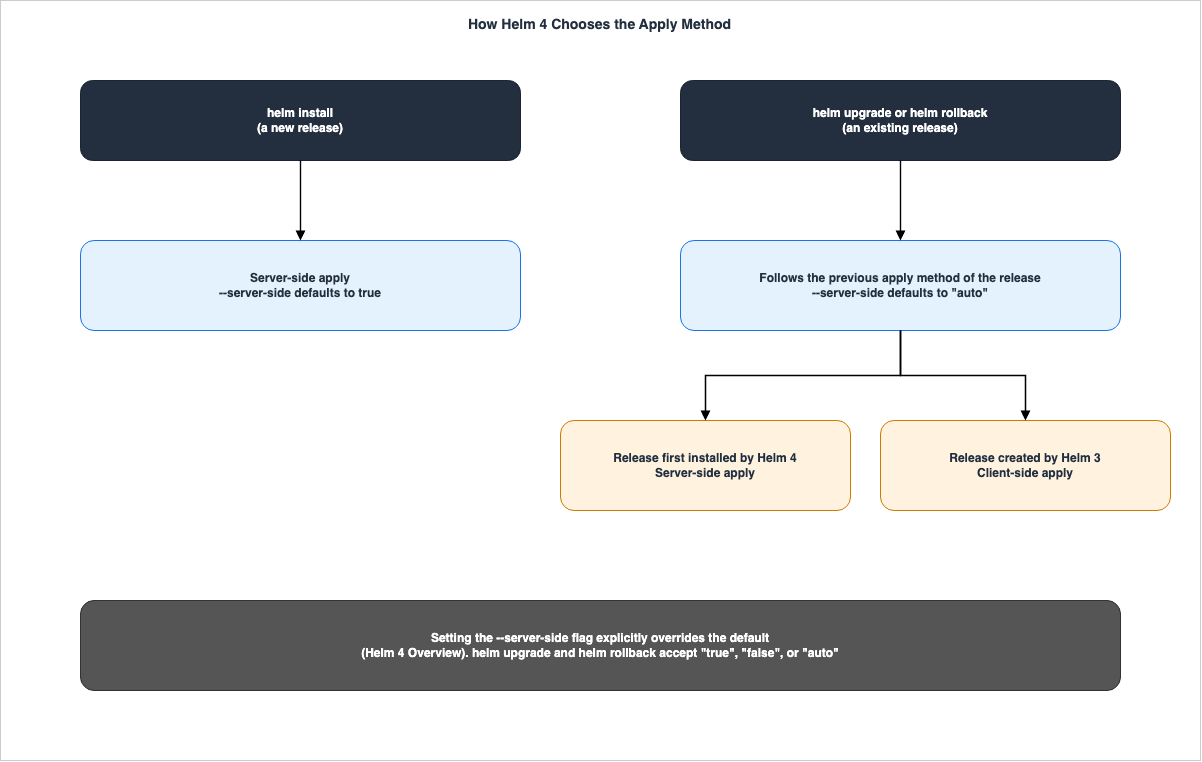
helm upgrade and helm rollback references mention the --server-side flag as follows:--server-side string must be "true", "false" or "auto". Object updates run in the server instead of the client ("auto" defaults the value from the previous chart release's method) (default "auto")The
helm install and helm upgrade references for Helm 3.22.1 do not include the --server-side flag.The two sources describe differently how to change the inherited default. The Helm 4 Overview states that the
--server-side flag can be used to change the behavior, without specifying a particular value. In contrast, the Helm 3 End of Life blog, in a paragraph describing the same behavior, gives an example that explicitly sets --server-side=false.This latching behavior can be overridden by explicitly setting --server-side=false.The
helm upgrade flag accepts three values: "true", "false", and "auto". This article primarily references the text from the Helm 4 Overview, and reads the blog sentence as an example of --server-side=false. This article found no documentation regarding migrating a release created in Helm 3 to server-side apply using the --server-side=true flag. The source code for tag v4.3.1, specifically in pkg/action/upgrade.go, contains a comment suggesting that when transitioning from client-side apply to server-side apply, the client-side field manager should be updated (comment: Update client-side field manager if transitioning from client-side to server-side apply). This is a note in the source code, and this article does not execute that process.Regarding conflicts with fields managed by other tools when using server-side apply, the Helm 4.3.1 reference documentation describes the
--force-conflicts flag as if set server-side apply will force changes against conflicts. The specific charts where such conflicts might occur cannot be determined from the materials used for this article.3.2 Without --wait, hookOnly; With --wait Alone, watcher
The Helm 4.3.1 documentation for helm install, helm upgrade, and helm rollback lists the --wait flag as follows:--wait WaitStrategy[=watcher] wait until resources are ready (up to --timeout). Use '--wait' alone for 'watcher' strategy, or specify one of: 'watcher', 'hookOnly', 'legacy'. Default when flag is omitted: 'hookOnly'. (default hookOnly)The Helm 3.22.1 documentation for
helm install lists the same --wait flag as follows:--wait if set, will wait until all Pods, PVCs, Services, and minimum number of Pods of a Deployment, StatefulSet, or ReplicaSet are in a ready state before marking the release as successful. It will wait for as long as --timeoutIn Helm 4, a line with
--wait alone indicates the watcher strategy, while a line without --wait indicates the hookOnly strategy. The Helm 4 Overview highlights the integration with kstatus as a new feature (New kstatus integration shows detailed status of your deployments.).When using
--rollback-on-failure, the --wait flag defaults to watcher. The helm install reference states The --wait flag will be default to "watcher" if --rollback-on-failure is set.The documentation does not specify what these three strategies wait for. In the source code for tag
v4.3.1, the file pkg/kube/client.go contains comments that begin with the following lines:// StatusWatcherStrategy: event-driven waits using kstatus (watches + aggregated readers).
// LegacyStrategy: Helm 3-style periodic polling until ready or timeout.
// HookOnlyStrategy: wait only for hook Pods/Jobs to complete; does not wait for general chart resources.In the same tag, the file
pkg/cmd/flags.go issues a warning when a boolean value is passed to --wait. For --wait=true it prints --wait=true is deprecated (boolean value) and can be replaced with --wait=watcher, and for --wait=false it prints --wait=false is deprecated (boolean value) and can be replaced with --wait=hookOnly. In the source code for tag v4.0.0, the warning for --wait=false reads can be replaced by omitting the --wait flag.In the source code for tag
v4.3.1, pkg/action/install.go waits with the watcher strategy until CRDs are recognized by the API server, even when the strategy is hookOnly. Its comment describes this as matching Helm 3's unconditional behavior. The v4.3.1 release page lists this change as fix(action): wait for CRD establishment under HookOnlyStrategy #32672. The source code for tag v4.0.0 does not contain this handling.These are descriptions from the source code. This article found no documentation or blog posts that state whether the behavior when
--wait is omitted in Helm 3 is the same as the hookOnly strategy in Helm 4. This article does not claim that they are the same, nor does it claim that they are different. The tables in Section 4 classify the lines that omit --wait as Default changed because, in Helm 4, --wait became a flag that takes a strategy, and the default when it is omitted is documented as hookOnly. This classification does not state that the behavior differs from that in Helm 3. The To Keep the Old Behavior column says The source does not say.3.3 Post-Renderers Are Now Plugins
The Helm 4 Overview lists "post-renderer" as the first item under Breaking Changes.Post-renderers are implemented as plugins. With this change, it is no longer possible to pass an executable directly to helm render --post-renderer, but a plugin name must be passed. This might require updates to any existing post-renderer workflows.The original text states
helm render --post-renderer. In Helm 4.3.1, the command reference for --post-renderer appears with helm install, helm upgrade, and helm template. All three references describe the flag as the name of a postrenderer type plugin to be used for post rendering. If it exists, the plugin will be used. In contrast, the Helm 3.22.1 reference for helm install describes the same flag as the path to an executable to be used for post rendering. The Helm 3 End of Life blog also states helm install --post-renderer now takes a plugin name, not an executable path.The "Post Rendering" section of the "Advanced Helm Techniques" page of the Helm documentation provides an example using
--post-renderer ./path/to/executable, and gives Helm 3.1+ as the prerequisite. At the top of that page, the following note is included.This page has not yet been updated for Helm 4. Some of the content might be inaccurate or not applicable to Helm 4. For more information about the Helm 4 new features, improvements, and breaking changes, see Helm 4 Overview.The same page also states that, as a change in Helm 4, hooks are now passed to the post-renderer.
In Helm 4, chart hooks are processed by post-renderers along with regular templates. By default, hooks and templates are sent together in a single stream (the combined strategy). This is a change from Helm 3, which never sent hooks to post-renderers.The AWS instructions reviewed for this article did not include any instances of using
--post-renderer (two aws-knowledge MCP searches). Consequently, the tables in Section 4 do not include a row for post-renderer.3.4 helm registry login Takes the Registry Host Only
The Helm 4 Overview lists this as the second item under Breaking Changes, with the heading Registry login does not accept full URLs:The helm registry login command must be done with the domain name only in v4.
This is so login can be scoped at different levels on a registry in the future.The Helm 3 End of Life blog states the same change as
helm registry login accepts domain names only (not full URLs), enabling future per-scope login. The "Use OCI-based registries" page of the Helm documentation provides the following table, demonstrating the correct format without scheme or path. This page also carries the same note as the page in Section 3.3, indicating that it has not yet been updated for Helm 4.| Example | Valid |
|---|---|
ghcr.io | Yes |
localhost:5000 | Yes |
https://ghcr.io | No - scheme not allowed |
ghcr.io/myrepo | No - path not allowed |
Section 5 discusses the hosts passed to
helm registry login in the AWS instructions and how the source code differs between Helm versions.3.5 Flag Name Changes
The Helm 4 Overview lists the following two flags that have been renamed:The existing flags remain, but emit a deprecated warning:
--atomic → --rollback-on-failure
--force → --force-replaceThe Helm 3 End of Life blog also states
The old flags still work but emit deprecation warnings. The list of flags in the Helm 4.3.1 helm install and helm upgrade reference documentation does not include --atomic and --force, but does include --rollback-on-failure and --force-replace. The source code for tag v4.0.0 in pkg/cmd/install.go marks the two older flags as deprecated, with the notes use --rollback-on-failure instead and use --force-replace instead.This article did not find any instances of the
--atomic and --force flags in the AWS instructions reviewed (one aws-knowledge MCP search).3.6 The v3 Chart API Is Experimental
The Helm 4 Overview describes the Chart API v3 as an experimental feature in early development.Charts v3 is in early development and available for experimentation.
v2 charts continue to work unchanged.To use charts with v3, set the environment variable
HELM_EXPERIMENTAL_CHART_V3=1. A warning box on the same page states Charts v3 is experimental. The AWS instructions do not use either the environment variable or the --chart-api-version flag with helm create.3.7 What the Helm Maintainers Say Stays the Same
The Helm 3 End of Life blog states the following regarding Helm 3 charts and releases:Charts deployable with Helm 3 should be deployable by Helm 4. Similarly, any existing chart (release) managed by Helm 3 generally should be upgradable by Helm 4.The strength of this statement is
should and generally should. The same blog post also states that Helm 4 can manage existing Helm 3 releases without any migration steps.4. The AWS Instructions, Line by Line
This section reads the Helm instructions on the AWS pages line by line, page by page. The following figure groups the lines read in this article by the type of change they represent.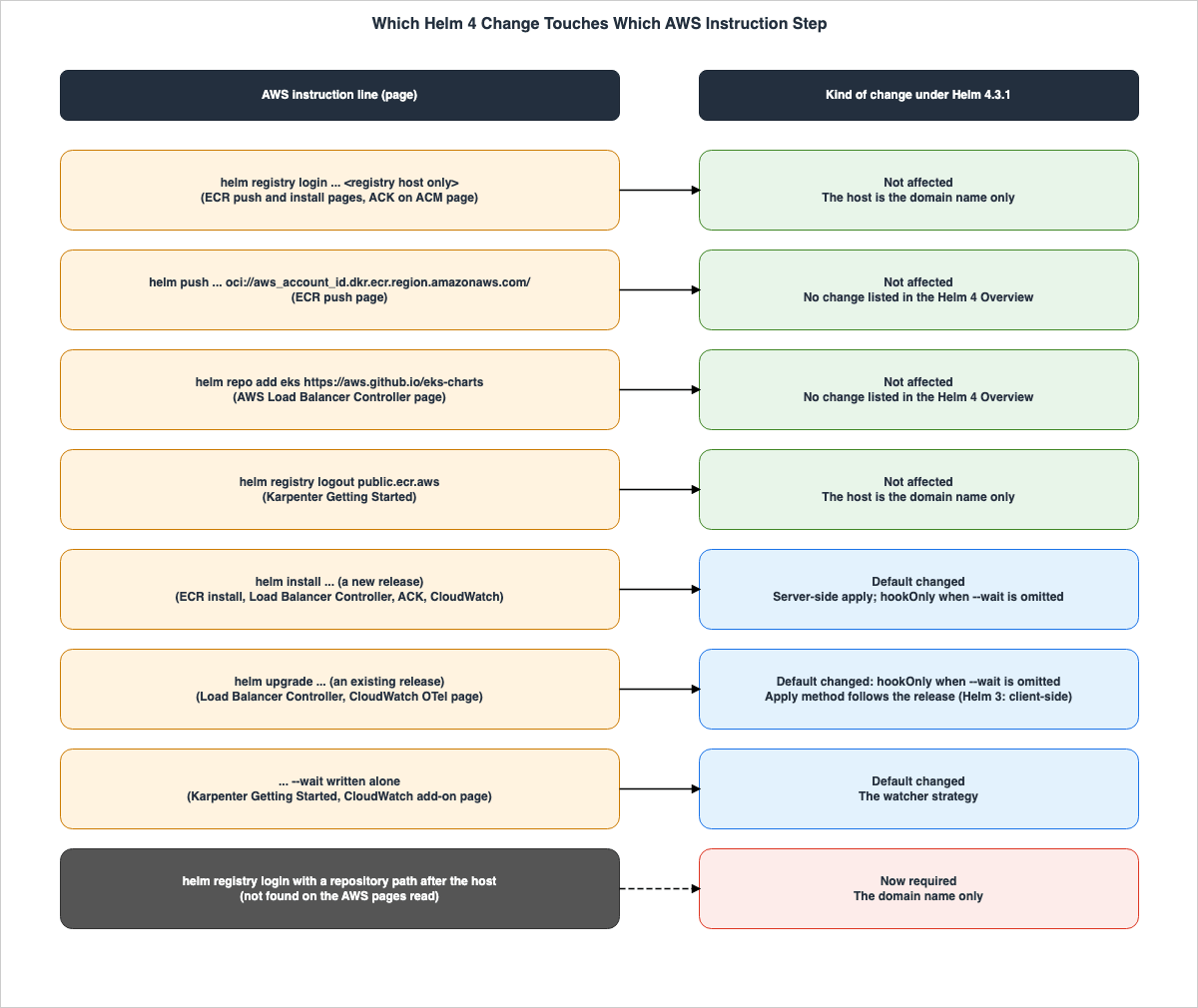
aws ecr get-login-password to helm registry login. The table cells show only the part from helm registry login onward.4.1 Amazon ECR: Pushing a Helm Chart to a Private ECR Repository
The Amazon ECR User Guide page "Pushing a Helm chart to an Amazon ECR private repository" states the Helm version as follows:These steps were written using Helm version 3.18.6. and For compatibility with Amazon EKS supported Kubernetes versions, use Helm version 3.9 or later. The login and push steps are as follows:aws ecr get-login-password \
--region us-west-2 | helm registry login \
--username AWS \
--password-stdin aws_account_id.dkr.ecr.region.amazonaws.com
helm push helm-test-chart-0.1.0.tgz oci://aws_account_id.dkr.ecr.region.amazonaws.com/| What You Write | Kind of Change | Resolves To (Helm 4.3.1) | To Keep the Old Behavior |
|---|---|---|---|
helm create helm-test-chart | Not affected | A chart is created; the v3 chart API version is used only with HELM_EXPERIMENTAL_CHART_V3=1 and --chart-api-version=v3 | Not applicable |
helm package helm-test-chart | Not affected | No change is listed in the Helm 4 Overview | Not applicable |
helm registry login --username AWS --password-stdin aws_account_id.dkr.ecr.region.amazonaws.com | Not affected | The host is the registry domain name only, which is what Helm 4 requires | Not applicable |
helm push helm-test-chart-0.1.0.tgz oci://aws_account_id.dkr.ecr.region.amazonaws.com/ | Not affected | No change is listed in the Helm 4 Overview | Not applicable |
None of the lines on this page fall under the Helm 4 changes. The login lines only pass the registry host. Where this page meets Helm 4 is the first step of the instructions:
Install the latest version of the Helm client. Following this step on the verification date installs Helm 4 (see Section 6.2).4.2 Amazon ECR: Installing an ECR Chart on an Amazon EKS Cluster
The Amazon ECR User Guide page "Installing a Helm chart on an Amazon EKS cluster" specifies that the Helm version used in the instructions is3.9.0. This page also begins with Install the latest version of the Helm client. The steps for installation are as follows:helm install ecr-chart-demo oci://aws_account_id.dkr.ecr.region.amazonaws.com/helm-test-chart --version 0.1.0| What You Write | Kind of Change | Resolves To (Helm 4.3.1) | To Keep the Old Behavior |
|---|---|---|---|
helm registry login --username AWS --password-stdin aws_account_id.dkr.ecr.region.amazonaws.com | Not affected | The host is the registry domain name only | Not applicable |
helm install ecr-chart-demo oci://aws_account_id.dkr.ecr.region.amazonaws.com/helm-test-chart --version 0.1.0 (apply method) | Default changed | Server-side apply for the new release | --server-side=false |
helm install ecr-chart-demo oci://aws_account_id.dkr.ecr.region.amazonaws.com/helm-test-chart --version 0.1.0 (wait) | Default changed | The hookOnly strategy, because --wait is not written | The source does not say. |
helm list -n default | Not affected | No change is listed in the Helm 4 Overview | Not applicable |
helm uninstall ecr-chart-demo | Not affected | No change is listed in the Helm 4 Overview | Not applicable |
A single
helm install command can trigger two default changes in Helm 4. Therefore, in the table, the apply method and the wait strategy are split into two rows.4.3 Amazon EKS: Deploying Applications to EKS with Helm
The Amazon EKS User Guide page "Deploy applications with Helm on Amazon EKS" listsbrew install helm as an installation method for macOS using Homebrew. It then provides a command to verify the installed Helm version, with an example output of v3.17.2. Following this, it outlines version compatibility as follows:Make sure the version installed is compatible with your cluster version. Check Supported Version Skew to learn more. For example, if you are running with 3.17.x, supported Kubernetes version should be within the range of 1.29.x to 1.32.x.| What You Write | Kind of Change | Resolves To (Helm 4.3.1) | To Keep the Old Behavior |
|---|---|---|---|
brew install helm | Not affected | On 2026-10-16, the stable version of the Homebrew helm formula is 4.3.1 | The Homebrew formula data lists a versioned formula helm@3; it does not describe it as a way to keep the Helm 3 behavior |
helm install chart-name | Default changed | Server-side apply for a new release; the hookOnly strategy when --wait is omitted | --server-side=false for the apply method |
While the line
brew install helm itself is not a change in Helm 4, the version of Helm that this command installs is 4.3.1 as of the verification date. The example output v3.17.2 and the version compatibility examples presented are written in reference to Helm 3. Version compatibility for Helm 4.3.x is discussed in Section 6.4.4.4 AWS Load Balancer Controller
The Amazon EKS User Guide page "Install AWS Load Balancer Controller with Helm" does not state a Helm version and listsInstall Helm on your local machine. as a prerequisite. The Helm commands listed on this page are as follows:helm repo add eks https://aws.github.io/eks-charts
helm repo update eks
helm install aws-load-balancer-controller eks/aws-load-balancer-controller \
-n kube-system \
--set clusterName=my-cluster \
--set serviceAccount.create=false \
--set serviceAccount.name=aws-load-balancer-controller \
--version 1.14.0This page also states
When upgrading, change install to upgrade in the previous command. Rows four and five of the following table are the lines with this change applied.| What You Write | Kind of Change | Resolves To (Helm 4.3.1) | To Keep the Old Behavior |
|---|---|---|---|
helm repo add eks https://aws.github.io/eks-charts | Not affected | No change is listed in the Helm 4 Overview; this line does not use helm registry login | Not applicable |
helm repo update eks | Not affected | No change is listed in the Helm 4 Overview | Not applicable |
helm install aws-load-balancer-controller eks/aws-load-balancer-controller (other options omitted) | Default changed | Server-side apply for a new release; the hookOnly strategy when --wait is omitted | --server-side=false for the apply method |
The same command with install changed to upgrade, on a release installed by Helm 3 | Default changed | Client-side apply, following the previous apply method of the release; the hookOnly strategy when --wait is omitted | Not applicable |
The same command with install changed to upgrade, on a release installed by Helm 4 | Default changed | Server-side apply, following the previous apply method of the release; the hookOnly strategy when --wait is omitted | --server-side=false for the apply method |
This page notes the following regarding
helm upgrade:The helm install command automatically installs the custom resource definitions (CRDs) for the controller. The helm upgrade command does not. If you use helm upgrade, you must manually install the CRDs.This note is not tied to any of the changes listed in the Helm 4 Overview. The list of changes in the Helm 4 Overview does not include any modifications related to CRD handling.
4.5 Karpenter
The Karpenter documentation (karpenter.sh), "Getting Started with Karpenter," sets the Karpenter version to1.15.0 on the verification date. It does not state a Helm version. The installation command is as follows:helm registry logout public.ecr.aws
helm upgrade --install karpenter oci://public.ecr.aws/karpenter/karpenter --version "${KARPENTER_VERSION}" --namespace "${KARPENTER_NAMESPACE}" --create-namespace \
--set "settings.clusterName=${CLUSTER_NAME}" \
--set "settings.interruptionQueue=${CLUSTER_NAME}" \
--set "settings.enableZonalShift=${ENABLE_ZONAL_SHIFT}" \
--set controller.resources.requests.cpu=1 \
--set controller.resources.requests.memory=1Gi \
--set controller.resources.limits.cpu=1 \
--set controller.resources.limits.memory=1Gi \
--wait| What You Write | Kind of Change | Resolves To (Helm 4.3.1) | To Keep the Old Behavior |
|---|---|---|---|
helm registry logout public.ecr.aws | Not affected | The Helm 4 Overview lists a change for helm registry login only; this line passes the domain name only | Not applicable |
helm upgrade --install karpenter oci://public.ecr.aws/karpenter/karpenter (other options omitted), when no release exists | Default changed | A new install: server-side apply (read from the v4.3.1 source; see below) | --server-side=false |
| The same command, when a release created by Helm 3 exists | Not affected | An upgrade: client-side apply, following the previous apply method of the release | Not applicable |
--wait at the end of the same command | Default changed | The watcher strategy, because --wait is written alone | The source does not say. A v4.3.1 source comment calls the legacy strategy Helm 3-style periodic polling (Section 3.2). |
helm upgrade --install will install a release if one with the same name does not already exist; otherwise, it will upgrade the existing release. The helm upgrade reference describes the --install flag as if a release by this name doesn't already exist, run an install. Consequently, the default behavior for applying changes depends on whether a release already exists in the cluster. The default value for helm upgrade's --server-side flag is "auto". This article found no documentation specifying how "auto" is resolved when a release does not exist. Examining the source code for the v4.3.1 tag in pkg/cmd/upgrade.go reveals that when a release is not present, the process transitions to an installation; and if the --server-side value is not "false", server-side apply is used (instClient.ServerSideApply = client.ServerSideApply != "false"). This is based on the source code, and this article has not verified this behavior through testing.The Karpenter documentation gives the reason for
helm registry logout public.ecr.aws in a comment before it (Logout of helm registry to perform an unauthenticated pull against the public ECR).4.6 ACK Controllers
The AWS Certificate Manager User Guide page "Secure Kubernetes Workloads with ACM Certificates" lists the command for installing the ACK ACM service controller via Helm, as follows. This page does not state a Helm version.aws ecr-public get-login-password --region us-east-1 | helm registry login --username AWS --password-stdin public.ecr.aws
helm install -n ack-system ack-acm-controller oci://public.ecr.aws/aws-controllers-k8s/acm-chart --set serviceAccount.create=false --set serviceAccount.name=ack-acm-controller --set aws.region=REGION| What You Write | Kind of Change | Resolves To (Helm 4.3.1) | To Keep the Old Behavior |
|---|---|---|---|
helm registry login --username AWS --password-stdin public.ecr.aws | Not affected | The host is the registry domain name only | Not applicable |
helm install -n ack-system ack-acm-controller oci://public.ecr.aws/aws-controllers-k8s/acm-chart (other options omitted) | Default changed | Server-side apply for a new release; the hookOnly strategy when --wait is omitted | --server-side=false for the apply method |
The AWS Lambda Developer Guide page "Using Lambda with Kubernetes" states a recommendation about the Helm version for installing ACK controllers.
We recommend that you use Helm 3.8 or later to install ACK controllers. Every ACK controller comes with its own Helm chart, which installs the controller, CRDs, and Kubernetes RBAC rules.This is a recommendation, in the context of installing ACK controllers. This article does not read it as a statement about whether Helm 4 can be used (see Section 6.1).
4.7 Amazon CloudWatch Observability Helm Chart
The Amazon CloudWatch User Guide includes two pages detailing theamazon-cloudwatch-observability Helm chart. The page "Install the CloudWatch agent with the Amazon CloudWatch Observability EKS add-on or the Helm chart" does not state a Helm version and gives the following install lines:helm repo add aws-observability https://aws-observability.github.io/helm-charts
helm repo update aws-observability
helm install --wait --create-namespace --namespace amazon-cloudwatch amazon-cloudwatch-observability aws-observability/amazon-cloudwatch-observability --set clusterName=my-cluster-name --set region=my-cluster-regionThe page for deploying OTel Container Insights with Helm states as a prerequisite that you must have
Helm version 3.9 or later and includes instructions for helm install and helm upgrade commands without the --wait flag.| What You Write | Kind of Change | Resolves To (Helm 4.3.1) | To Keep the Old Behavior |
|---|---|---|---|
helm repo add aws-observability https://aws-observability.github.io/helm-charts | Not affected | No change is listed in the Helm 4 Overview | Not applicable |
helm install --wait --create-namespace --namespace amazon-cloudwatch amazon-cloudwatch-observability aws-observability/amazon-cloudwatch-observability (other options omitted) (wait) | Default changed | The watcher strategy, because --wait is written alone | The source does not say. A v4.3.1 source comment calls the legacy strategy Helm 3-style periodic polling (Section 3.2). |
| The same command (apply method) | Default changed | Server-side apply for a new release | --server-side=false |
helm install amazon-cloudwatch-observability aws-observability/amazon-cloudwatch-observability (OTel Container Insights page, other options omitted) | Default changed | Server-side apply for a new release; the hookOnly strategy when --wait is omitted | --server-side=false for the apply method |
helm upgrade amazon-cloudwatch-observability aws-observability/amazon-cloudwatch-observability (OTel Container Insights page, other options omitted) | Default changed | The previous apply method of the release (client-side apply for a release created by Helm 3; Section 4.4); the hookOnly strategy when --wait is omitted | --server-side=false for the apply method |
Among the AWS pages this article read, one line that writes
--wait alone is the helm install line on this page. The line on the Karpenter page (Section 4.5) also writes --wait alone. In Helm 4, these two lines use the watcher strategy. Lines that do not write --wait use the hookOnly strategy in Helm 4. This page also writes --wait alone on a helm delete line, which this article does not list in the table above.5. Amazon ECR Login Under Helm 4
This section reads the ECR login lines alongside the Helm 4 change tohelm registry login.5.1 The AWS Instructions Pass the Registry Host Only
In the AWS instructions this article read, everyhelm registry login line passes only the registry host.- Private ECR registry (Sections 4.1 and 4.2):
aws_account_id.dkr.ecr.region.amazonaws.com - ECR Public (Section 4.6):
public.ecr.aws - Karpenter's
helm registry logout(Section 4.5):public.ecr.aws
The Helm 4 Overview states that
helm registry login must be done with the domain name only (Section 3.4). The way the AWS instructions are written meets this condition. Therefore, this article has marked the login lines in the AWS instructions as Not affected. Under Improvements (Registry Authentication), the Helm 4 Overview also lists Better OAuth and token support for private registries. This article has not checked how this improvement applies to these lines. Not affected here means that the lines do not fall under the Breaking Changes statement about helm registry login.The steps involving
helm push and helm install write the path to the repository after oci:// (e.g., oci://aws_account_id.dkr.ecr.region.amazonaws.com/helm-test-chart). The Helm 4 Overview sentence about domain names is about helm registry login. The Helm 4 Overview has no sentence to the same effect about the oci:// references of helm push and helm install.The two ECR pages state, regarding authentication tokens,
Authentication tokens must be obtained for each registry used, and the tokens are valid for 12 hours. This is a specification of ECR and is separate from the considerations related to different versions of Helm.5.2 When Specifying the Repository Path in the Login Destination
Some CI scripts may directly pass the URI of an ECR repository to the login destination. For example, this might be in the formataws_account_id.dkr.ecr.region.amazonaws.com/helm-test-chart, where the repository path is appended to the hostname. This form falls under the Helm 4 Overview sentence must be done with the domain name only in v4. The table on the "Use OCI-based registries" page also lists ghcr.io/myrepo as No - path not allowed (see Section 3.4).What happens when using this format with Helm 4 depends on the specific version of Helm being used, as the source code varies. In the source code for tag
v4.3.1, the pkg/registry/client.go file contains a function that issues a warning when the hostname includes a /.// warnIfHostHasPath checks if the host contains a repository path and logs a warning if it does.The warning message produced by this function is:
registry login currently only supports registry hostname, not a repository path. This function is absent in the source code for tags v4.0.0, v4.0.1, and v4.0.5, but is present in the source code for tags v4.1.0, v4.2.0, and v4.3.1. In the source code for tag v4.3.1, after issuing the warning, the login process continues.These observations are based on examining the source code. This article does not actually perform a login. Whether a login will succeed or fail when using a hostname with a path is not determinable from the information presented in this article. What can be stated is that the Helm 4 documentation requires only the domain name, and that the AWS instructions also specify only the domain name.
6. The Helm Versions the AWS Pages Name, and Kubernetes Version Skew
This section lists the Helm versions referenced in the AWS documentation and gives the scope of the search for statements about Helm 4. Subsequently, it outlines the compatibility of Helm 4 with various Kubernetes versions, and lists the Kubernetes versions supported by EKS.6.1 The Helm Versions the AWS Pages State
| Page | Helm Version Statement on 2026-10-16 | Source |
|---|---|---|
| ECR: Pushing a Helm chart to an Amazon ECR private repository | Install the latest version of the Helm client. These steps were written using Helm version 3.18.6. and use Helm version 3.9 or later | Amazon ECR User Guide |
| ECR: Installing a Helm chart on an Amazon EKS cluster | Install the latest version of the Helm client. These steps were written using Helm version 3.9.0. | Amazon ECR User Guide |
| EKS: Deploy applications with Helm on Amazon EKS | Example output v3.17.2; the version skew example for 3.17.x | Amazon EKS User Guide |
| EKS: Install AWS Load Balancer Controller with Helm | The source does not say. (Install Helm on your local machine.) | Amazon EKS User Guide |
| ACM: Secure Kubernetes Workloads with ACM Certificates | The source does not say. (Helm installed.) | AWS Certificate Manager User Guide |
| Lambda: Using Lambda with Kubernetes | We recommend that you use Helm 3.8 or later to install ACK controllers. | AWS Lambda Developer Guide |
| CloudWatch: Observability EKS add-on or the Helm chart | The source does not say. | Amazon CloudWatch User Guide |
| CloudWatch: Deploy OTel Container Insights with Helm | Helm version 3.9 or later | Amazon CloudWatch User Guide |
| Karpenter: Getting Started with Karpenter | The source does not say. | karpenter.sh |
The pages do not state whether Helm 4 is included in
3.9 or later and 3.8 or later. This article does not interpret these sentences as either a statement supporting Helm 4 or a statement excluding it.6.2 "Install the Latest Version" and the Latest Version on the Verification Date
The two ECR pages begin withInstall the latest version of the Helm client. The EKS Helm page lists brew install helm as the installation method for macOS. As of the verification date of October 16, 2026, the GitHub Releases page for helm/helm lists v4.3.1 as the latest version, and the Homebrew helm formula also lists version 4.3.1 as the stable release. Following these steps will install Helm version 4.3.1 as of the verification date.The latest version of Helm will change after the verification date. The Helm Release schedule policy states that a patch version is normally published on the second Wednesday of each month, while minor versions are published every four months.
6.3 No Statement About Helm 4 Was Found in the AWS Documentation
In the scope this article searched, no statement was found in the AWS documentation that Helm 4 is supported, that Helm 4 is not supported, or that rewrites the minimum Helm version for Helm 4. The search covered three groups of sources: the AWS documentation, the What's New announcements, and the re:Post Knowledge Center together with AWS blogs. The search was run on October 16, 2026, with aws-knowledge MCP, using the following six search terms:Helm 4 server-side apply Amazon EKSHelm 4 support Amazon ECR Amazon EKS(including searches in the What's New announcements)"Helm v4" OR "Helm 4" requirement chart installHelm v3 only not v4helm registry login domain name repository path Amazon ECR Helm 4helm upgrade --install --atomic Amazon EKS
In the search for this article, one AWS blog post was found that explicitly excluded Helm 4. The AWS Containers Blog post, "Implement SPIFFE/SPIRE authorization on Amazon EKS" (published April 27, 2026), lists
Helm: Version 3.12.2 (v3 only, not v4) as a prerequisite. However, this is a prerequisite listed within a specific blog post and does not represent an official AWS service policy. This article does not read this blog post as AWS policy.Furthermore, this article found no information regarding the version of Helm included in the curated images for AWS CodeBuild, or the version of Helm used by Argo CD in EKS Capabilities, in the scope this article searched.
6.4 Helm 4 Kubernetes Version Support and EKS Kubernetes Version Support
The Helm Version Support Policy outlines the supported Kubernetes versions for Helm 4 as follows:As of Helm 4, Helm is assumed to be compatible with n-3 versions of Kubernetes it was compiled against.The same page also describes using Helm on versions outside the supported range as follows:
If you choose to use Helm with a version of Kubernetes that it does not support, you are using it at your own risk.The table on the same page, along with the list of Kubernetes versions from the Amazon EKS User Guide's "Understand the Kubernetes version lifecycle on EKS," are listed with their values on the verification date.
| Helm Version | Supported Kubernetes Versions (Helm Version Support Policy) |
|---|---|
4.3.x | 1.37.x - 1.34.x |
4.2.x | 1.36.x - 1.33.x |
4.1.x | 1.35.x - 1.32.x |
4.0.x | 1.34.x - 1.31.x |
| EKS Support | Kubernetes Versions on 2026-10-16 (Amazon EKS User Guide) |
|---|---|
| Standard support | 1.37, 1.36, 1.35, 1.34 |
| Extended support | 1.33, 1.32, 1.31 |
As of the verification date, the range listed for Helm
4.3.x and the list of EKS standard support versions both cover the range from 1.37 to 1.34. The EKS extended support versions of 1.33, 1.32, and 1.31 are not included in the range listed for Helm 4.3.x. For Helm, version 1.33 is included in the row for 4.2.x, and version 1.31 is included in the row for 4.0.x. The Helm documentation specifies the supported ranges and states that using versions outside of those ranges is done at your own risk. This article does not describe what might happen when using unsupported versions. The end-of-support dates for EKS versions are covered on this site's AWS End-of-Support and EOL Reference.7. Dates
This section lists dates related to Helm 4 and Helm 3, categorized by document type.| Date | Event | Source |
|---|---|---|
| 2025-11-12 | Helm v4.0.0 is published. The release page shows 2025-11-12T16:04:51Z | helm/helm release page; Helm 4 Released blog (On Wednesday November 12th) |
| 2025-11-17 | The Helm 4 Released blog is published. It gives the original Helm 3 support dates: Bug fixes until July 8th 2026. and Security fixes until November 11th 2026. | Helm 4 Released blog |
| 2026-06-02 | The Helm 3 End of Life blog is published. It extends security support to February 10, 2027 | Helm 3 End of Life blog |
| 2026-09-09 | The blog's date for the final Helm 3 feature release. The v3.22.0 release page shows 2026-09-10T00:08:41Z | Helm 3 End of Life blog; helm/helm release page |
| 2026-09-09 | Helm v4.3.0 is published. The release page shows 2026-09-09T23:51:48Z | helm/helm release page |
| 2026-10-15 | Helm v4.3.1 (2026-10-15T01:08:37Z) and Helm v3.22.1 (2026-10-15T17:02:01Z) are published | helm/helm release pages |
| 2027-02-10 | The planned end of Helm 3 security fixes | Helm 3 End of Life blog |
The Helm 4 Released blog states
This is the first new major version of Helm in 6 years. about Helm 4.0.0.The Helm 3 End of Life blog announced an extension to the end-of-life schedule for Helm 3, revising the originally planned date. The reason for and duration of this extension are detailed in the following text:
However, the Helm maintainers have decided to create one extra (limited) feature release on September 9th, 2026 and extend security support to February 10th, 2027 - three months beyond the original timelines.The same blog further describes the new schedule as follows:
Bug fixes up to the final feature release, September 9th, 2026.
Final feature release: September 9th, 2026 — this will be the last Helm 3 minor release, limited to Kubernetes client library updates for new Kubernetes version support. No other new features will be backported.
Security fixes end February 10th, 2027 (extended from November 2026).
About the time after February 10, 2027, the blog states
After February 10th, 2027, no further Helm 3 releases of any kind will be made. As of the verification date of October 16, 2026, Helm 3 is within its security-fix period. The final minor version of Helm 3 is 3.22.0, and the latest version of Helm 3 as of the verification date is 3.22.1. The final minor version and the final version are not the same.The article What a GitHub-Hosted Runner Label Resolves To on this site addresses the inclusion of Helm 4 in the Ubuntu 26.04 image for GitHub-hosted runners, as well as the date when
ubuntu-latest will begin to refer to Ubuntu 26.04.8. Failure Modes
This section lists misreadings that are easy to make when reading the AWS instructions under Helm 4, alongside what the documentation this article read says.- Reading Helm 4 as breaking the login to ECR: The AWS instructions that use
helm registry loginonly pass the registry host. The Helm 4 Overview requires a format specifying only the domain name, and the AWS instructions meet that requirement. What falls under the Helm 4 change is a login target that includes a repository path (Section 5). - Reading an upgrade to Helm 4 as moving existing releases to server-side apply: The Helm 4 Overview states that upgrades and rollbacks inherit the previous method for releases, while releases created with Helm 3 default to client-side apply. To change this behavior, the
--server-sideflag must be explicitly specified (Section 3.1). - Reading a
helm upgrade --installline as always using the same apply method: If a release does not exist, it will perform an install; if it does exist, it will perform an upgrade. Even with the same command, the default behavior can differ based on the cluster's state (Section 4.5). - Reading lines without
--waitas waiting the same way as in Helm 3: The default behavior in Helm 4 is thehookOnlystrategy. No statement was found in the documentation or the blog posts that says whether this is the same as the default behavior in Helm 3 (Section 3.2). - Reading a line with
--waitalone as meaning the same as in Helm 3: In Helm 4, using--waitalone results in thewatcherstrategy. The Helm 3.22.1 reference and the Helm 4.3.1 reference describe--waitin different words. A source code comment in tagv4.3.1describes Helm 3-style periodic polling as thelegacystrategy (Sections 3.2, 4.5, and 4.7). - Reading
3.9 or lateror3.8 or lateras a statement that Helm 4 is supported or not supported: Neither phrase explicitly states whether Helm 4 is included. (Section 6.1) - Reading
--post-renderer ./path/to/executableon the "Advanced Helm Techniques" page as the Helm 4 form: The page begins by stating that it has not been updated for Helm 4. The Helm 4 Overview and the Helm 4.3.1 reference both state that a plugin name is passed (Section 3.3). - Reading
v3 only, not v4in an AWS blog post as AWS policy: This is a premise of the individual article. In the scope this article searched, no statement was found in the AWS documentation that Helm 4 is supported or not supported (Section 6.3). - Reading
--atomicand--forceas no longer usable in Helm 4: The Helm 4 Overview states that older flags remain, but will issue deprecation warnings (Section 3.5).
9. Frequently Asked Questions About Helm 4 and the AWS Helm Instructions
This article addresses common questions that arise when using the AWS instructions with Helm 4.Q1. Does the helm registry login line in the ECR instructions need to be rewritten for Helm 4?
As long as the line is written as in the ECR instructions this article read, there is no need to rewrite it. The instructions only pass the registry host (aws_account_id.dkr.ecr.region.amazonaws.com) as the login destination. The Helm 4 Overview requires only the domain name. Scripts that include the repository path in the login destination fall under the Helm 4 change. The source code for tag v4.3.1 issues a warning and continues in that case. This article has not checked whether the login then succeeds (Section 5.2).Q2. When Helm 4 upgrades a release created by Helm 3, does the release switch to server-side apply?
If the--server-side flag is not specified, the release does not switch to server-side apply. The Helm 4 Overview states that releases created in Helm 3 will continue to use client-side apply by default when upgraded in Helm 4. The default setting for --server-side in helm upgrade is "auto", which follows the apply method of the previous release (see Section 3.1).Q3. Are AWS instructions that do not include the --wait flag affected by changes in how waiting is handled in Helm 4?
In Helm 4, the default strategy when --wait is not specified is hookOnly. This article found no documentation stating whether this behavior is the same as when --wait was omitted in Helm 3. A source code comment describes hookOnly as a strategy that waits only for hook Pods and Jobs to complete (in tag v4.3.1, CRD establishment is still awaited; Section 3.2).Q4. Does AWS support Helm 4?
In the scope this article searched, no statement was found in the AWS documentation that Helm 4 is supported or that it is not supported. AWS documentation primarily references specific versions of Helm used in the instructions (e.g.,3.18.6, 3.9.0), as well as mentions of 3.9 or later and 3.8 or later. The two ECR pages tell readers to install the latest version of Helm (Section 6).Q5. How long will Helm 3 be supported?
The Helm 3 End of Life blog states that security fixes for Helm 3 will continue until February 10, 2027, after which no further versions of Helm 3 will be published. The initial plan was November 11, 2026. As of October 16, 2026, Helm 3 is within its security-fix period (Section 7).Q6. On which Amazon EKS Kubernetes versions can Helm 4.3 be used?
The Helm Version Support Policy table gives1.37.x to 1.34.x as the supported Kubernetes versions for Helm 4.3.x. As of the verification date, the standard supported versions of EKS are from 1.37 to 1.34. The extended support versions 1.33 to 1.31 are outside the range in the table row for Helm 4.3.x (see Section 6.4).Q7. When was the information in this article verified?
The verification was conducted on October 16, 2026. The version of the Helm documentation is4.3.1, and the AWS pages were read on this date. This article does not execute any helm commands (see Section 1.4).10. Summary
- The ECR instructions are written using Helm 3 versions and say to install the latest version: The ECR pages were written using Helm
3.18.6and3.9.0, and tell readers to install the latest version of Helm. As of the verification date, the latest version is4.3.1(Sections 4.1 and 6.2). - The ECR login lines do not fall under the Helm 4 changes: The AWS instructions only pass the registry host. What falls under the change is a login target with a repository path. The source code for tag
v4.3.1issues a warning and continues; whether the login then succeeds was not checked (Section 5). - New installations will use server-side apply: The default for
--server-sideinhelm installistrue.upgradeandrollbackcommands continue to use the previous method. Releases created with Helm 3 stay on client-side apply by default (Section 3.1). --waitdefaults tohookOnlyif not specified, and becomeswatcherwhen used alone: The instructions on the CloudWatch Observability and Karpenter pages use--waitalone (Sections 3.2, 4.5, and 4.7).--post-renderertakes a plugin name: This article did not find any instructions in the AWS pages it read that use--post-renderer. (Section 3.3)--atomicand--forcehave been renamed: The old flags remain, but with warnings (Section 3.5).- No statement of Helm 4 support was found in the AWS documentation: The pages state Helm 3 versions and
or later. Thev3 onlyin an individual blog post is that post's premise (Section 6). - Security fixes for Helm 3 will be provided until February 10, 2027: This is an extension of the initial date of November 11, 2026, by three months (Section 7).
- The Kubernetes versions that Helm 4.3.x supports match the EKS standard support versions: On the verification date, both range from
1.37to1.34(Section 6.4).
11. References
- Helm 4 Overview - Helm
- helm install - Helm
- helm upgrade - Helm
- helm rollback - Helm
- helm registry login - Helm
- helm template - Helm
- helm install (Helm 3.22.1) - Helm
- helm upgrade (Helm 3.22.1) - Helm
- Helm Version Support Policy - Helm
- Release schedule policy - Helm
- Advanced Helm Techniques - Helm
- Use OCI-based registries - Helm
- Helm 4 Released - Helm Blog
- Helm 3 End of Life - Helm Blog
- helm/helm releases - GitHub
- Helm v4.0.0 - GitHub
- Helm v4.3.0 - GitHub
- Helm v4.3.1 - GitHub
- Helm v3.22.0 - GitHub
- Helm v3.22.1 - GitHub
- pkg/kube/client.go at v4.3.1 - helm/helm
- pkg/cmd/flags.go at v4.3.1 - helm/helm
- pkg/registry/client.go at v4.3.1 - helm/helm
- pkg/action/install.go at v4.3.1 - helm/helm
- pkg/action/upgrade.go at v4.3.1 - helm/helm
- pkg/cmd/upgrade.go at v4.3.1 - helm/helm
- Pushing a Helm chart to an Amazon ECR private repository - Amazon ECR
- Installing a Helm chart on an Amazon EKS cluster - Amazon ECR
- Deploy applications with Helm on Amazon EKS - Amazon EKS
- Install AWS Load Balancer Controller with Helm - Amazon EKS
- Continuous Deployment with Argo CD - Amazon EKS
- Understand the Kubernetes version lifecycle on EKS - Amazon EKS
- Secure Kubernetes Workloads with ACM Certificates - AWS Certificate Manager
- Using Lambda with Kubernetes - AWS Lambda
- Install the CloudWatch agent with the Amazon CloudWatch Observability EKS add-on or the Helm chart - Amazon CloudWatch
- Deploy OTel Container Insights with Helm - Amazon CloudWatch
- Implement SPIFFE/SPIRE authorization on Amazon EKS - AWS Containers Blog
- Getting Started with Karpenter - Karpenter
- helm - Homebrew Formulae
References:
Tech Blog with curated related content
Written by Hidekazu Konishi