When AWS Client VPN Ends a Session - Device Posture Tokens, Cedar Policies, and Shadow Mode
First Published:
Last Updated:
This article details device posture within Client VPN, separating the decisions made to grant access and to continue an existing session. There are three components: the trust provider, device posture tokens, and a single Cedar-based authorization policy. It then shows the timing of evaluations, the transition from shadow mode to enforcement, connection logs and metrics, how the policy relates to authorization rules and the client connect handler, and how to stop it and what it requires.
To summarize, the decision to grant access is made once, at the time of connection, while the decision to continue a session is made repeatedly throughout the session. The Administrator Guide specifies re-evaluations every five minutes, while the launch post on the Networking & Content Delivery Blog states that evaluations occur each time a token is received. The default setting for shadow mode is
disabled. According to the Administrator Guide, if you add or update policies while shadow mode is disabled, or if you change shadow mode from enabled to disabled, all sessions to the endpoint will be terminated. Even if you update the client connect handler Lambda function, existing connections will not be affected. Switching to enforcement mode without understanding this distinction can result in all users being disconnected.This article was written after reviewing the documentation on November 11, 2026 (Japan Standard Time). It has not been tested in a live environment. Pricing information is not included.
Related articles on this site:
- AWS Zero-Trust Network Architecture Guide - Segmentation, Inspection, and Identity-Aware Access with VPC, Network Firewall, VPC Lattice, and Verified Access
- AWS Verified Permissions and Cedar Policy Language Complete Guide
- Policy Engines Compared - What IAM, Cedar, Rego, and Kyverno Do When Nothing Matches, When an Input Is Missing, and When the Engine Never Answers
- AWS History and Timeline regarding Amazon Verified Permissions and Cedar - Overview, Functions, Features, Summary of Updates, and Introduction
- AWS Networking Glossary - VPC, Transit Gateway, PrivateLink, and VPC Lattice Explained
Table of Contents
- 1. Scope and Assumptions
- 2. How to Read the Tables and Terms
- 3. Three Components and the Evaluation Rule
- 4. Evaluation Timing
- 5. From Shadow Mode to Enforcement
- 6. Relationship with the Other Gates
- 7. Stopping and Prerequisites
- 8. Where the Sources Disagree or Say Nothing
- 9. Failure Modes
- 10. Frequently Asked Questions About Client VPN Device Posture
- 11. Summary
- 12. References
1. Scope and Assumptions
This chapter defines the intended audience, scope, relevant materials, and terminology. The following ten points summarize the key conclusions.- Device posture is a feature that adds verification of device status to the current authentication process for Client VPN. Three trust providers are supported: CrowdStrike, Jamf, and JumpCloud (Chapter 3).
- Each endpoint can have only one authorization policy, written in Cedar. Only connections that match at least one
permitstatement and do not match anyforbidstatements are allowed (Section 3.4). - The decision to allow a connection is made at the time of the connection attempt. User identity information is retrieved only once, during the connection process, and remains unchanged throughout the session (Sections 4.1 and 4.3).
- The decision to continue a session is made repeatedly throughout the session. The Administrator Guide states that this occurs every five minutes, while the blog post indicates it occurs with each token received (Sections 4.2 and 8.2).
- Even if tokens stop being received, evaluations continue for a maximum of 15 minutes based on the last received token. The Administrator Guide and the blog post describe what happens next in different levels of detail (Section 4.4).
- Shadow mode only records evaluation decisions in connection logs and does not interrupt the connection. The default setting for the API's
ShadowModeisdisabled, and if you do not specify it when you create a new policy, the policy is enforced (Sections 5.1 and 5.2). - When a policy is added or updated with shadow mode disabled, or when shadow mode is changed from enabled to disabled, all sessions on the endpoint will be terminated (Section 5.3).
- Evaluation decisions are reflected in the connection logs under
authorization-policy-evaluation, and in CloudWatch metrics that begin withAuthorizationPolicy. These logs and metrics are separate from the client connect handler logs and metrics (Sections 5.5 through 5.7). - Authorization policies determine whether a connection is allowed, while authorization rules determine which destinations that connection can reach. It was not possible to find documentation specifying which is evaluated first: the client connect handler or the authorization policy (Chapter 6).
- AWS does not independently verify the health of the device. The configuration of the provider, the policy, and the device's status are the customer's responsibility (Section 7.6).
1.1 Intended Audience
This article is intended for the following audience:- Operations and security personnel who are using AWS Client VPN to provide remote access and want to prevent connections from unmanaged or non-compliant devices.
- Individuals already using client connect handler Lambda functions and authorization rules, and who want to understand how device posture integrates with these existing systems before implementation.
- Personnel who need to understand the impact on connected users when a policy is enforced, prior to creating documentation for the policy switching process.
This article assumes that readers are considering the following points, and each will be verified with supporting material:
- Device status only needs to be checked once during the connection process.
- Implementing a policy without enabling shadow mode will not immediately disconnect any users.
- Updating a policy will not affect currently connected users.
- The client connect handler Lambda function and device posture are mutually exclusive – only one can be used.
- AWS will verify the status of the device.
1.2 Scope and Exclusions
This article addresses device posture components, evaluation rules and context, evaluation timing, shadow mode and enforcement, conditions for terminating all sessions, connection logs and metrics, the relationship with authorization rules and the client connect handler, distinctions from Verified Access, methods for stopping the process, prerequisites, and discrepancies between documentation.This article does not cover:
- Pricing. It will not discuss the costs associated with Client VPN endpoint association and connection.
- Comparisons of provider products, nor the configuration steps within each provider's management console. This article will only list the attributes provided by the three providers, without making any judgments about their relative merits.
- Methods for modifying tokens or agents to alter their evaluation. This article focuses solely on the design context of the defense mechanisms.
- The overall design of zero-trust network architectures. This is covered in the AWS Zero-Trust Network Architecture Guide on this site.
- Explanations of the Cedar language. This is covered in the AWS Verified Permissions and Cedar Policy Language Complete Guide on this site.
- Comparisons of how policy engines behave when input is missing. This is covered in this site's article Policy Engines Compared. This article will only address the handling of
errorentries in Client VPN connection logs. - Configuration of mutual authentication, SAML, Active Directory authentication, and client certificates. The article When Public Certificates Stop Carrying clientAuth on this site addresses client certificates for Client VPN.
- A list of Regions where device posture is supported.
1.3 Verification Date and Reviewed Materials
This article was written after reviewing the following materials on November 11, 2026 (Japan Standard Time), except the SDK reference, which was read on November 12, 2026. The text uses the English short names in parentheses.In the AWS Client VPN Administrator Guide, the following 23 device posture pages were reviewed:
- Device posture for AWS Client VPN (device posture page)
- How device posture works (how-it-works page)
- Concepts (concepts page)
- Prerequisites (prerequisites page)
- Four pages from Step 1: Configure a device trust provider through Step 4: Enforce the policy (Step 1 page, Step 2 page, Step 3 page, Step 4 page)
- Supported device trust providers (providers page)
- Configuring a trust provider (provider configuration page)
- Trust data reference, and the three pages for CrowdStrike, Jamf, and JumpCloud (trust data pages)
- Authoring device posture authorization policies (policies page)
- Test policy, including its Step 1 and Step 2 pages (Test policy pages)
- How Client VPN uses Cedar (Cedar page)
- Three pages: Create or update a policy, View a policy, and Delete a policy (create page, view page, delete page)
- Considerations when writing policies (considerations page)
In the same Administrator Guide, the following pages were also reviewed.
- Client authorization in AWS Client VPN (client authorization page)
- AWS Client VPN authorization rules (authorization rules page)
- Connection authorization in AWS Client VPN (connection authorization page). This page covers the client connect handler.
- Connection logging for an AWS Client VPN endpoint (connection logging page)
- Amazon CloudWatch metrics for AWS Client VPN (metrics page)
- AWS Client VPN quotas (quotas page)
- What is AWS Client VPN? (what-is page)
- Document history for the Client VPN User Guide (document history)
The AWS Client VPN User Guide includes information on setting up a device trust provider (user setup page), as well as pages detailing the AWS provided client for Windows, macOS, and Linux, and the release notes.
The Amazon EC2 API Reference was consulted, specifically the pages for the following operations:
ModifyClientVpnEndpointAuthorizationPolicy, GetClientVpnEndpointAuthorizationPolicy, DeleteClientVpnEndpointAuthorizationPolicy, CreateClientVpnEndpoint, ModifyClientVpnEndpoint, and CreateVerifiedAccessTrustProvider. Additionally, the pages describing the DevicePostureOptions, ClientVpnTrustProviderRequest, and ConnectionLogOptions data types were reviewed (API Reference). The page for the ClientVpnAuthorizationPolicyStatus type in the AWS SDK for Kotlin API Reference was reviewed on November 12, 2026 (SDK reference).The AWS CloudFormation Template Reference was also consulted, focusing on the pages detailing the
AWS::EC2::ClientVpnEndpoint resource and its AuthorizationPolicy, DevicePostureOptions, and DevicePostureTrustProvider properties (CloudFormation reference).Furthermore, the following materials were reviewed:
- The What's New announcement of October 5, 2026, AWS Client VPN now supports device posture assessment (announcement)
- The AWS Networking & Content Delivery Blog post of November 5, 2026, Introducing device posture assessment for AWS Client VPN (blog post)
- Trust providers for Verified Access and Third-party trust provider context for Verified Access trust data in the AWS Verified Access User Guide (Verified Access pages)
All pages except the SDK reference were reviewed using the original text obtained via curl. The SDK reference was read using the AWS Knowledge reading feature. The AWS Knowledge search functionality was also used for searching.
1.4 Terms and Related Concepts with the Same Spelling
This article will consistently use the following terms:- Device posture: The name of the feature. The announcement and the blog post call it device posture assessment.
- Device trust provider: A third-party service that manages the state of a device. This refers to CrowdStrike, Jamf, and JumpCloud.
- Device posture token: A signed claim placed on a device by a provider. This article also calls it simply the token.
- Authorization policy: A policy written in Cedar and attached to an endpoint.
- Enforcement: A state where shadow mode is disabled and policy denials take effect on connections and sessions.
The documents this article read use some identical words for different things.
- posture assessment: The blog post notes that existing documentation for Client VPN uses posture assessment for the client connect handler pattern. In connection logs too, the statuses returned by the client connect handler go into the
posture-compliance-statusesfield, and device posture decisions go into theauthorization-policy-evaluationfield. This article uses "client connect handler" to refer to the client connect handler itself, "device posture" for the new feature, and avoids the term "posture assessment." - shadow mode: The "shadow mode" described in this site's article on Amazon Bedrock AgentCore refers to a different concept: monitoring agent quality. In this article, "shadow mode" refers to the authorization policy settings for Client VPN.
- authorization policy and authorization rules: An authorization policy is a single policy written in Cedar that determines whether a connection is permitted. Authorization rules are endpoint-specific rules that determine which networks a connection can reach (Section 6.2).
- trust provider: In Client VPN, a trust provider is a setting in the endpoint's
DevicePostureOptions. In Verified Access, it is an independent resource created usingCreateVerifiedAccessTrustProvider(Section 6.6). - monitoring-only mode: This term, used in the announcement, refers to the same functionality as "shadow mode" (Section 5.1).
1.5 Three Key Dates
This article keeps the following three dates apart:- September 28, 2026: The date version 6.2.0 of the AWS provided client was released. The release notes for Windows, macOS, and Linux mention Support for Device Posture in the 6.2.0 entry.
- October 5, 2026: The date of the announcement. This is the date the feature was announced.
- November 5, 2026: The date the blog post was published.
The document history does not include any mention of device posture. The most recent entry in the document history relates to IPv6 support, dated August 25, 2025. This article will not derive feature dates from the document history.
2. How to Read the Tables and Terms
This chapter defines the terms for the state of the sources used in the tables of this article, and how the verification date and other dates are written.2.1 Terms for the State of the Sources
This article uses six terms to describe the state of the documentation. These terms, including their English spellings, will also be used in the tables. Because this article did not test anything hands-on, it does not use the term Observation.- Stated: The documentation contains a statement regarding the matter.
- Stated as not supported: The documentation explicitly states that the matter is not supported or cannot be used.
- Documentation does not list: While a list or table exists, the specific item is not included. This does not necessarily indicate that the matter is unsupported or unavailable.
- No statement found: Despite searching using different search terms and examining different categories of documentation (as described in Section 1.3), no relevant statement could be found. This does not necessarily indicate that the matter is absent or does not occur.
- Sources disagree: The documentation from two different sources provides conflicting statements regarding the same matter. This includes cases where the statements directly contradict each other, as well as cases where the scope, strength, or subject matter differs, and the text alone does not settle which one applies. This article presents both statements and their sources without designating either as incorrect.
- Inference: This represents an inference made by this article, and is not a statement found in any of the documentation. This article says in the same sentence that it is an inference.
This article distinguishes between "Stated as not supported" and "No statement found." The former refers to a statement in the documentation, while the latter indicates that this article was unable to find a relevant statement.
This article will not classify two statements that differ only in detail or wording as "Sources disagree." For example, the Administrator Guide states that the token is dropped after 15 minutes without a new token, while the blog post states that the device attributes are then removed and the policy is evaluated again. The blog post describes a subsequent step that is not mentioned in the Administrator Guide (Section 8.1).
2.2 Verification Date and Date Format
The verification date for this article is November 11, 2026 (Japan Standard Time), and November 12, 2026 for the SDK reference. Page content may be updated after the verification date. In particular, the information regarding operating systems supported by each provider, the minimum agent version, the version of the AWS provided client, and the Test policy screens may change.All dates are written with the year included.
3. Three Components and the Evaluation Rule
This chapter outlines the three components that make up device posture, and the rules for evaluating policies.3.1 Adding Device Posture Verification to Authentication
The how-it-works page describes device posture as being built on top of the existing Client VPN authentication. Users will continue to authenticate using methods such as mutual authentication, SAML, or Active Directory. In addition, before a connection is established, the AWS provided client retrieves the token on the device and sends it to Client VPN.The device posture page outlines the purpose as follows:
With AWS Client VPN device posture, you can control access to your network based on the security health of the connecting device, not just the identity of the user.The announcement states that Client VPN previously authenticated users using certificates, SAML, or Active Directory, and that it now also evaluates security signals from the device through device posture.
The components involved are as follows:
| Component | Function | Configuration Location | Reference |
|---|---|---|---|
| Trust provider | Manages the device's state and places tokens on the device. | Endpoint's DevicePostureOptions | concepts page, provider configuration page |
| Token | A signed claim describing the device's state. | Placed on the device by the trust provider's agent. | concepts page |
| Authorization policy | Defines the conditions that a connection must meet, expressed in Cedar. | One per endpoint. | concepts page, Cedar page |
3.2 Trust Providers and DevicePostureOptions
The concepts page describes trust providers as settings associated with endpoints, and places them under theDevicePostureOptions in the API. When Enabled is set to true, device posture is enabled, and the TrustProviders list holds the trust providers. One endpoint can have one or more trust providers.The provider configuration page describes the following three values for each trust provider:
| Field | Description | Reference |
|---|---|---|
TrustProviderType | The type of trust provider. Must be one of: crowdstrike, jamf, or jumpcloud. | provider configuration page, API Reference |
TenantId | Your tenant identifier with that trust provider. | provider configuration page |
PublicSigningKeyUrl | The URL of the trust provider's public signing key. Client VPN uses this key to verify tokens. | provider configuration page, Step 1 page |
The provider configuration page notes that
PublicSigningKeyUrl is not required when using Jamf.The Step 1 page provides an example of associating two trust providers with a single endpoint, such as a macOS device managed by Jamf and a Windows device managed by CrowdStrike. The blog post states that a single policy can reference attributes from any trust provider.
The blog post explains that Client VPN verifies token signatures using the configured key URL and checks if the token's tenant matches the endpoint's tenant before examining its contents. Tokens originating from devices belonging to other organizations are rejected without evaluation.
3.3 Device Posture Tokens
The concepts page defines a token as a signed claim placed by the provider on the device. This token represents the device's health, containing information such as compliance status, disk encryption status, and risk scores. Client VPN uses the token as input to determine whether the device meets the required criteria.The concepts page also describes token updates, stating:
The AWS provided client refreshes the token on its own schedule, independently of Client VPN's policy re-evaluation.AWS provided clients are responsible for updating the tokens, and the update cycle is separate from the cycle for re-evaluating Client VPN policies. The relationship between these two cycles is discussed in Section 4.2.
3.4 One Authorization Policy, and forbid Wins
The concepts page states that you attach one policy to an endpoint. The API Reference forModifyClientVpnEndpointAuthorizationPolicy also states this.A Client VPN endpoint can have one authorization policy.The Cedar page describes policies as being composed of one or more Cedar
permit and forbid statements, and outlines the evaluation rules as follows.A connection is allowed only if it satisfies at least one permit statement and is not matched by any forbid statement. A forbid statement always takes precedence.In essence, if a connection does not match any
permit statement, it is not allowed. Conversely, if a connection matches any forbid statement, it is not allowed, regardless of whether it matches any permit statements.The Cedar page provides an example with a
forbid statement. It allows connections that meet the score requirement, but always rejects connections from devices reporting a jailbroken state.permit(principal, action, resource)
when { context.crowdstrike.assessment.overall > 50 };
forbid(principal, action, resource)
when { context.crowdstrike.jailbroken == true };The
jailbroken attribute in this example is not listed in the CrowdStrike trust data page table. It will be discussed in Section 8.2.3.5 Three Types of Context Used for Evaluation
The Step 2 page describes that the context in which Client VPN evaluates policies consists of three types of information.| Type | Namespace | When Collected | Reference |
|---|---|---|---|
| Device signals | context.crowdstrike.*, context.jamf.*, context.jumpcloud.* | Delivered in the token | Step 2 page |
| User identity | Varies depending on the authentication method: context.saml.*, context.active-directory.*, context.mutual-authentication.* | Once, at connect time | Step 2 page, considerations page |
| Connection information | context.connection.* | Always available | Step 2 page |
Connection information includes the endpoint ID, connection ID, platform, platform version, public IP address, client OpenVPN version, and the version of the AWS provided client.
A single expression can use both device signals and user identity as conditions. The blog post provides an example of requiring both a CrowdStrike score and a SAML group.
permit(principal, action, resource)
when {
  context.crowdstrike.assessment.overall > 50 &&
  context.saml.memberOf.contains("vpn-users")
};
3.6 Attributes by Provider
The trust data pages list the items available for use in the Cedar context, organized by provider. The Trust data reference page notes that the available items vary depending on the provider.| Provider | Namespace | Item | Source |
|---|---|---|---|
| CrowdStrike | context.crowdstrike | assessment.overall, assessment.os, assessment.sensor_config (each an integer from 1 to 100), assessment.version, cid, platform, serial_number | trust data pages |
| Jamf | context.jamf | risk, groups, osv. The value of risk can be HIGH, MEDIUM, LOW, SECURE, or NOT_APPLICABLE. | trust data pages |
| JumpCloud | context.jumpcloud | device.is_managed, org_id, system, durt_id | trust data pages |
The blog post states that the attributes provided by the three providers differ significantly, and there is very little commonality between them. Therefore, policies should be written specifically for each provider and cannot be easily transferred to another. This article simply lists the attributes of the three providers and does not evaluate which is superior.
3.7 Three Constraints When Writing Policies
The considerations page lists three considerations when writing policies:- A policy document can be a maximum of 10,000 bytes. The quotas page also gives the size of the authorization policy document per endpoint as 10,000 bytes and says that it is not adjustable.
- A namespace can only be used when the corresponding provider is configured on the endpoint.
- User identity signals are only obtained once, during connection, and do not change throughout the session.
The blog post mentions a limit of 10,000 characters for the policy document, as discussed in Section 8.2.
4. Evaluation Timing
This chapter describes when the policy is evaluated and what happens when tokens stop arriving. Decisions regarding connection approval and session continuation are made at separate times.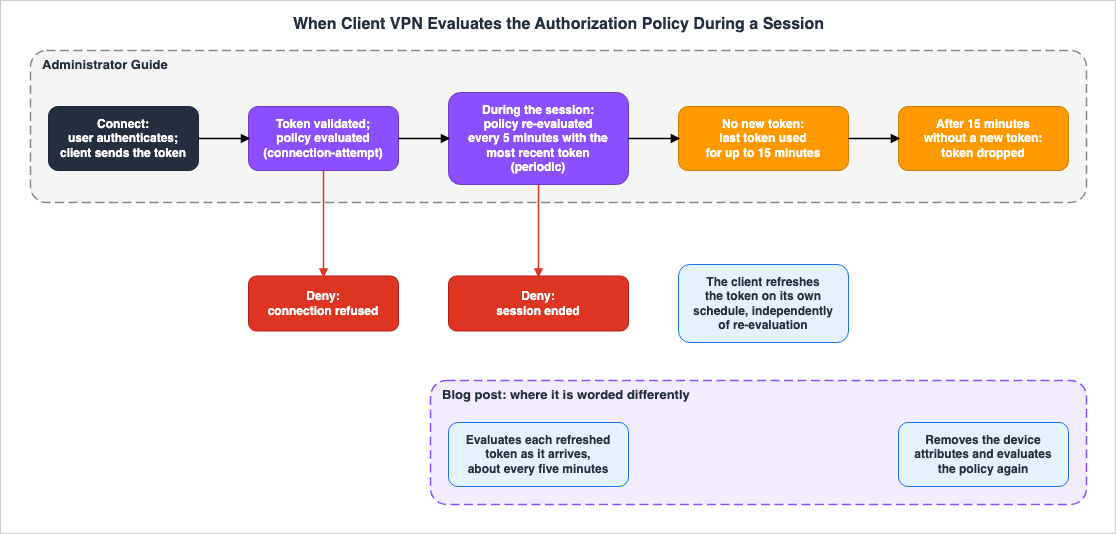
4.1 Evaluation at Connect Time
The how-it-works page describes the connection process in the following order:- The user initiates a connection and authenticates using one of the following methods: mutual authentication, SAML, or Active Directory.
- Before the connection is established, the AWS provided client retrieves the token placed on the user's device and sends it to Client VPN.
- Client VPN validates the token and then evaluates authorization policies based on the token, the authenticated user's identity, and connection information.
- If the policy allows the connection, it is established. If the policy denies the connection, it is rejected, and the AWS provided client displays the message "Authorization policy evaluation failed."
The blog post states that, until the policy allows the connection, Client VPN suspends VPN data transmission. The user setup page also describes that when a device does not meet the requirements, Client VPN rejects the connection, and the AWS provided client displays the same message.
4.2 Re-Evaluation During the Session
The how-it-works page describes the re-evaluation process after connection, as follows:Every 5 minutes, Client VPN re-evaluates the policy against the most recent device posture token. The AWS provided client refreshes the token independently, on its own schedule. If a device no longer meets your requirements, Client VPN ends the session.The device posture page, what-is page, client authorization page, and quotas page also state that the policy is evaluated at connect time and every 5 minutes during the session. The Administrator Guide states that the re-evaluation period is every 5 minutes, and that the most recent token available at that time is used for the evaluation. The AWS provided client updates the token on a separate schedule.
The blog post describes the same process as follows:
From then on, it re-evaluates each refreshed device token, about every five minutes, for the life of the session (steps 6 and 7).The blog post, in a separate section, states that the AWS VPN Client periodically sends updated tokens, and that Client VPN evaluates each token as it arrives. It also states that when a device falls out of compliance, Client VPN acts as soon as the provider reports the change, without waiting for a scheduled sweep. For example, a laptop whose CrowdStrike score drops below 50 loses its session at the next token refresh.
The Administrator Guide specifies that the trigger for re-evaluation is a 5-minute interval, separate from token updates. The blog post states that the trigger is the receipt of a token. This article treats the two as Sources disagree and does not favor either (Section 8.2). A reasonable lower bound that can be derived from both documents is that there may be a delay between a device's status changing and its session being terminated. This statement is an inference (Inference).
The announcement states that Client VPN continuously re-evaluates during the session. This statement does not specify the frequency of re-evaluations.
4.3 The User's Identity Is Captured Only Once, at Connect Time
The considerations page states that the user identity signal is obtained only once during connection and remains unchanged throughout the session. The Step 2 page also states that the user identity is obtained only once when the device connects.The blog post describes this as follows: Device attributes are refreshed, but the user identity is not. Therefore, a policy whose decision turns only on user attributes will not re-evaluate to a different answer mid-session.
In other words, a change in outcome during a session only occurs when the device's signal changes. Even if a user is removed from a SAML group, this will not be reflected in the re-evaluation of the current session. This reading is an inference (Inference) from the considerations page and the blog post.
4.4 When Tokens Are No Longer Received
The how-it-works page describes what happens when a device stops providing a token, as follows:If the device stops providing a token, Client VPN evaluates against the last token it received for up to 15 minutes. After 15 minutes without a new token, Client VPN drops the token.The blog post describes the case in which the agent stops or the provider becomes unreachable and no new token arrives, as follows:
Client VPN keeps using the claims it already holds for up to 15 minutes. That way, a session can ride out a transient failure. After that, rather than disconnecting, it removes the device attributes and evaluates your policy again.The blog post continues, stating that a policy that requires a device attribute then denies and ends the session, while an identity-only policy still permits.
The text in the Administrator Guide stops at the point where the token is dropped after 15 minutes. The blog post, however, continues to describe re-evaluating the policy without device attributes. This article treats the two as differing only in detail (Section 8.1).
4.5 When Attributes Are Missing
The connection logging page describes the following regarding the value of theresult field, specifically when it indicates error:An error result can occur when a Cedar policy references an attribute that is absent from the connection context, among other reasons.The same page provides examples, such as when a client fails to provide a token, and the policy references that provider's context, or when the policy references a SAML or Active Directory attribute that is not present for the user. It states that when shadow mode is
disabled, Client VPN will reject the connection.The blog post states that a device with no agent is evaluated with no device attributes. Policies that require device attributes will reject those devices.
Both documents state that when enforced, policies requiring device attributes will not allow devices lacking those attributes. The blog post does not specify whether the connection log
result will indicate error or deny (Section 8.1).4.6 Summary of Decisions at Each Point in Time
| Time Point | What is Evaluated | Action if Rejected | Status |
|---|---|---|---|
| At connect time | Verified token, user identity, connection information | Reject connection | Stated |
| During the session | Most recent token. User identity stays as captured at connect time. | Terminate session | Sources disagree (trigger of re-evaluation) |
| First 15 minutes when a token is not received | Last received token | Terminate session | Stated |
| After 15 minutes when a token is not received | The Administrator Guide says the token is dropped, while the blog post says the policy is evaluated without device attributes. | If the policy requires device attributes, terminate the session. | Stated (blog post) |
| Addition or update of policy, while shadow mode remains disabled | All sessions | All sessions are terminated | Stated (Section 5.3) |
| Transition from shadow mode enabled to disabled | All sessions | All sessions are terminated | Stated (Section 5.3) |
5. From Shadow Mode to Enforcement
This chapter describes the function of shadow mode, its default setting, the conditions under which all sessions are terminated when switching to enforcement, and how decisions are recorded.5.1 Shadow Mode Records Decisions and Does Not Block
The concepts page describes shadow mode as follows:A mode in which Client VPN evaluates the authorization policy and records the decision in your connection logs without blocking any connections.The Step 3 page also states that in shadow mode, Client VPN evaluates policies and records the resulting decisions in the connection logs, but does not interrupt the connection. The concepts page further explains that it is used to validate a policy against real traffic before enforcing it.
The blog post recommends testing any new or modified policies in shadow mode first. The reason given is that enforcing a policy stricter than the fleet can satisfy refuses every connection.
The announcement calls the same function monitoring-only mode, stating that it records the results of policy evaluations without terminating sessions. This article uses the term shadow mode.
5.2 The Default Is disabled, and Creating Differs from Updating
The API Reference forModifyClientVpnEndpointAuthorizationPolicy describes ShadowMode with two possible values: enabled and disabled. When enabled, the policy is evaluated and the results are recorded, but access is not enforced. When disabled, the policy is enforced.The default value is disabled.The same operation applies whether you are creating or modifying the policy. The API Reference describes the behavior when a policy already exists as follows:
If a policy already exists for the endpoint, the values that you specify replace the corresponding values in the existing policy, and values that you do not specify remain unchanged.PolicyDocument is required when creating a policy for an endpoint that currently does not have one.Therefore, it is necessary to consider these two cases separately.
- When creating a policy for an endpoint that does not yet have one, and
ShadowModeis not specified, the default isdisabled, and the policy is enforced. Under the condition in Section 5.3, all sessions are terminated. - When modifying an existing policy and
ShadowModeis not specified, based on the second API Reference sentence quoted above,ShadowModeremains at its current value. However, there is no explicit statement describing the handling ofShadowModein this specific scenario; this reading is an inference (Inference).
The enforcement example on the Step 4 page uses only
--shadow-mode disabled without specifying a policy document. This demonstrates a scenario where only the shadow mode setting is being changed, while keeping the existing policy document.aws ec2 modify-client-vpn-endpoint-authorization-policy \
--client-vpn-endpoint-id cvpn-endpoint-EXAMPLE \
--shadow-mode disabled5.3 Two Conditions Under Which All Sessions Are Terminated
The Step 4 page places the following sentence in a note:Client VPN disconnects all active sessions on an endpoint when you add or update a Cedar policy with shadow mode disabled, or when you change shadow mode from enabled to disabled.All sessions are terminated under the following two conditions:
- When Cedar policies are added or updated while shadow mode is disabled.
- When shadow mode is changed from enabled to disabled.
The second condition refers to the action of switching to enforcement mode after completing verification in shadow mode. Specifically, if you proceed from the Step 3 page to the Step 4 page as instructed, all sessions on the endpoint will be terminated at that point. The first condition occurs each time a policy is modified while the system remains in enforcement mode.
The text on the Step 4 page does not state whether, after a connection is terminated and the user reconnects, the new policy will be applied. It is natural to read that a re-established connection goes through the connect-time evaluation in Section 4.1. This reading is an inference (Inference).
The section on enforcement in the blog post states that you switch to enforcement when the only denials left in the logs are the ones you expect, and provides an example using the
--shadow-mode disabled flag. The blog post does not mention that all sessions are terminated.5.4 Policy Status
The API Reference documentation forModifyClientVpnEndpointAuthorizationPolicy, GetClientVpnEndpointAuthorizationPolicy, and DeleteClientVpnEndpointAuthorizationPolicy lists five possible values for the status field in the response: creating, updating, active, failed, and deleting. These pages do not explain each value. The SDK reference describes each value as follows.Describes the state of an authorization policy for a Client VPN endpoint. Possible states include:
creating - The authorization policy is being created.
updating - The authorization policy is being updated.
active - The authorization policy has been applied to the Client VPN endpoint.
failed - The authorization policy could not be applied to the Client VPN endpoint.
deleting - The authorization policy is being deleted.The blog post states that the response from
get-client-vpn-endpoint-authorization-policy includes the policy document, description, whether shadow mode is enabled, and the policy status. No statement was found on which status value the policy has while all sessions are being terminated (No statement found).5.5 authorization-policy-evaluation in the Connection Log
The connection logging page indicates that for an endpoint with an authorization policy, connection log entries include theauthorization-policy-evaluation field. This field contains the following sub-items:| Sub-Item | Description | Reference |
|---|---|---|
result | The evaluation result. Can be permit, deny, or error. | connection logging page |
evaluation-type | The type of evaluation. For new connections, this is connection-attempt; for re-evaluation of an existing session, it is periodic. | connection logging page |
shadow-mode | The shadow mode setting. If enabled, the evaluation is not enforced; if disabled, deny and error results are enforced. | connection logging page |
reason | The reason for the evaluation result. This entry only appears when the result is deny or error. The current value is policy-deny. | connection logging page |
device-token-status | The status of the token from each provider. The status can be validated or failed. | connection logging page |
context | The complete context used for the evaluation. This entry only appears when IncludeAuthorizationPolicyContext is enabled. | connection logging page |
When a policy rejects a connection, the
connection-attempt-failure-reason in the connection log will be set to authorization-policy-deny.The default value for
IncludeAuthorizationPolicyContext is false. The blog post suggests enabling this setting while writing policies, and says that it is probably more than you want at steady state.In shadow mode, connections that a policy would have rejected are recorded with a
result of deny and a shadow-mode setting of enabled, even though the connection itself is successful. The blog post provides an example of this type of record. The date and values in this example are for illustration, and this article does not cite them as measured values. The same applies to the examples provided on the connection logging page.5.6 Eight Reasons for Token Failure
When thestatus field in device-token-status indicates failed, the reason field will be populated. The connection logging page lists the following eight possible values:token-not-provided
token-expired
signature-invalid
token-malformed
tenant-mismatch
key-resolution-failed
network-error
internal-errorThe meaning of each value is not described on the page. This article reads
tenant-mismatch as corresponding to the blog post's sentence in Section 3.2 about refusing tokens whose tenant does not match. This correspondence is an inference (Inference).5.7 Three Metrics
The metrics page lists three metrics related to authorization policies in the AWS/ClientVPN namespace.| Metric | Counts | Reference |
|---|---|---|
AuthorizationPolicyEvaluationCount | The number of authorization policy evaluations performed on endpoints. | metrics page |
AuthorizationPolicyDeniedConnections | The number of connections rejected by the authorization policy. | metrics page |
AuthorizationPolicyTerminatedConnections | The number of sessions terminated due to periodic re-evaluation of the authorization policy. | metrics page |
The metrics page states that metrics beginning with
ClientConnectHandler are associated with the Lambda client connect handler, while those beginning with AuthorizationPolicy are related to Cedar authorization policies, and that these two sets are reported separately. The blog post notes that these three metrics are per endpoint and need no setup, so you can alarm on the denial rate from the day you enable a policy.No statement was found on whether the sessions terminated by the switch to enforcement (Section 5.3) are counted in
AuthorizationPolicyTerminatedConnections (No statement found). The metrics page clarifies that this metric represents sessions terminated as a result of periodic re-evaluation.5.8 Test policy
The Test policy pages describe a tool on the Authorization tab of the endpoint in the console, for testing and refining authorization policies. It shows the policy, the token context, and the user identity context on one screen, where you can test the policy.The Test policy Step 1 page lists the filters that select the connection to load. It describes the required filter, Authorization decision, as the most recent allow or deny decision in the connection logs. Device identifier, user, and operating system are optional. The same page states that the token and identity contexts are static: you can view them but cannot edit them.
The Test policy feature loads a connection's context by selecting an authorization decision from the connection logs (Step 1 page). Enabling connection logging and recording decisions in shadow mode would therefore give you material for refining the policy before enforcement. This reading is an inference (Inference). No statement was found regarding whether
IncludeAuthorizationPolicyContext is required for the Test policy feature.6. Relationship with the Other Gates
This chapter illustrates how the authorization policy overlaps with the other gates in Client VPN.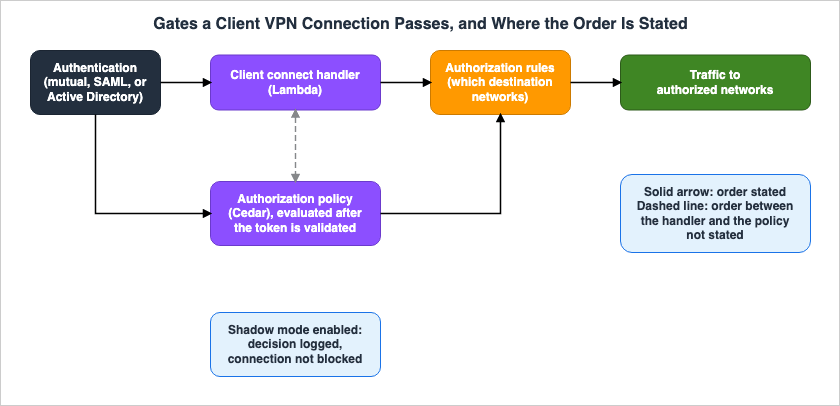
6.1 Authentication and Authorization Are Separate
The client authorization page states that authentication and authorization are separate processes. While users can authenticate to establish a VPN connection, that alone does not grant access to any network or resource. By default, Client VPN denies all access.The same page explains that Client VPN authorization involves two types: security groups and authorization rules that define network-level access. Additionally, a separate section details authorization policies, which determine whether a connection is permitted or denied based on factors such as device health, user identity, and connection information.
6.2 Authorization Policies and Authorization Rules Are Separate Layers
The authorization rules page describes authorization rules as functioning similarly to firewall rules that permit access to a network. Rules are added for each destination network, and the default setting is to deny access.The blog post describes the relationship between the two as follows:
The authorization policy decides whether a connection can carry traffic at all, and your existing authorization rules decide which network destinations that connection can reach.The blog post further clarifies that these two elements are separate layers, and both remain in effect. The announcement also states that device posture works alongside existing authorization rules. Even if the authorization policy permits a connection, the authorization rules and security groups decide whether it reaches the destination.
6.3 It Runs Alongside the Client Connect Handler
The connection authorization page describes the client connect handler as custom logic that authorizes a new connection. Currently, only Lambda functions are supported. The same page describes when the Lambda function is invoked, as follows:It's invoked after device and user authentication, and before the authorization rules are evaluated.The same page says that you can also define Cedar authorization policies, and points to the device posture page.
The blog post states that device posture can be used together with the client connect handler.
Both are evaluated independently on a connection attempt and either one can refuse it.The blog post further explains that, therefore, you can move checks from a Lambda function into a policy a few at a time rather than all at once. The blog post says that the client connect handler could run checks only once, at connect time, and only on device data that your code fetched itself.
6.4 What Happens to Existing Connections When Updated
The two gates treat existing connections in opposite ways when you update them, as long as the policy's shadow mode is disabled.The connection authorization page describes the behavior regarding the client connect handler as follows:
If you update your Lambda function, existing connections to the Client VPN endpoint are not affected.The same page also states that you can terminate existing connections and then have clients reconnect.
Regarding authorization policies, as described in Section 5.3, adding or updating a policy while shadow mode remains disabled will terminate all sessions. When migrating Lambda function verification to a policy, updating the policy in the same way you would update a Lambda function will result in all users being disconnected.
| Action | Existing Connections | Reference |
|---|---|---|
| Update the Lambda function for the client connect handler | Not affected | connection authorization page |
| Add or update an authorization policy while shadow mode is disabled | All sessions are terminated | Step 4 page |
| Change shadow mode from enabled to disabled | All sessions are terminated | Step 4 page |
| Update an authorization policy while shadow mode is enabled | No statement found | — |
| Delete an authorization policy | Evaluation stops. Whether sessions are terminated: No statement found | delete page, Step 4 page |
6.5 What Is and Is Not Stated About the Order of Evaluation
Regarding the order of operations, the documentation specifies three points:- The client connect handler is called after device and user authentication, but before the authorization rules are evaluated (connection authorization page).
- Authorization policies are evaluated after verifying the token, but before the connection is established (how-it-works page).
- Figure 2 in the blog post describes the authorization policy as step 1 and the authorization rules as step 2.
No statement was found on which of the client connect handler and the authorization policy is evaluated first (No statement found). The Administrator Guide, the blog post, and AWS Knowledge search were searched three times with different search terms. The blog post only states that the two components are evaluated independently and that either one can prevent the connection.
Regardless of which is evaluated first, a connection cannot be established unless both allow it. This reading is an inference (Inference) from the blog post.
6.6 Differences from Verified Access
This site's AWS Zero-Trust Network Architecture Guide, in Section 6.1, discusses trust providers for AWS Verified Access. Verified Access supports CrowdStrike, Jamf, and JumpCloud as device trust providers, and evaluates requests with Cedar policies. The same article describes an architecture that replaces VPNs with Verified Access for human access to internal applications. This is a design choice and does not contradict the content of this article. Since October 5, 2026, the VPN side can also make the device state a condition, through Client VPN device posture.The differences between Client VPN and Verified Access are as follows:
| Item | Client VPN | Verified Access | Reference |
|---|---|---|---|
| Trust providers | CrowdStrike, Jamf, JumpCloud | jamf, crowdstrike, jumpcloud | providers page, API Reference |
| Policy language | Cedar | Cedar | Cedar page, Verified Access pages |
| Provider configuration | An item in the endpoint's DevicePostureOptions. Not a standalone resource. | Created using CreateVerifiedAccessTrustProvider, a standalone resource. | concepts page, API Reference |
| Context name | A fixed namespace determined per provider. For example, context.crowdstrike. | A PolicyReferenceName chosen by the user during creation. | Step 2 page, API Reference |
The blog post calls Cedar the same policy language that Verified Access uses. The descriptions of CrowdStrike's scoring attributes are nearly identical across both pages. However, the Client VPN page does not state that it uses the same data format as Verified Access. This article does not claim that the two policies can be directly swapped.
7. Stopping and Prerequisites
This chapter outlines the stages of stopping device posture, and the prerequisites before use.7.1 Deleting the Policy Stops Evaluation
The delete page says to remove the policy withdelete-client-vpn-endpoint-authorization-policy, and places the following sentence.This stops evaluation for both new connections and existing sessions on the endpoint.Removing the policy will prevent both new connections and existing sessions from being evaluated.
7.2 Tokens Keep Being Sent While the Profile Has the Directive
The Step 4 page states that even after you remove the policy, the AWS provided client keeps providing a token as long as the client profile contains theaws-auth-device-posture directive. To turn off device posture completely, also do the following two things:- Remove the provider from the device posture settings for the endpoint.
- Have users download the client configuration file again and re-import the profile.
The user setup page states that device posture requires a
.ovpn file containing this directive, which the administrator distributes. The blog post recommends distributing the updated file before enforcing the policy.7.3 Setting Enabled to false Also Clears the Providers
The API Reference forDevicePostureOptions states that setting Enabled to false disables device posture and removes any configured providers. The API Reference for ModifyClientVpnEndpoint states that when DevicePostureOptions is specified, it overwrites the entire device posture configuration for the endpoint.When specifying
DevicePostureOptions with the intention of adding only one provider, you must include all providers you wish to retain. This reading is an inference (Inference) from the replacement sentence.7.4 What CloudFormation Can Hold
The CloudFormation reference forAWS::EC2::ClientVpnEndpoint includes the DevicePostureOptions and AuthorizationPolicy properties. The AuthorizationPolicy property contains PolicyDocument, ShadowMode, and Description. The ShadowMode property can be either enabled or disabled. For each property in the AuthorizationPolicy type, the description field states "Property description not available." There is no description provided for the default value of ShadowMode. The blog post indicates that this can be configured through the console, AWS CLI, AWS SDK, and AWS CloudFormation.The CloudFormation reference states that changes to the
AuthorizationPolicy result in a "No interruption" update type. This classification indicates whether resources are replaced during a stack update. It does not mean that connected VPN sessions are not terminated. No statement was found on whether the same thing as in the Step 4 page's note happens when a change through CloudFormation meets the conditions in Section 5.3 (No statement found). This article does not read No interruption as meaning that sessions are not terminated.7.5 Client Version, OS, and Provider Agent
The prerequisites page lists the following three requirements:- A corresponding provider account must exist and be configured on each device you intend to connect.
- AWS provided client version 6.2.0 or later. The prerequisites page continues with the following sentence:
Device posture is not supported with third-party OpenVPN clients.- Client VPN endpoint
The providers page and the user setup page list the supported operating systems for each provider as follows. The user setup page also lists the minimum required agent version.
| Provider | Supported OS | Minimum Agent Version | Reference |
|---|---|---|---|
| CrowdStrike | macOS, Windows | Documentation does not list | providers page, user setup page |
| Jamf | macOS | Jamf Trust 2.26.0 | providers page, user setup page |
| JumpCloud | macOS, Windows, Ubuntu | JumpCloud Agent 2.144.3 | providers page, user setup page |
The device posture pages do not give the Ubuntu versions. The Linux page for the AWS provided client lists Ubuntu 22.04 LTS, 24.04 LTS, and 26.04 LTS as client requirements.
The release notes indicate that version 6.2.0 was released on September 28, 2026. As of the verification date, the latest versions for Windows and macOS are 6.2.2, while the latest version for Linux is 6.2.0. The release notes include the phrase "No longer supported" in several version lines. The device posture feature requires version 6.2.0 or later.
7.6 AWS Does Not Independently Verify the Health of Devices
The device posture page includes the following note as an important clarification:AWS does not control or operate these third-party providers.The same note states that configuring the trust provider, defining the authorization policy, and ensuring that devices meet compliance requirements are the customer's responsibility. It states that Client VPN evaluates the tokens that the providers make available, but does not independently verify the health of devices.
In essence, the accuracy of device posture decisions relies on the provider's agents functioning correctly and reporting accurate status information. Monitoring the device's condition itself is done on the provider's side.
8. Where the Sources Disagree or Say Nothing
This chapter separates, among the documents this article read, the items that differ only in detail or wording, the statements that disagree, and the items with no statement found.8.1 Items That Differ Only in Detail or Wording
| Item | Sentence A | Sentence B | Treatment in this Article |
|---|---|---|---|
| After 15 minutes | The how-it-works page states that the token is dropped after 15 minutes without a new token. | The blog post states that after that, the device attributes are removed and the policy is evaluated again, and a policy that requires a device attribute denies. | The blog post describes what the how-it-works page does not state (Section 4.4). |
| Third-party OpenVPN clients | The prerequisites page states that device posture is not supported with third-party OpenVPN clients. | The blog post states that other OpenVPN clients can still connect, but they are evaluated with no device attributes, so a policy that requires one refuses them. | Both mean that device attributes cannot be used with other clients. Whether they can connect depends on how the policy is written. This reading is an inference (Inference) (Section 7.5). |
| Records when attributes are missing | The connection logging page states that an error result can occur when a referenced attribute is not in the context, among other reasons, and that the connection is denied when enforced. | The blog post states that the device is evaluated with no device attributes, and a policy that requires one denies it. | Both say that such a device does not pass when enforced. The blog post does not give the result value (Section 4.5). |
| Name of shadow mode | The Administrator Guide, API Reference, and blog post use the term shadow mode. | The announcement uses the term monitoring-only mode. | Both refer to the same functionality (Section 5.1). |
| Wording for re-evaluation | The Administrator Guide states every 5 minutes. | The announcement states that it continuously re-evaluates. | The announcement does not give the interval (Section 4.2). |
CrowdStrike platform | The CrowdStrike trust data page lists the values as Windows 10, Windows 11, and macOS. | The Windows page for the AWS provided client lists the requirement as Windows 11. | The platform value describes the operating system that the provider reports. No statement was found on whether Client VPN device posture works on Windows 10. |
8.2 Statements That Disagree
| Item | Sentence A | Sentence B | Status |
|---|---|---|---|
| Trigger for re-evaluation | Five pages of the Administrator Guide state every 5 minutes. The how-it-works page adds that the most recent token is used, and that the client refreshes the token on its own schedule. | The blog post states that each token is evaluated as it arrives, without waiting for a scheduled sweep, and about every five minutes. | Sources disagree |
| Unit of the policy document limit | The considerations page and the quotas page state 10,000 bytes. | The blog post states 10,000 characters. | Sources disagree |
| Attribute names in the Cedar example | The Cedar page example uses context.jamf.diskEncryptionEnabled and context.crowdstrike.jailbroken. | The Jamf trust data page table lists only risk, groups, and osv. The CrowdStrike table does not include jailbroken either. | Sources disagree |
The maximum size for policy documents can vary depending on whether you count in bytes or characters, especially when including multi-byte characters like those used in Japanese. This article considers it safer to count in bytes when a document approaches the limit. This judgment is an inference (Inference).
Regarding the attribute names used in the Cedar page example, they should not be copied as they are. The trust data pages indicate that the available items may differ depending on the provider. Check the attribute names used in your policies against the tables in the trust data pages and the context visible in the Test policy feature.
8.3 Items with No Statement Found
- The order in which the client connect handler and authorization policies are evaluated (No statement found). The Administrator Guide, the blog post, and AWS Knowledge search were searched three times with different search terms (Section 6.5).
- The version of Cedar used by Client VPN (No statement found). Searched three times.
- A statement describing what happens to
ShadowModewhen it is not specified when modifying an existing policy (No statement found). The API Reference contains a statement indicating that unspecified values remain unchanged (Section 5.2). - What happens to existing sessions when a policy is updated while shadow mode is still enabled (No statement found).
- Whether sessions terminated by the switch to enforcement are counted in
AuthorizationPolicyTerminatedConnections(No statement found). - Under which value of the policy's
statussessions are terminated (No statement found). Only the SDK reference gives the meaning of the five values. - The meaning of each of the eight possible failure reasons for
device-token-status(No statement found). - The blog post states that tokens whose tenant does not match are refused rather than evaluated. Whether the connection itself is refused at that point, or the policy is evaluated without that token's attributes (No statement found).
- Whether all sessions are terminated when a change through CloudFormation meets the conditions in Section 5.3 (No statement found).
- Whether
IncludeAuthorizationPolicyContextis required for Test policy (No statement found). - The supported versions of Ubuntu for device posture (No statement found). The Linux page for the AWS provided client gives versions as client requirements.
- The
contextin the connection log example in the blog post includes the following items for CrowdStrike:exp,iat,jwk_url,sub, andtyp. The table on the CrowdStrike trust data page does not list these. No statement was found on whether a policy can reference them. - The minimum version of the CrowdStrike Falcon sensor (Documentation does not list). The user setup page only lists minimum versions for Jamf and JumpCloud.
- A line regarding device posture in the document history (Documentation does not list).
9. Failure Modes
This chapter lists, by type, failures that can arise from the content of this article.- Creating a new policy without specifying shadow mode. The default is
disabled, and the policy is immediately enforced, terminating all sessions (Sections 5.2 and 5.3). - Switching from shadow mode verification to enforcement during business hours. Switching shadow mode from enabled to disabled will terminate all sessions (Section 5.3).
- Making minor adjustments to the policy text while it is enforced. Updating the policy with shadow mode disabled will terminate all sessions (Section 5.3).
- Updating the authorization policy with the same expectations as updating the client connect handler Lambda function. While updating the Lambda function does not affect existing connections, updating the policy with shadow mode disabled does (Section 6.4).
- Assuming that removing a user from a SAML group terminates their connected sessions at the next re-evaluation. A user's identity is only retrieved once, during connection, and remains unchanged throughout the session (Section 4.3).
- Assuming that sessions are terminated immediately when the device status changes. The Administrator Guide states that re-evaluation occurs every 5 minutes, and that the last received token is used for evaluation for up to 15 minutes if a token is not received (Sections 4.2 and 4.4).
- Copying the attribute names from the Cedar page example directly into the production policy. Some of these names are not in the trust data pages tables (Section 8.2).
- Assuming that the same policy can be used across the three providers. Each provider has different namespaces and attributes (Section 3.6).
- Specifying only the new provider in
DevicePostureOptionsto add one provider. This will replace the entire configuration (Section 7.3). - Assuming that deleting the policy completely stops device posture. As long as the profile contains the
aws-auth-device-posturedirective, the client will continue to send tokens (Section 7.2). - Enforcing the policy before distributing the
.ovpnfile that contains the directive (Section 7.2). - Reading No interruption in CloudFormation as meaning that connected sessions are not terminated (Section 7.4).
- Using metrics starting with
ClientConnectHandlerto monitor authorization policy denials. Authorization policy decisions are reflected in metrics starting withAuthorizationPolicy(Section 5.7). - Assuming that a connection the authorization policy allows can reach any destination. Authorization rules and security groups decide the destination (Section 6.2).
- Assuming that AWS verifies the health of the device. Client VPN only evaluates the provider's token (Section 7.6).
10. Frequently Asked Questions About Client VPN Device Posture
Q1. Is the device state checked only at connect time?
No. After the evaluation at connect time, the policy is also re-evaluated during the session. The Administrator Guide states that this occurs every 5 minutes, while the blog post indicates it happens each time a token is received (Sections 4.1 and 4.2).Q2. What happens if you attach a policy without shadow mode?
When creating a new policy, theShadowMode setting defaults to disabled, and the policy will be enforced. If you add a policy while shadow mode is disabled, all sessions on the endpoint will be terminated (Sections 5.2 and 5.3).Q3. What happens to connected users when you switch from shadow mode to enforcement?
All sessions will be terminated. The Step 4 page states that when changing shadow mode from enabled to disabled, all sessions on the endpoint will be terminated (Section 5.3).Q4. Can device posture be used together with a client connect handler Lambda function?
Yes. The blog post states that the two are evaluated independently on a connection attempt, and that either one can refuse the connection. No statement was found on which is evaluated first (Sections 6.3 and 6.5).Q5. If the device agent stops, is the session disconnected immediately?
Not immediately. Even after the agent stops, evaluation will continue for up to 15 minutes, based on the last token received. After that, the blog post says that if the policy requires device attributes, the session ends (Section 4.4).Q6. If a user is removed from a SAML group, are their connected sessions also terminated?
A user's identity is obtained only once during the connection process and remains unchanged throughout the session. Therefore, this article reads that removing a user from a group does not enter the re-evaluation of connected sessions. This reading is an inference (Inference) (Section 4.3).Q7. Where can you find the reason for a denial?
Theauthorization-policy-evaluation field of the connection logs contains information such as the decision made, evaluation type, shadow mode status, reason for rejection, and the status of tokens for each provider. The complete context used for the evaluation is only included when IncludeAuthorizationPolicyContext is enabled (Sections 5.5 and 5.6).Q8. Can device posture be used with third-party OpenVPN clients?
The prerequisites page states that it cannot. The blog post states that other OpenVPN clients can still connect, but they are evaluated with no device attributes, so a policy that requires one refuses them (Sections 7.5 and 8.1).Q9. Can you manage policies using CloudFormation?
Yes. TheAuthorizationPolicy property of AWS::EC2::ClientVpnEndpoint can hold the policy document and the shadow mode setting. The No interruption update type tells whether a stack update replaces the resource, and does not mean that sessions are not terminated (Section 7.4).Q10. Are the trust providers the same as those of Verified Access?
The same three companies and the same Cedar are used, but what you configure is different. In Client VPN, they are items in the endpoint'sDevicePostureOptions; in Verified Access, they are independent resources (Section 6.6).11. Summary
In Client VPN device posture, decisions about whether to allow a connection and whether to continue a session are made at different points.- The three parts are trust providers, tokens, and one Cedar authorization policy. Only connections that match at least one
permitstatement and noforbidstatement are allowed. - During connection, Client VPN evaluates the policy based on the token, the user's identity, and connection information. The user's identity is retrieved only once during this process.
- Re-evaluation during the session is every 5 minutes in the Administrator Guide, and each time a token arrives in the blog post. When a new token is not received, evaluations continue using the last received token for a maximum of 15 minutes.
- Shadow mode only records decisions and does not block connections. The default setting for
ShadowModeisdisabled. - If you add or update policies while shadow mode is disabled, or if you change shadow mode from enabled to disabled, all sessions are terminated. Updates to the client connect handler Lambda function do not affect existing connections.
- You can monitor the evaluation process through the connection logs, specifically the
authorization-policy-evaluationfield and three metrics that begin withAuthorizationPolicy. - Authorization policies determine whether a connection is allowed, while authorization rules determine the destination. No statement was found on the order of the client connect handler and the authorization policy.
- AWS does not independently verify the health of the device. The configuration of the provider and the state of the device are the customer's responsibility.
12. References
- Device posture for AWS Client VPN - AWS Client VPN
- How device posture works - AWS Client VPN
- Concepts - AWS Client VPN
- Prerequisites - AWS Client VPN
- Step 1: Configure a device trust provider - AWS Client VPN
- Step 2: Author an authorization policy - AWS Client VPN
- Step 3: Test the policy in shadow mode - AWS Client VPN
- Step 4: Enforce the policy - AWS Client VPN
- Supported device trust providers - AWS Client VPN
- Configuring a trust provider - AWS Client VPN
- Trust data reference - AWS Client VPN
- CrowdStrike (context.crowdstrike.*) - AWS Client VPN
- Jamf (context.jamf.*) - AWS Client VPN
- JumpCloud (context.jumpcloud.*) - AWS Client VPN
- Authoring device posture authorization policies - AWS Client VPN
- Test policy - AWS Client VPN
- Step 1: Select filters and test the policy - AWS Client VPN
- How Client VPN uses Cedar - AWS Client VPN
- Delete a policy - AWS Client VPN
- Considerations when writing policies - AWS Client VPN
- Client authorization in AWS Client VPN - AWS Client VPN
- AWS Client VPN authorization rules - AWS Client VPN
- Connection authorization in AWS Client VPN - AWS Client VPN
- Connection logging for an AWS Client VPN endpoint - AWS Client VPN
- Amazon CloudWatch metrics for AWS Client VPN - AWS Client VPN
- AWS Client VPN quotas - AWS Client VPN
- Setting up a device trust provider - AWS Client VPN
- AWS Client VPN for Linux - AWS Client VPN
- AWS Client VPN for Windows release notes - AWS Client VPN
- ModifyClientVpnEndpointAuthorizationPolicy - Amazon Elastic Compute Cloud
- GetClientVpnEndpointAuthorizationPolicy - Amazon Elastic Compute Cloud
- ClientVpnAuthorizationPolicyStatus - AWS SDK for Kotlin
- ModifyClientVpnEndpoint - Amazon Elastic Compute Cloud
- DevicePostureOptions - Amazon Elastic Compute Cloud
- CreateVerifiedAccessTrustProvider - Amazon Elastic Compute Cloud
- AWS::EC2::ClientVpnEndpoint AuthorizationPolicy - AWS CloudFormation
- AWS Client VPN now supports device posture assessment - AWS What's New
- Introducing device posture assessment for AWS Client VPN - AWS Networking & Content Delivery Blog
- Third-party trust provider context for Verified Access trust data - AWS Verified Access
- AWS Zero-Trust Network Architecture Guide - Segmentation, Inspection, and Identity-Aware Access with VPC, Network Firewall, VPC Lattice, and Verified Access
- AWS Verified Permissions and Cedar Policy Language Complete Guide
- Policy Engines Compared - What IAM, Cedar, Rego, and Kyverno Do When Nothing Matches, When an Input Is Missing, and When the Engine Never Answers
- AWS History and Timeline regarding Amazon Verified Permissions and Cedar - Overview, Functions, Features, Summary of Updates, and Introduction
- AWS Networking Glossary - VPC, Transit Gateway, PrivateLink, and VPC Lattice Explained
- When Public Certificates Stop Carrying clientAuth - Where AWS Sends or Accepts Client Certificates, and What Each Path Says About Extended Key Usage
References:
Tech Blog with curated related content
Written by Hidekazu Konishi