Claude Code Channels - Pushing Events into a Running Session, Sender Allowlists, and Permission Relay
First Published:
Last Updated:
This article answers these questions solely based on the official pages for Claude Code's channels. Channels are a mechanism by which an MCP server pushes events into a running session, and they are a research preview feature. This article outlines the journey of an external message as it reaches a session, dividing the process into three registration gates and two message gates. The three registration gates are the MCP configuration, the
--channels flag, and the organization's settings. The two message gates are the sender allowlist and the permission relay approval. Finally, it lists the paths where messages can be silently discarded without generating errors.To summarize, simply listing a server in
.mcp.json will not allow it to push anything to the session. The sender allowlist described on the pages is implemented on the channel server's side, and the pages do not describe it as a setting within Claude Code. In channels that declare a permission relay, anyone who can reply through that channel can approve or deny tool use. The allowlist defines the scope of those who can grant approval.This article was written after reviewing the pages on November 22, 2026 (Japan Standard Time). Channels are a research preview feature, and the pages state that the
--channels flag syntax and the protocol contract may change based on feedback. The information presented in this article reflects the pages as they were on that day. This article is based solely on the pages; it does not involve running or testing channels. It does not cover the creation of bots for Telegram, Discord, or iMessage, the use of Remote Control, or pricing information.Related articles on this site:
- Hardening and Governance Guide for Claude Code and Claude Desktop - Containerized Containment and Why Code and Desktop Govern Differently
- Claude Code Features and Settings Reference 2026
- Claude Code Operator's Handbook
- Claude Code in CI/CD and Headless Automation - Running the Agent Unattended in Pipelines
- Which MCP Clients a Remote MCP Server Lets In - Client ID Metadata Documents, Pre-Registration, Deprecated Dynamic Client Registration, and the Allowlists Layered on Top
Table of Contents
- 1. Scope and Assumptions
- 2. Three Registration Gates
- 3. The Delivery Contract
- 4. The Sender Allowlist
- 5. Permission Relay
- 6. Paths That Drop Silently
- 7. Things to Decide Before Enabling in an Organization
- 8. Frequently Asked Questions about Claude Code Channels
- 9. Summary
- 10. References
1. Scope and Assumptions
This chapter defines the intended audience, scope, terminology, and relevant materials for this article. The key conclusions are as follows:- A channel is an MCP server that pushes events into a running Claude Code session. It is a research preview feature, and it is not available on Amazon Bedrock, Google Cloud's Agent Platform, or Microsoft Foundry (Section 1.4).
- For a server to be able to push events, it must pass three gates: the MCP configuration, the
--channelsflag for each session, and the organization'schannelsEnabledsetting. Simply listing a server in.mcp.jsonis not sufficient (Chapter 2). - The default settings for an organization vary depending on the organization type. For claude.ai Team and Enterprise, channels are blocked until an Owner enables them. Pro, Max, and Ultra users without an organization are not subject to the organization checks (Section 2.3).
- Claude Code does not respond (acknowledge) to notifications. When the server is not loaded as a channel or is blocked by organization policy, Claude Code drops the events without returning an error to the server (Chapter 3).
- The channel server implements the sender allowlist. The check is based on the sender's ID, rather than the room (chat) (Chapter 4).
- In channels that declare permission relay, anyone who can reply can approve or deny tool use. The first answer received, whether from the terminal or a remote reply, is used, and it only applies to that single invocation (Chapter 5).
- There are nine potential paths where events fail to arrive without any error. One of them does not drop the reply but passes it to Claude as an ordinary message (Chapter 6).
- Before enabling channels in an organization, decisions must be made regarding whether to use them, permitted plugins, the scope of approvers, and the handling of the development flag (Chapter 7).
1.1 Intended Audience
This article is intended for the following audiences:- Developers who want to run Claude Code in a local terminal for extended periods, and who want to deliver CI failures, monitoring alerts, and instructions from chat to the running session.
- Developers who are building their own channel servers.
- Administrators in Team or Enterprise organizations who are responsible for configuring Claude Code managed settings.
1.2 Scope and What Will Not Be Covered
This article will address the following five topics:- The three registration gates and the default settings for each type of organization.
- The delivery contract, including the capabilities declared by the server, notification formats, the
<channel>tag, and the absence of acknowledgments. - The sender allowlist.
- Permission relay.
- Paths that drop silently.
The following topics will not be covered:
- How to create bots for Telegram, Discord, and iMessage, and the process for installing plugins.
- How to use Remote Control. This is covered in Section 11.2 of the published Claude Code Operator's Handbook.
- The complete configuration of Claude Code. This is covered in the published Claude Code Features and Settings Reference 2026.
- The overall management and control settings. This is covered in the published Hardening and Governance Guide for Claude Code and Claude Desktop.
- Authorization for remote MCP servers. The channels this article covers are local servers connected over stdio. Authorization is covered in the published Which MCP Clients a Remote MCP Server Lets In.
- Ways to substitute for channels on Amazon Bedrock, Google Cloud, or Microsoft Foundry.
- Procedures for prompt injection attacks. This article covers it only as far as the pages' warnings.
- Pricing.
The code is limited to copies of the notification and settings shapes on the pages, plus a minimal skeleton.
1.3 Definitions
This article uses the following terms with the following specific meanings:- Channel: Refers to the "channel" functionality within Claude Code. It is distinct from both the distribution channel (automatic update channel) for Claude Code and Slack channels.
- Channel Server: An MCP server that declares the
claude/channelcapability. Claude Code launches it as a child process and connects to it over stdio. - Sender: A person or system that sends messages to the channel server from an external source. This includes chat partners, CI systems sending webhooks, and monitoring systems.
- Plugin Allowlist: A list that determines which plugins can be registered as channels. This includes the list managed by Anthropic, as well as any organization-specific
allowedChannelPluginslist. - Sender Allowlist: A list that determines which senders' messages the channel server will pass to a session. This is separate from the plugin allowlist.
- Approval: Refers specifically to the approval for tool usage. It does not cover project trust or consent to use an MCP server.
- Relay: An abbreviation for "permission relay." It refers to the mechanism that forwards requests for tool usage approval to a remote party through the channel.
This article depends on not confusing the two allowlists. The plugin allowlist determines which servers can push. The sender allowlist determines whose text can pass through the server.
1.4 Materials Reviewed and Verification Date
This article was written after reviewing the following materials on November 22, 2026 (Japan Standard Time):- The Channels page on code.claude.com. This included information on the channels overview, supported plugins, the sender allowlist, organization settings, and the research preview.
- The Channels reference page on code.claude.com. This included information on server requirements, notification formats, reply tools, sender verification, and permission relay.
- The CLI reference page on code.claude.com. This included information on the
--channelsand--dangerously-load-development-channelsflags. - The MCP page on code.claude.com. This included information on the MCP client runtime and notes on channels.
- The Environment variables page on code.claude.com. This included information on
MCP_PROTOCOL_NEGOTIATION. - The Claude Code CHANGELOG. On the day it was read, the top entry was 2.1.330.
The Settings page did not contain information on
channelsEnabled and allowedChannelPlugins. This article identifies the Channels page as the source for defining these two settings.The introductory note at the top of the Channels page reads:
Channels are in research preview. They require Anthropic authentication through claude.ai or a Console API key, and are not available on Amazon Bedrock, Google Cloud's Agent Platform, or Microsoft Foundry. Team and Enterprise organizations must explicitly enable them.The Research preview section describes what may change as follows:
Channels are a research preview feature. Availability is rolling out gradually, and the `--channels` flag syntax and protocol contract may change based on feedback.During the research preview period, neither
--channels nor --dangerously-load-development-channels appear in the output of claude --help. The page states that even if the flags are not listed, they still function.The CHANGELOG has entries related to channels in the following versions. Since the CHANGELOG does not include dates, this article only lists the version number.
| Version | Changelog Summary |
|---|---|
| 2.1.80 | Added --channels as a research preview. |
| 2.1.81 | Added permission relay. Fixed --channels bypassing the check in Team and Enterprise organizations that had no other managed settings configured. |
| 2.1.84 | Added the allowedChannelPlugins managed setting. |
| 2.1.105 | Fixed an issue where, for users in Team and Enterprise organizations, notifications after the initial message were silently being discarded. |
| 2.1.128 | --channels now works with Console API key authentication. Console organizations with managed settings must set channelsEnabled to true. |
| 2.1.234 | Changed permission request previews to relay only to channel servers that passed the inbound check. Made Claude Code honor a server's explicit opt-out of the permission capability. |
| 2.1.267 | If the allowedChannelPlugins managed setting cannot be read, it now defaults to blocking all plugins instead of allowing all. |
| 2.1.281 | Changed --channels plugin entries to be matched against the plugin name as well as the marketplace. |
| 2.1.290 | In relay, a reply ID repeated within a session is now ignored instead of approving a different permission request. |
1.5 Differences from Other Features
The Channels page compares channels with other features that connect to the outside world. A table summarizing these comparisons, using the terminology in this article, is as follows:| Feature | What it does | Best suited for |
|---|---|---|
| Cloud Session | Runs tasks within a new cloud sandbox, cloned from GitHub. | Ideal for self-contained, asynchronous tasks that you can check on later. |
| Claude in Slack | Initiates a cloud session from Slack channels or threads by mentioning @Claude. | Directly starting tasks from team conversations. |
| Standard MCP Server | Claude queries it during a task. Nothing is pushed into the session. | Providing a means to read and query systems, giving Claude access when needed. |
| Remote Control | You drive your local session from claude.ai or the Claude mobile app. | Guiding an ongoing session while you are away. |
The page states that channels fill a gap in this list. Channels push events originating from sources other than Claude into an existing, active session. The difference between channels and Remote Control lies in whether a person is driving the session or if external events are being fed into it.
Events are received only while the session is open. The page suggests that if you want to always accept events, you should run Claude as a background process or on a persistent terminal.
2. Three Registration Gates
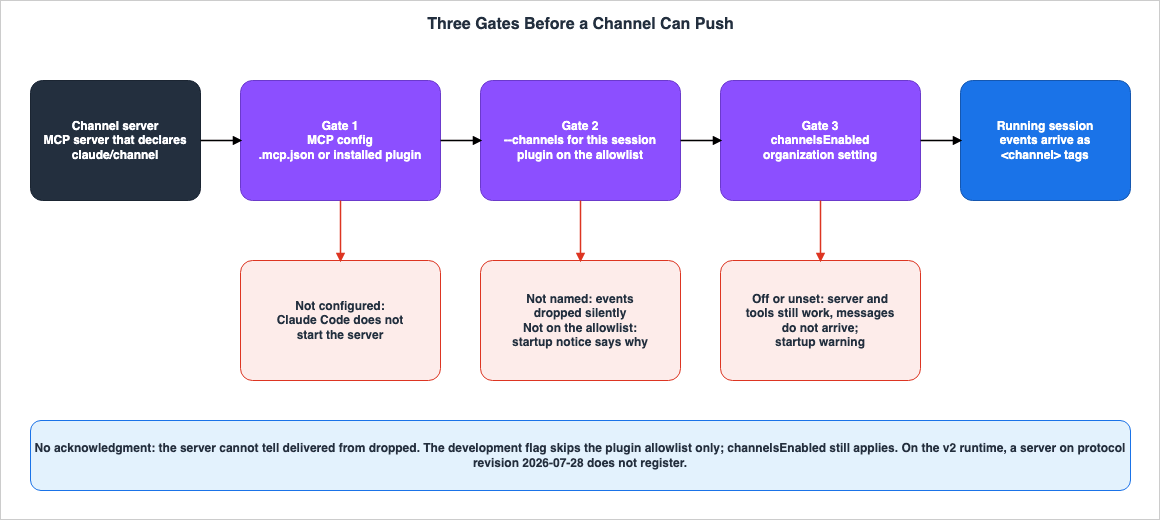
This chapter outlines the three gates a channel server must pass before it can push into a session. The first gate is the MCP configuration, the second is--channels for each session, and the third is the organization's channelsEnabled.2.1 First Gate: MCP Configuration
The channel server is an MCP server. Claude Code, upon startup, reads the MCP configuration and launches the server as a child process. The Channels reference page provides an example written in the project's.mcp.json file.{
"mcpServers": {
"webhook": { "command": "bun", "args": ["./webhook.ts"] }
}
}However, writing the server in the MCP configuration is not enough for it to push anything. The Channels page states:
Being in `.mcp.json` isn't enough to push messages: a server also has to be named in `--channels`.The included plugins are installed as plugins. The Telegram, Discord, and iMessage plugins all require Bun.
2.2 Second Gate: --channels and Plugin Allowlist
The second gate operates on an opt-in basis per session. A server is registered as a channel in a session only if the user names it with the--channels flag at startup. The example on the Channels page is as follows:claude --channels plugin:telegram@claude-plugins-officialThe CLI reference page describes the format for items accepted by
--channels as plugin:<name>@<marketplace>, separated by spaces. The format server:<name>, which names a bare server in .mcp.json, is the format accepted by --dangerously-load-development-channels.During the research preview, the
--channels flag only accepts plugins listed on the effective plugin allowlist. The default allowlist is the channel plugins in claude-plugins-official, managed by Anthropic. The Channels reference page states that community marketplaces are not included on the channel allowlist. If an organization's administrator configures allowedChannelPlugins, that setting will override Anthropic's default list.The page describes the behavior when passing plugins that are not on the allowlist as follows:
If you pass something that isn't on the effective allowlist, Claude Code starts normally but the channel doesn't register, and the startup notice tells you why.Channels you build yourself are not included on the allowlist during the research preview. The page recommends using
--dangerously-load-development-channels to test locally. This flag bypasses the allowlist, but only for the explicitly specified items. When used with --channels, the bypass does not extend to the --channels entries.This flag only bypasses the allowlist. The Channels reference page states:
This flag skips the allowlist only. The `channelsEnabled` organization policy still applies. Don't use it to run channels from untrusted sources.Because a confirmation screen is required, this flag only functions within interactive sessions. If passed in non-interactive mode (e.g., using
-p) or from the Agent SDK, Claude Code will ignore the flag, and the channel will not be registered.2.3 Third Gate: Organization's channelsEnabled
The third gate concerns organization settings. The Channels page says that administrators control whether channels are available through two managed settings that users cannot override.| Setting | Role | Behavior when not set |
|---|---|---|
channelsEnabled | Master switch. Must be true for any channel to deliver messages. When off, it blocks all channels, including the development flag. | claude.ai Team and Enterprise: blocked. Console: allowed, but if the organization deploys managed settings, blocked until this setting is set. |
allowedChannelPlugins | Specifies which plugins can be registered after channels are enabled. When set, it replaces Anthropic's default list. | Anthropic's default list is used. |
The authentication method and the type of organization determine the default behavior. The page details the behavior for each organization type:
| Organization Type | Behavior when channelsEnabled is not set | Method for enabling |
|---|---|---|
| claude.ai Team and Enterprise | Blocked | Organization settings > Claude Code > Channels (requires the Owner role), or true in managed settings. |
| Organizations authenticated with Console API keys and not deploying managed settings | Allowed | No setting required. |
| Organizations authenticated with Console API keys and deploying managed settings | Blocked | Set it to true in managed settings. |
| Users with Pro, Max, or Ultra plans (without an organization) | No organization checks; available | No such setting |
In all cases, channels will not function until the user explicitly opts in using the
--channels flag for each session. The page states that for users with Pro, Max, or Ultra plans (without an organization), the behavior is as follows:Pro, Max, and Ultra users without an organization skip these checks entirely: channels are available and users opt in per session with `--channels`.Regarding the behavior when
channelsEnabled is disabled or not set, the page explains that the MCP server will connect and its tools will function. However, channel messages will not be delivered. A warning message on the startup screen will prompt users to request that administrators enable the feature.The
allowedChannelPlugins setting requires channelsEnabled to be true. The page's settings example is as follows:{
"channelsEnabled": true,
"allowedChannelPlugins": [
{ "marketplace": "claude-plugins-official", "plugin": "telegram" },
{ "marketplace": "claude-plugins-official", "plugin": "discord" },
{ "marketplace": "acme-corp-plugins", "plugin": "internal-alerts" }
]
}The handling of an empty array is counterintuitive. The page clarifies:
If you set an empty array, you block all channel plugins from the allowlist, but `--dangerously-load-development-channels` can still bypass that block for local testing. To block channels entirely including the development flag, leave `channelsEnabled` unset instead.An empty array blocks the plugins on the allowlist, but does not block the development flag. Blocking the development flag is the job of
channelsEnabled.The page names the administrators who can set
allowedChannelPlugins as administrators on Team and Enterprise plans. Whether this setting takes effect in Console organizations that deploy managed settings could not be confirmed from the pages this article read. This article notes that this point remains unconfirmed.2.4 What the Startup Screen Shows After the Three Gates
When you pass through the three gates, a channels notice appears on the startup screen. In the fakechat example on the Channels page, the notice says that messages from the named plugin inject directly into this session. If a plugin is not installed or is not on the approved allowlist, a warning message will appear below the notification, identifying the issue.When loaded using the development flag, a subtle notification appears below the startup banner:
Channels (experimental) messages from server:webhook inject directly in this session · restart without --dangerously-load-development-channels to stopFor a session blocked by organization policy, the page gives blocked by org policy as the message, and says that the organization's administrator must first enable channels.
2.5 v2 Runtime and MCP Protocol Revision 2026-07-28
Even after passing the three gates, there is one more case where registration fails. The MCP page says that Claude Code connects to the MCP server using two runtimes: v1 and v2. It states that v2 adds MCP protocol revision 2026-07-28. Regarding channels, it further states:On the v2 runtime, a channel server that negotiates MCP protocol revision 2026-07-28 can't deliver channel messages, so Claude Code doesn't register it as a channel. A channel server that doesn't support that revision connects on the earlier handshake and registers as before.The page says that Claude Code asks stdio servers for that revision by default. To keep a stdio channel server on the earlier handshake, set the environment variable
MCP_PROTOCOL_NEGOTIATION to legacy. This setting will keep not only the channel server, but all servers, on the earlier handshake. The Environment variables page notes that this variable works only on the v2 runtime and requires Claude Code v2.1.221 or later.The Channels page also mentions, in its
allowedChannelPlugins section, that on the v2 runtime a channel can fail to register for this reason. Building a server with an SDK that supports the new revision may lead to this case. This sentence is an inference.3. The Delivery Contract
This chapter reads the contract between the channel server and Claude Code. It outlines what the server declares and transmits, how Claude sees that information, and what Claude Code will not return.3.1 What the Server Declares
The Channels reference page lists three requirements for the server. These are: declaring theclaude/channel capability, emitting notifications/claude/channel notifications, and connecting over the stdio transport. The declaration is made in the MCP Server constructor. The table from the page, translated into the terminology used in this article, is as follows:| Field | Type | Meaning |
|---|---|---|
capabilities.experimental['claude/channel'] | object | Required. Always an empty object. Its presence registers the notification listener. |
capabilities.experimental['claude/channel/permission'] | object or false | Optional. If set to an empty object, the server declares that it can receive permission relay requests. To opt out, omit the key or set it to false. |
capabilities.tools | object | Two-way channels only. Always an empty object. Declares the server's capability for standard MCP tools. |
instructions | string | Recommended. Claude Code passes it to Claude as context when the server connects. |
The page states that versions of Claude Code before v2.1.234 treated
claude/channel/permission set to false as declared.The
instructions field is a message that informs Claude about upcoming events, the meaning of attributes associated with the <channel> tag, and whether to reply, and if so, which tool to use and which attributes to return. This message is incorporated into Claude's context as a message from the server's author.The webhook example on the Channels reference page demonstrates a declaration written in the following format:
const mcp = new Server(
  { name: 'webhook', version: '0.0.1' },
  {
    // this key is what makes it a channel — Claude Code registers a listener for it
    capabilities: { experimental: { 'claude/channel': {} } },
    // Claude Code delivers this to Claude as context when the server connects, so it knows how to handle these events
    instructions: 'Events from the webhook channel arrive as <channel source="webhook" ...>. They are one-way: read them and act, no reply expected.',
  },
)
3.2 Notification Format and <channel> Tag
The server sends notifications/claude/channel with two params.| Field | Type | Meaning |
|---|---|---|
content | string | The body of the event. This is passed as the body of a <channel> tag. |
meta | Record<string, string> | Optional. Each item becomes an attribute of a <channel> tag. The key must be an identifier. |
The page's example is as follows:
await mcp.notification({
  method: 'notifications/claude/channel',
  params: {
    content: 'build failed on main: https://ci.example.com/run/1234',
    meta: { severity: 'high', run_id: '1234' },
  },
})
This notification enters Claude's context wrapped in a
<channel> tag.<channel source="your-channel" severity="high" run_id="1234">
build failed on main: https://ci.example.com/run/1234
</channel>The
source attribute is added automatically by Claude Code from the server's configured name. For plugins, the name includes the plugin's scope. In the fakechat example on the Channels page, the source is plugin:fakechat:fakechat.There are restrictions on the keys used in
meta. The page says:Keys must be identifiers: letters, digits, and underscores only. Keys containing hyphens or other characters are silently dropped.Only the entry for that key is dropped. If you use a key like
run-id, for example, it will not cause an error, but that attribute will not be delivered to Claude.3.3 Claude Code Does Not Acknowledge Notifications
The Channels reference page describes verification of delivery as follows:Claude Code doesn't acknowledge notifications. The `await` on `mcp.notification()` resolves when the message is written to the transport, not when Claude has processed it. If the session hasn't loaded your server as a channel, or the organization policy blocks it, Claude Code drops the events silently and returns no error to your server.Based on this description, the following can be understood:
- Even if the
awaiton the server resolves, Claude will not necessarily have read the notification. - Whether the server is not loaded as a channel or is blocked by organization policy, the server does not learn of the failure.
- From the server's side, a delivered notification and a dropped one cannot be told apart.
The page suggests that if delivery verification is required, the server should track event state and expose a reply tool that Claude can call to report that state back.
3.4 Notifications Received During Processing
Events are accumulated and processed sequentially in a session. If notifications arrive while Claude is working, they are bundled together and delivered in the next turn, and Claude treats them as a single set. The page says that to process independent event streams in parallel, you run separate sessions.3.5 What the Terminal Shows, and What It Does Not
The terminal displays received events, not as raw tags, but as a single-line summary. In the example on the Channels reference page, the body follows← webhook:.When Claude replies through a channel, the terminal shows the received message, but not the full text of the response. The terminal displays only the tool call and confirmation that the message was sent. The full text of the response is displayed on the recipient's platform.
3.6 The Reply Tool Is a Standard MCP Tool
Two-way channels expose a reply tool. The page states that nothing about registering this tool is channel-specific. In the full example on the Channels reference page, when Claude calls the reply tool, a permission dialog opens. The fakechat example on the Channels page also says to approve it if Claude Code asks for permission on the first reply.4. The Sender Allowlist
This chapter reads the sender allowlist, the first of the two message gates.4.1 The Gate Belongs to the Channel Server
The Channels reference page opens its section on sender checks with the following:An ungated channel is a prompt injection vector. Anyone who can reach your endpoint can put text in front of Claude. A channel listening to a chat platform or a public endpoint needs a real sender check before it emits anything.The page describes where sender verification is performed, noting that it occurs before the server calls
mcp.notification(). The page's example silently drops messages from senders not on the allowlist.const allowed = new Set(loadAllowlist()) // from your access.json or equivalent
// inside your message handler, before emitting:
if (!allowed.has(message.from.id)) { // sender, not room
return // drop silently
}
await mcp.notification({ ... })The Channels and Channels reference pages describe sender verification as part of the server's implementation. A Claude Code setting that verifies senders is not documented on these two pages. The three registration gates determine which servers can push, but they do not determine who can send text to that server.
Therefore, using a plugin on the allowlist also means trusting that plugin's sender verification. This sentence is an inference.
4.2 Gate on the Sender, Not the Room
The page describes the unit of the check as follows:Gate on the sender's identity, not the chat or room identity: `message.from.id` in the example, not `message.chat.id`. In group chats, these differ, and gating on the room would let anyone in an allowlisted group inject messages into the session.If the check is based on the room ID, anyone in the allowed group can send messages to the session. Adding a group to the allowlist effectively grants all members of that group the status of sender.
4.3 Pairing the Included Plugins
The Channels page explains that the Telegram, Discord, and iMessage plugins check direct messages against a sender allowlist. Direct messages from other people will only be delivered to your session after you add them to the list.Telegram and Discord use a pairing process to create the list. The page outlines the following four steps:
- Find your bot on Telegram or Discord and send it a message.
- The bot will return a pairing code.
- In your Claude Code session, approve the code when prompted.
- Your sender ID will be added to the allowlist.
The page also describes how, after pairing, you can restrict message sending to only your account by using the
/telegram:access policy allowlist command. A similar process is outlined for Discord.iMessage uses a different approach. Messages you send to yourself pass the gate automatically. To add other users, you can use the
/imessage:access allow command, providing their phone number or Apple ID email address. The Channels reference page states that the iMessage plugin finds your own addresses in the Messages database at startup and lets them through.4.4 The Gate on a Webhook Receiver
The Channels reference webhook example limits the HTTP listener to127.0.0.1. The page's code comments state that it cannot accept POST requests from outside this machine.The full example on the same page verifies the sender by checking the value of the
X-Sender header, which should be dev. The page's comments indicate that this is trust for the local walkthrough, and that a genuine bridge should verify the platform user's ID instead.The value of the header is freely set by the sender. Even when limited to
127.0.0.1, processes on the same machine can still send POST requests. If the webhook endpoint is used in a production environment, you need to implement sender verification with a method the sender cannot forge. This paragraph is an inference.4.5 The instructions Field Is Also Text Placed in Front of Claude
As described in Section 3.1, the server'sinstructions are passed to Claude as part of its context when the server connects. In addition to the sender's message, text written by the server's author is also presented to Claude. Adding a plugin to the allowlist also means including the author's instructions in the organization's sessions. This paragraph is an inference.5. Permission Relay
This chapter discusses the permission relay. Relay forwards requests for tool-use approval through the channel to a remote person.5.1 When Relay Requests Reach a Server
The Channels reference page describes when relay requests reach a server as follows:- The server must declare the
claude/channel/permissioncapability. - Users must opt the server in using the
--channelsflag or the development flag. - For Claude Code versions v2.1.234 and later, permission requests are only sent to servers registered as channels in that session.
The page states that, for versions v2.1.234 and later, relay sits behind the same session opt-in and organization controls as message delivery.
The page also outlines the prerequisite for declaring relay.
Only declare the capability if your channel authenticates the sender, because anyone who can reply through your channel can approve or deny tool use in your session.5.2 Relay Flow
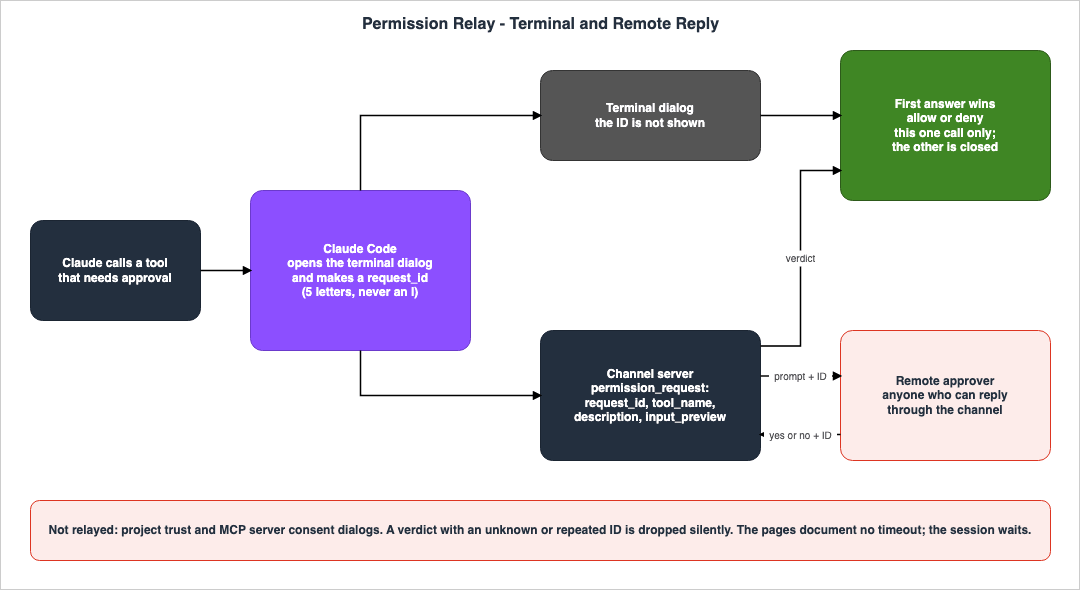
When Claude calls a tool requiring approval, the terminal dialog opens, and the session waits. Two-way channels that declare relay can receive the same request in parallel and forward it to the user on another device. The page states that both stay live. Whether the answer comes from the terminal or a smartphone, Claude Code uses the first response received and closes the other.The page describes the relay flow in the following four steps:
- Claude Code generates a short request ID and sends it to the server.
- The server forwards the permission prompt and the ID to the chat application.
- The remote user responds with "yes" or "no," along with the ID.
- The server's receiving process converts the response into a verdict. Claude Code only uses the verdict if the ID matches an open request.
The terminal dialog remains open throughout this process. If someone at the terminal answers before the remote verdict arrives, that response is used, and the remote pending request is discarded.
5.3 Four Fields of a Permission Request
Notifications from Claude Code to the server are sent vianotifications/claude/channel/permission_request. The params contain four fields, all of which are strings:| Field | Meaning |
|---|---|
request_id | Five lowercase letters from a to z without l. Include it in the prompt you send out so that it can be echoed in the reply. Claude Code will only accept verdicts associated with an ID it has generated. |
tool_name | The name of the tool that Claude wants to use. For example, Bash or Write. |
description | A human-readable summary of what this tool call will do. This is not the command itself. |
input_preview | The tool's arguments as JSON-shaped display text, keyed per top-level field. For Bash, this would be the command; for Write, it would be the file path and contents. |
The page explains that the exclusion of
l is to prevent misinterpretations when typed on a smartphone, as it might be read as 1 or I. The terminal dialog does not display this ID. The only way to know this ID is through the notification sent to the server.The
description field does not contain any commands. The page states that when the model gives no description for a Bash call, the description field is the fixed text Run shell command and does not include any details about the command itself. The approver sees the command only when the server displays input_preview.5.4 What Claude Code Changes in the Text Before Relaying
In Claude Code versions v2.1.211 and later, thedescription and input_preview are processed before being sent via relay. The page lists three changes:- Certain characters, including those that affect text direction, invisible characters, and characters resembling quotation marks or brackets, are neutralized.
- Each run of whitespace is folded into a single space.
- Text containing up to 3,500 code points is sent as is. For a longer value, its start and its end are sent around a marker that counts the omitted code points. The end of a long command still reaches the approver.
In
input_preview, the 3,500 limit is applied separately to each top-level field of the arguments. In earlier versions of Claude Code (before v2.1.211), the description was sent directly, while input_preview was cut to 200 UTF-16 units with a trailing ellipsis.In versions v2.1.234 and later, two additional handling methods are implemented. Values in the
input_preview fields that cannot be safely serialized are replaced with the marker (value unserializable). Furthermore, recognizable provider credential tokens are replaced with [REDACTED]. The page lists three limits of this masking:- Key names in
input_previeware also masked along with their corresponding values. The displayed key name may not always match the actual key name in the input. - Sections containing shell syntax, path characters, or URL characters are not masked. Masking will not obscure approved commands, file paths, or destinations.
- Secrets without recognizable prefixes and secrets that span whitespace are not masked. A private-key block is an example; both reach the server unmasked.
The page states that masking does not change who receives the fields. Whatever stays unmasked goes only to servers opted in with the
--channels flag or the development flag. The page says to treat both fields as untrusted input unless you control the client fleet.5.5 The Verdict Covers That One Call Only
The verdict the server returns isnotifications/claude/channel/permission and consists of two fields. request_id returns the ID mentioned earlier, and behavior is either allow or deny. The page states:Allow lets the tool call proceed; deny rejects it. Neither verdict affects future calls.Even if an
allow response is returned remotely, it does not apply to subsequent calls. If approval is required for the next call from the same tool, a new permission request opens.The page's example inbound handler identifies replies in the format
yes <id> or no <id> using regular expressions and sends a verdict notification. Replies in the verdict format are not forwarded to Claude. The page states that the verdict is passed to Claude Code, but does not reach Claude itself.5.6 Items Not Relayed
Relay forwards approvals for tool use such asBash, Write, and Edit. The Channels reference page states:Project trust and MCP server consent dialogs don't relay; those only appear in the local terminal.Relay works when a permission dialog opens. A call that opens no dialog has nothing to relay. The Channels reference page describes how to test relay, using a call to the reply tool as the example. It notes that in auto mode, the classifier decides approval, and no dialog opens for the remote side to answer. Therefore, it instructs users to switch to manual mode when testing. The Channels page also states that for unattended use, the
--dangerously-skip-permissions flag bypasses most permission requests and should only be used in trusted environments. It adds that even then, the actions that no mode auto-approves still apply.When using channels in non-interactive mode with the
-p flag, tools requiring terminal input, such as multiple-choice questions or plan mode approvals, become disabled. The page explains that this keeps the session from stalling while it waits for input. Headless -p as a whole is covered in the existing article Claude Code in CI/CD and Headless Automation.5.7 The Sender Allowlist Decides Who Can Approve
The Channels page describes the relationship between the sender allowlist and relay as follows:The allowlist also gates permission relay if the channel declares it. Anyone who can reply through the channel can approve or deny tool use in your session, so only allowlist senders you trust with that authority.What Claude Code checks on a verdict is whether the ID matches an open request it issued. Checking who sent the reply is the job of the server's sender gate. As described in Section 4.1, the server implements this gate.
Therefore, adding someone to the sender allowlist of a channel that declares relay also grants that person the authority to approve tool use in the session. If the channel gates on the room, everyone in that room becomes an approver. This paragraph is an inference that combines two statements on the pages.
5.8 When a Remote Reply Has No Effect
The Channels reference page lists three potential causes when a remote reply has no effect and the terminal dialog stays open.- Incorrect Format: If the reply does not match the inbound handler's regular expression, messages like
approve itoryeswithout an ID will be passed to Claude as ordinary messages. - Incorrect ID: The server sends a verdict, but Claude Code cannot find the corresponding request with that ID, so it silently drops the verdict.
- Duplicate ID: If the ID is the same as one used in a previous request, Claude Code will discard all verdicts associated with that ID. This is so that a reply meant for one permission request cannot approve another.
The page notes that the ID is a random sequence of five characters, making duplicates rare. In that case, the page says to answer at the terminal. The CHANGELOG entry for 2.1.290 states that a repeated ID is now ignored rather than used to approve a different request.
6. Paths That Drop Silently
This chapter identifies the paths through which messages can fail to reach their destination without generating an error, based on the descriptions in Chapters 2 through 5. Since channels have no acknowledgment (ack), the server learns of no failure on any path. What differs is whether anything shows on the user's terminal.6.1 Counting the Paths
| # | Path | What does not arrive | What the user's terminal shows | Source |
|---|---|---|---|---|
| 1 | In the MCP configuration, but not named with the --channels flag | All events | Not stated on the pages | Channels reference - Notification format |
| 2 | The organization's channelsEnabled setting is disabled or not configured | All events. The MCP server and its tools function normally. | Warning on the startup screen | Channels - Enterprise controls |
| 3 | The plugin is not on the effective plugin allowlist | Channel registration | Notification on the startup screen explains the reason | Channels - Research preview |
| 4 | The development flag was passed with -p or through the Agent SDK | Channel registration | Not stated on the pages | Channels reference - Test during the research preview |
| 5 | On the v2 runtime, the server negotiated protocol revision 2026-07-28 | Channel registration | Not stated on the pages | MCP - Push messages with channels |
| 6 | The meta key contains characters other than English letters, numbers, or underscores | The attribute of that key | Not stated on the pages | Channels reference - Notification format |
| 7 | The verdict ID does not match any open requests | That verdict | The terminal dialog stays open | Channels reference - Relay permission prompts |
| 8 | The verdict ID repeats the ID of an earlier permission request | Verdicts carrying that ID | The terminal dialog stays open | Channels reference - Relay permission prompts |
| 9 | The remote reply does not match the expected verdict format | The reply is not received as a verdict; it flows to Claude as an ordinary message | One line of the received message | Channels reference - Relay permission prompts |
Path 9 is not a path that drops anything. Text meant as an approval enters the session context as an instruction to Claude.
This table does not include messages dropped by the server's sender gate. That is the server behaving as designed, and the page's example also drops them silently.
6.2 What Can Be Identified from the Table
The table is divided into three groups.- Paths leading to a reason appearing on the startup screen: Paths 2 and 3. You can identify this by reading the notification on the startup screen.
- Paths where the terminal dialog stays open: Paths 7 and 8. You can notice them if the dialog stays open after you answer remotely.
- Paths where the page lacks visible information for the user: Paths 1, 4, 5, and 6. The only clues the pages give are the two in the troubleshooting for the webhook example, for when nothing reaches Claude: checking the server status with
/mcpand starting Claude Code with the--debugflag to read the debug log.
Since there is no acknowledgment (ack), the server author's method for verifying delivery is, as recommended on the page, to have Claude report status through a reply tool. Do not judge delivery by the
await on the server resolving.7. Things to Decide Before Enabling in an Organization
This chapter outlines the decisions administrators should make before enabling channels in a Team or Enterprise organization.7.1 List of Decisions
| Decision | Method | Page Reference |
|---|---|---|
| Whether to use channels | channelsEnabled. Through the claude.ai admin settings (Owner) or managed settings. | Channels - Enterprise controls |
| Which plugins to allow | allowedChannelPlugins. Replaces Anthropic's list and can include plugins from an internal marketplace. | Channels - Restrict which channel plugins can run |
| Scope of approvers | Read the plugin's source code to see whether it declares relay and how sender gates are implemented. | Channels - Security, Channels reference - Gate inbound messages |
| Handling of the development flag | The development flag bypasses the allowlist, but channelsEnabled remains effective. An empty allowedChannelPlugins does not block it. | Channels reference - Test during the research preview |
| Relationship with permission modes | Calls the classifier decides in auto mode open no dialog and are not relayed. --dangerously-skip-permissions bypasses most permission requests; the actions that no mode auto-approves still apply. | Channels reference - Full example, Channels - Quickstart |
| Whether to accept events at all times | Events are only delivered while a session is active. | Channels - opening paragraphs |
The source code for the included plugins can be found in the claude-plugins-official repository. The Channels page provides links to the source code for each plugin.
7.2 Relationship to the Existing Governance Article
ThechannelsEnabled and allowedChannelPlugins settings are managed settings that users cannot override. The distribution of managed settings, their combination with other settings, and the overall controls for Claude Code are covered in the existing Hardening and Governance Guide for Claude Code and Claude Desktop. This article focuses solely on these two settings related to channels.The existing governance article mentions the two settings in Section 5-2, which covers the configuration files that admins place, and points to this article for the details. At the time of writing, the definitions for these two settings are located on the Channels page, rather than the Settings page.
8. Frequently Asked Questions about Claude Code Channels
This chapter summarizes the key information from the main text in the form of frequently asked questions. The answers are based on the content presented in Chapters 2 through 7.Q1. Does an MCP server listed in .mcp.json deliver events as a channel?
No, it does not. The Channels page states that being in.mcp.json is not enough to push messages; the server must also be named with the --channels flag. During the research preview, the --channels flag only accepts plugins on the allowlist, and servers you create yourself are loaded with the development flag. Events from servers that are not loaded as channels are discarded without returning an error to the server.Q2. Is it sufficient to add the chat group to the allowlist?
No, it is not. The Channels reference page says to gate on the sender's ID, not the room. If access is determined by the room, anyone in the allowed group can send messages to the session. In channels where relay is declared, everyone in that group will be able to approve tool use.Q3. Once you reply yes on your smartphone, does the same tool stop asking?
No, it will continue to ask. The page states that neither theallow nor the deny verdict applies to subsequent calls. A verdict applies only to the one call for that ID.Q4. If you answer both at the terminal and remotely, which answer takes effect?
The answer that arrives first takes effect. Claude Code uses the first answer received and then closes the other. If you answer at the terminal first, any pending requests sent remotely will be discarded.Q5. If channelsEnabled is not enabled, will the MCP server also not function?
It will work. The page states that when the setting is disabled or not configured, the MCP server will connect and its tools will function, but channel messages will not be received. The startup warning tells the user to have an administrator enable the setting.Q6. If you set the allowedChannelPlugins array to empty, will all channels be stopped?
No, they will not. An empty array will stop the plugins on the allowlist, but it will not stop the development flag. If you want to stop channels, including the development flag, leave channelsEnabled unset.Q7. Can channels be used with Claude Code running through Amazon Bedrock?
No. The Channels page states that channels require authentication from Anthropic using either a claude.ai account or an API key from the Console, and are not available on Amazon Bedrock, Google Cloud's Agent Platform, or Microsoft Foundry.Q8. Can you run a custom channel in non-interactive mode with -p?
Not with the development flag. The development flag requires a confirmation screen, so when using-p or the Agent SDK, Claude Code will ignore the flag, and the channel will not be registered. During the research preview period, custom channels are not on the allowlist, so they will not be registered with the --channels flag either. In a Team or Enterprise organization, if an administrator adds the channel as a plugin to the organization's allowedChannelPlugins, it can be registered with the --channels flag.9. Summary
- A channel is an MCP server that pushes events into a running Claude Code session. As of November 22, 2026, it is a research preview, and the flag syntax and protocol contract may change.
- Before it can push events, a server passes three gates: the MCP configuration,
--channels, and the organization'schannelsEnabled. Simply listing a server in.mcp.jsonwill not suffice. - Claude Code does not return acknowledgments. The server cannot distinguish between events that are delivered and those that are discarded.
- The channel server implements the sender allowlist and checks the sender's ID, not the room.
- In channels that declare relay, anyone who can reply can approve tool use. The allowlist defines the scope of approvers. A verdict applies only to that single call.
- There are nine potential paths where events may fail to reach their destination without generating an error. The startup screen notices,
/mcp, and--debugcan provide clues.
The information presented in this article reflects the research preview pages as of the date of verification. Please review the Channels and Channels reference pages before using this functionality.
10. References
- Push events into a running session with channels - Claude Code Docs
- Channels reference - Claude Code Docs
- CLI reference - Claude Code Docs
- Connect Claude Code to tools via MCP - Claude Code Docs
- Environment variables - Claude Code Docs
- Continue local sessions from any device with Remote Control - Claude Code Docs
- Claude Code CHANGELOG - anthropics/claude-code - GitHub
- claude-plugins-official/external_plugins at main - anthropics/claude-plugins-official - GitHub
- Hardening and Governance Guide for Claude Code and Claude Desktop - Containerized Containment and Why Code and Desktop Govern Differently
- Claude Code Features and Settings Reference 2026
- Claude Code Operator's Handbook
- Claude Code in CI/CD and Headless Automation - Running the Agent Unattended in Pipelines
- Which MCP Clients a Remote MCP Server Lets In - Client ID Metadata Documents, Pre-Registration, Deprecated Dynamic Client Registration, and the Allowlists Layered on Top
References:
Tech Blog with curated related content
Written by Hidekazu Konishi