Windows Server and SQL Server Lifecycle Timeline - Mainstream, Extended, and Extended Security Update Years
First Published:
Last Updated:
Windows Server 2016 follows the Fixed Lifecycle Policy.This policy dictates that a version's support ends in two phases: Mainstream Support and Extended Support. Following the end of Extended Support, the Extended Security Updates (ESU) program provides a limited set of security updates for up to three years. The Windows ESU FAQ states what the ESU program does not do:
The ESU program does not extend the product's lifecycle and does not provide technical support beyond the original support timeline.As of November 15, 2026, several deadlines are near. Extended support for Windows Server 2016 is scheduled to end on January 12, 2027. The mainstream support for Windows Server 2022 ended on October 13, 2026. Extended support for SQL Server 2016 ended on July 14, 2026, and SQL Server 2016 entered its first ESU year. The third year of ESU for Windows Server 2012 and Windows Server 2012 R2 ended on October 13, 2026.
This article presents a timeline detailing the support start dates, end of mainstream support, end of extended support, and end of each year of the ESU program for six versions of Windows Server and seven versions of SQL Server, with citations indicating the source for each date. The timeline aims to answer two key questions: first, what is provided and what is not provided at each stage, specifically what the ESU program holds back and what it does not; and second, why the same end dates sometimes appear to differ by one day across different sources.
As far as the primary sources state, the answers are as follows. First, regarding support phases. During mainstream support, both security and non-security updates are provided. During extended support, according to the Fixed Lifecycle Policy table, only security updates are provided; non-security updates are not. ESU (Extended Security Updates) holds back the end of some security updates for up to three years after the end of extended support. The updates provided through ESU are limited to Critical and Important updates for Windows Server, and only Critical updates for SQL Server. ESU does not hold back the end of a product's lifecycle. It also does not hold back the end of support for issues that are not related to ESU updates.
Regarding dates, many entries in the product pages' HTML record end dates in the format of the next day at
6:59:59 AM. The tables in the ESU FAQs and the yearly Ending Support lists write the date of the day before. This article reads the 6:59:59 AM value as the end of the previous day, and this reading matched all rows in the date-written sources except the two Windows Server 2025 rows, where the sources disagree.This article holds only the dates of the Windows Server and SQL Server versions and the source of those dates. It does not cover licensing, ESU pricing and purchasing conditions, availability on Azure and Azure Arc, upgrade procedures, or which version to upgrade to. The end-of-support dates on the AWS services are left to the articles listed in the "Topics Covered in Other Articles" section. It also does not cover vulnerability details.
Background and Method of Creating the Windows Server and SQL Server Lifecycle Timeline
This section details the sources used to create the timeline and explains how the dates for each entry were determined. All sources were consulted as of November 15, 2026 (Japan Standard Time).The Primary Sources Used in This Article, and What Became Rows
The rows in the timeline were created using the following resources:- Product Pages (Microsoft Lifecycle on learn.microsoft.com): These pages, organized by version, contain a table with "Start Date," "Mainstream End Date," and "Extended End Date" columns. For versions with ESU rows, the Releases table gives the start and end dates of each ESU year. This article utilized 13 of these pages. The URL of the SQL Server 2012 page ends with
microsoft-sql-server-2012, and its form differs from the other 12 pages.
- Windows ESU FAQ (Product Lifecycle FAQ - Extended Security Updates): This page provides a description of the ESU program and includes a table listing "ESU Availability and End Dates." The table combines Windows Server 2012 and Windows Server 2012 R2 into a single row, while Windows Server 2016 has its own row. This article refers to this page as the "Windows ESU FAQ."
- SQL Server ESU FAQ (SQL Server Extended Security Updates FAQ): This page features a similar table with two rows: one for SQL Server 2014 and one for SQL Server 2016. This article refers to this page as the "SQL Server ESU FAQ."
- Ending Support lists (from Ending Support in 2021 to Ending Support in 2034): Each list gives the products and versions whose support ends in that year, with the dates written out. This article used the lists from 2021 to 2034 that included rows for Windows Server and SQL Server.
- Fixed Lifecycle Policy Page: This page outlines the policy stages and includes a table detailing what is delivered at each stage.
- SQL Server documentation (from learn.microsoft.com): This includes three pages: "What Are Extended Security Updates?", "Extended Security Updates FAQ," and "End of Support Options." This article used these to confirm what SQL Server Extended Security Updates provide and do not provide.
- AWS documentation: This includes two pages on "Amazon RDS for SQL Server," the "AWS Microsoft FAQ," the "AWS Trusted Advisor checks" page, and the "AWS Premium Support FAQ." This article used these to verify the relationship between AWS dates and Microsoft dates.
The timeline includes key dates for 13 versions: the start of support, the end of mainstream support, the end of extended support, and the end of each year of ESU. Service packs (SP) and cumulative updates (CU) dates are not included. Similarly, dates for versions prior to Windows Server 2012 are not included. In other words, please note that the items on this timeline are not all dates of Windows Server and SQL Server, but are representative updates that I have picked out.
Versions, Channels, and Phases
This article covers six versions of Windows Server: Windows Server 2012, Windows Server 2012 R2, Windows Server 2016, Windows Server 2019, Windows Server 2022, and Windows Server 2025. It also covers seven versions of SQL Server: SQL Server 2012, SQL Server 2014, SQL Server 2016, SQL Server 2017, SQL Server 2019, SQL Server 2022, and SQL Server 2025. Windows Server 2012 and Windows Server 2012 R2 are distinct versions, each with its own product page. These two versions have different start dates but the same end date.The product page for Windows Server 2022 lists the release channels for Windows Server as follows:
Beginning in September 2023, Windows Server has two primary release channels available: the Long-Term Servicing Channel (LTSC) and the Annual Channel (AC).The six Windows Server versions in this article all have product pages stating that they follow the Fixed Lifecycle Policy. The dates for the Annual Channel are available on the Windows Server Annual Channel page; this article does not include them as rows. This article does not cover client versions of Windows. The table in the Windows ESU FAQ also has rows for Windows 10, which this article does not copy.
This article refers to the different stages using the following terminology. The English spellings are also used in the tables.
- Mainstream Support: This is the initial phase. The Mainstream End Date on the product page is the end date of this phase.
- Extended Support: This phase follows mainstream support. The Extended End Date on the product page is the end date of this phase. This article refers to this phase as "extended support."
- Extended Security Updates (ESU): This is a program that delivers a limited set of security updates after extended support has ended. It is not part of the product's lifecycle. It is designated as ESU Year 1, ESU Year 2, and ESU Year 3 on a yearly basis. This article distinguishes Extended Support from Extended Security Updates without shortening either, even in the same sentence.
- End of support: This term is used in documentation to refer to the end of extended support. AWS documentation also uses this term. This article will use this term, specifying which phase it refers to.
This article writes that a phase "ends" and that ESU "holds back" an end by placing what ends and what is held back in the same sentence.
Terms for the State of the Sources
This article uses the following six terms to describe the state of the documentation. These terms, including their English spellings, are also used in the tables.- Stated: The documentation contains a statement regarding the matter.
- Stated as not supported: The documentation explicitly states that the matter is not supported or cannot be used.
- Documentation does not list: While a list or table exists, the specific item is not included. This does not necessarily indicate that the matter is unsupported or unavailable.
- No statement found: Despite searching the sources in this section using different keywords and categories of documentation, no relevant statement could be found. This does not necessarily indicate that the matter is absent or impossible.
- Sources disagree: The statements regarding the same matter in two different documents are contradictory. This article presents both statements, along with their sources, without designating either as incorrect.
- Inference: This is an inference made by this article, and is not a statement found in any of the documentation. This article says in the same sentence that it is an inference.
All dates referenced in this article are presented with the year. Pages may be rewritten after the date of review.
Timeline Table Columns and Sources for the Dates
The timeline tables each contain six columns:- Date — Represents the date associated with the row. All dates are formatted as
YYYY-MM-DD. - Product — Indicates the product and version the row pertains to.
- Change — Indicates the type of change. The value will be one of four options listed below.
- What Happened — Describes the event or change. Where a source is quoted, the quotation is verbatim.
- Date Source — Specifies the type of document from which the 'Date' value was obtained. The value will be one of three options listed below.
- Source — Refers to the specific document used as the basis for the row. This column may include documents beyond those used for the 'Date Source'.
The 'Change' values are as follows:
Start Date— The product's start date, representing the date when support for that version began.End of Mainstream Support— The end of mainstream support.End of Extended Support— The end of extended support.End of ESU Year— The end of a specific year (1st, 2nd, or 3rd) of ESU. The specific year is detailed in the 'What Happened' column.
The 'Date Source' values are as follows:
ESU FAQ table— The ESU Availability and End Dates table in the Windows ESU FAQ or the SQL Server ESU FAQ.Ending Support list— The date in that year's Ending Support list.Product page HTML— Values extracted from the product page HTML and converted into dates, using the reading described in the next section.
Dates from AWS documentation are not used in the Date column of the timeline.
When a single row contains information from multiple sources, the "Date Source" field lists the first source encountered in the order: ESU FAQ table, Ending Support list, and Product page HTML. Only rows without a date-written source, and the two Windows Server 2025 rows where the sources disagree, have Product page HTML as the Date Source. Scheduled rows that had not yet arrived are in a separate table.
How This Article Reads the Dates on the Product Pages
Product pages place the following sentence above the table:Support dates are shown in the Pacific Time Zone (PT) - Redmond, WA, USA.The HTML on product pages records dates in the
datetime attribute of an element labeled <local-time>, including the time. The end date for Windows Server 2016 Extended Support is as follows:<local-time timezone="America/Los_Angeles" format="date" datetime="1/13/2027 6:59:59 AM">The date portion of this value is 2027-01-13. The table in the Windows ESU FAQ lists the same end date as
January 12, 2027. This article turned the product page HTML values into dates after checking the time.- Values of
6:59:59 AMare interpreted as the end of the previous day. Both the mainstream support end and the extended support end are recorded in this format in all 13 versions. The end dates for each year of ESU are recorded in this format for Windows Server 2012, Windows Server 2012 R2, SQL Server 2012, and SQL Server 2014. - Values of
8:00:00 AMare interpreted as the date itself. Support start dates and the beginning of each year of ESU are recorded in this format. The end dates for each year of ESU for Windows Server 2016 and SQL Server 2016 are also recorded in this format.
The dates obtained through this reading matched all rows that the ESU FAQ tables and the Ending Support lists write as dates, except the two Windows Server 2025 rows, where the sources disagree. For example, the end of the first year of ESU for Windows Server 2016 has an HTML value of
1/11/2028 8:00:00 AM, while the table in the Windows ESU FAQ lists it as January 11, 2028. Because the time of the end date varies depending on the version, this article does not uniformly subtract one day from all values.In this article's observation, when a product page was opened in a browser, the page showed the date without the time, and that date changed with the reader's time zone setting. This observation is further detailed in the "How a Lifecycle Date Is Read" section. This article does not use the dates seen in a browser as the dates in the timeline.
When Sources Differ
Occasionally, different sources may provide different dates for the same event. This article lists these dates in a table located in the "Where the Dates Differ" section. The "Kind of Difference" column contains the following four values:Sources disagree— Different sources provide different dates for the same type of date.Different record formats— The date values in the product page HTML and the dates in the date-written sources may appear different due to differences in record formats. However, according to the interpretation used in this article, these dates represent the same day.Different kinds of dates— The sources list different types of dates. For example, this could be the end of Microsoft's extended support and the end of a version's support on AWS.General statement— The source lists a general timeframe, rather than specific dates for each version.
This article does not speculate on the reasons why sources may provide different dates unless the source explicitly states them.
Topics Covered in Other Articles
The following topics are covered in separate articles:- Information regarding the end-of-support and end-of-life dates for each AWS service, particularly for Amazon RDS for SQL Server, can be found in AWS End-of-Support and EOL Reference. This article will focus solely on the relationship between AWS dates and Microsoft dates, as detailed in the "Where the AWS Dates Differ" section.
- Information regarding Windows Server licensing on AWS and the Windows Server AMIs available on Amazon EC2 can be found in Running Windows Server Workloads on AWS.
- Details on Active Directory functional levels and the history of Microsoft identity products are available in Microsoft Identity History and Timeline.
- Information regarding Kerberos authentication for SQL Server on Amazon RDS is provided in Active Directory Authentication for Amazon RDS and Aurora.
- The support policies for .NET are separate from the Fixed Lifecycle Policy discussed in this article. Dates related to .NET can be found in .NET Release and Support Timeline.
Windows Server and SQL Server Lifecycle Historical Timeline (Updates from May 20, 2012)
The following two tables constitute the main body of this historical timeline. Following these tables are a table listing planned events that had not yet occurred as of November 15, 2026, and a table titled "Where the Dates Differ," which lists events with differing dates across various sources. Each table's columns are defined as described in the previous section. All data was referenced as of November 15, 2026.Index:
- 2012–2019 - The period when support began for nine versions, and when mainstream support ended for SQL Server 2012, Windows Server 2012, Windows Server 2012 R2, and SQL Server 2014.
- 2020–2026 - The period when support began for four versions, and when extended support ended for SQL Server 2012, Windows Server 2012, Windows Server 2012 R2, SQL Server 2014, and SQL Server 2016, followed by years of Extended Security Updates (ESU).
- Scheduled - Events that had not yet occurred as of November 15, 2026.
- Where the Dates Differ - Events with differing dates across various sources.
* You can sort the table by clicking on the column name.
2012–2019 — Nine Versions Start, and Four Versions Leave Mainstream Support
| Date | Product | Change | What Happened | Date Source | Source |
|---|---|---|---|---|---|
| 2012-05-20 | SQL Server 2012 | Start Date | Support for SQL Server 2012 began. The value in the product page HTML is 5/20/2012 8:00:00 AM. | Product page HTML | Microsoft SQL Server 2012 - Microsoft Lifecycle |
| 2012-10-30 | Windows Server 2012 | Start Date | Support for Windows Server 2012 began. This is the first entry for Windows Server in this article. | Product page HTML | Windows Server 2012 - Microsoft Lifecycle |
| 2013-11-25 | Windows Server 2012 R2 | Start Date | Support for Windows Server 2012 R2 began. It has a product page separate from that of Windows Server 2012. | Product page HTML | Windows Server 2012 R2 - Microsoft Lifecycle |
| 2014-06-05 | SQL Server 2014 | Start Date | Support for SQL Server 2014 began. | Product page HTML | SQL Server 2014 - Microsoft Lifecycle |
| 2016-06-01 | SQL Server 2016 | Start Date | Support for SQL Server 2016 began. | Product page HTML | SQL Server 2016 - Microsoft Lifecycle |
| 2016-10-15 | Windows Server 2016 | Start Date | Support for Windows Server 2016 began. The value in the product page HTML is 10/15/2016 8:00:00 AM. | Product page HTML | Windows Server 2016 - Microsoft Lifecycle |
| 2017-07-11 | SQL Server 2012 | End of Mainstream Support | Mainstream support for SQL Server 2012 ended. The value in the product page HTML is 7/12/2017 6:59:59 AM. | Product page HTML | Microsoft SQL Server 2012 - Microsoft Lifecycle |
| 2017-09-29 | SQL Server 2017 | Start Date | Support for SQL Server 2017 began. The product page indicates support for both Linux and Windows editions. | Product page HTML | SQL Server 2017 - Microsoft Lifecycle |
| 2018-10-09 | Windows Server 2012 and Windows Server 2012 R2 | End of Mainstream Support | Mainstream support for Windows Server 2012 and Windows Server 2012 R2 ended. The value in both product pages' HTML is 10/10/2018 6:59:59 AM. | Product page HTML | Windows Server 2012 - Microsoft Lifecycle, Windows Server 2012 R2 - Microsoft Lifecycle |
| 2018-11-13 | Windows Server 2019 | Start Date | Support for Windows Server 2019 began. | Product page HTML | Windows Server 2019 - Microsoft Lifecycle |
| 2019-07-09 | SQL Server 2014 | End of Mainstream Support | Mainstream support for SQL Server 2014 ended. The value in the product page HTML is 7/10/2019 6:59:59 AM. | Product page HTML | SQL Server 2014 - Microsoft Lifecycle |
| 2019-11-04 | SQL Server 2019 | Start Date | Support for SQL Server 2019 began. | Product page HTML | SQL Server 2019 - Microsoft Lifecycle |
2020–2026 — Extended Support Ends for Five Versions, and the ESU Years
The ESU rows in this table are only for the versions that have ESU rows. The six versions with ESU rows are Windows Server 2012, Windows Server 2012 R2, Windows Server 2016, SQL Server 2012, SQL Server 2014, and SQL Server 2016.| Date | Product | Change | What Happened | Date Source | Source |
|---|---|---|---|---|---|
| 2021-07-13 | SQL Server 2016 | End of Mainstream Support | Mainstream support for SQL Server 2016 ended. The Ending Support in 2021 list places SQL Server 2016 in the table of products moving to Extended Support. | Ending Support list | Ending Support in 2021, SQL Server 2016 - Microsoft Lifecycle |
| 2021-08-18 | Windows Server 2022 | Start Date | Support for Windows Server 2022 began. | Product page HTML | Windows Server 2022 - Microsoft Lifecycle |
| 2022-01-11 | Windows Server 2016 | End of Mainstream Support | Mainstream support for Windows Server 2016 ended. The value in the product page HTML is 1/12/2022 6:59:59 AM. | Ending Support list | Ending Support in 2022, Windows Server 2016 - Microsoft Lifecycle |
| 2022-07-12 | SQL Server 2012 | End of Extended Support | Extended support for SQL Server 2012 ended. The value in the product page HTML is 7/13/2022 6:59:59 AM, and the value for the start of ESU Year 1 is 7/13/2022 8:00:00 AM. | Ending Support list | Ending Support in 2022, Microsoft SQL Server 2012 - Microsoft Lifecycle |
| 2022-10-11 | SQL Server 2017 | End of Mainstream Support | Mainstream support for SQL Server 2017 ended. | Ending Support list | Ending Support in 2022, SQL Server 2017 - Microsoft Lifecycle |
| 2022-11-16 | SQL Server 2022 | Start Date | Support for SQL Server 2022 began. | Product page HTML | SQL Server 2022 - Microsoft Lifecycle |
| 2023-07-11 | SQL Server 2012 | End of ESU Year | The first year of ESU for SQL Server 2012 ended. | Ending Support list | Ending Support in 2023, Microsoft SQL Server 2012 - Microsoft Lifecycle |
| 2023-10-10 | Windows Server 2012 and Windows Server 2012 R2 | End of Extended Support | Extended support for Windows Server 2012 and Windows Server 2012 R2 ended. The table in the Windows ESU FAQ lists this date in the "End of Extended Support/ESU Start Date" column and specifies "Critical" and "Important" for the ESU update types. | ESU FAQ table | Product Lifecycle FAQ - Extended Security Updates, Ending Support in 2023 |
| 2024-01-09 | Windows Server 2019 | End of Mainstream Support | Mainstream support for Windows Server 2019 ended. | Ending Support list | Ending Support in 2024, Windows Server 2019 - Microsoft Lifecycle |
| 2024-07-09 | SQL Server 2014 | End of Extended Support | Extended support for SQL Server 2014 ended. The SQL Server ESU FAQ table specifies "Critical" for the ESU update types. | ESU FAQ table | SQL Server Extended Security Updates FAQ, Ending Support in 2024 |
| 2024-07-09 | SQL Server 2012 | End of ESU Year | The second year of ESU for SQL Server 2012 ended, coinciding with the end of extended support for SQL Server 2014. | Ending Support list | Ending Support in 2024, Microsoft SQL Server 2012 - Microsoft Lifecycle |
| 2024-10-08 | Windows Server 2012 and Windows Server 2012 R2 | End of ESU Year | The first year of ESU for Windows Server 2012 and Windows Server 2012 R2 ended. | ESU FAQ table | Product Lifecycle FAQ - Extended Security Updates, Ending Support in 2024 |
| 2024-11-01 | Windows Server 2025 | Start Date | Support for Windows Server 2025 began. | Product page HTML | Windows Server 2025 - Microsoft Lifecycle |
| 2025-02-28 | SQL Server 2019 | End of Mainstream Support | Mainstream support for SQL Server 2019 ended. The value in the product page HTML is 3/1/2025 6:59:59 AM. | Ending Support list | Ending Support in 2025, SQL Server 2019 - Microsoft Lifecycle |
| 2025-07-08 | SQL Server 2012 | End of ESU Year | The third year of ESU for SQL Server 2012 ended. The product page HTML has no ESU entry after this date. | Ending Support list | Ending Support in 2025, Microsoft SQL Server 2012 - Microsoft Lifecycle |
| 2025-07-08 | SQL Server 2014 | End of ESU Year | The first year of ESU for SQL Server 2014 ended. | ESU FAQ table | SQL Server Extended Security Updates FAQ, Ending Support in 2025 |
| 2025-10-14 | Windows Server 2012 and Windows Server 2012 R2 | End of ESU Year | The second year of ESU for Windows Server 2012 and Windows Server 2012 R2 ended. | ESU FAQ table | Product Lifecycle FAQ - Extended Security Updates, Ending Support in 2025 |
| 2025-11-18 | SQL Server 2025 | Start Date | Support for SQL Server 2025 began. | Product page HTML | SQL Server 2025 - Microsoft Lifecycle |
| 2026-07-14 | SQL Server 2016 | End of Extended Support | Extended support for SQL Server 2016 ended. The value in the product page HTML is 7/15/2026 6:59:59 AM, and the value for the start of ESU Year 1 is 7/15/2026 8:00:00 AM. | ESU FAQ table | SQL Server Extended Security Updates FAQ, Ending Support in 2026, SQL Server 2016 - Microsoft Lifecycle |
| 2026-07-14 | SQL Server 2014 | End of ESU Year | The second year of ESU for SQL Server 2014 ended, coinciding with the end of extended support for SQL Server 2016. | ESU FAQ table | SQL Server Extended Security Updates FAQ, Ending Support in 2026 |
| 2026-10-13 | Windows Server 2012 and Windows Server 2012 R2 | End of ESU Year | The third year of ESU for Windows Server 2012 and Windows Server 2012 R2 ended. The product page HTML has no ESU entry after this date. | ESU FAQ table | Product Lifecycle FAQ - Extended Security Updates, Ending Support in 2026 |
| 2026-10-13 | Windows Server 2022 | End of Mainstream Support | Mainstream support for Windows Server 2022 ended. The Ending Support in 2026 list places Windows Server 2022 in the table of products moving to Extended Support. The value in the product page HTML is 10/14/2026 6:59:59 AM. | Ending Support list | Ending Support in 2026, Windows Server 2022 - Microsoft Lifecycle |
Scheduled Dates as of November 15, 2026
The rows in the following table are scheduled dates that had not yet arrived as of November 15, 2026. These dates may change.The rows pertaining to Extended Security Updates (ESU) for Windows Server 2019, Windows Server 2022, Windows Server 2025, SQL Server 2017, SQL Server 2019, SQL Server 2022, and SQL Server 2025 are not on the product pages or in the two ESU FAQ tables as of November 15, 2026 (Documentation does not list). This article does not calculate ESU dates for these versions from the rules.
| Date | Product | Change | What Happened | Date Source | Source |
|---|---|---|---|---|---|
| 2027-01-12 | Windows Server 2016 | End of Extended Support | Scheduled end date for Windows Server 2016's extended support. The value in the product page HTML is 1/13/2027 6:59:59 AM. The body text of the Windows ESU FAQ gives the same end in a different year (see "Where the Dates Differ" table). | ESU FAQ table | Product Lifecycle FAQ - Extended Security Updates, Ending Support in 2027, Windows Server 2016 - Microsoft Lifecycle |
| 2027-07-12 | SQL Server 2014 | End of ESU Year | Scheduled end date for the third year of SQL Server 2014's ESU. | ESU FAQ table | SQL Server Extended Security Updates FAQ, Ending Support in 2027 |
| 2027-07-13 | SQL Server 2016 | End of ESU Year | Scheduled end date for the first year of SQL Server 2016's ESU. The value in the product page HTML is 7/13/2027 8:00:00 AM. | ESU FAQ table | SQL Server Extended Security Updates FAQ, SQL Server 2016 - Microsoft Lifecycle |
| 2027-10-12 | SQL Server 2017 | End of Extended Support | Scheduled end date for SQL Server 2017's extended support. The value in the product page HTML is 10/13/2027 6:59:59 AM. | Ending Support list | Ending Support in 2027, SQL Server 2017 - Microsoft Lifecycle |
| 2028-01-11 | Windows Server 2016 | End of ESU Year | Scheduled end date for the first year of Windows Server 2016's ESU. The value in the product page HTML is 1/11/2028 8:00:00 AM. | ESU FAQ table | Product Lifecycle FAQ - Extended Security Updates, Windows Server 2016 - Microsoft Lifecycle |
| 2028-01-11 | SQL Server 2022 | End of Mainstream Support | Scheduled end date for SQL Server 2022's mainstream support. | Ending Support list | Ending Support in 2028, SQL Server 2022 - Microsoft Lifecycle |
| 2028-07-18 | SQL Server 2016 | End of ESU Year | Scheduled end date for the second year of SQL Server 2016's ESU. | ESU FAQ table | SQL Server Extended Security Updates FAQ |
| 2029-01-09 | Windows Server 2019 | End of Extended Support | Scheduled end date for Windows Server 2019's extended support. | Ending Support list | Ending Support in 2029, Windows Server 2019 - Microsoft Lifecycle |
| 2029-01-09 | Windows Server 2016 | End of ESU Year | Scheduled end date for the second year of Windows Server 2016's ESU. This date is the same as the end of extended support for Windows Server 2019. | ESU FAQ table | Product Lifecycle FAQ - Extended Security Updates |
| 2029-07-17 | SQL Server 2016 | End of ESU Year | Scheduled end date for the third year of SQL Server 2016's ESU. | ESU FAQ table | SQL Server Extended Security Updates FAQ |
| 2029-11-13 | Windows Server 2025 | End of Mainstream Support | Scheduled end date for Windows Server 2025's mainstream support. The value in the product page HTML is 11/14/2029 6:59:59 AM. The "Ending Support in 2029" list lists a different date (Sources disagree). | Product page HTML | Windows Server 2025 - Microsoft Lifecycle, Ending Support in 2029 |
| 2030-01-08 | Windows Server 2016 | End of ESU Year | Scheduled end date for the third year of Windows Server 2016's ESU. The value in the product page HTML is 1/8/2030 8:00:00 AM. | ESU FAQ table | Product Lifecycle FAQ - Extended Security Updates, Windows Server 2016 - Microsoft Lifecycle |
| 2030-01-08 | SQL Server 2019 | End of Extended Support | Scheduled end date for SQL Server 2019's extended support. | Ending Support list | Ending Support in 2030, SQL Server 2019 - Microsoft Lifecycle |
| 2031-01-06 | SQL Server 2025 | End of Mainstream Support | Scheduled end date for SQL Server 2025's mainstream support. The value in the product page HTML is 1/7/2031 6:59:59 AM. | Product page HTML | SQL Server 2025 - Microsoft Lifecycle |
| 2031-10-14 | Windows Server 2022 | End of Extended Support | Scheduled end date for Windows Server 2022's extended support. | Ending Support list | Ending Support in 2031, Windows Server 2022 - Microsoft Lifecycle |
| 2033-01-11 | SQL Server 2022 | End of Extended Support | Scheduled end date for SQL Server 2022's extended support. | Ending Support list | Ending Support in 2033, SQL Server 2022 - Microsoft Lifecycle |
| 2034-11-14 | Windows Server 2025 | End of Extended Support | Scheduled end date for Windows Server 2025's extended support. The value in the product page HTML is 11/15/2034 6:59:59 AM. The "Ending Support in 2034" list lists a different date (Sources disagree). | Product page HTML | Windows Server 2025 - Microsoft Lifecycle, Ending Support in 2034 |
| 2036-01-06 | SQL Server 2025 | End of Extended Support | Scheduled end date for SQL Server 2025's extended support. The value in the product page HTML is 1/7/2036 6:59:59 AM. This is the last entry in the timeline. | Product page HTML | SQL Server 2025 - Microsoft Lifecycle |
Where the Dates Differ
| Event | Dates by Source | Kind of Difference |
|---|---|---|
| End of Extended Support for Windows Server 2016 | The body of the Windows ESU FAQ states 2026-01-12. The same FAQ's table, the "Ending Support in 2027" list, and the AWS Microsoft FAQ state 2027-01-12. The product page's HTML value is 1/13/2027 6:59:59 AM. | Sources disagree |
| End of Mainstream Support for Windows Server 2025 | The product page's HTML value is 11/14/2029 6:59:59 AM, while according to the interpretation used in this article, it is 2029-11-13. The "Ending Support in 2029" list states 2029-10-09. | Sources disagree |
| End of Extended Support for Windows Server 2025 | The product page's HTML value is 11/15/2034 6:59:59 AM, while according to the interpretation used in this article, it is 2034-11-14. The "Ending Support in 2034" list states 2034-10-10. | Sources disagree |
| Records of End Dates | In many instances, the product page's HTML value indicates the following day's 6:59:59 AM. For example, the end of Extended Support for Windows Server 2016 is listed as 1/13/2027 6:59:59 AM, while the table in the Windows ESU FAQ states 2027-01-12. | Different record formats |
| Records of End Years for ESU | For each year of ESU for Windows Server 2016 and SQL Server 2016, the records indicate 8:00:00 AM on that day. For example, the first year of ESU for Windows Server 2016 is listed as 1/11/2028 8:00:00 AM, while the table in the Windows ESU FAQ states 2028-01-11. | Different record formats |
| End of Support for SQL Server 2012 and SQL Server 2014 | Microsoft's Extended Support end dates are 2022-07-12 and 2024-07-09. Amazon RDS for SQL Server's end dates are 2022-06-01 and 2024-06-01. | Different kinds of dates |
| Length of Support Period | The AWS Trusted Advisor check page, the AWS Premium Support FAQ, and the SQL Server End of Support Options page state that the support period is 10 years (5 years of Mainstream Support and 5 years of Extended Support). The Fixed Lifecycle Policy page states that Mainstream Support is at least 5 years. According to calculations in this article, Windows Server 2012 R2 has a period of approximately 9 years and 10 months from its start to the end of Extended Support, and approximately 4 years and 10 months to the end of Mainstream Support. | General statement |
The body text and tables on the Windows ESU FAQ page contain different years. The body text reads:
Windows Server 2016 Extended Support ends on January 12, 2026.The "ESU Availability and End Dates" table on the same page lists Windows Server 2016 with the following entry. The following line represents a single row from the table, with a vertical bar separating the cells:
Windows Server 2016 | January 12, 2027 | January 11, 2028 | January 9, 2029 | January 8, 2030 | Critical, ImportantSeveral resources, including the product page, the Ending Support in 2027 list, and the AWS Microsoft FAQ, all list dates for the year 2027. This article does not decide that the year 2026 in the body text is an error, and uses the date 2027-01-12 from the table in the Date column of the timeline. The update date of the FAQ page referenced on 2026-11-15 is 2026-11-11.
Two dates for Windows Server 2025 also differ depending on the source. The pages referenced on 2026-11-15 were last updated on 2025-07-08 (the product page), 2025-02-05 (the Ending Support in 2029 list), and 2024-11-15 (the Ending Support in 2034 list). This article does not determine which date is correct. It uses the value from the product page in the "Date" column of the timeline, and writes in the same row that the list gives a different date.
Current Overview of Windows Server and SQL Server Support
This section summarizes the status of various versions of Windows Server and SQL Server as of November 15, 2026, outlining support policies, what each phase delivers, how the dates are read, and the differences from the AWS dates.Support Phases as of November 15, 2026
The following figure illustrates the support lifecycle for 13 versions, from the start of support to the end of extended support, represented by two bands: mainstream support and extended support. Six versions include an ESU band, indicating a three-year ESU period, while the remaining seven versions do not. The red vertical line in the figure marks the verification date, 2026-11-15. The second vertical line indicates the planned end date for extended support for Windows Server 2016, 2027-01-12. The band for Windows Server 2025 is based on the product page dates.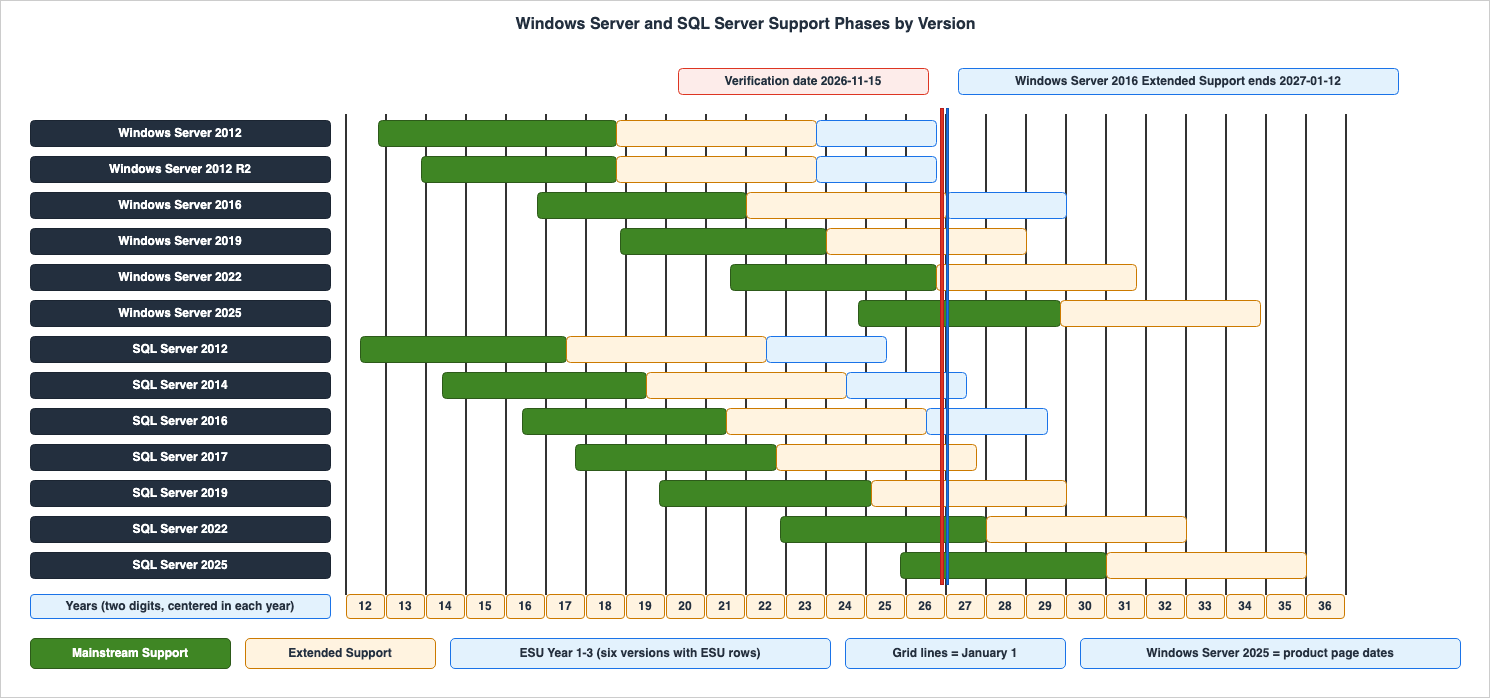
* You can sort the table by clicking on the column name.
| Product | Start | Mainstream End | Extended End | ESU End | Status (as of November 15, 2026) |
|---|---|---|---|---|---|
| Windows Server 2025 | 2024-11-01 | 2029-11-13 (product page; Sources disagree) | 2034-11-14 (product page; Sources disagree) | Documentation does not list | Mainstream Support |
| Windows Server 2022 | 2021-08-18 | 2026-10-13 | 2031-10-14 | Documentation does not list | Extended Support |
| Windows Server 2019 | 2018-11-13 | 2024-01-09 | 2029-01-09 | Documentation does not list | Extended Support |
| Windows Server 2016 | 2016-10-15 | 2022-01-11 | 2027-01-12 | 2030-01-08 | Extended Support |
| Windows Server 2012 R2 | 2013-11-25 | 2018-10-09 | 2023-10-10 | 2026-10-13 | Ended (ESU Year 3 ended) |
| Windows Server 2012 | 2012-10-30 | 2018-10-09 | 2023-10-10 | 2026-10-13 | Ended (ESU Year 3 ended) |
| SQL Server 2025 | 2025-11-18 | 2031-01-06 | 2036-01-06 | Documentation does not list | Mainstream Support |
| SQL Server 2022 | 2022-11-16 | 2028-01-11 | 2033-01-11 | Documentation does not list | Mainstream Support |
| SQL Server 2019 | 2019-11-04 | 2025-02-28 | 2030-01-08 | Documentation does not list | Extended Support |
| SQL Server 2017 | 2017-09-29 | 2022-10-11 | 2027-10-12 | Documentation does not list | Extended Support |
| SQL Server 2016 | 2016-06-01 | 2021-07-13 | 2026-07-14 | 2029-07-17 | ESU Year 1 |
| SQL Server 2014 | 2014-06-05 | 2019-07-09 | 2024-07-09 | 2027-07-12 | ESU Year 3 |
| SQL Server 2012 | 2012-05-20 | 2017-07-11 | 2022-07-12 | 2025-07-08 | Ended (ESU Year 3 ended) |
As of November 15, 2026, the versions in mainstream support are Windows Server 2025, SQL Server 2025, and SQL Server 2022. The versions in extended support are Windows Server 2022, Windows Server 2019, Windows Server 2016, SQL Server 2019, and SQL Server 2017. The versions in an ESU year are SQL Server 2016 and SQL Server 2014. Support for Windows Server 2012, Windows Server 2012 R2, and SQL Server 2012 has ended after three years of ESU.
The Policy at a Glance
The "Fixed Lifecycle Policy" page describes what this policy defines.A defined support and servicing Lifecycle timeline at the time of product launch.
A minimum of five years Mainstream Support.
An additional period of Extended Support for some products.This same page states what Microsoft does not accept during the extended support period.
Microsoft will not accept requests for warranty support, design changes, or new features during the Extended Support phase.The Windows ESU FAQ describes what the ESU provides.
It includes Critical* and/or Important* security updates up to three years after the product's End of Extended Support date.The note for
* is as follows:As defined by the Microsoft Security Response Center (MSRC).This same FAQ details what the ESU does not include.
ESUs do not include new features, customer-requested non-security updates, or design change requests.The ESU period is annual. The Windows ESU FAQ refers to these annual periods as Year 1 ESU, Year 2 ESU, and Year 3 ESU. The same FAQ states that the ESU program is a temporary bridge to a newer version and is not a long-term solution.
The SQL Server ESU FAQ describes the scope of available updates using different terminology than the Windows documentation.
SQL Server ESU includes only Critical security updates. These updates are provided up to three years after the product's End of Extended Support date.The "What Are Extended Security Updates?" page in the SQL Server documentation explains the conditions under which ESU is provided.
Microsoft makes ESUs available if needed once a security vulnerability is discovered and rated as Critical by the Microsoft Security Response Center (MSRC). Therefore, there's no regular release cadence for SQL Server ESUs.This same page lists the supported versions eligible for ESU.
ESUs are available for SQL Server 2014 (12.x), and SQL Server 2016 (13.x).This page does not mention ESU for SQL Server 2012. The product page for SQL Server 2012 lists a three-year ESU offering. The "Extended Security Updates FAQ" page in the SQL Server documentation answers a question about whether this offering applies to older versions.
No. For SQL Server 2012 (11.x) and earlier versions, upgrade to the latest supported versions.This article details the three-year ESU offering for SQL Server 2012, using the dates on the product page and in the Ending Support lists. This three-year period ended on 2025-07-08.
What Each Phase Still Delivers — A Checklist
The following table lists what is and is not provided during each phase, based on the Fixed Lifecycle Policy page, two ESU FAQs, and SQL Server documentation. The "After ESU Year 3" column refers to the period following the end of the third year of ESU, or after the extended support period for versions without ESU.| Item | Mainstream Support | Extended Support | ESU (Windows Server) | ESU (SQL Server) | After ESU Year 3 |
|---|---|---|---|---|---|
| Duration | At least 5 years | Some products have a period following Mainstream Support. | Up to 3 years from the end of Extended Support, on a year-by-year basis (Years 1-3). | Up to 3 years from the end of Extended Support. | — |
| Security Updates | Provided | Provided | Critical and Important (as defined by MSRC) | Critical only (as assessed by MSRC) | Not provided |
| Non-Security Updates | Available | Not provided (according to the policy table) | Customer-requested ones not included | Customer-requested ones not included (new features are not included either) | Not provided |
| Design Changes and New Features | Available | Not accepted | Not included | Not included | Not provided |
| Warranty and Technical Support | Includes support for warranty claims and incident support. | Does not accept warranty claim requests. | No technical support beyond the original support period. Issues unrelated to security updates will not receive troubleshooting support. | Technical support is limited to issues directly related to released updates. | Not provided |
| Self-Help Support | Available | Available | Available | Available | Available for at least 12 months after the end of support. |
| Lifecycle | — | — | Not extended | Not extended | — |
The "Not provided" designation in the "After ESU Year 3" column is based on the introductory statement in the "Ending Support" list. This statement indicates that upon the end of support, no new security updates, non-security updates, free or paid assisted support options, or online technical content updates will be provided.
Windows Server 2012 and Windows Server 2012 R2's third year of ESU is listed in the "Ending Support in 2026" list, under the "Products Ending Support" table, as an entry dated 2026-10-13.
The Self-Help Support row is based on a note on the Fixed Lifecycle Policy page. The note states that online self-help support is available throughout the product's lifecycle and for at least 12 months after the end of support. The policy table includes another row describing a form of support that this article does not cover.
The documentation regarding non-security updates during Extended Support is not consistent. The table on the Fixed Lifecycle Policy page lists "Non-security updates" under the "Extended Support" column as
Not available. The Ending Support lists, however, place a descriptive sentence before the table of products moving to Extended Support. This sentence describes how non-security updates and support remain available during Extended Support (Sources disagree). This article's checklist follows the policy table. The conditions under which updates are received, as described in the lists' sentence, are not covered in this article.The Windows ESU FAQ states the following regarding support for customers utilizing ESU:
Customers using ESUs will not receive standard support services such as troubleshooting, bug fixes, or technical guidance for issues unrelated to security updates.The Extended Security Updates FAQ page for SQL Server states:
Technical support is limited to issues directly related to the released updates.Both statements can be read as indicating that support for issues not related to ESU updates is not available. This article does not specify the extent of support available for issues related to ESU updates.
⇒ ESU holds back the end of only some security updates. For Windows Server, it holds back the end of Critical and Important updates, and for SQL Server, the end of Critical updates, for up to three years after the end of Extended Support. ESU does not hold back the end of customer-requested non-security updates, new features, design changes, the product lifecycle, or support for issues not related to ESU updates.
How Long Each Version Is Supported
The following table shows the support duration for each version, calculated from the dates listed, and each period is the calendar difference between the two dates.* You can sort the table by clicking on the column name.
| Product | Start to Mainstream End | Start to Extended End | Mainstream End to Extended End |
|---|---|---|---|
| Windows Server 2012 | 5 years, 11 months, 9 days | 10 years, 11 months, 10 days | 5 years, 1 day |
| Windows Server 2012 R2 | 4 years, 10 months, 14 days | 9 years, 10 months, 15 days | 5 years, 1 day |
| Windows Server 2016 | 5 years, 2 months, 27 days | 10 years, 2 months, 28 days | 5 years, 1 day |
| Windows Server 2019 | 5 years, 1 month, 27 days | 10 years, 1 month, 27 days | 5 years |
| Windows Server 2022 | 5 years, 1 month, 25 days | 10 years, 1 month, 26 days | 5 years, 1 day |
| Windows Server 2025 | 5 years, 12 days | 10 years, 13 days | 5 years, 1 day |
| SQL Server 2012 | 5 years, 1 month, 21 days | 10 years, 1 month, 22 days | 5 years, 1 day |
| SQL Server 2014 | 5 years, 1 month, 4 days | 10 years, 1 month, 4 days | 5 years |
| SQL Server 2016 | 5 years, 1 month, 12 days | 10 years, 1 month, 13 days | 5 years, 1 day |
| SQL Server 2017 | 5 years, 12 days | 10 years, 13 days | 5 years, 1 day |
| SQL Server 2019 | 5 years, 3 months, 24 days | 10 years, 2 months, 4 days | 4 years, 10 months, 11 days |
| SQL Server 2022 | 5 years, 1 month, 26 days | 10 years, 1 month, 26 days | 5 years |
| SQL Server 2025 | 5 years, 1 month, 19 days | 10 years, 1 month, 19 days | 5 years |
The figures for Windows Server 2025 are calculated based on the product page dates.
Out of the 13 versions, 12 offer a period exceeding 5 years from the start to the end of mainstream support, and more than 10 years from the start to the end of extended support. Windows Server 2012 R2 started approximately one year later than Windows Server 2012, and its end date coincides with that of Windows Server 2012, so both of its periods are shorter. SQL Server 2019 offers a period shorter than 5 years from the end of mainstream support to the end of extended support. While the Fixed Lifecycle Policy page states a minimum of 5 years for mainstream support, this article's calculation shows that for Windows Server 2012 R2, the period from its start to the end of mainstream support is approximately 4 years and 10 months. The documentation does not give the reasons for the periods of these two versions, so this article does not speculate.
The AWS Trusted Advisor check page states the following regarding Windows Server support periods:
Each Windows Server version offers 10 years of support, including 5 years of mainstream support and 5 years of extended support.The SQL Server End of Support Options page also states that each version of SQL Server receives at least 10 years of support, specifying a breakdown of 5 years for mainstream support and 5 years for extended support. Both statements refer to general guidelines regarding support periods, rather than specific dates for each version. To confirm the dates for a specific version, refer to the product page and the ESU FAQ tables.
How a Lifecycle Date Is Read
The following figure illustrates the process by which this article extracts date values from the HTML of a product page and then cross-references those dates. The "Read as" column in the figure represents how this article interprets the data; it is not a statement in the sources.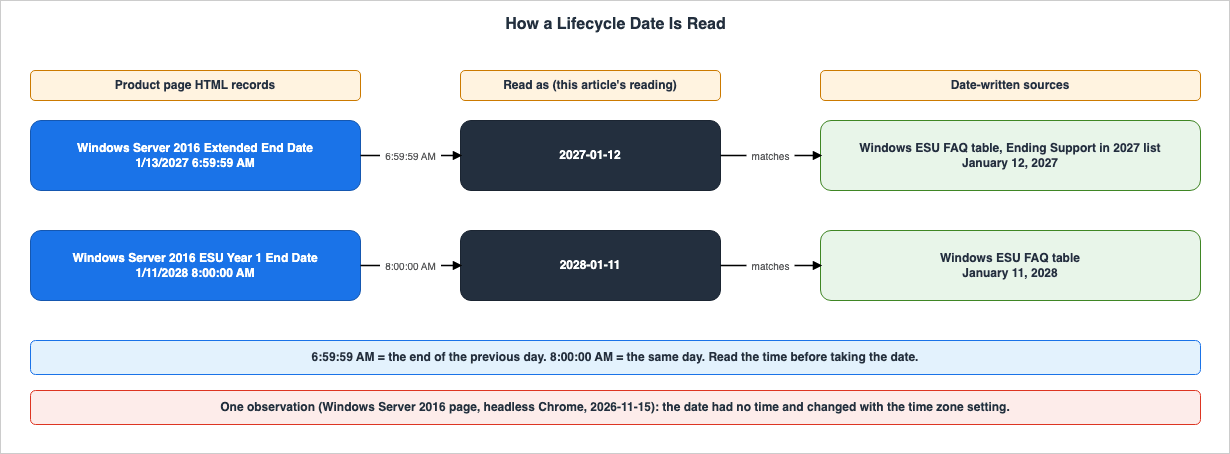
TZ set to three different values. This article then read the text in the <local-time> element. The results are shown in the table below. The Date-Written Source column shows the date in a date-written source: the Ending Support in 2022 list for the Mainstream End Date row, and the Windows ESU FAQ table for the other rows.| Value | HTML | TZ=America/Los_Angeles | TZ=Asia/Tokyo | TZ=UTC | Date-Written Source |
|---|---|---|---|---|---|
| Start Date | 10/15/2016 8:00:00 AM | Oct 15, 2016 | Oct 14, 2016 | Oct 15, 2016 | — |
| Mainstream End Date | 1/12/2022 6:59:59 AM | Jan 12, 2022 | Jan 11, 2022 | Jan 11, 2022 | January 11, 2022 |
| Extended End Date | 1/13/2027 6:59:59 AM | Jan 13, 2027 | Jan 12, 2027 | Jan 12, 2027 | January 12, 2027 |
| ESU Year 1 Start Date | 1/13/2027 8:00:00 AM | Jan 13, 2027 | Jan 12, 2027 | Jan 13, 2027 | — |
| ESU Year 1 End Date | 1/11/2028 8:00:00 AM | Jan 11, 2028 | Jan 10, 2028 | Jan 11, 2028 | January 11, 2028 |
In this observation, with
TZ=America/Los_Angeles, the text matched the date portion of the HTML value, and the two rows for the end of Extended Support and Mainstream Support were one day later than the date-written sources. With TZ=Asia/Tokyo, those two rows matched the date-written sources, while the Start Date row and the two ESU Year 1 rows were one day earlier than the date in the HTML value. With TZ=UTC, the text matched the date-written sources in all three rows that have them. This was a single page, observed in a single browser, during one instance. This article does not decide from this observation what other pages or browsers show.⇒ Do not copy a date seen on a product page in a browser as the end date as it is. Even on the same page, the end rows or the start rows can shift with the reader's time zone setting. For versions with date-written sources (the ESU FAQ tables and the Ending Support lists), compare the date with them.
Where the AWS Dates Differ
The dates listed in AWS documentation may not always align with those used by Microsoft. This article will not present AWS dates as if they were Microsoft dates.The Amazon RDS for SQL Server Version Policy page lists the support period for major versions as follows:
Amazon RDS for SQL Server maintains support for major versions until Microsoft's Extended End Date, which serves as the End of Support (EOS) date.As of November 15, 2026, the table on this page listing the end-of-support dates gives 7/14/2026 for SQL Server 2016, 10/12/2027 for SQL Server 2017, 1/8/2030 for SQL Server 2019, 1/11/2033 for SQL Server 2022, and 1/6/2036 for SQL Server 2025. These five dates correspond to the end dates for extended support as presented in this article. The same page's table listing major versions still indicates that SQL Server 2016 is
Supported as of November 15, 2026.On the Microsoft SQL Server versions on Amazon RDS page, the deprecation schedule table states that Amazon RDS started disabling the creation of new DB instances using SQL Server 2016 on January 15, 2026, and plans to end RDS support for it on July 14, 2026. It states that the remaining instances will be scheduled to migrate to SQL Server 2019. The same table lists the end of RDS support for SQL Server 2014 as June 1, 2024, and for SQL Server 2012 as June 1, 2022. These two dates precede Microsoft's extended support end dates of July 9, 2024, and July 12, 2022. The same table includes another entry, dated July 14, 2026:
Microsoft will stop critical patch updates for SQL Server 2016.This entry does not mention ESU (Extended Security Updates).
The AWS Microsoft FAQ regarding Windows Server 2016 states:
Windows Server 2016 will reach End of Support (EOS) on January 12, 2027 and will no longer receive regular security updates from Microsoft. On this date, AWS will no longer publish or distribute Windows Server 2016 AMIs. Existing 2016 instances and custom AMIs in your account will not be impacted, and you can continue to use them after the EOS date.The AWS dates are the dates for the Windows Server 2016 AMIs (Amazon Machine Images) and for the RDS for SQL Server versions, and not ESU dates. The end-of-support dates across the AWS services are covered in AWS End-of-Support and EOL Reference, while information regarding Windows Server licensing and AMIs on AWS is available at Running Windows Server Workloads on AWS.
AWS Trusted Advisor's check for Amazon EC2 instances with Microsoft Windows Server reaching end of support indicates that results are generated based on the AMI used to launch the instance. As of November 15, 2026, the "Yellow" condition for this check lists Windows Server 2012 and Windows Server 2012 R2 as versions that will reach end of support within 18 months. Extended support for these two versions ended on October 10, 2023.
Frequently Asked Questions about Windows Server and SQL Server Lifecycle
What still reaches Windows Server 2016 after January 12, 2027?
January 12, 2027, is the planned end date for extended support for Windows Server 2016. According to the table in the Windows ESU FAQ, for the three years following that date, the ESU program provides Critical and Important security updates. The ESU years end on January 11, 2028, January 9, 2029, and January 8, 2030. The ESU program does not include customer-requested non-security updates, new features, or design changes. Troubleshooting for issues unrelated to the ESU updates is not provided either. According to the AWS Microsoft FAQ, AWS will cease publishing and distributing Amazon Machine Images (AMIs) for Windows Server 2016 from this date.Do Extended Security Updates extend Extended Support?
No, they do not. The Windows ESU FAQ states that the ESU program does not extend the product's lifecycle and does not provide technical support beyond the original support period. ESU is a program that delivers a limited set of security updates for up to three years after the end of extended support. Even with ESU, the Extended End Date listed on the product page remains unchanged.Is there an ESU program for Windows Server 2019 or SQL Server 2017?
As of November 15, 2026, neither the product pages for Windows Server 2019 nor SQL Server 2017 list any Extended Security Update (ESU) offerings, and neither product is included in the tables of the two ESU FAQs (Documentation does not list). The "What Are Extended Security Updates?" page in the SQL Server documentation lists SQL Server 2014 and SQL Server 2016 as products eligible for ESU. This article searched Microsoft's announcements and search results for ESU announcements for these two versions, but found no statement (No statement found). This does not necessarily indicate that ESU is unavailable. Extended support for Windows Server 2019 is scheduled to end on January 9, 2029, and extended support for SQL Server 2017 is scheduled to end on October 12, 2027.Why does the same end-of-support date differ by one day between pages?
The HTML on product pages records the end date in many instances as6:59:59 AM on the following day. For example, the end of extended support for Windows Server 2016 is recorded as 1/13/2027 6:59:59 AM, while the table in the Windows ESU FAQ lists it as 2027-01-12. This article reads the 6:59:59 AM value as the end of the previous day, and this reading matched all rows in the date-written sources except the two Windows Server 2025 rows, where the sources disagree. When a page is opened in a browser, the date can change with the reader's time zone setting. In this article's observation, on the same page, the end rows or the start rows shifted depending on the time zone.Has Windows Server 2022 left Mainstream Support?
Mainstream support for Windows Server 2022 ended on October 13, 2026. The Ending Support in 2026 list places Windows Server 2022 in the table of products moving to Extended Support. As of November 15, 2026, Windows Server 2022 is in the extended support phase, which is scheduled to end on October 14, 2031. During the extended support period, security updates will be provided, but according to the Fixed Lifecycle Policy, non-security updates are not delivered, and requests for design changes or new features are not accepted.What does SQL Server 2014 still receive as of November 15, 2026?
As of November 15, 2026, SQL Server 2014 is in its third ESU year. Extended support ended on July 9, 2024. According to the table in the SQL Server ESU FAQ, the third year of ESU is scheduled to end on July 12, 2027. SQL Server ESU includes only security updates for vulnerabilities classified as Critical by MSRC and does not have a regular release cycle.Summary
This timeline begins with the launch of SQL Server 2012 support on May 20, 2012. As of November 15, 2026, out of 13 versions, 3 are within their mainstream support period, 5 are within their extended support period, 2 are in their ESU year, and 3 have already completed their third year of ESU.⇒ Support for each version ends in two phases: mainstream support and extended support. The Fixed Lifecycle Policy defines at least five years of mainstream support, with extended support available for some products. During the extended support period, according to the Fixed Lifecycle Policy table, only security updates are provided; non-security updates are no longer delivered. For the 12 versions other than Windows Server 2012 R2, the period from the start to the end of extended support exceeds ten years. For Windows Server 2012 R2, this article's calculation gives approximately four years and ten months of mainstream support.
⇒ ESU holds back the end of only some security updates. For Windows Server, this includes Critical and Important updates; for SQL Server, it includes Critical updates. These updates are provided for a maximum of three years following the end of extended support. ESU does not hold back the end of the lifecycle, or the end of support for issues not related to ESU updates. As of November 15, 2026, only six versions have ESU rows in the sources.
⇒ The product page HTML records most end values as
6:59:59 AM on the next day. This article reads this value as the end of the previous day, and the result matched the dates in the ESU FAQ tables and the Ending Support lists, except the two Windows Server 2025 dates. In this article's observation, the dates seen in a browser changed with the reader's time zone.⚠ As of November 15, 2026, some rows are scheduled dates, and some rows have sources that disagree. The planned end date for Windows Server 2016's extended support is January 12, 2027, while only the body text of the Windows ESU FAQ gives the year 2026. Two dates for Windows Server 2025 differ between the product page and the Ending Support lists. The AWS dates for RDS and the AMIs are separate from Microsoft's dates. All information presented is current as of November 15, 2026.
This timeline will be updated as Windows Server and SQL Server versions and the Microsoft Lifecycle Policy continue to evolve.
In addition, there are related history-and-timeline articles on this site, so please have a look if you are interested.
- .NET Release and Support Timeline - STS and LTS Releases, the Move to Two-Year STS Support, and End-of-Support Dates
- Microsoft Identity History and Timeline - Active Directory, AD FS, Microsoft Entra ID, and the Bridge Between Them
- PostgreSQL Release and Support Timeline - The Five-Year Policy, Minor Releases, and Final Release Dates
- Java Version and LTS Timeline - Release History, the LTS Model, and Support Across Distributions
- AWS End-of-Support and EOL Reference - Lambda, EKS, RDS and Aurora, ElastiCache, and OpenSearch Service
- Running Windows Server Workloads on AWS - What Carries Over, Why the License Decides the Tenancy, and Which Path Into the Domain
References:
- Fixed Lifecycle Policy - Microsoft Lifecycle
- Product Lifecycle FAQ - Extended Security Updates
- SQL Server Extended Security Updates FAQ
- Windows Server 2012 - Microsoft Lifecycle
- Windows Server 2012 R2 - Microsoft Lifecycle
- Windows Server 2016 - Microsoft Lifecycle
- Windows Server 2019 - Microsoft Lifecycle
- Windows Server 2022 - Microsoft Lifecycle
- Windows Server 2025 - Microsoft Lifecycle
- Windows Server Annual Channel - Microsoft Lifecycle
- Microsoft SQL Server 2012 - Microsoft Lifecycle
- SQL Server 2014 - Microsoft Lifecycle
- SQL Server 2016 - Microsoft Lifecycle
- SQL Server 2017 - Microsoft Lifecycle
- SQL Server 2019 - Microsoft Lifecycle
- SQL Server 2022 - Microsoft Lifecycle
- SQL Server 2025 - Microsoft Lifecycle
- Ending Support in 2021 - Microsoft Lifecycle
- Ending Support in 2022 - Microsoft Lifecycle
- Ending Support in 2023 - Microsoft Lifecycle
- Ending Support in 2024 - Microsoft Lifecycle
- Ending Support in 2025 - Microsoft Lifecycle
- Ending Support in 2026 - Microsoft Lifecycle
- Ending Support in 2027 - Microsoft Lifecycle
- Ending Support in 2028 - Microsoft Lifecycle
- Ending Support in 2029 - Microsoft Lifecycle
- Ending Support in 2030 - Microsoft Lifecycle
- Ending Support in 2031 - Microsoft Lifecycle
- Ending Support in 2033 - Microsoft Lifecycle
- Ending Support in 2034 - Microsoft Lifecycle
- What Are Extended Security Updates? - SQL Server
- Extended Security Updates FAQ - SQL Server
- End of Support Options - SQL Server
- Version policy for Amazon RDS for Microsoft SQL Server
- Microsoft SQL Server versions on Amazon RDS
- Microsoft FAQ - AWS
- AWS Trusted Advisor check reference - Security
- AWS Premium Support FAQs
References:
Tech Blog with curated related content
Written by Hidekazu Konishi