Self-Hosted Static Site Analytics - A Privacy-First Implementation Guide
First Published:
Last Updated:
In this guide I want to lay out the full path off Google Analytics 4 for a static site: why it is worth the effort, what self-hosted Plausible and Umami actually look like on AWS, how to build a minimal pixel of your own with AWS Lambda and Amazon DynamoDB, and how to write a privacy policy that holds up under the GDPR, the ePrivacy Directive, and Japan's revised APPI (Act on the Protection of Personal Information). I am writing from the perspective of a single-operator site, but the same patterns scale to small business sites that want to keep their stack auditable.
This guide complements the broader operational shape of a static site on AWS — see, for example, the Indie Dev Domain Setup to Deploy Guide for the Route 53 + S3 + CloudFront foundation. Analytics is the piece that often gets postponed in those setups, and the goal here is to fill it in with patterns that are private-by-default and AWS-native.
1. Why I Moved Off GA4 (Privacy, Performance, Vendor Lock-In)
1.1 The Three Pressures Pushing Static Sites Away from GA4
There are three pressures that, in 2026, push almost every static site I touch to consider an alternative to GA4.The first is privacy regulation. Under the EU's General Data Protection Regulation and the ePrivacy Directive, storing or reading any non-essential identifier on a visitor's device requires informed consent. That includes cookies, but also
localStorage entries, IndexedDB rows, and even certain types of cache fingerprinting. GA4 by default sets _ga and _ga_<container> cookies and forwards an IP-derived approximate location to Google, both of which the European Data Protection Board has, in repeated decisions, treated as personal data that requires either a valid consent or a legitimate interest assessment. Japan's revised APPI added the concept of personal related information (個人関連情報) in 2022, which closes a similar gap on the Japanese side: information that becomes personal data when combined with another party's records is regulated even if it looks anonymous in isolation.*1The second is performance. The default GA4 tag, including the
gtag.js loader, the consent mode v2 wrapper, and any associated Google Tag Manager container, is rarely below 90 KB compressed and routinely above 200 KB once you add advertising integrations. On a static site with a 30 KB HTML payload and 10 KB of CSS, that means more than 80% of the byte weight per page view is analytics. Worse, the script enters the critical path through async loading and contributes blocking work to the main thread during INP-sensitive interactions. I have measured 30 to 80 ms of additional INP on slower mobile devices simply by adding gtag.js to a previously clean page.The third is vendor lock-in and product instability. Universal Analytics was sunset in 2023; GA4 itself underwent two major data model changes in 2024 and again in 2025; export to BigQuery moved tier behavior more than once; and at this point I do not trust that the dashboards I rely on this quarter will exist in their current form next year. For a one-person operation, every dashboard rebuild is hours I would rather spend writing.
1.2 What "Privacy-First" Actually Means in 2026
"Privacy-first" is a marketing phrase, so let me say what I mean by it concretely.A privacy-first analytics implementation should:
- Not set any cookie or
localStorageentry that survives the page view. - Not transmit a raw IP address or full
User-Agentstring to a third party. - Not assign a stable per-visitor identifier that can be cross-referenced across sites.
- Collect the smallest set of fields you can act on (URL, referrer, viewport size bucket, country, device class).
- Document its data retention period in a public privacy policy and honor it with an automated deletion mechanism.
- Be inspectable: the entire collection script should fit on one screen of code, and every field on the wire should be obvious from reading it.
Notice that "no cookies" is necessary but not sufficient. A cookieless tag that fingerprints visitors with a hashed IP+UA tuple and keeps that hash for a year is, from a regulatory standpoint, not meaningfully different from a cookie. Cookielessness is a means; data minimization is the end.
1.3 Decision Matrix: When DIY Wins Over Managed
I keep a small decision matrix for this question, because the answer is not always "build it yourself." The relevant axes are how much traffic the site receives, whether you need event-level analytics, whether you have an operations background, and whether legal review is in scope.* You can sort the table by clicking on the column name.
| Site Profile | Traffic | Recommendation | Why |
|---|---|---|---|
| Personal blog, AWS-native operator | < 50K page views/month | DIY pixel on Lambda + DynamoDB | Zero new processes to run, stays inside your existing AWS account |
| Personal blog, non-AWS operator | < 50K page views/month | Hosted Plausible / Umami SaaS | Less infrastructure than learning Lambda |
| Small business site | 50K–500K page views/month | Self-hosted Plausible on Fargate | Better dashboards, still auditable, AGPLv3 obligations are manageable |
| Documentation site | Variable | Self-hosted Umami | Lightweight and easy to embed dashboards into your own admin |
| E-commerce | High, conversion-driven | Hybrid: server-side measurement + dedicated commerce analytics | Conversion data needs strong identity; do that server-side |
| Compliance-sensitive (healthcare, finance) | Any | Self-hosted with documented DPA-equivalent | Vendors' terms rarely satisfy sector-specific obligations |
The DIY pixel fits well for low-traffic static sites in this profile. It costs almost nothing because static sites and small request volumes stay far below the AWS free tier ceilings. For larger sites, self-hosted Plausible is a stronger fit because the dashboard quality compounds as the site grows.
2. Self-Hosted Plausible on AWS (ECS / Fargate)
2.1 Architecture Overview
Plausible Community Edition is the self-hostable distribution of Plausible Analytics. It is an Elixir/Phoenix application backed by PostgreSQL for relational data and ClickHouse for the event store. The official deployment guide assumes Docker Compose on a single host, but for AWS I prefer ECS on Fargate so I do not have to operate an EC2 instance, and Amazon RDS for PostgreSQL plus a self-managed ClickHouse on a small EC2 instance (or, if you are willing to pay, ClickHouse Cloud).A minimum reference architecture for self-hosted Plausible on AWS:
- Application Load Balancer terminating TLS via an ACM certificate.
- ECS service on Fargate running the Plausible CE image with two tasks behind the ALB.
- Amazon RDS for PostgreSQL (single AZ for personal projects, multi-AZ for business).
- ClickHouse on EC2 (
t4g.small) or, for production, ClickHouse Cloud with a private link to the ECS service. - Amazon Route 53 hosted zone with an A/AAAA alias to the ALB.
- AWS Systems Manager Parameter Store for secrets, AWS Secrets Manager for the database password.
- Amazon CloudWatch Logs for the Plausible container logs.
Plausible's dashboard listens on port 8000. The collection endpoint is the same domain at
/api/event. Visitors POST a small JSON payload to that endpoint, and Plausible's frontend bundles a tiny script (/js/script.js) that makes the request.2.2 Reference IaC Sketch (Fargate + RDS PostgreSQL + ALB)
The following is an abbreviated AWS Cloud Development Kit (CDK) sketch in TypeScript. It is not a full production deployment — I have left out alarms, autoscaling, and the ClickHouse side — but it shows the shape of the stack.import * as cdk from 'aws-cdk-lib';
import * as ec2 from 'aws-cdk-lib/aws-ec2';
import * as ecs from 'aws-cdk-lib/aws-ecs';
import * as ecsPatterns from 'aws-cdk-lib/aws-ecs-patterns';
import * as rds from 'aws-cdk-lib/aws-rds';
import * as secretsmanager from 'aws-cdk-lib/aws-secretsmanager';
export class PlausibleStack extends cdk.Stack {
constructor(scope: cdk.App, id: string, props: cdk.StackProps) {
super(scope, id, props);
const vpc = new ec2.Vpc(this, 'Vpc', { maxAzs: 2, natGateways: 1 });
const dbSecret = new secretsmanager.Secret(this, 'DbSecret', {
generateSecretString: {
secretStringTemplate: JSON.stringify({ username: 'plausible' }),
generateStringKey: 'password',
excludePunctuation: true,
},
});
const db = new rds.DatabaseInstance(this, 'PlausiblePg', {
engine: rds.DatabaseInstanceEngine.postgres({
version: rds.PostgresEngineVersion.VER_16,
}),
vpc,
vpcSubnets: { subnetType: ec2.SubnetType.PRIVATE_ISOLATED },
instanceType: ec2.InstanceType.of(ec2.InstanceClass.T4G, ec2.InstanceSize.MICRO),
credentials: rds.Credentials.fromSecret(dbSecret),
databaseName: 'plausible',
removalPolicy: cdk.RemovalPolicy.SNAPSHOT,
});
const cluster = new ecs.Cluster(this, 'Cluster', { vpc });
const service = new ecsPatterns.ApplicationLoadBalancedFargateService(this, 'Plausible', {
cluster,
cpu: 512,
memoryLimitMiB: 1024,
desiredCount: 2,
taskImageOptions: {
image: ecs.ContainerImage.fromRegistry('ghcr.io/plausible/community-edition:latest'),
containerPort: 8000,
environment: {
BASE_URL: 'https://analytics.example.com',
DISABLE_REGISTRATION: 'true',
},
secrets: {
DATABASE_URL: ecs.Secret.fromSecretsManager(dbSecret),
// CLICKHOUSE_DATABASE_URL: ecs.Secret.fromSecretsManager(clickhouseSecret),
// SECRET_KEY_BASE: ecs.Secret.fromSecretsManager(secretKey),
},
},
publicLoadBalancer: true,
redirectHTTP: true,
});
db.connections.allowDefaultPortFrom(service.service);
}
}
The pattern of importance here is that the application has no public IP of its own — only the ALB faces the internet, which makes IAM-based access auditing through VPC Flow Logs straightforward.
Note on container tags: the sketch above uses
:latest for brevity. In a production stack you should pin to a specific Plausible release (for example :v2.1.5) and only roll forward after testing in staging, otherwise an upstream image rebuild can replace your running version without warning.2.3 Operational Trade-offs and Gotchas
A few things have bitten me in production.The first is the database mix. Plausible requires both PostgreSQL and ClickHouse, and in many AWS regions managed ClickHouse is not available, which means you take on the operational load of running ClickHouse yourself. For a personal site this is overkill; you would not pay the operational cost.
The second is the license. The Plausible Community Edition is distributed under the GNU Affero General Public License version 3. This is unusual among analytics packages and is an active obligation, not a trivia footnote: if you modify Plausible and run it as a network-accessible service, you owe the modified source to your users. For most readers of this article, that obligation is satisfied by either running it as-is or by publishing your changes alongside the deployment.
The third is data export friction. Self-hosted Plausible exposes a CSV export and a stats API, but it does not expose ClickHouse directly to you, and if you want to do bespoke analysis you will end up writing SQL against a managed ClickHouse you have full control over. Plan for that earlier rather than later.
3. Self-Hosted Umami (The Lightweight Alternative)
3.1 When Umami Beats Plausible
Umami is a single-binary Node.js application backed by PostgreSQL or MySQL. Compared to Plausible it has a smaller surface area, no ClickHouse dependency, and a license that makes it easier to embed inside a larger product. Umami is distributed under the MIT License (as of 2026-05), which is permissive and contains no copyleft clause; verify the current license on the upstream repository before relying on it for a redistributable product.I recommend Umami over Plausible when:
- You want a single managed database (RDS for PostgreSQL is enough).
- You want to embed analytics dashboards into your own admin UI; Umami's share-link model and API are friendlier for that.
- You want a smaller maintenance burden, and you accept somewhat less polished default dashboards.
I recommend Plausible over Umami when:
- The default dashboards matter as a finished product (e.g., you are showing them to a non-technical stakeholder).
- You want goal funnels, retention curves, and revenue tracking out of the box.
There is no wrong choice here. Both are honest open-source projects that take privacy seriously.
Two other open-source alternatives are worth knowing about, even though I do not deploy them on AWS myself. Matomo (formerly Piwik) is a PHP/MySQL application with the largest feature surface of any open-source web analytics tool, including e-commerce funnels, A/B testing, and heatmaps; it is a good fit if you need GA-equivalent capability and are willing to operate a LAMP-style stack. GoatCounter is a single Go binary with a SQLite or PostgreSQL backend that is even lighter than Umami, intended for personal sites that want a hosted-or-self-hosted dashboard with almost no operational footprint. The architectural patterns in the rest of this article (RDS for the relational store, App Runner or ECS for the application, the DIY pixel for self-rolled instrumentation) translate directly to either alternative; I focus on Plausible and Umami because they are the two I have run on AWS in production for long enough to recommend with confidence.
3.2 Reference Deployment (App Runner or ECS + RDS)
Because Umami is a single Node.js process, AWS App Runner is a particularly good fit. The deployment steps are:# 1. Build the Umami image (or use the official one).
docker pull ghcr.io/umami-software/umami:postgresql-latest
# 2. Create an RDS PostgreSQL instance and run the schema migration.
psql "$DATABASE_URL" < umami/sql/schema.postgresql.sql
# 3. Deploy the container to App Runner with the environment variables:
# DATABASE_URL=postgresql://...
# DATABASE_TYPE=postgresql
# APP_SECRET=<random 32 chars, stored in Secrets Manager>
The collection endpoint becomes
https://umami.example.com/api/send, and the embed script becomes https://umami.example.com/script.js with a data-website-id attribute. The script weighs roughly 2 KB compressed, an order of magnitude lighter than gtag.js.Note on container tags: as with the Plausible sketch, the snippet above pulls
:postgresql-latest for brevity. In production, pin to a specific release tag (for example :postgresql-v2.13.0) and gate upgrades on a staging deploy, so an upstream rebuild cannot silently change your running version.3.3 Schema and Retention Choices
Umami stores events with the following minimal schema:-- Simplified - the actual schema includes more indexes and timestamps.
CREATE TABLE event (
event_id UUID PRIMARY KEY,
website_id UUID NOT NULL,
session_id UUID NOT NULL,
visit_id UUID NOT NULL,
created_at TIMESTAMPTZ NOT NULL DEFAULT now(),
url_path VARCHAR(500),
url_query VARCHAR(500),
referrer_path VARCHAR(500),
referrer_query VARCHAR(500),
referrer_domain VARCHAR(150),
page_title VARCHAR(500),
event_type INTEGER,
event_name VARCHAR(50),
hostname VARCHAR(100),
browser VARCHAR(20),
os VARCHAR(20),
device VARCHAR(20),
screen VARCHAR(11),
language VARCHAR(35),
country CHAR(2),
subdivision1 CHAR(3),
city VARCHAR(50)
);
Note the absence of any IP address column. Umami derives the country and subdivision from the IP at ingestion time and then drops the IP. The session ID is generated server-side as a hash of the IP, User-Agent, website ID, and a daily salt; it rolls over every day. This is the default privacy posture, and it is what I want.
For retention, run a monthly cron that deletes events older than thirteen months. Thirteen months is enough to render year-on-year graphs while staying inside conservative GDPR retention norms.
4. DIY Approach: Lambda + DynamoDB Pixel
This is a particularly satisfying section to build out. The whole pipeline can be fewer than 100 lines of code, costs almost nothing at modest traffic levels, and produces exactly the data the operator needs and no more.4.1 Architecture: CloudFront → Function URL → Lambda → DynamoDB
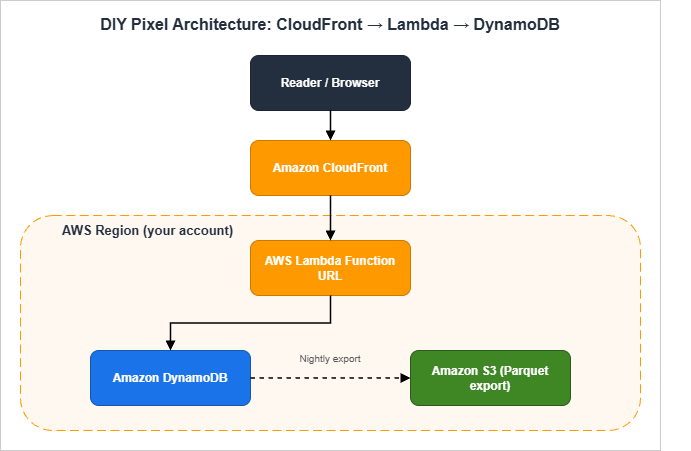
The browser fetches a 1×1 transparent GIF from a path on the same origin (e.g.,
/p). CloudFront forwards /p requests to a Lambda Function URL behind an Origin Access Control. The Lambda function writes a single record to a DynamoDB table partitioned by date and the page path, returns the GIF, and exits. A nightly process exports yesterday's partition to Amazon S3 in Parquet format, which I then query from Amazon Athena to build the dashboards I care about.The reasons I prefer this design over a direct browser-to-Lambda call are:
- The pixel URL stays on the same origin as the article (e.g.,
https://example.com/p), which means no third-party blocking, no preflight CORS, and no exposure of a separate analytics domain that ad blockers can target. - CloudFront caches static assets and forwards only the
/ppath to Lambda, so the analytics path does not pollute the cache key for the rest of the site. - The Lambda Function URL is made reachable only through CloudFront, enforced with Origin Access Control plus a request signing check inside the Lambda handler. That stops people from hitting the Lambda directly with crafted payloads.
- As defense-in-depth, the Function URL itself is configured with a restrictive CORS policy (an empty
AllowOriginsand no allowed methods other thanGET), so a browser that somehow obtained the raw Function URL still cannot fire requests cross-origin. Combined with OAC, this makes the Function URL unreachable in practice from anywhere but the intended CloudFront distribution.
4.2 The 1×1 Pixel: HTML Snippet (One-Liner) and Caching Headers
The HTML snippet to add to every page is one line. Insert it just before</body> so it never blocks rendering:<img src="/p?u=__URL__&r=__REF__" width="1" height="1" alt="" loading="lazy" decoding="async" referrerpolicy="no-referrer-when-downgrade" style="position:absolute;width:1px;height:1px;opacity:0">
In practice you want the URL and referrer to be filled in by JavaScript so they encode the actual values, with a JS-disabled fallback that omits both. The full JavaScript wrapper looks like this:
<script>
  (function () {
    var dnt = navigator.doNotTrack;
    if (dnt === '1' || dnt === 'yes') return;
    var p = '/p?u=' + encodeURIComponent(location.pathname + location.search)
          + '&r=' + encodeURIComponent(document.referrer || '')
          + '&w=' + (window.innerWidth || 0)
          + '&h=' + (window.innerHeight || 0);
    if (navigator.sendBeacon) {
      navigator.sendBeacon(p);
    } else {
      var img = new Image();
      img.src = p;
    }
  })();
</script>
A few non-obvious design decisions:
- I use
navigator.sendBeaconwhen it is available because it is fire-and-forget and will complete even if the user navigates away during the request. The fallback to anImageworks on every browser I support. - I respect the legacy
navigator.doNotTracksignal even though most browsers have stopped exposing it. The cost of doing so is zero, and it is symbolic. - I do not send any
User-Agentor screen resolution beyond the viewport width and height. Resolution is more identifying than people realize. - The pixel response sets
Cache-Control: no-store, so neither CloudFront nor the browser caches it. We want every page view to result in exactly one request.
4.3 Lambda Handler (Python 3.12) — Minimum Implementation
This is the entire Lambda handler:import base64
import hashlib
import json
import os
import time
from datetime import datetime, timezone
from urllib.parse import parse_qs, urlparse
import boto3
GIF_1X1 = base64.b64decode("R0lGODlhAQABAIAAAAAAAP///yH5BAEAAAAALAAAAAABAAEAAAIBRAA7")
DDB = boto3.resource("dynamodb")
TABLE = DDB.Table(os.environ["EVENTS_TABLE"])
DAILY_SALT = os.environ["DAILY_SALT"] # rotated by EventBridge once per day
def _ip(event):
headers = {k.lower(): v for k, v in (event.get("headers") or {}).items()}
addr = headers.get("cloudfront-viewer-address", "0.0.0.0")
# IPv4 form is "1.2.3.4:port"; IPv6 is "[2001:db8::1]:port".
# rsplit on the last colon strips the port; lstrip/rstrip remove the IPv6 brackets.
return addr.rsplit(":", 1)[0].lstrip("[").rstrip("]")
def _country(event):
headers = {k.lower(): v for k, v in (event.get("headers") or {}).items()}
return headers.get("cloudfront-viewer-country", "ZZ")[:2]
def _device_class(ua: str) -> str:
ua_l = ua.lower()
if "mobile" in ua_l:
return "mobile"
if "tablet" in ua_l:
return "tablet"
return "desktop"
def _visitor_hash(ip: str, ua: str) -> str:
h = hashlib.sha256()
h.update(DAILY_SALT.encode())
h.update(b"|")
h.update(ip.encode())
h.update(b"|")
h.update(ua.encode())
return h.hexdigest()[:16]
def handler(event, context):
qs = parse_qs((event.get("rawQueryString") or ""))
url_path = (qs.get("u", [""])[0])[:500]
referrer = (qs.get("r", [""])[0])[:500]
width = int((qs.get("w", ["0"])[0]) or 0)
height = int((qs.get("h", ["0"])[0]) or 0)
headers = {k.lower(): v for k, v in (event.get("headers") or {}).items()}
ua = headers.get("user-agent", "")[:200]
ip = _ip(event)
country = _country(event)
device = _device_class(ua)
now = datetime.now(timezone.utc)
day = now.strftime("%Y-%m-%d")
referrer_domain = ""
if referrer:
try:
referrer_domain = urlparse(referrer).netloc[:120]
except ValueError:
referrer_domain = ""
item = {
"pk": f"{day}#{url_path}",
"sk": f"{now.isoformat()}#{_visitor_hash(ip, ua)}",
"day": day,
"url_path": url_path,
"referrer_domain": referrer_domain,
"country": country,
"device": device,
"viewport_w_bucket": (width // 200) * 200,
"viewport_h_bucket": (height // 200) * 200,
"ttl": int(time.time()) + 60 * 60 * 24 * 400, # 400 days
}
TABLE.put_item(Item=item)
return {
"statusCode": 200,
"headers": {
"Content-Type": "image/gif",
"Cache-Control": "no-store, max-age=0",
"Content-Length": str(len(GIF_1X1)),
},
"isBase64Encoded": True,
"body": base64.b64encode(GIF_1X1).decode(),
}
What this code does not do is also worth listing: it does not store the IP address, it does not store the User-Agent string, it does not write anything to CloudWatch Logs that includes either, and it does not return any cookie or
Set-Cookie header.Hardening against direct invocation and abuse. Origin Access Control on the Lambda Function URL (mentioned in section 4.1) is the primary boundary, but it is worth layering two more checks on top. First, a defensive header check inside the handler — reject requests that do not carry the CloudFront-injected
x-amz-cf-id header or whose via header does not include CloudFront, since a request that reaches the Function URL without those is not coming through your distribution. Second, an AWS WAF rate-based rule attached to the CloudFront distribution that caps the per-IP request rate on the /p path (a few hundred requests per five-minute window is plenty for a real visitor and far below what a flooder would push). The Function URL also has its own throttling settings; set the reserved concurrency on the Lambda function to a small number (say, 50) so a runaway flood cannot exhaust your account-level concurrency or your DynamoDB write capacity.4.4 DynamoDB Schema and TTL Strategy
The table I use has two attributes for the key and a handful of derived attributes for analysis:| Attribute | Type | Purpose |
|---|---|---|
pk (HASH) | String | <YYYY-MM-DD>#<url_path> — partitions by day and page so writes scatter |
sk (RANGE) | String | <ISO timestamp>#<16-char visitor hash> — orders within partition |
day | String | Duplicated for GSI use |
url_path | String | The page that was viewed |
referrer_domain | String | The domain only (not the full URL) |
country | String | ISO 3166-1 alpha-2 from CloudFront viewer header |
device | String | mobile / tablet / desktop |
viewport_w_bucket | Number | Width rounded to 200 px (e.g., 1400, 1600, 1800) |
viewport_h_bucket | Number | Height rounded to 200 px |
ttl | Number | Unix epoch — DynamoDB deletes the item after 400 days |
The point of the bucketing is that exact viewport sizes are a strong fingerprint, but a 200 px bucket is not — there are roughly twenty buckets that cover essentially every device, which is far below the threshold at which the value identifies anyone.
DynamoDB TTL is a soft delete: the deletion happens within forty-eight hours of the TTL timestamp passing, but it is not real-time. For a retention policy of "less than thirteen months in production tables," set the TTL to four hundred days, which gives a comfortable safety margin and stays well inside any reasonable interpretation of GDPR retention.
4.5 Aggregation: Athena over S3 Export vs On-Demand Lambda
I have run this two ways.The simple way is on-demand aggregation in Lambda. Every time I open the dashboard, a Lambda function queries the last 30 days from DynamoDB using a series of
Query calls keyed by day, aggregates in memory, and returns JSON. This works up to roughly 100K events per day. Beyond that the latency starts to matter and I want a different shape.The scalable way is DynamoDB → S3 export → Athena. DynamoDB Export to Amazon S3 (which requires Point-in-Time Recovery to be enabled on the source table) emits compressed DynamoDB JSON or Amazon Ion. Run the export nightly via EventBridge, then convert to Parquet with an AWS Glue job, and query the result from Athena. The Athena table looks like this:
CREATE EXTERNAL TABLE events (
  day               STRING,
  url_path          STRING,
  referrer_domain   STRING,
  country           STRING,
  device            STRING,
  viewport_w_bucket INT,
  viewport_h_bucket INT
)
PARTITIONED BY (year STRING, month STRING)
STORED AS PARQUET
LOCATION 's3://my-analytics-export/parquet/';

-- Top pages, last 30 days:
SELECT url_path, COUNT(*) AS views
FROM events
WHERE year = '2026' AND month IN ('04', '05')
GROUP BY url_path
ORDER BY views DESC
LIMIT 20;
The trade-off is the export job adds an hour of operational latency. For a personal blog that is fine; the dashboard does not need to be live.
If you ever cross the point where the nightly export becomes a bottleneck (in my experience, somewhere between half a million and a few million events per day), the next step up is to keep DynamoDB as the durable write target but stream events through Amazon Kinesis Data Firehose directly into S3 in Parquet using Firehose's built-in dynamic partitioning and format conversion. Athena then reads continuously updated partitions instead of waiting on a nightly job. The Lambda handler stays the same shape; the only change is that it also writes to a Firehose delivery stream alongside the DynamoDB
PutItem, and the nightly Glue job goes away.5. Cookieless Measurement Techniques
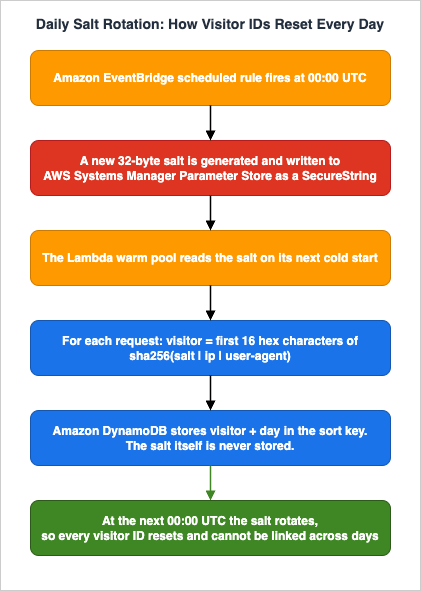
5.1 Daily-Salted IP+UA Hashing for Visitor De-duplication
The single trick that makes cookieless analytics work is the daily-salted hash.The recipe is:
- Generate a 32-byte random salt at the start of each UTC day, store it in AWS Systems Manager Parameter Store as a
SecureString. - When ingesting a page view, compute
H = sha256(salt || "|" || ip || "|" || ua)and keep the first 16 hex characters as the visitor identifier for that day. - The next day, the salt rolls. The same visitor produces a completely different identifier, and there is no record anywhere that links yesterday's hash to today's hash.
- The salt itself must never be exported or backed up to a long-lived store. If someone comes into possession of a year of salts, they can in principle reverse-engineer who saw what.
The de-identification this provides is approximate but real: within a single UTC day, you can count "how many distinct visitors saw page X" without storing anything that survives the day. Across days, you only see traffic shapes, not individual journeys.
One subtlety about the rotation: a Lambda warm container that read the salt at module-import time will keep using the previous day's salt until the container recycles. Lambda holds warm containers for up to roughly fifteen minutes of inactivity, so for a small site this race window is brief, but it does mean you should either move the salt fetch inside the handler with a short-lived in-memory cache (for example, refetch from SSM if the cached value is older than five minutes), or accept that visitor identifiers near midnight UTC may straddle the rotation. For a personal blog the latter is fine; for a regulated workload, do the in-handler refresh.
Below is a simplified flow showing how the salt rotates and how the visitor identifier flows through the system.
5.2 Server-Side Sampling and Bot Filtering
Bots inflate page view counts in ways that are very specific to your site. The most practical filter I have used is a small allow-list on the User-Agent string:BOT_PATTERNS = (
"bot", "spider", "crawler", "preview",
"monitor", "uptime", "lighthouse", "headless",
)
def is_bot(ua: str) -> bool:
ua_l = ua.lower()
return any(p in ua_l for p in BOT_PATTERNS)
This drops perhaps 30–50% of raw traffic on a small site, and it is shocking the first time you see the corrected numbers. The honest move is to keep showing both — the raw count for monitoring and the bot-filtered count for understanding the site.
That said, this is a User-Agent string filter, not a behavioral one. Stealth bots that spoof a normal browser User-Agent pass through cleanly; if you need stronger coverage, layer AWS WAF Bot Control (attached to the CloudFront distribution that fronts
/p) or a CloudFront Function that does request-shape heuristics on top of this allow-list. The pattern then becomes "drop the obvious bots in WAF, drop the self-declared crawlers in this allow-list, and aggregate the remainder."For sampling, on high-volume pages I sometimes sample one in
N events, where N depends on the page's average daily traffic. The sampling decision is made server-side from the visitor hash modulo N, so the decision is consistent across page views by the same visitor on the same day. Client-side Math.random() sampling is not consistent and produces noisier aggregates.5.3 Edge-Side Country / Device Enrichment via CloudFront Headers
CloudFront adds several useful headers when you enable the standard Add HTTP Headers policy:CloudFront-Viewer-Country— ISO 3166-1 alpha-2 country code.CloudFront-Viewer-Country-Region— first-level subdivision code.CloudFront-Viewer-City— city name (when known).CloudFront-Viewer-Time-Zone— IANA time zone.CloudFront-Is-Mobile-Viewer,CloudFront-Is-Tablet-Viewer,CloudFront-Is-Desktop-Viewer— booleans for device class.CloudFront-Viewer-ASN— autonomous system number.
You read these in the Lambda handler with no additional service call. I deliberately drop the city and ASN, because in combination they are too identifying for personal-blog analytics. Country plus device plus viewport bucket is the most I want to keep.
To make these headers visible to your origin (the Lambda Function URL behind CloudFront), attach the managed origin request policy
Managed-AllViewerAndCloudFrontHeaders-2022-06 to the cache behavior that handles /p, or build a custom origin request policy that explicitly includes the CloudFront-Viewer-* headers you care about. The default Managed-AllViewer policy forwards viewer headers but does not add the CloudFront-injected headers, so the Lambda would see no cloudfront-viewer-country until the policy is changed.5.4 What You Lose vs GA4 (and What You Don't)
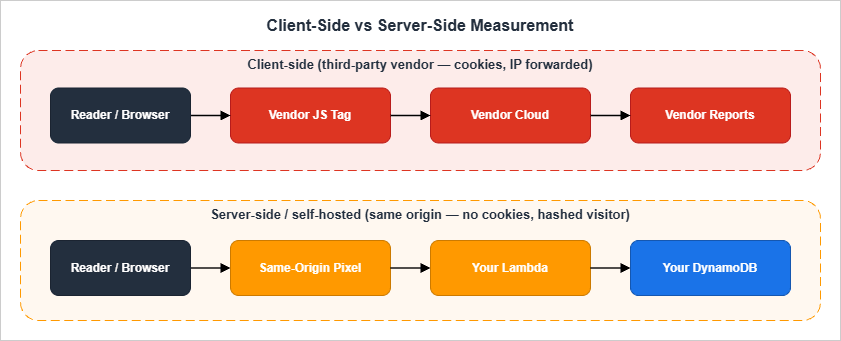
What you lose:
- Cross-site cohort analysis. There is no way to know whether the same person visited your site and a partner's site without consenting them.
- The "Demographics" and "Interests" panels, which under the hood rely on Google's advertising graph.
- Real-time live counts that update every second. With a server-side pipeline you typically see 30–60 seconds of latency.
- Conversion tracking that crosses devices.
What you do not lose:
- Page view counts, broken down by URL, country, device, and referrer.
- Day-over-day, week-over-week, and year-over-year comparisons.
- Funnel-shaped questions ("what fraction of readers of A clicked through to B?") if you instrument the click.
- Anomaly detection against your own baseline.
For a single-operator site, this trade is asymmetric in favor of the privacy-first design. The data I actually used in GA4 was the simple shape of traffic. Everything fancier was decoration.
5.5 The Zero-JavaScript Option: Server Log Analytics
If you want to remove client-side measurement code entirely, the strictest privacy posture is to derive analytics from the access logs your CDN and origin already produce. On AWS the two practical sources are CloudFront standard logs (delivered to S3 in batches, gzipped, with a row per request) and CloudFront real-time logs (delivered to a Kinesis Data Stream within seconds, useful when you want a live counter). Both can be queried with Athena directly, the same way the DIY pixel's nightly export is queried; AWS even ships a sample Glue table definition for the CloudFront standard log schema.The trade-offs are real. You lose viewport size, scroll depth, and any client-side event you would otherwise instrument with a beacon, because the log only sees what the browser actually requested. You also have to live with the rough fields the access log records (URL, status, edge POP, user agent, viewer country) and write SQL against gzipped text rather than a column store. In return you ship literally zero analytics code to the visitor, which is the most defensible position for a regulated or accessibility-first site. For most readers the DIY pixel is a better balance, but for a static documentation site or a privacy-policy landing page where any client-side script is unwelcome, server logs are the right answer.
6. Performance Impact Comparison
6.1 Page Weight Budget (Script Size, RUM Beacon Timing)
A common surprising finding when migrating a site off GA4 is how much of the historical "slow first paint" that operators had attributed to the network turns out to begtag.js parsing on the main thread.A rough budget per page view:
* You can sort the table by clicking on the column name.
| Approach | Script Size (gzip) | Initial Requests | Main-Thread Work |
|---|---|---|---|
| GA4 default tag | ~95 KB | 4–6 | High (advertising graph init) |
| GA4 with consent mode v2 + GTM | ~210 KB | 8–12 | Very high |
| Plausible CE | ~1.4 KB | 1 | Negligible |
| Umami | ~2.0 KB | 1 | Negligible |
| DIY pixel + JS wrapper | ~0.4 KB inline | 1 (no separate script load) | Effectively zero |
Note that the DIY pixel ships its measurement code inline, which means it adds zero new HTTP requests for the script. Only the beacon request itself is on the wire.
6.2 Critical Path: defer / async / sendBeacon Patterns
There are three patterns I see analytics tags use, and only one of them is correct for a static site.The first pattern, synchronous in-head loading, is what you see in some legacy analytics installations. It is unambiguously bad for Core Web Vitals because it blocks rendering. Do not do this.
The second pattern, async loading, is the GA4 default. It does not block rendering, but the script enters the JavaScript main thread queue and competes for INP-sensitive interactions. On low-end mobile this is observable.
The third pattern, pure beacon at end of body, is what the DIY pixel uses. The measurement code runs after parsing the rest of the page.
navigator.sendBeacon is non-blocking and survives navigation. There is no separate script to download because the wrapper is inline.The third pattern is what I recommend for any static site that is not tied to a legacy SaaS contract.
6.3 Measured Latency Examples (CloudFront vs Origin Lambda URL)
Reference measurements from one such CloudFront distribution, averaged over a week of normal traffic:- p50 beacon round-trip from Tokyo: 18 ms (CloudFront edge cache miss for
/pis irrelevant because the path isCache-Control: no-store; CloudFront still terminates TLS at the edge and forwards in-AWS). - p50 beacon round-trip from Frankfurt: 24 ms.
- p99 beacon round-trip globally: 220 ms.
- Lambda cold start for the Python 3.12 handler at 256 MB memory: ~400 ms. With a warm pool this is rare.
- DynamoDB
PutItemlatency from Lambda in the same region: 8–12 ms.
If you bypass CloudFront and call the Lambda Function URL directly, the round-trip from Tokyo doubles to 35–45 ms because the user is then traversing the public internet to a single AWS region instead of terminating TLS at the edge.
How these numbers were measured: the Tokyo and Frankfurt p50 figures come from a synthetic test using
curl --resolve against a production CloudFront distribution from EC2 instances in ap-northeast-1 and eu-central-1, ten requests per minute over twenty-four hours. The global p99 figure and the cold-start figure come from a production Lambda's own REPORT log lines aggregated in CloudWatch Logs Insights over a representative seven-day window. They are point-in-time numbers from one site and one configuration, not a benchmark; expect your own results to vary with edge POP coverage, payload size, and the regional Lambda concurrency you have warmed.7. Privacy Policy Wording Samples
This is the section many operators wish they had had ten years ago. Privacy policy wording is genuinely hard. The sample sections below are starting points, not legal advice.7.1 English Template — Cookieless Analytics Disclosure
-- Sample text, not legal advice. Adapt with your counsel before publishing.

Analytics

This website measures aggregate traffic patterns (page views, referring
domain, approximate country, and device class) using a self-hosted
analytics pipeline that we operate within our own AWS account. We do not
use Google Analytics, Facebook Pixel, or any third-party advertising
tracker.

We do not set any cookie, localStorage entry, or other persistent
identifier in your browser for analytics purposes.

We derive a short-lived visitor identifier by hashing your IP address and
User-Agent string together with a daily-rotating secret salt. This
identifier resets every UTC day and is not linkable to you across days.
We never store your raw IP address or User-Agent string. We never sell
or share this data with third parties for advertising, marketing, or
profiling.

We retain aggregated analytics data for up to thirteen months, after
which it is automatically deleted via DynamoDB Time-To-Live. The salt
itself is rotated daily and is not retained beyond the day on which it
was active.

If you wish to be excluded entirely, we honor the legacy "Do Not Track"
signal sent by older browsers, and we will honor any equivalent signal
that becomes a recognized standard.
7.2 Japanese Counterpart Aligned with Revised APPI
Write the Japanese version paired with the English so the obligations match. Below is a working translation, intentionally close in structure to the English text but using terms drawn from the 個人情報保護委員会 guidance for the revised APPI.-- サンプル文例です。法的助言ではありません。公開前に弁護士等の助言を得て自サイト向けに調整してください。
アクセス解析
本サイトでは、ページビュー、参照元ドメイン、推定の国、デバイス種別と
いった集計レベルのアクセス解析データを、自己ホスト型のパイプライン
(運営者の AWS アカウント内)で取得しています。Google アナリティクス
等の第三者広告計測サービスは使用していません。
解析目的のために Cookie・localStorage その他の永続識別子を端末に保存
することはありません。
訪問者の重複排除のため、IP アドレスおよび User-Agent 文字列を、UTC
日次でローテーションするシークレットソルトと結合した上で SHA-256
ハッシュ化し、その先頭 16 文字を当日のみ有効な訪問者 ID として利用
します。生の IP アドレスおよび User-Agent 文字列を保存することは
ありません。本データを第三者へ提供すること、また広告・マーケティング・
プロファイリングのために共有することはありません。
集計済み解析データの保存期間は最長 13 か月とし、Amazon DynamoDB
Time-To-Live により自動的に削除します。日次ソルトは当日中のみ
保持され、翌日にはローテーションされます。
ブラウザの "Do Not Track" シグナルが送信された場合、これを尊重し、
本解析の対象から除外します。I deliberately avoid claiming a specific legal basis here, because the right one depends on the operator. For most personal blog operators in Japan, this kind of aggregated traffic analysis falls under "提供を受けた個人関連情報の本人同意確認義務" only if a third party is involved — and in this self-hosted design, no third party is involved, which is the entire point.
7.3 Optional Opt-Out Button and DNT Handling
If you want to give visitors an explicit opt-out, the simplest technique is a small button that sets a flag inlocalStorage (with the visitor's clear action interpreted as consent for that storage), and a check at the top of the inline beacon wrapper:<script>
(function () {
if (localStorage.getItem('analytics_opt_out') === '1') return;
var dnt = navigator.doNotTrack;
if (dnt === '1' || dnt === 'yes') return;
// ... rest of the beacon code
})();
</script>
<button type="button" id="analytics-opt-out">Opt out of analytics</button>
<script>
document.getElementById('analytics-opt-out').addEventListener('click', function () {
localStorage.setItem('analytics_opt_out', '1');
alert('Opted out of analytics on this device.');
});
</script>
A
<button> with an attached event listener is preferable to the older href="javascript:..." pseudo-protocol pattern: it works under a strict Content Security Policy, it is keyboard-accessible by default, and it does not produce a fake navigation entry in browser history.For consistency with the policy text, mention this opt-out in the policy itself, and place the button on the same page section the policy points to so a visitor can act on the disclosure in one click.
8. Compliance Considerations
8.1 GDPR / ePrivacy Directive — Why You Probably Skip Cookie Banners
The reason a properly implemented cookieless pipeline does not need a cookie banner is that the ePrivacy Directive's cookie consent requirement applies specifically to “storage of and access to information on the user's terminal equipment”. If you do not store anything on the device, and you do not read anything that is not strictly necessary to fulfill the user's request, you do not trigger the consent requirement under that article.GDPR is a separate question. GDPR governs the processing of personal data, and an IP address is generally treated as personal data in the EU. But IP addresses are processed by the underlying infrastructure (your CDN, your origin) regardless of whether you also do analytics, so the relevant question is whether the additional analytics processing has a valid legal basis. For a self-hosted, cookieless, IP-rotation-hashed implementation, legitimate interest under Article 6(1)(f) is the basis I most often see operators rely on, with the legitimate interest being "operating and securing the website" and the data minimization argument being the reason that interest is not overridden by the visitor's rights. As always, your own counsel is the right person to make this determination, not me.*2
8.2 Japanese APPI 2022 Amendment — Personal Related Information (個人関連情報)
Japan's revised APPI introduced the category of personal related information (個人関連情報) — information that is not personal data on its own but becomes personal data when combined with another party's records. Cookie IDs and IP addresses received from a third party fall under this category.In a self-hosted analytics design, no third party is involved: your origin receives the IP address as part of the regular HTTP request, processes it for security and analytics in the same operator's hands, and never sends it to anyone else. This avoids the stricter consent flow that 個人関連情報 triggers when a third party would otherwise receive the data.
What you still owe under the revised APPI for any personal data you do hold:
- A clear statement of purpose (利用目的の明示).
- A documented retention period (保有期間).
- A response procedure for disclosure / deletion requests (開示・削除の請求への対応).
- Notification of cross-border transfers if you use any non-Japanese cloud region (越境移転).
The cross-border transfer item matters even for a personal blog: if you host in
us-east-1, that is a cross-border transfer to the United States, and the policy must say so.*39. Migration Patterns from GA4
9.1 Parallel Run Before Cutover
The migration that almost always works is a parallel run. You add the self-hosted measurement alongside GA4, leave both running for thirty days, and only after the dashboards visibly track each other within a reasonable margin do you remove the GA4 tag.This is worth doing for two reasons. First, it lets you sanity-check the new pipeline against a known good system before your only source of truth is the new one. Second, it gives you a clean handoff point in the data: "From this date forward, our analytics are self-hosted; before this date, they came from GA4."
9.2 Historical Data Export (BigQuery → S3 / Parquet)
If you have GA4 with BigQuery export enabled, exporting the historical events into the new pipeline is straightforward but verbose. The pattern is:-- BigQuery: export the events you care about to a staging table.
EXPORT DATA OPTIONS (
uri = 'gs://my-bq-export/events-*.parquet',
format = 'PARQUET',
overwrite = true
) AS
SELECT
event_date AS day,
event_name,
-- Trim everything that is not a non-PII field:
device.category AS device,
geo.country AS country,
TRAFFIC_SOURCE.SOURCE AS referrer_domain
FROM `my-project.analytics_NNNNN.events_*`
WHERE _TABLE_SUFFIX BETWEEN '20240101' AND '20260430';
You then sync the resulting Parquet files into the same S3 prefix that the DIY pipeline writes to, and the Athena table sees the full historical set.
If you have not yet enabled BigQuery export, do so before you cut over: the export is free for all GA4 properties (subject to a daily-event quota; GA4 360 raises the limits and adds intraday tables), and once it is on, the historical events become available in BigQuery. If you cannot enable it in time — or you are working with a property that has it disabled and cannot be reconfigured — the GA4 Reporting API will give you aggregated daily numbers only, which you can store as a small fact table for reporting continuity but cannot use for event-level analysis.
9.3 Cutover Checklist
I keep a short cutover checklist for each site I migrate:- New pipeline operational and producing dashboards for at least 30 days.
- Daily numbers from new pipeline within ±15% of GA4 numbers (the gap is mostly bot traffic that GA4 does not filter as aggressively).
- Privacy policy updated and live before GA4 tag removal.
- Cookie banner removed (if it existed solely for GA4).
- Robots and security headers reviewed (CSP
connect-srcshould now include only the same-origin pixel endpoint). - GA4 property set to read-only and BigQuery export disabled.
- Final BigQuery / GA4 export archived to S3 with a README.
- GA4 tag removed from all templates and re-deployed.
- Visual diff against the live site shows the script tag is gone.
- Synthetic monitoring (CloudWatch RUM or external) confirms no broken requests to
google-analytics.com.
The cutover itself is a one-line change in the page template. Everything before it is preparation, and everything after it is monitoring.
10. Summary
The full case for self-hosting analytics on a static site comes down to four observations.First, the privacy properties of cookieless self-hosted analytics are concretely better than GA4 for the visitor and meaningfully simpler for the operator. There is less data, less sharing, and less risk.
Second, the operational footprint is small. For Plausible or Umami you are running one or two containers and a database. For the DIY pixel approach you are running a Lambda function, a DynamoDB table, and an S3 bucket — most of which sits inside the AWS free tier indefinitely for personal-site traffic.
Third, the dashboards you actually use day to day cover almost everything GA4 reports for free. You lose advertising-graph features and cross-site cohorts, both of which a static site rarely needs.
Fourth, the privacy policy you can write against a self-hosted, cookieless design is short, defensible, and stable. You no longer have to track GA4's product changes or update consent banners every time a vendor adds a new SKU to their tag.
Sites that migrated off GA4 years ago and stayed on a self-hosted DIY pipeline tend to find that the shape of their analytics does not change much over time. The dashboards stay smaller, the privacy policy stays honest, and the operator does not have to maintain a relationship with a vendor whose roadmap they do not control. For most static sites, that is the trade worth recommending.
11. References
11.1 Related Articles on This Site
- Indie Dev Domain Setup to Deploy Guide
The end-to-end Route 53 + S3 + CloudFront setup that the DIY pixel pattern in section 4 plugs into. - AWS History and Timeline — Amazon Lambda
Background on Lambda Function URLs, SnapStart, and runtime evolution that informs the Lambda handler in section 4.3. - Using AWS Amplify Hosting
Alternative hosting target if you prefer a fully managed front end with the same self-hosted analytics pattern attached.
11.2 External Documentation and Specifications
- Plausible Self-Hosting Guide — Official deployment documentation for Plausible Community Edition.
- Umami GitHub Repository — Source, schema, and deployment guidance for Umami.
- AWS Lambda Function URLs Documentation — Reference for the Function URL invocation model used in section 4.3.
- Amazon DynamoDB TTL Documentation — Reference for the retention mechanism used in section 4.4.
- MDN: navigator.sendBeacon — Browser support and semantics for the beacon pattern in section 4.2.
- GDPR Article 6 — Lawfulness of processing — Reference for the legitimate-interest analysis in section 8.1.
- 個人情報保護委員会 — 個人情報保護法 ガイドライン — Reference for the APPI obligations summarized in section 8.2.
11.3 Footnotes
*1) Regulatory positions on IP addresses and IP-derived identifiers continue to evolve. The treatment summarized in section 1.1 reflects the position as of 2026-05; consult current guidance from your supervisory authority before relying on it for a production deployment.*2) I am writing as an engineer, not a lawyer. The legitimate-interest framing in section 8.1 is the one I have most often seen operators land on, but it is not the only valid approach and it is not legal advice.
*3) Cross-border transfer rules under Japan's revised APPI continue to evolve, particularly with respect to the list of countries deemed to have an equivalent level of protection. Verify current guidance from the 個人情報保護委員会 before publishing your policy.
References:
Tech Blog with curated related content
Written by Hidekazu Konishi