Enterprise AI Agent Environment Design Notes Part 3: Cloud Selection, Cost, and Operations
First Published:
Last Updated:
- Part 1: Comparing the Three Major Clouds and Designing Your Architecture
- Part 2: Implementing SharePoint ACL and Permission Control
- Part 3: Cloud Selection, Cost, and Operations (this article)
Disclaimer: This article reflects the author's personal research and synthesis of publicly available information as of 2025–2026. The configurations and recommendations presented here represent general, opinion-based perspectives and are not prescriptive solutions. Every organization has its own internal circumstances, use cases, and existing systems — what works in one environment may not be the right answer in another. Errors may also be present. When evaluating these options for your organization, always consult the official documentation from each cloud provider and make decisions based on your specific situation.
1. Introduction — What Part 3 Covers
Part 1 covered the overall platform landscape, and Part 2 walked through SharePoint ACL and permission control implementation.In this final installment, we tackle the questions practitioners care about most: which cloud do you actually choose, what will it cost, and how do you operate it? We'll cover use-case-driven cloud selection, agent communication protocols, multi-cloud architecture patterns, TCO comparisons, vendor lock-in mitigation, operations and monitoring, and a practical reference architecture.
2. Matching the Right Cloud to the Right Use Case
Building on the analysis from Parts 1 and 2, this section gives concrete answers to the question: "Which cloud is actually best suited for which use case?" No single provider wins across the board, so the key is knowing each platform's strengths and leveraging them accordingly.2.1 Internal Document RAG (SharePoint Integration with ACL Enforcement)
Leading candidate: Microsoft Foundry + Azure AI SearchAs detailed in Part 2, native SharePoint ACL synchronization, Purview sensitivity label support, and Entra RBAC integration are decisive differentiators. It's technically possible to implement custom solutions via Microsoft Graph API on other clouds, but Azure holds a significant advantage in operational simplicity and reliability.
Sidebar — "Can't we just deploy Azure AD inside an AWS/GCP VPC and sync from Entra ID to catch up?"
This is a natural question to raise for this specific use case, but the premise is technically incorrect and the proposed workaround does not close the ACL propagation gap. The short version (full treatment in Part 2 §2.6):- Entra ID is a global SaaS IDP and cannot be installed in any VPC. What can be placed in an AWS/GCP VPC is a classical AD DS — self-managed Windows Server AD, AWS Managed Microsoft AD, or Google Cloud Managed Service for Microsoft AD. Microsoft Entra Domain Services (the managed AD DS offering) is Azure-only.
- SharePoint ACLs do not live in AD DS. They live in Entra ID + SharePoint Online, together with Microsoft 365 groups and Purview sensitivity labels. Even a fully synced VPC-resident AD DS will not carry that metadata into Bedrock Knowledge Base or Vertex AI Search.
- Identity-layer affinity is already solved. AWS Bedrock AgentCore Identity and GCP Workforce Identity Federation already federate directly with Entra ID over OIDC/SAML. Adding a VPC AD does not improve IdP parity — the real gap is at the connector / ingestion layer, which a directory service cannot influence.
If you need stronger SharePoint-ACL parity but want AWS or GCP as the primary runtime, the realistic paths are Amazon Q Business or Kendra GenAI Index on AWS, and Gemini Enterprise's SharePoint Online connector on GCP (accepting its periodic-sync latency). A VPC-resident AD DS is the wrong tool for this particular problem.
2.2 Customer Support Bot
Candidates: AWS Bedrock AgentCore / Microsoft Foundry (if deep M365 integration is required)Customer support bots are customer-facing, so SharePoint ACL isn't a factor. Instead, latency, cost efficiency, and model quality take center stage.
| Dimension | AWS Bedrock | Microsoft Foundry | GCP Vertex AI |
|---|---|---|---|
| Primary models | Claude Sonnet 4.6 / Haiku 4.5 | GPT-4o / GPT-5 series / Claude | Gemini 2.5 Flash |
| Low latency | Best (sub-200ms) | Good | Good |
| Long-running sessions | Up to 8 hours | Supported | Supported |
| Cost efficiency | Best for medium-to-large scale | Best with Microsoft contracts | Cheapest at high volume (Gemini 2.5 Flash-Lite) |
2.3 Code Generation and Developer Assistance
| Platform | Strengths |
|---|---|
| Azure + GitHub Copilot | Tight integration with M365 and Azure DevOps. Access to both GPT and Claude models |
| AWS + Claude | Claude Opus/Sonnet are highly regarded for code generation and reasoning — ideal for complex refactoring tasks |
| GCP + Gemini | Gemini 2.5 Pro's 1M-token context window enables analysis of large codebases |
2.4 Data Analytics and BI Integration
In most cases, it makes sense to align your AI platform with your existing data infrastructure.| Scenario | Recommended |
|---|---|
| BigQuery-centric | GCP Vertex AI — deep BigQuery integration, AutoML, BQML |
| Power BI / Microsoft Fabric-centric | Microsoft Foundry — Fabric OneLake integration, Copilot for Power BI |
| AWS Redshift / S3-centric | AWS Bedrock — native S3 knowledge bases, Redshift integration |
| Multi-cloud data | GCP BigQuery Omni (query data across multiple clouds in one place) |
2.5 Multimodal Processing (Images, Audio, Video)
Leading candidate: GCP Vertex AI (Gemini)| Modality | GCP service |
|---|---|
| Text + image + audio + video | Gemini 2.5 Pro/Flash (1M-token context) |
| Real-time voice | Gemini Live API (low-latency bidirectional streaming) |
| Video generation | Veo |
| Custom voice | Chirp 3 (generates a custom voice from a 10-second audio sample) |
| Image generation and editing | Imagen |
2.6 Use Case Quick-Reference Table
The table below summarizes the per-use-case analysis above. "First choice" indicates the cloud most likely to excel in that area — but your existing infrastructure and contracts may shift the calculus.| Use Case | First Choice | Second Choice | Rationale |
|---|---|---|---|
| Internal document RAG (SharePoint) | Azure | — | Native SharePoint ACL / Purview support is decisive |
| Customer support bot | AWS | Azure | High-quality Claude models + low latency + proven AgentCore |
| Code generation / developer tooling | Azure | AWS | GitHub Copilot integration + Azure DevOps |
| Data analytics / BI | GCP | Azure | BigQuery integration + AutoML; choose Azure if Power BI is central |
| Workflow automation | Azure | AWS | Power Automate / Logic Apps with 1,400+ connectors |
| Multimodal processing | GCP | Azure | Comprehensive Gemini Live / Veo / Imagen coverage |
| Cost minimization (high-volume inference) | GCP | AWS | Gemini 2.5 Flash-Lite at $0.10 per million tokens |
| Governance and compliance | Azure | AWS | Integrated governance via Purview / Entra / Defender |
3. Agent-to-Agent Communication Protocols — MCP and A2A
In a single-agent environment, inter-agent communication isn't a concern. But once you start thinking about multi-agent environments where multiple agents collaborate, standardizing how they communicate becomes critical.3.1 MCP and A2A — Two Complementary Protocols
| Protocol | Originated by | Role | Maturity |
|---|---|---|---|
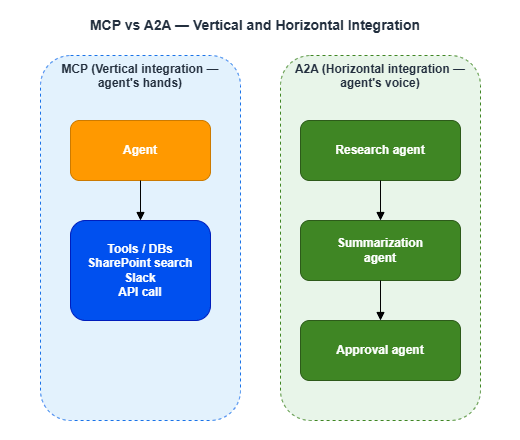
| MCP (Model Context Protocol) | Anthropic → Agentic AI Foundation (under Linux Foundation, established December 2025) | Vertical integration between agents and tools/data | GA. Widely adopted as an industry standard |
| A2A (Agent2Agent) | Google Cloud → A2A Protocol Project (under Linux Foundation, established June 2025) | Horizontal integration between agents | v1.0 GA (March 2026). Participants include AWS, Microsoft, Google, Salesforce, SAP, and others |
A simple way to think about the difference:
3.2 Protocol Support Across Clouds
Both MCP and A2A operate under open governance within the Linux Foundation — neither is controlled by a specific vendor. All three major clouds support both protocols, so protocol choice does not constrain your cloud selection.| Cloud | MCP support | A2A support | Proprietary framework |
|---|---|---|---|
| Microsoft Foundry | Yes | Yes (via Copilot Studio) | Semantic Kernel |
| AWS Bedrock AgentCore | Yes (MCP Gateway, IAM-authenticated) | Yes | LangGraph, CrewAI, etc. |
| GCP Vertex AI | Yes | Excellent (A2A originator) | ADK |
3.3 Cross-Cloud Integration Architecture
The real power of MCP and A2A lies in cross-cloud collaboration.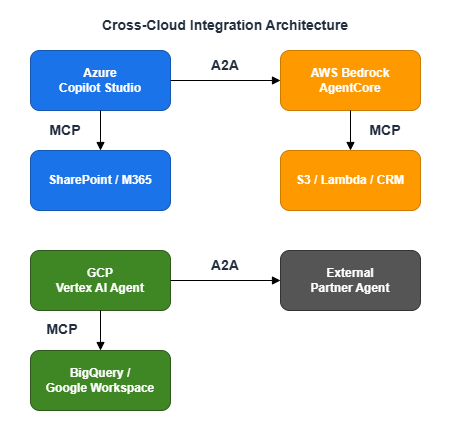
Because agents can collaborate without exposing their internal implementations, cross-cloud coordination is possible while maintaining IP protection and data privacy.
4. Hybrid and Multi-Cloud Architecture Patterns
By now it should be clear that no single cloud dominates across every dimension. Many enterprises are wary of full lock-in to one provider, and a "best-of-breed" approach — combining the best services for each workload — is gaining traction.4.1 Representative Architecture Patterns
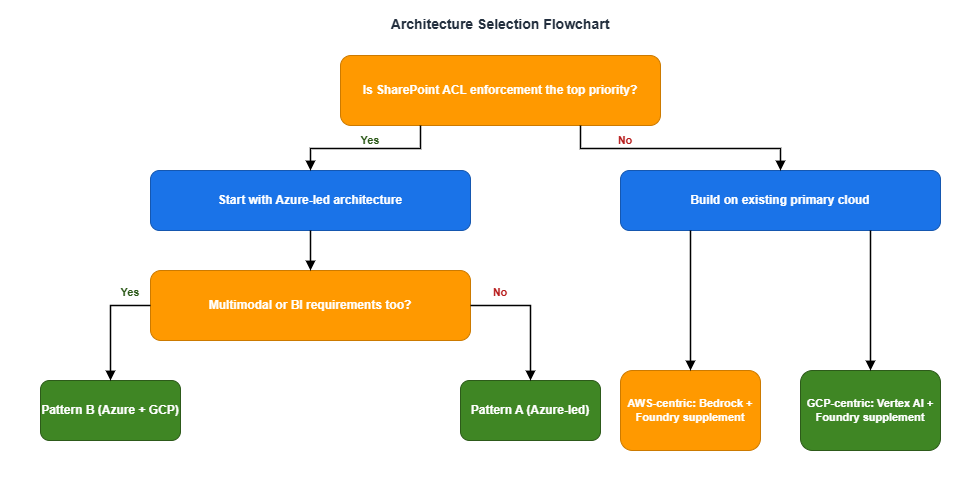
Pattern A: Azure-Led (The Default for M365 Organizations)
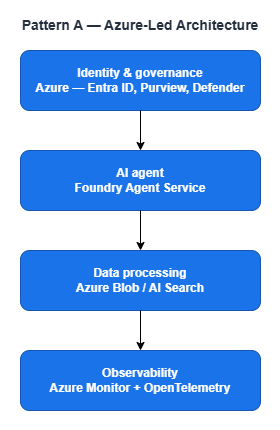
Best fit: Organizations that need deep SharePoint, Teams, and M365 Copilot integration and don't have significant multimodal or high-frequency inference requirements. Simple to operate and keeps overhead low.
Pattern B: Azure-Led with GCP Supplementing
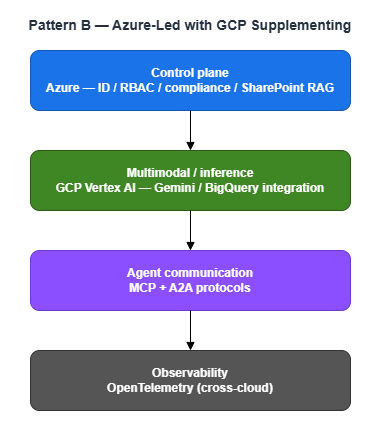
Best fit: Organizations that need Azure for SharePoint RAG but want to exploit GCP's strengths for multimodal processing and high-frequency inference. A good balance of cost efficiency and capability.
Pattern C: Distributed AI Inference (Large-Scale Organizations)
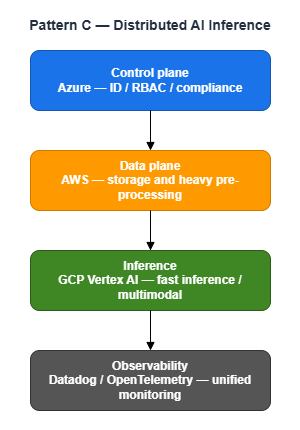
Best fit: Large organizations that want to leverage specific strengths from each cloud. Operational complexity increases significantly — better suited for teams with multi-cloud experience.
4.2 Architecture Selection Flowchart
5. Governance and Compliance
When taking AI agents to production, governance and compliance are unavoidable — not just technical features. Here's how the three clouds compare across regulatory compliance, audit logging, and network security.5.1 Data Protection Regulations
Organizations operating globally must comply with regional data protection laws such as GDPR (EU), CCPA (California), PIPEDA (Canada), APPI (Japan), and PDPA (Singapore).| Requirement | Azure | AWS | GCP |
|---|---|---|---|
| Global region coverage | Excellent — 70+ regions | Excellent — 39+ regions | Excellent — 40+ regions |
| Data residency control | Excellent — Sovereign Cloud, Purview labels | Excellent — customer-controlled region selection | Excellent — region selection + Assured Workloads |
| Cross-border transfer control | Excellent — data classification, labeling, and transfer control via Purview | Good — shared responsibility model | Good — shared responsibility model + VPC-SC |
All three providers offer tools to comply with global data protection regulations. Azure stands out for its comprehensive data classification, labeling, and cross-border transfer control via Purview, which integrates tightly with the M365 environment.
5.2 Security Certifications
| Certification | Azure | AWS | GCP |
|---|---|---|---|
| SOC 1/2/3 | Excellent | Excellent | Excellent |
| ISO 27001/27017/27018 | Excellent | Excellent | Excellent |
| FedRAMP | Excellent — High | Excellent — High | Excellent — High |
There are no major differences between the three providers when it comes to core security certifications.
5.3 Audit Logging Comparison
| Feature | Azure | AWS | GCP |
|---|---|---|---|
| Agent execution logs | Azure Monitor + Foundry Observability | CloudWatch + AgentCore Observability | Cloud Audit Logs + Vertex AI Experiments |
| Data access logs | Purview Audit | CloudTrail Data Events | Cloud Audit Logs (Data Access) |
| Log retention | Up to 2 years + Sentinel | Up to 10 years | Up to 10 years |
| SIEM integration | Microsoft Sentinel (native) | Security Hub / external SIEM | Chronicle / external SIEM |
5.4 Network Security
| Feature | Azure | AWS | GCP |
|---|---|---|---|
| Network isolation | VNet | VPC | VPC |
| API access control | Private Endpoints | VPC Endpoints | VPC Service Controls (unique, free) |
| Data exfiltration prevention | Purview (separate) | Built-in | VPC-SC Service Perimeter (free) |
| Cost | Private Endpoints: paid | VPC Endpoints: paid | VPC-SC: free |
GCP's VPC Service Controls add an extra layer of protection against data exfiltration risks from stolen credentials or IAM misconfigurations. The fact that it's available at no additional charge is a genuine advantage compared to Azure Private Endpoints and AWS VPC Endpoints, both of which incur costs.
6. TCO (Total Cost of Ownership) Comparison
Cost is an unavoidable part of any cloud selection decision. Here we estimate costs for a 1,000-employee organization, from per-token pricing to annual totals. Pricing below is based on each provider's published rates; EA (Enterprise Agreement) and CUD discounts are noted separately.6.1 Token Pricing for Key Models
These per-token price differences compound dramatically at high inference volumes.| Model | Platform | Input / 1M tokens | Output / 1M tokens |
|---|---|---|---|
| GPT-4o | Microsoft Foundry | $2.50 | $10.00 |
| Claude Sonnet 4.6 | Microsoft Foundry / AWS Bedrock | $3.00 | $15.00 |
| Claude Haiku 4.5 | Microsoft Foundry / AWS Bedrock | $1.00 | $5.00 |
| Gemini 2.5 Flash | GCP Vertex AI | $0.30 | $2.50 |
| Gemini 2.5 Flash-Lite | GCP Vertex AI | $0.10 | $0.40 |
| Gemini 2.5 Pro | GCP Vertex AI | $1.25 | $10.00 |
Note: GPT-4o remains available via API. GPT-5 (GPT-5.4 and similar) is OpenAI's current flagship, but GPT-4o is still a strong choice for enterprise API use. Be aware that GPT-5.4 has a higher output price ($15.00) than GPT-4o ($10.00).
Note: Claude Sonnet 4.6 has higher pricing for inputs exceeding 200K tokens (on AWS Bedrock: $6.00 input / $22.50 output).
Note: Gemini 2.5 Pro pricing above applies to inputs under 200K tokens. Long inputs above that threshold cost more ($2.50 input / $15.00 output). Check the official pricing page if you plan to use large contexts.
Note: Gemini 2.5 Flash-Lite is a lightweight variant of Flash, well-suited for cost-over-quality workloads such as FAQ responses and routing decisions. The stable version on Vertex AI (
gemini-2.5-flash-lite) is scheduled for deprecation in October 2026, with Gemini 3.1 Flash-Lite Preview as the successor. Check the latest model lifecycle documentation before committing.Estimated cost at 500M tokens/month (70/30 input/output split = 350M input / 150M output):
- GPT-4o (Azure): approx. $2,375/month
- Claude Sonnet 4.6 (AWS): approx. $3,300/month
- Claude Haiku 4.5 (AWS): approx. $1,100/month
- Gemini 2.5 Flash (GCP): approx. $480/month
- Gemini 2.5 Flash-Lite (GCP): approx. $95/month
- Gemini 2.5 Pro (GCP): approx. $1,938/month
In this scenario, Gemini 2.5 Flash-Lite is roughly 25–35x more cost-efficient than the other major models. That said, it doesn't match GPT-4o or Claude Sonnet in quality for all tasks — so smart model routing matters. A practical approach: route FAQ-style queries to Gemini 2.5 Flash-Lite, and complex reasoning tasks to Claude Sonnet.
6.2 Estimated Annual Total Cost (1,000-Employee Organization)
| Architecture | Estimated Annual Cost (USD) |
|---|---|
| Azure-centric | $300,000–$600,000 |
| AWS-centric | $350,000–$700,000 |
| GCP-centric | $200,000–$450,000 |
| Azure + GCP supplement | $250,000–$550,000 |
6.3 Cost Optimization Levers
| Cloud | Optimization method | Discount potential |
|---|---|---|
| Azure | Enterprise Agreement / Azure Hybrid Benefit | Up to 40–42% |
| AWS | Pure pay-as-you-go (best for variable workloads) | — |
| GCP | Committed Use Discounts (CUD) | Up to 55% (up to 70% for select resources) |
| GCP | Sustained Use Discounts (auto-applied) | Automatic |
GCP's CUD in particular — up to 55% off standard pricing, or up to 70% on select resources — can have a major impact when annual commitment is feasible.
7. Vendor Lock-In Risk and Mitigation Strategies
Beyond migration costs, AI agent environments introduce a distinct form of lock-in: context lock-in.7.1 AI Agent-Specific Lock-In Risks
Traditional lock-in centered on data and infrastructure migration costs. With AI agents, there's an additional dimension: context lock-in. Conversation history, user preferences, and evaluation data accumulated by agents are often stored in vendor-proprietary formats, making them difficult to reproduce during a migration.7.2 Six Practical Lock-In Mitigation Strategies
- Keep agent logic framework-neutral: Use OSS frameworks like LangGraph and CrewAI to minimize direct dependency on any cloud SDK
- Add a model abstraction layer: Use tools like LiteLLM to maintain a unified interface regardless of underlying model provider
- Containerize everything: Kubernetes-based deployments ensure portability across clouds
- Standardize IaC: Maintain cloud-neutral infrastructure code with Terraform
- Use MCP/A2A protocols: Adopt open, vendor-neutral protocols for agent communication
- Choose cloud-neutral experiment tracking: MLflow and Weights & Biases work across providers
8. Operations and Monitoring
AI agents aren't "build it and forget it." Running them in production means continuously monitoring and improving latency, cost, response quality, and hallucination rates.8.1 Agent Observability Capabilities by Cloud
| Feature | Microsoft Foundry | AWS Bedrock AgentCore | GCP Vertex AI |
|---|---|---|---|
| Distributed tracing | Application Insights | OTEL-compatible, CloudWatch | Cloud Trace |
| Evaluations (Evals) | Built-in evaluators | 13 built-in evaluators | Vertex AI Evaluation Service |
| Quality metrics | Groundedness, Coherence, Fluency | Helpfulness, Tool Selection Accuracy, Hallucination Rate | Trajectory Evaluation, Tool Use Accuracy |
| Third-party integrations | LangSmith, Langfuse | Datadog, Dynatrace, Arize, LangSmith, Langfuse | LangSmith |
| Standards | OpenTelemetry | OTEL-compatible | OTEL |
Notably, all three clouds support OpenTelemetry (OTEL), which makes it possible to build a unified observability layer across a multi-cloud setup.
8.2 Third-Party Observability Platforms
| Platform | Key characteristics | Best for |
|---|---|---|
| LangSmith (LangChain) | Trace clustering, automated failure pattern detection | Teams using LangChain/LangGraph |
| Langfuse (OSS) | Open source; visualizes LLM cost, latency, and error rates | Organizations prioritizing in-house control |
| Arize AX | "Evaluator committee" approach using multiple AI models for quality assessment | Enterprises requiring rigorous quality evaluation |
| Datadog | Integrates with existing infrastructure monitoring | Organizations already running Datadog |
8.3 Agent Evaluation Workflow
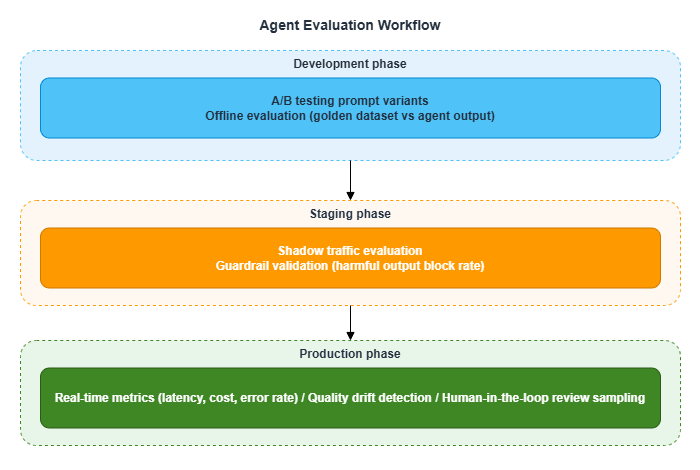
Quality drift detection is frequently overlooked. LLM model updates, changes to RAG data, and shifts in user query patterns can all cause agent response quality to change over time. Building a continuous evaluation mechanism is essential.
9. Summary and Reference Architecture
Across all three parts, we've examined the AI agent platforms from the three major clouds from multiple angles. This final section pulls everything together and presents a reference architecture. As always, this is a generic perspective — adapt it to your organization's security requirements, existing infrastructure, and budget.9.1 Cloud Positioning (for M365 Environments)
| Cloud | Role | In a nutshell |
|---|---|---|
| Azure | Primary platform | The first choice in most cases due to SharePoint ACL, M365 integration, and governance |
| GCP | Complementary candidate | Strong in multimodal, high-frequency inference, and cost efficiency — a compelling supplement |
| AWS | Conditional supplement | Valuable when existing AWS infrastructure is in place or when deep Claude usage is needed |
9.2 Reference Configurations by ACL Strictness Level
| Level | Requirements | Configuration |
|---|---|---|
| Level 1 | Basic document separation by department | Path B is sufficient |
| Level 2 | Rapid access revocation on role changes or departures | Path B + high-frequency indexer runs + resync API |
| Level 3 | Audit compliance required; ACL leakage is a legal risk | Two-layer configuration combining Path A and Path B |
9.3 Reference Architecture
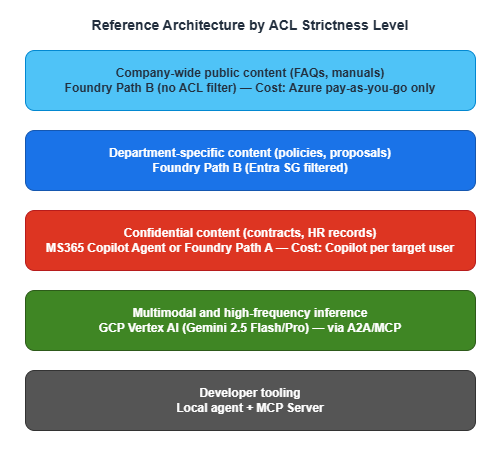
9.4 Full Architecture Overview
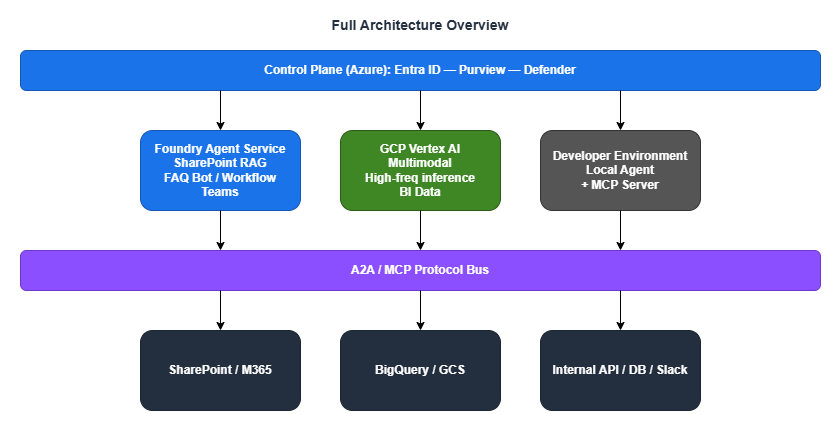
9.5 Pre-Deployment Checklist
General
- Audit how permissions are granted in SharePoint sites (Entra Security Groups vs. SharePoint-native groups)
- If dependent on SharePoint-native groups, develop a migration plan to Entra Security Groups
- Define the approach for a company-wide chat UI
- Determine which roles and departments will receive licenses
Azure (primary platform)
- Estimate Azure AI Search costs (index size, query volume)
- Design indexer run frequency and resync workflow for personnel changes
- Confirm GA timeline for any Preview APIs and align with production deployment schedule
GCP (supplementary)
- Design and validate Workforce Identity Federation (Entra ID integration)
- Evaluate Gemini Flash/Pro model quality against internal use cases
- Design VPC Service Controls perimeter
- Estimate and evaluate Committed Use Discounts (CUD) commitment
Governance
- Finalize approach to data protection regulations (data residency, cross-border transfer controls)
- Define audit log retention period and SIEM integration policy
- Design the operational workflow for agent evaluation (Evals)
- Establish a framework-neutral strategy to reduce vendor lock-in
10. Closing Thoughts
Across all three parts, we've worked through cloud selection, architecture design, permission control, cost optimization, and operations monitoring for organizations building internal AI agent environments on top of M365.The most important takeaway from this analysis is simple: there is no single cloud that wins on every dimension.
- Azure has a commanding lead in SharePoint ACL integration and M365 compatibility, but cedes ground on multimodal capabilities and cost efficiency
- GCP stands out for multimodal processing and cost efficiency, but native SharePoint integration isn't in its DNA
- AWS shines when existing AWS infrastructure is involved or when deep Claude usage is the goal, but SharePoint ACL requires custom implementation
That's precisely why a hybrid architecture — selecting the right cloud for each workload and connecting them with MCP and A2A — is worth serious consideration as one of your options.
I hope this series serves as a useful reference as you build out AI agent environments within your own organization.
11. Related Articles in This Series
- Part 1: Comparing the Three Major Clouds and Designing Your Architecture
- Part 2: Implementing SharePoint ACL and Permission Control
- Part 3: Cloud Selection, Cost, and Operations (this article)
This article is based on the author's personal research and synthesis of publicly available information as of 2025–2026, and represents a general, opinion-based perspective. Every organization's internal circumstances and use cases differ — the content here does not apply universally. The article reflects the author's interpretations and assumptions, and may contain errors. When evaluating these options, always consult the official documentation from each provider and make decisions appropriate to your own situation.
References:
Tech Blog with curated related content
Microsoft (Foundry / Governance / Operations):
What's new in Microsoft Foundry | Oct-Nov 2025 (Microsoft DevBlogs)
What's new in Microsoft Foundry | Dec 2025 & Jan 2026 (Microsoft DevBlogs)
Microsoft Copilot Studio vs. Microsoft Foundry (Microsoft TechCommunity)
Empowering multi-agent apps with the open Agent2Agent (A2A) protocol (Microsoft Cloud Blog)
Microsoft offers in-country data processing for Microsoft 365 Copilot (Microsoft 365 Blog)
AWS (Bedrock AgentCore / Compliance):
Amazon Bedrock AgentCore adds Quality Evaluations and Policy Controls (AWS Blog)
Introducing Amazon Bedrock AgentCore Identity (AWS ML Blog)
Japan Data Privacy - Amazon Web Services
Google Cloud (Vertex AI / Cost / Compliance):
Vertex AI Search Pricing (Google Cloud)
Multimodal AI (Google Cloud)
VPC Service Controls Overview (Google Cloud Docs)
Workforce Identity Federation with Microsoft Entra ID (Google Cloud Docs)
Act on the Protection of Personal Information (Japan) - Google Cloud
Open Agent Protocols (Linux Foundation):
Linux Foundation launches the Agent2Agent Protocol Project
Written by Hidekazu Konishi