Enterprise AI Agent Environment Design Notes Part 1: Comparing the Three Major Clouds and Designing Your Architecture
First Published:
Last Updated:
- Part 1: Comparing the Three Major Clouds and Designing Your Architecture (this article)
- Part 2: Implementing SharePoint ACL and Access Control
- Part 3: Cloud Selection, Cost, and Operational Considerations
Disclaimer: This article reflects the author's personal research and synthesis of publicly available information as of 2025–2026. The architectural recommendations presented here represent the author's own generalized perspective and are not definitive solutions. Every organization has different internal circumstances, use cases, and existing system configurations, so the approaches described here may not be the right fit for every environment. Cloud service specifications, pricing, and features change frequently, and the author's interpretations may contain errors. When evaluating these options for your organization, always refer to each cloud provider's official documentation and make decisions based on your specific situation. If you spot any errors, please feel free to point them out.
1. Introduction — Why Enterprise AI Agent Environments, and Why Now?
Between late 2025 and 2026, the way organizations use AI shifted dramatically. After the initial phases of "experimenting with ChatGPT" and "running a RAG proof of concept," companies are now moving toward building and operating AI agents as core production infrastructure.RAG chatbots that search internal documents, automated customer support, workflow automation — these aren't one-and-done projects. They become internal infrastructure used daily by hundreds or thousands of employees. At that scale, simply calling an LLM API is no longer enough. You need end-to-end system design covering authentication, access control, audit logging, cost management, and operational monitoring.
But when organizations try to move from experimentation to full-scale deployment, internal systems teams quickly face a cascade of decisions:
- Cloud selection: Should the primary platform be Azure, AWS, or Google Cloud?
- Access control: How do you carry over internal document ACLs (access control lists) to AI agents?
- Agent deployment: When should you use local agents vs. cloud-hosted agents?
- Multi-cloud: Should you commit to one provider, or combine multiple clouds?
- Avoiding lock-in: How do you preserve the ability to migrate in the future?
This series takes organizations that use Microsoft 365 (MS365) as their internal foundation as the primary audience, and provides a comprehensive comparison of the three major platforms: Microsoft Foundry (formerly Azure AI Foundry), Amazon Bedrock AgentCore, and Google Cloud Vertex AI. Rather than a simple feature checklist, this is a practical design reference that goes deep on architectural principles, differences in ACL implementation depth, TCO estimates, and strategies for reducing vendor lock-in.
1.1 Key Conclusions Across All Three Parts (Preview)
Here are the conclusions upfront. The details will unfold throughout the series.| Dimension | Conclusion |
|---|---|
| SharePoint ACL integration | Azure is the most practical choice today. Foundry Path A (full inheritance) / Path B (Entra SG only) provide platform-level ACL support. Google Cloud can handle it with additional configuration, though ACL sync has latency (via Gemini Enterprise). AWS has no ACL mechanism. |
| LLM choice flexibility | All three providers are well-stocked. Azure offers 11,000+ models; AWS has Claude/Llama/Nova and more; GCP has 200+ (Gemini/Claude/Llama). |
| Cost efficiency | For high-frequency inference, GCP (Gemini 2.5 Flash-Lite from ~$0.10/million tokens) is the clear winner. Azure pay-as-you-go is solid for RAG infrastructure. |
| Multimodal | GCP is the most comprehensive (Gemini Live API, Veo, Imagen, Chirp). |
| Governance | Azure (Purview/Entra/Defender integration) is the strongest fit for MS365 environments. |
| Architecture recommendation | Azure-led with GCP as a complement (for multimodal and high-frequency inference) tends to be the best-balanced approach. |
2. Local AI Agents vs. Cloud-Hosted AI Agents — Getting the Full Picture
Before diving into AI agent environment design, it's worth stepping back to ask: what kinds of AI agents exist, and how should you choose between them? Skipping this step often leads to misconceptions like "can't we just roll out a local tool to all employees?" or "can't a cloud service handle everything?"2.1 Why You Need Both
Local agents like Claude Code and GitHub Copilot, and cloud-hosted agents like Amazon Bedrock AgentCore, Microsoft Foundry, and Vertex AI Agent Builder are not competing alternatives — they're complementary.The emergence of MCP (Model Context Protocol) servers and Skills has rapidly expanded what local agents can do. They can now post to Slack, query databases, and call APIs directly from your local machine. But that doesn't make cloud-hosted agents obsolete. The reason is fundamental: the two serve different user groups and follow different operational models.
2.2 Where Local Agents Excel
Local agents are excellent personal productivity tools for technical users who want to maximize their individual output.- Developer productivity: Code editing, terminal operations, direct filesystem access
- Low latency: Immediate access to local resources with no network round-trips
- Extensibility via MCP/Skills: Connections to Slack, databases, APIs, and more from the local environment
- Privacy: Data stays local, making them well-suited for sensitive work
2.3 Why Cloud-Hosted Agents Are Indispensable
Delivering AI benefits to an entire organization requires cloud-hosted agents. The table below shows why cloud-hosted agents have the edge for each organizational concern.| Dimension | Why cloud-hosted agents have the advantage |
|---|---|
| Multi-user management | Setting up and managing local agents for hundreds or thousands of employees is operationally prohibitive. Cloud-hosted agents can be provisioned centrally. |
| Access control and auditing | Centralized logging of who accessed what, RBAC, and compliance requirements are far more efficiently managed server-side. |
| Deployment to non-technical users | Sales, legal, and HR teams won't realistically use terminal-based tools. They need a UI accessible from a browser or Microsoft Teams. |
| Shared knowledge base | RAG pipelines (embedding and searching internal documents) maintain better data consistency when managed centrally on the server side. |
| Always-on and event-driven | Automations like "classify incoming emails" or "answer questions posted in Slack" can't depend on a local PC being turned on. |
| Scalability | Orchestrating multiple agents and managing complex workflows requires the scaling capabilities of the cloud. |
2.4 A Three-Tier Agent Deployment Model by User Type
Putting this together, a rational design for an organization's AI agent environment is a three-tier structure: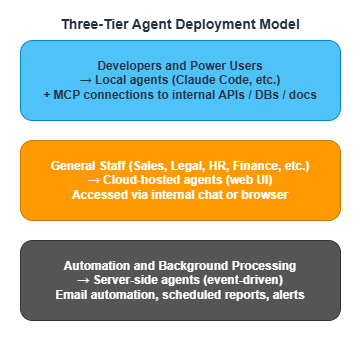
The key insight is not to give everyone the same tool, but to choose the right interface for each user tier. Give developers the flexibility of local agents. Give general staff the accessibility of cloud-hosted interfaces. Give background processes an event-driven automation foundation. This differentiation is what determines how much value AI actually delivers across the organization.
3. Designing the Architecture for an Enterprise AI Agent Deployment
Now that we have the big picture, let's get into the specifics of architecture design. The question is: where do you start, and in what order do you build? I'll break this down into three steps.3.1 Where Internal Resources Live and How to Access Them
First, let's establish the baseline: where are the internal resources your AI agents will use, and how will agents access them? Most organizations will recognize the following patterns.| Internal Resource | Typical Storage | How AI Agents Access It |
|---|---|---|
| Proposals, contracts, policies | S3 / SharePoint / GCS | RAG (embedding → search engine/vector DB → semantic search) |
| FAQs | Directly loaded into search engine/vector DB | Semantic search |
| Internal wiki | Confluence, etc. | Via API or crawl → RAG |
| Business data (customers, sales, etc.) | RDS / DynamoDB / BigQuery | MCP Server → SQL/API |
| Email and chat history | Existing SaaS | API integration (access control required) |
The important thing here is not to try to handle everything with a single approach. Documents go through RAG. Structured data goes through SQL/API. Real-time communication data goes through API integration. Choose the access method to match the nature of the resource.
3.2 A Phased Deployment Approach
Rather than building everything at once, the standard approach is to progress through three steps incrementally. Trying to build a "full stack" solution in the PoC phase doesn't just slow down delivery — it makes it nearly impossible to isolate what's working from what isn't.Step 1 — Build the RAG Foundation
The right place to start is a RAG pipeline for internal documents. Chunk internal documents, embed them as vectors, and store them in a search engine (Azure AI Search, Amazon Kendra, Vertex AI Search, etc.) or vector database (Amazon OpenSearch Serverless, etc.). This becomes the shared knowledge layer for all agents.The standard practice is to start with content that's easy to measure impact from and has lower sensitivity — FAQs and internal manuals are ideal first targets.
Step 2 — Build Two Access Paths
Once the RAG foundation is running, build two access paths to it.- Cloud-hosted UI: Use Bedrock AgentCore, Microsoft Foundry, or Vertex AI Agent Builder to create a chat interface for general staff connected to the Step 1 RAG foundation.
- MCP Server: For developers and power users. Establish a path for local agents to access the same RAG foundation and APIs.
Providing multiple access paths to the same underlying knowledge base lets you offer the right interface to each user tier while keeping the data consistent across all of them.
Step 3 — Centralize Permission Management
Finally, get permissions in order. Use IAM, Entra ID, Workforce Identity Federation, or equivalent systems to apply the same access policies to agent-mediated access as to direct access. Ensuring that AI agents can't violate existing access policies — "contracts are legal-only," "payroll data is HR-only" — is a prerequisite for rolling out to the broader organization.Permission control is one of the central themes of this series, and will be covered in depth in Part 2.
3.3 Decision Criteria for Common Design Questions
Here are the points where early-stage deployments tend to get stuck, along with guidance on how to think through them.| Decision point | Guidance |
|---|---|
| Bedrock vs. Foundry vs. Vertex AI vs. self-hosted | Align with your existing cloud infrastructure. In MS365 environments, prioritize Azure. |
| RAG vs. fine-tuning | Start with RAG. Only consider fine-tuning if accuracy in a specific domain proves insufficient. |
| Bulk document ingestion vs. phased ingestion | Phased. Start with FAQs, then policies, then proposals — expand the scope incrementally while measuring impact. |
| One all-purpose agent vs. a fleet of specialized agents | Specialized agents. Separating "contract review," "FAQ answering," and "proposal drafting support" gives you better accuracy and cleaner permission management. |
The last point deserves emphasis. An all-purpose agent may seem convenient at first glance, but it creates complex permission management and bloated prompts. Separating agents by use case tends to be more manageable over the long run.
4. Overview of the Three Major Cloud AI Agent Platforms
Now for the main event. Let's look at what each of Azure, AWS, and Google Cloud offers in terms of AI agent platforms. As you read, think not just about what each platform can do, but about which type of organization it's best suited for.4.1 Microsoft Foundry (Azure)
Formerly Azure AI Studio → Azure AI Foundry → Microsoft Foundry (renamed at Ignite in November 2025). Positioned as an "AI app and agent factory," it stands alongside Microsoft 365 and Microsoft Fabric as the third pillar of Microsoft's enterprise platform.Core Components
Microsoft Foundry is built around five core components. Foundry IQ and the Foundry Control Plane are particularly notable as enterprise differentiators.| Component | Role |
|---|---|
| Foundry Agent Service | Managed runtime for agents. Also supports OSS frameworks like LangGraph and CrewAI. |
| Foundry Models (Model Router) | Unified endpoint for 11,000+ models. Supports automatic cost/performance routing. |
| Foundry IQ | Next-generation RAG knowledge system (Public Preview). Backed by Azure AI Search, with connectors for OneLake, SharePoint, Azure Blob Storage, and more. Via OneLake shortcuts, it can also reference data in S3 and Snowflake. |
| Foundry Tools | Agent integration for Azure AI Services (speech, video, image, document, text). |
| Foundry Control Plane | RBAC, VNET isolation, Purview integration, tracing, and evaluation capabilities. |
Available LLMs
| Provider | Key Models |
|---|---|
| Anthropic | Claude Opus 4.6, Claude Sonnet 4.6, Claude Haiku 4.5 |
| Meta | Llama 4 Scout, Llama 4 Maverick, Llama 3.1-405B |
| Mistral AI | Mistral Large 3, Mistral Small, Codestral |
| DeepSeek | DeepSeek-R1, DeepSeek-V3 |
| OpenAI | GPT-5.4, GPT-4o, o3, o4-mini |
| Others | Cohere, Stability AI, NVIDIA, Hugging Face, etc. |
Key Strengths in MS365 Environments
Foundry's biggest differentiator is its native integration with the MS365 ecosystem. Where other clouds require configuration to connect, Azure starts out connected.- Entra ID, SharePoint, Teams, and Microsoft Fabric are all part of the same ecosystem
- Automatic recognition of SharePoint ACLs
- Integration with Microsoft Copilot Studio
- Workflow automation via Power Automate / Logic Apps (1,400+ connectors)
4.2 Amazon Bedrock AgentCore (AWS)
GA'd in October 2025. This is a managed platform that unifies the building, deployment, and operation of agents. True to AWS's character, it follows a "building blocks" design philosophy — you combine AgentCore components with related Bedrock capabilities to assemble what you need.Core Components
| Component | Role |
|---|---|
| AgentCore Runtime | Managed execution environment for agents. Supports long-running sessions up to 8 hours. |
| AgentCore Identity | Federated authentication with external IdPs (including Entra ID). JWT validation. |
| AgentCore Gateway | MCP-compatible tool connection gateway. Managed hosting with IAM/OAuth authentication. |
| AgentCore Memory | Short-term and long-term memory management for agents. |
| AgentCore Policy | Policy controls including content filtering, topic restrictions, and PII detection. |
| AgentCore Evaluations | Agent quality evaluation (helpfulness, tool selection accuracy, hallucination rate, etc.). |
| Knowledge Bases※ | RAG pipelines from S3, SharePoint, and other sources. Vector DB integration. |
※ Knowledge Bases is a separate Bedrock capability from AgentCore, but it's commonly used together when building agents.
Available LLMs
| Provider | Key Models |
|---|---|
| Anthropic | Claude Opus 4.6, Claude Sonnet 4.6, Claude Haiku 4.5 |
| Meta | Llama 4 Scout, Llama 4 Maverick |
| Mistral AI | Mistral Large 3 |
| Amazon | Amazon Nova Premier, Nova Pro, Nova Lite, Nova Micro |
| AI21 Labs | Jamba 1.5 Large, Jamba 1.5 Mini |
| Cohere | Command R+ |
Notable Points
A major advantage of Bedrock AgentCore is framework flexibility. You can bring in any OSS framework you like — LangGraph, CrewAI, OpenAI Agents SDK, and so on. AgentCore Identity also supports OIDC federation with external IdPs like Entra ID and Okta.However, SharePoint ACL is not supported at the platform level. This is a significant constraint when building internal document RAG in an MS365 environment. Details are covered in Part 2.
4.3 Vertex AI Agent Builder / ADK (Google Cloud)
Vertex AI Agent Builder is an integrated platform for building, deploying, and managing enterprise AI agents. The Agent Development Kit (ADK) serves as the core framework, and notably, it's published as open source.Core Components
| Component | Role |
|---|---|
| Agent Development Kit (ADK) | OSS agent framework. Supports Python, Java, Go, and TypeScript. |
| Agent Engine | Production-grade managed runtime. Automatic scaling, short-term and long-term memory. |
| Vertex AI Search | Fully managed search engine. Connectors for SharePoint, Confluence, Slack, and more. |
| Model Garden | 200+ models (Gemini, Claude, Llama, etc.) |
| Model Armor | Blocks prompt injection attacks. |
| Agent Identity | Registers agents as Cloud IAM principals. Enforces the principle of least privilege. |
| Gemini Enterprise (formerly Google Agentspace) | Integrated enterprise search and agent platform. |
Available LLMs
| Provider | Key Models |
|---|---|
| Gemini 3.1 Pro (Preview), Gemini 3 Flash (Preview), Gemini 2.5 Pro/Flash, Imagen, Veo | |
| Anthropic | Claude Opus 4.6, Claude Sonnet 4.6, Claude Haiku 4.5 |
| Meta | Llama 4 Maverick, Llama 4 Scout |
| Mistral AI | Codestral |
| Others | AI21 Labs, Gemma, PaliGemma, etc. |
Google Cloud's Unique Strengths
Where Google Cloud differentiates itself most from the other two is in multimodal capability and cost efficiency.| Capability | Description |
|---|---|
| Google Search Grounding | Grounds responses in real-time web search results. Effective for reducing hallucinations. A unique capability not available on other clouds. |
| Web Grounding for Enterprise | For regulated industries (finance, healthcare, public sector). VPC-SC integration and log control. |
| Multimodal | The broadest range: Gemini 3.1 Pro / 3 Flash / 2.5 Pro / 2.5 Flash (up to 1M token context), Gemini Live API (bidirectional audio/video), Veo (video generation), Imagen (image generation), and Chirp (speech). |
| BigQuery integration | Tight coupling between large-scale data analytics and AI agents. |
| VPC Service Controls | Free data exfiltration protection (equivalent to Azure/AWS Private Endpoints, plus additional safeguards). |
| A2A Protocol | Advocates for an open standard for agent-to-agent communication (now transferred to the Linux Foundation). |
4.4 Side-by-Side Comparison of All Three Platforms
Here's a consolidated comparison table of the three platforms. Use it to check where each platform is strong or weak relative to your organization's requirements.| Evaluation Axis | Microsoft Foundry | AWS Bedrock AgentCore | GCP Vertex AI |
|---|---|---|---|
| Model count | 11,000+ | Dozens (covers major models) | 200+ |
| Agent framework | Semantic Kernel + OSS | Any OSS supported | ADK (OSS) |
| SharePoint integration | ◎ Native | △ Connector (no ACL) | ○ Via Gemini Enterprise |
| Entra ID integration | ◎ Native | ○ AgentCore Identity | ○ Workforce Identity Federation |
| Multimodal | ○ GPT-5.4 | ○ Nova | ◎ Gemini (most comprehensive) |
| Network isolation | VNET | VPC | VPC-SC (free) |
| Teams integration | ◎ | ✕ Custom implementation | ✕ Custom implementation |
| Pricing model | Pay-as-you-go + Provisioned | Pay-as-you-go + Provisioned Throughput | Pay-as-you-go + CUD (up to 55% off) |
How to read this table: Having more ◎ marks doesn't make a platform "the best." What matters is whether it aligns with your organization's requirements. If you're on MS365 and SharePoint permission control is critical, Azure is the natural choice. If multimodal capability or cost optimization is the priority, GCP stands out. If integrating with existing AWS infrastructure or leveraging Claude is key, AWS is the right call. Each platform has its own home turf.
4.5 Sidebar — "Can't we just stand up Azure AD inside an AWS/GCP VPC?"
A natural follow-up question when looking at the table above is: "If Entra ID integration is the decisive factor, can't we just deploy Azure AD inside an AWS or GCP VPC and sync the Entra ID content there? Wouldn't that close the gap?" The short answer is no, and it's worth clarifying why — because the premise of the question is technically incorrect:- Entra ID is a global SaaS IDP and cannot be installed in any VPC (not even an Azure VNET). What can be placed inside an AWS/GCP VPC is a classical AD DS — self-hosted Windows Server AD, AWS Managed Microsoft AD, or Google Cloud Managed Service for Microsoft AD. Microsoft Entra Domain Services (the managed AD DS offering) is Azure-only.
- SharePoint ACLs do not live in AD DS. They live in Entra ID + SharePoint Online, together with Microsoft 365 security groups and Purview sensitivity labels. A VPC-resident AD DS — no matter how aggressively synced — will not carry any of that metadata.
- The identity-layer affinity is already solved without a VPC AD. AWS Bedrock AgentCore Identity and GCP Workforce Identity Federation already federate directly with Entra ID over OIDC/SAML. The gap between Foundry and the other two is at the connector / ingestion layer (how SharePoint ACLs are propagated into the retrieval index), which a VPC AD cannot influence.
In other words, the ◎/○/△ marks in the "SharePoint integration" and "Entra ID integration" rows above reflect architectural realities that won't change by moving a directory service into a VPC. Part 2 revisits this in more operational detail.
5. Part 1 Wrap-Up — What to Read Next
In Part 1, we covered the overall landscape of enterprise AI agent environments, the three-tier agent deployment model, a phased deployment approach, and a comparison of the three major cloud platforms.By now, you should have a solid sense of what each cloud excels at. But the most important and most challenging question — how to carry over internal document access control (ACL) to AI agents — hasn't been addressed yet.
Part 2: Implementing SharePoint ACL and Access Control tackles that question head-on. We'll go deep on the differences in ACL support across clouds, the details of Microsoft Foundry's Path A and Path B, and strategies for handling mixed-license environments — all at the implementation level.
6. Related Articles in This Series
- Part 1: Comparing the Three Major Clouds and Designing Your Architecture (this article)
- Part 2: Implementing SharePoint ACL and Access Control
- Part 3: Cloud Selection, Cost, and Operational Considerations
This article reflects the author's personal research and synthesis of publicly available information as of 2025–2026, and represents a generalized architectural perspective. Every organization has different internal circumstances and use cases, so the content here does not apply universally. The author's interpretations and assumptions may contain errors. When evaluating for your own organization, always consult each provider's official documentation and make decisions based on your specific context.
References:
Tech Blog with curated related content
Microsoft (Azure / Microsoft Foundry):
Microsoft Foundry on Azure
What's new in Microsoft Foundry | Oct-Nov 2025 (Microsoft DevBlogs)
What's new in Microsoft Foundry | Dec 2025 & Jan 2026 (Microsoft DevBlogs)
Foundry IQ: Unlocking knowledge retrieval for agents (Microsoft TechCommunity)
Foundry Models from partners and community (Microsoft Learn)
Microsoft Copilot Studio vs. Microsoft Foundry (Microsoft TechCommunity)
AWS (Amazon Bedrock AgentCore):
Amazon Bedrock AgentCore - Identity with Microsoft Entra ID (AWS Docs)
Introducing Amazon Bedrock AgentCore Identity (AWS ML Blog)
Amazon Bedrock AgentCore adds Quality Evaluations and Policy Controls (AWS Blog)
Google Cloud (Vertex AI / Gemini):
Vertex AI Agent Builder (Google Cloud)
Agent Development Kit (ADK) Documentation (Google)
Vertex AI Search (Google Cloud)
Model Garden Overview (Google Cloud Docs)
Grounding with Google Search (Google Cloud Docs)
Web Grounding for Enterprise (Google Cloud Docs)
Multimodal AI (Google Cloud)
VPC Service Controls Overview (Google Cloud Docs)
Written by Hidekazu Konishi