Enterprise AI Agent Environment Design Notes Part 2: Implementing SharePoint ACL and Permission Controls
First Published:
Last Updated:
- Part 1: Comparing the Three Major Clouds and Designing Your Architecture
- Part 2: Implementing SharePoint ACL and Permission Controls (this article)
- Part 3: Cloud Selection, Cost, and Operational Considerations
Disclaimer: This article reflects the author's personal research and synthesis of publicly available information as of 2025–2026. It represents a general architectural perspective based on the author's individual viewpoint. Every organization has its own internal circumstances, use cases, and existing system landscape, so the approaches described here are not universally applicable. Errors may be present. When evaluating implementation options, always consult the official documentation from each cloud provider and make decisions appropriate to your own organization's context.
1. Introduction — What Part 2 Covers
In Part 1, we compared the AI agent platforms of the three major cloud providers and mapped out each one's strengths.Part 2 dives deep into what I consider the most critical topic in this series: carrying SharePoint ACLs (access control lists) through to AI agents. This is a concern that tends to be overlooked when building enterprise AI agent environments, yet it carries major implications both technically and from a compliance standpoint.
2. Propagating SharePoint ACLs to AI Agents — The Biggest Technical Challenge
Imagine you've built an AI chatbot that searches internal documents and answers questions. The worst-case scenario is this: the AI surfaces content from documents the user should never have been allowed to see. HR evaluation forms leaking to general staff. M&A-related confidential documents becoming searchable by everyone in the company. This is both a technical failure and a serious compliance violation.During the proof-of-concept phase, access control tends to get pushed to "we'll handle it later." But for production environments, permission controls must be built into the design from the very beginning.
2.1 ACL Support Comparison Across Four Services
So how do the cloud services actually handle this problem? The comparison table below gives you the full picture.| Aspect | MS365 Copilot Agent | Microsoft Foundry | Amazon Bedrock AgentCore | Google Cloud (Gemini Enterprise) |
|---|---|---|---|---|
| SharePoint ACL auto-inheritance | ◎ Fully native | ○ Path A: equivalent / △ Path B: partial | ✕ Not supported | △ Via Gemini Enterprise (periodic sync) |
| SharePoint group support | ◎ | ○ Path A / ✕ Path B | ✕ | ✕ Not supported |
| Entra ID authentication | Native | Native (OBO) | ○ AgentCore Identity | ○ Workforce Identity Federation |
| LLM choice | ✕ GPT only | ◎ 11,000+ models | ◎ Claude/Llama, etc. | ◎ Gemini/Claude, etc. 200+ |
| Customizability | △ No-code/Low-code | ◎ Code-first | ◎ Code-first | ◎ Code-first |
| Teams integration | ◎ Native | ✕ Not with SharePoint Tool | ✕ Custom implementation | ✕ Custom implementation |
| VNET/VPC isolation | ✕ | ○ | ○ | ○ (VPC-SC, free) |
| License cost | $30/user/month | Azure pay-as-you-go (+Path A requires Copilot license) | AWS pay-as-you-go | GCP pay-as-you-go |
| ACL freshness | Real-time | Path A: Real-time / Path B: Indexer-dependent | N/A | ID sync: 30min–7d / Entity sync: 3h–7d (real-time sync is Preview) |
2.2 ACL Fidelity Ranking
If we reorganize the table above through the lens of "ACL fidelity," the ranking shakes out like this: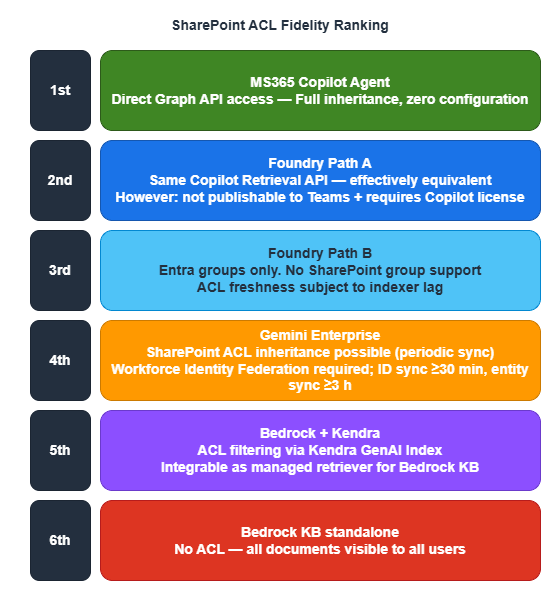
What this ranking reveals is a clear tradeoff: ACL quality and customizability/cost pull in opposite directions. The top two options — with the most complete ACL support — require Copilot licenses and come at significant cost. Everything below has some limitation, but costs less. The right choice comes down to balancing your organization's confidentiality requirements against its budget.
2.3 ACL Limitations in Amazon Bedrock AgentCore
For organizations that run primarily on AWS, this is important to know. AWS official documentation explicitly states the following limitation:
"All data that you sync from your data source becomes available to anyone with bedrock:Retrieve permissions to retrieve the data. This can also include any data with controlled data source permissions."
In other words, once content is crawled from SharePoint, ACL information is discarded. Anyone with the bedrock:Retrieve IAM permission can search across all documents. This is not a bug — it's by design.If you need ACL enforcement in an AWS environment, consider the following options:
| Approach | ACL support | Implementation cost | Constraints |
|---|---|---|---|
| Amazon Q Business | ○ SharePoint ACL auto-inheritance | Low (managed) | $3–20/user/month (Lite/Pro), fixed LLM |
| Kendra GenAI Index → Bedrock LLM | ○ UserContext ACL filter (partial when integrated with Bedrock KB) | Medium (managed retriever) | Kendra GenAI Index can be integrated as a managed retriever for Bedrock KB. Supports 43 connector types. For fully reliable ACL filtering, direct use of the Retrieve API or routing through Amazon Q Business is preferable |
| Bedrock KB + metadata filter | △ Pseudo-ACL (custom) | High | Must build ACL sync yourself. Leak risk |
| Bedrock KB as-is | ✕ | Low | All documents visible to all users |
2.4 A Fundamental Architectural Difference — Why the Gap Exists
Azure (Path B), GCP, and AWS all follow the same basic pattern — "copy SharePoint content into an index and run RAG queries against it" — but they handle permission information in fundamentally different ways. The diagrams below illustrate exactly where they diverge.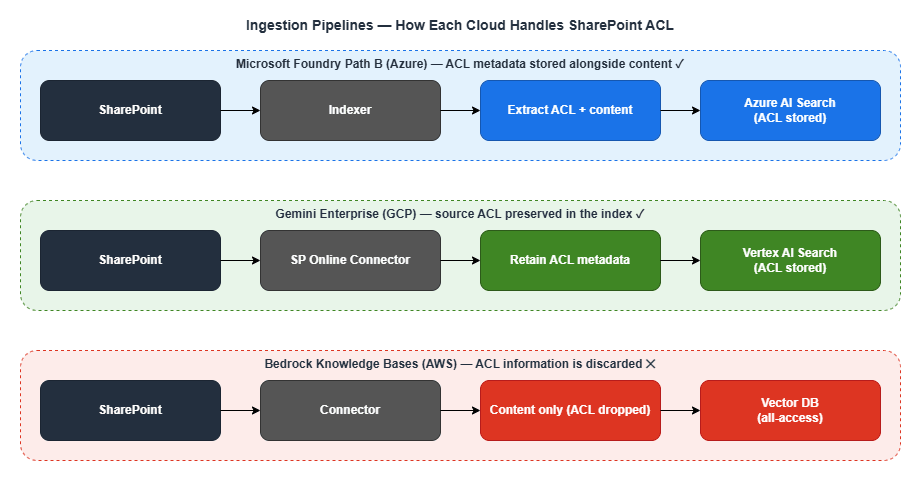
The contrast is stark. Azure and GCP copy content into the index with ACLs attached; AWS copies only the content. This difference in design philosophy is the direct cause of the ACL support gap.
2.5 Permission Control Maturity
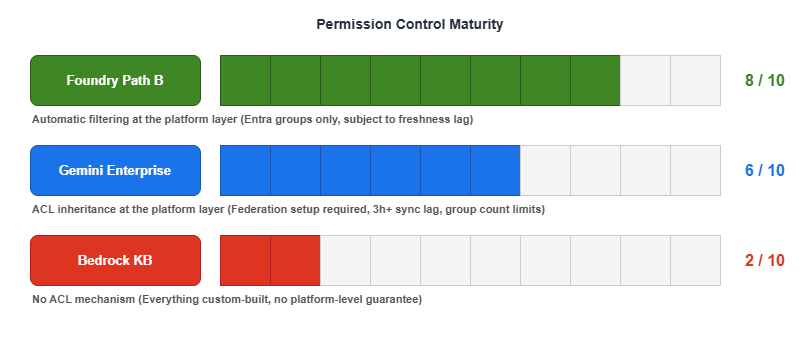
As a rough heuristic: Foundry Path B gets you "80-point ACL coverage automatically," Gemini Enterprise gets you "60-point ACL coverage with extra setup," and Bedrock KB starts you at zero and requires you to build everything from scratch.
When dealing with confidential documents, having ACL enforced at the platform layer — even imperfectly — dramatically reduces risk. Custom-built ACL implementations may appear to work correctly, but edge-case data leaks are an ever-present threat.
2.6 Sidebar — "Can't we just stand up Azure AD inside an AWS/GCP VPC to close the gap?"
Once you see the ranking above (Foundry Path B ≈80 / Gemini Enterprise ≈60 / Bedrock KB 0), a natural mitigation idea surfaces: "If the problem is Entra ID affinity, what if we deploy Azure AD inside an AWS or GCP VPC and sync the Entra ID content there? Wouldn't Bedrock or Vertex catch up to Foundry?"This is an intuitive question but the premise is technically incorrect, and the proposed workaround does not actually address the ACL propagation gap. There are three independent reasons.
(1) Entra ID cannot be installed in a VPC in the first place. Entra ID is a global SaaS IDP operated by Microsoft. It cannot be deployed inside any VPC — not AWS's, not GCP's, and not even Azure's own VNET. What can be placed in a VPC is a classical AD DS:
| Directory service | Can be placed in AWS/GCP VPC? | Notes |
|---|---|---|
| Microsoft Entra ID | ✕ | Global SaaS, no VPC deployment possible |
| Microsoft Entra Domain Services (managed AD DS) | ✕ | Azure-only |
| Self-managed Windows Server AD DS | ○ | You run the EC2/GCE instances yourself |
| AWS Managed Microsoft AD | ○ (AWS only) | Fully managed AD DS inside the VPC |
| Google Cloud Managed Service for Microsoft AD | ○ (GCP only) | Fully managed AD DS inside the VPC |
With Entra Connect / Entra Cloud Sync, this VPC-resident AD DS can be bridged to Entra ID — but the primary sync direction is AD DS → Entra ID. Writeback from Entra ID to AD DS is limited to password, group-membership, and device writeback; the bulk of Entra ID content does not flow down into an AD DS.
(2) SharePoint ACLs do not live in AD DS — they live in Entra ID + SharePoint Online. This is the crux of why a VPC AD does not solve the problem. The ACL information AI agents need to honor is held in SharePoint Online's own permission store (per-item ACLs, "Limited Access" inheritance, sharing links, etc.), Microsoft 365 groups and Entra ID security groups, and Purview sensitivity labels attached to documents. None of these live in AD DS. Even if you fully sync every user and group into a VPC-resident AD DS, SharePoint-native ACLs and Purview labels will not appear there — which means a fully populated VPC AD DS still leaves Bedrock Knowledge Base and Vertex AI Search without ACL metadata at ingest time, exactly the same problem described in §2.1–§2.4.
(3) The identity-layer affinity is already solved — the gap is in the connector layer. AWS Bedrock AgentCore Identity and GCP Workforce Identity Federation already federate directly with Entra ID over OIDC/SAML. There is no identity-layer gap that a VPC AD could fill. The gap that makes Foundry Path B score ≈80 while Bedrock KB scores 0 is at the connector / ingestion layer — specifically, how SharePoint ACLs are propagated into the retrieval index. That is a function of the SharePoint connector design (Bedrock KB discards ACL at crawl time by design; Gemini Enterprise preserves it with periodic sync lag), not of where a directory service happens to sit.
| Aspect | Does a VPC-resident AD DS help? | Reason |
|---|---|---|
| SharePoint ACL propagation | ✕ | ACLs live in SPO/Entra ID, not AD DS |
| Purview sensitivity labels | ✕ | Label metadata is not synced to AD DS |
| IdP federation with AWS/GCP runtimes | ✕ (not needed) | Already solved via OIDC/SAML to Entra ID directly |
| Kerberos/NTLM for domain-joined Windows workloads | ○ | But this is unrelated to AI-agent ACL |
| SQL Server Windows authentication | ○ | Classical on-prem-style workload, not agent-layer |
| Closing the Foundry Path B ↔ Bedrock KB gap | ✕ | Root cause is the connector, not the IdP |
Bottom line: the ACL propagation gap is a connector problem, not an IdP problem. If stronger ACL parity on AWS is required, the realistic path is Amazon Q Business or Kendra GenAI Index (which do preserve SharePoint ACLs by design); on GCP, Gemini Enterprise's SharePoint connector with its known sync-lag trade-offs; or the hybrid pattern covered in Part 3 — Azure as the ACL enforcement layer, AWS/GCP as inference or multimodal complements.
3. Microsoft Foundry's SharePoint Connection — A Deep Dive into Path A and Path B
Now that the importance of ACL should be clear, let's take a closer look at the two connection methods Azure offers (Path A and Path B). Despite similar-sounding names, they differ significantly in architecture, cost structure, and ACL rigor.3.1 Path A: Remote (via Copilot Retrieval API)

Path A is a "leave data in SharePoint and fetch it in real time at query time" approach. When the agent processes a query, it invokes the SharePoint Tool, which calls the Microsoft 365 Copilot Retrieval API on behalf of the user (On-Behalf-Of). Because SharePoint itself enforces permissions, ACLs are inherited in full.
Advantages:
- Full ACL inheritance (same API as MS365 Copilot)
- SharePoint group support
- Sensitivity label (Purview) support
- Real-time ACL reflection
Constraints:
- Cannot be used when publishing to Teams (OBO and managed identity conflict)
- Only one SharePoint tool per agent (Preview limitation)
- Restricted to the same Entra tenant
- Requires an M365 Copilot license per user (the biggest cost barrier — though a pay-as-you-go (PAYG) model is available in Preview that does not require licenses for every user. Even under PAYG, at least one M365 Copilot license must exist in the tenant. PAYG also does not support user-level data sources such as OneDrive)
3.2 Path B: Indexed (via Azure AI Search)
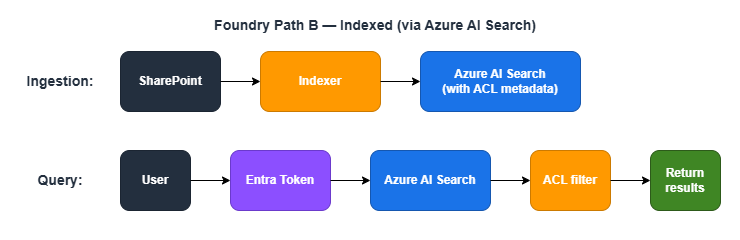
Path B is a "pre-copy SharePoint content into Azure AI Search and apply ACL filters at search time" approach. Since it does not require a Copilot license and runs on pay-as-you-go pricing, it is significantly more cost-effective than Path A.
Group types supported for ACL:
- Entra security groups: ○
- M365 groups: ○
- Mail-enabled security groups: ○
- SharePoint native groups: ✕ Not supported (a notable gotcha)
Advantages:
- No M365 Copilot license required (Azure pay-as-you-go only)
- Stable search performance (content is pre-indexed)
Constraints:
- No SharePoint group support (Entra groups only)
- ACL freshness depends on indexer run frequency
- ACL entry limit per file: 1,000
- When chunking (split skill) is used, ACL properties must be explicitly mapped to each chunk
3.3 Path A vs. Path B Comparison
Here's a side-by-side summary of the key differences to help you decide which path fits your needs.| Dimension | Path A (Remote) | Path B (Indexed) |
|---|---|---|
| Data location | Remains in SharePoint | Copied to Azure AI Search |
| Data freshness | Real-time | Depends on indexer schedule |
| ACL enforcement | SharePoint native (complete) | Entra groups only |
| Sensitivity labels | Applied as-is | Preview support |
| M365 Copilot license | Required per user | Not required |
| SharePoint group support | Full support | Not supported |
| File format support | Semantic search is limited | Broader format coverage |
| Implementation complexity | Low | High |
A practical rule of thumb: Choose Path B when cost is the priority; choose Path A when ACL strictness is non-negotiable. A two-tier architecture — Path B as the baseline, with Path A applied only to highly sensitive documents — is also a valid option. Weigh your organization's security requirements against its cost constraints and decide accordingly.
3.4 Azure AI Search ACL Security Trimming — Under the Hood
Let's look more closely at how Path B works internally. This feature was added in the Preview API from November 2025 (2025-11-01-preview), and as of April 2026 it is still in Public Preview. For production workloads, re-evaluate after GA.Ingestion process:
- The SharePoint indexer extracts user/group IDs at each permission level
- Effective ACLs are computed per file
- ACL metadata is stored in the index alongside the content
- Configured via
indexerPermissionOptionsin the data source definition - Required app permissions:
Files.Read.All+Sites.FullControl.All(orSites.Selected) - A managed identity (secretless) configuration is recommended
Query process:
- The user's Entra token is sent via the
x-ms-query-source-authorizationheader - Azure AI Search matches the calling Entra principal against stored ACL metadata
- Results are automatically trimmed
- If ACL evaluation fails, a 5xx error is returned — no partial results are returned under any circumstances
That last point is worth emphasizing. When ACL evaluation fails, the system does not silently fall back to returning all results — it returns an error and nothing else. This reflects a security-first design philosophy.
4. Connecting SharePoint from Google Cloud
Let's also look at what happens when you're connecting to SharePoint from a cloud other than Azure. Google Cloud is not as native an integration as Azure, but it does offer a path to SharePoint ACL inheritance through Gemini Enterprise (formerly Agentspace).4.1 Connection Methods
Option 1: Gemini Enterprise (Managed)

This approach uses a dedicated SharePoint Online connector that preserves source system ACLs at index creation time. One important constraint: ACL must be enabled when the data store is created and cannot be changed afterward. Sync intervals for identities (permissions) and entities (document content) can be scheduled independently. Identity sync options are: 30 minutes / 1 hour / 3 hours / 6 hours / 12 hours / 1 day / 3 days / 5 days / 7 days. Entity sync options are: 3 hours / 6 hours / 12 hours / 1 day / 3 days / 5 days / 7 days. Real-time sync (via webhook) is also available in Public Preview, allowing change events to be reflected within minutes — though periodic-only sync still introduces lag compared to Azure's near-real-time updates.
Option 2: Vertex AI RAG Engine (For Developers)
ACL functionality is not included by default and requires custom implementation. This option offers more development flexibility, but building permission management adds implementation cost.4.2 Technical Details of Entra ID Integration
To make SharePoint ACLs work from Google Cloud, an additional configuration layer called Workforce Identity Federation is required.| Item | Details |
|---|---|
| Connection protocol | SAML 2.0 or OIDC (OIDC recommended) |
| Group mapping | Up to 100 groups (expandable to 400) (confirmed in Google Cloud IAM official documentation) |
| Cost | Free (Cloud Logging audit logs billed separately) |
| MFA | Entra ID conditional access policies apply as-is |
| Setup complexity | Medium-High (Azure App Registration + GCP Workforce Pool setup required) |
4.3 Caveats
- Identity federation overhead: Setting up both Entra ID and Workforce Identity Federation is mandatory. Unlike Azure, this is not a native integration
- Periodic sync lag: ID sync can be configured as frequently as every 30 minutes; entity sync as frequently as every 3 hours. Entity sync lag is notable compared to Azure AI Search (which operates on a scale of minutes to hours). Real-time sync (webhook) is available in Public Preview
- Group count limit: Group mapping is capped at 100 (expandable to 400). This may not be sufficient for large organizations
- Service maturity: SharePoint integration is newer and less mature than Azure AI Search
Bottom line: When strict SharePoint ACL inheritance is a top requirement, Google Cloud alone is unlikely to fully satisfy it and is better positioned as a complementary component. That said, a hybrid architecture where Azure handles ACL enforcement and GCP handles inference is a compelling option worth considering.
5. Mixed-License Environments: A Coexistence Strategy
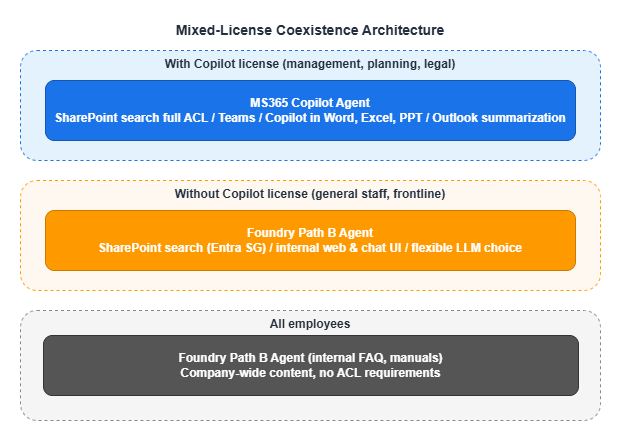
We've covered a lot of technical ground, but real-world organizations face a practical constraint: giving every employee the same license tier simply isn't affordable. MS365 Copilot (Enterprise tier, 300+ users) runs $30 per user per month. For a 1,000-person organization, that's $30,000/month — $360,000/year. Worth noting: M365 base license pricing is scheduled to increase from July 1, 2026 (e.g., E3 from $36 to $39/user/month, E5 from $57 to $60/user/month). The Copilot add-on price of $30/user/month is unchanged, but total cost of ownership including the base license will be affected.So how do you minimize the AI productivity gap when some employees have Copilot licenses and others don't?
5.1 A Sample Coexistence Architecture
5.2 What You Can and Can't Bridge
The key is to understand precisely which gaps between license tiers are technically bridgeable and which are not.Bridgeable Gaps
| Feature | With Copilot | Without Copilot (Path B) | Gap |
|---|---|---|---|
| SharePoint document search | ◎ | ○ (Entra SG only) | Small |
| Internal knowledge Q&A | ◎ | ◎ | None |
| Document summarization / analysis | ◎ | ◎ (equivalent when piped through LLM) | None |
| LLM quality | GPT family only (no model choice) | Claude etc. also available | Path B may have an edge |
Unbridgeable Gaps (Copilot-exclusive features)
| Feature | With Copilot | Without Copilot | Alternative |
|---|---|---|---|
| Copilot inside Word/Excel/PPT | ○ | ✕ | No substitute |
| Outlook summarization / drafting | ○ | ✕ | No substitute |
| Teams meeting recap | ○ | ✕ | No substitute |
| Agent access within Teams | ○ | ✕ | Separate UI as workaround |
In short, SharePoint search and knowledge Q&A can often be well covered by the more cost-efficient Path B, but there is no substitute for Copilot features embedded directly inside Microsoft 365 apps.
5.3 Design Considerations
1. Answer consistency: There is a risk that Copilot users and Path B users receive different answers to the same question. When important documents are updated, increase the indexer run frequency or incorporate manual re-syncing into your operational workflow.2. Unified UI: Consider providing a single chat UI (internal web app) for all employees, with backend logic that detects license status and routes to Path A or Path B accordingly.
5.4 Cost Estimate (1,000-person organization)
| Configuration | Monthly cost |
|---|---|
| Everyone on Copilot | 1,000 × $30 = $30,000/month |
| Mixed (200 on Copilot + 800 on Path B) | 200 × $30 = $6,000 + Azure AI Search & LLM usage ≈ $6,500–8,000/month |
Savings: $22,000–23,500/month, or roughly $270,000/year. One strategy is to concentrate Copilot licenses on roles that derive the most value from built-in Microsoft 365 features — executives, planning, legal — while serving employees whose primary use case is SharePoint search and knowledge Q&A through Path B.
6. Part 2 Summary — What to Read Next
Part 2 covered the biggest technical challenge in enterprise AI agent environments: propagating SharePoint ACLs. We walked through the difference between Azure Foundry Path A and Path B, the constraints of Google Cloud Gemini Enterprise, the ACL limitations of AWS Bedrock KB, and a coexistence strategy for mixed-license environments.At this point, you should have a solid overall picture of how to approach permission control in practice.
Part 3: Cloud Selection, Cost, and Operational Considerations covers use-case-driven cloud selection, inter-agent communication protocols (MCP/A2A), multi-cloud architectures, TCO comparisons, lock-in mitigation strategies, and practical guidance on operations and monitoring.
7. Related Articles in This Series
- Part 1: Comparing the Three Major Clouds and Designing Your Architecture
- Part 2: Implementing SharePoint ACL and Permission Controls (this article)
- Part 3: Cloud Selection, Cost, and Operational Considerations
This article is based on the author's personal research and synthesis of publicly available information as of 2025–2026, and represents a general architectural perspective. Internal circumstances and use cases vary by organization, so the content here does not apply universally. The article reflects the author's interpretation and reasoning and may contain errors. When evaluating implementation options, always consult official provider documentation and make decisions appropriate to your own organizational context.
References:
Tech Blog with curated related content
Microsoft (Azure AI Search / Foundry SharePoint):
Use SharePoint content with agent API - Microsoft Foundry (Microsoft Learn)
Sensitivity labels preservation and SharePoint ACLs in Azure AI Search (Microsoft TechCommunity)
Document-Level Access Control Overview - Azure AI Search (Microsoft Learn)
Use a SharePoint Indexer to Ingest Permission Metadata (Microsoft Learn)
Query-Time ACL and RBAC Enforcement - Azure AI Search (Microsoft Learn)
Microsoft Entra-Based Document Level Security in Azure AI Search (Microsoft TechCommunity)
Manage agent identities with Microsoft Entra ID - Microsoft Foundry (Microsoft Learn)
Agent OAuth flows - On-Behalf-Of flow (Microsoft Learn)
Foundry IQ: Unlocking knowledge retrieval for agents (Microsoft TechCommunity)
AWS (Bedrock Knowledge Bases / Kendra / Q Business):
Connect to Microsoft SharePoint for your knowledge base - Amazon Bedrock (AWS Docs)
End-to-End ACL with Bedrock Knowledge Base (AWS Samples)
SharePoint connector V2.0 - Amazon Kendra (AWS Docs)
Filtering on user context - Amazon Kendra (AWS Docs)
Build an Amazon Bedrock knowledge base with an Amazon Kendra GenAI index (AWS Docs)
Connect SharePoint Online to Amazon Q Business using OAuth 2.0 ROPC flow (AWS ML Blog)
Amazon Bedrock AgentCore - Identity with Microsoft Entra ID (AWS Docs)
Google Cloud (Gemini Enterprise / Workforce Identity Federation):
Gemini Enterprise - Connect SharePoint Online (Google Cloud Docs)
Vertex AI Search Data Source Access Control (Google Cloud Docs)
Google Agentspace / Identity and Permissions (Google Cloud Docs)
Workforce Identity Federation with Microsoft Entra ID (Google Cloud Docs)
Federating Google Cloud with Azure Active Directory (Google Cloud Architecture Center)
Written by Hidekazu Konishi