Regex Master Course - Interactive Recipes by Job Function
First Published:
Last Updated:
Every recipe is given as runnable code in PCRE-compatible, Python
re, or JavaScript syntax. Where engines diverge, the divergence is called out explicitly rather than glossed over. A companion in-browser regex tester (Regex Tester Tool) lets you paste any pattern from this page and see live capture groups and a natural-language explanation, so use it as you read.* The patterns in this article are provided 'as is'. Validate every regex against your actual data before deploying it to production, and run security-relevant patterns under a time budget or against an engine such as Google RE2 that guarantees linear-time matching.
1. Why Most Engineers Get Regex Wrong
1.1 The Three Failure Modes
When engineers ship buggy regex, the bug almost always falls into one of three buckets:- Over-permissive validation. The classic
.+@.+\..+"email validator" matchesa@b.c,' OR 1=1 --@x.y, and any other string with two literal characters, an at-sign, and a dot. It rejects nothing the application actually cared about. - Under-permissive matching. A log parser pinned to a single timestamp format silently drops half the rows when the upstream service rolls out an ISO-8601 update. The pattern compiles, runs, and lies.
- Catastrophic backtracking. A pattern such as
^(a+)+$runs in microseconds onaaaaand hangs the process for minutes onaaaaaaaaaaaaaaaaaaaaX. The bug is invisible until an attacker — or a long log line — finds it.
All three share a root cause: the author did not have a mental model of what the engine was doing. They typed something that "looked right" and stopped reading the moment the first test case passed.
1.2 What This Guide Fixes
By the end of chapter 4 you will have a working model of how a backtracking regex engine searches, why lookarounds are zero-width, and which features your target engine actually supports. By the end of chapter 9 you will recognize the two or three structural shapes that cause ReDoS and know two independent ways to disarm them. The recipe chapters in between are not exhaustive — they are deliberately the patterns that come up in real codebases, with the sharp edges called out.Read the chapters in order on the first pass. Once you know the layout, treat chapters 5 through 8 as a cookbook.
2. Mental Model — How a Regex Engine Actually Works
2.1 NFA vs DFA at a Glance
Two implementation strategies dominate production regex engines:- Backtracking NFA (PCRE, .NET, Java
java.util.regex, Pythonre, ECMAScriptRegExp, Perl, Ruby's default Onigmo). The engine tries one alternative, and on failure rewinds and tries the next. This is the family that supports backreferences, lookarounds, and atomic groups — and the family that can blow up exponentially. - DFA / Thompson NFA simulation (Google RE2,
ripgrepby default, Rustregexcrate, Goregexp, and the original Plan 9 / FreeBSDgrep). The engine tracks all possible states in parallel and runs in time linear in the input length. It cannot support backreferences or general lookarounds because doing so is provably not regular. Note that GNUgrep -Eis in the backtracking family, not this one — the "grep" command on most modern Linux distributions therefore inherits the same catastrophic-backtracking risks as PCRE for sufficiently exotic patterns.
The first family wins on expressive power; the second wins on worst-case performance. Most of this article assumes the first, because that is what languages ship by default. Chapter 10 covers when to switch.
2.2 Backtracking, Step by Step
Consider the patterna(b|c)d matched against the string acd. A backtracking engine processes it as a sequence of states: it commits to a, tries the b branch and fails, rewinds, tries the c branch and succeeds, then commits to d.
Two properties of this trace matter. First, the engine commits to
a and never reconsiders it — anchoring early reduces the search space. Second, the failure of the b branch costs one step of rewind, not a re-scan from the start. The danger appears only when quantifiers nest and the engine has to redistribute matched characters across multiple repeating groups, as in (a+)+. Chapter 9 walks through that case.2.3 Anchors, Boundaries, and the Implicit .*
A regex without anchors does not require a match at the start of the input. Most language APIs expose two relevant functions:re.match/String.matches()/ Javamatcher.matches()— match against the whole string (or, in Python's case, from the start; usere.fullmatchfor full-string match).re.search/String.search()— find a match anywhere in the string.
This distinction is the root of more validation bugs than any other.
re.match(r"\d+", "123abc") returns a match in Python; re.fullmatch(r"\d+", "123abc") does not. Always know which mode you are calling and add ^...$ (or use the full-match API) when validating.\b is a zero-width word boundary — it matches a position, not a character. It transitions between a \w (word character: [A-Za-z0-9_]) and a non-\w character. Be aware that \b is locale-sensitive in some engines and that Python defaults to Unicode \w for str patterns. To force ASCII-only word semantics in Python, pass re.ASCII.3. Core Syntax Cheat Sheet
3.1 Character Classes
* You can sort the table by clicking on the column name.| Token | Meaning |
|---|---|
. | any character except newline (with s / DOTALL flag, includes newline) |
\d \D | digit / non-digit |
\w \W | word character / non-word character |
\s \S | whitespace / non-whitespace |
[abc] | any of a, b, c |
[^abc] | not a, b, c |
[a-z] | range |
\p{L} | Unicode letter (PCRE, Python regex package, ECMAScript with u/v flag) |
Use a custom class
[abc] rather than alternation (a|b|c) for single characters — the engine treats them as a single dispatch instead of three branches.3.2 Quantifiers (Greedy, Lazy, Possessive)
| Form | Behavior | Backtracks? |
|---|---|---|
x* x+ x? x{m,n} | greedy: matches as much as possible, gives back on failure | yes |
x*? x+? x?? x{m,n}? | lazy: matches as little as possible, takes more on failure | yes |
x*+ x++ x?+ x{m,n}+ | possessive: matches as much as possible, never gives back | no |
Possessive quantifiers exist in PCRE, Java, Ruby (Onigmo), and Python 3.11+. They do not exist in ECMAScript or RE2. When unavailable, an atomic group
(?>...) achieves the same effect — see chapter 4.A common mistake:
<.*> against <a><b> matches the entire <a><b> because .* is greedy. The fix is <.*?> (lazy) or, better, <[^>]*> (negated class — no backtracking needed).3.3 Groups, Backreferences, Alternation
(abc)— capturing group, accessible by index (\1in pattern,m.group(1)in code).(?:abc)— non-capturing group. Use this when you only need grouping for quantification or alternation; it avoids polluting the group list and is faster to compile.(?P<name>abc)(Python) /(?<name>abc)(PCRE, ECMAScript, .NET, Java 7+) — named capturing group.\1,\k<name>— backreference: matches the same text the named or numbered group captured. Not supported in RE2.a|b|c— alternation. Try left to right; first match wins.
A subtle alternation rule:
^(cat|category)$ against category matches cat first in some engines and then fails the $ anchor, forcing a retry of category. Order branches longest-first when the prefixes overlap.3.4 Flags Across Engines
| Flag | PCRE | Python re | ECMAScript | RE2 | Effect |
|---|---|---|---|---|---|
i | yes | re.I | i | yes | case-insensitive |
m | yes | re.M | m | yes | ^ and $ match line breaks |
s | yes | re.S | s (ES2018+) | yes | . matches newline |
x | yes | re.X | not native | no | verbose: ignore whitespace and # comments in the pattern |
u | implicit | implicit for str | u | implicit | Unicode mode |
v | no | no | v (ES2024) | no | Unicode sets, set operations, \p{} strict |
U (ungreedy) | yes | no | no | yes | swap greedy and lazy semantics |
When in doubt, read the language's own reference. The above is accurate for the engine versions current at publication; verify against the latest release for cutting-edge flags.
4. Lookahead, Lookbehind, and Atomic Groups
4.1 Why Zero-Width Assertions Exist
Lookarounds let you constrain a match without consuming characters. The four forms are:| Form | Name | Matches if... |
|---|---|---|
(?=...) | positive lookahead | the following text matches ... |
(?!...) | negative lookahead | the following text does not match ... |
(?<=...) | positive lookbehind | the preceding text matches ... |
(?<!...) | negative lookbehind | the preceding text does not match ... |
A typical use is "match a word followed by a colon, but do not consume the colon":
import re
re.findall(r"\w+(?=:)", "alpha:1 beta:2 gamma")
# -> ['alpha', 'beta']
The match positions for
alpha and beta end exactly at the :, leaving the colon available for a separate operation. Without the lookahead you would either have to capture-and-discard (\w+): or post-process the matches.A second use is negative assertions. To find all
TODO comments that are not authored:re.findall(r"TODO(?!\(\w+\))", "TODO refactor; TODO(alice) ship")
# -> ['TODO']
4.2 Variable-Length Lookbehind: Engine Support Matrix
Lookbehind is the place where engines disagree most.| Engine | Variable-length lookbehind? | Notes |
|---|---|---|
| PCRE2 (10.x) | yes | since 10.30 (2017); arbitrary-length |
Python re (3.14) | no | fixed length only; (?<=a*) raises an error |
Python regex (third-party) | yes | drop-in replacement when you need it |
Java java.util.regex | bounded | up to a finite maximum that the engine determines |
| ECMAScript (ES2018+) | yes | V8, SpiderMonkey, JavaScriptCore all support it |
| .NET | yes | arbitrary-length |
| RE2 | no | lookbehind not supported at all |
If you find yourself writing
(?<=\w*) in Python, you have two options: switch to the regex package on PyPI, or restructure the pattern so the variable-length portion is consumed and captured normally. The latter is almost always clearer.4.3 Atomic Groups and Possessive Quantifiers (the ReDoS Antidote)
An atomic group(?>...) is a group that, once matched, refuses to give back any characters. If a later part of the pattern fails, the engine cannot backtrack into the atomic group's interior. This forecloses entire branches of the search tree.Pattern : ^(?>a+)b$
Input : "aaaaX"
Behaviour : a+ greedily matches "aaaa". b fails at position 4.
The atomic group will NOT give back any 'a'. Match fails immediately.Compare with the non-atomic equivalent
^(a+)b$, which would try aaaa, aaa, aa, a — four wasted attempts. On aaaaX the difference is invisible; on aaaaaaaaaaaaaaaaaaaaaaaaaaaaaaX it is the difference between linear and exponential time.Possessive quantifiers are syntactic sugar for atomic groups around a single quantifier:
| Possessive | Equivalent atomic group |
|---|---|
a*+ | (?>a*) |
a++ | (?>a+) |
a?+ | (?>a?) |
a{m,n}+ | (?>a{m,n}) |
If your engine supports either, prefer them around any quantifier whose contents could match overlapping characters with the next part of the pattern. Chapter 9 returns to this.
Try any pattern in this chapter against your own input in the Regex Tester Tool — it surfaces capture groups and a plain-English explanation alongside the match.
4.4 Verbose Mode — Patterns You Can Read Six Months Later
Most regex bugs are not in the engine; they are in the maintainer's head when they read a one-liner from six months ago and cannot reconstruct the intent. Every major engine offers a verbose mode (also called extended or free-spacing mode) that lets you write patterns across multiple lines with embedded comments. The pattern means exactly the same thing; the readability is multiplicatively better.In Python, the flag is
re.VERBOSE (or its inline form (?x)):EMAIL_RE = re.compile(r"""
^ # anchor at start
[A-Za-z0-9._%+\-]+ # local part: letters, digits, dot, underscore, percent, plus, minus
@ # at sign
[A-Za-z0-9.\-]+ # domain labels separated by dots
\.[A-Za-z]{2,} # top-level domain, two or more letters
$ # anchor at end
""", re.VERBOSE)
The semantics are unchanged from the dense version of the same pattern. What changes is that whitespace is no longer significant (so visual alignment is free), and
# introduces a comment to end of line. The two practical caveats: a literal space inside the pattern must now be written \ or [ ], and a literal # must be escaped as \#. Both come up rarely enough that they are easy to remember once you have hit them once.PCRE supports the
x flag with identical semantics, JavaScript does not (you have to build the pattern from a multi-line template literal and pass the resulting string to new RegExp), and Go's regexp uses the same (?x) inline form. For any pattern longer than about thirty characters, verbose mode is the cheapest readability win available, and it costs nothing at runtime — the engine compiles the same machine.A subtler benefit shows up in code review. A reviewer staring at a one-line regex tends to either skip past it or trust the author; a reviewer staring at a verbose pattern with comments naturally reads each clause and notices the one that says
{2,} where the requirement was {2,63}. The pattern format invites the kind of attention that catches off-by-one bugs in regex the same way it does in any other code. Verbose mode is, in a sense, the regex equivalent of breaking a long boolean expression onto multiple lines: same machine, more readable to a future maintainer, and the cost is one flag.5. Recipe Set 1 — Email / URL / Phone Validation
5.1 The "Reasonable" Email Pattern
The single most common regex question on the internet is "validate an email address." The honest answer is that the RFC 5322 grammar is too permissive for any production validator (it allows quoted local parts, comments, and IP-literal domains that you almost certainly do not want), and a regex strict enough to reject obvious garbage will reject some valid addresses. A pragmatic middle ground:import re
EMAIL_RE = re.compile(
r"^[A-Za-z0-9._%+\-]+" # local part
r"@"
r"[A-Za-z0-9.\-]+" # domain labels
r"\.[A-Za-z]{2,}$", # TLD, at least 2 chars
re.IGNORECASE,
)
EMAIL_RE.fullmatch("alice+filter@example.co.jp") # match
EMAIL_RE.fullmatch("a@b") # no match
The rules this enforces and the rules it skips, in order of importance:
- Enforces: an
@, a dot in the domain, alphabetic TLD of two or more characters, no whitespace, no leading/trailing dots in the local or domain parts (because the character class does not include them at the edges). - Skips: the IDN (internationalized domain) case, quoted local parts, IPv6 literals in brackets, and the "real" check — that mail to that address actually delivers. For that, send a confirmation email.
For RFC 5321 SMTP boundaries (max 64 octets for the local part, 255 for the domain), enforce length bounds in code, not in the regex. Length bounds in regex are a common source of ReDoS regressions.
5.2 URL Extraction with PCRE
For finding URLs in text (not validating them strictly), a permissive but practical pattern:pcre2grep -o '\bhttps?://[^\s<>"\)]+' input.txt
The negated class
[^\s<>"\)] stops at the first character that is unlikely to be part of the URL in surrounding prose. It is deliberately not anchored, because URLs in text are surrounded by other content. For full URL parsing — components, percent-decoding, internationalization — use a parser library such as Python's urllib.parse, not a regex.5.3 E.164 Phone Numbers
E.164 is the international phone number standard: a+, a country code (1 to 3 digits), and a subscriber number, with the total digit count between 8 and 15.const E164 = /^\+[1-9]\d{7,14}$/;
E164.test("+819012345678"); // true
E164.test("+0123456789"); // false (country code cannot start with 0)
E164.test("123-456-7890"); // false (no '+', has dashes)
For input that may contain spaces, dashes, or parentheses (common in user input), normalize first by stripping
[\s\-\(\)] and then validate with the strict pattern above. Do not try to make a single regex handle both — the pattern stops being readable before it stops being wrong.5.4 IPv4, IPv6, and CIDR Range Patterns
IP address validation is the canonical example of do not write your own regex when a library exists. Python'sipaddress, JavaScript's net module (Node), and Go's netip all parse and normalize addresses faster than any pattern, with full understanding of zone identifiers and zero-compression. But you still need regex for two jobs: extracting candidates from unstructured text (logs, support tickets, threat-intel feeds), and triaging input before passing it to the parser.A pragmatic IPv4 pattern that rejects octet values above 255 without the parsing library:
IPV4 = re.compile(
    r"\b(?:(?:25[0-5]|2[0-4]\d|[01]?\d?\d)\.){3}"
    r"(?:25[0-5]|2[0-4]\d|[01]?\d?\d)\b"
)
The four octet groups each match
0–255 by enumerating the three valid hundreds-ranges. The \b word boundaries stop the pattern bleeding into longer numeric strings (10.0.0.1234 would still partially match without them, capturing 10.0.0.123; word boundaries make the false positive obvious to a reviewer). The pattern also accepts leading-zero octets such as 010.0.0.1, which some inet_aton implementations interpret as octal — if you need strict decimal-only semantics, layer the standard library's ipaddress parser over the regex output.IPv6 is harder. The full grammar from RFC 4291 includes eight 16-bit groups separated by colons, an optional
:: shorthand for one run of zero groups, optional zone identifiers (%eth0), and an IPv4-mapped suffix (::ffff:192.0.2.1). A regex that handles every form runs to roughly 800 characters and is unmaintainable. The pragmatic compromise is a permissive extractor and a strict library validator:IPV6_LOOSE = re.compile(
r"(?<![\w:])" # left boundary, no preceding hex/colon
r"(?:[0-9A-Fa-f]{1,4}:){2,7}" # at least two colon-separated groups
r"[0-9A-Fa-f]{0,4}"
r"(?![\w:])", # right boundary
re.ASCII,
)
# Then validate each candidate with the standard library.
import ipaddress
for m in IPV6_LOOSE.finditer(text):
try:
ipaddress.IPv6Address(m.group())
except ValueError:
continue
yield m.group()
CIDR notation adds
/N after the address, where N is 0–32 for IPv4 and 0–128 for IPv6. Append (?:/(?:3[0-2]|[12]?\d)) to the IPv4 pattern, or run the candidate through ipaddress.ip_network() for the canonical answer.For private-range detection — "is this address inside RFC 1918?" — do not write a regex. Use
ip_network("10.0.0.0/8").supernet_of(addr) style checks. The maintenance cost of a regex catalog of all reserved ranges (RFC 5735, RFC 6890, link-local, multicast, ULA) is much higher than the parsing cost.6. Recipe Set 2 — Log Parsing and Extraction
6.1 Apache / Nginx Combined Log
The Apache "combined" log format is:%h %l %u %t \"%r\" %>s %b \"%{Referer}i\" \"%{User-Agent}i\"A named-capture pattern for it:
import re

COMBINED = re.compile(
    r'^(?P<ip>\S+)\s'
    r'(?P<ident>\S+)\s'
    r'(?P<user>\S+)\s'
    r'\[(?P<time>[^\]]+)\]\s'
    r'"(?P<request>[^"]*)"\s'
    r'(?P<status>\d{3})\s'
    r'(?P<bytes>\d+|-)\s'
    r'"(?P<referer>[^"]*)"\s'
    r'"(?P<agent>[^"]*)"$'
)

m = COMBINED.match(line)
if m:
    record = m.groupdict()
Three points worth absorbing:
- Negated classes over greedy
.*for bracketed and quoted fields.[^\]]+cannot run past the closing bracket, so it cannot backtrack into adjacent fields. \d+|-for the bytes field because Apache logs-instead of0when no body was sent.^...$anchoring. Without the anchors, a malformed line could match a substring and silently corrupt your parse.
6.2 JSON-Lines Selective Extraction
Real JSON should be parsed with a JSON library, but for ad-hoc grep over JSON-Lines logs a regex is faster and good enough. To extract thelevel field from each line:grep -oP '(?<="level":")[^"]+' app.log
The lookbehind
(?<="level":") anchors the match to the field name without consuming it; the negated class [^"]+ stops at the closing quote. This works because PCRE supports variable-length-bounded lookbehind. The same idiom in Python:re.findall(r'(?<="level":")[^"]+', line)
For nested or escaped JSON, fall back to
json.loads — this regex is for log triage, not parsing.6.3 CloudWatch Logs Insights parse Pattern
CloudWatch Logs Insights' parse command accepts a regex with named captures of the form (?<name>...). Extracting status code and latency from a service log:fields @timestamp, @message
| parse @message /status=(?<status>\d+) latency_ms=(?<latency>\d+)/
| stats avg(latency) by status
| sort status
Insights'
parse is one of the highest-leverage uses of regex in day-to-day work — the named groups become first-class fields you can aggregate over without a separate ETL step. For a deeper catalog of Insights queries, see CloudWatch Logs Insights Query Cookbook: Practical Recipes for Incident Investigation, Cost Analysis, and Security Audits.7. Recipe Set 3 — Code Hygiene
7.1 TODO/FIXME with Author Attribution
To find every TODO and FIXME annotated with an author, across a repository:rg -nP '\b(TODO|FIXME)\(([A-Za-z0-9_\-]+)\)\s*:?\s*(.+)' src/
ripgrep with -P switches to PCRE2, which gives you proper \b and named groups. To find the un-annotated ones (which are the maintenance liability):rg -nP '\b(TODO|FIXME)(?!\()' src/
The
(?!\() is a negative lookahead — match TODO only when not immediately followed by an opening parenthesis. This is the canonical lookaround use case: "X but not when followed by Y."7.2 Stripping console.log / debug
Removing leftover debugging calls from a JavaScript bundle, conservatively:// Use with caution: this is line-based and does not handle multiline calls.
const STRIP = /^\s*console\.(log|debug|info)\([^;]*\);?\s*$/gm;
source.replace(STRIP, '');
The
m flag makes ^ and $ match line boundaries; [^;]* stops at the first semicolon. Multi-line argument lists or calls containing semicolons inside string literals will defeat this — for those, use a JavaScript AST tool (Babel, swc) instead. Regex on source code is a stopgap, not a refactoring tool.7.3 Detecting Hardcoded Secrets
Secret scanners use regex extensively. A high-recall, deliberately low-precision sweep for AWS access keys:import re
AWS_ACCESS_KEY = re.compile(r"\b(?:AKIA|ASIA)[0-9A-Z]{16}\b")
AWS_SECRET_KEY = re.compile(r"(?<![A-Za-z0-9/+=])[A-Za-z0-9/+=]{40}(?![A-Za-z0-9/+=])")
The access-key pattern is high-precision because the AWS prefixes are distinctive. The secret-key pattern is high-recall and low-precision: any 40-character base64-ish string will match, including legitimate base64 payloads. In a real pipeline you would chain this with an entropy check (Shannon entropy of 4.5+ on the token), or use a purpose-built tool such as
gitleaks or trufflehog — both of which themselves embed regex catalogs you can read for inspiration.See live capture groups and a plain-English explanation for any of these patterns in the Regex Tester Tool.
7.4 Codebase-Wide Refactoring with Capture Groups
Most engineers know thatsed can substitute one literal for another. Fewer use the more powerful pattern: substitute one regex shape for another, exploiting capture groups to preserve the parts you want to keep. This turns a 200-file refactor into a one-liner.The canonical example is renaming an API while preserving its argument list. Going from
logger.info("...") to log.info("...") across a Python codebase:rg -l 'logger\.(debug|info|warning|error|critical)\(' \
| xargs sed -i.bak -E 's/logger\.(debug|info|warning|error|critical)\(/log.\1(/g'
rg -l emits the file list of matches; xargs sed -i.bak -E rewrites in place with extended regex and a .bak safety copy. The capture group \1 preserves whichever log level was in the original line.For more nuanced refactors, the same technique scales: argument reordering (
foo(a, b) → foo(b, a)), import path migrations (from old.path → from new.path), and even type annotations (: List\[(.+?)\] → : list[\1] for the Python 3.9+ generic-builtin migration). The recipe is always the same: capture what you want to keep, substitute the rest.The two failure modes to know: greedy quantifiers crossing structural boundaries (a
.* for "argument list" will eat past a closing paren on the same line) and multi-line context (most CLI tools default to line-at-a-time matching; for regex that should span lines, use a tool with explicit multi-line support like perl -0777 -pe or run an AST-aware refactor instead). For high-stakes refactors, prefer a real AST tool: tree-sitter queries for surface-level rewrites, jscodeshift or libcst for full programmatic transforms. Regex-driven refactoring is for the long tail of one-off changes where the pattern is unambiguous and the cost of a false positive is "fix it in code review."8. Recipe Set 4 — Security Pattern Detection
This chapter shows regex patterns for detecting attack signatures in logs or in WAF rules. It is not a substitute for input validation in your application code or for a managed WAF rule set. Treat these as triage and alerting heuristics.8.1 SQL Injection Heuristics
Classic SQLi probes share a small vocabulary: tautologies, comment markers, UNION SELECT, and stacked queries. A multi-pattern detector:import re
SQLI_TAUTOLOGY = re.compile(r"(?i)\b(or|and)\b\s+['\"]?\w+['\"]?\s*=\s*['\"]?\w+['\"]?")
SQLI_UNION = re.compile(r"(?i)\bunion\b(?:\s+all)?\s+\bselect\b")
SQLI_COMMENT = re.compile(r"(?:--\s|#|/\*|\*/)")
SQLI_STACKED = re.compile(r";\s*\b(?:drop|alter|truncate|insert|update|delete)\b", re.I)
The
(?i) inline flag enables case-insensitive matching for that pattern only. False-positive rate is high — natural language and legitimate SQL both contain words like or and select — so use the patterns as inputs to a scoring rule, not as a hard block on their own. For a generative-AI-specific layered defense (WAF, Bedrock Guardrails, Lambda pre-screen), see AWS WAF for Generative AI - Prompt Injection Defense Implementation Patterns.8.2 XSS Reflection Indicators
The XSS surface is too large for any regex to cover completely; modern WAFs maintain hundreds of rules. A small starter set for detecting reflected payloads:XSS_SCRIPT = re.compile(r"(?i)<\s*script\b")
XSS_EVENT_ATTR = re.compile(r"(?i)\bon[a-z]+\s*=")
XSS_JS_PROTOCOL = re.compile(r"(?i)\b(?:javascript|vbscript|data)\s*:")
XSS_SVG_FOREIGN = re.compile(r"(?i)<\s*svg\b[^>]*>[\s\S]*?<\s*foreignObject\b", re.S)
<\s*script\b rather than <script because attackers insert whitespace and other characters to bypass naive matchers. \bon[a-z]+\s*= catches onerror=, onclick=, onload=, and any future event handler. As with SQLi, score across multiple indicators rather than blocking on one.8.3 Path Traversal
Path traversal probes try to escape an application's root using.. segments, sometimes URL- or double-URL-encoded:PATH_TRAVERSAL = re.compile(
r"(?:"
r"\.\.[\\/]" # plain ../
r"|%2e%2e[\\/%2f%5c]" # URL-encoded ..
r"|%252e%252e" # double-encoded ..
r"|\.\.%2f|\.\.%5c" # mixed
r")",
re.IGNORECASE,
)
Defense in depth: do this and canonicalize paths before authorization checks. The regex is for detection and alerting; canonical-path comparison is what stops the attack.
8.4 Other Injection Surfaces — LDAP, NoSQL, Header, CSV
The injection patterns above (SQL, XSS, path traversal) are the loudest, but four other surfaces appear in production with surprising frequency:- LDAP injection. Filter syntax uses parentheses and operators (
&,|,!,=,*). A naive search for(uid=$user)with$user = "*)(uid=*"becomes(uid=*)(uid=*), a wildcard match. Detection regex:[()*\\\x00]. Defense: parameterize via the LDAP library's escape function, never string-concatenate. - NoSQL operator injection. MongoDB queries are JSON; a JSON body of
{"user": {"$gt": ""}}bypasses login checks that compared against{"user": "$input"}. There is no clean regex for this in the body itself — the field is structurally a string and the attacker substitutes an object — so the detection has to live one layer up: refuse non-string types in the deserializer, or whitelist allowed keys. - Header injection (CRLF). User input that flows into a
Set-CookieorLocationheader can split the response if it contains\ror\n. Regex:[\r\n]. Frameworks usually strip these now, but custom header builders sometimes do not. - CSV / spreadsheet formula injection. Cells beginning with
=,+,-,@, or tab/CR characters can execute as formulas when an Excel user opens the file. Detection:^[=+\-@\t\r]. Mitigation: prefix a single quote, or refuse export of fields containing those leading characters from untrusted users.
A common mistake across all four: treating regex as the security boundary. It is not. The regex is for telemetry — counting probes, flagging suspicious requests, alerting on a SIEM — and the actual fix is parameterized query construction, structural validation, or output encoding. A WAF rule that blocks
UNION SELECT only exists because the application below it might forget to parameterize; once the application is correct, the WAF is a defense-in-depth signal, not the wall.8.5 Detection Versus Sanitization — Why The Distinction Matters
The four recipe sets above all sit on the detection side of the line. They tell you something interesting happened; they do not transform input or stop a request. Treating a detection regex as if it were a sanitization routine is the most common security mistake I see in code review, and it manifests in three predictable ways:"Strip suspicious patterns then trust the result." A function that removes
<script> tags from user input and passes the rest to a templating engine is broken in a dozen ways. The attacker can submit <scr<script>ipt>, and the regex strips the inner tag, reassembling the outer one. Sanitization belongs to a real HTML parser (DOMPurify, Bleach, java HTMLSanitizer), not a pattern. The regex catches obvious probes; the parser catches the actual attacks. Mixing the two responsibilities into one pattern guarantees that the pattern is wrong in some case neither of you tested."Allowlist by regex on a parsed structure." A common JSON-validation antipattern is
re.match(r'^\{.*\}$', body) as a "this looks like JSON" check before passing to json.loads. The pattern matches almost any string that starts with a brace and ends with one; it does not check structural correctness. The right answer is to call json.loads in a try/except and let the structural validator do its job. The regex was added to fail fast, but it fails wrong — it passes garbage and rejects edge cases that json.loads handles correctly."Block list of dangerous keywords." Every WAF in production has had a SQL keyword block list. Every one of them has been bypassed with comments, hex encoding, alternate keyword spellings, or whitespace tricks. The block list catches naive automated scanners, which is genuinely useful for telemetry; treating it as the application's defense is what produces the next CVE. The architectural rule is consistent: pattern-based detection is signal, not control. Build the application as if the regex did not exist, and treat the regex output as a measurement that something interesting passed through.
The reason this distinction matters most in adversarial contexts is that detection regexes are tuned for signal-to-noise on legitimate traffic, while sanitization rules need to be tight against worst-case input. The two have different failure modes, different test corpora, and different ownership; conflating them is how a "security feature" becomes a security incident.
9. Performance Pitfalls and ReDoS
9.1 Catastrophic Backtracking, Visualized
OWASP's canonical "evil regex" is^(a+)+$. Against aaaaaX, the engine has to redistribute the five a characters across one or more (a+) iterations. The number of distributions is exponential in the input length: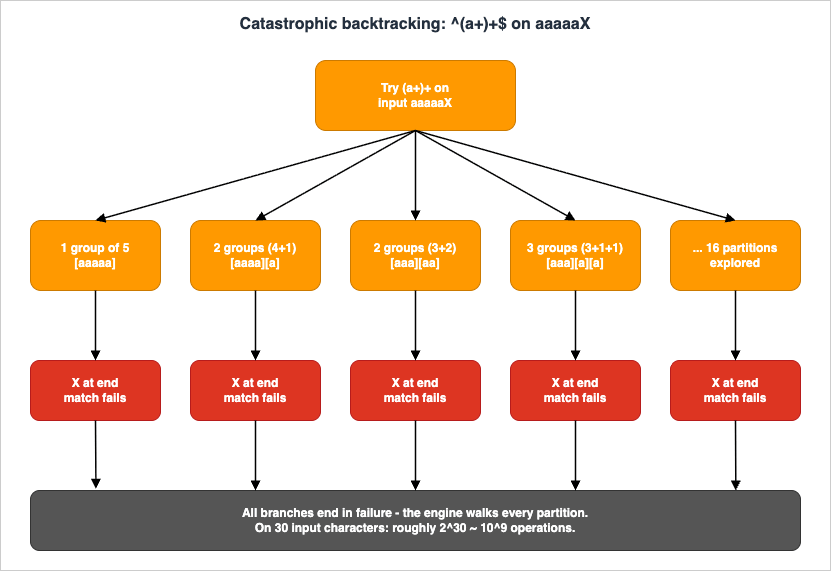
Every leaf path ends in failure (because of the trailing
X), but the engine has to walk all of them before reporting "no match." On 30 characters that is roughly 2^30 ~ 10^9 operations.The structural marker is a quantifier on a group whose body itself contains a quantifier on overlapping characters:
(a+)+, (a*)*, (a|aa)+, ([a-z]+)*. Once you can recognize this shape, you find it everywhere — including in patterns that you wrote yesterday.9.2 Real CVEs (Cloudflare 2019, Stack Exchange 2016)
Two production outages popularized ReDoS to mainstream engineering audiences:- Cloudflare, 2 July 2019. A regex deployed to the global WAF managed-rules layer contained the substring
.*(?:.*=.*). Adversarial-shaped legitimate traffic triggered catastrophic backtracking, CPU exhaustion across the edge, and a 27-minute global HTTP serving incident. The full pattern and post-mortem are public on the Cloudflare engineering blog (referenced in chapter 13). - Stack Overflow / Stack Exchange, 20 July 2016. A homepage formatting pass used a pattern equivalent to
\s+$for stripping trailing whitespace. A single comment with roughly 20,000 trailing whitespace characters triggered O(n^2) behavior, exhausting the formatter and tipping over the home page for 34 minutes.
OWASP's ReDoS catalog cites further CVEs across the .NET ecosystem and the JavaScript ecosystem: CVE-2009-3275 / -3276 / -3277 (Microsoft Enterprise Library, Telerik, and other 2009-era components), CVE-2015-2526 in ASP.NET MVC's
EmailAddressAttribute, and CVE-2022-3517 in the npm minimatch library's braceExpand. Search a CVE database periodically for fresh entries; new ReDoS findings remain a steady trickle.9.3 Defensive Patterns — Anchors, Possessive, RE2
Three independent defenses, in order of how disruptive they are to existing code:- Anchor and use negated character classes wherever possible.
[^"]*does not backtrack into adjacent regions;.*?does. Replacing lazy or greedy.with a negated class is the cheapest fix. - Apply atomic groups or possessive quantifiers around any quantifier whose body could match the next character of the pattern.
^(?>\s+)\Sor^\s++\Srather than^\s+\S. - Switch engines for adversarial input. Google RE2 (and the Rust
regexcrate, and Go'sregexp) executes in linear time on any input. The cost is that lookarounds and backreferences are unavailable. For WAF-style tagging where the pattern is your only input filter and the attacker chooses the text, this trade-off is usually correct.
A fourth, complementary measure: enforce a wall-clock or instruction-count timeout around regex execution. The third-party
regex package on PyPI accepts a per-call timeout keyword; the standard-library re module does not, so for untrusted input on stdlib re run the match inside a worker with an external wall-clock cap.Stress-test any pattern against pathological input in the Regex Tester Tool — pasting
aaaaaaaaaaaaaaaaaaaaaaaaaaaaaaX into a ^(a+)+$ field is a useful demo for the rest of your team.9.4 Building a ReDoS Smoke Test in CI
The cheapest insurance against a future ReDoS-induced incident is a pytest-style harness that runs every regex in your repo against three fixed inputs — the empty string, a benign legitimate value, and a known-bad pattern of repeated characters — with a one-second timeout. The fail mode is a hung test, which CI surfaces as a timeout and which a human reviewer can then dig into.# tests/test_regex_redos.py
import re
import signal
import pytest
from myapp.validators import EMAIL_RE, URL_RE, IPV4, PATH_TRAVERSAL
PATTERNS = {
"EMAIL_RE": EMAIL_RE,
"URL_RE": URL_RE,
"IPV4": IPV4,
"PATH_TRAVERSAL": PATH_TRAVERSAL,
}
ADVERSARIAL_INPUTS = [
"", # empty
"a" * 10_000, # repeated single char
"a" * 5_000 + "!", # near-match then breaker
"(a" * 1_000 + ")" * 1_000, # nested-group bait
"\x00" * 1_000, # null bytes
"\u200b" * 1_000, # zero-width spaces
]
class TimeoutError_(Exception): pass
def _alarm(_signum, _frame): raise TimeoutError_()
@pytest.mark.parametrize("name,pat", PATTERNS.items())
@pytest.mark.parametrize("text", ADVERSARIAL_INPUTS)
def test_no_runaway(name, pat, text):
signal.signal(signal.SIGALRM, _alarm)
signal.alarm(1)
try:
pat.match(text)
except TimeoutError_:
pytest.fail(f"{name} ran >1s on {text[:40]!r}...")
finally:
signal.alarm(0)
The harness scales: every time someone adds a validator they extend the
PATTERNS dict, and the matrix multiplier in pytest expands automatically. On a typical project of 30 patterns the entire suite runs in under a minute, and it has caught more than one regression caused by a maintainer "tightening" a pattern with what turned out to be a quantifier-on-quantifier expansion.A complementary tool is
recheck — a static analyser that takes a pattern and either reports it safe or generates an attack input. It catches issues the smoke test would miss because it reasons about the NFA structure directly rather than guessing inputs. Run both: the smoke test fails fast on the obvious cases, and recheck finds the subtle ones in the long tail.9.5 Performance Beyond ReDoS — Throughput, Caching, and Engine Tuning
ReDoS is the dramatic failure mode, but most regex performance problems in production are mundane: a pattern that is correct but slow, called millions of times per second on a hot path. Three optimization levers are worth knowing about before you reach for a different language or a different engine entirely.Compile patterns once. The Python idiom
re.match(r"^\d+$", s) hides a per-call compile that the cache amortizes across recent patterns but that a thoughtless heavy use can still dominate. The fix is the same in every language: compile the pattern at module load and reuse the compiled object. In Python this means PATTERN = re.compile(...) at module scope and PATTERN.match(s) inside the hot loop; in JavaScript it means storing a RegExp instance instead of passing a literal string each call; in Java it means a static Pattern field rather than a per-method Pattern.compile. A surprising amount of "regex is slow" benchmarking falls away once compilation moves out of the hot path.Anchor early to short-circuit non-matches. A pattern of the form
^prefix.*body$ can reject inputs that do not start with prefix after a single character. A pattern of the form .*body.*$ has to scan the whole input before deciding. For inputs where most calls are rejections (typical of validators), starting with a literal anchor or a literal prefix saves an enormous amount of work. The same logic applies to negated character classes inside the body: a [^"]+ that cannot match the next required character of the pattern aborts immediately, where a .+? would back-track.Choose the right engine for the workload. RE2 (and the Rust
regex crate, which is RE2-derived but faster) outperforms PCRE2 on bulk text scanning, partly because the linear-time guarantee is also a constant-time-per-character guarantee with low overhead. PCRE2 outperforms RE2 on patterns with backreferences and lookarounds, partly because RE2 cannot run those at all. Hyperscan, used inside Snort and several commercial products, can run thousands of patterns concurrently against a stream and beats every general-purpose engine for that specific use case. The right engine for a one-off validator is whichever you already have; the right engine for a hot path that processes a terabyte a day is worth a benchmarking afternoon.A subtle fourth lever, more art than rule: stop at the first match when the rule allows it.
re.search looks for the first match anywhere; re.findall finds every match. If the validator only cares whether any match exists, switching from findall to search can be a 100x speedup on long inputs where the first match is near the start. The pattern stays identical; only the API call changes. The same idea generalizes: any time the surrounding code only needs the first or the last hit, picking the API that stops scanning early is free performance, and almost every regex bug-bounty thread ends with this fix in the patch.10. Engine Differences (PCRE / RE2 / ECMAScript / Python)
10.1 Feature Matrix
The four engines you are most likely to meet in a typical web stack: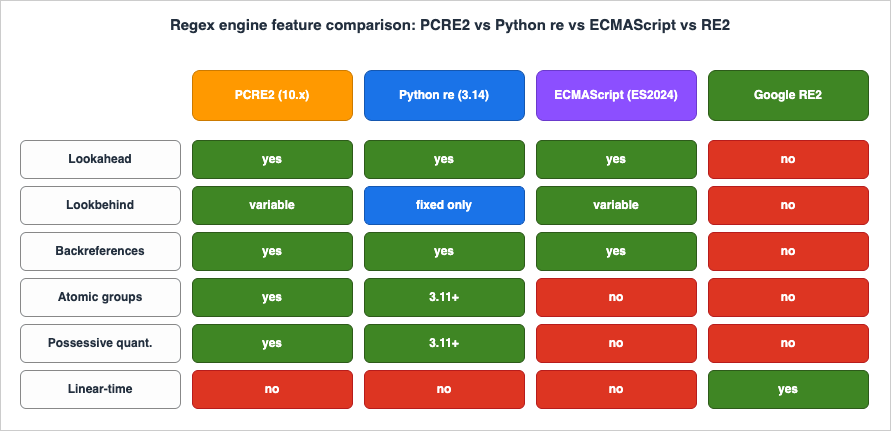
The most common surprise is that standard-library
re in Python does not support variable-length lookbehind. The third-party regex package on PyPI is API-compatible and does — keep it in mind when you copy a PCRE pattern from Stack Overflow and the import line silently downgrades it.10.2 When to Pick RE2 (and What You Lose)
Reach for RE2 (or RE2-derived engines: Goregexp, Rust regex, Cloudflare's RE2::Set in some products, Hyperscan for higher throughput) when at least one of the following is true:- The input is adversarial or unbounded in length (WAF, log ingestion, untrusted user input, search engines).
- You need to run the same pattern set across millions of inputs per second.
- You are willing to give up backreferences, lookarounds, atomic groups, and possessive quantifiers in exchange for hard linear-time guarantees.
You lose:
- Backreferences (so no
(\w+)\s+\1for repeated-word detection). - All lookarounds (so no
(?=password.*[0-9])style password validators). - Atomic groups and possessive quantifiers (irrelevant — the engine does not need them).
- Some Perl-isms like
\Kand conditional patterns.
For the average web validation pattern, none of these matter. For log parsing where you wrote
(?<="level":")[^"]+, you would rewrite it to capture: "level":"([^"]+)" and pull \1 from match results in code.10.3 Migrating Patterns Between Engines
Engine migration is rare but always painful when it arrives. Three concrete moves cover most cases:- PCRE2 to RE2 (most common; for adversarial input). Strip every lookahead, lookbehind, atomic group, possessive quantifier, and backreference. Rewrite "match X but not Y" lookarounds as a candidate-then-filter pattern in code: extract X with a capture group, then use a host-language conditional to reject the ones that also match Y. Lookbehind for "preceded by Z" becomes a negative-set character class on the surrounding context.
- JavaScript
RegExpto PCRE2 (sharing patterns with a backend). JavaScript supports lookbehind only on V8 (Node, Chrome) since 2018; thevflag (Unicode sets, ES2024) is newer still. PCRE2 is the more permissive of the two, so this direction usually works without edits. The exception is named groups: JavaScript uses(?<name>...), PCRE supports both that and(?P<name>...)(Python style). Pick the JavaScript form and both engines will accept it. - Python
retoregexpackage (gaining variable-length lookbehind). Theregexpackage is API-compatible:import regex as reusually drops in. The visible differences are extra features ((?V1)for newer behavior, scoped Unicode flags, fuzzy matching). Test the migration by running both libraries against your full corpus and asserting the match sets are identical — a one-pager script that takes a few minutes to write and saves an hour of head-scratching later.
A practical tip for any migration: keep the old pattern alive for a sprint, run both engines in parallel against production traffic, and assert their outputs agree. The mismatched-output set is your migration backlog. This is the same shadow-mode pattern you would use migrating a SQL query or a service implementation; regex deserves the same care because the failures are silent.
11. Tooling — Test Drive in Your Browser
11.1 Inline CTA to regex_tester_tool
The companion tool for this article is the Regex Tester Tool. It runs entirely in your browser — no input is sent to a server — and provides:- Real-time match highlighting as you type the pattern or the test string.
- Capture group display, including named groups (ECMAScript syntax, since the runtime is the browser's
RegExp). - A natural-language explanation of the pattern, useful when you are reviewing a regex in a pull request that someone else wrote.
Open it side by side with this article and paste each pattern as you reach it.
11.2 Companion CLIs — ripgrep, pcre2grep, re2c
For day-to-day work outside the browser:ripgrep(rg) — fast recursive grep. With-Pit switches to PCRE2 and gains lookarounds and named groups. The default engine is RE2-derived, so without-Pyour patterns are linear-time-safe.pcre2grep— the reference PCRE2 CLI. Useful when you need a featureripgrep's default engine refuses, such as backreferences.re2c— a compiler that turns regex into deterministic C/C++/Go code. Worth knowing about for hot-path lexers; not for everyday work.grep -Eandgrep -P— POSIX vs PCRE on most Linux distros. The unflaggedgrepuses BRE (basic regular expressions), which has different escaping rules from everything else in this article. Almost always pass-Eor-P.
11.3 Reviewing Regex in Pull Requests — A Reviewer's Checklist
A regex is the densest line of code most reviewers will see all week. Five questions catch the majority of production-quality issues without requiring the reviewer to mentally execute the engine:- Where does the input come from? User input, log lines, file contents, third-party API. The answer determines the threat model. User input means ReDoS is in scope; log lines mean encoding edge cases (UTF-8 BOM, CRLF) are in scope; file contents mean size is in scope.
- What does the input look like at the size extremes? Zero-length, single character, expected length, ten times expected length, one megabyte. Many bugs only surface at one of these. The pattern
.+for "non-empty" silently allows newlines unless the engine has a flag set; the pattern.*for "anything" silently disallows them in some flavours. - Is there a quantifier on a group containing a quantifier on overlapping characters? The structural ReDoS marker from §9. If yes, ask for an atomic group, possessive quantifier, or RE2-style engine.
- Are anchors correct? A validation pattern almost always wants
^and$(or in JS,/^...$/with the appropriate flags) so that partial matches in longer strings do not slip through.re.match()in Python anchors only at the start;re.fullmatch()anchors both ends. Confusing the two is the most common Python regex bug. - Does this engine actually support every feature used? The pattern compiles fine and silently misbehaves at runtime. Check §10's matrix or compile against the production engine in CI.
A sixth question, less universal but worth keeping in your kit: does the pattern need to be a regex at all? A loop with
str.contains() beats re.search(r"foo|bar|baz") for readability, runs faster on small inputs, and survives a future requirement to also accept foobar with no engine-feature anxiety. Use regex when the rule is genuinely a pattern; use plain string operations when the rule is a fixed list.11.4 The Editor and Shell Workflow That Senior Engineers Actually Use
The textbook approach to regex is to write the pattern correctly the first time. The professional approach is to iterate fast against real input until the pattern is correct, then commit it with the test corpus that proves it. The workflow has three moves and is worth describing concretely because it is the difference between fluency and frustration.Move 1: keep a scratch file open with realistic input. Whatever you are pattern-matching — logs, code, JSON lines — paste a representative sample into a scratch file and pull up your editor's regex search-and-replace panel side by side with it. The cycle of "edit pattern, see matches highlighted, edit again" is much faster than "write pattern in code, run program, read output, edit again." VS Code's built-in regex search, IntelliJ's "Find in Files" with regex enabled, and Vim's
/\v very-magic mode all support this loop with sub-second feedback.Move 2: prove the pattern with a one-liner before pasting it into code. Once the pattern works in the editor, run it against the file from the shell to confirm:
rg -nP 'YOUR_PATTERN' scratch.log or python -c "import re; [print(m.group(0)) for m in re.finditer(r'YOUR_PATTERN', open('scratch.log').read())]". The shell pass catches three classes of bug at once: shell-quoting issues that will hit you later if the pattern ever lands in a Bash script, engine differences between the editor's regex flavour and your production engine, and pattern compile-time errors that the editor's friendlier UI sometimes hides.Move 3: extract the pattern into a named constant with a comment block. Once the pattern is right, the failure mode is forgetting why you wrote it the way you did. Lift it into a module-level constant with a verbose-mode definition (§4.4), an inline comment per clause, and a fixture file checked in alongside it. Six months from now — or six minutes from now, if you are interrupted — the next reader of this code reconstructs your reasoning in seconds instead of reverse-engineering the pattern character by character.
The compounding benefit of this workflow is invisible until you have done it for a few months. The first time you reach for a regex on a familiar pattern shape (URL, email, log line) you find that the previous version is already in a tested constant somewhere in your codebase, ready to import. The library of patterns becomes a meaningful component of the codebase, the same way a utility module of date-handling helpers does. The quality bar rises with use, and "writing a regex" stops being a friction point and starts being routine. The senior engineer's apparent fluency with regex is not memorizing the syntax; it is having pattern fixtures and verbose-mode definitions in muscle memory, plus a clear sense of when the right answer is a different tool. Both habits are learnable, both compound, and both pay back the modest investment within a quarter of consistent practice.
12. Summary
Regex is not the right tool for parsing structured data, walking source code, or making security decisions on its own. It is the right tool for a remarkably wide band between those — input validation, log triage, search, refactoring, and detection heuristics — and the engineers who use it well share two habits. They have a mental model of what the engine does on each character, and they know which features their target engine actually supports. This article gave you both, plus four recipe sets to anchor the model in real work and a concrete vocabulary for talking about ReDoS during code review.If you want a single checklist to print out and pin near your monitor, here is the distilled version:
- Anchor first, capture later. A validation pattern almost always needs
^and$(orfullmatch()). Skipping anchors lets"<script>abc@example.com</script>"pass an "email" check. - Prefer negated character classes to
..[^"]+beats.+?for "everything between quotes" — faster, no backtracking surprises, and reads exactly like the rule. - Match the engine to the threat model. Adversarial input goes to RE2 (Go, Rust, ripgrep default). Internal tooling on trusted input keeps PCRE2 for lookarounds and backreferences.
- Look for the ReDoS shape on every quantifier-on-quantifier pattern.
(a+)+,(a*)*,([a-z]+)*,(a|aa)+. Add an atomic group, switch to a possessive quantifier, or replace the inner quantifier with a negated class. - Build a regression corpus, not a single test string. Every recipe in this article should ship with a fixture file containing the expected matches and at least three deliberately adversarial inputs. The corpus is the documentation; the pattern alone is not.
- Comment in the regex, not next to it. Multi-line / verbose mode (
re.VERBOSEin Python,(?x)inline,xflag in PCRE) lets you write structured patterns with embedded comments. A 30-character one-liner is harder to maintain than a 10-line annotated version. - Test in isolation before combining. A pattern that "almost works" in a 200-line function is almost impossible to debug. Extract it, test it against the corpus, and only then drop it back in.
The fastest way to internalize the rest is to paste every pattern in this article into the Regex Tester Tool, watch the matches, and break each one with deliberately bad input. The patterns you remember are the ones you have made fail. From there, the path to fluency is a 90-day habit: every time you reach for a regex at work, write the test corpus first, draft the pattern second, and review it against the five questions in §11.3 third. After a couple of months the questions become reflexive, and the next regex you write — or accept in a pull request — will be one a future maintainer thanks you for, not curses you over.
13. References
- PCRE2 —
pcre2syntax(3)andpcre2pattern(3)— canonical PCRE2 syntax reference, including atomic groups, possessive quantifiers, and variable-length lookbehind. - MDN — Regular expression syntax (
RegExp) — ECMAScript reference, including theuandv(Unicode sets, ES2024) flags. - Python
remodule documentation — flags, fixed-length lookbehind constraint, atomic groups and possessive quantifiers (3.11+). - Python
regexpackage on PyPI — drop-in replacement with variable-length lookbehind and additional Unicode features. - RE2 syntax reference (Google) — explicit list of features RE2 does not support and the four flags it supports (
i,m,s,U). - OWASP — Regular expression Denial of Service (ReDoS) — definition, canonical evil regex
^(a+)+$, and CVE catalog (CVE-2009-3275, CVE-2009-3276, CVE-2009-3277, CVE-2015-2526, CVE-2022-3517). - Cloudflare — "Details of the Cloudflare outage on July 2, 2019" — production ReDoS post-mortem with full regex.
- Stack Exchange — "Outage Postmortem - July 20, 2016" —
\s+$whitespace ReDoS post-mortem. - Russ Cox — "Regular Expression Matching Can Be Simple And Fast" — foundational article on Thompson NFA simulation; the theoretical basis for RE2.
- Regex Tester Tool — hidekazu-konishi.com — companion in-browser tester used throughout this article.
- CloudWatch Logs Insights Query Cookbook: Practical Recipes for Incident Investigation, Cost Analysis, and Security Audits — applied log parsing where the named-capture
parseregex from chapter 6.3 becomes a first-class field forstatsaggregation across CloudTrail, VPC Flow Logs, and Lambda logs. - AWS WAF for Generative AI - Prompt Injection Defense Implementation Patterns — layered defense where regex-based detection (chapter 8) is one input among WAF managed rules, Bedrock Guardrails, and Lambda pre-screening — never the only line of defense.
References:
Tech Blog with curated related content
Written by Hidekazu Konishi