PWA Advanced Implementation Guide - Service Worker Cache Strategies, Push, and Background Sync
First Published:
Last Updated:
This article is the update I have wanted to write for a while. It assumes you have already shipped a basic PWA and understand the mechanics of
navigator.serviceWorker.register(). From there it walks through the runtime model, the canonical cache strategies, the Push and Background Sync stacks, install prompt UX, and the actual sw.js running on this site so the patterns are grounded in something you can read and copy.Previous foundational article: How to create a PWA(Progressive Web Apps) compatible website on AWS and use Lighthouse Report Viewer
Table of Contents:
- Overview and Why an Update Was Due
- PWA Mental Model in the Modern Web
- Service Worker Lifecycle: install / activate / fetch
- Cache Strategy Decision Tree
- Push Notification: VAPID, Subscription, Delivery
- Background Sync and Periodic Background Sync
- Install Prompt UX Design
- Debugging with DevTools and Workbox
- Real Implementation: hidekazu-konishi.com sw.js Walkthrough
- Performance: Cache Eviction, Quota, Update Strategy
- Common Pitfalls and Anti-patterns
- Summary
- References
1. Overview and Why an Update Was Due
The PWA platform on the web has been stable in API surface but fluid in practice. The Service Worker, Cache, Push, and Notifications APIs landed years ago and have not changed in shape. What has changed is what browsers actually allow, what shipping engineering teams have discovered the hard way, and what the user expectations look like.Three shifts in particular justified this update:
- Cache strategies are now table stakes, not advanced material. The decision of "Network-First versus Cache-First versus Stale-While-Revalidate" is one any engineer touching a Service Worker has to make. It used to be sufficient to dump everything into one strategy and call the worker done; today, mixing strategies per request type is the minimum bar.
- Push notifications depend on a wider stack. Web Push is defined by RFC 8030 (Web Push protocol) and RFC 8292 (VAPID), and any non-trivial deployment touches subscription management, payload encryption, and token rotation. None of this fits into "register a Service Worker and you're done."
- Background Sync changed the offline model. Before Background Sync, offline writes meant either silently dropping requests or blocking the UI. With
syncandperiodicsyncevents, you can queue work, defer it past network outages, and let the OS decide when to wake your worker.
The previous PWA article on this site covered installability and Lighthouse pass criteria. This article picks up where that one stopped. It assumes you have:
- A registered Service Worker on an HTTPS origin (or
localhost). - A valid Web App Manifest with
name,start_url,display: standalone, icons, and a theme color. - A Lighthouse PWA score that is at least passing the basics (offline capable, installable, themed).
What you should walk away with:
- A mental model of the Service Worker lifecycle that survives contact with edge cases like updates during long-lived sessions.
- A decision tree for choosing a cache strategy per request class, plus production-ready vanilla JavaScript implementations of each.
- A complete Push Notification flow from VAPID key generation through subscription, server-side delivery, and unsubscription handling.
- Background Sync and Periodic Background Sync patterns, including the IndexedDB queue that almost every implementation needs.
- An install prompt UX that does not feel like a popup ad.
- The caveats — quota, eviction, scope traps, update windows — that are easy to miss until they break in production.
The code in this article is vanilla JavaScript by design. Frameworks such as next-pwa or Workbox wrap the same primitives and the same lifecycle events; if you understand the underlying Service Worker, you can read what those libraries are doing and reach for them only when the configuration burden of writing a worker by hand exceeds the benefit of staying lightweight.
The discussion of iOS Safari is intentionally kept brief. Safari's PWA support has improved year over year but still lags Chromium and Firefox on Push, Background Sync, and Periodic Background Sync. The pragmatic stance is feature-detect and degrade gracefully — and that is what the code samples below do.
2. PWA Mental Model in the Modern Web
Before drilling into APIs, it helps to fix a single mental model for what a PWA actually is, because the term collects several distinct capability layers that are often conflated.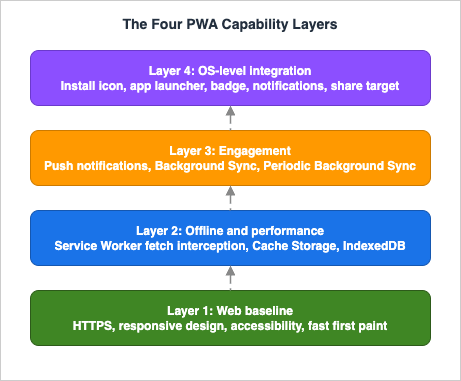
A PWA is an additive composition of these layers on top of a normal web application. You do not need to adopt all four at once, and most production PWAs actually live in Layers 1 and 2 with selective use of Layer 3.
What makes the platform worth learning is that the Service Worker — Layer 2 — is not a frontend script. It is a separate JavaScript thread, scoped to an origin and a path, with its own lifecycle decoupled from any open browser tab. It can run after every tab to your site is closed (briefly, when triggered by a Push or sync event), and it cannot touch the DOM. Treat it as a small, event-driven proxy server that happens to be installed in the user's browser, not as part of your page.
The implications of that framing are not academic:
- No DOM, no
window, no localStorage. The Service Worker has access toself,caches,fetch,clients,registration, andindexedDB, but not to the page's runtime. State that needs to be shared with a page must be passed explicitly viapostMessageor read from IndexedDB or the Cache API. - Lifecycle is independent of pages. A user can open your site, navigate, close the tab — and your Service Worker stays around. A new tab one minute later may pick up the same worker.
- Scope determines reach. A Service Worker registered at
/sw.jscontrols everything under/. A worker at/app/sw.jscontrols only/app/. Once chosen, scope is hard to change without orphaning users on old workers. - One worker per scope. You cannot register two competing Service Workers on the same scope; the registration will replace the previous one, but the old worker continues to serve any client (tab) that has it controlling them until that client navigates or is closed.
The Service Worker is also the only piece of your application that can intercept network requests transparently to the page. That is what makes cache strategies, offline fallbacks, and Background Sync queues possible. Everything in this article either leans on that interception model or interacts with the lifecycle that surrounds it.
The Web App Manifest, by contrast, is purely declarative. It tells the browser the metadata that the OS needs to install your application:
name, short_name, start_url, display, icons, theme_color, and the like. The manifest does not run code; it is fetched once during installation and at update checks. Most of the install-prompt UX questions later in this article come down to deciding when, not whether, to surface the install option that the manifest enables.3. Service Worker Lifecycle: install / activate / fetch
The lifecycle is the part of Service Worker development that bites engineers most often, because the model is correct but counter-intuitive. Once you have it cleanly in your head, the rest of the API surface follows.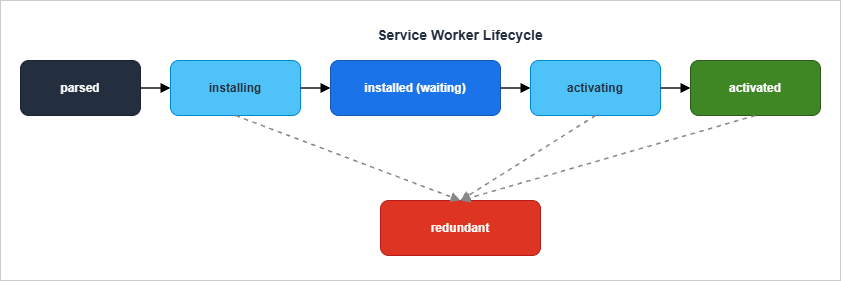
parsed, installing, installed (also called waiting), activating, activated, and redundant. The transitions are driven by two events your code typically wires up: install and activate. A third event, fetch, fires throughout the worker's active life and is where most production code spends its time.3.1 install
The browser fires theinstall event the first time it sees a new Service Worker file (byte-for-byte different from any worker currently registered for that scope). This is the single best moment to pre-cache resources you know you will always need: the application shell, the offline fallback page, fonts, and any critical CSS.const PRECACHE_NAME = 'app-shell-v3';
const PRECACHE_ASSETS = [
'/',
'/index.html',
'/offline.html',
'/css/app.css',
'/js/app.js'
];
self.addEventListener('install', (event) => {
event.waitUntil(
caches.open(PRECACHE_NAME).then((cache) => cache.addAll(PRECACHE_ASSETS))
);
});event.waitUntil() extends the install phase until the promise it receives resolves. If the promise rejects — for example, because one URL in addAll returns a non-2xx response — the entire installation fails and the worker never reaches installed. That is the documented behavior, and it is rarely what you want for a site with many optional assets. For anything beyond a small core list, prefer cache.add() per asset wrapped in a Promise.allSettled() so a single missing file does not abort the whole install.3.2 waiting and skipWaiting
Onceinstall resolves, the worker enters installed (waiting). It will not start handling fetches until the previously activated worker has no clients controlling it — that is, until every tab using the old worker is closed or navigates to a fresh page. This default is conservative on purpose: it prevents a user mid-session from being moved onto a new worker with potentially incompatible cached assets.You can override the default with
self.skipWaiting():self.addEventListener('install', (event) => {
self.skipWaiting();
event.waitUntil(precache());
});skipWaiting() tells the browser to activate the new worker as soon as installation finishes, without waiting for old clients to release. This is convenient for fast iteration but dangerous in long-lived sessions, because the page that registered the old worker may have JavaScript on it that expects a particular cache layout. A common pattern is to pair skipWaiting() with a client-side check that listens for controllerchange and offers a "Refresh to update" button, leaving activation timing to the user.3.3 activate and clients.claim
When the worker activates, theactivate event is your chance to clean up old caches and migrate stored data. A typical handler:self.addEventListener('activate', (event) => {
const allowlist = [PRECACHE_NAME, RUNTIME_CACHE];
event.waitUntil(
caches.keys().then((keys) =>
Promise.all(
keys.map((key) => (allowlist.includes(key) ? null : caches.delete(key)))
)
).then(() => self.clients.claim())
);
});self.clients.claim() is the activate-time analogue of skipWaiting(). By default, even after activation, an existing tab that loaded before this worker activated will not be controlled by it; it is still served by whatever worker (or no worker) was in charge when the page loaded. Calling clients.claim() makes the new worker take over those existing clients immediately. This is what you want for the very first install on a returning user — without it, the user must reload before the worker starts intercepting fetches.3.4 fetch
Thefetch event fires for every network request the page makes once the worker controls it: navigations, scripts, images, fetch/XHR API calls, even font loads. Within the handler you decide whether to call event.respondWith() to provide a response. If you do not call it, the browser proceeds with the default network request.self.addEventListener('fetch', (event) => {
if (event.request.method !== 'GET') return;
event.respondWith(handleFetch(event.request));
});- Only handle requests you have a strategy for. If the worker calls
respondWith()and rejects, the browser shows a network error page even when fallback might have worked. Restrict the handler to the request types your strategies cover (typicallyGETonly). - Avoid blocking on slow operations. Anything inside
respondWith()runs on the worker thread; long-running work without awaits will delay the response. Useevent.waitUntil()for cache writes that should complete after the response is returned.
The state diagram above ends in
redundant. A worker becomes redundant either when it fails to install or when a newer worker activates and replaces it. Once redundant, the worker will never run again; clients still controlled by it continue to use the cached response chain it already returned but cannot dispatch new events to it.4. Cache Strategy Decision Tree
Every fetch handler is implementing a cache strategy, whether explicitly or by accident. Naming and choosing strategies deliberately is the highest-leverage decision in Service Worker engineering, because it determines both perceived performance and the failure modes you will see in offline conditions.The five canonical strategies, codified by Jake Archibald's "Offline Cookbook" on web.dev, are:
- Cache-First (cache falling back to network)
- Network-First (network falling back to cache)
- Stale-While-Revalidate (return cache immediately, refresh in the background)
- Network-Only (always network)
- Cache-Only (always cache)
A sixth pattern — Cache-Then-Network — is a UI pattern that combines two responses (one fast from cache, one fresher from network) in the page itself, not strictly a Service Worker strategy. It is included because it shows up in real applications.
The choice is not "which is best" but "which fits this request class". The decision tree below is the one I use:
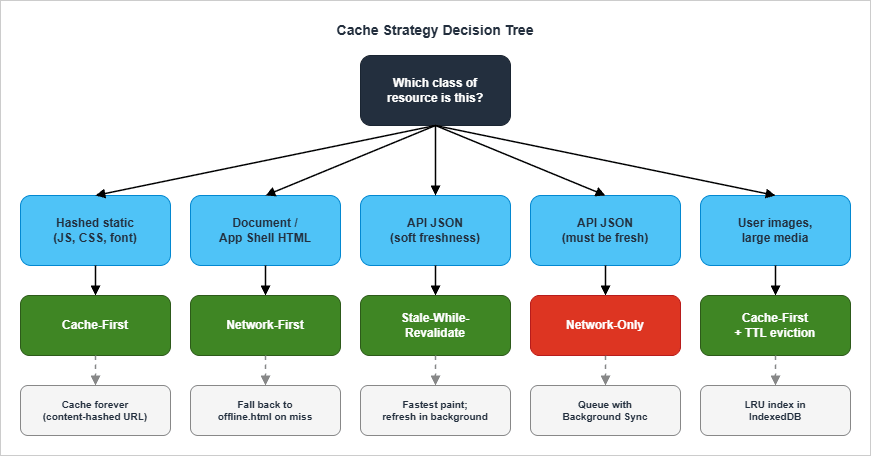
| Resource class | Strategy | Rationale |
|---|---|---|
| Hashed static assets (JS, CSS, fonts) | Cache-First | Filename includes content hash, so cache is safe forever |
| HTML pages / app shell | Network-First | Want fresh markup, fall back to cache when offline |
| API JSON (lists, dashboards) | Stale-While-Revalidate | Fast paint from cache, freshness on next view |
| API JSON (transactions, balances) | Network-Only | Stale data is wrong data; queue with Background Sync |
| Images uploaded by users | Cache-First with TTL | Rarely changes, but unbounded growth is a hazard |
| Analytics, telemetry | Network-Only | Caching distorts measurement; offline drops are tolerable |
| Search / autocomplete results | Stale-While-Revalidate | Cache for instant feel, refresh on every interaction |
Below are minimal, production-shaped implementations of the four strategies you will reach for most. Each is pure vanilla JavaScript and assumes a single runtime cache name; in real code you will often partition into per-class caches.
4.1 Cache-First
Cache-First serves the cached response if available, only falling back to the network on a cache miss. It is the right default for assets whose URL changes when content changes — typically anything with a content hash in the filename.async function cacheFirst(request, cacheName = 'static-v1') {
const cache = await caches.open(cacheName);
const cached = await cache.match(request);
if (cached) return cached;
const response = await fetch(request);
if (response.ok) {
cache.put(request, response.clone());
}
return response;
}/css/site.css, for example). Once cached, those resources will never refresh unless you bump the cache name or explicitly purge.4.2 Network-First
Network-First tries the network, with the cache as a fallback. Use it for HTML pages and any resource where fresh data is preferred but offline support is still valuable.async function networkFirst(request, cacheName = 'pages-v1') {
const cache = await caches.open(cacheName);
try {
const response = await fetch(request);
if (response.ok) {
cache.put(request, response.clone());
}
return response;
} catch (err) {
const cached = await cache.match(request);
if (cached) return cached;
throw err;
}
}fetch in a Promise.race against a timer and treat timeouts as cache misses.4.3 Stale-While-Revalidate
Stale-While-Revalidate returns the cached response immediately and asynchronously refreshes the cache for the next request. It is the pattern with the best perceived performance for content that updates regularly but does not need to be perfectly fresh on this view.async function staleWhileRevalidate(request, cacheName = 'swr-v1') {
const cache = await caches.open(cacheName);
const cached = await cache.match(request);
const networkPromise = fetch(request)
.then((response) => {
if (response.ok) {
cache.put(request, response.clone());
}
return response;
})
.catch(() => undefined);
return cached || (await networkPromise) || new Response('', { status: 504 });
}cached || (await networkPromise) is the heart of the strategy: if there is anything cached, return it now and let the network update happen in the background. A common addition is event.waitUntil(networkPromise) from the calling fetch handler, which keeps the worker alive long enough for the cache write to complete.4.4 Cache-Then-Network (UI pattern)
Cache-Then-Network is implemented partly in the worker (returning the cached response on first hit) and partly in the page (which dispatches a second fetch for fresh data and re-renders when it arrives). The Service Worker side is identical to Stale-While-Revalidate; the difference is what the page does.async function loadDashboard(url) {
const cacheRequest = fetch(url, { cache: 'force-cache' });
const networkRequest = fetch(url, { cache: 'no-store' });
cacheRequest.then((res) => res.json()).then(render);
try {
const fresh = await networkRequest;
render(await fresh.json());
} catch (err) {
// network failed; cached render already shown
}
}4.5 Choosing per route, not per app
The most common mistake is to pick one strategy and apply it everywhere. The fetch handler should branch on request URL or destination:self.addEventListener('fetch', (event) => {
const request = event.request;
if (request.method !== 'GET') return;
const url = new URL(request.url);
if (url.origin !== self.location.origin) return;
if (request.destination === 'document') {
event.respondWith(networkFirst(request, 'pages-v1'));
return;
}
if (url.pathname.startsWith('/api/')) {
event.respondWith(staleWhileRevalidate(request, 'api-v1'));
return;
}
if (['style', 'script', 'font'].includes(request.destination)) {
event.respondWith(cacheFirst(request, 'static-v1'));
return;
}
if (request.destination === 'image') {
event.respondWith(cacheFirst(request, 'images-v1'));
return;
}
});request.destination is the property to know. It is set by the browser based on what initiated the fetch (a <script> tag, an <img>, an XHR, the navigation itself) and lets the strategy be inferred without hardcoding URL patterns.5. Push Notification: VAPID, Subscription, Delivery
Web Push is one of the most-asked, least-understood parts of the PWA stack. The protocol layer is defined by RFC 8030 (Web Push) with VAPID identification on top per RFC 8292. The browser-facing API isPushManager. Together they let your application server push a message that wakes a Service Worker, which then displays a Notification — without any tab being open.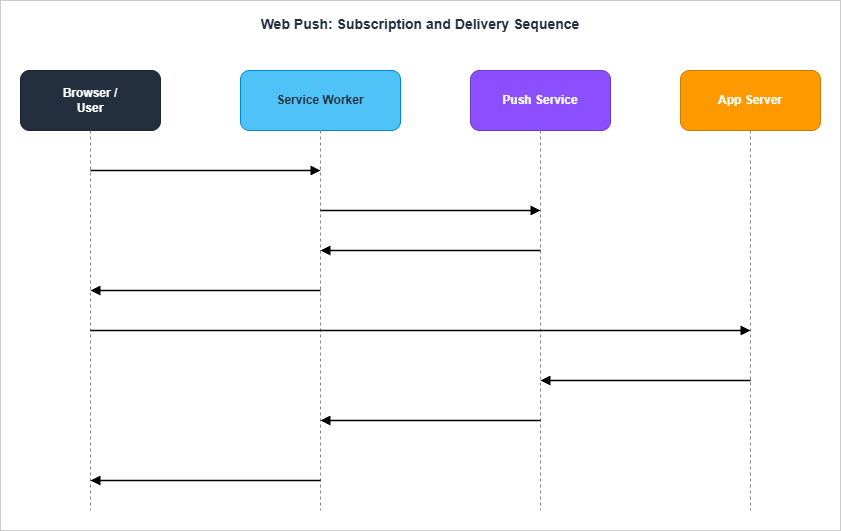
5.1 VAPID keys
VAPID (Voluntary Application Server Identification) is how your application server proves it is the same entity that the user subscribed to. You generate a key pair once. The public key is given to the browser at subscription time; the private key is held by the server and used to sign requests to the Push Service.Generation is a one-time operation. Using the popular
web-push Node.js library:const webpush = require('web-push');
const keys = webpush.generateVAPIDKeys();
console.log('public:', keys.publicKey);
console.log('private:', keys.privateKey);5.2 Subscribing the user
Subscription happens in the page (not the Service Worker), but uses the registration to obtain the worker-boundpushManager:async function subscribeUser(publicVapidKey) {
const permission = await Notification.requestPermission();
if (permission !== 'granted') {
throw new Error('Notification permission denied');
}
const registration = await navigator.serviceWorker.ready;
const subscription = await registration.pushManager.subscribe({
userVisibleOnly: true,
applicationServerKey: urlBase64ToUint8Array(publicVapidKey),
});
await fetch('/api/subscriptions', {
method: 'POST',
headers: { 'Content-Type': 'application/json' },
body: JSON.stringify(subscription),
});
return subscription;
}
function urlBase64ToUint8Array(base64String) {
const padding = '='.repeat((4 - (base64String.length % 4)) % 4);
const base64 = (base64String + padding).replace(/-/g, '+').replace(/_/g, '/');
const raw = atob(base64);
return Uint8Array.from([...raw].map((c) => c.charCodeAt(0)));
}userVisibleOnly: true is mandatory in current browsers; silent push (push without a user-visible notification) is not supported. The returned subscription object contains endpoint, keys.p256dh, and keys.auth, which together are everything the server needs to push a message to that user agent.Send the subscription to your backend and store it. A subscription is per user agent per origin per VAPID key, so the same human across two browsers produces two subscriptions.
5.3 Sending a push from the server
On the server, the sameweb-push library encrypts the payload, signs the request with VAPID, and POSTs to the endpoint:const webpush = require('web-push');
webpush.setVapidDetails(
'mailto:admin@example.com',
process.env.VAPID_PUBLIC_KEY,
process.env.VAPID_PRIVATE_KEY
);
async function sendPush(subscription, payload) {
try {
await webpush.sendNotification(subscription, JSON.stringify(payload));
} catch (err) {
if (err.statusCode === 404 || err.statusCode === 410) {
await deleteSubscription(subscription.endpoint);
return;
}
throw err;
}
}The TTL header (
webpush.sendNotification(..., { TTL: 60 })) controls how long the Push Service will hold the message if the user agent is offline. Use a short TTL for time-sensitive notifications (chat, alerts) and a longer one for reminders that remain useful hours later.5.4 Receiving the push in the Service Worker
The worker handles thepush event and shows a notification. Without a notification, the browser may suspend the worker and may eventually revoke the push permission entirely.self.addEventListener('push', (event) => {
const data = event.data ? event.data.json() : {};
const title = data.title || 'New message';
const options = {
body: data.body || '',
icon: '/android-chrome-192x192.png',
badge: '/badge-72x72.png',
tag: data.tag,
data: { url: data.url || '/' },
renotify: Boolean(data.tag),
};
event.waitUntil(self.registration.showNotification(title, options));
});
self.addEventListener('notificationclick', (event) => {
event.notification.close();
const url = event.notification.data?.url || '/';
event.waitUntil(
self.clients.matchAll({ type: 'window' }).then((clients) => {
for (const client of clients) {
if (client.url === url && 'focus' in client) return client.focus();
}
return self.clients.openWindow(url);
})
);
});tag deduplicates notifications with the same identifier — useful for collapsing multiple updates of the same chat thread into one. The notificationclick handler is the bridge back to the page: matchAll finds open clients, and openWindow falls back to launching one.5.5 Subscription lifecycle
Subscriptions can be invalidated at any time. The browser firespushsubscriptionchange to the worker when this happens, giving you a chance to re-subscribe:self.addEventListener('pushsubscriptionchange', (event) => {
event.waitUntil(
self.registration.pushManager
.subscribe({ userVisibleOnly: true, applicationServerKey: VAPID_PUBLIC_KEY })
.then((sub) =>
fetch('/api/subscriptions', {
method: 'POST',
body: JSON.stringify(sub),
})
)
);
});pushsubscriptionchange is not fired by every browser in every revocation case; the canonical signal that a subscription is dead remains the 404/410 from the Push Service. Treat the event as a best-effort hint, not a guarantee.6. Background Sync and Periodic Background Sync
Browser support, up front. Background Sync (the one-shotsync event) is shipped in Chrome, Edge, Opera, and Samsung Internet — not Firefox, not Safari. Periodic Background Sync (periodicsync) is even narrower: Chromium-only and only on installed PWAs, and it requires the site-engagement bar that Chrome applies to it. As of 2026, that means roughly half of mobile users (most iOS Safari users and all Firefox users) will not get sync delivery. Every code sample in this section therefore feature-detects ('sync' in registration, 'periodicSync' in registration) and degrades to an in-page retry path. Use Background Sync as a progressive enhancement, never as the only retry mechanism.Background Sync solves a problem that has plagued offline web apps since they existed: the user does an action while offline, the network request fails, and there is no good way to retry. Before Background Sync, the only options were to silently drop the work or to show a queue UI and require the user to be on the page when the network came back. Neither is acceptable for forms that the user expects to "just work."
The API exposes a
sync event that fires when the browser believes it has connectivity. Your worker can register a sync tag, the browser holds it across network outages, and when conditions are right the event fires once — or, if it fails, the browser retries with exponential backoff.6.1 Registering a sync from a page
async function queueSubmission(formData) {
  await idbPut('outbox', { id: crypto.randomUUID(), payload: formData });
  const registration = await navigator.serviceWorker.ready;
  try {
    await registration.sync.register('sync-outbox');
  } catch (err) {
    // sync API not supported; fall back to immediate fetch
    await fetch('/api/submit', { method: 'POST', body: JSON.stringify(formData) });
  }
}6.2 Handling the sync in the worker
self.addEventListener('sync', (event) => {
  if (event.tag === 'sync-outbox') {
    event.waitUntil(flushOutbox());
  }
});

async function flushOutbox() {
  const items = await idbGetAll('outbox');
  for (const item of items) {
    try {
      const response = await fetch('/api/submit', {
        method: 'POST',
        body: JSON.stringify(item.payload),
        headers: { 'Content-Type': 'application/json' },
      });
      if (response.ok) {
        await idbDelete('outbox', item.id);
      } else if (response.status >= 400 && response.status < 500) {
        // Permanent failure: drop the item, optionally surface to the user
        await idbDelete('outbox', item.id);
      } else {
        throw new Error(`Server returned ${response.status}`);
      }
    } catch (err) {
      throw err; // let the browser retry with backoff
    }
  }
}- Throw to retry, swallow to give up. If
flushOutboxthrows, the browser retries the sync later with exponential backoff. If it resolves, the browser considers the work done. Distinguishing transient failures (network hiccups, 5xx) from permanent ones (4xx, validation errors) prevents the queue from growing forever. - Idempotency on the server. The browser may fire
syncmore than once for the same registration if a previous attempt timed out. Your server must handle the same submission arriving twice; the easiest approach is a client-generated request ID stored alongside the payload.
6.3 Periodic Background Sync
Periodic Background Sync is a related but distinct API. It lets a worker register for aperiodicsync event that fires at the browser's discretion — typically no more than once per day — when the user has installed the PWA and the browser has decided the site is "engaged." It is intended for things like nightly content prefetch or feed updates, not for replacing cron.async function registerPeriodic() {
const registration = await navigator.serviceWorker.ready;
const status = await navigator.permissions.query({ name: 'periodic-background-sync' });
if (status.state !== 'granted') return;
await registration.periodicSync.register('content-refresh', {
minInterval: 24 * 60 * 60 * 1000,
});
}
self.addEventListener('periodicsync', (event) => {
if (event.tag === 'content-refresh') {
event.waitUntil(refreshArticleCache());
}
});registration.periodicSync is undefined, the feature is not available, and that should be a non-event for your app.7. Install Prompt UX Design
The Add to Home Screen prompt is one of the most easily mishandled UX moments on the platform. The browser fires abeforeinstallprompt event when it judges the user is eligible to install your PWA. By default, browsers show a generic install affordance in the URL bar; if you call prompt() on the event, you trigger a system-level dialog. Do that at the wrong moment and you train users to say no — to your install prompt and, by association, to anything else you ask them to consent to.The pattern that has held up:
- Capture the event and prevent the default mini-info bar.
- Wait for the user to demonstrate engagement (multiple page views, completing a primary action, returning to the site on a different day).
- Show a contextual in-app prompt (a card, a banner, a tooltip on the relevant control).
- Only call
event.prompt()after the user accepts the in-app prompt.
let deferredPrompt = null;

window.addEventListener('beforeinstallprompt', (event) => {
  event.preventDefault();
  deferredPrompt = event;
  showInstallAffordance();
});

document.querySelector('#install-button')?.addEventListener('click', async () => {
  if (!deferredPrompt) return;
  deferredPrompt.prompt();
  const { outcome } = await deferredPrompt.userChoice;
  deferredPrompt = null;
  hideInstallAffordance();
  recordInstallOutcome(outcome); // 'accepted' or 'dismissed'
});

window.addEventListener('appinstalled', () => {
  hideInstallAffordance();
  recordInstallOutcome('installed');
});beforeinstallprompthas fired.- The visitor has come back at least three times in the last 14 days.
- They have not dismissed the prompt in the last 30 days.
- The current page is one where installing adds clear value (an article, a dashboard).
Each gate exists to prevent a pattern that has eroded trust in install prompts: prompting on first visit, on every visit, or in contexts where installation does not benefit the user. Track dismissals in
localStorage with a timestamp so you can back off without nagging.The
appinstalled event lets you confirm the install actually happened (a user can dismiss the system dialog after prompt() resolves with accepted if they change their mind). Treat appinstalled as the source of truth for analytics and any onboarding follow-up.A note on iOS Safari: the install flow there is manual (the share sheet's "Add to Home Screen" item) and does not fire
beforeinstallprompt. Detect iOS and standalone display mode (window.matchMedia('(display-mode: standalone)').matches) and surface a brief "Tap the share icon, then Add to Home Screen" hint instead of an install button.8. Debugging with DevTools and Workbox
The Application panel in Chrome DevTools is the single most useful tool for Service Worker work. Treat its sub-sections as the canonical reference for what your worker is actually doing:- Service Workers — current registration, status, last update check, source link, "Update on reload" and "Bypass for network" toggles. The Update button forces a re-fetch of the worker file and is essential during development.
- Cache Storage — every cache the worker has opened, with the contents browsable per request. If a strategy is misbehaving, the first thing to check is whether the response is in the cache the strategy expects.
- Manifest — parsed manifest, install requirements, icon detection. The "Add to home screen" link triggers the install flow without waiting for the engagement heuristic.
- Storage — combined view of quota usage across Cache, IndexedDB, and other origin-bound storage. The Clear site data button is the fastest way to reset state during development.
- Background Services > Background Sync / Periodic Background Sync / Push Messaging — historical events with payloads, useful when an event fired but the handler did the wrong thing.
A few habits worth forming:
- Always test with "Update on reload" enabled while developing. Without it you will hit cached worker versions and waste time wondering why a code change had no effect.
- Use "Offline" in the Network panel together with "Bypass for network" off. That combination exercises your offline strategies; if you bypass the worker, you are testing the network, not your code.
- Inspect the
controllerofnavigator.serviceWorker. A page that thinks it has a worker but is not controlled by one (because it was loaded before activation) will see nofetchevents at all. The page will show controllernulluntil reload.
Workbox is Google's library that wraps the same primitives. It is worth knowing about even if you do not use it. The equivalent of the strategies above in Workbox 7:
import { registerRoute } from 'workbox-routing';
import {
  CacheFirst,
  NetworkFirst,
  StaleWhileRevalidate,
} from 'workbox-strategies';

registerRoute(
  ({ request }) => request.destination === 'document',
  new NetworkFirst({ cacheName: 'pages-v1' })
);
registerRoute(
  ({ url }) => url.pathname.startsWith('/api/'),
  new StaleWhileRevalidate({ cacheName: 'api-v1' })
);
registerRoute(
  ({ request }) => ['style', 'script', 'font'].includes(request.destination),
  new CacheFirst({ cacheName: 'static-v1' })
);9. Real Implementation: hidekazu-konishi.com sw.js Walkthrough
To ground the previous sections, here is the actual Service Worker running on this site, with annotations. The full file is small — about a hundred lines — and uses Network-First as a single strategy. That is a deliberate choice: this site is a tech blog, not an app, and the most painful failure mode would be a stale article served from cache when a new one has been published.9.1 Pre-cache list
'use strict';

const CACHE_NAME = 'amat-victoria-curam';

const STATIC_ASSETS = [
  "/",
  "/index.html",
  "/index.js?v=firmitas_20260815",
  "/css/amat-victoria-curam.css?v=invictus_20260815",
  "/img/hidekazu-konishi_com_ogp_icon.png",
  "/img/hidekazu-konishi_com_ogp.jpg",
  "/img/ProfilePicture.jpg",
  "/favicon.ico",
  "/manifest.json",
  "/android-chrome-192x192.png",
  "/android-chrome-512x512.png",
  "/entry/index.html"
];Note the version token
?v=invictus_20260815 on the stylesheet. It is part of the URL, so the pre-cache entry is keyed to that specific version, and the entry in this array has to be written exactly as the <link> tags in the HTML write it. A mismatch is a quiet failure rather than a loud one: the worker caches one URL while every page requests another, so the pre-cache silently stops covering the stylesheet and the only symptom is an unstyled page when the reader goes offline. Whenever the token is revised, this array and every page reference have to move together.Note: Being listed here does not mean the pre-cached copy is what the reader gets. A pre-cache entry only settles what is available offline. As long as the network is reachable, the response depends on this worker's fetch strategy and on the HTTP cache underneath it, because
fetch() inside a service worker goes through the HTTP cache like any other request. With a long max-age on the stylesheet, a network-first worker can still be answered from the browser cache without a request ever leaving the device.9.2 Install handler
self.addEventListener('install', event => {
    event.waitUntil(
        caches.open(CACHE_NAME)
            .then(cache => cache.addAll(STATIC_ASSETS))
            .catch(error => console.error('Cache addAll failed:', error))
    );
});
addAll on a small known list is fine. The .catch logs the error but does not rethrow, so the install proceeds even if a single asset fails. For a site with infrequent deploys this is the right tradeoff; for a high-frequency deploy the explicit per-asset Promise.allSettled pattern would be safer.9.3 Network-First fetch with guards
self.addEventListener('fetch', event => {
    if (event.request.method !== 'GET') return;
    event.respondWith(networkFirst(event.request));
});

async function networkFirst(request) {
    try {
        if (request.url.startsWith('chrome-extension://')) {
            return fetch(request);
        }

        const isRangeRequest = request.headers.has('range');
        if (isRangeRequest) {
            return fetch(request);
        }

        const response = await fetch(request);

        if (response.ok && response.type === 'basic') {
            try {
                const cache = await caches.open(CACHE_NAME);
                if (!request.url.startsWith('chrome-extension://')) {
                    await cache.put(request, response.clone());
                }
            } catch (error) {
                console.error('Cache put failed:', error);
            }
        }

        return response;
    } catch (error) {
        const cachedResponse = await caches.match(request);
        if (cachedResponse) {
            return cachedResponse;
        }
        throw error;
    }
}chrome-extension://URLs are skipped. Extensions sometimes inject requests that the worker sees but cannot legally cache; trying to put them produces noise in DevTools and can throw.- Range requests bypass the cache. Range requests are used by
<video>and<audio>for seeking. Caching partial responses is more trouble than it is worth — the strategies for serving range requests from cache require composing partial responses, which is an entire separate problem space. response.type === 'basic'filter. Cross-origin opaque responses cannot be inspected, and putting them into the cache can pin a chunk of your origin's quota for a response you cannot read back. Filtering bybasickeeps the cache to same-origin assets.
9.4 Activate cleanup
self.addEventListener('activate', event => {
    event.waitUntil(
        caches.keys()
            .then(cacheNames => {
                return Promise.all(
                    cacheNames.map(cacheName => {
                        if (cacheName !== CACHE_NAME) {
                            return caches.delete(cacheName);
                        }
                    })
                );
            })
    );
});CACHE_NAME in the source. On activate, anything under a different name is purged. To roll a new pre-cache, change the constant; the old cache disappears at the next activation.9.5 manifest.json highlights
The manifest declares the OS-facing identity of the PWA. The relevant keys:| Key | Purpose |
|---|---|
name / short_name | Full and short labels for the launcher |
start_url | Entry URL launched from the installed icon |
id | Stable PWA identity, used by the browser to detect the same app |
scope | URL prefix the PWA controls ("/" here) |
display | standalone removes browser chrome from the installed view |
theme_color | Title bar / status bar color in the installed app |
screenshots | OS install dialogs preview these for narrow / wide form factors |
icons (with purpose: maskable) | Adaptive icons for OSes that mask icons into shapes |
The maskable icon entries are the most often forgotten. Without
purpose: maskable icons, Android crops the regular icons to a circle, often clipping logo edges. Generate maskable variants and declare them explicitly — the previous foundational article on this site walks through preparing them with Maskable.app from a source icon.10. Performance: Cache Eviction, Quota, Update Strategy
Service Worker caches are not free. Browsers enforce a quota per origin — typically a percentage of available disk, but the exact number is opaque and varies by platform. Exceeding quota does not produce a clean error; instead the browser starts evicting data, often without a signal your worker can react to.10.1 Quota and eviction
The Storage API gives a coarse view of how much space is used:async function reportQuota() {
if (!navigator.storage?.estimate) return;
const { usage, quota } = await navigator.storage.estimate();
console.log(`Used ${(usage / 1024 / 1024).toFixed(1)} MB of ${(quota / 1024 / 1024).toFixed(0)} MB`);
}Two practical countermeasures:
- Bound your caches. Caches grow until you delete from them; the API never trims by itself. For images and other large assets, keep an LRU index in IndexedDB and evict the oldest entries when the cache exceeds a target count or size.
- Request persistent storage when it matters.
navigator.storage.persist()asks the browser to mark this origin as persistent, exempting it from automatic eviction. The browser only grants persistence for origins it considers important (installed, frequently visited, with notification permission); you cannot force it.
| Constraint | Behavior |
|---|---|
| Quota exceeded write | The cache.put() rejects; uncaught, this becomes a worker error |
| Eviction below limit | Silent; cache entries simply disappear between visits |
| Persistent storage | Marks origin to skip eviction; granted at browser discretion |
| Clear site data | Wipes everything (cache, IndexedDB, cookies); user-initiated only |
10.2 Update strategy
Service Worker update checks happen automatically at navigation and at most once per 24 hours when the worker is registered. You can force a check from a controlled page:const registration = await navigator.serviceWorker.ready;
await registration.update();- Bump the cache name when the pre-cache list changes.
- Keep
skipWaiting()opt-in via a UI prompt when new versions are available, not unconditional ininstall. - Listen for
controllerchangeon the page and offer a "Reload to update" button:
let refreshing = false;
navigator.serviceWorker.addEventListener('controllerchange', () => {
  if (refreshing) return;
  refreshing = true;
  window.location.reload();
});11. Common Pitfalls and Anti-patterns
The PWA stack has a small but specific set of failure modes that recur. Most of them are not bugs in the platform; they are gaps between the developer's mental model and what the platform actually does.- Registering the worker at the wrong scope. A worker at
/app/sw.jscannot control/. Either register at the root or setService-Worker-Allowed: /on the response and passscope: '/'toregister(). - Caching opaque cross-origin responses. They look like 0-byte responses to your worker, occupy quota, and serve unchanged forever. Filter on
response.type === 'basic'unless you have a specific reason not to. - Using
cache.addAllfor many optional assets. A single 404 fails the entire install. UsePromise.allSettledover per-assetcache.addcalls instead. - Forgetting
event.waitUntil. Without it, the browser is free to terminate the worker the moment your handler returns. Wrap any cache write or async work inwaitUntilso the worker stays alive long enough to finish. - Permission prompts on first paint. Asking for notification permission before the user has seen the app is the fastest way to get it permanently denied. Defer to a contextual moment.
- Push without subscription cleanup. The Push Service returns 410 Gone when a subscription is dead. Without a cleanup path, your subscription table grows monotonically and your sender wastes CPU encrypting payloads that will never be delivered.
- Treating
skipWaitingas the default. Forcing activation while clients are still on the old worker is the single most common cause of "the site went weird until I closed and reopened" reports. Make it deliberate. - No offline page. When a Network-First strategy falls all the way through to a cache miss, the browser shows a generic error. Pre-cache
/offline.htmland return it for navigation requests that fail. - Caching POST or other non-GET requests. The Cache API only honors GET. Background Sync is the answer for retrying writes; do not try to coerce the cache into doing it.
- Putting analytics through the Service Worker without a reason. Analytics endpoints are often the canonical "Network-Only" case. Caching them produces double-counted hits and breaks measurement.
12. Summary
The PWA platform's surface area looks small from the outside, but most of the engineering happens in the gaps between the obvious APIs. The Service Worker lifecycle, the choice of cache strategy per request class, the Push subscription lifecycle, the offline write queue, and the install prompt timing are each a small decision in isolation; together they are most of the work after the first registration.The patterns in this article — Network-First for documents, Stale-While-Revalidate for API JSON, Cache-First for hashed assets, IndexedDB-backed Background Sync queues, deferred install prompts, and explicit cache versioning — are the ones I have found hold up across both small static sites like this one and larger applications. Vanilla JavaScript is enough for them; reach for Workbox or framework wrappers when the configuration burden of the vanilla approach starts to dominate. Until then, every line of your worker is one you can read.
If this article was useful, the next step is probably to open Chrome DevTools, switch to the Application panel, and look at what your current Service Worker is actually doing under load and offline. Most production PWAs have at least one strategy that does not match the request class it is being applied to; finding that one is usually the highest-leverage change you can make this week.
13. References
- Service Worker API — MDN
- Cache Storage API — MDN
- The Offline Cookbook — web.dev
- Web Push Protocol — RFC 8030
- Voluntary Application Server Identification (VAPID) — RFC 8292
- Push API — MDN
- Background Synchronization API — MDN
- Periodic Background Synchronization API — MDN
- BeforeInstallPromptEvent — MDN
- Workbox — Google
- HTTP caching — MDN
- HTTP Caching — RFC 9111
- How to Create a PWA Website and Use Lighthouse - hidekazu-konishi.com
- Website Speed Test - hidekazu-konishi.com
References:
Tech Blog with curated related content
Written by Hidekazu Konishi